


If you’ve spent any time researching LinkedIn automation tools, you’ve almost certainly come across Dripify. It shows up in nearly every “best LinkedIn automation” list, gets mentioned constantly in B2B sales communities, and has built a reputation as one of the more polished tools in a crowded market.
But reputation isn’t enough when you’re trusting a third-party tool with your LinkedIn account — your most valuable professional asset in B2B sales.
This review exists to give you the full picture. Not a surface-level feature list. Not a vendor-sponsored summary. A genuine, detailed look at what Dripify actually does, how it performs in real use, what it costs, where it falls short, and whether it’s the right tool for your specific situation in 2026.
Whether you’re a solo founder running your own outreach, an SDR on a small team, or a sales leader evaluating tools for a growing team — by the end of this review, you’ll know exactly whether Dripify deserves a place in your stack.
Let’s get into it.
Dripify Review at a Glance
Before diving deep, here’s a quick reference snapshot for anyone who wants the short version first.
| Category | Details |
|---|---|
| Product Type | Cloud-based LinkedIn automation platform |
| Best For | B2B founders, SDRs, recruiters, growth marketers |
| Core Features | Drip campaigns, LinkedIn scraper, unified inbox, analytics, multi-account |
| Pricing Range | $39–$79/user/month (Basic to Advanced) |
| Free Trial | 7-day free trial available |
| LinkedIn Safety | Cloud-based — safer than browser extensions |
| Integrations | Zapier, HubSpot, webhooks, CSV export |
| Conditional Logic | Limited — linear sequences only |
| Overall Rating | ⭐⭐⭐⭐ (4/5) |
| Best Alternative | Expandi, Lemlist, Waalaxy (depending on use case) |
Quick verdict: Dripify is a well-designed, beginner-friendly LinkedIn automation tool that covers the core outreach workflow effectively. It’s an excellent choice for solo users and small teams. It starts showing limitations when you need advanced sequence logic, deep multi-account management, or robust native CRM integrations.
Dripify Feature Overview
Understanding what you’re paying for before committing to any software subscription is non-negotiable. Dripify markets itself as an all-in-one LinkedIn outreach platform, so let’s examine whether that claim holds up across each of its core feature areas.
1. Complete LinkedIn Outreach Tool
At its core, Dripify is built around one central workflow: automating the actions you’d otherwise have to perform manually on LinkedIn every single day. Connecting with prospects, following up, sending messages, viewing profiles, endorsing skills — all the repetitive touchpoints that make LinkedIn outreach effective but exhausting at scale.
Here’s how each component of that outreach suite performs:
Drip Campaigns
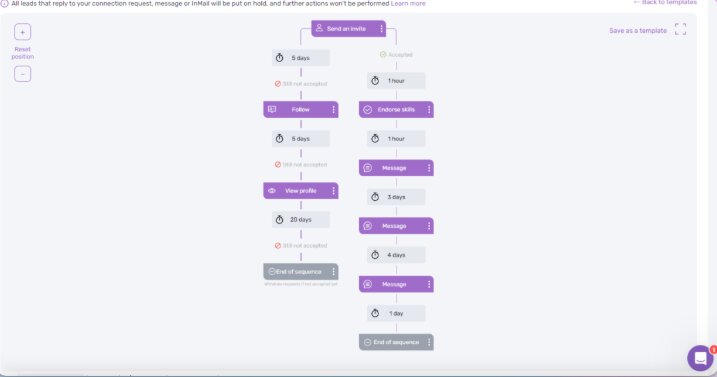
Dripify’s drip campaign builder is the centerpiece of the platform, and it’s genuinely one of the best-designed campaign builders in this category.
The interface is visual and drag-and-drop. You build your sequence by selecting LinkedIn actions, adding time delays between steps, and customizing message templates with personalization variables. The whole thing is intuitive enough that a first-time user can build and launch a basic campaign within an hour of signing up.
A typical drip campaign in Dripify might look like this:
| Step | Action | Delay |
|---|---|---|
| 1 | View prospect’s profile | Day 0 (immediate) |
| 2 | Follow the prospect | Day 1 |
| 3 | Send connection request with note | Day 2 |
| 4 | Send welcome message (after acceptance) | Day 0 after acceptance |
| 5 | Send follow-up message with resource | Day 5 |
| 6 | Send second follow-up with soft CTA | Day 10 |
| 7 | Endorse a skill | Day 12 |
| 8 | Final follow-up message | Day 15 |
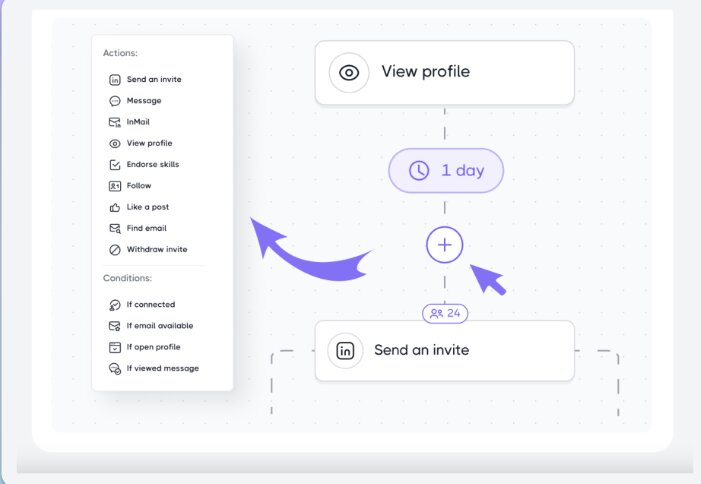
The personalization variables include first name, last name, company name, job title, and a few others — enough for basic personalization but limited compared to tools that support custom variables pulled from external data sources.
One honest limitation worth flagging: Dripify’s campaign builder currently supports linear sequences. There’s no true conditional branching — meaning if a prospect replies to message one, Dripify doesn’t automatically route them to a different track. You need to manually remove replied prospects from active campaigns, which adds a layer of manual management that more advanced tools handle automatically.
For most users running straightforward outreach sequences, this isn’t a dealbreaker. But for teams running complex, behavior-triggered outreach flows, it’s a real constraint.
Analytics
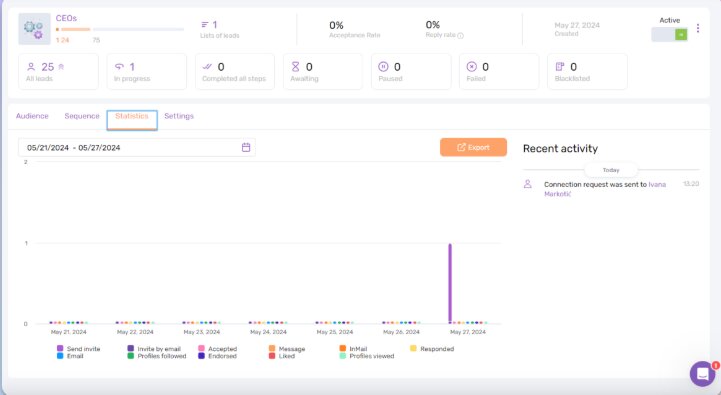
Dripify’s analytics dashboard gives you a clear view of how your campaigns are performing across the metrics that actually matter for LinkedIn outreach:
| Metric Tracked | What It Tells You |
|---|---|
| Connection request acceptance rate | How well your targeting and request note are working |
| Reply rate | How compelling your opening message is |
| Campaign-level performance | Which sequences are converting, which aren’t |
| Profile view count | Reach and visibility of your outreach activity |
| Team member performance | (Advanced plan) Individual SDR metrics |
| Daily activity stats | Volume of actions taken per day |
The dashboard is clean and easy to read. You can filter by campaign, by date range, and by team member (on the Advanced plan). The data refreshes regularly and gives you enough signal to make meaningful optimizations — testing different connection request notes, adjusting message timing, comparing campaign performance across different ICP segments.
Where the analytics fall short: there’s no A/B testing built into the platform natively. If you want to test two different opening messages, you need to run two separate campaigns and compare the results manually. For a tool positioned at this price point, native A/B testing feels like a missing feature that should be there.
Inbox
Dripify includes a unified inbox that consolidates all your LinkedIn conversations in one place, which is a genuinely useful feature if you’re managing high outreach volumes.
The inbox lets you label conversations, filter by status, leave internal notes on contact records, and view the full conversation history alongside the prospect’s profile data. It removes the need to constantly jump between Dripify and LinkedIn itself to manage replies, which saves real time during active campaigns.
The inbox also integrates with your campaign data — so you can see which campaign a prospect came from, where they are in the sequence, and what actions have already been taken against their profile.
Limitation worth noting: the inbox is functional but not deeply sophisticated. There’s no AI-assisted reply suggestion, no shared team inbox where multiple reps can collaborate on a conversation, and limited filtering options compared to dedicated sales engagement platforms. For solo users, it’s more than adequate. For teams managing shared prospect pools, it can get messy.
LinkedIn Scraper
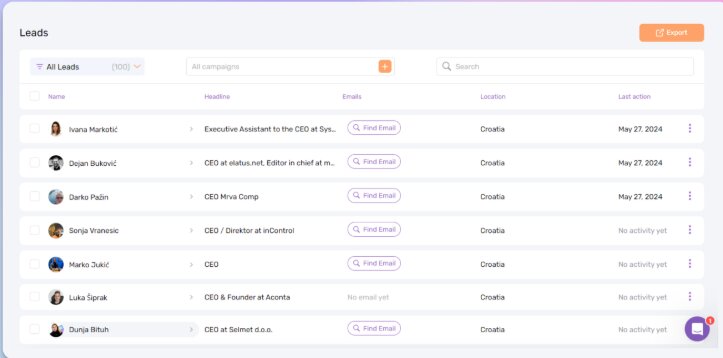
Dripify’s LinkedIn scraper allows you to extract profile data directly from LinkedIn search results, Sales Navigator lists, LinkedIn Groups, and event attendee lists. This is one of the most practically useful features in the platform because it eliminates the need to manually build prospect lists before running campaigns.
Here’s what data you can extract:
| Data Field | Available |
|---|---|
| First and last name | ✅ |
| Job title | ✅ |
| Company name | ✅ |
| LinkedIn profile URL | ✅ |
| Location | ✅ |
| Email address | ✅ (where publicly available) |
| Phone number | ⚠️ (limited, varies by profile) |
| Mutual connections | ✅ |
Scraped data can be exported as a CSV file or pushed directly into a campaign. The scraper works within LinkedIn’s displayed data — it’s not pulling information that isn’t publicly visible on the platform.
One important note: how you use scraped data matters from a compliance perspective. GDPR and similar data privacy regulations apply to how you store and use personal data extracted from LinkedIn profiles. If you’re operating in Europe or targeting European prospects, understanding your obligations before building large scraped lists is important.
Managing Multiple Accounts
Dripify supports multiple LinkedIn account management, which makes it relevant for sales teams, recruitment agencies, and anyone running outreach on behalf of multiple clients or users.
Each account in Dripify operates within its own workspace with separate campaign settings, separate analytics, and — critically — separate activity limits. This means the platform can enforce safe daily action volumes per account rather than pooling all activity under one setting, which reduces risk.
The platform assigns a dedicated IP address to each LinkedIn account, which is an important safety feature. Without dedicated IPs, LinkedIn can detect that multiple accounts are being operated from the same location or device, which is a significant red flag that can trigger account restrictions.
That said, Dripify’s multi-account management is solid for small teams but shows limitations at agency scale. Managing 10, 20, or 50+ client accounts within Dripify becomes administratively heavy — there’s no bulk campaign management, no cross-account reporting dashboard, and limited client-facing reporting functionality. Teams managing large volumes of accounts should evaluate whether Dripify’s multi-account features match their actual operational needs before committing.
2. Multiple LinkedIn Steps
The depth and flexibility of Dripify’s sequence steps is one of its genuine competitive strengths. Unlike simpler tools that only support connection requests and follow-up messages, Dripify lets you build sequences that incorporate a wider range of LinkedIn actions — which makes your outreach feel more human and less like a bot.
Here are all the LinkedIn actions available as steps in a Dripify sequence:
| Action Type | Purpose in Sequence |
|---|---|
| View Profile | Warms up the prospect before outreach — triggers a notification |
| Follow | Increases your visibility on their feed before connecting |
| Send Connection Request | Core outreach action, with or without a personalized note |
| Send Message | Direct message after connection is accepted |
| Send InMail | Reach non-connections (requires LinkedIn Premium credits) |
| Endorse Skills | Reciprocity trigger — one of the most underused warmup actions |
| Like a Post | Engagement signal before or after connecting |
| Follow-Up Messages | Timed follow-up messages with delay settings |
| Time Delays | Set custom delays between any two steps (hours or days) |
The ability to combine profile views, follows, and skill endorsements with connection requests and messages is powerful because it creates a sequence of micro-touches that make the outreach feel organic rather than robotic. Prospects see your name multiple times before they receive a message from you — which increases both acceptance rates and reply rates.
Best practice sequence structure for cold outreach
| Day | Action | Notes |
|---|---|---|
| Day 0 | View profile | Silent warmup |
| Day 1 | Follow | Second micro-touch |
| Day 2 | Connection request + note | Personalized, short, relevant |
| Day 3–4 (post-accept) | Welcome message | No pitch — just context |
| Day 7 | Value message | Share insight, resource, or relevant observation |
| Day 12 | Follow-up | Acknowledge no response, offer different angle |
| Day 15 | Skill endorsement | Re-engagement trigger |
| Day 18 | Final message | Soft close or breakup message |
One honest limitation that’s worth repeating here: there is no conditional branching logic. If a prospect accepts your connection request but doesn’t reply to your first message, they continue on the same sequence as a prospect who hasn’t accepted yet. You need to manually manage these distinctions, which adds overhead as campaign volume grows.
For teams doing under 500 active prospects at a time, this is manageable. For teams running thousands of simultaneous sequences, the lack of automatic if/then logic is a meaningful operational constraint.
3. Dripify Integrations
For any outreach tool to fit into a modern sales tech stack, it needs to connect cleanly with the CRM, automation, and data tools your team already uses. Here’s an honest look at Dripify’s integration landscape:
| Integration Type | Tools Supported | Use Case |
|---|---|---|
| CRM (via Zapier) | HubSpot, Salesforce, Pipedrive | Auto-sync new connections and replies to CRM |
| Automation | Zapier, Make (Integromat) | Multi-step workflow automation |
| Data Export | CSV download | Manual prospect list management |
| Webhooks | Custom webhooks | Developer-built pipeline integrations |
| Email tools | Limited (via Zapier) | Add LinkedIn leads to email sequences |
| Native integrations | Very limited | Most integrations require Zapier as middleware |
The honest assessment here is that Dripify’s native integration stack is thin. Almost everything beyond CSV export requires Zapier or Make as middleware, which means additional cost, additional configuration time, and additional points of potential failure in your workflow.
For a solo founder or small team that’s comfortable with Zapier, this isn’t a major problem — you can build the integrations you need. But for sales teams who expect native, one-click CRM sync, Dripify’s integration layer will feel underdeveloped compared to some competitors.
A practical Zapier workflow example for Dripify users:
Trigger: New connection accepted in Dripify Action 1: Create or update contact in HubSpot Action 2: Add contact to a LinkedIn outreach email sequence in your email tool Action 3: Notify the assigned rep in Slack
This workflow is entirely buildable in Zapier and works reliably. But it requires setup time and a Zapier subscription — costs and effort that aren’t visible in Dripify’s pricing page.
4. UX, Onboarding, and Knowledge Base
One area where Dripify consistently earns genuine praise — even from users who have complaints about other aspects of the product — is the quality of its user interface and onboarding experience.
The dashboard is clean, modern, and logically organized. Key functions are where you’d expect them to be. The campaign builder is visual and intuitive. New users can navigate the core workflow without needing to watch tutorials first, which is a meaningful advantage over tools with steeper learning curves.
UX and Support Scorecard
| Element | Rating | Notes |
|---|---|---|
| Dashboard design | ⭐⭐⭐⭐⭐ | Clean, modern, well-organized |
| Campaign builder | ⭐⭐⭐⭐ | Drag-and-drop, intuitive |
| Onboarding flow | ⭐⭐⭐⭐ | Guided setup, helpful tooltips |
| Knowledge base | ⭐⭐⭐⭐ | Comprehensive written docs + video walkthroughs |
| Customer support | ⭐⭐⭐ | Live chat available, response times vary |
| Mobile experience | ⭐⭐ | Not optimized for mobile — desktop-first tool |
| Team collaboration UX | ⭐⭐⭐ | Adequate for small teams, limited at scale |
The knowledge base deserves specific mention. Dripify has invested in genuinely useful documentation — step-by-step guides, video tutorials, use case examples, and a searchable help center. For a self-serve tool, this matters enormously. Most user questions can be answered without raising a support ticket.
Customer support quality is where the picture gets more mixed. Users on lower-tier plans report longer response times and less thorough resolutions. Users on the Advanced plan generally report better support experiences. This tiered support quality is common in SaaS but worth knowing before you commit.
The mobile experience is the weakest UX element. Dripify is fundamentally a desktop tool and doesn’t have a dedicated mobile app. The web interface technically loads on mobile but isn’t optimized for it. If you need to monitor campaigns or manage your inbox from a phone, you’ll find the experience frustrating.
5. Dripify Pricing — Is It Worth the Cost?
This is where many Dripify reviews get vague. Let’s be specific.
Dripify Pricing Plans (2026)
| Plan | Monthly Price | Annual Price (per month) | Best For |
|---|---|---|---|
| Basic | $59/user/month | $39/user/month | Solo users, light outreach |
| Pro | $79/user/month | $59/user/month | Active SDRs, founders doing regular outreach |
| Advanced | $99/user/month | $79/user/month | Teams, higher volume, multi-user management |
Feature comparison by plan
| Feature | Basic | Pro | Advanced |
|---|---|---|---|
| Drip campaigns | ✅ (1 campaign) | ✅ (unlimited) | ✅ (unlimited) |
| LinkedIn scraper | ✅ | ✅ | ✅ |
| Analytics | Basic | Advanced | Advanced + team |
| Unified inbox | ✅ | ✅ | ✅ |
| A/B testing | ❌ | ❌ | ❌ |
| Team management | ❌ | ❌ | ✅ |
| Personal activity control | ❌ | ✅ | ✅ |
| Zapier integration | ❌ | ✅ | ✅ |
| Webhooks | ❌ | ✅ | ✅ |
| Dedicated account manager | ❌ | ❌ | ✅ |
Free trial: Dripify offers a 7-day free trial. No credit card is required to start, which makes it easy to test the core functionality before committing.
Value assessment by tier
Basic ($39/month annual): The single campaign limitation makes Basic genuinely restrictive for anyone doing real outreach. It’s adequate for testing the platform but not for running a meaningful prospecting operation. Most serious users outgrow Basic within the first month.
Pro ($59/month annual): This is where Dripify hits its value sweet spot for most users. Unlimited campaigns, advanced analytics, Zapier integration, and personal activity controls give you everything you need to run a professional outreach operation as a solo user or individual SDR. At $59/month, it’s competitively priced against comparable tools.
Advanced ($79/month annual): The Advanced plan makes sense once you’re managing a team of two or more reps. The team management features, combined analytics, and dedicated account manager add real value at scale. At $79/user/month, it’s still within the normal range for this category.
Hidden costs to factor in
- Zapier subscription ($20–$50+/month) if you need CRM integration
- LinkedIn Premium or Sales Navigator ($40–$100+/month) if using InMail steps or advanced search
- Additional seats multiply the per-user cost quickly for larger teams
At five users on the Advanced annual plan, you’re looking at $395/month for Dripify alone — before factoring in Zapier and LinkedIn Premium. That’s not unreasonable for a sales team, but it’s worth modeling the full cost before signing up.
Dripify Pros and Cons
After examining every major feature area, here’s an honest summary of where Dripify earns its reputation and where it has room to grow:
| ✅ Pros | ❌ Cons |
|---|---|
| Cloud-based = significantly safer than browser extensions | No conditional branching in sequences |
| Best-in-class UX for a LinkedIn automation tool | Thin native integration stack (Zapier-dependent) |
| Strong visual campaign builder | No native A/B testing functionality |
| Solid analytics for campaign optimization | Multi-account management gets unwieldy at scale |
| LinkedIn scraper included on all plans | Customer support quality varies by plan tier |
| 7-day free trial, no credit card required | Mobile experience is poor |
| Comprehensive knowledge base and documentation | No native email outreach — LinkedIn only |
| Competitive pricing for solo users and small teams | Basic plan is too limited for real outreach use |
Biggest pro in practice: The combination of clean UX and cloud-based safety makes Dripify the most accessible “serious” LinkedIn automation tool available. Most competitors in this space either sacrifice usability for power or safety for features. Dripify threads that needle reasonably well.
Biggest con in practice: The absence of conditional logic in sequences is the most frequently cited limitation from power users. When a prospect replies — which is the outcome you’re working toward — the platform doesn’t automatically adapt. Manual campaign management at volume becomes a real time sink.
A Thorough Dripify Review Wouldn’t Be Complete Without Covering Alternatives
No tool is the right fit for every user. Depending on your team size, technical comfort level, budget, and outreach complexity, one of these alternatives might serve you better.
The Best Dripify Alternative for Agencies and Scale
For teams managing outreach across multiple LinkedIn accounts — particularly agencies running campaigns for clients — there are tools on the market built specifically for that use case, with stronger multi-account dashboards, better conditional sequence logic, and more robust client reporting features. These tools typically come at a higher price point but deliver meaningfully better operational efficiency when account volume exceeds what Dripify handles comfortably.
If you’re managing 10+ LinkedIn accounts simultaneously, it’s worth evaluating tools built specifically for that workflow before committing to Dripify.
Other Dripify Competitors Worth Considering
| Tool | Best For | Key Differentiator | Pricing Tier | Limitation |
|---|---|---|---|---|
| Expandi | Growth hackers, advanced users | Highly customizable sequences + conditional logic | Mid-high | Steeper learning curve |
| Lemlist | Multichannel outreach | Combined email + LinkedIn sequences | Mid | LinkedIn features less mature than email |
| Waalaxy | Beginners, budget users | Simplest UI in the category, very affordable | Low-mid | Limited analytics depth |
| LinkedIn Sales Navigator | Enterprise sales teams | Native LinkedIn tool, deepest search filters | High | Not an automation tool — research only |
| Phantombuster | Technical users, developers | API-first, highly flexible, broad use cases | Mid | Requires technical knowledge to configure |
| Zopto | Sales teams with CRM focus | Strong CRM integrations, team features | Mid-high | UI less polished than Dripify |
Expandi is the most direct alternative for users who outgrow Dripify’s sequence logic. It supports conditional branching, has a strong reputation for LinkedIn safety, and is used by many of the same B2B growth and sales teams that start on Dripify. The trade-off is a steeper learning curve and a slightly higher price point.
Lemlist makes the most sense if you’re running multichannel outreach — combining LinkedIn touchpoints with personalized email sequences. Its LinkedIn automation features are less mature than Dripify’s, but if email is your primary channel and LinkedIn is supplementary, Lemlist may be the better single-platform choice.
Waalaxy is worth serious consideration for solo users or early-stage founders who want the simplest possible LinkedIn automation experience at the lowest possible price. It sacrifices analytical depth and customization for pure ease of use — and for many users, that trade-off is worth it.
Phantombuster is in a different category: it’s a developer-friendly automation platform that goes far beyond LinkedIn, supporting automation across dozens of platforms. If you need flexibility and are comfortable with technical configuration, Phantombuster’s power is unmatched. If you want something you can set up in an afternoon without touching code, it’s the wrong choice.
Conclusion
After examining every feature, testing the interface, and working through the pricing math, here’s the honest bottom line:
Dripify is a genuinely good LinkedIn automation tool. It does what it promises, it does it cleanly, and it does it safely. The campaign builder is the best-designed in its category. The analytics give you enough data to improve your outreach over time. The scraper adds real value. The cloud-based architecture means your LinkedIn account isn’t being put at unnecessary risk.
For solo founders, individual SDRs, and small teams doing straightforward LinkedIn outreach — Dripify Pro on the annual plan is a strong, defensible choice at $59/month.
Where Dripify earns hesitation: if your outreach workflows require conditional sequence logic, if you’re managing many LinkedIn accounts for clients, if you need deep native CRM integration without relying on Zapier, or if you’re running enterprise-scale operations — you will hit Dripify’s ceiling and feel it.
Who should use Dripify
| User Type | Recommendation |
|---|---|
| Solo founder running outreach | ✅ Dripify Pro — strong fit |
| Individual SDR on a sales team | ✅ Dripify Pro — strong fit |
| Small team (2–5 reps) | ✅ Dripify Advanced — worth evaluating |
| Agency managing multiple client accounts | ⚠️ Evaluate purpose-built agency tools first |
| Technical user needing advanced logic | ⚠️ Consider Expandi or Phantombuster |
| Multichannel (LinkedIn + email) user | ⚠️ Consider Lemlist |
| Absolute beginner on tight budget | ✅ Waalaxy or Dripify Basic for testing |
| Enterprise sales team | ⚠️ Sales Navigator + dedicated SEP may be better fit |
The 7-day free trial with no credit card required makes the evaluation low-risk. Build a real campaign, scrape a real prospect list, run it for a week, and see whether the limitations matter for your specific workflow. Most users know within the first week whether Dripify fits.
Frequently Asked Questions
What is Dripify?
Dripify is a cloud-based LinkedIn automation tool that helps B2B sales teams, founders, and recruiters automate outreach sequences including connection requests, follow-up messages, profile views, and skill endorsements — all from a visual drag-and-drop campaign builder.
Is Dripify safe to use for LinkedIn automation?
Yes, Dripify is considered one of the safer LinkedIn automation tools because it operates from the cloud rather than as a browser extension. It assigns dedicated IP addresses per account and enforces daily activity limits to mimic human behavior and reduce detection risk.
How much does Dripify cost in 2026?
Dripify offers three plans. Basic starts at $39/month (billed annually), Pro at $59/month, and Advanced at $79/month. A 7-day free trial is available on all plans with no credit card required.
Does Dripify work with LinkedIn Free or only Sales Navigator?
Dripify works with both LinkedIn Free and LinkedIn Premium accounts. However, using it alongside LinkedIn Sales Navigator significantly improves targeting precision and unlocks access to a larger searchable prospect pool.
Can Dripify send automated messages on LinkedIn?
Yes. Dripify can automate connection requests with personalized notes, first messages after acceptance, and multiple timed follow-up messages — all within a single drip campaign sequence without manual intervention.
Does Dripify support team accounts and multiple LinkedIn profiles?
Yes, but only on the Advanced plan. It supports multiple LinkedIn accounts with separate workspaces, individual activity limits, and dedicated IP addresses per account. However, managing large volumes of accounts simultaneously has operational limitations.
What integrations does Dripify support?
Dripify integrates with HubSpot, Salesforce, and Pipedrive via Zapier. It also supports Make (Integromat), custom webhooks, and CSV export. Most CRM integrations require Zapier as middleware rather than native direct connections.
Does Dripify have conditional sequence logic?
No. Dripify currently supports linear sequences only. It does not offer if/then conditional branching based on prospect behavior. If a prospect replies mid-sequence, you need to manually remove them from the active campaign.
What is the difference between Dripify Basic, Pro, and Advanced plans?
Basic allows only one active campaign and has limited features — suitable for testing only. Pro unlocks unlimited campaigns, advanced analytics, and Zapier integration — best for solo users. Advanced adds team management, cross-account reporting, and a dedicated account manager — best for growing teams.
What are the best alternatives to Dripify in 2026?
The top Dripify alternatives include Expandi for advanced conditional sequence logic, Lemlist for combined LinkedIn and email outreach, Waalaxy for beginners seeking simplicity at lower cost, and Phantombuster for technically advanced users needing maximum automation flexibility across multiple platforms.