


LinkedIn has changed significantly over the last couple of years — and so has the risk landscape for anyone using automation to do outreach on it. Connection request limits are tighter, anti-bot detection has become smarter, and the era of blasting hundreds of generic messages per day is definitively over. LinkedIn began enforcing a 100 connection request weekly cap across account types, and its machine learning systems now analyze behavioral patterns, device consistency, and message timing to catch inauthentic activity. Tools that were standard practice two years ago — like Apollo.io and Seamless.ai — were officially banned by LinkedIn in 2025, demonstrating the platform’s increasingly zero-tolerance approach.
Into this environment comes a fair question: is PhantomBuster still the right tool? For many teams, the answer is no. Not because PhantomBuster is broken, but because it was built to do something slightly different from what most LinkedIn-focused sales teams actually need in 2026. It scrapes data and triggers actions. It doesn’t run conversations. It doesn’t handle replies. And its execution-time pricing model makes it genuinely difficult to scale without costs spiraling.
This guide covers six tools that outperform PhantomBuster in specific, clearly defined use cases. For each one, we explain exactly what it does, who it serves best, how it compares head-to-head with PhantomBuster, and what you’ll pay. We start with the most complete solution and work down.
Why People Are Moving Away From PhantomBuster in 2026
PhantomBuster is a legitimate, well-reviewed tool with over 130 “Phantoms” — pre-built automations that extract data from LinkedIn, Sales Navigator, Instagram, Twitter, and other platforms. Its G2 rating sits at 4.5/5. The problems are structural, not cosmetic, and they show up predictably once teams try to use it seriously.
The Execution-Time Pricing Problem
PhantomBuster doesn’t charge per lead, per action, or per seat. It charges by how long its servers run your automations — a model called “execution time.” The Starter plan costs $69/month and includes 20 execution hours, 5 Phantom slots, 500 email credits, and 10,000 AI credits. The Pro plan costs $159/month and bumps that to 80 execution hours, 15 slots, and 2,500 email credits. The Team plan sits at $439/month for 300 execution hours, 50 slots, and 10,000 email credits.
The issue is what that model actually costs in practice. A LinkedIn profile scrape takes roughly 0.8–1 minute per profile, meaning scraping 1,000 profiles burns 13–17 minutes of execution time. But real-world consumption runs 30–50% higher than estimates due to rate limiting, retries, and error handling. This makes budgeting genuinely difficult. When you hit your execution limit on day 20 of a 30-day billing cycle, you’re stuck — automations stop entirely, and your only options are waiting for the monthly reset or upgrading mid-cycle at a prorated charge.
Unused execution hours don’t roll over. A Starter user who uses 18 hours in one month but only 5 hours the next permanently loses those 13 hours. For agencies running unpredictable workloads or teams running seasonal campaigns, this “use it or lose it” structure quietly inflates the total cost of ownership.
LinkedIn Account Safety Has Gotten Riskier
PhantomBuster was designed as a multi-platform scraper — LinkedIn is one of 15+ platforms it supports. That architectural reality creates a meaningful problem in 2026: LinkedIn’s anti-bot systems detect generic automation patterns, and a tool not purpose-built for LinkedIn safety is more likely to produce those patterns.
Cloud-based platforms with dedicated IP addresses reduce ban risk by approximately 60% compared to browser extensions and generic automation tools. Tools purpose-built for LinkedIn include safety limits, activity warm-up logic, and human-behavior simulation as core features — not afterthoughts. PhantomBuster’s execution model, by contrast, has no built-in connection request warm-up, no account-level activity monitoring, and no automatic daily limit enforcement at the account level.
LinkedIn’s safe daily limit for connection requests sits at 15–25 per day for established accounts, with a weekly cap around 100 across all account types. Exceeding these consistently — which is easy to do when PhantomBuster runs a campaign without platform-specific guardrails — puts accounts at escalating risk of temporary restriction or permanent ban.
It Extracts Data But Doesn’t Run the Conversation
This is the most consequential gap for modern LinkedIn outreach. PhantomBuster can send a connection request. It can send a follow-up message. What it cannot do is read a reply, interpret its intent, handle an objection, answer a question, and book a meeting. Those steps — the actual conversion steps — still require a human sitting in the LinkedIn inbox.
For teams whose goal is booked meetings, not data exports, this means PhantomBuster is the first step in a pipeline that still requires significant manual effort downstream. The tool fills a spreadsheet. Someone still has to work that spreadsheet.
Steep Learning Curve for Non-Technical Teams
Setting up PhantomBuster properly requires chaining Phantoms and Flows together, which involves understanding cookies, session IDs, API-style configurations, and JSON outputs. Multiple user reviews on Capterra and G2 call out the learning curve as a genuine friction point. One reviewer described data scraping as “sometimes taking a long time” and error logs as providing limited diagnostic information. Another noted that automations can “fall into a breakdown and require manual reconfiguration,” which is time-consuming. For solo founders, small SDR teams, or non-technical agency operators, this overhead is a real productivity drain.
How to Choose the Right Alternative — Know Your Use Case First
Before evaluating any individual tool, it helps to know what role you need it to fill. The six tools in this guide solve different problems. Picking the wrong one — even a great one — is wasted budget.
- You need full conversation automation (AI handles replies → meetings): Go to DealsFlow.
- You need multi-account outreach at agency scale: Go to DealsFlow or La Growth Machine.
- You need LinkedIn + email + Twitter/X in a single multichannel sequence: Go to La Growth Machine.
- You need safe, structured LinkedIn campaign automation with advanced personalization: Go to Expandi.
- You’re an individual or solo SDR who wants the simplest possible LinkedIn automation: Go to Waalaxy.
- You need to export and clean Sales Navigator lead lists quickly: Go to Evaboot.
- You need deep prospect enrichment from 150+ data sources: Go to Clay.
Quick Comparison Table — All 6 PhantomBuster Alternatives at a Glance
| Tool | Best For | AI Handles Replies? | Multi-Account? | Starting Price | Free Trial? |
|---|---|---|---|---|---|
| DealsFlow | Full AI conversation → booked calls | ✅ Yes (Arlo AI) | ✅ Yes (up to 50) | $59/month | ✅ 14 days |
| La Growth Machine | Multichannel sequences (LinkedIn + Email + X) | ❌ No | ✅ Per identity | €60/month per identity | ✅ 14 days |
| Expandi | Safe LinkedIn campaign automation | ❌ No | ✅ Per seat | $99/month per seat | ✅ 7 days |
| Waalaxy | Beginners & solo users | ❌ No | ❌ Limited | €39/month (Pro) | ✅ 14 days |
| Evaboot | Sales Navigator scraping & email finding | ❌ No | ❌ No | $9/month + Sales Nav | ❌ Free plan only |
| Clay | Deep enrichment & AI personalization at scale | ❌ No | N/A | $149/month (Starter) | ✅ Free plan |
The 6 Best ZoomInfo Alternatives in 2026
1. DealsFlow — Best PhantomBuster Alternative for AI-Native LinkedIn Outreach

DealsFlow is a fundamentally different category of tool. Where PhantomBuster is a data extraction and action-trigger platform, DealsFlow is an AI-native LinkedIn outreach engine — one where the AI actively handles the conversation from connection request to booked meeting without requiring human intervention at the reply stage. This is not a minor feature difference. It’s a different product philosophy.
What Makes DealsFlow Different From PhantomBuster
PhantomBuster’s automation stops the moment a prospect replies. At that point, a human needs to pick up the conversation, qualify the interest, handle objections, propose a time, and convert the exchange into a meeting. DealsFlow’s Arlo AI picks up exactly where that gap begins. Arlo reads every incoming reply, interprets its intent, generates a contextually appropriate response in the sender’s voice, handles objections, and continues the conversation until the prospect agrees to a call.
The result is a complete outreach loop: DealsFlow finds prospects, sends the initial outreach, and closes the loop to a booked meeting — all without requiring a human to manage the inbox. For agencies running campaigns for multiple clients, SDR teams managing high reply volumes, and founders who are doing sales without dedicated headcount, this is a qualitative difference in capability.
Key Features
- Arlo AI Engine: The core differentiator. Arlo reads each reply, decides the best response, handles objections, and books meetings — all in the sender’s tone and voice.
- Multi-Account Dashboard: Manage up to 50 LinkedIn accounts from one interface, with individual campaign tracking, per-account inbox management, and sender-level performance data.
- Prospect CRM with AI Warmth Scoring: Every lead imported into DealsFlow receives an AI-calculated warmth score — Hot, Warm, Neutral, or Cold — based on engagement signals and conversation history.
- Campaign Builder with Full-Funnel Analytics: The analytics dashboard tracks the complete funnel: connections sent → accepted → replied → booked call, including rates at each stage.
- Built-In Account Safety: LinkedIn warmup, daily limit enforcement, and sender rotation are handled automatically. Users don’t need to configure safety settings manually.
- Per-Client Reporting: Agencies running outreach for multiple clients get isolated, per-client campaign dashboards, without accounts or data bleeding across clients.
- 14-Day Free Trial: No credit card required. Setup takes approximately 10 minutes.
3 Best Use Cases for DealsFlow
Lead Generation Agencies Running 10–50 Client Accounts
Agencies are the primary architecture that DealsFlow was designed around. Managing 10 or more LinkedIn accounts in PhantomBuster requires separate Phantom configurations, execution hour tracking, and manual inbox work per account — a fragmented workflow that doesn’t scale cleanly. DealsFlow’s flat-rate pricing model and multi-account dashboard allow agencies to add client accounts without linear cost increases, run campaigns from a single interface, and present per-client performance data without switching between tools or accounts.
Founder-Led Sales Without a Full SDR Team
Founders doing outreach personally face a specific constraint: they have high-value time that shouldn’t be spent managing LinkedIn inbox replies at scale. DealsFlow’s 10-minute setup and Arlo AI’s ability to manage conversation replies overnight means founders can wake up to booked calls rather than a backlog of replies that require individual attention. The platform’s full-funnel analytics also give visibility into what’s working without requiring manual tracking.
SDR Teams Drowning in LinkedIn Inbox Management
High-volume LinkedIn outreach generates high reply volumes. When a team is running multiple campaigns across several accounts, manually tracking which replies are warm leads versus polite declines versus objections that need follow-up becomes a genuine operational bottleneck. DealsFlow’s multi-inbox view and AI-sorted conversations surface the most important exchanges and reduce the manual overhead of inbox triage.
DealsFlow vs. PhantomBuster — Head to Head
| Category | DealsFlow | PhantomBuster |
|---|---|---|
| Execution model | AI handles full conversation | Triggers actions, stops at reply |
| AI reply handling | ✅ Full (Arlo AI) | ❌ Not available |
| Account safety | ✅ Built-in (warmup, limits, rotation) | ⚠️ Manual configuration |
| Multi-account | ✅ Up to 50 accounts, one dashboard | ✅ Up to 100 LinkedIn accounts per workspace |
| Pricing model | Flat rate | Execution-time (hours + slots + credits) |
| Setup time | ~10 minutes | Technical configuration required |
| Learning curve | Low | Moderate to high |
DealsFlow Limitations
DealsFlow is currently in early access, which means the feature set continues to evolve and some enterprise-grade configurations may not yet be available. The platform is purpose-built for LinkedIn outreach — it does not function as a multi-platform scraper for Instagram, Twitter, or other channels the way PhantomBuster does. For teams whose use case is raw data extraction across multiple platforms, DealsFlow is not the right tool. It is also primarily an outreach and conversation management tool rather than a data enrichment platform — it doesn’t replace dedicated enrichment tools like Clay.
DealsFlow Pricing
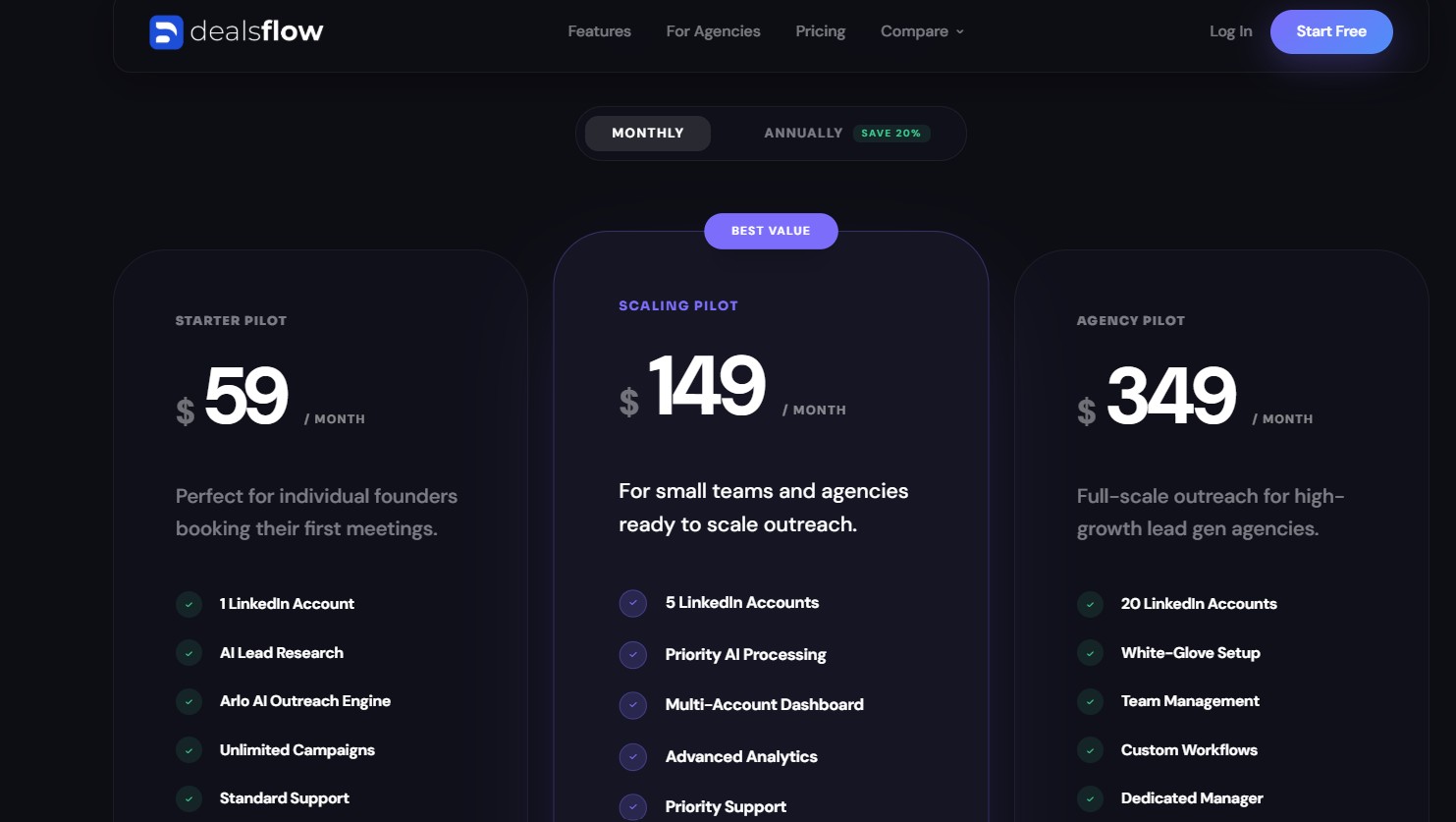
DealsFlow offers a 14-day free trial with no credit card required. Flat-rate pricing details are available at dealsflow.co/pricing. Unlike PhantomBuster’s execution-time model, the flat-rate structure allows agencies and teams to predict costs as they scale accounts.
The Verdict
DealsFlow is the right choice for agencies, SDR teams, and founders who want meetings booked — not just data scraped. It is the only tool in this list where AI manages the full conversation funnel from initial contact to booked call, which makes it a categorically different product from PhantomBuster. Teams that have been using PhantomBuster for LinkedIn outreach and still manually managing replies will find the biggest operational improvement by switching to DealsFlow.
2. La Growth Machine — Best for Multichannel Sequences (LinkedIn + Email + Twitter/X)
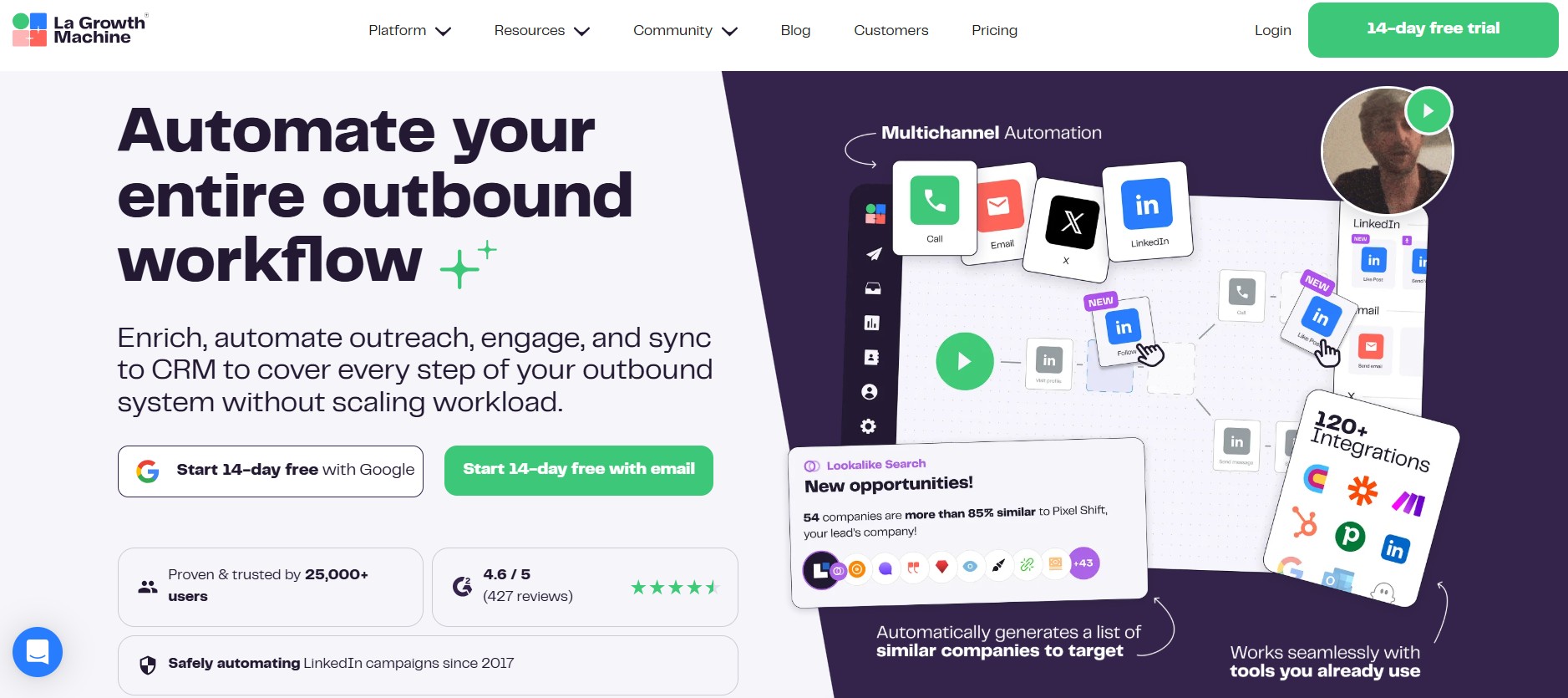
La Growth Machine (LGM) is a cloud-based multichannel sales automation platform built for B2B sales teams that want coordinated outreach across LinkedIn, email, and X (formerly Twitter) in a single automated workflow. It has over 25,000 users globally and is consistently cited as one of the more capable multichannel outreach tools available for teams that rely heavily on LinkedIn as their primary prospecting channel.
What La Growth Machine Does Well
Where PhantomBuster can export a list and trigger an action, La Growth Machine orchestrates a full multichannel sequence that adapts in real time based on how a prospect responds. The platform’s visual sequence builder lets sales teams combine connection requests, messages, email follow-ups, and X engagements into a single conditional workflow — if a prospect doesn’t respond on LinkedIn within 3 days, the system automatically follows up by email without requiring manual intervention. Multichannel prospecting of this kind generates 3.5x more replies compared to single-channel outreach, according to La Growth Machine’s own published data.
The platform also includes social warming capabilities — automatically liking or engaging with a prospect’s LinkedIn posts before sending a connection request — which meaningfully increases acceptance rates by building familiarity before the initial outreach. An AI voice cloning feature allows users to automate LinkedIn voice messages personalized for each prospect, which, according to LGM’s benchmarks, generates approximately 2x higher response rates than text-based messages.
Key Features
- Multichannel Sequence Builder: A visual, drag-and-drop interface for building automated outreach workflows that combine LinkedIn, email, X, and voice messages. Conditional branching means sequences adapt based on whether prospects respond, like posts, or open emails.
- Social Warming: Automatically likes or follows prospect’s LinkedIn posts before outreach begins, increasing connection acceptance rates.
- AI Voice Message Automation: Records the user’s voice once, then uses AI to personalize the opening for each prospect at scale.
- Waterfall Email Enrichment: Uses 9 data providers with double validation to find verified email addresses. If the first provider fails, the next is tried automatically.
- Unified Inbox: All replies from LinkedIn and email consolidate into a single inbox view, eliminating the need to switch between platforms.
- CRM Integration: Native integrations with HubSpot and Pipedrive are available on the Pro and Ultimate plans, with Zapier access for additional connections.
- 30 Ready-to-Use Templates: Pre-built campaign sequences drawn from top-performing user campaigns for LinkedIn, email, and X outreach.
Best Use Cases
Sales Teams Running True Multichannel Outreach
La Growth Machine’s core strength is coordinating LinkedIn, email, and X in a single automated flow. For sales teams that have been managing these channels separately — LinkedIn through one tool, email through another, X manually — consolidating into a single workflow removes significant operational overhead and improves response rates through increased touchpoints.
Teams With Existing Prospect Lists Who Need Enrichment + Outreach in One Tool
Teams that have lead lists from other sources (CSV imports, Sales Navigator exports, or CRM records) can bring those lists into LGM, enrich them with verified emails using the waterfall enrichment feature, and launch multichannel sequences without switching tools. The unified workflow from import to enrichment to outreach reduces the stack complexity that typically results from stitching together separate tools.
La Growth Machine vs. PhantomBuster
| Category | La Growth Machine | PhantomBuster |
|---|---|---|
| Channels covered | LinkedIn, Email, X/Twitter, Voice | LinkedIn + 15+ platforms (scraping) |
| Sequence logic | Conditional multichannel branching | Linear Phantom/Flow chaining |
| Email enrichment | ✅ Built-in (9 providers, waterfall) | ⚠️ Email credits (limited) |
| Voice messages | ✅ AI-cloned LinkedIn voice messages | ❌ Not available |
| CRM integration | ✅ Native HubSpot/Pipedrive (Pro+) | ✅ HubSpot integration |
| Pricing model | Per identity (per seat) | Execution time |
| Best for | Multichannel outreach teams | Multi-platform data extraction |
Limitations
La Growth Machine’s per-identity (per-seat) pricing model scales expensively for large teams. The Basic plan starts at €60/month per identity, the Pro plan is €120/month per identity, and the Ultimate plan is €180/month per identity. For a 5-person SDR team on the Ultimate plan, that’s €900/month. G2 reviewers specifically call out the per-seat cost as a scaling obstacle. The number of simultaneous active campaigns is also limited by plan tier — 3 on Basic, 6 on Pro, unlimited on Ultimate — which constrains high-volume agencies. Some users also report occasional sync errors and UI lags in their reviews on G2. La Growth Machine does not handle AI conversation management; it automates the sequence delivery but does not reply to prospects automatically.
Pricing
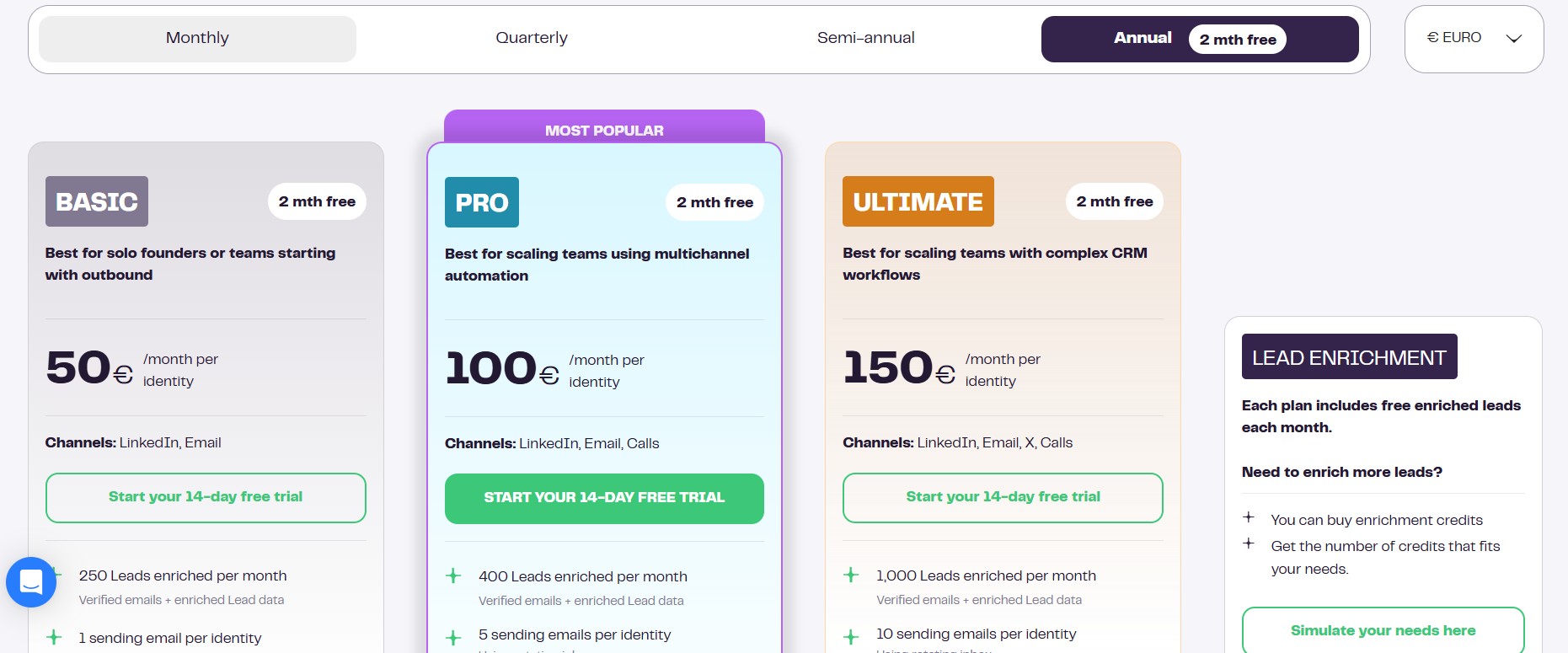
- Basic: €60/month per identity — multichannel outreach, unlimited lead enrichment, LinkedIn voice messages, 3 active campaigns
- Pro: €120/month per identity — unified inbox, AI writing assistant, API/Zapier access, X integration, 6 active campaigns
- Ultimate: €180/month per identity — unlimited campaigns, custom sequence builder, native HubSpot/Pipedrive integrations, dedicated account management
All plans include a 14-day free trial with no credit card required.
The Verdict
La Growth Machine is the right tool for dedicated sales teams and small-to-mid-sized agencies that need coordinated multichannel outreach across LinkedIn, email, and X — and who are willing to invest in the setup and per-seat cost to get it. It outperforms PhantomBuster significantly in outreach execution, sequence logic, and reply consolidation. It is not the right tool for teams focused on data extraction, for solo users with budget constraints, or for teams that need AI-managed conversations.
3. Expandi — Best for Safe, Scalable LinkedIn Campaign Automation
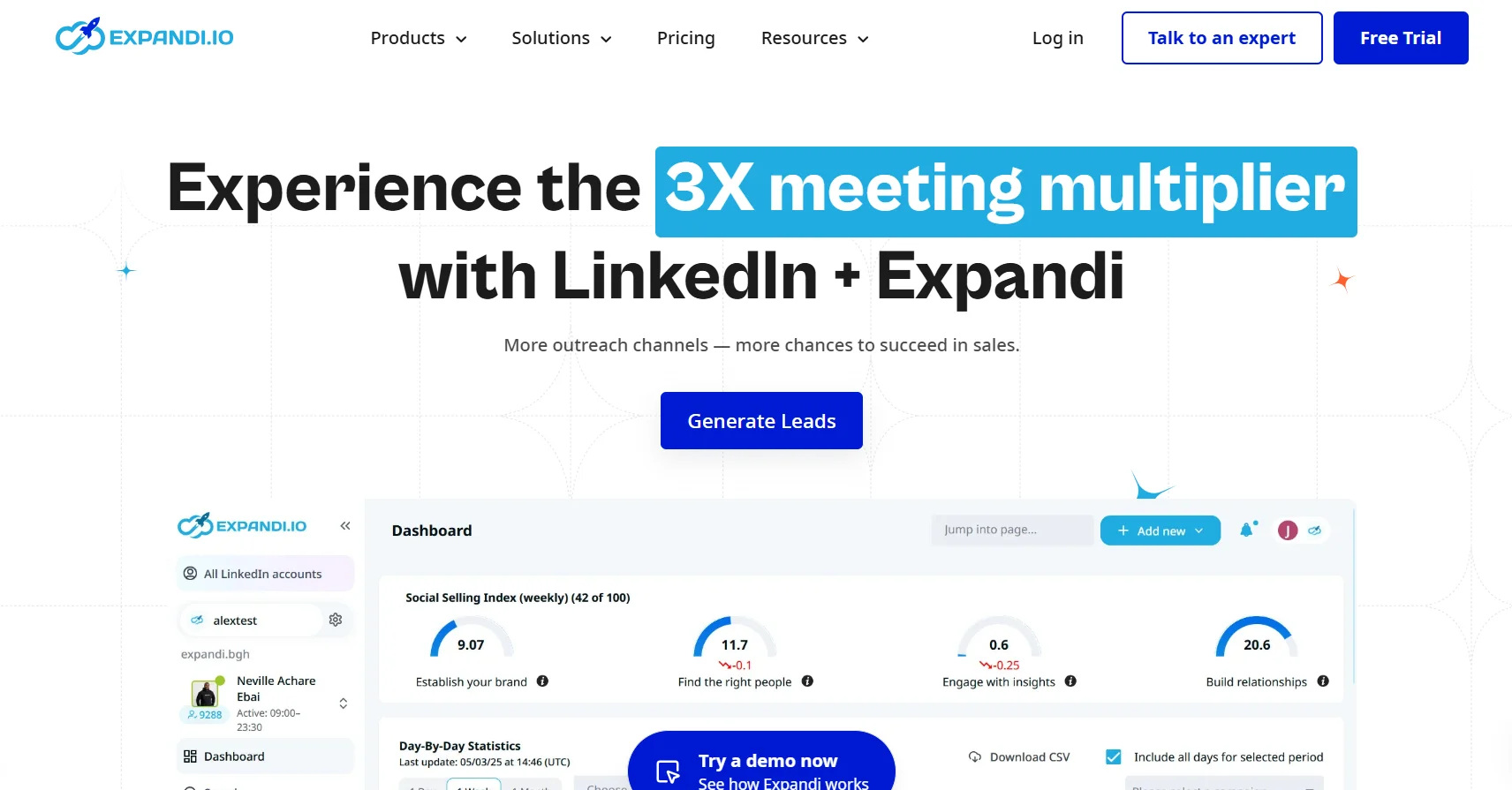
Expandi is a cloud-based LinkedIn automation platform built specifically for sales professionals, recruiters, and lead generation agencies. Founded in 2019 and rated 4.2/5 on G2, Expandi is distinguished by its dedicated IP address infrastructure, smart sequence logic, and comprehensive safety features — all purpose-built for LinkedIn. By 2025, the platform had powered over 70,130 campaigns, with users reporting an average connection acceptance rate of 29.61%.
What Expandi Does Well
Expandi’s core differentiation over PhantomBuster in the LinkedIn-specific context is its architecture. Where PhantomBuster is a generic multi-platform scraper running automations from shared infrastructure, Expandi runs from the cloud with dedicated, country-matched IP addresses for each user. This significantly reduces the likelihood of LinkedIn identifying the activity as automated. The platform also includes profile auto-warm-up, which gradually increases activity levels before campaigns go to full volume — a best practice that PhantomBuster does not automate.
The Smart Sequence builder is a genuine capability advantage for teams running LinkedIn-first outreach. Users can build conditional sequences combining connection requests, InMails, messages, profile endorsements, and company page follows — with up to 10 actions and 10 conditions per sequence. If a prospect accepts a connection but doesn’t reply to the first message, the sequence can automatically pivot to an InMail, then to an email, without requiring manual oversight. Expandi also includes a Mobile Connector campaign type that simulates mobile browsing behavior, which allows additional connection requests per week beyond standard desktop-based limits.
Key Features
- Cloud-Based Execution with Dedicated IPs: Runs 24/7 without your browser open, using country-matched dedicated IP addresses that reduce LinkedIn detection risk.
- Smart Sequence Builder: Conditional automation logic with up to 10 actions and 10 conditions — sequences adapt based on whether prospects respond, open messages, or engage with profile visits.
- Profile Auto-Warm-Up: Gradually increases daily outreach activity from a safe baseline, reducing the risk of sudden activity spikes that trigger LinkedIn’s detection systems.
- Dynamic Personalization: Supports custom text variables, personalized images (via Hyperise integration), and GIF personalization in LinkedIn messages.
- A/B Testing: Built-in message variation testing across campaigns, with analytics to identify which copy drives higher acceptance and reply rates.
- Unified Dashboard: Teams and agencies can manage multiple LinkedIn accounts from a single interface.
- Integrations: Webhooks and Zapier for workflow automation; some native CRM connections available.
Best Use Cases
Sales Teams Needing Structured Campaign Management Without Developer Setup
Expandi is significantly easier to configure for LinkedIn-specific campaigns than PhantomBuster. Users report being able to launch their first campaign within 15 minutes. The campaign builder doesn’t require understanding of cookies, session IDs, or API configurations — it’s designed for sales professionals, not growth hackers. Teams that have been avoiding PhantomBuster due to its learning curve will find Expandi considerably more accessible.
Agencies Running Multiple Client LinkedIn Campaigns
Expandi’s workspaces feature allows agencies to organize campaigns and accounts by client, with separate analytics per workspace. The cloud-based architecture means campaigns continue running without requiring a laptop to stay on, which matters for agencies managing client accounts across time zones.
Expandi vs. PhantomBuster
| Category | Expandi | PhantomBuster |
|---|---|---|
| Primary platform | LinkedIn-specialized | Multi-platform (15+) |
| Account safety | ✅ Dedicated IPs, auto-warmup, smart limits | ⚠️ No built-in LinkedIn-specific safety |
| Sequence logic | ✅ Smart conditional sequences (10+ steps) | ⚠️ Linear Phantom/Flow chaining |
| Email follow-up | ✅ Built-in (combined LinkedIn + email) | ❌ Requires external integration |
| Personalization | ✅ Dynamic images, GIFs (via Hyperise) | ❌ Not native |
| Setup time | ~15 minutes | Technical configuration required |
| Pricing model | Per seat ($99/month) | Execution time ($69–$439/month) |
Limitations
At $99/month per seat ($79/month billed annually), Expandi is on the more expensive end of LinkedIn automation tools. For agencies managing 10 client accounts, that’s $990/month at the base rate — a significant line item. Key personalization features also require separate subscriptions: Hyperise for image and GIF personalization starts at $69/month, and Sendspark for video personalization starts at $49/month, pushing the effective cost of a fully featured Expandi setup to $197+/month per seat. Expandi relies primarily on webhooks and Zapier for CRM connections rather than native integrations, which requires additional configuration compared to tools with native HubSpot or Salesforce sync. Some G2 reviewers also report occasional LinkedIn account restrictions despite following Expandi’s recommended settings — as with any automation tool, ban risk exists, even with safety features in place.
Pricing
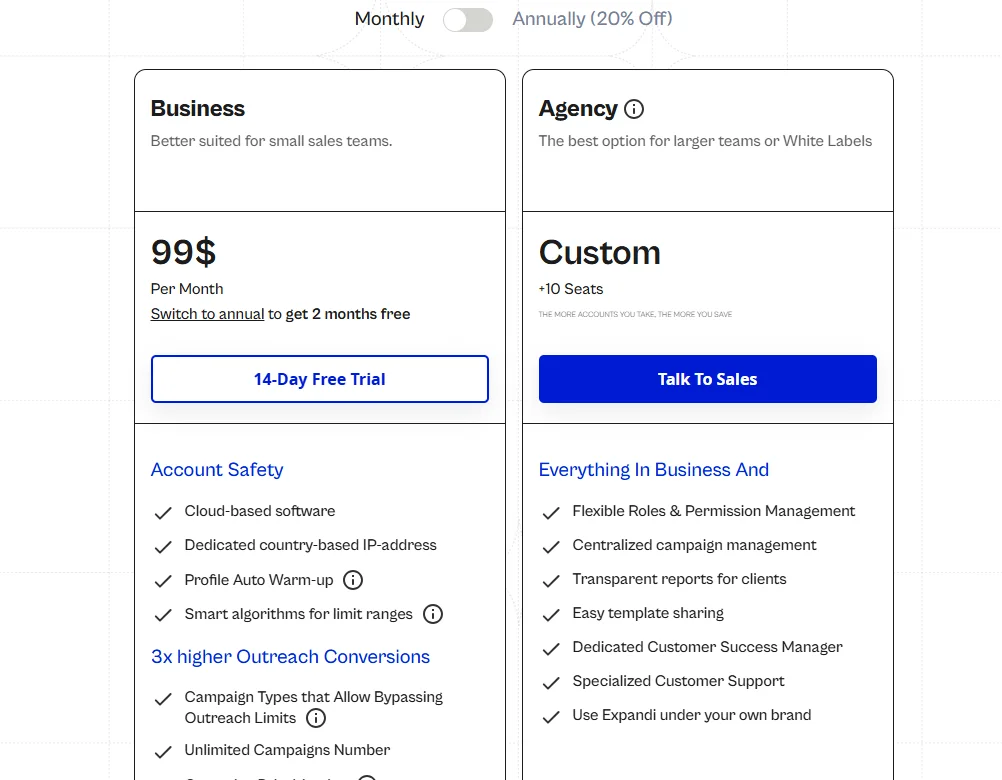
- Monthly: $99/month per seat
- Annual: $79/month per seat (billed annually, approximately 20% discount)
- Agency: Custom pricing for 10+ accounts, negotiated directly with the Expandi sales team
- Trial: 7-day free trial with full feature access. No credit card required.
The Verdict
Expandi is the right tool for B2B lead generation agencies, SDR teams, and recruiters who treat LinkedIn as their primary prospecting channel and need a platform purpose-built for safe, structured LinkedIn campaign automation. It outperforms PhantomBuster on account safety, sequence logic, and LinkedIn-specific features — at the cost of higher per-seat pricing and add-on costs for personalization. Teams that need multichannel outreach across LinkedIn, email, and X may find La Growth Machine a more complete fit; teams that need AI-managed conversations should look at DealsFlow.
4. Waalaxy — Best for Beginners and Solo Users Getting Started With LinkedIn Automation
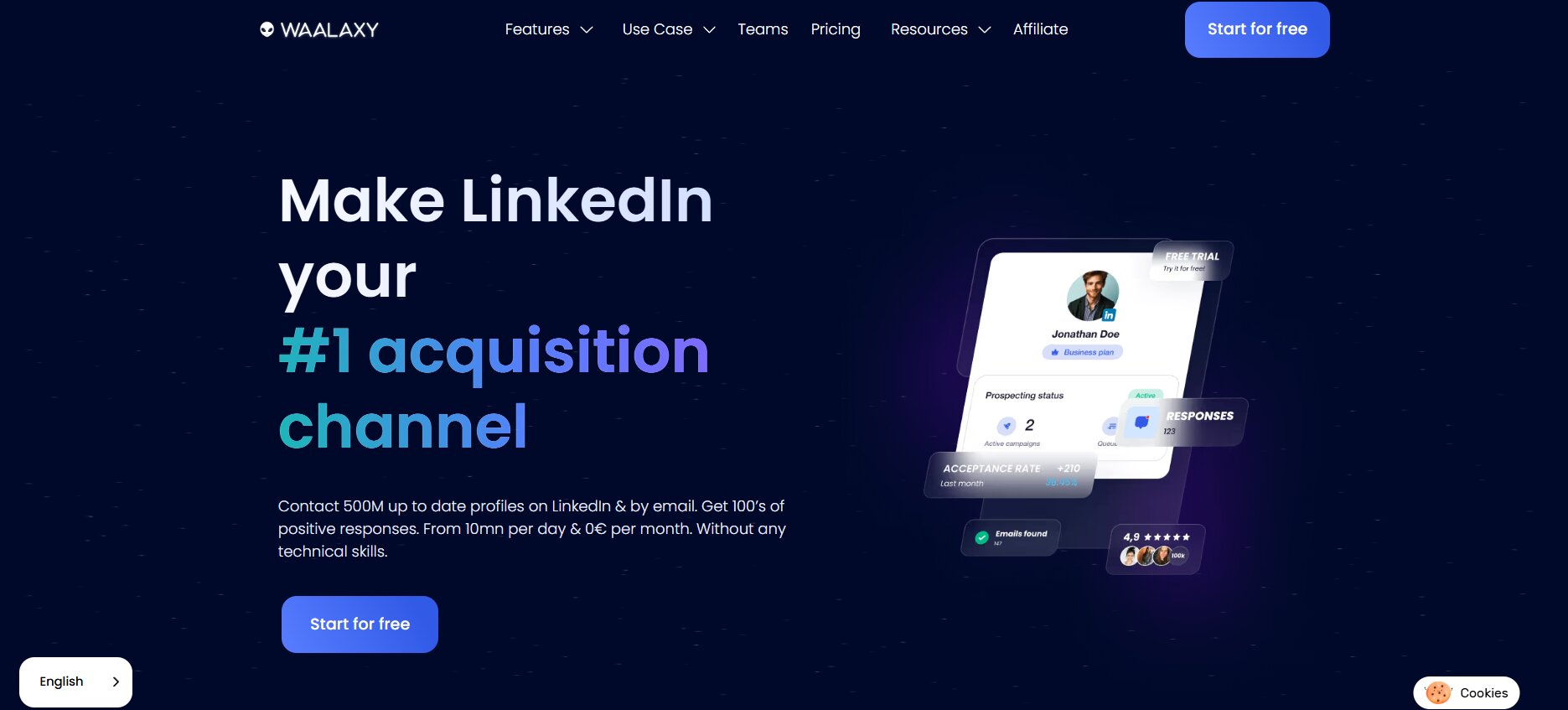
Waalaxy is a LinkedIn automation and prospecting tool built for sales professionals, freelancers, recruiters, and small teams who want to automate outreach without technical complexity. Founded in France in 2020 and reporting over 75,000 users, Waalaxy positions itself around accessibility — 75% of its users had never done LinkedIn outreach before they started using the product. It runs as a Chrome extension with some cloud-based components and supports multichannel outreach on higher-tier plans.
What Waalaxy Does Well
Waalaxy’s distinguishing characteristic is the speed of its onboarding. Users can install the Chrome extension in two minutes, import leads from a LinkedIn search URL, and have their first automated sequence running in under 10 minutes. The platform provides 99+ pre-built campaign sequences — covering use cases from sales prospecting to recruiting to networking — that can be launched without customization. For teams or individuals who have never used LinkedIn automation before and want to get started quickly without a learning curve, this is a genuine advantage.
The free plan is also a meaningful entry point: it includes 80 LinkedIn invitations per month and 25 email finder credits, allowing prospective users to validate the tool’s output before committing to a paid plan. Waalaxy’s reply detection feature automatically pauses sequences when a prospect responds, preventing the awkward scenario of a prospect receiving a follow-up message after already replying.
Key Features
- Pre-Built Sequence Templates: 99+ ready-to-use campaign sequences for LinkedIn outreach, email, and combined LinkedIn + email campaigns, designed for common outreach scenarios.
- Smart Reply Detection: Automatically stops a sequence when a prospect replies, preventing follow-up messages to already-engaged contacts.
- Email Finder: Built-in email discovery tool using the Dropcontact integration, with GDPR-compliant enrichment of verified professional email addresses.
- LinkedIn + Email Multichannel Sequences: Available on the Business plan, allowing LinkedIn and email to be combined in a single campaign workflow.
- CRM Integrations: Native connections to HubSpot, Pipedrive, and Salesforce, plus 2,000+ tools via Zapier and Make.
- Safety Limits: Built-in daily and weekly sending limits stay within LinkedIn’s published guidelines, reducing account restriction risk.
- Lead Management: Import leads from LinkedIn searches, Sales Navigator, CSV files, or existing lists, with tagging and filtering for prospect organization.
Best Use Cases
Freelancers and Solo Founders Who Want Simple, Low-Risk Automation
Waalaxy’s Pro plan at €39/month (or €19/month annually) is genuinely the most accessible paid entry point among the tools in this guide for individuals. The combination of pre-built templates, simple sequence setup, and automatic safety limits means a solo user can run a compliant LinkedIn outreach campaign in the time it takes to install a browser extension. For someone who has been doing LinkedIn outreach entirely manually, this provides meaningful time savings at low cost and low risk.
Recruiters Running Basic LinkedIn Outreach Campaigns
Waalaxy’s pre-built templates include recruiting-specific sequences, and the platform’s focus on clean interface and quick setup makes it a common choice for individual recruiters or small talent acquisition teams running outreach without dedicated sales operations support.
Waalaxy vs. PhantomBuster
| Category | Waalaxy | PhantomBuster |
|---|---|---|
| Platform coverage | LinkedIn + Email | LinkedIn + 15+ platforms |
| Setup complexity | Very low (Chrome extension, 10 min) | Moderate to high (Phantom configuration) |
| Audience | Beginners, solo users, small teams | Growth hackers, technical teams, agencies |
| Safety features | ✅ Built-in limits, reply detection | ⚠️ Manual configuration |
| Email enrichment | ✅ Built-in (Dropcontact) | ⚠️ Email credits (paid, limited) |
| Pricing model | Per user (€19–€139/month) | Execution time ($69–$439/month) |
| Multi-account | ❌ Limited (Enterprise plan) | ✅ Up to 100 LinkedIn accounts |
Limitations
Waalaxy runs as a Chrome extension, which means your browser needs to be open for campaigns to execute — a limitation compared to fully cloud-based tools like Expandi or La Growth Machine. Chrome extensions also carry a higher detection risk profile than cloud platforms in 2026, as they interact with LinkedIn through the browser in ways that LinkedIn’s fingerprinting systems can identify. Multiple reviews flag billing issues, unfair refund policies, and a pattern of price increases on existing customers — the platform has raised prices multiple times since launch, including cutting the free plan from more generous limits down to 80 invitations per week. The inbox management feature costs an additional €20/month on top of the base plan price, and email finder credits are limited (25 on the free plan, 150 on Business), which means teams doing serious email outreach will need to supplement. Custom sequence creation from scratch is not supported — users are limited to the pre-built templates, which constrains flexibility for more advanced outreach workflows.
Pricing
- Free: €0/month — 80 LinkedIn invitations/month, basic sequences, 25 email finder credits
- Pro: €39/month (monthly) / €19/month (annual) — unlimited campaigns, 300 LinkedIn invitations/month, CRM sync
- Advanced: €99/month — 800 invitations/month, live chat support
- Business: €139/month — LinkedIn + email combined sequences, multiple sender accounts, 500 email finder credits, priority support
Annual plans offer up to 50% discount. All paid plans include a 14-day free trial.
The Verdict
Waalaxy is the right starting point for solo users, freelancers, and small teams doing LinkedIn outreach for the first time, who need a tool that works out of the box without technical configuration. It is not the right tool for agencies managing multiple client accounts, teams that need cloud-based execution without browser dependency, or organizations that need advanced sequence customization or AI-managed replies.
5. Evaboot — Best PhantomBuster Alternative for LinkedIn Sales Navigator Scraping
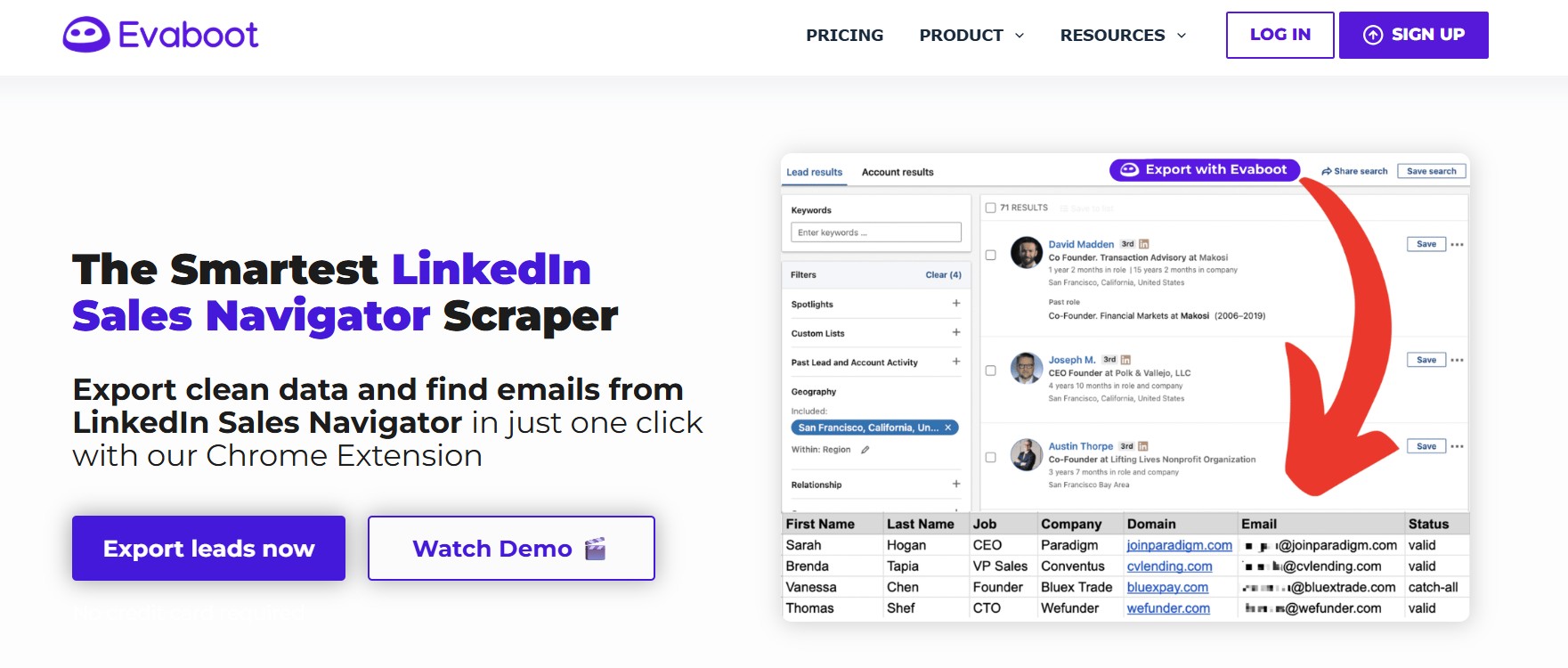
Evaboot is a hyper-specialized tool that does one thing extremely well: it exports clean, verified lead lists from LinkedIn Sales Navigator. It operates as a Chrome extension that adds an “Export with Evaboot” button directly to the Sales Navigator interface, allowing users to extract lead data, clean it, and find verified email addresses in a single workflow. It has over 50,000 users and holds a strong G2 rating for its reliability in this specific use case.
What Evaboot Does Well
PhantomBuster’s LinkedIn Sales Navigator scraping capability is one of its most popular use cases — extracting lead lists from Sales Navigator searches and exporting them to CSV for outreach. Evaboot is a purpose-built replacement for exactly this function, and it does the job more cleanly and reliably. Its core differentiator is an algorithm that double-checks each exported lead against the search filters used to find them, flagging profiles that don’t actually match the criteria (a known issue with raw Sales Navigator exports, where error rates can exceed 15% on deeper pages). The result is a cleaner list with fewer wasted credits and fewer outreach attempts sent to the wrong people.
The platform also handles the data cleaning step automatically — removing special characters, standardizing name and job title formatting, and associating LinkedIn profile URLs with company domain names. This structured output is significantly easier to import into a CRM or outreach tool than the raw data produced by most scrapers.
Key Features
- One-Click Sales Navigator Export: The Chrome extension adds an “Export with Evaboot” button directly to Sales Navigator search results, lead lists, and account lists. No manual copying or external configurations required.
- Lead Matching Verification: Evaboot’s algorithm checks each exported profile against the search filters used, flagging leads in a “No Match Reasons” column. This corrects a documented weakness in raw Sales Navigator data, where profiles matching your search page don’t always match your actual criteria.
- Automatic Data Cleaning: Standardizes names, job titles, and company names, removes special characters, and provides the company domain for each lead — making the export immediately usable for email outreach or CRM import.
- Email Finder and Verifier: Finds professional email addresses for each lead and verifies them for deliverability. One credit covers one scrape action; a second credit covers the email find — so each complete lead with verified email costs 2 credits.
- Credit Rollover: Unused credits carry forward to the next month as long as the subscription remains active, a practical advantage for teams with variable monthly scraping needs.
Best Use Cases
Sales Ops Teams That Need Clean, Verified Lead Lists Fast
Teams spending time manually cleaning Sales Navigator exports — fixing formatting, removing duplicates, validating emails — will find Evaboot eliminates most of that work. The automatic cleaning and matching verification means the CSV output is import-ready for a CRM or outreach tool without an intermediate cleaning step.
Teams Using PhantomBuster Only for Sales Navigator Scraping — And Want to Do It Cheaper
PhantomBuster’s Sales Navigator scraper is a popular Phantom, but it still consumes execution time and requires manual data cleaning afterward. Evaboot starts at $9/month for 100 credits (approximately 50 complete leads with verified emails). For teams whose entire PhantomBuster use case was limited to Sales Navigator exports, Evaboot is a lower-complexity, lower-cost specialist alternative.
Evaboot vs. PhantomBuster
| Category | Evaboot | PhantomBuster |
|---|---|---|
| Primary function | Sales Navigator scraping + email finding | Multi-platform automation + data extraction |
| Data quality | ✅ Verified match logic, automatic cleaning | ⚠️ Raw export, manual cleaning needed |
| Email verification | ✅ Built-in | ⚠️ Email credits (paid, separate) |
| Outreach automation | ❌ Not included | ✅ Yes (limited LinkedIn outreach) |
| Platform coverage | LinkedIn Sales Navigator only | LinkedIn + 15+ platforms |
| Sales Navigator required | ✅ Yes (minimum $99.99/month) | ❌ Not required |
| Pricing | $9–$699/month (credits) | $69–$439/month (execution time) |
Limitations
Evaboot requires an active LinkedIn Sales Navigator subscription to function — the entry-level Core plan costs $99.99/month, meaning the real minimum cost to use Evaboot is approximately $109/month ($9 Evaboot Mini plan + $99.99 Sales Navigator), not the $9 advertised. For teams without Sales Navigator, Evaboot is not an option. The tool also uses a 2-credit-per-lead model (1 for the profile scrape, 1 for the email find), which means a plan with 500 credits actually delivers approximately 250 complete leads. Evaboot does not include any outreach automation — it is purely a data extraction and enrichment tool. Once the CSV is exported, a separate tool is needed to actually contact those leads. Some users on G2 and Capterra also report that email accuracy could be improved, with a portion of extracted emails occasionally being invalid or outdated.
Pricing
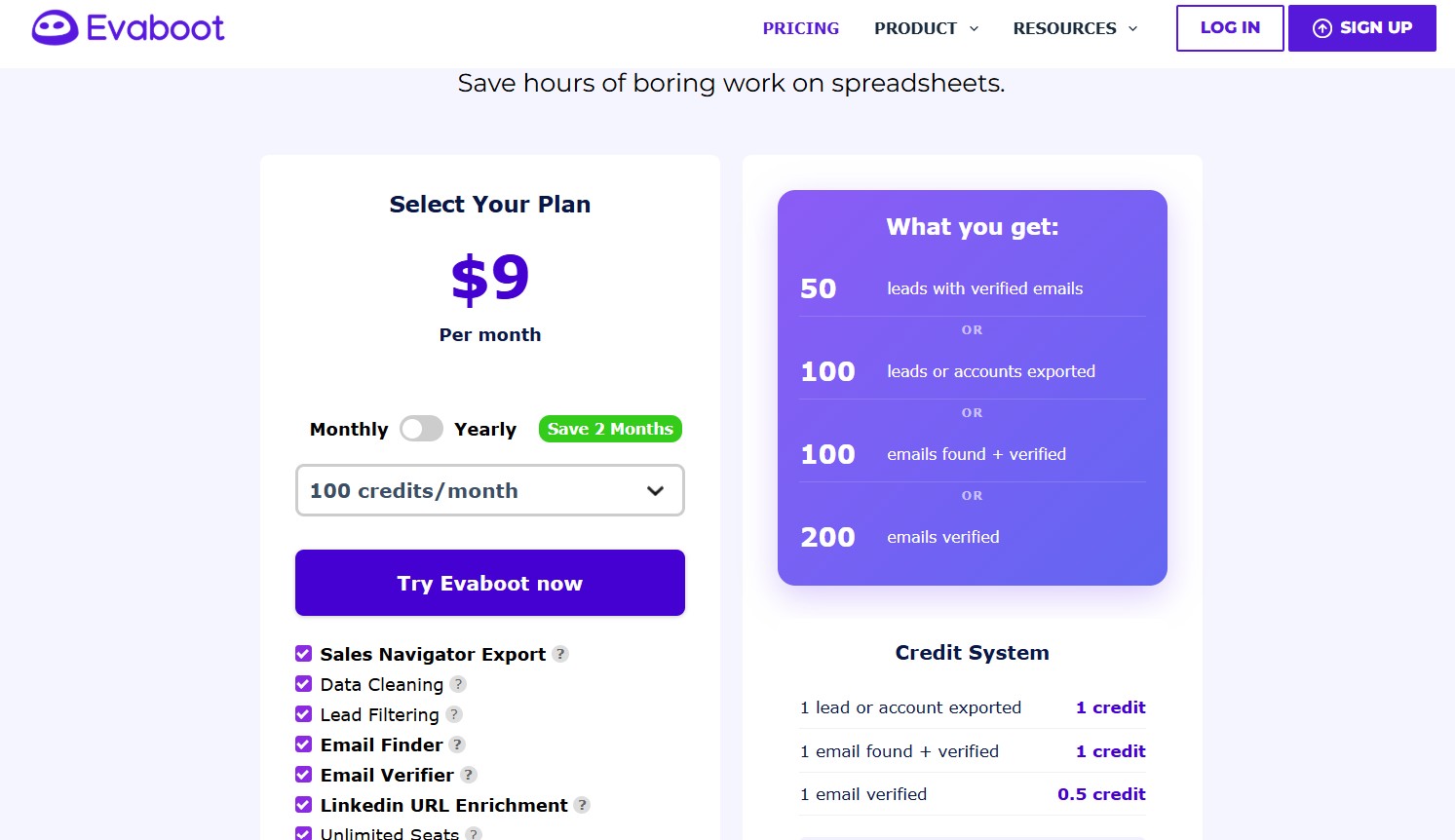
- Mini: $9/month — 100 credits (~50 complete leads with email)
- Starter: $39/month — 500 credits (~250 complete leads)
- Growth: $79/month — 1,500 credits (~750 complete leads)
- Pro: $139/month — 4,000 credits (~2,000 complete leads)
- Business: $239/month — 8,000 credits
Annual billing provides up to 17% discount. LinkedIn Sales Navigator subscription is required on all plans (minimum $99.99/month additional cost).
The Verdict
Evaboot is the right tool for sales professionals and teams whose specific need is extracting clean, verified lead lists from LinkedIn Sales Navigator quickly and reliably. It does this job better than PhantomBuster’s Sales Navigator Phantom — with cleaner data, built-in email verification, and no execution-time budget to manage. It is not an outreach tool and cannot replace the other capabilities of PhantomBuster for teams using it for automation or multi-platform scraping.
6. Clay — Best PhantomBuster Alternative for Advanced Data Enrichment and Workflow Building
Clay is a data enrichment and GTM workflow automation platform built for revenue operations teams, growth engineers, and data-driven sales organizations. It aggregates data from 150+ providers into a spreadsheet-style interface and uses AI (via its Claygent feature) to automate research, score leads, and generate personalized outreach — at a level of sophistication that no other tool in this list approaches for pure enrichment quality.
What Clay Does Well
Clay’s central value proposition is breadth and reliability of data. Rather than relying on a single data provider — which creates significant gaps, particularly for non-US contacts, smaller companies, or niche industries — Clay uses a waterfall enrichment approach. It tries the first (cheapest) provider in your configured sequence; if no result is found, it tries the next, and so on, until a match is found or all sources are exhausted. In testing reported by Hackceleration, this approach improved email coverage from 40% with a single provider to 78% using a Clay waterfall across multiple providers — nearly doubling coverage on the same prospect list.
The Claygent AI agent feature allows Clay to autonomously research companies and contacts: summarizing recent news, extracting pain points from job postings, identifying technology stack from website code, and generating personalized first lines for outreach messages based on LinkedIn activity. These are tasks that would otherwise require a human researcher reviewing each prospect individually. For teams doing high-volume, highly personalized outreach at scale, this automation represents a genuine capability that no other tool in this list provides.
Key Features
- 150+ Data Provider Integrations: Access email addresses, phone numbers, company revenue, headcount, technology stack, funding data, and hundreds of other fields from a single workspace — without managing separate vendor subscriptions for each source.
- Waterfall Enrichment: Sequential provider waterfall logic that maximizes coverage by trying multiple sources before marking a field as unfound. Reported to improve email coverage from ~40% to ~78% in real campaign testing.
- Claygent AI Agent: An AI research agent that can navigate websites, summarize LinkedIn activity, extract job posting insights, and return structured data — automating tasks that would otherwise require human researchers.
- AI-Powered Personalization: Uses enriched data to generate personalized outreach messages, first lines, or contextual conversation starters for each prospect at scale.
- Sculptor (AI Workflow Builder): A natural language AI co-pilot that converts GTM ideas into live enrichment and segmentation workflows without requiring manual table configuration.
- CRM Integration: Native bidirectional sync with HubSpot and Salesforce on the Explorer plan and above, plus connections to hundreds of tools via Zapier and API.
- Unlimited Users: Unlike per-seat tools, all Clay plans support unlimited users — pricing is based entirely on credits, not headcount.
Best Use Cases
RevOps and Growth Teams Building Sophisticated Enrichment-First Workflows
Clay is the standard tool for revenue operations teams that need to build and maintain high-quality prospect databases. The combination of 150+ data sources, waterfall enrichment, and AI research automation allows teams to build enrichment workflows that surface better-quality leads and richer data than any single-source database — at a level of customization that is not achievable in simpler tools.
Teams With Existing Lead Lists That Need Deep Personalization at Scale
Organizations that have prospect lists — from Sales Navigator, events, CRM records, or website visitor data — but lack the enrichment depth to run personalized outreach can use Clay to fill those gaps. Claygent can research each company, surface relevant context (recent funding, technology changes, hiring activity), and generate personalized outreach angles in bulk, converting a generic list into a high-quality outreach asset.
Clay vs. PhantomBuster
| Category | Clay | PhantomBuster |
|---|---|---|
| Primary function | Data enrichment + workflow automation | Data extraction + automation triggers |
| Data sources | 150+ providers, waterfall enrichment | Single scraper per platform |
| AI capability | ✅ Claygent research agent, AI personalization | ⚠️ AI credits for basic generation |
| Outreach automation | ⚠️ Limited (built-in Sequencer for email only) | ✅ LinkedIn + limited outreach |
| CRM sync | ✅ Native (HubSpot, Salesforce on Explorer+) | ✅ HubSpot integration |
| Pricing model | Credit-based ($149–$800/month+) | Execution time ($69–$439/month) |
| Learning curve | High | Moderate to high |
| Team pricing | Unlimited users included | Per workspace |
Limitations
Clay’s credit-based pricing model is complex and easy to underestimate. Each enrichment action consumes a variable number of credits depending on the data provider — a comprehensive enrichment of a single lead covering email, phone, LinkedIn, company data, and a Claygent research pass can consume 8–12 credits or more. On the Starter plan ($149/month with 2,000 credits), this means realistic capacity of 150–300 fully enriched contacts per month — and failed lookups still consume credits even when no data is returned, silently burning 20–30% of the monthly allocation on incomplete data. Clay’s published pricing covers only 40–60% of the real total cost of ownership; teams also need to budget for LinkedIn Sales Navigator if they use LinkedIn enrichment ($99.99–$149.99/month), a separate outreach tool ($37–$137/month), and any top-up credits at a 50% markup above the subscription rate.
Clay also has a steep learning curve. G2 reviews consistently cite 2–4 weeks to become comfortable with the platform, and multiple reviewers note that non-technical team members struggle to configure advanced workflows independently. It is not a beginner-friendly tool and is not appropriate for teams that need to be operational quickly.
Pricing
- Free: 100 credits/month, up to 100 table rows — sufficient for testing only
- Starter: $149/month — 2,000 credits, single user
- Explorer: $349/month — 10,000 credits, CRM integration, 400 records/hour API limit
- Pro: $800/month — 50,000 credits, full CRM sync, dedicated support
- Enterprise: Custom pricing
Annual billing provides a 20% discount. Note: Clay updated its pricing model in early 2026, splitting credits into Data Credits and Actions. Existing customers were allowed to stay on legacy plans through April 2026. Current plan details should be confirmed at clay.com/pricing.
The Verdict
Clay is the right tool for RevOps teams, growth engineers, and data-first sales organizations that need deep, multi-source enrichment and AI-powered research automation at scale. It is not a beginner tool, not an outreach execution tool on its own, and not cost-effective for teams enriching fewer than 500–1,000 contacts per month. For teams that need enrichment depth and accuracy that a single scraper cannot provide, Clay is the most capable option available.
PhantomBuster Alternatives — Final Comparison & Recommendation
The six tools in this guide represent six genuinely different approaches to the problem PhantomBuster was historically used to solve. The right choice depends almost entirely on where your biggest bottleneck actually sits.
| Tool | Best For | Starting Price | AI Replies | Multi-Account | Setup Speed |
|---|---|---|---|---|---|
| DealsFlow | Full AI conversation → booked calls | Flat rate (see pricing page) | ✅ Yes | ✅ Yes (50) | ⚡ 10 minutes |
| La Growth Machine | Multichannel (LinkedIn + Email + X) | €60/month/identity | ❌ No | ✅ Per identity | 🕐 Moderate |
| Expandi | Safe LinkedIn campaign automation | $99/month/seat | ❌ No | ✅ Per seat | ⚡ 15 minutes |
| Waalaxy | Beginners, solo users | €39/month | ❌ No | ❌ Limited | ⚡ 10 minutes |
| Evaboot | Sales Navigator scraping | $9/month + Sales Nav | ❌ No | ❌ No | ⚡ Quick |
| Clay | Deep enrichment, AI personalization | $149/month | ❌ No | N/A | 🕑 2–4 weeks |
Choose DealsFlow if…
You want the entire LinkedIn outreach loop — prospecting, conversation, objection handling, and meeting booking — managed by AI without requiring manual inbox work. DealsFlow is the only tool in this list where an AI agent (Arlo) holds the full conversation until the prospect agrees to a meeting. It is specifically well-suited for lead generation agencies managing multiple client accounts, SDR teams whose inbox volume has become unmanageable, and founders doing sales without dedicated headcount.
Choose La Growth Machine if…
You need true multichannel outreach across LinkedIn, email, and X/Twitter in a single coordinated sequence — with conditional logic that adapts to how each prospect responds. La Growth Machine is best for dedicated sales teams and growth agencies with the budget for per-identity pricing who want the highest-quality multichannel execution available in one platform.
Choose Expandi if…
You want a proven, safe LinkedIn automation platform for structured campaigns with advanced conditional sequences and dynamic personalization — and LinkedIn is your primary (or sole) prospecting channel. Expandi is best for B2B SDR teams, recruiters, and agencies who need platform-specific LinkedIn safety features and structured campaign management without the complexity of PhantomBuster’s configuration requirements.
Choose Waalaxy if…
You are an individual user, freelancer, or small team doing LinkedIn outreach for the first time and want the simplest possible tool to automate connection requests, follow-ups, and basic multichannel sequences without technical setup. Waalaxy’s free plan is a legitimate starting point, and its paid plans are among the most affordable in the market for individuals.
Choose Evaboot if…
Your only PhantomBuster use case was Sales Navigator scraping — exporting lead lists to CSV for outreach. Evaboot performs this specific job more cleanly, with better data quality, built-in email verification, and no execution-time budget to manage. It is not an outreach tool and should be paired with a separate platform for sending.
Choose Clay if…
Data enrichment and AI-powered research automation is the bottleneck in your outbound motion — not outreach execution. Clay is for RevOps teams and growth engineers who need 150+ data source coverage, waterfall enrichment, and Claygent-style AI research to build high-quality, deeply personalized prospect lists at scale. Budget 2–4 weeks for onboarding and plan for total costs significantly above the listed subscription price.
FAQs
Is PhantomBuster safe to use for LinkedIn in 2026?
PhantomBuster is a cloud-based tool, which is safer than a browser extension from a detection standpoint. However, it was not built specifically for LinkedIn safety. It does not include LinkedIn-specific account warm-up, connection request limit enforcement per account, or dynamic safety limits that adjust based on account health. LinkedIn uses machine learning to detect automation by analyzing behavioral patterns — timing consistency, volume spikes, and action sequences — and a generic multi-platform scraper is more likely to produce detectable patterns than a tool purpose-built for LinkedIn. LinkedIn explicitly bans automation in its terms of service, though enforcement targets accounts showing volume-based or pattern-based red flags rather than all automation use uniformly. For LinkedIn-specific safety, tools like Expandi, DealsFlow, and La Growth Machine include more purpose-built guardrails.
Can I use these tools without LinkedIn Sales Navigator?
Most of them, yes. DealsFlow, La Growth Machine, Expandi, and Waalaxy all work with standard LinkedIn accounts — Sales Navigator is optional and improves targeting but is not required. Evaboot is the exception: it is exclusively built on top of Sales Navigator and cannot function without an active Sales Navigator subscription (minimum $99.99/month). Clay’s LinkedIn enrichment features also benefit significantly from Sales Navigator access, though Clay itself works independently of it for non-LinkedIn data sources.
What’s the cheapest PhantomBuster alternative for a solo user?
Waalaxy’s free plan (80 LinkedIn invitations/month, 25 email finder credits, no payment required) is the most accessible starting point. For paid plans, Waalaxy Pro at €39/month (or €19/month annually) is the lowest entry point among tools with meaningful outreach automation capability. Evaboot has a $9/month plan, but the required Sales Navigator subscription brings the real minimum cost to approximately $109/month.
Do any of these tools handle LinkedIn replies automatically?
Only DealsFlow includes AI that actively handles LinkedIn conversation replies. The Arlo AI engine reads incoming replies, interprets their intent, generates contextually appropriate responses, manages objections, and books meetings — without requiring a human in the loop. All other tools in this guide — La Growth Machine, Expandi, Waalaxy, Evaboot, and Clay — automate the delivery of outreach sequences but do not manage replies automatically. When a prospect replies in those tools, a human still needs to respond.
Will LinkedIn ban my account for using automation tools?
LinkedIn’s enforcement in 2026 targets patterns rather than the mere presence of automation. Accounts sending 15–25 targeted connection requests per day with natural timing and high acceptance rates face minimal restriction risk. Accounts showing sudden volume spikes, low acceptance rates (below ~20%), mechanical timing intervals, or pulling data at unnaturally high velocity are significantly more likely to be flagged. Cloud-based tools with dedicated IP addresses and built-in safety limits carry meaningfully lower risk than browser extensions or generic automation platforms. The most significant policy development in 2025 was LinkedIn’s official banning of Apollo.io and Seamless.ai — a signal that the platform is actively pursuing enforcement against high-volume data extraction tools. Any automation tool carries some risk, and that risk is reduced by using conservative volume settings, personalized messaging, and purpose-built LinkedIn safety infrastructure.