


If you’ve spent any time prospecting on LinkedIn, you’ve probably heard of Salesflow. It’s one of the older names in the LinkedIn automation space — a cloud-based tool that promises to automate your outreach, fill your pipeline, and save you hours of manual work every week. But does it actually deliver in 2026? That’s exactly what this review sets out to answer.
We went deep on Salesflow — analyzing its features, testing the workflow, mining reviews across G2, Capterra, GetApp, and Software Advice, and comparing it head-to-head against the top alternatives on the market today. This isn’t a marketing summary. It’s an honest, evidence-backed evaluation designed to help you decide whether Salesflow deserves a place in your sales stack — or whether you should be looking elsewhere.
Quick Verdict: Who Is Salesflow Actually For?
Salesflow is best described as a solid, cloud-based LinkedIn automation tool built primarily for solo SDRs, small sales teams, and outreach agencies that do most of their prospecting on LinkedIn. It automates the repetitive mechanics of LinkedIn outreach — sending connection requests, follow-up message sequences, and InMails — reasonably well. For someone who sends dozens of LinkedIn messages manually each day, Salesflow can represent a genuine time savings.
That said, it is not the right tool for everyone. It has a narrow focus, a mixed support reputation, and recurring complaints around reliability, analytics depth, and UX. Users who need robust multi-channel workflows, deep CRM integration, or a polished interface will likely find Salesflow frustrating.
Best for:
- Solo SDRs and account executives running LinkedIn-first outreach
- Agencies managing multiple client LinkedIn accounts
- Small B2B sales teams (under 10 seats) whose prospects are primarily on LinkedIn
- Startups that want to get an outbound motion running without a large ops budget
Not ideal for:
- Teams that need true multi-channel sequencing (LinkedIn + email + calling) natively managed
- Buyers who require HubSpot, Salesforce, or other CRM deep-sync without relying on Zapier
- Users on tight budgets — $99/month per seat adds up quickly for small teams
- Teams that expect consumer-grade UX and zero learning curve
How we evaluated Salesflow: This review draws on publicly verified user reviews from G2 (where Salesflow holds a 4.3/5 rating), Capterra (4.1/5), GetApp, and Software Advice. We also analyzed product documentation, competitor positioning, and firsthand feature walkthroughs to assess claims against reality. Every criticism and praise cited below is traceable to real, identifiable user feedback.
What Is Salesflow?
Salesflow is a cloud-based LinkedIn automation and email outreach platform designed for B2B sales professionals, agencies, and growing startups. Founded roughly a decade ago under the name Growthlead, it has evolved into a tool that claims to serve over 10,000 users across 120+ countries, with more than 300 agency partners using the platform.
The core premise is straightforward: LinkedIn is where most B2B decision-makers live, and manually sending connection requests, following up with prospects, and managing conversations at scale is time-consuming and unsustainable. Salesflow automates those mechanics so that sales reps can focus their attention on actual conversations rather than the plumbing that creates them.
What sets Salesflow apart from cheaper browser-extension tools is its cloud-based infrastructure. Rather than running inside your Chrome browser (which makes automation patterns easy for LinkedIn to detect), Salesflow operates from dedicated cloud servers with assigned IP addresses. This architecture means your campaigns run 24 hours a day without your computer being on, and the activity appears more human-like to LinkedIn’s detection systems.
The core Salesflow workflow looks like this:
- Connect your LinkedIn account — You link your LinkedIn profile to Salesflow, and the platform assigns it a dedicated IP address.
- Build your campaign — You define your target audience using a LinkedIn or Sales Navigator search URL, then choose your campaign type (new connections, existing connections, InMail, groups/events).
- Create your message sequences — You write your connection request message and any follow-up messages, using personalization tokens to customize each message with the prospect’s name, company, or other details.
- Add contacts and activate — Contacts are pulled from your LinkedIn search URL or imported via CSV. Once you activate the campaign, Salesflow sends outreach automatically on your behalf.
- Manage replies in the inbox — Replies come into Salesflow’s unified inbox, where you can respond, tag conversations, and track who has replied.
This is a clean, logical workflow for LinkedIn-first outreach. For teams that have never used automation before, it eliminates a significant amount of daily manual effort.
Salesflow Features: An Honest Deep-Dive
LinkedIn Outreach Automation & Sequences
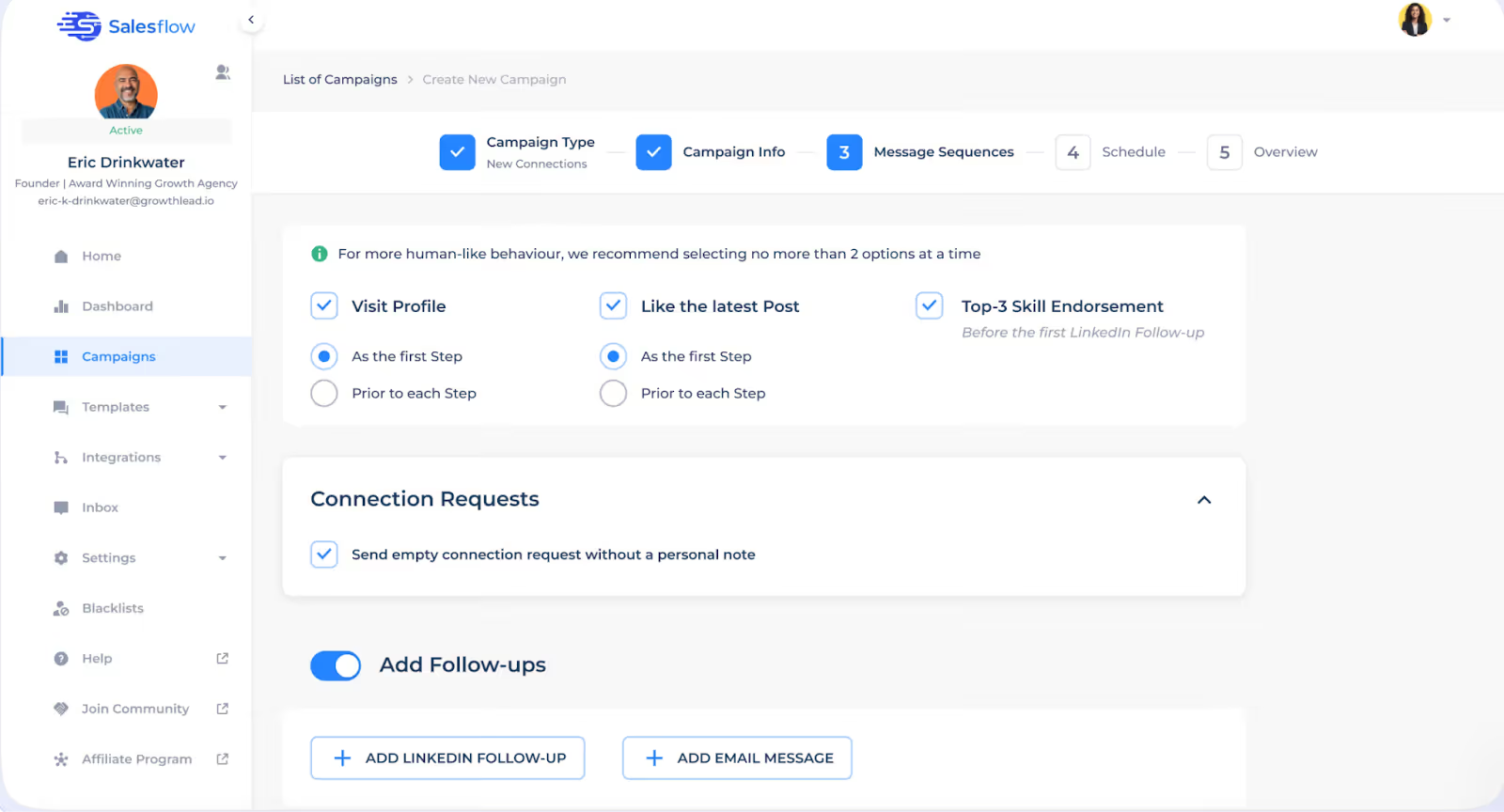
Salesflow’s core feature is its LinkedIn sequence builder, and it works well for its intended purpose. Users can build multi-step outreach sequences that include:
- Connection requests — automated invitations sent to 2nd and 3rd-degree connections, with a personalized note.
- Follow-up messages — follow-ups sent after a connection is accepted, spaced out over days or weeks.
- Open InMails — messages sent to LinkedIn Premium or Sales Navigator users who haven’t connected with you yet.
- Profile views and skill endorsements — social engagement actions designed to warm up a prospect before the connection request lands.
In terms of volume, Salesflow allows users to send up to 400 connection requests per month and up to 800 Open InMails per month, with follow-up message sequences capped at up to 2,000 per month. These limits are broadly in line with what LinkedIn enforces across the board, and Salesflow’s system is designed to stay within them. The sequence builder lets you space out actions over time — a critical detail for avoiding LinkedIn’s spam detection.
One genuine limitation here is the inability to switch a campaign type mid-run. A review on Software Advice noted that “when running campaigns you can only carry out one operation at a time and not switch campaign say from cold to InMails — this makes more work in terms of setting up.” For users managing multiple campaign types simultaneously, this adds friction.
Multi-Channel Capabilities (LinkedIn + Email)
Salesflow does support LinkedIn combined with email outreach, and it markets itself as a multi-channel platform. In practice, however, the email functionality is more of an add-on than a deeply integrated feature. Salesflow does not include native email finding or contact enrichment. If you want to reach a prospect via email, you need to import leads with their email addresses already attached — sourced from a separate data provider.
This adds meaningful friction compared to fully integrated platforms like Lemlist or La Growth Machine, where email discovery is built in. The upside is that if you already have a list with emails included, adding email steps to your LinkedIn sequences is functional and adds a genuine second touchpoint for prospects who don’t respond on LinkedIn.
Unified Inbox & Reply Management
Salesflow includes a customizable LinkedIn inbox that consolidates your outreach replies in one place. The inbox allows you to tag conversations, use message templates for faster replies, set reminders, and track whether leads have responded positively or negatively. Salesflow also uses AI-based sentiment detection that attempts to tag replies as positive or negative automatically — a useful feature for prioritizing follow-ups when you’re managing volume.
Where the inbox falls short is in multi-account management. While Salesflow allows you to connect multiple LinkedIn accounts under one user, there is no true shared inbox across accounts. You still need to switch between accounts manually to respond on a teammate’s or client’s behalf. A review on HeyReach’s analysis noted this limitation explicitly: “There’s no shared inbox, so true multi-account outreach isn’t possible.” For agencies managing 10+ client accounts, this can become operationally painful.
Message Templates & Personalization
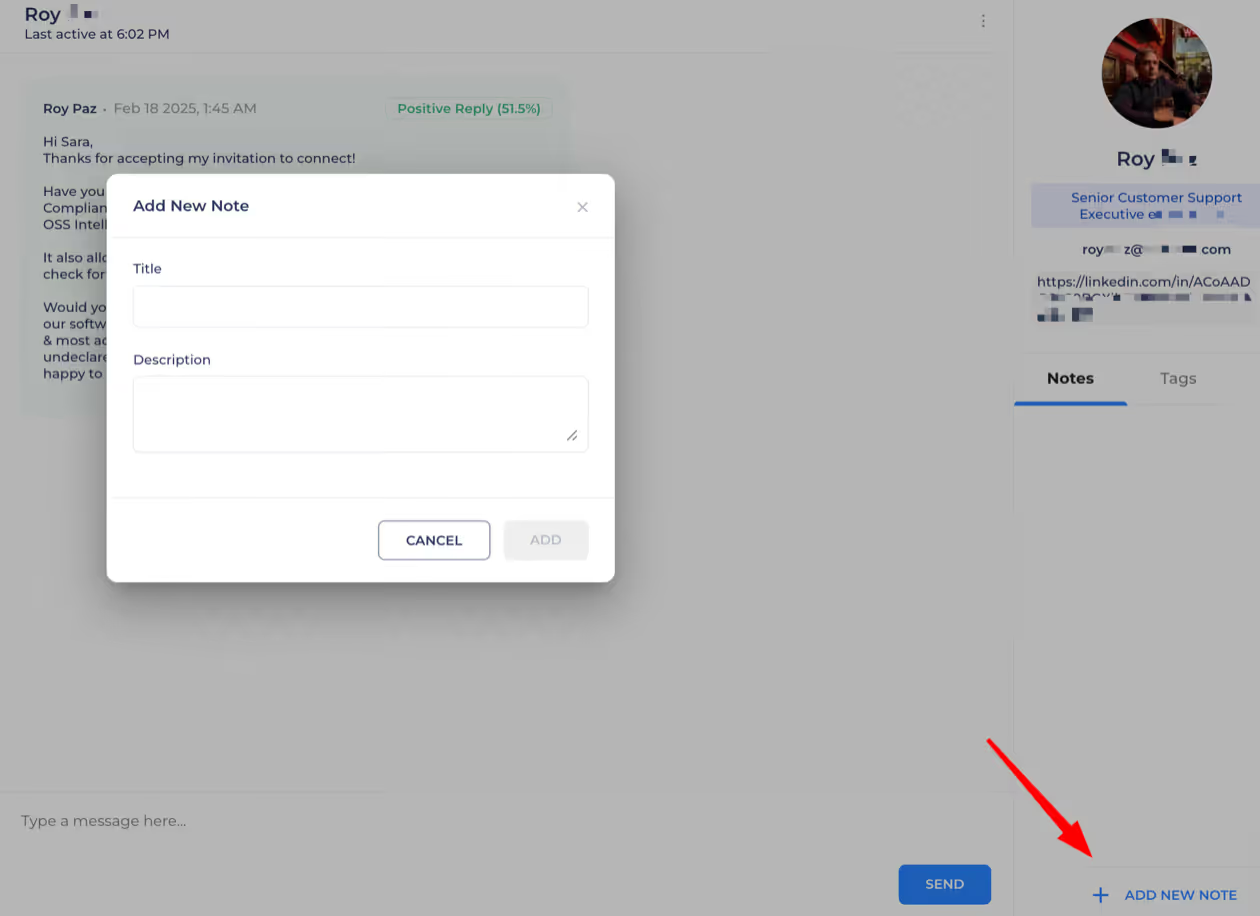
Salesflow provides a template library where you can save and reuse messages across campaigns. Personalization tokens let you insert dynamic fields — the prospect’s first name, last name, company name, and job title — into messages automatically.
What Salesflow does not offer is AI-powered message writing or optimization. There is no built-in assistant to help you write better copy, suggest variations, or improve response rates based on campaign data. Users have to supply their own message copy from scratch. For teams with strong copywriting skills this is fine, but for users who want guided help crafting outreach messages, this gap is noticeable compared to newer tools that include AI writing assistance.
Analytics & Reporting
Salesflow provides a statistics dashboard that tracks key outreach metrics including invite sends, acceptance rates, response rates, and campaign performance over time. Team and agency plans include more granular reporting across multiple accounts and users.
However, user feedback on analytics is notably mixed. Multiple reviewers on G2 and Capterra flag the reporting as confusing or inaccurate. One G2 reviewer noted that “data can be somewhat confusing — not entirely sure how accurate the reports are,” while another described the statistics as showing “conflicting figures on the dashboard.” The analytics module covers the basics, but it lacks the depth of segmentation that advanced users expect when trying to optimize campaigns at scale.
Lead Import & CSV Management
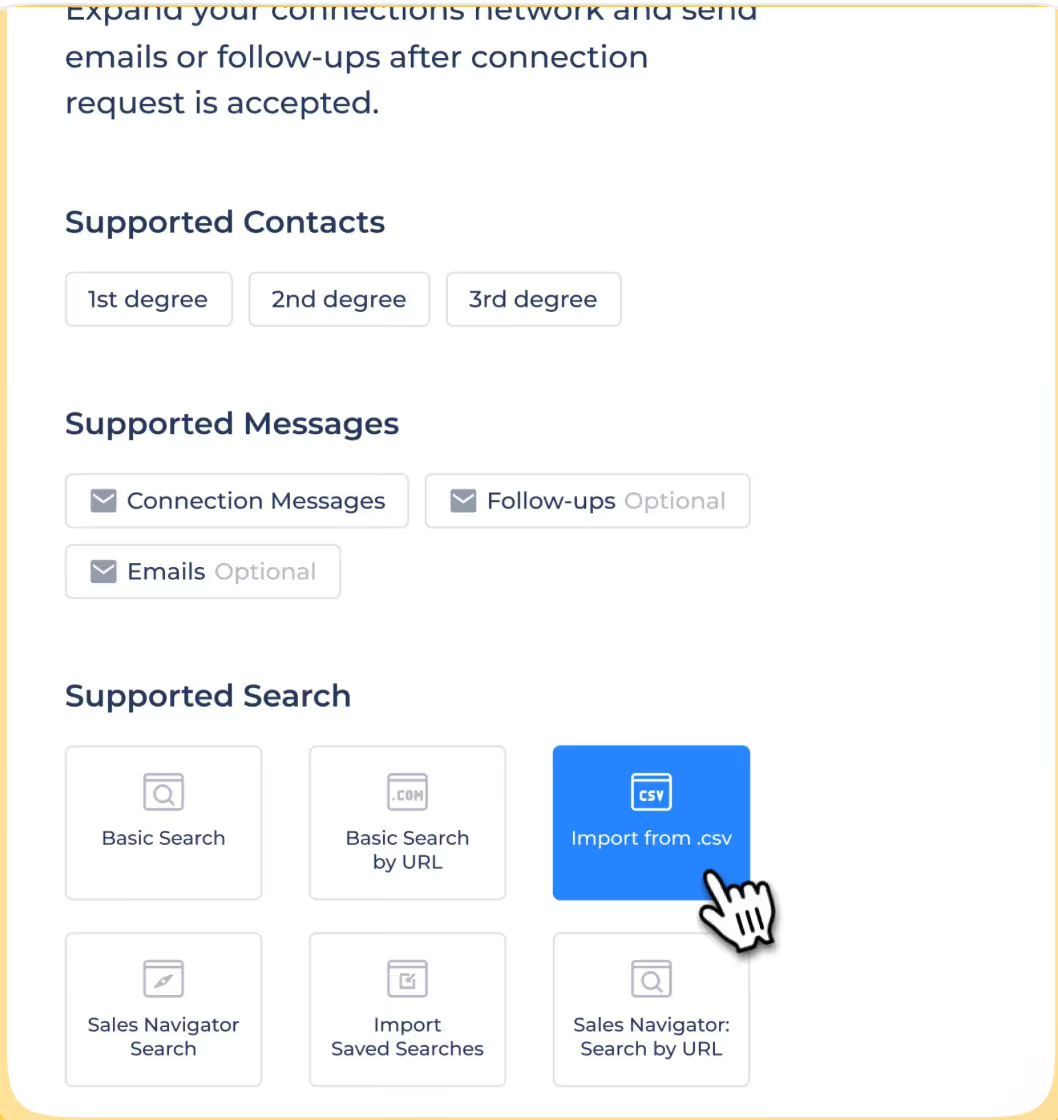
Salesflow supports two main methods of adding prospects to campaigns. The first is entering a LinkedIn or Sales Navigator search URL directly, from which Salesflow scrapes the results. The second is uploading a CSV file of contacts with their LinkedIn profile URLs included. CSV importing works reliably for most use cases, though several Capterra reviewers noted that the import format requirements were tricky to figure out initially. One reviewer mentioned: “When importing, it’s hard to tell why some did not import — importing format requirements were tricky to figure out, but support was great.”
A commonly cited frustration is the inability to transfer contacts between campaigns. If you want to move a list of prospects from one campaign to another, there is no direct way to do this — you have to re-import. There is also no global contact database, meaning you cannot easily check whether a prospect is already in your system before adding them again.
Safety & LinkedIn Compliance
Cloud-based operation is Salesflow’s most important safety feature. Because it runs on dedicated IP addresses rather than inside your browser, LinkedIn sees the activity as coming from a consistent location rather than an extension overlay. Salesflow also implements:
- Randomized action timing — actions are spaced out to mimic human behavior rather than firing at machine-like regularity.
- Auto-withdrawal of pending connection requests — to keep your pending request queue under LinkedIn’s threshold and avoid flags.
- Rate limiting — to prevent sending too many actions within a short window.
That said, user reviews on this point are not uniformly positive. Some users on G2 report frequent LinkedIn account disconnections that require manual re-authentication, which breaks campaign automation. One G2 reviewer flagged “constant disconnection of LinkedIn accounts requiring a lot of manual intervention.” While the infrastructure is sound in theory, operational reliability appears to be a recurring issue for a meaningful segment of users.
Team & Agency Management
Salesflow’s Teams and Agency plans include features designed for managing multiple users and client accounts:
- Admin dashboard — a centralized view of activity across seats and accounts.
- Blacklist management — the ability to block certain domains or profiles from being targeted across all campaigns.
- White-label branding — the Agency plan allows you to present reports under your own brand, useful for client-facing agencies.
- Dedicated onboarding — Team and Agency customers receive dedicated customer success support.
The caveat, as noted earlier, is that multi-account inbox management is limited. Without a shared inbox, agencies managing many client accounts may find the day-to-day reply management cumbersome.
CRM Integrations (Zapier, Native, API)
Salesflow integrates natively with LinkedIn Sales Navigator, HubSpot, Pipedrive, and Salesforce Starter. It also supports Zapier and Webhooks for connecting to tools not covered by native integrations, and provides an API for custom development needs.
The native HubSpot integration exists, but multiple user reviews flag it as limited. One G2 reviewer specifically called out: “If you’re using HubSpot or another CRM, Salesflow doesn’t sync directly. Many users had to rely on workarounds, which made managing replies and pipeline tracking harder.” The Zapier route works but introduces latency and additional cost. For teams with complex CRM workflows, this integration gap is a material limitation.
Done-for-You Setup Service
Salesflow offers an optional Done-for-You (DFY) service, priced at a one-time fee of $199. This service pairs you with a campaign manager from Salesflow’s team who helps develop your LinkedIn lead generation strategy, sets up your first campaigns, and manages initial execution on your behalf.
In theory, this is useful for users who are new to LinkedIn outreach and want expert guidance. In practice, reviews of the DFY service are the most polarizing in Salesflow’s entire review profile. On the positive side, several users found onboarding helpful. On the negative side, Capterra reviewers described the DFY experience as an “operational nightmare” with teams “continually making mistakes” and poor communication throughout. This is an area where your experience will likely depend heavily on which campaign manager you are assigned.
Getting Started: Onboarding & Setup Experience
Salesflow’s setup process is relatively straightforward compared to tools that require Chrome extensions, browser configuration, or SMTP setup. The basic flow involves creating an account, linking your LinkedIn profile, and building your first campaign — a process that, for users who know what they’re doing, can be completed in under 30 minutes.
Account connection & initial setup: Connecting your LinkedIn account is a single authentication step. Salesflow then assigns a dedicated IP address to your account in the background. The campaign builder is tab-based and walks you through selecting your campaign type, entering your target search URL, writing your message sequence, and setting your daily limits.
Learning curve: For beginners, there is a moderate learning curve. The platform terminology (campaign types, sequence logic, inbox management) takes time to internalize, and the interface — while functional — is not as polished as consumer-grade tools. Several G2 reviewers described it as “not immediately understandable” with “confusing options to perform the sales tasks.” One Software Advice reviewer summarized it well: “There was a learning curve. The software can be slow and buggy at times and basically requires a walk-through to understand how it works.” Once you’re past the initial setup, the day-to-day operation becomes manageable.
For experienced users who have previously used LinkedIn automation tools, the setup is fairly quick. One G2 reviewer noted their first campaign was live within 20 minutes of first use.
Support quality & documentation: Salesflow offers email and chat support, with dedicated customer success management on higher-tier plans. Feedback on support is genuinely split. On the positive side, multiple users specifically praised the responsiveness of the support team: “Salesflow offers the best support I have ever experienced with a software company.” On the negative side, a significant cluster of Capterra and G2 reviews describe experiences ranging from unhelpful to actively hostile. One Capterra reviewer wrote extensively about their experience with the Head of Customer Success, describing interactions as “aggressive, hostile, and rude.” This inconsistency is worth flagging — your support experience may vary significantly depending on the nature of your request.
What Real Users Say: Salesflow Reviews Analyzed
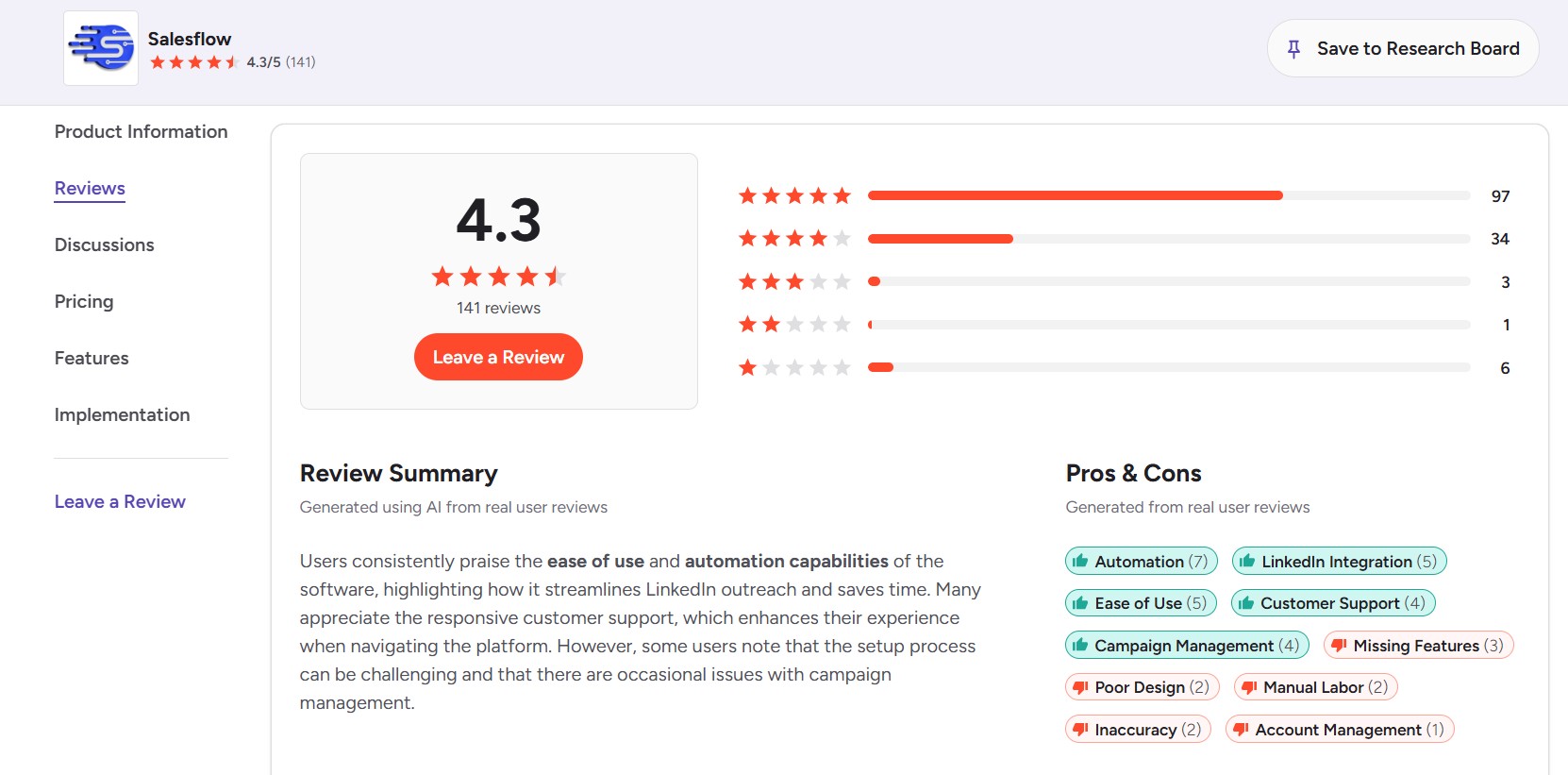
Rather than cherry-picking individual testimonials, we analyzed patterns across the full review profile on G2, Capterra, and GetApp to give you an accurate picture of the user consensus.
Aggregate ratings across platforms:
- G2: 4.3 out of 5 (based on verified user reviews)
- Capterra: 4.1 out of 5 (based on verified user reviews)
- GetApp: 4.1 out of 5 (based on 46 verified reviews)
These are respectable scores for a B2B SaaS tool, but they mask a bimodal distribution — Salesflow tends to receive either enthusiastic 4-5 star reviews or frustrated 1-2 star reviews, with fewer neutral opinions in the middle.
What users consistently praise:
- Time savings on LinkedIn prospecting — The most common positive theme across all platforms. Users repeatedly report being able to scale from manual outreach of 20–30 contacts per day to 100+ automated touchpoints with minimal daily effort.
- Ease of campaign creation — Multiple reviewers highlight that building a basic sequence is straightforward once you’ve gotten past initial setup. The template-based approach to message writing is appreciated.
- LinkedIn automation reliability (for most users) — The majority of users report that the core automation — sending requests, follow-ups, and InMails — runs reliably for their accounts.
- Cloud-based convenience — Users frequently mention that campaigns running 24/7 without their computer being on is a genuine operational advantage, especially for international outreach.
What users consistently complain about:
- Analytics accuracy — Multiple reviewers on G2 and Capterra note that the reporting dashboard shows metrics that don’t always match reality. Success rates, acceptance rates, and reply counts have been reported as inconsistent or inaccurate.
- LinkedIn account disconnections — A recurring frustration is that LinkedIn accounts frequently disconnect from Salesflow, pausing campaigns and requiring manual re-authentication. This breaks the “set and forget” promise of the platform.
- Interface clunkiness — The UI has been described as clunky, dated, and non-intuitive by multiple reviewers. Settings are reportedly buried under multiple clicks, and the campaign builder lacks the polish users expect from modern SaaS tools.
- Missing native integrations — HubSpot deep-sync, native email finding, and seamless CRM data flow are frequently cited as gaps.
- Customer support inconsistency — As described in the onboarding section, support quality appears to vary significantly by team member and issue type.
Red flags worth knowing before you buy:
Several serious complaints surface in the 1-2 star review cluster that warrant explicit mention:
- Unauthorized renewals and refund denials — At least one G2 reviewer described being renewed without consent, being unable to cancel easily, and being denied a refund. They rated the company 0/5 and called the behavior “shady.”
- Cancellation is not fully self-service — Multiple reviewers note that cancelling requires contacting customer support rather than a one-click billing portal action, which creates friction if you want to stop paying quickly.
- DFY service execution issues — Several users who paid for the Done-for-You service describe the experience as disorganized, with repeated campaign errors and poor communication that eventually led them to cancel entirely.
These are not universal experiences, but they represent a meaningful pattern across multiple independent review platforms and should be weighted in your evaluation.
Salesflow Pricing: Is It Worth the Cost?
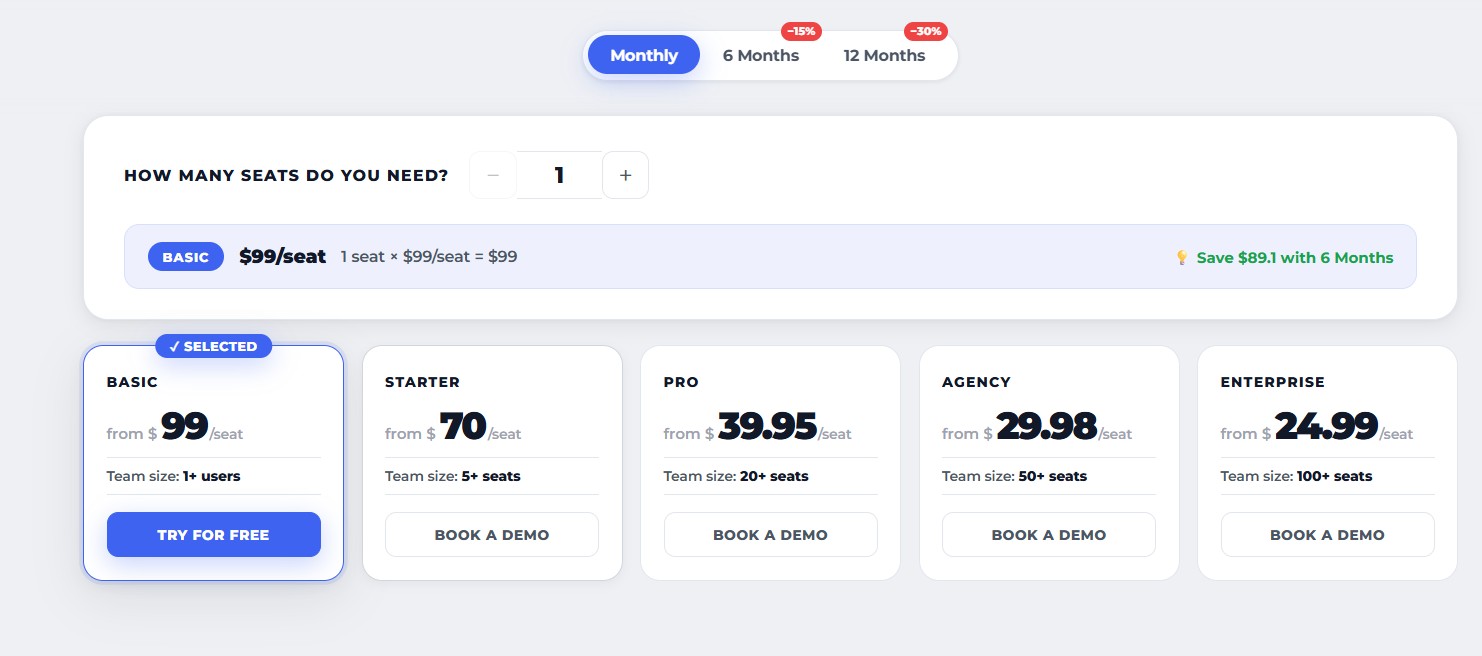
Salesflow’s pricing structure covers three main tiers, with the solo plan being publicly listed and team/agency plans available on request.
Plan breakdown:
- Single User Plan — $99/month (or $79/month billed annually): Includes one LinkedIn account, up to 400 connection requests per month, up to 800 Open InMails per month, follow-up messaging sequences of up to 2,000 per month, groups and events engagement up to 1,000 per month, advanced reporting and statistics, blacklists, a customizable LinkedIn inbox, Webhooks, and native integrations.
- Teams Plan — Custom pricing: Includes all Single User features plus team management capabilities, dedicated customer success, admin panel, and collaboration features. Pricing is provided upon request based on seat count and requirements.
- Agency Plan — Custom pricing: Includes all Teams features plus admin panel management for unlimited clients, dedicated IP settings for high-level security, white-label branding, and the option to operate under your own logo for client-facing reporting. Custom pricing on request.
- Done-for-You Setup — $199 one-time fee: An optional add-on where a Salesflow campaign manager helps configure and launch your first campaigns. This is separate from the monthly subscription.
Hidden costs and gotchas:
- The $79/month price is only available on annual billing. Monthly billing is $99/month — a $240/year difference per seat that is not always prominently communicated.
- The Teams and Agency pricing is opaque. Without a discovery call, it’s impossible to know your actual cost until you’ve invested time in a sales conversation.
- LinkedIn Sales Navigator (required for many of Salesflow’s advanced targeting features) costs $79–$135/month extra, depending on your plan. This is a LinkedIn cost, not Salesflow’s, but buyers should factor it into total investment.
- The DFY service is an add-on, not included in any plan. If you’re considering the managed service, budget $199 on top of your monthly subscription.
Value verdict — who gets ROI, who doesn’t:
At $99/month, Salesflow can deliver strong ROI for users in high-ticket B2B sales. If a single booked meeting from your outreach is worth $2,000+ in pipeline, the math favors the investment easily. Users consistently report meaningful increases in meetings booked — one G2 reviewer described a “large uplift in connections, messages replied to and meetings booked,” while another attributed “4x qualified pipeline” growth to Salesflow-powered outreach.
The value equation breaks down for users in lower-value deals, very small teams splitting seats across budget, or buyers who primarily need email outreach rather than LinkedIn-first. At $99/user/month with no free tier and paid annual pricing for the lower rate, Salesflow is meaningfully more expensive than several capable competitors.
Free trial and cancellation policy:
Salesflow advertises a free trial that does not require a credit card. The trial period covers core functionality but does not include full access to team features without upgrading. As noted in the reviews section, cancellation is not self-service — users report needing to contact support to stop their subscription, which has led to disputes in some cases.
Salesflow Pros and Cons
Having analyzed the features, pricing, and user feedback in depth, here is an honest assessment of Salesflow’s strengths and weaknesses.
Pros:
- Genuinely saves time on LinkedIn outreach. The most consistent praise across all review platforms is how much time Salesflow saves for users doing volume LinkedIn prospecting. For a solo SDR or founder spending hours on manual LinkedIn activity, this is a real, measurable benefit.
- Cloud-based architecture is the right approach. Running on dedicated IPs without a Chrome extension is the correct way to do LinkedIn automation from both a safety and reliability standpoint. Users don’t need their computers running, and campaigns can target global audiences across time zones.
- Sequence builder handles most use cases. For standard LinkedIn outreach — connection requests, follow-ups, InMails — the sequence logic is functional and covers what most users need. The template system makes setting up recurring campaign types efficient.
- Sales Navigator compatibility. Native integration with LinkedIn Sales Navigator means users with advanced targeting needs can plug their searches directly into Salesflow without workarounds.
- Multi-account support for agencies. The ability to manage multiple LinkedIn accounts under a single Salesflow login is genuinely useful for agencies, even if the shared inbox limitation adds friction.
Cons:
- Analytics reliability is a legitimate concern. Multiple independent reviewers across G2 and Capterra flag metrics that appear inaccurate or inconsistent. This is a meaningful problem if you’re trying to optimize outreach based on performance data.
- Frequent LinkedIn account disconnections. For a tool whose value proposition is “set it and forget it” automation, campaigns breaking because of account disconnection issues undermine the core promise. This is a documented, recurring complaint rather than an isolated incident.
- No native email enrichment or finding. Unlike tools such as Lemlist or La Growth Machine, Salesflow requires you to bring your own email data for multi-channel campaigns. This adds cost and friction for teams that need a one-stop solution.
- Interface lags behind modern SaaS standards. The UI described by reviewers as clunky and unintuitive is a practical drag on daily use, particularly for new users still learning the platform.
- Customer support inconsistency is a real risk. The bimodal support experience — some users praising it highly, others describing it as hostile and unhelpful — creates unpredictable outcomes when you actually need help.
- Cancellation friction and refund disputes. The documented difficulty cancelling subscriptions and reported refund denials are red flags for buyers who value straightforward billing practices.
Salesflow Alternatives: The Right Tool for Different Needs
Salesflow covers a specific niche well, but it’s not the right tool for every buyer. Here is a balanced comparison of the strongest alternatives, with clear guidance on when each makes more sense than Salesflow.
Feature comparison at a glance:
| Feature | Salesflow | Dealsflow | Expandi | Lemlist | La Growth Machine |
|---|---|---|---|---|---|
| Cloud-based | ✅ | ✅ | ✅ | ✅ | ✅ |
| LinkedIn automation | ✅ | ✅ | ✅ | ✅ | ✅ |
| Native email outreach | Partial | ❌ | Partial | ✅ | ✅ |
| AI personalization | ❌ | ✅ | Partial | ✅ | ✅ |
| Unified inbox | ✅ | ✅ | ✅ | ✅ | ✅ |
| Free trial | ✅ | ✅ (14 days) | ✅ (7 days) | ✅ | ✅ |
| Starting price/month | $99 | $49 | $99 | $39 | $60 |
| Multi-account (agency) | ✅ | ✅ | ✅ | ✅ | ✅ |
Dealsflow — The Top Alternative (Recommended)
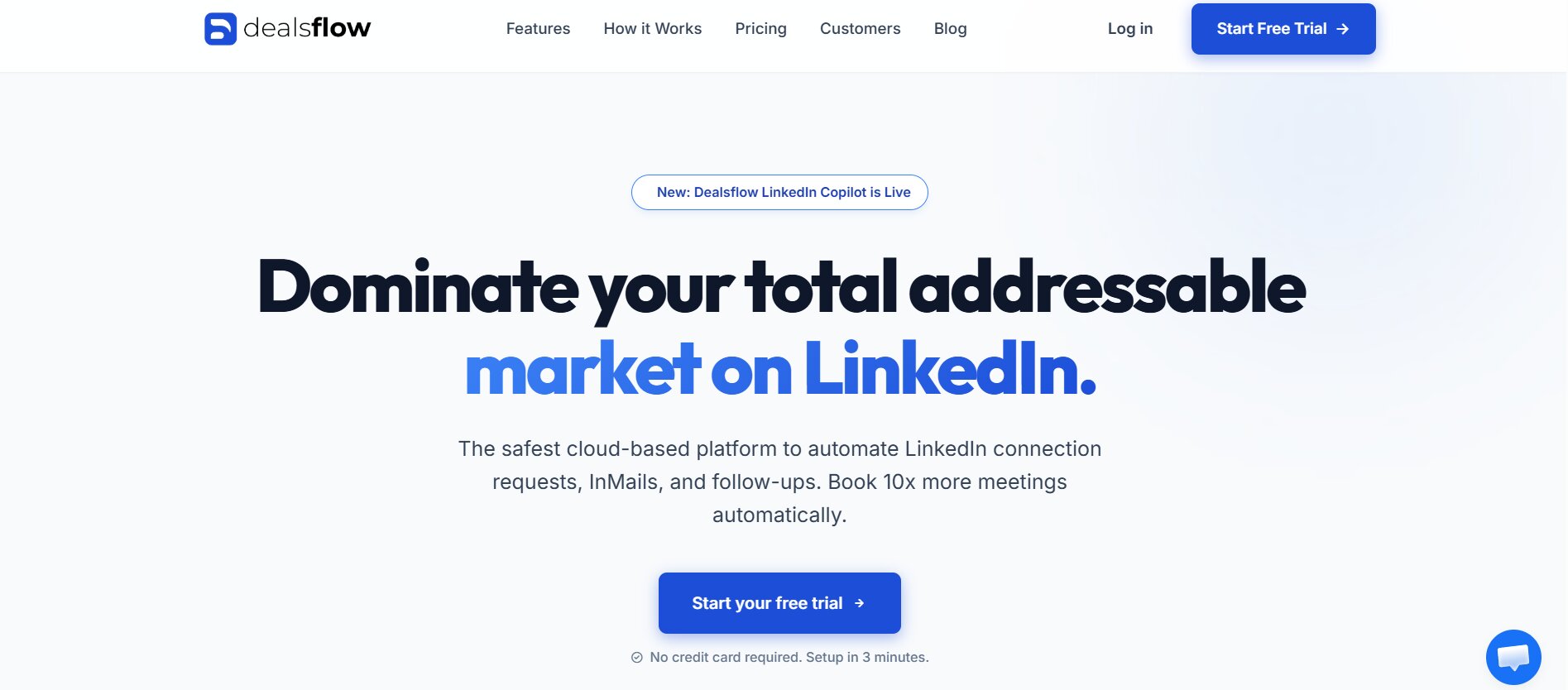
Dealsflow is the strongest alternative to Salesflow for most buyers, and it deserves the top spot for several concrete reasons. It is a cloud-based LinkedIn outreach automation platform with a cleaner interface, a more transparent pricing model, and a free trial that requires no credit card.
Dealsflow operates on the same foundational principle as Salesflow — dedicated residential proxy IPs assigned per account, 24/7 cloud-based automation, and a sequence builder for LinkedIn outreach — but it addresses several of Salesflow’s documented shortcomings.
What Dealsflow does differently:
- AI-powered personalization built in. Dealsflow’s AI analyzes each prospect’s LinkedIn profile and generates unique icebreakers automatically. Users report connection acceptance rates jumping from around 15% to nearly 40% as a result. This is a feature Salesflow simply does not have.
- Significantly more transparent pricing. Dealsflow’s pricing is publicly listed on its website with no discovery call required. The Starter plan begins at $49/month for one LinkedIn account — half the cost of Salesflow’s entry plan. The Professional plan is $99/month and includes up to three LinkedIn accounts. The Enterprise plan is $249/month for large teams and agencies with 10+ accounts, white-label reports, a Smart Inbox Copilot, and dedicated success management. All plans come with a 14-day free trial, no credit card required.
- Cancellation is self-service. Dealsflow explicitly states that subscriptions can be cancelled at any time directly from the billing dashboard, with no long-term contracts unless an annual plan is chosen. This directly addresses one of the most consistent pain points reported by Salesflow users.
- Drag-and-drop campaign builder. The advanced sequence builder is designed for ease of use, supporting profile views, connection requests, and follow-up messages on a configurable timeline.
- Smart Inbox. Dealsflow’s unified inbox automatically unenrolls prospects when they reply — preventing the awkward situation of a prospect receiving automated follow-ups after they’ve already responded. It also manages all LinkedIn replies from a single view without needing to switch between browser tabs.
Dealsflow pricing summary:
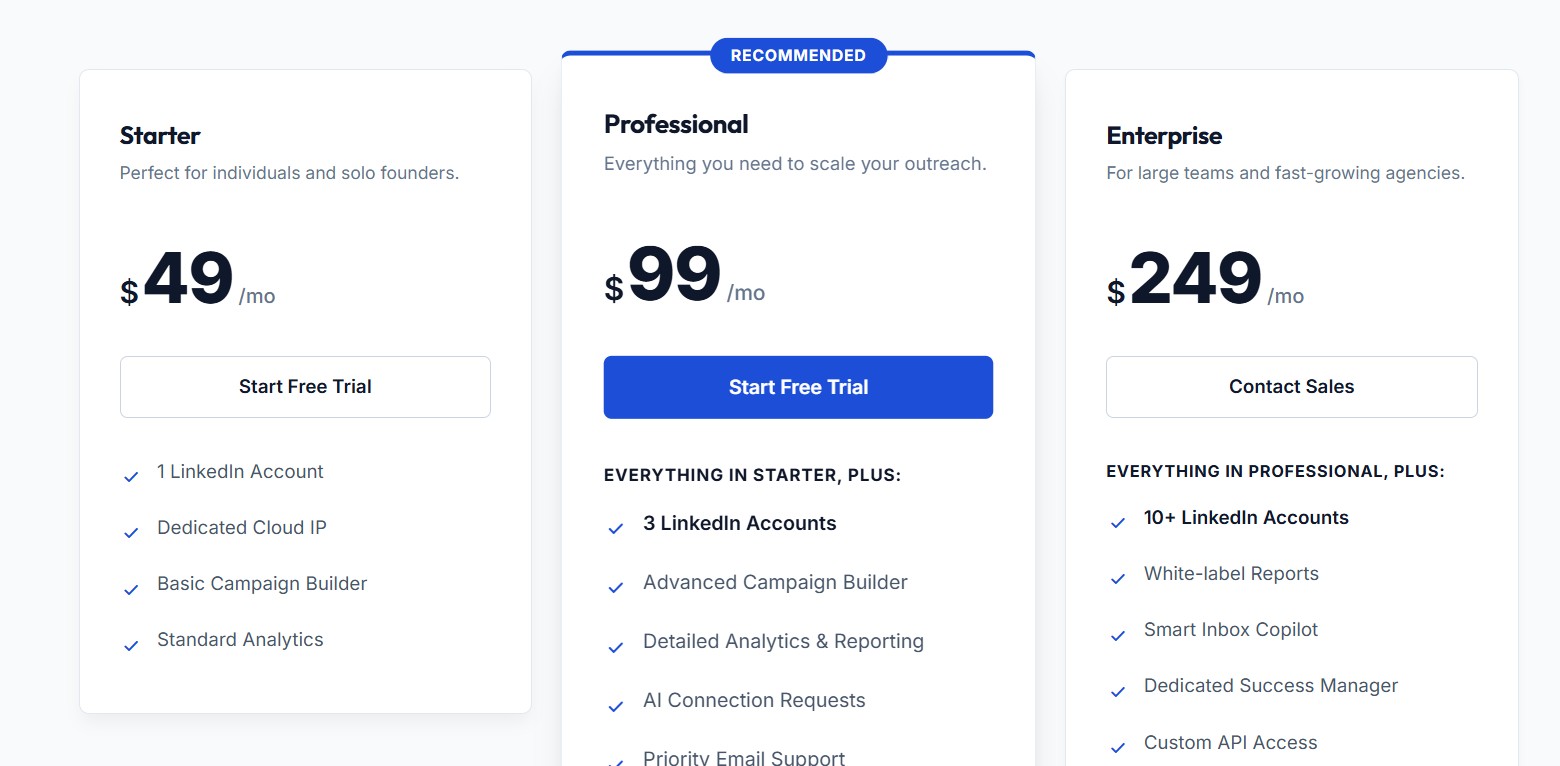
- Starter: $49/month — 1 LinkedIn account, dedicated cloud IP, basic campaign builder, standard analytics.
- Professional: $99/month — 3 LinkedIn accounts, advanced campaign builder, detailed analytics and reporting, AI connection requests, priority email support.
- Enterprise: $249/month — 10+ LinkedIn accounts, white-label reports, Smart Inbox Copilot, dedicated success manager, custom API access.
- Annual billing saves 20% across all plans.
For buyers who are currently evaluating Salesflow, Dealsflow offers a meaningfully competitive alternative with better pricing transparency, AI-native personalization, and cleaner billing practices.
Salesflow vs. Expandi — For Safety-First Buyers
Expandi is another cloud-based LinkedIn automation tool that competes directly with Salesflow on the safety and compliance front. Like Salesflow, it runs on dedicated local IP addresses rather than as a browser extension, and it is designed to keep your account within LinkedIn’s acceptable usage parameters.
Where Expandi differentiates is in its personalization capabilities. Expandi supports hyper-personalized outreach including personalized images and GIFs within message sequences — a feature that can meaningfully improve response rates compared to text-only messages. It also includes if-then branch logic in sequences, allowing you to customize follow-up paths based on whether a prospect viewed your profile, replied, or took no action. This makes Expandi’s sequencing meaningfully more sophisticated than Salesflow’s.
Expandi starts at $99/month per seat with a 7-day free trial. It is best suited for experienced sales operators and growth-focused agencies that prioritize account safety and advanced personalization, and who aren’t deterred by a steeper learning curve. Reviewers note that Expandi’s interface is not beginner-friendly, and there have been reports of tight refund policies.
Salesflow vs. Lemlist — For Multi-Channel Buyers
Lemlist is the right choice for buyers who need a true multi-channel outreach platform where email is as important as LinkedIn. While Salesflow’s email functionality is an add-on that requires you to bring your own contact data, Lemlist has native email finding and verification built directly into the platform, pulling from multiple third-party data sources. This removes the friction of needing a separate data enrichment tool.
Lemlist also includes a 450 million+ contact database for prospecting, AI-powered personalization that can insert personalized images and videos into cold emails, and multi-channel sales sequences that combine email, LinkedIn, and calling in a single workflow. For teams whose outreach strategy is genuinely split across channels rather than LinkedIn-first, Lemlist’s integrated approach is operationally cleaner than Salesflow.
Lemlist’s Email Starter plan begins at $39/month billed monthly, making it more accessible for budget-conscious buyers. Enterprise and multi-channel plans scale from there. It is best for teams that want email deliverability, visual personalization, and a full B2B contact database in one platform.
Salesflow vs. La Growth Machine — For Power Users
La Growth Machine is the most feature-rich multi-channel outreach platform in this comparison. It supports LinkedIn, email, and Twitter outreach in deeply integrated workflows, with native voice message support on LinkedIn — a capability no other tool in this list offers. Its sequence builder is sophisticated enough to handle complex conditional logic, A/B testing, and cross-channel orchestration, making it the choice for advanced operators who need maximum flexibility.
La Growth Machine also includes built-in lead enrichment, pulling additional contact data from multiple sources to enrich your prospect lists automatically. For teams managing sophisticated outbound programs with multiple channels and complex audience segmentation, it delivers capabilities that Salesflow simply doesn’t match.
The trade-off is complexity and cost. La Growth Machine’s pricing starts at approximately $60/month for the Basic plan, but its Advanced plan — where most of the multi-channel features unlock — is significantly higher. It requires more time to set up and configure correctly. It is best for power users, experienced outbound teams, and agencies running multi-channel programs at scale who have outgrown simpler tools.
Salesflow vs. Dux-Soup / PhantomBuster — For Budget Buyers
For buyers who need basic LinkedIn automation at the lowest possible cost and can accept a higher risk profile, browser-extension tools like Dux-Soup and PhantomBuster represent the budget end of the market. Dux-Soup starts at approximately $11.25/month, while PhantomBuster’s LinkedIn automations begin at a lower price point with usage-based billing.
The critical trade-off is safety. As noted earlier, browser-based tools are significantly easier for LinkedIn to detect as automated because the activity patterns are generated inside the browser rather than from a dedicated cloud IP. This increases the risk of LinkedIn warnings, temporary restrictions, or permanent account bans. For users running low-volume outreach where a potential restriction is an acceptable risk, these tools can work. For anyone running outreach at meaningful volume or managing client accounts, the account risk makes cloud-based tools the more prudent choice despite the higher cost.
Use Case Fit: Should YOU Use Salesflow?
Solo SDR or Account Executive Doing LinkedIn Prospecting
This is Salesflow’s strongest use case. If you are a solo sales professional spending significant time on LinkedIn, Salesflow can automate the mechanical parts of your outreach — connection requests, follow-ups, InMails — and free you up to focus on conversations and closing. The $99/month investment is justified if a single additional booked meeting per month covers the cost, which is achievable for most SDRs in B2B sales. Salesflow works best here when paired with strong copywriting, a well-targeted Sales Navigator list, and a willingness to manage the occasional account disconnection.
Small Sales Team (2–10 Seats)
Salesflow can work for small teams, but the per-seat cost adds up quickly. At $99/month per seat, a 5-person team is spending $495/month — a non-trivial budget for a tool that still has meaningful limitations in shared inbox management and analytics depth. Team plans offer admin dashboards and some collaboration features, but the lack of a shared inbox means each rep is still managing their own reply stream in isolation. If your team needs coordinated inbox management or shared campaign visibility, you may find Salesflow’s team features underwhelming relative to the cost.
Lead Generation or Outreach Agency
The Agency plan’s white-label reporting and multi-account management make Salesflow a plausible choice for outreach agencies. Managing multiple client LinkedIn accounts from a single dashboard is genuinely useful, and the white-label branding feature allows you to present performance reports under your own brand. The key limitation, as noted throughout this review, is the absence of a shared inbox — which means reply management across client accounts requires account switching rather than a unified view. Agencies managing more than a handful of active client accounts may find this creates meaningful daily friction.
When Salesflow Is the Wrong Choice
Salesflow is not the right tool if your primary outreach channel is email rather than LinkedIn. Its email functionality is supplemental and requires you to source your own contact data. If you need a tool that handles the full multi-channel workflow natively — finding email addresses, sending sequences across LinkedIn and email, and syncing everything back to your CRM without Zapier — a platform like Lemlist or La Growth Machine will serve you better.
It’s also the wrong choice if you are on a tight budget and primarily need basic automation. At $99/month with no free tier after trial, Salesflow is expensive relative to tools like Dealsflow’s Starter tier ($49/month) that offer comparable LinkedIn automation with more transparent billing.
Finally, if you are highly CRM-dependent and require native two-way sync with HubSpot, Salesforce, or Pipedrive as a non-negotiable, Salesflow’s integration depth may disappoint you. The native integrations exist, but user feedback suggests they are limited in practice, with many teams resorting to Zapier workarounds.
Final Verdict
Scorecard:
| Category | Rating |
|---|---|
| Core LinkedIn automation | ⭐⭐⭐⭐ (4/5) |
| Pricing transparency | ⭐⭐⭐ (3/5) |
| Ease of use / UX | ⭐⭐⭐ (3/5) |
| Analytics & reporting | ⭐⭐½ (2.5/5) |
| Customer support | ⭐⭐½ (2.5/5) |
| CRM & integrations | ⭐⭐⭐ (3/5) |
| Overall value | ⭐⭐⭐ (3/5) |
Salesflow is a functional, established LinkedIn automation tool that genuinely delivers on its core promise of saving time for users doing high-volume LinkedIn outreach. The cloud-based infrastructure is the right approach, the sequence builder covers most use cases, and the platform has powered real results for thousands of users across multiple industries. Its 4.3/5 rating on G2 and 4.1/5 on Capterra reflect a user base that is, on balance, satisfied with what the tool does.
At the same time, Salesflow in 2026 carries real, documented limitations that a buyer should weigh honestly. Analytics reliability issues, frequent account disconnections, a clunky UI, a narrow integration depth, and a polarizing customer support experience are not minor complaints — they are consistent patterns across independent review platforms. The billing friction and refund difficulties reported by some users are particularly worth noting for anyone who values clean, self-service account management.
Our recommendation: Salesflow is worth considering if you are a LinkedIn-first SDR, a small agency needing multi-account management, or a sales team with straightforward outreach needs and a willingness to work around the platform’s UX limitations. It is not the right choice if you need deep multi-channel capability, native CRM sync, or a lower price point.
For buyers who are uncertain, we recommend starting with Dealsflow — it offers a 14-day free trial with no credit card, covers the same LinkedIn automation core with AI personalization built in, has transparent public pricing starting at $49/month, and explicitly allows self-service cancellation. It directly addresses the most common pain points reported by Salesflow’s dissatisfied users.
Frequently Asked Questions
Is Salesflow safe for LinkedIn?
Salesflow operates from the cloud using dedicated IP addresses rather than a browser extension, which makes its automation harder for LinkedIn to detect than extension-based tools. The platform includes safety features such as randomized action timing, auto-withdrawal of pending connection requests, and rate limiting. That said, some users report frequent account disconnections that suggest the tool is not entirely immune to LinkedIn’s detection. Following Salesflow’s recommended daily limits is essential.
Does Salesflow work without Sales Navigator?
Yes. Salesflow works with standard LinkedIn accounts. However, many of its most powerful targeting and InMail features work significantly better with Sales Navigator, as it allows more precise audience filtering and unlocks the Open InMail capability. For users on standard LinkedIn, campaign targeting is limited to what standard LinkedIn search allows.
Can you cancel Salesflow anytime?
Salesflow allows cancellation, but multiple verified user reviews indicate that the process requires contacting customer support rather than a self-service billing portal action. This has led to disputes in some documented cases. If clean, self-service cancellation is important to you, this is worth factoring into your decision.
Does Salesflow support email outreach?
Yes, partially. Salesflow allows you to add email steps to your LinkedIn sequences, but it does not include native email finding or data enrichment. You need to supply email addresses for your contacts from a separate tool. This makes Salesflow’s email capability supplemental rather than a core feature.
How many accounts can one user manage?
Under the Single User plan, one user can manage multiple LinkedIn accounts. The exact number depends on the plan configuration and is discussed during onboarding. Team and Agency plans are designed for managing larger numbers of accounts across multiple users.
What CRMs does Salesflow integrate with?
Salesflow natively integrates with HubSpot, Pipedrive, and Salesforce Starter. It also supports Zapier and Webhooks for connecting to other tools, and provides an API for custom integrations. However, user feedback suggests the native CRM sync depth is limited in practice, with many teams using Zapier as a workaround.
Is there a Salesflow free trial?
Yes. Salesflow offers a free trial that does not require a credit card. The trial covers core platform functionality, though team and agency features may require a paid plan to access in full.
Salesflow vs. Expandi: which is safer?
Both are cloud-based tools with dedicated IP infrastructure, placing them in the same safety category. Expandi uses local dedicated IPs specifically assigned per user account and is designed with account safety as a primary focus. Salesflow also assigns dedicated IPs, but user reports of account disconnections are more prevalent in Salesflow’s review profile than in Expandi’s. For the most safety-sensitive use cases, Expandi’s architecture and track record may offer a marginal advantage.