


LinkedIn has quietly become the most competitive prospecting channel in B2B sales. Everyone is automating, everyone is sequencing, and your ideal customer’s inbox is full of connection requests they never asked for. Into this crowded market steps SalesRobot — a tool that promises to cut through the noise, scale your outreach, and land you more meetings without the manual grind. But with dozens of LinkedIn automation tools making similar promises in 2026, the real question is not whether SalesRobot works in theory. It is whether it holds up in practice, at your budget, for your use case — and whether the risk to your LinkedIn account is worth taking. That is exactly what this review answers.
What Is SalesRobot and Who Is It Actually For?
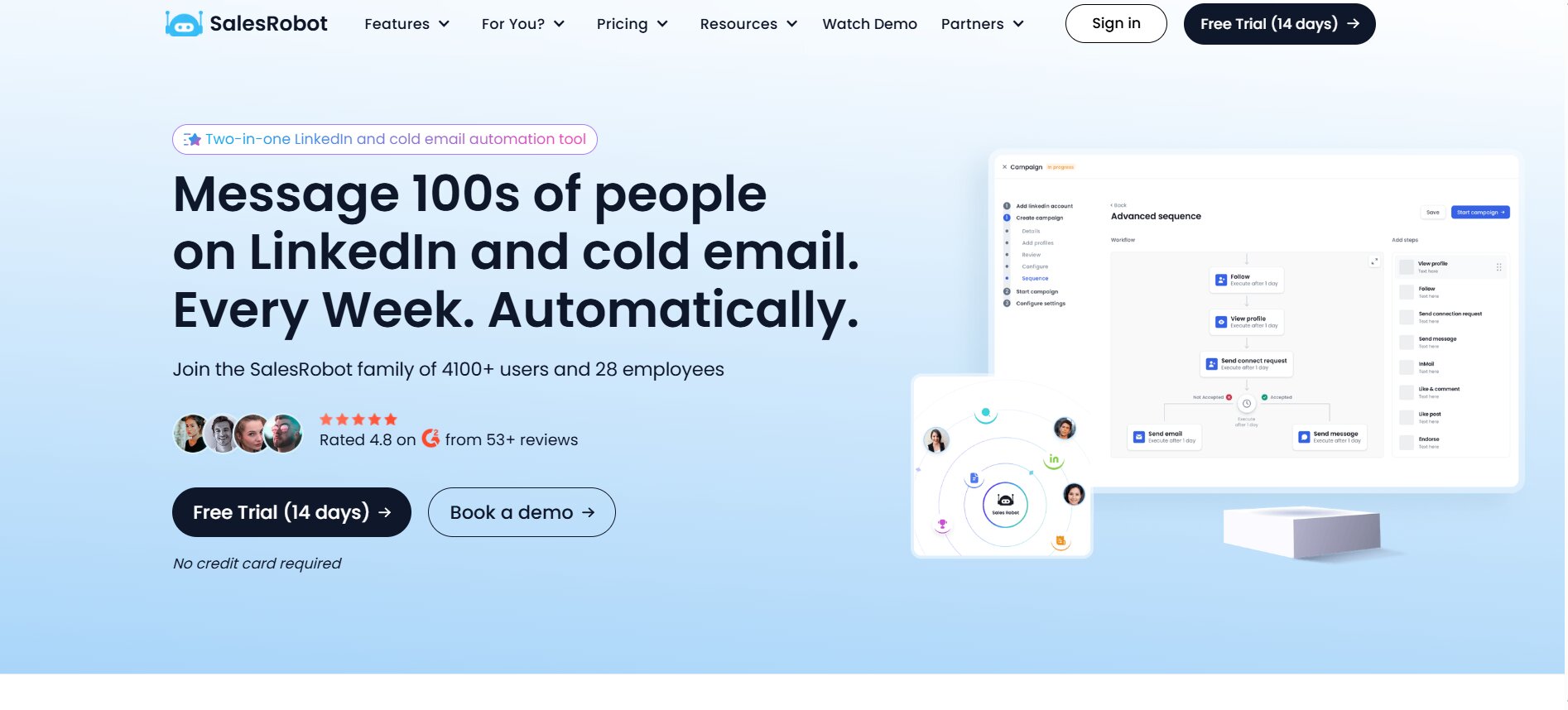
If you have spent any time exploring LinkedIn automation tools in 2026, you have almost certainly come across SalesRobot. It markets itself loudly — promising to connect you with hundreds of prospects weekly, automate your entire outreach pipeline, and act as a virtual SDR running in the background while you focus on closing. That is a compelling pitch. But does the product actually live up to it?
This review answers exactly that question. We have gone through the platform’s features in detail, cross-referenced real user reviews from G2, Product Hunt, AppSumo, and Trustpilot, and compared SalesRobot against the most relevant alternatives available in 2026. Nothing here is filler. If a claim is made, it is backed by what the tool actually does or what users have actually reported.
What Does SalesRobot Do
SalesRobot is a cloud-based sales automation platform that handles LinkedIn and email cold outreach from a single dashboard. At its core, it does three things: it finds the people you want to reach, sends them a sequence of automated messages across LinkedIn and email, and manages the replies in a built-in inbox. You do not need to keep your computer on for it to run — it is cloud-based, meaning campaigns run 24/7 in the background once configured.
The platform automates connection requests, follow-up messages, InMails, profile visits, post engagements, endorsements, and cold emails. It also uses AI to write and personalize those messages, and it includes a lightweight CRM to track where each lead sits in your outreach sequence. The goal, as the company positions it, is to help B2B sales teams, founders, and agencies generate leads without doing every repetitive task manually.
The One-Paragraph Verdict
SalesRobot is a genuinely capable LinkedIn and email automation platform with real strengths in account safety, multi-channel sequencing, and AI-powered personalization. For individual sellers, small B2B teams, and agencies running moderate outreach volumes, it delivers solid value — particularly if LinkedIn is your primary lead generation channel. However, it is not without serious caveats. Reliability complaints from real users are more than occasional noise. Pricing scales up fast as you add accounts. Email deliverability lags behind dedicated cold email tools. And LinkedIn’s own terms of service explicitly prohibit automation tools, so account risk — however well-managed — never fully disappears. It is a legit tool, but whether it is the right tool depends heavily on your use case and risk tolerance.
Who Should Use SalesRobot — and Who Definitely Shouldn’t
SalesRobot fits a specific profile. It works best for:
- B2B founders and sales reps who want to automate LinkedIn prospecting without hiring a dedicated SDR
- Small-to-mid-sized sales teams running multi-touch outreach across LinkedIn and email simultaneously
- Marketing agencies managing outreach for a handful of client accounts, where per-account pricing is still manageable
- Professionals who have tried manual LinkedIn outreach and want to scale without simply doing more of the same
It is a poor fit for:
- Teams where email is the primary channel, not LinkedIn — dedicated cold email tools like Instantly or Lemlist will outperform SalesRobot on deliverability metrics
- Agencies managing 10+ LinkedIn accounts — at that scale, the per-account pricing model becomes expensive fast, and flat-fee alternatives like HeyReach offer better economics
- Users with zero margin for LinkedIn account risk — if your personal or business LinkedIn profile is mission-critical and you cannot afford any chance of a temporary restriction, no automation tool is truly safe, including this one
- Budget-constrained solopreneurs running a single low-volume campaign — the entry price of $59/month is reasonable, but the value-to-cost ratio narrows at lower usage levels
SalesRobot at a Glance: Scorecard & Key Specs
Before diving into feature depth, here is a high-level orientation. SalesRobot is a cloud-based tool, meaning it does not require a Chrome extension or an open browser tab to run campaigns. It was founded with a specific focus on safe LinkedIn automation and has since expanded into email, AI-driven personalization, and built-in CRM functionality.
Feature Scorecard (Rated 1–5 Across 6 Dimensions)
Based on available user reviews and documented capabilities across G2, HeyReach’s comparative review, and Salesforge’s hands-on test, here is how SalesRobot rates across six core dimensions:
| Dimension | Score | Notes |
|---|---|---|
| LinkedIn Automation | 4.5/5 | Strong core capability with dedicated IPs and mobile API usage |
| Email Outreach | 3/5 | Functional but lags behind dedicated email tools on deliverability |
| Personalization & AI | 4/5 | SalesGPT and AI variables are genuine differentiators |
| Account Safety | 4/5 | Above-average safety architecture; not zero-risk |
| Reporting & Analytics | 3.5/5 | Solid but can lag on updates; not enterprise-grade |
| Value for Money | 3/5 | Good for small teams; scales expensively for agencies |
Pros at a Glance
- Cloud-based architecture means campaigns run without keeping a computer on
- Dedicated residential IPs and LinkedIn mobile APIs for reduced detection risk
- True multi-channel outreach combining LinkedIn and email in one platform
- AI-powered personalization that goes beyond name/company fields
- Built-in mini-CRM with smart reply detection to stop follow-ups automatically
- 14-day free trial with no credit card required
- Integrates with HubSpot, Pipedrive, GoHighLevel, and Zapier
Cons at a Glance
- Per-account pricing model gets expensive quickly for agencies or larger teams
- Multiple user reports of reliability issues, automation failures, and unexpected downtime
- Some AppSumo users report features being removed or locked behind new paid tiers without advance notice
- Email deliverability is weaker compared to tools like Instantly or Lemlist
- LinkedIn account restriction risk exists regardless of safety features — LinkedIn prohibits automation tools in its terms
- Daily connection request limits sometimes fall short of the stated 50/day maximum (users report hitting 40–41 on some days)
- Cancellation requires contacting support via chat with 15 days’ notice — no self-service option
How We Tested SalesRobot (Methodology & Cost Breakdown)
The Salesforge team published a documented hands-on test in which they used SalesRobot’s Advanced plan at $79/month across three LinkedIn accounts and added email automation for one mailbox at $15/month. Over several weeks of active testing — including credits and taxes — they reached a total spend of approximately $399. This review synthesises that testing data, the HeyReach comparative review (updated February 2026), verified G2 user reviews, AppSumo feedback, and Product Hunt user commentary to give you a picture that is grounded in actual usage — not just feature lists from the vendor’s own website.
SalesRobot Features: Deep Dive With Real Test Results
SalesRobot’s feature set covers five main areas: LinkedIn automation, email outreach, personalization, lead management, and analytics. Each is documented below with what the platform actually does — and where the gaps appear in practice.
1. LinkedIn Automation — Limits, Safety, and Daily Volume
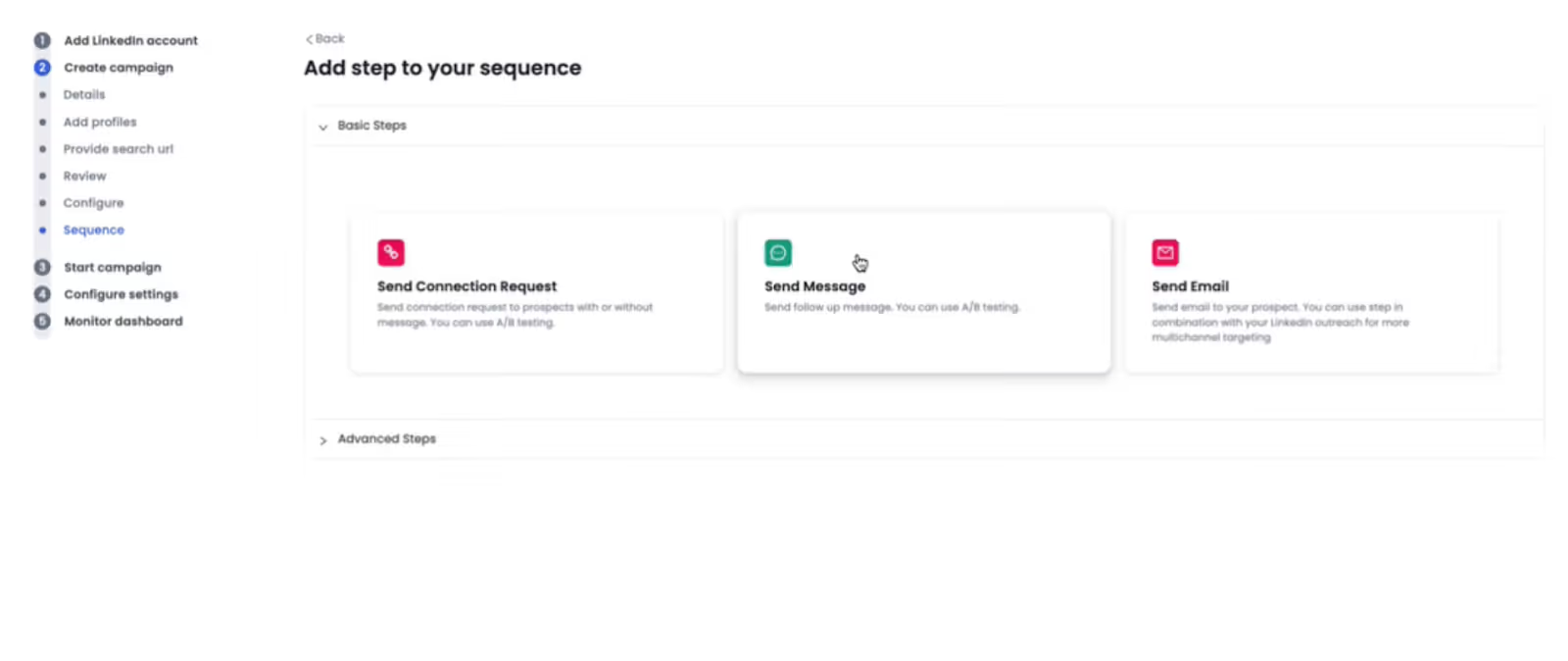
LinkedIn automation is SalesRobot’s core competency and the reason most users come to the platform. The tool automates a surprisingly wide range of LinkedIn actions, not just connection requests and messages. You can automate profile visits, post likes, post comments, skill endorsements, follows, and InMail messages — all within a single sequence.
Campaigns can pull prospects from several sources:
- LinkedIn Search URLs
- LinkedIn Sales Navigator filter results
- LinkedIn Group members
- LinkedIn Event attendees
- Commenters on specific posts
- CSV file uploads
Once a target list is set, SalesRobot’s cloud-based system runs outreach on a defined daily schedule. You configure how many connection requests to send per day, when during the day to send them, and how many hours to wait between follow-up steps. Campaigns stop automatically when a prospect replies, preventing duplicate or post-reply automated messages from going out.
What we actually got vs. what was promised: One recurring note in G2 reviews is that the platform does not always hit its stated daily limits. Users report that the connection request cap of 50/day sometimes lands at 40–41 on certain days instead. This is a minor inconsistency, but it is worth flagging because advertised daily volumes directly influence how quickly you can build pipeline. The SalesRobot website claims residential IP usage and mobile API behaviour makes the tool’s activity look “completely natural” to LinkedIn, reducing ban risk. Multiple users confirm they ran campaigns for months without account restrictions. However, some AppSumo and Product Hunt reviewers report the opposite — temporary LinkedIn bans occurring during use. LinkedIn’s own User Agreement explicitly prohibits the use of automation tools, and SalesRobot itself acknowledges in its own blog that “LinkedIn isn’t a big fan of automation tools.” Any claim of zero risk should be treated with appropriate scepticism.
2. Multi-Channel Outreach (LinkedIn + Cold Email Together)
SalesRobot is not a LinkedIn-only tool. You can layer cold email sequences on top of LinkedIn campaigns, meaning a prospect can receive a LinkedIn connection request, then a follow-up LinkedIn message, then a cold email, all coordinated from the same campaign dashboard. This is a meaningful feature because it lets you spread touchpoints across channels without needing a separate email tool.
The sequence builder lets you configure the order of actions, set custom delays between steps (in hours or days), and define stopping conditions. For example, you can build a sequence like: visit profile on day one, send connection request on day two, send a message on day four after acceptance, send a follow-up message on day seven if no reply, then trigger an email sequence if still no response by day ten.
Email automation is handled as a paid add-on at $15/month per email account. You connect your mailbox via SMTP, which means compatibility with Gmail, Outlook, and most other providers. However, SalesRobot does not include built-in email warm-up functionality. Email warm-up is the process of gradually increasing send volume from a new mailbox to build sender reputation and avoid the spam folder — and its absence is a notable gap. Dedicated cold email tools like Instantly or Smartlead handle this natively. Users who rely heavily on cold email alongside their LinkedIn outreach may find SalesRobot’s email layer insufficient on its own for deliverability management.
3. Personalization & AI Messaging — Does It Actually Save Time?
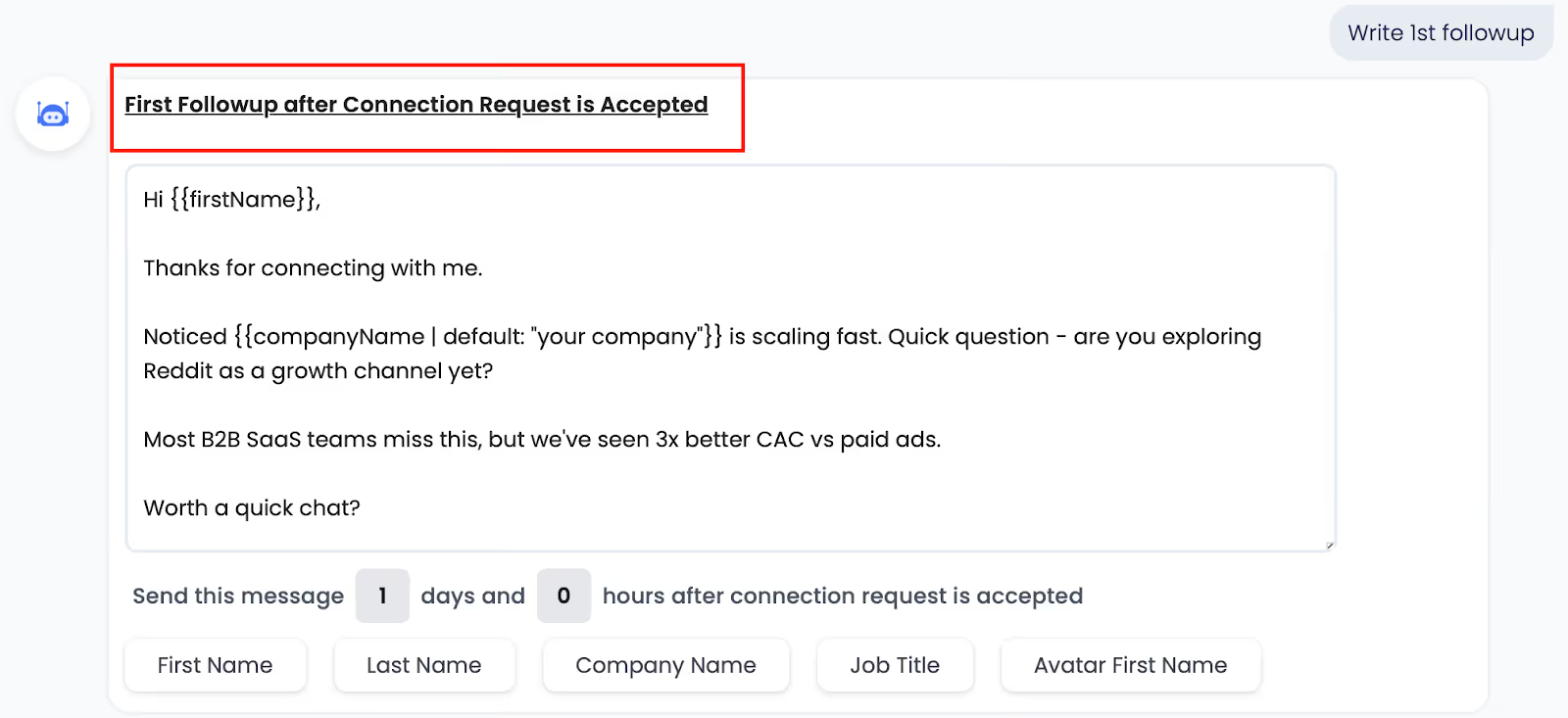
SalesRobot’s personalization features go meaningfully beyond the typical “Hi {{first_name}}” approach that most automation tools offer. The platform includes a feature called SalesGPT, which generates message sequences from plain English prompts. Instead of writing individual templates, you describe your campaign goal and target audience, and the AI drafts a sequence for you.
Beyond SalesGPT, the tool supports what it calls “AI Variables” — dynamic fields that pull context-specific data about a prospect. These go beyond name and company to include data points like LinkedIn recommendations the prospect has received, their listed volunteer work, or mutual connections. The idea is to generate messages that reference something specific about the prospect, making outreach feel less templated.
On the media side, you can include personalized images and GIFs in both LinkedIn messages and cold emails. Personalized images — where the prospect’s name, company logo, or photo is embedded into a custom image — have been shown in various outreach studies to improve response rates compared to text-only messages, although exact rates will vary by industry and audience.
Does it save time in practice? The Salesforge team’s hands-on test confirmed that AI-assisted message creation works and reduces the time needed to launch a campaign. However, they note that the AI-generated messages still require review and editing — they should not be deployed without a human sanity check, particularly for tone and accuracy. At high volumes, managing personalisation quality across many campaigns adds complexity that partially offsets the time savings.
4. Lead Sourcing & Enrichment — Where Do Leads Actually Come From?
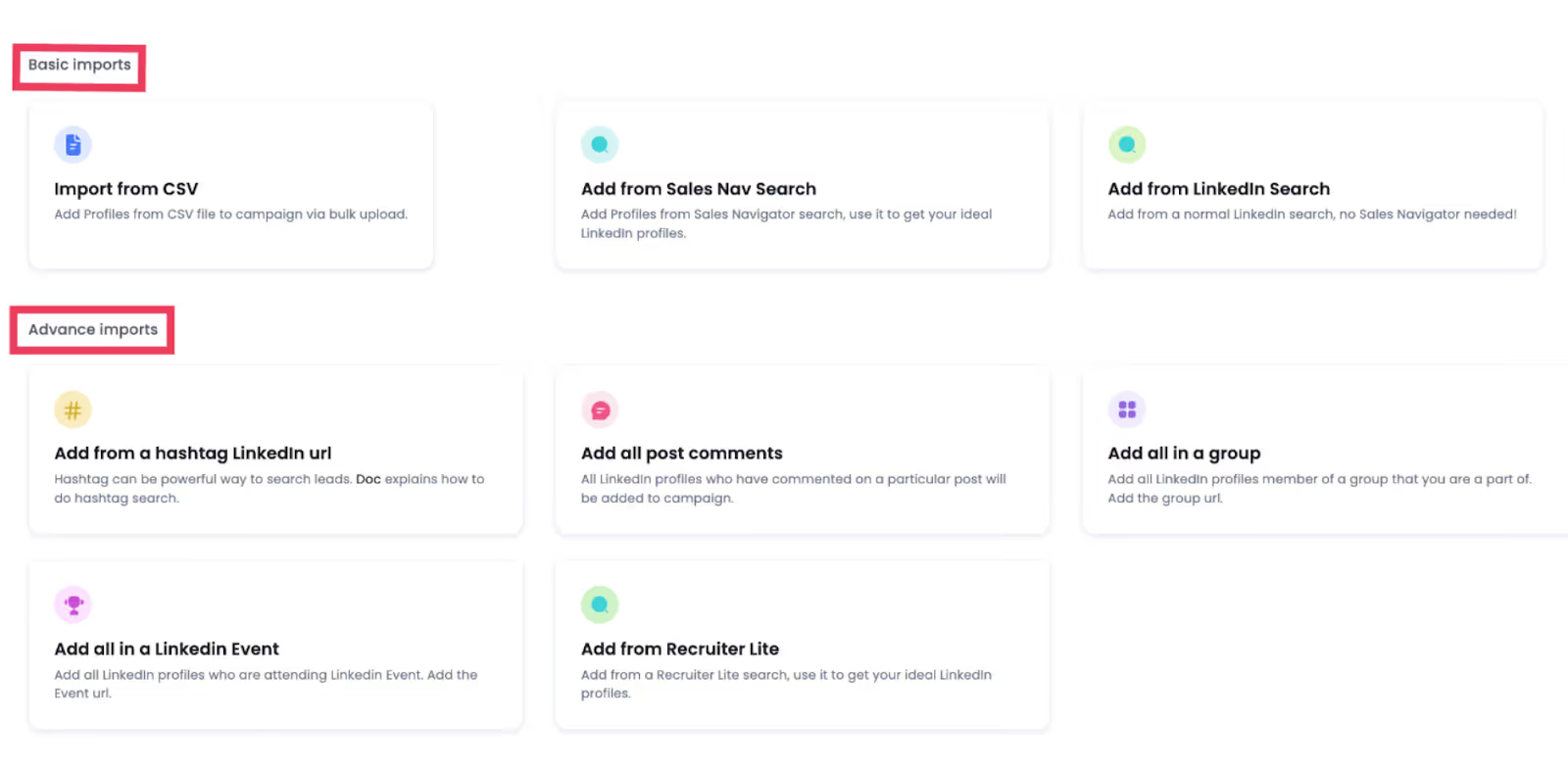
SalesRobot does not have a proprietary B2B contact database. This means you are not buying leads from SalesRobot — you are bringing your own. The platform pulls prospect data from:
- LinkedIn Search results (using your own LinkedIn account’s search capability)
- LinkedIn Sales Navigator searches (requires a separate Sales Navigator subscription from LinkedIn)
- LinkedIn Groups and Events (via member/attendee lists)
- Post commenters (useful for engagement-based targeting)
- CSV file imports (for pre-built lists from external data sources)
When a prospect list is pulled from LinkedIn, SalesRobot captures name, role, company, and LinkedIn profile URL. It does not enrich contacts with verified email addresses or phone numbers natively — if you need that level of enrichment, you would need a separate tool such as Apollo, Clay, or a dedicated email finder.
The absence of a built-in email finder is worth noting. If you want to run email outreach to contacts from LinkedIn, you will either need their work email already (perhaps via Sales Navigator’s email reveal feature or a third-party enrichment tool), or you are limited to LinkedIn-channel-only outreach for those prospects. This is a practical constraint that some users do not discover until after setup.
5. Smart Inbox / Mini CRM — Can It Replace a Full CRM?
SalesRobot includes a unified inbox that consolidates both LinkedIn and email conversations in one view. When a prospect replies — on either channel — the system automatically detects the reply, stops the automated follow-up sequence for that contact, and flags the conversation for human review. This prevents the embarrassing scenario of sending an automated follow-up to someone who already responded.
Within the inbox, you can tag leads with custom labels (for example: “Interested,” “Not Now,” “Wrong Person”), filter conversations by tag or campaign, and manually re-enrol prospects into a new sequence directly from the inbox. The Salesforge test confirmed this workflow functions as described. The inbox also includes a basic lead history view showing what messages were sent and when.
However, it is important to be clear about what this is and what it is not. The built-in CRM is appropriate for managing early-stage outreach conversations. It handles: tracking reply status, applying tags, filtering by campaign, and stopping automation upon reply. It does not handle: deal stages, contact history beyond outreach messages, pipeline value tracking, activity logging for non-SalesRobot interactions, or team assignment workflows beyond the basics. For later-stage pipeline management, you will still need a proper CRM — HubSpot, Salesforce, Pipedrive, or similar. SalesRobot integrates with these tools, but the integration depth has been flagged in some G2 reviews as a work in progress, with CRM sync described as “not always smooth.”
6. Analytics & Reporting Dashboard — What the Data Actually Shows
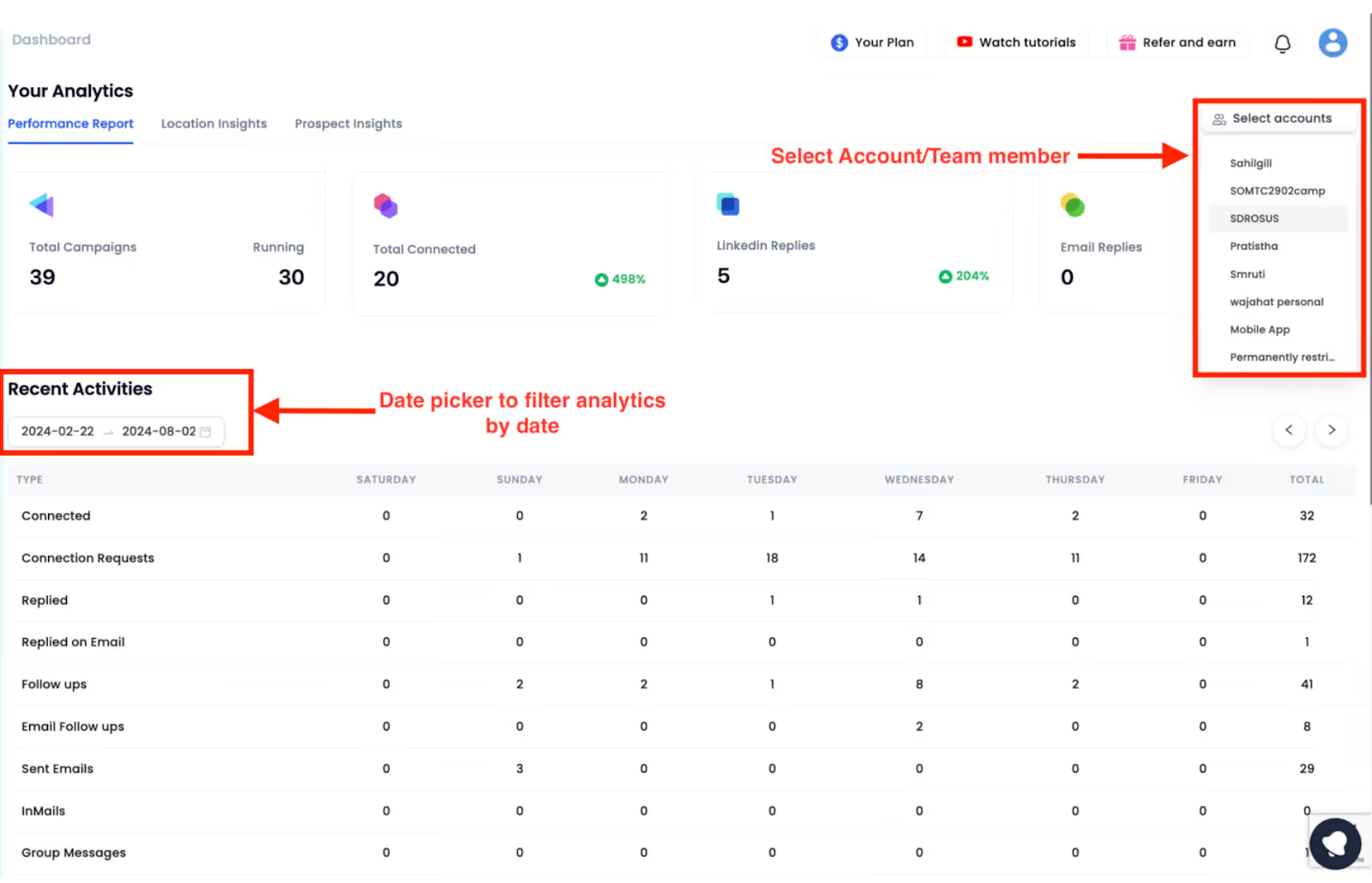
SalesRobot provides a live reporting dashboard that tracks outreach performance at both the account and campaign level. Metrics tracked include:
- Number of connection requests sent and accepted
- Messages delivered across LinkedIn and email
- Reply rates by campaign
- Geographic breakdown of prospects reached (by city and country)
- Industry and job title segmentation
- Conversation conversion data (how many replies led to further engagement)
The Salesforge review notes the dashboard is “simple and easy to understand, especially for beginners.” This is accurate for basic performance monitoring. The visualisations include graphs and tables that let you compare performance across time periods and campaigns.
The main limitation flagged in real user reviews is update latency. Stats are not always real-time — there can be a delay between when a reply arrives and when the dashboard reflects it. For users running multiple campaigns simultaneously, this lag can make it harder to make timely decisions. For high-volume teams with enterprise-grade reporting expectations, the current dashboard may feel limited.
7. Account Safety & LinkedIn Risk — The Honest Verdict
This is the section that matters most for anyone serious about using SalesRobot. LinkedIn explicitly prohibits automation tools in its User Agreement. That is not a grey area. What automation tools like SalesRobot do is use technical measures to make automated activity appear as though it originates from a human user, which reduces — but does not eliminate — the probability of LinkedIn detecting and restricting the account.
SalesRobot’s specific safety architecture includes:
- Dedicated residential IP addresses assigned to each account, rather than shared data-centre IPs that LinkedIn can more easily flag
- LinkedIn mobile API usage on the backend, which mimics the behaviour of a LinkedIn mobile app user rather than a browser-based script
- Smart throttling that caps daily action volumes and adjusts limits based on account age and activity patterns
- Safe Mode — a conservative setting that keeps volume low to minimise detection risk
- Scheduled activity windows so outreach only happens during defined hours, further mimicking human behaviour
SalesRobot’s own website states that its users have “reported zero bans for months.” Multiple G2 reviews corroborate positive experiences with account safety. However, a meaningful number of AppSumo and Product Hunt reviews tell the opposite story — including at least one user who reported a temporary LinkedIn ban and attributed it directly to SalesRobot usage. A Kondo-published review documented several such accounts.
What happens if LinkedIn restricts your account? LinkedIn’s restrictions can range from a temporary action limit (preventing you from sending messages or connection requests for a few days) to a more serious permanent restriction. SalesRobot’s support team can advise on steps to take, but they cannot reverse LinkedIn’s decisions. The risk is real and users should enter with eyes open.
The honest verdict on safety: SalesRobot has invested meaningfully in reducing risk compared to simpler, less sophisticated tools. It is likely safer than tools that use browser extensions or shared IPs. But it is not safe in an absolute sense. LinkedIn automation always carries inherent risk, and anyone who tells you otherwise is misrepresenting the situation.
8. Integrations — CRM, Zapier, and API Depth
SalesRobot connects with the major CRM platforms used by B2B sales teams. Native or semi-native integrations are available for:
- HubSpot — sync leads, update contact records based on outreach status
- Pipedrive — push lead data and activity logs
- GoHighLevel — useful for agencies already on the GHL stack
- Salesforce — available, though depth of sync varies
- Zapier — enables connection to hundreds of additional tools through triggers and actions
- Integry — allows direct CRM control of SalesRobot (pausing sequences, tagging conversations, sending replies from within the CRM)
- Webhooks — custom webhook configuration for technical users building their own integrations
The integration setup uses a trigger-based model: you define an event (for example, “when a prospect accepts a connection request”) and a resulting action in the connected tool (for example, “add contact to HubSpot list”). This is a standard and workable integration pattern.
The limitation noted in G2 reviews is that CRM sync quality is not consistent for all users. Some report smooth data flow, while others describe HubSpot sync as unreliable or requiring manual intervention. There is no indication the API documentation is publicly available in the way a developer-first tool would provide it, which may be a constraint for technical teams wanting deep custom integrations.
SalesRobot Pricing: Is It Worth the Cost?
Plan Breakdown With What Each Tier Actually Unlocks
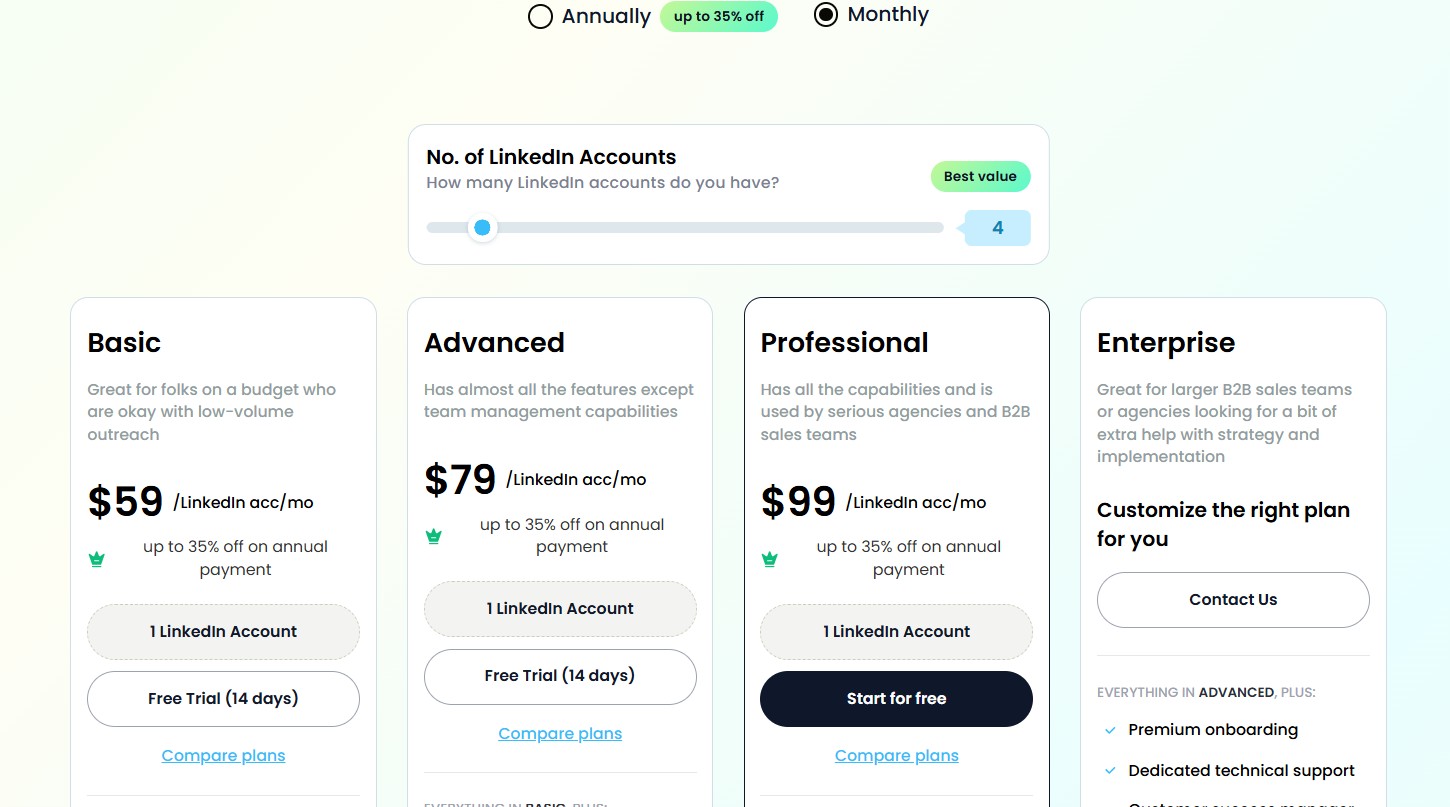
SalesRobot currently offers three main plans, each priced per LinkedIn account connected. There is also an optional email automation add-on. The pricing is documented below as of early 2026:
| Plan | Monthly Price | Annual Price | Key Inclusions |
|---|---|---|---|
| Basic | $59/month/account | $39/year/account | 1 active campaign, limited daily quotas, analytics dashboard, AI Appointment Setter |
| Advanced | $79/month/account | $59/year/account | Unlimited campaigns, full daily quotas, A/B testing, smart inbox, CSV export, Zapier |
| Professional | $99/month/account | $79/year/account | Everything in Advanced + team management, activity control, advanced reporting |
| Email Add-on | $15/month/account | $12/year/account | Email sequence automation, follow-ups based on open/reply triggers |
Volume discounts are available for larger teams:
- Over 10 LinkedIn accounts: 33% discount per account
- Over 20 LinkedIn accounts: 45% discount per account
- Unlimited accounts: Flat rate of $1,000/month (Basic), $1,500/month (Advanced), or $2,000/month (Professional)
Hidden Costs and What We Spent in Total
The pricing table above covers the base subscription, but there are additional costs to be aware of:
- Email add-on: $15/month per email mailbox connected. If you want email automation for three accounts, that is $45/month on top of your base plan
- Credit purchases: For certain AI features and enrichment actions, SalesRobot uses a credit system. Credits are purchased separately, with packages ranging from 3,000 credits for $43/month up to 150,000 credits for $406/month (annual pricing receives a 20% discount on these)
- Annual billing savings: Annual plans are priced significantly lower than monthly — for the Advanced plan, the difference is $20/month per account, which is meaningful at scale
The Salesforge team’s real-world test reached $399 across several weeks using the Advanced plan on three accounts plus one email mailbox. That is approximately $237 for three Advanced LinkedIn accounts plus $15 for one email account per month, plus additional credits and tax.
Is There a Free Trial? What You Can (and Can’t) Test Before Paying
SalesRobot offers a 14-day free trial across all three plans. Critically, no credit card is required to start the trial, which removes the friction and risk of accidental charges. This is a meaningful commitment from the vendor.
During the trial, you can:
- Set up and run an actual LinkedIn campaign
- Test the sequence builder with real prospects
- Explore the dashboard and inbox
- Access AI messaging features
What the trial period does not let you fully evaluate is long-term reliability — since that is a complaint that tends to surface over weeks of sustained use rather than a two-week window.
Cost-Per-Lead Benchmark: How SalesRobot Stacks Up
Comparing cost-per-lead across tools is imprecise because reply rates and conversion rates vary enormously by industry, target audience, message quality, and market conditions. However, a useful frame is cost comparison at equivalent account volumes.
At $79/month (Advanced plan, monthly billing) for a single LinkedIn account, SalesRobot sits in a mid-market price band. Expandi starts at a similar range. Dripify starts at $59/month. HeyReach’s Starter plan is $79/month per account. For individual accounts, these are all broadly comparable. The economics shift significantly at agency scale: HeyReach offers flat-fee plans that cover 50+ LinkedIn accounts under a single monthly cost, while SalesRobot’s per-account pricing means costs multiply linearly with the number of accounts added.
SalesRobot Alternatives: How Does It Compare?
SalesRobot vs. Dealsflow — Which Is Better for LinkedIn-First Outreach?
Dealsflow positions itself as a cloud-based LinkedIn outreach automation platform focused on connection requests, InMails, and follow-up sequencing — making it arguably the most direct head-to-head competitor to SalesRobot of any tool in this comparison. Both are cloud-based, both use dedicated residential IPs, both support AI-powered personalization, and both are built primarily around LinkedIn rather than email. So where do they actually differ?
Architecture and safety approach: Both tools assign a dedicated residential proxy IP to each account and run campaigns 24/7 in the background without requiring a browser to be open. This is identical positioning. The distinction is in how each executes this in practice — SalesRobot additionally uses LinkedIn’s mobile API to mimic app-like behaviour, which is a more specific technical claim than Dealsflow makes on its website.
Sequence builder: Dealsflow offers a drag-and-drop campaign builder that lets you trigger profile views, connection requests, and follow-up messages on a precise timeline. SalesRobot’s sequence builder is functional but more form-based than visual. For users who think visually when building outreach flows, Dealsflow’s drag-and-drop approach may feel more intuitive.
AI personalization: Dealsflow’s AI generates personalized icebreakers by analyzing a prospect’s LinkedIn profile description and experience, which is similar in intent to SalesRobot’s AI Variables. One Dealsflow user reported that their connection acceptance rate increased from 15% to nearly 40% after using the AI icebreaker feature. SalesRobot’s AI personalization goes deeper on available data points — pulling from recommendations, volunteer work, and mutual connections — whereas Dealsflow’s AI focuses primarily on profile bio and experience.
Email outreach: This is a meaningful gap. SalesRobot supports email automation as a paid add-on, allowing true multi-channel sequencing from a single dashboard. Dealsflow’s platform is built around LinkedIn outreach — there is no native email automation feature documented on its website. For teams that want to layer cold email alongside LinkedIn, SalesRobot has a clear advantage here.
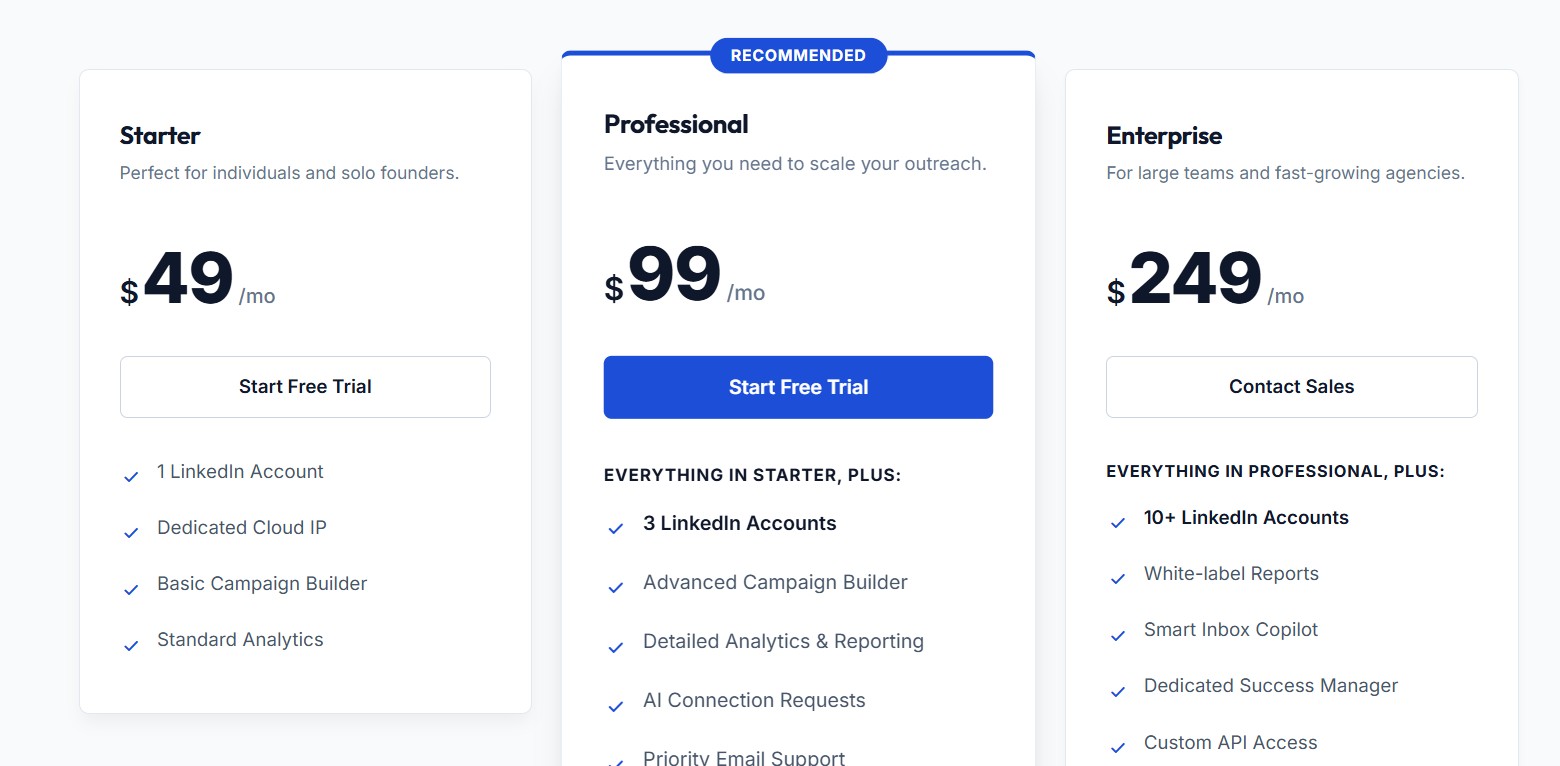
Pricing: Dealsflow’s Starter plan is $49/month for one LinkedIn account, the Professional plan is $99/month and covers three LinkedIn accounts, and the Enterprise plan is $249/month for 10+ accounts. This multi-account bundling on the Professional plan is worth noting — $99/month covering three accounts compares favourably to SalesRobot’s $79/month per account, which would cost $237/month for the same three accounts on the Advanced plan. For small teams managing two to three accounts, Dealsflow’s Professional tier at $99 flat represents significantly better value. A 20% discount is available on annual billing, and a 14-day free trial is available with no credit card required.
Cancellation policy: Dealsflow allows users to cancel at any time directly from their billing dashboard with no long-term contracts. This is a direct contrast to SalesRobot, which requires users to contact support via chat with 15 days’ notice to cancel — a meaningful usability difference.
Maturity and track record: SalesRobot has a longer market presence, more documented user reviews across G2 and other platforms, and more developed AI features including the AI Appointment Setter’s Autopilot mode. Dealsflow is a newer entrant with fewer independent reviews available, which makes it harder to assess long-term reliability with the same confidence. Its customer testimonials on the website are positive, but the absence of third-party review volume means there is less data on edge cases and reliability over sustained use.
Bottom line: For a small team running two to three LinkedIn accounts with limited need for email automation, Dealsflow’s Professional plan at $99/month flat is considerably more cost-effective than SalesRobot. Its drag-and-drop builder and straightforward self-serve cancellation also make it more user-friendly out of the box. SalesRobot pulls ahead on AI depth, email integration, and feature maturity — but users pay a premium for those capabilities.
SalesRobot vs. HeyReach — Feature-by-Feature
HeyReach is the most commonly cited alternative to SalesRobot in the LinkedIn automation space in 2026, and the two tools are aimed at somewhat different markets despite surface-level similarity.
Architecture: Both are cloud-based and LinkedIn-focused. HeyReach is built with agencies and teams managing multiple LinkedIn accounts as its primary design target. SalesRobot is built for individual users and smaller teams first, with agency functionality added on top.
Pricing model: This is the most significant difference. SalesRobot charges per LinkedIn account ($59–$99/month per account depending on plan and billing cycle). HeyReach offers a flat-fee model — its plans cover multiple accounts at a single price point, making it considerably more cost-efficient for agencies running 10, 20, or 50+ LinkedIn accounts simultaneously.
Multi-account campaign management: HeyReach’s architecture allows multiple LinkedIn sender accounts to rotate within a single campaign — meaning outreach from a single campaign can originate across several accounts simultaneously, staying within per-account LinkedIn limits while scaling total volume. SalesRobot manages accounts individually within campaigns rather than rotating across them.
Unified inbox: HeyReach’s Unibox consolidates messages across all sender accounts and allows team members to respond on behalf of others. SalesRobot’s inbox handles multi-channel (LinkedIn + email) for a given user but is less suited to cross-account team reply management.
Email integration: SalesRobot has native email automation built in (as a paid add-on). HeyReach integrates with dedicated email platforms like Instantly and Smartlead rather than building email automation natively, which means users get best-in-class email delivery through those specialised tools.
AI features: SalesRobot’s AI Appointment Setter and AI Variables are genuine differentiators — particularly the Autopilot mode that continues conversations automatically. HeyReach recently added MCP (Model Context Protocol) integration that allows natural-language control of the platform through LLMs like Claude.
Bottom line: For individuals and small sales teams, SalesRobot is competitive with HeyReach on pricing and offers more built-in AI features. For agencies managing large numbers of accounts, HeyReach’s flat-fee model typically delivers better economics and more robust multi-account tooling.
SalesRobot vs. Expandi — Which Is Safer for LinkedIn?
Expandi is a cloud-based LinkedIn automation tool known for its smart sequence builder and geotargeted IP approach. Both SalesRobot and Expandi are positioned as “safe” LinkedIn automation options, but their safety architectures differ.
IP approach: Expandi uses geotargeted IPs — meaning the IP address assigned to your account matches the country where your LinkedIn profile is registered. SalesRobot uses dedicated residential IPs with LinkedIn mobile API behaviour. Both approaches aim to make automated activity appear human; they take slightly different technical paths to get there.
Sequence builder: Expandi offers a visual drag-and-drop sequence builder with conditional branching logic. SalesRobot’s sequence builder is functional but somewhat more linear. For users who want complex conditional outreach (for example: if the prospect accepts but does not reply, do X; if the prospect visits your profile before replying, do Y), Expandi’s branching may offer more flexibility.
Pricing: Expandi’s pricing is in a comparable range to SalesRobot’s mid-tier plans. Both use per-account pricing models.
AI features: SalesRobot’s AI capabilities are more developed than Expandi’s as of 2026, particularly in the areas of auto-reply handling and voice/video message personalisation.
Account safety in practice: Real-world user reports for both tools include some accounts of LinkedIn restrictions. Neither tool can honestly claim a zero-risk safety guarantee.
SalesRobot vs. Lemlist — Which Handles Cold Email Better?
Lemlist started as a cold email platform and evolved into a multichannel tool that now includes LinkedIn automation. SalesRobot started as a LinkedIn automation tool and added email. This difference in origin matters for where each tool is strongest.
Email deliverability: Lemlist is purpose-built around email deliverability. It includes Lemwarm (a built-in email warm-up tool), detailed deliverability analytics, spam trigger scanning, and a focus on sender reputation management. SalesRobot’s email feature does not include any of this. For teams where email is a serious channel alongside LinkedIn, Lemlist’s email infrastructure is meaningfully superior.
LinkedIn automation: SalesRobot’s LinkedIn automation depth is stronger than Lemlist’s. Lemlist requires a Chrome extension for LinkedIn actions, which means the computer must be on and the browser running for LinkedIn campaigns to execute. SalesRobot’s cloud-based architecture removes this constraint.
Personalization: Both tools offer advanced personalization. Lemlist is particularly known for personalised images and videos in email — a feature that sets it apart for email-first campaigns. SalesRobot’s AI Variables and SalesGPT offer comparable depth for LinkedIn-centric personalisation.
Pricing: Lemlist prices per user rather than per account, at approximately €63/month for Email Pro and €87/month for Multichannel Expert. LinkedIn automation is only available on the Multichannel Expert tier.
Bottom line: If email is your dominant channel, Lemlist is a stronger choice. If LinkedIn is your dominant channel with email as a supporting layer, SalesRobot is more capable.
Comparison Table: Key Specs Side by Side
| Feature | SalesRobot | Dealsflow | HeyReach | Expandi | Lemlist |
|---|---|---|---|---|---|
| Cloud-based (no open browser) | Yes | Yes | Yes | Yes | No (LinkedIn via Chrome ext.) |
| LinkedIn automation | Strong | Strong | Strong | Strong | Basic |
| Email automation | Add-on ($15/mo) | No | Via integration | Limited | Native & strong |
| Email warm-up built in | No | No | No (via partners) | No | Yes (Lemwarm) |
| Dedicated IPs | Yes (residential) | Yes (residential) | Yes | Yes (geo-targeted) | No |
| Multi-account campaign rotation | No | No | Yes | Limited | No |
| AI reply handling / autopilot | Yes (Autopilot mode) | Limited | Partial (via MCP) | No | Limited |
| Starting price | $59/mo/account | $49/mo (1 account) | $79/mo/account | ~$99/mo/account | €63/mo/user |
| Multi-account pricing | Per account | Bundled (3 accounts @ $99) | Flat fee | Per account | Per user |
| Free trial | 14 days, no card | 14 days, no card | 14 days | 7 days | 14 days |
| Self-serve cancellation | No (chat required) | Yes | Yes | Yes | Yes |
| Built-in CRM/inbox | Mini-CRM | Smart Inbox | Unibox | Limited | Unified inbox |
| Drag-and-drop sequence builder | No | Yes | No | Yes | Yes |
The Bottom Line: When to Pick SalesRobot, When to Look Elsewhere
Pick SalesRobot if LinkedIn is your primary outreach channel, your team has fewer than 5–8 LinkedIn accounts to manage, and you want AI-assisted personalization and multi-channel capability without needing a separate email tool for most of your outreach.
Look elsewhere if you are an agency managing 10+ accounts (HeyReach will be more cost-effective), if email deliverability is mission-critical for your business (Lemlist or Instantly will serve you better), or if you need complex conditional sequence logic (Expandi’s branching builder is more flexible).
Final Verdict
What SalesRobot Does Well (and Genuinely Better Than Competitors)
SalesRobot has earned its place in the LinkedIn automation market. A few areas where it genuinely stands out:
- AI Appointment Setter: The ability to have the tool continue a conversation autonomously — either generating replies for human review (CoPilot mode) or sending them automatically (Autopilot mode) — is a feature with real practical value. It reduces the manual work involved in managing a busy outreach inbox.
- Account safety architecture: Dedicated residential IPs combined with LinkedIn mobile API behaviour represents a more sophisticated approach to reducing ban risk than many competitors that simply throttle request volumes without addressing the underlying detection mechanism.
- Personalisation depth: AI Variables that pull contextual LinkedIn data (recommendations, volunteer work, mutual connections) go meaningfully beyond the template-based personalisation most tools offer.
- Ease of setup: Multiple G2 and Salesforge reviewers confirm the platform is accessible for users who are not technically deep. Getting a campaign live within a couple of hours of signing up is achievable.
- Cloud-based operation: No dependency on an open browser or running computer is a practical benefit that dedicated SaaS operations teams and busy sales reps both appreciate.
Where SalesRobot Falls Short in 2026
The weaknesses are real and should not be glossed over:
- Reliability inconsistency: The volume of user reports describing automation failures, unexpected downtime, and features ceasing to work without notice is above what you would expect from a stable SaaS product. These reports span G2, AppSumo, Trustpilot, and Product Hunt — multiple independent review platforms — which adds weight to the pattern.
- Feature and pricing changes without adequate notice: Multiple users have reported that previously included features were moved behind paywalls or altered without clear communication. One AppSumo user noted: “Half of the functionalities have disappeared. I no longer have access to data enrichment or emailing.” This type of surprise creates legitimate trust problems.
- Email deliverability gap: Without built-in warm-up, SalesRobot cannot fully own the cold email side of its multichannel promise. Teams serious about email alongside LinkedIn will need to manage deliverability elsewhere.
- Cancellation friction: Requiring users to contact support via chat with 15 days’ notice to cancel a subscription — with no self-service cancellation option — is an unusual and frustrating policy for a software product in 2026.
- Daily connection limit variability: Advertising 50 connection requests per day but consistently delivering 40–41 is a minor but real gap between promise and delivery.
Our Recommendation by Use Case and Team Size
Individual contributor / solopreneur (1 LinkedIn account): SalesRobot is a reasonable choice at the Basic or Advanced plan level. The 14-day free trial with no credit card is genuinely low-risk. Use the trial to test stability and AI messaging quality before committing.
Small sales team (2–5 LinkedIn accounts): SalesRobot works well here. The Advanced plan gives you the full feature set, A/B testing, and Zapier integration. Cost is manageable and you get genuine multi-channel capability.
Growing agency (5–15 LinkedIn accounts): This is where the per-account pricing starts to become a real consideration. Run the maths: at 10 accounts on the Advanced plan monthly, that is $790/month before email add-ons. Flat-fee alternatives like HeyReach become meaningfully competitive at this range.
Large agency or enterprise (15+ LinkedIn accounts): SalesRobot’s flat unlimited plans ($1,500/month for the Advanced tier) may be competitive depending on what you need. However, the reliability concerns documented in user reviews are a more serious risk at high volumes where downtime directly translates to missed pipeline.
The overall verdict: SalesRobot is a legitimate tool, not a scam and not vapourware. It does what it says on the box — most of the time. The “most of the time” qualifier is the honest caveat that the vendor’s own marketing glosses over. If you go in with realistic expectations about LinkedIn’s inherent automation risks, an understanding that reliability issues exist and are more than rare exceptions, and a plan for managing email deliverability separately, SalesRobot can deliver real pipeline value. It is a capable mid-market LinkedIn automation tool — not the most powerful on the market, but a solid and actively developed option for the right user profile.
Frequently Asked Questions
Is SalesRobot Safe to Use on LinkedIn in 2026?
SalesRobot uses dedicated residential IPs and LinkedIn’s mobile API to make automated activity appear more natural to LinkedIn’s detection systems. This is a more sophisticated approach than many competitors. However, LinkedIn’s terms of service explicitly prohibit the use of automation tools, and some users have reported temporary account restrictions while using SalesRobot. No LinkedIn automation tool can guarantee zero risk. SalesRobot reduces risk compared to less sophisticated tools, but does not eliminate it.
Can I Connect Multiple LinkedIn Accounts?
Yes. SalesRobot supports multiple LinkedIn accounts under one subscription. Each additional account is billed at the per-account rate of the plan you have chosen (Basic at $59/month, Advanced at $79/month, or Professional at $99/month for monthly billing). Volume discounts of 33% apply after 10 accounts and 45% apply after 20 accounts.
Does SalesRobot Work for Cold Email Outreach?
SalesRobot includes email automation as a paid add-on at $15/month per email account. You can build multi-step email sequences, add personalisation, and coordinate email follow-ups alongside LinkedIn outreach from the same dashboard. However, it does not include built-in email warm-up functionality, which means users managing deliverability for new or low-reputation mailboxes will need to handle warm-up through a separate tool.
What Is SalesRobot? (Definition + Quick Summary)
SalesRobot is a cloud-based LinkedIn and cold email automation platform designed for B2B sales teams, founders, and agencies. It automates connection requests, follow-up messages, and multi-channel outreach sequences, manages replies in a built-in inbox with smart reply detection, and uses AI to personalise messaging at scale. It runs without needing an open browser or computer, operating on a cloud infrastructure with dedicated residential IPs.
How Much Does SalesRobot Cost?
SalesRobot has three plans billed per LinkedIn account: Basic at $59/month (or $39/year), Advanced at $79/month (or $59/year), and Professional at $99/month (or $79/year). Email automation is an optional add-on at $15/month per email account. Volume discounts of 33% apply for 11–20 accounts and 45% for 21+ accounts. A 14-day free trial is available with no credit card required.
SalesRobot vs. HeyReach: What’s the Real Difference?
The most important difference is the pricing model. SalesRobot charges per LinkedIn account, which scales linearly as you add accounts. HeyReach uses flat-fee plans that cover multiple accounts under a single monthly cost, making it significantly more cost-effective for agencies at scale. On features, SalesRobot has stronger built-in AI capabilities (especially AI Appointment Setter and AI Variables). HeyReach has stronger multi-account management, a more advanced unified inbox, and better agency-oriented team and workspace features.
What Happens if LinkedIn Restricts My Account?
LinkedIn restrictions can range from temporary action limits (preventing connection requests or messages for several days) to permanent account restrictions in severe cases. If LinkedIn restricts your account while using SalesRobot, you should pause all automated campaigns immediately and stop sending connection requests and messages manually for several days to reduce the signal. SalesRobot’s support team can advise on next steps, but they cannot reverse LinkedIn’s enforcement decisions. Recovering from a restriction typically involves a period of reduced activity and manual engagement.
Does SalesRobot Offer a Free Trial?
Yes. SalesRobot offers a 14-day free trial for all three plans. No credit card is required to start the trial, which means there is no risk of accidental charges if you decide not to continue. During the trial, you can access the full feature set of the plan you select and run actual outreach campaigns to evaluate real-world performance.