LinkedIn has evolved from a simple professional networking site into one of the most powerful platforms for B2B marketing, recruitment, and lead generation. With over a billion professionals actively using the platform, businesses and individuals now rely heavily on LinkedIn to connect with decision-makers, generate leads, build authority, and grow their professional network.
However, manually sending connection requests, writing messages, following up with prospects, and engaging with profiles can quickly become overwhelming. For professionals who manage hundreds or even thousands of prospects, performing these tasks manually every day is not practical.
This is where LinkedIn Automation becomes valuable.
LinkedIn Automation refers to the use of specialized tools and software that automate repetitive LinkedIn activities such as sending connection requests, messaging prospects, visiting profiles, and following up with leads. These tools help users streamline their outreach efforts while saving significant time and effort.
But automation on LinkedIn must be used carefully. While it can improve productivity and efficiency, improper usage may violate LinkedIn policies or result in account restrictions. Understanding how automation works, when to use it, and how to use it safely is essential for anyone considering automation.
This complete beginner’s guide explains everything you need to know about LinkedIn automation in 2026, including how it works, its benefits, risks, use cases, tools, and best practices.
What is LinkedIn Automation
Before exploring tools and strategies, it’s important to clearly understand what LinkedIn automation actually means.
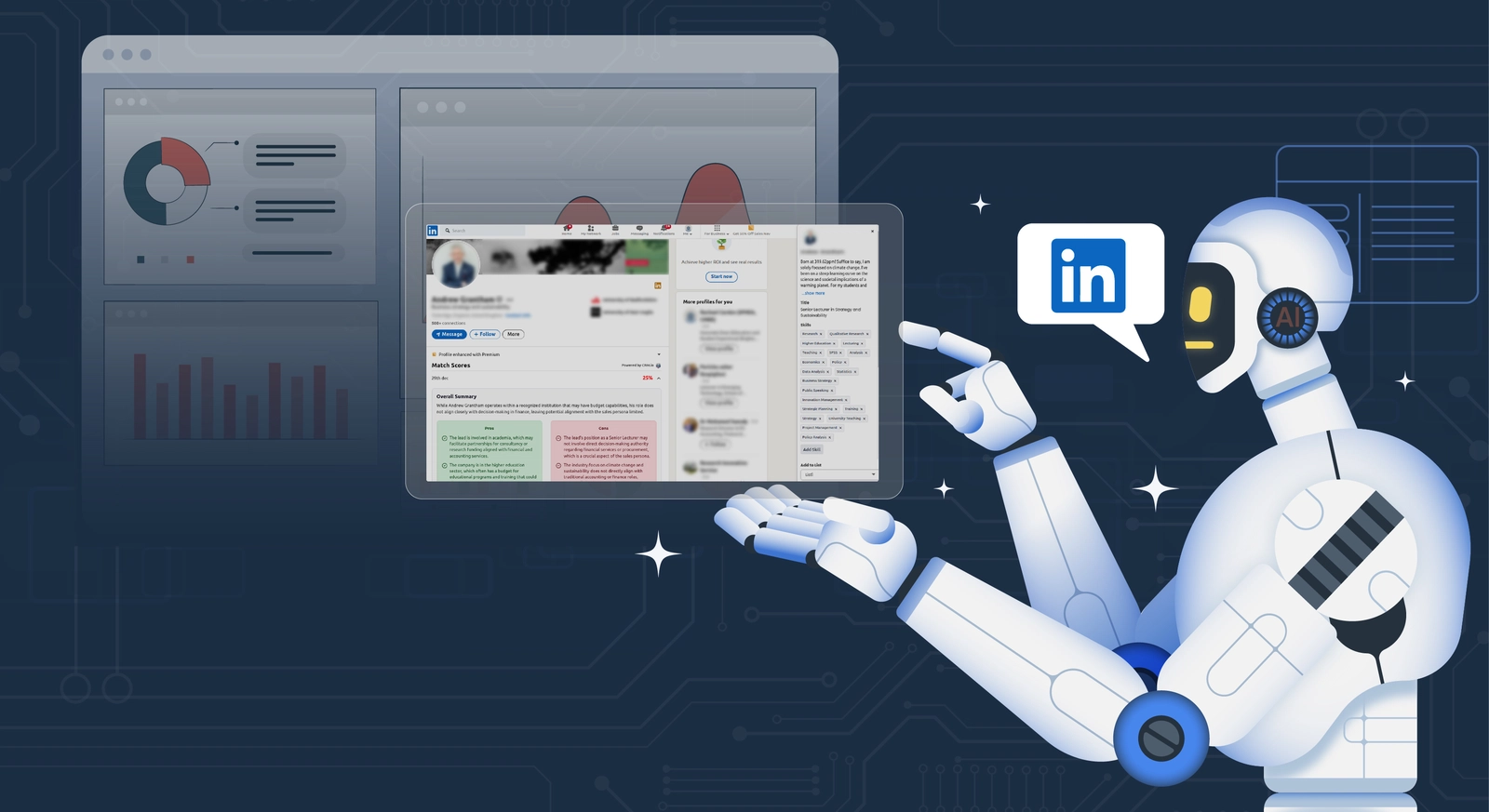
LinkedIn Automation refers to the use of software applications that automate certain actions on LinkedIn. Instead of performing tasks manually, automation tools simulate human behavior and carry out actions on behalf of the user.
These actions may include:
- Sending connection requests
- Sending automated messages
- Visiting profiles
- Endorsing skills
- Following users
- Sending follow-up messages
- Exporting leads
Automation helps professionals manage large volumes of LinkedIn interactions more efficiently.
Manual vs Automated LinkedIn Activities
| Activity |
Manual Method |
Automated Method |
| Sending connection requests |
Done individually |
Scheduled automatically |
| Messaging prospects |
Written and sent manually |
Pre-written message sequences |
| Following up with leads |
Requires reminders |
Automatic follow-up sequences |
| Profile visits |
Done one by one |
Automated profile visiting |
| Lead tracking |
Manual spreadsheet |
Built-in CRM or integrations |
Automation does not replace human interaction completely. Instead, it handles repetitive tasks so professionals can focus on conversations and relationship building.
Why LinkedIn Has Become Essential for Professionals
To understand why automation tools are gaining popularity, it’s important to first understand the role LinkedIn plays in the modern professional world. Over the past decade, LinkedIn has evolved far beyond being just a platform for uploading resumes or searching for jobs. Today, it functions as a global professional ecosystem where businesses, recruiters, entrepreneurs, and professionals interact daily.
Organizations use LinkedIn to discover talent, professionals use it to build credibility, and companies rely on it to reach potential customers and partners. Because so many professional activities now take place on this platform, LinkedIn has become one of the most influential digital spaces for career growth and business networking.
Below are the major reasons why professionals across industries rely on LinkedIn.
Professional Networking
One of the primary reasons LinkedIn has become essential is its ability to facilitate professional networking on a global scale. Traditionally, networking required attending industry conferences, business events, or professional meetups. While these methods are still valuable, LinkedIn has made networking far more accessible and scalable.
On LinkedIn, professionals can connect with people across industries, geographic regions, and organizational levels. This includes peers working in the same field, senior industry experts, recruiters, entrepreneurs, and decision-makers in various organizations.
For example, a marketing professional in India can easily connect with marketing leaders in the United States or Europe. Similarly, a startup founder can directly interact with potential investors or partners without needing formal introductions.
Networking on LinkedIn also allows professionals to stay updated on industry developments. By following influential professionals, joining discussions, and interacting with posts, individuals can build relationships that extend beyond simple connection requests.
Over time, these connections can lead to collaborations, mentorship opportunities, job offers, or partnerships. As a result, LinkedIn has become one of the most efficient platforms for building and maintaining a professional network.
Lead Generation
LinkedIn has also become a powerful platform for lead generation, particularly for businesses operating in the B2B (business-to-business) sector. Unlike many social media platforms that focus primarily on entertainment or personal interactions, LinkedIn is designed specifically for professional communication.
Sales professionals frequently use LinkedIn to identify potential clients, research companies, and reach out to decision-makers. The platform provides detailed profile information, including job roles, industries, company size, and professional experience. This information helps businesses identify prospects who are more likely to be interested in their products or services.
For instance, a software company selling project management tools may search for operations managers or project managers in technology companies. Once relevant prospects are identified, sales professionals can initiate conversations through connection requests or messages.
Additionally, LinkedIn allows professionals to observe prospects’ activity, including the content they engage with and the topics they discuss. This context makes outreach more relevant and personalized.
Because LinkedIn provides direct access to decision-makers and industry professionals, it has become one of the most effective channels for generating high-quality business leads.
Recruitment
Recruitment is another major reason LinkedIn has become essential for professionals and organizations. Hiring the right talent is a critical challenge for many companies, and LinkedIn has significantly simplified the recruitment process.
Recruiters and hiring managers use LinkedIn to search for candidates based on skills, job titles, industries, experience levels, and geographic locations. The platform allows recruiters to evaluate potential candidates by reviewing their professional background, recommendations, work experience, and endorsements.
Unlike traditional recruitment platforms that rely solely on job applications, LinkedIn allows recruiters to proactively identify and approach candidates who may not be actively searching for jobs but are open to new opportunities.
For example, a technology company looking for a data analyst can search LinkedIn profiles to find professionals with relevant skills and experience. Recruiters can then initiate conversations directly with these candidates.
LinkedIn also helps candidates showcase their expertise through posts, articles, and professional achievements. This provides recruiters with a deeper understanding of a candidate’s abilities beyond what is listed on a resume.
Because of these capabilities, LinkedIn has become one of the most widely used recruitment platforms globally.
Personal Branding
Another important aspect of LinkedIn is its role in helping professionals build a personal brand. Personal branding refers to the way individuals present their expertise, values, and professional identity online.
LinkedIn allows professionals to share insights, publish articles, comment on industry trends, and engage in meaningful discussions. By consistently sharing valuable knowledge and participating in professional conversations, individuals can position themselves as experts in their field.
For example, a digital marketing professional might regularly share insights about marketing trends, case studies, or campaign strategies. Over time, these posts can attract attention from recruiters, business leaders, and industry peers.
Personal branding on LinkedIn also helps professionals build credibility and trust. When individuals demonstrate expertise through thoughtful posts and meaningful engagement, their professional reputation grows.
This visibility can open doors to career opportunities such as speaking engagements, consulting projects, partnerships, or job offers.
In today’s competitive professional environment, a strong personal brand on LinkedIn can significantly influence career growth.
Business Development
LinkedIn also plays a crucial role in business development. Companies use the platform to identify potential partners, investors, collaborators, and clients.
Business development teams often use LinkedIn to research companies, analyze industry trends, and connect with decision-makers in relevant organizations. The platform allows professionals to identify key stakeholders within companies and initiate conversations that may lead to partnerships or business opportunities.
For example, a consulting firm may use LinkedIn to connect with executives in companies that require strategic guidance. Similarly, startups may use LinkedIn to reach potential investors or advisors who can support their growth.
LinkedIn also helps companies establish credibility by sharing updates about products, services, achievements, and industry insights. These updates help organizations remain visible within their professional network.
Because LinkedIn enables direct communication with professionals across industries, it has become an essential tool for organizations seeking new business opportunities.
The Increasing Volume of Professional Interactions
As LinkedIn continues to grow, the number of interactions taking place on the platform has increased significantly. Professionals may need to connect with hundreds of individuals, send multiple messages, respond to inquiries, and maintain ongoing conversations.
Managing this level of engagement manually can become extremely time-consuming. Sales teams, recruiters, and entrepreneurs often spend several hours each day performing repetitive tasks such as sending connection requests, following up with prospects, and organizing contacts.
This growing volume of activity is one of the main reasons automation tools have become popular. These tools help professionals manage large-scale outreach efforts more efficiently while maintaining consistency in their communication.
By reducing the time spent on repetitive actions, professionals can focus more on meaningful conversations, relationship-building, and strategic activities that drive real professional value.
How LinkedIn Automation Works
To fully understand LinkedIn Automation, it’s important to look at how automation tools actually operate behind the scenes. Many beginners assume automation simply means sending mass messages automatically, but the process is more structured and strategic than that.
Automation tools are designed to interact with LinkedIn’s interface in a way that replicates human activity. Instead of performing every action manually—such as sending connection requests or writing follow-up messages—the user defines rules and workflows. The automation software then executes those actions gradually according to the defined schedule.
In simple terms, LinkedIn automation works like a task assistant that performs repetitive networking actions while the user focuses on meaningful conversations and relationship building.
Below is a detailed step-by-step explanation of how the process typically works.
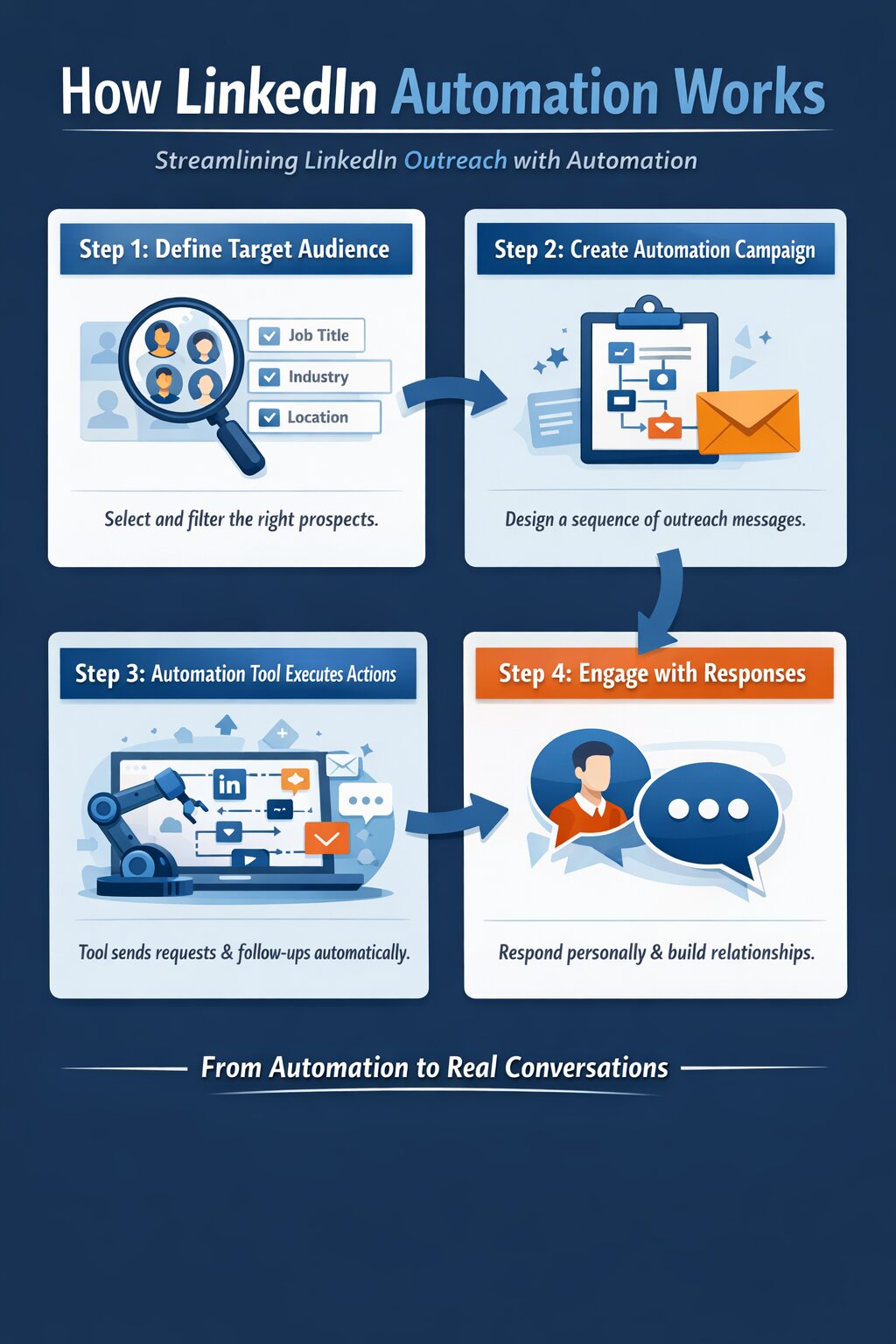
Step 1: User Defines Target Audience
The first and most important step in any automation workflow is identifying the right target audience. Automation becomes effective only when outreach is directed toward people who are genuinely relevant to your goals.
Professionals usually start by defining the type of individuals they want to connect with. This could depend on several factors such as industry, job title, company size, location, or professional interests.
For example, different professionals may target different groups:
- A marketing agency may target marketing managers in SaaS companies
- A recruitment firm may target HR managers in healthcare organizations
- A startup founder may target other startup founders or investors
- A software company may target technical leaders or CTOs
- A recruiter may search for software engineers in tech companies
LinkedIn provides advanced search filters that allow users to narrow down prospects based on multiple criteria. These filters help professionals identify people who are most relevant to their objectives.
Common LinkedIn search filters include:
| Filter Type |
Example Use |
| Job Title |
Marketing Manager, HR Director |
| Industry |
SaaS, Healthcare, Finance |
| Location |
United States, Europe, India |
| Company Size |
Startups, Mid-size companies |
| Seniority Level |
Manager, Director, VP |
By applying these filters, users can generate a list of highly targeted prospects.
Selecting the right audience is crucial because automation is only effective when the outreach is relevant and personalized. Poor targeting often leads to low response rates and ineffective campaigns.
Step 2: User Creates an Automation Campaign
Once the target audience has been identified, the next step is creating an automation campaign.
An automation campaign is essentially a structured workflow that defines what actions should happen and when they should occur. Instead of performing actions randomly, the user designs a sequence of interactions that gradually builds engagement with the prospect.
Most automation tools allow users to create multi-step campaigns that simulate natural networking behavior.
A typical campaign may include several actions such as:
- Sending a connection request
- Sending a welcome message after connection acceptance
- Sending follow-up messages if there is no response
- Visiting the prospect’s profile
- Endorsing skills or interacting with content
Each action is usually scheduled with a time delay to mimic natural human activity.
For example, a simple outreach campaign might look like this:
| Step |
Action |
Timing |
| Step 1 |
Send connection request |
Day 1 |
| Step 2 |
Send welcome message |
After connection accepted |
| Step 3 |
Follow-up message |
3 days later |
| Step 4 |
Final message |
7 days later |
This sequence ensures that communication remains consistent while avoiding aggressive messaging.
Campaign creation is an important stage because it determines how prospects will experience the interaction. Well-designed campaigns feel natural and conversational rather than automated.
Step 3: Automation Tool Executes Actions
After the campaign has been configured, the automation tool begins executing the actions automatically.
The software performs tasks according to the workflow created by the user. Instead of sending all messages immediately, most tools distribute actions throughout the day to simulate normal user behavior.
For example, instead of sending 100 connection requests at once, the tool may send them gradually over several hours.
Automation tools also include safety mechanisms such as:
- Daily activity limits
- Random delays between actions
- Gradual campaign pacing
These features help ensure that automated activity does not appear unnatural.
During this stage, the tool may perform several actions automatically:
- Sending connection requests to targeted prospects
- Visiting LinkedIn profiles
- Sending scheduled follow-up messages
- Tracking responses from prospects
- Organizing lead information
Some advanced tools also provide analytics that track campaign performance, including connection acceptance rates and message response rates.
This automated execution significantly reduces the amount of manual effort required for outreach campaigns.
Step 4: Prospects Respond
The final stage of the automation process occurs when prospects respond to messages or accept connection requests.
Once a prospect replies, automation typically stops and the conversation shifts to manual communication. At this stage, genuine human interaction becomes essential.
Automation tools are designed to assist with the initial stages of outreach, but meaningful conversations require a personal approach. Professionals should respond thoughtfully, address questions, and build relationships naturally.
For example, if a prospect replies with interest in learning more about a service or opportunity, the user should personally continue the conversation rather than relying on automated responses.
This transition from automated outreach to manual communication ensures that interactions remain authentic and professional.
Why Automation Focuses on the Initial Outreach Stage
Most automation systems focus primarily on the early stages of networking because this is where the majority of repetitive tasks occur.
Initial outreach activities often include:
- Searching for prospects
- Sending connection requests
- Sending introductory messages
- Following up with prospects
These steps can be repetitive and time-consuming when performed manually.
However, once a prospect engages in a conversation, the interaction becomes more personalized. At this point, automation becomes less useful because each conversation may require a different response.
For this reason, automation tools are typically used to start conversations, while professionals handle the relationship-building process themselves.
Example Workflow of LinkedIn Automation
To better understand the overall process, consider a typical automation workflow used by professionals.
| Stage |
Description |
| Audience Targeting |
Identify relevant prospects using LinkedIn filters |
| Campaign Setup |
Create connection request and message sequence |
| Automation Execution |
Tool sends requests and messages gradually |
| Response Handling |
User replies manually and continues conversation |
This structured approach allows professionals to expand their network efficiently while maintaining authentic communication.
The Role of Automation in Professional Networking
LinkedIn automation should not be viewed as a replacement for professional networking. Instead, it acts as a productivity tool that reduces repetitive tasks and improves outreach efficiency.
By automating initial actions, professionals can spend more time focusing on activities that truly matter, such as:
- Building meaningful relationships
- Understanding client needs
- Providing value through conversations
- Developing partnerships and opportunities
When used responsibly, automation helps professionals scale their networking efforts while still maintaining the personal touch that LinkedIn interactions require.
Types of LinkedIn Automation Tools
LinkedIn automation tools are not all built in the same way. Different tools operate using different technologies, and understanding these differences is important before choosing an automation solution.
In general, LinkedIn automation tools can be categorized based on how and where they operate. Some tools run directly inside your browser, others run on remote servers, and some are integrated with customer relationship management (CRM) platforms.
Each type offers its own advantages and limitations. Knowing how these systems work can help professionals choose the right automation approach for their needs while minimizing risks.
Below are the most common types of automation tools used for LinkedIn outreach.
Browser-Based Automation
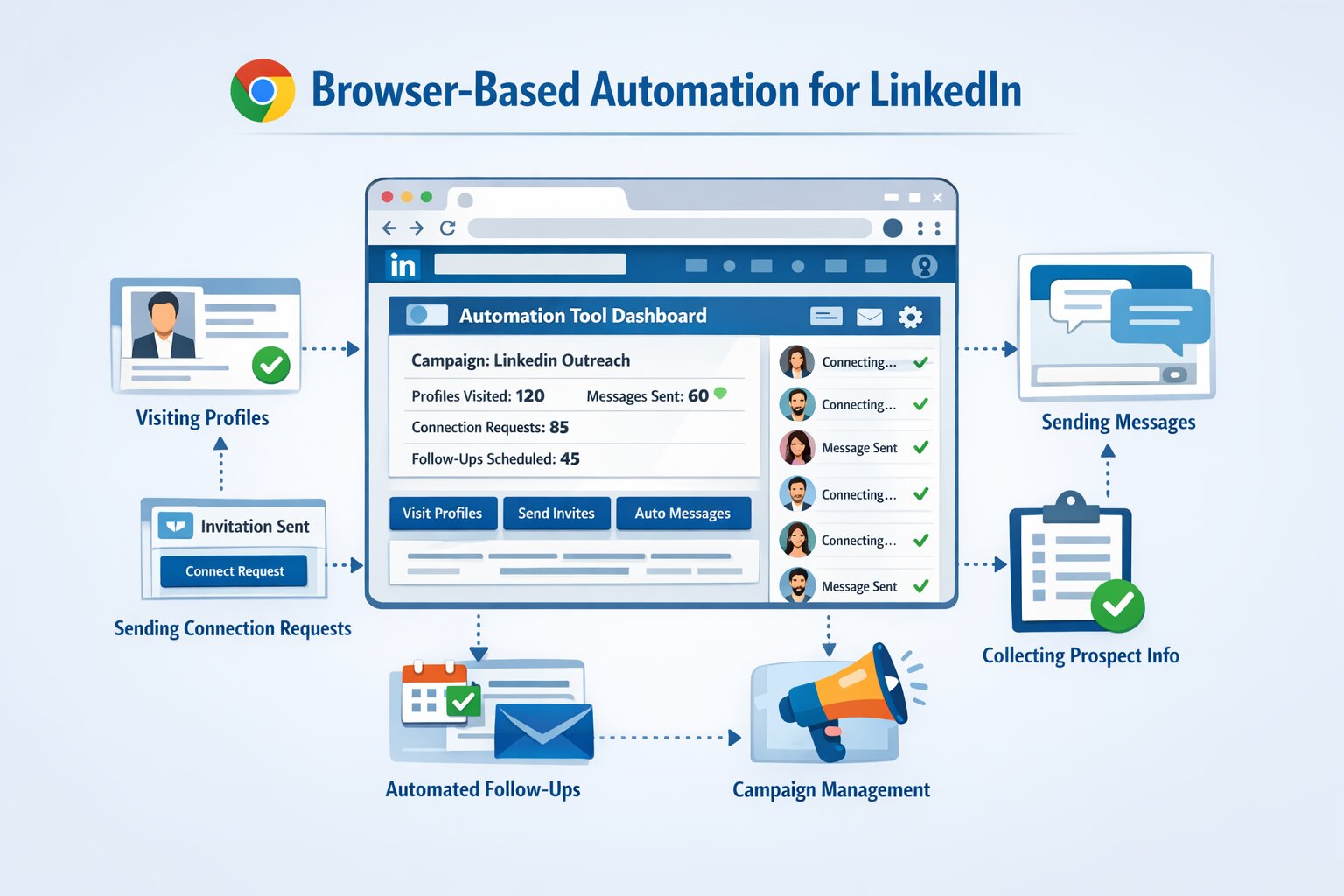
Browser-based automation tools are among the most commonly used tools, especially for beginners. These tools typically function as browser extensions installed in web browsers such as Google Chrome.
Once installed, the extension interacts directly with LinkedIn’s interface and simulates user actions. It performs activities such as sending connection requests, visiting profiles, and sending messages automatically while the user’s browser is open.
Because these tools operate within the browser environment, they essentially behave like a human user interacting with the platform.
For example, a browser-based tool may automatically perform tasks such as:
- Visiting targeted LinkedIn profiles
- Sending connection requests
- Sending automated welcome messages
- Scheduling follow-up messages
- Collecting prospect information
These tools usually provide simple dashboards where users can create outreach campaigns and manage prospects.
Advantages of Browser-Based Automation
One of the main reasons many professionals start with browser-based tools is their simplicity. These tools are relatively easy to install and require minimal technical knowledge.
Some key advantages include:
Easy Setup
Most browser-based tools can be installed within minutes. Users simply download the browser extension, log in to their LinkedIn account, and configure automation settings.
Because the tools operate inside the browser, they do not require complex software installation or server configuration.
Lower Cost
Browser-based tools are often more affordable compared to advanced cloud automation platforms. This makes them a popular choice for freelancers, small businesses, and individual professionals who want to experiment with automation without making large financial investments.
Simple Automation Features
These tools usually focus on core automation functions such as sending connection requests, messaging prospects, and visiting profiles. For beginners, these features are often sufficient to start building networks and initiating outreach campaigns.
Limitations of Browser-Based Automation
Although browser automation tools are convenient, they also have certain limitations that users should consider.
Requires Browser to Remain Active
Since the tool runs inside the browser, the browser must remain open for automation to work. If the browser is closed or the computer is turned off, automation stops immediately.
This can limit scalability for professionals who want continuous automation throughout the day.
Higher Risk if Limits Are Exceeded
Because browser tools directly interact with LinkedIn’s interface, excessive automation activity may trigger platform restrictions. If users attempt to send too many requests or messages within a short period, LinkedIn may detect unusual behavior.
For this reason, users must carefully manage activity limits when using browser-based tools.
Cloud-Based Automation
Cloud-based automation tools operate differently from browser extensions. Instead of running inside a browser, these tools run on external servers hosted in the cloud.
Users access the automation platform through a web dashboard where they configure campaigns and define automation workflows. Once the campaign is activated, the automation software performs the actions remotely without requiring the user’s browser or computer to remain active.
This means outreach campaigns can continue running even when the user is offline.
Cloud-based automation systems are often more advanced and are commonly used by businesses, marketing agencies, and larger sales teams.
These tools may perform various tasks such as:
- Managing multi-step outreach campaigns
- Scheduling messages
- Tracking campaign analytics
- Managing prospect databases
- Integrating with other sales tools
Because the automation runs on dedicated servers, these platforms often provide greater reliability and scalability.
Advantages of Cloud-Based Automation
Cloud automation platforms offer several benefits that make them suitable for professional outreach campaigns.
More Stable Automation
Since cloud-based tools run on remote infrastructure rather than a local browser, they tend to be more stable. Campaigns continue running without interruption, even if the user’s computer is turned off.
This reliability is particularly useful for professionals who manage large-scale outreach campaigns.
Does Not Require Browser to Remain Open
Unlike browser-based tools, cloud automation platforms operate independently of the user’s device. Once campaigns are configured, the system handles the outreach automatically.
This allows professionals to focus on other tasks while automation continues in the background.
Advanced Analytics and Insights
Many cloud-based tools provide detailed performance analytics. These analytics may include:
- Connection request acceptance rates
- Message response rates
- Campaign performance metrics
- Prospect engagement data
These insights help users optimize their outreach strategies and improve campaign effectiveness over time.
Limitations of Cloud-Based Automation
Despite their advanced capabilities, cloud automation tools also have some limitations.
Higher Cost
Cloud-based automation platforms typically require subscription plans that are more expensive than browser extensions. These tools often target businesses and professional sales teams rather than individual users.
Requires Careful Configuration
Because these tools offer more advanced features, setting up campaigns may require more planning and configuration. Users must carefully define targeting criteria, campaign sequences, and safety settings to ensure the automation behaves naturally.
Without proper configuration, campaigns may produce poor results or create unnatural outreach patterns.
CRM-Based Automation
CRM-based automation tools represent another category of LinkedIn automation technology. These tools integrate LinkedIn outreach with Customer Relationship Management (CRM) systems.
CRM platforms are widely used by sales teams to track leads, manage customer interactions, and organize sales pipelines. When LinkedIn automation integrates with CRM systems, it allows professionals to combine prospecting with structured lead management.
Instead of treating LinkedIn outreach as a separate activity, CRM-based automation integrates it directly into the overall sales workflow.
These platforms typically provide features such as:
- Automated LinkedIn outreach sequences
- Lead tracking and organization
- Sales pipeline management
- Customer interaction history
- Campaign analytics and reporting
For example, when a connection request is accepted, the lead can automatically be added to a CRM pipeline where sales teams can track the progress of conversations.
Advantages of CRM-Based Automation
CRM-integrated automation provides several benefits for organizations that rely heavily on structured sales processes.
Better Lead Tracking
CRM systems store detailed information about prospects, including communication history, company details, and interaction timelines. This allows sales teams to monitor every stage of the relationship with potential clients.
Instead of managing leads manually in spreadsheets, CRM systems provide a centralized platform for organizing outreach data.
Sales Pipeline Integration
CRM-based automation allows sales teams to track prospects through different stages of the sales funnel. For example:
| Sales Stage |
Description |
| Prospect Identified |
Potential lead discovered on LinkedIn |
| Initial Contact |
Connection request sent |
| Engagement |
Prospect replies to message |
| Opportunity |
Business discussion begins |
| Conversion |
Prospect becomes customer |
This structured pipeline helps organizations manage sales opportunities more effectively.
Campaign Analytics
CRM-integrated automation platforms also provide deeper campaign analytics. These insights may include lead conversion rates, message performance metrics, and outreach effectiveness.
Sales teams can use this data to improve messaging strategies and refine prospect targeting.
Comparison of Automation Tool Types
Each automation approach offers different advantages depending on the user’s goals, experience level, and outreach scale.
Below is a comparison of the major automation tool categories.
| Tool Type |
Where It Runs |
Best For |
| Browser-based |
Local browser |
Beginners and individual users |
| Cloud-based |
Remote servers |
Agencies and outreach teams |
| CRM-integrated |
CRM platforms |
Structured sales teams |
Browser-based tools are typically best suited for individuals who want a simple introduction to automation. Cloud-based tools provide greater scalability and reliability for larger campaigns. CRM-based systems are ideal for organizations that require detailed lead management and structured sales pipelines.
Choosing the Right Automation Approach
Selecting the right automation tool depends on several factors, including the scale of outreach, technical expertise, and business goals.
Professionals should consider questions such as:
- How many prospects will be contacted daily?
- Is lead tracking required?
- Will multiple team members manage campaigns?
- Is integration with other business tools necessary?
Understanding the differences between automation technologies allows professionals to select tools that align with their workflow and objectives.
Ultimately, the goal of LinkedIn automation is not simply to automate actions but to support meaningful professional networking and communication at scale.
Benefits of Using LinkedIn Automation
When used strategically and responsibly, LinkedIn Automation can provide significant advantages for professionals who rely on LinkedIn for networking, recruitment, or business development. Instead of performing repetitive tasks manually every day, automation tools streamline outreach activities and help professionals maintain consistent communication with their network.
However, the true value of automation lies not in replacing human interaction but in improving productivity. By automating routine actions such as sending connection requests or scheduling follow-up messages, professionals can dedicate more time to meaningful conversations and relationship building.
Below are some of the major benefits of using automation tools on LinkedIn.
Time Efficiency
One of the most significant advantages of automation is the ability to save time. Managing LinkedIn outreach manually can be extremely time-consuming, especially for professionals who interact with a large number of prospects.
For example, sending connection requests individually, writing follow-up messages, and tracking responses may take several hours every day. Professionals who rely heavily on LinkedIn for networking often spend a large portion of their workday performing these repetitive tasks.
Automation tools simplify this process by performing routine activities automatically.
Instead of manually sending dozens of connection requests, an automation system can gradually send them throughout the day. Similarly, follow-up messages can be scheduled automatically without requiring manual reminders.
As a result, professionals can focus on more important tasks such as:
- Building relationships with potential clients
- Conducting sales calls
- Developing business strategies
- Creating valuable content for their network
By reducing the time spent on repetitive activities, automation helps professionals use LinkedIn more efficiently while maintaining consistent outreach efforts.
Consistent Outreach
Maintaining consistent communication with prospects is essential for effective networking and lead generation. However, when outreach is handled manually, it is easy to forget to follow up with contacts or delay responses.
Automation tools help maintain consistency by scheduling outreach campaigns in advance.
For example, a professional may create a message sequence that includes:
- A connection request
- A welcome message after the connection is accepted
- A follow-up message after a few days
- A final message if the prospect does not respond
Automation systems send these messages automatically according to predefined schedules.
This ensures that every prospect receives timely communication without requiring constant manual monitoring.
Consistent outreach improves engagement rates because many prospects respond only after receiving multiple messages. Without automation, following up with every contact manually would be difficult and inefficient.
Scalable Networking
Another major advantage of automation is the ability to scale networking efforts.
Manually interacting with hundreds of professionals on LinkedIn can be extremely challenging. Professionals may struggle to keep track of who they contacted, when they sent messages, and which prospects responded.
Automation tools allow users to interact with a large number of prospects in a structured and organized manner.
For example, automation can help users:
- Send connection requests to multiple targeted prospects
- Schedule follow-up messages automatically
- Track responses from different leads
- Manage conversations efficiently
This scalability is particularly valuable for professionals who rely heavily on LinkedIn outreach, including:
- Sales professionals seeking new clients
- Recruiters searching for candidates
- Business development teams exploring partnerships
By enabling structured large-scale outreach, automation allows professionals to expand their networks more efficiently than manual methods.
Improved Lead Organization
Managing leads effectively is a major challenge when using LinkedIn manually. Without proper organization, professionals may lose track of conversations, forget to follow up, or miss valuable opportunities.
Many automation tools include built-in systems for tracking prospects and organizing lead information.
These tools typically track several important data points, including:
- Connection request status
- Message replies from prospects
- Profile information of leads
- Campaign engagement metrics
This information helps professionals understand which prospects are interested and which outreach strategies are performing best.
Some automation tools also allow users to export lead data or integrate it with customer relationship management (CRM) systems. This enables businesses to maintain structured records of all interactions with potential clients.
By improving lead organization, automation tools help professionals manage their networking activities more effectively and ensure that valuable contacts are not overlooked.
Risks and Limitations of LinkedIn Automation
Although automation offers many advantages, it also comes with potential risks. Professionals must understand these limitations before implementing automation strategies.
Using automation irresponsibly can lead to poor engagement results or even account restrictions. Therefore, it is essential to approach automation with caution and follow recommended best practices.
Below are some of the most important risks associated with LinkedIn automation.
LinkedIn Policy Violations
LinkedIn has strict policies regarding the use of third-party automation tools. The platform discourages tools that perform excessive automated actions or mimic unnatural user behavior.
If automation tools perform actions too aggressively, LinkedIn may detect unusual activity patterns. This can result in account limitations or other restrictions.
Possible consequences may include:
- Temporary restrictions on sending connection requests
- Limited messaging capabilities
- Reduced profile visibility
- Permanent account suspension in severe cases
To avoid these risks, professionals should always follow recommended activity limits and use automation tools responsibly.
Spam Perception
Another risk associated with automation is the possibility of appearing spammy.
If automated messages are poorly written or overly generic, recipients may view them as unsolicited spam rather than genuine communication.
For example, sending identical messages to hundreds of prospects without personalization can reduce response rates and harm professional credibility.
Professionals should focus on creating meaningful messages that provide value to the recipient. Personalized communication significantly improves engagement and reduces the likelihood of negative reactions.
Lack of Personalization
Automation can sometimes remove the human element from professional communication.
When messages are generated automatically without customization, they may feel impersonal and robotic. This can weaken the relationship-building aspect of networking.
To maintain authenticity, professionals should incorporate personalization elements into their outreach messages.
Examples include referencing:
- The prospect’s company
- Their professional achievements
- Shared interests or connections
Personalized messages make automation feel more natural and increase the likelihood of meaningful conversations.
Over-Automation
Using automation excessively can make a LinkedIn profile appear unnatural. If every action on the platform is automated, interactions may lack authenticity.
LinkedIn is designed as a professional networking platform where genuine engagement is highly valued. Over-automation can damage professional credibility and reduce trust among connections.
For this reason, automation should be used as a support tool rather than a replacement for human interaction.
LinkedIn Automation Use Cases
Automation tools are widely used in several professional contexts. These tools are particularly valuable in situations where professionals must interact with large numbers of contacts.
Below are some of the most common use cases.
B2B Lead Generation
One of the most common uses of automation is business-to-business lead generation.
Sales professionals often use LinkedIn to identify decision-makers within organizations. Automation tools help them initiate conversations with these prospects more efficiently.
A typical lead generation workflow may include:
- Identifying relevant prospects
- Sending connection requests
- Introducing products or services
- Continuing conversations manually
This process allows sales teams to reach potential clients more systematically and increase the chances of generating business opportunities.
Recruitment
Recruitment professionals often need to contact large numbers of candidates within specific industries or job roles.
Automation tools help recruiters streamline this process by sending connection requests and introductory messages to potential candidates.
Recruiters can use automation to:
- Connect with qualified professionals
- Introduce job opportunities
- Schedule conversations with interested candidates
By automating the initial outreach stage, recruiters can focus more on evaluating candidates and conducting interviews.
Business Development
Entrepreneurs and business leaders also use automation to support business development activities.
Founders may connect with potential partners, investors, or industry leaders to explore collaboration opportunities.
Automation tools allow entrepreneurs to expand their networks efficiently while maintaining structured outreach campaigns.
Personal Branding
Automation can also support personal branding efforts on LinkedIn.
Some professionals use automation tools to increase profile visibility and expand their network. By connecting with professionals in relevant industries, individuals can grow their audience and increase the reach of their content.
Automation may help with:
- Network expansion
- Profile visibility
- Relationship building
However, personal branding still depends heavily on genuine engagement, valuable insights, and meaningful conversations.
Conclusion
LinkedIn has become one of the most powerful platforms for professional networking, lead generation, recruitment, and business development. However, managing LinkedIn outreach manually can be time-consuming, especially when professionals need to interact with hundreds of prospects.
LinkedIn Automation helps simplify these repetitive tasks by automating actions such as sending connection requests, scheduling follow-up messages, visiting profiles, and organizing leads. When used correctly, automation allows professionals to maintain consistent outreach while saving significant time.
However, automation must be used carefully. Overusing automation or sending generic messages can lead to poor engagement, damaged professional reputation, or even account restrictions. The key to successful automation lies in balancing efficiency with authenticity.
Professionals should use automation as a support system rather than a replacement for genuine interaction. Automation can initiate conversations and manage workflows, but meaningful networking still depends on human communication, trust, and relationship-building.
As technology continues evolving, LinkedIn automation tools will become smarter, more personalized, and more integrated with professional workflows. Understanding how automation works today will help professionals use it responsibly and effectively in the future.
Frequently Asked Questions
1. What is LinkedIn Automation?
LinkedIn Automation refers to the use of specialized software tools that automate repetitive LinkedIn activities such as sending connection requests, scheduling messages, visiting profiles, and following up with prospects. These tools help professionals streamline networking and outreach while saving time on manual tasks.
2. Is LinkedIn Automation allowed by LinkedIn?
LinkedIn discourages the use of certain third-party automation tools that violate its platform policies. If automation is used aggressively or exceeds activity limits, it may trigger restrictions. However, many professionals use automation carefully by maintaining safe limits and focusing on authentic engagement.
3. Who should use LinkedIn Automation?
LinkedIn automation is commonly used by professionals who need to interact with large numbers of people regularly. This includes:
- Sales professionals
- Recruiters
- Business development teams
- Entrepreneurs
- Marketing professionals
These users rely on automation to manage outreach campaigns more efficiently.
4. What tasks can be automated on LinkedIn?
Several LinkedIn activities can be automated using automation tools, including:
- Sending connection requests
- Sending welcome messages after connection acceptance
- Scheduling follow-up messages
- Visiting profiles
- Exporting prospect data
However, meaningful conversations and relationship building should always be handled manually.
5. Is LinkedIn Automation safe for my account?
LinkedIn automation can be safe when used responsibly. Users should follow recommended activity limits, avoid sending spam messages, and prioritize personalized communication. Using automation excessively or irresponsibly may lead to account restrictions.
6. What are the main benefits of LinkedIn Automation?
Automation offers several advantages, including:
- Saving time on repetitive tasks
- Maintaining consistent outreach
- Scaling networking efforts
- Organizing leads more effectively
These benefits allow professionals to focus on building relationships rather than managing manual outreach activities.
7. Can LinkedIn Automation replace manual networking?
No. Automation can help initiate conversations and manage outreach workflows, but it cannot replace genuine human interaction. Building trust and long-term professional relationships still requires personalized communication and meaningful engagement.
8. What are the risks of using LinkedIn Automation?
Some potential risks include:
- Violating LinkedIn platform policies
- Appearing spammy to recipients
- Reduced personalization in communication
- Account restrictions if activity limits are exceeded
These risks can be minimized by using automation responsibly.
9. How many connection requests can I safely send per day?
Although limits may change over time, many professionals recommend keeping daily activity within safe ranges.
| Activity |
Recommended Daily Limit |
| Connection Requests |
20–30 |
| Messages |
50–100 |
| Profile Visits |
50–80 |
Maintaining moderate activity levels helps avoid triggering LinkedIn restrictions.
10. What is the future of LinkedIn Automation?
LinkedIn automation is evolving rapidly with advancements in artificial intelligence and sales technology. Future automation tools are expected to include smarter personalization, improved analytics, and deeper integrations with CRM systems to support more effective professional outreach.


