


Cold email is still one of the most powerful lead generation channels in B2B sales — but the landscape has changed dramatically. According to Instantly’s 2026 Cold Email Benchmark Report, which analyzed billions of emails, the overall average reply rate across all industries now sits at just 3.43%. Meanwhile, data from Martal and Snov.io shows that average open rates have stabilized around 27.7%, down from roughly 36% in 2023. And here is the sobering number that every sender needs to internalize: approximately 17% of cold emails never reach the inbox at all, often because of poor domain authentication, high bounce rates, or spam-triggering content.
The math is clear. In 2026, cold email success is not about blasting more volume. It is about infrastructure, personalization, and choosing the right software to back your outreach. The wrong tool burns your domain, shrinks your sender reputation, and produces nothing but wasted spend. The right tool, built on deliverability-first architecture, proper AI automation, and smart sequencing, can turn cold email into a repeatable pipeline machine.
This guide cuts through the noise. We tested ten cold email platforms hands-on, evaluated them against real deliverability metrics, AI capabilities, pricing, personalization depth, and team usability — and only the tools that held up made the list.
Why Choosing the Wrong Cold Email Tool Costs You More Than Money
Most teams focus on price when selecting cold email software. That is the wrong starting point. The real cost of a bad cold email tool is measured in something far more damaging than a monthly subscription fee.
When you send campaigns through a platform with weak deliverability infrastructure — one that lacks proper SPF, DKIM, and DMARC support, or does not warm up new domains adequately — your sender reputation begins to deteriorate. Once your domain gets flagged or blacklisted by email service providers, recovery takes weeks. During that time, every email you send to every prospect suffers. You cannot easily separate your cold outreach domain from your brand domain if you have been sending from the same setup. That is a business-level problem, not a software inconvenience.
The second cost is opportunity cost. A tool that does not support meaningful personalization at scale means you are sending generic messages into crowded inboxes. Research from Mailforge confirms that proper email infrastructure combined with advanced personalization can improve response rates by up to 30.5% compared to generic outreach. Campaigns with advanced, beyond-first-name personalization have seen reply rates as high as 18% — compared to the 3.43% average for undifferentiated sends. The difference between those two numbers is the difference between a functional pipeline and one that never fills.
Finally, there is the hidden cost of complexity and fragmented stacks. Some tools look affordable at the headline price but require you to bolt on a separate warmup tool, a separate data enrichment source, a separate CRM layer, and a separate inbox placement tester. By the time you add those costs, you are spending two to three times what you budgeted, with four logins to manage and zero data continuity between them.
Choosing the right cold email software from the start means protecting your domain, your time, and your pipeline.
How We Tested These Tools
We did not evaluate these tools by reading their feature pages or comparing marketing claims. Each platform was tested through actual use: inboxes were connected, sequences were built, campaigns were sent, and deliverability was observed across real campaigns.
Our Testing Criteria
Deliverability (Inbox Placement, Warm-Up, SPF/DKIM/DMARC Support)
Deliverability is the foundation of everything. A cold email that lands in spam does not exist. We evaluated each tool’s built-in warm-up network, its support for email authentication protocols (SPF, DKIM, DMARC), whether it offered inbox placement testing before campaigns launched, domain health monitoring, and bounce detection capabilities. Tools that treated deliverability as a checkbox feature rather than a core infrastructure concern were marked down significantly.
Personalization & AI Capabilities
Personalization in 2026 goes far beyond inserting a first name. We tested each tool’s ability to support dynamic variables, AI-generated icebreakers, spintax variation, personalized images and videos, and whether AI features genuinely saved time during campaign creation or merely added a cosmetic layer that required extensive rewriting before use.
Sequence Automation & Follow-Up Logic
We evaluated whether each tool supported multi-step sequences with behavior-based branching — for example, sending a different follow-up if a prospect opened but did not reply versus if they never opened at all. We also looked at out-of-office detection, subsequences triggered by intent signals, and automatic reply pausing.
Ease of Use & Onboarding Speed
A tool that takes three weeks to configure is not practical for most teams. We timed how long it took to go from account creation to a live campaign, and flagged any significant setup friction, confusing UIs, or features buried behind layers of menus.
Pricing & Value for Money
We evaluated the actual cost of using each platform, not just the headline plan price. This included hidden costs like add-on data credits, separate CRM modules, additional mailbox charges, and any features locked behind higher tiers that most users would reasonably expect to be included.
Integrations & CRM Compatibility
Cold email does not operate in isolation. We tested how well each tool connected with common CRMs like HubSpot, Salesforce, and Pipedrive, and whether integrations were one-way (push-only) or two-way (bidirectional sync that keeps your CRM updated in real time).
Multi-Account & Agency Support
For agencies and growing teams, the ability to manage multiple clients or multiple sending accounts from one dashboard is non-negotiable. We evaluated white-label options, client workspace separation, per-client reporting, and flat-rate versus per-seat pricing models.
Quick Comparison — All 10 Tools at a Glance
| Tool | Best For | Starting Price | Free Trial | Multichannel | AI Features |
|---|---|---|---|---|---|
| DealsFlow | AI LinkedIn automation & meeting booking | Free (14-day trial) | Yes | LinkedIn + Outreach | Arlo AI (full conversation) |
| Instantly.ai | High-volume cold email at scale | $37/mo (annual) | Yes (14-day) | Email only | AI sequences, reply agent |
| Saleshandy | Agencies scaling on a budget | $25/mo | Yes (7-day) | Email + basic LinkedIn | AI sequence generator |
| Smartlead | Deliverability-focused agencies | $32.5/mo (annual) | Yes (14-day) | Email + LinkedIn | AI warm-up, intent detection |
| Lemlist | Visual & creative personalization | $55/user/mo | Yes | Email + LinkedIn | AI variables, sequence gen |
| Apollo.io | Data-rich prospecting + outreach | $49/user/mo (annual) | Yes (free plan) | Email + LinkedIn + calls | Outbound Copilot, lead scoring |
| Woodpecker | Small teams wanting simplicity | $29/mo (per slot) | Yes (7-day) | Email + LinkedIn tasks | AI bounce shield, reply detection |
| Reply.io | Structured multichannel cadences | $59/user/mo | Yes (free plan) | Email + LinkedIn + SMS + calls | Jason AI SDR |
| Klenty | SDR teams with dialer needs | $50/user/mo (annual) | Yes (14-day) | Email + LinkedIn + calls + SMS | AI cadences, list builder |
| Snov.io | All-in-one for startups | $30/mo (Starter) | Yes (free plan) | Email + LinkedIn | AI email writer, enrichment |
The 10 Best Cold Email Software in 2026 (In-Depth Reviews)
1. DealsFlow — Best for AI-Powered LinkedIn + Outreach Automation

DealsFlow is a LinkedIn-first outreach platform built for teams and agencies that want AI to handle more than just sending — they want it to handle the entire conversation. At the center of the platform is Arlo, DealsFlow’s AI engine, which connects to your LinkedIn accounts, identifies qualified prospects based on your ideal customer profile, initiates outreach, and then carries conversations through objections, answers, and follow-ups until the prospect agrees to a call. The proposition is a significant departure from traditional cold email tools: instead of a tool that sends messages and waits for you to take over when someone replies, DealsFlow’s AI manages the full dialogue autonomously in your voice.
This makes DealsFlow particularly well suited for agencies running outreach for multiple clients, SDR teams looking to reduce the manual load of conversation management, and founders who want a pipeline without hiring a full outreach team.
Key Features
- Arlo AI Engine: The core of the platform. Arlo reads every reply, determines the best response strategy, handles objections in real time, answers prospect questions, and continues the conversation until a meeting is booked. It operates with your voice and tonality, not generic AI copy.
- Multi-Account Management: DealsFlow supports up to 50 LinkedIn accounts from a single dashboard. Every connected account shows connection volume, reply rates, warmup status, and campaign health in one place — eliminating the chaos of managing multiple LinkedIn profiles manually.
- Campaign Builder with ICP Targeting: Users define their ideal customer profile, and DealsFlow identifies matching prospects from LinkedIn searches, post commenters, CSV imports, or search URLs. The campaign builder then constructs the outreach flow around those targets.
- AI Warmth Scoring: Every prospect in the system is automatically classified as Hot, Warm, Neutral, or Cold based on engagement signals. This allows teams to prioritize follow-up efforts and ensure that the highest-intent conversations receive attention first.
- Prospect CRM: DealsFlow includes a built-in CRM that shows the full funnel from connection request sent through to booked call. Users can view engagement history, export data, and track conversion rates at every stage without switching tools.
- Full-Funnel Analytics: The analytics dashboard provides a complete view of connections sent, acceptance rates, reply rates, and booked calls. According to DealsFlow’s own platform data, active campaigns across their user base show an average acceptance rate of approximately 74%, with reply rates around 17%.
- Account Safety & Automatic Warmup Limits: DealsFlow automatically enforces LinkedIn’s safe sending limits on all connected accounts, reducing the risk of account restrictions from sending too aggressively.
What We Liked
DealsFlow’s differentiator is real and measurable. Most cold outreach tools automate the sending but stop there — once a prospect replies, a human has to step in. Arlo genuinely continues the conversation, which removes one of the biggest time drains in outbound sales. For agencies managing ten or more clients across multiple LinkedIn accounts, the centralized multi-account dashboard eliminates what is usually an operational nightmare. The AI warmth scoring is also practically useful: it surfaces the best opportunities immediately rather than requiring manual review of hundreds of reply threads.
What Could Be Better
DealsFlow is primarily LinkedIn-focused, not a cold email platform in the traditional sense. Teams that need a high-volume email sequencer with large B2B databases or deep CRM integrations will find the platform’s current scope narrower than tools like Saleshandy or Apollo. It is in early access, which means some features are still maturing. Teams with complex email-first workflows may need to pair DealsFlow with a dedicated email tool.
Pricing
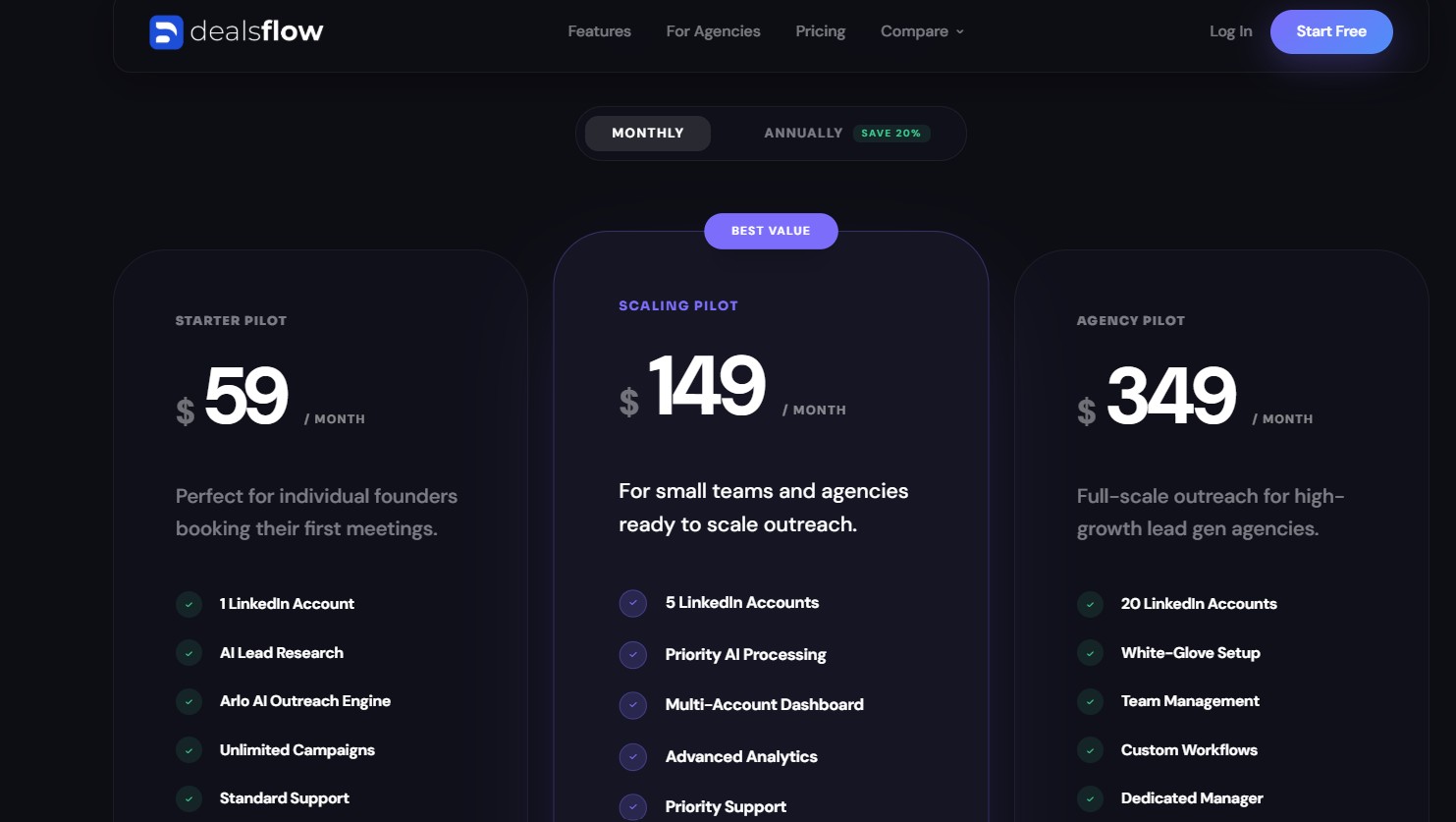
DealsFlow offers a 14-day free trial with no credit card required. Full pricing details are available at dealsflow.co/pricing. The platform is built with agency-friendly, flat-rate pricing designed for teams managing multiple client accounts simultaneously.
Best For
Agencies, SDR teams, and founders who want AI to run LinkedIn conversations end-to-end — not just initiate them.
User Ratings
Trusted by agencies and sales teams worldwide including active campaign management across multiple accounts with documented results.
2. Instantly.ai — Best for High-Volume Cold Email at Scale
Instantly.ai was founded in 2021, designed specifically for lead generation agencies and outbound teams that need to run high-volume cold email campaigns without being penalized with per-inbox charges. The platform’s defining feature is its unlimited email accounts model — you can connect as many inboxes as you need on any plan without paying extra per account. Combined with a built-in warm-up network and a clean, user-friendly interface, Instantly has grown into one of the most popular cold email tools for agencies and scaling teams.
Key Features
- Unlimited Email Accounts & Sending: All Instantly plans allow unlimited inbox connections. This is the platform’s biggest selling point and the primary reason agencies running client campaigns choose it over per-seat alternatives.
- Automated Inbox Warm-Up: Instantly includes a built-in warm-up network that gradually builds sending reputation for new domains and inboxes. Consistent warm-up is one of the primary requirements for maintaining deliverability at scale.
- AI-Powered Sequences: Instantly’s AI Copilot assists with writing personalization variables, subject lines, and full email sequences inside the campaign builder. The AI Reply Agent reads incoming responses and replies on your behalf, handles objections, and can book meetings autonomously.
- Multi-Step Sequences with A/B Testing: The Hypergrowth plan ($97/month) and above include A/B and A/Z testing, allowing you to test multiple subject line and body variations simultaneously to optimize reply rates.
- Unibox: Instantly’s Unibox pulls all replies from all connected inboxes into a single, centralized view. This is essential for teams managing dozens of email accounts and needing to track conversations without logging in and out of individual accounts.
- Campaign Analytics Dashboard: Instantly provides detailed campaign-level reporting including open rates, reply rates, bounce rates, and conversion tracking, helping teams identify what is working and what needs to be adjusted.
What We Liked
Instantly’s unlimited inbox model is genuinely cost-efficient for teams running multiple domains. The warm-up network is reliable and well-regarded in the cold email community. The Unibox is an excellent centralized reply management solution for high-volume outreach. The AI Reply Agent is one of the more advanced AI features in the space, capable of keeping conversations moving autonomously after first contact.
What Could Be Better
Instantly is email-only — there is no native LinkedIn or phone channel. This is a meaningful limitation as multichannel outreach now drives significantly higher engagement. According to research from Mailforge, integrating email with LinkedIn outreach has shown customer engagement increases of up to 287%. Additionally, the advertised starting price of $37/month (annual billing) understates the real cost significantly. The Growth plan caps contacts at 1,000 total across all campaigns, which most active teams exhaust within days. Most functional setups require the Hypergrowth plan at $97/month at minimum. When you add the SuperSearch lead database ($47–$177/month), the CRM layer ($38–$78/month), and the cost of domains and Google Workspace mailboxes, realistic operational costs range from $150 to $400 per month or higher. A/B testing — a basic optimization feature — is locked behind the $97/month tier.
Pricing
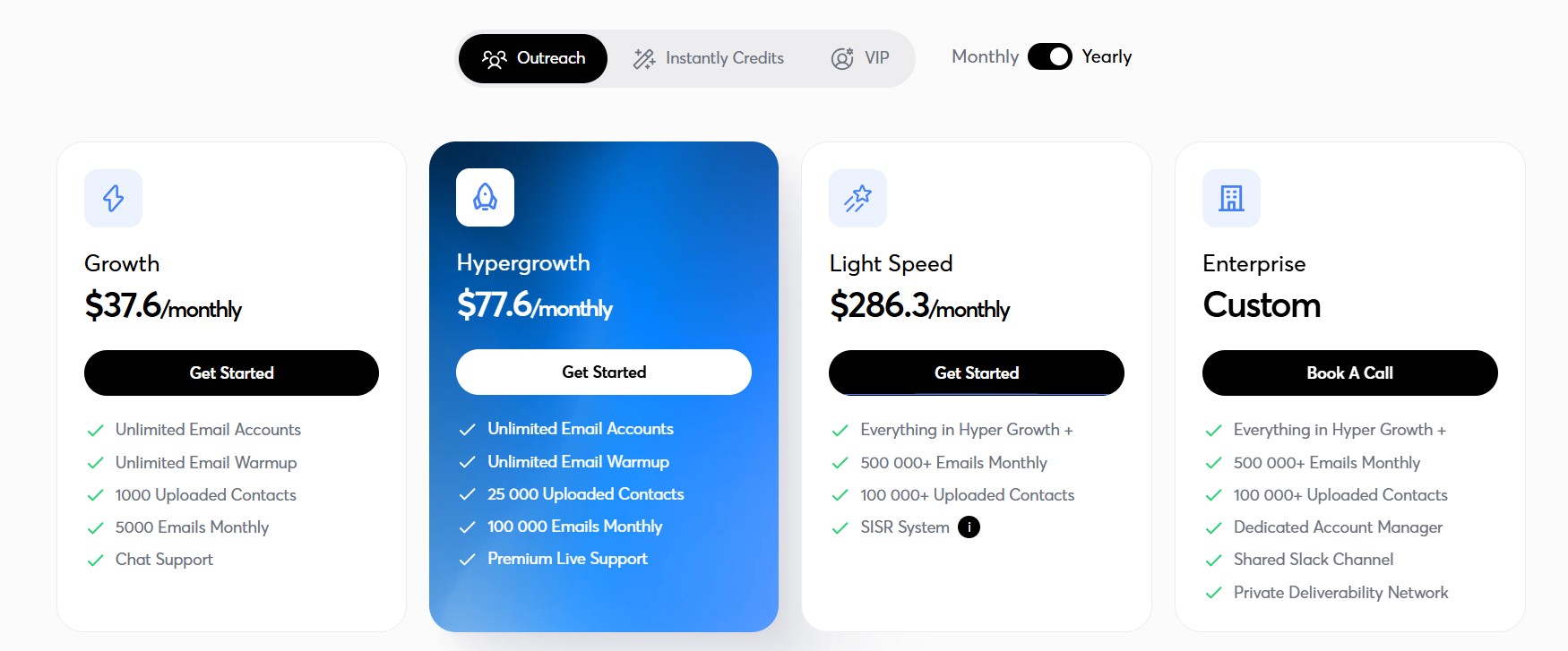
- Growth: $37.6/month (annual) — Unlimited email accounts, unlimited warmup, 1,000 contacts, 5,000 emails/month
- Hypergrowth: $77.6/month (annual) — 25,000 contacts, 100,000 emails/month, A/B testing, full Unibox, Slack integration
- Light Speed: $286.3/month (annual) — 500,000+ emails/month, SISR dedicated infrastructure, unlimited contacts
- 14-day free trial available on all plans
Best For
Agencies and email-focused teams that need unlimited inboxes, reliable warm-up, and high-volume sending at a flat rate.
User Ratings
G2: 4.9/5 from over 3,000 reviews. Users consistently cite ease of use, unlimited account support, and the Unibox as standout features.
3. Saleshandy — Best for Agencies Scaling Email Outreach on a Budget
Saleshandy is a cold email platform built for agencies and sales teams that need to scale outreach without scaling costs proportionally. It starts at $25/month and gives users unlimited email accounts on every plan — a pricing model that makes it exceptionally cost-effective compared to per-seat competitors. It also includes an 830M+ B2B contact database, a built-in CRM, and an AI sequence generator that can build a full multi-step campaign from your company URL and ICP in minutes.
Key Features
- Unlimited Email Accounts from $25/Month: Every Saleshandy plan includes unlimited email account connections, sender rotation, and unlimited warmup, making it one of the most affordable ways to scale sending infrastructure.
- 830M+ B2B Contact Database: Saleshandy includes a massive prospect database with 25+ search filters including industry, company size, job title, technology stack, and location. This reduces dependency on third-party prospecting tools.
- AI Sequence Generator: Enter your company URL and describe your ICP and campaign goals, and Saleshandy’s AI builds a complete multi-step sequence — including subject lines, email body copy, and follow-up timing — in minutes.
- Hyper-Personalization (Merge Tags, Variable Tags, Spintax): Saleshandy supports multiple levels of personalization including custom merge fields, variable tags for dynamic content blocks, and spintax for automatic email variation, which helps protect sender reputation by diversifying outgoing emails.
- Sender Rotation & ESP Matching: Saleshandy automatically rotates between connected inboxes to distribute volume and matches email service providers for better deliverability signals.
- Unified Inbox: All replies from all connected inboxes are managed in one centralized inbox with smart AI filters to categorize and prioritize conversations.
- Built-in CRM: Saleshandy includes an outbound CRM to track prospects, deals, and pipeline from within the same platform — eliminating the need for a separate CRM tool at the prospecting stage.
- Sequence Score: Before launching a campaign, Saleshandy’s Sequence Score feature reviews the setup — copy, subject lines, personalization depth, sending timing, and sequence structure — and flags improvements before the first email goes out.
What We Liked
The value-per-dollar ratio at Saleshandy is exceptional. A five-person team on Saleshandy’s Outreach Starter plan pays $25/month total. The equivalent team on Apollo Professional pays approximately $395/month, and on Klenty Growth, approximately $350/month. The AI sequence generator is genuinely time-saving: campaigns built with it are usable starting points that require far less rewriting than most AI writing tools produce. The inclusion of an 830M+ database within the same platform removes the need to subscribe to a separate prospecting tool, which is a meaningful cost saving for smaller teams.
What Could Be Better
Saleshandy’s multichannel capabilities are limited compared to full sales engagement platforms. LinkedIn automation is basic, and there is no native dialer. Some users report that the included B2B database, while large, has accuracy variation and may require cross-verification for high-value campaigns. The CRM is functional but not as deep as dedicated CRM tools, making it better suited as a prospecting-stage tracker than a full sales pipeline manager.
Pricing
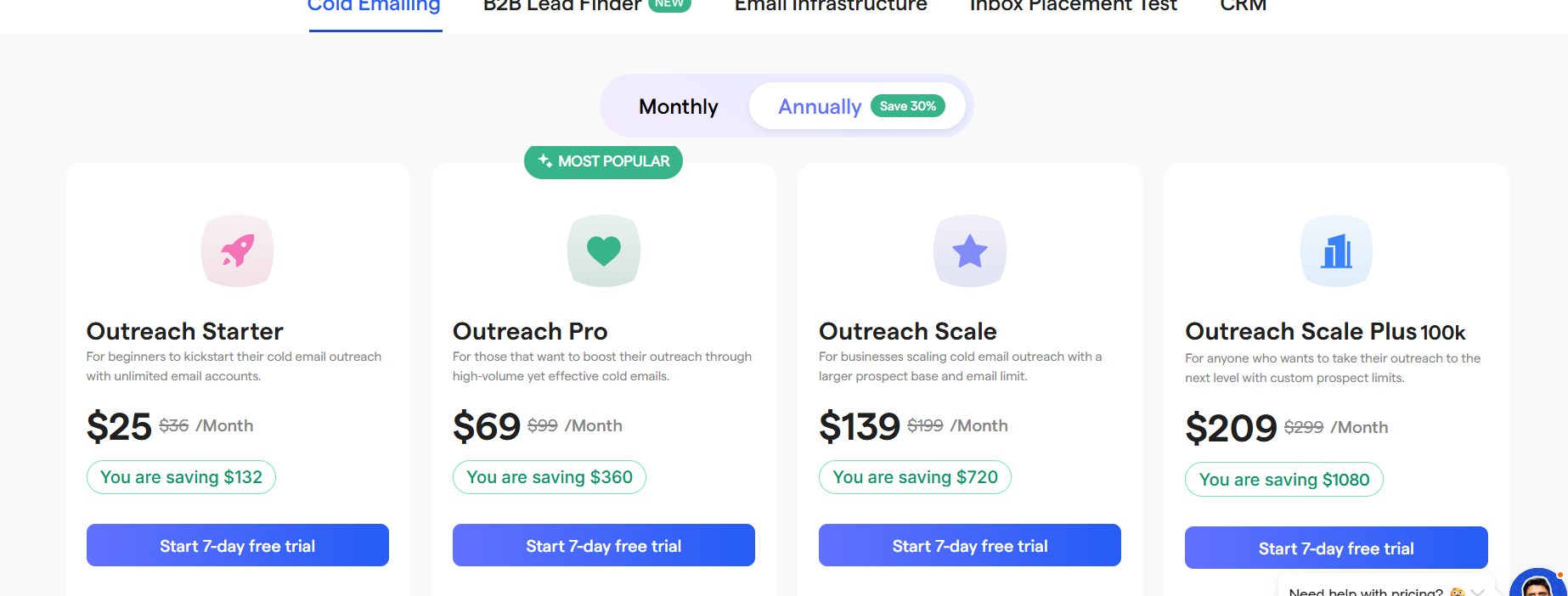
- Outreach Starter: $25/month — Unlimited email accounts, unlimited warmup, 2,000 active leads/month, 6,000 emails/month
- Outreach Pro: $74/month — 30,000 active leads/month, 100,000 emails/month, advanced AI features
- Outreach Scale: $149/month — Unlimited active leads, 200,000+ emails/month
- 7-day free trial available
Best For
Agencies and solo operators scaling cold email outreach on a controlled budget, with access to a large prospect database and AI campaign automation without paying per seat.
User Ratings
G2: 4.6/5. Users frequently highlight the cost structure, unlimited accounts, and the AI sequence generator as key reasons they chose Saleshandy over competitors.
4. Smartlead — Best for Deliverability-Obsessed Teams & Agencies
Smartlead is a cold email automation platform built around a single core conviction: inbox placement is the only metric that matters at scale. It is the tool most commonly chosen by agencies running high-volume outreach that cannot afford deliverability failures, thanks to its comprehensive warm-up infrastructure, unlimited mailboxes, dynamic IP rotation, and white-label agency capabilities.
Key Features
- Unlimited Mailboxes with Automated Rotation: Every Smartlead plan includes unlimited email account connections with automatic sender rotation built in. The rotation system distributes send volume intelligently across accounts to prevent any single inbox from being overloaded.
- SmartSenders & SmartDelivery: SmartSenders automates SPF, DKIM, and DMARC setup across connected mailboxes, eliminating configuration errors that commonly damage deliverability. SmartDelivery is an inbox placement testing feature (available as an add-on at $49/month) that shows where emails land — primary inbox, promotions, or spam — before a campaign launches.
- Unlimited Email Warm-Up: Warm-up is included from the base plan with no additional cost. The AI-powered warm-up engine follows natural email patterns to build domain reputation, and it scales to as many accounts as you connect.
- Subsequences Based on Lead Intent: Smartlead allows you to build conditional follow-up sequences that trigger based on specific prospect behaviors — opens, clicks, no response, or explicit reply signals. This makes outreach adaptive rather than robotic.
- Multi-Channel Infrastructure: Smartlead supports email and LinkedIn sequences and is continuing to expand its multichannel footprint for agencies needing to coordinate across channels.
- White-Label Experience for Agencies: Agencies can run the entire Smartlead platform under their own branding, with per-client workspaces, reporting, and API access. This makes it the most agency-ready platform in this tier.
- Master Inbox (Unibox): Smartlead’s master inbox aggregates replies from all connected accounts across all client campaigns in one view, with AI-powered categorization to surface the most important threads.
- A/B Testing & Spintax: Smartlead includes multivariate testing from its base plan, allowing teams to test subject lines, email bodies, and CTAs across live campaigns without upgrading.
What We Liked
Smartlead scored the highest deliverability rating among the tools we tested in this tier. The unlimited warm-up from the base plan is a meaningful cost saving. The white-label agency infrastructure is the best available in this price range — managing multiple client campaigns, tracking performance per client, and presenting branded reports is seamless. The subsequence feature with intent-based triggers goes well beyond what most tools offer for automated follow-up logic.
What Could Be Better
The SmartDelivery inbox placement testing feature is a $49/month add-on rather than being included in the core plan, which is inconsistent given Smartlead’s positioning as a deliverability-first platform. Some users report that despite built-in warmup, emails occasionally land in spam — a reminder that no warm-up tool is a complete substitute for proper sending strategy and list hygiene. The learning curve for new users is steeper than tools like Woodpecker or Instantly.
Pricing
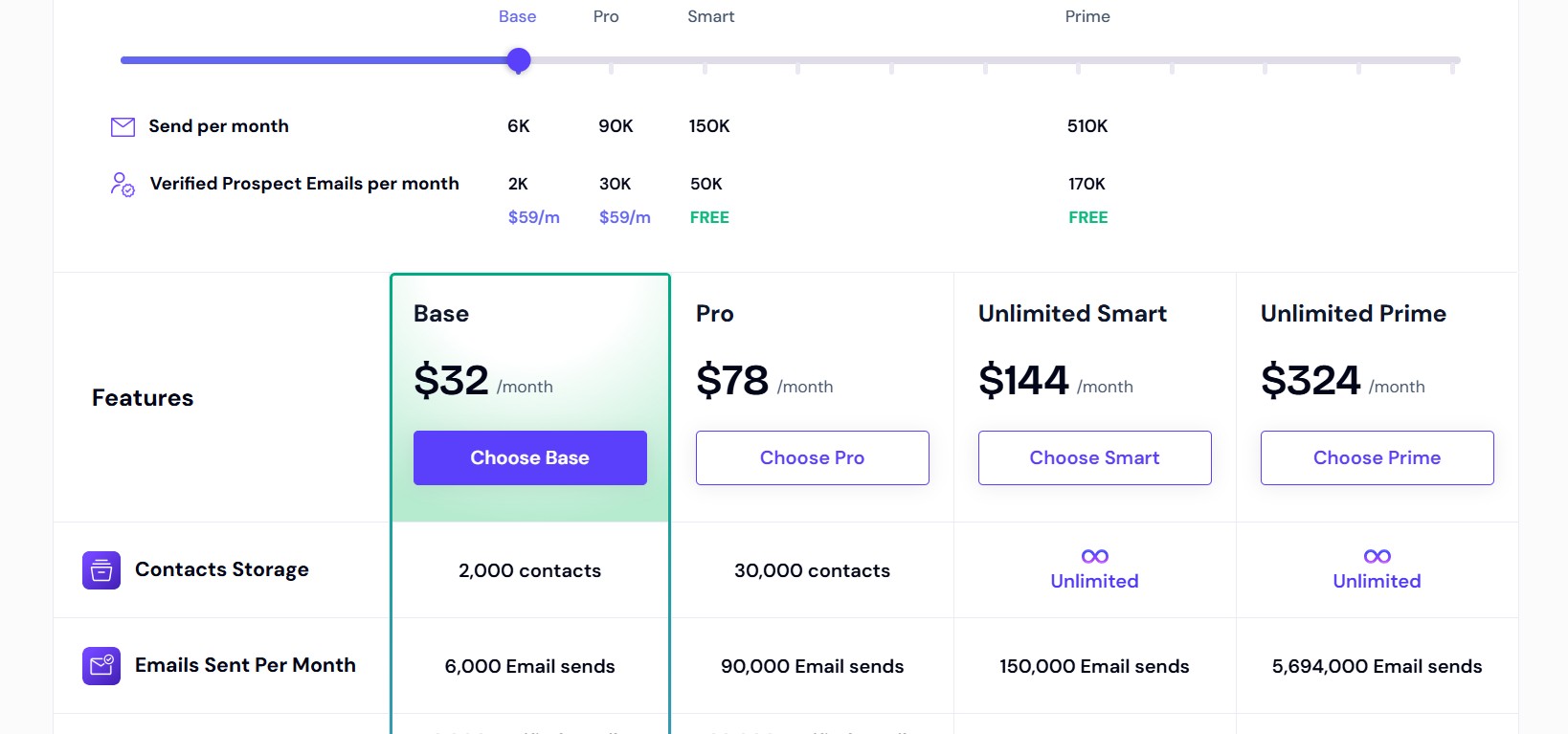
- Basic: $32/month (annual) — Unlimited mailboxes, unlimited warmup, 2,000 active leads/month, 6,000 emails/month
- Popular: $78/month (annual) — 30,000 active leads, 150,000 emails/month, multichannel, integrations
- Pro: $94/month — Full feature access, client workspaces, white-label, unlimited team members
- 14-day free trial available
Best For
Cold email agencies, high-volume outbound teams, and any team for whom inbox placement is non-negotiable.
User Ratings
G2: 4.6/5. Frequently cited strengths include deliverability performance, white-label setup, and the master inbox for managing multi-account campaigns.
5. Lemlist — Best for Creative, Visual & Personalized Cold Outreach
Lemlist is widely recognized as the most creative cold email platform on the market. It was the first tool to introduce personalized images and video thumbnails into cold email sequences — dynamically inserting prospect names, company logos, or custom text into images and personalized landing pages. For teams whose outreach strategy depends on standing out visually and creating emails that feel individually crafted, Lemlist remains the strongest choice in 2026.
Key Features
- Personalized Images and Videos: Lemlist allows you to insert dynamic personalized images into emails — for example, a screenshot of a prospect’s website with a handwritten-style annotation, or a video thumbnail with the prospect’s name overlaid. This level of visual personalization is unique to Lemlist in this price range.
- Waterfall Lead Enrichment: Lemlist uses a waterfall verification method — cross-referencing multiple data providers rather than relying on one — to validate prospect email addresses before campaigns send. This significantly reduces bounce rates.
- Lemwarm (Built-In Warm-Up Tool): All Lemlist plans include access to lemwarm, Lemlist’s dedicated email warm-up network, along with inbox rotation for multiple sending accounts.
- LinkedIn + Email Sequences in One Workflow: Lemlist allows users to build sequences that combine LinkedIn connection requests, LinkedIn messages, email steps, and call tasks in a single coordinated campaign flow. It is one of the few tools where true multichannel is seamlessly integrated rather than bolted on.
- AI Variables & Spintax for Copy Personalization: Beyond visual elements, Lemlist supports AI-generated icebreakers, dynamic text variables, and spintax to ensure every email in a sequence reads as individually crafted.
- AI Sequence Generator for Faster Campaign Creation: Lemlist’s AI can generate a full multi-step outreach sequence — including copy — based on your target audience and value proposition.
What We Liked
Lemlist’s personalized image and video capabilities are genuinely differentiated. In a world where most cold emails look identical, a personalized image referencing the prospect’s specific company or role creates an immediate pattern interrupt. The multichannel integration — combining LinkedIn and email in one sequence — is among the most polished implementations available. The waterfall enrichment ensures list quality going in, which protects domain reputation throughout the campaign.
What Could Be Better
Lemlist uses per-user pricing, which gets expensive quickly for growing teams. A team of three on the Multichannel Expert plan at $87/user/month pays $261/month before add-ons. Extra sending inboxes beyond the included allocation cost $9 per inbox. Teams needing more than five sending addresses per user hit additional costs fast. The B2B prospect database is smaller than Apollo or Saleshandy, making Lemlist better suited as an outreach execution tool rather than an end-to-end prospecting and sending platform.
Pricing
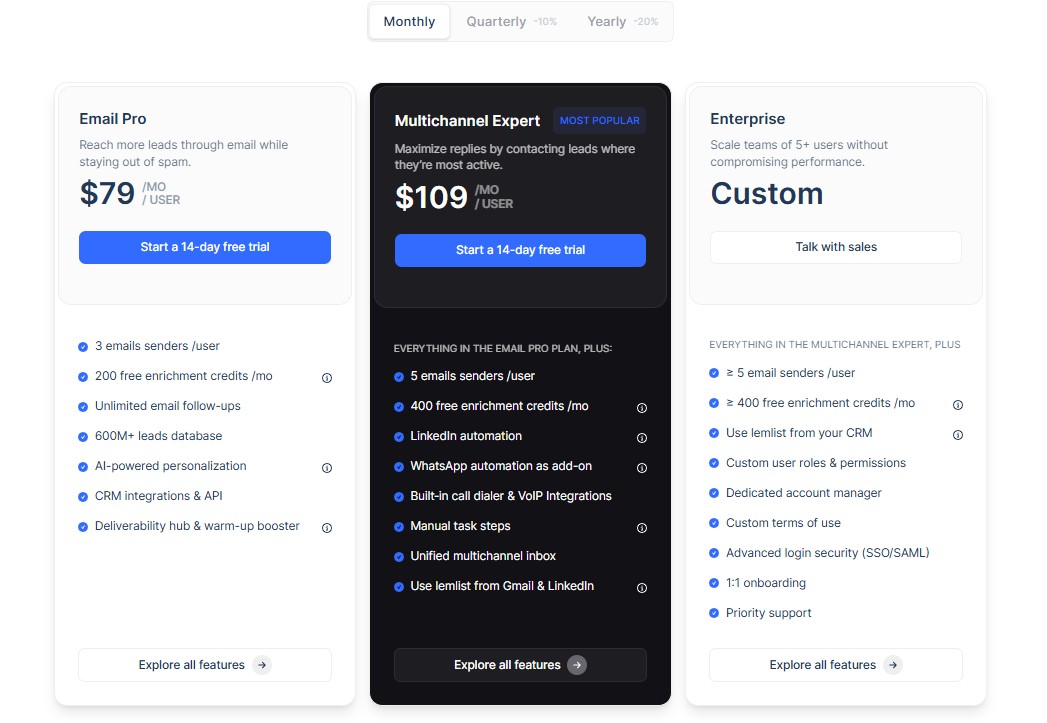
- Email Starter: $55/user/month — Basic email sequences, lemwarm, personalized images
- Email Pro: $79/user/month — Includes A/B testing, AI features, CRM integrations
- Multichannel Expert: $109/user/month — Full LinkedIn + email + calls + WhatsApp integration
- Free trial available
Best For
SMB sales teams, agency SDRs, and individual contributors whose strategy depends on creative, high-personalization outreach that stands out visually in crowded inboxes.
User Ratings
G2: 4.5/5. Users consistently highlight the personalized image feature and multichannel integration as the reasons they chose Lemlist over simpler alternatives.
6. Apollo.io — Best for Data-Rich Prospecting + Outreach in One Place
Apollo.io is one of the most powerful all-in-one sales intelligence and outreach platforms on the market. It combines a 210M+ B2B contact database with built-in email sequencing, a dialer, LinkedIn automation, AI-powered prospecting, and CRM-level contact management. For teams that previously needed separate tools for prospecting (to find leads) and outreach (to contact them), Apollo’s integrated approach is a significant operational simplification.
Key Features
- 210M+ B2B Contact Database: Apollo’s database includes contact records with verified email addresses, phone numbers, job titles, and company data. Users can filter by industry, location, company size, technology stack, funding stage, and dozens of other criteria to build highly targeted prospect lists.
- AI Outbound Copilot: Apollo’s AI SDR feature handles the prospecting-to-outreach workflow: researching prospects, finding and categorizing leads, crafting personalized messages, and automating multi-step outreach sequences. It is one of the most comprehensive AI automation stacks in the market.
- AI Lead Scoring: Apollo uses AI to rank prospects based on conversion likelihood, analyzing engagement signals, firmographic fit, and buying intent to surface the highest-priority leads.
- Email Warm-Up + Inbox Rotation: Apollo includes email warm-up and inbox rotation to support deliverability at scale, though independent reviews — including a 231-point scoring framework analysis by Amplemarket — note that Apollo’s deliverability stack is thinner than dedicated email-only tools.
- LinkedIn Chrome Extension: Apollo’s Chrome extension surfaces contact data directly from LinkedIn profiles, allowing users to find verified email addresses and add prospects to campaigns without leaving LinkedIn.
- Native CRM Integrations: Apollo offers two-way integrations with HubSpot, Salesforce, and Pipedrive, syncing all outreach activity back to your CRM in real time.
What We Liked
The combination of a massive contact database and a built-in outreach engine in one platform is Apollo’s strongest selling point. Eliminating the need to buy separate prospecting and sequencing tools is a meaningful cost and complexity saving. The Chrome extension is extremely practical for LinkedIn-based research workflows. The AI Outbound Copilot is a genuinely powerful feature for teams looking to move from research to campaign quickly.
What Could Be Better
Apollo’s per-user pricing model penalizes growth. A five-person team on the Professional plan pays approximately $395/month, compared to Saleshandy’s $25/month for the same team. The credit system for mobile phone number lookups (8 credits each) and the monthly expiration of unused credits add unpredictable costs. Apollo’s email sending features — while functional — are widely considered less advanced than dedicated cold email tools like Lemlist or Smartlead. Independent deliverability testing suggests Apollo users at volume often need supplemental warmup tools and inbox placement testing to maintain strong inbox rates.
Pricing
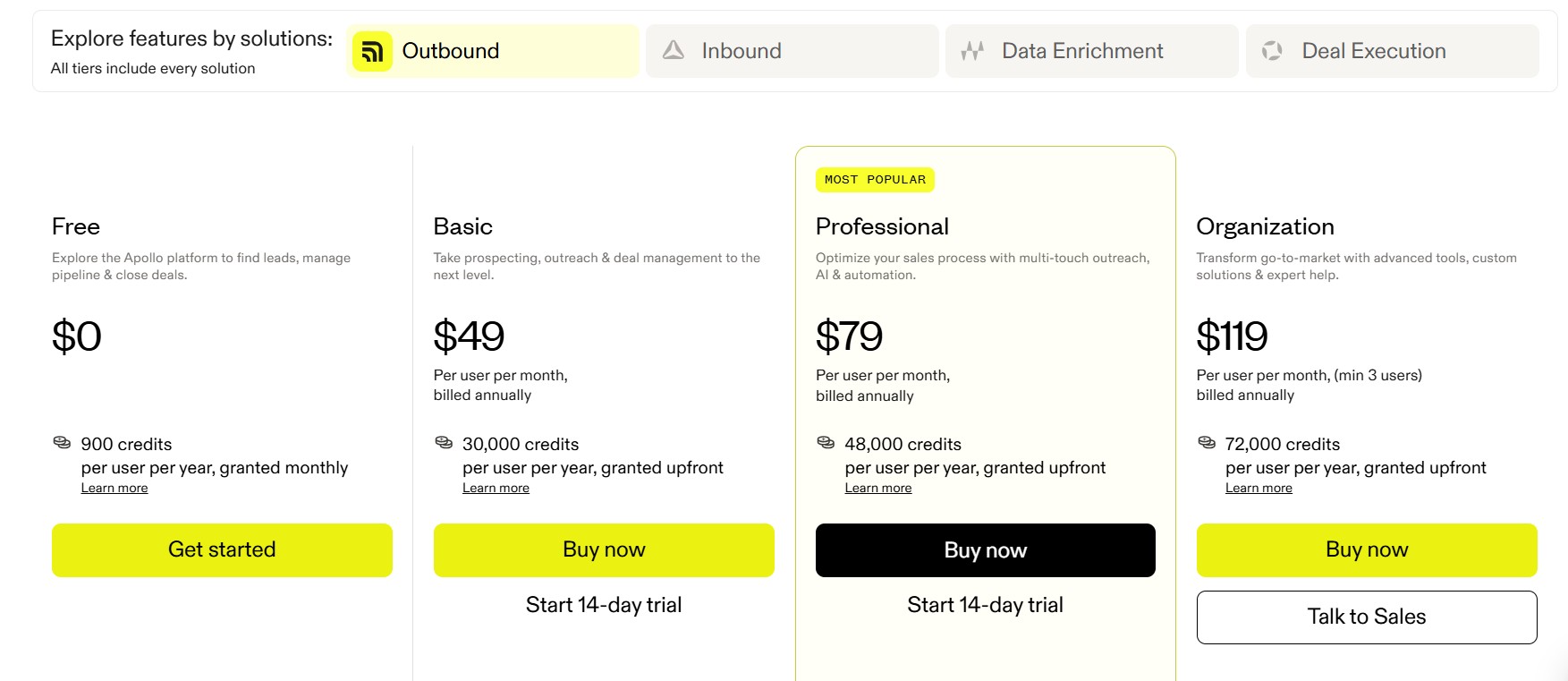
- Free: $0/month — 10,000 email credits/month, basic sequences, 250 emails/day limit
- Basic: $49/user/month (annual) — Unlimited email credits, 75 mobile credits, sequence automation
- Professional: $79/user/month (annual) — Full AI features, advanced filters, dialer
- Organization: $119/user/month (annual) — Custom permissions, advanced analytics, SSO
- Free plan available; paid plans require annual commitment for best pricing
Best For
Sales teams that need a combined prospecting database and outreach engine in one platform, and whose priorities include contact data quality and AI-assisted lead qualification.
User Ratings
G2: 4.7/5. Most cited strength is the contact database size and the ease of moving from a prospect list directly into an outreach campaign.
7. Woodpecker — Best for Small Teams That Want Simplicity & Reliability
Woodpecker is a cold email specialist. It does not try to be an all-in-one platform, a prospecting database, or a multichannel sales engagement suite. It focuses on doing cold email sequencing extremely well — with a clean, intuitive interface, strong deliverability protections, and conditional sequence logic that punches above its price point. For teams new to cold outreach, or for teams that prefer simplicity over feature bloat, Woodpecker is consistently one of the first recommendations.
Key Features
- Condition-Based Follow-Up Sequences: Woodpecker’s sequence builder supports if-then logic — if a prospect opens but does not reply, send one follow-up; if they click a link, trigger a different branch; if they do not open at all, escalate. This conditional logic is uncommon at Woodpecker’s entry-level price point.
- Unlimited Email Account Connections: Like Smartlead and Instantly, Woodpecker allows unlimited inbox connections on all plans, removing the per-inbox cost barrier for teams using multiple sending domains.
- Built-In Warm-Up & Deliverability Monitoring: Woodpecker includes email warm-up and a live deliverability monitor that tracks domain health in real time. Its Bounce Shield feature automatically pauses sending when bounce rates spike, protecting sender reputation without requiring manual intervention.
- AI Reply Detection: Woodpecker uses AI to detect replies and automatically pause sequences when a prospect responds — preventing awkward follow-up emails after someone has already engaged.
- A/B Testing with Up to 5 Variants: Woodpecker supports testing up to five variations of subject lines or email copy within a single sequence, giving teams meaningful optimization capability.
- Native 2-Way CRM Integrations: Woodpecker offers direct two-way integrations with HubSpot, Salesforce, Pipedrive, Close, and Copper CRM, synchronizing cold email activity back to your CRM in real time.
- LinkedIn Steps & Call Tasks: Woodpecker supports adding LinkedIn outreach steps and call tasks to sequences, creating a basic multichannel flow alongside the core email channel.
What We Liked
The simplicity of Woodpecker’s setup is genuinely impressive. A first campaign can go live within the same session you sign up, and the interface does not require a training manual. The conditional sequence logic is a standout feature at this price — most entry-level tools only support linear sequences. The Bounce Shield and AI reply detection protect sender reputation automatically, making it a forgiving tool for teams still learning outreach best practices.
What Could Be Better
Woodpecker’s pricing model is unique in the space and worth understanding carefully before committing. Instead of charging per user or per email, Woodpecker charges per “slot” based on the number of new prospects you contact each month. The Starter plan at $29/month covers 500 contacted prospects. For deliverability best practices, most experts recommend rotating between at least two to three inboxes per SDR — meaning you may need multiple slots to run a proper campaign. This can make the real cost of Woodpecker higher than the headline price suggests for teams at meaningful scale. The platform is also email-and-basic-tasks only; for a full multichannel strategy, you would need additional tools.
Pricing
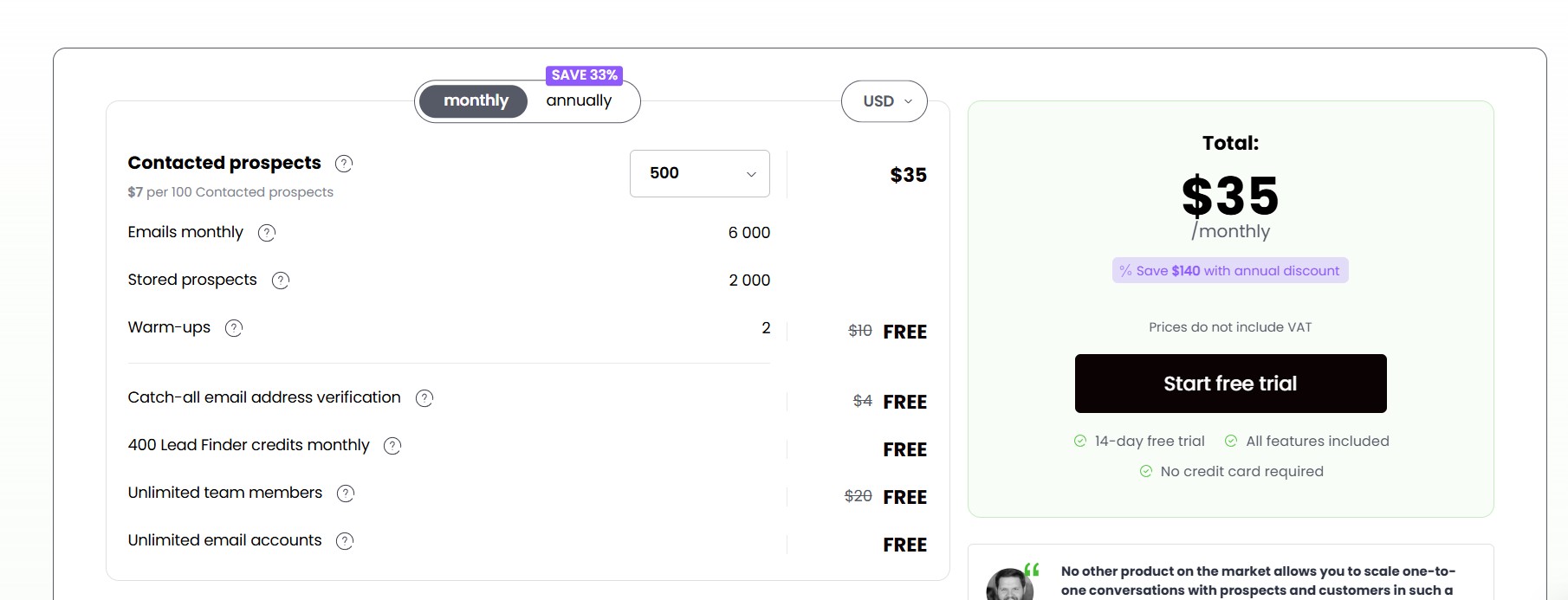
- Starter: $35/month (per slot) — 500 contacted prospects/month, unlimited email accounts, conditional sequences
- Growth: $84/month (per slot) — 3,000 contacted prospects/month, A/B testing, priority support
- Scale: $188/month (per slot) — Enterprise features, advanced reporting, dedicated support
- 7-day free trial with 50 contacted prospects, no credit card required
Best For
Freelancers, small teams, and agencies that want reliable cold email automation with smart deliverability protection and clear sequence logic, without the learning curve of more complex platforms.
User Ratings
G2: 4.5/5. Users frequently cite ease of setup, the conditional sequence builder, and responsive customer support as the platform’s strongest qualities.
8. Reply.io — Best for Structured Multichannel Sales Cadences
Reply.io is one of the most established sales engagement platforms in this comparison, having been founded in 2014. It is built for sales teams that need to run structured multichannel outreach across email, LinkedIn, SMS, WhatsApp, and calls — all from a single campaign flow. More recently, Reply.io has expanded its AI capabilities significantly through Jason AI, an autonomous SDR agent that handles prospecting, sequence creation, and reply management.
Key Features
- True Multichannel Outreach: Reply.io allows you to build campaigns that combine email sequences with LinkedIn connection requests and messages, automated SMS, WhatsApp messages, and in-app calling — all in a single coordinated cadence. This level of native multichannel integration is rare.
- Jason AI SDR: Jason is Reply.io’s AI sales agent, available as an add-on, that autonomously handles prospecting, builds personalized sequences, manages replies, and advances conversations toward a booked call. It represents the platform’s push toward fully automated outreach execution.
- AI-Powered Email Writing & Sequence Building: Even on base plans, Reply.io includes AI assistance for writing cold email copy, generating subject lines, and building multi-step sequences with suggested timing and touchpoints.
- Native 2-Way CRM Integrations: Reply.io offers deep, bidirectional integrations with HubSpot, Salesforce, Pipedrive, Close, and Copper CRM, meaning all outreach activity syncs back to your CRM in real time without needing middleware.
- B2B Lead Database: Reply.io has added a built-in prospect database to reduce dependency on external lead sources, though independent reviews have noted some data quality inconsistencies compared to established database providers.
- In-App Calling: Unlike most cold email tools that require a separate dialer, Reply.io includes calling capability directly within the platform, allowing reps to manage all outreach from a single interface.
What We Liked
Reply.io’s multichannel depth is genuinely comprehensive. The ability to build a single campaign that touches a prospect across email, LinkedIn, SMS, and phone — without switching tools — is a significant workflow advantage. The native CRM integrations are among the best in this list, supporting genuine two-way data sync that keeps CRM records current. For teams with structured sales processes and multiple SDRs needing coordinated outreach, Reply.io provides the infrastructure to manage that systematically.
What Could Be Better
Reply.io’s per-user pricing model gets expensive quickly. The Email Volume base plan starts at $59/user/month, and the Multichannel plan starts at $89/user/month. LinkedIn automation and calling features are add-ons priced separately, meaning the total cost for a fully-enabled single rep can exceed $100/month. Jason AI SDR, which is the platform’s most differentiated feature, is only available on the highest tier or as a significant add-on purchase. Teams that want full AI automation will be paying $650 or more per month for a single rep. The platform’s wide feature set also creates a steeper learning curve than simpler tools like Woodpecker.
Pricing
- Free Plan: Limited sequences, basic features
- Email Volume: $59/user/month — Unlimited mailboxes, email sequences, basic analytics
- Multichannel: $89/user/month — LinkedIn, SMS, WhatsApp, calls included
- Jason AI SDR: Custom pricing for the full AI agent functionality
- Free plan available; 14-day free trial on paid plans
Best For
Mid-market sales teams, structured SDR organizations, and teams running coordinated multichannel outreach across email, LinkedIn, phone, and SMS with CRM sync requirements.
User Ratings
G2: 4.6/5. Praise centers on multichannel capability, CRM integration depth, and customer support responsiveness.
9. Klenty — Best for SDR Teams Wanting AI Cadences + Dialer in One Tool
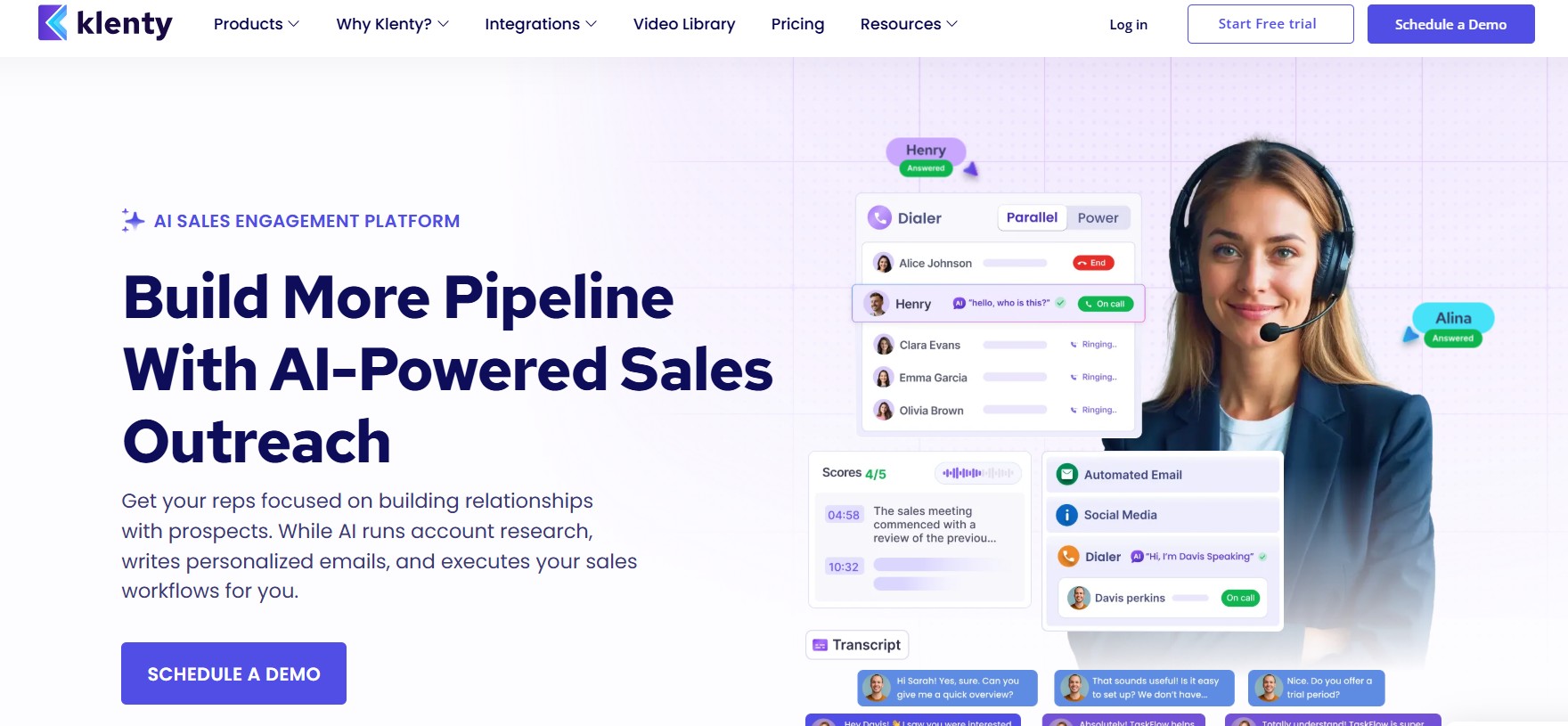
Klenty is a sales engagement platform purpose-built for SDR teams that run structured outbound across multiple channels. It combines email sequencing, a built-in multi-mode dialer, LinkedIn automation, SMS, and WhatsApp into one platform, with AI features focused on adapting outreach based on prospect behavior rather than sending the same fixed sequence to everyone. Its deliverability infrastructure includes done-for-you domain and mailbox setup, which makes onboarding faster for teams without technical configuration experience.
Key Features
- Adaptive Cadences: Klenty’s cadence engine detects prospect engagement signals — opens, clicks, replies, lack of response — and automatically adjusts the next step in the sequence. This means prospects who show interest are handled differently than those who have not opened anything, improving both relevance and conversion.
- AI List Builder: Klenty uses AI to help teams build prospect lists based on a described ICP, generating lead suggestions and enrichment data without requiring manual database browsing.
- Built-In Multi-Mode Dialer: Klenty includes a native dialer with Power Dialer mode (dials one prospect at a time automatically) and Parallel Dialer mode (dials up to five prospects simultaneously). This is a significant advantage for teams that use phone outreach alongside email.
- LinkedIn Automation: Klenty supports automated LinkedIn connection requests, messages, and InMail within the same cadence framework as email and calling.
- Full-Stack Email Deliverability Suite: Klenty handles done-for-you SPF, DKIM, and DMARC configuration for connected domains, automated inbox rotation, email throttling to mimic human-like sending patterns, and custom tracking domains with spam safeguard checks.
- Unlimited Inboxes (Single Domain): Klenty allows unlimited inbox connections within a single domain on all plans, with additional domains available as paid add-ons.
- Playbooks for SDR Workflow Management: Klenty’s playbook system creates structured daily workflow guides for SDRs, surfacing the right accounts to work each day based on engagement data and cadence stages.
- AI Email Copywriting: Klenty’s AI generates personalized cold email copy based on example emails, custom prompts, or a prospect’s LinkedIn and company data, reducing the time reps spend writing from scratch.
What We Liked
Klenty’s combination of a native dialer with adaptive AI cadences is not commonly found at this price point. For SDR teams running coordinated email and phone outreach, the ability to manage both channels from one platform — with AI adapting the sequence based on what prospects actually do — is a meaningful efficiency gain. The done-for-you deliverability setup is valuable for teams without a dedicated technical resource to configure DNS settings across multiple domains. The Parallel Dialer is a particularly strong feature for teams with high call volume requirements.
What Could Be Better
Klenty’s pricing is per-user, which adds up quickly for larger teams. The Startup plan starts at $50/user/month (annual billing), and the Growth plan with full multichannel capabilities sits at $70/user/month. For a five-person team at the Growth level, that is $350/month minimum before any add-on data products. The platform also has a steeper setup and learning curve than email-only tools, and some users note that the breadth of features can feel overwhelming initially. Klenty does not include a built-in B2B database on core plans — lead sourcing requires integration with external data tools.
Pricing
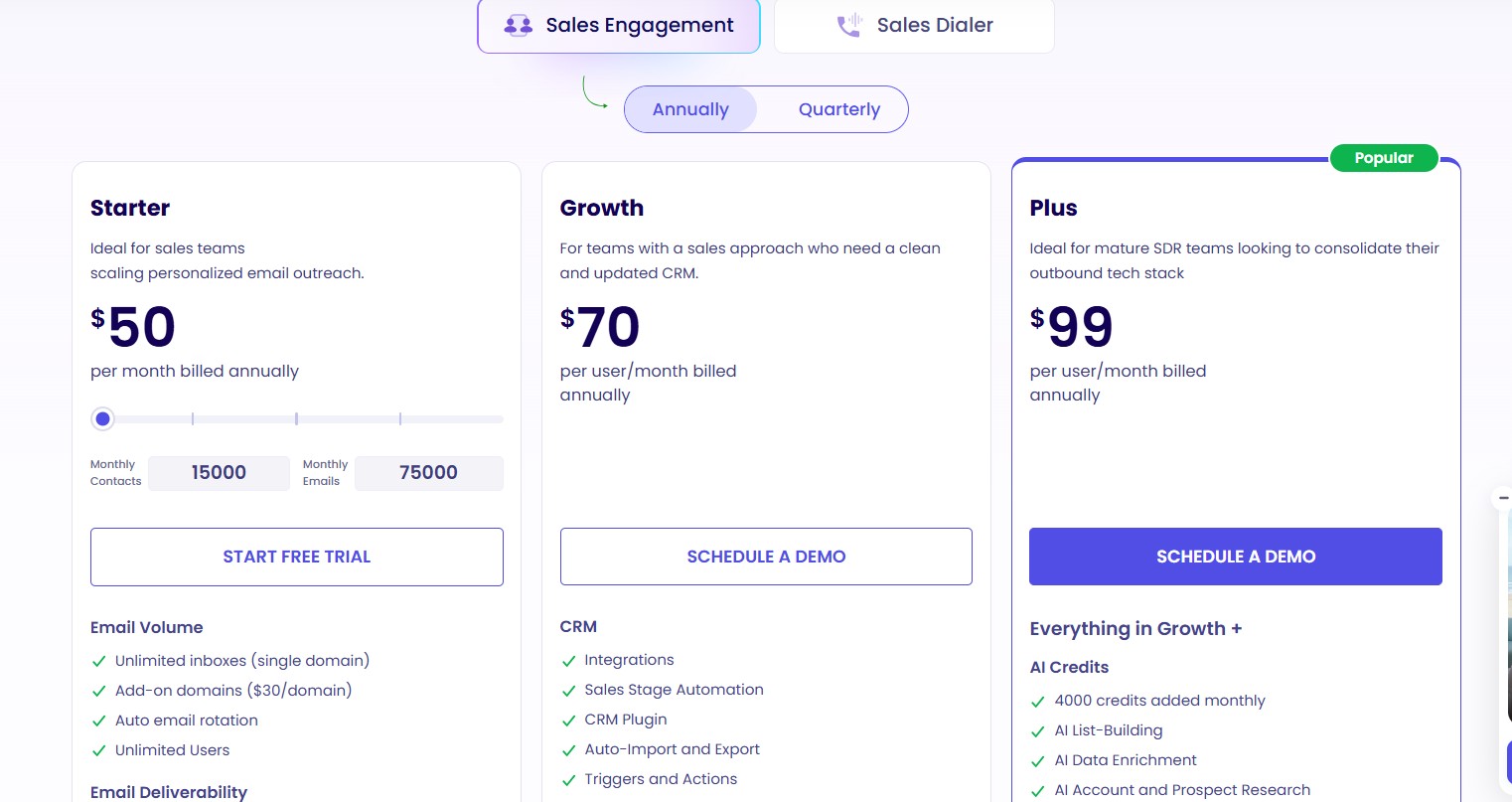
- Startup: $50/user/month (annual) — Email, deliverability, task management, basic analytics
- Growth: $70/user/month (annual) — Full multichannel: email, LinkedIn, calls, SMS, CRM integrations
- Pro: $99/user/month (annual) — Full AI features, intent-based follow-ups, advanced cadence playbooks
- 14-day free trial available
Best For
SDR teams and outbound sales organizations that need email, calling, and LinkedIn automation in one coordinated platform with AI-driven cadence adaptation.
User Ratings
G2: 4.6/5. Users particularly value the dialer integration, adaptive cadence intelligence, and the done-for-you deliverability configuration.
10. Snov.io — Best All-in-One Tool for Startups & Growing Teams
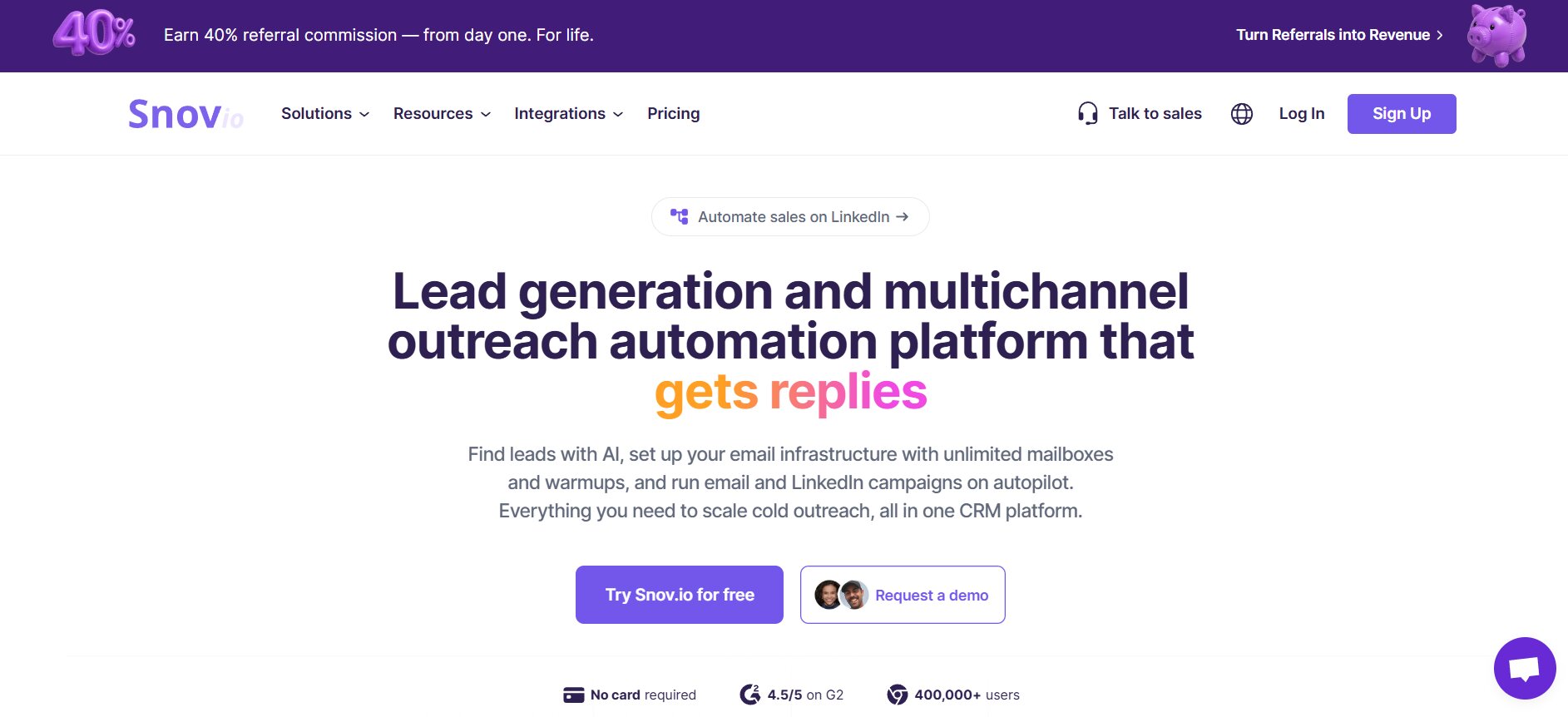
Snov.io is a comprehensive lead generation and outreach automation platform that wraps email finding, email verification, outreach sequencing, LinkedIn automation, and a built-in CRM into a single subscription at one of the most accessible price points in the market. For startups, solo founders, and small teams that want to handle the full outbound workflow from prospecting to booking without stitching together multiple tools, Snov.io is the most complete entry-level option available.
Key Features
- Email Finder & Verifier: Snov.io’s core technology is its email discovery engine, which finds and verifies contact emails from company websites, LinkedIn profiles, and its own B2B database. The 7-step verification process cross-checks emails before they are used in campaigns, reducing bounce rates from the source.
- B2B Contact Database: Snov.io includes a searchable database of B2B contacts filterable by company size, industry, location, job title, and other firmographic attributes, integrated directly into the outreach workflow.
- Automated Drip Campaigns: Snov.io supports multi-step email sequences with condition-based triggers, allowing users to send different follow-ups based on whether prospects opened, clicked, or did not engage with previous emails.
- LinkedIn Outreach + Email Sequences Combined: Snov.io allows users to run LinkedIn connection requests and messages alongside email outreach within the same campaign, without needing a separate LinkedIn automation tool.
- AI Email Generator: When writers’ block hits, Snov.io’s AI email generator creates personalized cold email copy based on the prospect’s role, company, and your defined value proposition. It also generates subject lines and suggested follow-up angles.
- Built-In CRM with Deal Pipeline: Snov.io includes a CRM layer that allows users to manage contacts, track deals through pipeline stages, and log all outreach activity in one place — a meaningful feature for small teams that do not yet need a full-scale CRM tool.
- Single, All-Inclusive Pricing Tier: Unlike many competitors that divide deliverability tools, email verification, AI features, and CRM into separate paid modules, Snov.io includes all of these capabilities in its standard pricing — a significant value advantage.
What We Liked
Snov.io’s core strength is covering the full top-of-funnel workflow in one tool at an accessible price. The email finder and verifier are among the best standalone tools in the space, and having them integrated into the sequencing platform means you can go from zero to a verified, personalized campaign without touching another tool. The LinkedIn and email combination in a single campaign flow is seamlessly implemented. The built-in CRM, while not as deep as HubSpot or Salesforce, is more than adequate for early-stage pipeline management.
What Could Be Better
Snov.io uses a credit-based pricing system for email finding, verification, and enrichment. Users on lower tiers can exhaust credits quickly, especially if combining email search, AI feature usage, and enrichment in the same billing cycle. As teams scale outreach to larger volumes, the credit system adds unpredictable costs that can erode the initial value advantage. Advanced sequencing features are more limited than dedicated tools like Smartlead or Instantly, and users who need complex conditional logic or high-volume inbox rotation may find the platform insufficient at scale.
Pricing
- Starter: $30/month — 1,000 credits, unlimited email accounts, drip campaigns, CRM, LinkedIn outreach
- Pro: $75/month — 5,000 credits, expanded database access, AI features, advanced analytics
- Managed Service: Custom pricing for done-for-you outreach management
- Free plan available with limited credits
Best For
Startups, solopreneurs, and small sales teams that need a single tool for finding leads, verifying contacts, running email and LinkedIn sequences, and tracking pipeline — at an accessible entry price.
User Ratings
G2: 4.5/5. Frequently praised for the combination of email finding and verification in one platform, ease of use, and the value of the all-inclusive pricing structure.
How to Choose the Best Cold Email Software for Your Use Case
The cold email software market in 2026 is crowded, and nearly every tool claims to be the best. The way to cut through that noise is to evaluate tools against your specific situation — your channels, budget, team size, and technical resources — rather than chasing the most feature-rich option or the lowest headline price.
1. Define Your Primary Outreach Channel (Email-Only vs. Multichannel)
Before comparing tools, decide whether your outreach strategy is built on cold email alone or whether it incorporates LinkedIn, phone, and SMS as parallel channels. Research from Sopro’s 2026 study, which analyzed 151 million outreach touchpoints, found that LinkedIn outreach delivers approximately double the response rate of cold email in isolation. If multichannel is your strategy, you need a platform like Reply.io, Klenty, or Lemlist that supports true multichannel in a single campaign workflow. If email is your primary channel and volume is the priority, platforms like Instantly or Smartlead are better fits. If LinkedIn automation with AI-driven conversation handling is the goal, DealsFlow operates in a category of its own.
2. Evaluate Deliverability Infrastructure — Not Just Warm-Up Claims
Every cold email tool in 2026 advertises warm-up as a feature. The real differentiator is the depth of the deliverability stack behind it. A complete deliverability infrastructure includes domain health monitoring, SPF/DKIM/DMARC verification, inbox placement testing (so you know before sending whether emails land in primary, promotions, or spam), spam content checking, and AI-powered mailbox selection that routes sends through the highest-performing inboxes. Tools that only offer warm-up without placement testing and domain monitoring are leaving you partially blind. According to a 231-point framework analysis by Amplemarket comparing nine leading platforms, the highest competitor deliverability score was less than 40% of a complete deliverability stack — meaning most tools have meaningful gaps.
3. Assess AI Features That Actually Save Time vs. Just Look Good
Every platform in 2026 markets AI prominently. The practical test is simple: use the AI feature to build a campaign, and measure how much editing you need to do before the output is something you would genuinely send. AI that generates a full, contextually relevant multi-step sequence from your website URL and ICP description saves real hours. AI that rewrites a subject line slightly differently is a thin productivity gain dressed as a major feature. The AI features that genuinely move the needle in 2026 include full sequence generation from prospect and company data, AI reply agents that continue conversations after first contact, intent-based lead scoring, and AI-driven personalization that incorporates public company signals beyond just name and job title.
4. Match Pricing Model to Your Sending Volume
Cold email tools use fundamentally different pricing models, and the cheapest option for your use case depends on your volume. Per-seat pricing (used by Apollo, Reply.io, Klenty, Lemlist) scales linearly with team size and gets expensive for larger organizations. Flat-rate or usage-based pricing (used by Instantly, Smartlead, Saleshandy) charges based on emails sent or active leads rather than users, making it far more economical for teams managing multiple inboxes. Per-prospect pricing (used by Woodpecker) charges based on how many new contacts you add to campaigns each month, which can be cost-effective at low volumes but limiting at scale. Always calculate the real operational cost — including data, warm-up, add-ons, and CRM layers — not just the plan headline.
5. Check Team & Agency Needs (Multi-Account, White-Label, Client Reporting)
If you are managing outreach for multiple clients or multiple business lines, the platform’s agency infrastructure becomes a key requirement. Look for white-label capabilities (Smartlead), separate client workspaces with individual reporting, flat-rate pricing that does not charge per client account, and a centralized inbox that aggregates replies across all managed accounts. Platforms that charge per seat or per client workspace can make agency operations financially unviable at scale.
6. Verify Integration Depth with Your CRM & Existing Stack
A cold email tool that does not sync with your CRM creates data silos and forces manual data entry. Check whether integrations are one-way (pushing contacts from your CRM into the outreach tool) or two-way (also syncing replies, open events, and sequence activity back to your CRM). Two-way integrations are significantly more valuable for teams that use CRM data to prioritize follow-up and measure pipeline contribution from outreach campaigns. Platforms like Reply.io, Woodpecker, and Lemlist offer two-way integrations with major CRMs. Apollo provides two-way sync with HubSpot and Salesforce natively.
7. Always Use Free Trials Before Committing
Every platform on this list offers either a free trial or a free plan. Given the significant differences in UI, workflow logic, and actual feature delivery between how tools are marketed and how they perform in use, there is no substitute for running a real campaign before committing to an annual plan. Use the trial period to build a sequence, connect inboxes, test deliverability, and evaluate the AI features against your own use case. What works for a ten-person agency may not suit a solo founder, and vice versa.
Cold Email Benchmarks to Know in 2026
Understanding the benchmarks that define average and excellent performance in 2026 helps you set realistic goals and identify whether your campaigns are underperforming relative to the market.
Average Cold Email Open Rate: According to Snov.io’s 2026 cold email statistics, the average open rate across all industries is 27.7%, down from approximately 36% in 2023. However, this figure is increasingly unreliable as a standalone metric, since Apple’s Mail Privacy Protection pre-loads tracking pixels automatically, inflating open rates without reflecting genuine human engagement. Reply rate is now the preferred north-star metric for evaluating outreach performance.
Average Cold Email Reply Rate: Instantly’s 2026 Benchmark Report, analyzing billions of emails across the platform, found the overall average reply rate to be 3.43%. Top-performing campaigns exceed 10% reply rates, which is two to four times the average. According to Saleshandy’s benchmark report, which analyzed over 100 million emails, campaigns with three to five follow-up steps consistently achieve 8.3% reply rates, compared to 4.1% for sequences without any follow-ups.
The Best Day and Time to Send: Three major studies from Snov.io, Instantly, and Saleshandy all agree that Tuesday through Thursday between 9:30 AM and 11:30 AM in the recipient’s local time zone produces the best results. Snov.io’s data shows Wednesday leads for reply rates at 5.8%, and Tuesday leads for open rates at 28.2%.
Follow-Up Timing: According to Instantly’s benchmark data, the first email in a sequence captures 58% of all replies. The remaining 42% come from follow-ups, confirming that a well-structured follow-up sequence is essential for capturing prospects who need more than one touchpoint.
Bounce Rate Threshold: Industry guidance is consistent: keep bounce rates below 2%. Research from Firstsales.io notes that going from a 1.8% bounce rate to a 2.3% bounce rate is not a small increment — it is the difference between primary inbox placement and spam folder routing, because deliverability damage from bounce rates scales exponentially, not linearly.
Personalization Impact: Campaigns with advanced personalization (using multiple custom fields beyond just name and company) have achieved reply rates as high as 18%, versus the 3.43% average for undifferentiated sends — a five-times multiplier, according to Martal’s 2026 analysis. Customized subject lines alone improve open rates by up to 50% compared to generic subject lines.
Our Final Verdict
After testing all ten platforms and reviewing the data, the right answer depends entirely on your priorities. There is no universal best tool. There is only the best tool for your specific combination of channels, volume, team size, and budget. Here is the breakdown:
| Use Case | Recommended Tool |
|---|---|
| AI-powered LinkedIn automation from outreach to booked call | DealsFlow |
| High-volume email at scale with unlimited inboxes | Instantly.ai |
| Agency email outreach with the best cost-per-seat value | Saleshandy |
| Deliverability-first agencies needing inbox placement control | Smartlead |
| Creative, visual, high-personalization outreach | Lemlist |
| Data + outreach in one platform, large B2B database | Apollo.io |
| Simple, reliable cold email for small teams | Woodpecker |
| Structured multichannel cadences with deep CRM sync | Reply.io |
| SDR teams needing email, dialer, and LinkedIn in one tool | Klenty |
| All-in-one for startups: find, verify, send, and track | Snov.io |
The single most important piece of advice for 2026: do not evaluate tools in isolation from the strategy behind them. The best cold email software in the world will not save a campaign with a poorly defined ICP, unverified contact lists, or emails that lead with features instead of prospect pain points. Software is infrastructure. Strategy, copy, and targeting are what actually drive replies.
Frequently Asked Questions
1. What Is Cold Email Software and How Is It Different from Email Marketing Tools?
Cold email software is built for one-to-one sales outreach to people who have no existing relationship with you — prospects who have not opted in to receive your emails. It is designed to send personalized, conversation-starting messages at scale, manage follow-up sequences, protect sender reputation, and track reply rates and meeting bookings.
Email marketing software (like Mailchimp or Klaviyo) is built for permission-based communication — newsletters, announcements, and promotional campaigns sent to opted-in subscriber lists. The technical requirements are different: cold email demands strong deliverability infrastructure, warmup capabilities, and personal-looking single-column emails. Email marketing prioritizes HTML design, list segmentation, and broadcast volume. Using an email marketing tool for cold outreach will result in high spam rates and deliverability damage.
2. Is Cold Emailing Legal in 2026? (CAN-SPAM, GDPR, & CASL)
Cold emailing to businesses is legal in most jurisdictions when done correctly, but the rules differ by region and recipient type. In the United States, cold email is governed by the CAN-SPAM Act, which requires a valid physical address in every email, a clear opt-out mechanism, and honesty in subject lines and header information. There is no opt-in requirement for B2B email under CAN-SPAM.
In the European Union, GDPR applies to any email sent to EU-based contacts. B2B cold email to professional email addresses is generally permissible under the “legitimate interest” basis, provided the outreach is relevant to the recipient’s professional role. Consumer cold email in the EU requires explicit prior consent. Canada’s CASL is stricter than both, generally requiring express consent before sending commercial messages unless a specific exemption applies, such as B2B outreach where there is a reasonable expectation of contact.
The practical bottom line: B2B cold email to verified professional addresses, on a relevant business topic, with a clear opt-out, is legal and widely practiced across the US, EU, and most other major markets. Always consult legal counsel for your specific jurisdiction.
3. What Is the Best Cold Email Software for Agencies Managing Multiple Clients?
For agencies managing ten or more clients with separate email domains, campaign tracking, and reporting needs, the three strongest options are Smartlead (for its white-label setup, client workspaces, and master inbox), Saleshandy (for its flat-rate pricing that does not charge per client), and DealsFlow (for LinkedIn-focused agencies running AI-automated outreach across multiple client accounts simultaneously). Avoid per-seat tools when running large client rosters — the costs scale unsustainably fast.
4. Which Cold Email Tool Has the Best Deliverability?
Based on independent testing and community consensus in 2026, Smartlead and Instantly both have strong reputations for deliverability infrastructure, particularly inbox rotation and warm-up. However, Amplemarket’s 231-point evaluation of nine major platforms found that most tools — including Smartlead — scored below 40% on a complete deliverability stack. A full deliverability setup requires not just warm-up, but inbox placement testing, domain health monitoring, SPF/DKIM/DMARC verification, and spam content analysis. No single tool in this list scores perfectly on all five dimensions. For maximum deliverability, the best approach is pairing a platform with strong warm-up (Smartlead or Instantly) with a dedicated inbox placement testing add-on.
5. What Is the Best Free Cold Email Software to Start With?
If you need to start sending cold email without a paid subscription, Apollo.io’s free plan is the most capable free option — it includes 10,000 email credits per month, basic sequence automation, and access to the B2B contact database. Snov.io and Hunter.io also offer free tiers with limited credits. Keep in mind that free plans universally impose sending caps, lack advanced warm-up, and restrict the features that most improve deliverability and reply rates. They are suitable for testing and validation, not for sustained outreach at meaningful volume.
6. Can I Use These Tools with Gmail or Outlook?
Yes. All ten tools on this list support connecting Gmail and Google Workspace accounts, and most also support Outlook and Microsoft 365. The connection is typically made via OAuth or SMTP credentials. For deliverability purposes, sending through properly configured Google Workspace or Microsoft 365 accounts is widely recommended over shared SMTP servers, as both carry higher sender reputation baselines. Most platforms — including Instantly, Saleshandy, and Smartlead — actively guide users toward Google Workspace setups with separate sending domains rather than using primary brand domains for cold outreach.
7. How Many Cold Emails Should I Send Per Day?
Most deliverability experts recommend sending no more than 30 to 50 cold emails per day from any single inbox during the first month of use. After a proper 2 to 4 week warm-up period, this can gradually increase to 80 to 100 emails per inbox per day. Exceeding these limits — especially on recently created domains — triggers spam filter scrutiny from major email providers. Instantly’s 2026 benchmark report confirms that teams distributing volume across multiple warmed domains while maintaining predictable daily patterns see 15 to 20% higher reply rates than teams sending erratically from a small number of inboxes.
8. What Is the Difference Between Cold Email Software and a Sales Engagement Platform?
Cold email software focuses primarily on sending personalized email sequences at scale, with deliverability infrastructure, warm-up, and reply management as its core features. The goal is email as a channel. A sales engagement platform is a broader category that coordinates outreach across multiple channels — email, LinkedIn, phone, SMS, and sometimes WhatsApp — within a single campaign workflow, and typically includes deeper CRM integration, analytics, and team workflow management. Tools like Reply.io, Klenty, and Lemlist straddle both categories. Instantly and Smartlead are primarily cold email tools. Saleshandy is positioned between the two.