


Here is the thing about LinkedIn outreach at scale: the moment you start sending volume, you stop sounding like yourself. The message that booked you three calls last month, the one you wrote manually in ten minutes while thinking about a specific person, turns into a spam flag when your tool fires it at 800 people who all look similar on paper.
This is not a technology problem. Every major LinkedIn automation platform today lets you add a first name, a company name, a job title. That is not personalization. That is mail merge, and your prospects have been ignoring mail merge since 2004.
The actual problem is that most outbound operators have learned to personalize the format of a message without personalizing the signal behind it. And those are two completely different things. One gets you past the spam filter. The other gets you a reply.
This article is not about telling you to “do your research.” You already know that. What it covers is the operational system behind personalization at scale: which signals to use, how to enrich them without spending three minutes per prospect, how to build messages that feel like they were written for one person even when they were sent to five hundred, and what to do when someone actually replies. Every section is built for the person running this at volume, not the person sending thirty messages a week manually.
Why Most “Personalized” LinkedIn Messages Still Get Ignored
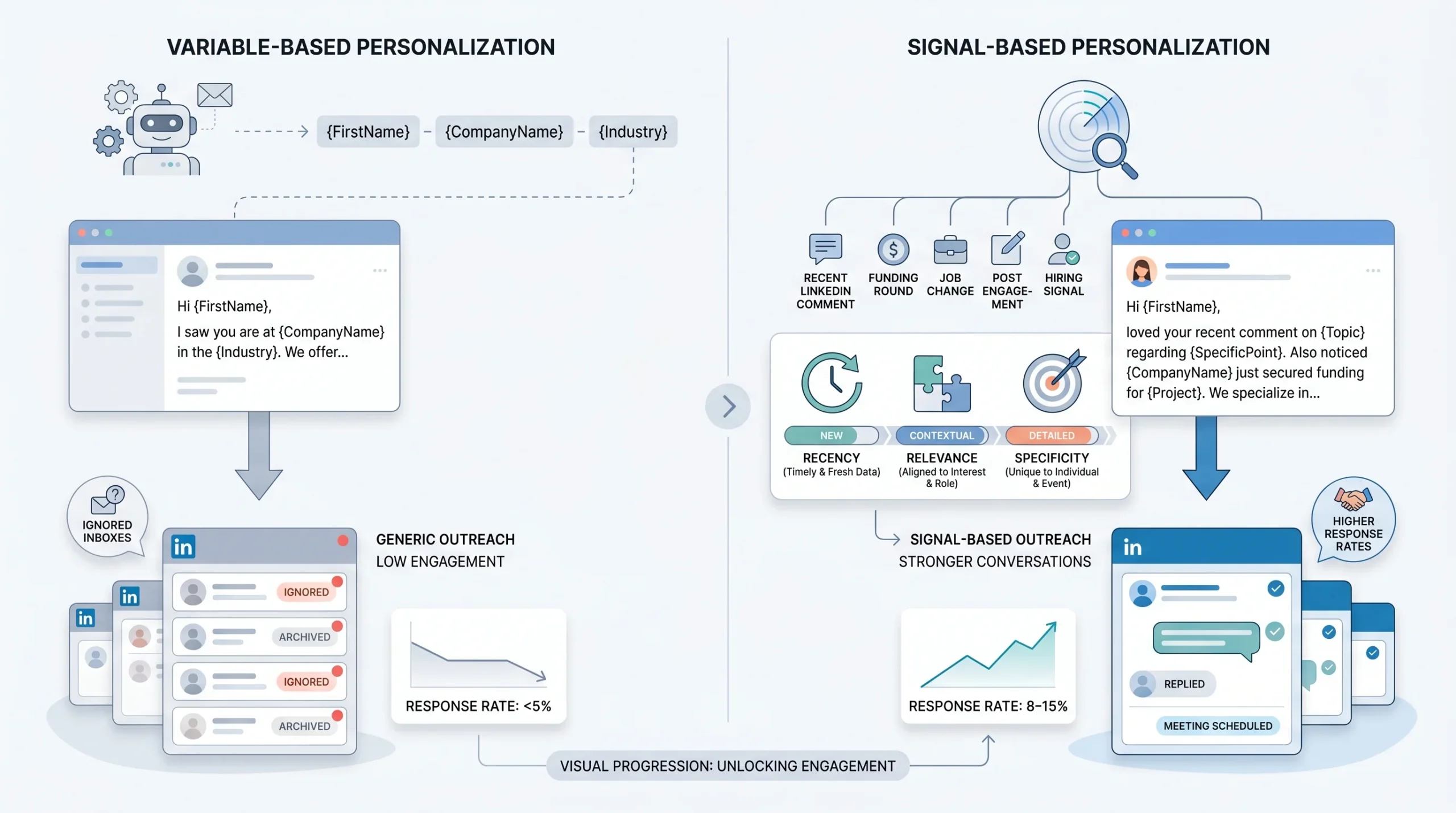
Personalization at scale fails for one consistent reason: operators personalize the container but not the content. They swap in a name, pull a job title, maybe grab a company name, and call it done. The message still reads like it could have been sent to anyone in the same industry. And it was.
The distinction that matters here is between variable-based personalization and signal-based personalization.
Variable-based personalization replaces placeholders with data. “Hey {{first_name}}, I work with {{industry}} companies like {{company_name}}…” is variable-based. It is also what every other tool on the market produces, which is why prospects recognize it on sight.
Signal-based personalization starts from a trigger: something that happened recently, something specific to this person at this moment, something that makes the outreach feel timely rather than generic. The signal is the reason you reached out today instead of last month or next month.
There are three qualities that separate signals that produce replies from signals that don’t:
- Recency: The signal happened within the last 7 to 14 days. A LinkedIn post from eight months ago is not a signal. A comment they left on a founder’s thread three days ago is.
- Relevance: The signal connects directly to a pain your ICP actually has. It is not enough for the signal to be about them. It needs to be about them in a way that makes your message feel obvious rather than random.
- Specificity: The signal can only apply to this person. “I loved your post on leadership” is not specific. “Your point about async culture breaking down once you hit 50 people landed for me because we see that exact inflection point in the teams we work with” is specific.
The mechanics of why this matters show up clearly in reply rates. When sequences run on variable-based personalization alone, a reply rate below 5% is standard. When signal-based personalization is in play, reply rates in the 8 to 15% range become achievable, depending on the ICP and the quality of the list. The difference is not the tool. It is the signal.
One more mistake worth naming directly: using the same “personalization” hook for six hundred people in the same vertical. If your opener references “SaaS founders scaling past Series A” for everyone in your list who fits that description, it is not personalization anymore. It is segment-level messaging with a friendly tone. That has its place, but it should not be confused with personalization that drives above-average reply rates.
What a 0.3% reply rate is actually telling you is not that LinkedIn outreach does not work. It is that your opening signal is not registering as specific to the person reading it.
The Signal Stack: What to Personalize and Where to Find It
Most guides on LinkedIn personalization stop at “research your prospects.” That is not a system. It is advice that breaks down the moment you try to run it at scale. A workable system requires knowing which data points are worth building around and which ones are noise that slows you down without lifting reply rates.
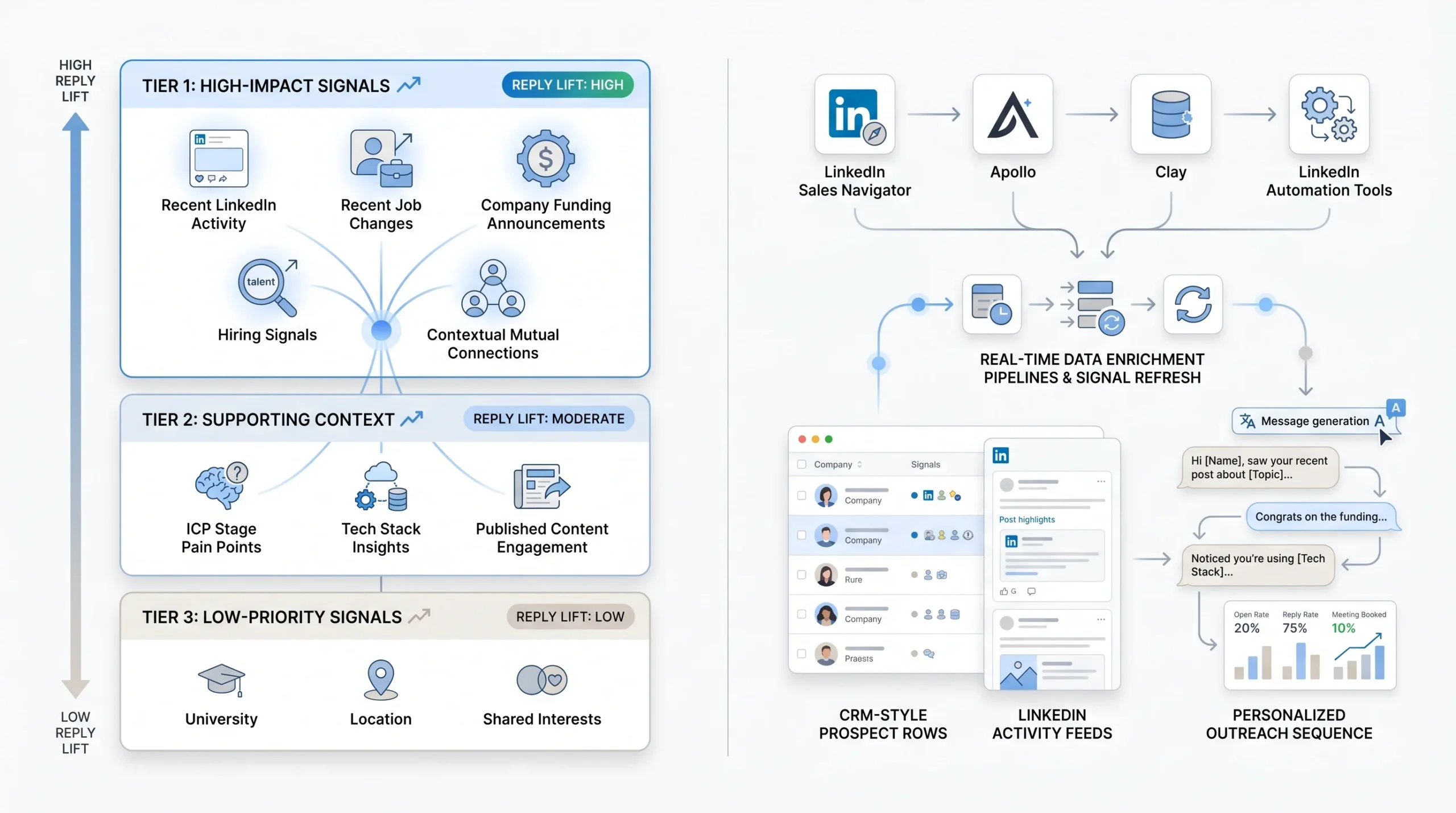
The signals below are organized by the reply lift they tend to produce, based on what operators running high-volume LinkedIn campaigns have observed consistently. They are not weighted by how easy they are to find; they are weighted by how much they actually move the needle.
Tier 1 Signals: Highest Reply Lift
These are the signals worth enriching for at scale. Each one implies timing, which is what makes outreach feel relevant rather than random.
- Recent LinkedIn activity: A post, comment, or reaction from the prospect in the last 14 days. This is the highest-quality signal available because it tells you two things simultaneously: the person is active on LinkedIn right now, and the content they engaged with tells you something about what is on their mind. A VP of Sales who commented on a thread about quota compression is more receptive to a message about pipeline tools than a VP of Sales who has been silent for six months.
- Job change in the last 90 days: A new role is one of the most reliable buying signals in B2B outreach. People who have recently moved into a new position are actively re-evaluating vendors, building new processes, and more open to conversations than someone who has been running the same stack for three years. LinkedIn’s own data shows that people update their profiles within the first 30 days of a role change, so this signal is reliably findable through enrichment tools.
- Company funding or hiring announcement: A Series B announcement, a hiring surge in a specific function, or a new executive hire signals growth and the budget conversations that come with it. A company that just raised $20M and posted 15 open sales roles is in a different buying posture than one that has been flat for 18 months.
- Mutual connection with context: Not just a name drop. If you have a mutual connection, the signal is most effective when you can reference something specific: “I noticed you and [Name] are connected, and they mentioned your work on [topic] when we spoke last month.” Without that context, mutual connections are noise.
Tier 2 Signals: Supporting Context
These signals work best when they support a Tier 1 signal rather than carry a message on their own.
- Industry-specific pain points mapped to ICP stage: Every ICP has predictable pain at predictable stages. A 20-person SaaS company hitting its first scaling problems looks different from a 200-person company dealing with process bloat. When you know which stage your prospect is in, you can write to the pain they are likely feeling right now rather than the generic pain that applies to everyone in their industry.
- Tech stack signals: Tools like Clearbit, Apollo, and Clay can surface what platforms a company is running, which tells you something about their current infrastructure and where the gaps might be. A company running Salesforce, Outreach, and ZoomInfo is in a different conversation than one still running HubSpot and a spreadsheet.
- Content they have published: Articles, LinkedIn newsletters, or LinkedIn Lives give you direct access to how this person thinks. An article arguing that outbound is dead tells you something different than one arguing that outbound just needs better personalization. Read what they wrote and reference the argument, not just the fact that they wrote something.
Tier 3 Signals: Use Sparingly
- University, location, shared interests: These signals have their place in low-volume, high-ticket outreach where the relationship-building phase matters more than speed. At scale, they dilute your signal-to-noise ratio. “I see we’re both Michigan alumni” reads as filler when the prospect has already received six other messages that week using the same opener.
How to Enrich at Scale Without Manual Research
The gap between knowing which signals matter and actually using them at scale is the enrichment workflow. Manual research at volume is not a system. It is a bottleneck dressed up as diligence.
The practical approach most operators have landed on uses a layered enrichment pipeline:
- Clay pulls LinkedIn activity data, job change information, company news, and tech stack signals into a single row per prospect, with each field mapped to a dynamic variable.
- Apollo or LinkedIn Sales Navigator handles the initial list build, filtered by title, company size, industry, and geography.
- The enrichment row feeds directly into your LinkedIn automation tool (DealsFlow, Expandi, or a similar platform) as a set of variables that the message template can call dynamically.
The result is that each message pulls from a real, recently verified signal rather than a stale data field. A prospect who posted on LinkedIn three days ago gets a message referencing that post. A prospect who changed jobs six weeks ago gets a message acknowledging the new role. Neither of those messages was written manually. Both of them read like they were.
One operational detail that trips up teams at scale: enrichment data goes stale. A post from last week becomes a post from last month if your enrichment run was two weeks ago. Build a QA step into the pipeline that flags enrichment rows older than 21 days and re-enriches them before the sequence fires.
Writing Personalized Messages That Don’t Sound Like Templates (Even When They Are)
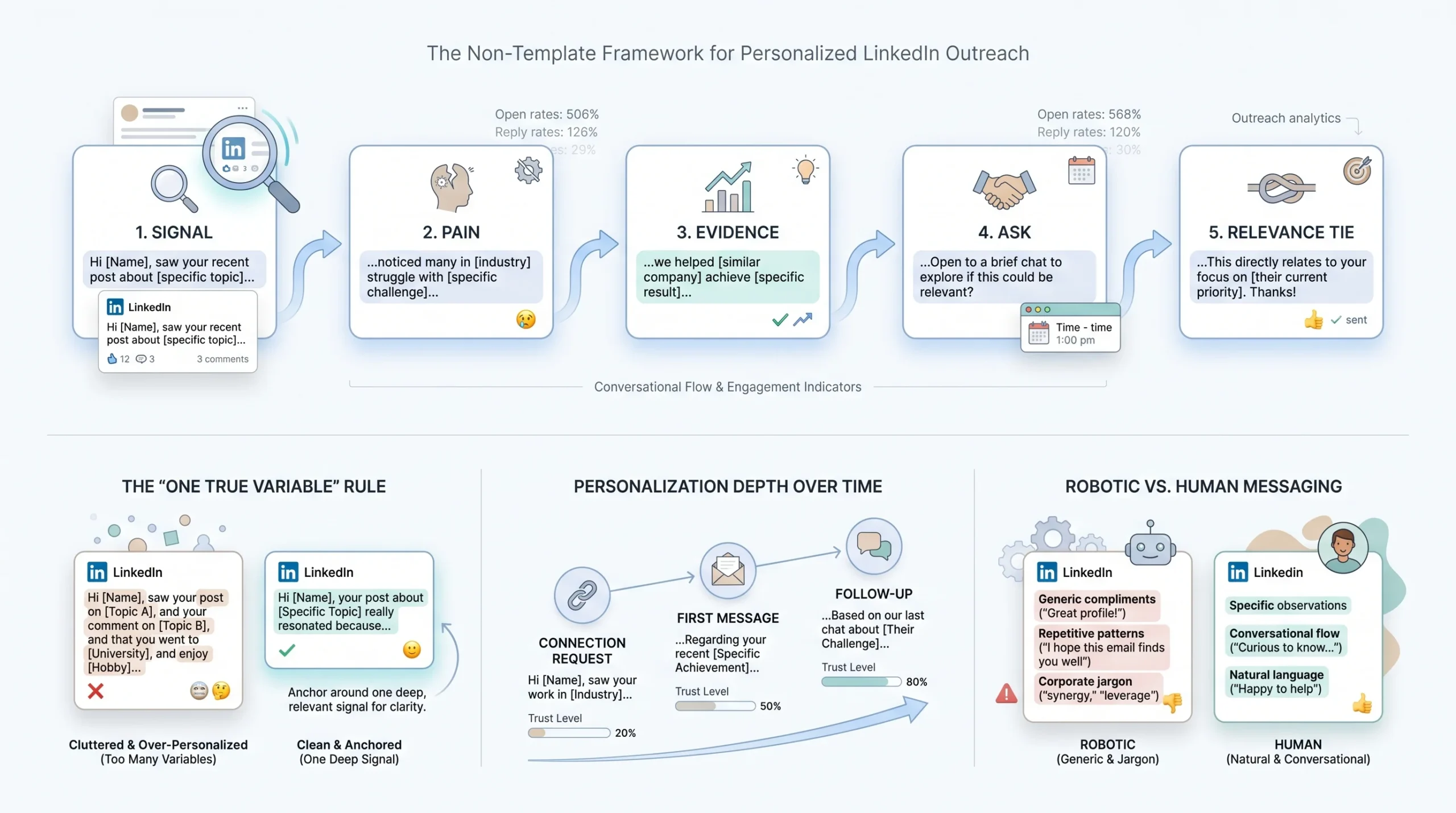
The SPEAR framework below is not a message template. It is an architecture for messages. Every good high-volume, personalized message follows something close to this structure, whether the writer named it or not.
The SPEAR Framework for Scalable Personalization
- S: Signal. Open with the specific thing that triggered the outreach. Not “I noticed you work in sales” but “Saw your post on outbound fatigue last week, specifically the point about reply rates dropping across the board.”
- P: Pain. Move immediately to the problem your ICP is reliably dealing with at this stage. Do not introduce your product yet. Name the pain clearly enough that the prospect thinks “yeah, that’s us.”
- E: Evidence. One line of proof. A result you achieved for a comparable company, a number, a named outcome. Not “we help companies like yours” but “we helped a 12-person SDR team at a Series B SaaS company cut their average days-to-meeting from 22 to 9.”
- A: Ask. A low-friction next step. Not “Can I schedule a 30-minute call?” Not yet. “Worth a quick five-minute conversation to see if this even applies to where you are right now?” is a softer ask that removes the commitment pressure.
- R: Relevance tie. Close by connecting the opening signal back to the ask. “Given what you said about reply rates, I thought this might be worth a quick look” brings the message full circle and reinforces that this is not a blast.
The “One True Variable” Rule
Most automation platforms let you stack four to six dynamic variables into a single message. That is technically possible and operationally counterproductive. When there are six variables, none of them lands with the weight it needs to.
The message that performs best at scale is anchored by one deep, specific variable in the opening line and supported by the rest of the structure. The choice of which variable gets the anchor position comes down to which signal is most recent and most specific to this prospect. If they posted on LinkedIn four days ago, that is the anchor. If they just changed jobs, that is the anchor. If the only thing you have is their industry and title, you do not have a strong enough signal for a personalized open, and the message should go into a segment-level campaign instead.
Connection Request vs. First Message vs. Follow-Up: Different Personalization Depth
These three touchpoints serve different functions, and the personalization approach should match each one.
- Connection note (150 characters maximum): Signal-first, no pitch. “Saw your comment on [Name]’s post about pipeline velocity. Lot of overlap with what we’re working on. Worth connecting.” This is not the place to explain what you do. It is the place to create enough recognition that the accept rate climbs.
- First message post-connect: Signal plus pain plus soft ask. This is where the SPEAR framework applies in full. Keep it under 150 words. The goal is one response, not a booked meeting.
- Follow-up: Add value and reference prior context. Do not repeat the opener. If someone did not reply to your first message, sending a slightly rephrased version of the same message is not a follow-up. It is a second strike with the same pitch. A strong follow-up adds something: a relevant piece of content, a second proof point, a direct question that is easier to answer than the open-ended ask in the first message.
What “Sounding Like a Bot” Actually Means (and How to Fix It)
The prospect reading your message does not consciously think “this is automated.” What they experience is a faint recognition that nothing in this message required the sender to actually think about them. The tells are subtle but consistent:
- Every sentence is approximately the same length. Human writing varies. Automation does not.
- The opener is a compliment that could apply to anyone (“love what you’re building at [Company]”).
- The transition from signal to pitch happens in one sentence with no breathing room.
- The call to action is corporate phrasing (“I’d love to connect and explore potential synergies”).
The fix is not to add irregularity artificially. It is to write the message the way you would write it if you were sending it to one person and you actually knew what they had been thinking about last week. Short sentences where the point is blunt. Longer sentences where you are explaining something that requires context. A call to action that sounds like something a person would say out loud.
Audit your current templates by reading them aloud. If you would not say it in a conversation, you should not send it in a message.
Scaling the System: How to Build a Personalization Workflow Across 10, 50, or 500 Prospects a Day
The personalization frameworks in the previous section work for individual messages. This section is for the operator who needs them to work for fifty campaigns running simultaneously, across multiple client accounts, with different ICPs, different signals, and different sequences.
The Three-Layer Personalization Stack
Not every prospect on your list deserves the same depth of personalization. Building personalization depth into a tiering system is what separates campaigns that scale from campaigns that collapse under their own complexity.
- Layer 1: ICP-level messaging. The same for everyone in a segment, but written sharply for that segment’s specific pain. A message for “VP of Sales at a 50-150 person SaaS company experiencing their first SDR team scaling problems” is not a personalized message, but it is a targeted one. It addresses a real pain with specificity, and it works at volume because the ICP cohort is defined tightly enough that the pain is consistent.
- Layer 2: Signal-triggered variables. Dynamically inserted based on enrichment. The ICP-level message becomes signal-personalized when the opening line is populated by a real, recent trigger rather than a generic opener. This is where the enrichment pipeline from the previous section connects to the message architecture.
- Layer 3: Manual spot-personalization. Reserved for Tier 1 accounts only, typically the top 10 to 20% of the list by account size, fit score, or deal potential. These prospects get a message where a human reviewed the enrichment data, adjusted the signal reference, and added something that only a person paying attention would catch.
Prospect Segmentation Before You Write a Single Message
The single most common mistake in high-volume LinkedIn outreach is treating segmentation as a step that happens after list building. It has to happen before. Sending the same sequence to a VP who just started a new role six weeks ago and a VP who has been in the same seat for five years is a targeting mistake disguised as a volume strategy.
Segment by signal strength, not just job title. A clean segmentation framework looks like this:
- Signal-strong prospects: Recent LinkedIn activity, job change in the last 90 days, or a company event in the last 30 days. These prospects go into the Layer 2 enrichment pipeline and get signal-triggered variable openers.
- Signal-light prospects: No recent activity, no trigger events. These prospects go into Layer 1 ICP-level messaging. The message is still targeted and well-written for the segment, but it does not attempt to fake a signal that does not exist.
- Tier 1 accounts: Signal-strong prospects at high-priority target accounts. These get Layer 3 manual review before the sequence fires.
Tag and route prospects in your CRM based on enrichment output, not manual review. Clay lets you build scoring logic that flags prospects by signal tier automatically. That scoring output becomes the routing rule for which sequence a prospect enters.
Building the Enrichment-to-Sequence Pipeline
Step-by-step, a working enrichment-to-sequence pipeline for LinkedIn outreach looks like this:
- Step 1: Build the prospect list in Sales Navigator or Apollo using ICP filters (title, company size, industry, geography, technology used).
- Step 2: Export the list into Clay. Run enrichment workflows that pull LinkedIn activity (posts and comments from the last 14 days), job change data (role change in the last 90 days), company news (funding, hiring, leadership changes), and tech stack.
- Step 3: Map enrichment output to dynamic variable fields. The variable names in Clay should match the variable names in your LinkedIn automation tool exactly (for example:
{{recent_post_topic}},{{job_change_note}},{{company_news_hook}}). - Step 4: Set fallback variables for each dynamic field. If the enrichment comes back empty for
{{recent_post_topic}}, the fallback should be a strong ICP-level opener, not a blank or a broken variable tag. - Step 5: QA the pipeline before launching. Pull a sample of 20 to 30 enriched rows and read the messages they would generate. If more than three in twenty read as generic or contain a broken variable, the pipeline needs fixing before volume runs.
One operational reality worth stating plainly: enrichment data is never 100% complete. Build your message templates to work with partial data. The fallback variable is not a backup plan. It is part of the system.
Multi-Account Management for Agencies
Running personalization logic across 15 to 30 client accounts introduces a layer of complexity that single-account operators do not have to solve. The personalization brief is the tool that makes it manageable.
A personalization brief per client campaign defines:
- The ICP for this campaign (title, company stage, geography, industry)
- The Tier 1 signals for this ICP (which triggers are most relevant for this buyer)
- The core pain this campaign addresses (one sentence, specific to this ICP)
- The evidence point used in the message (one result, one number, one named outcome)
- The fallback opener for signal-light prospects in this list
With a brief in place, the enrichment-to-sequence pipeline can run without daily human intervention. The brief is the input. The pipeline is the execution. The human reviews QA samples and reply data, not individual messages.
Where an AI conversation engine becomes relevant is at the post-reply stage. When a prospect replies across 20 active client campaigns simultaneously, the human bottleneck is not the message. It is the response. An AI that can handle the reply conversation, field objections, answer qualification questions, and move the prospect toward a meeting without the human being in the loop is what separates campaigns that book calls from campaigns that generate interest without converting it.
The Post-Reply Problem: Personalization Doesn’t Stop at the Opener
This section covers territory that almost no competing article addresses, which is a strange gap given that the opener is only the first ten seconds of a conversation that might take five to ten exchanges to convert.
The post-reply problem is this: most LinkedIn automation workflows are built entirely around the front of the funnel. Connection request, first message, two follow-ups. The sequence ends when someone replies. And then, because the human is usually juggling fifty other conversations across thirty other accounts, the reply gets a generic response twenty-four hours later that undoes everything the personalized opener built.
Why a Robotic Reply to a Genuine Response Kills a Warm Lead Instantly
When a prospect takes the time to reply to a LinkedIn message, something has worked. They recognized the signal as relevant, they read the message, and they responded. That is a high-value moment. A reply that reads like it was written by someone who did not read their message, or worse, one that immediately pivots to a hard calendar link without acknowledging what they said, signals that the personalization in the opener was a tactic, not a genuine interest in them.
The prospect does not need to articulate this to feel it. The response rate to your reply is the number that tells you whether you handled the post-reply moment correctly.
The Three Reply Types That Need Different Personalization Strategies
- Interest replies (“This looks relevant, tell me more”): Move fast and stay specific. Do not send a generic product overview. Reference what they said, connect it to the specific pain your message addressed, and offer the next step. The goal is to keep the momentum, not to restart the sales process from the beginning.
- Objection replies (“We’re already using X” or “Not the right time”): Handle the objection directly without deflecting. “We’re already using HeyReach” is an opening, not a door close, if you know where HeyReach stops (at the end of the sequence, when someone replies) and where the problem starts (in the post-reply conversation). Acknowledge their current setup, then ask one specific question about whether that setup is handling the thing your solution actually addresses.
- Question replies (“How does this work exactly?”): Answer the question specifically, then re-qualify. A prospect asking how something works is showing intent. Answer them with precision, not a paragraph of benefits. Then ask the question that tells you whether they are a real fit: “Is [specific use case] something you’re dealing with right now, or is this more of a future-planning conversation?”
How to Build Response Frameworks That Stay Conversational Without a Human Typing Every Reply
A response framework is not a template. A template is the same response sent to everyone who replies with interest. A response framework is a decision tree: if they say X, the response pulls from signal A; if they raise objection Y, the response addresses Y specifically and then asks Z.
Building these frameworks requires knowing your ICP’s most common reply types and the three to five objections that come up consistently. That data exists in your current reply history. If you have been running LinkedIn outreach for more than a month, you have enough reply data to build a framework that covers 80% of what prospects say when they respond.
The AI-vs-Human Call: When to Hand Off and When AI Can Handle the Reply
The decision point between AI-handled replies and human-handled replies comes down to deal size and conversation stage.
For high-volume, lower ACV campaigns where the goal is a booked discovery call, an AI that can handle the post-reply conversation, field objections, and book the meeting without human intervention is not just an efficiency play. It is the only way to maintain personalization at the volume required to hit pipeline goals. A human trying to manage 200 simultaneous post-reply conversations across 20 client accounts will drop threads, slow down, and default to generic responses.
For enterprise or high-ACV campaigns where the conversation requires judgment calls that depend on context a system cannot fully capture, the human should own the reply from the first response onward. The automation is there to get the reply. The human is there to close it.
Arlo AI runs the post-reply conversation without human intervention: fielding objections, answering questions, and booking meetings. For lead generation agencies running 15 to 30 client campaigns simultaneously, that is the difference between campaigns that generate interest and campaigns that generate booked calls.
What Reply Personalization at Scale Looks Like Operationally
Operationally, personalization at the reply stage requires two things: a clear framework for each reply type and a system that routes replies to the right response without requiring a human to read each one individually. For most operators running at scale, this means an AI conversation layer sitting between the automation tool and the human, handling Tier 2 and Tier 3 replies autonomously and flagging Tier 1 accounts (high-value, high-priority) for human review.
The metric that tells you whether your post-reply personalization is working is the meeting booked rate per reply received, not the meeting booked rate per message sent. If your reply rate is 10% and your meeting booked rate per reply is 8%, your post-reply system is working. If your meeting booked rate per reply is 2%, the personalization is breaking down after the opener.
Metrics That Tell You If Your Personalization Is Actually Working
Every LinkedIn automation tool reports connection acceptance rate and reply rate. Most operators stop there. The problem is that those two numbers can look fine while the campaign is structurally broken. The metrics below tell you where in the personalization system the problem actually lives.
Connection Acceptance Rate
A connection acceptance rate between 30% and 40% is the current baseline for a well-targeted LinkedIn campaign with a personalized connection note. Below 25% indicates one of two problems: the targeting is off (you are reaching people outside your ICP), or the connection note is not generating enough recognition to merit an accept.
If the acceptance rate is below 25% on a list that is well-targeted by ICP criteria, the connection note is the problem. Test a version with a stronger signal reference, a version with a specific mutual connection mention, and a version that asks a low-friction question instead of making a statement.
Reply Rate
A reply rate between 8% and 15% is achievable on a well-personalized sequence with a strong signal layer. Below 5% is a personalization failure, not a volume problem. More sends will not fix a weak signal. They will produce more of the same result at higher cost to your LinkedIn account’s health.
One number that most operators do not track separately: the positive reply rate versus the total reply rate. Automation tools count “remove me from your list” as a reply. So does “please stop messaging me.” Tracking positive replies separately gives you a cleaner signal of what percentage of your outreach is actually landing. If your total reply rate is 7% and your positive reply rate is 3%, half your replies are friction, not interest.
Meeting Booked Rate Per 100 Sends
This is the number that connects to revenue, and it is the one most useful for calibrating personalization investment. If you are booking one meeting per 100 sends, the campaign is producing. If you are at one meeting per 500 sends, something in the system is broken and the reply rate will tell you where.
A campaign with a 35% acceptance rate, a 10% reply rate, and a 20% positive-reply-to-meeting conversion would produce roughly two booked meetings per 100 sends. That math is achievable with strong personalization. It is not achievable with variable-based messaging that treats everyone in an ICP the same.
How to A/B Test Personalization Variables, Not Full Messages
A/B testing full messages is a common mistake because it makes it impossible to isolate what changed. If you test a completely different message against your control, you do not know whether the improvement came from the signal reference, the pain statement, the evidence point, or the call to action.
Test one variable at a time:
- Version A uses a recent post signal as the opener; Version B uses a job change signal. Everything else is identical. Which drives a higher reply rate?
- Version A uses a named customer as the evidence point; Version B uses a percentage outcome. Which drives a higher meeting booked rate from replies?
Running these tests at volume gives you a personalization data set that tells you exactly which signal type your ICP responds to, which proof format they find credible, and which call to action lowers enough friction to generate a response.
Reading Drop-Off by Sequence Step
If your first message generates replies and your second follow-up kills the thread, the follow-up is the problem, not the campaign. Drop-off by sequence step tells you where the personalization breaks down.
The most common drop-off pattern: Step 1 references a strong signal and gets a solid reply rate. Step 2 ignores the signal entirely and sends a generic value proposition follow-up. The prospect who was engaged after Step 1 now feels like they are in a blast campaign. The reply rate drops because the second message does not feel like it came from the same person who sent the first one.
The fix is simple but requires operational discipline: every follow-up in the sequence must reference context from the earlier message. At minimum, the follow-up should acknowledge the original signal (“Following up on my earlier note about your post on outbound fatigue”) and add something new rather than repeating the opener.
Conclusion
The core insight of personalization at scale is not about adding more variables or running more enrichment workflows. It is about choosing the right signal, building one tight, specific variable around it, and letting the message architecture do the rest.
The operators who consistently book meetings from LinkedIn outreach at volume share one habit: they treat the signal selection step as the most important decision in the campaign, not the message writing step. The message follows naturally from a strong signal. A weak signal cannot be saved by a clever message.
The action this week is specific: pull one active sequence, read the first ten outgoing messages that your tool actually sent, and ask honestly whether each opener references something that required knowing this specific person, or whether it references something that applies to anyone with the same job title. If it’s the latter, the sequence has a signal problem. Rebuild the enrichment step before you change another word of the message.
Personalization at scale is solvable. It is just not solved by the tool alone.
Frequently Asked Questions
1. What does “personalizing LinkedIn outreach at scale” actually mean?
Personalizing LinkedIn outreach at scale means building a system where each message sent to a prospect references a specific, timely signal about that person, without requiring a human to research each one manually. The system relies on enrichment workflows that pull real data (recent LinkedIn activity, job changes, company news) and map it to dynamic variables in the message template. The result is that a message sent to 500 people reads differently for each recipient because the opening line is populated by a different signal, not just a different name.
2. How many personalized messages can I send per day on LinkedIn without risking my account?
LinkedIn does not publish hard limits publicly, but operators running large-volume campaigns generally keep connection requests between 20 and 30 per day per account, and messages between 50 and 100 per day per account. Going above these ranges, especially on accounts that have not been properly warmed up over several weeks, increases the risk of a temporary restriction or a permanent account ban. Using a tool that includes automated account warmup and daily limit controls reduces this risk materially.
3. What is the best data source for LinkedIn personalization signals?
LinkedIn itself is the highest-quality source for LinkedIn signals. Recent posts, comments, and profile updates are all available through Sales Navigator and through enrichment tools that pull LinkedIn activity. For signals outside of LinkedIn, Clay is widely used for aggregating job change data, company news, funding announcements, and tech stack information into a single enrichment row. Apollo handles initial list building with ICP filtering before enrichment runs.
4. How do tools like Clay help with LinkedIn message personalization?
Clay is an enrichment platform that connects to multiple data sources simultaneously and outputs a single enriched row per prospect. For LinkedIn personalization, it can pull recent LinkedIn activity (posts and comments from the last 14 days), job change alerts, company news (funding rounds, executive hires, product launches), and firmographic data (company size, industry, revenue range) in one automated workflow. The enriched fields then map directly to dynamic variables in LinkedIn automation tools, so each message is populated with real, verified signal data rather than static list fields.
5. Is it better to personalize the connection request or the first message after connecting?
Both require personalization, but they serve different goals. The connection note (limited to 150 to 300 characters depending on account type) needs to be signal-first and pitchfree. Its only job is to generate enough recognition that the prospect accepts. The first message after connecting is where the full SPEAR framework applies: signal, pain, evidence, ask, and relevance tie. Trying to squeeze a full pitch into the connection note reduces acceptance rates. Using the first post-connect message to re-introduce yourself from scratch wastes the signal you established in the note.
6. What is a good reply rate for personalized LinkedIn outreach?
A reply rate between 8% and 15% is achievable on a well-personalized sequence with strong signal enrichment and a well-defined ICP. Below 5% consistently indicates a personalization problem, not a volume problem. Above 15% is possible in very narrow, high-fit ICP campaigns where the signal quality is exceptional. The more useful number to track alongside total reply rate is positive reply rate, which excludes “remove me” and “not interested” replies from the conversion calculation.
7. How do HeyReach, Expandi, and Dripify handle dynamic personalization variables?
All three platforms support dynamic variables in message templates, meaning you can insert fields like {{first_name}}, {{company}}, {{custom_field_1}} that populate from your prospect list at send time. The difference between them is primarily in the quality of their enrichment integrations and the flexibility of their variable handling. HeyReach is built specifically for multi-account agency use cases with strong campaign management across multiple LinkedIn accounts. Expandi offers more complex sequence logic including condition-based branching. Dripify is generally positioned for smaller teams and simpler campaign structures. None of them handle the post-reply conversation autonomously; they stop when a prospect replies.
8. Can AI write personalized LinkedIn messages that don’t sound robotic?
AI can write personalized LinkedIn messages that are structurally correct and signal-referenced, but the quality of the output depends entirely on the quality of the input. If the enrichment data feeding the AI is accurate and recent, and the prompt specifies the signal, the pain, and the evidence clearly, the output can read as genuinely personalized. If the enrichment data is stale or the prompt is vague, the AI will produce messages that are technically personalized but feel generic because the signal is not specific enough to carry the opener. The framework matters more than the tool.
9. How do agencies manage personalization across multiple client LinkedIn accounts?
The most effective approach combines a personalization brief per client campaign with an enrichment pipeline that runs automatically based on the brief’s parameters. The brief defines the ICP, the priority signals, the pain the campaign addresses, and the evidence point used in the message. The pipeline handles enrichment and variable population without requiring the operator to manually research each prospect. A multi-account management dashboard lets the operator review campaign performance across all client accounts from one place, flag underperforming sequences, and update signal logic without rebuilding campaigns from scratch.