


If you have ever typed “LinkedIn automation” into a search bar, you have probably come back with two completely opposite answers. One camp says it is totally fine — everyone does it, LinkedIn tolerates it, move on. The other camp says it is a violation of LinkedIn’s terms, a risk to your account, and something you should avoid entirely. The frustrating truth is that both camps are partially right, and neither one is giving you the complete picture.
The confusion largely comes from a question most articles never properly answer: what does LinkedIn’s Terms of Service actually say, what does LinkedIn actually enforce, and — critically — what is the difference between something being against platform rules and something being outright illegal? Those are three very different things, and conflating them is what makes this topic so murky for the millions of B2B sales professionals, recruiters, and marketers who rely on LinkedIn every single day.
This guide cuts through all of that. It covers the exact language from LinkedIn’s User Agreement, breaks down automation into three clearly defined risk tiers, explains how LinkedIn’s detection systems actually work, walks through the escalating consequences of getting caught, and tells you what you can do — safely and compliantly — at scale. Every claim here is backed by LinkedIn’s own published policies or documented industry data. No speculation, no vague reassurances, no product pitches disguised as editorial.
By the end, you will know exactly where the lines are drawn, how tightly those lines are being enforced in 2025 and 2026, and how to make an informed decision about your own LinkedIn outreach strategy.
The Short Answer (And Why It’s More Complicated Than You Think)
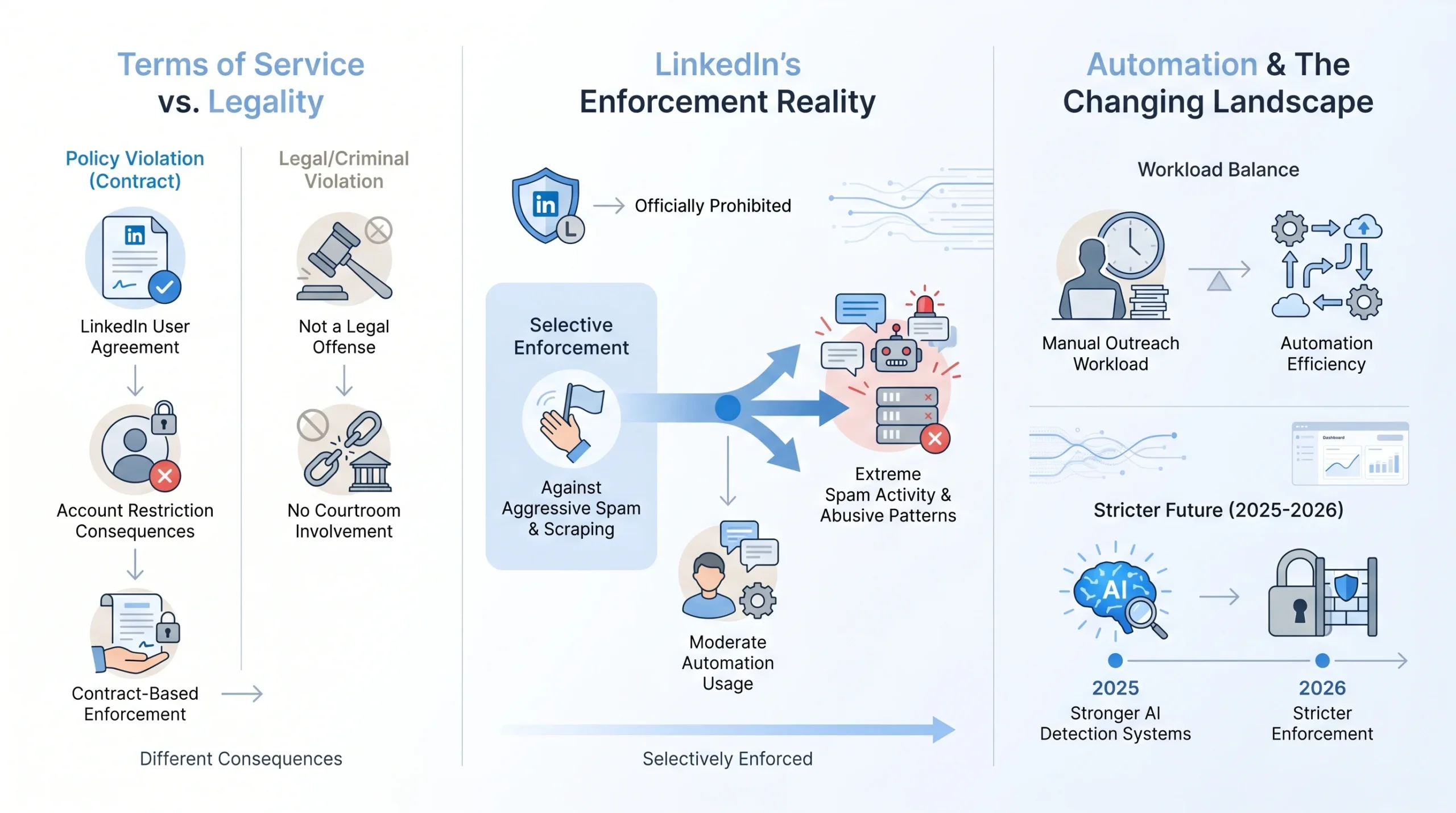
The short answer is: yes, most LinkedIn automation is against LinkedIn’s Terms of Service. But that statement alone tells you almost nothing useful, because it skips two important follow-up questions — what exactly is prohibited, and what actually happens to you if you do it?
The “illegal vs. against ToS” distinction most articles get wrong
These two things are not the same. Something can be against a platform’s terms of service without being against the law. When you violate LinkedIn’s User Agreement, you are not committing a crime. LinkedIn is a private platform, and its terms of service are a contract between you and the company. Breaking that contract means LinkedIn has the right to restrict or terminate your account. It does not mean you will face criminal charges, civil lawsuits, or regulatory penalties — at least not in most standard automation scenarios. The legal picture only changes in specific edge cases, such as scraping and reselling personal data at scale in jurisdictions with strong data protection laws like GDPR in Europe or CCPA in California. For the vast majority of users using automation tools for outreach and lead generation, the risk is an account penalty, not a courtroom.
LinkedIn’s position: officially banned, selectively enforced
LinkedIn’s official position is unambiguous. Its published policies prohibit all unauthorized automated activity on the platform. And yet, an entire industry of LinkedIn automation tools has existed for over a decade — tools with millions of users, venture-backed funding, and public marketing campaigns — and LinkedIn has not shut all of them down. That is not an accident. As one industry guide puts it, LinkedIn knows this is happening, does not love it, but tolerates it when it stays within reasonable bounds. Enforcement focuses on the worst offenders: accounts sending thousands of connection requests per week, tools scraping enormous datasets, and behavior that degrades the experience for other users.
Why millions of professionals still use automation tools — and what has changed recently
The practical reality is that manually sending personalized connection requests, follow-up messages, and engagement sequences at any meaningful scale is enormously time-consuming. Sales teams and recruiters have turned to automation tools to stay competitive. However, what worked with relatively low detection risk in 2022 or 2023 carries meaningfully higher risk in 2025 and 2026. LinkedIn has substantially upgraded its detection infrastructure, increased enforcement actions, and — most visibly — has begun taking action against the vendors themselves, not just individual users. Understanding that this landscape has shifted is the starting point for making smart decisions about automation today.
What LinkedIn’s Terms of Service Actually Say About Automation
Before discussing risk tiers, tool comparisons, or enforcement patterns, it is worth going directly to the source. LinkedIn’s User Agreement and its associated Prohibited Software policy are publicly available, and the language in them is more specific than most articles suggest.
The Exact Language from LinkedIn’s User Agreement
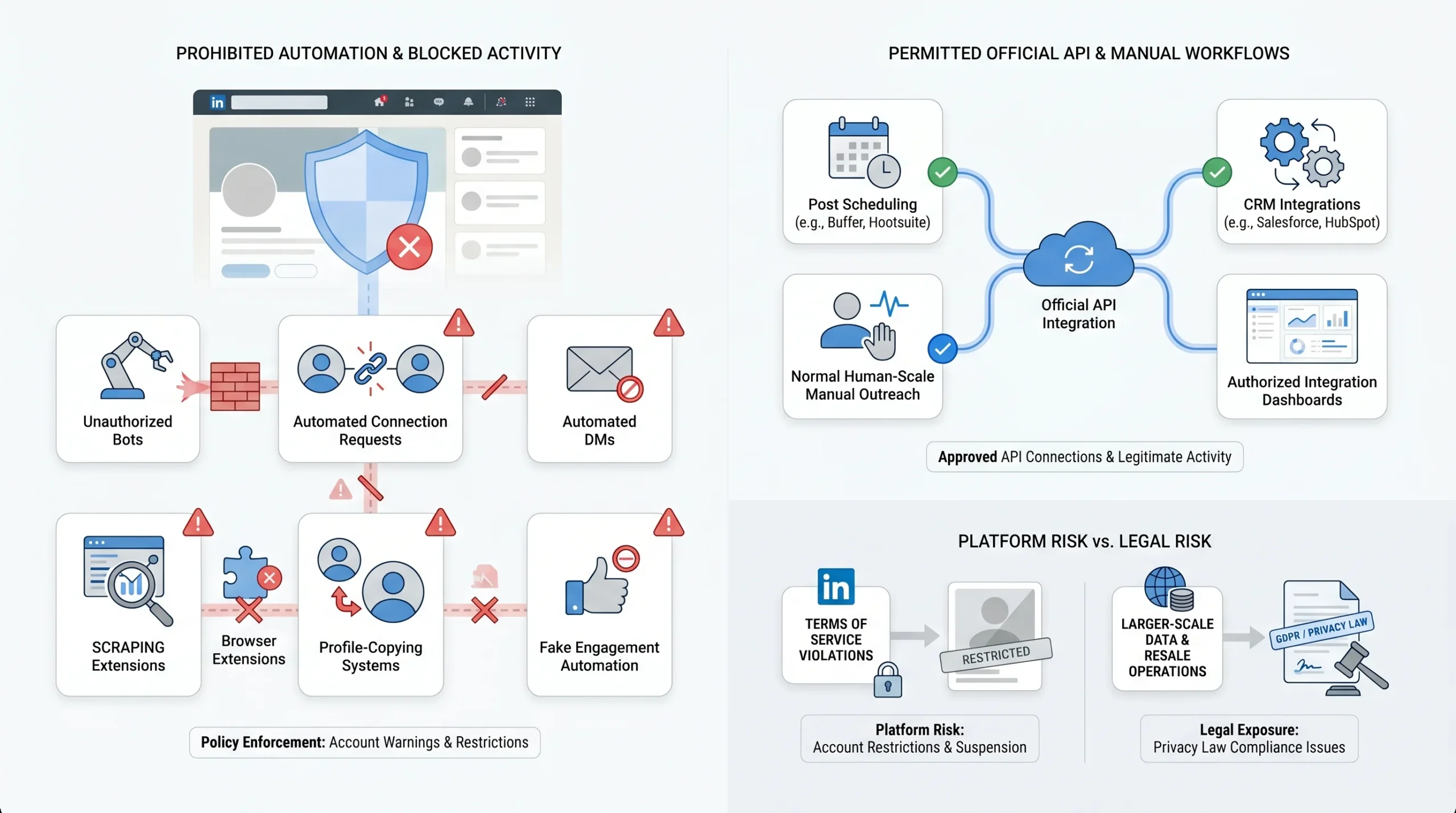
LinkedIn’s User Agreement contains a section on prohibited conduct that directly addresses automation. The platform explicitly prohibits using bots or other unauthorized automated methods to access its services, add or download contacts, send or redirect messages, and create inauthentic engagement — including automated likes, comments, shares, and re-shares. The agreement also bans developing, supporting, or using software, devices, scripts, robots, or any other means — including crawlers, browser plugins, and add-ons — to scrape the services or otherwise copy profiles and other data from the platform. This language covers essentially every common form of LinkedIn automation: automated connection requests, automated DMs, automated profile views, automated engagement on posts, and data scraping.
The Prohibited Software help page reinforces this, stating clearly that third-party software that automates tasks could potentially export or scrape data from LinkedIn and affect authenticity — sometimes without the user’s consent — and that this constitutes a violation of the User Agreement that may also violate privacy legislation in specific jurisdictions.
What LinkedIn’s ToS Does NOT Explicitly Prohibit
The terms of service do not prohibit everything. There is a meaningful category of activity that LinkedIn permits — or at minimum does not target for enforcement — because it operates through authorized, official channels.
- Content scheduling via LinkedIn’s official API: Tools that use LinkedIn’s official API to publish posts on your behalf are operating within LinkedIn’s authorized framework. LinkedIn even built its own native post scheduler, which signals that post-scheduling automation is not the behavior the ToS is designed to stop. Managing a company page through approved third-party social media management tools — such as Buffer or Hootsuite, which connect via LinkedIn’s official OAuth API — falls within acceptable use.
- CRM sync through approved integrations: LinkedIn’s official Sales Navigator integration with HubSpot, Salesforce, and other approved CRM partners allows for data sync and some workflow automation. These are sanctioned connections that LinkedIn itself markets and supports.
- Manually sending personalized connection requests within normal daily volumes: This one is important. Sending connection requests manually, within LinkedIn’s unpublished but enforced volume thresholds, is not against the terms. The ToS targets automated behavior, not human outreach. Keeping your activity within human-scale volumes — even if you are disciplined and consistent about it — does not violate any policy.
The pattern is clear: if activity flows through LinkedIn’s official APIs, respects rate limits, and operates within the channels LinkedIn has explicitly authorized, it is permitted. If it simulates human behavior on the website through unauthorized means or extracts data without authorization, it is not.
The Legal vs. ToS Distinction
This point deserves its own section because it changes how you should think about risk. Violating LinkedIn’s ToS is a platform risk, not a legal one — for most users. Third-party tools operating outside LinkedIn’s infrastructure face account restrictions. Violating the Terms of Service results in account penalties rather than legal prosecution. LinkedIn’s leverage over you is the ability to restrict or terminate your account, not the ability to take you to court.
However, there are specific scenarios where automation can cross into legal territory. Scraping personal data from LinkedIn profiles at scale and using or selling that data in ways users did not consent to can implicate data protection laws. In the European Union, GDPR creates legal exposure for unauthorized processing of personal data. In California, CCPA provides similar protections. The hiQ Labs v. LinkedIn case, which wound through U.S. courts for years, specifically addressed whether scraping publicly available LinkedIn data violated the Computer Fraud and Abuse Act — and the courts found that it generally did not, though the case had significant limitations and did not resolve all questions around scraping. For most users running outreach campaigns, the legal risk is low. For anyone building a business around scraping and reselling LinkedIn data, the legal landscape is far more complex.
The Three Tiers of LinkedIn Automation (And Where Each Stands)
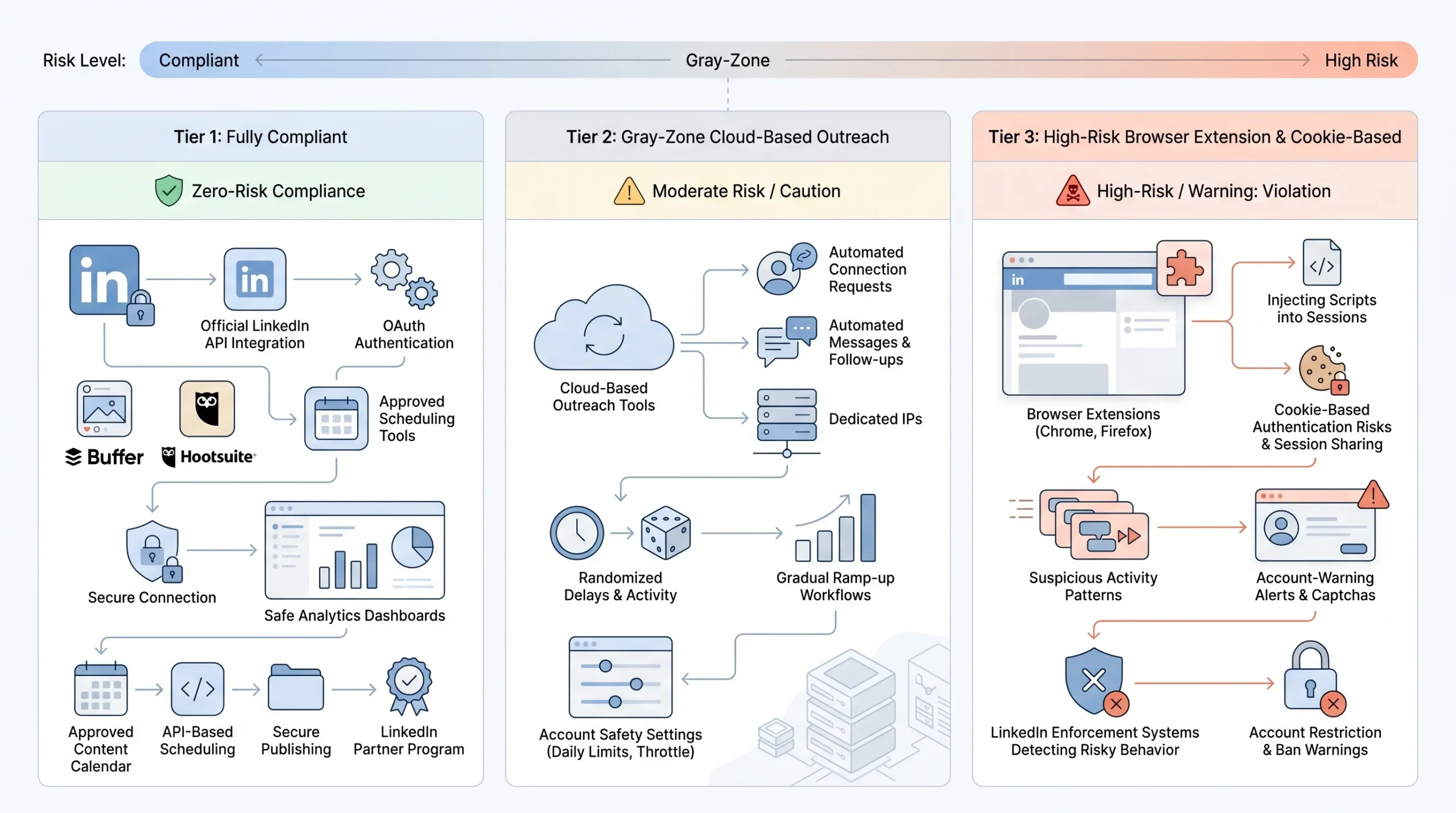
Not all LinkedIn automation carries the same risk. The technical architecture of a tool — how it connects to LinkedIn, where it runs, and what credentials it uses — determines how detectable it is and how likely it is to trigger enforcement. There are three clearly distinct tiers, and understanding them is essential for anyone making a decision about which tools to use.
Tier 1 — Fully Compliant: Official API and OAuth Tools
LinkedIn’s official Marketing API and Talent Solutions API are explicitly permitted. These are the tools that operate within LinkedIn’s authorized framework, using OAuth 2.0 for authentication and accessing only the data and actions LinkedIn has officially made available through those endpoints.
Tools that connect to LinkedIn via official OAuth — meaning they request specific permissions through LinkedIn’s developer program and operate through sanctioned API endpoints — cannot trigger account restrictions because LinkedIn itself authorized their access. Examples include Buffer and Hootsuite for content scheduling, and LinkedIn’s own native scheduler. These tools are explicitly permitted and carry zero account risk.
The important caveat here is that LinkedIn’s official API does not support the actions most sales and outreach teams actually want to automate. Mass connection requests, bulk direct messages, and automated profile views are not available through the official API. The Marketing API covers ad campaign management, analytics, and content publishing for company pages. The Talent Solutions API is oriented toward recruitment platforms. All API access now requires official partnership with LinkedIn — individual developers or small teams cannot simply create an app and start using LinkedIn APIs without going through a formal application and approval process that can take weeks or months and is frequently rejected.
For most sales teams, this means Tier 1 tools are genuinely compliant but limited in outreach capability. They are the right choice for content automation and analytics. For connection requests and DMs, they are not a viable option through official channels.
Tier 2 — Gray Zone: Cloud-Based Outreach Tools
Cloud-based outreach tools like Expandi, Dripify, and La Growth Machine operate in a gray zone. They technically violate LinkedIn’s User Agreement — because they automate connection requests and messages using methods LinkedIn has not authorized — but they are designed to minimize detection risk and operate far below the volume thresholds that trigger aggressive enforcement.
LinkedIn’s enforcement focus is on the worst offenders: accounts blasting thousands of messages or scraping massive datasets. Sensible, low-volume automation using cloud-based tools with proper safety features has historically been tolerated. A widely cited industry analogy describes it as speeding on the highway — officially prohibited, practically universal, and the enforcement only comes down on the most egregious violators.
The key detection risk for cloud-based tools is the session environment. These tools run LinkedIn sessions on remote servers, which means the IP address differs from your usual location, the browser fingerprint does not match your normal device, and account activity originates from a server rather than your personal computer. LinkedIn’s updated detection systems have become increasingly good at identifying this pattern. Users of cloud-based tools report account warnings more frequently than they did in 2024. Additionally, moving from zero actions to a full outreach load overnight is a primary detection signal that flags accounts — even on cloud-based platforms with strong safety features.
For teams that choose to use cloud-based outreach tools, the risk is real but manageable with proper configuration: dedicated IPs matched to your location, gradual ramp-up from low volumes, daily caps within LinkedIn’s soft thresholds, and randomized delays between actions.
Tier 3 — Highest Risk: Browser Extensions and Cookie-Based Tools
Browser extensions that inject code directly into your LinkedIn session — such as older versions of Dux-Soup and Octopus CRM — and any tools that use cookie-based authentication rather than OAuth carry the highest detection risk of any automation category. These are the tools LinkedIn detects most easily, and they were the primary targets of LinkedIn’s April 2025 crackdown that reshaped the automation tool landscape.
Cookie-based authentication works by capturing your LinkedIn session cookies and using them to perform actions on your behalf. This approach is particularly dangerous because LinkedIn’s security systems can identify that the same session cookies are being used in patterns inconsistent with a single human user. Even after you delete the extension or cancel the tool, some cookie-based tools continue using your session data — creating ongoing risk to your account without your knowledge.
The April 2025 enforcement update specifically targeted cookie-based authentication and Chrome extension overlays that inject scripts into LinkedIn’s interface. Tools operating this way became substantially riskier after that update. For anyone whose professional reputation, client relationships, or business development depends on their LinkedIn account, using Tier 3 tools for high-volume activity represents a risk profile that is difficult to justify.
How LinkedIn Actually Detects Automation
Understanding that LinkedIn detects automation is one thing. Understanding how it detects automation is what allows you to make genuinely informed decisions. LinkedIn’s detection infrastructure has grown significantly more sophisticated, and it is worth knowing exactly what signals it looks for.
Behavioral Analysis and Pattern Recognition
LinkedIn has deployed machine learning systems to analyze behavior patterns across accounts. These systems look at timing, content relevance, device consistency, and location consistency. The tell-tale sign of automation is not necessarily high volume — it is mathematical precision. A human sending 15 connection requests over the course of a working day will have irregular timing, varying gaps between actions, and natural interruptions. A script running 15 connection requests will tend toward precise, regular intervals that no human replicates. LinkedIn’s behavioral analysis is specifically designed to find that mathematical precision and flag it as automation.
Equally, the content of messages matters. Sending highly similar messages to many recipients in a short period — even at low volume — creates a pattern that LinkedIn’s message similarity detection can identify. A generic “I’d love to connect” sent to 50 people in a day looks very different to LinkedIn’s systems than a varied set of personalized notes sent to a smaller group.
Other behavioral red flags include being active on LinkedIn at hours that do not match your account’s registered timezone, viewing hundreds of profiles in a single session at a rate no human could sustain, and sending connection requests to people with whom you share no connections, groups, or mutual interests.
Browser Fingerprinting and Session Signals
Beyond behavioral analysis, LinkedIn uses browser fingerprinting to identify automation tools. Every browser session leaves a fingerprint: the browser type, installed plugins, screen resolution, system fonts, and dozens of other signals combine to create a unique identifier. When automation tools inject code into a browser session or run in cloud environments, they often produce fingerprints that differ from the user’s normal device — or that match known automation tool signatures.
Session signals are equally important. LinkedIn’s security has evolved to fingerprint cloud-session behavior — even without traditional browser simulation — when action patterns are inconsistent with human usage. The IP address from which account activity originates is a significant signal. VPNs, which some users employ hoping to mask automation activity, often increase suspicion rather than reduce it, because VPN IP addresses are commonly associated with bots and scrapers, and LinkedIn’s systems are well aware of this.
For agencies or teams managing multiple client accounts, there is an additional risk vector: when many accounts operate from the same IP address, LinkedIn’s detection systems identify the shared infrastructure as an automation service. A flag on one account can degrade the IP reputation for all accounts sharing that infrastructure.
Volume and Rate Triggers
LinkedIn enforces daily activity thresholds that it does not publish in any official documentation, but that are consistently documented across the practitioner community and reflected in enforcement patterns. Current safe thresholds, based on documented enforcement data, are approximately 10–20 connection requests per day for free accounts and around 20–30 for premium accounts, with a weekly ceiling closer to 100 for free accounts and 150–200 for premium accounts. For messages, the range is roughly 50 per day for free accounts and up to 75–100 for premium or Sales Navigator accounts. Profile views should stay under 80 per day for free accounts.
Your Social Selling Index (SSI) score — LinkedIn’s internal metric that measures profile strength, network quality, engagement, and relationship-building — also plays a role. Accounts with high SSI scores and long histories of consistent, legitimate activity have more tolerance before triggering flags. Newer accounts or accounts that have been inactive and suddenly spike in activity are flagged much more quickly. The acceptance rate of your connection requests is another signal: a rate below 15–20% may indicate poor targeting or spam-like messaging patterns to LinkedIn’s systems, which can accelerate enforcement action.
The Shared IP Problem for Agencies and Teams
Agencies managing LinkedIn outreach on behalf of multiple clients face a specific structural risk that individual users do not. When 20 or more client accounts run automation from the same IP address, LinkedIn’s detection identifies the shared infrastructure as an automation service. The risk is not just to any individual account — a flag on one account degrades the IP reputation for all accounts on that infrastructure. This means that a client who is using their account conservatively can still face restrictions because another client on the same shared IP crossed a threshold. Cloud-based automation platforms have responded to this problem by offering dedicated IPs per account, but the infrastructure risk remains a meaningful consideration for agency use cases.
What Happens When LinkedIn Catches You
The consequences of LinkedIn detecting automation activity follow an escalating pattern. Understanding that escalation is important, because the cost of a first offense is very different from the cost of a third.
The Escalating Penalty Structure
LinkedIn’s enforcement follows a documented progression. First violations typically result in temporary restrictions lasting 24 to 72 hours, during which specific actions — like sending connection requests or messages — are limited. These are often accompanied by a notification asking you to review and disable any automation software. Second violations are more serious: they typically require identity verification, which may involve confirming your phone number or email, and restrictions can last one to four weeks. Third violations carry an extremely high likelihood of permanent account suspension with virtually zero recovery chance.
There is also a subtler form of enforcement that does not involve account restriction: comment and content suppression. LinkedIn has stated in its help documentation that if it detects excessive comment creation or use of an automation tool, it may limit the visibility of those comments. This means your engagement activity may appear to be working — you are posting comments, liking posts, sending requests — while LinkedIn is quietly throttling how much of the platform actually sees your activity. This is a silent penalty that is easy to miss and hard to diagnose.
Vendor-Level Enforcement — The HeyReach Example
Perhaps the most significant signal that LinkedIn’s enforcement posture has changed came on March 25, 2026, when LinkedIn permanently removed HeyReach’s 16,400-follower company page and banned the founder Nikola Velkovski’s personal profile. This was not a temporary restriction or a warning. It was a permanent removal of the vendor’s own brand presence on the platform it was built to automate. This action was qualitatively different from previous enforcement patterns, which had primarily targeted individual user accounts rather than the automation vendors themselves.
HeyReach was not the first vendor to face consequences. Apollo.io and Seamless.ai were officially banned by LinkedIn in 2025, marking an escalation from banning individual users who violated the ToS to banning the companies building tools to facilitate those violations. The message from LinkedIn is clear: enforcement is moving up the stack from users to platforms.
The Professional and Business Costs
Account-level consequences are not just technical inconveniences. When a LinkedIn account is permanently banned, the account holder loses everything associated with it: all first-degree connections accumulated over years or decades, all content, all recommendations and endorsements, all messaging history. There is no recovery process — LinkedIn does not restore permanently banned accounts. For executives, senior sales professionals, and recruiters whose LinkedIn presence is a core professional asset, this is a genuinely severe consequence. Industry professionals have documented losing accounts with over a thousand connections — and the relationships those connections represent — overnight. The business impact on pipeline, deal flow, and brand credibility can be substantial and difficult to quantify.
Safe Daily Limits: The Numbers LinkedIn Doesn’t Publish (But Enforces)
LinkedIn does not publish a specific table of daily activity limits in its terms of service or help documentation. This is by design — if LinkedIn published exact thresholds, it would be trivial for automation tools to program right up to those limits. However, through consistent practitioner documentation and enforcement patterns, a reliable picture of these limits has emerged.
| Action | Free Account | Premium / Sales Navigator |
|---|---|---|
| Connection Requests | ~10–20 per day | ~20–30 per day |
| Messages | ~50 per day | ~75–100 per day |
| Profile Views | Under 80 per day | Higher tolerance |
| InMails | Not available | 5–50 per month (plan-dependent) |
| Weekly Connection Cap | ~100 total | ~150–200 total |
These numbers are not LinkedIn’s official documentation — they are the thresholds at which enforcement patterns have consistently been observed. Some practitioners report higher tolerances without consequences; others have reported restrictions at lower volumes. The variance is accounted for by account age, SSI score, activity history, and the quality of targeting (low acceptance rates accelerate enforcement).
Why these limits are not written in LinkedIn’s docs — but are enforced
The absence of published limits serves LinkedIn’s enforcement strategy. Automation tools that know the exact threshold can program up to it; tools that do not know the threshold must either stay conservative or risk exceeding it. LinkedIn’s goal is not to allow a specific number of automated actions per day — it is to maintain a platform experience that feels like authentic professional interaction. The limits exist to operationalize that goal, not to define a safe automation volume that users can treat as a license.
The role of account age, SSI score, and activity history
Newer accounts face lower effective thresholds. LinkedIn is more suspicious of a six-month-old account suddenly sending 20 connection requests per day than it is of a five-year-old account with a history of regular, consistent activity doing the same thing. Accounts with high SSI scores — indicating genuine profile completeness, active networking, content engagement, and relationship-building — are extended more latitude. This is not a formal policy LinkedIn has published; it is a consistent pattern in how enforcement plays out in practice.
What You Can Do Safely on LinkedIn Without Risking Your Account
Despite the restrictions on automation, there are meaningful things you can do at scale on LinkedIn without violating the terms of service or risking your account. The key is working through authorized channels rather than against LinkedIn’s systems.
Compliant Automation Activities
Several categories of automation are fully within LinkedIn’s permitted use:
- Post scheduling via official API tools: Tools like Buffer, Hootsuite, and LinkedIn’s own native scheduler use LinkedIn’s official API and carry zero account risk. If your team needs to maintain consistent content publishing at scale, this is the right infrastructure to build on.
- CRM enrichment through LinkedIn’s official Sales Navigator integrations: LinkedIn’s approved integrations with platforms like HubSpot and Salesforce allow for contact syncing, activity logging, and pipeline management. These are sanctioned by LinkedIn and represent the officially supported path for sales team workflow automation.
- Analytics and reporting dashboards via the Marketing API: For companies running LinkedIn advertising or managing company page performance, the Marketing API provides access to campaign data, engagement metrics, and audience analytics. Building reporting workflows on top of this API is fully compliant.
The governing principle here is consistent: if a tool operates through LinkedIn’s official APIs and respects the rate limits LinkedIn defines, it falls within acceptable use. If it simulates browser behavior or accesses LinkedIn’s website through unauthorized means, it does not.
Human-Paced Outreach Practices That Work at Scale
For connection requests and direct messages — the actions that drive most outreach campaigns — the compliant path is human-paced, well-targeted outreach rather than automated volume.
- Personalization at the list level: Rather than compensating for generic messaging with volume, tighten your Ideal Customer Profile (ICP) targeting so that every contact on your list is a genuinely relevant prospect. Sending 10 well-targeted, personalized connection requests per day consistently will outperform 100 generic requests per week both in acceptance rates and in enforcement risk.
- Using templates as a starting point, not a finished message: Templates that require manual editing before sending give you efficiency without the message-similarity detection risk that comes from sending identical copy to hundreds of recipients.
- Warm-up sequencing for new accounts or reactivated tools: If you are starting LinkedIn outreach on a new account or resuming activity after a gap, begin at very low volumes — five to ten actions per day — and increase gradually over two to four weeks. This mimics the organic growth pattern of a legitimate user and avoids the sudden activity spike that is one of LinkedIn’s primary detection signals.
The Inbound Alternative
The outreach strategies discussed above are legitimate and useful. But there is a LinkedIn strategy that carries genuinely zero terms-of-service risk, requires no automation tools whatsoever, and — according to documented data from B2B marketing research — delivers significantly better conversion rates than cold outreach: inbound authority building through content.
The approach is straightforward: instead of chasing prospects with automated messages, you publish valuable content that reaches your target audience, establish expertise around the specific problems your ICP faces, and position yourself so that qualified prospects find and reach out to you. HubSpot and other B2B marketing research organizations have documented that inbound-driven leads convert at substantially higher rates than cold outreach leads, in large part because the prospect arrives with pre-established trust rather than having to be convinced from a cold start.
This is not a quick fix — building a LinkedIn content presence that generates consistent inbound interest takes months of consistent effort. But it is a compounding asset that grows over time, carries no account risk, and creates a fundamentally different dynamic with prospects than cold outreach does.
Choosing a Tool: Questions to Ask Before You Sign Up
If you decide to use a LinkedIn automation tool — whether in the compliant Tier 1 category for content scheduling or in the gray-zone Tier 2 category for outreach — the specific tool you choose matters enormously for your account risk. Not all tools in either category are equivalent.
Compliance Checklist for Automation Tools
Before committing to any LinkedIn automation tool, these are the questions that determine your real risk exposure:
- Does it use official OAuth/API or simulate browser behavior? OAuth-based tools connect through LinkedIn’s developer program with explicit permission grants. Browser-simulation tools inject scripts into your LinkedIn session or control your browser in ways LinkedIn has not authorized. The authentication method is the single most important factor in a tool’s risk profile.
- Does it run on your local machine or a shared cloud IP? Cloud-based tools running on shared server infrastructure put your account on shared IP addresses. If another account on that infrastructure gets flagged, your IP reputation suffers. Tools with dedicated per-account IPs reduce this risk, though they do not eliminate it.
- Does it have built-in daily caps, randomized delays, and warm-up logic? Any tool worth using should enforce daily limits that keep you within safe thresholds, introduce randomized delays between actions so that the timing pattern does not look robotic, and have a warm-up mode for new accounts or tools. Cloud-based systems that run without needing your browser open are generally safer than browser-based tools that run inside your active LinkedIn session.
- What happens to your session data after you cancel? Cookie-based tools may retain access to your account credentials even after you cancel the service. Before using any tool that accesses your LinkedIn credentials, understand what data it retains and what happens to that data if you stop using the service.
Red Flags That Signal a High-Risk Tool
Certain features and claims are reliable warning signs that a tool is likely to create account risk:
- Promises of 300–500+ connection requests per week: Anything promising volume that exceeds LinkedIn’s documented soft limits by a significant margin is explicitly advertising that it will push your account into the detection zone.
- Cookie-based login rather than OAuth: Tools that log in by capturing your session cookies rather than using LinkedIn’s authorized OAuth flow are using a method that LinkedIn’s April 2025 crackdown specifically targeted. This is the highest-risk authentication approach available.
- No mention of daily limits or compliance features: A tool that does not prominently discuss safety limits, randomized delays, or account warm-up logic is a tool that is not designed with your account’s safety in mind.
- Shared IP infrastructure with no dedicated proxy option: If a tool cannot tell you that it uses dedicated IPs per account, your account is sharing infrastructure with potentially thousands of other users — and their violations become your problem.
Conclusion
The question of whether LinkedIn automation is against the terms of service has a clear answer: yes, most of it is. LinkedIn’s User Agreement explicitly prohibits bots, scrapers, automated messages, and unauthorized browser extensions. That has been true since the platform introduced its terms, and those terms have only become more rigorously enforced over time.
But the more important question — the one that actually affects your decisions — is what the real consequences are, where enforcement is focused, and what you can actually do without putting your professional presence at risk. The answer to that is more nuanced. LinkedIn enforcement has historically targeted egregious volume and obvious abuse, not every user who has ever used a scheduling tool or sent a templated connection request. However, the enforcement posture has shifted meaningfully in 2025 and 2026. Detection rates have increased substantially. Major vendors have been publicly banned. The gray zone that used to be quite wide has narrowed.
The risk-reward calculation now looks different than it did two or three years ago. Tools that are fully compliant — those using LinkedIn’s official API for content scheduling, analytics, and approved CRM integrations — carry zero account risk and should be the default choice for any activity they support. For outreach, the compliant path is human-paced, well-targeted, personalized connection requests and messages within LinkedIn’s soft volume thresholds. And for teams willing to invest the time, building an inbound content presence on LinkedIn is the only approach that eliminates enforcement risk entirely while also producing better-quality leads.
The professionals who will get the most out of LinkedIn in 2026 and beyond are not the ones who find the most sophisticated way to circumvent the rules. They are the ones who understand where the platform is heading, operate accordingly, and build something that compounds rather than risks being taken away overnight.
FAQs
Is LinkedIn automation illegal?
No, LinkedIn automation is not illegal in the criminal sense for most users. Using automation tools to send connection requests or messages violates LinkedIn’s Terms of Service, which is a contractual agreement between you and LinkedIn — not a law. The consequence of violating that agreement is account restriction or termination, not legal prosecution. The legal picture becomes more complex in specific scenarios involving large-scale data scraping and the use or sale of that data in jurisdictions with strong privacy laws like GDPR or CCPA, but for standard outreach automation, the risk is an account penalty, not a courtroom.
What’s the difference between violating LinkedIn’s ToS and breaking the law?
LinkedIn’s Terms of Service is a private contract. When you agree to use LinkedIn, you agree to its rules. If you break those rules, LinkedIn’s remedy is to restrict or close your account. Breaking the law involves violating statutes enforced by governments, with potential for fines, civil liability, or criminal prosecution. Most LinkedIn automation violates the ToS. Very few cases of LinkedIn automation break the law — those that do typically involve large-scale scraping and unauthorized data processing that implicates data protection legislation.
Can LinkedIn permanently ban my account for using automation?
Yes. LinkedIn’s enforcement follows an escalating structure. First violations result in temporary restrictions of 24 to 72 hours. Second violations require identity verification and can last one to four weeks. Third violations carry an extremely high probability of permanent account suspension with virtually no recovery path. Permanent bans result in the loss of all connections, content, and professional history associated with the account. There is no formal appeals process that reliably results in account restoration.
Which LinkedIn automation tools are officially allowed?
Tools that use LinkedIn’s official API via OAuth are officially permitted. This includes LinkedIn’s own native post scheduler, Buffer, Hootsuite, and other social media management platforms that connect through LinkedIn’s authorized developer program. LinkedIn’s Marketing API and Talent Solutions API are sanctioned for approved partner use. These tools can automate content publishing, analytics, and certain CRM functions. They cannot automate connection requests, bulk direct messages, or profile views — those actions are not available through the official API.
What are the safe daily limits for connection requests and messages in 2025–2026?
LinkedIn does not publish official daily limits, but documented enforcement patterns indicate the following approximate thresholds: free accounts should stay around 10–20 connection requests per day and 50 messages per day; premium and Sales Navigator accounts have somewhat higher tolerances, approximately 20–30 connection requests per day and 75–100 messages per day. Profile views should stay under 80 per day for free accounts. These are not official LinkedIn figures — they are the thresholds at which enforcement has been consistently observed. Individual account history, SSI score, and acceptance rates all affect how much tolerance a specific account has.
Does LinkedIn automation affect my SSI score?
LinkedIn’s Social Selling Index (SSI) score measures profile strength, network quality, content engagement, and relationship-building activity. While LinkedIn has not published documentation explicitly linking automation detection to SSI score penalties, the practitioner community has consistently reported that accounts flagged for automation tend to see SSI score declines. LinkedIn has also stated that it may limit the visibility of comments it detects as automated, which would reduce the engagement signals that feed SSI scoring. A lower SSI score, in turn, makes the account more susceptible to detection and enforcement — creating a compounding negative effect.
What’s the safest way to do LinkedIn outreach at scale?
The genuinely safest approach is inbound authority building: publishing consistent, valuable content that attracts your target audience and generates inbound connection requests and messages rather than requiring you to initiate outreach at volume. This carries zero Terms of Service risk and produces higher-quality leads than cold outreach. For outbound, the safest compliant approach is human-paced, highly personalized outreach targeting a tightly defined ICP — staying well within the soft volume thresholds and sending varied, individualized messages rather than templates. If you use automation tools for outreach, choose cloud-based platforms with dedicated IPs, OAuth authentication, built-in daily caps, randomized delays, and warm-up protocols — and stay well below the volume levels that trigger enforcement.