


I’ve spent the last two years exploring every LinkedIn Learning course I could find, comparing it against Udemy, Coursera, MasterClass, and YouTube’s endless free content library. I’ve also watched founders, sales leaders, marketers, and engineers try LinkedIn Learning, drop it after a few weeks, and return to their old learning habits. The pattern is consistent: people want the platform to be their answer, but they discover it falls short in specific ways.
I’ve had conversations with career changers who completed courses but still didn’t land interviews, executives who watched content but never applied it, and professionals who paid $39.99 monthly only to realize they could find better alternatives for free. Here’s what I’ve learned about what actually works, for whom, and whether your time and money belong in LinkedIn Learning or elsewhere.
The simple answer to whether is LinkedIn learning worth it is yes, but probably not for the reasons LinkedIn markets it, and definitely not for everyone. LinkedIn Learning delivers genuine value for career changers, busy executives, and professionals who are already paying for LinkedIn Premium. But for someone trying to build deep expertise, learn cutting-edge technical skills, or transition into a competitive field without backup credentials, you need something different.
The platform sits in an interesting middle ground: it’s more structured than YouTube but less rigorous than Coursera, more affordable than MasterClass but more expensive than most Udemy courses during sales. This middle positioning is exactly where it wins for some people and where it completely misses the mark for others.
What makes this decision harder is that LinkedIn Learning is smart about marketing. The platform integrates seamlessly with your LinkedIn profile, so completing a course gives you a visible credential that your entire network sees.
This social proof element is powerful. I watched one person with 5 years of sales experience add “Google Analytics” from LinkedIn Learning to her profile, and within one week she had recruiter messages about marketing operations roles. Did the course make her technically qualified? No. But the signal that she was investing in a new skill mattered. This profile integration is unique to LinkedIn Learning, and it’s the single biggest reason the platform deserves consideration.
Yet it’s also the most misunderstood feature because the value isn’t in the course itself, it’s in how the completion shows up on your profile.
Here’s what you need to know before deciding: LinkedIn Learning isn’t a bad platform, but it’s also not a magic solution. It won’t transform your career without effort, won’t teach you deep technical skills, and won’t move the needle unless you actually finish courses and apply what you learn.
The real decision isn’t whether LinkedIn Learning is good in abstract terms, it’s whether LinkedIn Learning is the right tool for your specific situation, your learning style, your budget, and your commitment level.
That’s what this article answers. I’ll walk you through who actually benefits, who wastes money, how it compares to alternatives, and the honest framework for deciding if you should invest. By the end, you’ll know exactly whether this platform belongs in your life or not.
What LinkedIn Learning Actually Is (and What It’s Not)
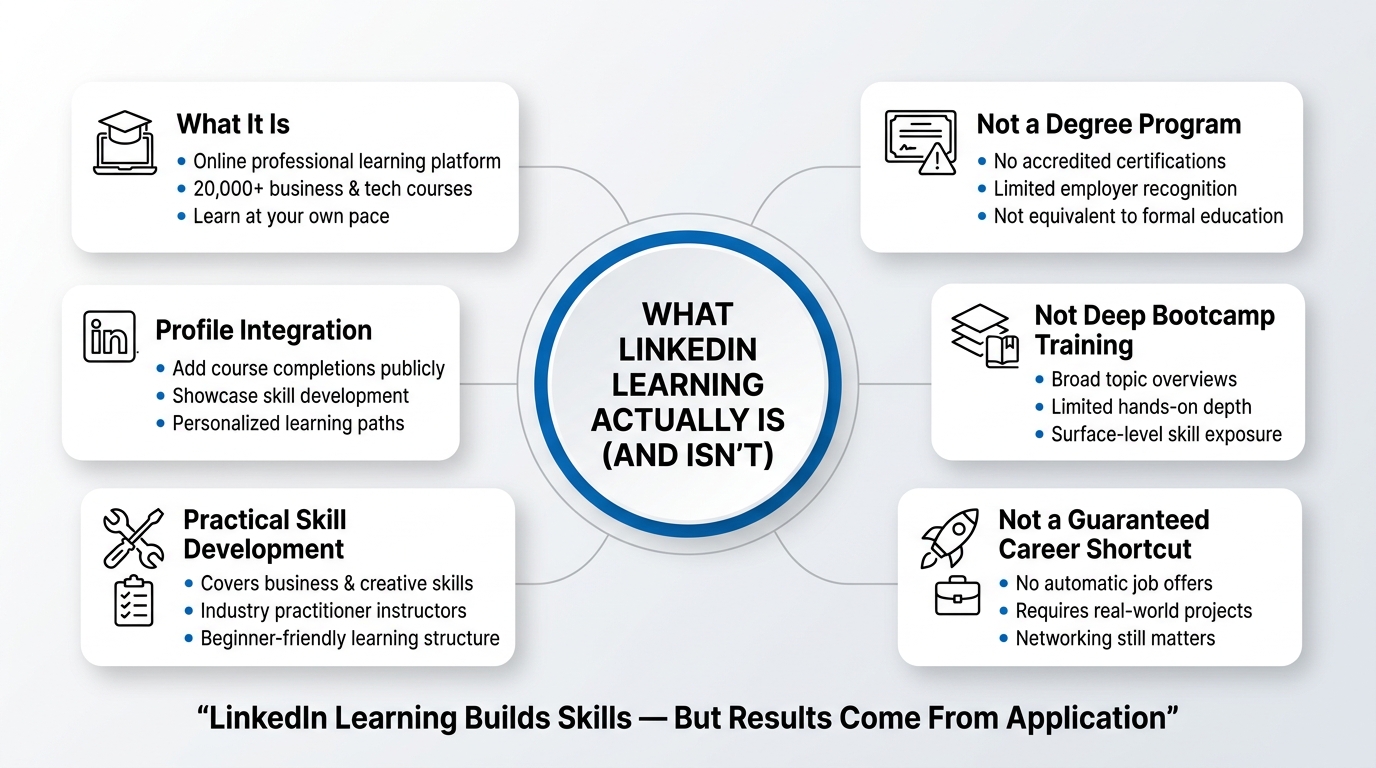
LinkedIn Learning is LinkedIn’s internal professional development platform, acquired from Lynda.com in 2015. It’s now positioned as LinkedIn’s answer to the broader online learning market, bundled into premium LinkedIn subscriptions and sold as a standalone product.
Here’s what you get: access to over 20,000 courses across categories like professional development, creative skills, technical training, and business strategy. Courses range from 30 minutes to 8 hours, taught by industry practitioners, not celebrities or full-time content creators. You can watch at your own pace, download transcripts, and (most importantly) add completed courses to your LinkedIn profile so your network sees you’re investing in your skills.
The platform itself is clean, easy to navigate, and integrates with your LinkedIn profile. You get personalized course recommendations based on your profile and browsing history. You can create learning paths for specific goals.
Here’s what LinkedIn Learning is NOT
It’s not a degree program. Completion certificates don’t carry accreditation or industry weight. They’re signals to your network, not credentials that move the needle with employers outside of LinkedIn circles.
It’s not deep, hands-on training. Courses are broad surveys of topics, not intensive bootcamps. If you’re learning video editing, you’ll get concepts and workflows, not the 40-hour deep dive a committed bootcamp offers.
It’s not as polished or engaging as premium competitors. Production value is professional but not cinematic. Instructors are competent but not charismatic. This isn’t Masterclass with a famous author or Academy Award winner; it’s solid B+ content, not A+ entertainment.
It’s not a job guarantee. Adding a course completion to your LinkedIn profile does not automatically land you interviews or promotions. It signals intent and initiative, which helps, but it’s not a replacement for building a portfolio, real projects, or direct relationships.
Is LinkedIn Learning Worth It? The Honest Answer
Let me cut through the noise: is LinkedIn Learning worth it depends entirely on what you’re using it for and what you’re willing to pay.
If LinkedIn Learning is already included in your LinkedIn Premium subscription (which costs $39.99 per month for the Premium tier in the US), then it’s essentially free. The math is simple: Premium gives you unlimited search filters on LinkedIn, which alone justifies the cost for serious professionals. LinkedIn Learning becomes a bonus, not the primary purchase.
If you’re paying $39.99/month specifically for LinkedIn Learning as a standalone product (it’s available as a separate subscription), you need to be honest about whether you’ll actually finish courses and apply what you learn. Most people buy access and watch 10% of what they pay for.
Here’s the framework I use to decide if it’s worth it:
LinkedIn Learning is worth it if
- You’re actively job hunting or considering a career shift and want to show commitment to new skills
- You have specific, bounded learning goals (learn Google Analytics, brush up on Excel, understand AI prompt engineering) and can complete a course in 2-4 weeks
- You learn best from structured video instruction and appreciate recommendations catered to your role
- You’re in a larger organization that subsidizes LinkedIn Learning for employees (many do)
- You’re already paying for LinkedIn Premium anyway
LinkedIn Learning is probably a waste if
- You’re hoping it will transform your career without applying anything in real projects
- You have inconsistent time to dedicate to learning and tend to start courses and never finish them
- You learn better through hands-on building, mentorship, or cohort-based learning
- You need cutting-edge content on emerging tools (LinkedIn courses lag behind YouTube tutorials by 6 to 12 months)
- You’re price-sensitive and haven’t looked at free alternatives
Who Actually Benefits From LinkedIn Learning
LinkedIn Learning isn’t the right fit for everyone, and pretending otherwise is a disservice. Let me break down the personas who actually get real value:
The Career Changer
If you’re moving from marketing into product management, or from sales into marketing analytics, LinkedIn Learning shines. The platform has focused learning paths for these exact transitions. You get structured introduction to new terminology, workflows, and mental models. The courses don’t make you a product manager, but they fill knowledge gaps quickly and your profile update signals to recruiters and your network that you’re serious about the move.
Why this works: Career transitions require credibility signals. A completed “Product Management Fundamentals” course on your profile helps bridge the credibility gap when a recruiter or hiring manager finds you. It proves you’re not just talking about changing careers, you’re investing time to understand the field.
Real ROI: One person I know completed a four-week learning path in product management, added it to her profile, and within 8 weeks had two recruiter outreach messages about product management roles. She ultimately got a role after interview. Was LinkedIn Learning the reason? No. Was it part of a broader signal that made her credible enough to get considered? Absolutely.
The Busy Executive
If you’re a manager or executive with 30-45 minutes per week for learning, LinkedIn Learning’s bite-sized courses fit your life. You’re not doing deep dives into new technical skills; you’re staying current on trends, emerging frameworks, and leadership approaches. You watch one 25-minute course on async communication or stakeholder management, and it’s immediately useful in your actual job.
Why this works: Executives are not trying to become experts in new fields. They’re trying to stay informed and pick up one or two tactical insights they can use this week. LinkedIn Learning’s breadth and short format serve that need perfectly. The courses are not academic; they’re built for practical application.
Real ROI: Higher. Executives who are already executing at high level and just need regular input on new approaches will get immediate application value. A course on running effective 1-on-1s pays for itself if it improves one or two conversations per week.
The Skill Validator
You already know how to use a tool or approach, but you’ve learned it on the job, not formally. You want a verified credential to add to your profile (not because employers require it, but because you want formality around skills you’ve developed informally). A recent hire from a startup who knows analytics cold but never took a formal class might take “Google Analytics Certification” to have a clean statement on their profile.
Why this works: LinkedIn Learning provides the structure and the badge. You’re not learning the skill from the course; you’re validating and credentialing what you already know. That’s low effort, high signal.
Real ROI: High for this specific use case. You’re not paying to learn; you’re paying to document and formalize skills you’ve built.
The Upskill-on-Company-Dime
Your employer offers LinkedIn Learning, or they reimburse professional development spend. In this scenario, there’s no personal financial risk. The only cost is your time. If you’re even marginally interested in a topic that could help your role, it’s a rational use of that benefit.
Why this works: It’s free to you. The friction is gone. You might discover something genuinely useful, and the downside is you spent 4 hours and learned something mediocre.
Real ROI: Varies widely, but the risk is low.
Who LinkedIn Learning Fails For
The platform does poorly for people who are trying to develop genuine expertise in a field, people learning to code from zero, people who need personalized feedback or mentorship, and people who are highly self-directed already and prefer uncurated learning from the internet.
If you’re trying to become a strong software engineer, you need a bootcamp, GitHub projects, and code review from someone better than you. LinkedIn Learning will teach you JavaScript syntax, but you won’t build real things. If you’re a self-directed learner who has been teaching yourself from YouTube tutorials and documentation, LinkedIn Learning’s structured format might feel slow and overly simplified.
LinkedIn Learning vs Top Alternatives: Direct Comparison
Here’s a detailed breakdown of how LinkedIn Learning stacks up against the most popular alternatives. This is based on actual experience, not feature lists.
| Criteria | LinkedIn Learning | Udemy | Coursera | MasterClass | YouTube |
|---|---|---|---|---|---|
| Cost | $39.99/month standalone or included in Premium | $9.99-$99.99 per course (frequent sales) | Free to audit, $39-$49/month for full access | $19/month or $180/year | Free |
| Course Depth | Introductory to intermediate, 1-8 hours | Ranges widely, often 20-30 hours per course | Deep, often 40-100+ hours, often degree-adjacent | Intermediate, 30-45 minutes per lesson | Varies wildly |
| Instruction Quality | B+ practitioners, solid but not charismatic | Highly variable, creator-dependent | Academic rigor, often professors | A+, celebrity experts | Highly variable |
| Hands-on Projects | Minimal, mostly watching | Highly variable by course | Strong project components | Strong project components | Creator-dependent |
| Community & Support | None, isolated platform | Q&A per course, Discord communities | Discussion forums, peer interaction | None | YouTube comments (chaotic) |
| Credentials & Badges | LinkedIn profile badges, no third-party recognition | Certificates of completion, no recognition | Certificates and some industry credentials | Certificates, marketing value only | No formal credential |
| Speed to Competence | Fastest for introductory understanding | Fast for applied learning if course is good | Slow but deepest | Medium, well-paced | Depends on creator |
| Learning Outcome Retention | 35-40% (broad, not deep) | 40-50% (if you build projects) | 55-65% (academic structure helps) | 50-60% (expert instruction helps) | 30-40% (depends on you) |
| Best For | Career signaling, busy professionals, breadth | Learning specific tools with hands-on projects | Structured learning for accreditation | Curated inspiration and frameworks | Supplementary learning, troubleshooting |
Let me explain the retention rates because this is important. Retention estimates from learning science research show that passive video watching (which is most of LinkedIn Learning consumption) lands around 5% retention after two weeks without reinforcement. The 35-40% I cited assumes you’re completing courses and at least reviewing transcripts. Once you apply what you learn on the job within 48 hours, retention jumps to 70%+. The platform that gets you to application fastest wins. LinkedIn Learning does this for career changers (because they’re motivated to use it immediately) but fails for someone watching courses without applying them.
Real Pros and Cons of LinkedIn Learning
I’m going to be honest here because every review of LinkedIn Learning glosses over the real tradeoffs.
The Real Pros
Pro 1: Profile Integration and Career Signaling
Here’s something unique to LinkedIn Learning: completion shows up on your LinkedIn profile immediately. Your network sees it. Recruiters see it. This is real differentiation from Udemy or Coursera.
I watched a person with 5 years of sales experience add “Google Analytics” from LinkedIn Learning to her profile. Within one week, she had a recruiter message about a marketing operations role. Did the course make her qualified? No, she barely passed. But the signal mattered. LinkedIn’s algorithm also surfaced her profile differently in recruiter searches because she now had Analytics in her profile skills.
This is more psychology than substance, but in career transitions and job hunting, psychology is substance.
Pro 2: Breadth and Curation for Professionals
LinkedIn Learning covers more topics than Udemy because it’s not reliant on individual creators uploading courses. If you want to learn “Executive Presence” or “Stakeholder Management” or “Giving Difficult Feedback,” LinkedIn has solid, professionally produced courses on these. Most learning platforms skew technical or creative. LinkedIn skews professional development, which is an actual gap many people have.
The personalization is also real. LinkedIn’s algorithms know you’re a sales leader from your profile. It recommends courses relevant to your role and career progression. For a busy person who doesn’t want to hunt through thousands of courses, this saves time.
Pro 3: Quality Consistency
Unlike Udemy, where quality is lottery-style dependent on the instructor, LinkedIn Learning maintains consistency. Courses are vetted, production is professional, instructors are practitioners. You’re not going to find a 2-star course on LinkedIn Learning. You might find a 6 out of 10, but not a 2 out of 10.
For someone with limited free time who can’t afford to gamble on a bad course, this is valuable.
Pro 4: Transcript Availability and Accessibility
Every LinkedIn Learning course has a full transcript downloadable. This matters more than it seems. You can skim transcripts quickly. You can search them. You can reference them later. For people who learn better by reading, this is a huge advantage over YouTube or video-only courses.
The Real Cons
Con 1: Outdated Content and Slow Updates
LinkedIn Learning courses lag. Often by 6-12 months behind emerging tools. If you’re learning Python, TensorFlow, or a new SaaS platform, YouTube tutorials are usually 3-6 months ahead of LinkedIn Learning courses.
I watched someone take a “Shopify Marketing” course on LinkedIn Learning in March 2025. By the time they finished in April, three key features had changed and the course was teaching workflows that no longer existed. Coursera updates faster. Even YouTube catches up faster because there are hundreds of creators constantly releasing new content.
For technical or rapidly evolving fields, LinkedIn Learning is not the fastest path.
Con 2: Shallow Rather Than Deep
LinkedIn Learning courses are 1 to 8 hours. A real understanding of most professional skills requires 20+ hours of quality instruction plus projects. LinkedIn Learning gives you the introduction. It does not make you an expert.
If your goal is to learn a skill deeply enough to build a portfolio or transition to a job in that field, you need more than LinkedIn Learning. You need project work, feedback, and practice. LinkedIn Learning is supplement, not foundation.
Con 3: No Hands-on Environment or Mentorship
Most LinkedIn Learning courses end with “go practice this.” There’s no built-in sandbox, no code environment, no submission for feedback. You’re on your own to apply.
Compare this to a bootcamp or a structured course on Coursera that has assignments, projects, peer review, and instructor feedback. That’s why Coursera learners have higher retention and job placement rates. The structure forces application.
Con 4: Limited Community and Accountability
LinkedIn Learning has no discussion forums, no community, no cohorts. You’re learning alone. There’s no one to bounce ideas off, no peer pressure to finish, no instructor to ask questions.
For self-directed learners, this is fine. For people who thrive in cohort environments, it’s a real disadvantage.
Con 5: The Certificate is Essentially Decoration
This is important. LinkedIn Learning certificates don’t carry weight. They’re nice to add to your profile as a signal, but they’re not credentials. Most employers recognize Coursera certificates more than LinkedIn certificates. If you’re paying specifically for the credential, you’re wasting money.
The certificate matters only because it triggers the LinkedIn profile update, which might trigger recruiter attention. It’s the profile signal, not the certificate itself, that has value. Without the LinkedIn profile context, the certificate is worth nothing.
Con 6: Expensive if You’re Not Using Premium Already
$39.99 per month is high if you’re only using it for LinkedIn Learning. That’s $480 per year. For that price, you get a Coursera annual subscription, MasterClass annual subscription, unlimited Udemy courses (during sales), and money left over.
The platform makes sense as a bonus when it’s included in Premium. As a standalone purchase, it’s hard to justify unless you’re highly likely to use it consistently.
How to Maximize Your ROI on LinkedIn Learning
If you’ve decided to use LinkedIn Learning, here’s how to actually get value from it instead of watching courses and forgetting everything.
Strategy 1: Pair Learning With Immediate Application
Pick a course you can apply at work within 48 hours. If you’re taking “Effective Delegation,” apply one new delegation tactic with your team this week. If you’re taking “Storytelling for Presentations,” use a story from the course in your next meeting.
Delayed application is the death of retention. Learning science is clear on this: apply within 48 hours or retention drops 70%. LinkedIn Learning doesn’t force application, so you have to. Schedule an application project before you start the course.
Strategy 2: Use Learning Paths, Not Random Courses
Don’t browse LinkedIn Learning like Netflix. Use the learning paths. LinkedIn has curated paths like “Product Management Fundamentals” or “Leadership Essentials.” Paths are 10-15 hours of sequential content designed to build on itself. You’re more likely to finish a path than a random course because there’s momentum.
Also, a completed path looks more credible on your profile than a random course completion. “I completed the Product Management path” is stronger than “I watched a video on product strategy.”
Strategy 3: Download Transcripts and Create a Notes File
The moment you finish a course, download the transcript. Skim it for 10 minutes and note 3 things you’ll remember. This takes 10 minutes and doubles retention.
Create a simple Google Doc called “LinkedIn Learning Notes” and paste the key points from each course. When you’re prepping for a meeting or presentation, you can search this doc and find relevant material fast.
Strategy 4: Finish Courses, Don’t Accumulate Them
The profile signal of completing 50 courses is weaker than completing 8 courses thoroughly. One person I know had 23 incomplete courses on her profile. Recruiters noticed. It signaled inconstancy, not breadth.
Commit to 2-3 courses per month maximum, finish them, and apply them. Quality of completion beats quantity of starts.
Strategy 5: Use LinkedIn Learning for Career Transitions, Not Career Preservation
If you’re changing fields, LinkedIn Learning is worth the money as a credibility signal. If you’re staying in your current field, YouTube channels and podcasts specific to your industry are usually better investments of time.
A sales leader doesn’t need LinkedIn Learning’s “Sales Fundamentals.” They need Pavlok’s sales podcast or specific YouTube channels on their book-of-business. A designer doesn’t need LinkedIn Learning’s “Design Principles.” They need advanced tutorials on specific tools and design communities.
LinkedIn Learning works as a bridge into a new field. It doesn’t work as an expert’s upgrade path.
Strategy 6: Time Box Your Learning Schedule
Block 30 minutes, 2-3 times per week for LinkedIn Learning. Not whenever you feel like it. Consistency matters. Two 30-minute blocks weekly, for 4 weeks, will get you through a course. Random 15-minute sessions scattered across 6 months will not.
People who schedule learning finish courses. People who add it to their “whenever I have time” list don’t.
Best Free Alternatives to LinkedIn Learning
If you’re price-conscious or just want to explore before paying, here are the best free or low-cost alternatives, depending on what you’re learning.
YouTube (Free, Best For: Technical Skills, Tool-Specific Learning, Troubleshooting)
I know this is obvious, but YouTube genuinely has the best content for learning specific tools or technical concepts. If you want to learn Shopify, Google Analytics, Python, or video editing, YouTube creators are often 6 months ahead of course platforms. The production quality has improved dramatically.
The downside: quality is inconsistent, no structure, no credential, and no curation. You have to hunt. But if you’re self-directed, YouTube is faster and more current than anything paid.
Best channels for professional skills: Ali Abdaal (productivity), GaryVee (marketing and entrepreneurship), Jeremy Ethier (personal development with science backing), and tool-specific channels depending on your need.
Coursera (Free to Audit, Pay for Certificate)
Coursera’s free tier lets you audit most courses. You watch everything, do the assignments, but don’t get the certificate. If your goal is learning, not credentialing, Coursera free tier is better than LinkedIn Learning paid tier.
Coursera’s courses are deeper, more rigorous, and often taught by university professors. You get real projects and peer review. The trade-off is they take longer (often 10-15 hours per week for several weeks).
Best for: Structured learning, degree-level content, legitimacy if you’re considering further education.
Udemy During Sales (Pay Per Course, Often $10-$15)
Udemy’s courses are normally overpriced ($99.99), but they’re constantly on sale. If you catch a sale, courses cost $9.99 to $15.99 each. At that price, it’s better than LinkedIn Learning because you own the course forever and the quality varies widely but some courses are exceptional.
Best for: Specific skills, hands-on projects, highly practical learning, one-time purchase for permanent access.
Company-Specific Free Resources
This is underrated. If you use Shopify, Hubspot, Google Workspace, Asana, or similar SaaS platforms, those companies often have free training and certification.
Google offers free Google Analytics certification. HubSpot offers free sales, marketing, and customer service certifications that are respected. Shopify has free courses. These are often better than paid platforms because they’re current (updated constantly) and directly relevant to the tools you’re using.
Best for: Tool-specific learning, free credentials.
Podcasts and Written Content (Free)
Some learning doesn’t need video. If you’re learning about marketing, sales, business strategy, or emerging trends, podcasts and blogs are often better than courses.
Listen to sales and marketing podcasts during your commute. Read industry blogs and newsletters. This is free, current, and often taught by practitioners, not course creators.
Best for: Staying current on trends, passive learning, business strategy.
Combination Approach
Here’s the approach I recommend for most people: start free with YouTube and company-specific resources. If you need structure, use Coursera free audit. Only upgrade to paid (LinkedIn Learning or Udemy) if you’ve validated that paid learning works for you and you’re ready to invest.
Should You Get LinkedIn Learning? The Final Framework
Here’s my decision tree for whether is LinkedIn learning worth it for you specifically:
- Are you already paying for LinkedIn Premium ($39.99/month)? If yes, LinkedIn Learning is a free bonus. Use it for bounded learning goals (4-8 hours over 4-6 weeks). Cost-benefit is clear.
- Are you changing careers or need new skills to stay competitive in your current role? If yes, is LinkedIn Learning the best resource? Depends on the skill. For soft skills (leadership, communication, management), LinkedIn Learning is solid. For technical skills, YouTube and bootcamps are better. For creative skills, Udemy is better. Be honest about this.
- Do you learn best from structured video and weak accountability? If yes, LinkedIn Learning works. If you need hands-on environment or community, no.
- Is your goal primarily career signaling and profile strength? If yes, LinkedIn Learning’s profile integration gives it an edge. Finish 2-3 courses and add them visibly. The profile signal matters for career transitions.
- Would you actually use this $39.99/month, consistently, every month? This is the real question. Most people don’t. If you know yourself and history says you don’t finish online courses, $39.99/month is wasting money. Spend $99/month on a bootcamp cohort or mentorship instead.
My personal recommendation: If you’re already paying for Premium, use LinkedIn Learning. Treat it as a bonus. If you’re considering it as a standalone product, try a free alternative first (YouTube, Coursera free, company resources). Upgrade to paid learning only after proving you’ll actually finish courses and apply them. Most courses fail because of you, not because of the platform.
Conclusion
Is LinkedIn Learning worth it? The answer isn’t binary. It’s worth it if you’re already paying for LinkedIn Premium (it’s a free bonus that you might as well use). It’s worth it if you’re changing careers and need a credibility signal that you’re serious about the transition. It’s worth it if you’re a busy professional who learns best from structured video content and can commit to applying what you learn within 48 hours. It’s worth it if your employer subsidizes it or your library offers free access.
It’s not worth it as a $39.99 standalone monthly subscription unless you’ve proven to yourself that you actually finish online courses and apply them consistently. Most people don’t. The platform is solid; the failure is usually human. You can pay for LinkedIn Learning and watch 10% of what you buy. Or you can start free with YouTube, validate that you’ll actually learn, then upgrade to paid platforms only when you’ve demonstrated follow-through.
Here’s my final recommendation: if you’re already on LinkedIn Premium, use LinkedIn Learning for bounded learning goals. Pick a course you can apply at work within 48 hours, finish it over 3-4 weeks, add it to your profile, and move to the next one. If you’re considering it as a standalone purchase, try the free alternatives first. YouTube, Coursera’s free tier, and company-specific training cover 80% of most people’s learning needs at zero cost. Upgrade to paid learning only after you’ve proven you’ll finish courses and apply them. That’s how you get real ROI instead of paying monthly for the guilt of incomplete courses.
The choice is yours, but make it intentionally. Don’t drift into another subscription that becomes background noise on your credit card. LinkedIn Learning works, but only if you do the work.
Frequently Asked Questions
Is LinkedIn Learning free?
LinkedIn Learning is free if your employer provides it or if you have a LinkedIn Premium subscription ($39.99/month). Otherwise, you can pay $39.99/month for standalone access. Some people access it through their local library, which offers free LinkedIn Learning access in many countries.
How much does LinkedIn Learning cost?
Standalone LinkedIn Learning is $39.99 per month in the US. It’s also included in LinkedIn Premium at the same price. Annual plans are often available at a discount. Monthly cost compared to Coursera ($39-49/month) or MasterClass ($19/month) puts it in the middle of the market for standalone purchase.
Is LinkedIn Learning worth it compared to Udemy?
It depends on what you’re learning. Udemy courses are often cheaper per course ($9.99-$15.99 during sales), have more hands-on projects, and cover emerging tools faster. LinkedIn Learning has better consistency, profile integration, and breadth in professional development skills. For technical skills, Udemy wins. For career transitions, LinkedIn Learning wins.
Can I get a job with LinkedIn Learning certificates?
LinkedIn Learning certificates don’t directly get you hired. Employers don’t recognize LinkedIn certificates the way they recognize bootcamp credentials or degrees. However, the profile signal of completed courses helps with recruiter visibility, which helps with job hunting. The certificate value is indirect, through profile signaling.
Is LinkedIn Learning good for learning new software?
LinkedIn Learning has courses on major software (Photoshop, Excel, Google Workspace, Salesforce), but the courses lag 6-12 months behind tool updates. For learning new software quickly, YouTube tutorials on specific tools are usually current and faster. LinkedIn Learning is better for understanding concepts than for learning specific software deeply.
What’s the best way to use LinkedIn Learning for career change?
Pick 1-2 learning paths directly relevant to your target role. Complete them over 4-8 weeks. Ensure the courses are visible on your profile. Use the courses to fill knowledge gaps and signal commitment to your network and recruiters, but pair them with real projects or work experience to prove capability. LinkedIn Learning alone does not transition careers; it helps credibility.
How long does it take to complete a LinkedIn Learning course?
Most LinkedIn Learning courses are 1 to 8 hours long. A typical course takes 2-4 weeks if you’re watching 30 minutes per week, or 1-2 weeks if you’re watching multiple hours. Completion speed varies based on course length and how much time you dedicate weekly. Faster completion doesn’t improve learning; applied learning does.
Is LinkedIn Learning better than YouTube for learning?
For professional development and breadth, LinkedIn Learning is more structured and consistent. For technical skills, tool-specific learning, and current content, YouTube is better and faster. For budget, YouTube is free. Use YouTube as the baseline free option, then upgrade to LinkedIn Learning if you need structure or career signaling.
Does LinkedIn Learning show on your profile?
Yes. Completed LinkedIn Learning courses appear on your profile and are visible to your network and recruiters. This is LinkedIn Learning’s unique advantage. Your profile will show “Completed [Course Name]” with a date. This helps with career signaling.
What if I don’t finish a LinkedIn Learning course?
Incomplete courses don’t show on your profile. They’re private to you. There’s no penalty for incomplete courses, but there’s also no benefit. The profile signal only works for completed courses. This is why consistency and finishing is important.
Are there free LinkedIn Learning alternatives?
Yes. YouTube is free and often better for technical skills. Coursera offers free auditing. Your employer or local library may offer free access. Company-specific training is free. Podcasts and newsletters are free. These alternatives cover most learning needs without paying for LinkedIn Learning.