


Most agencies do not find out their LinkedIn automation setup is broken from a dashboard alert. They find out when a client calls.
The account is restricted. Campaigns have been paused. A week of outreach is gone, and nobody caught it in time. The client is not angry yet, but they are asking questions you do not have clean answers to.
That is the specific failure mode that hits agencies running LinkedIn outreach for 10 or more clients. Not a slow decline in reply rates. Not a gradual increase in connection request rejections. A hard stop, often with a client’s professional reputation attached to it.
LinkedIn automation for agencies is not the same problem as LinkedIn automation for individual sellers. The infrastructure, the risk profile, the operational structure, and the tooling requirements are all different. What works smoothly at one account starts cracking at three and breaks badly at ten.
This is an operational playbook for agencies already running LinkedIn outreach at scale or planning to get there. It covers account safety, multi-account management architecture, reply handling, tool selection, and the client onboarding workflow that keeps campaigns running without the 2am restriction notices.
Why Managing LinkedIn Accounts at Scale Is a Different Problem Than Running One
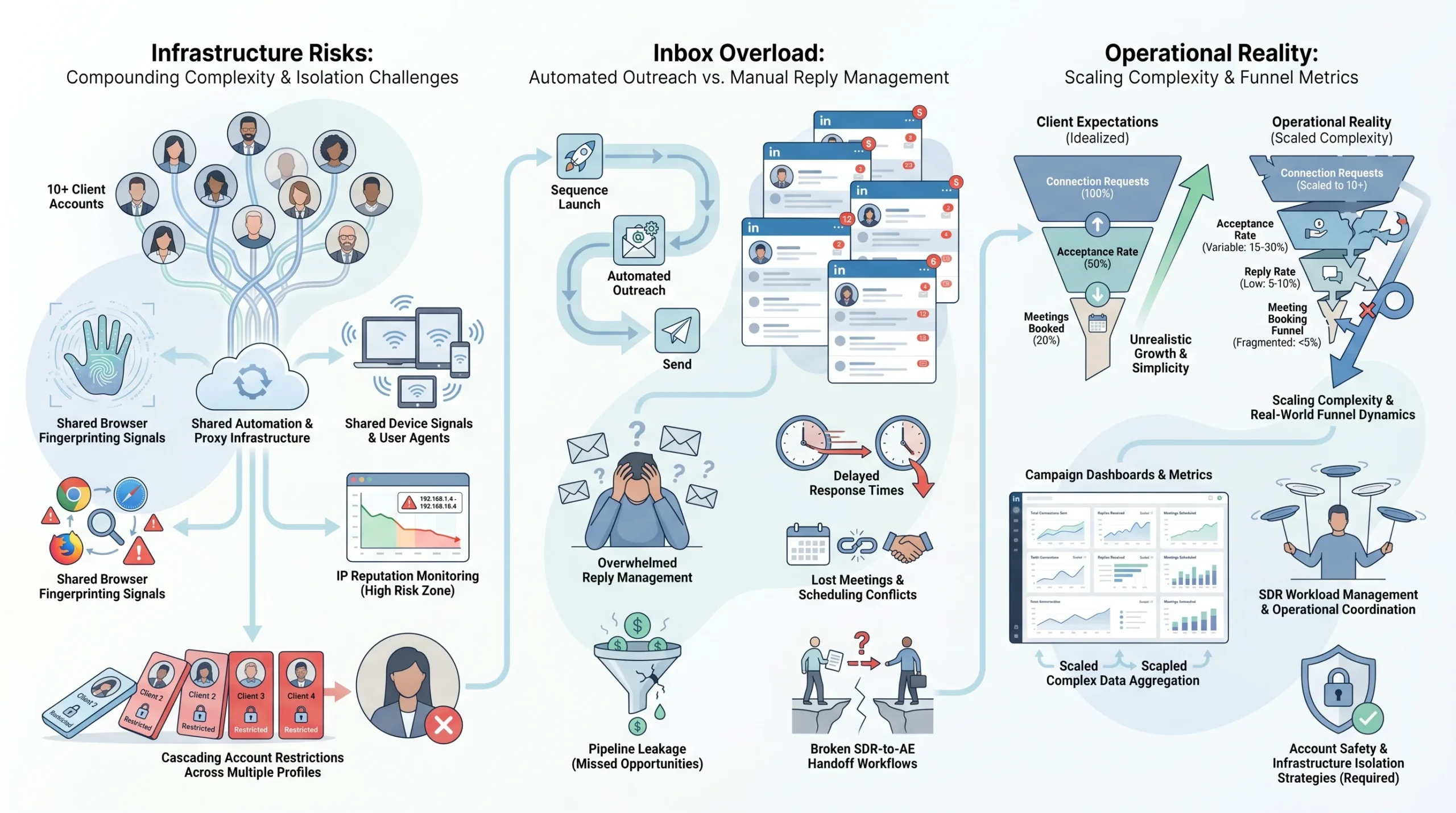
Running LinkedIn outreach for a single client is a workflow problem. Running it for ten or more clients is an infrastructure problem. The difference matters because the solutions are completely different, and agencies that treat multi-account management as a simple extension of single-account outreach are the ones that eventually lose a client’s account to a restriction.
The core issue is that every risk that exists at one account gets multiplied and compounded at ten. A detection event that would have flagged one account can cascade across an entire client roster if the underlying infrastructure is shared. And the reply management problem that was annoying at one account becomes a real revenue leak at ten.
The Compounding Risk of Shared Infrastructure
LinkedIn does not evaluate accounts in isolation. It evaluates them in the context of behavioral patterns, device signals, IP addresses, and session data. When multiple client accounts share the same tool infrastructure, the same IP block, or the same browser environment, LinkedIn’s detection systems can identify the pattern.
This is not speculation about LinkedIn’s exact algorithm. It is an observable outcome that agencies running multi-account setups on shared proxies or shared tool sessions consistently report: when one account gets flagged, others running on the same infrastructure often get reviewed around the same time. The technical reason is that LinkedIn uses a combination of signals, including browser fingerprinting, IP reputation, and login patterns, to assess account trustworthiness.
The structural exposure for agencies is higher than for individual users because:
- Agencies log into client accounts from IP addresses that are not associated with the client’s normal location or device
- Multiple accounts may be active during the same time window, originating from the same infrastructure
- Automated actions across accounts can create correlated behavioral patterns that stand out from normal LinkedIn usage
The fix is not a single setting in your automation tool. It is a deliberate decision to isolate each client account’s infrastructure from every other.
The Inbox Problem Nobody Talks About
Automation handles the send side of LinkedIn outreach well. Connection requests go out on schedule. Follow-up sequences run on the configured delays. Campaigns operate without anyone touching them.
The problem is the reply side.
When a prospect responds, the automation stops. At one account, a human can monitor replies and respond within a reasonable window. At ten accounts running active campaigns simultaneously, the volume of replies across all accounts quickly exceeds what any single person or small team can manage without a defined system.
What happens in practice is that interested prospects reply, wait two or three days for a response, and either go cold or assume the outreach was not genuine. The connection acceptance rate and the reply rate look fine in the dashboard. The meeting booking rate tells the real story.
LinkedIn’s own research on response behavior shows that reply rates on InMail drop sharply after 24 hours without a response. While connection-based messaging does not have published equivalent data, the pattern holds: the window between a prospect replying and the conversation going cold is short. At scale, without a system for managing replies across all client accounts, agencies consistently lose meetings they already earned.
Client Expectations vs. Automation Reality
Part of the operational problem at agencies is that LinkedIn outreach is often sold to clients with optimistic output projections that do not account for the actual mechanics of multi-account management.
The realistic benchmarks, based on agency-reported data and platform-level research across LinkedIn outreach campaigns, look like this:
- Connection acceptance rates average between 30% and 40% for well-targeted outreach to cold audiences, according to data published by LinkedIn outreach platforms including Expandi and HeyReach. Targeting quality and profile credibility are the biggest variables.
- Reply rates on LinkedIn messages run between 10% and 20% when sequences are well-written and targeted correctly. Generic messaging or over-automated sequences push this closer to 5% or below.
- Meeting booking rates from reply to booked call typically run between 15% and 30%, depending on ICP fit, offer clarity, and how quickly replies are handled.
For a client account running 50 to 100 connection requests per day (a conservative safe volume for a warmed-up account), the weekly output is 350 to 700 connection requests sent. At a 35% acceptance rate, that is roughly 120 to 245 new connections per week. At a 15% reply rate, that is 18 to 37 replies. At a 20% booking rate from reply, that is 3 to 7 meetings per week per account.
Multiply that across 10 client accounts and the math looks good on paper. What breaks it is reply latency, poor targeting, or an account restriction event midway through the month. Setting realistic expectations with clients from the start, and building the operational infrastructure to actually hit those numbers, is the difference between retaining a client and losing them after three months.
The Account Safety Framework Every Agency Needs Before Automating
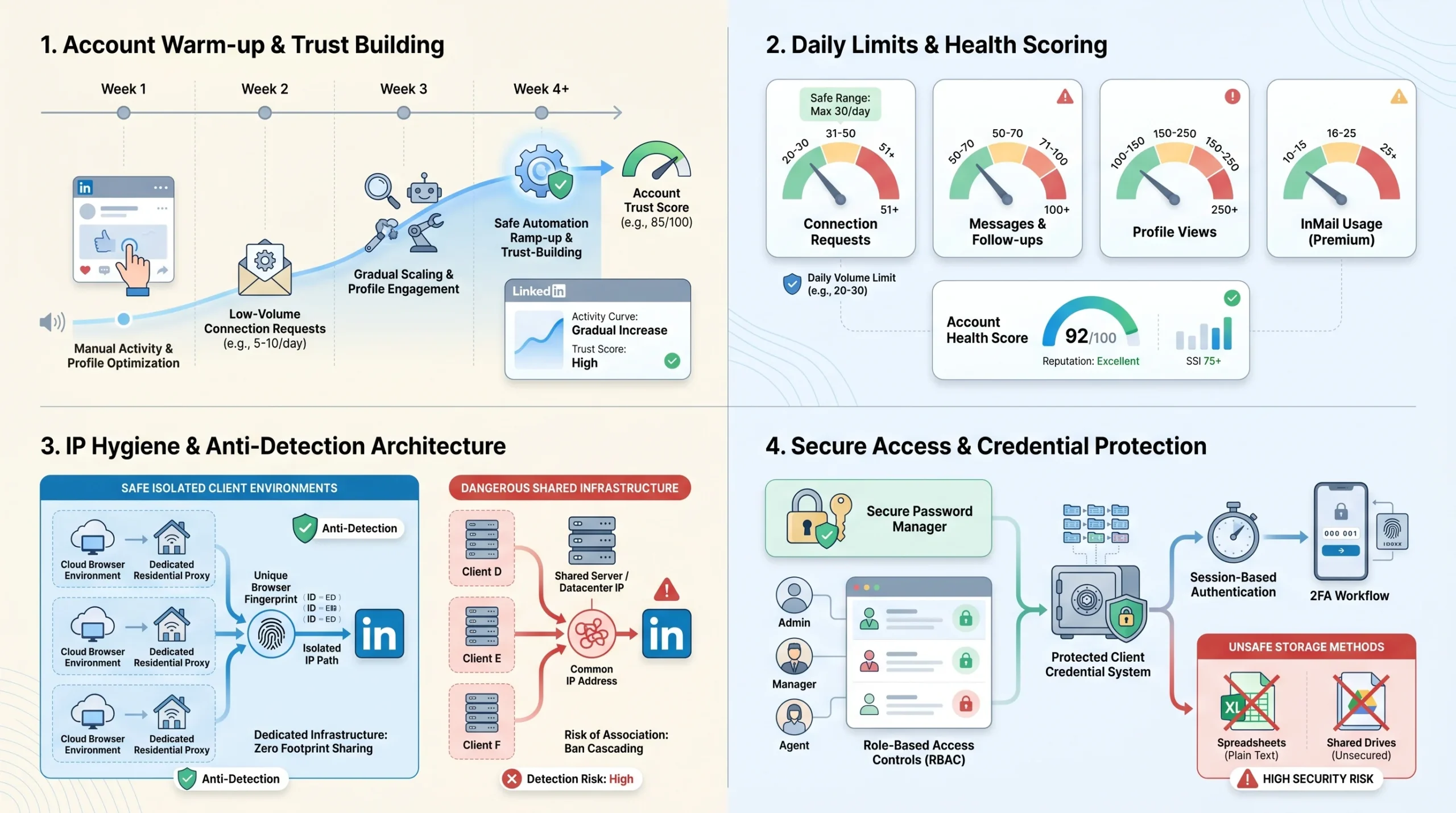
Account safety at the agency level is not a checklist item you handle during tool setup. It is a system you build before the first campaign launches, and it covers warm-up, volume controls, IP management, and credential security. Skipping any one of these creates a vulnerability that will eventually turn into a restriction.
Warm-Up Protocols for New Client Accounts
Every LinkedIn account that is going to be used for automated outreach needs a warm-up period before automation runs at full volume. This is true for new LinkedIn accounts and for established accounts that have never been used with an automation tool before.
The rationale is behavioral. LinkedIn’s systems establish a baseline for each account: how often it logs in, how many connections it sends per day, how much it interacts with content, what times it is active. When an account suddenly starts sending 50 connection requests per day after weeks of minimal activity, the behavioral shift is detectable.
A practical warm-up protocol for agency client accounts:
- Week 1 to 2 (new accounts): Manual activity only. Connect with 5 to 10 people per day, view profiles organically, engage with content. No automation running. For established accounts that have never been automated, this phase can be compressed to 5 to 7 days.
- Week 2 to 3: Introduce the automation tool at low volume. 10 to 15 connection requests per day, no follow-up sequences running yet. Monitor for any warning messages from LinkedIn.
- Week 3 to 4: Increase to 20 to 25 connection requests per day. Begin running follow-up message sequences to connections accepted in week 2.
- Week 4 and beyond: Gradually scale to the target daily volume. For most accounts, 40 to 60 connection requests per day is the operating ceiling for sustained campaigns without elevated restriction risk.
The warm-up timeline is longer for accounts with no existing LinkedIn history, younger than 6 months old, or with sparse profile completion. For these accounts, 4 to 6 weeks of warm-up before running automation at full volume is the safer approach.
Daily Volume Limits That Actually Hold Up
LinkedIn publishes general guidance on account usage but does not publish specific numeric limits for automated activity. The limits that matter in practice are the ones that experienced agencies have learned from running accounts at scale.
The safe daily operating limits for a warmed-up LinkedIn account with a standard account (not Sales Navigator or Recruiter):
- Connection requests: 40 to 60 per day. Pushing beyond 80 to 100 per day on a regular basis raises restriction risk, particularly if the acceptance rate is low. A low acceptance rate signals to LinkedIn that you are connecting with people outside your network who do not recognize you.
- Messages to connections: 100 to 150 per day. Messages to existing connections carry less risk than cold connection requests.
- Profile views: Up to 200 per day, though this is rarely a primary restriction trigger on its own.
- InMail messages (Sales Navigator): LinkedIn sets a monthly InMail credit limit that varies by subscription tier. Sales Navigator Core provides 50 InMails per month. Using InMail credits as part of a sequence is generally lower risk than sending cold connection requests at high volume.
Sales Navigator accounts can operate at slightly higher volumes than standard LinkedIn accounts because they are designed for sales activity and LinkedIn expects higher usage. The connection request limit remains a concern, but message volume and profile view limits are more generous.
The daily limits above are guidelines, not guarantees. An account with a low Social Selling Index (SSI) score, a profile that is less than 50% complete, or a history of connection requests being withdrawn at high rates should run at the lower end of these ranges.
IP Hygiene and Browser Fingerprinting
The single most common infrastructure mistake agencies make is running multiple client accounts through shared IP addresses. This is a detectable pattern and a real restriction risk.
Each client account should operate from a dedicated IP address that is consistently associated with that account. The logic mirrors how a normal LinkedIn user behaves: they log in from the same device, in the same location, at consistent times. When an account switches between IP addresses frequently, or shares an IP with other accounts showing similar automated behavior, the behavioral signal is abnormal.
The options for IP management in agency setups:
- Residential proxies (dedicated per account): The strongest option for LinkedIn compliance. Residential IPs are associated with real consumer internet connections and are much less likely to be flagged than data center IPs. Tools like Smartproxy and Oxylabs offer dedicated residential proxies with static IPs. Each client account gets its own assigned residential IP that it always connects through.
- Data center proxies: Lower cost but higher risk. Data center IP ranges are known to proxy providers and detection systems. LinkedIn has become more effective at identifying automated activity originating from data center IPs. Acceptable for low-volume, low-risk accounts, but not recommended as the primary approach for agency multi-account setups.
- Cloud browser environments: Tools like Multilogin and GoLogin create isolated browser profiles with separate fingerprints, cookies, and proxy assignments per profile. Each client account runs inside its own browser environment with a unique fingerprint. This is the most complete solution for browser-level isolation and is widely used by agencies running 10 or more accounts.
Browser fingerprinting is a secondary detection vector that matters when IP hygiene is correct. LinkedIn collects browser characteristics including user agent strings, screen resolution, installed fonts, and canvas fingerprint data. When multiple accounts share the same browser fingerprint while claiming to be different users, the pattern is detectable. Dedicated cloud browser profiles address this by generating unique fingerprints per account.
Credentials and Access Management
Agencies routinely handle client LinkedIn credentials during campaign setup. How those credentials are stored and managed is an operational security risk that goes beyond LinkedIn restrictions.
The minimum safe practices for credential management:
- Never store client passwords in shared team documents, spreadsheets, or chat tools. Slack messages, Google Docs, and Notion pages are not designed for credential security and create exposure if any team member’s account is compromised.
- Use a dedicated password manager (1Password Teams, Bitwarden for Business) with role-based access controls. Only team members who directly manage a specific client account should have access to that account’s credentials.
- Use session-based tool access where possible. Several LinkedIn automation platforms allow accounts to be connected via browser session or cookie rather than requiring the stored password. This is preferable because it does not require the agency to hold the raw LinkedIn password.
- Establish a client credential change protocol. Clients frequently change their LinkedIn passwords without notifying their agency. Build a step into your client communication process that asks clients to notify you immediately when this happens, and have a documented re-authentication process ready so campaigns can be restored quickly.
- Two-factor authentication handling. Many clients use 2FA on their LinkedIn accounts. Plan for this during onboarding. Determine whether the client will handle 2FA codes during session setup, or whether a shared authentication app arrangement is feasible. Do not bypass 2FA methods in ways that weaken the client’s account security.
How to Structure Multi-Account Management Without Losing Control
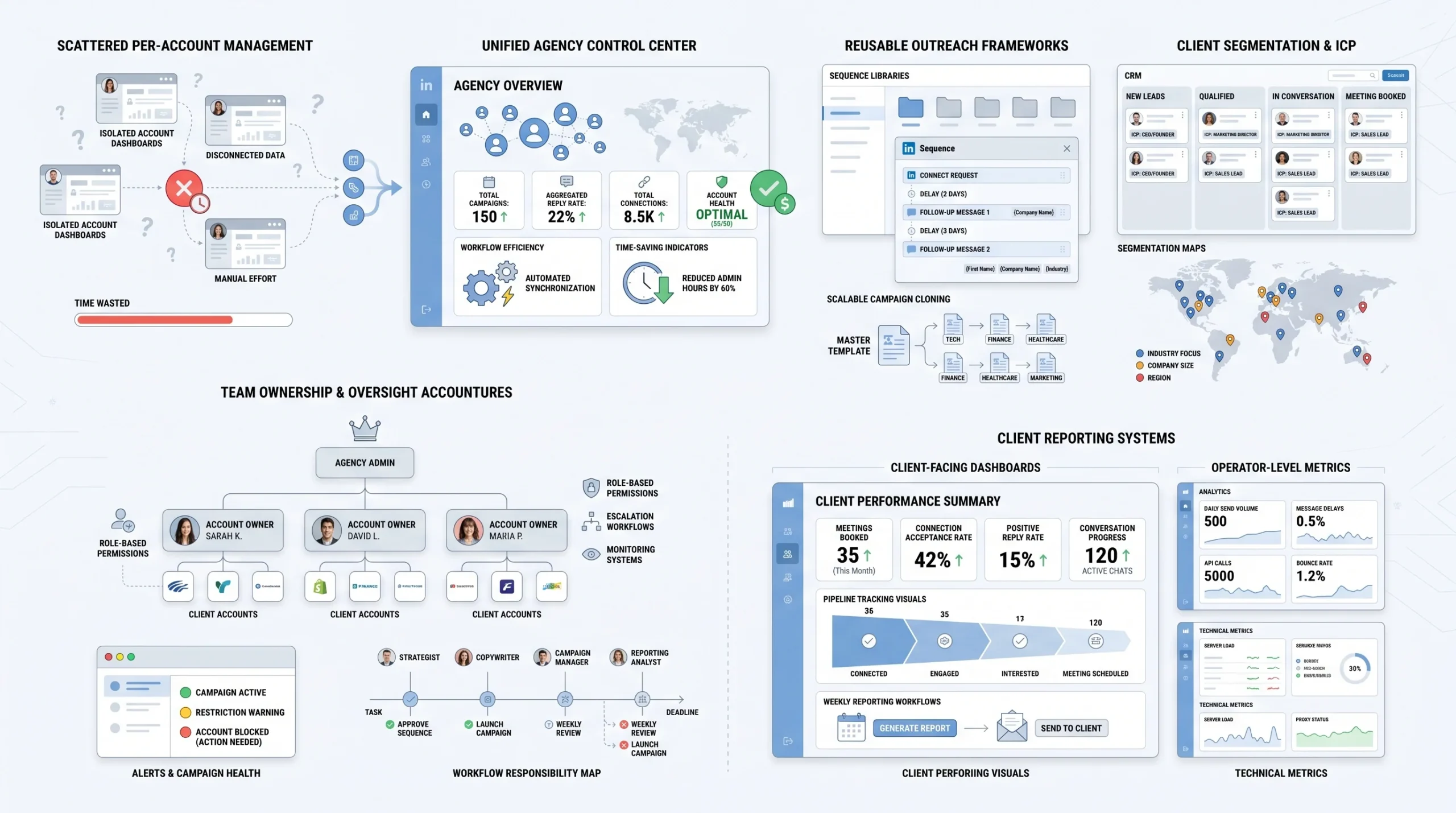
The operational problem at 10 or more client accounts is not a tool problem. It is a structure problem. Even the best multi-account automation platform becomes unmanageable if the internal workflows, reporting structure, and team responsibilities are not clearly defined.
Centralized Dashboard vs. Per-Account Management
There are two fundamentally different approaches to managing multiple LinkedIn accounts in a single agency:
The per-account approach means each client account is managed in its own isolated workspace or tool instance. The team member responsible for that client logs into that account’s campaigns separately, reviews results separately, and reports separately. This was the only option when most LinkedIn automation tools were built for individual users rather than agencies.
The centralized dashboard approach means all client accounts are visible from a single agency-level view. The tool shows connection rates, reply rates, active campaigns, and account health indicators across all accounts in one place.
The operational cost difference between these two approaches is significant:
- In a per-account setup, reviewing campaign performance across 10 clients requires opening 10 separate dashboards, logging into 10 separate environments, and mentally assembling a picture of overall agency performance. This takes a dedicated team member several hours per week just in navigation time.
- In a centralized dashboard, the same review takes 20 to 30 minutes. Performance anomalies (an account whose connection rate dropped, a campaign that stalled) are visible immediately without account-by-account inspection.
Tools like HeyReach and Dealsflow are built with the centralized model as the primary use case. Expandi and Dripify started as single-account tools and added multi-account features later, which means the centralized view experience is less complete.
For agencies managing 10 or more accounts, a tool built around the centralized agency dashboard is not a nice-to-have. The per-account management approach does not scale past about 5 clients before it becomes a full-time job just to monitor what is running.
Campaign Templates and Client Segmentation
Rebuilding outreach sequences from scratch for every new client is one of the most common sources of wasted time in agency operations. Most clients share ICP characteristics with other clients the agency has already served. A SaaS company targeting VP of Sales buyers has a different sequence than a recruiting firm targeting passive candidates, but the underlying structure is reusable.
A practical template library for a LinkedIn outreach agency should be organized by ICP profile, not by client:
- ICP type 1 (example: SaaS executives at companies with 50 to 500 employees): Connection request message template, 3-step follow-up sequence, objection handling responses for common replies.
- ICP type 2 (example: professional services buyers at enterprise companies): Separate template set for the longer consideration cycle and different messaging tone.
- ICP type 3 (example: founder-led SMBs): Direct, conversational tone sequence that performs differently from the enterprise approach.
When a new client onboards, the process is to identify which ICP template family applies, clone the template, and personalize it for the client’s specific offer, case study references, and voice. This reduces campaign setup time from several hours to 30 to 45 minutes per new client.
The segmentation layer within a centralized tool allows campaigns across all accounts to be filtered and compared by ICP type. This gives agencies visibility into which sequence structures are performing best across the whole client roster, not just individual client performance.
Assigning Team Members to Client Accounts
At ten or more client accounts, the question of who owns what becomes a real operational risk. Without clear account ownership, campaigns get paused by the wrong person, client-specific instructions get missed, and the accountability for account health becomes diffuse.
A workable structure for agency teams:
- Account owner: One named team member is responsible for each client account. They own campaign setup, performance monitoring, client reporting, and escalation decisions. They are the person who notices if connection acceptance drops below threshold before it becomes a client conversation.
- Role-based permissions in the tool: Account owners should have write access to their accounts. Senior team members or account directors should have read access across all accounts for oversight. Junior team members should not have campaign-pause or campaign-delete access on accounts they do not own.
- Escalation protocol: Define clearly what triggers escalation from the account owner to a senior team member or agency owner. An account restriction warning is an obvious trigger. A connection acceptance rate drop below 20% for three consecutive days should also be a trigger. An account going 48 hours without any campaign activity due to a technical issue is another.
Without these structures, the most common failure mode is that a problem sits undetected for several days because everyone assumed someone else was watching the account.
Reporting That Clients Actually Understand
Most LinkedIn automation tools produce performance data formatted for the operator running the campaigns, not for the client paying for them. The metrics that matter to an operator (sequence completion rates, connection request pending counts, A/B test variant performance) are not the same metrics that answer the question a client asks: “Is this working?”
A client-facing weekly report for LinkedIn outreach should contain:
- Connection requests sent during the reporting period
- Connection acceptance rate (not just count, the percentage, so the client can see if targeting quality is consistent)
- Replies received and reply rate against connections accepted
- Conversations progressed (prospects who moved past the first reply into a genuine back-and-forth)
- Meetings booked during the period, attributed to LinkedIn outreach specifically
What should be left out of client reports:
- Sequence-level A/B test data (this is internal optimization information, not client-relevant)
- Tool-specific metrics that require knowledge of how the platform works to interpret
- Vanity metrics like profile views or post impressions unless these are specifically part of the client’s engagement strategy
The reporting cadence most agencies use is a weekly email summary with a monthly deeper review. The monthly review is the right place to discuss sequence changes, targeting adjustments, or campaign pivots based on cumulative performance data.
The Reply Management Problem (And How Agencies Are Solving It)
Getting a LinkedIn prospect to reply is the hard part of outreach. Most agencies treat it as the end goal. It is not. The reply is the start of the sales conversation, and what happens in the window between the reply and the next human touch is where most of the pipeline gets lost at scale.
Why Most LinkedIn Automation Stops at the Reply
LinkedIn automation tools are built around sequences. A connection request goes out. If it is accepted, a follow-up message fires after a configured delay. If there is no reply to the follow-up, another message goes out. The sequence logic handles the send side of the conversation efficiently.
The moment a prospect replies, most sequence tools stop. The automation recognizes that a response has arrived, pauses the sequence for that contact, and places the conversation in a queue for a human to review. In the tool’s logic, the job is done. A lead has replied.
In practice, this is the moment the agency’s conversion rate is determined. The prospect who replied is interested enough to respond. They are, by definition, the highest-intent leads in the pipeline. What happens to those leads in the next 24 to 48 hours determines whether outreach converts to meetings or to silence.
At one account, a dedicated human can monitor replies and respond quickly. At ten accounts running active campaigns, the daily reply volume across the full client roster can easily reach 50 to 100 new replies. Without a system, those replies pile up, response times stretch, and prospects cool off before anyone gets back to them.
Human Handoff Workflows at Scale
The first step in solving the reply management problem without AI assistance is building a structured handoff system that prevents replies from sitting unanswered. A workable model:
- Reply tagging by intent: When a reply comes in, the first person to review it tags it by category before it goes to the response queue. Suggested categories: Interested (asked for a call, asked for more information), Not Now (timing objection but not a no), Wrong Fit (ICP mismatch or clearly not qualified), Question (asked a specific question about the offer or company), Unsubscribe Request (wants to be removed from outreach).
- Routing by category: Interested replies should have a response within 4 hours during business hours. Not Now replies can go into a 30-day follow-up sequence. Wrong Fit replies get a polite close. Question replies get routed to whoever can answer the specific question accurately.
- Response SLAs: Define maximum response times for each reply category and hold the team accountable to them. A common model is 4 hours for Interested, 24 hours for Questions, 48 hours for Not Now. Unsubscribe requests should be handled within 24 hours to maintain compliance.
- Centralized reply inbox: All client account replies should be visible in one place, not distributed across 10 separate tool dashboards. This is a tool selection consideration. Agencies that do not have a centralized reply view end up assigning one person per client account to monitor replies, which is not scalable.
The limitation of this model is that it requires consistent human availability during the hours when prospects are most likely to reply. LinkedIn outreach to business buyers generates most of its replies on weekday mornings and early afternoons in the prospect’s time zone. For agencies serving clients across multiple time zones, or agencies where the team is not dedicated full-time to reply management, this model breaks down.
AI-Driven Conversation Handling
The emerging answer to the reply management problem is AI that continues the conversation after a prospect replies, without requiring a human to step in for every interaction.
The practical application works like this: a prospect replies to a LinkedIn message. Instead of the reply sitting in a queue until a human reviews it, an AI reads the reply, identifies the intent, and responds appropriately. For common reply types (asking what the company does, asking for more information, expressing interest in a call, raising a timing objection), the AI can handle the conversation through to a meeting booking or a clear disqualification without any human involvement.
Arlo AI, built into Dealsflow’s platform, operates this way. It reads the prospect’s reply, determines intent, and continues the conversation. If a prospect says “Can you tell me more about how this works?”, Arlo responds with a relevant explanation based on the client’s offer. If a prospect says “I’m interested but we’re in Q3 planning right now”, Arlo handles the timing objection and either schedules a follow-up for Q4 or moves toward a call to discuss timing. If a prospect says “Let’s set up a call”, Arlo coordinates booking.
What this model handles well:
- High-volume reply environments where human response capacity is the constraint
- Consistent, on-brand responses across all client accounts without requiring a different team member for each account
- After-hours reply management, so prospects who reply in the evening get a response before they wake up the next morning rather than waiting until someone opens the inbox
Where human judgment still needs to be in the loop:
- Complex or unusual replies that fall outside common patterns (a prospect who replies with a specific technical question, or a situation where the prospect’s context requires knowledge the AI does not have)
- High-value accounts where the client specifically wants human involvement in every conversation
- Escalation situations where a prospect expresses frustration with the outreach approach
The AI-driven conversation model does not eliminate the need for human judgment. It handles the volume so that human attention is reserved for the conversations that actually require it.
Tool Comparison: What Agencies Actually Need vs. What Most Platforms Offer
The tool market for LinkedIn automation has several established players that agencies regularly evaluate. The honest comparison is not about which tool has the longest feature list. It is about which tool is built for the specific operational reality of running outreach for multiple clients simultaneously.
Dealsflow (Arlo AI)
Dealsflow is built around two things that most competitors do not address simultaneously: managing up to 50 LinkedIn accounts from a single agency dashboard, and continuing the conversation after a prospect replies through Arlo AI.
The platform’s multi-account architecture covers what agencies need operationally: centralized campaign visibility, per-account daily limit controls, account warm-up, and a unified inbox for replies across all accounts. The account safety layer includes automated warm-up protocols and daily limit enforcement that prevents campaigns from pushing beyond the safe thresholds.
The differentiator is Arlo AI. When a prospect replies to an outreach message, Arlo reads the reply, identifies the intent, and continues the conversation without a human stepping in. For an agency running 20 client accounts with active campaigns, this changes the operational math significantly. The reply volume does not require proportionally more team headcount to manage. Arlo handles the routine conversations and escalates the complex ones.
The honest limitation: AI-driven conversation handling works best on high-frequency, pattern-consistent reply types. For highly specialized offers, niche industries, or technically complex sales conversations, the AI response quality depends on how thoroughly the client’s offer and key talking points have been configured in the system.
HeyReach
HeyReach is built with multi-account use cases as its core design premise, not an add-on. The platform allows agencies to connect multiple LinkedIn accounts, run campaigns across all of them from a single interface, and rotate outreach across accounts to spread volume.
The primary strength is infrastructure: HeyReach handles the multi-account architecture cleanly, with good controls on daily limits and campaign scheduling per account. For agencies whose primary need is volume distribution across client accounts, the platform covers the core use case well.
The gap is on the reply side. HeyReach manages the send side of outreach efficiently, but when a prospect replies, the response workflow is human-dependent. There is no AI layer that continues the conversation post-reply. For agencies with enough team capacity to handle reply management manually, this is workable. For agencies where the reply volume exceeds what the team can handle responsively, it is the constraint that limits meeting booking rates.
Expandi
Expandi has been in the LinkedIn automation market longer than most competitors and has built a substantial safety feature set over that time, including warm-up sequences, behavioral randomization (varying send times and actions to mimic human patterns), and account health monitoring.
The platform works well for agencies that prioritize safety controls and have a smaller account roster (under 10 clients). The interface becomes operationally slow at higher account counts because the multi-account management layer was added to a product originally designed for single-account use. Moving between client accounts, reviewing performance across the full roster, and managing campaign changes at scale requires more navigation steps than a natively agency-oriented tool.
Expandi does not have an AI conversation layer. Like HeyReach, the platform handles sequencing and stops when a prospect replies.
Dripify
Dripify is a lower-cost entry point to LinkedIn automation with a clean interface and reasonable sequence-building capabilities. It is a viable option for small agencies managing two to five client accounts or for individual sales reps.
At 10 or more accounts, the limitations become operational constraints. Multi-account management is present but not the central design of the product. The analytics layer is less detailed than HeyReach or Expandi. And like the other tools in this category, there is no AI reply handling.
Dripify’s pricing model makes it attractive for smaller operations, but the per-seat or per-account cost structure at scale often makes it more expensive than agency-oriented alternatives that are priced for multi-account use from the start.
Side-by-Side Comparison
| Criteria | HeyReach | Expandi | Dripify | Dealsflow |
|---|---|---|---|---|
| Multi-account support | Strong (native) | Moderate (add-on) | Limited | Strong (up to 50) |
| Daily limit controls | Yes | Yes | Basic | Yes |
| AI conversation handling | No | No | No | Yes (Arlo AI) |
| Client reporting | Moderate | Moderate | Basic | Yes |
| Account warm-up | Yes | Yes | Basic | Yes |
| Pricing model for agencies | Per account | Per account | Per seat | Agency tier |
| Centralized dashboard | Yes | Partial | No | Yes |
| Unified reply inbox | Partial | No | No | Yes |
Building a Scalable LinkedIn Outreach Operation: The Agency Playbook
The five sections above cover the individual components of a multi-account LinkedIn outreach operation. This section pulls them together into a repeatable system that an agency can apply to every new client, regardless of industry or ICP.
The Onboarding Checklist for Each New Client Account
Every new client account should go through the same structured onboarding before a single campaign goes live. Skipping steps in this process is where agencies create problems that surface two months later.
Phase 1: Account audit (before onboarding)
- Review the client’s LinkedIn profile. Is it 100% complete? Does the headline communicate clearly who they help and how? Is there a professional photo? A weak profile hurts connection acceptance rates before any automation variable is considered.
- Check the account’s current activity level. Has it been dormant for months? Is it a new account? This determines the warm-up timeline.
- Review the client’s existing connection base. Who are they already connected to? This informs ICP targeting and avoids sending connection requests to people the client already knows.
- Assess the SSI score (LinkedIn’s Social Selling Index, visible at linkedin.com/sales/ssi). A score below 50 indicates an account that LinkedIn does not currently view as an active, trusted user. This account needs a longer warm-up before automation begins.
Phase 2: Infrastructure setup
- Assign a dedicated residential IP address to this account.
- Create a dedicated browser profile in the agency’s cloud browser tool.
- Connect the account to the automation platform through the dedicated browser profile.
- Verify the account connection is stable and the tool is reading activity correctly before any campaign configuration begins.
Phase 3: Warm-up start
- Begin the warm-up protocol appropriate for the account’s starting state (new account, dormant account, or actively-used account being automated for the first time).
- Set daily volume limits in the automation tool to warm-up levels. Do not allow the campaign template to override these limits.
- Monitor for the first 5 to 7 days. Any LinkedIn warning or unusual account behavior during warm-up should trigger a full pause and review before proceeding.
Phase 4: ICP definition and campaign setup
- Work with the client to define the target ICP with specificity: job title ranges, company size, industry, geography, and any exclusion criteria (competitors, existing customers, industries where the offer does not apply).
- Select the appropriate campaign template from the agency’s template library.
- Personalize the sequence for the client’s specific offer, case studies, and voice. Get written approval from the client on the copy before launch.
- Configure the reply routing rules in the tool so that incoming replies are tagged and routed correctly.
Phase 5: Launch and reporting setup
- Launch the campaign at the warm-up volume level, not the target operating volume.
- Set up the client-facing reporting template with the five core metrics (connection requests sent, acceptance rate, replies received, reply rate, meetings booked).
- Schedule the first weekly report delivery and confirm the client’s preferred format and timing.
- Confirm the escalation contact on the client side: who should be notified if there is an account issue that requires their involvement?
Quality Control at Scale
Maintaining outreach message quality across 10 or more client accounts without reviewing every message individually requires systematic controls, not manual oversight.
The mechanisms that work at scale:
- Template approval before launch: Every sequence, including all message variants, must receive explicit client approval before going live. This is documented in writing (email or a shared approval doc). This prevents the agency from launching copy the client would object to, and it gives the client ownership of the outreach voice.
- Personalization QA sampling: Automation tools that generate personalized first lines or insert dynamic fields should be audited regularly. Run a sample review of 10 to 20 outgoing messages per account per week to confirm personalization is working correctly and the output reads naturally. Broken personalization fields (a message that reads “Hi [First Name]”) or obviously generic AI-generated opening lines cause immediate damage to campaign performance.
- ICP filter audits: Every three to four weeks, review the targeting criteria for each active campaign to confirm the accounts being reached are still a good fit. LinkedIn’s database changes. Job titles change. Company sizes shift. An ICP filter that was accurate at campaign launch may be reaching the wrong people four weeks later.
- Message performance review: If connection acceptance rate or reply rate drops by more than 10 percentage points from the previous period, the sequence copy should be reviewed and updated. Declining performance on a static sequence is usually a signal that the messaging is becoming stale or that the ICP targeting needs adjustment.
When to Pause, When to Pivot, When to Escalate
Agencies that run multi-account operations need clear decision rules for when to act, not judgment calls made under pressure when a client calls asking what happened.
Pause and review immediately if:
- LinkedIn sends an account warning or restriction notice of any kind
- The connection acceptance rate drops below 20% for three consecutive days (this signals that either the targeting is off or LinkedIn’s algorithm is suppressing the account’s outreach)
- The automation tool reports an unusual error pattern on a specific account
- A client reports receiving a complaint from a prospect about their outreach
Pivot the campaign if:
- Reply rate drops below 8% over a two-week period (sequence copy needs revision)
- The ICP targeting is generating connections but no replies from the target buyer persona
- The client’s offer or positioning has changed in a way that makes the existing sequence inaccurate
Escalate to the agency owner or client immediately if:
- An account restriction has occurred and campaigns are paused (the client needs to know within 2 hours, not at the end of the week)
- A prospect has escalated a complaint to the client directly
- There is a data or security concern about the client’s account access
- Campaign performance has been below agreed benchmarks for more than four weeks without a clear corrective action in place
The decision tree is not about bureaucracy. It is about making sure that the people with the authority and the information to fix a problem are in the loop before the problem becomes a client conversation about whether the engagement should continue.
Conclusion
The agencies that run LinkedIn outreach for 10, 20, or 30 clients without constant fire drills are not using more tools or more automation. They are running a tighter operation with clearer infrastructure, better-defined processes, and a real answer to what happens when a prospect replies.
The account safety framework in this article, the IP isolation approach, the warm-up protocols, the daily volume controls, and the credential management practices, are not optional components for an agency at scale. Each one is a failure point. An agency that handles nine of the ten correctly will eventually lose a client account on the one they skipped.
The reply management problem is the most consistently underestimated operational challenge in multi-account LinkedIn outreach. Getting the send side right is the easier half. The meeting gets booked or lost in the 24 hours after a prospect replies.
The concrete next step: audit your current setup against the account safety framework in section two of this article. Go through each of the four pillars, warm-up protocols, daily volume limits, IP hygiene, and credentials management, and identify which ones are not fully in place. That is where the risk is, and that is where to start.
FAQ
1. What is LinkedIn automation for agencies?
LinkedIn automation for agencies refers to using software tools to run LinkedIn outreach campaigns on behalf of multiple clients simultaneously. The agency manages connection requests, follow-up message sequences, reply handling, and reporting across all client accounts from a centralized platform. The goal is to generate qualified leads and book meetings for clients at a volume that would not be achievable through manual outreach.
2. How many LinkedIn accounts can an agency manage with one tool?
The number varies by tool. HeyReach and Dealsflow are built to handle 20 to 50 client accounts from a single agency dashboard. Expandi and Dripify can handle multiple accounts but are less optimized for high account counts, and performance can degrade operationally above 10 to 15 accounts. The technical limit is different from the practical operational limit, which depends on the tool’s centralized visibility, reporting, and team access controls.
3. Is LinkedIn automation safe for client accounts?
LinkedIn automation carries inherent risk if it is not implemented with proper safety infrastructure. The primary risks are account restrictions triggered by high-volume activity, IP mismatches, and behavioral patterns that deviate from normal LinkedIn usage. Accounts protected by proper warm-up protocols, dedicated IP addresses, realistic daily volume limits, and isolated browser environments can run sustained automation campaigns with significantly lower restriction risk. No automation approach eliminates risk entirely.
4. What are the daily LinkedIn connection request limits in 2026?
LinkedIn does not publish official daily connection request limits, but agency-reported operational data consistently shows that 40 to 60 connection requests per day is the safe operating range for a fully warmed-up standard LinkedIn account. Pushing above 80 to 100 per day on a sustained basis increases restriction risk, particularly if the account’s connection acceptance rate is below 30%. Sales Navigator accounts can sustain slightly higher volumes because LinkedIn expects elevated activity from paid prospecting accounts.
5. How do I warm up a LinkedIn account before running outreach?
A proper LinkedIn warm-up starts with 1 to 2 weeks of manual activity only: connecting with 5 to 10 people per day, engaging with content, and visiting profiles organically. After this baseline period, introduce automation at 10 to 15 connection requests per day for another week before scaling toward the target volume. The full warm-up process takes 3 to 6 weeks depending on the account’s age and prior activity level. New accounts with no LinkedIn history require the longer end of this range.
6. What happens if a client’s LinkedIn account gets restricted?
A restriction typically pauses all outbound activity from the account and may require the account holder to verify their identity or agree to LinkedIn’s terms of service. The immediate response is to stop all automation on the account, notify the client within a few hours (not at the end of the week), and have the client complete LinkedIn’s restriction resolution process directly. After the restriction is lifted, the account should be reintroduced to automation at warm-up volume levels rather than resuming at the previous operating volume immediately.
7. How do agencies handle LinkedIn replies at scale?
The two main approaches are structured human handoff workflows and AI-driven conversation handling. Human handoff involves tagging replies by intent (interested, timing objection, wrong fit, question), routing them to the right team member, and enforcing response time SLAs. AI-driven handling involves a tool like Arlo AI reading the prospect’s reply and continuing the conversation autonomously, including handling objections and booking calls. Most agencies at 10 or more accounts use a combination: AI for routine reply types and human review for complex or high-value conversations.
8. What is the difference between HeyReach and Expandi for agency use?
HeyReach is built natively for multi-account management and provides a cleaner centralized view for agencies running high account volumes. Expandi has stronger account safety features developed over a longer time in the market but was originally designed for single-account use, which shows in the interface experience when managing 10 or more accounts simultaneously. Neither platform includes AI conversation handling post-reply. The choice between them typically comes down to whether account safety features or multi-account operational efficiency is the higher priority.
9. Can AI handle LinkedIn conversations after a prospect replies?
Yes. Tools like Arlo AI (part of Dealsflow) are built specifically to continue the conversation after a prospect replies, without requiring human involvement for each interaction. The AI reads the prospect’s reply, identifies the intent, and responds appropriately: answering questions, handling objections, and moving toward a call booking. The approach works well for common reply types and high-volume environments. It is less suited for highly technical or context-specific conversations that require knowledge the AI has not been configured with.