


Every LinkedIn user doing serious outreach eventually hits the same wall. You’ve found the right person. Their profile checks every box. You know you have something genuinely worth saying. And then you’re staring at two options: send a connection request, or open an InMail. It seems like a small decision. It isn’t.
That choice — repeated across dozens or hundreds of outreach attempts — shapes your acceptance rates, your reply rates, your cost per conversation, and ultimately your results from the platform. Most people make it instinctively, based on habit or gut feel, without ever examining the data, psychology, or strategy behind it.
This guide changes that. We’re going to go deep on every dimension of this decision: how each method actually works, what the performance data shows, why the psychology plays out the way it does, when each approach earns its place in your workflow, and how to build an integrated strategy that uses both intelligently. Whether you’re doing B2B sales, recruiting, partnership development, or simply trying to build a meaningful professional network, the framework here applies.
What are the Core Mechanics
Before any strategy conversation makes sense, you need a precise understanding of what connection requests and InMails are, how they reach recipients, and what experience they create on the receiving end. Most people have a surface-level understanding of both. The nuances matter more than you’d expect.
Connection Requests
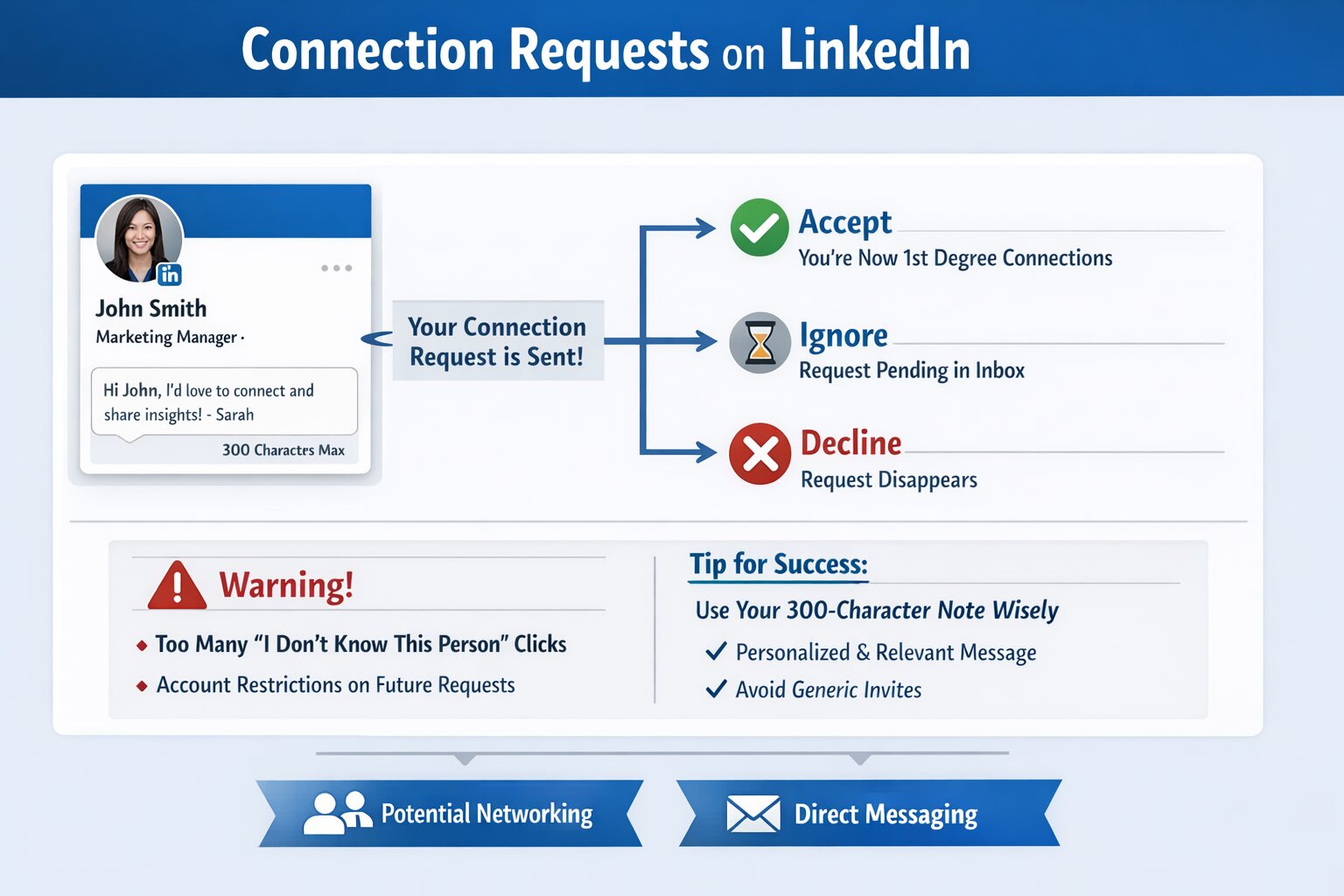
A LinkedIn connection request is the platform’s fundamental networking tool, and it’s been that way since LinkedIn’s earliest days. When you send one, the recipient receives a notification — in-app, via email, or both depending on their notification settings — that shows your name, your current headline, your profile photo, and any mutual connections you share. They also see a brief personal note if you’ve written one, up to a maximum of 300 characters.
From there, the recipient has three choices: accept, decline, or ignore. If they accept, you become first-degree connections. This unlocks direct messaging at no cost, visibility into each other’s networks, and more prominent placement in each other’s feeds. If they decline, the request disappears. If they ignore it, the request sits in a pending state that can be visible for months before LinkedIn eventually clears old pending requests.
One mechanic worth understanding: if enough people click “I don’t know this person” when declining your requests, LinkedIn can restrict your ability to send connection requests in the future, requiring you to include an email address with every subsequent request. This is a meaningful penalty that affects high-volume outreach campaigns and is one reason why targeting and personalization aren’t just about reply rates — they’re about protecting your account’s health.
The 300-character note field is where most of the strategic leverage lives. The majority of LinkedIn users either skip it entirely or fill it with generic language that could have been sent to anyone. The minority who use it thoughtfully — with specific, personalized, genuinely relevant content — see substantially different results. We’ll get into exactly what “thoughtful” means in practice later in this guide.
InMail
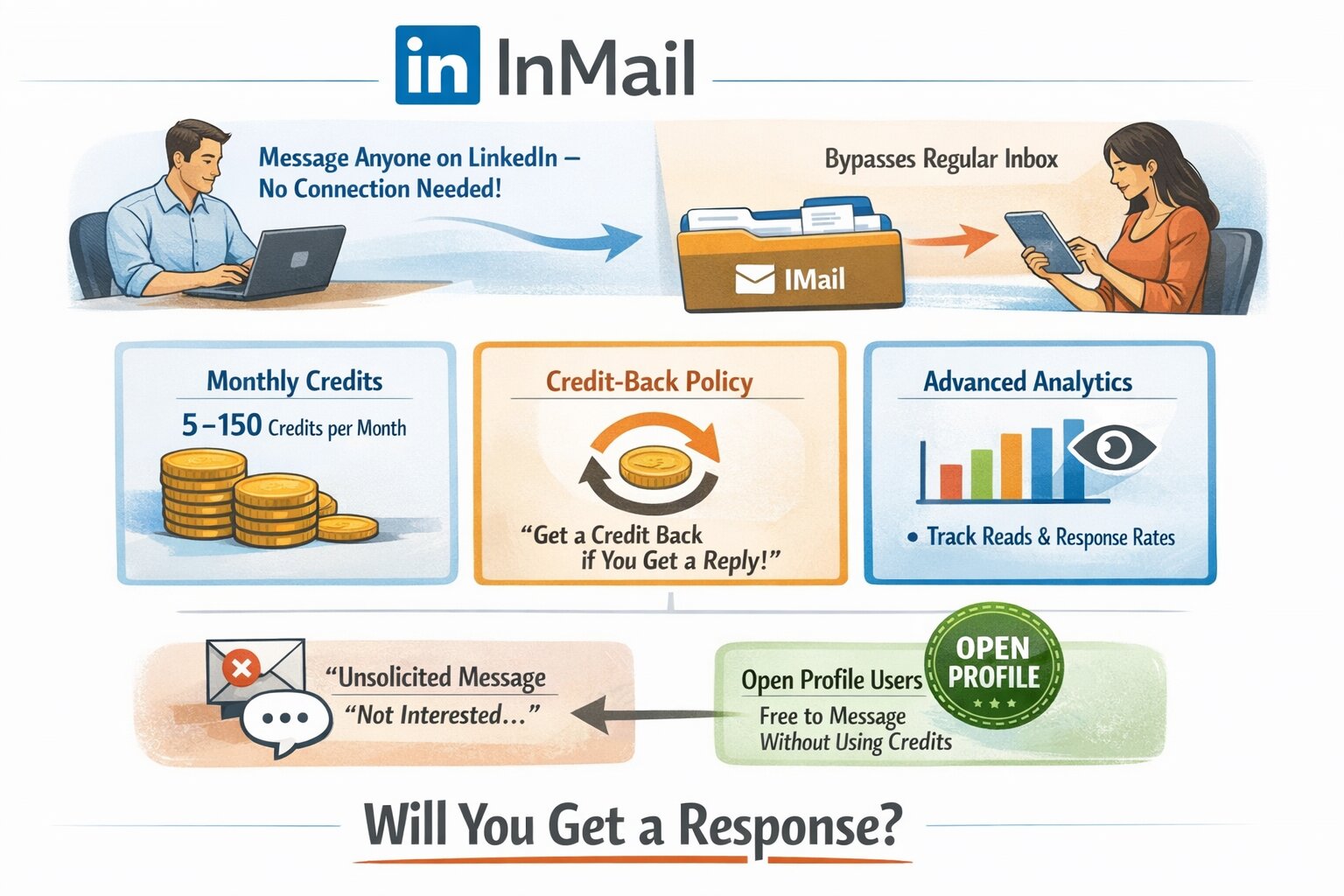
InMail is a paid feature available to users with LinkedIn Premium, Sales Navigator, or Recruiter subscriptions. Its defining characteristic is that it bypasses the connection requirement entirely — you can send a direct message to anyone on LinkedIn, regardless of whether you’re connected, as long as they haven’t explicitly disabled InMail in their privacy settings.
The message lands in a dedicated InMail folder that’s visually and functionally separated from the regular message inbox. This separation is a double-edged sword: it ensures your message doesn’t get buried in a busy conversation thread, but it also signals clearly to the recipient that this is an unsolicited commercial communication. There’s no ambiguity about the nature of the contact.
LinkedIn’s credit system governs InMail access. Depending on your subscription tier, you receive between 5 and 150 InMail credits per month. The most important mechanic to understand is the credit-back policy: if a recipient responds to your InMail within 90 days — even with a negative response — you receive the credit back. This creates a direct financial incentive to write messages that generate some response, even if that response is a polite “not interested.”
InMails also come with richer analytics than connection requests. You can see whether your message was read, when it was read, and track aggregate performance data across your campaigns. For professionals who take a data-driven approach to outreach, this visibility is genuinely valuable.
One additional InMail scenario worth knowing: some LinkedIn members enable “Open Profile,” which allows anyone to send them InMail for free, without using credits. These members have explicitly signaled that they’re open to contact from non-connections, which changes the psychology of the interaction meaningfully.
Overview of LinkedIn InMail vs Connection Request
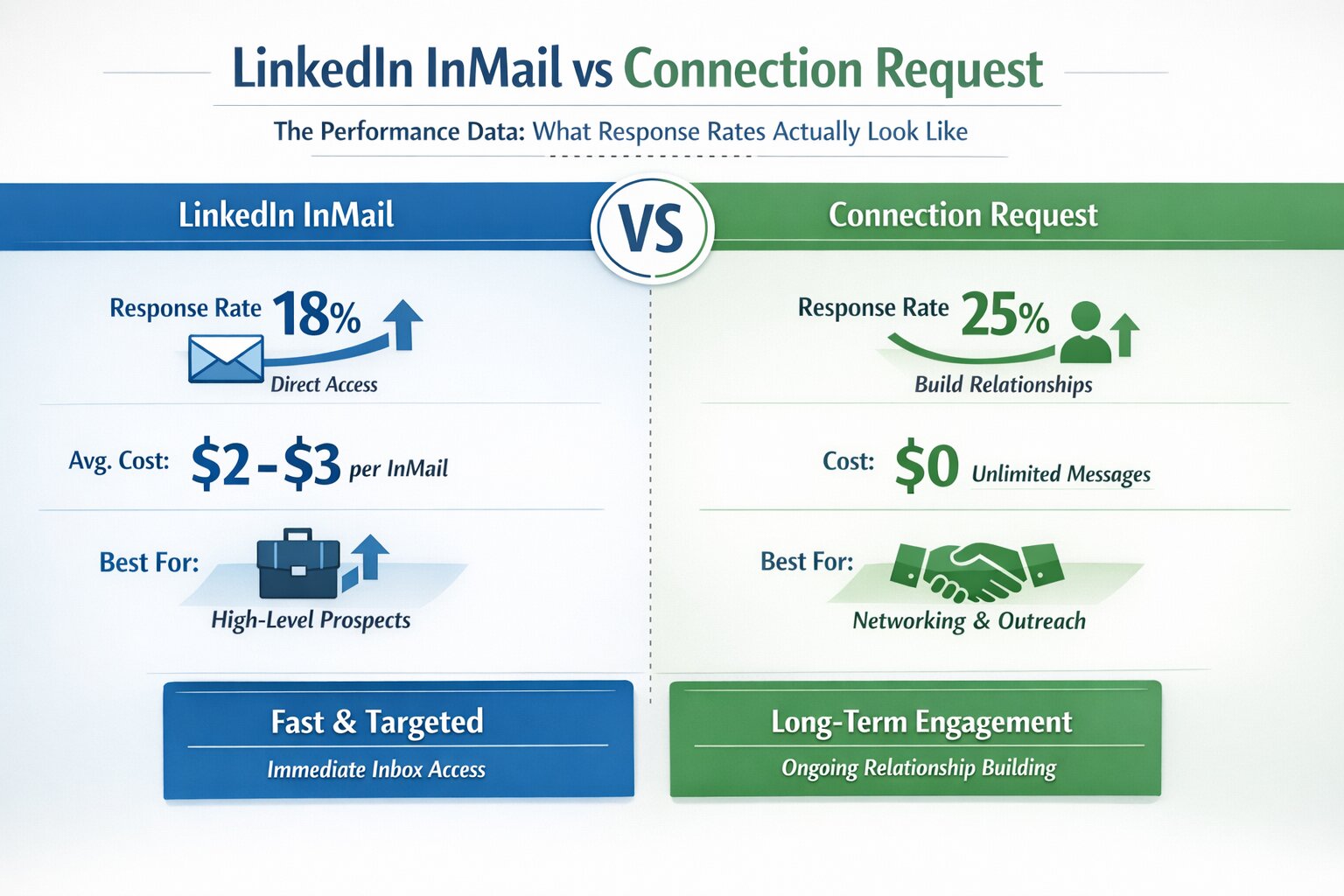
Now that you understand how both outreach methods work individually, it’s important to compare them directly. The debate around LinkedIn InMail vs Connection Request usually comes down to effectiveness, cost, response rates, and the type of relationship you want to build.
A connection request focuses on building a professional relationship first and then starting a conversation after the request is accepted. In contrast, InMail allows you to send a direct message to someone without connecting, which can be useful when reaching decision-makers or high-level professionals who may not accept connection requests from unknown profiles.
Each approach has its own advantages. Connection requests are free and allow unlimited follow-up messages once accepted, making them ideal for long-term networking and outreach campaigns. InMail, on the other hand, provides immediate access to someone’s inbox and can be valuable for time-sensitive opportunities or high-value prospects.
To better understand how these two outreach methods compare in real-world performance, let’s examine the response rates, costs, and engagement patterns associated with each.
The Performance Data: What Response Rates Actually Look Like
With mechanics established, let’s look at what the data actually shows. Research from LinkedIn’s own B2B marketing team, Sales Navigator user studies, and independent research by sales professionals paints a consistent picture — with some genuinely counterintuitive findings.
| Metric | Connection Request (no note) | Connection Request (with personalized note) | InMail |
|---|---|---|---|
| Acceptance / Open Rate | 20–25% | 30–40% | 50–70% |
| Reply Rate (overall) | — | 10–30% (post-acceptance) | 10–15% |
| Follow-up Cost | $0 | $0 | $1–$3 per message |
| Cost Per Reply | $0 | $0 | $6.67–$20 |
| Multi-touch Capability | Yes, unlimited | Yes, unlimited | Paid only |
| Best For | Broad network building | Targeted relationship building | Senior executives, time-sensitive |
| Relationship Longevity | Ongoing | Ongoing | Single-shot unless replied |
The most striking data point in this table is the InMail paradox. InMails achieve open rates of 50–70% — genuinely impressive numbers that dwarf what cold email typically achieves. Yet their reply rates are only 10–15%, nearly identical to (and sometimes lower than) the reply rates you get from follow-up messages sent to people who’ve already accepted your connection request.
Think about what this means. More than half the people who receive your InMail open and read it — and then three quarters of those people actively choose not to respond. The message is getting through. The delivery mechanism is working. The conversion problem isn’t visibility; it’s what happens after the recipient reads your words.
This tells us something important: the debate around connection requests versus InMail is not primarily a debate about delivery mechanisms. It’s a debate about message quality, relevance, timing, and psychological framing. The best outreach professionals understand this and focus their energy accordingly.
The Psychology That Drives Everything
Numbers without psychological context are incomplete. To truly understand why connection requests frequently outperform InMails in terms of actual reply rates — despite InMails’ superior open rates — you need to examine what’s happening in the recipient’s mind the moment each type of message arrives.
Reciprocity and the Low-Stakes Invitation
Robert Cialdini’s foundational research on influence identified reciprocity as one of the most powerful drivers of human behavior. When someone gives you something — even something small — you feel an inclination to give something back. Connection requests are structured around this principle in a way that InMails fundamentally are not.
When you send a connection request, the implicit message is: “I’d like to include you in my professional network.” The action of accepting is low-cost, low-commitment, and feels mutual — they’re not just doing you a favor, they’re expanding their own network too. The whole interaction is framed as a bilateral exchange. Accepting costs the recipient almost nothing, and it feels reciprocal and balanced.
InMails create a very different dynamic. The recipient knows immediately — from the dedicated folder, from the “InMail” label, from the professional context — that this is a paid, unsolicited outreach message. The implicit framing is: “I paid money to get access to your inbox because I want something from you.” Even when the content is genuinely valuable, that framing triggers mild defensiveness before the recipient has read a single word. They approach the message with a different, more guarded disposition than they bring to a connection request.
This psychological headwind is real and measurable. It shows up in that reply rate gap. Getting a message opened is one thing; getting a psychologically guarded reader to respond warmly is another challenge entirely.
Commitment, Consistency, and the Micro-Relationship
Leon Festinger’s research on cognitive dissonance, and Cialdini’s subsequent work on the principle of commitment and consistency, reveal a powerful behavioral dynamic: once people make a small commitment, they tend to behave consistently with that commitment going forward.
When someone accepts your connection request, they’ve made a small but real commitment to engaging with you professionally. They said yes to including you in their network. That yes has psychological weight. When your follow-up message arrives days later, they approach it not as a complete stranger’s outreach, but as a message from someone they’ve already, in a small way, vouched for by accepting the connection.
InMails create no such prior commitment. Every InMail arrives as a cold contact from a stranger, which means it faces the full weight of cold-contact skepticism regardless of how well-crafted it is.
The Single-Shot Problem
One of InMail’s most significant structural disadvantages is that it’s a single-shot communication with no natural follow-up path. If your prospect doesn’t respond, re-engaging requires spending another credit on another InMail — and a second unsolicited paid message to someone who ignored your first one carries significant awkwardness.
Connection requests, by contrast, open a communication channel that supports ongoing engagement. Once connected, you can send multiple follow-up messages at no cost. You can engage with their content. You can comment on their posts, share their articles, and build familiarity over weeks or months. You’re not betting everything on a single message — you’re building a relationship incrementally.
This is the difference between a door-to-door salesperson who knocks once and leaves if there’s no answer versus one who builds genuine familiarity in the neighborhood over time. The latter approach generates more trust, more goodwill, and ultimately more responses.
Connection Request Performance Factors
What Actually Drives Acceptance Rates
The 20–40% acceptance rate range for connection requests is wide enough to be almost meaningless without understanding what puts you at the low end versus the high end. Several specific factors reliably move that needle:
Profile strength: Before accepting your request, most recipients visit your profile within seconds of receiving the notification. A weak, incomplete, or unprofessional profile is the single biggest driver of declined connection requests that never get properly attributed. You can write the most compelling 300-character note in the world, but if your profile photo looks like a driver’s license photo from 2009 and your headline just says “Sales Manager,” your acceptance rate will suffer.
Mutual connections: Having mutual connections visible on your profile creates an immediate trust signal that significantly increases acceptance rates, even without a personalized note. People are far more likely to connect with someone who is two degrees removed from people they already know and trust.
Relevance of your profile to theirs: A recruiter connecting with job seekers makes intuitive sense. A B2B software salesperson connecting with the VP of Engineering at a company that uses similar software makes sense. A random person with an unclear profile connecting with a senior executive makes no sense. The clearer the logic of why your connection would be mutually valuable, the higher your acceptance rate.
The personalized note: This is the variable most directly within your control message-to-message. A good note does three things: it establishes why you’re connecting this person specifically (not just generically expanding your network), it signals that you’ve actually looked at their profile or work, and it doesn’t ask for anything beyond the connection itself. The note should open a door, not make a pitch.
The 300-character constraint as a discipline: Many people resent the 300-character limit on connection request notes. In practice, it’s a gift. It forces you to be ruthlessly concise, to identify the single most relevant reason for connecting, and to communicate it clearly. Notes that try to cram in a full pitch or explanation almost always come across as desperate or confusing. Notes that say one clear, specific, relevant thing consistently outperform.
What Drives Reply Rates After Acceptance
Acceptance gets you in the door. The follow-up message determines whether the relationship goes anywhere. Here’s what the data and practitioner experience consistently show about what drives replies:
Timing of the follow-up: Sending your first message within 48–72 hours of acceptance hits the sweet spot. Any sooner, and you risk appearing as if you were sitting there waiting — which you may have been, but shouldn’t advertise. Any later than a week, and the context of the original connection request has faded and your follow-up lands cold.
Referencing the original context: Your follow-up should acknowledge the connection and briefly recall the context of why you reached out. This creates narrative continuity that feels natural rather than starting from scratch.
The value-first principle: The single most reliable way to generate a response is to lead with something genuinely valuable to the recipient — an insight, a data point, a relevant resource, a specific observation about a challenge they face — before asking for anything. People respond to people who give before they ask.
Message length: On mobile, where the majority of LinkedIn messages are read, every additional line is friction. Three to five short paragraphs is the ceiling for a follow-up message. Three sentences is often enough. If you cannot make your point in under 150 words, you haven’t made your point clearly enough yet.
The call to action: The CTA should be specific and low-friction. “Would you be open to a brief conversation if this seems relevant?” generates more responses than “Can we schedule a 30-minute demo call?” The higher the commitment required to say yes, the fewer people will say yes.
InMail Performance Factors
The Open Rate Is Not What You Think It Is
InMail’s 50–70% open rate is genuinely impressive in absolute terms. In context, it requires some skepticism. Several factors inflate this number in ways that don’t translate to conversion:
The dedicated InMail folder creates novelty. Many professionals check it simply because it’s separate from their regular inbox, out of habit or curiosity. The LinkedIn notification for InMail is more prominent than for regular messages. And InMail’s “premium” framing creates a psychological signal that the message might be worth opening — even if, after reading it, the recipient disagrees.
None of these factors have anything to do with the quality of your outreach. They’re structural features of the delivery mechanism. And they don’t carry through to replies — the 75–80% drop-off from opened to replied reveals that curiosity is easy to generate, conversion is hard.
This is why measuring InMail performance exclusively by open rates is misleading. Open rate is a vanity metric in this context. Reply rate, meeting conversion rate, and cost per opportunity are the numbers that matter.
The Credit Economy and Real Cost Calculations
Understanding InMail costs requires going beyond the nominal per-message price. The credit-back system creates a more complex actual cost structure.
Consider a campaign of 100 InMails at an average cost of $2 per credit:
- Gross cost: $200
- Response rate: 15% → 15 responses
- Credits returned: 15 → $30 returned
- Net cost: $170
- Cost per response: $11.33
- Non-responding opens: approximately 42 people opened and chose not to reply
- Total ignored: 85 (including non-openers)
Now consider the same targeting via connection requests:
- 100 connection requests sent, cost: $0
- Acceptance rate at 30% → 30 connections
- Follow-up messages sent: 30, cost: $0
- Reply rate on follow-ups: 20% → 6 responses
- Total cost: $0
- Cost per response: $0
On pure economics and raw reply volume, connection requests dominate — assuming you’re reaching an audience that’s reachable by connection request. The qualifier is important. There are audiences where connection requests reliably don’t work, and that’s where InMail’s cost-per-response calculus becomes favorable despite the higher nominal price.
When InMail’s Economics Flip Positive
InMail stops being an expensive alternative and becomes an obvious choice under specific conditions:
High-value target, high deal size: If you’re a recruiter placing executives at $200,000+ total compensation and one successful InMail placement pays your annual InMail costs dozens of times over, the math is trivially simple. Spend the $3. The alternative — not reaching the candidate at all — is far more expensive.
Unreachable via connection request: C-suite executives at major companies often have their LinkedIn connection settings configured to accept requests only from people they know or from specific filters. Their connection request queue goes unmonitored for weeks. InMail is frequently the only viable path to their LinkedIn inbox.
Time-critical windows: When you have a hard deadline — a conference, a product launch, a quarterly close, a hiring deadline — the multi-step timeline of connection request + wait + follow-up may be genuinely unworkable. InMail compresses that timeline to hours rather than days.
Second-touch after declined connection: LinkedIn prevents re-sending connection requests to someone who declined for an extended period. InMail remains available. For high-priority prospects who passed on your first outreach, InMail provides a second path that doesn’t exist via connection requests.
Crafting Messages That Convert: The Practical Craft
Understanding strategy without execution skills produces no results. Here’s a detailed breakdown of what high-converting messages in both channels actually look like.
Writing Connection Request Notes That Get Accepted
You have 300 characters. The goal is singular: give this specific person a genuine reason to want you in their network. Nothing else.
The structure that works:
Opening: One specific observation about them, their work, or a shared context. Bridge: Brief, clear reason why connecting makes sense for both of you. Optional: A light signal of what value you might offer, without making a pitch.
Concrete examples:
Weak (generic): “Hi Sarah, I’d love to connect with you and learn from your experience in marketing. Looking forward to connecting!”
Strong (specific): “Read your breakdown of B2B content strategy shifts in Q1 — your point about intent signals was something we’ve been wrestling with internally. Would love to connect.”
The strong version references something specific, signals genuine engagement with their work, establishes shared context, and asks for nothing except the connection. It takes three minutes to write. It will double or triple your acceptance rate compared to the generic version.
What to ruthlessly eliminate:
- Any phrase that sounds like it came from a template (“I came across your profile and was impressed…”)
- Any mention of your product, service, or company in the request itself
- Flattery without substance (“Your profile is incredibly impressive”)
- Anything that requires the recipient to do work to understand why you’re reaching out
Writing Follow-Up Messages That Generate Conversations
Once connected, your first message needs to justify the connection the recipient just granted you. The stakes are lower than an InMail — they’ve already said yes to including you in their network — but squandering the opportunity with a pitch is a common and costly mistake.
A framework that consistently works:
Paragraph 1: Acknowledge the connection and provide a specific, relevant context for reaching out. Reference something concrete about their role, their company, or a challenge in their industry.
Paragraph 2: Deliver something genuinely valuable. This could be a data point, an insight, a relevant resource, or a specific observation about something they’re working on. The key word is “genuinely” — value that’s relevant to them, not to you.
Paragraph 3: A single, low-friction call to action. Make it easy to say yes. “Would it make sense to share a bit more detail and see if this applies to what you’re working on?” is easier to say yes to than “Can we schedule a 30-minute call next week?”
Total length: 100–150 words maximum. If you’re going over that, you’re trying to do too much in one message.
Writing InMails That Justify Their Premium Cost
InMails demand a higher standard of writing because the stakes are higher — you’re spending money, the recipient knows you’re spending money, and there’s no follow-up path if this message doesn’t land.
The subject line: This is unique to InMail and critically important. InMail subject lines function like email subject lines — they determine whether the message gets opened at all (though open rates are already high, a good subject line can push them higher and prime the recipient positively). Specificity dramatically outperforms generality.
Generic (weak): “Partnership Opportunity” / “Quick Question” / “Thought You’d Find This Interesting”
Specific (strong): “Question about your APAC expansion — saw the recent announcement” / “Regarding your team’s shift to product-led growth”
The body structure:
Sentence 1: Hyper-specific personalization. Reference something real — their recent content, a company announcement, a mutual connection who suggested you reach out, a specific challenge in their industry. This sentence alone separates InMails that get serious consideration from those that get dismissed.
Paragraph 2: The substance of what you’re offering or asking, framed entirely around their potential benefit. What problem does this solve for them? Why is now the right time?
Paragraph 3: A specific, low-commitment next step. “Happy to send over a brief summary if this is relevant — just let me know” requires far less commitment than “Would you be available for a call Thursday or Friday?”
Total length: 150–200 words. Longer than a connection follow-up, but still concise enough to be read on mobile without scrolling.
When You Send Is Nearly As Important As What You Send
The Weekly Engagement Window
LinkedIn engagement is not uniformly distributed across the week. Research from Hubspot, Salesforce, and LinkedIn’s own internal analytics consistently identifies a clear pattern:
| Day | Outreach Performance | Why |
|---|---|---|
| Monday | Moderate | Catching up on weekend email backlog; not yet in networking mode |
| Tuesday | High | Full professional focus; high LinkedIn engagement |
| Wednesday | High | Peak mid-week decision-making and engagement |
| Thursday | High | Still in professional mode; slightly more relaxed than mid-week |
| Friday | Low-Moderate | Mentally winding down; less receptive to new initiatives |
| Saturday | Very Low | Personal time; professional outreach feels intrusive |
| Sunday | Low | Slightly better than Saturday; still largely personal |
The Tuesday–Thursday window is your primary target. If you’re running high-volume connection request campaigns, concentrate the majority of your sends during these three days. For high-stakes InMails, Tuesday and Wednesday morning tend to be the strongest windows.
Time of Day Optimization
8 AM to 10 AM in the recipient’s local time zone is the consistently highest-performing window for LinkedIn outreach. Professionals check LinkedIn during their morning routine — often before their day gets chaotic and their attention fragments. You’re competing with fewer distractions and catching them in a moment when they have mental space to engage with something new.
A secondary spike occurs between 4 PM and 6 PM as professionals wind down their core work tasks and do a final round of platform checks before logging off for the day.
The worst times: anything between noon and 2 PM (lunch, distraction, meetings resuming), late Friday afternoon, and weekend evenings.
For outreach targeting international recipients, this requires some calculation. If you’re in India targeting US-based prospects, a message sent Tuesday at 8 PM IST reaches US East Coast recipients at 9 AM EST — timing it well without you having to be awake at 3 AM.
Timing the Follow-Up Sequence
| Touch | Timing | Channel | Purpose |
|---|---|---|---|
| 1 | Day 0 | Connection Request | Initiate contact, establish context |
| 2 | Day 3–5 post-acceptance | Direct Message | Deliver value, initiate conversation |
| 3 | Day 10–14 | Direct Message or Email | Second angle, different value |
| 4 | Day 21–30 | InMail (if high-value) | Premium second channel if no response |
| 5 | Day 45+ | Content engagement | Stay top of mind without direct ask |
This cadence respects the recipient’s time while maintaining enough presence to capture attention when the moment is right. Most positive responses to outreach sequences come after the second or third touch — which means the majority of professionals who give up after one or two attempts are leaving significant response rates on the table.
Profile Optimization: The Conversion Factor Nobody Talks About Enough
Every connection request and every InMail you send drives the recipient to your profile. In many cases, your profile is where the actual acceptance or reply decision gets made — not in the message itself.
Think of your profile as a landing page. Every outreach message is driving traffic to that landing page. If the page doesn’t convert, it doesn’t matter how good your message was.
The Elements That Matter Most
Profile photo: Professional but approachable. Your face should fill roughly 60% of the frame. Good lighting, neutral or professional background, and a genuine expression matter significantly more than formal attire or studio photography. Profiles with strong headshots receive markedly higher connection acceptance rates than those with poor photos or no photo at all.
Headline: This is the first text line visible in your connection request notification. Most people default to their job title. Job titles convey seniority but not value. A headline that communicates what you do and who you help — “Helping mid-market SaaS companies reduce churn through customer success systems” — gives the recipient an immediate reason to be curious. That curiosity translates into profile visits, and profile visits translate into acceptances.
About section: This is the most underutilized real estate on LinkedIn. Written well, it’s your strongest conversion tool. Written poorly (or left blank), it actively undermines your outreach. The best About sections are written from the reader’s perspective — what problems do you solve, for whom, and what’s your track record? Two or three specific results beat three paragraphs of career summary every time.
Featured section: Use this to showcase your three to five most compelling professional artifacts: a case study, a published article, a speaking engagement, a notable project. This gives curious profile visitors a deeper look at your expertise without requiring them to dig through your experience section.
Recommendations: Two or three strong, specific recommendations from credible sources provide powerful social proof. Generic recommendations (“It was a pleasure working with John”) add minimal value. Results-focused recommendations (“Within six months of implementing their approach, our qualified pipeline increased by 40%”) are genuinely persuasive. Solicit recommendations intentionally by asking recommenders to focus on specific outcomes or projects.
Experience section: Be specific about outcomes, not just responsibilities. “Managed enterprise sales team” is a responsibility. “Led a team of 8 to grow enterprise ARR from $2M to $8M in 18 months” is a result. Results-driven experience sections significantly increase profile credibility.
The Integrated Four-Step Framework
Understanding linkedin inmail vs connection request as a binary choice is the first misconception to discard. The most effective LinkedIn outreach professionals use both, in sequence, as part of a coherent system. Here’s the framework that consistently produces the best results:
Step 1: Pre-Warm Your Highest-Value Targets
Before sending any outreach to your most important prospects, invest one to two weeks in genuine pre-engagement. Like their recent posts (selectively, not every post). Leave a thoughtful comment on an article they published — one that demonstrates you actually read and considered the content, not just “Great insights!” Engage with their company’s content if relevant.
This converts your eventual outreach from a cold contact into what feels like a natural continuation of an existing professional relationship. Warm outreach — where the recipient recognizes your name from prior engagement — converts 3–5x better than fully cold outreach. At the volumes where LinkedIn outreach operates, this is one of the highest-leverage investments of time you can make.
Step 2: Lead With Personalized Connection Requests at Scale
Your first direct outreach should be a personalized connection request with a specific, well-crafted 300-character note. Send 10–20 per day to stay within LinkedIn’s activity guidelines and avoid triggering spam filters. Concentrate sends on Tuesday through Thursday, 8–10 AM in the recipient’s time zone.
Track everything: your acceptance rates by note type, industry, seniority level, and company size. Within two to four weeks, patterns will emerge. You’ll find that certain note approaches consistently outperform others with your specific audience. That data is invaluable — it tells you where to double down and where to adjust.
Step 3: Follow Up Strategically With Connected Prospects
For everyone who accepts, deploy the follow-up message framework discussed earlier: specific, value-forward, short, with a low-friction CTA. Wait 48–72 hours after acceptance before sending.
If the first follow-up generates no response, wait 7–10 days and send a second message from a different angle — a different piece of value, a different framing of the potential relevance. Vary the approach enough that the second message doesn’t feel like a copy of the first. Track which approaches generate replies.
If a third touch seems warranted for a high-value prospect, consider shifting channels — a comment on their recent content, an email if you have their contact information, or moving to Step 4.
Step 4: Deploy InMail for Your Highest-Value Unreached Targets
For prospects who represent the highest potential value and who haven’t responded to connection-based outreach — or who couldn’t be reached via connection request in the first place — deploy InMail. These should be your most carefully crafted messages: hyper-personalized, with a strong subject line, clear relevant value, and a specific next step.
Treat each InMail as a premium communication. Research the recipient’s recent activity, company news, and professional focus before writing. Reference something specific and real. Make the connection between what you’re offering and their actual situation as direct and concrete as possible.
After the full four-step sequence, integrate other channels. If LinkedIn outreach generates an initial response, move to email or phone to deepen the conversation. LinkedIn is most powerful as a discovery and initial engagement platform — the deeper relationship-building happens across channels.
Measuring Performance: The Metrics That Actually Matter
Data-driven outreach requires tracking the right numbers. Here’s a complete metrics framework with baselines and targets:
| Metric | Definition | Baseline | Target | What It Tells You |
|---|---|---|---|---|
| Connection Acceptance Rate | % of requests accepted | 20–25% | 30%+ | Quality of targeting + note effectiveness |
| Post-Acceptance Reply Rate | % of connected prospects who reply to follow-up | 10–15% | 20%+ | Message quality + offer relevance |
| InMail Open Rate | % of InMails opened | 50–60% | 65%+ | Subject line quality + recipient targeting |
| InMail Reply Rate | % of InMails generating replies | 10–12% | 15%+ | Message quality + offer relevance |
| Conversion to Meeting | % of conversations resulting in booked meetings | 2–5% | 8%+ | Full funnel effectiveness |
| Cost Per Conversation | Net InMail cost ÷ responses | $10–$20 | <$10 | InMail targeting efficiency |
| Time to First Response | Average hours/days to first reply | 72–96 hrs | <48 hrs | Prospect interest level |
| Profile View Rate | % of outreach recipients who view your profile | Varies | Track trends | Message curiosity generation |
Review these metrics weekly, not monthly. LinkedIn outreach responds quickly to changes in approach — a revised note, a new subject line, a different follow-up timing — and the feedback loop is short enough that you can run meaningful tests within two to three weeks.
The most sophisticated analysis is segmentation: which industries, job titles, company sizes, regions, and seniority levels respond best to your outreach? Once high-performing segments are identified, concentrate InMail credits there and broaden connection request volume in those pools. You’re effectively optimizing a funnel, and segment-level data tells you where the funnel is leaking.
Common Mistakes That Silently Kill Your Results
Pitching in the First Touch
The most widespread error in LinkedIn outreach — across both connection requests and InMails — is treating the first contact as a sales opportunity. Connection request notes that mention your product, follow-up messages that immediately ask for a demo, InMails that open with “I’d love to show you how our platform can help you…” — all of these trigger immediate disengagement.
The first contact should do one thing: establish genuine relevance and open a conversation. The pitch comes later, after you’ve demonstrated that you understand their situation and have something worth their time. Skipping to the pitch before establishing that foundation is the single most common reason outreach campaigns underperform.
Treating “Personalization” as Replacing Their Name in a Template
“Hi [First Name], I noticed you’re the [Title] at [Company]…” is not personalization. It’s mail merge. Recipients can identify template outreach within the first sentence, and when they do, the message is essentially dismissed regardless of what follows.
Real personalization references something specific that required genuine research: a piece of content they published, a recent company announcement, a specific aspect of their professional background, a mutual connection who suggested you reach out, or a specific challenge in their industry that you know they’re navigating. It takes three to five minutes per message. For high-value targets, that investment is trivial relative to the outcome.
Ignoring Mobile Formatting
More than 60% of LinkedIn activity happens on mobile devices. A message that looks clean and well-structured on desktop — clear paragraphs with good spacing — can render as a wall of undifferentiated text on a phone screen. Write every message with mobile in mind: short sentences, clear paragraph breaks, no long lists, nothing that requires scrolling to get to the main point.
If your message can’t be read and understood in under 30 seconds on a phone, it’s too long or too complex.
Giving Up After One Touch
Research on B2B outreach consistently shows that most positive responses come after the second, third, or fourth touch. The overwhelming majority of LinkedIn outreach campaigns stop after one or two messages. The professionals who follow up persistently — while respecting boundaries and varying their approach — dramatically outperform those who don’t.
There’s a meaningful distinction between persistent and pushy. Persistence means following up with new value, different angles, and appropriate spacing. Pushy means repeating the same message until someone responds. Persistent gets results. Pushy gets blocked.
Measuring the Wrong Numbers
Tracking messages sent, connections accepted, or InMails opened without tying those numbers to meetings, qualified opportunities, and closed deals allows underperforming campaigns to run indefinitely. Set up simple tracking that connects outreach activity to business outcomes. The only metrics that ultimately matter are conversations that led somewhere worth going.
The Decision Framework: A Quick-Reference Guide
When facing any specific outreach situation, run through this decision logic:
Reach for a Connection Request when: The prospect is accessible on LinkedIn and not obviously configured to decline cold requests. You have time for a multi-touch nurture sequence. You’re building broad network presence in a particular industry or function. You’ve identified warm signals — they engaged with your content, visited your profile, or you share multiple mutual connections. Budget is a meaningful constraint.
Reach for InMail when: The prospect is C-suite or senior leadership with likely connection request filters. You’ve already sent a connection request that was declined or ignored. You’re working within a hard time deadline that can’t accommodate the connection request timeline. The prospect has an Open Profile. The deal or placement value is high enough that $2–$3 per message is genuinely trivial.
Use both, in sequence, when: You’re running an account-based outreach program with defined high-value targets. You have a clear multi-touch strategy and the tracking infrastructure to measure it. You’re willing to invest in pre-engagement warming before either channel. The opportunity justifies a sustained, multi-channel effort.
Conclusion
The question of linkedin inmail vs connection request is, at its core, the wrong frame. It implies a permanent choice between two tools, when the real answer is that both tools have their place in a well-designed outreach system, and the professionals who get the best results from LinkedIn use both intelligently rather than defaulting to one.
Connection requests win on economics, win on psychology, win on follow-up flexibility, and win on relationship-building capability. They should be your default for most outreach scenarios, executed with genuine personalization and a patient, multi-touch approach. InMails win on access — they reach people who simply cannot be reached any other way on the platform, and in the right scenarios, their cost is so trivial relative to the opportunity that the comparison barely warrants discussion.
The real leverage in LinkedIn outreach has nothing to do with which button you click. It lives in message quality, targeting precision, profile strength, follow-up consistency, and the discipline to measure what actually matters and improve based on what you find. The delivery mechanism is the last 10% of the equation. The first 90% is understanding your audience well enough to say something worth responding to.
Master both channels. Build the system. Obsess over quality. The results follow.
Frequently Asked Questions
1. What is the difference between LinkedIn InMail and a connection request?
The main difference between LinkedIn InMail and a connection request is how you contact the recipient. A connection request allows you to connect with someone and message them after they accept your request. In contrast, LinkedIn InMail lets you send a direct message to someone without connecting first. InMail is a paid feature available with LinkedIn Premium, Sales Navigator, or Recruiter accounts.
2. Is LinkedIn InMail better than a connection request for outreach?
Neither option is universally better. Connection requests are generally more effective for building long-term professional relationships because they allow ongoing communication after acceptance. InMail can be more useful when reaching senior executives, time-sensitive prospects, or people who rarely accept connection requests.
3. What is the typical response rate for LinkedIn connection requests?
On average, connection requests receive an acceptance rate of around 20–40%, depending on targeting and personalization. Requests with personalized notes usually perform better than those sent without a message.
4. What is the average response rate for LinkedIn InMail?
LinkedIn InMail typically achieves open rates between 50% and 70%, but reply rates are usually around 10–15%. While many recipients read InMails, fewer respond unless the message is highly relevant and personalized.
5. Should you include a note in a LinkedIn connection request?
Yes. Adding a short personalized note significantly increases the chances that your connection request will be accepted. A good note briefly explains why you want to connect and shows that you are genuinely interested in the recipient’s work or profile.
6. When should you use LinkedIn InMail instead of a connection request?
You should consider using LinkedIn InMail when:
- The prospect is a C-level executive or senior leader
- Your connection request was previously ignored or declined
- The opportunity is time-sensitive
- The user has an Open Profile allowing free InMail messages
7. Is LinkedIn InMail free?
No. LinkedIn InMail requires a LinkedIn Premium, Sales Navigator, or Recruiter subscription. Users receive a limited number of InMail credits each month. However, if the recipient replies within 90 days, LinkedIn often returns the credit.
8. How long should a LinkedIn outreach message be?
The most effective LinkedIn outreach messages are short and concise. A connection request note should stay within the 300-character limit, while follow-up messages should generally be 100–150 words to ensure they are easy to read on mobile devices.
9. What is the best time to send LinkedIn outreach messages?
Studies show that LinkedIn outreach performs best Tuesday through Thursday, especially between 8 AM and 10 AM in the recipient’s local time zone. Engagement is typically lower on weekends and late Friday afternoons.
10. Can you follow up after sending an InMail on LinkedIn?
Yes, but unlike connection requests, follow-ups with InMail may require another credit if the recipient does not respond. This is why many professionals prefer starting with a connection request and then continuing the conversation through free direct messages.