


Here’s a situation most sales professionals know intimately.
You spend twenty minutes researching a prospect. You craft what feels like a thoughtful, relevant message. You hit send with genuine optimism. And then — nothing. No reply. No view notification. Just silence.
You try again with a different prospect. Same result. You start wondering whether LinkedIn outreach actually works, or whether you’re doing something fundamentally wrong.
The answer is almost always the latter — but not in the way most people think. The problem usually isn’t your targeting, your product, or your value proposition. The problem is the message itself. Specifically, how it opens, what it leads with, how long it runs, and what it asks for at the end.
LinkedIn outreach in 2026 is harder than it was three years ago. Over one billion professionals are on the platform. Automation tools have flooded inboxes with templated sequences that buyers have learned to recognize and ignore in under two seconds. The bar for what constitutes a “good” LinkedIn message has risen significantly — and most outreach is still stuck at 2019 standards.
This guide fixes that. You’ll get 25 proven LinkedIn outreach message templates covering every major outreach scenario — cold connections, warm follow-ups, InMails, partnership outreach, event invitations, and more. Each template is built on real psychological principles, includes customization guidance, and comes with a follow-up message so you never lose momentum after the first touch.
Let’s start with the fundamentals.
What Is LinkedIn Outreach and Why Does It Matter in 2026?
LinkedIn outreach is the practice of proactively initiating contact with prospects, partners, potential collaborators, or recruits through LinkedIn’s messaging system — whether through direct messages to existing connections or InMail to people you haven’t connected with yet.
What makes LinkedIn outreach fundamentally different from cold email is context. When someone receives your LinkedIn message, they can see everything about you before deciding whether to respond — your job title, company, experience, content you’ve published, mutual connections, and shared groups. This context changes the trust equation entirely. A message from a stranger on LinkedIn carries significantly more credibility than the same message arriving as a cold email from an unknown domain.
Two primary LinkedIn outreach scenarios:
| Scenario | Who You’re Reaching | Method | Trust Level |
|---|---|---|---|
| Warm outreach | Existing connections, past colleagues | Direct message | Established |
| Cold outreach | People you don’t know yet | Connection request + InMail | None or weak |
What LinkedIn outreach is used for in 2026:
- B2B sales prospecting and pipeline generation
- Recruitment and talent acquisition
- Partnership and collaboration building
- Content promotion and audience growth
- Event and webinar promotion
- Community building and thought leadership
The engagement advantage over email is substantial. LinkedIn messages consistently achieve open rates of 85–95% compared to cold email’s 20–35%. Reply rates of 10–25% versus email’s 1–5%. These numbers exist because LinkedIn’s professional environment creates a different behavioral context — people are in a business mindset, inboxes are less crowded, and your visible profile does credibility work before the message is even read.
How to Send LinkedIn Messages: InMails, Direct Messages, and Choosing the Right Method
Before diving into templates, understanding the mechanics of LinkedIn messaging is essential — because using the wrong message type for your situation wastes credits, reduces reply rates, and can limit your account’s outreach capacity.
Direct Messaging Your Existing Connections
Direct messages are unlimited, free, and available to all LinkedIn users for communicating with first-degree connections. They’re your most underutilized outreach asset. Most LinkedIn users are sitting on hundreds or thousands of first-degree connections they’ve never sent a meaningful message to — warm prospects who already know who you are.
Best uses for direct messages:
- Re-engaging dormant connections with a relevant observation or resource
- Following up with new connections after they accept your request
- Sharing content or insights with warm leads over time
- Introducing a product or service to someone who’s already shown professional interest in your work
Before investing in InMail campaigns, audit your first-degree connections for prospects you haven’t engaged with meaningfully. The warmest leads in your LinkedIn network are often ones you’ve never directly messaged.
Sending InMails for Cold Outreach
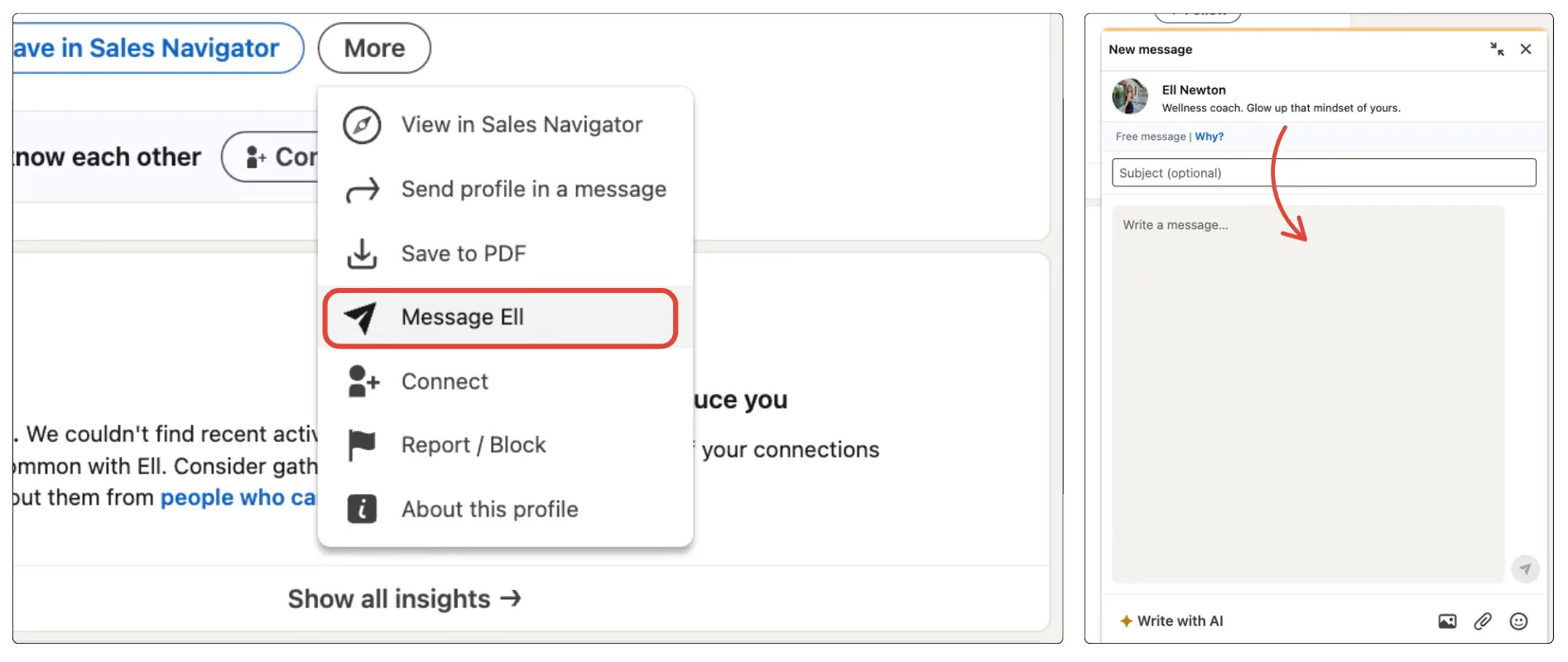
InMail is LinkedIn’s premium messaging system that lets you contact people you’re not connected with. It’s available to LinkedIn Premium, Sales Navigator, and Recruiter subscribers through a monthly credit allocation.
InMail credit allocation by subscription:
| LinkedIn Plan | Monthly InMail Credits |
|---|---|
| Premium Career | 5 credits |
| Premium Business | 15 credits |
| Sales Navigator Core | 50 credits |
| Sales Navigator Advanced | 50 credits |
| Recruiter Lite | 30 credits |
| Recruiter | 150 credits |
The credit refund policy is important to understand: if a recipient responds to your InMail within 90 days, the credit is returned. This creates a direct financial incentive for relevant, personalized outreach — generic InMails that get ignored cost you credits permanently, while well-crafted ones that generate replies essentially cost nothing.
The Three Types of InMail
1. Free InMails
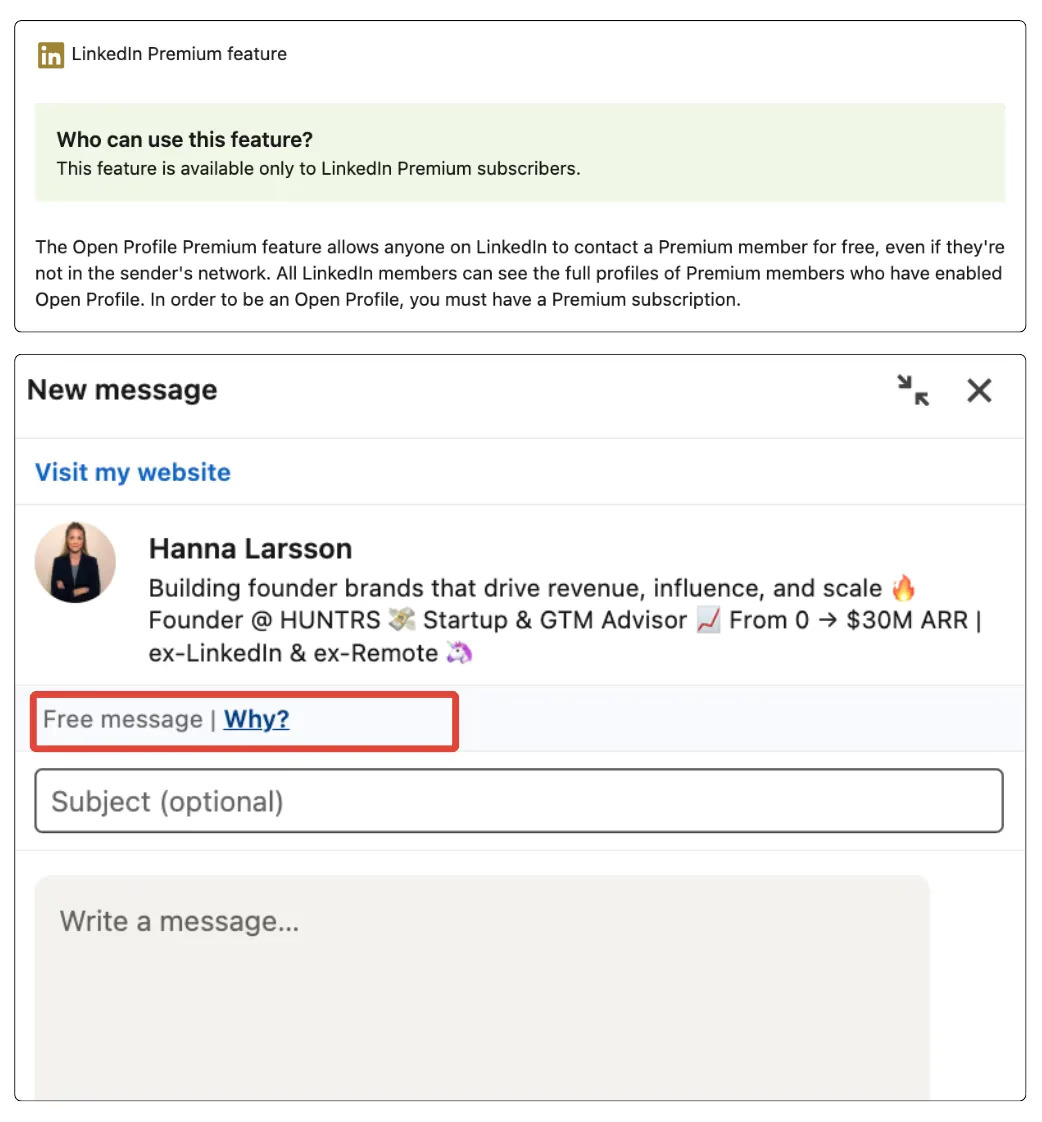
Members who have enabled “Open Profile” on their LinkedIn settings can be messaged by anyone at no credit cost. Open Profile members — typically thought leaders, actively networking founders, and professionals seeking new connections — are identifiable by the “Message” button appearing on their profile even when you’re not connected.
| Feature | Detail |
|---|---|
| Cost | Free — no credit used |
| Availability | Open Profile members only |
| Character limit | Standard InMail limits |
| Best for | High-value cold outreach to engaged professionals |
2. Paid InMails
Standard InMail credits used to message any LinkedIn Premium member. Use these for high-priority cold prospects where quality of connection matters more than volume. Tips for maximizing credit ROI: send Tuesday through Thursday for highest response rates, personalize every InMail thoroughly, and never use a paid credit on a message you wouldn’t send to a top-tier prospect.
3. Sponsored InMails (Message Ads)
A paid LinkedIn advertising format delivering messages directly to targeted LinkedIn members’ inboxes regardless of connection status. Unlike standard InMails, Sponsored InMails appear with an “Ad” label.
| Use Case | Why Sponsored InMail Works |
|---|---|
| Product launches | Reach large targeted audiences simultaneously |
| Event promotion | Drive registrations from specific professional segments |
| Content distribution | Deliver reports or guides to defined personas |
| Retargeting | Re-engage website visitors or content engagers |
How to Write LinkedIn Messages That Get Replies: 4 Core Principles
The 25 LinkedIn outreach message templates in the next section are built on four psychological and structural principles. Understanding these principles is what lets you customize any template and maintain its effectiveness — because knowing why something works is more valuable than knowing what works.
Principle 1: Use the Law of Reciprocity
Reciprocity is one of the most well-documented principles in social psychology: people feel compelled to return value they’ve received. In LinkedIn outreach, this means leading with something genuinely useful before making any ask.
This doesn’t mean attaching a PDF to your connection request. It means opening with an observation that shows you’ve actually looked at their work, sharing an insight that’s relevant to their specific situation, or offering something of real value — an audit, a resource, a useful connection — before asking for anything in return.
The critical distinction: reciprocity only works when the value is genuine. A thinly disguised pitch wrapped in the language of helpfulness reads exactly as what it is — and performs worse than a straightforward pitch because it also feels manipulative.
Reciprocity message structure:
| Element | Purpose | Example |
|---|---|---|
| Opening | Give genuine value first | “Saw your post on X — your take on Y was really insightful” |
| Bridge | Connect value to relevant context | “We work with companies dealing with exactly this challenge” |
| Ask | Low-friction, specific next step | “Would a 15-minute conversation be worth it?” |
Principle 2: Establish Social Proof
Social proof — credible evidence that other people in similar situations have found value in what you offer — dramatically accelerates trust with someone who has no direct experience of you or your work.
Types of social proof that work in LinkedIn messages:
- Specific customer outcomes: “We helped [Company Type] achieve [result] in [timeframe]”
- Mutual connections: “I noticed we’re both connected to [Name]”
- Relevant shared experience: “I saw your panel at [Event]”
- Verifiable metrics: “Our clients typically see X% improvement in Y within Z weeks”
One strong, specific proof point consistently outperforms three vague ones. “We work with leading companies in your space” is worthless. “We helped a Series B SaaS company reduce churn by 23% in 90 days” is credible, specific, and relevant.
Principle 3: Keep It Short
Messages under 100 words consistently outperform longer messages across every LinkedIn outreach scenario. Decision-makers are busy. Mobile LinkedIn usage is high. Long messages signal that you value your time more than theirs.
Optimal message lengths:
| Message Type | Optimal Word Count | Maximum |
|---|---|---|
| Connection request note | 40–60 words | 300 characters |
| First InMail | 75–100 words | 150 words |
| Follow-up message | 40–75 words | 100 words |
| Value-share message | 60–90 words | 120 words |
| Final breakup message | 25–40 words | 60 words |
What to cut from every message before sending:
- “I hope this message finds you well”
- Long company background sections
- Feature lists
- Multiple CTAs competing for attention
- Anything that’s about you rather than them
Principle 4: One Easy Call-to-Action
The most common structural mistake in LinkedIn outreach is ending a well-crafted message with either no CTA or a CTA that’s too high-friction to say yes to. A CTA is “easy” when it requires minimal time commitment, can be answered yes or no, and feels like an invitation rather than a demand.
CTA comparison:
| High-Friction CTA | Low-Friction Alternative |
|---|---|
| “Let’s schedule a 45-minute demo” | “Worth a 15-minute call?” |
| “Can we jump on a call this week?” | “Open to a quick chat?” |
| “Let me know if you’re interested” | “Happy to share more — useful?” |
| “Reply with your availability” | “Does Thursday work, or another time?” |
| “Visit our website to learn more” | “Want me to send a quick overview?” |
The Best LinkedIn Outreach Message Templates for Every Situation in 2026
Here are 25 templates covering every major LinkedIn outreach scenario. Each includes the situation it’s designed for, the psychological principle it applies, the template itself, customization notes, and a follow-up message.
Treat these as starting points. The structure is proven. The personalization is yours to add.
Template 1: Offer to Help Their Business
When to use: You’ve identified a specific, visible problem or opportunity in a prospect’s business Principle: Reciprocity — lead with genuine observation before any ask
Connection request version:
“Hi [Name] — noticed [specific observation about their business/content/challenge]. I’ve helped [similar companies] with exactly this — happy to share what’s worked. Would love to connect.”
First message after connecting:
“Hi [Name], noticed [specific situation they’re facing]. We recently helped [Company Type] achieve [specific result] — I think there’s a similar opportunity for [Their Company]. Worth 15 minutes?”
Follow-up (Day 5):
“Hi [Name] — just following up briefly. Happy to share [specific resource] that’s relevant to [their situation] — no pressure, just thought it might be useful.”
Customization note: Replace every bracketed field with specific research. The more precise your observation, the higher your reply rate.
Template 2: Direct Product Introduction
When to use: Qualified prospect who matches your ICP closely Principle: Problem-first framing + specific social proof
“Hi [Name] — most [ICP role] I speak with are dealing with [specific problem]. [Product/Company] solves this by [one-line how]. We’re working with [relevant company type] and seeing [specific result]. Worth exploring?”
Follow-up (Day 7):
“Hi [Name] — wanted to follow up. Happy to share how [similar company] approached [specific challenge] — takes 15 minutes. Useful?”
Customization note: Lead with the problem, never the product. The product is only relevant after you’ve demonstrated you understand their situation.
Template 3: Connection Request to a Potential Partner
When to use: Partnership outreach, co-marketing, referral relationships, integration partners Principle: Mutual benefit framing
Connection request note:
“Hi [Name] — I work with [ICP] at [Company], and we often see overlap with what [Their Company] does. Think there could be a useful connection here. Would love to connect.”
First message after connecting:
“Hi [Name] — appreciate the connection. We serve [ICP] and have noticed our clients often need [their solution]. Thought it might be worth exploring whether there’s a natural fit. Open to a brief call?”
Follow-up (Day 7):
“Hi [Name] — circling back briefly. Happy to share how we’ve structured similar partnerships — takes 20 minutes. Worth it?”
Template 4: Introduce Your Content Channel
When to use: Growing a LinkedIn newsletter, company page, or content channel Principle: Value-first — offer specific useful content before asking for a follow
“Hi [Name] — I’ve been publishing weekly content on [topic] that I think your audience would find genuinely useful. [Recent piece] resonated strongly with [relevant persona]. Happy to share it?”
Follow-up (Day 6):
“Hi [Name] — wanted to share [specific piece] — covers [specific topic] in depth. Think it’s particularly relevant to [their role/industry]. Let me know what you think.”
Template 5: Respond to a Behavioral Trigger
When to use: Prospect liked your post, visited your profile, commented on your content, or downloaded a resource Principle: Behavioral relevance — they showed interest first
“Hi [Name] — noticed you [engaged with my post on X / visited my profile]. Thought [relevant challenge] might be on your radar. Happy to share [specific resource] that goes deeper — useful?”
Follow-up (Day 5):
“Hi [Name] — following up on [content/resource]. Happy to walk through how it applies to [their specific situation] in 15 minutes.”
Customization note: Always name the specific action they took. This one detail separates your message from every generic outreach they receive that day.
Template 6: Offer a Free Audit or Review
When to use: Service providers, consultants, agencies using audit-led sales motions Principle: Reciprocity — give real value before making any ask
“Hi [Name] — I’ve been reviewing [relevant area] for [ICP] and noticed [specific observation about their company]. Happy to put together a quick [audit/analysis] — no cost, no commitment. Worth it?”
Follow-up (Day 6):
“Hi [Name] — following up on the free [audit] offer. We did this for [similar company] and found [specific insight]. Takes 20 minutes to share — worth a look?”
Customization note: Make the audit specific. “A quick LinkedIn profile audit” outperforms “a free review.” Named specificity = perceived value.
Template 7: Webinar or Live Event Invitation
When to use: Promoting a webinar, LinkedIn Live, workshop, or industry event Principle: Relevant value delivery — invite them to something genuinely useful
“Hi [Name] — we’re hosting a [webinar/live session] on [specific topic] on [date]. Given your focus on [relevant area], thought it might be genuinely useful. [Specific speaker/topic detail]. Want the link?”
Pre-event follow-up (Day 4):
“Hi [Name] — following up on the [event] invite. Spots are filling — happy to reserve one. Think [specific session] would be particularly relevant for what you’re working on.”
Post-event follow-up:
“Hi [Name] — we ran the [event] yesterday. Happy to share the recording — covers [specific topic] in depth. Want me to send it over?”
Template 8: Share a Relevant Case Study
When to use: Mid-funnel outreach to warm prospects who match an existing customer profile Principle: Social proof through specific, highly relevant customer outcome
“Hi [Name] — we recently worked with [Company Type] on [specific challenge]. They achieved [specific result] in [timeframe]. Given [Their Company]’s focus on [relevant area], thought the story might be useful. Want the full case study?”
Follow-up (Day 6):
“Hi [Name] — wanted to follow up on the [Company] case study. Happy to walk through what they did differently — 15 minutes, and I think [specific part] is directly relevant to [their situation].”
Template 9: Congratulate on a Recent Achievement
When to use: Funding round, promotion, award, company milestone, product launch Principle: Genuine recognition before any ask — builds goodwill and opens the door naturally
Connection request note:
“Hi [Name] — congratulations on [specific achievement]. Really impressive [milestone/result]. Would love to connect and follow your journey.”
Follow-up message:
“Hi [Name] — again, impressive work on [achievement]. We’ve worked with companies at similar [stages/milestones] on [relevant challenge]. Happy to share what’s worked — might be timely given where you are now.”
Customization note: Generic “congrats on your recent news” is worse than no message. Name the specific achievement. Show you actually looked.
Template 10: Ask for Their Opinion or Feedback
When to use: Early-stage relationship building, content validation, market research Principle: Ego appeal — people engage when their expertise is genuinely valued
“Hi [Name] — I’m working on [relevant topic/content/challenge] and your perspective as [their role] would be genuinely valuable. Would you be open to sharing your take on [specific question]? Two minutes — really appreciate your input.”
Follow-up (Day 5):
“Hi [Name] — following up on my question about [topic]. Even a one-line take would be incredibly useful. Happy to share what I’m putting together once it’s done.”
Template 11: Content Collaboration Invitation
When to use: Approaching potential co-authors, podcast guests, newsletter contributors, panel speakers Principle: Mutual benefit — both parties gain audience exposure and credibility
“Hi [Name] — I’ve been following your content on [topic] and think your perspective would really resonate with [your audience description]. We’re working on [content piece/format] and would love to feature your take. Interested?”
Follow-up (Day 7):
“Hi [Name] — wanted to follow up on the collaboration idea. [Specific detail about the content]. Happy to keep it light — just a few quotes or a short contribution. Worth a quick chat?”
Template 12: Exclusive Discount or Time-Limited Offer
When to use: Warm prospects or existing connections — never cold leads Principle: Urgency + exclusivity — but only when the offer is genuinely relevant
“Hi [Name] — we’re offering [specific offer] to [relevant persona] for the next [timeframe]. Given [relevant context about their situation], thought it was worth flagging. Happy to share details?”
Urgency follow-up (Day 4):
“Hi [Name] — quick note that the [offer] closes [date]. Happy to get you set up quickly if it’s of interest — takes about 10 minutes.”
Customization note: Never lead with a discount to a cold prospect. This template is exclusively for warm leads and existing connections who already know your value.
Template 13: Community or Private Group Invitation
When to use: Building a LinkedIn group, Slack community, or exclusive professional network Principle: Exclusivity + reciprocity — invitation to something curated and valuable
“Hi [Name] — I run a private [group/community] for [ICP description] focused on [specific topic]. Given your background in [relevant area], I think you’d find the conversations genuinely useful. Happy to send an invite?”
Follow-up (Day 6):
“Hi [Name] — following up on the [community] invite. We have [number] [relevant professionals] in the group — the recent discussion on [topic] was particularly strong. Happy to share more?”
Template 14: Quick Demo or Trial Offer
When to use: Bottom-of-funnel outreach to qualified warm prospects Principle: Low-friction CTA — reduce the commitment required to say yes
“Hi [Name] — given your interest in [relevant area], thought it might be worth seeing [Product] in action. Quick 15-minute demo — I’ll show you [specific feature relevant to their situation]. Worth it?”
Follow-up (Day 5):
“Hi [Name] — following up on the demo offer. Happy to send an async video instead if easier — just [specific value] in 3 minutes. Want me to send that over?”
Trial version:
“Hi [Name] — happy to set you up with a [free trial/pilot] — no commitment, [timeframe]. Would that be easier than a call?”
Template 15: Re-Engage a Cold Connection
When to use: Someone you connected with months or years ago but never had a meaningful conversation with Principle: Relevance through timing — acknowledge the gap, give a reason to reconnect now
“Hi [Name] — we connected a while back and I’ve been following your work on [topic]. [Relevant recent observation about their content or company]. Thought it was a good reason to finally reach out properly. Would love to catch up — open to a quick call?”
Follow-up (Day 7):
“Hi [Name] — wanted to follow up. Given what you’re working on with [topic/project], I think [specific resource or insight] might be genuinely relevant right now. Happy to share?”
Template 16: Mutual Connection Introduction
When to use: When you share a meaningful mutual connection with the prospect Principle: Borrowed trust — mutual connection transfers credibility
“Hi [Name] — [Mutual Connection] mentioned you’d be a great person to know given your work on [topic]. I’ve been [relevant context about your work] — thought there might be a useful connection. Would love to connect.”
Follow-up (Day 5):
“Hi [Name] — following up on my note. Happy to share what [Mutual Connection] and I have been working on — think it’s relevant to [their area]. Open to a brief chat?”
Template 17: Respond to Their Published Content
When to use: After a prospect publishes a post, article, or newsletter that gives you a genuine, specific reason to reach out Principle: Genuine engagement — show you actually read and thought about their work
“Hi [Name] — your [post/article] on [topic] was genuinely insightful — particularly your point about [specific element]. I’ve been thinking about [related angle] from a different perspective. Would love to connect and continue the conversation.”
Follow-up (Day 6):
“Hi [Name] — following up on [their content]. I wrote something on [related topic] that takes a different angle — thought it might be interesting given your perspective. Happy to share it?”
Template 18: Job Change or New Role Outreach
When to use: A prospect has recently started a new role — one of the highest-intent outreach triggers available Principle: Timing relevance — new roles come with new problems, new budgets, and fresh thinking
“Hi [Name] — congratulations on the new role at [Company]. First 90 days in a new position are always intense — especially when [relevant challenge for their role] is on the agenda. Happy to share what’s worked for others in your position. Worth a quick chat?”
Follow-up (Day 7):
“Hi [Name] — following up on my last note. Happy to share [specific resource] that’s been useful for [similar role] during onboarding. No agenda — just thought the timing might be right.”
Template 19: Fundraising or Investment Announcement Follow-Up
When to use: A company has recently announced a funding round — signaling growth, new budget, and new priorities Principle: Timing relevance — funding announcements signal specific, predictable needs
“Hi [Name] — congratulations on the [Series X] raise. Exciting milestone for [Company]. Companies at this stage typically focus on [relevant challenge] — it’s something we’ve helped [similar companies] navigate. Happy to share what’s worked. Open to a conversation?”
Follow-up (Day 6):
“Hi [Name] — wanted to follow up. Happy to share how [similar company] used their [Series X] period to [specific outcome]. Takes 15 minutes and I think the timing is relevant.”
Template 20: Industry Research or Insights Share
When to use: Top-of-funnel awareness outreach — using data or research as the hook Principle: Reciprocity through genuine insight delivery
“Hi [Name] — we recently published research on [topic] that found [specific surprising finding]. Given your work in [their area], thought it might be worth sharing. Happy to send the full report?”
Follow-up (Day 5):
“Hi [Name] — following up on the [research] share. The section on [specific finding relevant to their role] is particularly interesting. Want me to send it over?”
Template 21: Recruitment or Talent Outreach
When to use: Recruiters or hiring managers approaching potential candidates Principle: Flattery through specificity — make the candidate feel genuinely sought out, not mass-messaged
“Hi [Name] — your background in [specific skill/experience] caught my attention. We’re building something at [Company] that I think would be genuinely interesting for someone with your track record. Not a cold pitch — just thought it was worth a conversation. Open to a brief chat?”
Follow-up (Day 7):
“Hi [Name] — wanted to follow up. Happy to share more about what we’re building — even if timing isn’t right, might be worth knowing about. Takes 15 minutes.”
Template 22: Conference or Event Connection Follow-Up
When to use: Following up with someone you met — or almost met — at a conference, event, or LinkedIn Live Principle: Shared experience — real-world context creates instant warmth
“Hi [Name] — really enjoyed [specific moment/talk/conversation] at [Event]. Your take on [specific topic] stuck with me. Would love to continue the conversation — open to a quick call?”
Follow-up (Day 5):
“Hi [Name] — following up on [Event]. Happy to share [resource/insight related to the conversation] — thought it was relevant to what we were discussing.”
Template 23: Competitor Customer Outreach
When to use: Targeting users of competitor tools who might benefit from switching Principle: Problem awareness — acknowledge the competitor without being dismissive
“Hi [Name] — I noticed you’re using [Competitor]. Teams at [similar companies] have been switching to [solution] because of [specific advantage]. Happy to share what the transition looks like — takes 15 minutes and no commitment. Worth it?”
Follow-up (Day 7):
“Hi [Name] — following up. Happy to share a quick comparison — specifically on [relevant differentiator]. Even if timing isn’t right, might be useful context.”
Template 24: Speaking Opportunity or Podcast Guest Invitation
When to use: Inviting a prospect to speak at an event, join a podcast, or contribute to a panel Principle: Ego appeal + genuine mutual benefit
“Hi [Name] — I’ve been following your work on [topic] and think your perspective would be genuinely valuable for [our audience/podcast/event]. [Specific audience size or context]. Would you be open to [15-minute conversation/episode/session]?”
Follow-up (Day 7):
“Hi [Name] — wanted to follow up on the [opportunity] invite. [Specific detail about format or audience]. Think your take on [specific topic] would be particularly valuable. Still interested?”
Template 25: Simple, Direct Cold Outreach
When to use: When you want to be straightforward about why you’re reaching out — no warm-up framing Principle: Directness and honesty — sometimes the cleanest message performs best
“Hi [Name] — I’ll be direct: [Company] helps [ICP] with [specific problem], and based on your role at [Their Company], I think there might be a fit. Happy to share one relevant example. Worth 15 minutes?”
Follow-up (Day 5):
“Hi [Name] — following up on my last message. Happy to send a one-paragraph overview instead of a call — would that be easier?”
How to Follow Up Without Being Annoying
The follow-up is where most LinkedIn outreach campaigns fail — not because the sequences are too aggressive, but because every follow-up says the same thing with slightly different punctuation.
The follow-up framework:
| Follow-Up | Timing | Content | Tone |
|---|---|---|---|
| Follow-up 1 | Day 3–5 | New angle on original point | Curious, brief |
| Follow-up 2 | Day 8–10 | Useful resource or insight | Helpful, no ask |
| Follow-up 3 | Day 14–16 | Relevant case study or proof | Specific, credible |
| Follow-up 4 | Day 21 | Breakup message | Direct, respectful |
The four follow-up templates:
Follow-up 1 — New angle:
“Hi [Name] — wanted to add one thought to my last message. [New angle or observation]. Does this change anything?”
Follow-up 2 — Value add:
“Hi [Name] — came across [resource/article/data] that felt relevant to [their situation]. No agenda — just thought it might be useful.”
Follow-up 3 — Social proof:
“Hi [Name] — quick note: [Similar Company] was dealing with [same challenge] and saw [specific result]. Happy to share how — 15 minutes.”
Follow-up 4 — Breakup:
“Hi [Name] — I’ll stop reaching out after this. If [specific problem] becomes a priority down the road, happy to reconnect. Best of luck with [specific thing they’re working on].”
Follow-up rules:
| Rule | Why It Matters |
|---|---|
| Never say “just checking in” | Adds zero value — signals you have nothing new to offer |
| Space follow-ups 3–5 days apart | Daily follow-ups feel like harassment |
| Maximum 4 follow-ups for cold outreach | After four no-responses, move on |
| Remove immediately when they reply | Even a no is a reply — never auto-follow-up into a live thread |
| Each follow-up adds new value | Different angle, new resource, new proof point |
Handling different reply types:
| Response | Recommended Action |
|---|---|
| “Not right now” | Ask when to follow up — set a specific reminder |
| “Not the right person” | Ask who is — “Happy to reach out to them directly” |
| “Not interested” | Thank them — ask if they know someone who might be |
| No reply after 4 touches | Send breakup message and move on |
Conclusion
The difference between LinkedIn outreach that fills your pipeline and LinkedIn outreach that goes silent isn’t the volume of messages you send. It’s the quality of every single one.
The 25 templates in this guide give you a proven structural starting point for every outreach scenario you’ll encounter. But the personalization — the specific observation about their business, the relevant case study that mirrors their situation, the genuine congratulation on their actual achievement — that’s what converts a template into a reply.
Key principles to take forward:
| Principle | One-Line Application |
|---|---|
| Lead with reciprocity | Give genuine value before making any ask |
| Keep messages short | 75–100 words maximum for most scenarios |
| Use specific social proof | One real, relevant proof point beats three vague ones |
| One CTA per message | Make it easy to say yes to one specific thing |
| Follow up with new value | Different angle, different resource, every time |
| Know when to stop | Four touches maximum — then a respectful exit |
| Personalize every template | Structure is the foundation; personalization builds the house |
Pick the three templates most relevant to your current outreach goals. Customize them for your ICP. Run a 30-day test and measure reply rates at every step. The data will tell you what’s working — and from there, it compounds.
Frequently Asked Questions
What is the best LinkedIn outreach message template for cold outreach in 2026?
The best cold outreach template leads with a specific observation about the prospect’s business, keeps the message under 100 words, and ends with one low-friction CTA. Avoid generic openers. Reference something real — their recent post, a company milestone, or a role-specific challenge — before making any ask.
How long should a LinkedIn outreach message be?
Keep first messages between 75–100 words. Follow-up messages should be even shorter — 40–75 words. Connection request notes must stay under 300 characters. Shorter messages consistently generate higher reply rates because they respect the recipient’s time and get to the point faster.
How many follow-up messages should I send after a LinkedIn outreach message?
Send a maximum of four follow-up messages, spaced 3–5 days apart. Each follow-up should add new value — a different angle, a useful resource, or a relevant case study. After four unanswered touches, send a brief breakup message and move on. Never repeat the same message with different punctuation.
What is the difference between LinkedIn InMail and a direct message?
Direct messages are free and unlimited but only available to first-degree connections. InMail is a premium feature that lets you message anyone on LinkedIn regardless of connection status, using monthly credits allocated by subscription tier. Credits are refunded when a recipient replies within 90 days.
Should I always personalize LinkedIn outreach message templates?
Yes — every single time. Templates provide proven structure but personalization provides the relevance that actually generates replies. At minimum, include one specific observation about the prospect’s role, company, content, or recent activity. Generic templates sent without customization perform no better than spam and can damage your account’s outreach credibility.
What should I never include in a LinkedIn outreach message?
Never open with “I hope this message finds you well.” Avoid long company background sections, feature lists, vague social proof claims, multiple competing CTAs, and anything primarily about you rather than the prospect. Every sentence should either add value to the reader or move toward one clear, specific next step.
What is the best time to send LinkedIn outreach messages for maximum replies?
Tuesday through Thursday between 8–10am and 12–2pm in the recipient’s timezone consistently produces the highest open and reply rates. Monday mornings and Friday afternoons are the weakest performing windows. For InMail specifically, mid-week sending matters most given the credit cost of messages that go unopened.
Is a connection request or InMail better for cold LinkedIn outreach?
Connection requests work better for most cold outreach scenarios — they are free, create a notification, and if accepted open a permanent direct messaging channel. InMail makes more sense when reaching very senior executives unlikely to accept unknown connection requests, or when you want to send a detailed first message without waiting for acceptance.
How do I write a LinkedIn connection request that gets accepted?
Stay under 300 characters. Reference something specific — their recent post, a mutual connection, a shared group, or a relevant event. State briefly why connecting makes sense for both of you. Never include a pitch in the connection request. The connection request asks for permission to start a conversation — it is not the conversation itself.
Why are my LinkedIn outreach messages not getting replies?
The most common reasons are messages that are too long, too generic, too product-focused, or too high-friction in their CTA. Check whether your opening line references something specific about the prospect, whether your message leads with their problem rather than your product, and whether your CTA asks for one small commitment rather than a large one.