


If you’ve been using SalesRobot for your LinkedIn and email outreach and started hitting walls — whether it’s pricing changes, limited multichannel support, or LinkedIn account safety concerns — you’re not alone. A growing number of sales teams and agencies are actively exploring what else is out there.
This blog compares the 8 best SalesRobot alternatives in 2026, breaking down features, pricing, strengths, and weaknesses for each tool. Whether you’re a solo founder, a growing sales team, or a full-scale agency, you’ll find a recommendation that actually fits your workflow and budget.
Best SalesRobot Alternatives at a Glance
| Tool | Best For | Starting Price | Free Trial | Standout Feature |
|---|---|---|---|---|
| Dealsflow | Safe cloud-based LinkedIn automation + AI personalization | $49/mo | Yes – 14 days | Dedicated residential proxy IPs + AI icebreaker generator |
| Apollo.io | All-in-one prospecting + outreach | $49/user/mo (annual) | Yes – 14 days | 210M+ contact database with built-in sequencing |
| Cognism | EMEA-focused B2B data & compliance | ~$1,500/user/year | No (sample only) | Diamond Data® phone-verified mobile numbers |
| LinkedIn Sales Navigator | Native LinkedIn prospecting | $99.99/mo (annual) | Yes – 30 days | Direct LinkedIn integration + InMail credits |
| Expandi | Safe cloud-based LinkedIn automation | $99/mo/seat | Yes – 14 days | Dedicated IP per user + smart sequence builder |
| Lemlist | Multichannel cold outreach | $69/user/mo | Yes – 14 days | Dynamic image/video personalization + Lemwarm |
| Dripify | Budget-friendly LinkedIn automation | $59/user/mo | Yes – 7 days | Intuitive drip campaigns with funnel analytics |
| Waalaxy | SMB LinkedIn + email outreach | Free / €39/mo | Yes – 7 days | Freemium plan + AI Prospect Finder |
Why Look for a SalesRobot Alternative?
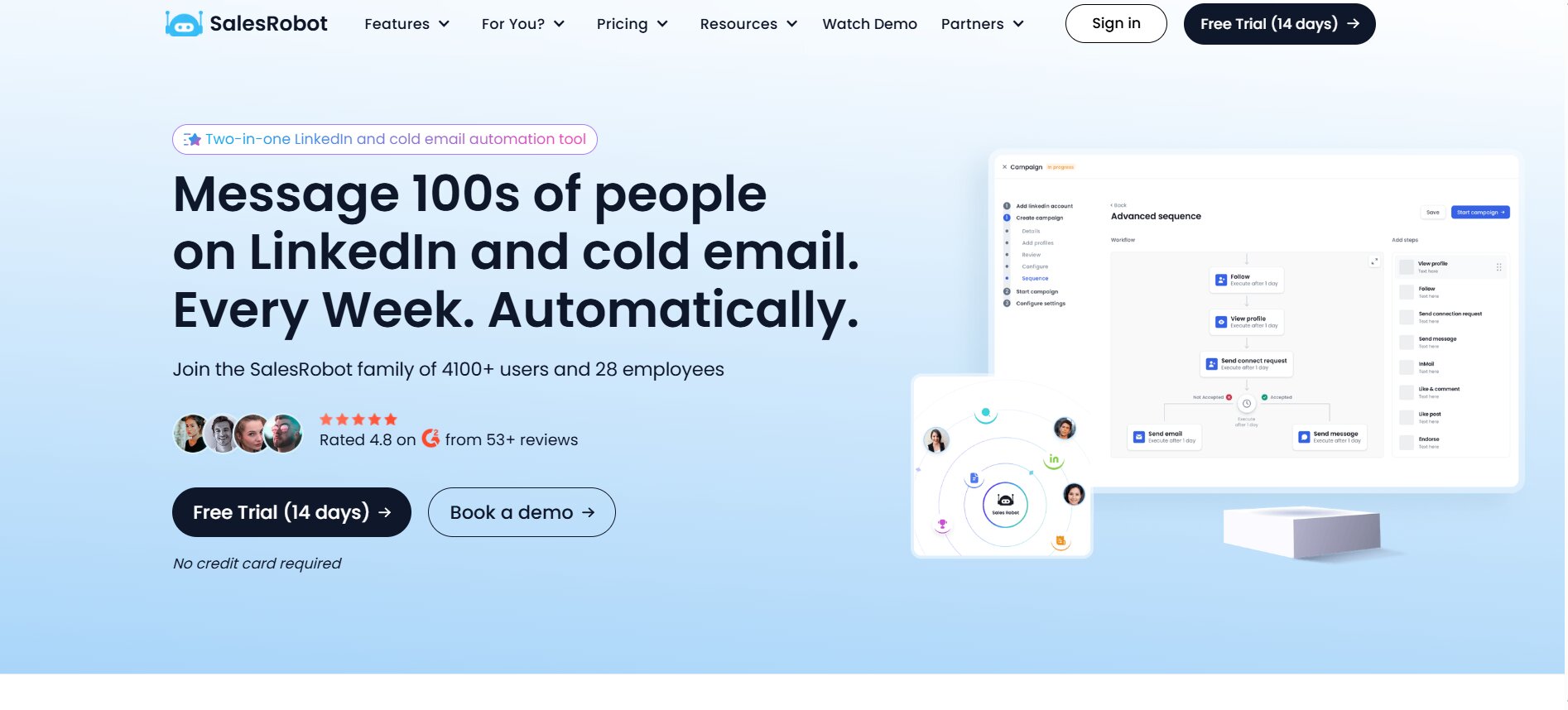
SalesRobot has carved out a genuine niche in the LinkedIn automation space. It serves over 3,000 customers worldwide with a platform that promises to act like a 24/7 virtual SDR — automating LinkedIn connection requests, follow-ups, and multichannel sequences, all from a single dashboard. For many solo salespeople and small teams, it works well.
But no tool is perfect for every team, and SalesRobot is no exception.
What SalesRobot Does Well
SalesRobot is a cloud-based LinkedIn and email outreach automation platform that focuses on helping B2B teams scale cold outreach without risking their LinkedIn accounts. The tool runs campaigns 24/7 using mobile API behavior and real-time throttling to simulate human activity patterns, which reduces the risk of LinkedIn restrictions.
Key capabilities that users genuinely praise include AI-powered message personalization, multi-channel sequences combining LinkedIn and email, a smart unified inbox, support for voice notes and video messages, and an AI reply management layer that handles responses. The platform also integrates with CRMs such as Pipedrive, Salesforce, HubSpot, Copper, Zoho, and Google Sheets, and connects to Zapier for broader workflow automation. Customer support is frequently highlighted as a strength in user reviews.
Where SalesRobot Falls Short
Despite its strengths, SalesRobot has documented shortcomings that drive users to look for alternatives.
- Unexpected pricing and feature changes. Multiple users on G2 have reported that SalesRobot has altered feature access and introduced additional fees — including per LinkedIn account charges — in ways that weren’t clearly communicated upfront. Some lifetime deal holders reported being asked to move to a subscription model mid-use.
- LinkedIn account risk. Like all LinkedIn automation tools, SalesRobot carries the inherent risk of LinkedIn disconnection or account restriction when automation functions are used aggressively.
- Integration and setup overhead. Several users note that integrating SalesRobot with existing tools or setting up complex campaigns takes more effort than comparable platforms.
- Price-to-value tension for smaller teams. For smaller teams running low outreach volumes, SalesRobot can feel expensive relative to what they actually use.
- No native contact database. SalesRobot automates outreach but does not include its own B2B contact database. Teams still need to source and enrich contact lists externally before running campaigns.
Signs You’ve Outgrown SalesRobot
You may be ready to explore alternatives if your team is scaling beyond a handful of LinkedIn accounts and the per-seat pricing is compounding quickly. Similarly, if your outreach strategy is evolving to require deeper data enrichment, intent signals, or a built-in contact database, SalesRobot’s execution-focused model will leave gaps you’ll need to fill with additional tools. Teams operating in EMEA markets that require strict GDPR compliance will also find the platform limited compared to data-focused tools like Cognism.
How We Evaluated These Alternatives
Every tool in this comparison was assessed against six consistent criteria to ensure a fair, apples-to-apples evaluation.
Evaluation Criteria
- Outreach Channels — Does the tool support LinkedIn, email, cold calling, or a combination? Single-channel tools are noted as such.
- Contact Data Quality & Database Size — Does the tool include a built-in B2B database, and how accurate and large is it?
- AI Personalization Capabilities — How does the tool help personalize messages at scale using AI, dynamic variables, or data enrichment?
- CRM & Tool Integrations — Which CRMs does the tool natively integrate with, and how seamlessly does data flow?
- LinkedIn Account Safety / Compliance — How does the tool manage LinkedIn rate limits, account protection, and regulatory compliance (GDPR/CCPA)?
- Pricing & Value for Money — What does the tool actually cost across realistic usage scenarios, including any hidden fees or credit-based surprises?
The 8 Best SalesRobot Alternatives in 2026
1. Dealsflow — Best Overall SalesRobot Alternative for Safe LinkedIn Automation
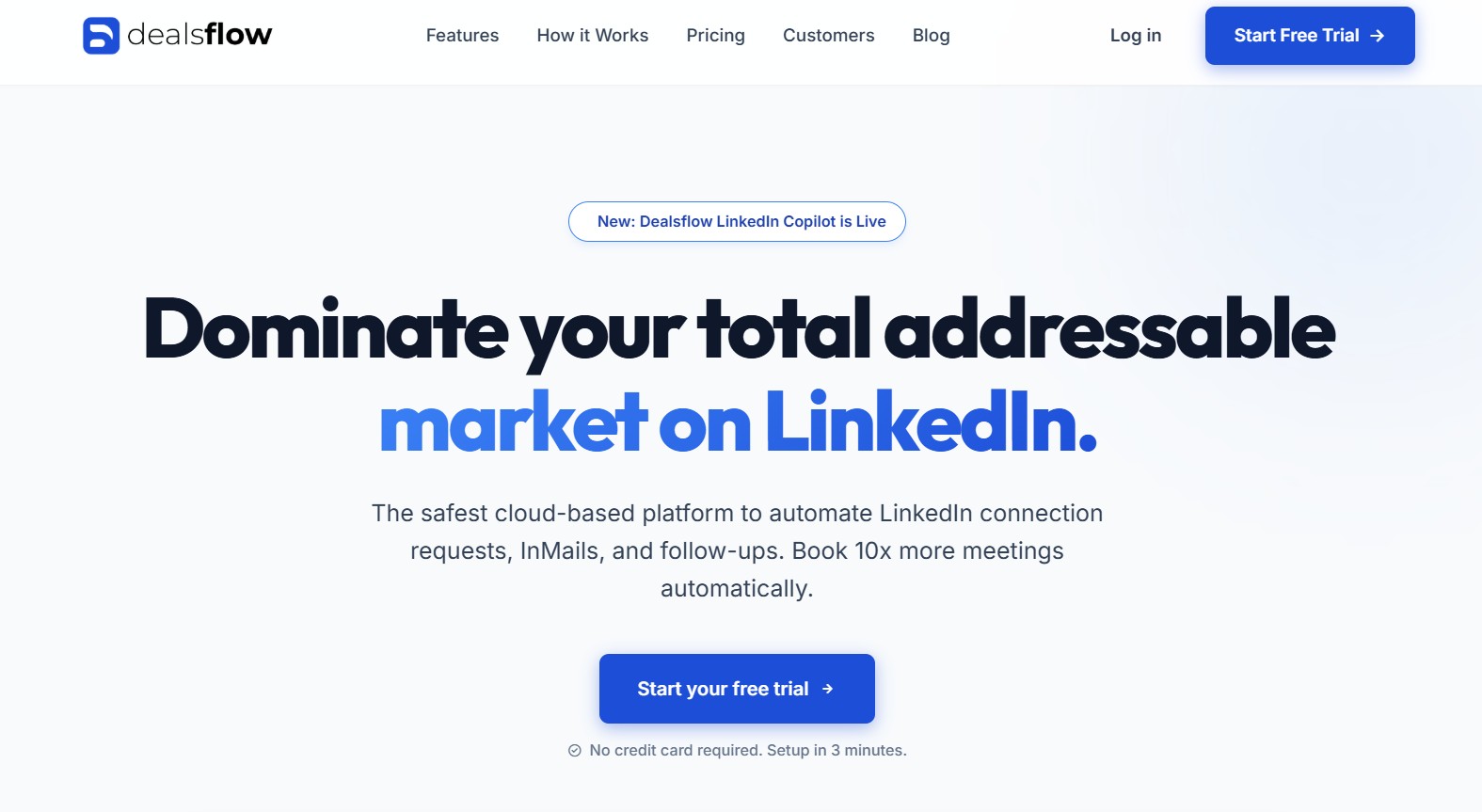
What Is Dealsflow?
Dealsflow is a cloud-based LinkedIn outreach automation platform built for B2B sales teams, SDRs, and founders who want to scale their LinkedIn prospecting safely and intelligently. The platform positions itself as the operating system for modern LinkedIn outbound sales, combining a cloud-based campaign builder with dedicated residential proxy IPs per account and an AI-powered icebreaker generator that crafts personalized connection requests by analyzing each prospect’s LinkedIn profile. Unlike browser extension tools that require a running computer and carry higher detection risk, Dealsflow runs campaigns 24/7 from the cloud, making it one of the cleaner and more accessible entries in the LinkedIn automation space in 2026.
Key Features
- Advanced Sequence Builder — Dealsflow offers a drag-and-drop campaign builder that allows users to design multi-step LinkedIn sequences combining profile views, connection requests, and follow-up messages on a precise, configurable timeline. The visual builder is designed for speed — the platform states that users can complete setup in approximately 3 minutes from account connection to live campaign, making it one of the fastest onboarding experiences in this comparison.
- Dedicated Residential Proxy IPs — Each Dealsflow account is assigned a dedicated residential proxy that mimics natural human browsing behavior at the IP level. This is a meaningful safety distinction from shared IP tools or browser extensions: a residential proxy assigned to a specific account means LinkedIn sees consistent location and device behavior, reducing the behavioral anomalies that typically trigger automated account reviews. According to Dealsflow’s own documentation, this architecture is designed to keep accounts safe and within LinkedIn’s published activity limits.
- AI Icebreaker Generator — Dealsflow’s AI personalization layer automatically generates unique icebreakers for each prospect by analyzing their LinkedIn profile description and work experience. Rather than relying on simple variable substitution such as inserting a first name or company name, the AI reads contextual profile data to construct opening lines that feel individually written. Users have credited this capability with pushing connection acceptance rates from 15% to nearly 40%, based on testimonials published on the platform’s website.
- Unified Smart Inbox — All LinkedIn replies from active campaigns are routed into a single Smart Inbox inside the Dealsflow dashboard, eliminating the need to switch between LinkedIn tabs or browser windows. The inbox automatically unenrolls prospects the moment they reply, preventing automated follow-up messages from being sent after a live conversation has started — a common and damaging problem with less sophisticated automation tools.
- LinkedIn Copilot — Dealsflow’s LinkedIn Copilot, launched in 2026, is an AI assistant layer built on top of the campaign and inbox workflows. It helps users manage conversations, draft replies, and prioritize active prospects, reducing the manual effort required once replies start coming in.
- Flexible Lead Import — Users can import target leads by dropping a LinkedIn Sales Navigator search URL directly into the platform, or by uploading a CSV of LinkedIn profile URLs. Dealsflow processes the list and prepares it for outreach automatically.
Dealsflow vs SalesRobot
Dealsflow and SalesRobot are the closest direct competitors in this entire comparison — both are cloud-based, LinkedIn-first automation platforms designed to safely scale outreach for B2B teams. The differences come down to a few key areas. Dealsflow’s dedicated residential proxy architecture represents a more modern and technically robust approach to account safety than SalesRobot’s mobile API behavior simulation. Dealsflow’s pricing is also significantly more transparent and structured, with three clear tiers published on its website and no documented history of mid-subscription pricing changes. Where SalesRobot has an edge is in multichannel depth — it supports native email sequences and voice notes within LinkedIn campaigns, which Dealsflow does not currently offer. However, for teams whose primary outreach channel is LinkedIn and who have been frustrated by SalesRobot’s pricing unpredictability or setup complexity, Dealsflow offers a cleaner, faster, and equally safe alternative with a setup time of approximately 3 minutes.
Dealsflow Pricing
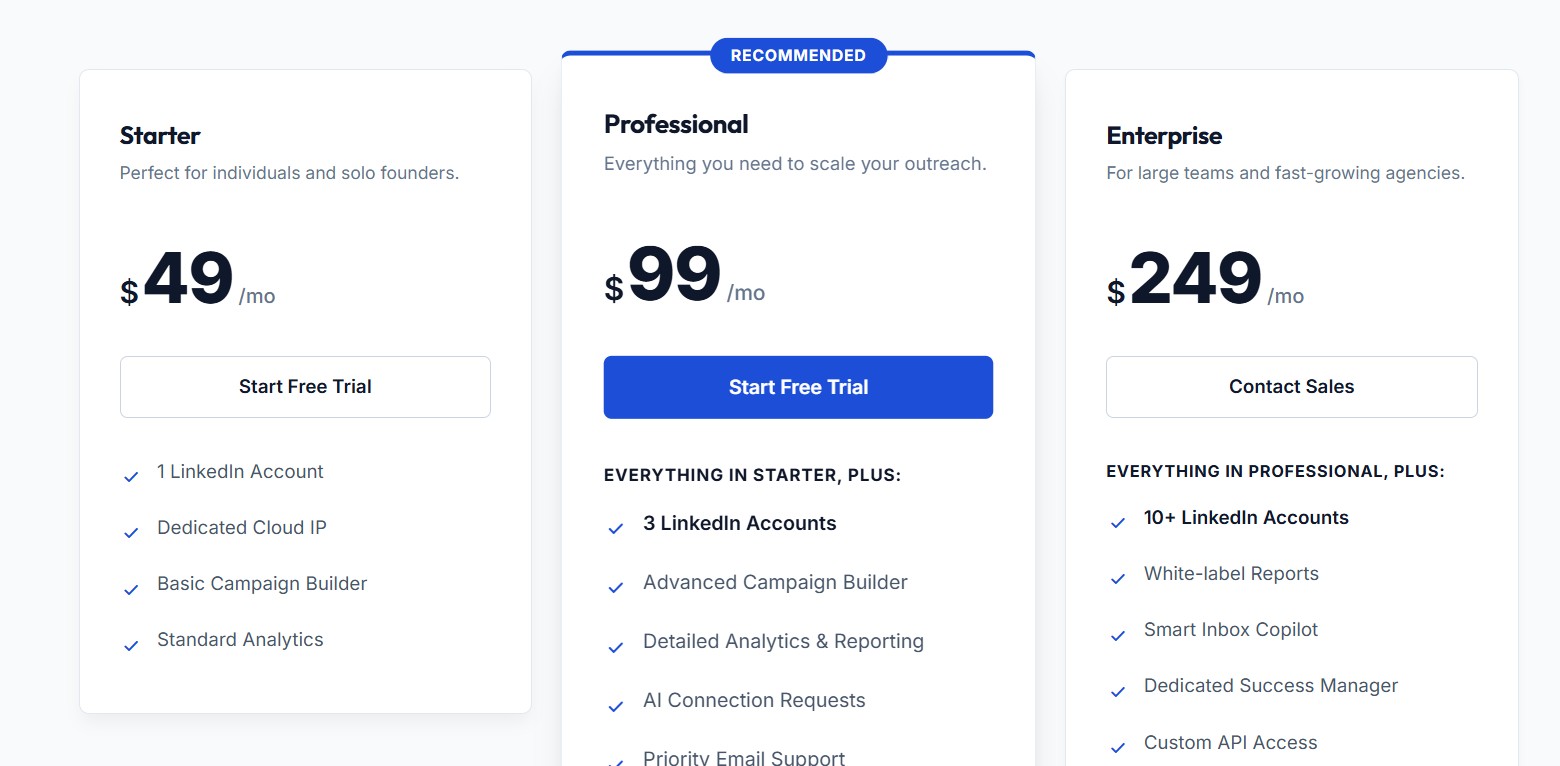
Dealsflow publishes fully transparent, flat-rate pricing on its website with no hidden credit systems or per-feature add-on charges. Annual billing saves 20% across all plans.
- Starter — $49/month (monthly) or ~$39/month (annual). Includes 1 LinkedIn account, a dedicated cloud IP, the basic campaign builder, and standard analytics. Best for solo founders and individual sales reps.
- Professional — $99/month (monthly) or ~$79/month (annual). Includes 3 LinkedIn accounts, the advanced campaign builder, detailed analytics and reporting, AI-powered connection requests, and priority email support. This is Dealsflow’s recommended plan for growing teams.
- Enterprise — $249/month (monthly) or ~$199/month (annual). Includes 10+ LinkedIn accounts, white-label reporting, the Smart Inbox Copilot, a dedicated customer success manager, and custom API access. Designed for large teams and agencies.
- 14-Day Free Trial — All plans include a 14-day free trial with no credit card required.
A 3-person sales team on the Professional plan would pay $99/month, or approximately $79/month on annual billing. Compared to most tools in this list, Dealsflow’s pricing is among the clearest and most predictable in the market.
Who Should Choose Dealsflow?
Dealsflow is the right fit for individual SDRs, sales teams of 2–10 people, and agencies managing multiple LinkedIn accounts who want safe, cloud-based LinkedIn automation with AI personalization and a fast setup experience. It is particularly well-suited for teams that have been burned by pricing surprises or account restrictions on other platforms and want a modern, straightforward alternative.
Pros & Cons
Pros:
- Dedicated residential proxy IPs per account — one of the strongest account safety architectures available
- AI icebreaker generator creates genuinely unique opening lines based on each prospect’s profile
- Fully transparent, flat-rate pricing with no credit systems or hidden fees
- 14-day free trial with no credit card required
- Fast onboarding — live campaigns in approximately 3 minutes
- Smart Inbox auto-unenrolls prospects when they reply, preventing automated messages from interrupting live conversations
Cons:
- LinkedIn-only automation — no native email sequences or multichannel outreach capabilities
- No built-in B2B contact database — lead lists must be sourced externally via Sales Navigator or CSV
- Newer platform with a smaller public review footprint compared to established tools like Apollo.io or Expandi
2. Apollo.io — Best for All-in-One Prospecting + Outreach
What Is Apollo.io?
Apollo.io is a B2B sales intelligence and engagement platform that combines a massive contact database with built-in outreach automation, a dialer, and analytics — all in a single interface. It is designed to replace the need for multiple point solutions by giving SDRs and sales teams everything they need to find leads, reach out, and track results in one place. With over 210 million contacts and 30 million companies in its database, Apollo is one of the most comprehensive prospecting platforms available for small to mid-market sales teams.
Key Features
- 210M+ Contact Database — Apollo’s database allows users to filter leads using advanced criteria including job title, company size, revenue range, industry, funding stage, technologies used, and even recent job changes. This level of filtering precision is one of Apollo’s most consistently praised capabilities across user reviews on G2 (rated 4.7/5 based on 9,000+ reviews) and Capterra (4.5/5 based on 381 reviews).
- Email Sequencing + LinkedIn Touchpoints — Users can build automated email sequences with A/B testing, reply detection, and follow-up triggers. LinkedIn tasks (such as connection requests and profile views) can be added to sequences, though these require manual execution rather than full automation.
- AI Email Writer — Apollo includes an AI assistant that can generate personalized email copy and icebreakers based on prospect data from LinkedIn profiles and company websites, helping speed up campaign creation.
- Built-In Dialer — Available on Professional and Organization plans, the dialer supports click-to-call functionality directly from the platform. An international dialer is included on the Organization plan only.
- Native CRM Sync — Apollo integrates natively with Salesforce, HubSpot, and other CRMs, allowing contacts and activities to sync automatically. Each CRM export consumes credits.
- Call Recording & AI Insights — On the Organization plan, Apollo records calls, generates AI-powered summaries, and provides 8,000 minutes of recording storage.
Apollo.io vs SalesRobot
Where Apollo clearly wins over SalesRobot is in data. SalesRobot is an execution platform — it runs campaigns but doesn’t help you find who to reach out to. Apollo solves both problems in one subscription. For teams tired of juggling a prospecting database alongside their automation tool, the consolidation alone can justify the price difference. However, Apollo falls short when it comes to native LinkedIn automation. Unlike SalesRobot, Apollo doesn’t automate LinkedIn sequences — users must manually execute LinkedIn steps, which limits multichannel automation depth. Apollo is also a purely email and calling platform at its core, whereas SalesRobot is LinkedIn-first with email as a secondary channel.
Apollo.io Pricing
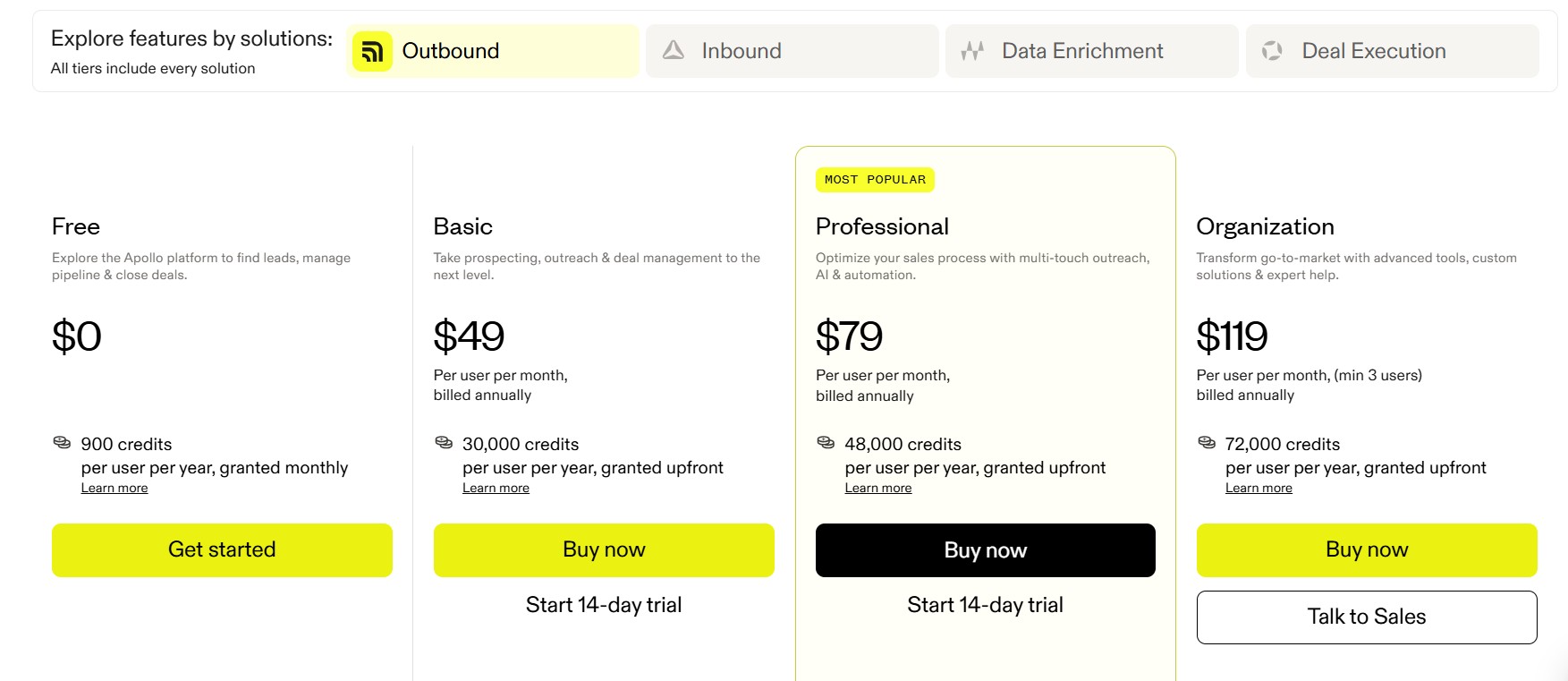
Apollo.io operates on a tiered, per-user, per-month pricing model with a credit-based system that controls data access.
- Free Plan — Includes 5 mobile credits and 10 export credits per month, two active sequences, and basic filters. Suitable only for minimal testing.
- Basic — $49/user/month (annual) or $59/user/month (monthly). Includes 5,000 annual mobile credits and 10,000 export credits.
- Professional — $79/user/month (annual) or $99/user/month (monthly). Adds unlimited sequences, A/B testing, and the built-in dialer.
- Organization — $119/user/month (annual) or $149/user/month (monthly). Adds international dialing, call transcriptions, 200 mobile credits/month, 4,000 export credits/month, advanced reporting, and SSO. Requires a minimum of 3 users.
An important caveat: accessing email addresses costs 1 credit, while mobile phone numbers cost 8 credits per record. Credits expire at the end of each billing cycle with no rollover. According to Salesmotion’s independent pricing analysis, real-world costs for active outbound teams often run 2–3x the advertised plan rate once credit overages, verification tools, and add-ons are factored in.
Who Should Choose Apollo.io?
Apollo is the right fit for startups, SMB sales teams, and mid-market companies that want an all-in-one platform for both finding and reaching prospects, primarily through email. It works particularly well when LinkedIn automation is not a core requirement or when teams prefer to supplement email sequences with manual LinkedIn touchpoints.
Pros & Cons
Pros:
- One of the largest B2B databases available at this price point
- Transparent tiered pricing with a usable free plan
- Built-in dialer removes the need for a separate calling tool
- Strong CRM integrations with Salesforce and HubSpot
Cons:
- Credit-based model can make costs unpredictable at scale
- LinkedIn automation is manual — sequences must be partially executed by the user
- Data accuracy varies, with email bounce rates of 15–25% reported across G2 and Trustpilot reviews
- Organization plan requires a minimum of 3 users
3. Cognism — Best for Compliant B2B Data in EMEA
What Is Cognism?
Cognism is a B2B sales intelligence platform built around data quality and regulatory compliance. It is the dominant choice among European sales and marketing teams that need verified contact data without running into GDPR or CCPA violations. The platform gives revenue teams access to verified phone numbers, email addresses, and firmographic data across EMEA, North America, and APAC regions. Cognism is not primarily an automation tool — it is a data provider that feeds your outreach tools with accurate, compliant contacts.
Key Features
- Diamond Data® Phone-Verified Mobile Numbers — Cognism’s flagship feature is its manually verified mobile number dataset. Unlike most data providers that scrape numbers from public sources, Cognism physically calls numbers to confirm accuracy. Users report connect rates up to 3x higher compared to standard contact databases when using Diamond Data®. Coverage is strongest for UK and European contacts, with North American coverage continuing to expand.
- GDPR and CCPA Compliance — Cognism maintains 13 Do Not Call (DNC) lists internationally and is designed specifically to help sales teams comply with data protection laws. This is a genuine differentiator for EMEA-focused teams where legal risk is a real concern.
- Intent Data via Bombora — On the Diamond/Elevate plan, Cognism integrates with Bombora to surface companies actively researching solutions in your category. This helps teams prioritize accounts showing active buying intent rather than cold-prospecting randomly.
- Sales Companion AI — An AI-powered prospecting assistant that surfaces recommended contacts based on your existing deal history, provides one-click business summaries, and delivers real-time signals such as job changes, funding rounds, and hiring trends.
- Diamonds-on-Demand® — A premium verification service that allows users to submit high-priority contacts for manual phone number verification, typically capped around 50 contacts per month.
- Native CRM Integration — Salesforce, HubSpot, and other CRM connections are supported natively, along with a Chrome browser extension and CSV enrichment for existing lists.
Cognism vs SalesRobot
Cognism and SalesRobot operate at different layers of the sales stack. SalesRobot automates outreach — it sends messages and manages follow-ups. Cognism provides the data that makes those messages worth sending. They are, in many ways, complementary tools rather than direct competitors. However, if your primary pain point with SalesRobot is that the contact data you’re feeding into campaigns is inaccurate or outdated — causing low reply rates and wasted sequences — Cognism’s verified data can directly solve that problem. The trade-off is that Cognism does not include any native outreach automation, so you will always need a separate engagement tool alongside it.
Cognism Pricing
Cognism does not publish pricing on its website and requires a demo and negotiation with their sales team. All contracts are annual (sometimes multi-year). Based on aggregated data from Vendr, G2, and multiple independent pricing analyses, the approximate structure is:
- Platinum (Grow) Plan — ~$1,500/user/year, plus a platform fee of approximately $15,000. Estimated total for a 5-user team: ~$22,500/year.
- Diamond (Elevate) Plan — ~$2,500/user/year, plus a platform fee of approximately $25,000. Includes Diamond Data®, Bombora intent data, and advanced AI segmentation.
- Additional costs commonly include onboarding fees ($500–$1,500), intent data topic add-ons ($200–$400 per topic per year), and auto-renewal clauses that include 10–15% annual price increases.
According to Vendr’s benchmarking data, discounts of 28–52% off initial quotes are common, so buyers are advised never to accept the first quote.
Who Should Choose Cognism?
Cognism is the right choice for mid-market to enterprise B2B sales teams that sell into European or UK markets and need GDPR-compliant, verified contact data. It’s particularly valuable for outbound teams that rely on cold calling where mobile number accuracy is critical. It is not appropriate for early-stage startups, solo salespeople, or small teams with limited budgets.
Pros & Cons
Pros:
- Diamond Data® delivers phone-verified mobile numbers with up to 3x better connect rates
- Best-in-class GDPR and international DNC compliance
- Bombora intent data integration (Elevate plan) helps prioritize high-intent accounts
- Reliable CRM integrations with Salesforce and HubSpot
Cons:
- No outreach automation — requires a separate engagement tool, adding $50–$150/user/month to total stack cost
- Completely opaque pricing with no self-serve options; contracts are annual-only
- Platform fee creates a high minimum spend even for small teams
- Diamond Data® coverage is stronger in EMEA than North America
4. LinkedIn Sales Navigator — Best for Native LinkedIn Prospecting
What Is LinkedIn Sales Navigator?
LinkedIn Sales Navigator is LinkedIn’s own premium subscription service for B2B sales professionals. With over 1 billion LinkedIn members on the underlying platform and more than 700,000 sales professionals using Sales Navigator, it offers the most comprehensive and authoritative source of LinkedIn-native prospect data available anywhere. Rather than scraping LinkedIn or approximating its data, Sales Navigator gives users direct access to real-time, platform-native information — job changes, content activity, buyer intent signals — all within a LinkedIn-compliant environment.
Key Features
- Advanced Lead & Account Filters — Sales Navigator provides 40+ search filters including seniority level, company growth rate, department, technologies used, and recent activity. Users can save up to 10,000 leads and receive alerts when filter criteria are newly matched.
- Real-Time Buyer Intent Signals — The Advanced plan includes Buyer Intent insights that surface accounts actively researching topics related to your products, allowing users to prioritize outreach based on purchase readiness.
- InMail Credits — All plans include monthly InMail credits for messaging prospects outside your first-degree connections. The Core plan includes 50 InMail credits per month. Research from GiveMeLeads notes that InMails have response rates of 10–25%, compared to 0.5–2% for cold emails, when properly personalized.
- TeamLink for Warm Introductions — The Advanced plan includes TeamLink, which shows users the paths to reach a prospect through their colleagues’ networks, enabling warm introductions rather than cold outreach.
- CRM Sync — Sales Navigator integrates with Salesforce, HubSpot, and Microsoft Dynamics, with full CRM writeback available only on the Advanced Plus (enterprise) plan.
- Relationship Map — An account mapping feature that builds dynamic organizational charts to help users understand company hierarchies and identify additional decision-makers.
Sales Navigator vs SalesRobot
Sales Navigator and SalesRobot are designed to be used together rather than as alternatives. Sales Navigator is the prospecting and intelligence layer; SalesRobot is the outreach automation layer. However, for teams that prefer to stay within LinkedIn’s native environment and conduct manual outreach at a managed pace, Sales Navigator alone — combined with their own time — can replace the need for SalesRobot entirely. The key difference is that Sales Navigator does not automate anything. Outreach through InMail and connection requests must be performed manually, which is lower risk from a LinkedIn compliance perspective but significantly more time-intensive.
Sales Navigator Pricing
Sales Navigator offers three plan tiers. Note that LinkedIn does not always display prices on their website in all regions; prices below are based on widely reported industry figures verified against LinkedIn’s pricing page.
- Core — $119.99/month (billed monthly) or approximately $99.99/month (billed annually at ~$1,199/year). Designed for individual sellers.
- Advanced — $179.99/month (billed monthly) or approximately $139.99/month (billed annually at ~$1,679/year). Includes TeamLink, Buyer Intent signals, shared lead lists, and Smart Links.
- Advanced Plus — Custom pricing, typically starting around $1,600/seat/year (annual only). Includes full CRM writeback with Salesforce, HubSpot, and Microsoft Dynamics, SSO, and enterprise admin controls. Requires a demo and direct negotiation with LinkedIn’s sales team.
All plans include a 30-day free trial. Prices shown exclude applicable taxes.
Who Should Choose LinkedIn Sales Navigator?
Sales Navigator is the right choice for individual sales reps, founders, and small teams that primarily work within the LinkedIn ecosystem and want the most accurate, real-time LinkedIn-native data available. It is also essential for larger enterprise teams that need CRM integration and collaborative prospecting features. It is not appropriate for teams that need automation — manual outreach is required.
Pros & Cons
Pros:
- The only truly LinkedIn-native prospecting tool — data is real-time and authoritative
- 40+ search filters produce highly specific lead lists
- InMail response rates significantly outperform cold email for decision-maker outreach
- 30-day free trial for all plans
Cons:
- No outreach automation whatsoever — everything is manual
- InMail credits are limited and non-renewable (except when prospects respond within 90 days)
- CRM writeback requires the most expensive Advanced Plus plan
- Per-seat pricing adds up quickly for larger teams
5. Expandi — Best for Safe Cloud-Based LinkedIn Automation
What Is Expandi?
Expandi is a cloud-based LinkedIn automation platform founded in 2019 that focuses on running LinkedIn campaigns safely from the cloud. Unlike browser extension-based tools that require your computer to be on and running, Expandi operates through a dedicated cloud server with country-based IP addresses assigned per user account. This cloud architecture is its core safety differentiator. The platform automates connection requests, message sequences, InMails, profile visits, post likes, and endorsements, all while using smart algorithms to stay within LinkedIn’s daily and weekly limits.
Key Features
- Cloud-Based Architecture with Dedicated IPs — Each Expandi account is assigned a dedicated country-based IP address, reducing detection risk from LinkedIn’s anti-bot systems. Campaigns run 24/7 without requiring the user’s computer or browser to remain active.
- Smart Sequence Builder — Expandi’s conditional sequence logic allows users to create branching campaigns with up to 10 actions and 10 conditions. If a prospect accepts a connection request, the next step triggers automatically; if they don’t respond, Expandi can redirect to an InMail or email instead.
- Dynamic Personalization with Images & GIFs — Expandi supports hyper-personalized outreach using custom images and GIFs embedded in messages. Important note: this feature requires a separate subscription to Hyperise (starting at $69/month), which is not bundled with the base plan.
- Mobile Connector Campaign — Expandi offers a Mobile Connector campaign type that can send an additional 50–100 connection requests per week by simulating mobile behavior patterns, supplementing the standard weekly limit.
- Profile Auto-Warm-Up — New accounts begin with a warm-up phase that gradually increases daily activity levels to avoid triggering LinkedIn’s spam detection systems.
- A/B Testing & Analytics — Built-in A/B testing allows users to test different message variants across campaigns, with an analytics dashboard tracking acceptance rates, reply rates, and conversion metrics.
- Webhook & Zapier Integration — Expandi integrates with Zapier and webhooks for connecting to CRMs and other tools, though it lacks native direct CRM integration. This is a noted limitation versus competitors like Dripify that offer native HubSpot and Salesforce connections.
Expandi vs SalesRobot
Both Expandi and SalesRobot are cloud-based LinkedIn automation tools, making this one of the closest head-to-head comparisons in this list. Expandi’s primary advantage is its dedicated IP architecture and the conditional branching logic in its sequence builder — features that make campaigns more sophisticated and potentially safer. SalesRobot, however, includes native voice notes and video messaging capabilities that Expandi doesn’t, and SalesRobot’s AI reply management handles conversation responses automatically. For agencies managing multiple client LinkedIn accounts, Expandi’s per-seat pricing ($99/month per account) can become expensive at scale — 10 accounts would cost $990/month.
Expandi Pricing
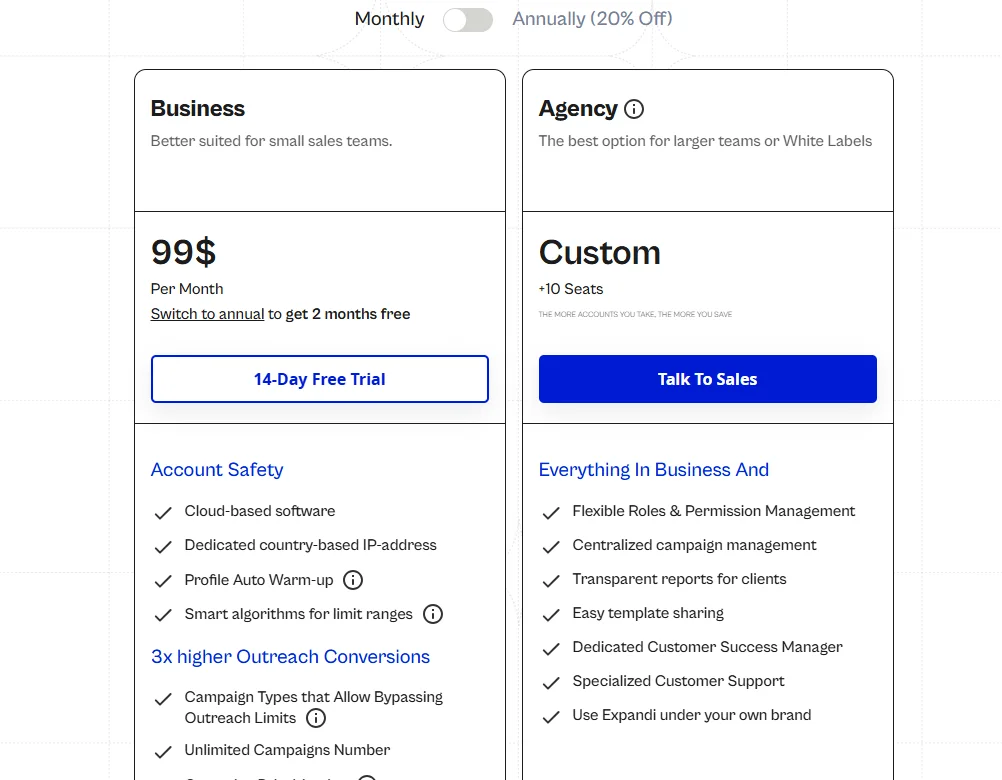
- Business Plan — $99/month per seat, billed monthly. Includes all core automation features.
- Annual Plan — $950/year per seat (~$79/month), saving approximately two months’ cost.
- 14-Day Free Trial — Full feature access with no credit card required.
Note that image and GIF hyper-personalization features shown in Expandi’s marketing require a separate Hyperise subscription starting at $69/month, and video personalization requires Sendspark starting at $49/month. The true all-in cost with personalization add-ons can reach $197–$220/month per seat.
Who Should Choose Expandi?
Expandi is best suited for mid-market sales teams and agencies that prioritize LinkedIn account safety above all else and need sophisticated conditional campaign logic. Teams that run outreach for multiple clients will need to carefully calculate per-seat costs against the alternatives.
Pros & Cons
Pros:
- Cloud-based with dedicated per-user IP addresses for strong account protection
- Sophisticated conditional sequence builder with branching logic
- Profile auto-warm-up reduces risk when starting automation on fresh accounts
- Built-in A/B testing for continuous message optimization
Cons:
- Core image/GIF personalization requires expensive third-party add-ons
- No native CRM integration — relies on Zapier and webhooks only
- Per-seat pricing makes it costly for agencies managing many accounts
- Relies primarily on LinkedIn-only automation with limited native email capabilities
6. Lemlist — Best for Multichannel Cold Outreach
What Is Lemlist?
Lemlist is a multichannel sales engagement platform that started as a cold email personalization tool and has grown into a comprehensive outreach workspace. It stands out in the market for its emphasis on creative personalization — specifically dynamic images, personalized videos, and custom landing pages embedded in email campaigns — combined with a built-in email warm-up system called Lemwarm. The platform has since added LinkedIn automation steps, an in-app calling feature supporting 23 countries, and a built-in lead database of over 600 million verified contacts, making it one of the more genuinely all-in-one options in this comparison.
Key Features
- 600M+ Lead Database — All paid Lemlist plans include access to a lead database with advanced filters by job title, company size, industry, location, and funding status. An email finder and phone number finder (using waterfall enrichment) are included, consuming credits per use.
- Dynamic Image & Video Personalization — Lemlist’s signature feature allows users to create email templates that automatically populate images with prospect-specific details — such as their company logo, name, or LinkedIn profile screenshot embedded in a custom graphic. This makes cold emails appear tailored rather than mass-produced and can improve reply rates.
- Multichannel Sequences — The Multichannel Expert plan allows users to build sequences combining email, LinkedIn actions (connection requests, profile visits, messages, voice notes), WhatsApp messages, and in-app call reminders — all from a single campaign builder.
- Lemwarm Built-In Deliverability — Every paid plan includes Lemwarm, Lemlist’s email warm-up system that gradually builds sender reputation through real email interactions, reducing the likelihood of landing in spam folders.
- AI-Powered Copy Generation — Lemlist’s AI assistant generates entire email sequences based on the user’s value proposition and target audience, with icebreakers pulled from LinkedIn profile data and company websites.
- CRM Integrations — Native integrations with HubSpot, Salesforce, and Pipedrive are included, along with API access and connections to Zapier, Make, n8n, and Clay for workflow automation.
Lemlist vs SalesRobot
Lemlist and SalesRobot overlap significantly in their multichannel ambition — both support LinkedIn and email outreach from a single dashboard. Lemlist’s advantage is its creative personalization depth, its large built-in lead database, and its strong email deliverability tools. SalesRobot’s advantage is its LinkedIn-first approach and native voice note and video message capabilities within LinkedIn sequences. For teams where email deliverability and personalization are the primary concern, Lemlist is the stronger option. For teams that live in LinkedIn and rely on that channel for the majority of their pipeline, SalesRobot’s features align more closely.
Lemlist Pricing
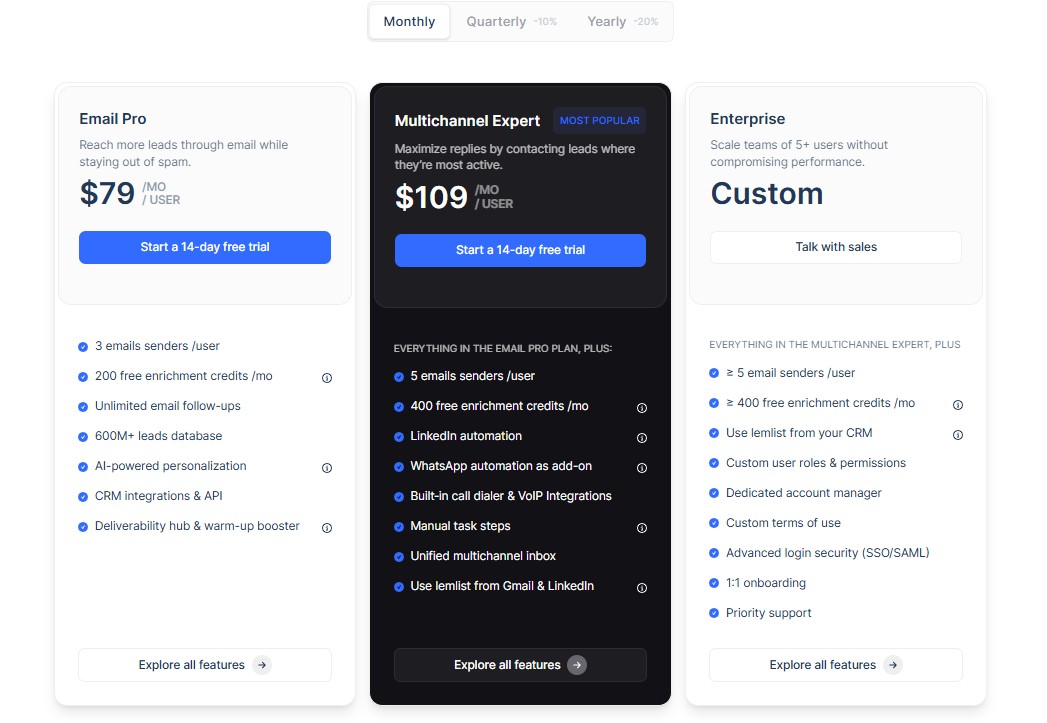
- Email Pro — $79/user/month (billed monthly). Email-only outreach with Lemwarm, the lead database, and up to 3 sending addresses per user.
- Multichannel Expert — $109/user/month (billed monthly). Adds LinkedIn automation, in-app calling, WhatsApp steps, and 5 sending addresses per user.
- Enterprise — Custom pricing with a minimum of 5 seats. Includes all features plus unlimited guest seats, 2,500 lead finder credits, a dedicated account manager, and custom integrations.
- 14-Day Free Trial — Full Multichannel Expert access with no credit card required.
An important note on credits: Lemlist’s lead finder credits do not roll over between months. If you find 400 leads out of your 1,000-credit allocation, the remaining 600 credits are lost. Finding verified email addresses costs 5 credits per email. Additional credits can be purchased at $50 for 5,000.
Who Should Choose Lemlist?
Lemlist is best for sales teams, SDRs, and lead generation agencies that want a genuine multichannel outreach platform with strong email personalization. It is especially well-suited for teams that want a combination of email deliverability tools (Lemwarm), creative personalization, and multichannel sequencing without managing multiple separate tools.
Pros & Cons
Pros:
- Dynamic image and video personalization is genuinely differentiated in the market
- Lemwarm’s built-in email warm-up is one of the better deliverability systems available
- 600M+ lead database included in all plans — reduces need for a separate data tool
- Clean, modern interface with straightforward sequence building
Cons:
- Credit system for lead finding has no rollover, creating inefficiency for inconsistent users
- Per-user pricing scales quickly for larger teams
- LinkedIn automation capabilities are less sophisticated than LinkedIn-native tools
- In-app calling is a sequence step, not a full-featured power dialer
7. Dripify — Best Budget LinkedIn Automation Tool
What Is Dripify?
Dripify is a cloud-based LinkedIn automation and prospecting tool designed for sales professionals, recruiters, and small business owners who want to scale their LinkedIn outreach without complex setup or premium pricing. The platform runs campaigns entirely from the cloud, meaning drip sequences continue executing even when your laptop is closed. Its core focus is LinkedIn automation — building multi-step drip campaigns that combine connection requests, personalized messages, and automated follow-ups with built-in delay controls.
Key Features
- Drip Campaign Builder — Dripify’s campaign builder allows users to create multi-step LinkedIn automation sequences combining actions like profile visits, connection requests, messages, and InMails. Delays between steps can be configured to mimic natural human pacing.
- Smart Limits for Account Protection — The platform automatically enforces LinkedIn’s daily and weekly outreach limits and adds random delays between actions to reduce detection risk. Higher-tier plans include additional LinkedIn protection features.
- Team Management Dashboard — The Advanced plan includes team collaboration features, allowing sales managers to monitor team-level campaign performance, assign accounts, and access aggregate analytics.
- CRM Integration — Dripify offers native integrations with HubSpot, Salesforce, Zoho CRM, Asana, Google Sheets, and other platforms, as well as Zapier connectivity. This native CRM integration is a notable advantage over Expandi.
- Email Finder Credits — All plans include email finder credits for enriching LinkedIn contacts with professional email addresses, enabling multichannel follow-up outside LinkedIn.
- Analytics Dashboard — Visual funnel analytics show connection request rates, acceptance rates, message reply rates, and conversions, making it easy to identify where prospects are dropping off in sequences.
Dripify vs SalesRobot
Compared to SalesRobot, Dripify is simpler, more affordable at the entry level, and has native CRM integrations that SalesRobot lacks directly. However, Dripify does not match SalesRobot’s AI personalization depth, lacks voice note and video messaging features, and has no AI reply management capability. For teams that want basic LinkedIn drip campaigns at a predictable, affordable price without the advanced AI features, Dripify is a strong alternative. G2 users rate Dripify 4.6/5, with automation and ease of use cited as its strongest attributes.
Dripify Pricing
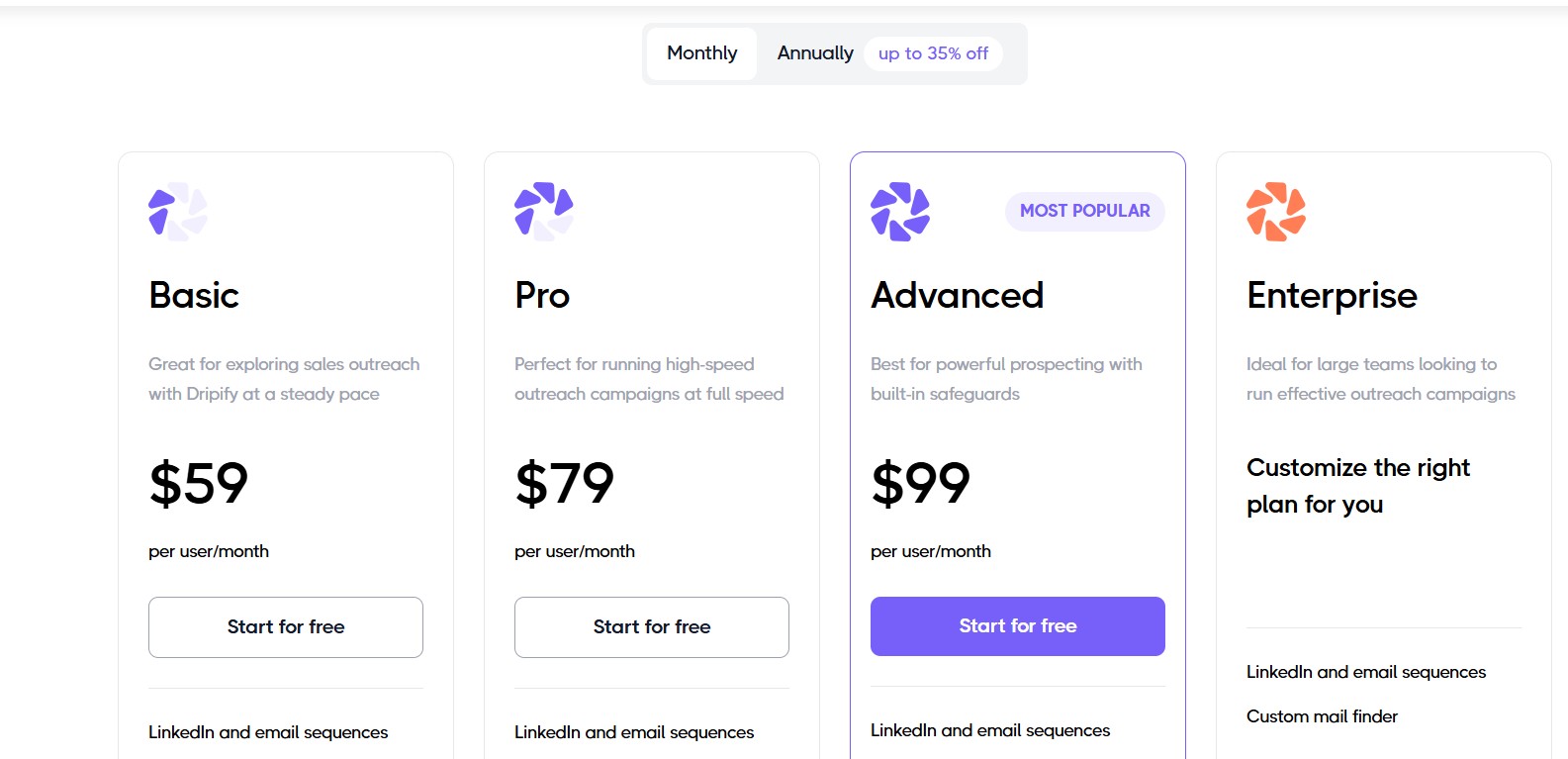
Dripify pricing is per user per month, with a 35% discount available on annual billing.
- Basic — $59/user/month (monthly) or $39/user/month (annual). Includes 1 drip campaign, limited daily quotas, basic analytics, and 100 email finder credits.
- Pro — $79/user/month (monthly) or $59/user/month (annual). Adds unlimited campaigns, full daily quotas, A/B testing, smart inbox, and additional email finder credits.
- Advanced — $99/user/month (monthly) or $79/user/month (annual). Adds team management, activity control, and LinkedIn account protection features.
- Enterprise — Custom pricing for 10+ seats with concierge onboarding and dedicated support.
- 7-Day Free Trial — No credit card required.
A 5-person team on the Pro plan would pay approximately $395/month on monthly billing.
Who Should Choose Dripify?
Dripify is the right fit for solo sales reps, small teams, and budget-conscious users who want clean, reliable LinkedIn automation without needing AI features, voice notes, or advanced multichannel capabilities. The native CRM integrations make it a particularly good fit for teams already using HubSpot, Salesforce, or Zoho.
Pros & Cons
Pros:
- Clean, intuitive interface with fast campaign setup — G2 users consistently rate ease of use as a top strength
- Native integrations with major CRMs (HubSpot, Salesforce, Zoho) without requiring Zapier
- Annual billing offers a genuine 35% discount
- Cloud-based execution — campaigns run without browser dependency
Cons:
- LinkedIn-only automation — no native email sequences or multichannel capabilities beyond LinkedIn
- Some users report LinkedIn warnings when campaigns are configured too aggressively
- Editing an existing live sequence requires deleting and rebuilding consecutive steps
- Per-seat pricing creates cost creep for growing teams
8. Waalaxy — Best for LinkedIn + Email Outreach for SMBs
What Is Waalaxy?
Waalaxy is a LinkedIn and email automation tool launched in France in 2020 and has grown to 150,000+ users worldwide, with particularly strong adoption among solopreneurs, SMBs, and non-technical sales teams. The platform operates as a Chrome browser extension, distinguishing it from cloud-based tools like Expandi and Dripify. It positions itself as one of the most accessible entry points into LinkedIn automation with a genuine free tier, a straightforward interface, and multi-language support. In 2025–2026, Waalaxy added an AI Prospect Finder feature that helps users discover ideal clients without requiring advanced technical setup.
Key Features
- Pre-Built Campaign Sequences — Waalaxy offers a library of ready-made outreach sequence templates that cover common use cases like initial LinkedIn connection, follow-up messaging, and recruiter outreach. Users with no technical background can launch their first campaign in minutes.
- AI Prospect Finder — Waalaxy’s AI Prospect Finder automatically suggests ideal prospects based on your target profile criteria, reducing time spent on manual search and list building.
- Email Finder via Dropcontact Integration — Waalaxy integrates with Dropcontact to find and verify professional email addresses of LinkedIn connections, enabling email follow-up outside LinkedIn. Email finder credits are included in paid plans (25 credits/month on Pro, rising to 500 credits/month on Business).
- LinkedIn Inbox Management — Waalaxy offers an optional Smart Inbox add-on (€20/month extra) that includes response templates, scheduled follow-ups, lead tagging, and conversation reminders — helping users stay organized when reply volume increases.
- Multi-Channel Sequences — The Business plan enables combined LinkedIn + email sequences, allowing users to coordinate outreach across both channels within a single campaign flow.
- CRM Sync via Zapier and Make — Waalaxy integrates with HubSpot, Pipedrive, and 2,000+ apps via Zapier and Make, enabling contact data to flow into CRM systems automatically.
Waalaxy vs SalesRobot
Waalaxy and SalesRobot overlap most directly at the entry level. Both support LinkedIn automation with email follow-up, and both target SMBs and individual sales reps. Waalaxy’s primary advantage is its genuinely accessible free tier and lower pricing floor, as well as a simpler onboarding experience for non-technical users. SalesRobot’s advantages are its cloud-based architecture (versus Waalaxy’s Chrome extension dependency), its more advanced AI features, and its built-in inbox management without extra charges. It is also worth noting that multiple reviewers have flagged that Waalaxy doubled its prices in 2025 without proportional feature additions, which has made the value-for-money calculation less clear for returning users.
Waalaxy Pricing
All prices shown are per user per month. Annual billing offers approximately 50% discount.
- Free Plan — €0/month. Includes 80 LinkedIn invitations per month, basic sequences, and 25 email finder credits. No email automation.
- Pro — €39/month (~$42). Includes unlimited campaigns, 300 LinkedIn invitations per month, automated follow-ups, CRM sync, and CSV imports.
- Advanced — €99/month (~$107). Includes 800 LinkedIn invitations per month with live chat support.
- Business — €139/month (~$150). Adds cold email sequences, multiple sender accounts, 500 email finder credits per month, and priority support.
- Enterprise — Custom pricing for 5+ seats with team workspaces, analytics, volume discounts, and dedicated onboarding.
- 7-Day Free Trial — Full Business plan access during trial.
The LinkedIn Inbox add-on is €20/month and is not included in any plan by default.
Who Should Choose Waalaxy?
Waalaxy is the best choice for individual sales reps, freelancers, consultants, and small teams who are new to LinkedIn automation and want the lowest possible barrier to entry. The free plan is a genuine starting point for testing outreach without any financial commitment. Teams that need cloud-based execution or advanced AI personalization should look at other options.
Pros & Cons
Pros:
- Free tier provides real functionality — 80 LinkedIn invitations per month is enough to test outreach
- Extremely easy to set up, even for non-technical users
- AI Prospect Finder simplifies list building for beginners
- 7-day free trial gives access to full Business plan features
Cons:
- Chrome extension dependency means your computer must be on and browser running during sequences
- Pricing has increased significantly (reportedly doubled) in 2025 without proportional new features
- Email finder credits are very limited on lower plans (only 25/month on Free and Pro)
- Smart Inbox is a paid add-on rather than being included in plans
Side-by-Side Feature Comparison Table
| Feature | Dealsflow | Apollo.io | Cognism | Sales Navigator | Expandi | Lemlist | Dripify | Waalaxy |
|---|---|---|---|---|---|---|---|---|
| LinkedIn Automation | ✅ Full | Manual only | No | Manual only | ✅ Full | ✅ Partial | ✅ Full | ✅ Full |
| Email Sequences | No | ✅ | No | No | ✅ (basic) | ✅ Full | ✅ (credits) | ✅ (Business) |
| Contact Database | No | ✅ 210M+ | ✅ 400M+ | No | ✅ 600M+ | No | No | |
| AI Personalization | ✅ Strong | ✅ | ✅ | Limited | Partial | ✅ Strong | Basic | ✅ (AI Finder) |
| Dedicated IP / Account Safety | ✅ Residential | Partial | N/A | ✅ Native | ✅ Country-based | Partial | Partial | ❌ Extension |
| Native CRM Integration | No | ✅ | ✅ | ✅ (Adv+) | Zapier only | ✅ | ✅ | ✅ (Zapier) |
| GDPR Compliance | Partial | Partial | ✅ Best-in-class | ✅ | Partial | Partial | Partial | ✅ |
| Built-In Calling | No | ✅ (Pro+) | No | No | No | ✅ (23 countries) | No | No |
| Free Trial | 14 days | 14 days | No | 30 days | 14 days | 14 days | 7 days | 7 days |
| Starting Price | $49/mo | $49/user/mo | ~$1,500/user/yr | $99.99/mo | $99/seat/mo | $69/user/mo | $59/user/mo | Free / €39/mo |
How to Choose the Right SalesRobot Alternative for Your Team
The right tool depends on three factors: your team size, your primary use case, and your budget.
Choose by Team Size
Solo / Freelancer: Dealsflow’s Starter plan at $49/month is the most purpose-built entry point for individual LinkedIn outreach, combining cloud safety with AI personalization at a flat, predictable rate. Waalaxy’s free plan is the right choice if budget is the primary constraint.
Small Team (2–10 people): Dealsflow’s Professional plan at $99/month covers up to 3 LinkedIn accounts with advanced campaign building and AI-powered connection requests — making it the most efficient choice for small teams focused on LinkedIn outreach. Apollo.io on the Basic or Professional plan is the better pick if email is the primary channel and a built-in contact database is a priority.
Mid-Market (11–200 employees): Dealsflow’s Enterprise plan at $249/month supports 10+ LinkedIn accounts with white-label reporting and a dedicated success manager, making it a strong choice for mid-market LinkedIn-first teams. Cognism becomes worth evaluating if your team sells into EMEA and data accuracy is a consistent friction point.
Enterprise (200+ employees): ZoomInfo SalesOS is the clear choice at enterprise scale where intent data, conversation intelligence, and deep CRM automation are requirements. Cognism is the enterprise-grade alternative if EMEA compliance is the primary driver and budget is below ZoomInfo’s threshold.
Choose by Primary Use Case
LinkedIn-Only Outreach: Dealsflow (residential proxy safety + AI icebreakers + fast setup), Expandi (sophisticated conditional branching logic), or Dripify (budget-friendly with native CRM integrations) are the three strongest options.
Multichannel Sequences: Lemlist (personalization + deliverability), Apollo.io (database + email automation + calling), or SalesRobot (if voice notes + video are priorities).
Data Enrichment + Prospecting: Cognism for EMEA markets, ZoomInfo for North American enterprise, Apollo.io for a strong all-round option at accessible pricing.
Compliance-Heavy Markets (EMEA): Cognism is the market-leading option for GDPR-compliant, phone-verified contact data in European markets.
Choose by Budget
- Free to start: Waalaxy’s free plan provides 80 LinkedIn invitations/month and basic sequences — enough to validate whether automation fits your workflow.
- Under $50/month: Dealsflow’s Starter plan ($49/month) and Dripify’s annual Basic plan ($39/month) are the two most capable options in this range. Dealsflow wins on AI personalization; Dripify wins on native CRM integration.
- $50–$150/month: This is the most competitive bracket. Dealsflow Professional ($99/month for 3 accounts), Apollo.io Basic or Professional, Lemlist Email Pro, Expandi Business, and Waalaxy Business all compete here. Choose based on primary channel (email vs. LinkedIn) and whether you need a built-in database.
- Enterprise ($10,000+/year): Cognism for EMEA data quality, ZoomInfo SalesOS for full enterprise intelligence across North America and EMEA.
Final Verdict
The honest answer is that no single tool replaces SalesRobot perfectly for every use case — the right alternative depends on where SalesRobot was specifically failing you.
If SalesRobot was falling short because you had no built-in contact database and were manually sourcing leads, Apollo.io solves that problem with 210M+ contacts and built-in sequencing in a single affordable platform. If the issue was email deliverability and creative personalization, Lemlist’s Lemwarm system and dynamic personalization features are genuinely differentiated. If LinkedIn account safety was your primary concern and you want the most robust cloud-based safety architecture available, Expandi’s dedicated IP model is the strongest option. If you sell in Europe and need GDPR-compliant, phone-verified mobile numbers, Cognism is the only tool in this list that delivers that at scale. If you are a solo rep or SMB looking for the simplest and most affordable LinkedIn automation with zero setup friction, Waalaxy’s free plan or Dripify’s Basic annual plan gets you running immediately. And if you have outgrown everything else and operate at enterprise scale with a large budget and a complex account-based GTM motion, ZoomInfo SalesOS is the market-leading intelligence layer.
The honest answer is that no single tool replaces SalesRobot perfectly for every use case — the right alternative depends on where SalesRobot was specifically failing you.
If LinkedIn account safety and a fast, clean setup experience are your primary concerns, Dealsflow is the strongest overall alternative in 2026. Its dedicated residential proxy architecture, AI icebreaker generator, and transparent flat-rate pricing directly address the most common frustrations that drive users away from SalesRobot. If SalesRobot was falling short because you had no built-in contact database and were manually sourcing leads, Apollo.io solves that problem with 210M+ contacts and built-in sequencing in a single affordable platform. If the issue was email deliverability and creative personalization, Lemlist’s Lemwarm system and dynamic personalization features are genuinely differentiated. If you sell in Europe and need GDPR-compliant, phone-verified mobile numbers, Cognism is the only tool in this list that delivers that at scale. If you are a solo rep or SMB looking for the simplest and most affordable LinkedIn automation with zero setup friction, Waalaxy’s free plan gets you running immediately. And if you have outgrown everything else and operate at enterprise scale with a large budget and a complex account-based GTM motion, ZoomInfo SalesOS is the market-leading intelligence layer.
Our Top Picks by Category
- Best overall: Dealsflow
- Best for LinkedIn safety: Dealsflow
- Best for all-in-one prospecting + outreach: Apollo.io
- Best for EMEA/compliance: Cognism
- Best budget pick: Dripify (annual) or Waalaxy (free plan)
- Best for enterprise: ZoomInfo SalesOS
- Best for multichannel personalization: Lemlist
- Best native LinkedIn tool: LinkedIn Sales Navigator
Frequently Asked Questions
What is the best free alternative to SalesRobot?
Waalaxy offers the most capable free plan among the alternatives covered in this blog. The free tier includes 80 LinkedIn connection invitations per month, basic drip sequences, and 25 email finder credits — enough to validate whether LinkedIn automation fits your outreach workflow before committing to a paid plan. Apollo.io also offers a free plan, though it is limited to 5 mobile credits and 10 export credits per month, making it suitable primarily for testing data quality rather than running active campaigns. Dealsflow’s 14-day free trial on all plans is the best option for teams that want to test a full-featured cloud-based LinkedIn automation tool before making a financial commitment, as it requires no credit card.
Is LinkedIn automation safe to use in 2026?
The safety of LinkedIn automation in 2026 depends heavily on how it is implemented, not simply whether automation is used. According to an automation safety analysis by Growleads, browser extension-based tools carry approximately 60% higher detection risk than cloud-based platforms. Research from the same analysis found that 23% of users relying on browser extensions experienced LinkedIn account restrictions within 90 days of use. Cloud-based tools that assign dedicated IP addresses per user account and enforce randomized delays between actions — such as Dealsflow, Expandi, and SalesRobot — reduce that restriction rate significantly, to an estimated 5–10% according to the same source. LinkedIn’s 2026 detection systems primarily flag accounts based on behavioral patterns rather than the mere presence of automation: low connection acceptance rates (below 20%), message volume spikes, identical message content sent at scale, and inconsistent timing all increase detection risk. LinkedIn itself has clarified in its 2026 policy updates that it focuses on intent and behavior patterns rather than blanket bans on all automation tools.
Can I use these tools with LinkedIn Sales Navigator?
Yes. All of the tools in this comparison are compatible with LinkedIn Sales Navigator in some form. Sales Navigator does not increase LinkedIn’s published weekly connection request limits, but it provides significantly more advanced search and filtering capabilities that help build higher-quality, more targeted prospect lists — which in turn produces higher acceptance rates that indirectly reduce automation risk. Dealsflow directly supports Sales Navigator URL imports, allowing users to drop a saved search URL into the platform and have it automatically populated as a campaign audience. Tools like Expandi, Dripify, and Waalaxy all support importing leads directly from Sales Navigator searches. Apollo.io and Cognism work alongside Sales Navigator as complementary data sources rather than replacements.
Which SalesRobot alternative is best for cold email outreach?
Apollo.io and Lemlist are the two strongest alternatives for cold email-focused outreach. Apollo.io provides a 210M+ contact database with built-in email sequencing, A/B testing, and a native dialer — giving teams everything they need to run high-volume cold email campaigns without relying on additional tools. Lemlist’s advantage is in creative personalization and email deliverability: its Lemwarm system gradually builds sender reputation to reduce spam placement, while its dynamic image and video personalization capabilities can meaningfully improve reply rates compared to plain-text emails. If deliverability and personalization are your priority, Lemlist is the better choice. If database size and all-in-one cost-efficiency matter more, Apollo.io wins.
Which tool is best for agencies managing multiple LinkedIn accounts?
For agencies running outreach on behalf of multiple clients across separate LinkedIn accounts, Dealsflow’s Enterprise plan is the most purpose-built option in this list. At $249/month it supports 10+ LinkedIn accounts with white-label reporting and a dedicated success manager — features that are directly relevant to agency operations. Dripify’s Advanced plan and Expandi’s per-seat pricing model are also practical alternatives. Dripify’s Advanced plan ($79/user/month on annual billing) includes a team management dashboard that allows managers to monitor campaign performance across multiple accounts. Expandi assigns a dedicated IP address to each individual seat, meaning a restriction on one client account does not affect others. The key consideration for agencies is cost at scale: at 10 accounts, Expandi costs $990/month, Dripify’s Advanced plan costs $790/month on annual billing, and Dealsflow Enterprise covers 10+ accounts at $249/month.
Do any of these tools include a built-in B2B contact database?
Three tools in this comparison include a meaningful built-in B2B contact database. Apollo.io provides access to 210M+ contacts and 30M+ companies directly within the platform. Lemlist includes a 600M+ lead database on all paid plans, searchable by job title, company size, industry, location, and funding status. Cognism operates its own database of verified contacts with a particular focus on phone-verified mobile numbers for EMEA markets. ZoomInfo SalesOS maintains one of the largest enterprise-grade databases at 260M+ professional profiles. Dealsflow, Expandi, Dripify, and Waalaxy do not include native contact databases — they are outreach execution tools that require a separately sourced lead list, whether from LinkedIn Sales Navigator, a data provider, or a CSV upload.
How do I switch from SalesRobot to a new tool without losing my outreach data?
Before canceling your SalesRobot subscription, export all available data from the platform — including contact lists, campaign history, message logs, and CRM sync records. Most alternatives in this list support CSV or spreadsheet imports, so your existing lead lists can be re-uploaded directly. Dealsflow, for example, accepts both CSV uploads and direct Sales Navigator search URL imports, making the transition straightforward. If SalesRobot is connected to a CRM such as HubSpot or Salesforce, ensure all activity and contact data has been fully synced to the CRM before deactivating the integration, as data written from SalesRobot directly to its internal records will not automatically transfer. When setting up a new automation tool, particularly a LinkedIn-first platform, allow 7–14 days for the account warm-up phase before running full-volume campaigns. Launching at maximum volume immediately on a new tool is one of the most common causes of early LinkedIn account restrictions.
What should I look for when evaluating a SalesRobot alternative?
The six criteria used in this blog’s evaluation framework capture the most important factors: outreach channels supported, contact data quality and database size, AI personalization capabilities, CRM integration depth, LinkedIn account safety architecture, and pricing transparency. Beyond these, pay attention to whether the tool’s pricing model scales predictably with your team size — credit-based systems (such as Apollo.io’s) can produce unexpected costs as usage grows, while per-seat flat pricing (such as Dealsflow’s or Dripify’s) is more predictable. Also consider whether the tool’s primary channel matches your team’s workflow. A LinkedIn-first team will get less value from an email-first platform and vice versa, regardless of how many features the tool advertises across both channels.