


Most LinkedIn messages never get a reply. Not because the pitch is bad. Not because the product is wrong. But because they never reach the inbox in the first place.
Here is the hard truth: LinkedIn limits who can message whom. Unless you are already connected to someone, sending them a direct message requires InMail credits — a finite resource that LinkedIn hands out sparingly on its Premium plans. According to LinkedIn’s own platform documentation, free users cannot send messages to people outside their network at all. Premium users get between 5 and 50 InMail credits per month depending on their plan. For a salesperson trying to reach 200 prospects a week, that ceiling is a wall.
This is where most outreach strategies stall. Sales reps either burn through credits in days, resort to spammy connection requests with notes attached, or simply give up on a segment of the market entirely.
But there is a setting that a significant portion of LinkedIn Premium users have turned on — one that bypasses the InMail credit wall entirely. It is called Open Profile, and it allows anyone on LinkedIn to message them for free, without a connection request, without credits, and without friction.
The problem is that most salespeople, recruiters, and founders either do not know it exists, do not know how to find people who have it enabled, or do not know how to use it strategically once they do. This guide fixes all three of those problems. By the end, you will know exactly what open profile is, how to identify it, how to enable it yourself, how to find and target open profile prospects at scale, and — most importantly — how to turn those conversations into actual leads.
Key Takeaways
- An Open Profile on LinkedIn is a Premium feature that lets anyone send you a free direct message without being a connection or using InMail credits.
- You can identify open profile users by the Open Profile badge on their profile or by the presence of a “Message” button on a non-connection’s profile.
- Enabling it requires a LinkedIn Premium subscription and takes about 60 seconds to set up in Settings & Privacy.
- Open profile prospects can be found manually via LinkedIn Search and Sales Navigator, or at scale using automation tools.
- The biggest mistake people make is treating open profiles as a bulk email list. The right approach uses intent-aware messaging, structured follow-up sequences, and a quality-over-volume mindset.
What Is an Open Profile on LinkedIn?
The Simple Definition
An Open Profile is a LinkedIn Premium feature that removes the messaging barrier between you and people outside your network. When a LinkedIn member enables Open Profile, they are signalling that anyone on the platform — whether connected to them or not — can send them a free direct message without either party spending InMail credits.
Normally, reaching someone outside your LinkedIn network requires one of three things: a mutual connection who can introduce you, a connection request that the other person accepts, or an InMail credit. InMail credits are LinkedIn’s paid messaging currency. According to LinkedIn’s Help Center, Premium Career subscribers receive 5 InMail credits per month, Premium Business subscribers receive 15, Sales Navigator Core subscribers receive 50, and Recruiter Lite subscribers receive 30. Once those credits are used, they are gone until the next billing cycle — unless a message receives a response, in which case LinkedIn returns the credit.
Open Profile eliminates this friction entirely. When you message someone with Open Profile enabled, LinkedIn delivers the message directly to their inbox at no cost to either party. This makes it one of the most underused — and therefore highest-leverage — features in B2B prospecting on the platform.
Open Profile vs. Standard Profile vs. LinkedIn Premium — What’s the Difference?
These three terms are often conflated, but they are distinct. Here is how they compare:
| Feature | Free (Standard) Profile | LinkedIn Premium (No Open Profile) | LinkedIn Premium (Open Profile Enabled) |
|---|---|---|---|
| Who can view your profile | Limited (varies by settings) | Broader visibility | Broadest visibility |
| Who can message you for free | 1st-degree connections only | 1st-degree connections only | Anyone on LinkedIn |
| InMail credits required to message you | Yes (for non-connections) | Yes (for non-connections) | No — messages are free |
| Who can message others for free | 1st-degree connections only | Uses InMail credits | Uses InMail credits (but can receive free messages) |
| Cost to enable | Free | Paid subscription required | Paid subscription required + toggle enabled |
The key distinction: LinkedIn Premium gives you the ability to send InMail messages (using credits). Open Profile, by contrast, makes you receivable — it allows others to message you without spending anything. It is a permission you grant to the world, not a tool you use to reach out.
Who Should Use Open Profile?
Open Profile is not a one-size-fits-all setting. Its value varies significantly depending on how you use LinkedIn professionally.
- B2B salespeople and SDRs: Open Profile is most powerful as an outreach targeting strategy. Rather than enabling it for yourself (which generates inbound from random sources), sales professionals benefit most from finding prospects who have Open Profile enabled and messaging them for free. This conserves InMail credits and allows higher-volume prospecting without additional cost.
- Recruiters: Enabling Open Profile makes you reachable to candidates who might hesitate to send a connection request to a recruiter they do not know. It also means that when you want to message candidates, you can target other open profile users and avoid depleting your InMail allocation on lower-priority outreach.
- Freelancers and consultants: For independent professionals, enabling Open Profile functions like an “open door” sign. Potential clients, collaborators, and referral partners can reach out without friction. If your business depends on inbound interest, being findable and messageable is a direct revenue driver.
- Founders and executives: Open Profile signals accessibility. For founders doing partnership development, investor relations, or community building, removing the messaging barrier makes it easier for the right people to start conversations. This is especially valuable if you are actively building a network in a new market or geography.
How to Tell If Someone Has an Open Profile on LinkedIn
The Open Profile Badge — What to Look For
LinkedIn displays a small gold ring or circle around a user’s profile photo when they have Open Profile enabled. This badge is visible on both desktop and mobile. On the desktop version of LinkedIn, you will also see the words “Open Profile” written near the top of their profile, typically beneath their headline or near their connection degree indicator.
On mobile, the gold ring around the profile photo is the primary visual cue. It is subtle but consistent. If you are browsing LinkedIn on a phone and you see a gold-outlined circle around someone’s profile picture — rather than the standard grey or blue ring — that is an Open Profile user.
It is worth noting that this badge is only visible to other LinkedIn members who are logged in. It does not appear to anonymous or logged-out visitors.
The “Message” Button Test
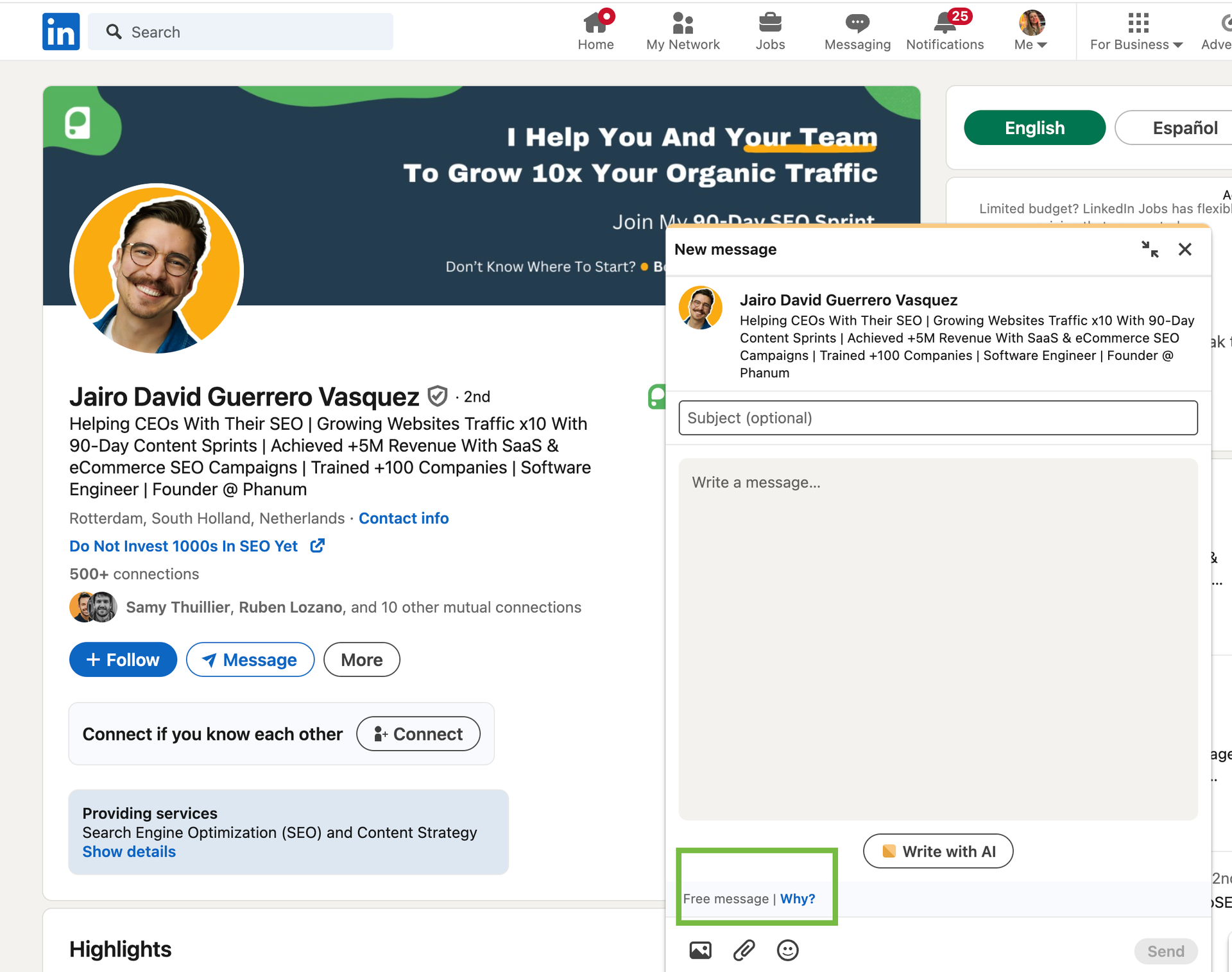
Here is a faster practical signal that most salespeople overlook: if you visit the profile of someone who is not a first-degree connection and you see a blue “Message” button — rather than a “Connect” button or an “InMail” option — that person has Open Profile enabled.
This button test works because LinkedIn’s interface dynamically adjusts the call-to-action on a profile based on the messaging permissions in place. For standard non-connections, you would see “Connect” as the primary button, with InMail as a secondary option (if you have credits). But when someone has Open Profile on, LinkedIn replaces that friction with a direct “Message” button, signalling that the conversation is free and immediate.
This is the fastest way to confirm Open Profile status when you are manually reviewing profiles. You do not need to look for the badge — just check the button.
How to Enable Open Profile on LinkedIn (Step-by-Step)
Step 1: Upgrade to LinkedIn Premium (if not already)
Open Profile is exclusively a LinkedIn Premium feature. It is not available on free accounts. According to LinkedIn’s Help Center, Open Profile can be accessed on Premium Career, Premium Business, Sales Navigator, and Recruiter plans.
If you are not yet on a Premium plan, you will need to upgrade before this setting becomes available to you. LinkedIn frequently offers free 30-day trials for new Premium subscribers, so it is worth checking whether a trial is available before committing to a paid plan.
Step 2: Go to Settings & Privacy
Once you have a Premium account, click on your profile photo in the top right corner of LinkedIn’s desktop interface. From the dropdown menu, select “Settings & Privacy.” This takes you to the central settings panel where LinkedIn organises account preferences, privacy controls, and communication settings.
Step 3: Toggle Open Profile On
Inside Settings & Privacy, navigate to the “Visibility” section. Within Visibility, look for the subsection labelled “Visibility of your LinkedIn activity” or scroll until you find the “Open Profile” option. LinkedIn labels this setting as “Open Profile” and describes it as allowing Premium members to be messaged by anyone on LinkedIn for free.
Toggle this setting to “On.” The change takes effect immediately. Your profile will now display the Open Profile badge, and your LinkedIn inbox will begin accepting free messages from non-connections.
Step 4: Verify Your Profile Shows the Badge
After enabling the setting, navigate to your own profile by clicking your name or photo. Scroll to the top of your profile and confirm that the Open Profile designation is visible. On desktop, you should see the label “Open Profile” near your connection degree information. The gold ring should also appear around your profile photo.
If you want to double-check from an outside perspective, you can open LinkedIn in a private or incognito browser window while logged into a different account (a colleague’s, for example) and visit your profile URL. You should see the Message button — not Connect — as the primary call-to-action.
Step 5: Should You Leave Open Profile On All the Time?
This is a question that most LinkedIn guides skip entirely, but it matters. Enabling Open Profile has genuine trade-offs.
Reasons to keep it on:
- You are in a role that benefits from inbound conversations — recruiting, sales leadership, consulting, founding.
- You are actively building your personal brand and want to be reachable by journalists, collaborators, or potential partners.
- You want to model accessibility to your target audience (especially relevant for thought leaders in industries where relationships drive deals).
Reasons to turn it off or use it selectively:
- You are receiving a high volume of irrelevant or spammy messages that are consuming time.
- You are in a period of focused execution and do not want to be interrupted by cold outreach directed at you.
- Your role is primarily outbound, so the inbound channel is low-value for your specific objectives.
The strategic play for most outbound-focused salespeople is this: rather than enabling Open Profile on your own account for inbound, use Open Profile as a targeting criterion to find prospects who have it enabled, and message them for free. You do not need to have Open Profile on yourself in order to send free messages to people who do.
How to Find Open Profiles on LinkedIn (3 Manual Methods)
Method 1: LinkedIn Search Filters
LinkedIn’s native search functionality allows you to filter results by a range of criteria, though the Open Profile filter specifically is more accessible on Sales Navigator (covered in Method 2). On free and standard Premium accounts, you can still approximate an Open Profile search by combining filters that tend to correlate with open profile usage.
Use LinkedIn’s “All Filters” option in the People search to narrow by:
- Industry: Focus on your target verticals to keep results relevant.
- Geography: Narrow to the regions where your prospects are based.
- Current Company Size: Filter for company sizes that match your ICP (ideal customer profile).
- Keywords: Search for titles like “VP of Sales,” “Head of Marketing,” or whatever role you are targeting.
Once you have a filtered list, manually browse profiles and look for the Open Profile badge or the Message button. This method is slower than Sales Navigator but works for teams that do not have access to the paid prospecting tool.
Method 2: LinkedIn Sales Navigator’s “Open Profile” Filter
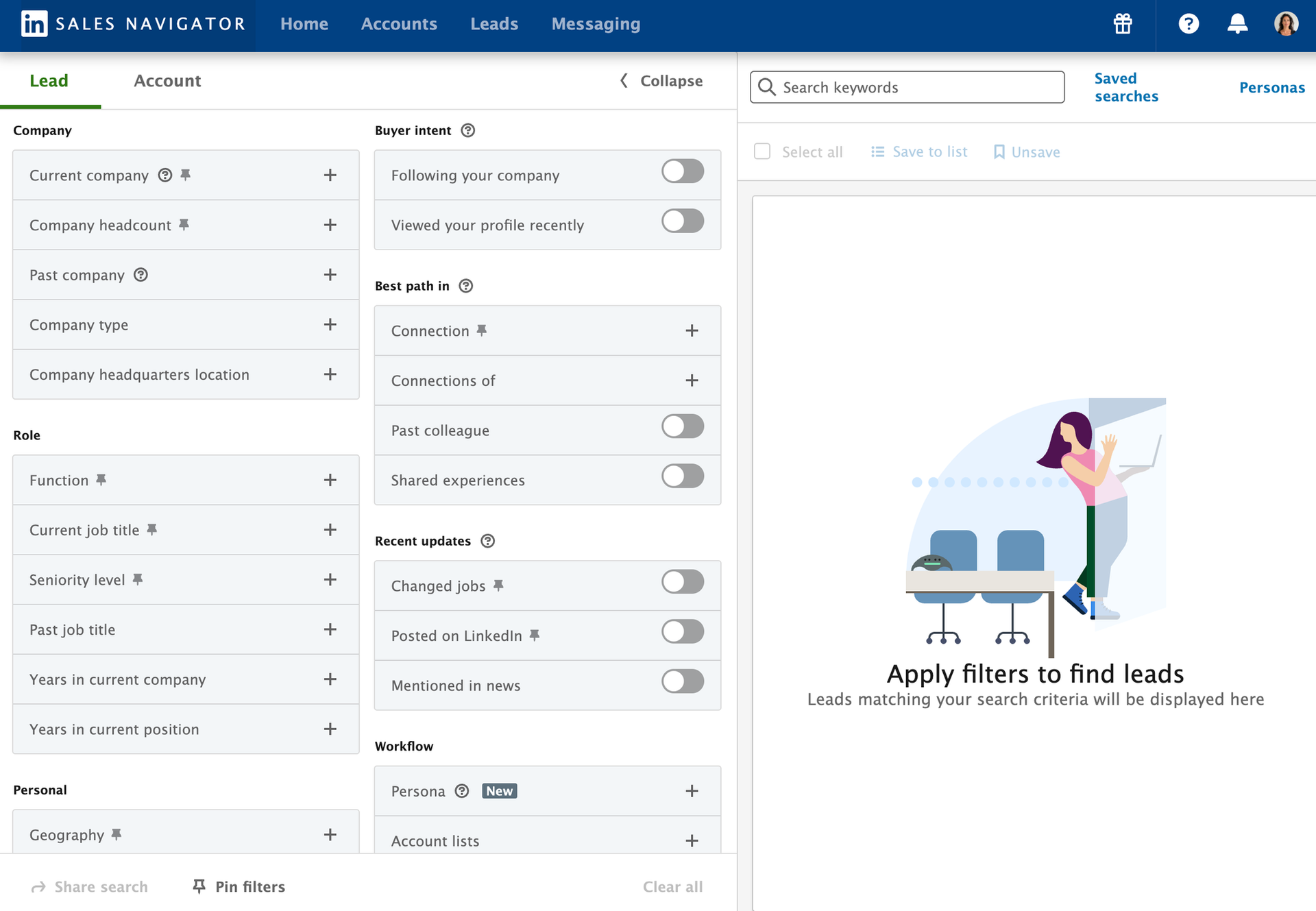
Sales Navigator is LinkedIn’s dedicated prospecting platform, and it includes a native Open Profile filter that makes the manual badge-checking process entirely unnecessary.
When building a lead list in Sales Navigator, open the “All Filters” panel on the left side of the search interface. Scroll down to the “Workflow” section. You will find a checkbox labelled “Open Profile.” Selecting this filter restricts your search results to only those LinkedIn members who have Open Profile enabled — meaning every profile that surfaces in your results can be messaged for free.
This is the most efficient manual method for identifying open profile prospects. You can stack the Open Profile filter on top of your standard ICP criteria — job title, seniority level, company size, industry, geography — to build a highly targeted list of people you can reach without spending a single InMail credit.
According to LinkedIn’s Sales Navigator documentation, this filter is available on all Sales Navigator plans, including the Core tier.
Method 3: LinkedIn Groups — A Hidden Source
LinkedIn Groups are communities built around professional topics, industries, or interests. What makes Groups useful for finding Open Profile prospects is a lesser-known feature: LinkedIn allows members of the same Group to message each other for free, even if they are not first-degree connections — but this applies only within the Group messaging interface, and it has its own limitations.
The more actionable use of LinkedIn Groups is as a discovery channel. When you join a group that is relevant to your target market — a SaaS founders group, a digital marketing professionals group, a supply chain executives community — you can browse the member list. Profiles within that group list will display the Open Profile badge when it is active, making it easy to identify high-value open profile users within a curated, already-relevant audience.
The added benefit of approaching prospects through a shared Group context is that you have a natural conversation starter: the shared community. Instead of a cold message out of nowhere, you can open with a reference to the group, which immediately adds relevance and reduces the perceived intrusiveness of the outreach.
How to Find and Message Open Profiles at Scale Using Automation
Step 1: Choose a LinkedIn Automation Tool
For teams doing high-volume prospecting, manually reviewing profiles for the Open Profile badge is not sustainable. LinkedIn automation tools are designed to handle this prospecting work at scale.
Several tools in the market — including Dealsflow, Dux-Soup, Expandi, and Waalaxy — offer LinkedIn profile scraping and outreach automation capabilities. When evaluating a tool, look for the following:
- Open Profile detection: The tool should be able to identify and filter for Open Profile status as part of its scraping logic.
- Cloud-based operation: Cloud-based tools run on remote servers rather than your local browser, which reduces the risk of triggering LinkedIn’s activity detection algorithms.
- Safety limits: The tool should allow you to set daily send limits and randomise delays between actions to mimic human behaviour.
- CRM integration: For any serious outreach operation, the tool should push data to your CRM automatically.
It is important to use automation tools carefully. LinkedIn’s User Agreement prohibits the use of bots, scrapers, and automated tools that access the platform without explicit permission. Violating these terms can result in account restrictions or bans. Always operate within conservative daily action limits and avoid any tool that promises unrealistic volume.
Step 2: Build Your Target List (ICP Filters + Open Profile Flag)
Before launching any automation, you need to define precisely who you are targeting. This is your Ideal Customer Profile (ICP), and it should drive every filter decision.
A typical ICP filter stack for a LinkedIn scraping campaign might include:
- Job title or function: Target the specific decision-maker role relevant to your product (e.g., “Head of HR,” “Director of Finance,” “VP of Engineering”).
- Seniority level: Mid-level managers vs. C-suite requires different messaging entirely. Filter for the right level.
- Company industry: Narrow to the verticals where your product has the strongest product-market fit.
- Company size: Headcount ranges help segment by deal size and complexity.
- Geography: Time zone and region matter for follow-up timing and cultural context.
- Open Profile status: Apply this as a filter to ensure every profile on your list can be messaged without InMail credits.
The combination of a precise ICP filter with the Open Profile flag produces a list that is both targetable (you can reach them for free) and relevant (they match your buyer persona). This is the foundation of an efficient open profile prospecting campaign.
Step 3: Connect Your LinkedIn Session
Automation tools access LinkedIn on your behalf by using your account session. The most common method is session cookie authentication, where you copy the cookie value from your browser’s LinkedIn session and paste it into the tool’s settings. This tells the tool which LinkedIn account to operate as.
Some tools use a browser extension instead of session cookies, which works similarly but keeps actions tied to your local browser. Cloud-based tools typically prefer the cookie method because it allows operation even when your computer is off.
When connecting your session, always use your primary LinkedIn account with care. Apply conservative daily action limits — most automation safety guides recommend no more than 50–80 profile views per day and 20–30 messages per day — to avoid triggering LinkedIn’s automated detection systems.
Step 4: Configure Scraper Behaviour and Messaging Triggers
Once your session is connected and your target list is built, configure how the tool should behave when it encounters each profile.
Key settings to define at this stage:
- Profile visit before message: Most tools allow you to configure a profile visit before sending a message. This creates a natural footprint (prospects often check who visited their profile) and can increase open rates.
- Message trigger conditions: Define exactly when a message should be sent. For open profile campaigns, the trigger should be: confirmed Open Profile status + matches ICP criteria.
- Message template assignment: Link your message template (covered in the next section) to this campaign. Make sure personalisation variables — first name, company name, role — are correctly mapped to the scraper’s output fields.
- Exclusion lists: Configure the tool to skip anyone already in your CRM, anyone who has replied, and anyone from your own company’s domain.
Step 5: Set Send Frequency and Safety Limits
Automation at high volume without safety controls is how LinkedIn accounts get restricted. Every automation tool worth using will have settings that let you control cadence and randomise behaviour.
Recommended safety parameters:
- Daily message limit: Keep this at 20–30 messages per day per account. Higher volumes dramatically increase detection risk.
- Random delays: Set delays between actions (e.g., 30–90 seconds between profile visits, 2–5 minutes between messages) to simulate human browsing patterns.
- Time-of-day scheduling: Restrict automation to business hours in your target audience’s time zone. Messages sent at 3am local time stand out as automated.
- Weekly rest days: Some tools allow you to pause activity on weekends, which mirrors normal human LinkedIn usage and reduces detection risk.
If you are running campaigns across multiple team members’ accounts, distribute the volume across accounts rather than concentrating it on one. This both protects individual accounts and allows for more total outreach without exceeding per-account safety thresholds.
Step 6: Launch, Monitor Results, and Iterate
Once your campaign is live, the work shifts from setup to analysis. Track the following metrics from day one:
- Message delivery rate: Are messages landing in inboxes? A low delivery rate may indicate targeting issues or account health problems.
- Open rate: What percentage of recipients are opening the message? A strong subject line or first line drives this.
- Reply rate: This is the primary success metric. Industry benchmarks for LinkedIn cold outreach sit between 10–30% reply rates, with open profile outreach often performing at the higher end because the audience is self-selected as open and engaged.
- Positive reply rate: Of all replies, what percentage are expressing interest rather than opting out? This is the number that connects to pipeline.
- Conversion to meeting: How many positive replies convert to a booked call or demo?
Review these metrics weekly. Test one variable at a time — opening line, call to action, message length — and compare performance across campaign variants. Automation without iteration is just noise. The value comes from using data to sharpen your approach over time.
How to Use Open Profiles to Generate Leads (Not Just Send Messages)
Why Open Profile Prospects Are Higher-Intent
This is the insight that separates strategic outreach from mass messaging: the act of enabling Open Profile is itself a behavioural signal.
When a LinkedIn user turns on Open Profile, they are actively choosing to make themselves reachable to strangers. They have navigated into their settings, found the toggle, and decided that the upside of being contactable outweighs the downside of receiving unsolicited messages. That is not a passive or accidental state — it is a deliberate choice.
What does that tell you about them? It suggests that they are professionally active, open to new conversations, and not locked behind the kind of gatekeeping posture that makes cold outreach difficult. In practical terms, this means your message is reaching someone who has already opted into the spirit of being found and contacted.
This does not mean every open profile user is a hot lead. But it does mean that, as a group, they are more likely to engage with a relevant, well-crafted outreach message than the average LinkedIn user. Combine this behavioural signal with precise ICP filtering, and you have a prospect segment that is both accessible and pre-qualified for engagement.
Crafting the Right Opening Message for Open Profile Outreach
The biggest mistake in LinkedIn outreach is leading with a pitch. An open profile gives you access to someone’s inbox, not permission to sell to them immediately. The opening message has one job: to start a conversation.
Here are three message frameworks that work specifically in the open profile context:
Framework 1: The Relevant Observation Open with something specific and true about their work, company, or LinkedIn content. Reference a post they wrote, a career transition they made, or a challenge that is common in their industry. Then make a soft connection to why you are reaching out. This framework works because it demonstrates that you did the work of understanding them before you contacted them.
Example structure: “Noticed your post on [topic] last week — [one specific observation about it]. We work with [type of companies] on [related problem]. Worth a quick conversation?”
Framework 2: The Shared Context Reference something you genuinely have in common — a mutual connection, a shared group membership, the same conference, or a relevant industry event. Shared context dramatically reduces the perceived coldness of an unsolicited message.
Example structure: “We’re both in [LinkedIn Group name] — I’ve found it a great source for [benefit]. I work with [role like theirs] at companies like [relevant examples] on [problem]. Open to a 15-minute chat?”
Framework 3: The Direct Value Offer For prospects with high seniority or very specific needs, a direct, no-fluff message that leads with the outcome you deliver — without a long preamble — performs well. Executives in particular respond to brevity and specificity.
Example structure: “Quick one: we help [role] at [company type] achieve [specific outcome]. [One sentence on how]. Would it make sense to talk this week?”
Across all three frameworks, keep the message under 150 words. LinkedIn messages are read on mobile more often than not, and long blocks of text are skipped. End every message with a clear but low-friction call to action — a question, not a “book a call” link dropped in the first message.
Building a Follow-Up Sequence That Converts
The first message rarely converts on its own. According to research by Yesware, 70% of email chains stop after one unanswered message, yet 30% of replies come after the second follow-up or later. The pattern applies to LinkedIn as well. The money is in the follow-up — but the follow-up has to be done correctly.
Here is a three-touch sequence structure that works for open profile outreach:
Day 1 — Opening Message Send your primary outreach message using one of the frameworks above. Keep it focused on them, not you. One clear call to action at the end.
Day 4 — Value-Add Follow-Up If there is no reply by day four, send a second message that adds genuine value. This could be a relevant article, a data point specific to their industry, a brief case study from a company similar to theirs, or a question that invites a response without requiring a major commitment. The goal is to give them a reason to engage that is separate from your original ask.
Day 9 — The Graceful Exit If still no reply, send a final short message that acknowledges you have reached out twice and offers a clear off-ramp. Something like: “I don’t want to keep cluttering your inbox — if this isn’t relevant right now, no worries at all. If timing changes, I’d love to reconnect.” This message often generates replies precisely because it removes pressure. People feel comfortable saying “actually, let’s talk” when they know it is genuinely their last chance to respond without more follow-up.
After the three-touch sequence, remove the prospect from active follow-up. Mark them in your CRM for a re-engagement attempt in 60 to 90 days if they remain in your ICP. Circumstances change — budget cycles, team changes, strategy shifts — and timing is often the real barrier, not interest.
What About Closed Profile Leads?
Open Profile is a prioritisation filter, not an exclusion rule. It tells you which prospects you can reach for free, not which prospects are worth reaching.
There will be high-value targets in your ICP who have not enabled Open Profile. Decision-makers at enterprise companies, conservative industries, or executives who have intentionally restricted their LinkedIn accessibility will often fall into this category. Writing them off because of their messaging settings would mean ignoring some of your best prospects.
For closed profile leads, you have three options:
- Send a connection request with a personalised note: LinkedIn allows up to 300 characters in a connection request note. Use that space to deliver a concise, relevant message that explains why connecting is worthwhile for them. Acceptance rates on personalised notes consistently outperform blank connection requests.
- Use your InMail credits strategically: Reserve your limited InMail credits for the highest-priority closed profile targets — typically senior decision-makers at your most valuable target accounts.
- Leverage warm introductions: LinkedIn’s “How You’re Connected” feature shows mutual connections. A warm introduction from someone you both know is more valuable than any direct message, open profile or not.
Think of Open Profile prospects as your high-efficiency prospecting lane — the path of least resistance. Closed profile prospects are the lane that requires more investment per contact but should not be abandoned entirely. A complete lead generation strategy uses both.
Conclusion
LinkedIn outreach does not have to be a war of attrition fought with limited InMail credits. The Open Profile feature quietly removes the biggest structural barrier to LinkedIn prospecting — the messaging wall — for a subset of LinkedIn’s user base that is, by definition, already open to being found and contacted.
The opportunity is real, but it is not automatic. Reaching someone’s inbox is step one. Converting that access into a genuine conversation, and that conversation into a meeting, requires a clear understanding of why Open Profile prospects represent a higher-intent segment, a message framework that respects their time and intelligence, a structured follow-up sequence that adds value at each touch, and a profile that earns trust when they click through to check who you are.
The teams that win on LinkedIn are not the ones sending the most messages. They are the ones sending the right messages to the right people through the right channels — and Open Profile, when used with the strategic intent it deserves, is one of the highest-leverage channels available to them.
Start small. Pick your best ICP segment. Filter for Open Profile users using Sales Navigator or a targeted search. Send 20 highly personalised messages this week using one of the frameworks in this guide. Measure what happens. Then iterate.
FAQs
Is Open Profile free to use?
Open Profile is not free — it requires an active LinkedIn Premium subscription. The feature itself does not cost extra beyond your Premium plan, but you cannot enable it on a free LinkedIn account. Once you are on any Premium tier, you can activate Open Profile at no additional charge directly from your Settings & Privacy page.
Does enabling Open Profile affect my privacy?
Enabling Open Profile increases your visibility and openness on the platform. It means anyone can send you a message, which may include people outside your target audience or industry. It does not, however, expose personal contact information like your email address or phone number — those remain private unless you choose to share them. If you begin receiving unwanted messages, LinkedIn’s message filter and blocking tools allow you to manage your inbox without disabling Open Profile.
Can anyone message me on Open Profile, or just Premium users?
Yes — any LinkedIn member, including those on free accounts, can send you a direct message once you have Open Profile enabled. The Open Profile setting removes the requirement for the sender to have InMail credits. This is one of the primary reasons Open Profile is valuable for outbound prospecting: a salesperson using a basic LinkedIn account can message an Open Profile user without needing a Premium subscription themselves.
Is Open Profile worth it for salespeople?
It depends on how you use it. Enabling Open Profile on your own account is most valuable if you are trying to generate inbound interest — if people are searching for someone with your expertise and you want to make it easy for them to reach you. For outbound-focused salespeople, the greater value of Open Profile is as a targeting filter: use it to identify prospects who can be messaged for free, and build your outreach campaigns around those lists. In that use case, the ROI is significant because it reduces or eliminates InMail credit spend while increasing the total number of prospects you can contact.
What is the difference between InMail and Open Profile messages?
InMail is LinkedIn’s paid messaging system that allows Premium subscribers to send messages to people outside their network. Each InMail sent uses one credit from your monthly allocation. If the recipient does not respond, the credit is consumed. Open Profile messages, by contrast, are free for both sender and recipient. When you message an Open Profile user, no InMail credit is deducted from your account. The messages land in the same inbox, but the underlying cost structure is completely different. InMail credits should be reserved for high-priority closed profile prospects; Open Profile messaging is the efficient, scalable alternative for everyone else on your list.