


The average B2B startup today runs 8.3 sales tools at roughly $187 per rep per month — and 66% of reps still feel overwhelmed by the very technology that was supposed to help them sell. That is a paradox at the heart of modern startup sales: the more tools you add, the less your team actually sells.
Building a lean sales tech stack in 2026 is not about finding the cheapest software. It is about assembling a small, tightly integrated set of tools — ideally four to six — where every single one earns its place by driving measurable pipeline outcomes. This guide will walk you through exactly how to do that: from the mental model and the pre-build checklist, all the way through a week-by-week setup plan and the signals that tell you when it is time to scale.
Whether you are a solo founder closing your first ten deals or a sales lead at a seed-stage startup building out your first real process, this guide is built for you.
Why Most Startup Sales Stacks Are Broken Before They Start
Most startup sales stacks do not fail because founders chose bad tools. They fail because founders chose too many tools, too early, without a clear process to support them.
The pattern is consistent. A founder signs up for a CRM. Then adds a prospecting tool. Then an email sequencer. Then a LinkedIn automation tool someone recommended on a podcast. Then a proposal tool. Before long, there are ten software subscriptions, five browser tabs open at all times, and no single source of truth for anything.
The data on this is sobering. According to a 2026 analysis of B2B sales benchmarks, the average SDR now operates with 8.3 tools in their stack — and sellers who feel overwhelmed by their tech stack are 43% less likely to hit quota. Not slightly less likely. Nearly half as likely. Yet teams keep adding tools, as if the next subscription will fix the problem caused by the last five. Meanwhile, 48.5% of purchased martech tools go completely unused — shelfware sitting on a credit card statement, quietly burning runway without contributing a single dollar to pipeline.
The costs are not limited to subscription fees. There is what analysts call an “integration tax” — companies with 20 or more tools spend roughly 40% of their technology budget just on connecting those tools together. There is the context-switching cost, where reps jumping between platforms lose focus and momentum. There is ramp time multiplication, where every new hire has to learn an entirely different set of disconnected tools instead of one coherent workflow. And there is vendor lock-in, where annual contracts turn impulsive tool purchases into year-long regrets.
The 2026 mindset shift among the highest-performing startup sales teams looks different. These teams are choosing platforms over point solutions — picking one platform that covers 70 to 80% of their needs and adding one or two specialized tools for the rest. They are measuring cost per held meeting rather than cost per tool, because a $50,000-per-year platform that generates 200 held meetings at $250 each beats a $20,000 stack that only produces 60 meetings at $333 each. And they are prioritizing speed to lead over data volume, because deals closed within 50 days show a 47% win rate compared to just 20% for deals that drag beyond 50 days.
The lesson is straightforward: your stack architecture directly impacts deal velocity. Every extra click, every manual data transfer, every broken sync between tools adds friction that stretches your sales cycle and drains your team’s energy.
What Is a Sales Tech Stack (and What It Isn’t)
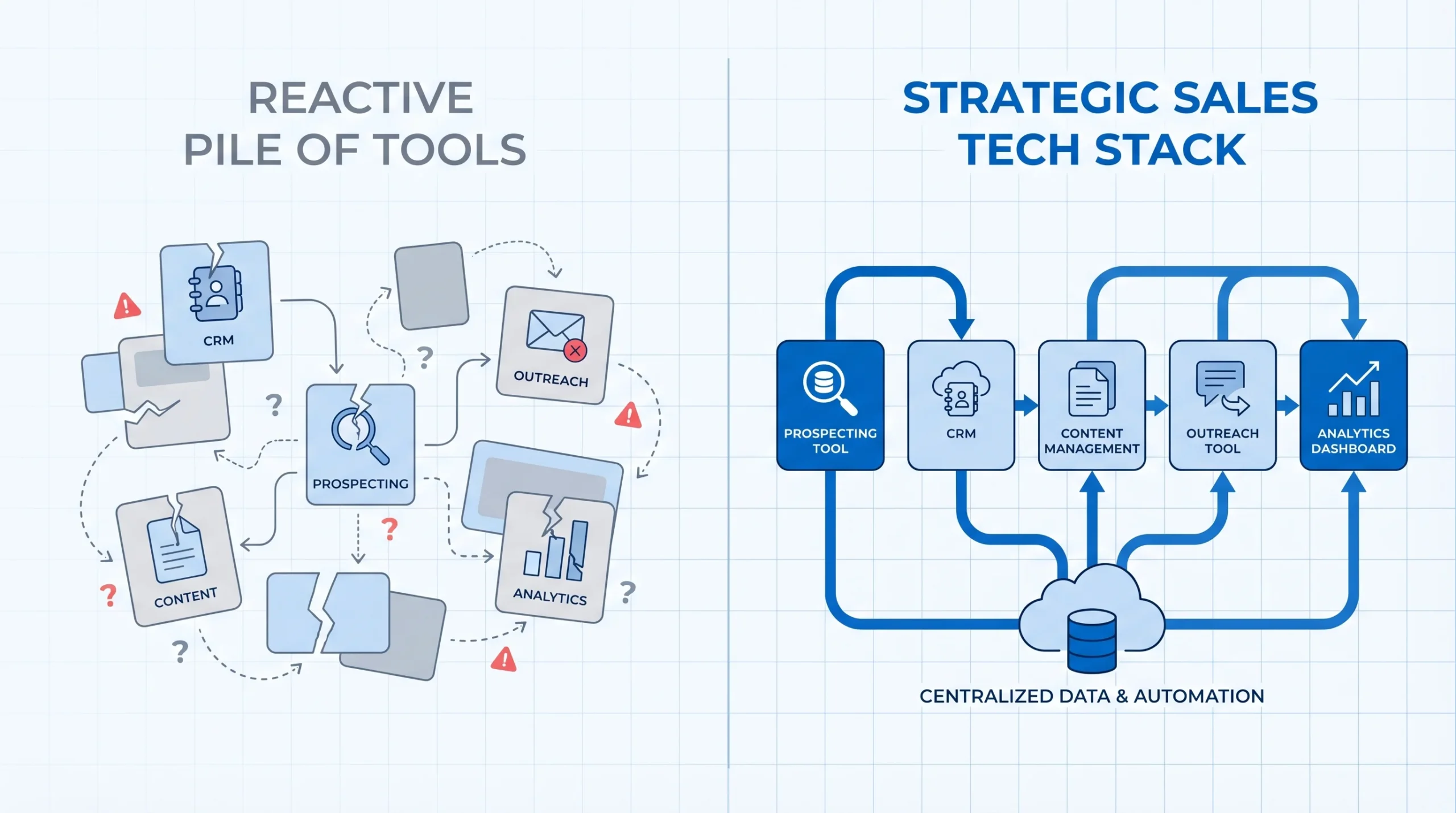
A sales tech stack is the connected set of software tools your revenue team uses to find, engage, and close customers. The operative word is “connected.” A true sales tech stack is not a collection of individual subscriptions. It is an integrated system where data flows between tools automatically, without manual exports or duplicate entry.
The distinction between a strategic stack and a reactive pile of apps is significant. Most teams build their stacks reactively: one person adopts a prospecting platform, another implements a content management tool, leadership invests in an analytics solution, and before long the team has a fragmented ecosystem where each tool solves one problem while creating three new ones. A strategic stack, by contrast, starts with a clear picture of the sales workflow and works backward to identify exactly which tools are needed at each step.
What “lean” actually means in 2026 is four to six tools, each mapped to a specific workflow step with a clear owner and a measurable output. If a tool does not map to a specific workflow step, it does not belong in the stack. Every tool you add is another integration to maintain, another login for reps to ignore, and another line item your CFO will scrutinize at the next planning session.
On the question of all-in-one platforms versus best-of-breed tools: for early-stage startups, all-in-one platforms almost always win. The integration savings, the simplified onboarding, and the single source of truth for data outweigh the feature depth trade-offs that matter more at scale. A two-person sales team does not need enterprise-grade sequencing with 14 customizable modules. They need something that works, connects, and can be learned in a day. As the team grows, the argument for best-of-breed strengthens — but that is a Series A problem, not a pre-revenue one.
The Lean Stack Framework: 5 Layers Every Startup Needs
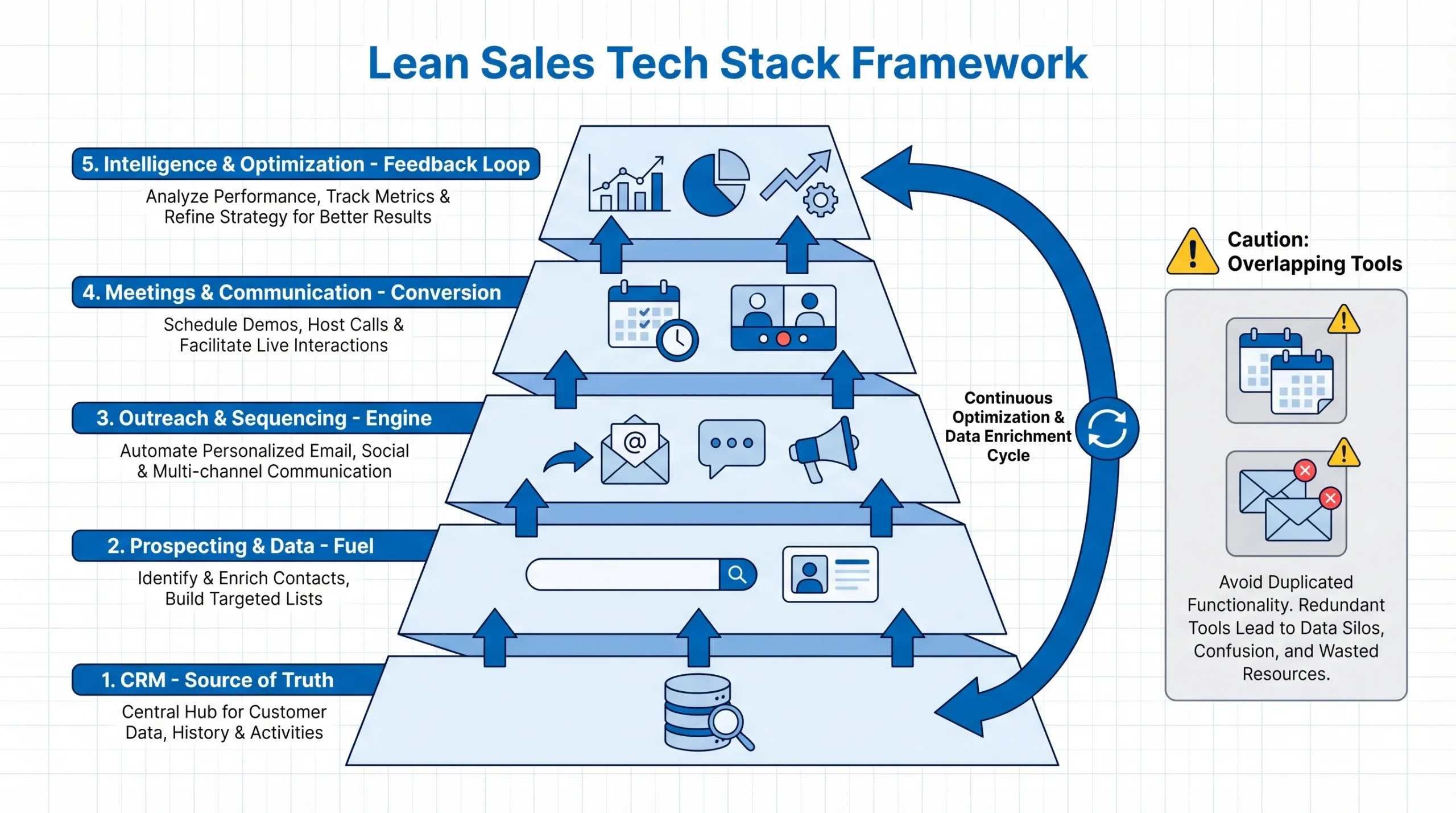
Before recommending specific tools, it is important to establish a mental model for how a lean stack is structured. Every effective startup sales stack follows the same five-layer architecture, regardless of budget or stage. The tools change as you grow; the layers do not.
- Layer 1 — CRM (Source of Truth): This is where every deal, contact, and conversation lives. It is the foundation of the entire stack. Every other tool feeds into or draws from the CRM.
- Layer 2 — Prospecting & Data (Fuel): This is how you find and verify the right buyers before reaching out. Without accurate contact data, every downstream layer underperforms.
- Layer 3 — Outreach & Sequencing (Engine): This is how you engage prospects at scale through structured, personalized touchpoints across email, LinkedIn, or phone.
- Layer 4 — Meetings & Communication (Conversion): This is how you convert prospect interest into booked conversations, and how you capture those conversations for follow-up.
- Layer 5 — Intelligence & Optimization (Feedback Loop): This is how you understand what is working, coach your team, and continuously improve conversion rates at each stage.
The guiding rule for each layer is simple: one tool is ideal, two is acceptable, three is a warning sign. When multiple tools share the same layer — two CRMs, two sequencing platforms, two data providers — data fragments, adoption drops, and costs compound without proportional gains.
The Pre-Build Checklist — Answer These Before Buying Anything
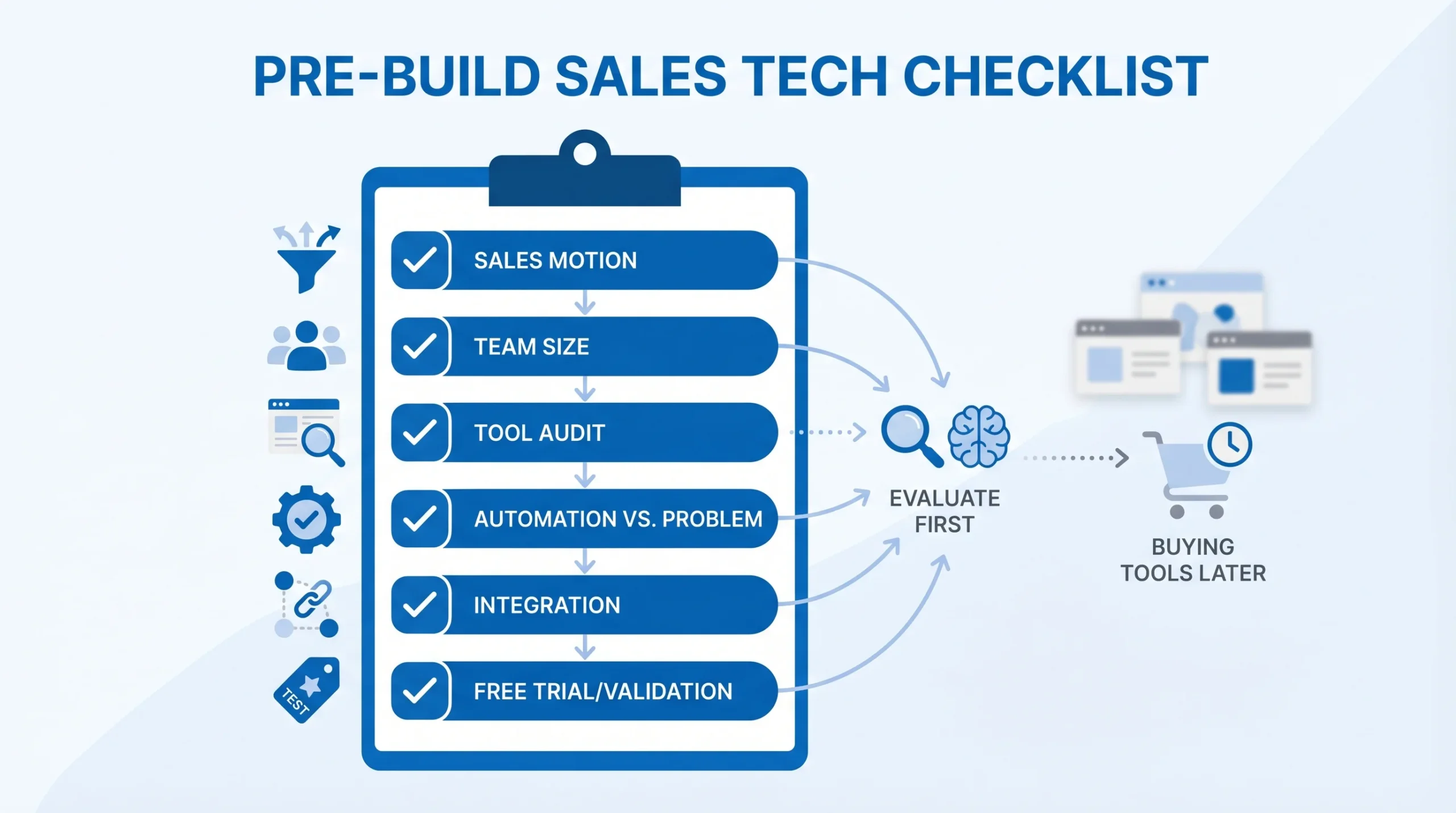
The most expensive mistake in sales tech is buying tools before you understand your own sales process. Before spending a single dollar on software, work through these six questions. The answers will determine which tools you actually need versus which ones are marketing to you.
- What is your primary sales motion? Are you running outbound (you find buyers), inbound (buyers find you), product-led growth (the product drives adoption), or a hybrid? Each motion has different tool requirements. An outbound-heavy team needs strong prospecting and sequencing tools. An inbound team needs CRM automation and conversion optimization. Conflating the two leads to buying tools for a motion you are not actually running.
- How many reps are actually selling today versus in six months? Tools that are correctly sized for a team of five will be inadequate for a team of fifteen, but a team of two does not need to pre-buy enterprise capacity. Buy for today’s headcount and plan the upgrade triggers explicitly.
- What tools are already in use — and which are actually being used? Before buying anything new, audit what you have. A quarterly usage check — did anyone log into this tool in the last 30 days? — is the fastest way to identify shelfware eating budget.
- Does this tool replace a manual task, or is it solving a problem you do not yet have? Tools that automate a real, recurring manual task deliver immediate ROI. Tools purchased to solve hypothetical future problems sit unused until they are cancelled.
- Will this tool integrate natively with your CRM, or will it create a new data silo? Every tool that does not integrate natively with your CRM becomes a separate data island. Native integrations — meaning the tool connects via a standard API without custom development — should be a hard requirement, not a nice-to-have.
- Does it have a free tier or startup discount you can validate before committing? In 2026, the majority of credible sales tools offer free plans or startup program pricing. There is rarely a good reason to commit to an annual contract before you have validated the tool against a real workflow. Always test on a free tier first.
Layer 1 — CRM: Your Non-Negotiable Foundation
A CRM is not optional. It is the first tool you implement, not the fourth. Without a CRM, there is no pipeline visibility, no accountability, no repeatable process, and no foundation for any other tool in the stack to connect to. Everything else in your sales stack either feeds data into or draws data from your CRM.
When evaluating a CRM for a startup, four capabilities matter most: pipeline visualization so you can see where every deal stands without holding a team meeting, workflow automation so routine tasks like follow-up reminders and stage updates happen without manual effort, native integrations with the prospecting and sequencing tools you plan to use, and ease of adoption because a CRM that no one uses is worse than no CRM at all.
Bootstrap tier ($0): HubSpot’s free CRM is the most widely recommended starting point for early-stage B2B startups. It offers contact management, deal pipeline, email tracking, meeting scheduling, and basic reporting at no cost. For a team of one to three people running structured outbound or inbound, HubSpot free provides enough functionality to run a real sales process without spending anything.
Growth tier ($25–$50/month): HubSpot Starter or Pipedrive unlock meaningful workflow automation, sequences, and AI-assisted lead insights. At the growth tier, the CRM starts doing more of the administrative work that reps would otherwise do manually — logging activity, sending reminders, surfacing deals that have gone cold.
The key decision on when to upgrade from free is a cost comparison, not a feature checklist. When your team is spending more than two hours per week per rep on manual pipeline updates, logging calls, or sending follow-ups that should be automated, the cost of that time almost always exceeds the subscription cost of the next tier.
The most common mistake at this layer is over-customizing the CRM before the sales process is proven. Adding twenty custom fields, six pipeline stages, and complex automation rules before you have closed ten deals is building a system for a process you do not yet understand. Start with a simple pipeline — five stages or fewer — and add complexity only when you can justify it with a specific operational need.
Layer 2 — Prospecting & Data: The Layer Most Startups Under-invest In
The data layer is where most lean stacks quietly bleed money — not through expensive subscriptions, but through the invisible cost of bad contact data. Email addresses decay at roughly 30% per year. When your sequences run against a list where one in three contacts has changed roles or left their company, your bounce rates climb, your sender domain reputation suffers, and your reply rates tank — not because your copy is weak, but because you are sending to dead addresses.
Bad contact data does not announce itself. It silently degrades deliverability, inflates bounce rates, and trains inbox providers to route your domain to spam. This is why investing appropriately in the data layer — even before you invest in outreach tools — is the highest-leverage decision in the entire stack.
The 2026 prospecting landscape has consolidated significantly. Where startups once needed separate tools for finding contacts, enriching them with firmographic data, and verifying email addresses, platforms like Apollo.io now combine all three in a single interface at startup-friendly pricing.
Bootstrap tier ($0–$50/month): Apollo.io’s free tier offers contact search, basic email sequences, a Chrome extension for LinkedIn prospecting, and email verification credits. For a solo founder or a very early-stage team running structured outbound, Apollo free provides enough firepower to run real prospecting campaigns without spending anything. This is the recommended starting point for nearly all pre-revenue or early-traction startups.
Growth tier ($50–$150/month): Apollo’s paid tiers or Clay unlock more export credits, waterfall enrichment from multiple data sources, and ICP-powered list building. Clay, in particular, is worth understanding — it pulls data from 75+ enrichment sources simultaneously, meaning if one provider does not have a contact record, the next one does. For teams running high-volume outbound or targeting very specific buyer profiles, this significantly improves data quality without requiring a ZoomInfo contract.
Premium data platforms like ZoomInfo, Cognism, and Clearbit are enterprise-tier investments with enterprise-tier price tags — typically $1,200 to $5,000 per user per year. Budget alternatives like Apollo.io, Lusha, and LeadIQ offer strong targeting accuracy at a fraction of that cost. For startups, the decision to move to premium data should be driven by one clear signal: your outbound is producing meetings, your ICP is validated, and the bottleneck is genuinely data quality rather than copy, targeting, or process.
Layer 3 — Outreach & Sequencing: How to Engage Without Spamming
The 2026 outreach reality is one that many startup sales playbooks have been slow to absorb. Cold email volume is declining. Multiple practitioners and analysts report a meaningful drop in cold email effectiveness over the past year, driven by inbox saturation, improved spam filters, and buyer fatigue. The teams winning in 2026 are not sending more emails — they are sending fewer, better-targeted messages powered by verified contact data and genuine personalization. Volume for its own sake is a losing strategy.
The distinction between sequencing and cold blasting is fundamental. A cold blast is sending the same generic message to 5,000 contacts and hoping for a 0.5% reply rate. A sequence is a structured, multi-touch outreach program — typically five to eight steps across two to four weeks — designed for a specific buyer persona with contextually relevant messaging at each step. The same effort produces dramatically different results because the signal quality is higher for the prospect receiving it.
Bootstrap tier ($0–$30/month): For teams already on Apollo, the built-in sequencing functionality is a strong starting point. It handles multi-step email sequences, basic personalization, and reply detection without an additional subscription. For low-to-medium outbound volume, Apollo’s sequencing handles the job.
Growth tier ($50–$100/month): Instantly, Lemlist, and Reply.io all operate in this range and offer meaningfully better personalization at scale, multi-channel sequencing (email plus LinkedIn), and more sophisticated A/B testing. Lemlist, in particular, has a strong reputation for personalization features — liquid syntax variables, dynamic images, and per-prospect customization — that consistently outperform generic templates.
Email infrastructure deserves explicit attention, because it is the foundational layer beneath sequencing that most guides skip. Before running any outreach campaign, you need a warmed sending domain (separate from your primary business domain), a daily sending limit that respects inbox provider thresholds — typically no more than 30 to 50 emails per day from a new domain — and an email verification pass on every list before it goes into a sequence. Skipping infrastructure is the fastest way to get your domain blacklisted and destroy deliverability that takes months to rebuild.
On the question of multi-channel outreach: combining email with LinkedIn touchpoints consistently outperforms email-only sequences in reply rate, but the additional complexity is only worth it when the email-only process is already producing results. Get the single-channel motion working first. Add LinkedIn as a channel when you have a hypothesis about why it will improve a specific conversion metric.
Layer 4 — Meetings & Communication: Converting Interest Into Pipeline
A prospect who replies to your sequence and expresses interest is not pipeline. A booked meeting is pipeline. The conversion from expressed interest to scheduled conversation is where a surprising amount of revenue leaks out of startup sales processes — and it leaks because of friction.
Every step between “I’m interested” and “here’s a calendar invite” is an opportunity for the prospect to lose momentum, get distracted, or simply not bother. The booking experience needs to be instant and require zero effort from the prospect.
Scheduling ($0–$15/month): Calendly’s free tier handles the fundamental job: a personal booking link that the prospect clicks, sees your available times, and books directly — no back-and-forth email chains. HubSpot Meetings, included in HubSpot’s free CRM, achieves the same result for teams already on that platform. Embed the booking link directly in your final sequence step, your email signature, and your LinkedIn profile. Remove every possible obstacle between interest and meeting booked.
Video calls: Google Meet or Zoom are almost certainly already running in your startup environment. Do not add a separate video conferencing tool. This is a layer that should cost zero incremental dollars.
Conversation intelligence tools — recording, transcription, and analysis of sales calls — become genuinely valuable the moment you have more than two reps and a manager who needs coaching visibility. Fathom’s free tier is one of the most compelling zero-cost options in the entire sales tech landscape: it records and transcribes every call, generates AI-powered meeting summaries, and pushes notes to your CRM automatically. For a startup with two to five reps, this eliminates the manual note-taking burden entirely and creates a searchable record of every sales conversation.
The gap between Fathom’s free tier and Gong’s enterprise pricing is enormous for early-stage teams. Gong is a world-class conversation intelligence platform with world-class pricing — typically $1,000 to $1,500 per user per year. For a seed-stage startup, that budget is better deployed elsewhere until the team is large enough and the deals are complex enough to justify the investment in advanced deal risk detection and revenue forecasting.
Layer 5 — Intelligence & Optimization: Know What’s Working
Most startup sales teams skip the intelligence layer entirely in the early stages, treating it as a luxury they will add once the stack is “mature.” This is a mistake, but not for the reason you might expect. You do not need a dedicated analytics platform to have intelligence. What you need is a habit of measuring the right things with whatever tools you already have.
At the early stage, your CRM’s built-in reporting provides more than enough visibility to make good decisions — if you know what to look for. The three metrics that matter most at a startup are pipeline coverage (do you have enough deals in the pipeline to hit your revenue target, assuming a realistic win rate?), conversion rate by stage (where specifically are deals dying?), and average deal velocity (how long is a deal sitting in each stage before moving or dying?). These three numbers tell you where to intervene, and you can track all three in HubSpot or Pipedrive’s free reporting dashboards without a single additional tool.
Revenue intelligence platforms like Clari, InsightSquared, and Aviso provide pipeline forecasting, deal risk scoring, and executive-level dashboards. They are most valuable for scaling organizations with complex, multi-threaded sales motions and management hierarchies that need accurate quarterly forecasts for board reporting. For early-stage startups with a simple sales process and a small team, the CRM’s built-in reporting typically provides sufficient insight without the additional cost and complexity of a standalone revenue intelligence layer.
AI-assisted insights inside existing tools are worth turning on and paying attention to. HubSpot’s AI surfaces deal risk signals based on activity patterns. Apollo’s lead scoring identifies which prospects in your pipeline are showing buying signals. Pipedrive’s AI assistant flags deals that have gone cold based on last activity. These capabilities are built into the tools you are already paying for, and they provide a meaningful intelligence layer without requiring a separate subscription.
The 2026 AI Factor — What’s Actually Worth Using Right Now
Artificial intelligence in sales has moved from hype category to genuine utility over the past 18 months, but the landscape remains noisy. For every AI tool that delivers real workflow improvement, there are ten that look impressive in a demo and quietly die in browser tabs a week later. The honest framing for 2026 is this: go-to-market is where AI tools promise the biggest gains but often add noise before they add value, and founders are right to be more skeptical than the vendor marketing suggests.
What AI genuinely accelerates in sales, based on current practitioner evidence, is a specific and narrow set of tasks: personalization at scale (researching prospects and drafting contextually relevant opening lines), call summarization and note-taking (converting recorded conversations to structured follow-up notes), lead scoring (identifying which prospects in a large list are most worth prioritizing), and first-draft sequence writing (generating personalized email templates that a rep then edits and sends).
AI SDR tools are the most discussed category in sales technology right now, and the economics are compelling on paper. Some platforms claim a 71% cost reduction versus a human SDR for outbound prospecting. The data on hybrid human-AI SDR models is more encouraging: 94% of sales leaders using AI agents report them as already essential, and 45% of high-performing teams have adopted hybrid models where AI handles initial research and outreach at scale, while humans manage replies, objections, and relationship development. For startups considering this approach, the right strategy is to pilot with 100 to 200 test accounts, prove the workflow, and then scale — not to replace your outbound motion with AI before you have validated what a good human-run process looks like.
The AI tools that deliver clear, immediate value at startup budget are Clay for enrichment and prospect research automation, Lavender for email coaching (it analyzes your drafted emails and scores them for reply probability before you send), and Fathom for meeting note automation. These tools slot into existing workflows and eliminate specific time-consuming tasks without requiring a process redesign.
The tools to skip for now are expensive standalone AI platforms that replicate what your CRM already does natively — particularly if your CRM has recently launched AI features covering the same use case. The rule worth internalizing is this: add AI to a workflow that already works. Never use AI to fix a broken one, because the AI will simply automate the broken process faster.
Budget Tier Breakdown — What to Spend at Each Stage
Understanding what to spend at each stage of company growth is as important as knowing which tools to buy. Over-investing in tools before you have a repeatable sales process is one of the most common ways startups burn runway without generating proportional pipeline. Under-investing in the wrong layer — particularly data quality — is an equally common failure that takes months to diagnose.
| Stage | Monthly Budget | Core Stack |
|---|---|---|
| Pre-revenue / Bootstrap | $0–$100 | HubSpot Free + Apollo Free + Calendly Free |
| Early traction (1–2 reps) | $100–$300 | HubSpot Starter + Apollo Paid + Instantly + Calendly |
| Scaling (3–10 reps) | $300–$700 | HubSpot Pro + Clay + Instantly or Lemlist + Fathom + Calendly |
| Growth (Series A+) | $700–$1,500+ | Salesforce or HubSpot + Outreach or Salesloft + Clay + Gong |
A clear benchmark to hold onto: if you are pre-Series A and spending $500 per month or more on sales tools, you are very likely overbuying. That does not mean cutting useful tools — it means auditing whether every dollar is tied to a workflow step that is actually running.
One of the most underutilized cost reduction strategies in startup sales is startup program pricing. HubSpot for Startups offers 30 to 90% discounts depending on funding stage and accelerator affiliation. Apollo, Clay, and Instantly all offer startup credits or discounted plans for early-stage companies. Y Combinator alumni have access to significant tool credits through the YC deals program. Before paying full price for any tool, check whether it is available through your accelerator, investor network, or a startup deal aggregator.
Total cost of ownership matters more than the monthly subscription line. Factor in the time cost of setup — how many engineering hours or founder hours does onboarding this tool require? Factor in training — how long before a new rep can use it fluently? Factor in integration maintenance — does this tool require ongoing upkeep to stay connected to the rest of the stack? A $50/month tool that takes 20 hours to set up properly and breaks its CRM integration every quarter is more expensive than a $100/month tool that runs without maintenance.
How to Audit Your Existing Stack Before Adding Anything New
For readers who already have a sales tech stack in place, the right first step is not adding new tools — it is understanding what you already have and whether it is working. This is true whether your stack has three tools or thirteen.
The four-question audit framework covers the most important dimensions:
- Usage: Who is actually using each tool, and how often? Pull login data or activity reports from each platform. If utilization is below 50% of licensed seats, you have an adoption problem that a new tool will not fix.
- Overlap: Are two or more tools doing the same job? Common overlaps in startup stacks include multiple email tracking tools, CRM features that duplicate sequencing platform capabilities, and data providers with significant contact list overlap. Every overlap is budget that could be consolidated.
- ROI: Can you draw a direct line from this tool to a pipeline metric? If you cannot clearly explain how a specific tool contributes to meetings booked, deals created, or revenue closed, it is a candidate for removal.
- Integration health: Is every tool actively syncing data with your CRM? Pull a sample of recent contacts and check whether activity from your sequencing tool, your data platform, and your booking tool is appearing in CRM records as expected. Broken integrations are invisible until they cause a data problem at exactly the wrong moment.
Signs of tool sprawl worth watching for include multiple tools performing the same workflow function, reps creating manual workarounds because the official tooling is too complex or unreliable, deal data that exists in three different platforms with no clear single source of truth, and new reps taking more than two weeks to become operationally productive because of system complexity.
When consolidating a fragmented stack, the most important rule is protecting pipeline data. Before removing any tool, export every contact, deal, and activity record it contains, verify that it has been properly synced to the CRM, and only then cancel the subscription. Rushed consolidations that lose prospect data or activity history create gaps that cost more to recover than the subscription savings.
The “earn your seat” rule is a useful heuristic to institutionalize across the stack: every tool must demonstrate a connection to a measurable pipeline metric within 90 days of adoption. If it cannot, it is a candidate for removal regardless of how much the team likes using it.
Week-by-Week Setup Guide: Your First 30 Days
The most important thing about setting up a lean sales tech stack is the order of operations. Many startups try to configure everything simultaneously and end up with a partially-built system in every layer and a complete system in none. A sequential, week-by-week approach ensures each layer is functional before the next one is added.
Week 1: Set up your CRM, define your pipeline stages, and import existing contacts. Start with HubSpot free or your chosen CRM platform. Create a pipeline with no more than five stages — something like Lead, Contacted, Meeting Booked, Proposal Sent, and Closed Won/Lost. Import every existing prospect and customer contact. Define what each stage means and what action is required to move a deal forward. Do not add custom fields or automation yet. Get the basic structure right first.
Week 2: Connect your prospecting tool, build your initial ICP list, and verify emails. Set up Apollo.io (or your chosen data layer tool), install the Chrome extension, and build your first list of 100 to 200 target accounts matching your Ideal Customer Profile. Run every email address through a verification pass before moving to Week 3. Configure the CRM integration so that contacts created in Apollo automatically appear as CRM records with the relevant firmographic data attached.
Week 3: Configure your first outreach sequence, set up your booking link, and test the end-to-end flow. Write a five-step sequence — three emails and two LinkedIn touches is a strong starting structure — with personalized first lines and a clear, specific call-to-action at each step. Set up your Calendly booking link and embed it in the final sequence step and your email signature. Before launching to a full list, send the sequence to yourself and two to three colleagues and verify that every step fires correctly, every link works, and replies route to the right inbox.
Week 4: Run your first real campaign, review reply metrics, and optimize before adding anything new. Launch the sequence to your verified list. After the first 50 to 100 sends, review the data: open rates indicate deliverability, reply rates indicate messaging quality, and booking conversion from reply indicates how compelling the call-to-action is. Optimize one variable at a time — subject line, first line, or call-to-action — before drawing conclusions. Resist the temptation to add a new tool during this week. The goal is to prove that Layers 1, 2, 3, and 4 are producing consistent activity data before adding the intelligence layer.
The key principle behind this four-week structure is that Layer 5 intelligence tools require data to be useful. Building dashboards and AI-powered coaching workflows before you have meaningful activity volume produces noise, not signal. Wait until you have at least 30 days of consistent sequencing activity in the system before investing time in optimization tooling.
When to Scale Your Stack (The Right Triggers)
Knowing when to upgrade is as important as knowing what to buy. The right triggers are operational — specific workflow bottlenecks that can only be resolved by adding capability — not aspirational, meaning you should not upgrade because a competitor has a fancier stack or because a vendor demo was impressive.
Trigger for upgrading your CRM: When manual pipeline updates and activity logging are consuming more than two hours per week per rep, the cost of that time exceeds the subscription cost of the next tier. This is the moment to upgrade from free to a paid plan with workflow automation.
Trigger for upgrading your data layer: When your email sequences are producing bounce rates above 5%, or when reply rates are declining despite strong copy and a well-targeted list, the bottleneck is likely data quality. This is the moment to move from Apollo’s free tier to a paid plan with more verification credits, or to add Clay for waterfall enrichment from multiple data sources.
Trigger for adding conversation intelligence: When you have more than three reps and a manager who needs visibility into call quality for coaching purposes, call recording and transcription move from optional to essential. Before this point, a manager can listen to calls directly. After it, the volume makes that impractical. Fathom’s free tier handles this need for most startups until the team is large enough to justify Gong’s enterprise pricing.
Trigger for adding revenue intelligence: When your sales cycles run six months or longer and your investors or board require accurate quarterly pipeline forecasts, a standalone revenue intelligence platform earns its cost. Below that threshold, CRM-native reporting provides sufficient visibility. A startup with 30-day sales cycles and a five-person sales team has no business need for Clari.
The governing principle throughout all of these decisions is that a startup with a team of around ten can thrive with a compact stack of essentials, while a team with 50 or more sellers needs specialized tools that serve varied roles and complex sales motions. Scale your tools to match actual organizational complexity, not organizational ambition.
Frequently Asked Questions
What is the minimum viable sales tech stack for a solo founder?
A solo founder can run a complete, functional outbound sales process at zero monthly cost using HubSpot’s free CRM for pipeline management, Apollo.io’s free tier for contact prospecting and email sequences, and Calendly’s free tier for booking links. These three tools cover every essential workflow step from finding a prospect to getting them on a call — at $0 per month. The free tiers have limitations on export volume and sequence automation, but for a founder closing their first 10 to 50 deals, the limitations rarely become binding constraints.
Should I use an all-in-one platform or best-of-breed tools?
At the early stage — roughly pre-Series A with a sales team of five or fewer — all-in-one platforms win on simplicity, integration, and total cost. The time saved by not managing five separate tool integrations is worth more than the feature depth you sacrifice by not using a specialized tool for each function. Post-Series A, when the sales motion is more complex, the team is larger, and specific workflow gaps are clearly identifiable, best-of-breed tools become worth the integration overhead.
How do I know if a tool is worth paying for?
Map the tool to a specific workflow step and define the metric it should move. Give it 60 days of real usage against that metric. If it moves the needle — more meetings booked, lower bounce rates, higher conversion from reply to meeting — it earns its subscription. If it does not produce a measurable change in a defined metric within 60 days, that is a clear signal it is not the right tool for your workflow, regardless of how well it performed in the demo.
What is the difference between a sales engagement platform and a CRM?
A CRM is a system of record — it tracks what has happened in a deal: who was contacted, what was said, where the deal stands. A sales engagement platform is a system of action — it drives what happens next through structured sequences, automated touchpoints, and multi-channel outreach workflows. The CRM tells you the history; the engagement platform executes the future. At the bootstrap stage, platforms like Apollo.io and HubSpot Starter combine both functions, which is why starting with an all-in-one is often the right call.
Is Apollo.io enough for an early-stage B2B startup?
For most early-stage B2B startups running outbound, yes — Apollo.io’s paid tiers cover contact data, email verification, sequencing, CRM-lite functionality, and basic analytics in a single platform at startup-accessible pricing. It is not the most powerful tool in any individual category, but the combination of coverage, integration, and cost-efficiency makes it the most practical starting point for teams that are not yet at the data volume or workflow complexity that would justify multiple specialized tools.
When should I bring in Gong or a similar conversation intelligence platform?
Two clear scenarios justify the investment. First, when you have recurring deal losses that you cannot diagnose from CRM data alone — you need to hear what is happening in the calls themselves to understand where the deal is breaking. Second, when onboarding new sales reps consistently takes longer than 60 days to reach productivity, and the bottleneck is the quality of coaching and call review. Below these thresholds, Fathom’s free recording and transcription handles the fundamental job. Gong’s advanced deal intelligence and coaching features earn their cost only when the problems they solve are actually present and measurable.