


Most B2B sales teams are still running single-channel plays in a world that has moved on. They either blast cold emails until they hit a reply or spam LinkedIn connection requests until someone bites. Neither approach is working the way it used to — and the data makes it impossible to ignore.
Cold email inboxes are saturated. LinkedIn DMs feel transactional. The average B2B decision-maker is hit from every direction, every single day. If you send emails alone, you compete with hundreds of other sequences. If you only use LinkedIn, your messages get buried in a notification feed that no one reads carefully anymore. Single-channel outreach underperforms in 2026 because inbox saturation and LinkedIn noise reduce reply rates, while coordinated multichannel sequences consistently generate more pipeline.
The teams booking the most meetings right now are not sending more messages — they are running coordinated, channel-diverse sequences where every touchpoint is deliberate, every fallback is automatic, and no prospect slips through because of a single non-reply. The setup matters just as much as the messaging. A well-written message in the wrong sequence, at the wrong time, on the wrong channel, does not convert.
The case for going multichannel is compelling: outreach that combines email with LinkedIn and phone in a coordinated omnichannel sequence can boost results by over 287% compared to single-channel campaigns. That is not a marginal gain. That is a fundamental shift in what outbound sales can produce.
This guide is the step-by-step playbook you need to build, sequence, and scale a LinkedIn and email system that compounds results. You will learn how each channel works, how they complement each other, what a proven sequence looks like day-by-day, how to personalize without sacrificing scale, what to say at each touchpoint, which tools to use, and how to measure what is actually working. By the end, you will not just understand the theory — you will have everything you need to build the system.
Understanding Each Channel’s Superpower (And Weakness)
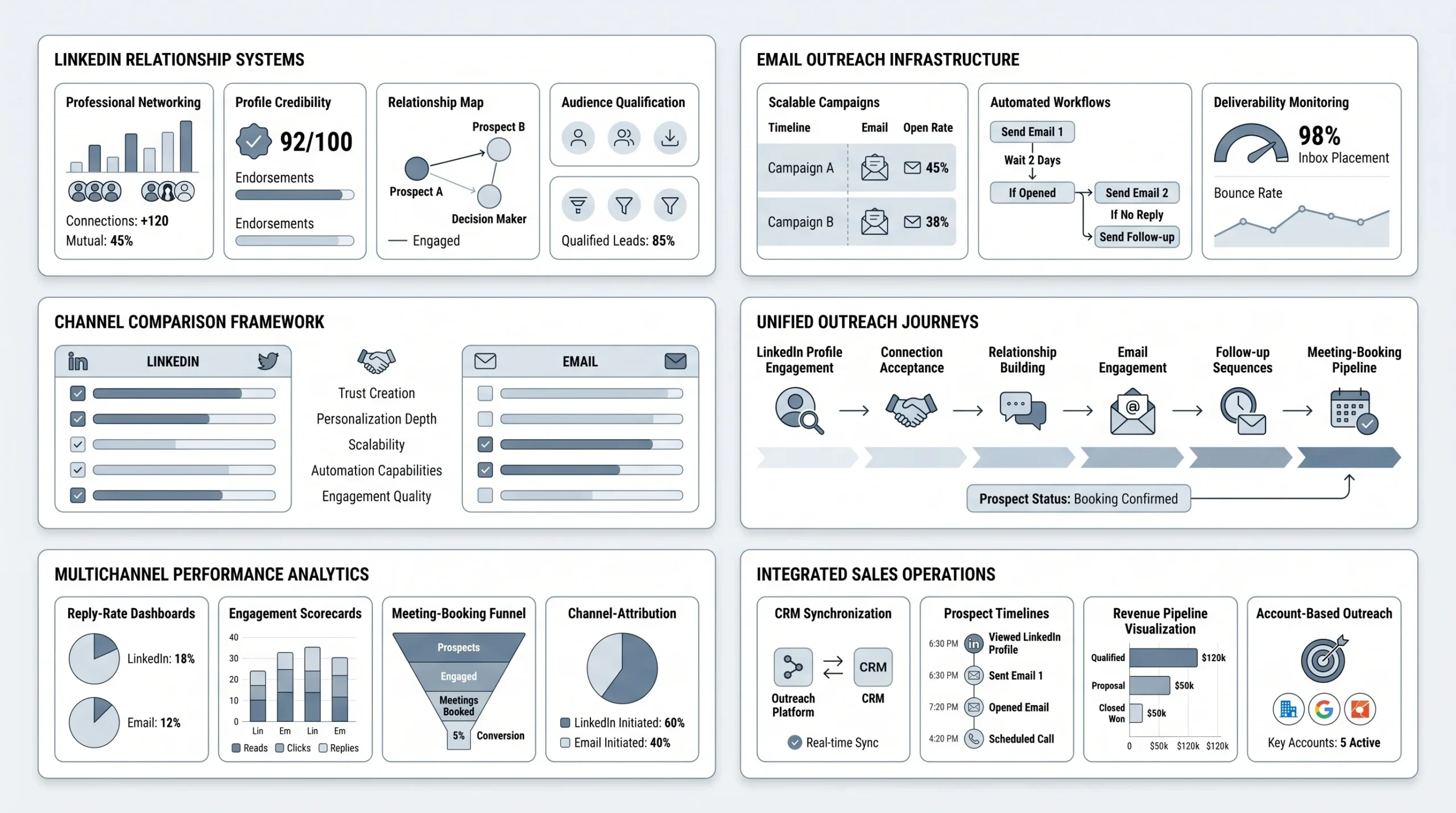
Before you can combine LinkedIn and email effectively, you need to understand what each channel is actually good at — and where it falls short. Treating them as interchangeable channels is one of the most common mistakes teams make. They are not the same tool. They serve fundamentally different roles in the buyer’s journey.
LinkedIn: The Relationship Builder
LinkedIn’s primary strength is professional context. When a prospect sees your name on LinkedIn, they can instantly look at your profile, your company, your mutual connections, your activity, and your credibility. That context creates trust before a single word of outreach is read. There is no equivalent of that in a cold email.
The numbers back this up. LinkedIn reply rates average around 10.3%, versus email at 5.1% — meaning LinkedIn generates roughly twice the response rate per message sent. LinkedIn is ideal for building professional relationships, creating real-time targeting based on live professional data, and establishing social proof through your network visibility.
That said, LinkedIn has real limitations. You can only send a limited number of connection requests per week. The platform has strict rules around automation, and violating those rules can result in account suspension. Scaling LinkedIn outreach aggressively without the right tools and safety measures is risky. LinkedIn personalizes, but it does not scale easily without the right infrastructure.
Email: The Scalable Workhorse
Email’s core advantage is reach and automation. You can send ten times more messages per day through email than through LinkedIn, automate follow-up sequences completely, and deliver detailed, long-form content — proposals, case studies, product walkthroughs — that would look out of place in a LinkedIn DM. Email also excels at nurturing leads over time, where the relationship is already partially established and the prospect needs more information before committing to a conversation.
Email allows 10x more daily sends, offers full automation, and produces average reply rates of 8.5% for well-run campaigns. It is the primary conversion channel for most B2B outreach operations — the engine that powers volume and follow-up persistence.
The downside is anonymity. A cold email arrives with zero social proof. The prospect has no idea who you are, has no way to instantly verify your credibility, and has every reason to ignore it. In a saturated inbox, that anonymity is a serious handicap.
Why You Need Both
The logic of combining LinkedIn and email is not complicated. LinkedIn solves email’s anonymity problem. Email solves LinkedIn’s scalability problem. Used together, they form a system where each channel’s strength compensates for the other’s weakness.
Pairing LinkedIn’s networking capabilities with email’s broad reach creates an effective B2B outreach strategy — establishing familiarity on LinkedIn first, then transitioning to email outreach. When your email lands in someone’s inbox after they’ve already seen your LinkedIn profile and accepted your connection request, it does not feel cold. It feels like a continuation of an existing relationship.
The results are measurable. Users running unified LinkedIn and email sequences report 25% higher reply rates and 40% more booked meetings compared to email-only baselines. LinkedIn’s professional context lifts reply quality; email’s automation lifts reach. Personalization is the multiplier on both.
The Core Philosophy: Coordinated Touchpoints, Not Parallel Spam
Getting the tools and the sequence right is only half the battle. The other half is understanding the philosophy that makes multichannel outreach actually work — because most teams that try it get this part wrong.
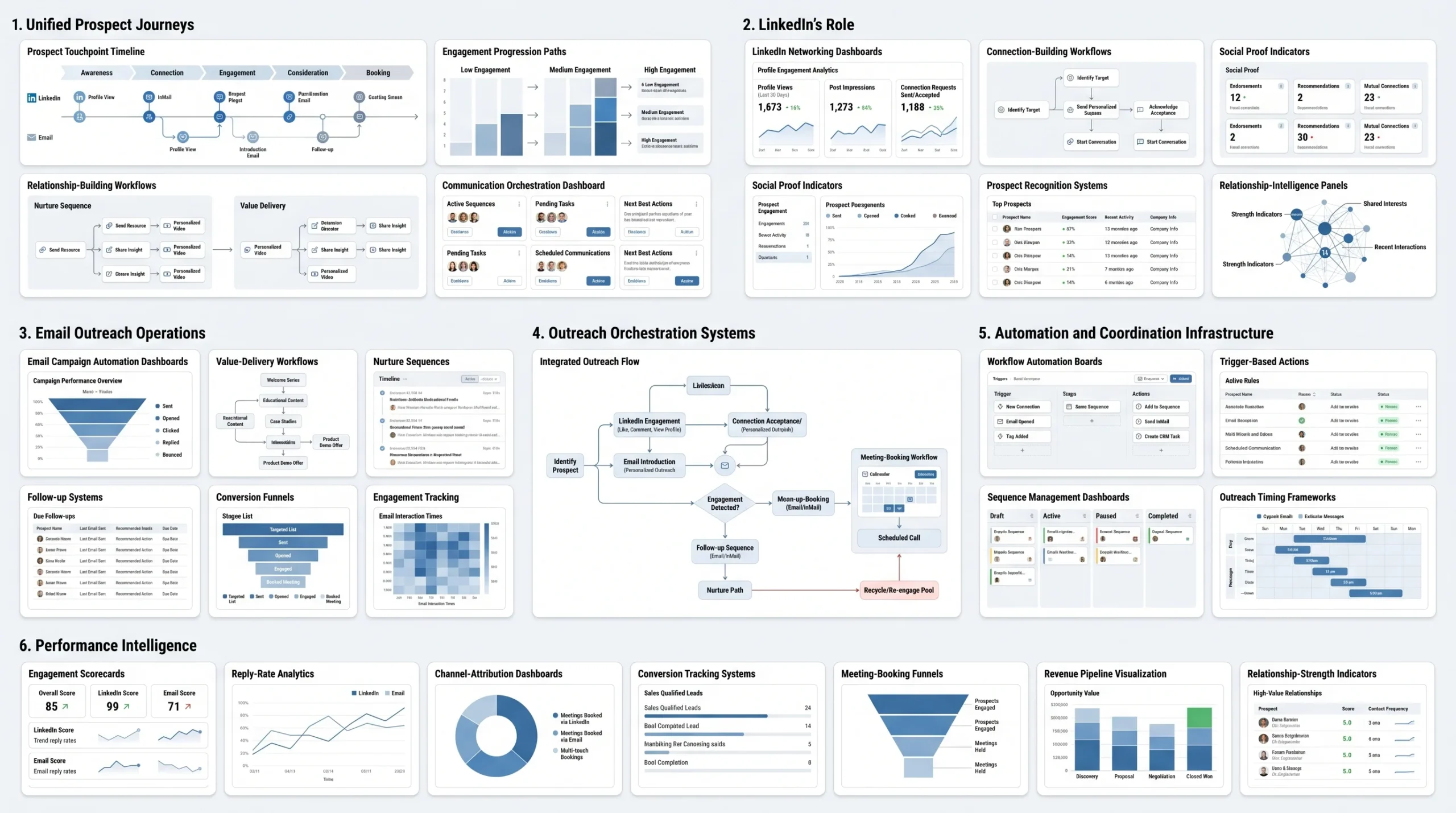
There is a critical difference between multichannel outreach and what could be called omnichannel clutter. Multichannel means your touchpoints are coordinated — each message references or builds on the previous one, and the prospect experiences your outreach as a single, coherent conversation happening across different surfaces. Omnichannel clutter means hitting someone on every available platform with the same generic pitch and hoping something sticks. The second approach does not just fail — it actively damages your brand.
A modern multi-channel outreach strategy synchronizes messaging, timing, and personalization across all touchpoints to create a single, unified conversation with the prospect. Unlike conventional methods that treat each channel as a separate entity, a true multichannel strategy makes every touchpoint feel like the logical next step in an ongoing exchange.
The clearest way to internalize this is through the “channel roles” mental model. Each channel in your sequence has a specific job to do — and if you understand those jobs, you will never send the wrong message on the wrong channel at the wrong time.
- LinkedIn builds recognition. Its job is to make your name familiar before your pitch arrives. Profile views, content engagement, and connection requests all serve one goal: making the prospect feel like they already know you when your email lands.
- Email carries the message. Its job is to deliver your detailed value proposition, case studies, and CTAs in a format built for reading. Email is where the actual selling happens.
- Automation coordinates the timing. The tools you use to run the sequence are not the strategy — they are the infrastructure that ensures each channel fires at the right moment.
Each channel plays a different role: email carries the message, LinkedIn builds recognition, and automation coordinates the timing. When these roles are clearly defined and respected, every touchpoint in the sequence feels natural to the prospect rather than intrusive. And that feeling — the sense that this outreach is relevant, well-timed, and coming from someone who has actually paid attention — is what separates sequences that book meetings from sequences that generate unsubscribes.
The Multichannel Sequence: Step-by-Step
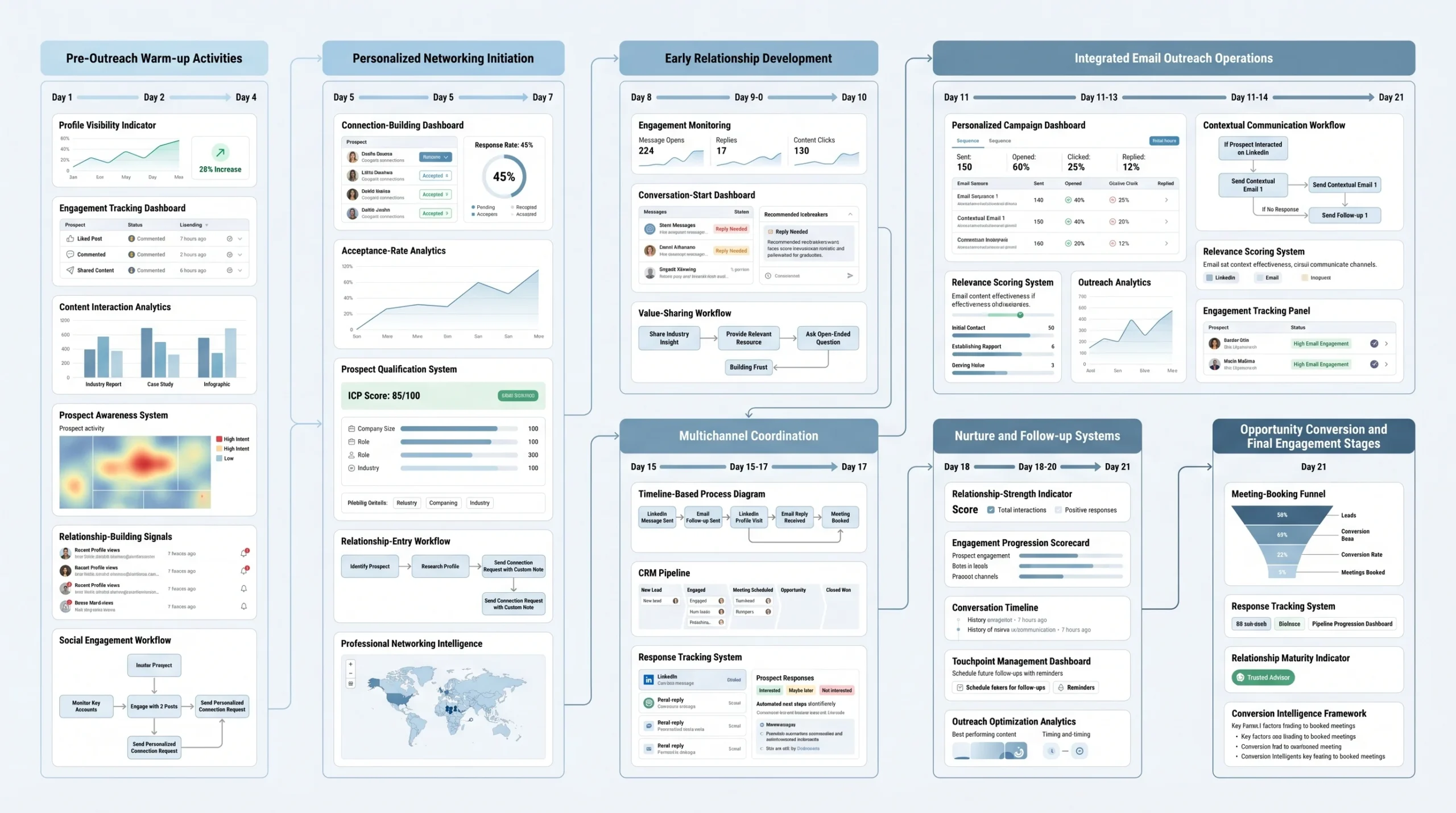
This is where strategy becomes execution. The following 7-step sequence is built on what is consistently working across B2B outreach campaigns in 2026. It is designed to be run over approximately 21 days, with deliberate timing between touchpoints to build familiarity without creating pressure.
Step 1 — Pre-Connection Warm-Up (Days 1–3)
Before you send a single message, you do something most SDRs skip entirely: you make yourself known without asking for anything.
In the two to three days before sending a connection request, engage with the prospect’s LinkedIn content two to three times. Like a post, leave a genuinely insightful comment on something they’ve written, or react to a company update. Then view their profile — this triggers a notification, and your name appears in their “Who viewed your profile” list.
This matters more than most people realize. Engagement before outreach — commenting on posts, reacting to company updates, engaging with their content — creates familiarity that makes your outreach feel like a natural continuation. When your connection request arrives after this warm-up, it does not feel like cold contact. It feels like a next step.
Step 2 — Send a Personalized Connection Request (Day 4)
On Day 4, send your connection request — but not without a note. The note is non-negotiable.
Reference something specific in your note: a post they wrote, a mutual connection, a shared professional group, or a relevant challenge you noticed in their company’s public updates. Make it clear you have actually looked at their profile and are not sending a mass request.
The data on this is unambiguous. Including a personalized note with a connection request increases acceptance rates by up to 58%, especially in B2B tech and SaaS sectors. A generic “I’d like to connect” note is functionally the same as sending no note at all.
Step 3 — LinkedIn DM After Acceptance (Days 6–7)
Once they accept, wait a day or two before messaging. Sending a pitch within minutes of acceptance is one of the fastest ways to destroy the trust you just built.
When you do send that first DM, keep it short, warm, and value-first. This is not the place for your pitch deck, your pricing, or a link to your calendar. It is a soft opener — a genuine message that leads with a relevant observation, a useful insight, or a simple question rooted in their role or industry.
Over 40% of users decide to open a message based on the first sentence. Make it count by addressing a pain point or shared interest immediately, not by introducing yourself and your company for three paragraphs.
Step 4 — First Email (Days 8–9)
Now the email enters the picture. And the most important thing you can do in this first email is bridge it directly to the LinkedIn connection.
Open with a reference: “We connected on LinkedIn last week” or “I noticed you accepted my connection request — I wanted to follow up properly over email.” This single line transforms a cold email into a continuation of an existing interaction. The prospect has context. They know your name. The email does not feel random.
Beyond the bridge, the email itself needs to lead with relevance. Reference something specific to their role, industry, recent company news, or a pain point that is publicly visible. Campaigns with advanced personalization beyond first name saw reply rates up to 18%, double the average of generic templates. Only 5% of senders personalize every message — which means doing this properly is an immediate competitive advantage.
Keep the body focused on one idea. One pain point, one proof point, one call to action. The goal of this email is not to sell — it is to earn a reply.
Step 5 — LinkedIn Follow-Up DM (Days 11–12)
A few days after the email goes out, return to LinkedIn with a short, light follow-up DM. This touchpoint serves one purpose: to create a cross-channel echo that reinforces your presence without repeating your pitch.
Something like: “Hey — I sent something over email a couple of days ago, just wanted to make sure it didn’t get buried. Happy to share the short version here if easier.” Keep it conversational. Do not paste your email into a LinkedIn DM. The value of this touchpoint is the channel switch itself — it signals that you are genuinely interested, not just running an automated blast.
Step 6 — Follow-Up Email #2 (Days 14–15)
Your second email should never repeat the first one. Change the angle entirely.
If your first email led with a pain point, this one should lead with proof — a case study, a specific result from a similar company, a piece of data that is relevant to their situation. Or flip it the other way: if your first email was data-driven, make this one more human and conversational.
The persistence here is not nagging — it is necessary. Follow-up emails collectively generate 42% of all campaign replies, yet 48% of reps never send a second message. Nearly half of all possible responses are abandoned before they happen simply because the sender gave up too soon.
Step 7 — Final Breakup Message (Days 18–21)
The last touchpoint in the sequence is the breakup message. It is sent on one channel only — either email or LinkedIn, not both — and it is designed to do one thing: give the prospect a graceful, low-pressure way to either engage or close the loop.
The tone should be light and permission-based. Something along the lines of: “I’ve reached out a few times and I don’t want to keep cluttering your inbox. If this isn’t relevant right now, totally understand — just let me know and I’ll leave you alone. If timing is off, I’m happy to check back in a few months.” This kind of message consistently generates replies from prospects who were interested but not quite ready — because it removes pressure at exactly the right moment.
Timing Rules
Two to three business days between touchpoints on the same channel is the proven range for most B2B sequences. For cross-channel switches — moving from LinkedIn to email, or email to LinkedIn — one to two days is acceptable because you are reaching out on a different surface rather than repeating the same action.
For email specifically, Monday launches with Wednesday follow-ups consistently outperform other timing patterns. The optimal send window is mid-morning, between 9:30 and 11:30 AM in the recipient’s local timezone. This is when decision-makers have settled into the day but have not yet been pulled into back-to-back calls.
Personalization That Actually Scales
Personalization is the word every sales tool advertises and almost no sales team actually executes well. The gap between “personalized outreach” as a concept and personalized outreach as a daily practice is where most campaigns fall apart.
The lazy personalization trap is easy to identify: it is any message that uses the first name and the company name and calls it personalized. “Hey [First Name], I noticed [Company] is in the [Industry] space…” is not personalization. It is mail merge with a friendly coating. Prospects recognize it immediately, and it signals that you spent no time thinking about them specifically.
Real personalization in 2026 operates across three distinct tiers — and each tier requires a different kind of input and produces a different quality of output.
Tier 1 — Profile-Level Personalization
- References the prospect’s job title, seniority level, department, or company size
- Acknowledges the specific challenges that come with their role at a company of that scale
- Addresses the industry context — regulatory environment, competitive landscape, growth stage
- This is the minimum acceptable level of personalization for any outbound message
Tier 2 — Activity-Level Personalization
- References something the prospect has recently done on LinkedIn: a post they published, a promotion they received, a company milestone they announced, a webinar they attended
- LinkedIn outreach tied to recent activity — such as attending a webinar or being promoted — boosts response rates by 32%, according to Sales Navigator data
- This level of personalization demonstrates that you actually pay attention, which is rare enough to stand out
Tier 3 — Signal-Level Personalization
- Uses real-time business intelligence: funding rounds, recent hiring spikes in a specific department, a new product launch, a technology stack change, or a strategic shift visible in press releases or job postings
- This is the deepest form of personalization and the hardest to execute at scale — but it is also where reply rates spike most dramatically
- A message that references a company’s recent Series B and connects it to a specific workflow challenge facing their newly-expanded sales team is not something that feels automated
How to Personalize at Scale Without Writing Every Message Manually
- Use data enrichment tools like Clearbit, ZoomInfo, or Clay to pull live signals from prospect profiles and company data into your outreach system automatically
- Write modular templates with clearly marked “personalization blocks” — sections of the message that are swapped out per prospect while the structure remains consistent
- Separate the research layer from the writing layer — automate the research, but keep the writing human
Generic outreach feels spammy and impersonal, and messages without personalization have significantly lower reply rates. The goal is not to write every message from scratch — it is to make every message feel like it was.
A simple personalization framework to apply to every message is the PPPP model: lead with a Pain relevant to their specific role, follow with Proof that you have solved it before, make a clear Prompt (your CTA), and anchor the whole thing with a Personalization detail that proves this message was written for them, not for a list.
Messaging Framework: What to Say on Each Channel
Knowing when to use each channel is half the battle. Knowing what to say — and how long to say it — is the other half. The messaging norms on LinkedIn and email are fundamentally different, and ignoring those differences is one of the most common reasons good sequences fail at the message level.
LinkedIn Message Blueprint
LinkedIn is a conversational, social environment. Messages that work here are short, warm, direct, and human. They do not open with a company overview or a product pitch. They open with something that is relevant to the specific person reading it.
The ideal structure for a LinkedIn DM is: Recognition → Relevance → Single, Low-Friction CTA.
- Recognition: Acknowledge something about the prospect’s work, role, or recent activity. Not flattery — genuine acknowledgment. “Saw your post on SDR ramp time last week — the point about onboarding quality resonated.”
- Relevance: Connect that acknowledgment to why you’re reaching out. “I work with early-stage SaaS teams on exactly that problem.”
- CTA: End with one simple, low-friction ask. Not “Can I book 30 minutes?” — that is high commitment. Better: “Would it make sense to connect for a quick conversation?” or simply a question that invites a reply.
Ideal length for LinkedIn DMs is 50 to 80 words. Connection request notes should stay under 300 characters. Anything longer is a pitch deck in disguise — and people can feel it.
What NOT to do on LinkedIn:
- Never pitch on first contact — it kills trust before it is built
- Do not use InMail for cold introductions without a warm-up sequence already in place
- Do not attach case studies, PDF brochures, or calendar links to your first message
- Do not use the same copy you would write in an email — the formats are not interchangeable
Email Copy Blueprint
Email gives you more room to build a case, and the structure matters. A cold email that buries the relevance in paragraph three will be deleted in paragraph one.
The proven body structure is: Hook → Bridge → Value → CTA.
- Hook: Your opening line must earn the next sentence. Lead with a specific observation about the prospect’s company, role, or industry — something that signals this email was written for them. One well-crafted opening line can double your reply rate.
- Bridge: Connect the observation to what you do. One or two sentences maximum. “We help [ICP description] solve [specific problem] — and [Company] matches the profile of teams where we see the fastest results.”
- Value: Provide one specific, concrete proof point. A metric, a case study result, a relevant comparison. Not a list of features.
- CTA: One ask, clearly stated. Not three options and a Calendly link. One simple question or action.
Subject lines that work in 2026 are specific, curious, or personally relevant — never generic. “Quick question” is overused. “[Company] + [Your Company]” is lazy. Something like “How [Similar Company] cut SDR ramp by 40%” or “A thought on [their recent post topic]” earns the open.
The signature as social proof: Your email signature is not just contact information. Include your LinkedIn URL (closes the loop on the multichannel connection), any relevant social proof (a notable client name, a recognizable publication you’ve contributed to, a G2 or industry award), and your role with enough context that a stranger can immediately understand who you are and why they should care.
The LinkedIn mention as the opening bridge: In every email that follows a LinkedIn interaction, the first line should reference it. “We connected on LinkedIn last week” transforms a cold email into a warm follow-up in a single sentence. Never skip this line — it is the thread that ties both channels together.
Template Examples Across the Sequence
Template 1 — Connection Request Note (LinkedIn, Day 4)
“Hi [First Name] — saw your recent post on [topic] and it matched exactly what we’re working on at [Your Company]. Would love to connect and keep tabs on your thinking here.”
Template 2 — Post-Acceptance DM (LinkedIn, Day 6–7)
“Thanks for connecting, [First Name]. I work with [ICP description] on [specific problem]. Based on [something specific about their role or company], I think there might be something worth a short conversation. No hard sell — genuinely curious if [pain point] is something that’s on your radar right now.”
Template 3 — First Cold Email Referencing LinkedIn (Email, Day 8–9)
Subject: [Specific hook — e.g., “How [Similar Company] solved [relevant problem]”]
“Hey [First Name],
We connected on LinkedIn last week — wanted to follow up properly over email.
I noticed [specific observation about their company/role/recent activity]. At [Your Company], we help [ICP description] [specific outcome — e.g., cut SDR ramp time by 35% in the first 90 days].
[One-sentence proof point or case study result.]
Worth a 15-minute call to see if the approach fits what you’re building?
[Your Name]”
Template 4 — Follow-Up Email Shifting the Angle (Email, Day 14–15)
Subject: Different angle on [relevant topic]
“Hi [First Name],
Sent something over last week — just want to try a different angle in case the timing is better now.
[New pain point or specific case study]: [Company similar to theirs] was dealing with [specific challenge]. Within [timeframe], they [specific result].
I think there’s a version of that conversation worth having for [their company name]. Open to a quick chat?
[Your Name]”
Tech Stack: Tools to Run This at Scale
A well-designed sequence without the right infrastructure is just a plan. The tools you choose to execute multichannel outreach determine how consistently the sequence runs, how safely your LinkedIn accounts operate, and how clearly you can see what is working. Getting the tech stack right is not a luxury — it is the difference between a system that scales and a workflow that collapses the moment your team grows.
Multichannel sales outreach engages prospects across multiple communication channels within a coordinated sequence, recognizing that buyers have channel preferences and that touchpoints across multiple channels compound to produce higher response rates than any single channel. The right tools automate the coordination without removing the human quality from the messages.
When evaluating any multichannel outreach tool, look for: a unified inbox that consolidates LinkedIn and email replies in one place, native support for LinkedIn and email sequencing in a single workflow, CRM sync so that prospect data, outreach history, and deal stages update automatically, and built-in safety limits that protect LinkedIn accounts from triggering platform restrictions.
All-in-One Sequencers
- DealsFlow — A cloud-based LinkedIn outreach automation platform built for SDRs, founders, and sales teams who want to scale prospecting safely. Unlike browser extensions, DealsFlow assigns a dedicated residential proxy IP to each account, which significantly reduces the risk of LinkedIn bans. The platform combines LinkedIn automation, pipeline CRM, and AI-powered conversation handling — including its Arlo AI engine, which reads replies, handles objections, and books meetings automatically. Built for agencies and SDR teams managing multiple LinkedIn accounts from a single dashboard, with full-funnel analytics from connection request to booked call.
- La Growth Machine — Enables synchronized LinkedIn and email sequences with cross-channel logic and conditional branching. Strong for teams that want granular control over multi-step workflows.
- Overloop — Combines LinkedIn multi-account management and email sequencing in one interface, with SPF/DKIM-monitored email deliverability and A/B subject line testing built in.
- Expandi — Cloud-based LinkedIn automation with a focus on safety limits and campaign personalization. Commonly used in combination with dedicated email tools.
- Instantly — Primarily an email sequencing platform with strong deliverability infrastructure. Often paired with LinkedIn tools for multichannel coverage.
Data Enrichment
- Clay — Pulls live signals from dozens of sources (LinkedIn, Crunchbase, job boards, news feeds) into enriched prospect lists. Enables the kind of signal-level personalization that materially lifts reply rates.
- Clearbit — Enriches contact data with company size, technographics, and firmographic signals. Strong for real-time website visitor identification and CRM enrichment.
- Apollo.io — Combines a 210 million contact database with built-in outreach automation and intent data. A common all-in-one solution for teams that want prospecting and engagement in one platform.
- ZoomInfo — Enterprise-grade data enrichment with deep firmographic and intent signal coverage. Best for larger sales teams with complex ICP requirements.
Email Deliverability
- Lemwarm (by Lemlist) — Automated email warmup tool that gradually increases sending volume and generates authentic engagement signals to protect sender reputation.
- Mailreach — Email warmup and deliverability monitoring, including inbox placement testing across major providers.
CRM Integration
- The outreach tool must connect cleanly with your CRM — whether that is HubSpot, Salesforce, or Pipedrive. Friction in the data-to-outreach workflow costs SDRs measurable time every single day. The best platforms update deal stages, log activities, and sync contact records automatically based on outreach events.
LinkedIn Automation Safety Note
LinkedIn’s terms of service explicitly prohibit certain automation tools, and violating these terms can result in account restriction or permanent ban. Avoid browser extension-based tools that inject automation directly into LinkedIn’s interface. Prioritize cloud-based platforms that use dedicated proxy IPs and respect LinkedIn’s daily activity limits. The safety infrastructure of your outreach tool is not a secondary concern — it is a core requirement.
Metrics, Measurement & Optimization
Running a multichannel sequence without measuring it properly is the equivalent of driving with your eyes closed. The sequence will produce results, but you will have no way to know which touchpoints are driving them, where prospects are dropping off, or what to change when performance declines. Systematic measurement is what separates teams that compound results over time from teams that plateau.
What to Track by Channel
| Metric | ||
|---|---|---|
| Connection acceptance rate | ✓ | — |
| Reply rate | ✓ | ✓ |
| Meeting booked rate | ✓ | ✓ |
| Sequence drop-off point | ✓ | ✓ |
| Open rate | — | ✓ |
| Click-through rate | — | ✓ |
| Unsubscribe / disconnect rate | — | ✓ |
LinkedIn-specific metrics to monitor:
- Connection acceptance rate — target 40–60% with personalized notes
- Reply rate on DMs — target 10–20% on warmed-up connections
- Profile views generated by your warm-up activity (an early signal of interest)
- InMail response rate if using Sales Navigator — benchmark range is 10–25%
Email-specific metrics to monitor:
- Open rate — a proxy for subject line effectiveness and sender reputation
- Reply rate — the primary conversion metric; target 5–10% overall, 15–25% for top-performing sequences
- Follow-up reply contribution — what percentage of total replies came from follow-up messages rather than the first email
- Bounce rate — a signal of list quality and deliverability health
Benchmark Targets for 2026
A good cold outreach reply rate in 2026 is 5–10% across all channels. Top-performing teams consistently achieve 15–25% by combining tight ICP targeting with signal-anchored personalization. The overall average sits between 1–5% for email, 10–25% for LinkedIn InMail, and around 2.5% meeting conversion for cold calls. If your reply rate is below 3%, the issue is almost always relevance, not volume.
One of the most important benchmarks to keep in mind is the role of persistence. Sequenced follow-up messages across multiple channels improve conversions by 49% over one-off outreach attempts. This means that nearly half of your additional pipeline comes not from better first messages, but from having the system to follow up properly.
A/B Testing Framework
Optimization requires testing, and testing requires discipline. The core principle is simple: isolate one variable at a time. If you change the subject line and the CTA in the same test, you cannot know which change drove the result.
What to test by priority:
- Subject lines — the highest-leverage variable for email open rates. Test curiosity-driven vs. specificity-driven vs. personalization-driven formats
- Opening lines — the most important line in any cold email. A stronger opener alone can lift reply rates by double digits
- CTA phrasing — “15-minute call” vs. “quick chat” vs. a simple question. Lower-commitment CTAs often outperform direct meeting requests on first contact
- Sequence timing — test 2-day gaps vs. 3-day gaps between same-channel touchpoints
- Channel order — for some audiences, email-first with LinkedIn as the follow-up outperforms LinkedIn-first. Test against your specific ICP
Minimum viable sample size: Do not draw conclusions from fewer than 100 prospects per variant. Small samples produce misleading results.
Optimization cadence: Review sequence performance every two weeks. Update messaging every four to six weeks based on what the data shows. Archive what is not working, document what is, and build on what converts. The sequence is not a campaign — it is infrastructure that gets better over time.
Conclusion
The most important reframe in this entire playbook is this: multichannel outreach is not a campaign. It is infrastructure.
Campaigns are temporary. They run for a few weeks, produce some results, and then have to be rebuilt from scratch. Infrastructure compounds. Every optimization you make to your sequence, every template you refine, every data source you add to your enrichment stack, every test you run — all of it makes the system better over time, and that improvement is cumulative.
The sequence described in this guide — seven deliberate touchpoints across LinkedIn and email, spaced over 21 days, grounded in three tiers of personalization, with clear channel roles and a rigorous measurement framework — is not a one-time sprint. It is a machine that, once built and calibrated, runs continuously, improves consistently, and books meetings predictably.
The data makes the case plainly. Unified LinkedIn and email sequences produce 25% higher reply rates and 40% more booked meetings than email alone. Multichannel sequences with coordinated touchpoints improve conversions by 49% over one-off outreach attempts. Teams that commit to 8 to 12 touchpoints per prospect dramatically outperform teams that give up after two. None of these results require larger budgets, bigger lists, or more headcount. They require a better system — and that is what this playbook gives you.
Start with the sequence. Define your channel roles. Choose tools that automate coordination without stripping out personalization. Measure obsessively, optimize consistently, and never stop the follow-up before the system has done its job.
Your next 20 booked meetings are already sitting in a LinkedIn search. The sequence is how you get them on the calendar.
Frequently Asked Questions
Q1. What is multichannel outreach, and how is it different from just using both LinkedIn and email at the same time?
Multichannel outreach is a coordinated strategy where LinkedIn and email are used as a single, synchronized system — not two separate campaigns running in parallel. The key distinction is coordination. In a true multichannel sequence, every touchpoint references or builds on the previous one, and the prospect experiences the entire outreach as one unified conversation happening across different surfaces.
Running both channels at the same time without coordination is what leads to omnichannel clutter — the same generic pitch sent on LinkedIn and email simultaneously, with no threading between them. That approach does not just underperform; it damages your brand because prospects can see you are mass-blasting rather than engaging thoughtfully.
The difference in results is significant. Coordinated multichannel sequences consistently generate more pipeline than single-channel approaches, while uncoordinated multi-platform blasting often produces worse results than a well-run single-channel campaign — because it signals low intent and erodes trust before the conversation even begins.
Q2. Which channel should I start with — LinkedIn or email?
For most B2B audiences in 2026, LinkedIn-first is the stronger default. The reason is simple: LinkedIn creates a human, visible entry point before your email lands. When your connection request is accepted and your name has appeared in a prospect’s notifications from a profile view or a content engagement, your subsequent email does not arrive cold. It arrives with context — and that context is what converts anonymity into familiarity.
That said, the right channel to lead with depends on your target audience. For audiences less active on LinkedIn — such as finance professionals, technical operations roles, or senior executives at large enterprises who receive high LinkedIn message volume — email-first with LinkedIn as the follow-up channel can outperform the default. The best approach is to test channel order against your specific ICP and let the reply rate data guide the decision rather than assuming one order works universally.
The one rule that holds regardless of which channel leads: never use both channels for the same message at the same time. Each channel should add something the other does not.
Q3. How many touchpoints does it actually take to book a meeting with a cold prospect?
Research consistently shows that 8 to 12 touchpoints across multiple channels are needed to book a meeting with a cold prospect. This is one of the most important and most ignored benchmarks in B2B outreach.
Most sales reps stop far too early. 44% of sales reps give up after just one follow-up, yet up to 80% of prospects say no four times before saying yes. The gap between where most teams stop and where most conversions happen is enormous — and it is the single biggest reason multichannel sequences outperform one-off outreach attempts by 49%.
For email specifically, the sweet spot is 3 to 4 messages per sequence. Beyond 7 email-only touches, returns diminish sharply. The value of adding LinkedIn to the sequence is that it gives you additional touchpoints on a different surface, which means you can maintain momentum across 8 to 12 total interactions without exhausting a single channel or overwhelming the prospect on one platform.
Q4. What reply rates should I realistically expect from a well-run LinkedIn and email sequence?
A good cold outreach reply rate in 2026 is 5–10% across all channels combined. Top-performing teams consistently achieve 15–25% by pairing tight ICP targeting with signal-anchored personalization.
Breaking it down by channel: LinkedIn InMail and DMs produce reply rates of 10–25% for warmed-up sequences, while cold email averages 1–5% for generic campaigns and up to 8.5% for well-run, personalized sequences. Campaigns that go beyond first-name personalization to include role-specific pain points, recent activity references, and company-level signals have seen reply rates as high as 18% — double the average of generic templates.
When LinkedIn and email are unified in a single coordinated sequence, users report 25% higher reply rates and 40% more booked meetings compared to email-only baselines. If your overall reply rate sits below 3%, the primary issue is almost always relevance and ICP fit, not sending volume. More messages to the wrong people never solves a targeting problem.
Q5. How do I personalize outreach at scale without writing every message from scratch?
The answer is modular personalization — a system where the structure of the message stays consistent but specific sections are swapped out per prospect based on enriched data. This is different from mail merge, which only substitutes first name and company name. True personalization at scale requires three things working together.
First, you need a data enrichment layer. Tools like Clay, Clearbit, and ZoomInfo automatically pull live signals from LinkedIn profiles, company news feeds, job postings, funding announcements, and technographic data into your prospect lists. This gives you the raw material for genuine personalization without manual research for every contact.
Second, you need templated messages with clearly marked personalization blocks — sections of the message that are populated dynamically based on the enriched data. The opening line, the pain point reference, and the proof point are the three blocks that benefit most from personalization. The structure around them can be consistent.
Third, you need to separate the research layer from the writing layer. Automate the research — let the tools pull the signals. Keep the actual writing human and channel-native. Automating the research layer while keeping the writing layer authentic is the key to personalizing cold outreach at scale. Only 5% of senders personalize every message at this level, which means doing it properly is an immediate and measurable competitive advantage.
Q6. Is LinkedIn automation safe? How do I avoid getting my account banned?
LinkedIn’s terms of service explicitly prohibit certain automation tools, and violating those terms can result in account restriction or permanent ban. The risk is real, but it is also manageable with the right approach.
The tools to avoid are browser extension-based automation platforms that inject activity directly into LinkedIn’s interface by simulating mouse clicks and page interactions. LinkedIn’s detection systems are designed to identify exactly this kind of behavior, and these tools carry the highest ban risk.
The safe approach is cloud-based automation with dedicated residential proxy IPs — platforms that assign a unique IP address to each LinkedIn account being managed, making the activity appear to originate from a consistent location rather than a shared server. This is the infrastructure model used by tools like DealsFlow, which assigns a dedicated residential proxy IP to each account specifically to reduce the risk of LinkedIn restrictions.
Beyond the tool choice, the daily activity limits matter as much as the platform. Staying within LinkedIn’s accepted thresholds for connection requests, profile views, and messages — even with a cloud-based tool — is what sustains long-term account health. Aggressive volume over short periods is what triggers restrictions, regardless of the tool being used.
Q7. What is the ideal length for a LinkedIn DM versus a cold email?
The formats are fundamentally different, and treating them as interchangeable is one of the most common reasons good sequences fail at the message level.
For LinkedIn DMs, the ideal length is 50 to 80 words. Connection request notes should stay under 300 characters. LinkedIn is a conversational, social environment — messages that work here are short, warm, and direct. Anything longer reads as a pitch deck in disguise, and prospects can feel the difference. The structure that consistently works on LinkedIn is: Recognition (acknowledge something specific about them) → Relevance (connect it to why you’re reaching out) → a single, low-friction CTA that invites a reply rather than demanding a calendar commitment.
For cold emails, you have more room to build a case, but “more room” does not mean “fill the space.” The proven body structure is Hook → Bridge → Value → CTA. The hook must earn the next sentence in the first line. The bridge connects the observation to what you do in one or two sentences. The value is one specific, concrete proof point. The CTA is one clear ask — not three options with a Calendly link. Emails that are focused on a single idea with a single CTA consistently outperform emails that try to cover everything in one message.
Q8. What should the first LinkedIn DM say after a connection request is accepted?
The first DM after acceptance should never be a pitch. It should be a warm, value-first opener that demonstrates you have actually looked at the prospect and thought about why reaching out makes sense — not a template that could have been sent to anyone.
The three things a strong first DM does: it opens with something specific about the prospect (a recent post, a company milestone, a challenge visible in their public profile), it connects that observation to a relevant pain point or topic you know matters to their role, and it ends with a single low-pressure CTA — ideally a question that invites a reply rather than a request for a meeting.
What it should never do: attach a brochure, include a calendar link, describe your product in the first message, or open with “I’d love to tell you about [Company].” Over 40% of users decide to open a message based on the first sentence. A message that opens by talking about you rather than about them has already lost the most important moment in the exchange.
Q9. How do I handle email deliverability when scaling outreach?
Email deliverability is the foundation that every outreach sequence is built on — and it is the element most teams neglect until it fails. When it fails, it fails quietly: your open rates drop, your reply rates drop, and your sequence produces nothing because your emails are landing in spam rather than inboxes.
Before scaling any email sequence, three infrastructure requirements must be in place. First, domain authentication: SPF, DKIM, and DMARC records must be correctly configured on every sending domain. These are the technical signals that email providers use to verify that your messages are legitimate. Missing or misconfigured authentication is the single most common cause of deliverability problems. Second, sending domain warmup: new domains need to be warmed up gradually — starting with low daily volumes, generating real engagement, and building sender reputation over four to six weeks before any high-volume campaign is launched. Tools like Lemwarm and Mailreach automate this process. Third, inbox placement monitoring: deliverability is not binary. A domain that is not technically blacklisted can still have significant portions of its email landing in spam. Actively monitoring inbox placement rates across major providers (Gmail, Outlook, etc.) is what allows you to catch and correct problems before they compound.
Scaling a sequence that is already landing in spam does not produce more replies — it produces more damage to your domain reputation. Fix the foundation before building the volume.