


Every LinkedIn outreach tool makes the same promise. More replies. More booked calls. Less time wasted on manual work. The pitch is always the same — it’s the execution that separates them.
DealsFlow and Closely are two tools that come up a lot in B2B sales and agency circles. Both are cloud-based. Both automate LinkedIn outreach. Both claim to help you close more deals without grinding through prospecting yourself. But they are built for very different users, at very different scales — and picking the wrong one will either leave you missing features you need, or paying for things your workflow can’t use.
This comparison breaks both tools down feature by feature. No vague claims, no ranking based on vibes. By the end, you will know exactly which one fits your setup.
What Is Closely?
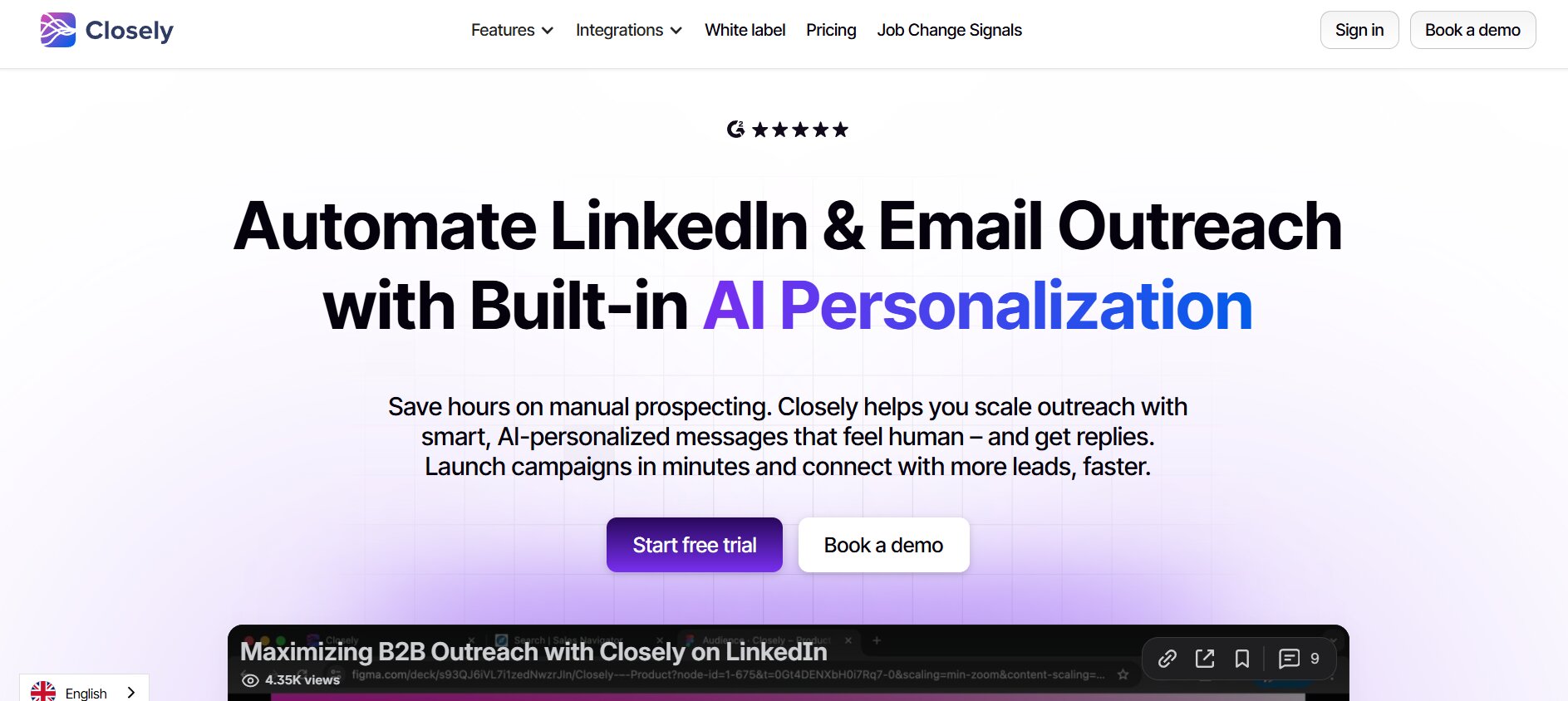
Closely is a cloud-based LinkedIn automation and email outreach platform. It is built for sales teams, marketers, and B2B agencies that want to run multichannel prospecting from one place — connecting LinkedIn campaigns with email sequences without jumping between tools.
The platform covers a solid range of use cases:
- Automated LinkedIn outreach — connection requests, follow-up message sequences, profile visits, post likes, and conditional branching based on whether a prospect accepts or not
- Email outreach — all plans include email campaign capabilities, so LinkedIn and email touchpoints can be coordinated in a single sequence
- Built-in lead database — the Lead Finder tool lets you search for and identify potential prospects based on filters like industry, location, and job title, pulling from a reported database of 300 million+ contacts
- Data enrichment — pulls verified business emails and phone numbers from LinkedIn profiles in real time, sourcing from 30+ data providers
- Unified inbox — consolidates LinkedIn and email replies in one place, with conversation tagging and teammate presence to prevent duplicate outreach
- CRM sync — native integrations with HubSpot, Salesforce, Pipedrive, and GoHighLevel, syncing DMs, connection events, and replies automatically
Closely targets solo founders, SDRs, and sales teams running multichannel campaigns. Its credit-based pricing system means each plan comes with a monthly allocation of emails, phone lookups, and AI personalizations — so the more you use, the more you need to watch your credit balance.
What Is DealsFlow?

DealsFlow is an AI-native LinkedIn outreach platform built specifically for scale. The pitch is different from most tools in this space — instead of handing you an automation framework and leaving the conversations to you, DealsFlow’s Arlo AI engine runs the actual back-and-forth with prospects, handling objections and booking calls without human input on every reply.
Here is what the platform covers:
- Arlo AI outreach engine — AI that reads incoming replies, decides the best response, handles common objections, and books meetings, all in the sender’s voice
- Multi-account dashboard — manage up to 20+ LinkedIn accounts from a single dashboard, built specifically for agencies and SDR teams running outreach across multiple profiles
- Campaign builder — multi-step campaign sequences with smart delays, daily action limits, and behavioral mimicry designed to keep accounts safe at volume
- AI lead research — finds and qualifies prospects based on your Ideal Customer Profile directly from LinkedIn
- Prospect CRM — import leads from LinkedIn search URLs, post commenters, or CSV; every lead gets an AI warmth score (Hot, Warm, Neutral, Cold)
- Advanced analytics — full-funnel tracking from connection request to booked call, with team-level performance reporting
- Smart unified inbox — cross-account inbox management with reply detection and conversation organization
DealsFlow is built for agencies running outreach for multiple clients, growth teams doing high-volume prospecting, and B2B sales teams that need AI to handle conversations — not just automation to send them.
Feature-by-Feature Comparison
Outreach Automation
Closely runs sequence-based automation with conditional logic — if a prospect accepts, they go down one path; if they don’t, you can set up alternative actions like profile views or post likes to stay on their radar. The branching is useful and the campaign builder is drag-and-drop, which makes setup fast. It supports smart delays and configurable working hours to make activity look more natural.
DealsFlow takes a different approach. The campaign builder handles the standard automation — connection requests, follow-ups, smart delays, daily limits — but the Arlo AI engine sits on top of that and runs live conversations. When a prospect replies, Arlo reads the message, determines the right response, manages objections, and pushes toward a booked call. That is not a template-matching system. It is AI running an actual dialogue.
For teams that want to build sequences and manage replies themselves, Closely handles that well. For teams that want AI to own the conversation from start to finish, that is DealsFlow’s lane.
Verdict: DealsFlow offers more intelligent execution at volume. Closely is strong for teams that prefer direct control over their sequences.
Multi-Account Management
This is where the gap between the two tools becomes obvious.
Closely supports multiple accounts — its Growth plan allows 2–3 LinkedIn accounts and its Pro plan allows 5+ — but multi-account functionality is not the core design priority. It is available, but it is not what the platform was built around.
DealsFlow was built from day one for multi-account management. The Agency Pilot plan supports 20 LinkedIn accounts under one dashboard. You can see every account, every inbox, every campaign side by side. There is per-client reporting, team management, and custom workflows built specifically for agencies running outreach across dozens of profiles simultaneously.
If you are managing outreach for one LinkedIn account, this difference does not matter. If you are running outreach for 5, 10, or 20 clients — it is the entire product experience.
Verdict: DealsFlow is the clear choice for agencies and teams managing multiple LinkedIn accounts.
Lead Sourcing & Targeting
This one is an honest draw because the two tools solve the sourcing problem differently.
Closely has a built-in B2B contact database with 300 million+ contacts. You can search and filter by industry, job title, location, and other criteria without ever touching LinkedIn Search or Sales Navigator. The Lead Finder tool is genuinely useful for teams that do not have access to Sales Navigator or want a single platform to handle both sourcing and outreach. It also enriches leads in real time with verified emails and phone numbers from 30+ data sources.
DealsFlow works from LinkedIn-native sourcing — you define your ICP, and the AI lead research feature finds qualified prospects on LinkedIn directly. You can also import from LinkedIn search URLs, Sales Navigator exports, post commenters, or CSV files. If you are already using Sales Navigator, DealsFlow slots in cleanly.
Verdict: Draw — Closely wins if you need a built-in contact database. DealsFlow wins if you are already in a LinkedIn-native workflow and want AI to handle the research.
Inbox & Reply Management
Closely has a unified inbox that pulls LinkedIn DMs, InMails, and email replies into one place. You can assign conversations, add tags, use reply templates, and see teammate presence to avoid duplicate outreach. It is a functional inbox for teams running multichannel campaigns.
DealsFlow’s smart inbox is built specifically for managing high reply volume across multiple LinkedIn accounts simultaneously. Every connected account feeds into one centralized view, with reply detection, conversation tagging, and the Arlo AI engine handling responses in the background when you are not actively managing threads. For an agency running 10 client accounts, that is a fundamentally different experience than toggling between individual inboxes.
Verdict: DealsFlow handles multi-account inbox management significantly better for high-volume teams. Closely’s inbox is solid for single or small-team use.
AI & Personalization
Closely’s AI personalization pulls context from LinkedIn profiles and company data to generate 1-to-1 messages for DMs, InMails, and emails. It supports dynamic variables, human review before sending, and A/B testing. It is a real personalization engine — not just a first-name merge tag.
DealsFlow’s AI goes further. The Arlo engine does not just write personalized outreach — it manages the live conversation. It reads replies, interprets intent, handles objections, and books meetings. The personalization happens at the message level, but the intelligence keeps running after the first send. For context on what that looks like in practice: DealsFlow’s platform shows an AI reply rate of 23% across active campaigns, with 12,000+ meetings booked via the platform.
Verdict: Both tools have real AI personalization. DealsFlow’s advantage is that the AI keeps working after the initial message — Closely’s stops at sending.
Safety & LinkedIn Compliance
Both platforms are cloud-based, which means campaigns run without your computer being on and without a browser extension sitting on your LinkedIn account. That matters a lot for account safety.
Closely uses smart delays, configurable working hours, and daily action limits to keep outreach looking human. It also has a warm-up mode for new accounts. Users report a low restriction rate of 5–10%, and one independent reviewer noted zero LinkedIn warnings after sending 15,000+ messages on the platform.
DealsFlow’s safety controls include randomized delays, daily action limits, behavioral mimicry to match natural human patterns, and automatic warmup for connected accounts. These are baked into the platform by default — you do not have to configure them manually. The platform handles safety limits automatically when you connect a LinkedIn profile.
Verdict: Both tools take LinkedIn compliance seriously. DealsFlow’s safety controls are automatic and built for accounts running at agency scale.
Reporting & Analytics
Closely offers unified analytics across LinkedIn and email campaigns — you can track connection request acceptance rates, message open rates, reply rates, and email bounce data from one dashboard. A/B testing data feeds back in, so you can see which message variants drive better results.
DealsFlow goes deeper on team-level performance. The analytics dashboard shows full-funnel data from connection request all the way through to booked call — DealsFlow shows this as a conversion breakdown: connections sent, accepted, replied, and calls booked. For agencies, there is per-client reporting, so you can show each client exactly what their accounts are doing.
Verdict: DealsFlow provides more actionable reporting, especially for teams and agencies that need to track performance across multiple accounts and present results to clients.
Integrations
Closely has native integrations with HubSpot, Salesforce, Pipedrive, and GoHighLevel. These sync DMs, InMails, connection events, and replies to contacts, accounts, and deal timelines automatically. It also connects via Zapier for tools outside the native list.
DealsFlow supports integrations and webhook/API access for teams building custom workflows into existing tech stacks. For agencies with specific reporting setups or CRM pipelines, the API gives flexibility to build what the native integrations do not cover.
Verdict: Closely edges ahead on out-of-the-box CRM depth. DealsFlow’s API support is better for custom integration work.
Pricing Comparison
Here is how the two tools sit on pricing.
DealsFlow (annual billing, 20% discount applied):
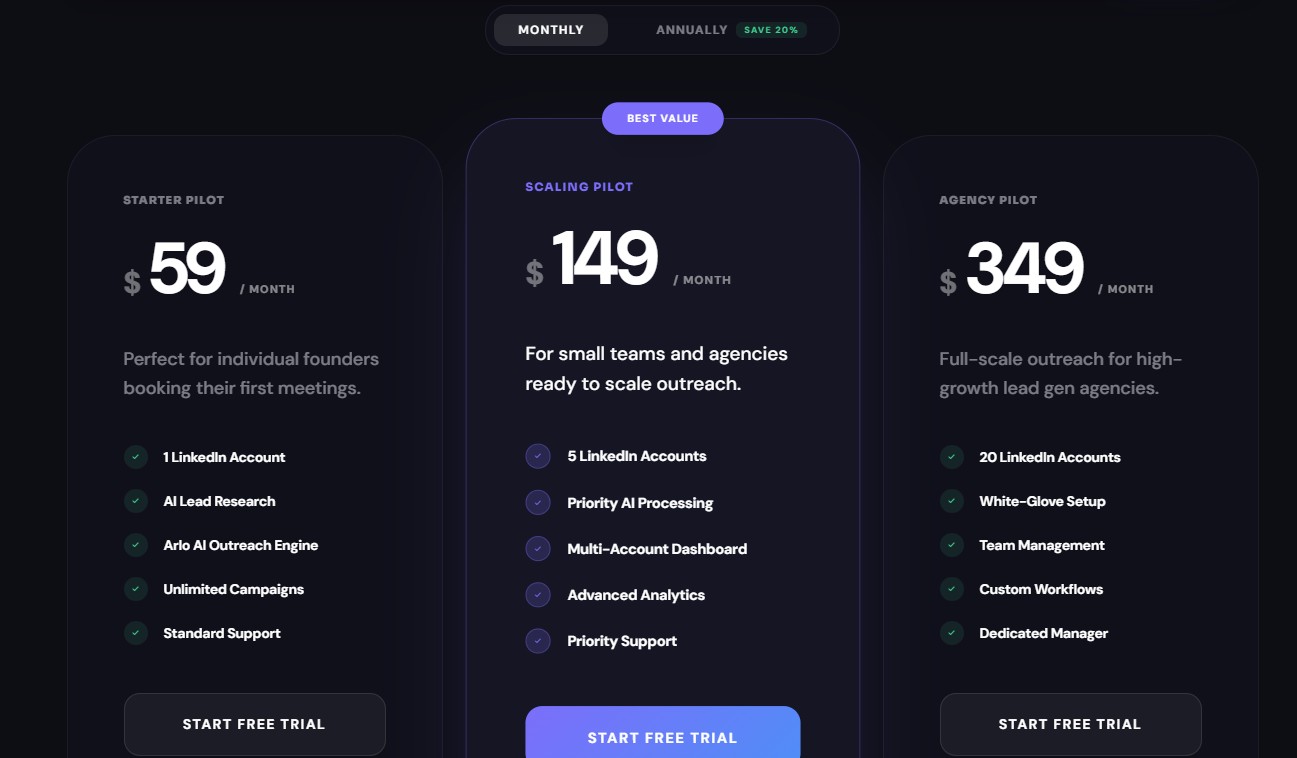
- Starter Pilot — $49/month — 1 LinkedIn account, AI lead research, Arlo AI outreach engine, unlimited campaigns, standard support
- Scaling Pilot — $129/month — 5 LinkedIn accounts, priority AI processing, multi-account dashboard, advanced analytics, priority support
- Agency Pilot — $299/month — 20 LinkedIn accounts, white-glove setup, team management, custom workflows, dedicated manager
On monthly billing, those prices are $59, $149, and $349 respectively. All three plans include Arlo AI — the conversational AI engine is not gated behind the top tier.
Closely (varies by plan):
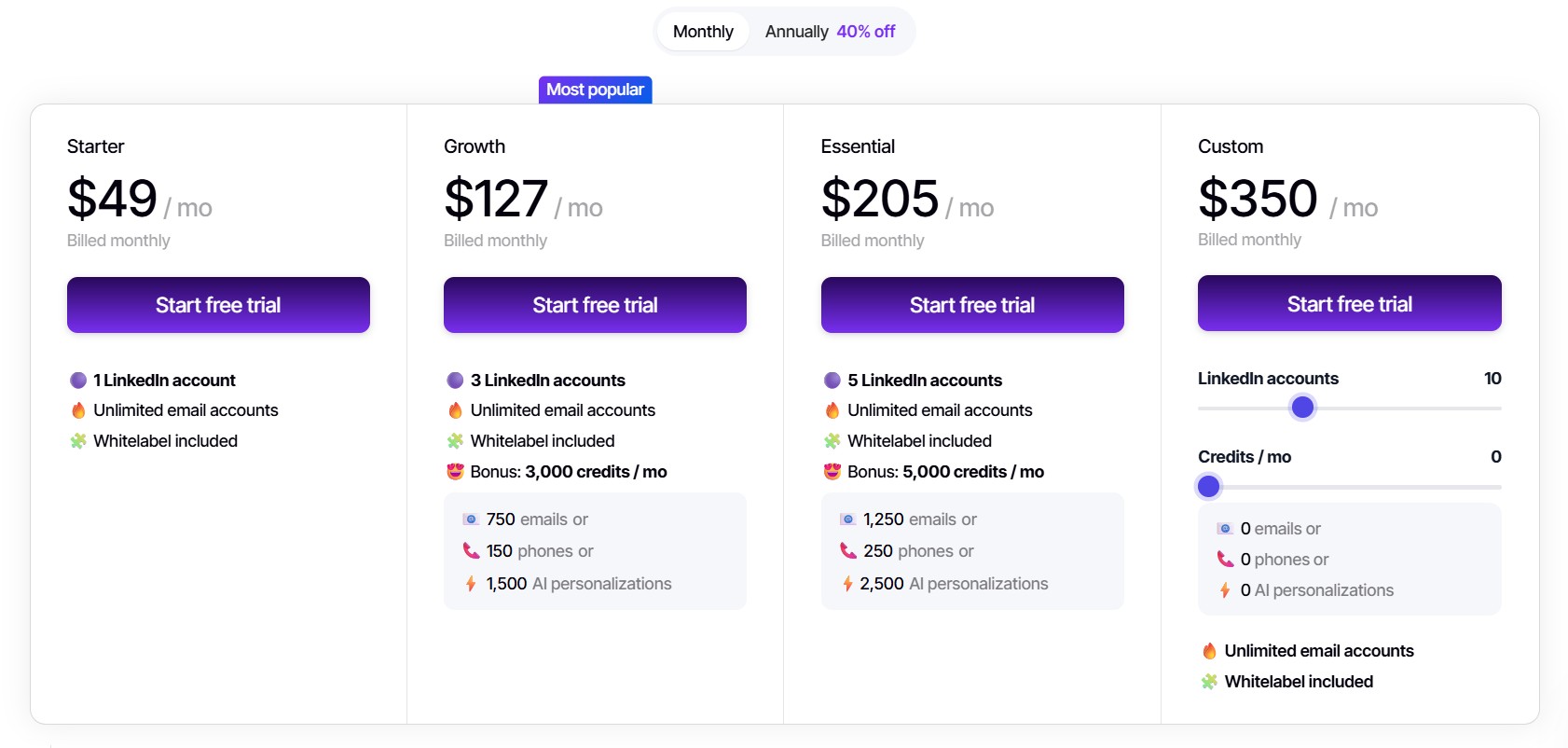
- Personal/Starter plans start around $49–$99/month with 1 LinkedIn account and 500–1,000 credits monthly (credits cover emails, phone lookups, and AI personalizations)
- Growth plans run $127–$219/month for 2–3 LinkedIn accounts and 3,000–5,000 credits
- Pro plans run $166–$339/month for 5+ LinkedIn accounts with unlimited credits
The credit system on Closely means your effective monthly cost scales with usage. A team running high-volume enrichment or AI personalizations will burn through credits faster than the base plan allows, which can push you into a higher tier than the headline price suggests.
DealsFlow’s pricing is straightforward — a flat monthly rate per account tier, with no credit system or usage caps on core features.
Verdict: DealsFlow offers more predictable pricing. For teams managing multiple accounts and needing AI throughout the workflow, it delivers more per dollar at the Scaling and Agency tiers.
Who Should Use Closely?
Closely is genuinely a good tool in the right context. Here is where it makes sense:
- Solo founders and SDRs who want LinkedIn and email outreach in one place and do not want to pay for a separate email tool or lead database
- Teams that need built-in contact sourcing — if you do not have Sales Navigator and want to find and reach prospects without leaving the platform, the Lead Finder is a real advantage
- Small sales teams running single-user or two-to-three-account campaigns who value the multichannel coordination of LinkedIn and email in one sequence
- Teams with established CRM workflows using HubSpot, Salesforce, or Pipedrive, where native sync matters more than raw outreach volume
If the workflow is one person, one LinkedIn account, multichannel outreach, and a need for built-in lead sourcing — Closely is a reasonable fit.
Who Should Use DealsFlow?
DealsFlow is the stronger choice in these situations:
- Lead gen agencies managing outreach for 5, 10, or 20+ clients — the multi-account dashboard, per-client reporting, and Agency Pilot plan are built specifically for this
- Growth teams running high-volume LinkedIn outreach who want AI to handle conversations after the first connection, not just send templates
- B2B sales teams where volume of booked calls is the metric that matters and manually managing every reply thread is not realistic
- Teams already using Sales Navigator that want to maximize their prospecting output with AI-powered follow-up and campaign management
- Anyone who wants predictable, flat-rate pricing without tracking credit consumption
The Arlo AI engine is the real differentiator. If the reason you want an automation tool is to reduce the time you spend on LinkedIn conversations — not just reduce the time spent sending — DealsFlow is built for that.
Final Verdict
Both tools do LinkedIn outreach. The difference is what they are optimized for.
Closely is a capable multichannel outreach platform. If you need LinkedIn and email under one roof, a built-in contact database, and tight CRM integration — it handles all of that competently. It is a good tool for teams that want to run their outreach themselves and just want the repetitive parts automated.
DealsFlow is built for a different problem. It is for teams that need to run outreach at volume, across multiple accounts, where the bottleneck is not sending messages but managing conversations. The Arlo AI engine handles the part that takes the most time — the back-and-forth — which is why teams using it report cutting outreach management time by 70% while booking twice as many calls.
FAQs
Q1: Is DealsFlow safe to use for LinkedIn outreach?
Yeah, account safety is built into the platform by default. DealsFlow uses randomized delays, daily action limits, and behavioral mimicry that mirrors how a real person uses LinkedIn. When you connect an account, warmup starts automatically — you do not have to configure any of it manually. It is cloud-based too, so there is no browser extension sitting on your profile flagging activity.
Q2: Can Closely manage multiple LinkedIn accounts?
It can, but with limits. The Growth plan supports 2–3 accounts and the Pro plan supports 5+. The multi-account functionality exists, but it was not what Closely was designed around. If you are managing outreach for multiple clients or running 10+ LinkedIn profiles simultaneously, that setup gets clunky fast. DealsFlow’s Agency Pilot plan handles up to 20 accounts from a single dashboard with per-client reporting built in.
Q3: What makes DealsFlow’s Arlo AI different from standard LinkedIn automation?
Most automation tools send your messages for you. That is where they stop. Arlo keeps going — it reads incoming replies, figures out the right response, handles objections, and pushes toward a booked call, all without you touching the thread. It is not a template-matching system. It is AI running the actual conversation in your voice, which is why the platform reports a 23% AI reply rate across active campaigns.
Q4: Does Closely have a built-in lead database?
Yes. The Lead Finder tool lets you search for prospects by industry, job title, location, and other filters, pulling from a database of 300 million+ contacts. It also enriches profiles with verified emails and phone numbers in real time. That is genuinely useful if you do not have Sales Navigator and want sourcing and outreach in one place.
Q5: Which tool is better for agencies running LinkedIn outreach for clients?
DealsFlow, and it is not particularly close. The Agency Pilot plan is built specifically for lead gen agencies — 20 LinkedIn accounts, a unified multi-account dashboard, per-client reporting, custom workflows, team management, and a dedicated manager. Closely can technically handle multi-account work at the Pro tier, but DealsFlow’s entire Agency plan was designed for exactly that use case.
Q6: How does DealsFlow pricing compare to Closely?
DealsFlow runs on flat-rate pricing — no usage credits, no consumption tracking. You pay for a tier and you get everything in it. Closely uses a credit-based system where credits cover emails, phone lookups, and AI personalizations. Heavy users burn through credits quickly and often need to step up to a higher plan than the entry price suggests. For teams running volume outreach, DealsFlow’s pricing is more predictable.
Q7: Does DealsFlow offer a free trial?
Yes. DealsFlow offers a 14-day free trial with no credit card required, and setup takes around 10 minutes according to the platform. It is enough time to connect an account, run a campaign, and see how Arlo handles replies before committing.