


There’s a quiet frustration that anyone who has run LinkedIn outreach for more than a few months knows well. You set up a campaign, your connection requests go out, and then someone actually replies — and the automation stops cold. Now you’re back to doing it manually: reading through threads, crafting responses, handling objections one by one, following up when leads go quiet. The tool that was supposed to save you time just handed the work back.
This is the core tension in LinkedIn automation in 2026. LinkedIn now caps weekly connection requests at 100 per account, which means you can no longer win on volume alone. The teams booking the most meetings are not the ones sending the most messages — they’re the ones doing something useful with every reply they get.
Two tools sit at opposite ends of this problem. Dripify has been a go-to platform for LinkedIn drip sequences since the early 2020s. It runs in the cloud, builds polished multi-step campaigns, and has a reputation for being accessible for individual salespeople and small teams. DealsFlow is a newer, AI-native platform built around a different premise: that the conversation doesn’t end when a prospect replies — that’s when it gets interesting. Its Arlo AI engine picks up every reply, handles objections, and moves toward a booked meeting without handing anything back to a human.
This guide compares both tools across seven dimensions — automation depth, multi-account management, campaign building, account safety, CRM features, analytics, and integrations — with full pricing breakdowns and a clear verdict on which type of user belongs on which platform. The goal is not to pick a winner for everyone. It’s to help you figure out which one makes sense for your situation.
Tool Snapshots — What Each Product Actually Is
Before getting into the feature-by-feature breakdown, it helps to understand what each platform was built to do, because that shapes everything else.
DealsFlow at a Glance

DealsFlow describes itself as an AI-native LinkedIn outreach platform — not a tool that added AI features, but one built with AI as the core mechanism from the start. The central product is the Arlo AI Engine, which handles the full outreach loop: finding qualified prospects, sending connection requests and initial messages, reading every reply, responding to objections, and booking a meeting when the prospect is ready. The human’s job is to take the call that Arlo books.
The platform runs entirely in the cloud and supports up to 50+ LinkedIn profiles managed from a single dashboard — a design choice clearly aimed at agencies and SDR teams running outreach across multiple accounts. It includes a built-in prospect CRM that assigns each lead an AI warmth score (Hot, Warm, Neutral, or Cold) based on their engagement signals, and a full-funnel analytics view that tracks the path from connection sent to call booked.
DealsFlow is currently in Early Access, with the company reporting over 12,000 meetings booked through the platform. It holds G2 badges for High Performer, Best Results, and Easiest Setup, and offers a 14-day free trial with no credit card required.
Dripify at a Glance
Dripify is a cloud-based LinkedIn automation platform that has been in the market since around 2021. It automates the top of the funnel well: connection requests, follow-up messages, profile visits, skill endorsements, and multi-step drip sequences that run 24/7 without needing your computer to be on.
Its campaign builder is one of its strongest assets — a visual, no-code interface that lets users build sequences with time delays, conditional logic, and over 20 personalization variables including first name, company, job title, mutual connections, and time in current role. The platform integrates natively with HubSpot, Salesforce, Zoho CRM, Pipedrive, Google Sheets, and several other tools, and connects to thousands more via Zapier, Make, and webhooks.
Dripify is rated 4.5 to 4.6 out of 5 on G2. It uses a per-user subscription model — each LinkedIn account requires its own license — and offers a 7-day free trial without a credit card. Reviews consistently praise its ease of use and campaign-building flexibility, while pointing to its pricing structure as a pain point for teams and agencies managing multiple accounts.
The platform’s most frequently cited limitation is what happens when a prospect replies: Dripify’s automation stops. The conversation moves to the inbox, and from that point it’s manual.
Head-to-Head Feature Comparison
1. Automation Depth — DealsFlow Wins
This is where the two platforms diverge most sharply, and it’s the most consequential difference for anyone whose goal is booked meetings rather than raw message volume.
Dripify automates the outbound sequence — the connection request, the follow-up message, and any additional steps you’ve programmed in. The moment a prospect types back, the automation stops. Their reply lands in your LinkedIn inbox and waits for you. If you’re managing one account, that’s manageable. If you’re running outreach across ten accounts simultaneously, that inbox becomes a full-time job.
DealsFlow’s approach is different. When a prospect replies, Arlo reads the message, assesses whether it’s a positive signal, a question, or an objection, and responds accordingly — in the voice and tone you’ve configured. If someone says “Interesting, but we already use a tool like this,” Arlo doesn’t stop. It acknowledges the objection, provides a specific rebuttal, and works toward scheduling a call. According to DealsFlow’s published data, the platform’s AI handles replies in a way that users report they “couldn’t tell it wasn’t a human.”
For solo founders and small teams, this matters because time spent manually managing reply threads is time not spent on the calls themselves. For agencies running outreach on behalf of multiple clients, it matters even more — Dripify’s handoff model doesn’t scale without adding headcount.
- DealsFlow: Full-loop automation from first message to booked meeting; Arlo AI handles replies, objections, and scheduling without human input; users intervene only when they want to, not because they have to
- Dripify: Automates outbound sequences reliably; stops when a prospect replies; all reply management is manual; no AI response layer at any price tier
2. Multi-Account Management — DealsFlow Wins
The pricing math here tells the story faster than any feature description can.
DealsFlow was built with agencies in mind. All plans include multi-account capability — the Scaling Pilot ($129/month) supports 5 LinkedIn profiles, and the Agency Pilot ($299/month) supports 20 profiles, all managed from one dashboard. Account switching is a single click. Campaign performance, inbox activity, and lead status are visible in aggregate across all profiles. The platform supports per-client reporting, which matters for agencies that need to show results separately to each client.
Dripify charges per LinkedIn account. One subscription covers one profile. If you need to run outreach from five accounts, you buy five subscriptions. Third-party reviews confirm that a team of ten salespeople on Dripify’s Advanced plan would pay $990 per month — with no volume discount available.
For a 20-account agency, the cost comparison is stark: DealsFlow’s Agency Pilot runs $299 per month. The equivalent Dripify setup — 20 accounts on the Advanced plan — runs $1,980 per month. That’s a $1,681 monthly difference, or over $20,000 per year.
- DealsFlow: Unlimited LinkedIn profiles across all plans; single unified dashboard for all accounts, campaigns, and inboxes; per-client reporting included; built explicitly for agencies and SDR teams at scale
- Dripify: One LinkedIn account per subscription; no bundling or volume discount for multiple accounts; agencies must purchase and manage separate licenses for each profile; management complexity increases linearly with account count
3. Campaign and Sequence Builder — Dripify Wins
Dripify has had years to refine its campaign builder, and it shows. The visual interface lets users assemble multi-step sequences with time delays between actions, conditional branches that respond to prospect behavior (accepted, not accepted, replied, did not reply), and over 20 dynamic personalization variables. Pre-built templates for common use cases — sales outreach, recruiting, partnership development — lower the barrier for new users. The result is a campaign builder that gives experienced outbound operators a high degree of control over every step of the sequence.
DealsFlow has a campaign builder, but it functions differently. Once a campaign launches and Arlo takes over the conversation, the AI makes real-time decisions rather than following a fixed sequence. That’s a strength when it comes to handling replies, but it means users have less direct control over what happens at each specific step. If your team has strong, tested messaging sequences and wants to run them precisely as written, Dripify gives you more control over the execution.
- Dripify: Mature visual campaign builder; conditions and triggers based on prospect actions; 20+ personalization variables including mutual connections, time in role, and university; pre-built sequence templates; fine-grained control over every automation step
- DealsFlow: Campaign builder handles initial setup and targeting; Arlo’s AI handles dynamic conversation flow from there; less manual scripting of individual steps; better suited for teams that trust AI to decide the best response in real time
4. Account Safety and LinkedIn Compliance — Tied
Both platforms are cloud-based, which means campaigns continue running when your computer is off. Both also use humanization techniques — randomized timing, variable delays between actions — to avoid patterns that LinkedIn’s detection systems flag as automation.
DealsFlow states a “zero bans, guaranteed” policy, citing distributed cloud execution and hard daily limits aligned with LinkedIn’s current safety thresholds. Its built-in account warmup is automatic, so new accounts are gradually ramped up before hitting full volume.
Dripify also runs in the cloud with human-behavior mimicry baked in. However, an independent review published by ConnectSafely in January 2026, which tested automation behavior across 50 accounts, found that approximately 23% of users on automation platforms like Dripify faced LinkedIn account restrictions within 90 days. That figure is worth noting, though it applies broadly to LinkedIn automation tools rather than specifically to Dripify in isolation.
LinkedIn’s weekly connection request cap — which dropped from 100 per day to 100 per week — also changes the calculus. Tools that built their value proposition around high-volume sending are now less differentiated by volume capacity than by what they do with each connection made.
- DealsFlow: Cloud-based; automatic account warmup; hard daily limits enforced by the platform; distributed cloud execution; zero-ban guarantee stated
- Dripify: Cloud-based; human-timing mimicry; LinkedIn protection features on higher-tier plans; third-party testing shows account restriction risk that is consistent with the broader automation category
5. Built-in CRM and Lead Management — DealsFlow Edges Ahead
DealsFlow includes a native prospect CRM as part of the platform. Leads come in from LinkedIn search URLs, Sales Navigator filters, CSV files, or post commenters — and each one gets an AI warmth score. The scoring model categorizes prospects as Hot, Warm, Neutral, or Cold based on their response behavior, so teams can prioritize follow-up on the conversations most likely to close. The full-funnel view tracks every lead from the initial connection request through to a booked call.
Dripify has a Leads dashboard where users can see each prospect’s status (in progress, completed, awaiting action, paused, failed, or blacklisted), add notes, and search across their lead list. Data can be exported to CSV. What Dripify doesn’t have is a native CRM with pipeline views or AI-driven lead scoring. For teams that need those features, they connect Dripify to an external CRM — HubSpot, Salesforce, Pipedrive — through Zapier or native integrations.
Both approaches work. DealsFlow’s advantage is that the AI warmth scoring surfaces which leads deserve attention without requiring the user to read every conversation. Dripify’s advantage is that if you already have a CRM you trust, the integration works cleanly.
- DealsFlow: Native prospect CRM with AI warmth scoring; import from LinkedIn URL, post commenters, or CSV; full-funnel view from connection to booked call; no external tool required for basic pipeline management
- Dripify: Leads dashboard with status tracking and notes; CSV export; no native lead scoring; relies on Zapier or native CRM integrations for pipeline visibility beyond basic status fields
6. Analytics and Reporting — Dripify Edges Ahead
Dripify’s analytics dashboard is one of its stronger features. Users can track connection acceptance rates, reply rates, campaign performance over time, and team member activity. The reporting UI is clean and has had several years of iteration. For managers overseeing a team’s LinkedIn activity, the performance monitoring view makes it straightforward to see who is hitting their numbers and which campaigns are underperforming.
DealsFlow provides full-funnel analytics — connections sent, acceptance rate, reply rate, and booked calls — and the data is exportable. The platform’s funnel view (published on its website) shows the complete conversion path: connections sent → accepted → replied → booked. The reporting is functional and covers what most users need, but as a newer platform, its analytics UI is less mature than Dripify’s.
Neither platform offers native BI integrations, though Dripify’s Zapier and webhook connections allow teams to push data into external dashboards.
- DealsFlow: Full-funnel analytics from connection to booked call; data export available; newer reporting interface
- Dripify: Mature visual analytics dashboard; team performance monitoring by individual account; campaign-level performance tracking; Zapier-enabled export to external analytics tools
7. Integrations and Ecosystem — Dripify Wins
Dripify has native integrations with HubSpot, Salesforce, Zoho CRM, Pipedrive, Google Sheets, Asana, Intercom, Zendesk, and ActiveCampaign. It also connects to thousands of additional tools via Zapier, Make, and custom webhooks — making it straightforward to slot into an existing sales technology stack without building custom workarounds.
DealsFlow’s integration ecosystem is newer and more limited. The platform is designed to handle the full outreach workflow end-to-end internally, which reduces the need for external integrations for teams whose primary goal is booking calls from LinkedIn. For teams with established CRM workflows or marketing automation setups they need to sync with, this is a meaningful gap.
If your sales process lives primarily inside your CRM and LinkedIn outreach is one input among many, Dripify’s integration depth is a genuine advantage. If LinkedIn outreach is the primary or only outbound channel and you want one tool to handle the whole thing, DealsFlow’s closed loop is less of a limitation.
- DealsFlow: Integration ecosystem is newer; best suited for teams running LinkedIn outreach as a self-contained workflow; limited native connections to external CRMs and tools at this stage
- Dripify: Native integrations with HubSpot, Salesforce, Zoho, Pipedrive, Google Sheets, Asana, Intercom, Zendesk, and ActiveCampaign; Zapier, Make, and webhooks for additional connections; no public API for custom builds
Pricing Breakdown — The Real Numbers
DealsFlow Pricing
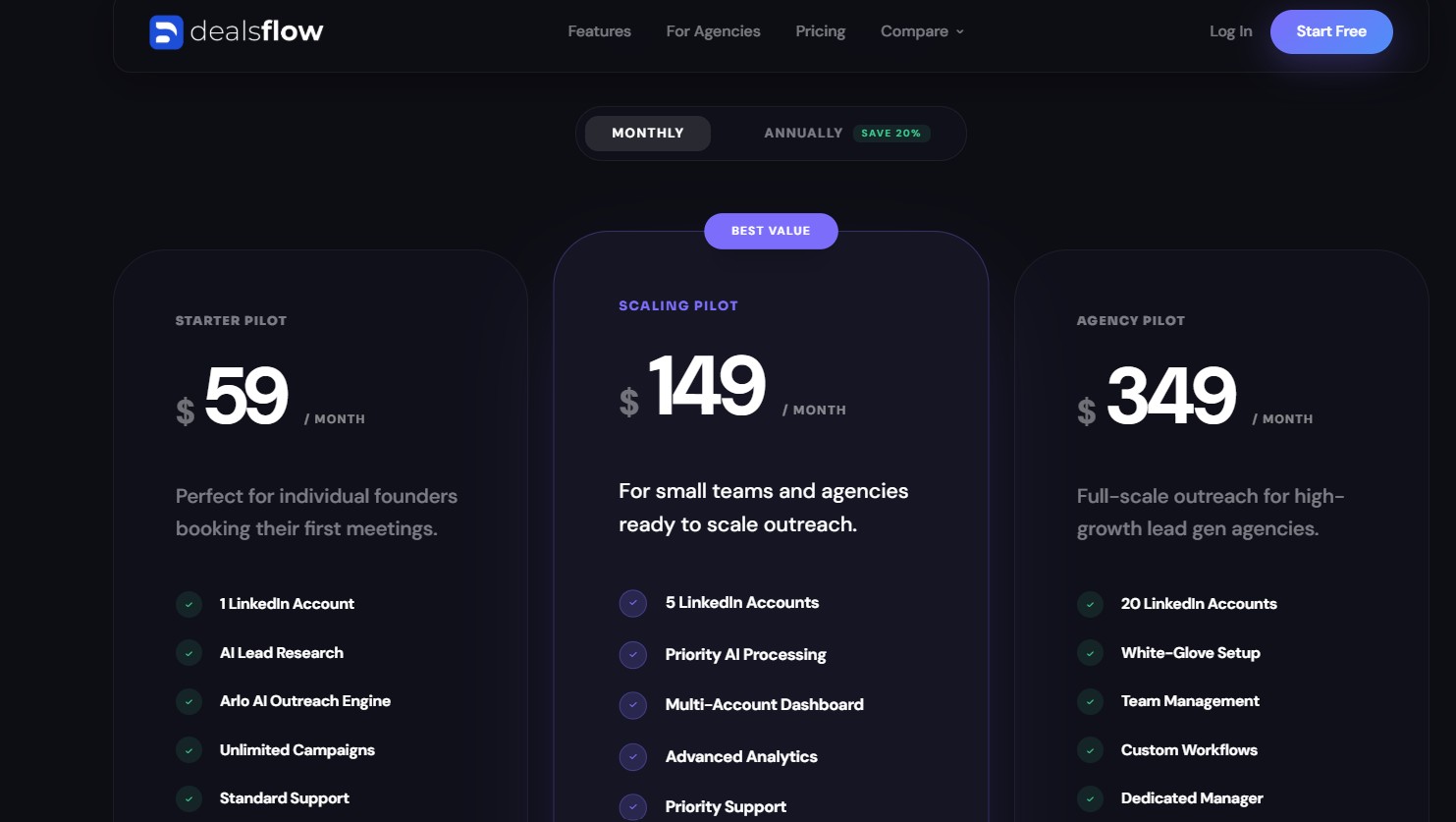
DealsFlow offers three plans, all with a 14-day free trial and no credit card required. Annual billing saves 20%.
- Starter Pilot — $59/month: 1 LinkedIn account, Arlo AI Outreach Engine, unlimited campaigns, AI lead research, standard support. The entry point for individual founders testing the platform.
- Scaling Pilot — $149/month: 5 LinkedIn accounts, priority AI processing, multi-account dashboard, advanced analytics, priority support. The right tier for small SDR teams or boutique agencies with a handful of clients.
- Agency Pilot — $349/month: 20 LinkedIn accounts, white-glove setup, team management, custom workflows, dedicated account manager. Built for lead-gen agencies managing multiple client accounts simultaneously.
There are no per-seat fees. No additional costs for email finder credits. The 20-account Agency Pilot is a flat $299 per month regardless of how many team members use the dashboard.
Dripify Pricing
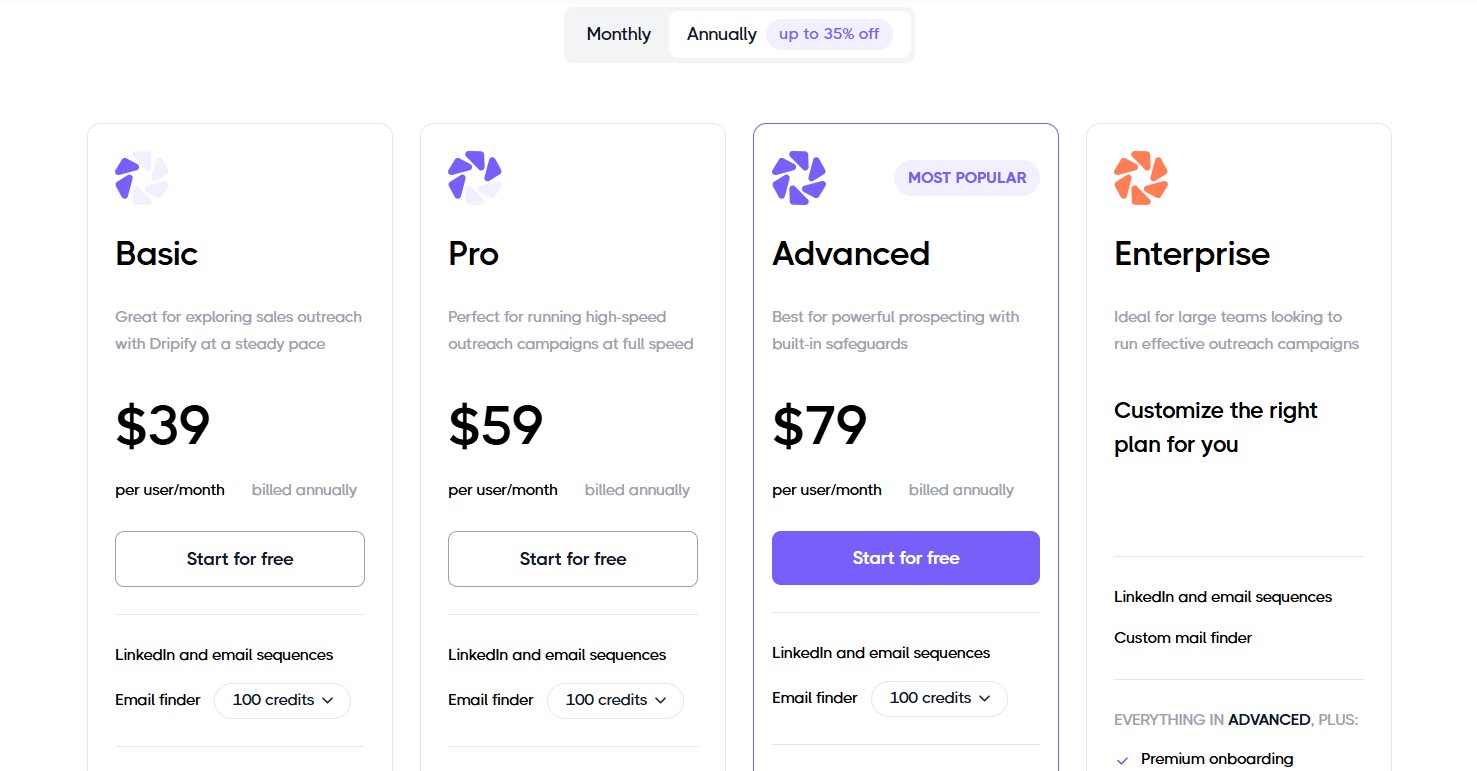
Dripify uses a per-user model — every LinkedIn account connected to the platform requires its own subscription. The platform offers four tiers, with annual billing providing approximately 35% savings versus monthly rates.
- Basic — $59/month ($39/month billed annually): 1 LinkedIn account, 1 drip campaign at a time, limited daily action quotas, 100 email finder credits, analytics dashboard, 24/7 live support.
- Pro — approximately $79–99/month: Unlimited campaigns, expanded automation capacity, email finder credits, lead response handling features, and webhook support on higher configurations.
- Advanced — $99/month ($79/month annually): Full team management features, role assignments, collaborative tools, performance monitoring by team member.
- Enterprise: Custom pricing for organizations with 10 or more seats, with dedicated support and onboarding.
There are two costs that review sources flag as easy to underestimate. First, the email finder operates on a credit model and is billed separately from the core subscription. Second, because Dripify charges per LinkedIn account, team costs compound quickly. G2 reviewers in 2025 and 2026 also note issues with Dripify’s payment processor (Fastspring), including failed payments that trigger account deactivation and slow resolution times from support.
Value-Per-Dollar Comparison
| Scenario | DealsFlow | Dripify |
|---|---|---|
| 1 LinkedIn account | $59/month ($49 annual) | $59/month ($39 annual) |
| 5 LinkedIn accounts | $149/month (Scaling Pilot) | $295–$495/month (5 × Pro/Advanced) |
| 20 LinkedIn accounts | $349/month (Agency Pilot) | $1,180–$1,980/month (20 × Basic/Advanced) |
| Free trial length | 14 days | 7 days |
| AI reply handling included | Yes, all plans | No |
| Email finder | Included | Separate credit cost |
| Annual discount | 20% | ~35% |
User Experience and Onboarding
DealsFlow
DealsFlow’s onboarding is built around a four-step flow: connect your LinkedIn accounts, define your ideal customer profile, let Arlo run the outreach, and take the calls it books. The company states that initial setup takes around 10 minutes, and user testimonials published on its website back that up — one SDR lead at Nexus Growth describes setting up their first campaign in 8 minutes and booking 6 calls in the first week.
For agencies migrating from another tool, DealsFlow offers free campaign and account migration from Dripify, which the company says typically takes under two hours. The Agency Pilot plan includes white-glove setup, meaning a dedicated account manager handles the technical configuration. The G2 Easiest Setup badge reflects the platform’s design philosophy: reduce friction between signup and first booked call.
Dripify
Dripify has a well-established reputation for accessibility. Its visual campaign builder is consistently praised in reviews for being intuitive without requiring technical knowledge. The platform maintains an extensive knowledge base with video tutorials and onboarding documentation, which makes it one of the easier LinkedIn automation tools to get started with as a first-time user.
The complexity increases significantly for agencies or teams managing multiple accounts. Because each account is a separate subscription, there’s no unified dashboard — users switch between accounts individually, which becomes unwieldy at scale. G2 reviews from 2025 and early 2026 also note a decline in support quality, with several reviewers citing AI chatbots replacing human support agents and long resolution times for billing and account issues.
Who Should Use Which Tool
Choose DealsFlow If You…
- Run a lead-gen agency managing 5 or more client LinkedIn accounts and need predictable, flat-rate pricing that doesn’t scale with headcount
- Want AI to handle mid-funnel conversations — not just top-of-funnel blasts — so your team’s time goes to calls, not inbox management
- Are a founder or small SDR team that cannot staff a person to manually respond to every LinkedIn reply thread across multiple campaigns
- Measure success in booked calls rather than in messages sent or connection acceptance rates
- Are switching from Dripify and want a free migration with minimal downtime
Choose Dripify If You…
- Need a mature, proven sequence builder where you control every step, every delay, and every branch condition in your outreach funnel
- Rely on HubSpot, Salesforce, or Pipedrive and need deep native CRM integrations that sync without third-party tools or custom configuration
- Are a solo SDR or recruiter managing a single LinkedIn account on a tighter monthly budget
- Want LinkedIn and email outreach managed within the same platform, using Dripify’s built-in email sequence and email finder features
- Already have a tech stack and need a LinkedIn automation tool that plugs into it cleanly
Overall Verdict
The clearest way to frame the difference: Dripify is a sequence tool and DealsFlow is a sales execution engine.
Dripify is very good at what it does — automating the top of the funnel, building structured multi-step campaigns, and integrating with the CRMs that most sales teams already use. For a solo salesperson or a small team that wants control over their sequences and has the capacity to manage replies manually, it delivers solid value.
DealsFlow is built for a different model. The premise is that a human’s time is too valuable to spend managing reply threads, handling objections in LinkedIn DMs, and manually nudging warm leads toward a calendar. Arlo handles all of that. The human shows up for the call.
In 2026, with LinkedIn’s weekly connection limits constraining outbound volume, the competitive edge in LinkedIn outreach has shifted away from sending more toward converting better. That shift favors DealsFlow’s approach. When you can only send 100 connection requests per week per account, every reply matters more — and a tool that treats a reply as the start of the process rather than the end of its job has a structural advantage.
Conclusion
LinkedIn automation has matured to the point where the question is no longer whether to automate but what exactly you’re automating. Sending connection requests on autopilot is table stakes. Every tool in this category does it. The real question is what happens after a prospect replies — because that’s where most of the sales work actually lives.
Dripify built a reliable, well-integrated platform for the top of the funnel. For a single salesperson who wants precise control over their sequence steps and connects to HubSpot or Salesforce daily, it still does the job. But its per-account pricing makes it expensive at scale, and its stop-on-reply model leaves the most important part of the conversation — the part where a prospect is actually engaging — back in human hands.
DealsFlow is designed around a simpler bet: that an AI handling objections and booking meetings is more valuable than an AI that only sends the first message. Given LinkedIn’s tightening volume limits in 2026, that bet looks increasingly correct. When you can’t win on volume, you have to win on conversion — and full-loop automation is a better conversion tool than a drip sequence that stops when the drip lands.
If you’re an agency or SDR team managing multiple LinkedIn accounts and measuring your results in booked calls, DealsFlow is the stronger platform at this point. Start your 14-day free trial at app.dealsflow.co/register — no credit card required.
FAQs
Is DealsFlow safe for LinkedIn accounts?
DealsFlow runs entirely in the cloud and enforces hard daily action limits that align with LinkedIn’s current usage thresholds. The platform uses distributed cloud execution and randomized, human-like timing between actions to avoid patterns that LinkedIn’s detection systems flag. DealsFlow states a zero-ban guarantee as part of its product offering and includes automatic account warmup for newly connected profiles.
Does DealsFlow replace Dripify completely?
For most use cases — especially agencies and SDR teams running multi-account outreach — yes. DealsFlow covers campaign building, automated outreach, reply handling, lead management, and analytics in one platform. The gap where Dripify still has an edge is in native CRM integrations. If your workflow depends on native HubSpot, Salesforce, or Pipedrive data syncing, Dripify’s integration depth is worth considering, at least until DealsFlow’s ecosystem matures.
Can I migrate from Dripify to DealsFlow?
Yes. DealsFlow offers free campaign and account migration from Dripify. The company states the process typically takes under two hours. The Agency Pilot plan includes a dedicated account manager who assists with setup and migration as part of onboarding.
Do I need Sales Navigator with either tool?
Neither platform requires a LinkedIn Sales Navigator subscription. DealsFlow works with standard LinkedIn accounts and supports importing leads from regular LinkedIn search URLs, CSV files, or post commenters. That said, Sales Navigator provides more granular search filters — by company size, seniority, headcount growth, and other signals — and both platforms recommend it for teams running high-volume, targeted outreach.
What happens when a prospect replies in DealsFlow vs. Dripify?
This is the core product difference. In Dripify, when a prospect replies, the automated sequence stops and the message lands in your LinkedIn inbox for manual follow-up. In DealsFlow, when a prospect replies, Arlo reads the message, determines the appropriate response, and continues the conversation — handling questions, objections, and scheduling — without handing anything back to a human. The user can intervene at any point, but the default is for Arlo to continue through to a booked meeting.