


You’re running outreach. Manually checking replies, copy-pasting follow-ups, switching between tabs, wondering why your reply rate is garbage. So you start looking at tools. You find DealsFlow. You find LinkedFusion. Both promise to fix the problem. But they’re solving it in completely different ways, and picking the wrong one means months of friction with a tool that just doesn’t fit how you work.
So here’s an honest breakdown. No fluff, no vendor talking points. Just what each tool actually does, where it wins, and who should be using it.
What Is DealsFlow?

DealsFlow is an AI-native LinkedIn outreach platform. And yeah, every tool says “AI” right now, but DealsFlow actually built around it from day one — it wasn’t bolted on later.
The core idea is simple. You connect your LinkedIn accounts, define who you want to reach, and DealsFlow’s AI engine (called Arlo) handles the rest. That means finding prospects, sending connection requests, and — this is the part that actually sets it apart — continuing the conversation after someone replies. Handling objections. Booking the meeting. All without you touching it.
They claim over 12,000 meetings booked through the platform. There’s a 14-day free trial with no credit card required. Setup reportedly takes about 10 minutes. Target users are founders doing outbound solo, SDR teams managing multiple accounts, and lead gen agencies running outreach for clients.
What Is LinkedFusion?
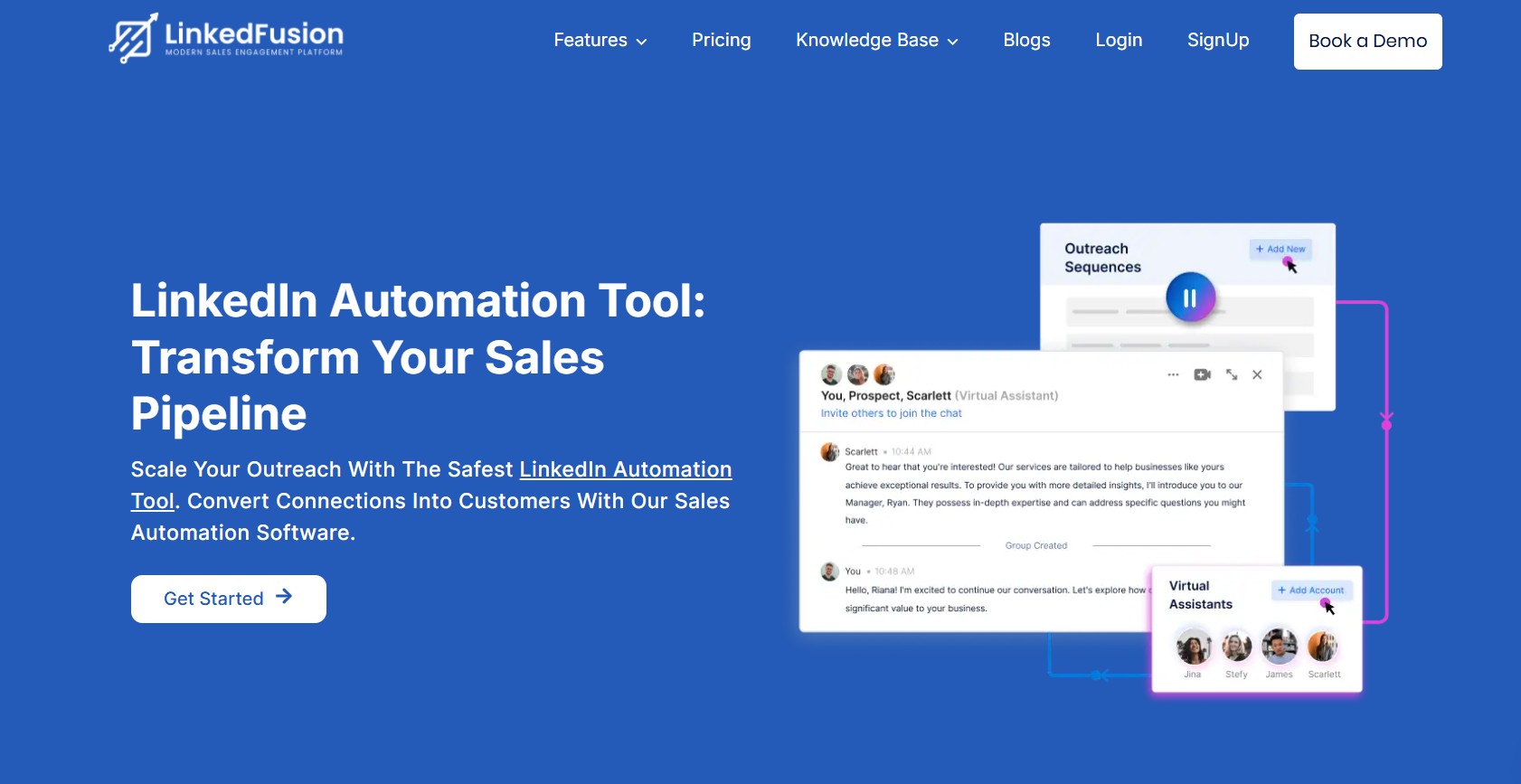
LinkedFusion is a cloud-based LinkedIn automation platform that’s been around longer and has a broader user base — over 45,000 professionals across 87 countries according to their site.
The approach here is more traditional. You build your sequences. You set your follow-up logic. You control the triggers and timing. The tool executes. LinkedFusion also covers more ground than just outreach — there’s an AI post scheduler, AI commenting on posts, LinkedIn SSI score tracking, and native CRM integrations with Salesforce, HubSpot, Pipedrive, Close CRM, Zoho, and more.
It’s built for SMBs and sales teams that want their LinkedIn outreach tightly synced with their existing CRM setup. More configuration overhead, more control.
DealsFlow vs LinkedFusion: Feature Comparison
AI and Conversation Handling
This is the biggest gap between the two tools, and it matters a lot depending on how you work.
DealsFlow’s Arlo AI doesn’t just send a sequence of messages on a timer. It reads each reply, understands what the prospect said, and decides what to say next. If someone comes back with “we already use a tool like this,” Arlo doesn’t stop — it handles the objection. If someone says “yes, tell me more,” Arlo moves toward booking a call. It’s doing the actual thinking in the middle of the funnel.
LinkedFusion has AI in the picture — there’s AI-assisted content generation and an AI commenting feature for posts — but it doesn’t manage post-reply conversations. Once a prospect responds, the ball is back in your court. You’re manually reviewing and replying. That’s not a knock on LinkedFusion, it’s just a fundamentally different model. Some teams want that control. Others are drowning in it.
For anyone who’s spent time manually managing 30+ LinkedIn inboxes across client accounts, the Arlo approach makes a lot more sense.
Multi-Account Management
DealsFlow structures its plans around account bundles:
- Starter Pilot: 1 LinkedIn account
- Scaling Pilot: 5 LinkedIn accounts
- Agency Pilot: 20 LinkedIn accounts
All managed from one dashboard. You see every account, every inbox, every campaign in one place. The pricing is flat per tier, not per seat.
LinkedFusion uses a per-user model. Each person on your team is a separate subscription. They do offer a Virtual Assistant (VA) technology feature that lets you expand outreach under a single account, but scaling to 10–20 client accounts gets complicated and expensive fast under a per-seat structure.
Agencies running outreach for multiple clients will find DealsFlow’s model easier to budget and manage.
Campaign Builder and Sequences
LinkedFusion is genuinely strong here. You can run unlimited concurrent sequences across all time zones, set specific scheduling windows (run only Tues–Thurs, 9am–5pm, etc.), add email steps alongside LinkedIn steps for multichannel outreach, and use smart triggers to branch logic based on prospect behavior. If you want to engineer every touchpoint, this level of control is real and useful.
DealsFlow has an unlimited campaign builder too, but the philosophy is different. You’re defining the ICP and the general direction — Arlo handles the rest. There’s less manual configuration of each step because the AI is making those decisions dynamically. For teams that have a clearly defined ICP and want to move fast, that’s a time-saver. For teams running complex, highly segmented outreach with conditional logic, LinkedFusion gives more of the plumbing.
CRM Integrations
LinkedFusion wins this category. Their native integration list includes:
- HubSpot
- Salesforce
- Pipedrive
- Close CRM
- Insightly
- Zoho CRM
- Google Sheets
- Zapier
- ActiveCampaign
- Slack
- Mailchimp
- Webhooks
And it’s not just contact sync — LinkedFusion also synchronizes conversation history into your CRM, not just the lead metadata. That’s a big deal for teams where the whole point of LinkedIn outreach is feeding a CRM pipeline.
DealsFlow has a built-in prospect CRM with AI warmth scoring that labels leads as Hot, Warm, Neutral, or Cold. It also lets you export analytics. But if your team is already deep into Salesforce or HubSpot and needs everything in sync, LinkedFusion’s integration depth is hard to match right now.
Prospect Sourcing
Both tools let you import via CSV. Both support LinkedIn search-based importing.
LinkedFusion goes deeper on in-app filtering — they claim 40+ advanced search filters comparable to what you’d get in Sales Navigator, plus support for third-party list imports from tools like ZoomInfo. If you’re sourcing and filtering prospects directly inside the platform, LinkedFusion gives you more options.
DealsFlow lets you import from LinkedIn search URLs, post commenters, and CSV. The AI warmth scoring on top of that is a useful layer — you’re not just getting a raw list, you’re getting a ranked list. Different approach, but both are functional.
Account Safety
Both platforms run on cloud infrastructure, not browser extensions. That matters because browser-based tools are easier for LinkedIn to detect.
DealsFlow uses distributed cloud execution with randomized human-like timing and enforces hard daily limits that stay within LinkedIn’s current safety thresholds.
LinkedFusion takes a slightly different angle — every account gets a dedicated exclusive local IP address. Over 190 countries are supported, and no two users share the same IP. That means your outreach activity looks like it’s coming from a single individual’s location, not a data center. For high-volume multi-account scenarios, that level of IP isolation is a meaningful safety feature.
Both are built with account safety in mind. LinkedFusion’s dedicated IP approach is more explicit about it.
LinkedIn Content Tools
This one isn’t even close. LinkedFusion has features DealsFlow doesn’t offer at all:
- AI post scheduler — build and schedule your LinkedIn content calendar
- AI commenting — automatically comment on relevant posts in your niche
- LinkedIn SSI score tracking — monitor your Social Selling Index and get suggestions to rank higher
- LinkedIn Text Formatter — a free in-platform tool to format posts properly
DealsFlow is purely outreach-focused. There’s no content scheduling, no commenting tool, no SSI tracking. If growing a LinkedIn presence alongside running outreach campaigns is part of the strategy, LinkedFusion covers more ground.
DealsFlow vs LinkedFusion: Pricing Comparison
DealsFlow pricing (Annual billing):
- Starter Pilot — $49/month (1 LinkedIn account)
- Scaling Pilot — $129/month (5 LinkedIn accounts) — marked as Best Value
- Agency Pilot — $299/month (20 LinkedIn accounts)
DealsFlow monthly billing:
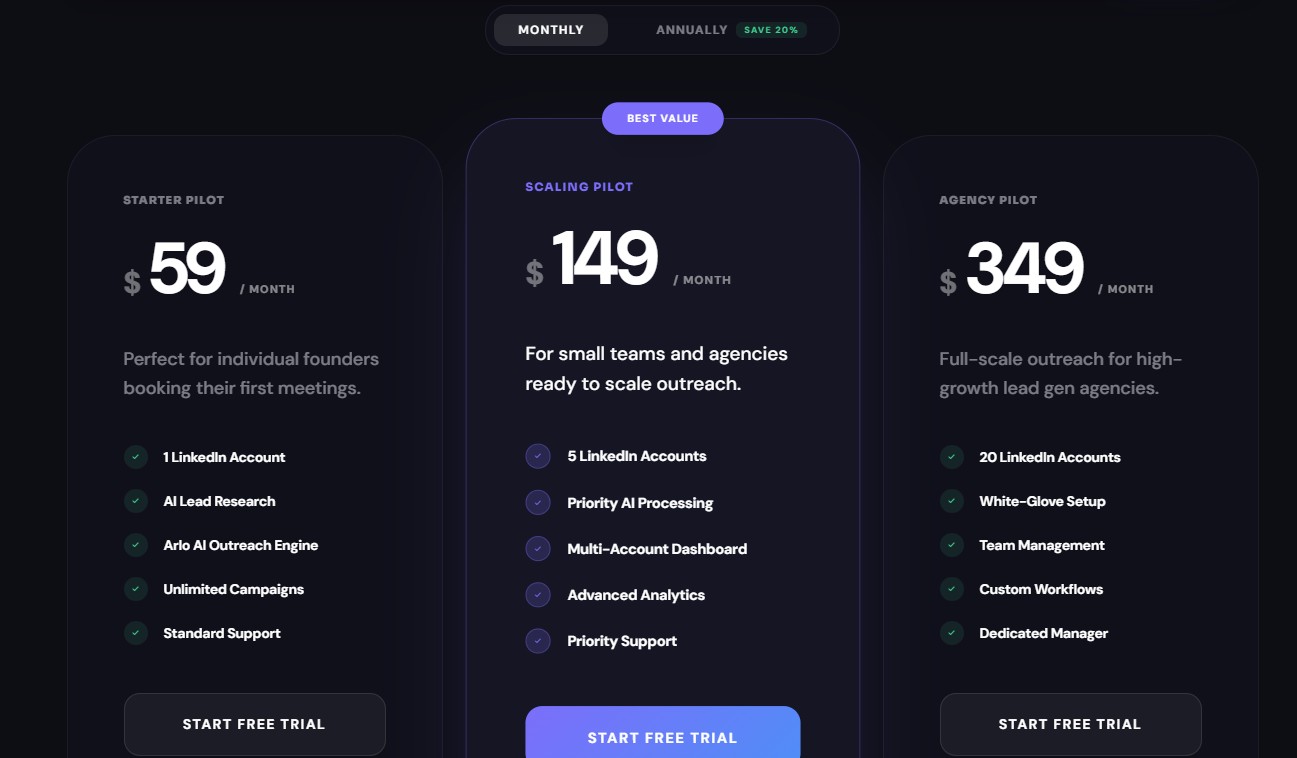
- Starter Pilot — $59/month
- Scaling Pilot — $149/month
- Agency Pilot — $349/month
14-day free trial, no credit card required.
LinkedFusion pricing (Monthly billing):
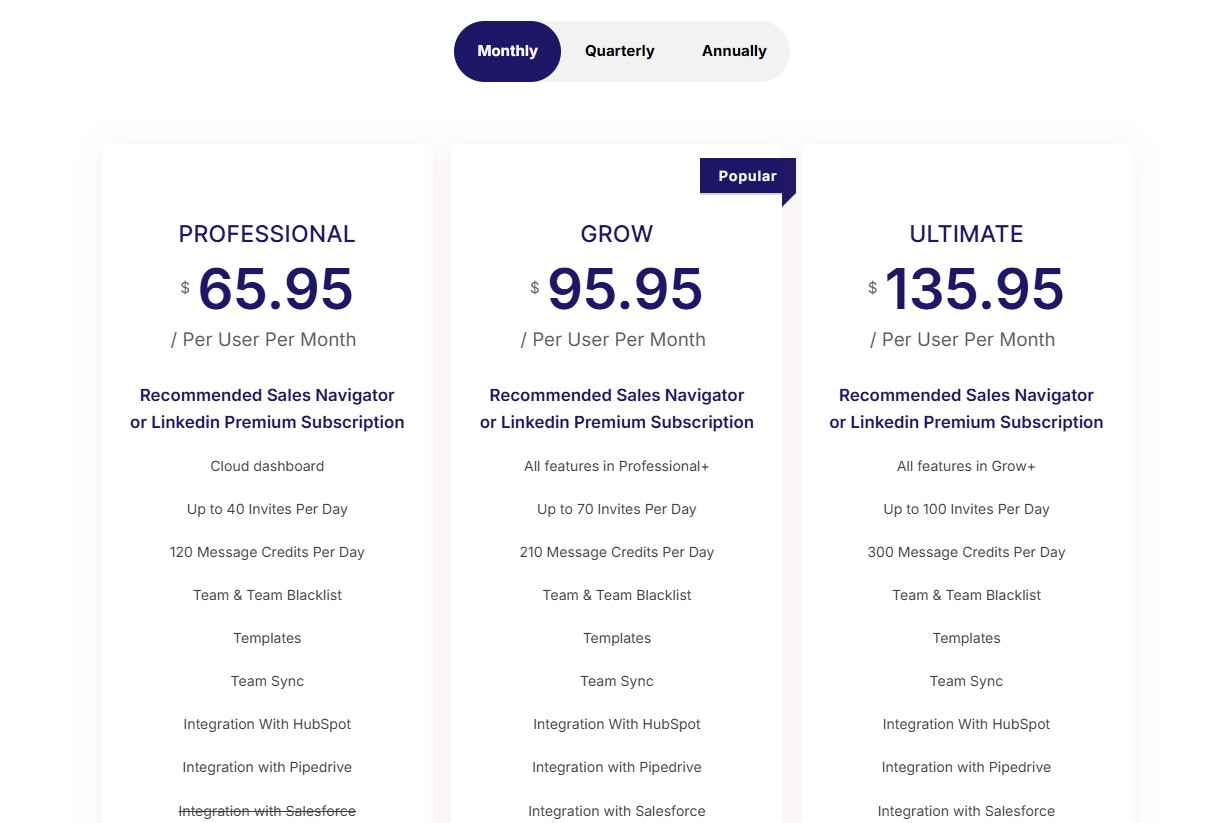
- Professional — $65.95/user/month (40 invites/day, 120 message credits/day)
- Grow — $95.95/user/month (70 invites/day, 210 message credits/day)
- Ultimate — $135.95/user/month (100 invites/day, 300 message credits/day)
LinkedFusion annual billing:
- Professional — $46.95/user/month
- Grow — $67.95/user/month
- Ultimate — $95.95/user/month
7-day free trial available.
The real pricing insight is in what “per user” actually means at scale. A 5-person SDR team on LinkedFusion’s Grow plan at $95.95/user/month comes out to $479.75/month. DealsFlow’s Scaling Pilot covers 5 LinkedIn accounts for $149/month flat. That’s a $330/month difference.
Now, to be fair — these tools aren’t doing the same job. LinkedFusion at $479.75 gives you 5 users with full sequence control, deep CRM sync, and email prospecting. DealsFlow at $149 gives you 5 accounts with AI running the whole conversation. What’s “worth it” depends entirely on what your team actually needs. But the cost gap is real and worth factoring in.
DealsFlow vs LinkedFusion: Ease of Use
DealsFlow claims setup in 10 minutes, and user reviews on their site back that up — one SDR lead cited getting their first campaign running in about 8 minutes and booking 6 calls in the first week. That’s a low configuration overhead because Arlo is doing the downstream decision-making. You’re not building a 7-step sequence with conditional branches. You’re defining who you want and letting the AI figure out how to get there.
LinkedFusion has a wider feature surface, which means more time in the setup stage. Sequences need to be built step by step. Follow-up rules need to be set. Time zone scheduling needs to be configured. CRM integrations need to be mapped. For a team that’s done this before and knows what they want, that’s fine. For someone setting up LinkedIn outreach for the first time, it’s a steeper ramp.
Honestly, if you’re a solo founder or a small agency and you just want results fast, DealsFlow is lower friction. If you have an ops person who can set things up properly and wants that level of control, LinkedFusion rewards the time investment.
Who Should Use DealsFlow?
DealsFlow is the right fit if you recognize yourself in any of these:
- Lead gen agencies managing multiple client accounts — flat-rate per tier with up to 20 LinkedIn accounts on one plan, all in one dashboard, no per-seat math
- Founders doing outbound without an SDR team — you don’t have time to manage replies manually; Arlo does that
- SDR teams tired of burning hours on reply management — if your reps are spending 40% of their day in the LinkedIn inbox handling the same five objections, Arlo takes that off their plate
- Teams that want a clear metric: booked calls — DealsFlow’s whole design is optimized toward that one outcome, not just messages sent or connection rates
- Anyone who wants to test fast — 14-day free trial, no card, up and running in under 15 minutes
Who Should Use LinkedFusion?
LinkedFusion makes more sense if your situation looks like this:
- SMBs already living inside a CRM — if your sales process runs on HubSpot or Salesforce and you need every LinkedIn conversation synced automatically, LinkedFusion’s native integrations are solid
- Teams that also want to grow their LinkedIn presence — the AI post scheduler, AI commenting, and SSI tracking make it a more complete LinkedIn tool, not just an outreach tool
- Sales teams running multichannel sequences — combining LinkedIn and email steps in the same sequence is built in, not an add-on
- Teams that want granular control over every message and touchpoint — the unlimited concurrent sequences with time zone scheduling gives serious flexibility to teams that have a refined outreach playbook
- Organizations using a VA-driven outreach model — LinkedFusion’s Virtual Assistant feature is purpose-built for that setup
- Higher-volume single-account users — the Ultimate plan allows up to 100 connection invites and 300 message credits per day per user
DealsFlow vs LinkedFusion: Quick Comparison Table
| Feature | DealsFlow | LinkedFusion |
|---|---|---|
| AI Conversation Handling | Full AI (Arlo handles replies, objections, booking) | Sequence automation only; replies are manual |
| Multi-Account | Up to 20 accounts on Agency plan (flat rate) | Per-user model with VA expansion |
| Pricing Model | Flat rate per tier | Per user per month |
| CRM Integrations | Built-in prospect CRM, export | Native: HubSpot, Salesforce, Pipedrive, Zoho, Close, Insightly, Google Sheets, Zapier + more |
| Account Safety | Distributed cloud, randomized timing, hard daily limits | Dedicated exclusive local IP per account (190+ countries) |
| LinkedIn Content Tools | None | AI post scheduler, AI commenting, SSI tracking |
| Free Trial | 14 days, no credit card | 7 days |
| Best For | Agencies, founders, SDR teams wanting AI-run outreach | CRM-heavy teams, multichannel sequencers, content + outreach |
The Verdict
These aren’t two versions of the same tool. They’re solving different problems.
DealsFlow is the better option if the goal is booked meetings with as little manual involvement as possible. The Arlo AI is genuinely different — it’s not just a scheduler, it’s handling the actual sales conversation. And for agencies managing multiple client accounts, the flat-rate multi-account pricing is a real advantage over per-seat models that compound fast.
LinkedFusion is the better option if your team needs deep CRM sync, wants to run multichannel sequences with full control, or is building a LinkedIn presence alongside running outreach. It has more integration depth, more sequence flexibility, and more tools for LinkedIn beyond just lead gen.
If you’re choosing purely on “what gets me meetings fastest with the least setup,” DealsFlow. If you’re choosing on “what fits into our existing sales tech stack and gives us full control,” LinkedFusion.
Neither one is wrong. They’re just built for different kinds of teams.
FAQs
Q1: Is DealsFlow better than LinkedFusion for agencies?
For agencies managing multiple client LinkedIn accounts, DealsFlow is the stronger fit. The Agency Pilot plan covers 20 LinkedIn accounts for a flat $299/month (annual). LinkedFusion charges per user, so scaling to 10–20 accounts compounds fast. DealsFlow also gives you aggregated reporting across all accounts from one dashboard, which matters when you’re reporting back to clients.
Q2: Does LinkedFusion work without LinkedIn Premium or Sales Navigator?
Yes. LinkedFusion works with a standard free LinkedIn account. That said, their pricing page explicitly recommends LinkedIn Business Premium for Professional plan users and Sales Navigator for Grow plan users. The higher your outreach volume, the more LinkedIn’s own limits become the bottleneck — and a paid LinkedIn plan expands those limits significantly.
Q3: Can DealsFlow replace a human SDR?
For the middle-of-funnel work — managing replies, handling objections, moving warm leads toward a booked call — Arlo does replace a chunk of what an SDR does manually. What it doesn’t replace is strategy, ICP refinement, or closing on the actual call. Think of it as an SDR’s inbox assistant that never sleeps, not a full replacement for a great rep.
Q4: How many LinkedIn accounts can you run on LinkedFusion?
LinkedFusion is structured per user, not per account bundle. Each subscription covers one LinkedIn user. To expand beyond that, you’d add seats or use their Virtual Assistant (VA) technology feature, which lets managers assign and oversee outreach across team members under one account. It works, but it’s a different architecture than DealsFlow’s flat-rate multi-account model.
Q5: What happens when a prospect replies in DealsFlow?
Arlo takes over. It reads the reply, identifies whether it’s positive, an objection, or a question, and responds accordingly — in your voice, based on the context you set. If it’s a booking signal, Arlo moves toward scheduling a call. You can jump in and take over at any point, but the default is Arlo handling the conversation until a meeting is booked or the prospect goes cold.
Q6: Which tool is safer for LinkedIn account health — DealsFlow or LinkedFusion?
Both use cloud-based execution, which is safer than browser extensions. DealsFlow uses distributed cloud infrastructure with randomized human-like timing and enforces hard daily limits. LinkedFusion uses dedicated exclusive local IPs per account — meaning your activity looks like it’s coming from one individual’s location, not a shared data center. Both are built with account safety in mind. If dedicated IP isolation is important to you specifically, LinkedFusion is more explicit about how they handle it.