


Most LinkedIn outreach tools will help you send more messages. That part is solved. What they won’t do is handle the mess that follows — the replies piling up, the warm leads going cold because nobody got back to them fast enough, the inbox that turns into a second job the moment a campaign actually works.
That’s the real problem, and it’s the frame you should bring to this comparison. Skylead and DealsFlow both automate LinkedIn outreach. Both are cloud-based. Both have been around long enough to have real user reviews worth reading. But they solve different problems, and betting on the wrong one means you’re either paying for features you’ll never use or missing the capability that would actually move your numbers.
This comparison is for SDRs and sales leads who’ve outgrown doing it manually, agencies running outreach across multiple LinkedIn accounts, and operators who are tired of picking tools that generate replies they can’t keep up with. Here’s what actually matters when choosing between these two.
Quick Verdict: DealsFlow vs Skylead at a Glance
| Category | DealsFlow | Skylead |
|---|---|---|
| Monthly Pricing | Starter $59/mo, Scaling $149/mo, Agency $349/mo | $100/mo per LinkedIn account |
| Annual Pricing (Save 20%) | Starter $49/mo, Scaling $129/mo, Agency $299/mo | ~$83/mo per account |
| Free Trial | 14 days, no credit card | 7 days, no credit card |
| Infrastructure | Cloud-based | Cloud-based |
| LinkedIn Automation | Yes | Yes |
| Email Outreach | Yes | Yes |
| Smart / Conditional Sequences | Yes | Yes — standout feature |
| AI Post-Reply Automation | Yes — Arlo AI handles replies | No — manual inbox |
| Image & GIF Personalization | No | Yes |
| Built-in Email Finder | No | Yes — double-verified |
| Free Email Warm-Up | No | Yes — unlimited |
| Native CRM | Yes | No |
| White Label / Agency Plan | Yes | Yes (custom pricing) |
| CRM Integrations | Native CRM included | HubSpot, Salesforce, Zapier, Make, API |
| Account Safety | Residential proxies | Dedicated IPs, 3-layer protection |
If the table is enough: DealsFlow wins on AI-powered reply handling and cost at scale. Skylead wins on multichannel sequence sophistication, built-in email data, and personalization depth. Keep reading if you’re still deciding.
What Is DealsFlow?

DealsFlow is a LinkedIn outreach platform built around a specific bet: that getting replies is the easy part, and what happens next is where most outreach falls apart. The platform automates connection requests, follow-up messages, and campaign sequencing — but its actual differentiator is Arlo AI, which takes over when a prospect responds.
Arlo reads incoming replies, understands context, handles objections, and books meetings without a human in the loop on every message. That’s not a smart inbox. That’s a post-reply conversation layer that keeps the pipeline moving even when nobody’s watching.
Here’s what you get across the platform:
- Arlo AI Outreach Engine — Reads replies, handles objections, and books calls in your voice. Available on every plan.
- AI Lead Research — Finds and scores qualified prospects from LinkedIn based on your ICP.
- Campaign Builder — Unlimited campaigns with connection requests, messages, and follow-up steps.
- Native CRM — Full prospect pipeline built in. No separate subscription needed.
- Multi-Account Dashboard — Manage multiple LinkedIn accounts from one place (Scaling and Agency plans).
- Advanced Analytics — Full-funnel view from connection request to booked call.
- Residential Proxy Infrastructure — Distributed cloud execution with randomized timing to protect account health.
Pricing on annual billing: Starter Pilot at $49/month (1 LinkedIn account), Scaling Pilot at $129/month (5 accounts), Agency Pilot at $299/month (20 accounts). Monthly rates are $59, $149, and $349 respectively. 14-day free trial, no credit card required.
DealsFlow is built for founders doing outbound without a full sales team, SDR teams where inbox management is the bottleneck, and agencies that need multiple accounts managed without paying per-seat.
What Is Skylead?
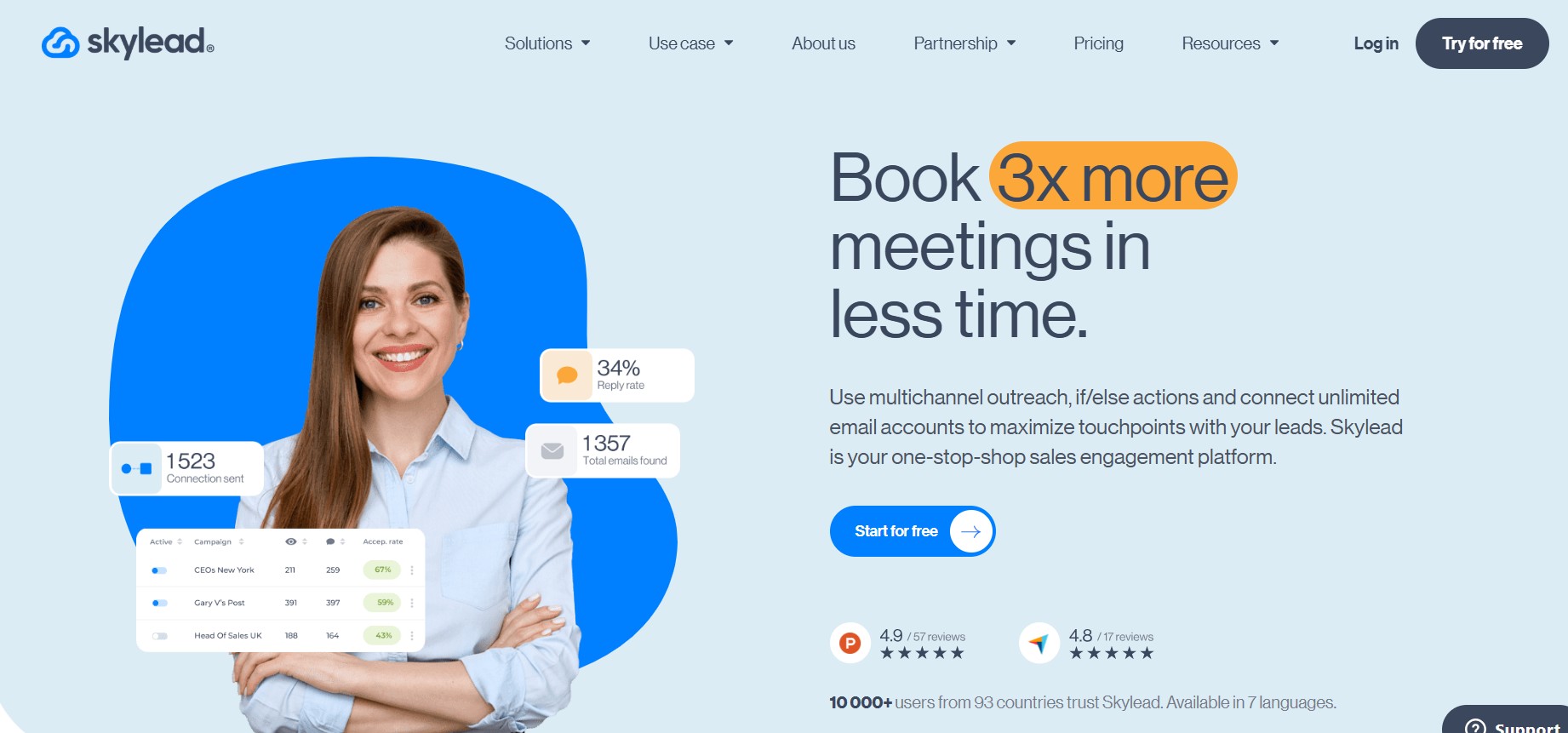
Skylead is a cloud-based LinkedIn and email outreach platform. The standout feature is its Smart Sequences — conditional if/else logic that routes prospects through different outreach paths based on how they behave. If they accept a connection request, the sequence pivots. If they open an email but don’t reply, it triggers a LinkedIn follow-up. That level of behavioral branching is genuinely more sophisticated than what most tools in this price range offer.
The other meaningful piece is that Skylead is genuinely all-in-one for multichannel: it includes a built-in email finder and double-verifier, unlimited email account connections, and free email warm-up. You’re not paying for three separate tools to run a LinkedIn-plus-email campaign.
Core features:
- Smart Sequences with If/Else Logic — The most advanced conditional branching of any tool in this category. Campaigns that adapt to prospect behavior in real time.
- LinkedIn Automation — Connection requests, personalized messages, InMail, profile views, follows. Full suite.
- Email Outreach — Unlimited email account connections, built-in email finder and verifier, free warm-up for unlimited accounts, capped at 100,000 emails/month.
- Image & GIF Personalization — Auto-generates personalized visuals with the prospect’s name, company logo, or other variables baked in. Real engagement lift reported by users.
- Smart Inbox — Centralizes all LinkedIn and email replies in one view.
- Dedicated IPs — One per account, cloud-based, which matters for LinkedIn detection risk.
- Integrations — HubSpot, Salesforce, Zapier, Make, and API. No native CRM.
Pricing: $100/month per LinkedIn account, or approximately $83/month on an annual plan (2 months free). White label available for agencies at custom pricing, estimated around $60-80/seat at volume. Seven-day free trial, no credit card required.
Skylead is built for teams that want LinkedIn and email under one roof without cobbling together a stack, and that need conditional campaign logic to handle different prospect segments differently.
Feature-by-Feature Breakdown
LinkedIn Automation
Both tools are cloud-based, and that matters more than most people think. Browser extension tools are easier for LinkedIn to flag because they interact directly with the browser in ways that look automated. Cloud-based tools run remotely, which is harder to detect. Neither Skylead nor DealsFlow requires a browser extension.
Skylead’s conditional Smart Sequences are the most sophisticated in this price range. Instead of linear step-by-step campaigns, you build branching logic: if a prospect is already a first-degree connection, skip the request and message directly. If they viewed your profile but didn’t accept, send an InMail. If they opened your email twice but never replied, escalate to a LinkedIn message. That kind of behavioral routing isn’t available in most tools at this price point.
DealsFlow’s campaign builder covers the core use cases well — connection requests, initial messages, follow-ups. For most teams, the sequencing does what it needs to do. If your campaigns don’t require heavy conditional branching, you won’t feel the gap. If they do, Skylead has the edge here.
Neither tool requires a LinkedIn Sales Navigator subscription, though both support it. For high-volume outreach, Sales Navigator improves targeting granularity.
Email Outreach
Skylead’s built-in email finder is a genuine money-saver. Double-verified emails, no third-party subscription needed. The unlimited email account connections and free warm-up included at $100/month means you’re consolidating what would otherwise be three or four separate tool costs — LinkedIn automation, email finder, warm-up, and outreach sequencing.
The email sending cap is 100,000 emails per month per account. For most teams, that’s more than enough. High-volume agencies running cold email at serious scale may eventually hit limits, but that’s not a realistic concern for the majority of users.
DealsFlow supports email outreach but doesn’t include a native email finder. You’re bringing your contact data from another source — whether that’s Sales Navigator, a CSV from Apollo, or another enrichment tool. For teams already running a data stack, this isn’t a dealbreaker. For teams trying to consolidate everything into one tool, it’s a real gap.
AI Post-Reply Automation: The Category Gap
This is where the two tools are not comparable, and it’s worth being direct about that.
Skylead has a Smart Inbox. It pulls all your LinkedIn messages and email replies into one centralized view so you’re not jumping between tabs. That’s a UX convenience — a good one. It does not do anything with those replies. Someone has to read them and respond. At volume, that someone is either you, a team member, or a rep you’re paying.
DealsFlow has Arlo AI. Arlo doesn’t surface replies for you to handle — it handles them. It reads the incoming message, understands the context, decides whether to move toward booking a call or address an objection, and responds in your voice. When a prospect says “we’re already using a tool for this,” Arlo doesn’t stop. It provides a rebuttal. When they say “yeah, let’s chat,” Arlo moves to book the call.
The math on this is simple. If you’re sending 500 connection requests a month and getting a 15-20% reply rate, you have 75 to 100 active conversations to manage. Multiply that across five LinkedIn accounts and you’re looking at 375 to 500 conversations — simultaneously. Without Arlo, you’re either hiring someone to manage that inbox, or you’re letting warm replies go cold because there’s no capacity to respond fast enough. Both outcomes are expensive.
Skylead users do flag inbox management as a pain point in real reviews. Replies from Sales Navigator-targeted prospects sometimes surface in LinkedIn’s native inbox instead of Skylead’s Smart Inbox. The sync isn’t always clean. At volume, that confusion costs you conversations.
Skylead helps you start more conversations. DealsFlow — specifically Arlo AI — helps you finish them. That’s the actual difference.
Personalization
Skylead’s image and GIF personalization is a real feature, not a gimmick. You build one template, and the platform auto-generates a unique version for each prospect with their name, company logo, or other variables embedded in the visual. Skylead claims up to 63% higher reply rates with visual personalization — and users on G2 consistently report that it makes their messages stand out.
DealsFlow uses text-based personalization with dynamic fields. No image or GIF capability. If visual personalization is already a core part of your outreach strategy and you’re seeing measurable lift from it, this matters. If you rely on copy-driven personalization, it probably doesn’t change much for you.
Account Safety and LinkedIn Protection
Both tools operate cloud-based and both enforce LinkedIn’s daily limits, which is the baseline you need. Skylead claims a 3-layer safety protection system and has a track record of cloud-based operation going back several years. They assign a dedicated IP to each LinkedIn account.
DealsFlow uses residential proxies. Residential IPs are assigned to real home internet connections, which means they look like normal user traffic to LinkedIn’s detection systems. Datacenter IPs — which many tools use — are more easily identified as automation traffic because they come from server infrastructure. On pure architecture for account safety, residential proxies are the stronger approach.
Neither tool guarantees zero risk. LinkedIn continues improving its detection. If your LinkedIn account is irreplaceable — your main sales profile, your primary reputation — that risk calculus should factor into your decision. Both tools are safer than browser extensions, and both are safer than manual limit-busting.
Integrations and CRM
Skylead connects to HubSpot, Salesforce, Zapier, Make, and API. It does not have a native CRM — it’s an outreach layer designed to feed data into your existing stack. If you’re already running HubSpot or Salesforce, the integrations are solid and the hand-off works cleanly.
DealsFlow includes a native CRM pipeline. Every prospect gets scored with an AI warmth rating — Hot, Warm, Neutral, Cold — and you can track deals, notes, and stages without leaving the platform. For teams that don’t already have a CRM or don’t want another subscription, this is a real simplification. For teams deeply embedded in Salesforce or HubSpot, the native CRM in DealsFlow is probably redundant.
Pricing Comparison
DealsFlow pricing (monthly):
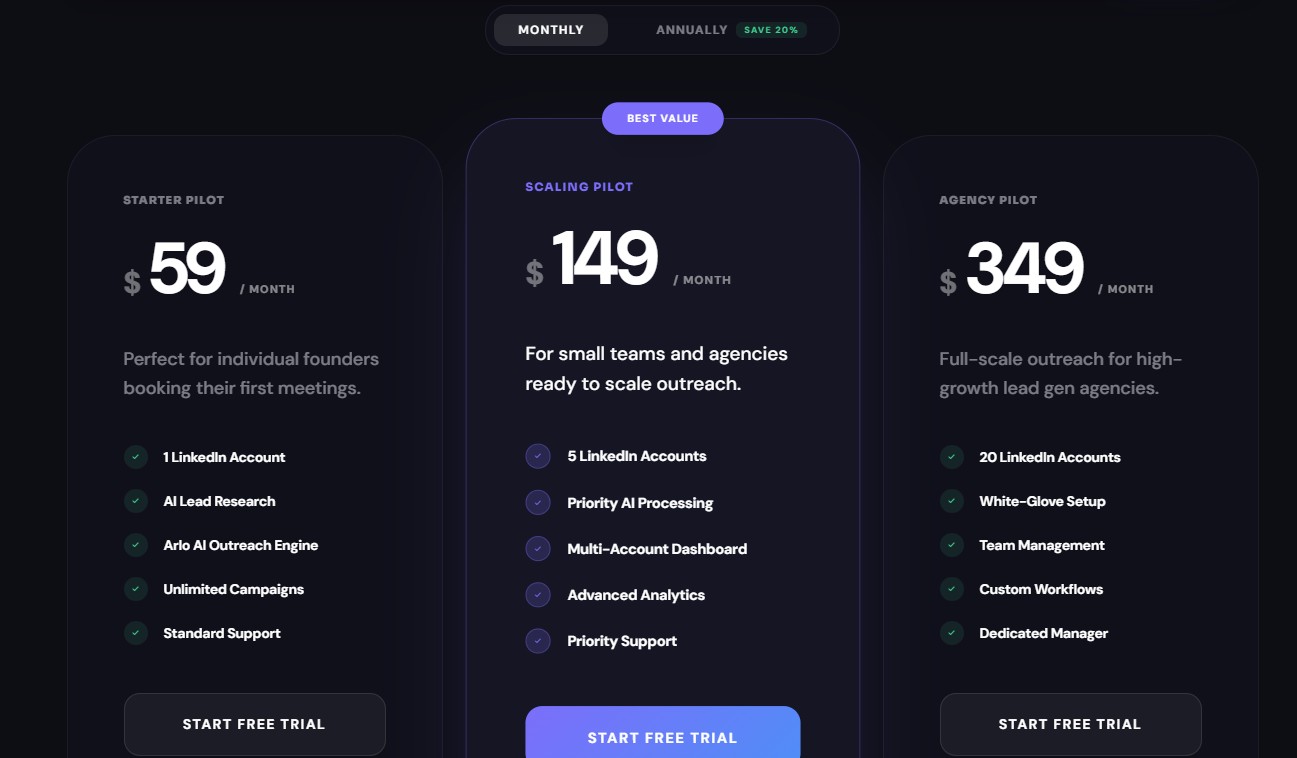
- Starter Pilot: $59/month — 1 LinkedIn account, Arlo AI, AI Lead Research, Unlimited Campaigns, Standard Support
- Scaling Pilot: $149/month — 5 LinkedIn accounts, Priority AI Processing, Multi-Account Dashboard, Advanced Analytics, Priority Support
- Agency Pilot: $349/month — 20 LinkedIn accounts, White-Glove Setup, Team Management, Custom Workflows, Dedicated Manager
DealsFlow pricing (annual, save 20%):
- Starter Pilot: $49/month
- Scaling Pilot: $129/month
- Agency Pilot: $299/month
14-day free trial, no credit card required.
Skylead pricing:
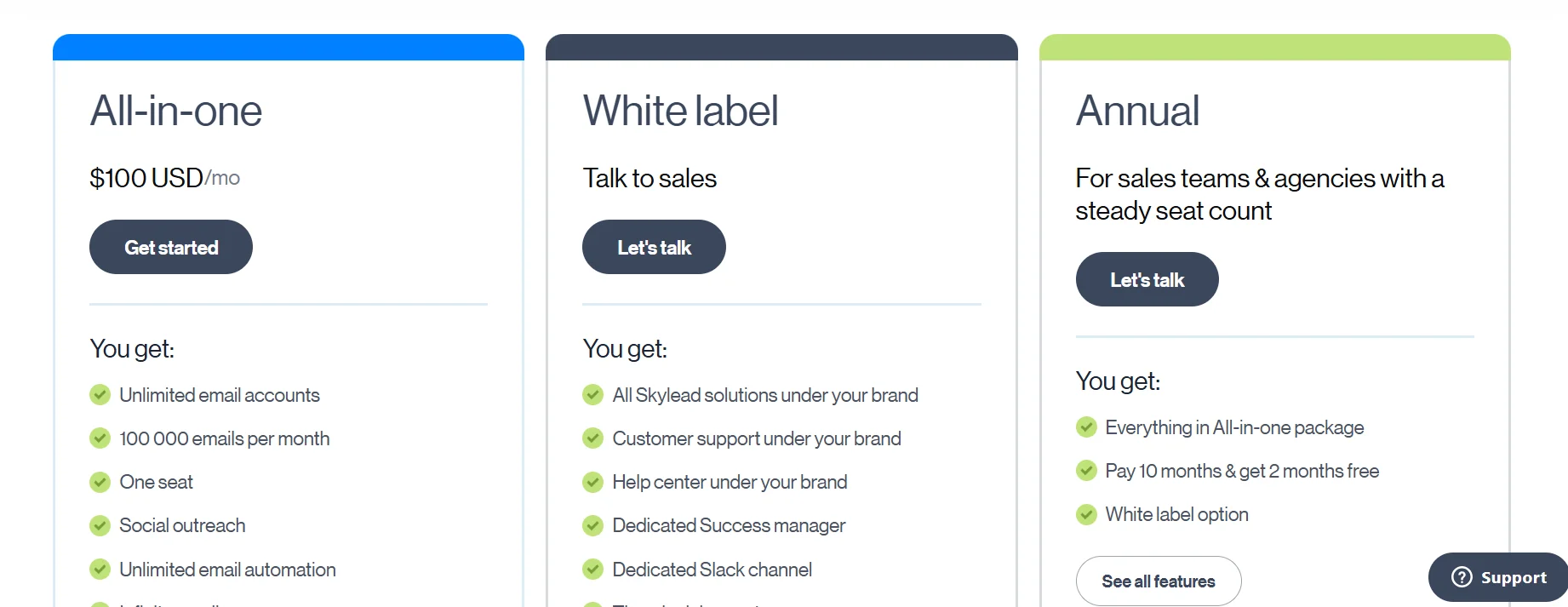
- All-In-One: $100/month per LinkedIn account
- Annual: approximately $83/month per account (2 months free, ~17% savings)
- White label: custom pricing, typically $60-80/seat at volume with commitment
- 7-day free trial, no credit card required
For a solo operator: DealsFlow’s Starter at $59/month versus Skylead’s $100/month is a $41 difference monthly. That’s $492/year before you account for the fact that Skylead’s $100 includes an email finder and warm-up you might otherwise pay separately for. When you factor in those tool consolidations, the effective price gap narrows.
The agency math is different. DealsFlow’s Agency Pilot covers 20 LinkedIn accounts for $299/month on annual billing. Skylead’s model charges $100 per account — so 20 accounts runs you $2,000/month. That’s a $1,700/month difference. Even at 5 accounts, Skylead at $500/month versus DealsFlow’s Scaling Pilot at $129/month is a significant gap. DealsFlow’s flat-rate model scales much cheaper as account count grows.
One more thing worth noting: DealsFlow gives you 14 days to evaluate. Skylead gives you 7. Smart Sequences take real time to learn and configure. Seven days is genuinely tight to know whether Skylead’s conditional logic is going to fit your workflow.
Ease of Use and Learning Curve
Skylead’s sequence builder is powerful, and real users say it takes time to learn. G2 reviews and Capterra feedback consistently note a steep learning curve on the conditional logic. Multiple users report bugs mid-setup — sequences that can’t be saved partway through, which is exactly the kind of friction that kills momentum when you’re trying to launch a campaign. New users often default to basic linear sequences and never fully adopt the if/else branching that makes Skylead worth the price.
DealsFlow is built for faster setup. The campaign builder is less complex, and Arlo AI reduces the operational overhead that normally scales with outreach volume. You’re not managing a second job in your inbox — the AI is handling that layer.
For agencies onboarding new clients, setup speed has a direct cost. Every hour a team spends configuring a tool is an hour they’re not billing. That math favors the platform that gets a campaign live in 20 minutes over the one that takes half a day to configure properly.
Who Should Choose DealsFlow?
If your pipeline is stalling because you can’t handle the replies you’re already getting, Arlo AI is the answer to a real problem. The bottleneck isn’t campaign volume — it’s reply capacity. DealsFlow is built specifically for that constraint.
Agencies running multiple LinkedIn accounts will find the Agency Pilot’s flat-rate pricing makes more financial sense than Skylead’s per-account model. At 20 accounts, the difference is roughly $1,700/month. At 5 accounts, it’s still several hundred dollars.
Teams that want outreach plus a native CRM in one platform, without adding another subscription to the stack, get that with DealsFlow. The AI warmth scoring on prospects means you know which leads to prioritize without building a manual tracking system.
Founders and early-stage teams on tighter budgets who need a capable outreach platform at $49 or $59 before committing to a more expensive stack should start here. Arlo AI is included on every plan — it’s not a premium add-on.
Anyone who’s watched a high-volume outreach campaign generate 80 replies in a week and then seen most of them go cold because there wasn’t enough time to follow up properly — that’s exactly the problem DealsFlow exists to solve.
Who Should Choose Skylead?
If your campaigns genuinely require conditional logic — large ICP lists where prospects need meaningfully different paths based on whether they accepted a connection, opened an email, visited your profile, or responded to InMail — Skylead’s Smart Sequences are the best in this price range. No other tool at $100/month does behavioral branching this well.
Teams that want LinkedIn and email under one roof without paying separately for an email finder, warm-up tool, and outreach platform get real value from Skylead’s $100 all-in pricing. The effective cost comparison to a multi-tool stack is better than it looks.
If image and GIF personalization is producing measurable lift in your current campaigns, Skylead has the feature and DealsFlow doesn’t. That’s not a small gap if visual personalization is genuinely working for your audience.
Agencies already running HubSpot or Salesforce, with a CRM they trust and don’t want to replace, will find Skylead’s integrations solid. The white-label option works for client-facing reporting. Teams with the time and willingness to invest in learning a more complex tool in exchange for more powerful campaign logic will get more out of Skylead than they would from a simpler platform.
Final Verdict
Skylead is a better outreach builder. The conditional sequence logic is more sophisticated than anything DealsFlow offers, the built-in email finder and free warm-up are real consolidation value, and the image personalization is a legitimate engagement lever. If designing complex multichannel campaigns that adapt dynamically to prospect behavior is your core need, Skylead is the stronger tool for that job.
DealsFlow is a better outreach operator. It’s easier to run, it scales cheaper as account count grows, and Arlo AI handles the reply layer that Skylead leaves entirely to you. If you’re running outreach at any real volume and the inbox is the problem — not the campaign design — DealsFlow solves that in a way Skylead can’t.
The question that should drive your decision is simple: where is your actual constraint right now? If it’s campaign sophistication and behavioral branching logic, go Skylead. If it’s reply management, cost-efficient scaling, or running multiple accounts without hiring an inbox manager, go DealsFlow.
Frequently Asked Questions
Is DealsFlow safer for my LinkedIn account than Skylead?
Both are cloud-based, which already puts them ahead of browser extension tools. The main architecture difference is that DealsFlow uses residential proxies — IP addresses tied to real home internet connections — while Skylead uses dedicated datacenter IPs. Residential proxies are harder for LinkedIn to identify as automation traffic. That said, both tools respect LinkedIn’s daily sending limits and neither guarantees zero risk. LinkedIn continues improving detection, and no tool is completely immune.
Does Skylead have AI for managing replies?
No. Skylead’s Smart Inbox consolidates replies from LinkedIn and email into one place, but someone still has to read and respond to each one. DealsFlow’s Arlo AI reads incoming replies, handles objections, and books calls automatically. Those are different things.
Can I try both tools before committing?
Yes. DealsFlow offers a 14-day free trial with no credit card required. Skylead offers a 7-day free trial with no credit card required. If you’re seriously evaluating Skylead’s Smart Sequences, be aware that seven days is tight to get comfortable with the conditional branching logic.
Is Skylead’s built-in email finder good enough to replace Apollo or Hunter?
For most use cases, yes. Skylead double-verifies emails, which keeps bounce rates down. Coverage isn’t 100% — particularly for contacts with thin LinkedIn profiles — but for standard B2B outreach lists, the built-in finder handles the job without a separate subscription. High-volume teams running enrichment-heavy workflows may still want a dedicated data tool alongside it.
Which is better for agencies?
Depends on the account count. DealsFlow’s Agency Pilot covers 20 LinkedIn accounts for $299/month (annual) with a flat rate — pricing that doesn’t change as you add accounts within that plan. Skylead charges $100 per account, so five accounts is $500/month, twenty accounts is $2,000/month. At small account counts, the tools are closer in price. At scale, DealsFlow is dramatically cheaper. Skylead’s white-label option is available for client-facing setups, and DealsFlow includes team management and a dedicated manager on the Agency Pilot.