


There is a version of this story that plays out constantly in B2B sales teams. Someone buys a Wiza subscription, exports 2,000 LinkedIn profiles with verified emails, loads them into an email sequence tool, sends the campaign, gets a 1.8% reply rate, and then wonders why the pipeline is not moving. The data was clean. The emails were verified. The targeting was solid. So what went wrong?
Nothing went wrong with Wiza. Wiza did exactly what it is built to do: find contact data. The problem is that finding contacts and booking meetings are two completely different problems, and a lot of teams conflate them. They buy a lead database, assume that is the hard part, and then discover that turning a list of verified emails into actual conversations requires a whole separate workflow, a separate tool stack, and usually a dedicated person to run it.
That is what makes the DealsFlow vs Wiza comparison genuinely interesting. These two tools are not really competing with each other. They are solving different problems in the same general space of “I need to talk to more prospects.” Wiza is a data tool. You use it to find and verify contact information for people on LinkedIn. DealsFlow is an outreach platform with an AI agent called Arlo that finds the prospects, reaches out on LinkedIn, holds real conversations, handles replies, and books meetings. The workflows are completely different. The outputs are completely different.
So why does this comparison keep coming up? Because teams doing LinkedIn outreach often start by asking “how do I find the right contacts” and Wiza is one answer to that question. But DealsFlow answers a different question: “how do I get those contacts to actually agree to a call without spending three hours a day in my LinkedIn inbox.” Once you understand what each tool is actually doing, the comparison gets a lot clearer and so does the decision.
This post goes deep on both tools. What they do, where they stop, who they are built for, what they cost, and which one actually moves the needle if your goal is booked meetings on the calendar.
What DealsFlow Does in the DealsFlow vs Wiza Conversation
DealsFlow is built around a different premise. Instead of giving you data and stepping back, DealsFlow runs the entire outreach workflow from lead identification through to booked meeting. The AI agent, Arlo, does everything: finds the prospects that match your ICP on LinkedIn, sends personalized connection requests, follows up after connections are accepted, reads and responds to replies, handles objections, and books meetings.
The channel is LinkedIn, not email. That distinction matters. LinkedIn messages have significantly higher open and reply rates than cold email in most B2B verticals. A cold email to a verified address gets maybe a 2% to 4% reply rate on a good day. A well-timed LinkedIn message from a real profile, especially one that does not look like a template blast, can get 15% to 25% reply rates. The channel itself is part of why DealsFlow’s output tends to outperform email-based outreach from tools like Wiza’s downstream stack.
How Arlo Handles the Full Outreach Loop
The piece of DealsFlow that has no equivalent in Wiza’s world is Arlo’s reply management. When a prospect responds to an outreach message, Arlo reads the message, assesses the intent, and replies appropriately. If the person is interested, Arlo moves toward booking. If they have an objection, Arlo addresses it. If they ask who is reaching out, Arlo explains the context and pivots naturally.
This matters enormously for conversion rates. The difference between a reply coming back to a live inbox and getting a response within 4 hours versus landing in a queue and getting a response the next morning is often the difference between a booked meeting and a dead lead. Arlo responds within minutes. Around the clock.
No email sequencer does this. No data provider does this. The reply management is the operational problem that kills most outreach campaigns and it is the specific problem DealsFlow is built to solve.
AI Lead Research vs Wiza’s Data Export
Wiza requires Sales Navigator to do its best work. You need a Sales Navigator subscription (starting around $99/month) to run the searches that Wiza exports from. So the real cost of a Wiza-based outreach stack includes the Wiza credits plus the Sales Navigator subscription plus whatever email tool you use for sequencing.
DealsFlow includes AI lead research natively. You define your ICP, Arlo identifies matching prospects on LinkedIn, and the research feeds directly into the campaign. You do not need to export a CSV, clean it, and upload it somewhere else. The research and execution live in one product.
For solo founders and small teams, this workflow consolidation is genuinely significant. Less time building lists, less tooling overhead, and less chance of something breaking in the middle of the pipeline.
What Wiza Actually Does (And the Gap It Leaves Open)
Wiza is a contact data platform built specifically for LinkedIn. The core functionality is simple: you find people on LinkedIn using Sales Navigator or regular LinkedIn search, Wiza scrapes their profiles, verifies their email addresses in real time, and gives you an exportable list with names, titles, companies, emails, and sometimes phone numbers.
The appeal is obvious. LinkedIn has the most reliable professional database anywhere. The problem is LinkedIn does not give you people’s emails. Wiza solves that. You run a Sales Navigator search for “Head of Marketing at SaaS companies with 50 to 200 employees,” Wiza exports the list with verified emails attached, and now you have an outreach-ready dataset.
What Wiza Gets Right
The email verification is genuinely good. Wiza claims high accuracy rates on verified emails, and based on the product’s actual use in outreach campaigns, bounce rates on Wiza exports tend to be lower than on bulk data providers that pull from static databases. The real-time verification against current MX records makes a real difference, especially for roles with high turnover.
The Sales Navigator integration is clean. You run your search, install the Wiza Chrome extension, click export, and the tool runs in the background while you do other things. For a list of 500 contacts, the export typically takes 5 to 15 minutes. You get a CSV with all the fields.
Wiza also does phone numbers for some contacts, depending on data availability. And there is a prospect profile enrichment option where you can upload a list of company domains and Wiza finds the right contacts at those companies, which is useful for account-based outreach.
Where Wiza Stops
Wiza gives you a spreadsheet. That is where the product ends. What you do with that spreadsheet, meaning how you reach out, what you say, which channel you use, how you handle replies, how you follow up when someone does not respond, how you book a meeting when someone shows interest, none of that is Wiza’s job.
So the moment you export that list of 500 verified contacts, you are now responsible for loading it into an email sequencer, writing the campaign, setting up the follow-ups, monitoring reply rates, handling actual replies manually, and trying to convert interested prospects into calendar bookings. Or, if you want to reach those contacts on LinkedIn instead of email, you are going back to LinkedIn and either doing it manually or using a separate automation tool.
That is a lot of tool stack. Email sequencer plus Wiza plus CRM plus LinkedIn automation tool plus someone to manage the replies. For a small team or a solo founder, that stack is expensive and operationally heavy.
This is not a knock on Wiza. The tool delivers exactly what it promises. The gap is in the workflow that comes after it.
DealsFlow vs Wiza: Side-by-Side on What Matters for Pipeline
These tools do not compete feature-for-feature because they serve different functions. But if you are trying to figure out which one belongs in your workflow (or whether you need both), here is how they line up on the things that actually affect pipeline outcomes.
Lead Identification
Wiza: finds contacts and verifies emails based on LinkedIn searches you run. Requires Sales Navigator for best results. Output is a contact list with verified data.
DealsFlow: Arlo identifies leads based on ICP parameters you set inside the platform. No external search tool required. Output feeds directly into active outreach campaigns.
Outreach Execution
Wiza: does not do outreach. Gives you data. You choose the channel and the tool.
DealsFlow: Arlo executes outreach on LinkedIn including connection requests, personalized intro messages, and multi-touch follow-up sequences.
Personalization Quality
Wiza: no personalization layer. It is a data export tool.
DealsFlow: Arlo writes messages based on prospect profile context, ICP match, and conversation history. Not merge tag personalization. Contextually relevant message generation.
Reply Handling
Wiza: does not handle replies. That is on you or your sequencing tool.
DealsFlow: Arlo reads replies, determines intent, and responds appropriately. Handles objections, re-engagement, and booking without human input.
Meeting Booking
Wiza: no booking functionality. Data only.
DealsFlow: Arlo’s explicit goal is to get a yes on a call. Every conversation is aimed at booking. The platform tracks meetings booked as the primary metric.
Data Portability
Wiza: excellent. Clean CSV exports with email, phone, LinkedIn URL, company data. Easy to push into any CRM or sequencer.
DealsFlow: the data stays within the platform’s campaign workflow. For teams that need contact data fed into a CRM, Wiza’s export capability is more flexible.
Pricing: What You Actually Pay in the DealsFlow vs Wiza Comparison
Wiza Pricing
Wiza has a free tier that gives you 20 email credits per month. Paid plans start around $49/month for 100 email credits per month, which is genuinely not much if you are running any real volume of outreach. The Growth plan at around $99/month gives you 300 credits. Higher volume tiers go up from there, and there is a pay-per-credit option if you need more in a given month.
The important thing to understand about Wiza pricing is that credits get consumed per verified email. If you export 500 contacts and Wiza verifies 380 of them, you used 380 credits. On the $99/month plan, you would blow through your monthly credit allocation in one medium-sized export.
On top of Wiza’s cost, you need to factor in the rest of the stack. Sales Navigator at $99/month is nearly required for quality targeting. An email sequencer like Instantly, Lemlist, or Outreach adds another $50 to $150/month depending on the tool and tier. You are at $250 to $350/month before any of this actually executes, and you still need someone to manage replies manually.
DealsFlow Pricing
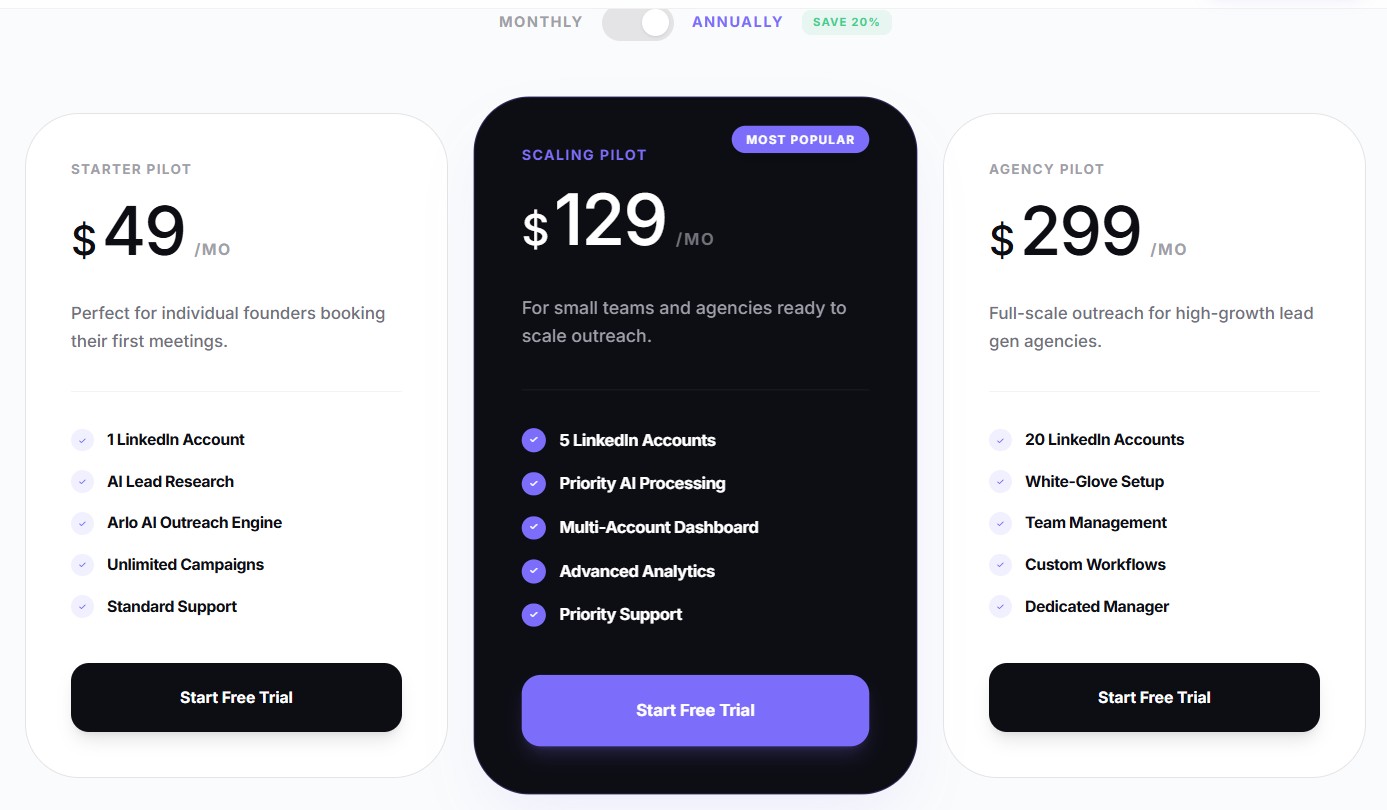
DealsFlow has three plans, billed monthly or with a 20% discount annually. There is a 14-day free trial with no credit card required.
The Starter Pilot is $49/month. One LinkedIn account, AI lead research, the Arlo outreach engine, unlimited campaigns, and standard support. This is for individual founders or solo operators.
The Scaling Pilot is $129/month. Five LinkedIn accounts, priority AI processing, multi-account dashboard, advanced analytics, and priority support. For small teams and growing agencies.
The Agency Pilot is $299/month. Twenty LinkedIn accounts, white-glove setup, team management, custom workflows, and a dedicated manager. Built for agencies running outreach as a core service.
The Real Cost Comparison
A solo founder using Wiza to fuel email outreach realistically needs: Wiza Growth plan at $99/month, Sales Navigator at $99/month, a basic email sequencer at $50/month. That is $248/month to execute outreach that still requires daily manual reply management. And the output is cold email, which converts at lower rates than LinkedIn outreach.
The same founder on DealsFlow’s Starter Pilot pays $49/month, has no additional tooling costs for the core outreach workflow, and has Arlo managing all replies autonomously. One booked meeting with a decent client covers that cost. The math is not subtle.
When Wiza Still Makes Sense (and When It Does Not)
Wiza is the right tool in specific situations. Nope, it is not going anywhere. But the use cases are more narrow than people often assume.
Where Wiza Wins
If your primary outreach channel is cold email and you have already built the infrastructure to run it, Wiza is one of the better data sources available. The email verification quality is solid, the Sales Navigator integration is smooth, and the export workflow is fast. For teams with a dedicated SDR running 1,000+ emails per month out of a mature email sequencer, Wiza is a good data layer.
Wiza also makes sense for account-based marketing teams that need to enrich company data with contact-level information. If you have a target account list of 200 companies and need to find the right 3 to 5 contacts at each one, Wiza’s bulk enrichment handles that efficiently.
And for teams that need verified phone numbers alongside emails for multi-channel outreach, Wiza’s data breadth covers that. DealsFlow is a LinkedIn-first product and does not replace a phone number database.
Where Wiza Falls Short
For anyone without an established email outreach infrastructure, Wiza is a data asset with no home. You export the list and then you have to figure out the rest. That is where most small teams and solo operators get stuck. The data is the easy part. The execution is where deals get made or lost.
Wiza also does not help at all with LinkedIn as an outreach channel. If you want to reach those same contacts on LinkedIn where reply rates are higher, you need a separate tool. DealsFlow handles that natively.
And honestly, for any team where the bottleneck is reply management and not contact data, Wiza does not touch the problem. You can have the most accurate email list in the world and still have a pipeline that is not converting because replies are sitting unaddressed for 24 hours.
Real Scenarios: Which Tool Fits Which Situation
Scenario 1: SaaS Founder, 0 SDRs, Needs 8 Calls Per Month
No team, no time, LinkedIn is the best channel for the ICP. Wiza gives data for a channel (email) that would require building an entire separate workflow. DealsFlow’s Starter Pilot at $49/month runs Arlo on LinkedIn, handles all conversations, books the meetings.
Go with: DealsFlow.
Scenario 2: SDR Team of 4, Primary Channel Is Cold Email, Already Using Outreach.io
They have an email sequencer, a process, and reps who manage replies. They need better contact data. Wiza plugs in cleanly as the data source feeding their existing stack.
Go with: Wiza.
Scenario 3: B2B Agency, 12 Clients, LinkedIn Outreach as a Core Service
Managing 12 LinkedIn accounts manually is not possible without a large team. Wiza would give data but not solve the execution problem. DealsFlow’s Agency Pilot at $299/month covers 20 accounts with Arlo running all outreach and reply management.
Go with: DealsFlow.
Scenario 4: Marketing Team Doing Account-Based Outreach, Needs Contact Data for 300 Target Accounts
They have the accounts, they need the contacts. This is contact enrichment, not outreach execution. Wiza’s bulk enrichment handles this faster and more cleanly than any outreach tool.
Go with: Wiza.
Scenario 5: Early-Stage Startup, First Hire, No Sales Infrastructure
No CRM, no email tool, no sequences, no nothing. Building the whole stack from scratch. Wiza requires 3 to 4 other tools to make it useful. DealsFlow is the entire workflow in one product.
Go with: DealsFlow.
Can You Use Both DealsFlow and Wiza Together?
Yeah, you can. They are not mutually exclusive. Some teams use Wiza to build a contact list for email outreach and simultaneously run DealsFlow on LinkedIn for the same ICP. That kind of multi-channel approach, email plus LinkedIn, tends to produce better pipeline coverage than either channel alone.
The overlap worth noting is the lead research function. If you are already using DealsFlow and Arlo is handling LinkedIn lead identification, you do not need Wiza to find the same people again. Where Wiza adds value on top of DealsFlow is specifically when you want their email and phone data for outreach on channels other than LinkedIn.
For most small teams and solo operators, running both is overkill. Pick the channel that fits your ICP and go deep on one tool. For growth-stage teams or agencies that want full coverage, the combination works well.
Conclusion
If you are trying to decide between these two tools because you want more booked meetings, the answer is DealsFlow. It is not even a close comparison on that specific outcome. Wiza gives you data. DealsFlow gives you meetings. Those are fundamentally different deliverables.
The situation where Wiza wins is when email outreach is your primary channel and you already have the infrastructure to execute it. In that context, Wiza is a good data source and nothing in DealsFlow replaces it.
But for the much larger group of founders, small sales teams, and agencies who need LinkedIn outreach to actually produce pipeline without an army of SDRs managing conversations, DealsFlow is the better tool. Arlo handles everything that a human would otherwise spend 2 to 3 hours doing every day: finding leads, sending messages, reading replies, handling objections, and getting people on the calendar.
The 14-day free trial has no credit card requirement. Set up a campaign, define your ICP, let Arlo run for two weeks, and count the meetings. That is the clearest test of whether it works for your situation.
Frequently Asked Questions
Q1. Is DealsFlow a replacement for Wiza?
Not exactly. They solve different problems. Wiza is a contact data tool that finds verified emails from LinkedIn. DealsFlow is a LinkedIn outreach platform that handles the full process from lead research to meeting booking. If email is your primary outreach channel, you still need Wiza for contact data. If LinkedIn is your primary channel and you want meetings booked autonomously, DealsFlow replaces most of the stack you would otherwise build around Wiza.
Q2. Does DealsFlow require a Wiza subscription?
No. DealsFlow includes native AI lead research. Arlo finds prospects matching your ICP directly within the platform. You do not need to export data from Wiza or any other tool to run campaigns in DealsFlow.
Q3. What is the difference between Wiza and LinkedIn Sales Navigator?
Sales Navigator is LinkedIn’s own advanced search tool for finding prospects. Wiza is a third-party Chrome extension that scrapes and verifies contact data (primarily emails) from LinkedIn searches run through Sales Navigator or regular LinkedIn. Wiza cannot function as a standalone prospecting tool without LinkedIn. Sales Navigator can, though its native messaging features are limited compared to dedicated outreach tools like DealsFlow.
Q4. How accurate is Wiza’s email verification?
Wiza verifies emails in real time against MX records and claims accuracy rates above 95% for verified emails. In practice, bounce rates on Wiza exports tend to be lower than on bulk data providers that use static databases. That said, email accuracy degrades over time as people change jobs. Exporting and emailing the same list 6 months later will show higher bounce rates regardless of the initial verification quality.
Q5. What LinkedIn outreach reply rates can DealsFlow achieve?
Reply rates vary by ICP, message quality, and campaign settings. LinkedIn messages generally outperform cold email with typical rates landing between 10% and 30% for well-targeted campaigns. DealsFlow’s contextual personalization through Arlo tends to push reply rates toward the higher end of that range compared to template-based LinkedIn automation tools that use static merge tags.
Q6. Is Wiza safe to use with LinkedIn?
Wiza uses a Chrome extension that interacts with LinkedIn’s front-end interface. LinkedIn’s terms of service restrict scraping, and using tools like Wiza does technically fall into that gray area. Wiza has been widely used for years without widespread account bans, but the risk is not zero. Using it conservatively (not exporting thousands of contacts per day) reduces the risk significantly.
Q7. Can DealsFlow work without LinkedIn Sales Navigator?
Yes. DealsFlow connects to a standard LinkedIn account and Arlo’s lead research works without a Sales Navigator subscription. That said, having Sales Navigator expands the prospect data available to the AI and improves targeting precision, especially for niche verticals or specific company size filters. Many users on the Starter Pilot start without it and upgrade later.
Q8. How does DealsFlow’s pricing compare to building a Wiza-based outreach stack?
A minimal Wiza-based email outreach stack (Wiza Growth + Sales Navigator + email sequencer) runs $248 to $350/month before any labor costs for reply management. DealsFlow’s Starter Pilot is $49/month and includes lead research, outreach execution, and autonomous reply management. For solo operators and small teams, the cost difference plus the labor savings makes DealsFlow significantly more cost-efficient if LinkedIn is an appropriate channel for the ICP.
Q9. Does DealsFlow export contact data like Wiza does?
DealsFlow is designed as an end-to-end outreach platform, not a data export tool. Contact information identified during lead research lives within campaign workflows rather than being exported as a CSV. If your workflow requires raw contact data fed into a CRM or separate tool, Wiza’s export functionality is more suited to that specific need.
Q10. What industries does DealsFlow work best for?
DealsFlow works for any B2B vertical where decision-makers are active on LinkedIn. That covers most professional services, SaaS, consulting, recruiting, financial services, real estate, and agency businesses. It is less suited for consumer businesses or B2B niches where the target audience does not maintain active LinkedIn profiles.
Q11. How quickly does DealsFlow start producing meetings?
Campaigns launch within 24 hours of setup. Given LinkedIn’s daily connection limits, the realistic timeline for first meetings is 7 to 14 days from campaign start. The 14-day free trial is set up specifically to let you see results before making a payment decision.