


If you’re researching LinkedIn automation tools, Dux-Soup’s name comes up constantly. It’s been around since 2015, it has over 300,000 users worldwide, and it sits at the budget-friendly end of the market. But does that track record translate into a tool worth using in 2026? The LinkedIn landscape has shifted considerably — the platform’s detection systems are sharper, buyer expectations for personalisation are higher, and a growing category of cloud-native tools has emerged to challenge browser-based automation. This review cuts through the marketing to give you a clear, factual picture of what Dux-Soup does well, where it genuinely falls short, how much it costs, and who should actually be using it.
Quick Verdict
| Best for | Solo users, small sales teams, and budget-conscious professionals who need LinkedIn-only automation |
| Skip if | You need multi-channel outreach, run campaigns for multiple clients, or can’t keep your browser open |
| G2 Rating | 4.3/5 (87 reviews) |
| Capterra Rating | 4.0/5 |
| Starting price | $14.99/month (individual) or $11.25/month billed annually |
| Free trial | 14 days on Turbo plan, no credit card required |
| Founded | 2015 |
What is Dux-Soup? (And How It Actually Works)
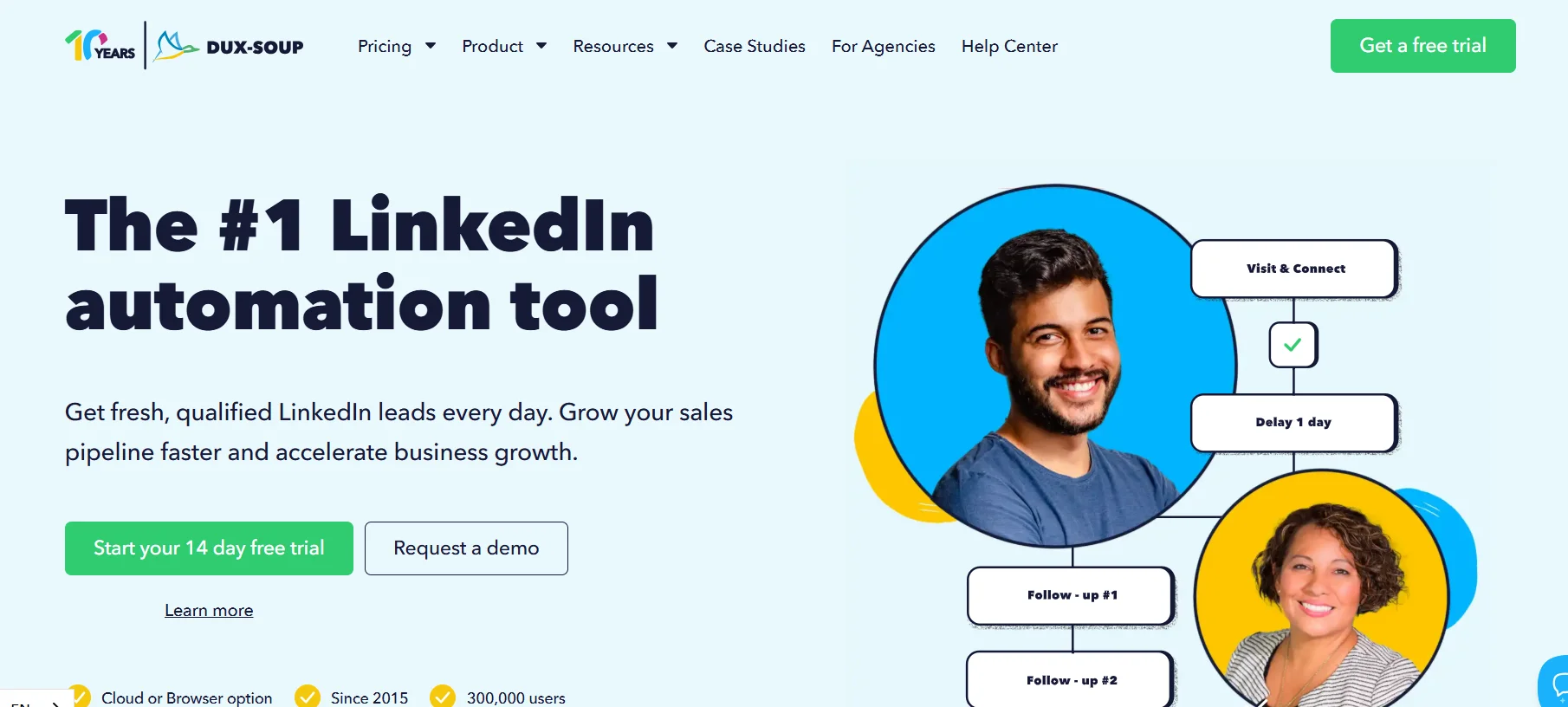
Dux-Soup is a LinkedIn automation platform designed to help sales professionals, recruiters, and growth teams automate the repetitive tasks involved in LinkedIn prospecting — visiting profiles, sending connection requests, following up with messages, and managing lead sequences. At its core, it removes the manual burden of high-volume LinkedIn outreach so that users can focus on the conversations that actually matter.
Browser Extension vs Cloud Tools: The Core Architectural Difference
This is the most important thing to understand about Dux-Soup, and it’s the detail that explains most of the platform’s strengths and weaknesses in a single sentence.
Dux-Soup was originally built as a Chrome browser extension. When you run automation on the browser-based plans (Pro and Turbo), the tool operates directly within your LinkedIn tab. That means:
- LinkedIn must be open in your browser for automation to run
- Your computer must be on and the browser must be active
- The extension injects actions directly into LinkedIn’s interface from your local machine
- If your laptop sleeps, the browser crashes, or you close the tab, automation stops
Dux-Soup now also offers a Cloud plan at $99/month, which moves execution off your machine and onto Dux-Soup’s own infrastructure. On the Cloud plan, campaigns run 24/7 without requiring your browser to be active. However, this plan carries a significantly higher price tag than the browser-based tiers.
This architectural difference — browser-based vs cloud-based — is not a minor technical detail. It is the reason the tool has a price range from $11.25 to $99/month, and it’s why some users encounter safety concerns that others don’t. Cloud-based tools simulate human behaviour from a remote server with a dedicated IP address; browser extensions execute directly within your active browser session. Both approaches can work safely, but they carry different risk profiles and practical limitations, which this review will return to throughout.
What Dux-Soup Automates on LinkedIn
Dux-Soup automates a specific set of LinkedIn activities that would otherwise need to be done manually:
- Automatically visiting LinkedIn profiles (which can prompt profile owners to view yours in return)
- Sending personalised connection requests at scale
- Following LinkedIn profiles and company pages
- Endorsing skills of your connections
- Sending InMail messages
- Running multi-step drip campaigns that combine the above actions in sequences
- Extracting LinkedIn profile data and enriching your CRM contact records
- Tagging and segmenting contacts within the Dux-Soup dashboard
All of these actions are performed within the limits of what LinkedIn allows individual users to do — Dux-Soup does not bypass LinkedIn’s activity limits, it automates within them.
Who is Dux-Soup Designed For?
Dux-Soup was built for individual professionals and small sales teams who want to scale their LinkedIn outreach without a significant budget investment. Based on publicly available user data and the tool’s own positioning, its typical customers include:
- B2B sales development representatives (SDRs) running outbound LinkedIn campaigns
- Recruiters who need to source and contact candidates at volume
- Small business owners and consultants building their professional network
- Marketing agencies managing LinkedIn outreach for a small number of clients
- Growth hackers and solo operators looking for a low-cost entry into LinkedIn automation
It is notably not designed for large agencies managing dozens of client accounts simultaneously, teams who need multi-channel outreach (email + LinkedIn), or enterprises with strict compliance requirements.
Dux-Soup Features: What You Actually Get
LinkedIn-Native Drip Sequences (Visit → Connect → Message Flows)
Dux-Soup’s core feature is its drip campaign builder, which lets you create automated, multi-step outreach sequences on LinkedIn. On the Turbo and Cloud plans, you can build campaigns with up to 12 actions and messages, combining any of the following touchpoints in sequence:
- Profile visits
- Profile follows
- Skill endorsements
- Connection request with a personalised note
- Direct messages to accepted connections
- InMail messages
Each step in the sequence can be configured with custom time delays — measured in hours, days, weeks, or even months — meaning you can create nurture sequences that space out touchpoints over an extended period rather than hitting a prospect repeatedly in a short window. Crucially, campaigns automatically pause when a prospect responds, so you don’t continue sending automated messages to someone who has already engaged.
Message personalisation is handled through merge tags, allowing you to insert a prospect’s first name, last name, company name, job title, and other dynamic fields. This keeps outreach from feeling fully templated, though the personalisation depth is more basic compared to some newer tools that allow dynamic content blocks or AI-generated variations.
Lead Enrollment from LinkedIn Search, Sales Nav and Recruiter
One of Dux-Soup’s practical strengths is the range of sources from which you can build your prospect list. You can enrol leads directly from:
- Standard LinkedIn search results
- LinkedIn Sales Navigator search results
- LinkedIn Recruiter search results
- LinkedIn groups
- A CSV file you upload directly into Dux-Soup
This flexibility means you don’t need Sales Navigator to use Dux-Soup, but the tool does support it natively if you have a subscription — something not all competitors do. Dux-Soup claims it is one of the few automation tools on the market that works fully with Sales Navigator, which provides significantly more powerful search and targeting filters than basic LinkedIn.
Multi-Campaign Management
On the Turbo and Cloud plans, Dux-Soup supports unlimited concurrent drip campaigns. This allows you to run separate sequences targeting different audience segments simultaneously — for example, one campaign targeting VPs of Marketing at SaaS companies, and another targeting HR Directors at professional services firms, with completely different message sequences for each.
You can also assign different daily action limits to individual campaigns and manage which campaigns take priority when your LinkedIn activity budget for the day is being allocated. For team plans, campaigns can be shared across users, enabling collaborative prospecting where multiple team members contribute to the same outreach initiative.
Funnel Flow Analytics and Activity Monitor
Dux-Soup includes a reporting dashboard called Funnel Flow within the Dux-Dash. This is one of the tool’s genuinely useful features that doesn’t get as much attention as it deserves.
Within Funnel Flow, you can track:
- How many profiles have been enrolled in each campaign
- Connection acceptance rates (the percentage of requests that were accepted)
- Number of new connections added over a given period
- Messages sent and response rates
- Qualified leads at each stage of the sequence
- Which individual messages in a sequence are performing best
The Activity Monitor provides a real-time view of what Dux-Soup is currently doing on your LinkedIn account — which profiles it is visiting, which messages it is sending, and at what rate. This transparency is useful both for monitoring performance and for ensuring the tool is behaving within safe activity limits.
You can also view and export your prospect list at each stage of the funnel, which makes it straightforward to move qualified leads into your CRM or pass them to a human for follow-up.
Auto-Tagging and Automatic Data Collection
Two features that are often overlooked in Dux-Soup reviews are auto-tagging and automatic data collection.
Auto-tagging allows you to assign labels to prospects based on where they are in your sequence or how they have responded. For example, you can automatically tag someone as “Accepted – Not Responded” once they connect but don’t reply, making it easy to identify which prospects need a different approach. Manual tagging is also available for adding custom notes or categories directly on LinkedIn profiles while browsing.
Automatic data collection refers to Dux-Soup’s ability to extract publicly available data from LinkedIn profiles as the tool visits them. This includes name, job title, company, location, email address (where visible), and other profile information. Extracted data can be downloaded as a CSV file or pushed directly into connected CRM platforms. For recruiters and sales teams who would otherwise be manually copying this information, this alone can save meaningful hours every week.
CRM and Tool Integrations (HubSpot, Salesforce, Zapier, Webhooks)
Dux-Soup offers native two-way integrations with a solid set of CRM and sales tools:
- HubSpot
- Salesforce
- Pipedrive
- Freshsales
- SharpSpring
- Woodpecker
- Microsoft Teams
- Slack
For tools not on this native list, Dux-Soup connects via Zapier, Make (formerly Integromat), webhooks, and its own API, which significantly extends the range of possible integrations. The two-way nature of key integrations means you can both push LinkedIn data into your CRM and pull CRM contacts into Dux-Soup to trigger LinkedIn outreach sequences — removing the need for manual list exports between systems.
The Microsoft Teams and Slack integrations are particularly practical for sales teams, as they allow the whole team to see LinkedIn response notifications and collaborate on follow-ups without logging into Dux-Soup directly.
Team and Agency Features (Shared Dashboards, Seat Management)
Dux-Soup offers distinct team and agency plans that add collaborative functionality on top of the individual feature set.
Team plans allow multiple users to share campaigns, pool targeting lists, and view collective performance data from a centralised dashboard. Pricing for team plans follows the same per-seat structure as individual plans, with volume discounts applied as the number of seats increases.
The Agency plan includes a dedicated Agency Dashboard, which allows agencies to onboard and manage multiple client LinkedIn accounts from a single interface, view campaign results by client, and run LinkedIn outreach on behalf of clients without sharing login credentials. The Agency plan requires a minimum number of seats (30+ seats for Pro, 10+ for Turbo, 5+ for Cloud), which means it is structured for established agencies with an existing client base rather than solo freelancers testing agency-style operations.
Getting Started with Dux-Soup: Setup and Learning Curve
Installation and Onboarding Walkthrough
Getting Dux-Soup running is straightforward on the browser-based plans. The process involves:
- Installing the Dux-Soup Chrome extension from the Chrome Web Store
- Logging into your Dux-Soup account and linking your license key to the extension
- Navigating to LinkedIn, where Dux-Soup’s interface appears as a sidebar panel on the right side of your browser
- Creating your first campaign by defining a target list (via LinkedIn search or CSV upload) and setting up your sequence of actions and messages
The initial setup can be completed in under an hour for a basic campaign. Dux-Soup provides a library of help articles and video tutorials, and the onboarding experience has reportedly improved in recent years based on user review data from G2 and Capterra.
The Cloud plan has a slightly different setup since it doesn’t rely on the Chrome extension in the same way. Instead, automation is managed through the Dux-Dash web application rather than from within your browser.
How Steep is the Learning Curve?
Dux-Soup’s learning curve is moderate. Basic campaigns — enrolling a LinkedIn search into a visit → connect → message sequence — are easy to configure and can be set up by someone with no prior experience in automation tools within their first session.
The complexity increases when you start configuring more advanced elements:
- Building multi-step campaigns with conditional logic
- Setting up CRM integrations, especially for bidirectional data sync
- Managing the interaction between multiple simultaneous campaigns
- Fine-tuning the activity limits and delay settings for safety
Multiple users on G2 and Capterra note that the interface, while functional, is not as modern or intuitive as some newer tools. One G2 reviewer noted the UI “could be slightly more user-friendly and modern.” This is a fair criticism — Dux-Soup’s interface reflects its age and has not been redesigned as radically as some competitors. Power users tend to get comfortable with it over time, but the initial navigation can feel less obvious than you’d expect from a tool at this price point.
UI and UX: Honest Assessment
Dux-Soup’s interface is utilitarian rather than polished. The Dux-Dash (the web-based management dashboard) is functional for campaign management, analytics, and CRM integration, but it lacks the visual clarity and modern design language of newer competitors. The Chrome extension sidebar on LinkedIn is compact and information-dense, which is practical once you’re familiar with it but can feel cluttered for new users.
The tool does what it is supposed to do, but users accustomed to the polished dashboards of tools like HubSpot, Expandi, or HeyReach may find the UI a step below in terms of visual experience. This does not materially affect functionality, but it does affect the daily experience of working with the tool.
Dux-Soup Pros and Cons
Where Dux-Soup Genuinely Shines
Cost-effectiveness for individual users
Dux-Soup is one of the most affordable LinkedIn automation tools on the market at the entry and mid-tier levels. At $14.99/month for Pro or $55/month for Turbo (with annual plans dropping those to $11.25 and $41.25 respectively), it undercuts most cloud-native competitors significantly. For a solo user or small team with a limited budget, the price-to-functionality ratio is genuinely strong, particularly on the Turbo plan.
Compatibility with LinkedIn, Sales Navigator, and Recruiter
Dux-Soup works natively across LinkedIn’s three main interfaces — standard LinkedIn, Sales Navigator, and Recruiter. This is not universal among LinkedIn automation tools, and for users who invest in Sales Navigator’s advanced search and targeting capabilities, having a tool that integrates cleanly with it is a meaningful advantage.
Maturity and stability
Dux-Soup launched in 2015, making it one of the oldest LinkedIn automation tools still actively maintained. Its longevity means it has a large knowledge base, an established user community, and a track record of adapting to LinkedIn’s platform changes. Users on G2 note that it has been “proven with 10+ years” and that the company continues to update the tool. For buyers who have been burned by newer tools that become unstable or unsupported, Dux-Soup’s track record is a genuine selling point.
CRM integration flexibility
The range of native CRM integrations — HubSpot, Salesforce, Pipedrive, Freshsales, SharpSpring — combined with Zapier, Make, webhooks, and an API gives Dux-Soup unusually broad connectivity for its price point. Most competitors at this price level offer fewer native integrations and rely more heavily on Zapier as a workaround.
Funnel Flow analytics
The built-in Funnel Flow analytics give users clear visibility into campaign performance at each stage of the outreach funnel. Tracking acceptance rates, response rates, and qualified lead counts by campaign is actionable data that helps users refine their targeting and messaging over time.
Where Dux-Soup Falls Short
Browser-tab dependency on Pro and Turbo plans
The most significant practical limitation of Dux-Soup’s browser-based plans is that automation stops when your browser closes, your laptop sleeps, or your internet connection drops. This means campaigns effectively run only during your working hours unless you deliberately leave your computer running 24/7 — which is neither efficient nor practical for most users. Users on Capterra and G2 frequently cite this as a frustration: one user noted that the tool “took up a lot of processor bandwidth on my computer and it would often freeze.” The Cloud plan resolves this issue but at a price jump to $99/month.
Resource consumption on the browser
Multiple user reviews across G2, Capterra, and Software Advice describe Dux-Soup slowing down their computer and browser while running automation. Since the extension operates within your active LinkedIn tab and opens additional LinkedIn pages to visit profiles and execute actions, it consumes meaningful CPU and RAM. On lower-powered machines or during heavy multi-tasking, this can noticeably affect computer performance. This is a structural limitation of browser-extension-based automation rather than a fixable bug.
LinkedIn-only scope
Dux-Soup is exclusively a LinkedIn automation tool. There is no email outreach capability, no multi-channel sequencing, and no integration with cold calling or WhatsApp outreach. For users who need a single platform to orchestrate outreach across multiple channels, Dux-Soup is not the right tool — they would need to combine it with a separate email tool or switch to a multi-channel platform.
Higher risk of LinkedIn detection on browser plans
Browser extensions carry a higher detection risk than cloud-based tools because they execute actions directly within the browser’s DOM (Document Object Model) in a way that LinkedIn’s systems can potentially identify as non-human. This is a structural characteristic of browser-extension automation, not a specific failing of Dux-Soup, but it is relevant to how the tool is assessed on safety.
Basic personalisation capabilities
While Dux-Soup supports message personalisation through merge tags (first name, company, job title, etc.), it does not offer the more advanced personalisation features available in newer tools — such as AI-generated message variations, personalised images, personalised video embeds, or dynamic content based on prospect activity on LinkedIn. For users who want hyper-personalised outreach at scale, the personalisation toolkit in Dux-Soup is functional but basic.
Limited user interface modernity
As noted above, the UI reflects the tool’s age. While it is functional, it does not match the visual quality of newer competitors and can create a steeper initial learning curve for new users.
Is Dux-Soup Safe? LinkedIn Account Risk Explained
Why Browser Extensions Carry Higher Detection Risk Than Cloud Tools
LinkedIn actively monitors accounts for behaviour that deviates from normal human usage patterns — sending too many connection requests in too short a time, visiting hundreds of profiles per hour, or sending identical messages to large volumes of people at once. When automation is detected, LinkedIn’s typical response ranges from temporary action restrictions to permanent account suspension.
Browser-extension-based tools like Dux-Soup’s Pro and Turbo plans operate by injecting code directly into LinkedIn’s browser environment and triggering actions on your behalf. This approach is inherently more visible to LinkedIn’s detection systems than cloud-based automation, which operates from a remote server that LinkedIn sees as a standard user login from a consistent IP address.
Cloud-based tools (including Dux-Soup’s own Cloud plan) can assign dedicated IP addresses, simulate more realistic usage patterns, and operate independently of a user’s browser fingerprint — all of which reduce detection surface. According to analysis published by Growleads, browser extensions carry meaningfully higher detection risk than cloud platforms as a general category.
Dux-Soup’s Built-In Safety Settings (Delays, Limits, Randomisation)
Dux-Soup has invested in safety features across all plans to help users stay within LinkedIn’s acceptable activity boundaries:
- Daily action limits: Users can set maximum daily limits for connection requests, messages, profile visits, and other actions. Staying below LinkedIn’s recommended thresholds (generally around 100 connection requests per week for most accounts) significantly reduces detection risk.
- Time delays between actions: Users can configure minimum and maximum delays between individual actions, adding randomness to the timing so that activity does not look mechanically uniform.
- Snooze feature: Dux-Soup includes a unique “Snooze” feature that pauses automation activity for configurable periods, which can be used to avoid alerting LinkedIn to consistent patterns of high-volume activity.
- Response detection: Campaigns automatically stop sending to a prospect once they reply, preventing the kind of continued messaging after engagement that flags accounts as spam-like.
- Activity monitoring: The Activity Monitor in the Dux-Dash gives users real-time visibility of what the tool is doing, enabling manual intervention if volume or speed looks too aggressive.
Dux-Soup describes these as its five core safety points and emphasises that it has maintained a strong safety record since its 2015 launch when settings are followed correctly.
Real-World Ban Reports: What the Evidence Shows
Multiple LinkedIn automation users across review platforms report receiving temporary restrictions or warnings while using browser-extension-based tools. User reviews on Capterra, G2, and third-party review aggregators include accounts of profile restrictions following periods of high-volume automation. A recurring observation from users who have been restricted is that violations typically occurred when daily limits were set too aggressively or when the snooze and delay settings were not properly configured.
Dux-Soup itself acknowledges the risk, noting in its own documentation that LinkedIn restrictions can occur if limits are not respected, and proactively recommending its Cloud plan as offering “ultimate safety” over the browser-based tiers. The difference in safety between Dux-Soup’s own browser plans and its Cloud plan is a point the company itself makes openly.
The consensus across user reviews and independent comparisons is that Dux-Soup can be used without LinkedIn restrictions when configured carefully and conservatively — but that aggressive settings increase the risk materially, particularly on the browser-based plans.
Best Practices to Reduce Your Risk
Based on Dux-Soup’s own guidance and the patterns in user reviews, the following practices reduce LinkedIn account risk:
- Start with low daily limits and increase gradually over several weeks (account warm-up)
- Keep connection requests to no more than 20–25 per day when starting out
- Use the time delay and randomisation settings to ensure activity does not occur at machine-regular intervals
- Enable the Snooze feature to take periodic breaks from automation
- Avoid running automation 24/7, even on the Cloud plan — mimic the patterns of a human user
- Personalise connection request notes rather than sending blank or fully templated requests
- Stop campaigns promptly when you receive any LinkedIn warning, even a minor one
Dux-Soup Pricing: Plans, Value and What You Don’t Get
Individual Plans (Starter, Pro, Turbo)
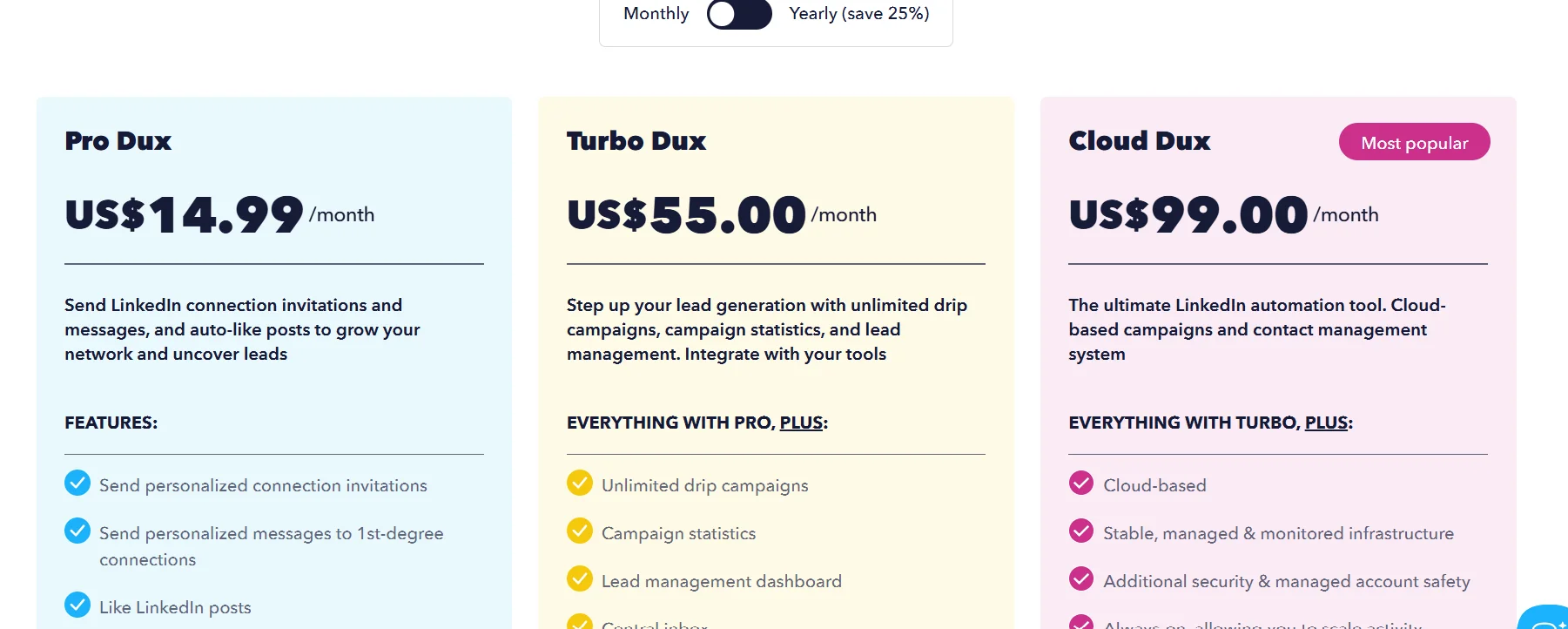
Dux-Soup offers three individual plans for single users, plus a free Starter edition:
Free Starter The free plan provides basic LinkedIn profile visiting and data extraction. It does not include drip campaigns, CRM integrations, or analytics. It is useful for testing the extension but limited for any serious outreach work.
Pro Dux — $14.99/month or $11.25/month (billed annually / $135/year)
- Automated connection requests and direct messages
- Automated profile visits, follows, and endorsements
- Data download from LinkedIn profiles
- Basic personalisation with merge tags
- Does not include drip campaigns, CRM integrations, or Funnel Flow analytics
Turbo Dux — $55/month or $41.25/month (billed annually / $495/year)
- Everything in Pro, plus:
- Unlimited drip campaigns with up to 12 actions and messages
- Custom time delays and smart campaign controls
- Native CRM integrations (HubSpot, Salesforce, Pipedrive, Freshsales, SharpSpring)
- Zapier, Make, and webhook integrations
- Funnel Flow campaign analytics and lead management dashboard
- API access
- Runs via Chrome extension (browser must be open)
Cloud Dux — $99/month or $74.17/month (billed annually / $890/year)
- Everything in Turbo, plus:
- Always-on automation running from Dux-Soup’s cloud infrastructure
- Browser does not need to be open or computer turned on
- Faster campaign execution via managed infrastructure
- No resource drain on your computer
Team Plans: Per-Seat Pricing Breakdown
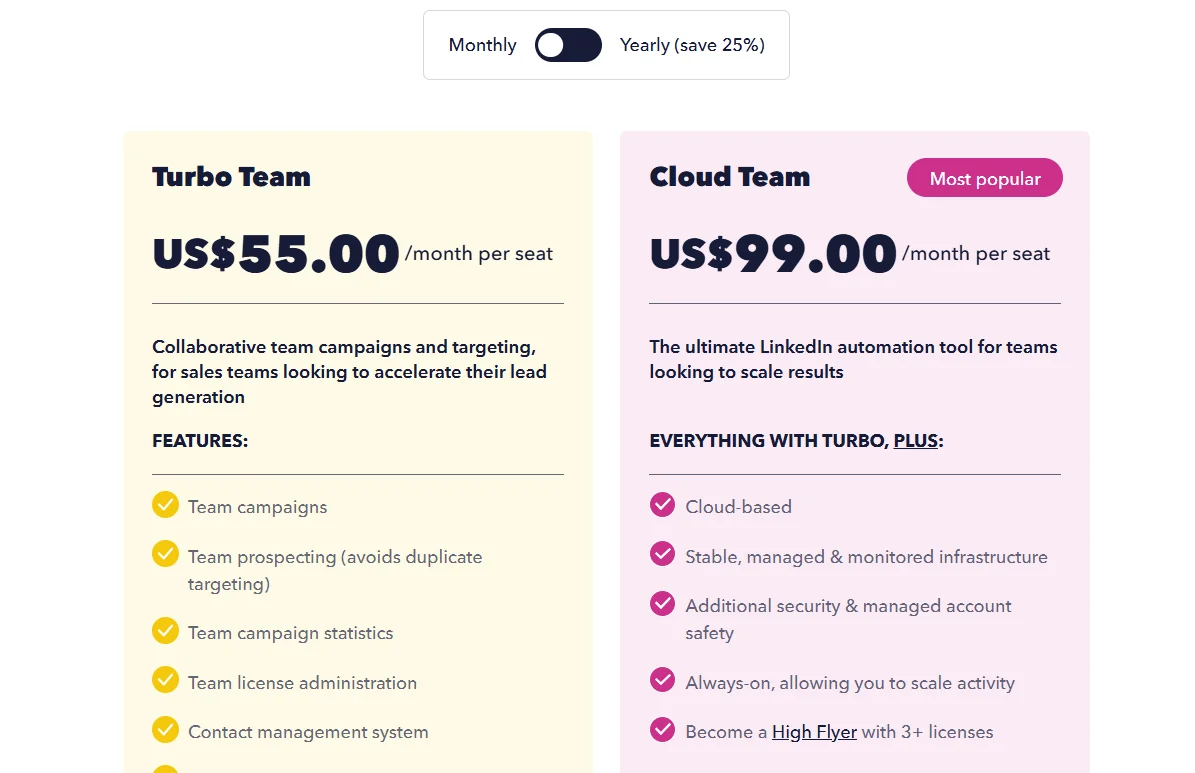
Team plans mirror the individual plan structure but are priced per seat and include team-level features such as shared campaigns and collaborative dashboards. Volume discounts apply as the number of seats grows.
- Pro Team: $14.99/seat/month ($11.25/seat/month billed annually)
- Turbo Team: $55/seat/month ($41.25/seat/month billed annually)
- Cloud Team: $99/seat/month ($74.16/seat/month billed annually)
For a team of three using Turbo annually, that works out to approximately $124/month. A three-person Cloud team costs approximately $222/month. These figures are per-seat without additional platform fees, making the total cost transparent and predictable.
Agency Plan
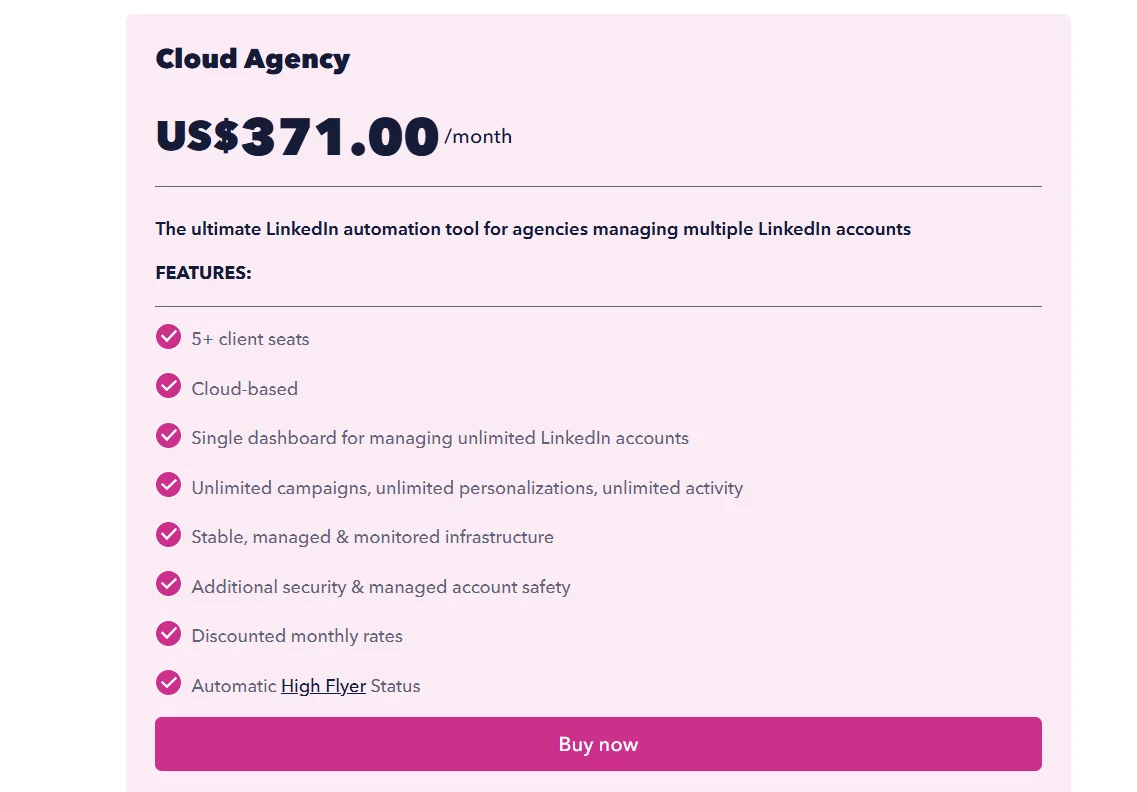
The Agency plan is designed for marketing and sales agencies managing LinkedIn outreach for multiple clients from a single dashboard. It requires a minimum number of seats depending on the plan tier:
- Pro Agency: Minimum 30 seats — $337.50/month
- Turbo Agency: Minimum 10 seats — $412.50/month
- Cloud Agency: Minimum 5 seats — from $371/month (5 seats)
The Agency Dashboard allows agencies to onboard client LinkedIn accounts, run campaigns on their behalf, and view per-client reporting without switching between accounts manually.
Price-to-Value Verdict: Is Each Tier Worth It?
Pro at $14.99/month is a reasonable entry point for someone who simply wants to automate connection requests and basic messages without building drip sequences. However, the absence of drip campaigns and CRM integrations limits its usefulness for anyone running systematic outreach. Most users who move beyond casual LinkedIn prospecting will quickly need to upgrade.
Turbo at $55/month (or $41.25 annually) is where Dux-Soup delivers its best value. For a solo user who wants full drip campaign functionality, CRM integration, and analytics at a price well below most cloud-native alternatives, Turbo is competitive. The main caveat is the browser dependency — if leaving your computer on for automation is impractical, the Turbo plan’s always-on limitation is a real constraint.
Cloud at $99/month addresses the browser limitation but puts Dux-Soup in direct price competition with cloud-native tools like Expandi ($99/month) that were built cloud-first and offer more advanced safety features like dedicated IP addresses by default. At this price point, Cloud Dux is a reasonable choice for existing Dux-Soup users who want to upgrade their infrastructure, but it is not obviously better value than dedicated cloud alternatives for new buyers.
Agency plans are appropriately priced for agencies already using Dux-Soup at scale, but the minimum seat requirements (30 seats for Pro Agency) make the entry threshold high for smaller agencies.
Who Should (and Shouldn’t) Use Dux-Soup in 2026
Best Use Cases for Dux-Soup
Dux-Soup performs best in a specific set of circumstances:
- Solo SDRs or freelancers running LinkedIn-only outreach with a modest daily volume and a tight budget. The Turbo plan delivers the core automation toolkit at a price point that few competitors can match.
- Small B2B sales teams (two to five people) who need shared campaigns and CRM integration without paying for the enterprise feature sets of larger platforms.
- Recruiters who need to source candidates at volume from LinkedIn and Sales Navigator and capture their profile data automatically. The data extraction and CSV export capabilities are particularly useful here.
- Users who already have a Sales Navigator subscription and want a tool that integrates with it natively rather than working around it.
- Budget-constrained users who are new to LinkedIn automation and want to test the channel before committing to a higher-priced platform.
When Dux-Soup is the Wrong Tool
There are clear scenarios where Dux-Soup is not the right fit:
- Agencies managing more than a handful of client accounts who need a more robust multi-account management environment without high per-seat costs.
- Teams who need multi-channel outreach (LinkedIn + email + calling in the same sequence). Dux-Soup is LinkedIn-only. Tools like Lemlist or La Growth Machine are more appropriate here.
- Users who cannot or will not keep their browser open during business hours and don’t want to pay the Cloud plan premium. The browser dependency is a genuine operational constraint on Pro and Turbo.
- Power users who need advanced personalisation at scale — personalised images, video thumbnails, AI-generated message variations, or dynamic content based on prospect behaviour.
- Enterprises with compliance and security requirements around data handling, where a browser extension operating on local infrastructure may not meet IT policy.
- Users prioritising account safety above all else, who should evaluate dedicated cloud-native platforms with built-in dedicated IPs and account warm-up infrastructure.
Dux-Soup Alternatives: Honest Comparisons
Dux-Soup vs Phantombuster
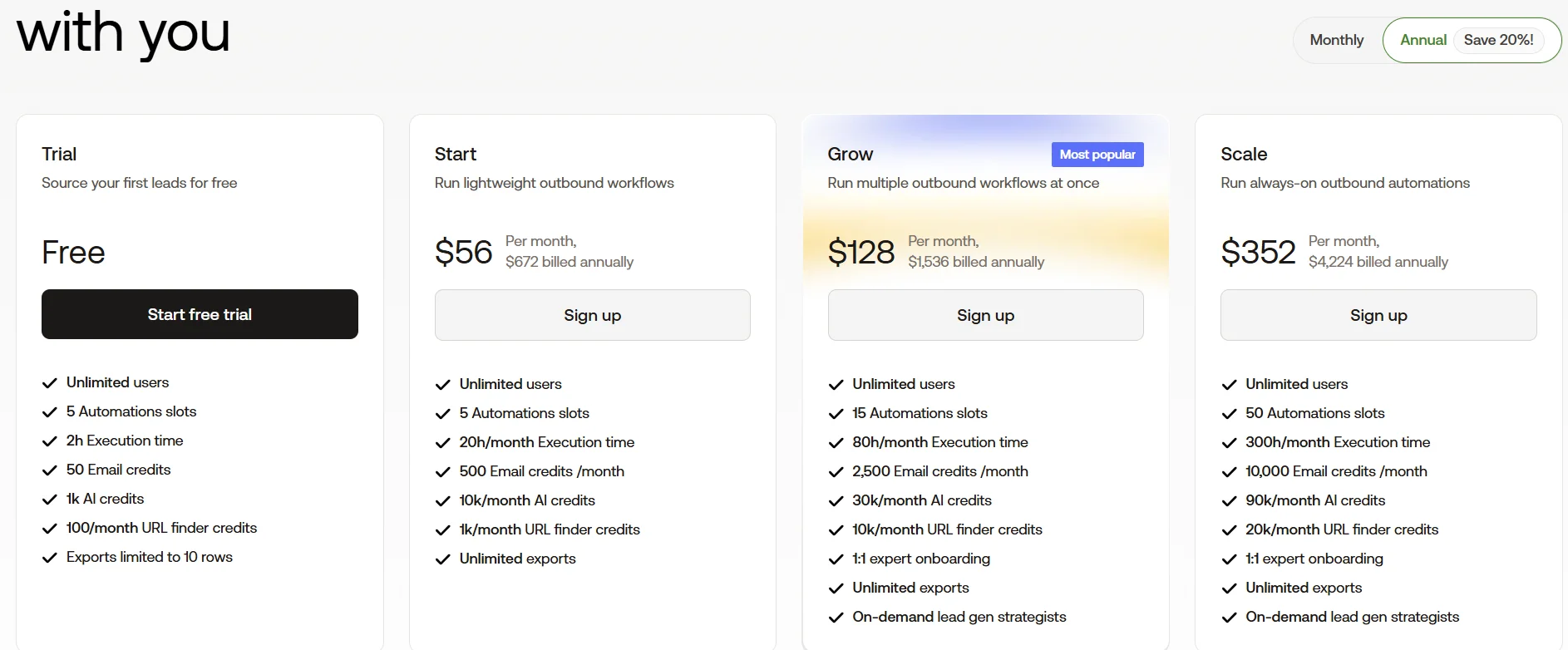
Phantombuster is a cloud-based automation and data extraction tool that works across multiple platforms — LinkedIn, Twitter, Instagram, Facebook, Google Maps, and more. Unlike Dux-Soup, which is built specifically for LinkedIn outreach, Phantombuster operates on a “Phantoms and Flows” model where individual automation scripts (Phantoms) can be chained together to build custom workflows.
Phantombuster’s strength is data extraction and lead list building. It is particularly useful for gathering profile data from LinkedIn searches, Sales Navigator, post engagers, and event attendees, and pushing that data into CRMs or spreadsheets. However, Phantombuster does not have native multi-step outreach sequences for LinkedIn in the same way Dux-Soup does — its outreach capabilities rely on integrations with tools like HubSpot or external sequencing tools.
For a pure LinkedIn outreach use case, Dux-Soup is more capable out of the box. For teams who need to extract and enrich lead data across multiple platforms before feeding it into a separate outreach tool, Phantombuster is a more flexible choice.
Pricing: Phantombuster starts at approximately $69/month for paid plans. Team workspaces range from approximately $159 to $439/month depending on capacity.
Dux-Soup vs Expandi
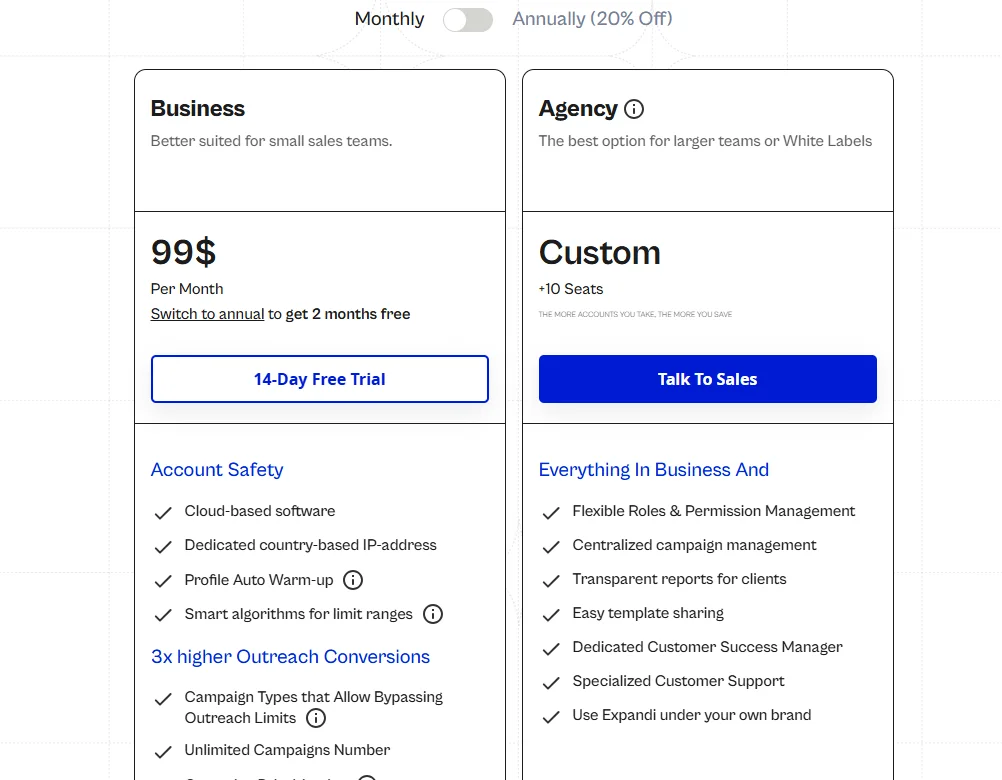
Expandi is a cloud-based LinkedIn automation platform that operates from a dedicated IP address per account, includes account warm-up, and offers a visual campaign builder with conditional logic (“if reply, then…”). It is positioned as a safety-first, cloud-native alternative to browser extension tools.
Key differences from Dux-Soup:
- Expandi is fully cloud-based with no browser extension; Dux-Soup offers both but the cheaper plans require a browser
- Expandi includes dedicated IP addresses per account; Dux-Soup’s Cloud plan does not specify per-account dedicated IPs
- Expandi offers conditional sequences (if/then branching); Dux-Soup sequences are linear
- Expandi costs $99/month for a single flat plan; Dux-Soup Turbo is $55/month but requires the browser to be open
Expandi is the stronger choice for users who prioritise account safety and want conditional campaign logic. Dux-Soup Turbo is significantly cheaper and covers the core use case if browser dependency is not a problem.
Pricing: Expandi is $99/month per account with a 7-day free trial (credit card required).
Dux-Soup vs Lemlist
Lemlist began as an email outreach tool and has expanded into a multi-channel platform combining email, LinkedIn, and calling in the same sequences. It is not a LinkedIn-only tool — LinkedIn is one channel within a broader outreach workflow.
Key differences from Dux-Soup:
- Lemlist covers email + LinkedIn + calling in unified sequences; Dux-Soup covers LinkedIn only
- Lemlist includes a built-in B2B lead database of over 63 million companies
- Lemlist offers advanced personalisation including personalised images and landing pages
- Lemlist starts at a higher price point (multi-channel plans are significantly more expensive per user than Dux-Soup Turbo)
For users who want LinkedIn as part of a broader multi-channel outreach strategy, Lemlist is more capable. For users whose outreach is LinkedIn-only, Dux-Soup is more cost-effective and purpose-built.
Dux-Soup vs HeyReach
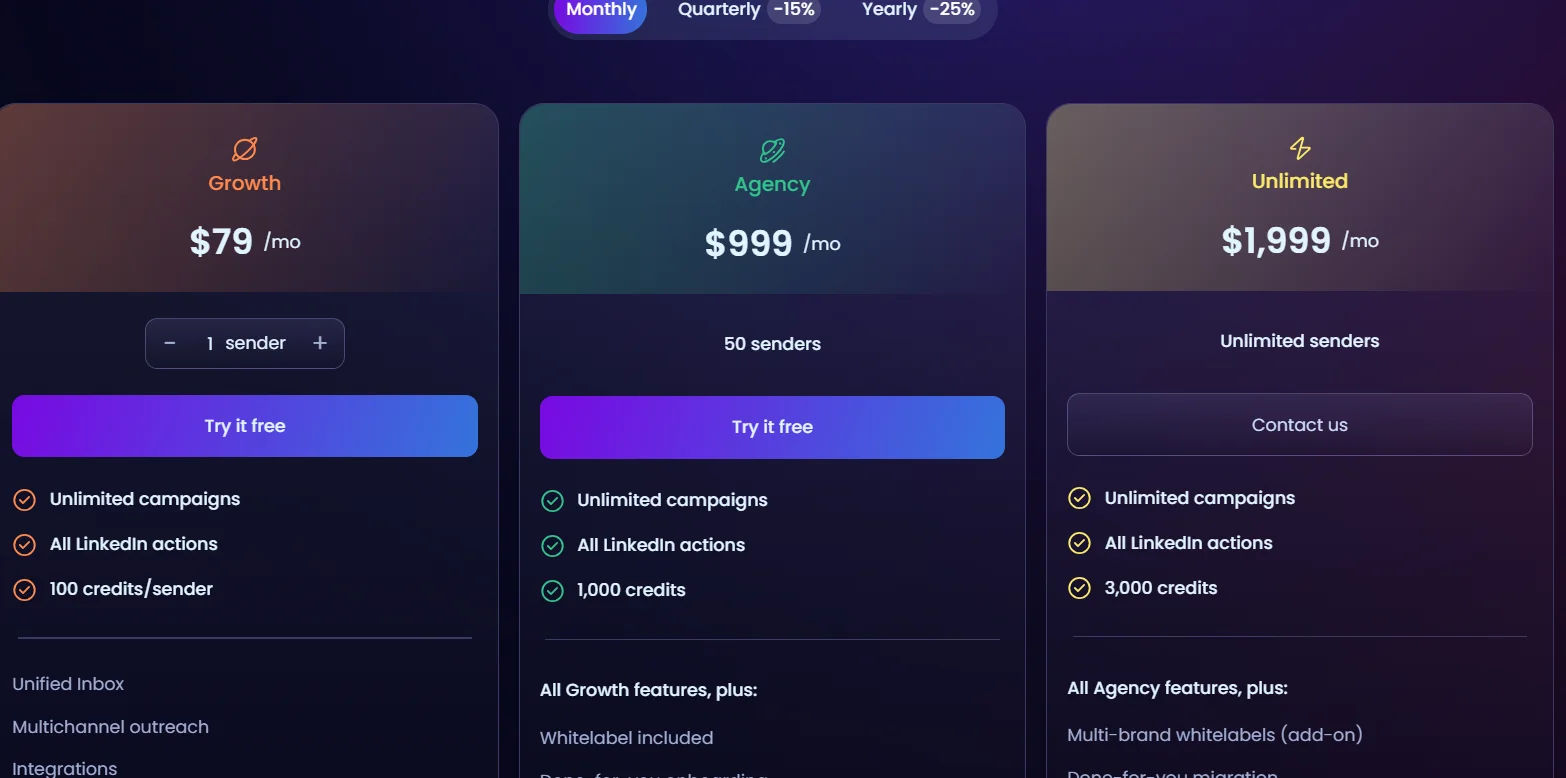
HeyReach is a cloud-based LinkedIn automation platform built specifically for agencies and high-volume sales teams. Its defining feature is the ability to run campaigns across multiple LinkedIn sender accounts simultaneously, with automatic rotation between senders to distribute activity and reduce per-account risk.
Key differences from Dux-Soup:
- HeyReach runs on flat pricing that does not scale per sender account, making it cost-effective for agencies managing multiple senders
- HeyReach includes a unified inbox (Unibox) that aggregates all LinkedIn conversations across sender accounts into one view
- HeyReach has a G2 rating of 4.9/5 based on user reviews
- HeyReach starts at $79/month; Dux-Soup Turbo is $55/month
For a solo user or small team running outreach from a single LinkedIn account, Dux-Soup is more affordable. For agencies or teams running outreach from multiple LinkedIn accounts simultaneously, HeyReach’s architecture and pricing model are more appropriate.
Comparison Table: Features, Pricing, Safety, Ease of Use
| Dux-Soup Turbo | Expandi | Lemlist | HeyReach | Phantombuster | |
|---|---|---|---|---|---|
| Starting price | $41.25/mo (annual) | $99/mo | Higher per user | $79/mo | $69/mo |
| Cloud-based | Cloud plan only ($99/mo) | Yes | Yes | Yes | Yes |
| LinkedIn-only | Yes | Yes | No (multi-channel) | Yes | No (multi-platform) |
| Drip sequences | Up to 12 actions | Conditional sequences | Multi-channel sequences | Yes | Limited natively |
| Sales Nav support | Yes | Yes | Yes | Yes | Yes |
| CRM integrations | HubSpot, Salesforce, Pipedrive, others | Via Zapier/Make | Native + Zapier | HubSpot, Pipedrive, Zapier | Via Zapier/Make |
| Multi-account mgmt | Agency plan only | Yes | Yes | Yes (core feature) | Yes |
| Free trial | 14 days, no credit card | 7 days (credit card required) | Yes | 14 days | Yes |
| G2 rating | 4.3/5 | 3.5/5 | 4.6/5 (Capterra) | 4.9/5 | Varies |
Real User Reviews: What Customers Say in 2026
G2 and Capterra Sentiment Summary
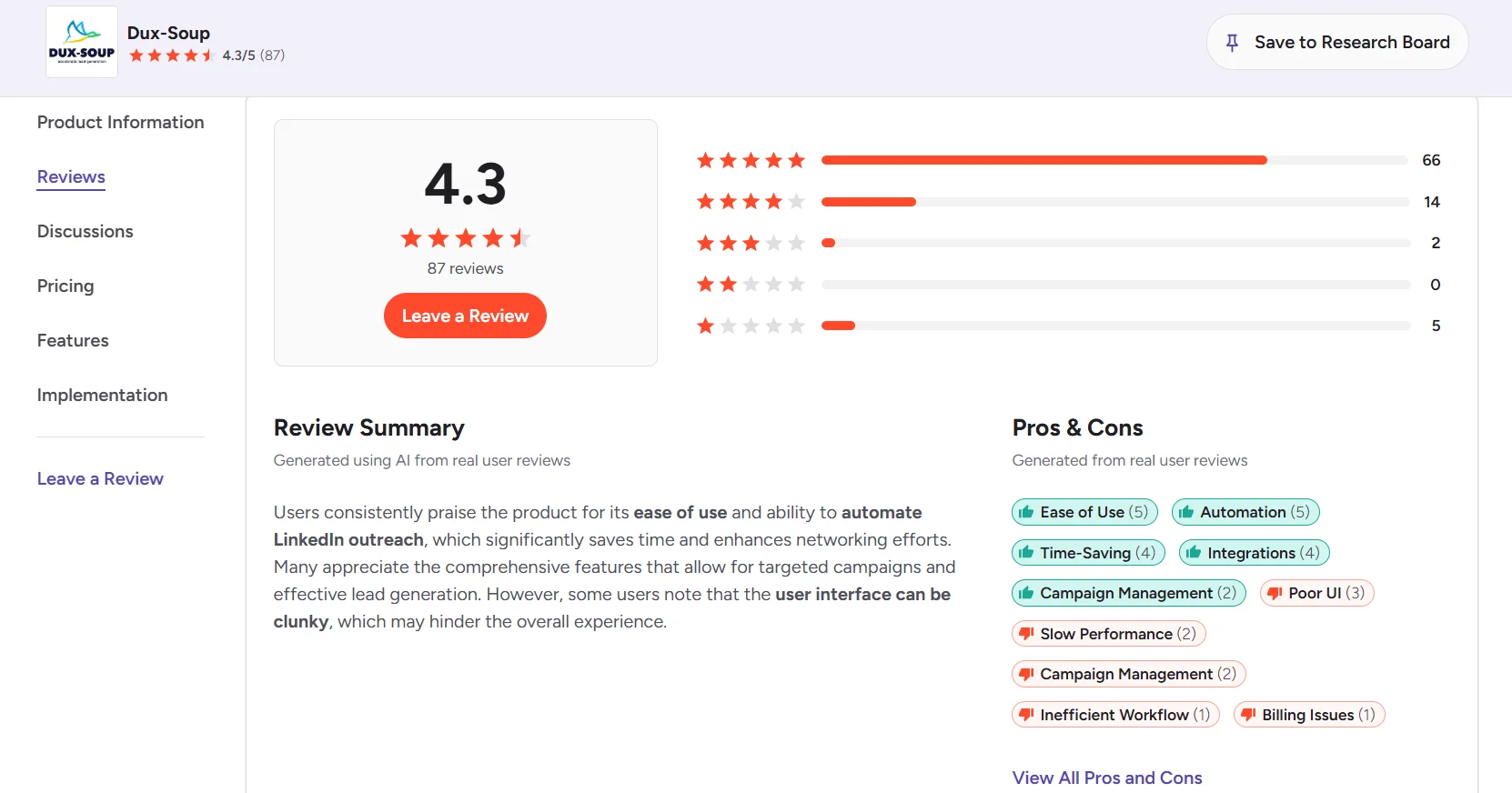
Dux-Soup carries a rating of 4.3 out of 5 on G2 based on 469 verified reviews, and a 4.0 out of 5 on Capterra. These are solid ratings in a category where tools frequently receive polarised feedback due to the sensitivity of LinkedIn account risk and the variability of user experience based on how the tool is configured.
On Software Advice, reviewers broadly rate the tool positively on functionality while noting specific limitations around UI and the computer resource usage.
Common Praise Themes
Recurring positive themes across G2, Capterra, and Software Advice reviews include:
- Time savings: Multiple reviewers cite weekly time savings of 10+ hours on LinkedIn outreach tasks that would otherwise be done manually. One G2 user noted that Dux-Soup “completes about 500-700 tasks on LinkedIn” per week — activity that would be “basically impossible to do manually.”
- Ease of initial setup: Many users describe the installation and first campaign setup as quick and straightforward, particularly for the basic connection request and messaging workflows.
- Effective lead generation: Users report meaningful results from campaigns — one company cited a 65% increase in booked meetings and time savings across their sales team. Another noted closing a $12,500 contract within 30 days of their first campaign.
- Sales Navigator compatibility: Users who rely on Sales Navigator specifically mention Dux-Soup’s native compatibility as a differentiator compared to tools that do not fully support it.
- CRM integration quality: Users integrating with HubSpot, Salesforce, and Pipedrive generally report the integrations working reliably and reducing manual data entry between systems.
Common Complaint Themes
Recurring negative themes across the same review sources include:
- Computer slowdown: Multiple reviewers on Capterra and G2 describe the browser extension consuming significant CPU and RAM, making their computers noticeably slower while automation runs. One user described it “freezing” their computer. Dux-Soup’s own response to these reviews points users toward the Cloud plan as a solution.
- UI complexity and dated design: New users consistently mention that the interface is not as intuitive as they expected, and that it takes time to learn where everything is. Several reviewers describe the UI as “old-fashioned” or less polished compared to newer tools.
- Browser dependency frustration: Users who did not fully understand the browser-based architecture before purchasing describe frustration at discovering their campaigns stop when they close their laptop. This is well-documented in Dux-Soup’s own materials but is not always apparent to first-time buyers.
- Accidental campaign enrolment: A small number of users mention that browsing LinkedIn normally while the extension is active can sometimes trigger unintended profile visits or enrolments. Dux-Soup has noted this in their own product feedback responses and has added settings to manage it.
- Price scaling for multiple accounts: Users managing more than one LinkedIn account note that the per-seat pricing model adds up quickly compared to tools with flat per-team pricing.
Final Verdict
Dux-Soup is a legitimate and well-established LinkedIn automation tool that delivers real value — but the value is concentrated in specific use cases.
For a solo user or small team running LinkedIn-only outreach from a single account, the Turbo plan at $41.25/month (annual) represents strong value. You get unlimited drip campaigns, CRM integration, Funnel Flow analytics, and Sales Navigator compatibility at a price that most cloud-native alternatives cannot match. If you are comfortable leaving your browser open during business hours and you configure activity limits conservatively, Dux-Soup Turbo is a cost-effective workhorse.
For users who need always-on automation without the browser constraint, the Cloud plan at $74.17/month (annual) is the sensible upgrade — but at that price point, it deserves to be compared directly against cloud-native competitors like Expandi and HeyReach, where those tools’ dedicated infrastructure and additional safety features become relevant considerations.
For agencies managing multiple client accounts or teams who need multi-channel outreach, Dux-Soup is not the right starting point. HeyReach’s architecture is better suited to the multi-sender agency model, and tools like Lemlist are built for multi-channel from the ground up.
If you do go with Dux-Soup, the recommended path is to start with the Turbo plan if budget is a primary concern, or go directly to Cloud if you need always-on automation and your budget allows. Use the 14-day free trial (no credit card required) before committing, and spend time setting up conservative daily limits and realistic time delays before launching your first campaign.
Frequently Asked Questions
What is Dux-Soup?
Dux-Soup is a LinkedIn automation platform that helps sales professionals, recruiters, and marketers automate repetitive LinkedIn tasks — including profile visits, connection requests, message sequences, skill endorsements, and lead data extraction. It was founded in 2015 and is used by over 300,000 individuals, teams, and agencies. It is available as a Chrome browser extension (on Pro and Turbo plans) and as a cloud-based service (on the Cloud plan).
How much does Dux-Soup cost?
Dux-Soup offers three individual paid plans: Pro Dux at $14.99/month ($11.25/month billed annually), Turbo Dux at $55/month ($41.25/month billed annually), and Cloud Dux at $99/month ($74.17/month billed annually). Team plans follow the same per-seat pricing with volume discounts. Agency plans start at $337.50/month (Pro, minimum 30 seats), $412.50/month (Turbo, minimum 10 seats), and $371/month (Cloud, minimum 5 seats). A 14-day free trial of the Turbo plan is available with no credit card required.
Is Dux-Soup safe to use on LinkedIn?
Dux-Soup can be used without triggering LinkedIn restrictions when activity limits are configured conservatively and the tool’s built-in safety features (time delays, snooze function, daily limits, response detection) are properly set up. The browser-based plans (Pro and Turbo) carry a higher detection risk than cloud-based tools as a category, because they operate from your local browser rather than a dedicated remote server. The Cloud plan operates from Dux-Soup’s own infrastructure and carries a lower detection risk. Following the tool’s recommended settings and starting with low daily volumes significantly reduces the probability of account restrictions.
Does Dux-Soup work with LinkedIn Sales Navigator?
Yes. Dux-Soup is compatible with LinkedIn’s standard interface, Sales Navigator, and Recruiter. Users can enrol leads directly from Sales Navigator search results into Dux-Soup campaigns, which is a feature not universally available across all LinkedIn automation tools.
What are the best alternatives to Dux-Soup?
The most commonly cited alternatives to Dux-Soup are Expandi (cloud-based, dedicated IP per account, $99/month), HeyReach (multi-sender agency platform, starts at $79/month), Lemlist (multi-channel outreach including email and LinkedIn), and Phantombuster (cross-platform data extraction and automation). The right alternative depends on your specific use case — cloud vs browser preference, LinkedIn-only vs multi-channel needs, individual vs agency scale, and budget.
Can Dux-Soup get my LinkedIn account banned?
LinkedIn restrictions are possible with any automation tool, including Dux-Soup, if activity limits are set too high or if automation behaves in patterns that LinkedIn’s systems detect as non-human. Dux-Soup’s browser-based plans carry a higher inherent detection risk than cloud-native tools because they operate from within your browser. Multiple user reviews document cases of temporary restrictions occurring after high-volume or aggressively configured campaigns. Following Dux-Soup’s recommended safety settings — particularly conservative daily limits, realistic time delays, and the snooze feature — significantly reduces but does not eliminate this risk.