


LinkedIn outreach is one of the few B2B channels that still actually works. No paid media budget, no algorithm roulette, just direct access to decision-makers. But here’s the thing: the tool you pick doesn’t just change how fast you send messages. It changes whether those messages turn into meetings.
That’s where Dux-Soup and DealsFlow split into two very different roads.
Dux-Soup has been around since 2015. Over 15,000 customers, affordable plans, and a decade of community tutorials behind it. It’s what people reach for when they want to automate LinkedIn without spending much. DealsFlow is newer and built differently — an AI-native platform where an engine called Arlo handles the entire outreach conversation, not just the sending.
On the surface, both tools automate LinkedIn outreach. But they’re built on completely opposite philosophies. Dux-Soup automates the sequence. DealsFlow automates the conversation. Choosing the wrong one for your workflow doesn’t just cost you a subscription fee — it costs you pipeline. Real opportunities that slip through because your tool stopped working the moment a prospect replied.
By the end of this piece, you’ll know exactly which one fits your setup, your team size, and what you’re actually trying to accomplish.
Quick Overview — What Each Tool Is Built For
Dux-Soup at a Glance
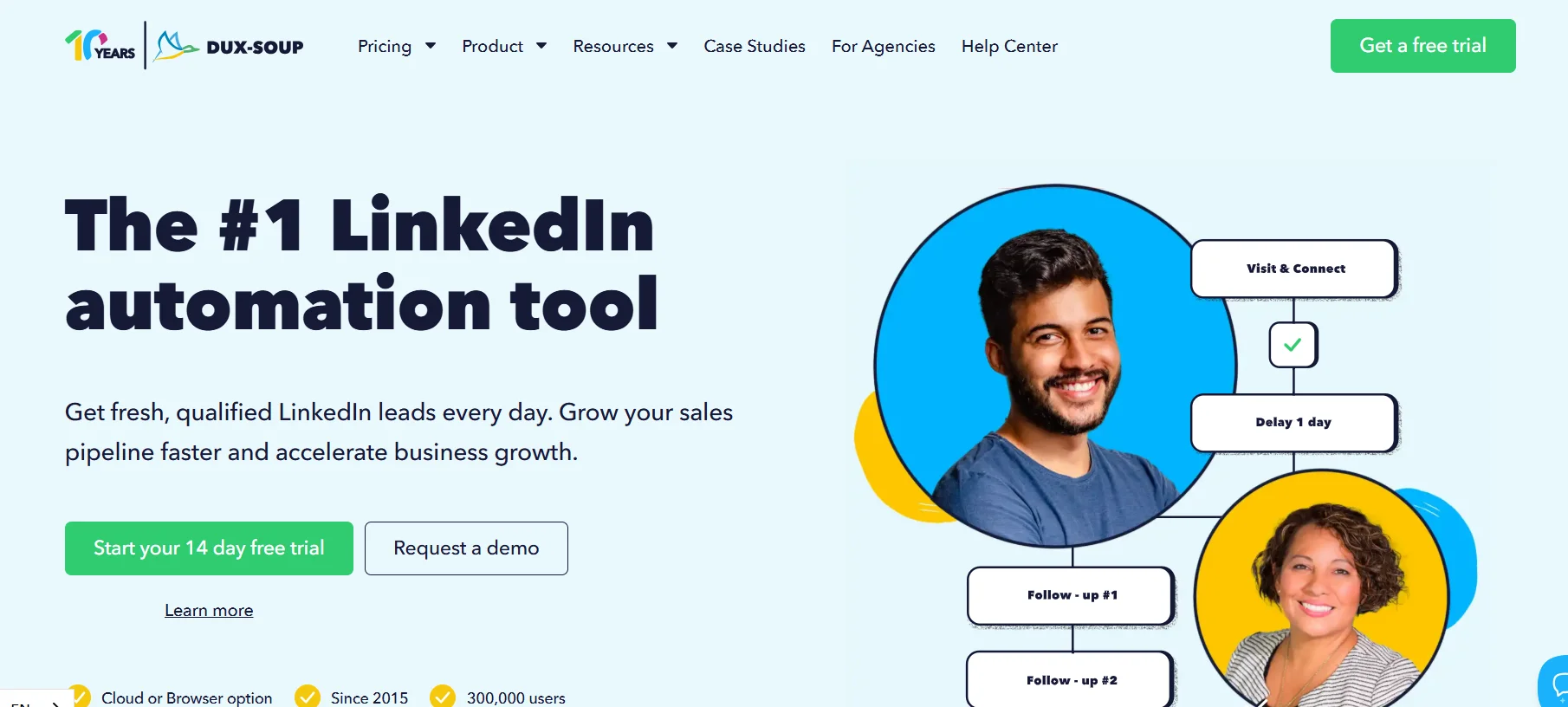
Dux-Soup launched in 2015 as a Chrome extension, and that’s still its core architecture today. It automates the repetitive parts of LinkedIn prospecting: visiting profiles, sending connection requests, running follow-up message sequences, and exporting data. It connects natively with HubSpot, Salesforce, Pipedrive, Zapier, and Webhooks, which is genuinely useful for teams already inside those ecosystems. There’s an optional Cloud Dux upgrade that removes the browser dependency, but the tool’s identity is still rooted in that extension-based origin.
The positioning is simple: affordable, customizable sequence automation with broad CRM connectivity.
DealsFlow at a Glance

DealsFlow is cloud-based from the start — no browser extension at all. Its whole bet is the Arlo AI engine, which doesn’t just fire off connection requests and follow-ups. It reads prospect bios, recent activity, and company context, then holds real back-and-forth conversations: handling objections, reading intent, pushing toward a booked call. All without a human sitting there managing each thread.
It supports up to 50 LinkedIn accounts from one dashboard, which is a big deal for agencies and SDR teams running outreach across multiple clients. The positioning: your AI books LinkedIn meetings while you run the business.
The Core Philosophical Difference
This is what really matters. Dux-Soup stops working the moment a prospect replies. A human has to take over from there. DealsFlow’s Arlo reads the reply, figures out where the prospect is in the conversation, handles whatever objection comes up, and keeps moving toward a booked call — without anyone needing to step in.
One tool automates the sending. The other automates the conversation. That gap is the whole story.
Feature-by-Feature Comparison
1. Outreach Automation
Dux-Soup gives you a 12-action campaign builder. It covers profile visits, connection requests, messages, InMails, post likes, skill endorsements, and drip sequences with customizable delays. You can merge in basic fields like first name and company. But that’s where it stops. No AI personalization whatsoever — every message is only as good as the template a human wrote. And the second a prospect writes back, Dux-Soup is done. Whatever happens next is up to you.
DealsFlow works differently. Arlo actually reads each prospect’s profile, recent posts, and company news before crafting a message. It’s not pulling from a static template. It’s building context-aware outreach, which is a real distinction when reply rates are the thing you’re trying to move. More importantly, Arlo doesn’t stop at the first reply. It handles the conversation all the way through — objections, scheduling friction, whatever comes up — until a meeting is on the calendar. A human can step in at any point, but the design goal is that they don’t have to.
Winner: DealsFlow — for teams optimizing for conversations, not just sends.
2. Multi-Account Management
Dux-Soup’s team plans (Turbo Team and Cloud Team) do support multiple LinkedIn accounts. But there’s no unified multi-account dashboard on the entry-level plans, and managing 10 to 50 client accounts means a lot of switching between instances. It’s not built for agency-scale operations.
DealsFlow’s whole dashboard is built for this. Up to 50 LinkedIn accounts, per-account metrics visible at a glance: messages sent, replies, whether accounts are active, warming, or paused. The Agency Pilot plan includes per-client reporting specifically because the product was designed with agencies in mind from day one.
Winner: DealsFlow — the infrastructure here isn’t even close for anyone running more than two or three accounts.
3. Lead Prospecting and CRM
Dux-Soup imports leads from LinkedIn search and Sales Navigator, lets you tag and filter profiles, export CSVs, and syncs natively with HubSpot, Salesforce, Pipedrive, Freshsales, and SharpSpring. If your team lives in one of those CRMs, this is a genuine strength. The integrations are real and they work.
DealsFlow takes a different approach: a built-in Prospect CRM with AI warmth scoring. Leads get tagged as Hot, Warm, Neutral, or Cold based on how they’ve engaged in the conversation. Imports come from LinkedIn search URLs, post commenters, or CSV. Full-funnel analytics track connections sent all the way through to calls booked. No external CRM lock-in, but also no native push to Salesforce or HubSpot.
Winner: Dux-Soup for teams already embedded in a CRM stack. DealsFlow for teams that want a self-contained system and don’t want to manage another integration.
4. Analytics and Reporting
Dux-Soup gives you campaign-level reporting and activity logs per profile. If you want actual funnel visibility — connections to replies to meetings — you’re pulling CSV exports or building dashboards in your CRM. That’s extra work, and at lower pricing tiers, the native analytics are pretty thin.
DealsFlow’s dashboard shows the full funnel from connection request to booked call, broken down per account and per campaign. Data is exportable. The Agency Pilot includes per-client reporting, which is genuinely useful for anyone billing clients or reporting performance to stakeholders.
Winner: DealsFlow for built-in funnel visibility without needing to stitch together multiple tools.
5. Campaign Setup and Ease of Use
Dux-Soup’s Chrome extension setup is fast for an individual getting started. The cloud plan takes more configuration. G2 reviews from Q4 2025 and Q1 2026 consistently call out the UI as clunky and dated. Advanced drip workflows have a real learning curve, and onboarding new SDRs onto the tool is a recurring friction point teams mention.
DealsFlow is designed to get someone running in under 10 minutes. The onboarding is four steps: connect accounts, define your ICP, let Arlo run outreach, take the calls. Account warmup and daily safety limits are handled automatically. It’s a modern product with a modern UI, and that difference matters when you’re trying to onboard a new rep quickly or hand the tool to a founder who doesn’t want to spend an afternoon in settings.
Winner: DealsFlow on simplicity and onboarding speed.
6. Feature Summary Table
| Feature | Dux-Soup | DealsFlow |
|---|---|---|
| AI Conversation Engine | No | Yes (Arlo AI) |
| Handles Replies Automatically | No | Yes |
| Multi-Account Dashboard | Limited | Yes (up to 50 accounts) |
| AI Lead Warmth Scoring | No | Yes |
| Native CRM Integrations | Yes (HubSpot, Salesforce, Pipedrive) | No (built-in CRM) |
| Browser Extension Required | Yes (Pro/Turbo) | No (fully cloud) |
| Full-Funnel Analytics | Limited | Yes |
| Agency Client Reporting | Limited | Yes |
| Account Warmup (Automatic) | Manual | Yes |
| Free Trial | No | Yes (14 days) |
Pricing Comparison
Dux-Soup Pricing (2026)
- Free Dux: Basic profile visits only, no automation
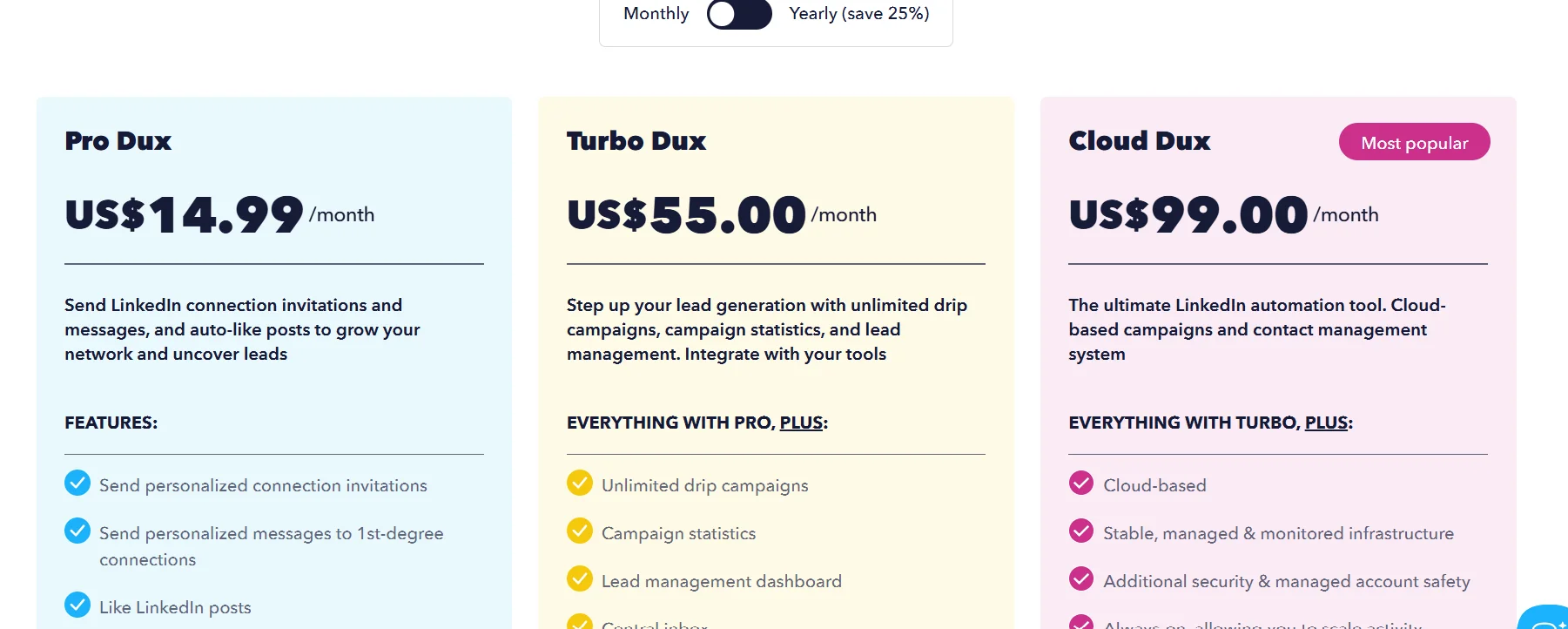
- Pro Dux: $14.99/month ($11.25/month billed annually) — core automation for individuals
- Turbo Dux: $55.00/month ($41.25/month billed annually) — drip campaigns, CRM integrations, Zapier
- Cloud Dux: $99.00/month ($74.17/month billed annually) — cloud-based execution, no browser required
- Team and agency plans available at higher tiers
The entry price is the lowest in the market for basic LinkedIn automation. That’s real.
DealsFlow Pricing (2026)
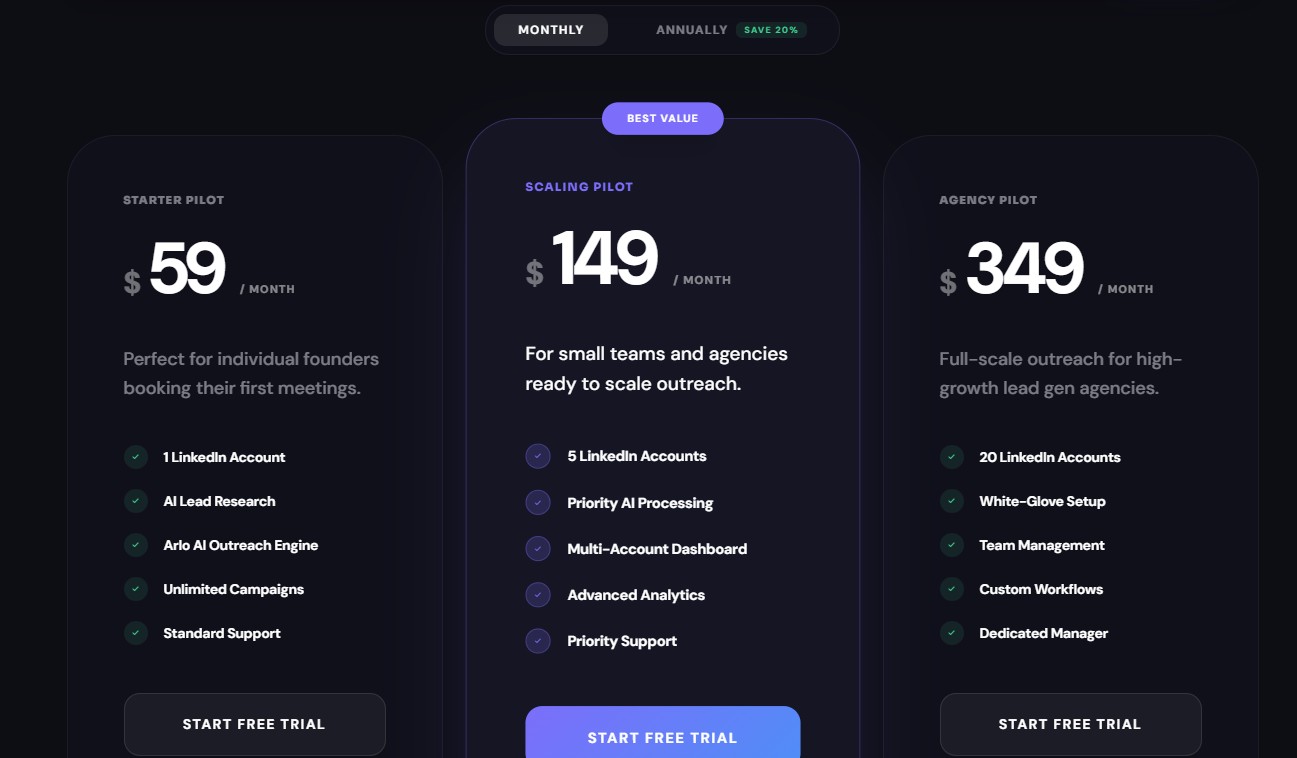
- Starter Pilot: $59/month — 1 LinkedIn account, Arlo AI engine, unlimited campaigns, standard support
- Scaling Pilot: $149/month — 5 LinkedIn accounts, priority AI processing, multi-account dashboard, advanced analytics, priority support
- Agency Pilot: $349/month — 20 LinkedIn accounts, white-glove setup, team management, custom workflows, dedicated manager
- All plans include a 14-day free trial, no credit card required
- 20% discount on annual billing
Price-for-Value Analysis
At the individual level, Dux-Soup’s Pro plan at $14.99/month is cheaper. No debate. But DealsFlow’s Starter at $49/month includes Arlo AI, which means you’re not spending an hour a day managing replies, sorting threads, and hand-qualifying interested prospects. Cheap tools aren’t cheap when the time cost is that high.
At the team level, DealsFlow’s Scaling Pilot at $129/month covers 5 accounts with AI reply handling across all of them. Compare that to Dux-Soup’s Cloud plan at $99/month for a single account once you factor in multi-account needs, and the math shifts.
At the agency level, DealsFlow’s Agency Pilot at $299/month for 20 accounts is a flat rate that scales cleanly. Dux-Soup’s agency pricing scales per user, which gets expensive fast when you’re managing volume.
Pricing verdict: Dux-Soup wins on the lowest absolute cost. DealsFlow wins on cost-per-booked-meeting when Arlo is replacing manual hours.
LinkedIn Account Safety
This is the factor most people skip when evaluating these tools. Then an account gets banned, and suddenly it’s the only thing they’re thinking about.
Dux-Soup Safety Profile
- Browser extension architecture carries inherent detection risk. Chrome extensions inject code directly into LinkedIn sessions, which makes them easier for LinkedIn’s security systems to identify
- Multiple verified G2 reviews from Q1 2026 report permanent account bans while using Dux-Soup
- Safety limits exist but must be actively monitored by the user — they’re not automatically enforced
- Cloud Dux reduces browser-based detection risk but doesn’t eliminate it entirely
DealsFlow Safety Profile
- Fully cloud-based execution — no browser extension, no injected code
- Distributed cloud execution with randomized, human-like timing built into the platform
- Hard daily limits are enforced automatically; account warmup is managed by DealsFlow, not by the user
- Zero-ban guarantee stated on the product, enforced via LinkedIn’s current safety thresholds
- New accounts enter a “warming” status before full outreach begins, which mirrors how a real person would ramp up activity
Safety verdict: DealsFlow’s cloud-native, zero-extension architecture is structurally safer than Dux-Soup’s browser-based model in 2026. LinkedIn’s detection capabilities have improved significantly over the past two years. The structural risk of Chrome extensions isn’t hypothetical — it’s documented in current user reviews, and it’s a real cost to weigh.
Who Should Use Each Tool
Choose Dux-Soup If:
- You’re a solo founder or individual on a tight budget who needs basic connection and follow-up automation
- Your team is deeply embedded in HubSpot, Salesforce, or Pipedrive and needs tight native CRM sync
- You only need to automate the sending phase, and you or your SDR will handle all replies manually
- You’re comfortable managing your own safety limits and browser-based workflows
- You want a tool with a decade of documentation, community tutorials, and established integrations behind it
Choose DealsFlow If:
- You want the AI to handle the full outreach cycle — from first message to booked call — without manual reply management
- You’re an agency managing outreach across 5 to 50 LinkedIn accounts and need one consolidated dashboard
- You’re an SDR team leader trying to reduce per-rep workload and increase meetings-per-account
- You’re a founder doing outreach yourself and want calls booking while you focus on running the business
- You want a 14-day free trial with zero friction to validate results before committing
- LinkedIn account safety and automation detection risk are genuine concerns for you
The Verdict
Dux-Soup and DealsFlow serve fundamentally different needs. That’s the honest answer.
Dux-Soup is the right call if you’re on the lowest possible budget, need deep CRM integration, and are happy to handle all replies and conversations yourself. It’s a proven, stable tool. But it’s a 2015-era workflow engine operating in a 2026 market that has shifted toward AI-driven conversations. It does exactly what it was built to do. The question is whether what it was built to do is still enough.
DealsFlow is the right call if you’re optimizing for booked meetings per dollar and per hour. Arlo doesn’t just send messages — it closes the loop. For agencies running multiple client accounts, SDR teams trying to scale output without scaling headcount, and founders who want outreach running in the background while they focus on the actual business, DealsFlow’s AI-native architecture is built for exactly that outcome.
The bottom line is simple. If the goal is meetings on the calendar and not just messages in the queue, DealsFlow delivers a fundamentally better system for that job.
Conclusion
The LinkedIn outreach landscape in 2026 rewards tools that can hold a conversation, not just start one. Dux-Soup helped define the category. DealsFlow is redefining what the category can actually do.
If you’ve been running outreach manually, handing off replies to an SDR, or watching your response rate stall because your tool runs out of road the moment someone writes back, that’s the gap Arlo is built to close. It’s not a marginal improvement — it’s a different model entirely.
Frequently Asked Questions
Q: What is the biggest difference between Dux-Soup and DealsFlow?
Dux-Soup automates the sending — connection requests, follow-ups, drip sequences. DealsFlow’s Arlo AI automates the full conversation, including replies, objection handling, and booking the meeting. Dux-Soup stops the moment a prospect writes back. DealsFlow keeps going.
Q: Is Dux-Soup safe to use on LinkedIn in 2026?
It carries real risk. Dux-Soup’s Chrome extension injects code directly into LinkedIn sessions, which LinkedIn’s security systems can detect. Multiple verified G2 reviews from Q1 2026 report permanent account bans. Cloud Dux reduces that risk but doesn’t eliminate it. DealsFlow is fully cloud-based with no browser extension, randomized timing, and automatic daily limits — structurally safer by design.
Q: Does DealsFlow replace an SDR?
Not exactly. Arlo handles the outreach, replies, and objections autonomously, which cuts down the volume of manual work significantly. But a human still takes the actual sales call once a meeting is booked. Think of it as Arlo doing everything up to the point where a real conversation needs to happen.
Q: Which tool is cheaper?
Dux-Soup wins on the lowest entry price — $14.99/month for the Pro plan. DealsFlow starts at $49/month. But that comparison only holds if you’re ignoring the time spent manually handling every reply. When you factor in Arlo replacing hours of follow-up work, DealsFlow’s cost-per-booked-meeting often comes out lower.
Q: Can I manage multiple LinkedIn accounts with these tools?
Yes, both support it — but very differently. Dux-Soup’s multi-account support requires switching between instances and isn’t built for agency-scale use. DealsFlow manages up to 50 LinkedIn accounts from a single dashboard, with per-account metrics and per-client reporting included on the Agency Pilot plan.
Q: Does Dux-Soup have AI features?
Nope. Dux-Soup uses static templates with basic merge fields like first name and company. There’s no AI personalization, no intent detection, no reply handling. Every message is exactly what you wrote, sent to every prospect the same way.
Q: Does DealsFlow integrate with HubSpot or Salesforce?
Not natively. DealsFlow has a built-in Prospect CRM with AI warmth scoring (Hot, Warm, Neutral, Cold) and full-funnel analytics. If your team lives in HubSpot or Salesforce and needs tight two-way sync, Dux-Soup is the stronger option there.
Q: Is there a free trial for DealsFlow?
Yeah, 14 days, no credit card required. Dux-Soup has a free tier for basic profile visits, but no free trial on its paid automation features.