


If you’ve ever dismissed LinkedIn skill endorsements as a meaningless vanity metric — a relic from 2012 that people click on out of obligation — you’re not alone. That’s the prevailing narrative. But here’s the problem with that take: it’s built entirely on the job-seeker perspective, not the B2B sales perspective.
For B2B sales professionals, LinkedIn is not a résumé platform. It’s a pre-sales environment. Every element of your profile — your headline, your featured section, your content, and yes, your skills and endorsements — is a trust signal that prospects evaluate long before they ever respond to your message or accept your connection request. In that context, endorsements are not a checkbox. They are a compounding layer of third-party credibility that works for you 24 hours a day, without any extra effort.
This guide covers two things: how to build a strategically endorsed LinkedIn profile that earns trust from B2B buyers, and how to use the act of giving endorsements as an underutilized prospecting and relationship-building tactic. Every claim in this article is backed by data. Let’s start with what endorsements actually are — and what they can do for your pipeline.
What Is a LinkedIn Skill Endorsement?
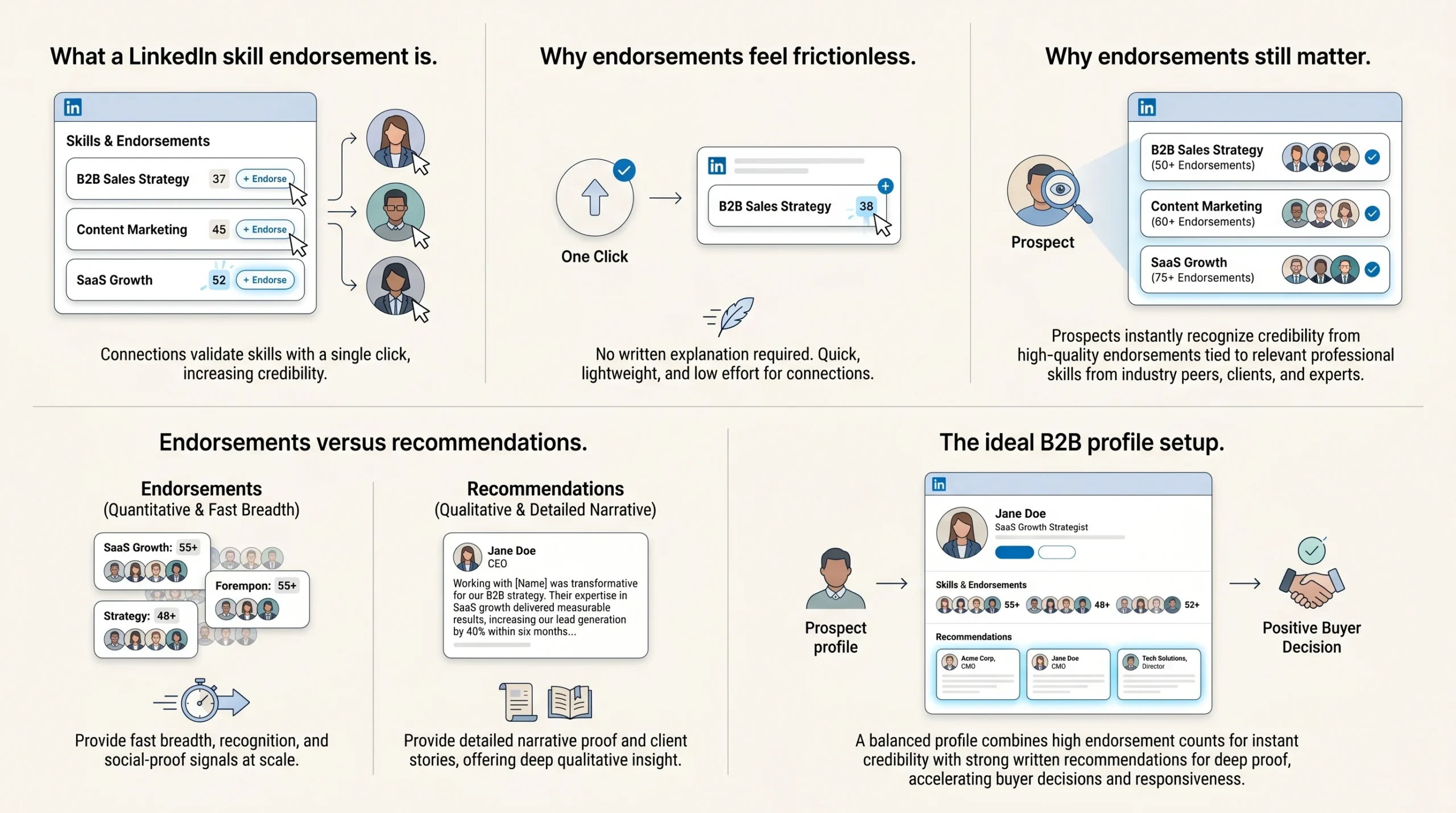
A LinkedIn skill endorsement is a one-click validation from a connection confirming that you possess a particular skill listed on your profile. It requires no written explanation, no detailed context, and no significant time investment from the person giving it. When someone visits your profile and sees a skill they believe you genuinely have, they can click “Endorse” and your endorsement count for that skill increases by one.
This simplicity is both its strength and the source of its skepticism. Because endorsements are frictionless, some critics argue they are meaningless. But frictionless does not mean weightless — especially when the endorsements come from the right people, at the right volume, for the right skills.
Unlike a written recommendation, which provides narrative depth and context, an endorsement is a signal of breadth and recognition. It answers a different question for a prospect browsing your profile: “Do people who know this person professionally confirm that they have the skills they’re claiming?” The answer, when backed by quality endorsements, is a quiet but powerful “yes.”
Endorsement vs. Recommendation: Which Carries More Weight in B2B?
This is one of the most common questions sales professionals ask when optimizing their LinkedIn profiles, and the honest answer is: they serve different purposes, and you need both.
A written recommendation carries narrative authority. When a client writes three paragraphs about how you helped them close a gap in their sales process, reduce churn, or hit a revenue target, that story does something an endorsement cannot — it provides specific, verifiable proof of impact. Recommendations are your qualitative case studies, embedded directly in your profile.
Endorsements, on the other hand, operate at scale. A profile with 80 endorsements for “B2B Sales Strategy” from actual sales professionals and clients tells a prospect, at a glance, that a lot of relevant people in your field recognize this as a real competency. They don’t need to read a paragraph to absorb that signal — they see it in seconds. That immediacy matters enormously in B2B, where a prospect might spend 90 seconds scanning your profile before deciding whether to respond to your InMail.
The practical takeaway: prioritize getting written recommendations from clients and senior stakeholders for depth, and build endorsements from industry peers, clients, and collaborators for breadth and discoverability. Neither replaces the other.
Why LinkedIn Endorsements Still Matter for B2B Sales in 2026
Let’s address the skepticism directly. Endorsements have a credibility problem — not because they don’t work, but because most people use them wrong. Volume-chased, random endorsements from distant connections for loosely related skills do very little. Strategic, quality-sourced endorsements for role-relevant skills from credible people in your industry do quite a lot. The distinction matters enormously.
They’re a Trust Signal Before You Ever Send a Message
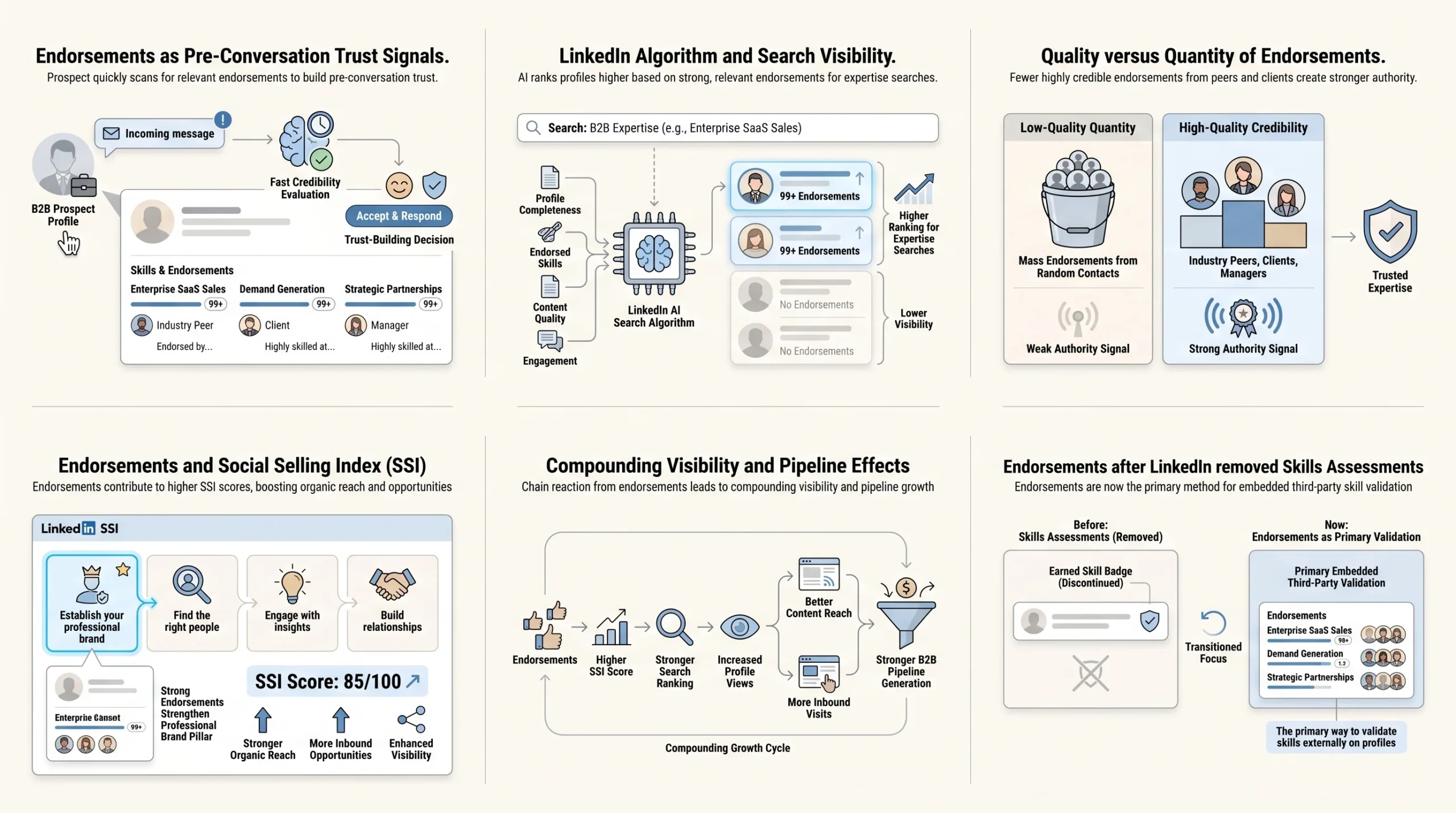
The most important thing to understand about B2B sales on LinkedIn in 2026 is that trust is built before the conversation starts. According to data from LinkedIn’s own research, 95% of decision-makers say strong thought leadership makes them more receptive to sales outreach. Buyers don’t reply to strangers — they reply to professionals they recognize, respect, and have already seen add value in their space.
Your profile is the foundation of that pre-conversation trust. When a prospect receives your connection request or InMail, the first thing most of them do is click on your name and scan your profile. In that 60-to-90-second window, they’re making a judgment: Is this person credible? Do they actually know what they’re talking about? Are they worth my time?
A well-endorsed skills section answers that last question passively. According to research on LinkedIn outreach strategy, in B2B, trust decides outcomes — and when endorsements are built correctly (with quality sources and role-relevant skills), they lift connection acceptance rates, reply rates, and meeting booking rates. Your skills section is not decoration. It is a trust asset that operates while you sleep.
They Feed the LinkedIn Algorithm and Improve Your Search Visibility
LinkedIn’s search and ranking algorithm is not just about keywords in your headline and About section. Skills endorsements are an explicit part of how LinkedIn ranks profiles in search results. LinkedIn uses multiple ranking signals, including keyword relevance in your headline and About section, profile completeness, connection proximity, engagement activity, skills endorsements, and content quality — and profiles that match more of these signals rank higher.
The downstream impact on B2B lead generation is significant. Profiles with five or more skills listed get up to 17 times more profile views than those without skills listed. Members who add five or more skills are messaged up to 31 times more — making skill selection and the endorsements attached to those skills a direct lead generation lever, not just a profile formatting choice.
When a prospect’s colleague or a warm referral searches for someone with your expertise — say, “enterprise SaaS sales” or “B2B demand generation” — your profile’s probability of appearing at the top of those results is meaningfully influenced by whether your skills section is populated and endorsed.
Endorsement Quality Beats Endorsement Quantity
This is the insight that most articles about LinkedIn endorsements miss entirely, and it’s the one that matters most for B2B professionals. Not all endorsements carry equal weight. Endorsements from connections in your industry carry more weight than random endorsements from unrelated contacts. A profile with 50 endorsements for “B2B Sales” from actual sales professionals and clients signals more authority than 200 endorsements from personal contacts or distant connections with no relevance to your work.
The implication is clear: your goal should not be to collect as many endorsements as possible. Your goal should be to earn endorsements from people your target audience would recognize and respect — former clients, industry peers, managers you’ve reported to, and collaborators in your exact field. Ten high-quality endorsements from relevant professionals are more valuable than 100 endorsements from your college acquaintances.
This quality-over-quantity principle is also what makes the strategic approach to endorsements — covered in detail later in this article — so different from the spray-and-pray tactics that have given endorsements a bad reputation.
The SSI Connection: How Endorsements Support Your Social Selling Index
Your LinkedIn Social Selling Index (SSI) is a score from 0 to 100 that LinkedIn calculates daily based on four pillars: establishing your professional brand, finding the right people, engaging with insights, and building relationships. Each pillar contributes up to 25 points to your total score. For B2B sales professionals, the SSI is not just a vanity metric — it has measurable pipeline implications.
According to LinkedIn’s official SSI data, users with a high SSI score above 70 generate 45% more opportunities than those with lower scores and are 51% more likely to hit their sales targets.
The first pillar — establishing your professional brand — directly includes endorsements as a factor. LinkedIn’s algorithm especially values third-party validation: recommendations carry more weight than self-written content, and endorsements signal peer recognition. Additionally, following LinkedIn’s Q4 2025 algorithm update, accounts scoring above 70 on SSI now receive 2 to 3 times higher organic reach on posts and approximately 40% better search ranking. Users with SSI above 70 also see 78% more profile views compared to those scoring below 50.
In practical terms: a strategically endorsed skills section strengthens your professional brand pillar, which raises your SSI, which improves your content reach and search visibility, which means more inbound profile visits from the prospects you’re trying to reach. Endorsements are one small but compounding input into a system that directly affects your pipeline.
A Note on LinkedIn’s Removal of Skills Assessments in 2024
One development that actually increases the importance of endorsements is LinkedIn’s decision to retire its Skills Assessments feature. LinkedIn retired Skills Assessments in late 2023 and removed all skill badges from profiles in 2024, citing that hiring managers and decision-makers found examples of how candidates applied skills more valuable than quiz results.
What this means for B2B professionals: endorsements are now one of the only remaining forms of third-party skill validation directly embedded in your profile. With skill badges gone, the endorsement count next to each skill has become a more prominent and uncontested signal of peer-recognized competence.
Which Skills Should B2B Sales Pros Actually List (And Get Endorsed For)?
Most LinkedIn advice on skills says something like “add skills relevant to your role.” For a B2B sales professional, this guidance is too vague to be useful. There is a meaningful difference between skills that signal credibility to recruiters and skills that build trust with B2B buyers. Optimizing for the wrong audience leads to a skills section that looks good to HR but does nothing for your pipeline.
Skills That Signal Credibility to B2B Buyers (Not Just Recruiters)
When a prospect lands on your LinkedIn profile, they are not evaluating you as a job candidate. They are evaluating you as a potential business partner, advisor, or solution provider. The skills they find credible are the ones that map to the problems they care about, the language their industry uses, and the competencies that prove you understand their world.
Consider the difference between these two sets of skills for an enterprise software sales rep:
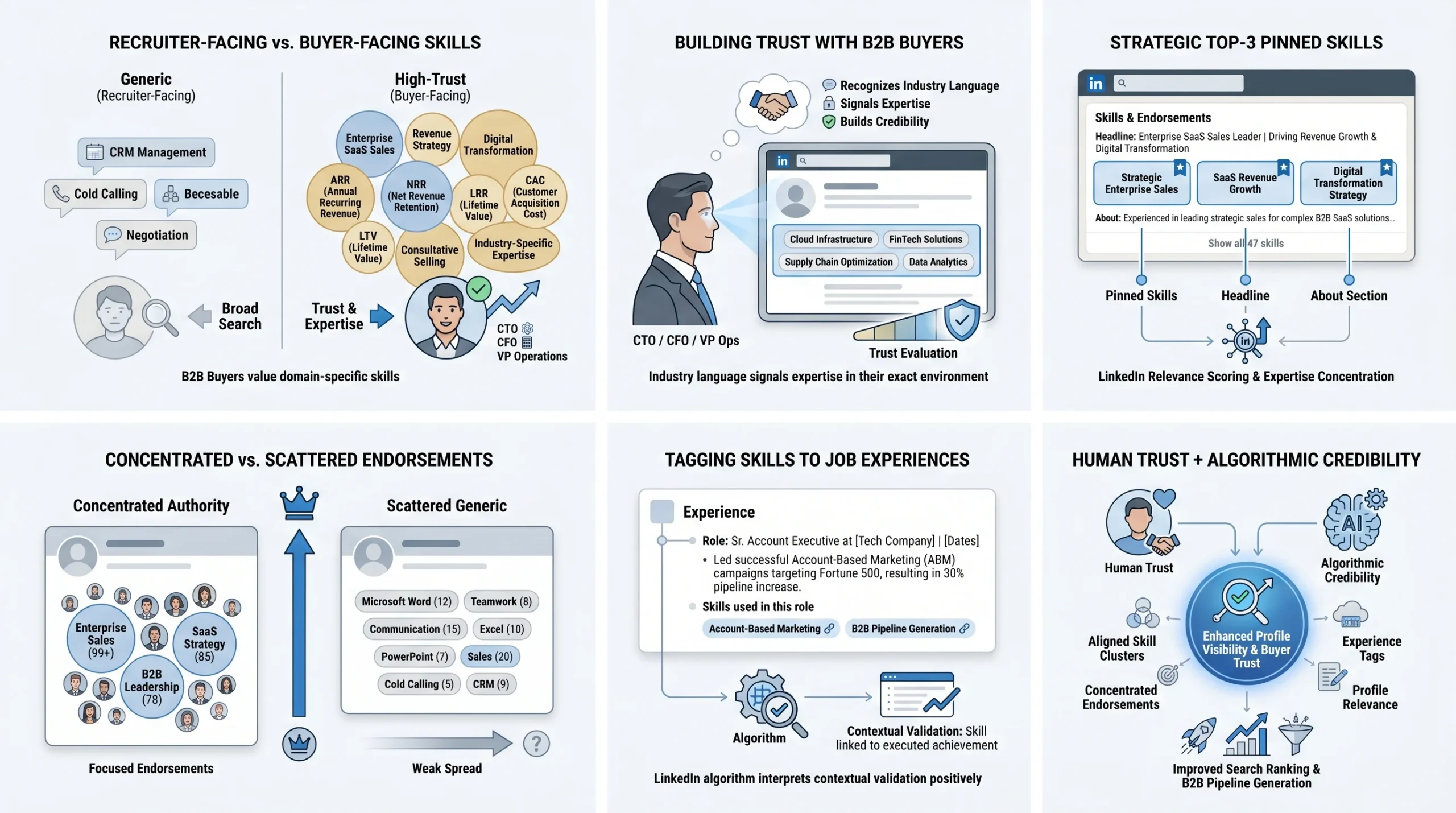
Recruiter-facing skills (good for job searches, weak for B2B trust):
- Sales
- CRM
- Cold Calling
- Pipeline Management
- Negotiation
Buyer-facing skills (builds trust with the decision-makers you’re selling to):
- Enterprise SaaS Sales
- B2B Revenue Strategy
- Digital Transformation
- SaaS Metrics (ARR, NRR, CAC, LTV)
- Consultative Selling
- Change Management
- [Your specific industry vertical, e.g., FinTech Sales, HealthTech Sales]
The second set tells a CTO, CFO, or VP of Operations that you speak their language and understand their domain — not just that you know how to dial a phone. When curating your skills section, the test to apply to each skill is: Would my ideal customer profile (ICP) see this skill and think, “This person understands our space”? If yes, include it. If it’s only legible to a recruiter, deprioritize it or remove it.
How to Pin Your Top 3 Skills Strategically
LinkedIn allows you to add up to 100 skills to your profile, but your top three pinned skills receive the most visibility and endorsement activity. These three skills appear at the top of your skills section, above the fold, and are the first thing anyone sees when they scroll to that part of your profile.
Choosing your top three is not a random exercise. Your pinned skills should be:
- Directly aligned with your ICP — the language your buyers use to describe the expertise they’re looking for
- Consistent with your headline and About section — LinkedIn’s algorithm evaluates skill clusters alongside your headline keywords for relevance scoring, so alignment across sections strengthens your search ranking
- The skills you want to be most known and endorsed for — because concentration of endorsements on a small number of skills signals deeper expertise than a thin spread across 50 skills
For example, if you are a sales consultant targeting mid-market B2B SaaS companies, your top three pinned skills might be “B2B SaaS Sales,” “Go-to-Market Strategy,” and “Revenue Operations” — not generic terms like “Business Development” that could apply to almost anyone.
Tagging Skills to Specific Job Experiences
One of the most underused features in LinkedIn’s skills system is the ability to tag skills to specific positions in your experience section. This contextual linking matters because tagging skills to experience entries validates your expertise contextually — LinkedIn’s algorithm evaluates skill clusters alongside your job history for relevance scoring.
What this means in practice: if you list “Account-Based Marketing” as a skill and also tag it to the role where you actually ran ABM campaigns, LinkedIn treats that skill as contextually verified, not just self-asserted. This improves both your search ranking for that skill and the credibility signal it sends to profile visitors who look at your experience in detail.
Go into each position in your experience section, click “Add skills,” and tag the skills that are genuinely relevant to what you did in that role. Doing this for your top 10 to 15 skills across your experience history takes about 15 minutes and meaningfully strengthens the algorithmic and human-credibility value of your skills section.
How to Get LinkedIn Endorsements That Actually Build B2B Credibility
The standard advice — “just ask your connections to endorse you” — produces endorsements of exactly the kind you don’t want: high in volume, low in credibility, from people who have no professional relevance to your target buyers. The goal is not a big number. The goal is the right endorsements from the right people.
1. Ask Clients and Customers First (Not Just Colleagues)
A single endorsement from a satisfied client is worth more to a B2B prospect than ten endorsements from your internal colleagues. When a prospect sees that actual customers have endorsed your skills, it closes the credibility loop in a way that peer endorsements simply cannot. It tells them: Real buyers have worked with this person and confirmed they have the skills they claim.
The timing and framing of your ask to clients matters significantly:
- Best timing: After a successful project milestone, a positive QBR, a deal close, or a moment where the client has explicitly expressed satisfaction with your work. The endorsement ask feels natural and earned in these moments, not transactional.
- Best channel: A private, personalized LinkedIn message — not a bulk email or a generic request. Keep it short and genuine.
- Best framing: Tell them exactly which skill you’re asking them to endorse, so they don’t have to navigate your profile and guess. Something like: “I’d really appreciate it if you could endorse me for ‘Enterprise SaaS Sales’ on LinkedIn — given the work we’ve done together on [specific project], your endorsement would mean a lot and would carry real weight with the people I work with.”
This level of specificity increases the chance of getting a quality, meaningful endorsement rather than a vague click on whichever skill appeared first.
2. Make a Targeted Private Ask (With a Specific Skill in Mind)
The same principle of specificity applies to all endorsement requests, not just those to clients. Whether you’re asking a former manager, a long-term colleague, or a respected peer, naming the exact skill you want endorsed makes the process easier for them and more valuable for you.
A strong endorsement request message for a professional peer might look like:
“Hey [Name] — I’ve been doing some profile work on LinkedIn and I’d love to strengthen my endorsements for [Skill Name]. Given that we’ve worked together on [relevant context], I think your endorsement would carry a lot of credibility. Happy to return the favor for any skills of yours you’d like strengthened.”
Note the offer to reciprocate. This is not manipulation — it is the natural functioning of a professional network where people support each other. It also increases the response rate considerably.
3. Use a Post-Project or Post-Call Touchpoint
The best endorsement requests are anchored to real, recent evidence of the skill in action. Instead of sending cold endorsement requests out of the blue, build a habit of making targeted asks at natural touchpoints in your client relationships:
- After a successful implementation or go-live: Ask the project stakeholder to endorse your “Solution Consulting” or “Enterprise Implementation” skills
- After a QBR where the client praised your work: Ask them to endorse the skills most relevant to what you just presented
- After closing a complex deal: Ask the economic buyer to endorse your “Enterprise Sales” or “Strategic Selling” skills
- After a referral: Ask the referrer to endorse your skills as a follow-up to the introduction they made
These touchpoints produce endorsements with genuine credibility behind them — the endorser actually witnessed the skill in use, which is exactly what makes them valuable.
4. Optimize Your Profile So Endorsements Are Easy to Give
A commonly overlooked barrier to getting endorsed is a disorganized or outdated skills section. If the skills you most want to be known for aren’t listed on your profile, no one can endorse you for them. If your skills section is cluttered with outdated or irrelevant skills, the people who want to endorse you might choose the wrong one.
Before making any endorsement asks:
- Audit your skills list and remove anything that is no longer relevant to your current role and ICP
- Make sure your top 3 pinned skills are the ones you most want endorsed
- Check that each skill is tagged to the appropriate experience entry for contextual relevance
- Review your skills list from the perspective of a prospect — does it tell a coherent story about your expertise?
When you send an endorsement request and name a specific skill, the recipient should be able to find that skill immediately and endorse it in under 30 seconds. The easier you make it, the more likely it happens.
5. Build Visibility Through Content So Endorsements Come Organically
One of the most powerful endorsement strategies is indirect: becoming consistently visible on LinkedIn through content means that when people visit your profile — prospects, former clients, industry peers — they are more likely to endorse skills they’ve just watched you demonstrate through your posts and articles.
According to LinkedIn’s data, 75% of buyers are influenced by thought leadership content on the platform. When you publish a post that demonstrates your expertise in “Revenue Operations” or “B2B Demand Generation,” people who read it and visit your profile are primed to recognize those skills as real. That recognition translates into organic endorsements from people who found you through content — often exactly the kind of high-quality, relevant endorsers you want.
This creates a self-reinforcing cycle: strong content drives profile visits from relevant professionals, who endorse your skills, which strengthens your search ranking, which drives more profile visits. Endorsements are not just a one-time setup task — they benefit from the same consistent activity that drives all LinkedIn results.
How to Endorse Someone on LinkedIn (Step-by-Step)
The mechanical process of giving an endorsement is simple, but the decision of which skill to endorse someone for deserves more thought than most people give it. A purposeful endorsement is more meaningful — and more memorable — than a reflexive click.
Step 1 — Go to Their Profile and Navigate to the Skills Section
Go to the profile of the person you want to endorse. Scroll down past their About section and experience entries until you reach the “Skills” section. On desktop, this section shows their pinned top skills followed by a “Show all skills” option. On mobile, the layout is similar but may require an extra tap to expand.
Before you click anything: Take 30 seconds to look at their experience and recent content. What have they actually been doing? What skill have you witnessed them demonstrate in your work together, in their posts, or through their professional reputation? This small step is what separates a meaningful endorsement from a thoughtless click.
Step 2 — Select the Skill Most Relevant to Their Work
Once you’ve identified the right skill — the one you can genuinely vouch for — click the “+” or “Endorse” button next to that specific skill. LinkedIn may also proactively suggest skills to endorse when you visit a connection’s profile; these suggestions are worth reviewing, but don’t feel obligated to endorse skills that aren’t within your first-hand knowledge.
Do not endorse skills you have no basis to evaluate. This matters both for the integrity of the endorsement and for your own professional credibility. If you endorse someone for “Machine Learning” when you’ve only worked with them on sales strategy, your endorsement carries no weight — and may actually dilute the credibility of their more legitimate endorsements from people in that field.
Step 3 — Confirm the Endorsement
After clicking “Endorse,” LinkedIn will confirm the endorsement has been recorded. The person will receive a notification. That notification is a touchpoint — a small, positive signal that you were thinking of them and took a moment to support their professional presence. It is this touchpoint quality, beyond the profile benefit, that makes endorsements such a powerful B2B relationship tool — covered in detail in the next section.
Pro tip: Before endorsing, take a moment to read the person’s most recent two or three posts or check their current role. The skill you choose to endorse should be genuinely relevant to what they’re doing right now — not just the most prominent skill on their profile. A targeted endorsement lands differently than a generic one, and the person you’re endorsing will notice the difference.
How B2B Sales Reps Can Use Giving Endorsements as a Prospecting Warm-Up
This is the section that separates a strategic LinkedIn approach from a tactical one — and the angle that virtually no existing content on LinkedIn endorsements covers. Giving endorsements is not just a way to prompt reciprocation. Used intentionally, it is a systematic warm-up tactic that can meaningfully improve outreach results.
Endorsing a Prospect Opens a Warm Touchpoint
When you endorse someone’s skill on LinkedIn, they receive a notification. In a sea of connection requests, InMails, and generic messages, that notification stands out because it is positive, non-transactional, and requires no action from them. It says, implicitly: “I looked at your profile, I recognize your expertise, and I took a moment to acknowledge it.”
This is the beginning of a warm-up sequence — a structured series of low-friction, value-first interactions that establish familiarity before you ever send a pitch. A high-performing prospecting warm-up sequence might look like:
- Follow the prospect’s profile — they may see the notification
- Engage genuinely with one of their recent posts — a thoughtful comment, not just a like
- Endorse one of their skills — specifically one relevant to their current role or a challenge they’ve written about
- Send a personalized connection request — referencing something specific about their work
- Open a conversation — built on the foundation of familiarity you’ve already created
By the time you send that connection request, you are not a stranger. You are someone who has been visible in their world in a positive, professional way. According to research on LinkedIn outreach, prospects engaging with multiple touchpoints show significantly higher meeting acceptance rates compared to cold outreach, because you are starting conversations based on demonstrated interest rather than interruption.
Endorse Existing Clients to Strengthen Retention and Referral Relationships
Client relationships on LinkedIn are often underinvested by sales professionals. The deal closes, the relationship moves to customer success, and the sales rep’s LinkedIn activity with that client goes quiet. This is a missed opportunity.
Periodically endorsing a client’s skills — specifically skills related to their professional role, their decision-making authority, or their area of expertise — keeps your relationship warm and visible. The client sees the notification, thinks of you positively, and you remain present in their professional consciousness without sending a single sales message.
This is particularly valuable for referral generation. Clients who are regularly reminded of your existence through positive, non-salesy interactions are more likely to mention your name when a colleague in their network is looking for what you sell. Endorsing a client’s “Business Transformation” or “Digital Strategy” skills costs you 30 seconds and keeps you top-of-mind in the accounts that can generate your best future pipeline.
Endorse Partners and Collaborators to Build Ecosystem Credibility
The people who appear in your endorsement activity are visible signals to anyone who looks closely at your professional network. When prospects see that you actively endorse technology partners, channel partners, integration partners, and industry collaborators, it communicates that you operate within a professional ecosystem — that you are connected, engaged, and reputable enough for other respected professionals to be in your network.
Strategic endorsements of co-sellers, alliance partners, and joint venture collaborators strengthen your perceived professional stature in ways that are difficult to manufacture through other means. They signal that your network is real, active, and high-quality — all of which contributes to the baseline credibility that makes a prospect more likely to trust you.
What NOT to Do: Avoid Endorsement Sprays and Automation
Given the touchpoint value of endorsements, it is tempting to automate the process — to use tools that bulk-endorse dozens or hundreds of connections at once in hopes of triggering a wave of reciprocal endorsements. This approach is counterproductive and potentially damaging to your professional reputation.
The quality-over-quantity principle applies in both directions. When you spray endorsements indiscriminately across your network, you train your connections to see your endorsements as meaningless automated actions rather than genuine professional acknowledgments. The notification loses its warmth. The touchpoint loses its value. And if a prospect or client notices that you endorsed 50 people in one day for skills you couldn’t possibly have first-hand knowledge of, it undermines the credibility of your entire profile.
Prioritize source quality over raw counts. Endorse purposefully — when you have genuine professional basis to validate a skill, when the timing creates a natural touchpoint, or when it is part of a deliberate warm-up sequence. The 30 seconds spent on a thoughtful endorsement produces better outcomes than 30 automated endorsements produced by a tool.
Start Treating Endorsements as a Sales Asset, Not a Profile Afterthought
The underlying message of this entire guide is a reframe: LinkedIn skill endorsements are not a job-seeker feature that occasionally benefits sales professionals. For B2B sales reps, account executives, and sales leaders, they are a pre-sales trust infrastructure — a quiet, always-on layer of credibility that works on your behalf every time a prospect visits your profile, runs a search, or evaluates whether you’re worth their time.
The sales professionals who understand this are not the ones with the most endorsements. They are the ones with the right endorsements — sourced from clients, industry peers, and collaborators who carry genuine credibility in the eyes of the buyers they’re trying to reach. They treat giving endorsements as a prospecting warm-up tactic, not just a gesture of goodwill. And they maintain their skills section as a living part of their professional brand, not a static form they filled out once years ago.
Your action item from this article is simple: audit your top three pinned skills today. Ask yourself whether they reflect the expertise your ideal customer needs to see. Then identify three past or current clients who could genuinely endorse those skills — and send them a targeted, specific, private request this week. That is the beginning of a more strategic approach to one of LinkedIn’s most underutilized B2B trust tools.
Frequently Asked Questions
Do LinkedIn endorsements still help with search ranking?
Yes. LinkedIn’s search algorithm uses skills endorsements as one of multiple ranking signals alongside headline keywords, profile completeness, connection proximity, and engagement activity. Profiles that satisfy more of these signals rank higher in search results. The key is that endorsements from relevant, industry-appropriate connections carry more algorithmic weight than random endorsements from unrelated contacts.
How many endorsements do you need to rank for a skill?
LinkedIn has not published a specific threshold. However, the research consensus suggests that quality matters more than a specific number. Focusing on earning endorsements from professionals in your industry and from actual clients produces better search ranking and profile credibility outcomes than chasing a specific count. Concentrating endorsements on your top pinned skills — rather than spreading them thinly across 50 or 100 skills — also improves ranking performance for the skills that matter most to your ICP.
Can you remove an endorsement you’ve received?
Yes. Go to your profile, scroll to the Skills section, click the pencil (edit) icon, and manage the visibility of specific endorsements. You can hide endorsements from connections whose validation is not relevant or credible for your current professional positioning. This is worth doing periodically — removing irrelevant endorsements helps concentrate the credibility signal on the ones that matter.
Should you endorse people you haven’t worked with directly?
Only if you have genuine, first-hand basis to validate the specific skill you’re endorsing. Endorsing a skill you’ve seen demonstrated through someone’s LinkedIn content or through industry reputation — rather than direct collaboration — is acceptable if your knowledge is real and specific. What you should avoid is endorsing skills you have absolutely no basis to evaluate, as this erodes the integrity of the endorsement for both you and the recipient.
How are endorsements different from the now-removed Skills Assessments?
LinkedIn’s Skills Assessments were timed quizzes that tested knowledge of specific skills, with passing scores displayed as badges on profiles. LinkedIn retired these assessments in late 2023 and removed all skill badges from profiles in 2024, noting that decision-makers found demonstrated examples of skill application more valuable than quiz scores. Endorsements remain as the primary peer-validated skill signal directly embedded in LinkedIn profiles, making them more prominent in the post-Assessments landscape than they were before.