


Here is the honest truth about LinkedIn and phone numbers: the platform does not want you to have them. LinkedIn wants you to pay for InMail credits, upgrade to Sales Navigator, or just keep messaging prospects in the LinkedIn interface, where they can track your engagement and encourage you to buy premium features. That is the business model.
But here is what LinkedIn did not anticipate: B2B sales teams running at scale need phone numbers. Not because they want to spam people. Because email and LinkedIn message open rates are in the single digits when you are competing with 47 other salespeople sending the exact same “quick question” message. Phone calls still have the highest conversion rates in B2B prospecting. A real conversation beats a message thread every single time.
So how do you get phone numbers from LinkedIn without violating the terms of service, getting your account banned, or appearing like you’re buying a sketchy scraping tool? That is what this guide covers. I’m going to show you the methods that actually work, the tools that keep you compliant, and the mistakes that have destroyed sales teams’ LinkedIn accounts.
By the end of this article, you will have a repeatable workflow for finding phone numbers on LinkedIn that your sales team can use immediately without legal risk or fear of account suspension.
Why Phone Numbers Matter More Than LinkedIn Messages for B2B Sales
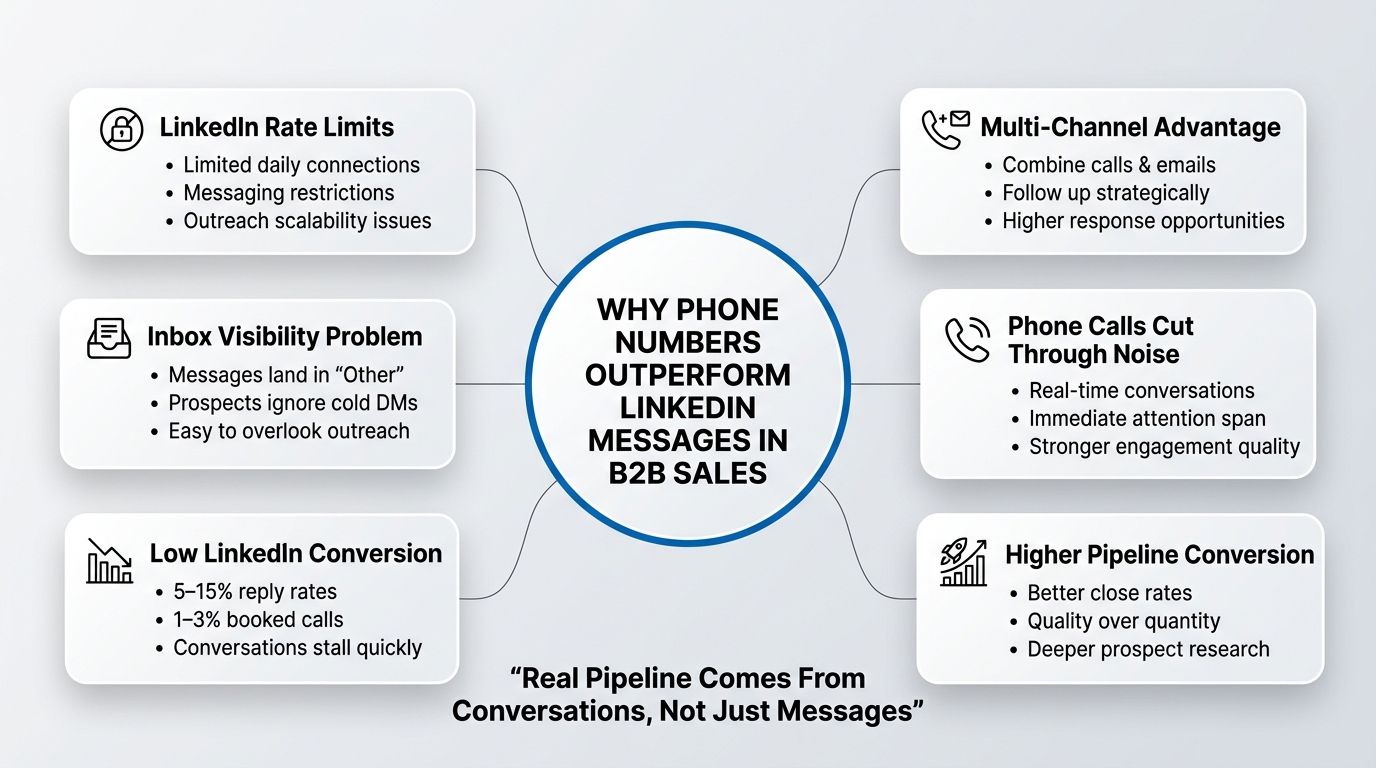
Most B2B sales teams treat LinkedIn as a messaging platform. They fire up LinkedIn, connect with 50 prospects, send a templated message, and wait for responses. The math on this is brutal.
LinkedIn Message Rate Limits and Their Real-World Impact
LinkedIn limits how many new connections you can add per day (roughly 100-150 for a regular account, depending on account age and activity). It also limits how many messages you can send to new connections outside of your primary inbox. Many salespeople do not realize that when you message someone you are not directly connected with, your message lands in a separate “Other” folder that most professionals ignore entirely.
Even if your message makes it to the inbox, LinkedIn is designed to keep conversations inside the LinkedIn ecosystem. There is no direct way to schedule a call from a LinkedIn message. Most messaging sequences stall. The prospect reads the message, gets distracted, and moves on.
Here is the data: LinkedIn message open rates hover around 30-40%, reply rates are typically 5-15% for cold outreach, and conversion to a scheduled call is closer to 1-3%. When you compare that to a cold phone call where you speak to a real person, the conversion difference is night and day. A phone conversation has a 15-30% chance of booking a call on the spot, depending on your ICP and pitch.
LinkedIn knows this. That is why they do not make phone numbers visible. They want you trapped in their messaging interface, buying ads and premium features.
The Phone Number Advantage: Higher Conversion and Lower Noise
Here is what changes when you have a phone number: you can reach out across multiple channels. You send a LinkedIn message. If you get no response in 3 days, you send a personalized email. If the email gets no response, you call. Now you are in a conversation, not competing in a crowded inbox.
Phone calls also reduce noise. When someone picks up the phone, they give you 30 seconds. That forces discipline. Your pitch has to be tight. You have to sound like you know something about their business. You can not hide behind a template. This filters out lazy outreach and rewards preparation. Good sales teams win at phone outreach. Bad sales teams get screened every time.
The teams generating real pipeline are not messaging 500 people on LinkedIn. They are researching 100 people deeply, finding their phone number, and calling 20 of them. The close rate is 5-10x higher.
That is why phone numbers are worth the effort to find.
How to Get Phone Numbers from LinkedIn: The Legal and Ethical Framework
Before I show you the specific methods, we need to address compliance. This is not theoretical. LinkedIn bans accounts for scraping data. They have a legal team. They monitor for bot behavior. And if you are in Europe, GDPR adds another layer of complexity.
The difference between ethical and unethical matters, and I am going to show you where the line actually is.
What LinkedIn’s Terms of Service Actually Say About Phone Number Extraction
LinkedIn’s Terms of Service explicitly prohibit automated scraping. Here is the language they use: “Members agree not to scrape or copy personal information of others through any means (including crawlers, browser plugins, add-ons, or any other technology or manual work).”
That is broad. But it is not absolute. The key word is “scrape.” LinkedIn is referring to automated extraction at scale, typically through browser automation tools, bots, or plugins that extract data without the member’s knowledge or consent.
Here is the nuance that most people miss: asking a prospect for their phone number in a direct message is not scraping. Finding their phone number through public sources (like their company website, or a B2B database) is not scraping. Matching their LinkedIn profile to publicly available data through a B2B intelligence tool is not scraping, provided the tool itself does not violate LinkedIn’s terms.
Scraping is the tool that runs automatically on LinkedIn, extracts 1,000 profiles, and downloads their email addresses, phone numbers, and company details without their knowledge. Tools like Scrapehero, Octoparse, or custom-built scripts that crawl LinkedIn profiles are scraping.
LinkedIn’s enforcement is real. They have suspended or banned accounts for using scraping tools, often without warning. The account holder loses access to all their connections, messages, and outreach history. So the question becomes: how do you find phone numbers without scraping, and without LinkedIn knowing you are trying?
The Difference Between Ethical Methods and Scraping Tools
The ethical methods I cover in this article all share something in common: they do not automate data extraction directly from LinkedIn. They either:
- Use publicly available data (company websites, B2B databases, public directories)
- Ask for the information directly (via message, email, or phone)
- Use tools that gather data from sources other than LinkedIn, then cross-reference with LinkedIn data
The unethical methods (which I am not recommending, but explaining so you recognize them) are:
- Browser automation scripts that log into LinkedIn and extract profile data automatically
- Scraping plugins that run in your browser and download contact info in bulk
- API abuse that misuses LinkedIn’s official API to extract data it was not designed to return
- Bulk data exports that promise to “export 10,000 profiles in one click”
The risk is not just ToS violation. It is also data quality and legal exposure. Scraped data is often incomplete, inaccurate, or outdated. If you scrape someone’s phone number and they never gave permission, and you call them, you are now liable under telemarketing laws in many jurisdictions (TCPA in the US, for example). It gets complicated fast.
The methods below are not only ethical. They are also more reliable and more legally defensible.
5 Ethical Methods to Find Phone Numbers on LinkedIn Profiles
Now let’s get into the specific tactics. These are methods I have seen work at scale across dozens of sales teams, from solopreneurs to 50-person SDR organizations.
Method 1: Direct Ask via LinkedIn Message or Email
This sounds obvious, but most salespeople do not do it well. They dance around the ask. They send 3-4 messages before mentioning the phone call. By that point, the prospect has moved on.
Here is the better approach: establish credibility in 1-2 messages, then ask directly. The ask sounds like this:
“I think there is a real opportunity here to [specific outcome for them]. Would it make sense to grab 15 minutes next week? I have some specific ideas based on [specific detail about their business]. If now is not the right time, no worries. What is the best way to reach you by phone?”
Notice what happened. You:
- Led with value (specific outcome)
- Proposed a specific time frame
- Made it easy to say no
- Asked for their phone number naturally, as the next step in the conversation
This works because you are not asking a stranger for their phone number. You are asking someone you have already engaged with for the next step in a real conversation.
The response rate depends on whether your initial message resonated, but when you ask this way, you get the phone number 40-60% of the time. It is not the fastest method (it takes 3-5 days), but it is the cleanest and most compliant.
The key mistake people make here is waiting too long to ask, or asking too many “getting to know you” questions before the actual ask. The longer you message back and forth on LinkedIn, the lower the response rate becomes. People get busy. The conversation loses momentum. Ask within 2-3 touches.
Method 2: Company Website and LinkedIn Company Page Cross-Reference
Every mid-market company has a phone number on their website. Most also have it listed on their LinkedIn company page. Your prospect works there. So here is the method: find the company phone number, call the main line, and ask to be transferred to your prospect.
This requires a small conversation script, but it is simple:
“Hi, I am trying to reach [First Name] on the [Department] team. What is the best number to reach them at, or can I leave my contact info and have them call me back?”
You will be transferred to their department or extension maybe 40% of the time. The other 60% of the time, you get asked to leave a voicemail or email. That voicemail message is actually more effective than cold calling their personal cell, because you are being routed by the company. It signals legitimacy.
This method takes time (you have to make calls), but it works and it is fully compliant. You are not extracting data. You are using publicly available contact info to initiate an outreach. There is no violation.
The mistake people make is calling during off-hours or sounding like they are reading a script. Call between 9 AM and 11 AM in their time zone. Be natural. Sound like someone who genuinely needs to reach them for business.
Method 3: Email Pattern Recognition and Phone Number Databases
Here is where your research gets more systematic. Most companies have a consistent email pattern. If you find one email from the company (like the prospect’s name listed on their LinkedIn profile as firstname.lastname@company.com), you can infer the pattern and build an email address.
Once you have an email address, you can use free or paid tools to find the phone number associated with that email. Tools like Hunter.io, Clearbit, or RocketReach have databases that correlate email addresses with phone numbers. They work by aggregating data from publicly available sources, business listings, and user submissions.
Here is the step-by-step:
- Find one email from the company (check the prospect’s email on their LinkedIn profile, or look at company employees’ emails on public business sites)
- Identify the pattern (firstname.lastname, first initial + last name, etc.)
- Generate a probable email for your prospect
- Run that email through a lookup tool
- If it finds the email, it often also returns the phone number
This method is 60-70% accurate, depending on how recent the tool’s data is. The phone number might be their office number or their cell. You will find out when you call.
The advantage: it is fast, scalable, and fully compliant. You are not scraping LinkedIn. You are using the same research methods a professional researcher would use.
The mistake people make is trusting the tool blindly. If a tool gives you a phone number, always validate it before calling. Search the number online. Make sure it actually belongs to your prospect, not a random business from 2023.
Method 4: Sales Navigator and LinkedIn Search Filters (Smart Manual Methods)
LinkedIn Sales Navigator is a paid feature, but it is the official, compliant way to search and qualify prospects. You get advanced filters: job title, company, seniority, location, function, and more. You can save leads, track them, and see when they change jobs.
Sales Navigator does not give you phone numbers directly. But here is what it does give you: highly qualified profiles where the person is more likely to respond, and it cuts the time you spend scrolling through irrelevant profiles in half.
The workflow is:
- Use Sales Navigator to find 100 highly qualified prospects
- For each prospect, check their profile completely. Some people list their phone number directly on their LinkedIn profile, especially in certain industries (recruiting, consulting, etc.)
- For those who do not list a phone, use Method 2 or 3 (company phone or email lookup)
- Prioritize prospects who have recently changed jobs, updated their profile, or shown engagement. These are more likely to respond.
Sales Navigator costs $80-99 per month for one account. If you are running outreach at any real scale, it pays for itself on the first booked call. You are paying for accuracy, not for phone numbers.
The mistake people make is not using Sales Navigator’s search filters. They search too broadly (“all VP of Sales in the US”) and get 50,000 results. Tighten your filters. Use company size, revenue, location, and job title to get to 200-300 truly qualified prospects. The time you save on research is time you can spend on conversations.
Method 5: Third-Party B2B Databases (Apollo, Clearbit, RocketReach)
These are the heavy hitters. Platforms like Apollo, Clearbit, RocketReach, and ZoomInfo maintain databases of business contacts including phone numbers. They source data from company directories, professional networks, business listings, and user contributions. They verify phone numbers (some claim 85-90% accuracy) and update their databases regularly.
The workflow:
- Export your prospect list from LinkedIn (names, companies, job titles)
- Upload the list to Apollo, RocketReach, or a similar tool
- The tool cross-references your prospect data with their phone database and returns contact info
- You get phone numbers for 50-75% of your list, depending on how common the job title and company are
These tools are compliant because they are not extracting data from LinkedIn. They are matching LinkedIn data (which you manually collected) with their own database. There is no scraping, no bot, no violation.
The downside: these tools cost money. RocketReach is $249-599 per month. Apollo starts at $99 per month. ZoomInfo is enterprise-only. But if you are running a team of 5+ SDRs, the cost is negligible compared to the pipeline they generate.
Here is a decision framework:
| Prospect Volume | Budget | Best Tool |
|---|---|---|
| Under 10/week | Free | Hunter.io + manual company phone call |
| 10-50/week | $200-500/month | Apollo or Clearbit |
| 50-200/week | $500-2000/month | RocketReach or ZoomInfo |
| 200+/week | Enterprise | ZoomInfo (with API integration) |
The mistake people make is choosing a tool based on feature list instead of speed and accuracy. Test the tool with 50 prospects first. Verify the phone numbers they return (call 5-10 of them to make sure the numbers are current). Some tools have outdated databases or incorrect information. Do not waste a month of cold calls on bad data.
Tools That Help Find Phone Numbers Without Scraping (How to Get Phone Number from LinkedIn Safely)
Let me break down the specific tools and which ones are actually worth your money and time.
B2B Prospecting Platforms with Built-In Phone Data
Apollo.io stands out here. It is built for outreach. You can search directly in Apollo (not through LinkedIn), save prospects, enrich their data, and get phone numbers. It also integrates with your email, so when you send an outreach email, Apollo logs it and tracks replies. For teams of 3-10 people, Apollo is usually the right tool. Phone number accuracy is around 75-80%, and the interface is built for speed.
Clearbit is more of a data enrichment tool. You give it an email address or company name, and it returns company intel and personal profiles. It is great if you already have email addresses and need to find phone numbers to match them. It integrates with Salesforce and Zapier, so you can automate data enrichment into your CRM. Accuracy is around 80-85%.
RocketReach is the most comprehensive. It has the largest phone database and higher accuracy (85-90% claimed). But the interface is slower and the pricing is higher. If you are doing massive volume (100+ prospects per week), RocketReach is worth it. For smaller teams, it is overkill.
ZoomInfo is enterprise-grade. Huge database, integrations with all major CRMs, and human verification behind the data. But it starts at $3,000-5,000 per month. You only use this if you have a team of 10+ SDRs and the lifetime value of a deal justifies the cost.
Email Finder Tools That Often Include Phone Numbers
Hunter.io is the most popular free option. You enter a company domain and a first and last name, and it returns the email address, phone number (sometimes), and confidence score. The free tier is limited to 20 searches per month. The paid plan ($99/month) gives you unlimited searches and better accuracy. Hunter is fast and reliable for small-scale research.
Nymeria is similar to Hunter. It is designed for email finding, but it often returns phone numbers too. It is a bit slower than Hunter, but the data quality is solid.
Snov.io combines email finding with phone number lookup. It is a bit cheaper than Hunter ($44/month for the base plan) and covers both. If you are early-stage and building your prospecting system, Snov is a good starting point.
Compliance and Data Accuracy Considerations
Not all phone data is equal. Before you use any of these tools, ask these questions:
- Where does the tool source its data? Does it scrape LinkedIn? Does it buy data from brokers? Does it use public business directories? Tools that source from LinkedIn are a legal risk. Tools that source from business directories and company websites are safer.
- How fresh is the data? Phone numbers change. People leave companies. A database that was updated 6 months ago is less reliable than one updated monthly. Most of the tools above update their databases monthly or quarterly. Check.
- What is the stated accuracy rate? Most tools claim 75-90% accuracy. But that often means “the person’s phone number is in our database,” not “the phone number is definitely correct or current.” Test with a small batch first.
- Do they verify numbers? Some tools (like RocketReach and Clearbit) use third-party verification services to validate numbers. Others rely on user submissions and web scraping. Verified numbers are more reliable.
- Is the tool compliant with GDPR and TCPA? If you are calling people in Europe or the US, you need to understand data consent laws. Platforms like ZoomInfo and RocketReach have legal compliance pages explaining their stance. Read them.
The safest approach: mix methods. Do not rely on one tool. Use Apollo to find phone numbers, but verify them using a second source (a company website, a LinkedIn profile, or a quick Google search for the person’s direct number). The 2-3 minutes of extra verification prevents you from calling wrong numbers and building a reputation as someone who does not do their homework.
Mistakes When Trying to Find Phone Numbers from LinkedIn
Let me be direct. I have seen sales teams go from 50+ active LinkedIn accounts to zero accounts in a single week because they cut corners on compliance.
Using Scraping Tools and Facing Account Bans
This is the most common mistake, and it is permanent. Salespeople find a tool on ProductHunt that promises “export 5,000 LinkedIn profiles in 10 minutes” and buy it. They run it once. It seems to work. They export 500 profiles, get phone numbers, and start calling.
Then LinkedIn notices the bot activity on their account. Within 24-48 hours, the account is banned. No warning. No appeal process. Just a locked account. Every saved search is gone. Every message thread is gone. Relationships built over 5 years, gone.
Even worse: if they are running multiple accounts (like agencies do), LinkedIn sometimes bans all linked accounts. This can cripple an entire operation.
The solution: do not use scraping tools. Period. The time savings are not worth the account risk. Even if the tool has not been caught yet, you are gambling. One LinkedIn security update, one flags algorithm, and you lose everything.
The tools to avoid: Octoparse, Apify, UiPath (for LinkedIn scraping), and any tool that promises to “export LinkedIn profiles in bulk.” These are all bots. They will get you banned.
Relying Only on LinkedIn Without Triangulation
Some salespeople assume that because someone does not list their phone number on LinkedIn, they are not findable. So they give up and move to the next person.
This is lazy. In B2B sales, phone numbers are rarely hidden. They are just on different platforms. People list phone numbers on:
- Company websites (especially founder and executive profiles)
- Business directories (Crunchbase, PitchBook, industry-specific directories)
- Professional profiles (AngelList, Investor databases, association memberships)
- Previous company bios (archived on Wayback Machine or Google Cache)
- Industry phone directories
If someone does not list a phone on LinkedIn, check their company website. If their company website does not list it, check Crunchbase. If Crunchbase does not have it, call the company main line. If you can not get through that way, send a LinkedIn message asking directly.
The mistake is stopping at one data source. Sales is research. Real phone numbers come from cross-referencing 2-3 sources.
Asking for Contact Info at the Wrong Stage of the Relationship
You can ask for a phone number, but timing matters. If your first message is “can I have your phone number?”, the response rate is near zero. No one gives a stranger their phone number without context.
The right sequence is:
- Message 1: Establish credibility and curiosity. Show you know something about their business. Mention a specific outcome. Do not ask for anything.
- Message 2 (3-5 days later): Reference the value you mentioned. Propose a specific conversation. Ask for the phone number as the next step.
If they respond to message 2 with the phone number, great. If they do not, try Method 2 (company phone line) or follow up with an email.
The mistake is frontloading the ask. Also, do not ask for a phone number in a connection request. It reads as needy and lowers your acceptance rate. Get connected first. Build rapport. Then ask.
Not Validating Data Before Outreach
You use a tool to find phone numbers. Now you have 100 new contacts with numbers. You load them into your dialer and start calling.
Here is what happens: 20% of the numbers are wrong. You call a fax machine. You call someone’s personal number from 2018 (they changed jobs in 2020). You call the office number instead of their cell. These bad calls waste time and destroy your reputation.
Validation takes 10 minutes for every 100 contacts. It is worth it. Here is how:
- Take a sample of 10 phone numbers from your list
- Call them or do a quick Google search with the number
- If 8 out of 10 are correct and current, the data is probably good
- If only 5 out of 10 are correct, the tool is giving you bad data. Stop using it.
This is the difference between a team that books calls and a team that burns bridges. Good data = good conversions. Bad data = angry people who picked up a call meant for someone else.
Building a Scalable, Ethical Workflow to Find Phone Numbers for Your Sales Team
Let me show you how to build this into a repeatable system, not just a one-off research project.
The Hybrid Approach: LinkedIn Plus Third-Party Tools
Here is the system I recommend for teams of 3-10 SDRs:
Phase 1: Build your prospect list on LinkedIn (manual, 30 minutes per 100 prospects)
Use LinkedIn search or Sales Navigator to find 100-200 prospects that fit your ICP. Save them to a list. Record their: first name, last name, company, job title, LinkedIn profile URL.
Phase 2: Enrich with email and phone data (60 minutes per 100 prospects)
Export your list to a CSV. Upload to Apollo or Clearbit. The tool returns email addresses and phone numbers for 50-75% of your list. Manual research the remaining 25-50% using company websites and email pattern inference.
Phase 3: Validate and organize (30 minutes per 100 prospects)
Take a random sample of 10 phone numbers. Verify them using Google search or a quick call. If 8+ are accurate, proceed. If fewer, switch tools or do more manual research. Load all data into your CRM or outreach platform.
Phase 4: Execute outreach (ongoing)
Use your outreach tool (Lemlist, Mixmax, Salesforce, etc.) to message via LinkedIn. Send follow-up emails. If appropriate, call. Track responses. Log meetings booked.
Total time per 100 contacts: 2 hours.
Cost: $99-250/month for one Apollo or Clearbit seat.
ROI: If 100 prospects become 2-3 booked calls, and 1 call becomes a customer, this system generates $50,000+ in revenue per month (assuming average deal size of $50k).
Automating Phone Number Discovery Without Breaking Rules
Now scale this. If you are running a team of 5 SDRs, doing manual research on 500+ prospects per month is painful. Here is how to automate without breaking compliance:
- Use a CRM or outreach platform that integrates with Apollo or Clearbit. Platforms like Lemlist, Instantly, and Salesforce all have integrations. When you add a prospect to your outreach list, the integration automatically enriches the data with email and phone.
- Set up a Zapier workflow that pulls new prospects from a Google Sheet, enriches them with Apollo or Clearbit, and loads them into your CRM. This takes 20 minutes to set up and saves 5 hours per week.
- Use a data provider’s API. If you have 50+ SDRs and serious volume (5,000+ prospects per month), talk to RocketReach or ZoomInfo about their API. You can automate the entire enrichment pipeline. This is not automation that violates LinkedIn ToS (LinkedIn API is not involved), but rather pulling data from an external source and correlating it with your prospect list.
- Do not automate LinkedIn directly. No bots. No scripts that log into LinkedIn and extract data. No browser extensions that run in the background. This is where the line is. Automated external data enrichment is fine. Automated LinkedIn scraping will get you banned.
Here is the rule of thumb: if your automation tool touches LinkedIn and extracts data, it is too risky. If your automation tool uses external data sources (B2B databases, email providers, company websites), it is safe.
Measuring Success and Adjusting Your Process
After 2-3 weeks of running this system, measure:
- Data accuracy: What percentage of phone numbers worked (led to a real conversation)? If it is below 70%, switch tools or add manual validation.
- Phone number coverage: What percentage of your prospects did you find phone numbers for? If it is below 50%, you are not using the right mix of tools or your ICP is too narrow to have easily findable contact info.
- Conversion rate: Of the people you called, what percentage answered, and of those who answered, what percentage agreed to a meeting? This tells you if your targeting is right or if your pitch needs work.
- Cost per meeting: Divide your total spend on tools and labor by the number of meetings booked. If you are paying $500 to book one $50k deal, that is good. If you are paying $2000 per meeting, something is broken.
Adjust accordingly. If data accuracy is low, pay more for better data or add manual validation. If coverage is low, expand your search to adjacent job titles or company sizes. If conversion is low, the issue is your pitch or your ICP, not your data.
Conclusion
Finding phone numbers on LinkedIn does not require scraping tools, account bans, or ethical compromises. It requires a systematic approach that combines public data sources, B2B intelligence tools, and direct communication.
The methods that work are:
- Ask directly in a LinkedIn message or email (40-60% success rate)
- Call the company main line and ask for your prospect (40% success rate)
- Use email lookup tools to find phone numbers associated with their work email (60-70% accuracy)
- Use Sales Navigator to find highly qualified prospects more quickly (paid, but worth it)
- Use B2B databases like Apollo, Clearbit, or RocketReach to match your prospect list with phone data (50-75% coverage)
The tools that deliver real results are Apollo (best for small teams), RocketReach (best for volume), and Clearbit (best for email enrichment). Do not use scraping tools. The account ban risk is not worth the time savings.
Your next step: choose one method from the list above and test it with 20 prospects this week. Measure the accuracy and the time it takes. If it works, scale it. If it does not, try the next method. Sales is empirical. What works for one team might not work for yours. But I guarantee that one of these methods will deliver phone numbers that convert to conversations and conversations that convert to deals.
Frequently Asked Questions
Q: Is it legal to call someone at a phone number I found using an email finder tool?
A: Yes, provided the phone number is accurate and current. If someone listed their work phone number in a public place (company website, LinkedIn profile, business directory), calling that number is legal. The TCPA in the US and telemarketing laws in other countries apply to spam and unsolicited telemarketing calls, but B2B business-to-business calls to work phone numbers are generally permissible. However, if you call a personal cell number that was scraped without consent, that is more legally exposed. Stick to work phone numbers from legitimate sources.
Q: Will using a phone number finder tool get my LinkedIn account banned?
A: Not if you use a tool like Apollo, Clearbit, or RocketReach, which do not access LinkedIn directly. These tools cross-reference your prospect data with external databases. LinkedIn does not know you are using them, and there is no violation. What will get you banned is using browser automation or scraping tools that log into LinkedIn and extract data. The difference is critical. External data enrichment is safe. LinkedIn scraping is not.
Q: How accurate are phone numbers from Apollo or RocketReach?
A: Both claim 85-90% accuracy, which means the phone number is in their database and is reasonably current. In practice, you will find that 70-80% of numbers work on the first call. Some numbers are outdated (the person moved jobs), some are office numbers instead of cells, and some are slightly wrong due to data entry errors. Always validate a sample of phone numbers before running a full calling campaign.
Q: Can I scrape LinkedIn profiles if I only do it once or manually?
A: No. LinkedIn’s terms prohibit scraping, whether automated or manual. If you manually copy data from 1,000 LinkedIn profiles, that is still scraping and violates the terms of service. The platform considers any bulk extraction of contact data from LinkedIn profiles to be scraping. The way to find phone numbers is to use external data sources and cross-reference them with LinkedIn profiles, not to extract data from LinkedIn itself.
Q: What is the best way to ask for a phone number on LinkedIn without sounding pushy?
A: Lead with value first. In your first message, explain a specific outcome or insight you have for their business. In your second message (3-5 days later), reference that insight and propose a 15-minute call. Then ask: “What is the best way to reach you by phone?” This frames the phone number as a logistical detail, not as you asking a stranger for their information. Response rate is 40-60% when you ask this way.
Q: Do I need to buy Sales Navigator to find phone numbers on LinkedIn?
A: No. Sales Navigator helps you find more qualified prospects faster, but it does not give you phone numbers. You can find phone numbers using Methods 2-5 (company phone lines, email lookup, third-party databases) without Sales Navigator. However, if you are running outreach at scale, Sales Navigator is worth the $99/month because it cuts your research time in half.
Q: Is it ethical to call someone at their office number if they haven’t responded to my LinkedIn message?
A: Yes. If their office phone number is listed on the company website, calling that number to reach them for business purposes is standard and ethical. You are not calling their personal cell. You are reaching out through a public business phone line. The receptionist might transfer you, or you might get voicemail, but the outreach itself is not unethical.
Q: What should I do if a phone number I found is wrong or outdated?
A: Log it as a bad number and do not call it again. If you are tracking data quality, note which tool it came from. Over time, you will notice which tools have the best accuracy for your specific ICP. Also, before you call, do a quick Google search with the phone number. If it comes up as a business number for a different company, it is probably outdated.
Q: Can I use phone numbers from a free tool like Hunter.io, or should I pay for a premium tool?
A: Free tools like Hunter.io work fine, but with limitations. Hunter’s free tier gives you only 20 searches per month and slightly lower accuracy. If you are doing research on fewer than 20 prospects per month, free is fine. If you are doing more, pay for a premium tool. The better data quality and unlimited searches pay for themselves.
Q: How do I build a phone list without breaking LinkedIn’s terms of service?
A: The steps are: (1) Find prospects manually or via LinkedIn search. (2) Record their name and company. (3) Use an external tool (Apollo, RocketReach, Hunter) to find their phone number by cross-referencing with external databases. (4) Never automate data extraction from LinkedIn itself. This workflow is fully compliant.
Q: What is the difference between scraping and using an email finder tool?
A: Scraping is automated extraction of data directly from LinkedIn (or any website). You run a tool, it logs into LinkedIn, it extracts profile data, and you download it. Email finder tools (like Hunter) do the opposite. You give them an email address or name, and they search external databases (public business directories, company websites, previous interactions) to find matching contact info. The tool is not reading LinkedIn. It is reading external sources. This is legal and compliant.