


Most LinkedIn profiles are technically “complete” and still functionally invisible. You filled in your job title, uploaded a photo, listed a few skills, and called it done. The little strength meter moved to Intermediate or Advanced. Then nothing happened. No recruiter InMails. No inbound connection requests from people you actually want to talk to. No prospects clicking through to your profile after a cold outreach and thinking, “yes, I want to take this meeting.”
LinkedIn profile strength is the platform’s built-in measure of how complete your profile is, and it controls more of your visibility than most people realize. This article covers exactly what the five strength levels mean, three specific ways to check your score, which profile sections carry the most algorithmic weight, and a sequenced action plan to get from wherever you are now to the level where LinkedIn’s search algorithm actually works in your favor.
What LinkedIn Profile Strength Actually Measures (and What It Doesn’t)
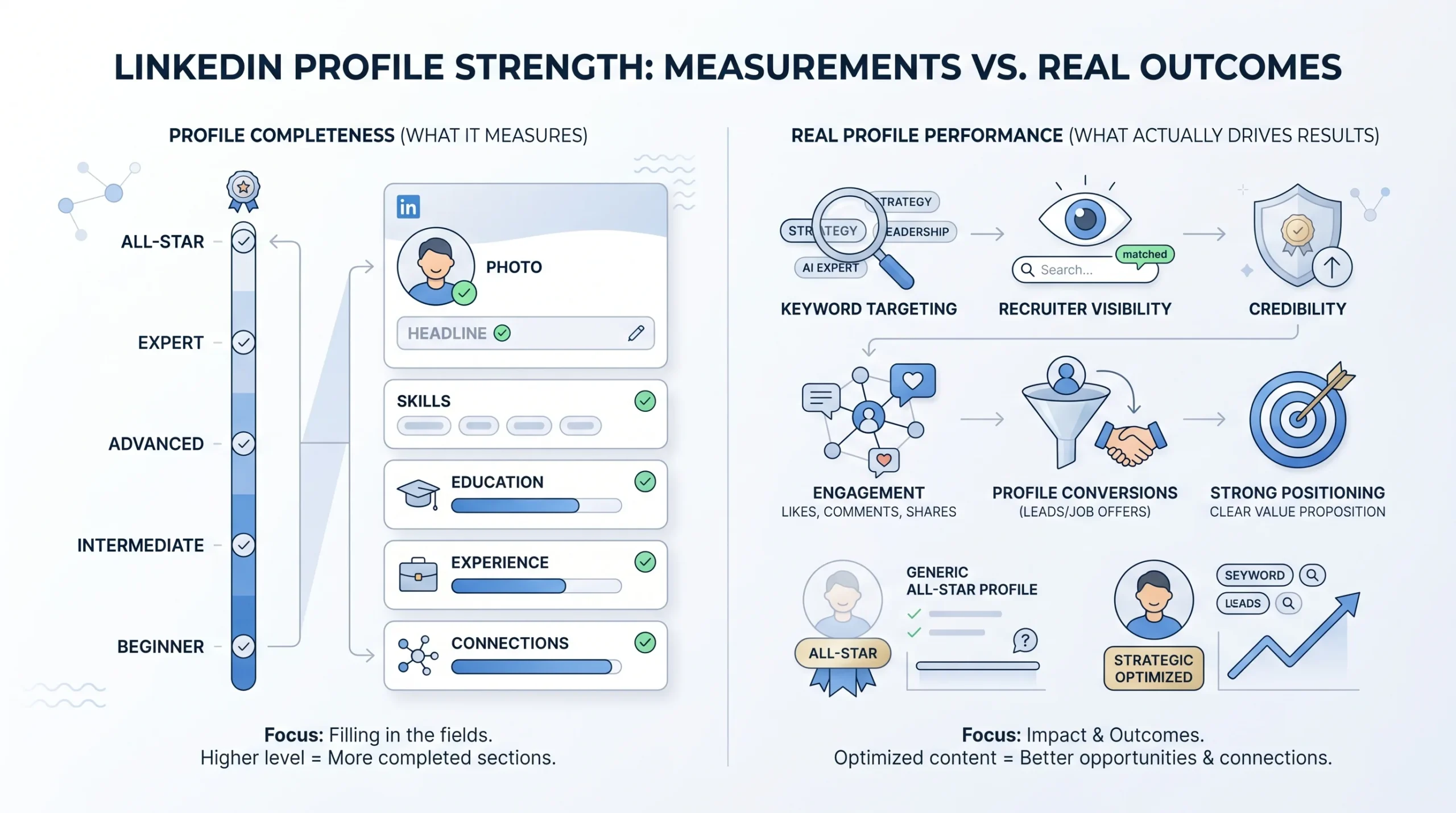
LinkedIn profile strength is a completeness indicator. It answers one question: have you filled in the sections LinkedIn considers necessary for a functional profile? What it does not measure is whether your profile would convert a prospect, rank for the keywords a recruiter is searching, or survive five seconds of scrutiny from someone who received your cold connection request. Those are separate problems. Understanding the distinction between what the meter measures and what actually drives outcomes is the first thing most guides skip, and skipping it is exactly why people reach All-Star and then wonder why nothing changed.
The 5 Levels, Defined
LinkedIn uses a five-step ladder to rate profile completeness. Every member starts at Beginner. From there, the level climbs as you add specific sections. According to LinkedIn’s own help documentation, the progression works as follows:
- Beginner: The default starting state. Very few sections have been filled in. The profile functions as little more than a name and email address.
- Intermediate: You have added four of the recommended sections. The profile is started but incomplete. LinkedIn’s search algorithm treats this profile as under-resourced.
- Advanced: More sections have been added beyond the four-section threshold. You are past the halfway mark but not yet in the range LinkedIn considers fully optimized.
- Expert: Nearly all recommended sections are filled in. You are close to LinkedIn’s completeness ceiling but not there yet.
- All-Star: The highest tier. To reach All-Star, you need a profile photo, a headline, your location, a current position with a written description, at least two past positions, your education listed, a minimum of five skills, and at least 50 connections. All seven of those elements must be present simultaneously.
One important detail: the profile strength meter is private. Only you can see it. And once you reach All-Star, the meter disappears entirely. LinkedIn treats All-Star as the finish line for completeness, which is accurate for their purposes but misleading for yours.
What “Completeness” Controls in the Algorithm
All-Star status is the threshold at which LinkedIn’s search algorithm stops penalizing your profile for being incomplete. LinkedIn’s search function ranks profiles based on three layers: network proximity (first-degree connections rank above second-degree, which rank above third-degree), profile completeness, and keyword relevance. All-Star status is the gate to the second layer. If your profile sits at Intermediate or Advanced, you are competing in keyword-relevant searches with a structural handicap, because LinkedIn is already down-weighting you before it even gets to whether your headline matches the query.
The data behind this matters. According to LinkedIn’s own reported statistics, profiles at All-Star completeness receive 21 times more profile views and 36 times more messages than incomplete profiles. A separate analysis found that optimized profiles can receive up to 40 times more profile views than basic ones. These are not marginal differences. They represent the gap between being findable and being invisible to the platform’s own distribution system.
What Profile Strength Does NOT Tell You
Here is the part that trips up the most people. The native strength meter measures completeness, not persuasiveness, not keyword targeting, and not engagement signals. A profile can sit at All-Star with a headline that says “Marketing Professional at XYZ Company,” an About section written in 2021 that has not been touched since, and skills that LinkedIn auto-populated when the account was first created. That profile gets a perfect completeness score. It also ranks for almost nothing a recruiter or prospect would actually search.
All-Star removes the completeness penalty. It does not inject keyword relevance, sharpen your positioning, or make your profile more credible to someone landing on it cold. Those require a second layer of work that the strength meter cannot prompt you to do, because the meter was never designed to measure it.
How to Check Your LinkedIn Profile Strength (3 Methods)
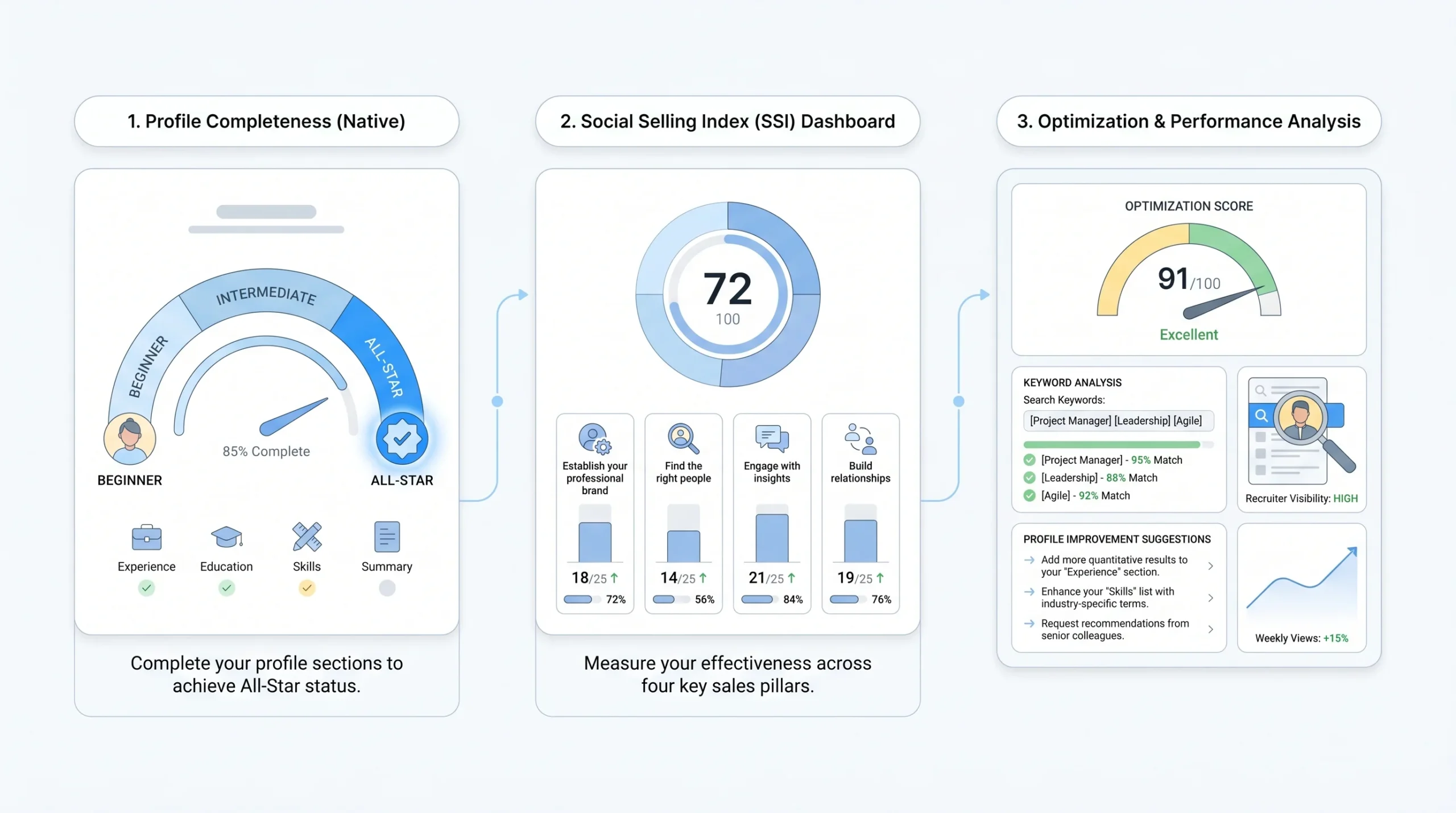
There are three meaningfully different ways to assess your LinkedIn profile strength, and each answers a different question. Most articles describe the native meter and stop there. That leaves the two more diagnostic tools unmentioned, which is where the actionable information actually lives.
Method 1: The Native LinkedIn Profile Level Meter
This is LinkedIn’s built-in completeness indicator. It is the quickest check and the one most people already know exists without necessarily knowing where to find it.
On desktop:
- Click the Me icon at the top of your LinkedIn homepage.
- Select View Profile.
- Scroll down to the “Suggested for you” section.
- The Profile level indicator is displayed there.
On mobile:
- Navigate to your profile.
- Look under the “Suggested” tab directly on your profile page.
- The level meter appears in that section.
The meter shows your current level (Beginner through All-Star) and indicates which sections are still needed to advance. Once you hit All-Star, the indicator disappears. It does not reappear even if you later delete sections that would otherwise drop you below All-Star. The meter is private at all times. No one viewing your profile can see your level.
The core limitation: this tool answers “is my profile complete?” and nothing more. It does not tell you whether your headline contains keywords anyone searches for, whether your About section reads like a pitch or a press release, or whether your Experience section is doing any SEO work. For those answers, you need the other two methods.
Method 2: The LinkedIn Social Selling Index (SSI)
The Social Selling Index, or SSI, is a separate 0-100 score that LinkedIn calculates for every member. It is free to check and measures something entirely different from profile completeness. Where the native meter is a static completeness check, SSI is a live score that updates based on your activity on the platform.
SSI measures performance across four pillars:
- Establishing your professional brand: How complete and credible your profile is, including whether you publish content.
- Finding the right people: Whether you are actively using LinkedIn’s search tools, Sales Navigator filters, or other discovery features to identify relevant contacts.
- Engaging with insights: Whether you are engaging with content in your feed and participating in conversations within your target audience.
- Building relationships: The quality and pace of your network growth, connection requests sent and accepted, and InMail responses.
Each pillar is scored out of 25, and the four combine to produce your overall SSI score out of 100. You can check your SSI for free by visiting LinkedIn’s SSI dashboard directly (linkedin.com/sales/ssi). No paid subscription is required.
SSI matters more for sales operators, SDR teams, and agency owners than it does for passive job seekers. LinkedIn’s algorithm uses SSI as a signal in how widely it distributes the content you post and, according to practitioners who run outreach at scale, it may influence how LinkedIn treats your daily activity limits. The global average SSI sits around 35 across all LinkedIn users. Sales-focused users targeting outreach should aim for 60 or above to stay in good standing with LinkedIn’s distribution and activity systems.
Method 3: Third-Party Profile Scorers
Third-party LinkedIn profile analyzers go further than the native meter by scoring specific sections out of 100 and identifying keyword gaps the completeness indicator never surfaces. These tools answer the question the native meter cannot: “Is my profile actually optimized to rank and convert, or is it just complete?”
Several tools are actively used for this:
- LinkedInRank: Scores profiles across six categories (Headline, About, Experience, Skills, Education, and Completeness) using 30-plus signals. Scores are tiered as Bronze (0-54), Silver (55-69), Gold (70-84), and Platinum (85-100). Most professionals score between 40 and 65 on a first analysis.
- Teal: A Chrome extension that runs an AI-powered analysis directly on your LinkedIn profile. It provides a detailed breakdown with actionable, section-specific recommendations and highlights which elements are missing or underperforming.
- Resume Worded: Scores your LinkedIn profile using an AI engine and returns headline examples, About section suggestions, and keyword gap analysis.
These tools are most useful once you have already reached All-Star and still are not seeing the profile views, search appearances, or inbound messages you expected. The native meter has nothing left to tell you at that point. Third-party scorers show you why a complete profile can still underperform, and which specific sections to fix first.
Why LinkedIn Profile Strength Matters Beyond Your Job Search
Most articles frame LinkedIn profile strength as a job-seeker concern. That framing leaves out a large portion of the people who actually need this information. For founders running outbound, SDR teams sending connection requests at volume, and agency owners managing sender accounts across multiple clients, profile strength has direct commercial consequences that have nothing to do with getting hired.
Profile Strength and LinkedIn Search Ranking
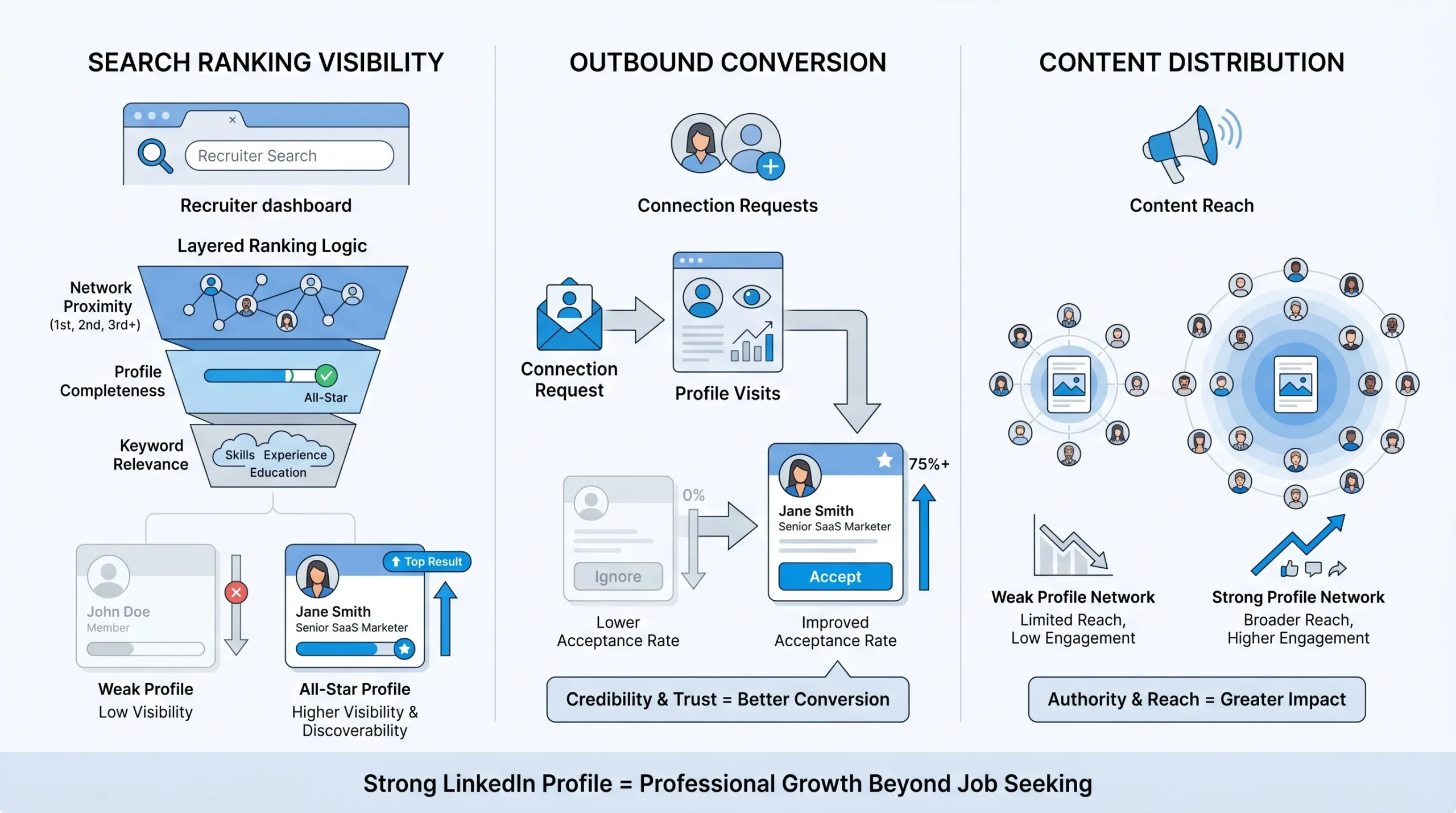
LinkedIn’s search algorithm ranks profiles using three sequential layers. Understanding the sequence changes how you prioritize fixes.
Layer 1: Network proximity. First-degree connections rank above second-degree, which rank above third-degree. This is the layer you cannot easily manipulate in the short term. It is governed by who you are already connected to.
Layer 2: Profile completeness. All-Star profiles rank above incomplete profiles at the same network distance. This is the gate. Before keyword optimization does anything useful, completeness has to be in order. An Intermediate profile with perfect keyword targeting still loses to an All-Star profile with mediocre keywords, because completeness is evaluated before keyword relevance in LinkedIn’s ranking sequence.
Layer 3: Keyword relevance. Once completeness and proximity are accounted for, keyword matching determines the final ranking order within a set of results. But not all fields carry equal keyword weight. The headline is the highest-weighted field. Job titles in Experience rank second. The About section contributes keyword depth. Skills feed into filter-based searches specifically.
The practical implication: if you are not at All-Star, start there. Keyword optimization before clearing the completeness gate is working at reduced capacity, because LinkedIn’s own algorithm is down-ranking you before it ever gets to the keyword comparison.
Profile Strength and Outbound Conversion
When you send a cold connection request on LinkedIn, the recipient does one of two things: accepts without looking, or visits your profile first. The higher the seniority of the prospect, the more likely they are to visit your profile before deciding. A sparse or incomplete profile signals low credibility, and credibility is the first thing a cold prospect is evaluating.
Connection acceptance rates on LinkedIn run between 30 and 40 percent for well-optimized campaigns. That is the industry baseline for outreach done correctly, with a strong sender profile, a personalized note, and targeting that matches the recipient’s actual professional context. A weak sender profile drags that number down. The profile is not a passive element in an outbound campaign. It is a conversion point that sits inside every single connection request you send.
For teams running LinkedIn outreach across multiple sender accounts, this compounds fast. Ten sender accounts each converting at 25 percent instead of 35 percent is a meaningful volume difference across a month of outreach. Sender profile strength is one of the levers that most teams leave unoptimized because it is less visible than the message copy.
Profile Strength and Content Distribution
LinkedIn’s algorithm factors profile completeness into how widely it distributes the content you post. This is not a published rule, but it is consistent with how LinkedIn’s completeness tiers interact with the platform’s other systems. A profile at All-Star gets broader organic reach for its posts than a profile sitting at Intermediate, all else being equal. If you publish content to build pipeline, attract inbound leads, or establish credibility with a target audience, your profile completeness affects whether that content reaches beyond your immediate first-degree network or stays largely contained within it.
The Sections That Move Your LinkedIn Profile Strength Score Most
Reaching All-Star gets you into the algorithm’s competitive pool. What happens after that depends on which sections you optimize and in what order. The native strength meter treats all sections as roughly equal. They are not. Some sections carry dramatically more algorithmic weight than others, and optimizing them in order of impact is how you turn a complete profile into one that actually ranks and converts.
Headline (Highest Weight)
The headline is the single highest-weight field in LinkedIn’s search algorithm. It appears in every search result, every InMail preview, every notification, and every Google result that indexes your profile. A recruiter or prospect sees your headline before they see anything else about you. High-scoring headlines convert search impressions into profile visits at three to five times higher rates than generic ones, according to analyses of LinkedIn’s ranking behavior.
The fix is specific. Include your primary role title spelled out in full, not abbreviated. LinkedIn’s own data shows that recruiters search for “Chief Technology Officer” more frequently than “CTO,” which means using the full title is a keyword choice, not just a formatting one. Add two or three industry-relevant positioning terms. Include a value signal or differentiator. A structure that consistently performs: Role | Context or Industry | Outcome or Differentiator. The headline field allows 120 characters. Use most of them.
A weak headline: “Marketing Manager at Acme Corp” A stronger version: “B2B Marketing Manager | SaaS Pipeline & ABM | Helping Sales Teams Close Faster”
The second version ranks for more queries, communicates positioning clearly to a human reader, and tells a prospect who lands on your profile exactly what you do and for whom.
About Section (Narrative + Keywords)
LinkedIn surfaces only the first 220 characters of your About section before a “see more” click on desktop. That opening lines needs to earn the click. The algorithm, however, reads the full text, which means the About section is both a conversion element (for human readers) and a keyword field (for the algorithm). Both jobs have to be done in the same copy.
Target 150 to 300 words written in first person. Open with a concrete hook, not a job title restatement. Cover your core expertise and the specific terms your target audience would search for. Close with a clear call to action that tells the reader exactly what to do next. Whether that is “connect with me,” “send a message,” or a link to a specific resource depends on your goal, but the section should not end without one.
Generic About sections with phrases like “results-driven professional” or “passionate about making a difference” rank for nothing and convert nobody. They are also a credibility signal in the wrong direction for anyone landing on your profile from a cold outreach.
Experience (Keyword Density + Achievement Framing)
Job titles in your Experience section carry strong algorithmic weight, similar to how a page title works in Google search. LinkedIn’s algorithm reads your listed titles as primary role signals. If your actual job title is “Revenue Operations Specialist” but every recruiter or prospect you want to reach searches for “RevOps Manager” or “Sales Operations Manager,” your title is doing nothing for your discoverability. Use the title your target audience actually searches for, not the exact internal corporate label if those two things differ and a reasonable adjustment is available.
Beyond titles, the content of each role entry matters for both keyword depth and human conversion. Experience bullets that lead with responsibilities rank poorly and convert weakly. Bullets that lead with outcomes and specific numbers do both jobs better:
- Weak: “Managed marketing campaigns and coordinated with the sales team.”
- Strong: “Led 15-person marketing team that generated $4.2M in pipeline through integrated ABM and content programs, achieving 150% quota attainment.”
The second version contains specific entities (ABM, content programs), a quantified outcome ($4.2M), and a performance benchmark (150% quota). It ranks for more relevant queries and gives a human reader a concrete reason to keep reading.
Skills (Searchability Signal)
LinkedIn allows up to 100 skills on your profile. The top three pinned skills are visible without expanding the section, which makes them both a human-facing credibility signal and the first skills a recruiter or prospect sees. Choose the top three deliberately: they should reflect the highest-value terms your target audience would use to search for someone with your expertise.
Skills feed directly into filter-based searches. Recruiters using LinkedIn Recruiter and Talent Hub filter results by specific skills, which means a skill you have not listed is a filter you do not match. Adding relevant skills you have not yet listed costs nothing and increases the number of filter combinations your profile appears in. The minimum of five skills is required for All-Star. Fifty skills is a reasonable target. One hundred is available if the terms are genuinely relevant.
Endorsements for your listed skills carry a modest engagement signal in LinkedIn’s algorithm. They do not move the needle dramatically, but a skill with 50 endorsements signals greater credibility to both the algorithm and human visitors than the same skill with zero.
Profile Photo and Banner (Credibility, Not Ranking)
A professional profile photo does not directly improve your search ranking position. What it does is change what happens after someone finds you. According to data from The Muse, adding a professional photo makes you 11 times more likely to be found by hiring managers and recruiters in terms of profile view conversion. The photo appears on every recruiter search result, every InMail preview, and every Google result for your name. It is not a ranking signal, but it is a conversion signal at every touchpoint where your name appears.
The banner image is the most consistently underused element on LinkedIn profiles. Most people leave it at the generic LinkedIn default. That is a missed opportunity. The banner is visible to everyone who lands on your profile and it loads before they scroll. Use it to reinforce what you do and who you serve. For a sales operator, that might be a tagline and a relevant visual. For a recruiter, it might be company branding and a clear value statement.
Recommendations (Authority Signal)
Recommendations do not move LinkedIn’s native strength meter. They are not one of the required elements for All-Star. What they do is add social proof that converts profile visitors who are already interested but not yet decided. Three to five specific, outcome-focused recommendations from relevant professional contacts carry more weight than twenty generic ones that say things like “great team player” or “pleasure to work with.”
The algorithm does factor recommendations as a quality signal in third-party scoring systems and in LinkedIn’s broader assessment of profile authority. For anyone running outbound where a prospect will visit their profile before accepting a connection request, a profile with zero recommendations looks noticeably different from one with four well-written ones. That difference shows up in acceptance rates.
A Prioritized Action Plan to Reach All-Star (and Go Beyond It)
The sequence matters here. Optimizing your keywords before clearing the completeness gate is working against the algorithm’s own ranking hierarchy. Do these in order and track the results at each stage before moving to the next.
Phase 1: Reach All-Star First (Week 1)
Before touching anything else, complete every element LinkedIn requires for All-Star status. This is the gate. Until you clear it, every other optimization is running at reduced effectiveness.
The checklist for All-Star:
- Profile photo: Professional, clear, well-lit. Only you in the frame.
- Headline: Any headline that includes your role and at least one positioning term. You will refine it in Phase 2.
- Location: Your current city or region. Required for local search visibility.
- Current position: Title and company, with a written description. The description can be brief at this stage; you will expand it in Phase 2.
- At least two past positions: Listed with at minimum a title and company name.
- Education: At minimum your highest-level degree, institution, and graduation year.
- At least five skills: Add the most relevant terms for your role and industry. You will expand the list in Phase 2.
- 50-plus connections: If you are under 50, send connection requests to colleagues, classmates, former coworkers, and anyone you have a professional relationship with before moving forward.
Completing all eight of these elements simultaneously is what triggers All-Star status. Adding seven of them and leaving one out keeps you at Expert.
Phase 2: Keyword-Optimize the High-Weight Sections (Week 2)
With All-Star cleared, the next step is optimizing the sections that carry the most algorithmic weight, in order of impact.
- Headline first: Revise it to include your primary role title (spelled out in full), two or three keyword-rich positioning terms, and a value signal. Use close to the full 120-character limit.
- About section second: Rewrite it in first person with a strong opening line, your core expertise keywords distributed naturally through the body, and a specific call to action at the close. Target 150 to 300 words.
- Experience job titles third: Review each listed title. Where the internal title differs from what your target audience actually searches, consider whether a reasonable adjustment is appropriate.
- Experience bullets fourth: Revise at least the three most recent roles to lead with outcomes and specific numbers rather than responsibilities.
- Skills section fifth: Expand from your Phase 1 minimum to 40 to 50 relevant skills. Use LinkedIn’s skill suggestions and cross-reference with the job titles or prospect profiles that represent your target audience.
Use third-party tools like LinkedInRank or Teal at this stage. They will surface which keywords your profile ranks for, which searches you are appearing in but not converting from, and which terms are missing entirely from your current copy.
LinkedIn’s search algorithm weighs keyword distribution across sections, so the same term appearing in your headline, your About section, and your skills carries more signal than that term appearing only once in your Experience section. Aim for 15 to 25 relevant keywords distributed naturally across sections. Repeating the same term five or more times in a single section can trigger a spam signal and work against you.
Phase 3: Track and Iterate (Weeks 3-4)
LinkedIn Analytics (accessible directly from your profile page) shows two metrics that tell you whether your optimization is working:
- Search appearances: How many times your profile appeared in LinkedIn search results in the past week, and which keywords drove those appearances. This is the primary signal. It should increase within two weeks of meaningful profile changes.
- Profile views: The number of people who visited your profile. After optimization, profile views should increase two to three times within the first 30 days if your keyword targeting is accurate.
Check your SSI score every 30 days. It is a real-time score that changes with your activity, so a baseline measurement before optimization gives you a comparison point a month later. Re-run a third-party profile scorer every 90 days. Profiles drift: roles change, keyword trends shift, and sections that were strong six months ago may have become less relevant to what you are currently targeting.
Conclusion
All-Star is the floor in 2026, not the ceiling. The native strength meter tells you whether your profile has cleared LinkedIn’s completeness gate. It does not tell you whether your headline contains a single keyword a recruiter would search for, whether your About section would make a prospect want to accept your connection request, or whether your Experience section is doing any ranking work at all. Those require a second pass that the meter was never designed to prompt.
The sequence is fixed: reach All-Star first, then keyword-optimize the headline and Experience sections, then track search appearances over 30 days to verify the changes are landing. Checking your SSI every 30 days and running a third-party scorer every 90 days keeps the profile from drifting back to invisible as your targets and the platform evolve.
For teams running LinkedIn outbound at scale, sender profile strength is a campaign variable that most operators underestimate until they look at the acceptance rate data by account and notice the pattern. Platforms like Dealsflow, which manage outreach across multiple LinkedIn accounts, routinely surface this as a campaign setup step: a well-optimized sender profile running the same sequence as a sparse one will consistently produce more accepted connections and more booked calls from the same volume of outreach.
Run your profile through LinkedIn’s SSI dashboard and a third-party scorer this week. Get your baseline. Then fix the headline first, because that single field will move more needles than any other change you can make in 30 minutes.
Frequently Asked Questions
What is LinkedIn profile strength?
LinkedIn profile strength is the platform’s built-in indicator of how complete your profile is. It uses five levels (Beginner, Intermediate, Advanced, Expert, All-Star) based on whether you have filled in key sections: a profile photo, headline, current role with description, at least two past positions, education, a minimum of five skills, and 50-plus connections. Reaching All-Star means LinkedIn considers your profile fully complete and gives it full weight in its search algorithm. The meter is private and only visible to you.
How do I check my LinkedIn profile strength?
On desktop, go to your profile and look for the “Suggested for you” section: the Profile level indicator sits there. On mobile, it appears under the Suggested tab on your profile page. The meter is private and only you can see it. If you want a more detailed breakdown, check your Social Selling Index score for free at LinkedIn’s SSI dashboard, or run your profile through a third-party tool like LinkedInRank or Teal, which score specific sections out of 100 and surface keyword gaps the native meter does not address.
What does LinkedIn All-Star status mean?
All-Star is LinkedIn’s highest profile completeness tier. It indicates you have filled in all recommended sections: a profile photo, headline, location, a current position with a written description, at least two past positions, education, five or more skills, and 50-plus connections. According to LinkedIn’s reported data, All-Star profiles receive 21 times more profile views and 36 times more messages than incomplete profiles. All-Star status removes the completeness penalty in LinkedIn’s search algorithm and allows your keyword optimization to operate at full effect.
Does LinkedIn profile strength affect search visibility?
Yes, directly. LinkedIn’s search algorithm uses profile completeness as the second of three ranking layers, evaluated after network proximity and before keyword relevance. Profiles below All-Star are algorithmically down-ranked in search results regardless of how relevant their keywords are. Reaching All-Star is the prerequisite before keyword optimization produces its full effect in search rankings.
What is the LinkedIn Social Selling Index (SSI) and how is it different from profile strength?
Profile strength measures how complete your profile is. SSI is a separate 0-100 score that measures commercial activity across four pillars: establishing your professional brand, finding the right people, engaging with insights, and building relationships. SSI is more relevant for sales operators, SDR teams, and founders running outbound than for passive job seekers. You can check your SSI for free through LinkedIn’s SSI dashboard at linkedin.com/sales/ssi. The global average SSI is around 35; sales-focused users should aim for 60 or above.
How long does it take to see results after improving LinkedIn profile strength?
Search appearances typically increase within two weeks of meaningful profile changes. Profile views tend to climb two to three times within the first 30 days if your keyword targeting is accurate. Recruiter InMail volume usually begins to increase by weeks three and four. These timelines apply to LinkedIn’s internal search. Google indexing of your public profile takes two to four weeks after activating public visibility in your privacy settings.
Which LinkedIn profile sections matter most for search ranking?
The headline carries the highest algorithmic weight and appears in every search result, InMail preview, and Google result for your name. Job titles in the Experience section rank second. The About section contributes keyword depth across the full text. Skills feed into filter-based recruiter searches specifically. Profile photo and recommendations affect conversion once someone lands on your profile but do not directly drive search ranking position.
Does having more LinkedIn connections improve profile strength?
Partially. The native strength meter requires a minimum of 50 connections to reach All-Star, so below that threshold, connections directly affect your profile level. Above 50, additional connections do not move the completeness meter. They do, however, increase the probability that your profile appears within LinkedIn’s network proximity layer of search results, because LinkedIn prioritizes first- and second-degree connections in its ranking algorithm.
Can I have an All-Star profile and still rank poorly in LinkedIn search?
Yes, and this is the most common misunderstanding about LinkedIn profile strength. All-Star status removes the completeness penalty in LinkedIn’s algorithm but does not guarantee strong keyword relevance. A profile with All-Star status and a generic headline like “Marketing Professional at Company X” will still rank poorly for any specific search query. Keyword optimization in the headline, About section, and Experience section is a separate step that must happen after reaching All-Star.
Does LinkedIn profile strength matter for outbound sales and cold outreach?
More than most sales teams realize. When a prospect receives a connection request, they typically visit the sender’s profile before deciding whether to accept. A weak or sparse profile reduces acceptance rates across every campaign it touches. Connection acceptance rates on LinkedIn run between 30 and 40 percent for well-optimized campaigns with strong sender profiles. A poor sender profile can pull that number significantly lower, which means the same outreach volume generates fewer conversations and fewer booked calls.