


LinkedIn Premium costs anywhere from $39.99 a month for Career to $99.99 a month for Sales Navigator. Per year, that’s between $480 and $1,200 just to access features that frankly should be part of a standard account. That price point makes a lot of people pause, especially when you’re job hunting and already not bringing in income, or you’re a freelancer who’s trying to grow a client base without burning through cash on subscriptions.
And yet LinkedIn Premium is genuinely useful for certain people at certain times. The ability to see who viewed your profile in full, send InMail to people outside your network, access LinkedIn Learning, see how you compare to other applicants for a job, and get AI-assisted profile and message tools, some of those features move the needle in real situations. A job seeker who can directly message a hiring manager without being connected is in a different position than one who can’t. A recruiter who can search the full LinkedIn database has a meaningful advantage. The features aren’t just cosmetic.
So the question a lot of people land on is: is there a legitimate way to get LinkedIn Premium without paying full price, or even for free?
The short answer is yes, actually. Several ways. None of them are hacks or tricks or sketchy workarounds. LinkedIn itself offers free trials regularly. Certain programs and partnerships give students, job seekers, and veterans free access. Some employers pay for it. Some credit cards cover it. LinkedIn occasionally runs promotions tied to specific actions. And there are also ways to stretch a free trial across multiple types of Premium so you’re evaluating what’s actually worth paying for before committing to anything.
But there’s also a lot of noise around this topic. Posts claiming you can get “lifetime free Premium” or access it through browser extensions or by changing your account region. Most of that is either outdated, false, or risky to your account. This post cuts through all of that and covers only what actually works in 2026, how to access each method, who qualifies, and what to do if none of them apply to your situation but you still want Premium features without paying the full price.
The goal here isn’t to game LinkedIn. It’s to make sure you’re not overpaying or skipping something useful just because you didn’t know the legitimate options existed. Let’s go through all of them.
The LinkedIn Premium Free Trial: What It Actually Gives You
The most direct way to get LinkedIn Premium for free is the standard one-month free trial that LinkedIn offers to most accounts. This is legitimate, offered by LinkedIn directly, and requires no payment until the trial ends.
Here’s how it works. Go to your LinkedIn profile and click the “Try Premium for free” button, which usually appears in the left sidebar or when you try to access a Premium feature. LinkedIn will show you a 30-day free trial offer for one of its Premium tiers, usually Premium Career or Premium Business depending on what LinkedIn thinks you might want based on your account activity.
You need to enter a payment method to activate the trial. LinkedIn charges nothing during the 30 days. If you cancel before the trial ends, you pay nothing. If you don’t cancel, you get charged the full monthly rate the day the trial expires.
Set a calendar reminder the day before the trial ends. Seriously, do this immediately when you activate it. LinkedIn is counting on some percentage of trial users to forget to cancel. The reminder takes 10 seconds and saves you from an unexpected charge.
What’s Included in the Free Trial
The trial gives you full access to whatever Premium tier you activated. For Premium Career, that means:
- Full list of who viewed your profile in the last 90 days
- 5 InMail credits per month to message people outside your network
- LinkedIn Learning access (thousands of courses)
- Applicant Insights showing how you compare to other job applicants
- AI-assisted profile writing and job application tools
- Open Profile status so anyone can message you for free
For Premium Business, it adds more InMail credits, unlimited profile browsing, and more detailed business insights.
The trial is genuinely full access. It’s not a limited demo or a teaser version. Use it actively.
How Many Times Can You Use the LinkedIn Free Trial
Here’s something LinkedIn doesn’t advertise clearly. You can use the free trial once per Premium product type. LinkedIn has multiple Premium tiers: Premium Career, Premium Business, Sales Navigator Core, Recruiter Lite. In some cases, accounts that haven’t tried a specific tier in a long time, or ever, get offered a new trial for that tier.
So someone who used the Premium Career trial two years ago might be eligible for a Premium Business trial now, or vice versa. It’s not guaranteed, but it happens often enough to be worth checking. When you go to the upgrade page, look at what trial offer is showing for each tier rather than assuming you’ve exhausted all options.
How to Get LinkedIn Premium for Free Through Employer Benefits
This one is underused. A lot of people don’t realize their employer might pay for LinkedIn Premium as part of a professional development budget, a software subscription package, or directly through a company LinkedIn license.
Large companies especially often have LinkedIn enterprise agreements that include Premium licenses for employees, or a budget employees can use for professional tools. If you’re employed and want LinkedIn Premium, the first move is to check with HR or your manager about whether it’s covered.
Even at smaller companies, if LinkedIn Premium is genuinely useful for your role, like if you’re in sales, recruiting, marketing, or business development, asking your company to cover it as a business expense is completely reasonable. A lot of people just never ask.
If your company uses LinkedIn Recruiter or LinkedIn Sales Navigator at the enterprise level, individual employees in sales or talent acquisition roles may already have licenses they haven’t been told about or haven’t activated. Check with whoever manages your company’s LinkedIn account.
LinkedIn Premium Free for Students
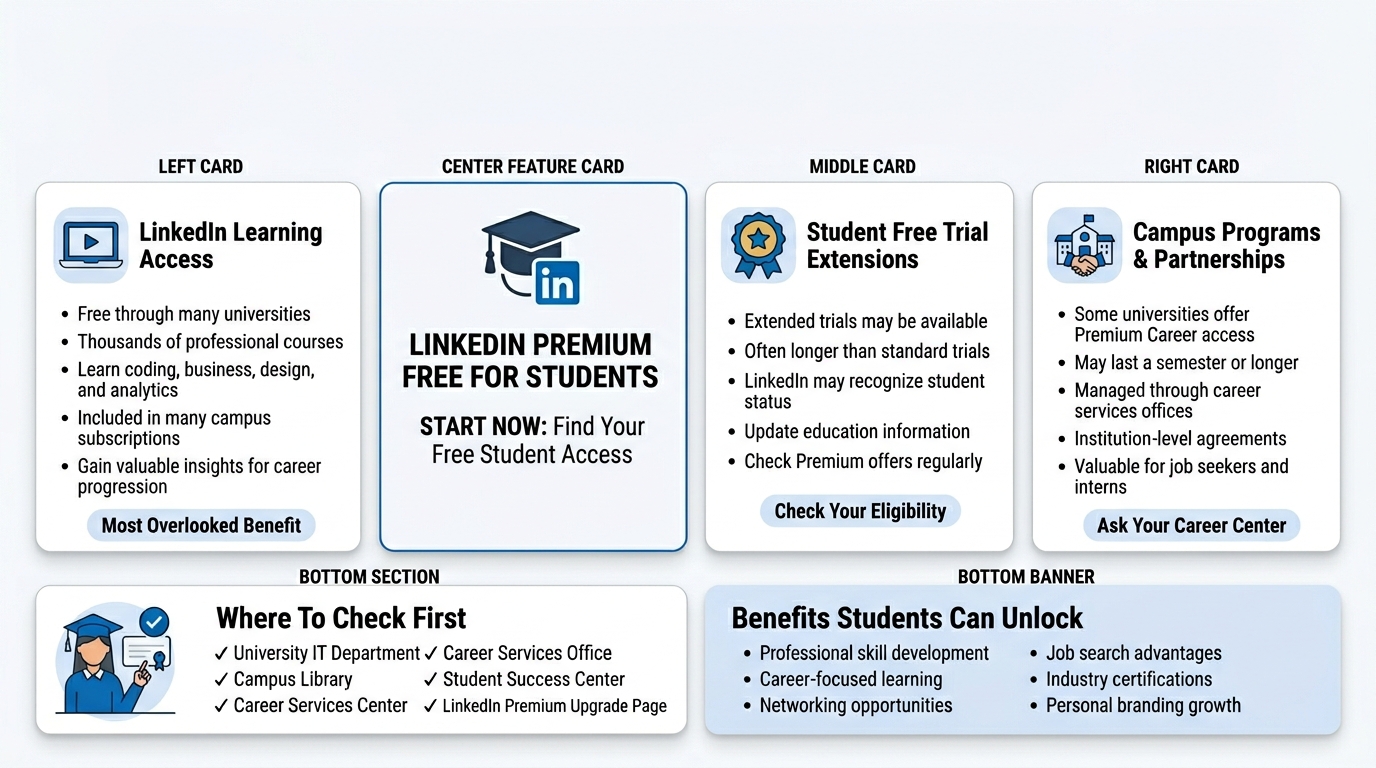
LinkedIn offers free Premium access to students in certain situations, though the program has changed a bit over the years.
LinkedIn Learning for Students
LinkedIn has partnerships with many universities and colleges where students get free access to LinkedIn Learning (which is part of Premium) through their institution. This doesn’t always include the full Premium suite, but LinkedIn Learning alone is worth a lot. Thousands of courses on coding, design, business, data analysis, project management, and more.
Check with your university library or IT department first. A lot of students sit on free LinkedIn Learning access they don’t know about because the university hasn’t advertised it well.
Student Free Trial Extensions
When LinkedIn detects that an account is associated with a .edu email or a student profile, it sometimes offers extended free trials of 2 to 3 months instead of the standard one month. This isn’t universally available but shows up often enough to be worth checking. Update your profile to reflect that you’re a current student with a verified school, then check the Premium upgrade page to see what trial length you’re offered.
Campus Programs and Partnerships
LinkedIn has direct partnerships with some universities that give enrolled students free Premium Career access for a semester or full year. These programs are set up at the institution level. Ask your career services office whether your school has a LinkedIn agreement in place. Many do, and many students graduate without ever using it.
LinkedIn Premium Free for Job Seekers
This is one of the most direct paths and one of the least publicized.
LinkedIn has a program called LinkedIn Premium for Job Seekers that, at various points, has offered free or heavily subsidized access to people who are actively unemployed and looking for work. The availability and terms of this program shift based on LinkedIn’s priorities and regional availability, but it’s worth checking directly.
In 2023 and 2024, LinkedIn ran programs in partnership with workforce development organizations and government agencies in several countries where eligible job seekers could receive 6 months of free Premium Career access. These programs usually required verification of employment status.
To check current availability, go to LinkedIn’s Help Center and search for “free Premium for job seekers” or look at the LinkedIn for Good section of their website. The program isn’t always running in all regions, but it does exist and it’s legitimate.
LinkedIn’s Workforce Development Partnerships
LinkedIn partners with nonprofits and government programs focused on workforce development. Organizations like Per Scholas, Year Up, and various state workforce boards have included LinkedIn Premium access as part of their programs for participants. If you’re enrolled in any kind of job training, reentry, or workforce development program, ask the program coordinator whether LinkedIn Premium is included.
LinkedIn Premium Free for Veterans and Military
This is a concrete, ongoing program. LinkedIn has offered free Premium Career access to veterans and military spouses for years through its LinkedIn for Veterans program.
Eligible individuals get 12 months of free LinkedIn Premium Career. That’s a $480 value. It covers the full Career tier including InMail credits, who viewed your profile, LinkedIn Learning, and applicant insights.
To access it, go to linkedin.com/veterans and verify your eligibility. You’ll need to confirm your military service status. The verification process is straightforward.
This program has been running since 2012 and LinkedIn has consistently renewed it. If you’re a veteran or a military spouse who hasn’t used this, it’s worth doing immediately.
How to Get LinkedIn Premium Free Through Credit Card and Bank Benefits
This one surprises people but it’s real. Several premium credit cards and bank accounts include LinkedIn Premium as a benefit, the same way some cards include streaming service credits or airport lounge access.
The specific cards and banks offering this change over time, so it’s worth checking your current cards’ benefits portals. In recent years, certain American Express, Chase, and Citi cards have included statement credits that cover LinkedIn Premium subscriptions. Some business bank accounts and fintech platforms have also offered LinkedIn Premium as a perk for account holders.
Where to check: log into your credit card account and look at the “Card Benefits” or “Perks” section. There’s often a dedicated portal (like Amex Offers, Chase Offers, or similar) where you can see what’s available. LinkedIn Premium shows up there periodically, sometimes as a free trial extension, sometimes as a recurring monthly credit.
If your card has a startup or small business focus, the odds of LinkedIn-related perks being available go up. These cards often package together tools like LinkedIn Premium, Canva Pro, and similar subscriptions as value-adds for their target customers.
LinkedIn Premium Free Through Referral and Promotional Credits
LinkedIn occasionally runs promotions where completing certain actions earns Premium credits or free access. These aren’t always announced loudly. They show up as banners in the LinkedIn feed or in notification emails.
Some examples of how this has worked historically:
Completing your profile to “All-Star” status sometimes triggers a free trial offer specifically for accounts that haven’t tried Premium before. LinkedIn prompts this through the profile completion nudge system.
Attending certain LinkedIn Events or LinkedIn Live sessions has come with Premium trial invitations. If you see a LinkedIn-hosted event in your feed, it’s worth attending because the follow-up sometimes includes a Premium offer.
LinkedIn has also run seasonal promotions around career events, New Year job hunting season (January is LinkedIn’s biggest traffic month), and graduation season in spring. Checking the upgrade page during these periods sometimes reveals extended trial offers.
None of these are guaranteed. But they cost nothing to check and a few minutes of attention to what LinkedIn is offering at any given time can result in free access you wouldn’t have known about.
LinkedIn Learning: The Free Part of Premium Most People Forget
LinkedIn Learning is included in Premium, but LinkedIn also offers a free one-month trial of LinkedIn Learning specifically, separate from the full Premium trial. If you’ve already used your Premium Career trial, you might still be eligible for a standalone LinkedIn Learning trial.
LinkedIn Learning on its own includes over 21,000 courses across technology, business, and creative skills. Certificates of completion you earn there show up on your LinkedIn profile. For someone who’s trying to upskill or add credentials without paying full Premium price indefinitely, the Learning trial alone is worth using.
Beyond the trial, LinkedIn Learning is available free through most public library systems in the United States, Canada, the UK, and Australia. Your library card is all you need. Go to your local library’s digital resources page and look for LinkedIn Learning. This is one of the most underused free resources in existence. Libraries pay for institutional access so their cardholders can use it at no cost.
This doesn’t get you InMail credits or the who-viewed-your-profile feature. But if the main reason you’re considering Premium is the courses, you might not need to pay for Premium at all.
What You Actually Get With LinkedIn Premium (So You Know If It’s Worth It)
Before spending any energy getting Premium, even for free, it’s worth being clear about what each tier actually does so you can figure out which one matters for your situation.
Premium Career ($39.99/month)
Built for job seekers. The features that actually matter: seeing the full list of people who viewed your profile, 5 InMail messages per month, LinkedIn Learning, and Applicant Insights that show how you rank compared to other candidates for jobs you’ve applied to. The AI tools for profile writing and job application customization are also here and have gotten meaningfully better in 2025 and 2026.
Honest take: if you’re actively job hunting, this tier is worth using for a month or two. The applicant insights and InMail access to hiring managers are genuinely useful. Long-term once you’re employed? Probably not worth $40/month for most people.
Premium Business ($59.99/month)
More InMail (15 per month), unlimited people browsing, company insights, and larger profile view history. Good for people doing business development or research-heavy work. Less relevant for someone just maintaining a professional presence.
Sales Navigator Core ($99.99/month)
This is a whole separate tool, not just a profile upgrade. It has advanced search filters, lead and account management, CRM integrations, and real-time sales alerts. If you’re in B2B sales, Sales Navigator is a legitimate work tool. If you’re not in sales, it’s overkill.
Recruiter Lite ($170/month)
Built specifically for talent acquisition. Advanced candidate search, pipeline management, and 30 InMail messages per month. Only relevant if recruiting is a core part of your job.
Things That Don’t Work (Save Yourself the Time)
There’s a lot of misinformation floating around about ways to get LinkedIn Premium free that either don’t work or are risky.
Browser extensions claiming to unlock Premium features. Nope. These don’t work and some are data-harvesting tools. Don’t install them.
Changing your account region to a country where Premium is cheaper. This violates LinkedIn’s Terms of Service. LinkedIn checks your actual location. Accounts that do this risk being flagged or suspended.
Creating multiple accounts to keep cycling free trials. Also against LinkedIn’s Terms of Service. LinkedIn’s systems are pretty good at detecting linked accounts, especially if you’re using the same device, same credit card, or same phone number. Getting caught means losing all your accounts, including your main one with years of connections. Not worth it.
Third-party sites selling “LinkedIn Premium accounts.” These are either stolen accounts or scams. Either way, using them is against LinkedIn’s Terms of Service and you’ll get banned eventually.
Sharing Premium accounts. LinkedIn Premium is licensed per individual account. You can’t share it and it won’t work the way people expect anyway since features like InMail credits are tied to the individual account.
How to Maximize a Free Trial Before It Ends
If you’ve got a free trial running, use it aggressively and strategically. Don’t let it sit idle for three weeks and then scramble on day 29.
On day one: check who’s viewed your profile for the last 90 days. Export or note down any interesting names. These are warm leads, people who already looked at you.
Send InMail messages to the people you’ve been trying to reach. You typically get 5 per month on Career. Use all of them for genuine outreach, not cold pitches.
Check the Applicant Insights on any jobs you’ve applied to or are considering. This data tells you how your experience, education, and skills compare to other applicants. Use it to adjust your profile or cover letters.
Download any LinkedIn Learning certificates you want. The certificates are yours even after Premium ends and they stay on your LinkedIn profile.
Review the AI-assisted profile suggestions. LinkedIn’s AI will often flag gaps or weak spots in how your profile is positioned. Even if you disagree with some of it, some suggestions are legitimately useful.
Set a cancellation reminder for day 28 or 29. Then decide whether to continue paying or not based on what you actually used during the trial.
When LinkedIn Premium Is Actually Worth Paying For
Look, the goal of this article is helping people get free access. But it’s also worth being honest about when free or discounted just isn’t the right call long-term and paying full price makes sense.
If you’re in active job search mode and have a clear timeframe (say, 2 to 3 months), paying for Premium Career for those 2 to 3 months after a free trial is defensible. The tools move the needle for job seekers who use them properly.
If you’re in B2B sales and LinkedIn is genuinely one of your main prospecting channels, Sales Navigator pays for itself fast if you’re closing deals. The math is simple: one mid-size client sourced through Sales Navigator and the subscription cost is covered many times over.
If you’re a recruiter doing independent or agency work, Recruiter Lite is basically table stakes. The alternative tools cost more.
For everyone else, like someone just maintaining a professional presence, posting occasionally, and keeping their network warm, the free version of LinkedIn is probably fine. The features most people think they need Premium for, like seeing who viewed your profile, are nice to have but not business-critical.
Conclusion
LinkedIn Premium isn’t some exclusive club you have to pay full price to access. There are real, legitimate ways to get it free or heavily discounted, and most people don’t use them simply because they don’t know they exist.
Start with the 30-day free trial if you haven’t used it yet. Check whether your employer covers it. If you’re a veteran, go to the Veterans program page today. If you’re a student, call your university’s career services office. Check your credit card benefits. Look into whether your library has LinkedIn Learning.
Use whatever free access you get strategically. Plan what you’re going to do with it before you activate it, not after. The features are there, the trial is real, and 30 days used well can genuinely change your job search or business development momentum.
And if none of the free options apply to you and you’re genuinely wondering whether to pay? Be honest about whether you’ll actually use the features. A subscription that sits idle isn’t a deal at any price.
Frequently Asked Questions
Can you actually get LinkedIn Premium for free legitimately?
Yes. Through the standard 30-day free trial, through LinkedIn’s Veterans program (12 months free), through university partnerships (varies by school), through employer benefits, through credit card perks, and through LinkedIn’s job seeker assistance programs. None of these require anything sketchy.
How long is the LinkedIn Premium free trial?
Standard free trial is 30 days. Students and certain new accounts sometimes see extended 2 or 3-month trials. LinkedIn Learning also has its own separate free trial.
Can I use the LinkedIn free trial more than once?
Not for the same tier on the same account, typically. But if you’ve only tried Premium Career, you might still be eligible for a trial of Premium Business or Sales Navigator. LinkedIn treats different tiers as separate products for trial eligibility purposes.
Does LinkedIn charge if I forget to cancel the free trial?
Yes. The full monthly rate is charged the day the trial period ends if you don’t cancel. Set a reminder on day 28 or 29. Cancel through Settings > Account preferences > Subscriptions.
How do veterans get LinkedIn Premium for free?
Go to linkedin.com/veterans, verify your service status, and receive 12 months of free Premium Career. It covers full Premium Career features including InMail, learning, and profile insights.
Is LinkedIn Learning free through libraries?
Yes. Most public library systems in the US, Canada, UK, and Australia provide free LinkedIn Learning access with a library card. Check your library’s digital resources page. This works independently of LinkedIn Premium.
Can students get LinkedIn Premium free?
Sometimes. Many universities have partnerships with LinkedIn that include free Learning access or full Premium for enrolled students. Check with your university library or career services. Some schools also offer extended free trials to students with .edu emails.
What happens to my InMail credits if I cancel Premium?
Any unused InMail credits expire when your Premium subscription ends. Use them before canceling.
Is there a way to get LinkedIn Premium cheaper if free isn’t available?
Yes. LinkedIn runs 20% to 50% discount promotions periodically, especially in January and around major hiring seasons. If you’re considering paying, check the upgrade page across a few weeks before committing. Also, paying annually instead of monthly saves about 20% on most tiers.
What’s the best LinkedIn Premium tier to trial for job searching?
Premium Career. It’s built specifically for job seekers. The applicant insights, InMail credits, and full profile view history are the most useful features for someone actively applying to jobs.