


Every sales professional knows the frustration intimately well.
You find a great prospect. You reach out. They respond positively. And then the whole thing drags on for weeks, sometimes months, through endless follow-ups, missed calls, delayed decisions, and long silences that make you wonder if the deal is still alive at all.
The sales cycle — that stretch of time between first contact and closed deal — is one of the most expensive problems in B2B sales. Every day a deal stays open costs money in time, resources, and opportunity cost. Every week that passes increases the risk of the prospect going cold, finding a competitor, or simply deprioritizing the decision altogether.
LinkedIn has emerged as the most powerful platform for B2B prospecting and relationship building. But most professionals use it manually, inconsistently, and without any real system behind it. They send a few messages, forget to follow up, lose track of where conversations stand, and wonder why their pipeline moves so slowly.
LinkedIn outreach automation, done correctly, changes all of that. It brings speed, consistency, and intelligence to a process that is otherwise entirely dependent on human memory and willpower — two things that are always in short supply.
This guide is going to show you exactly how the right automation approach compresses your sales cycle, moves prospects through your pipeline faster, and helps you close more deals in less time — without sacrificing the human touch that actually wins business.
What a Sales Cycle Actually Costs You And Why Speed Matters More Than You Think
Before getting into the how, it’s worth sitting with the why. Because most sales teams accept a long sales cycle as simply the cost of doing business — when in reality, it’s one of the most solvable problems in their operation.
Consider what a bloated sales cycle actually costs:
Lost deals from prospect fatigue. The longer a deal takes, the more opportunities a prospect has to talk themselves out of it, get distracted by other priorities, or find a competitor who moved faster. Research from various sales analytics firms consistently shows that deals that close quickly are significantly more likely to close at all.
Wasted rep time. When salespeople spend hours manually tracking follow-ups, searching for prospect information, and drafting one-off messages, they have less time for the high-value conversations that actually move deals forward. Time spent on admin is time not spent selling.
Compounding pipeline uncertainty. A long sales cycle makes forecasting nearly impossible. When deals can sit in “negotiation” for months, your ability to predict revenue becomes guesswork — which creates problems for budgeting, hiring, and growth planning.
Competitor vulnerability. Every day your deal is open, a competitor can step in. Speed signals confidence and capability. A slow, disjointed follow-up process signals the opposite.
The goal of reducing your sales cycle isn’t to rush prospects into decisions they’re not ready for. It’s to eliminate the unnecessary delays, the dropped follow-ups, and the inconsistent touchpoints that drag things out without adding any value to anyone.
That’s exactly what smart LinkedIn automation addresses.
How to Reduce Sales Cycle With LinkedIn Automation in the Right Way
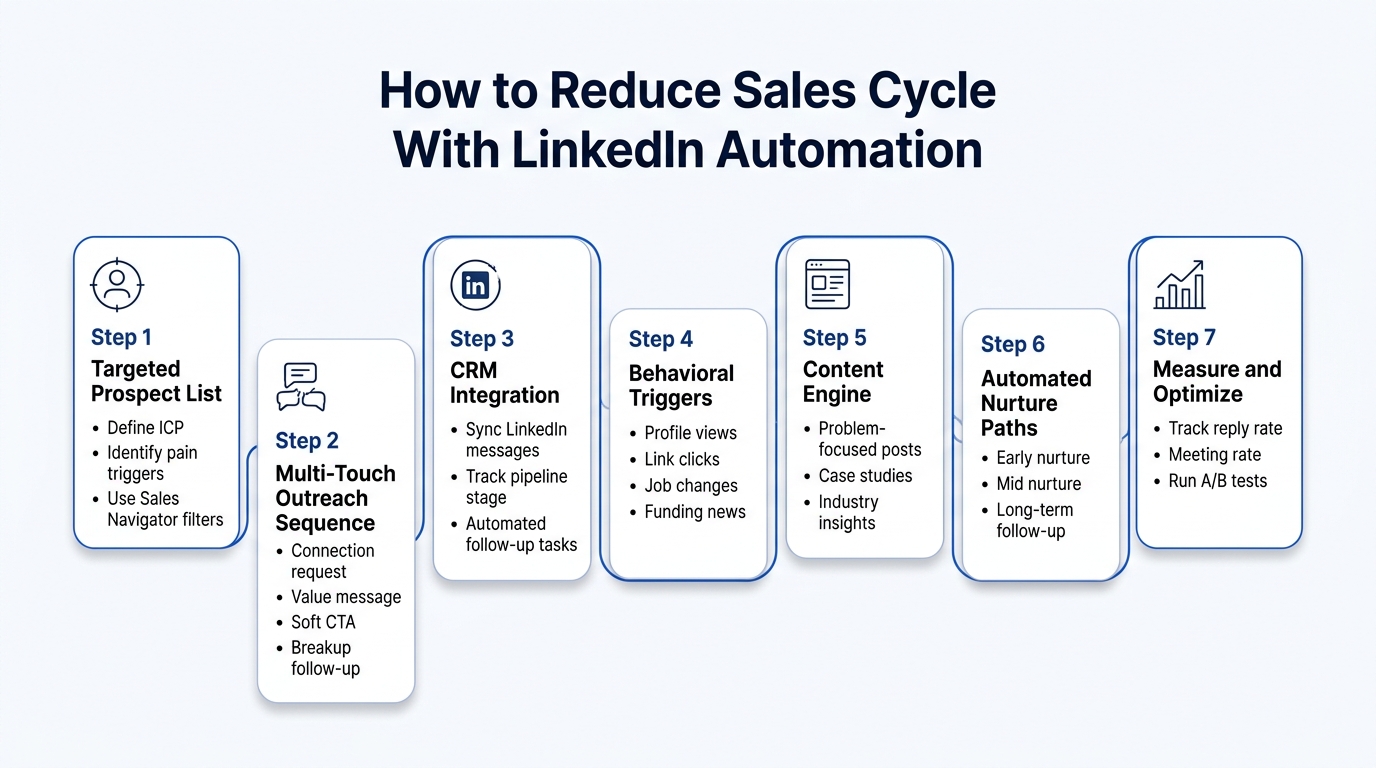
The phrase “LinkedIn automation” makes some people nervous — and for good reason. Done wrong, automation produces the robotic, copy-paste outreach that everyone on LinkedIn has learned to despise. It damages your reputation, gets your account flagged, and produces zero results.
Done correctly, LinkedIn automation is simply a system that ensures the right message reaches the right person at the right time — consistently, without relying on human memory to keep track of every thread.
Here’s the distinction that matters: automation handles the logistics; humans handle the relationship. Automation decides when to send the follow-up. A human decides what to say in it. Automation keeps track of where every prospect stands. A human decides how to respond when they reply.
With that principle established, let’s break down exactly how to build a system that genuinely compresses your sales cycle.
Step 1: Build a Hyper-Targeted Prospect List Before You Touch Any Automation Tool
The single biggest reason LinkedIn outreach campaigns fail — automated or otherwise — is that they target the wrong people. When you reach out to someone who has no reason to ever buy from you, no follow-up sequence in the world will save the conversation.
Before you automate anything, invest serious time in defining your Ideal Customer Profile (ICP) with surgical precision.
Your ICP should define:
| ICP Element | Questions to Answer |
|---|---|
| Industry | Which specific sectors benefit most from your solution? |
| Company size | What revenue range or headcount signals a good fit? |
| Decision maker title | Who actually approves the purchase — not just uses the product? |
| Geography | Are there regional factors that affect relevance or regulations? |
| Growth stage | Are you better suited to startups scaling fast, or established enterprises optimizing? |
| Pain triggers | What specific events or challenges signal they need you right now? |
That last row — pain triggers — is especially important for cycle compression. Certain events signal buying urgency far better than generic industry targeting:
- Recent funding announcements — Companies with new capital are actively investing in growth tools
- New executive hires — A new VP of Sales or CMO is almost always evaluating new vendors
- Rapid headcount growth — Scaling teams creates new operational challenges
- Job postings in specific roles — A company posting five SDR roles is clearly investing in outreach capacity
- Recent industry regulation changes — Compliance needs create urgency
LinkedIn Sales Navigator makes filtering by many of these signals possible at scale. Using these triggers means your outreach arrives when the prospect is already in “problem-solving mode,” which dramatically shortens the time from first contact to genuine interest.
The quality-over-quantity principle: A list of 200 precisely targeted prospects will outperform a list of 2,000 loosely targeted ones every single time. Smaller, sharper lists produce better response rates, better conversations, and faster sales cycles.
Step 2: Design a Multi-Touch Outreach Sequence That Mirrors Natural Conversation
The architecture of your outreach sequence is what turns a one-off message into a structured pipeline. Most salespeople send one or two messages and give up. A properly designed automated sequence ensures consistent, value-driven follow-up that keeps conversations alive without requiring daily manual attention.
Here’s a sequence framework that balances persistence with professionalism:
| Touch | Timing | Type | Purpose |
|---|---|---|---|
| Touch 1 | Day 1 | Connection request with personalized note | Open the door with something relevant to them |
| Touch 2 | Day 3 (after connect) | First DM — problem focused | Show you understand their world |
| Touch 3 | Day 7 | Value asset — article, insight, tool | Give before you ask |
| Touch 4 | Day 12 | Soft CTA | One low-friction ask |
| Touch 5 | Day 18 | Social proof — mini case study | Build credibility with a specific result |
| Touch 6 | Day 25 | Direct but respectful follow-up | Create gentle urgency |
| Touch 7 | Day 35 | Breakup message | Prompt a response by closing the loop |
Each touch in this sequence serves a specific purpose. None of them should be filler. None of them should feel like an automated blast — even if they are triggered automatically.
The breakup message deserves special attention. The final message in a sequence — something like “I don’t want to keep reaching out if this isn’t relevant. If the timing isn’t right, I completely understand — happy to reconnect whenever makes sense.” consistently generates some of the highest reply rates in the entire sequence. It works because it removes pressure, signals respect for the prospect’s time, and prompts the human instinct to respond to closure.
Personalization at scale — how to do it: Modern automation tools allow you to use dynamic variable fields that pull in information specific to each prospect. This means your template might include {{first_name}}, {{company}}, {{recent_post_topic}}, or {{industry_challenge}}. When filled in correctly, these variables make each message feel individually crafted, even when sent at scale.
The key is ensuring your variable data is actually accurate and specific, not generic. “I saw you work in {{industry}}” is barely better than no personalization. “I saw your recent post about the challenges of scaling a remote sales team at {{company}}” is a different conversation entirely.
Step 3: Integrate LinkedIn Automation With Your CRM for Full Pipeline Visibility
One of the most powerful ways automation compresses the sales cycle is by eliminating the gaps — the moments where a prospect slips through the cracks because no one was tracking them properly.
When your LinkedIn automation tool integrates with your CRM, every touchpoint, reply, and engagement gets logged automatically. Your sales team always knows exactly where each prospect stands, what was said, and what the next step is.
Without CRM integration, here’s what typically happens:
- A prospect replies positively to a LinkedIn message
- The rep means to follow up but gets pulled into other work
- Three weeks pass
- The prospect has moved on or forgotten the conversation entirely
- The deal dies without anyone noticing
With CRM integration:
- A prospect replies positively
- The automation tool logs the reply and triggers a CRM task
- The rep receives a notification with full conversation context
- They respond within 24 hours while the conversation is still warm
- The deal keeps moving
Key CRM integrations to look for in LinkedIn automation tools:
| CRM Platform | What to Sync |
|---|---|
| Salesforce | Lead status, activity log, next task, sequence stage |
| HubSpot | Contact record, deal stage, email thread, LinkedIn messages |
| Pipedrive | Deal progression, contact notes, activity reminders |
| Zoho CRM | Lead scoring, campaign touchpoints, response tracking |
| Monday CRM | Pipeline board updates, team notifications, deal status |
The best setups also include automated lead scoring — where prospects who engage more (visiting your profile, opening messages, clicking links) automatically get elevated priority in your pipeline. This means your human time goes to the hottest prospects first, which inherently speeds up your cycle.
Step 4: Use Behavioral Triggers to Send the Right Message at Exactly the Right Moment
This is where automation shifts from simply “scheduling messages” to genuinely intelligent outreach. Behavioral trigger-based messaging sends different messages based on what a prospect actually does rather than just the passage of time.
Here’s why this matters for cycle compression: the biggest delays in a sales cycle often happen because the salesperson doesn’t know the prospect is interested. The prospect visits the company website but doesn’t reach out. They open a document you shared but say nothing. They view your LinkedIn profile three times in a week but don’t connect.
These are buying signals — and automated systems can detect and respond to them faster than any human could manually.
Common behavioral triggers and corresponding responses
| Trigger | What It Signals | Automated Response |
|---|---|---|
| Prospect views your LinkedIn profile | Interest or awareness | Connection request with relevant intro message |
| Prospect opens your InMail but doesn’t reply | Curiosity without commitment | Follow up with a different angle or lower-friction ask |
| Prospect clicks a link you shared | Active interest in the content | Message referencing the content and offering more value |
| Prospect comments on your LinkedIn post | Public engagement | Personal DM acknowledging their comment and opening a conversation |
| Prospect’s company announces funding | Growth trigger, likely buying mode | Congratulations message tied to a relevant problem you solve |
| Prospect changes jobs | New role, new budget authority | Outreach acknowledging the transition |
When your message arrives moments after a relevant behavior, it feels remarkably well-timed to the prospect — even though it was automated. The message feels relevant because it is relevant. And relevant, well-timed outreach moves faster through the cycle than cold, generic messaging sent on an arbitrary schedule.
Step 5: Build a Content Engine That Warms Prospects Before You Even Reach Out
Here’s a dimension of LinkedIn automation that most people completely overlook: your content strategy. Automated outreach works significantly faster when the prospect already knows who you are before your DM arrives.
When someone has been seeing your posts in their feed for two or three weeks — posts that speak directly to their problems, their industry, their challenges — your connection request doesn’t feel cold. It feels like a natural next step in a conversation that’s already been happening.
This is called social warming, and it’s one of the most effective cycle-compression strategies available on LinkedIn.
The content types that warm prospects most effectively:
| Content Format | Warming Effect | Best For |
|---|---|---|
| Problem-focused text posts | High — directly resonates with pain points | All prospect types |
| Case study carousels | Very high — specific proof builds trust | Risk-averse buyers |
| Industry insight posts | High — establishes authority | Technical or expert buyers |
| Contrarian opinion posts | Medium-high — generates comments and visibility | Thought-leader positioning |
| Short video insights | High — builds personal connection faster | Any audience |
| Polls | Medium — generates engagement, shows up in feeds | Broad awareness |
How to automate content distribution: Tools that allow you to schedule LinkedIn posts in advance mean you can plan two or three weeks of content in a single session. You can also use automation tools to strategically engage with your target prospects’ posts — liking, commenting, and interacting before initiating direct outreach.
When a prospect recognizes your name, they’re statistically far more likely to accept your connection request and respond to your first message. That head start translates directly into a faster path from first contact to first conversation.
Step 6: Create Automated Nurture Paths for Prospects Who Aren’t Ready Yet
Not every prospect is ready to buy right now. In fact, research suggests that at any given time, only about 5% of your target market is actively in buying mode. The other 95% are either unaware of their problem, aware but not prioritizing it, or evaluating options without urgency.
Most sales automation stops when someone doesn’t respond to the initial sequence. But the real opportunity lies in what happens to those “not yet” prospects over time.
Long-term nurture sequences keep your name and value proposition in front of prospects over months, not just weeks. When their situation changes and they move into buying mode, you’re already the familiar, trusted option in their mind.
Here’s how to structure a long-term nurture path:
| Phase | Timeframe | Frequency | Content Type |
|---|---|---|---|
| Active sequence | Weeks 1–5 | Every 5–7 days | Personalized outreach messages |
| Early nurture | Months 2–3 | Every 2 weeks | Value content, industry insights |
| Mid nurture | Months 4–6 | Monthly | Case studies, relevant news |
| Long-term nurture | Month 7 onward | Quarterly | Check-ins, major insight pieces |
The prospect who doesn’t respond in month one might become your best client in month six. Automated nurture sequences mean you maintain that relationship with zero ongoing manual effort — and when the timing is finally right, you’re already positioned as the obvious choice.
Step 7: Measure, Analyze, and Continuously Optimize Your Automation Performance
An automation system you set up and forget is not an asset — it’s a liability. The reason many LinkedIn automation campaigns underperform is that people treat them as a one-time setup rather than an ongoing optimization process.
The metrics that matter most for sales cycle compression:
| Metric | What It Tells You | Benchmark to Aim For |
|---|---|---|
| Connection acceptance rate | Quality of your targeting and request messaging | 30–50% for targeted campaigns |
| Reply rate | Relevance and quality of your first message | 15–30% for well-targeted sequences |
| Positive reply rate | How well your message resonates with the right people | 8–15% |
| Meeting booking rate | Conversion from conversation to sales conversation | 3–8% |
| Sales cycle length by source | Whether LinkedIn is actually compressing your cycle | Benchmark against other channels |
| Sequence drop-off by touch | Which message is losing people | Use to rewrite underperforming touches |
Run A/B tests on your most important variables:
- Connection request note: Test a problem-focused opening vs. a mutual interest opening
- First message angle: Test leading with a question vs. leading with an insight
- CTA style: Test a soft “would this be useful?” vs. a direct “are you free Tuesday?”
- Message length: Test shorter, punchier messages vs. more detailed, context-heavy ones
- Send timing: Test morning sends vs. evening sends for your specific audience
Small improvements compound dramatically. If you improve your reply rate by 5% and your meeting booking rate by 2%, the cumulative impact on your pipeline over a year is enormous.
The Tools That Power Effective LinkedIn Outreach Automation
Understanding strategy is important. Knowing which tools actually execute it is equally important. Here’s an honest overview of the main categories:
| Tool Category | Examples | Best For |
|---|---|---|
| LinkedIn-native automation | LinkedIn Sales Navigator | Deep prospecting, behavioral signals, CRM sync |
| Outreach automation platforms | Various cloud-based tools | Sequence management, personalization at scale |
| CRM integration middleware | Zapier, Make | Connecting LinkedIn data to your CRM automatically |
| Content scheduling | Buffer, Hootsuite | Social warming through consistent content |
| Analytics and reporting | Built-in dashboards, custom reporting | Optimization and performance tracking |
A critical safety note: LinkedIn actively monitors and restricts accounts that use automation irresponsibly. Always use tools that operate within LinkedIn’s terms of service, mimic natural human behavior patterns (reasonable daily send limits, varied timing), and prioritize quality over volume. An account restriction can set your entire outreach operation back by weeks, which defeats the entire purpose of cycle compression.
Safe daily activity limits to stay within:
- Connection requests: 20–30 per day maximum
- Messages: 50–80 per day maximum
- Profile views: 80–100 per day maximum
Why the Human Element Remains Non-Negotiable
Everything in this guide is designed to help automation support human connection, not replace it. The moment a prospect replies to any message in your sequence, the automation should pause, and a human should take over.
This is the critical handoff point. Automated messages got the conversation started. Now, a real person needs to carry it forward with genuine attention, curiosity, and responsiveness.
The prospects who convert fastest are the ones who feel heard. Automation creates the conditions for that by ensuring consistent, well-timed, relevant outreach. But it’s the human conversation that closes the deal.
The professionals who understand how to reduce sales cycle LinkedIn automation most effectively are the ones who treat their automated sequences as a system that feeds human conversations — not as a replacement for having them.
Conclusion
A long sales cycle is never inevitable. It’s almost always a symptom of inconsistent follow-up, poor targeting, untimely outreach, and the inevitable gaps that occur when human memory is the only system holding a pipeline together.
LinkedIn outreach automation addresses all of those root causes simultaneously. It ensures every prospect receives consistent, relevant, well-timed communication. It surfaces buying signals the moment they appear. It keeps the pipeline organized and visible. And it frees your salespeople to focus their energy on the high-value conversations that actually close deals — rather than on the administrative labor of tracking who they messaged last Tuesday.
The professionals and teams who genuinely know how to reduce sales cycle linkedin automation strategies understand one fundamental truth: automation is not about doing less. It’s about doing the right things consistently, at the right time, for the right people so that when a prospect is ready to move, you’re already positioned, already trusted, and already top of mind.
Set up the system thoughtfully. Optimize it relentlessly. Let the automation handle the logistics. And show up fully for the human conversations it creates.
That combination is what turns a slow, unpredictable pipeline into one that moves with speed, consistency, and confidence.
Frequently Asked Questions
Is LinkedIn automation safe to use for sales outreach?
Yes, when used responsibly. The key is to use tools that operate within LinkedIn’s guidelines, respect daily activity limits, and simulate natural human behavior. Cloud-based tools that operate through LinkedIn’s interface with reasonable daily limits are generally safer than browser-extension-based tools that mimic clicks. Always read the terms of service of any tool you use and stay well within recommended activity limits.
How much can LinkedIn automation realistically reduce my sales cycle?
Results vary by industry, deal size, and how well the automation is set up. However, well-implemented automation typically reduces the time-to-first-meeting by 40–60% compared to purely manual outreach, primarily by eliminating the delays caused by inconsistent follow-up. Full sales cycle compression depends on many factors beyond outreach, but faster, more consistent touchpoints consistently move deals forward faster.
Should I automate my entire outreach process or just parts of it?
Automate the logistics — timing, sequencing, follow-up scheduling, CRM logging, and behavioral triggers. Keep the human element for anything requiring genuine judgment — responding to replies, handling objections, adapting the conversation based on what the prospect says, and building the relationship once initial contact is made.
How many prospects should I include in an automated LinkedIn sequence at once?
Start smaller than you think necessary — 50 to 100 prospects per active sequence is a manageable starting point. This allows you to monitor performance, respond to replies promptly, and maintain quality control. Scaling to 200 to 500 is reasonable once your sequence is optimized and your response management system is solid.
What’s the most common reason LinkedIn automation campaigns underperform?
Poor targeting is the number one reason. When the prospect list isn’t tightly defined around a specific ICP, even a perfectly crafted sequence produces minimal results. The second most common reason is lack of personalization — sequences that feel robotic or generic get ignored regardless of timing or frequency.
How do I handle replies that come in while the automated sequence is still running?
The best automation tools allow you to set a reply-detection feature that automatically pauses or ends the sequence for any prospect who responds. This is critical — continuing to send automated messages to someone who has already replied is one of the fastest ways to destroy a promising conversation. Always ensure reply detection is enabled.
Can I use LinkedIn automation for enterprise prospects, or is it only suited for SMB outreach?
It works for both, but the approach differs. Enterprise outreach typically requires longer nurture sequences, more personalization, multiple stakeholder threads, and more patience with the timeline. Automation helps manage the complexity of multi-threaded enterprise conversations — tracking multiple contacts within the same account and coordinating outreach across different decision makers simultaneously.
How do I measure whether my automation is actually shortening my sales cycle?
Track time-to-first-meeting as your primary metric — measuring the days between first outreach and first booked call across different prospect cohorts. Compare this against your historical baseline from manual outreach. Also track deal progression speed by stage to identify where in the cycle automation is having the most impact and where bottlenecks still exist.