


Most cold outreach has a personalization problem. Not a “we don’t care” problem. A “we’re faking it badly” problem. Teams spend hours crafting sequences, writing copy, building ICPs — and then every email goes out starting with “Hi {{first_name}}, I noticed you work at {{company}}.” That’s not personalization. That’s mail merge with extra steps.
Hyperise exists to fix that. It’s a dedicated personalization tool built around one idea: the first thing your prospect sees should feel like it was made specifically for them. Not a generic template with their name dropped in. A real, visual signal that you actually looked them up.
So in 2026, does it deliver on that? That’s what this review covers. What Hyperise actually does, what it costs (and why pricing is confusing depending on where you look), what real users say after using it for months, and whether it holds up against what else is out there. No fluff. Just a straight read on whether it belongs in your outreach stack.
What Is Hyperise?
Hyperise is a personalization platform. Not a sequencer. Not a CRM. It doesn’t send emails or manage LinkedIn campaigns. What it does is make the content inside those touchpoints feel like it was built for one specific person.
The company launched in 2018 out of the UK. The core product has stayed focused: add dynamic personalization layers to images, videos, and website content — without needing to write a line of code. You bring your outreach tool (Expandi, Lemlist, HubSpot, whatever), and Hyperise wraps personalized visuals around it.
Three things sit at the center of what it does. Image personalization is the flagship — up to 16 dynamic layers per image, pulling in data like the prospect’s name, company name, LinkedIn profile photo, company logo, or even a screenshot of their website. Video personalization adds those same dynamic layers on top of existing video content. And website personalization changes what a visitor sees on your landing page in real time based on who they are. All three work without writing code.
That platform-agnostic setup is actually what makes Hyperise interesting. It’s not asking you to switch outreach tools. It slots into whatever you’re already running.
Core Features Breakdown
Image Personalization
This is what most people buy Hyperise for, and honestly it’s where the tool earns its reputation. The editor is drag-and-drop. You build a base image template — could be a whiteboard mockup of their website, a custom graphic with a CTA, a fake screenshot — and then layer dynamic elements on top. The prospect’s LinkedIn profile photo. Their company logo pulled from their domain. Their first name in a handwritten-style font. Their company name in a browser tab. Up to 16 layers, all rendered dynamically at the time the email is opened.
The mechanics matter here. Images aren’t pre-rendered and attached. They live on Hyperise’s servers and get generated on the fly when the email loads. So every recipient sees a version built around their data. That’s different from a tool that just lets you drop a name into an image at send time.
The Images plan caps you at 5,000 impressions per month and 5 live templates. Worth knowing if you’re planning volume.
Video Personalization
This one’s available on the $149/seat/month Videos plan, not the base tier. The idea is you take an existing video — a demo, a screen recording, a talking-head intro — and Hyperise adds personalized overlays on top. The prospect’s name animates in. Their company shows up in a browser frame within the video.
It’s worth being clear about what this isn’t. Hyperise isn’t generating AI video where a synthetic version of you says the prospect’s name. You provide the base video, Hyperise personalizes the wrapper around it. That’s a different product from Vidyard or Sendspark, which are video-first platforms. Hyperise treats video as one channel alongside images and web personalization — part of a broader stack, not the whole thing.
Website Personalization
This feature is underused and underrated. The premise: when a prospect lands on your website or landing page after seeing your outreach, the page changes based on who they are. Their company name shows up in the headline. The logo switches to match their brand. The CTA shifts based on their industry.
It works through IP enrichment, UTM parameters, or CRM data. There’s a native WordPress plugin and integration with HighLevel. The practical application for outreach is clean: you send someone a cold message, they click through to a landing page that already has their company name in the hero. That’s a different experience than a generic page.
Data Enrichment
Hyperise can pull prospect data from email addresses, domains, visitor IPs, and connected CRMs including HubSpot and Salesforce. The enrichment matters because personalization is only as good as the data feeding it. If you’re running a clean outreach operation with solid data hygiene, the enrichment layer reduces your dependence on a separate data tool for basic use cases.
Integrations
Hyperise connects with Google Sheets via webhooks, Expandi, Lemlist, HighLevel, ActiveCampaign, Constant Contact, Drift, Intercom, Mailchimp, Close CRM, Salesforce, and hundreds more through Zapier and the API. The list is genuinely long.
The point isn’t the volume of integrations — it’s what they represent. Hyperise is designed to plug into your existing stack, not replace it. That’s a real advantage for teams that have already built out their outreach infrastructure and just want to add a personalization layer on top without rebuilding everything.
Pricing: What It Actually Costs in 2026
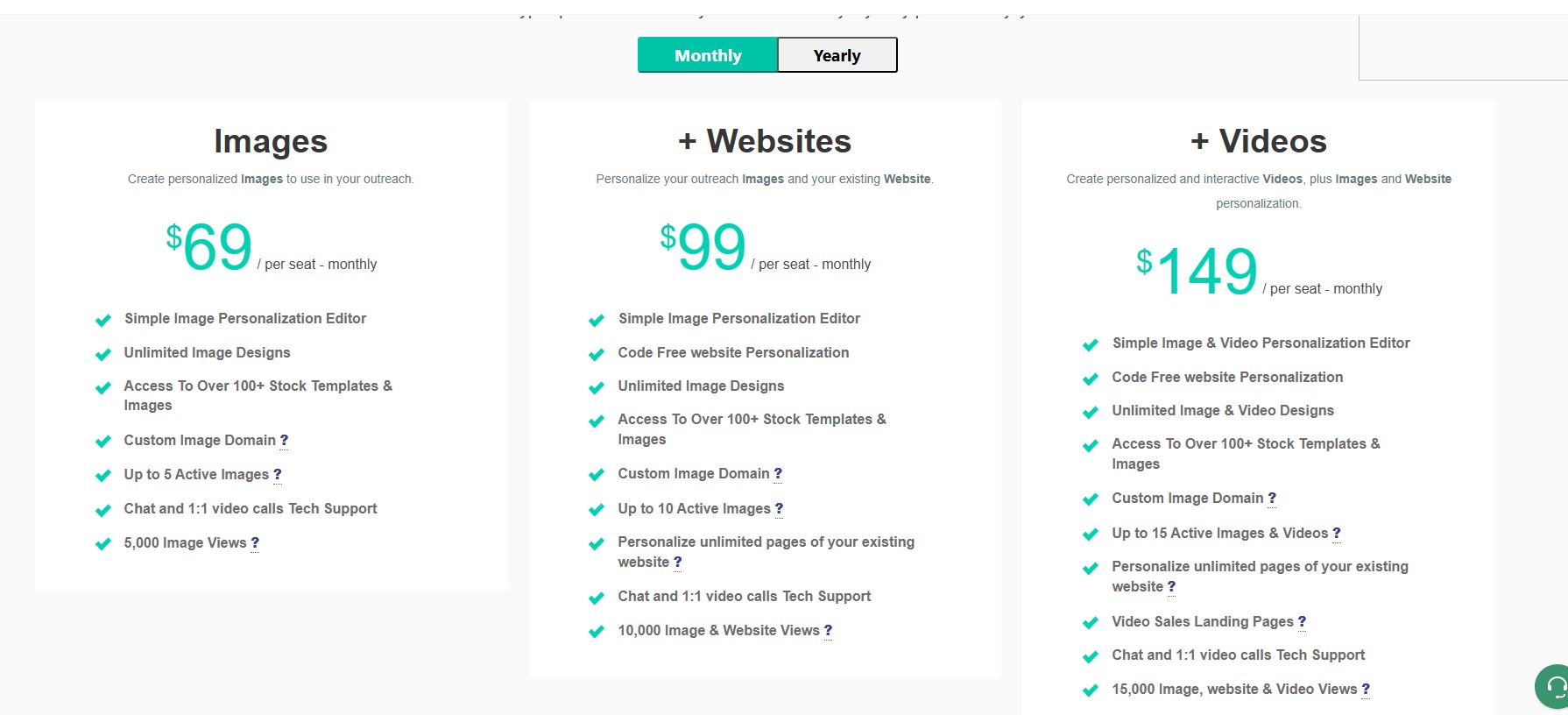
Let’s address the confusion first. Different directories show different numbers. Some still list $49/user/month as the Images starting price. Current sources, including what’s on Hyperise’s own site and G2 listings, put it at $69/user/month. Go with the $69 figure.
Here’s how the plans break down:
- Images — $69/seat/month: Image personalization, 5,000 impressions/month, 5 live templates, custom image domain
- Images + Websites — $99/seat/month: Adds website personalization, 10,000 impressions/month, 10 live templates
- Images + Videos — $149/seat/month: Adds video personalization, 15,000 impressions/month, 15 live templates, 1 website
- Agency — $495/month: 5 seats included, client sub-accounts, additional seats at $75/each
- White Label — $1,620/month: 20 seats, remove Hyperise branding, your own branded SaaS product
Annual billing saves roughly 17% across all tiers — about two months free. Add-on services run separately: $199 for a custom image design, $299 for video personalization setup, $499 for funnel setup. The 14-day trial has no credit card requirement.
Now for the honest math. Solo operator or two-person team running real outreach volume? The $69–$149/month range is defensible. But the per-seat model gets painful fast past three seats. Usage-based alternatives like OKZest can run 3x cheaper per image impression at scale once you’re managing multiple reps. That gap is real and worth running the numbers on before committing to a team plan.
The impression caps are also worth scrutinizing. 5,000 impressions at the base tier sounds fine until you realize that’s your ceiling for the month. High-volume teams hit that faster than expected.
What Users Actually Say: Pros and Cons From Real Reviews
Hyperise scores 4.4/5 on G2 across 19 reviews and 4.6/5 on Capterra across 47 reviews. The sample sizes aren’t huge, but the patterns across both platforms are consistent enough to take seriously.
What users consistently praise:
- The image layer system, specifically pulling LinkedIn profile photos into email creatives. That feature gets mentioned repeatedly as the thing that makes outreach feel genuinely personal.
- Platform-agnostic design. Users appreciate that they didn’t have to change their outreach tool to use it.
- Long-term reliability. Multiple reviewers have been using it since 2019 and report it just works. One user described it as a “magic wand for marketing metrics” after seeing immediate ROI.
- Support responsiveness. The team gets positive marks for being accessible when things go sideways.
What users consistently criticize:
- The learning curve is steep, and reviewers are not shy about it. One Capterra review described getting the basics working as requiring “blood, sweat, tears, bad language, and a lot of screaming at my computer screen.” That’s not a one-off comment — the sentiment shows up across multiple platforms.
- Documentation is structurally weak. This complaint has appeared consistently from 2019 through recent reviews. One verified reviewer described spending two weeks in back-and-forth support just to get email personalization working. That’s not a bug, that’s a product problem.
- Cost versus value for low-volume teams. For a solo founder or small team not running serious outreach volume, the price doesn’t add up.
- Impression caps frustrate teams that scale up. The 5,000 cap on the base plan is real friction for anyone doing meaningful volume.
The honest read: Hyperise is genuinely powerful for the right team. The people who are enthusiastic about it are running it at volume inside a mature stack. The people who bounced are usually solo operators who underestimated the setup work or can’t justify the cost at low send volumes. Both reactions make sense given the product’s design.
Hyperise vs. The Alternatives
Hyperise vs. DealsFlow

These two tools don’t actually compete — but they get compared because both sit inside the outreach conversation, and it’s worth being clear about where they each live.
DealsFlow is a LinkedIn AI outreach platform. It handles connection campaigns, automated sequences, and prospect management. The thing that sets it apart is Arlo AI, its post-reply conversation engine. Arlo reads incoming replies, handles objections, answers questions, and books meetings — all automatically, in the sender’s voice. That’s not image personalization. That’s AI managing the middle of the funnel where most tools completely stop.
Hyperise makes the first touch more visually personalized. A prospect opens an email or message and sees an image built around their company, their LinkedIn photo, their brand. That’s the Hyperise lane.
DealsFlow’s Arlo AI handles what happens after the prospect responds. That’s an entirely different problem. And it’s honestly the harder one to solve. Getting a reply is one thing. What you do with it — whether that’s a human spending time writing follow-ups or an AI that already knows how to handle “we already have a solution” — is where outreach either converts or dies.
So for a team running LinkedIn-first outreach, the real question isn’t Hyperise or DealsFlow. It’s whether you even need image personalization if Arlo is already making your conversations feel human at the reply stage. Stacking Hyperise on top of DealsFlow would give you visual personalization on the first touch and AI-handled conversations afterward. That’s a real combo for teams who can justify both.
But if the budget forces a choice: DealsFlow’s Arlo AI closes more pipeline gaps than adding a visual layer to a tool that doesn’t handle replies. Where DealsFlow wins outright is for LinkedIn-first teams that want sequencing, prospect management, and automated reply handling in one platform — starting at $49/month (Starter Pilot), $129/month (Scaling Pilot for teams up to 5 accounts), or $299/month (Agency Pilot for up to 20 accounts), all with a 14-day free trial and no credit card required.
Where Hyperise has the edge is multichannel outreach teams running email, LinkedIn, ads, and landing pages who need visual personalization consistent across every single touchpoint and are already running a mature multi-tool stack.
Hyperise vs. Sendspark / Vidyard
Sendspark and Vidyard are video-first tools. If personalized video thumbnails are the only thing you’re after, Sendspark at $15–39/month is a much cheaper entry point.
Hyperise is the right call when you need image personalization, video personalization, and website personalization from one platform, under one plan, feeding into a single data source.
Hyperise vs. OKZest
OKZest is usage-based — you pay per image impression rather than per seat. For a solo operator or small team running low volume, OKZest’s free tier is genuinely worth testing before spending $69/month on Hyperise. Validate that personalized images even lift your reply rates first.
Beyond three seats at scale, OKZest tends to be significantly cheaper per impression. The tradeoff is feature depth. OKZest is image-only. Hyperise adds website personalization, video personalization, data enrichment, and a much broader integration list. If you need just images and you’re running at volume with multiple reps, run the numbers on both.
Hyperise vs. Built-in Outreach Tool Personalization
Apollo, Salesloft, Outreach — they all have basic personalization now. Merge tags, some image support, dynamic variables. None of them match what Hyperise does on image layers, website personalization, or enrichment depth.
The honest threshold: if you’re sending under 500 personalized emails a month, test what your existing tool already does before adding another paid tool to the stack. Hyperise only earns its place when you’re running volume where the personalization depth actually moves metrics.
Who Should Actually Use Hyperise?
Not everyone. That’s the honest answer.
Strong fit:
- Sales teams doing high-volume cold email — 5,000+ sends per month — where visual personalization at that scale would take a full-time person to do manually
- Agencies running the Agency plan who need client sub-accounts and the ability to manage multiple brands from one dashboard
- B2B outbound teams running multichannel campaigns across email, LinkedIn, retargeting ads, and landing pages who want personalization consistent across all of them
- Teams that already have a mature outreach stack (Expandi, HubSpot, Salesloft) and want to add a personalization layer without ripping out what’s working
Poor fit:
- Solo founders or early-stage teams with low send volumes — the per-seat cost doesn’t justify itself at low volumes
- Anyone who wants outreach and personalization in one tool — Hyperise is a layer, not a sequencer, and it requires other tools to function as part of a full outreach workflow
- Teams expecting plug-and-play simplicity — the learning curve is real, the documentation is thin, and setup takes real time investment before things work cleanly
Final Verdict
Hyperise is the strongest dedicated image and website personalization tool available for outbound teams running at real volume. The image layer system — specifically the LinkedIn photo pull and the ability to stack 16 dynamic elements per image — is genuinely hard to replicate with anything else. The website personalization feature is underrated and worth attention for any team that drives prospects to landing pages as part of their sequence.
The problems are real too. The setup curve is steep. Documentation relies on support rather than self-serve materials. And the per-seat pricing model stops making economic sense once you’re managing a team of four or more.
The bottom line: if your reply rates have plateaued and you’re already sending thousands of personalized touches per month with a stack that works, Hyperise is worth the 14-day trial. The visual personalization depth is real and it does move metrics for teams running it at volume.
But if you’re still finding your outreach rhythm — still testing messaging, still figuring out your ICP, still getting connection acceptance rates under control — add Hyperise after that work is done. Personalized images on weak targeting and bad copy don’t save campaigns. Get the fundamentals right first, then layer in the visuals.
FAQs
Does Hyperise offer a free plan?
Nope. There’s no free version. What they do offer is a 14-day free trial with no credit card required. That’s enough time to build templates and test your integration, but budget the first few days for setup given the learning curve.
What’s the difference between the Images and Videos plans?
The Images plan ($69/seat/month) covers image personalization only — 5,000 impressions/month, 5 live templates. The Images + Videos plan ($149/seat/month) adds video personalization on top, bumps you to 15,000 impressions, and includes 15 live templates plus website access. There’s also an Images + Websites middle tier at $99/seat/month if video isn’t relevant to your stack.
Does Hyperise work with LinkedIn outreach?
Yeah, it integrates with LinkedIn outreach tools including Expandi and Lemlist. You can pull LinkedIn profile photos into image templates and use them inside connection messages or InMail outreach. Hyperise itself doesn’t send LinkedIn messages — it provides the personalized visual content that your outreach tool delivers.
Is Hyperise worth it for small teams?
Depends entirely on send volume. For a solo operator or two-person team running 5,000+ personalized emails per month, the math works. Below that threshold, the impression caps and per-seat pricing make it hard to justify. Try OKZest’s free tier first if you want to validate that image personalization actually moves your metrics before committing budget.
How does Hyperise count impressions?
Image views are counted each time an image is loaded by a recipient. Most email platforms cache images, so Hyperise notes that one counted view typically equals multiple actual views. Video views count for each 10 seconds of video watched. The 5,000 impression cap on the base plan applies to image loads, not email sends — so a single email opened multiple times by the same person could count more than once.