


Most EdTech sales reps are sending LinkedIn messages into a void. Not because LinkedIn does not work for EdTech sales, but because they are treating a district curriculum director the same way they would treat a VP of Sales at a software company. The pitch is the same. The timing is wrong. And the person on the receiving end has seen hundreds of vendor messages that sound exactly like theirs.
LinkedIn for EdTech sales works. It is, by a significant margin, the most reliable outbound channel for reaching school and university buyers. But it only works if you understand the institutional buying structure, the academic calendar, and the psychology of an educator receiving a cold message before you write a single line of outreach.
This guide covers all of it: who to find, how to find them, when to reach out, what to say, and how to scale outreach across hundreds of institutions without burning your account or your reputation in the process.
Why LinkedIn Is the Highest-ROI Channel for EdTech Outbound (and Where Most Sellers Get It Wrong)
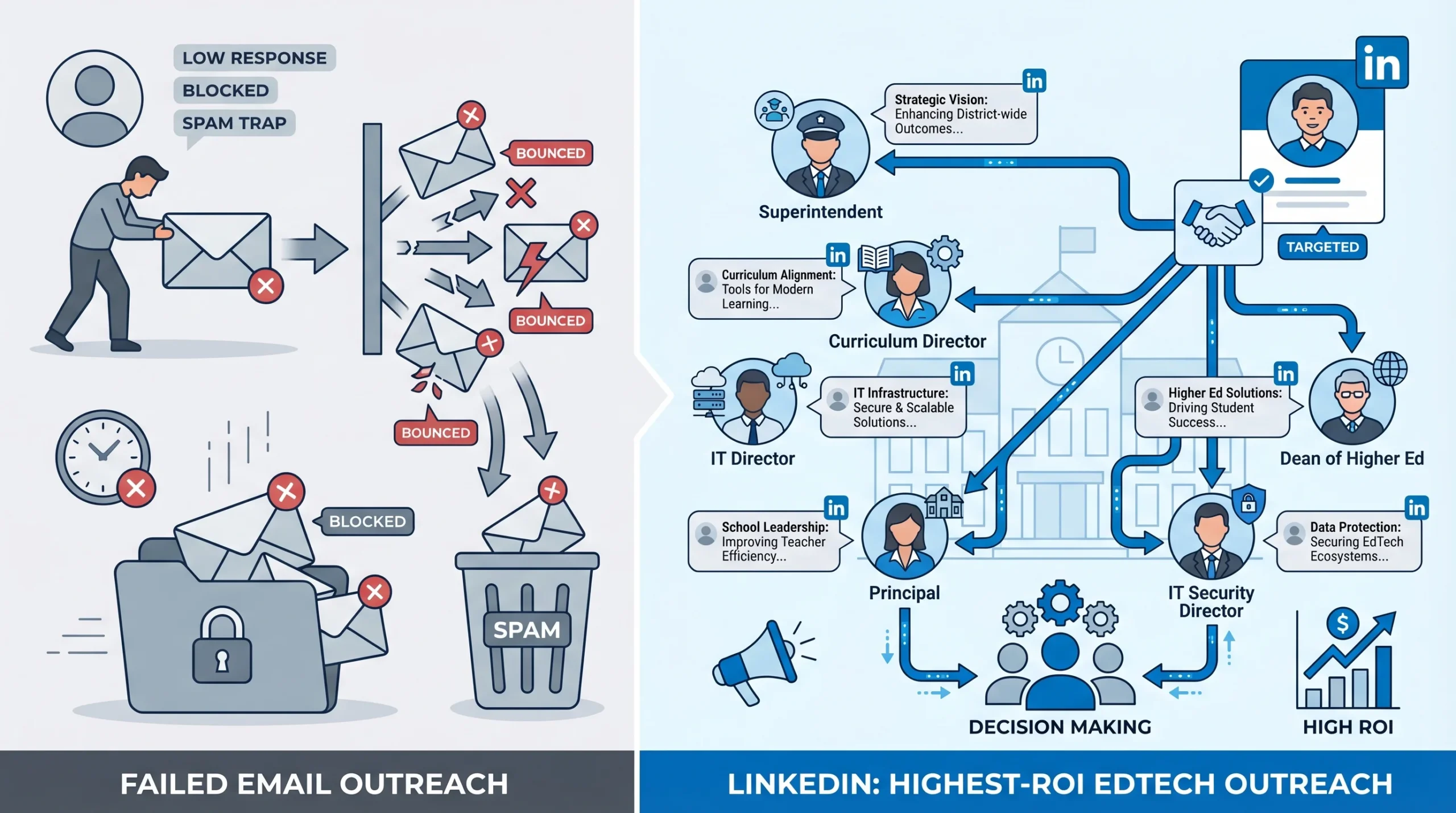
LinkedIn is not automatically the right channel for every B2B sale. For EdTech, it happens to be the best one available, and the reason is structural.
Email open rates in the education sector run significantly below average. School district email servers are configured with aggressive spam filters. Many administrator inboxes at the .edu domain level are gatekept by IT policies that flag unfamiliar senders, bulk sends, and domains not on approved vendor lists. A well-crafted cold email from a legitimate EdTech company frequently lands in a junk folder that nobody checks until a holiday break.
LinkedIn bypasses most of those barriers. A connection request from a real profile lands in a real inbox. School administrators and university staff are increasingly active on the platform. According to LinkedIn’s own platform data, the education industry is among the top five sectors by user growth, and decision-making roles within schools and universities have seen particularly strong profile growth since 2022.
But the channel advantage disappears immediately if you use the wrong approach. The single most common mistake EdTech reps make on LinkedIn is applying a corporate B2B playbook to a fundamentally different type of buyer. A Director of Curriculum Development at a K-12 school district is not trying to grow revenue, hit a quarterly target, or justify software spend with an ROI calculator. Their job is to improve learning outcomes under budget constraints they did not set, timelines that the academic calendar dictates, and approval processes that can involve school boards, union agreements, and state procurement rules.
A message that opens with “I noticed your company is scaling rapidly” is not just irrelevant to this person. It signals immediately that you do not understand their world. And once that signal is sent, the conversation is over.
The EdTech Buyer Is Not One Person
This is where most LinkedIn outreach for EdTech falls apart at the strategy level, not the execution level.
In K-12 school districts, a typical EdTech purchase involves multiple people across different roles:
- Superintendent: Final sign-off on budget allocation, especially for district-wide deployments. Rarely the first contact, but their awareness and endorsement determines whether a pilot ever becomes a contract.
- Curriculum Director / Director of Instruction: Evaluates whether the tool actually supports learning goals, teacher adoption, and state curriculum standards. This is often the internal champion for EdTech purchases.
- IT Director / Director of Technology: Evaluates security, infrastructure compatibility, LMS integration (Canvas, Schoology, Google Classroom), and ongoing support requirements. A veto player, not a buyer, but capable of killing a deal on technical grounds.
- Principal: Relevant for school-level pilots. Can advocate up to district leadership or down to department heads. Useful for social proof and initial access.
In higher education, the structure is more complex and varies significantly by institution size:
- VP of Academic Affairs / Provost’s Office: Sets instructional technology priorities at the institutional level.
- Dean / Department Head: Controls adoption at the faculty and department level. Often the internal champion for subject-specific EdTech tools.
- Registrar: Relevant for student information systems, enrollment tools, and anything touching student data records.
- IT Security / Chief Information Security Officer: Non-negotiable gatekeeper for any tool that handles student data. FERPA compliance is the filter. If your tool does not pass their review, nothing else matters.
- Procurement Office: Handles vendor qualification, RFP processes, and contract negotiation. Often comes in late in the process but controls the final steps.
The practical implication for your LinkedIn strategy is that you are not building one outreach sequence. You are building three to five persona-specific sequences, each with a different hook, a different primary concern, and a different definition of what success looks like. Running the same message to all of them is not just ineffective. It is counterproductive, because multiple people at the same institution comparing notes and finding identical messages will trust you less, not more.
How to Find the Right EdTech Decision Makers on LinkedIn (Without Guessing)
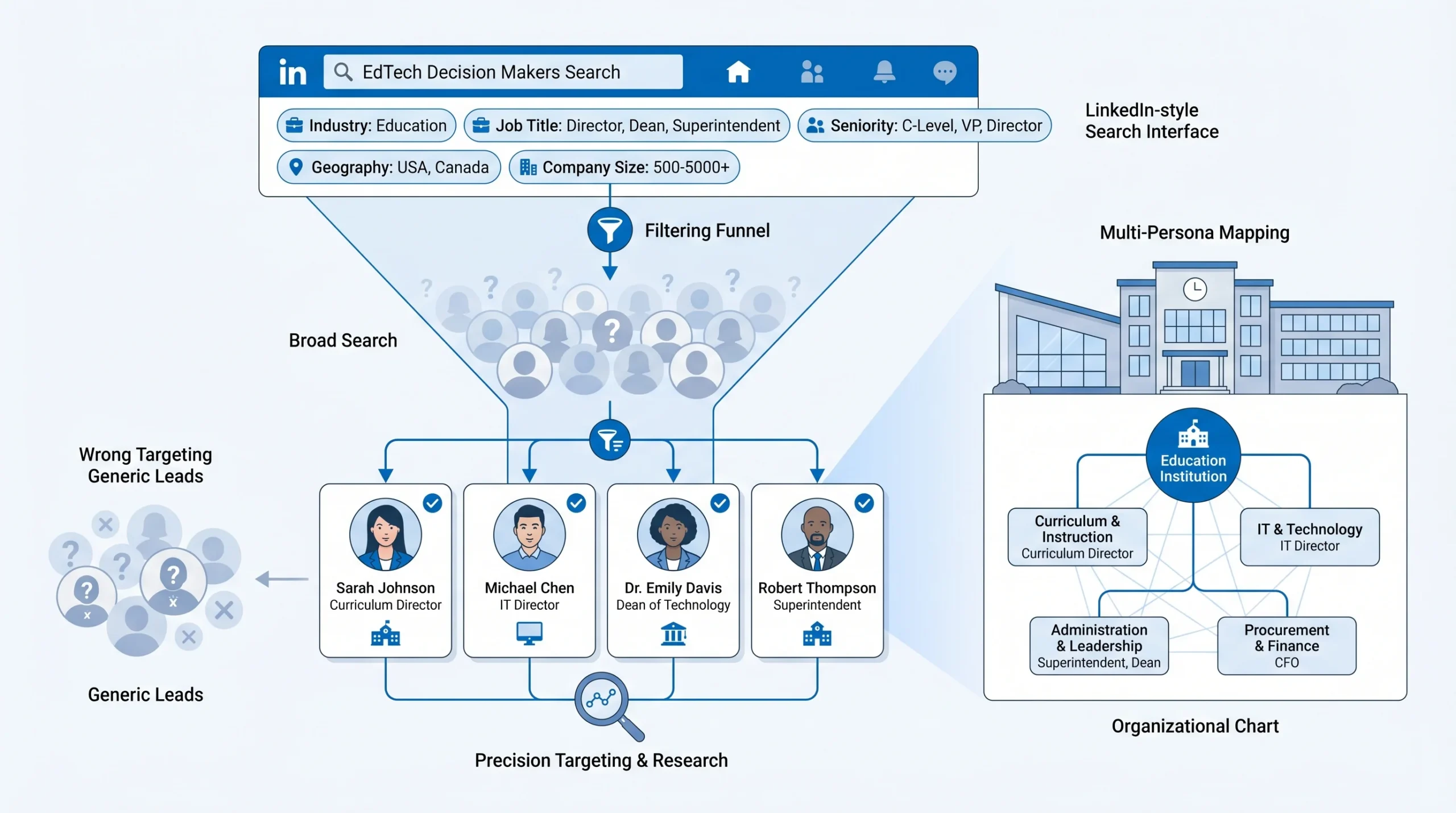
The standard advice is to use LinkedIn Sales Navigator, filter by job title in the education industry, and start sending messages. That advice is incomplete, and it produces low-quality lead lists that waste your time.
Here is the actual process.
Using Sales Navigator for K-12 vs. Higher Ed Targeting
Sales Navigator’s Education industry filter is a starting point, not a finishing point. The platform groups a wide range of institution types under a single filter, and not all of them are relevant to your product or your ICP.
For K-12 targeting, start with these filters:
- Industry: Primary/Secondary Education
- Seniority level: Director, Manager, CXO (for Superintendents)
- Job title keywords: Curriculum Director, Director of Instruction, Director of Technology, Director of Educational Technology, Superintendent, Principal
- Geography: Filter by state or metro area to match your sales territory or target region
- Company headcount: This is your proxy for district size and budget. A school district with 1 to 50 employees is a small rural district with minimal purchasing power. 200 to 500 employees typically represents a mid-size suburban district. 500 and above signals a large district with dedicated department heads and real budget.
For higher education targeting, adjust to:
- Industry: Higher Education
- Seniority level: Director, VP, CXO, Partner (for academic titles like Dean)
- Job title keywords: Dean, VP Academic Affairs, Director of Learning Technologies, Chief Information Officer, Director of Digital Learning, Registrar, Instructional Design Director
- Company headcount: Use this to differentiate between community colleges (typically smaller, centralized procurement) and large research universities (decentralized, department-level budget authority)
The Title Ambiguity Problem
“Technology Coordinator” is a job title that appears at institutions of wildly different sizes. At a 400-student private school, a Technology Coordinator is the person who fixes the projectors and manages the Wi-Fi password list. At a 60,000-student urban school district, the same title may sit on a team of 12 and oversee a seven-figure technology budget.
The way to read between the lines is to cross-reference title with company headcount (available in Sales Navigator) and look at the person’s LinkedIn activity. Someone managing real purchasing decisions will typically have connections with other administrators, engage with EdTech vendor content, and list responsibilities that include vendor management, procurement, or curriculum alignment in their profile.
Do not skip this check. Sending a sales sequence to 50 Technology Coordinators who have no purchasing authority is 50 wasted touches and a damaged sender reputation.
Navigating the Org Chart from LinkedIn Itself
You do not always need to find the economic buyer first. Sometimes finding a lower-resistance contact and using their connections to map the org is the faster path.
Start with someone visible and approachable: a Department Head, a Curriculum Specialist, or an Instructional Designer. Connect with them. Once connected, look at their “People Also Viewed” sidebar and their connection list (if public). This often surfaces the Director and VP-level people you actually need to reach, along with a connection path you can reference.
This matters because a message to a Director that includes “I recently connected with [their colleague] who suggested I reach out about [specific concern]” converts at a meaningfully higher rate than a cold approach with no context. The education sector runs on relationships and institutional trust. Any warm signal you can create before the first message lands helps.
Using LinkedIn’s Education and Alumni Filters as Warm Entry Points
Most EdTech reps ignore two filters in Sales Navigator that open warm paths into institutions: the Schools Attended filter and the Alumni network.
If your company has employees who attended universities you are targeting, their alumni network is an asset. A connection request from a fellow alumnus has a noticeably higher acceptance rate, even in a professional context. Sales Navigator’s “Alumni” saved search under an account lets you find exactly these paths.
Similarly, searching for contacts who attended the same institutions as your existing customers gives you a referral angle: “I work with [peer institution] and thought what we’re doing there might be relevant to your team.”
Free LinkedIn vs. Sales Navigator: What You Actually Need for EdTech Prospecting
Free LinkedIn limits your search results, restricts profile visibility for people outside your network, and caps the number of profiles you can view per month through LinkedIn’s commercial use limits. For a one-person operation testing a new market, you can get initial traction with free LinkedIn combined with manual prospecting.
For any EdTech team running outreach to more than 50 institutions, Sales Navigator is non-negotiable. The features that matter most for EdTech specifically are:
- Saved searches with alerts: When a new Curriculum Director joins a target school district, you know immediately. Education leadership turns over frequently, and catching a new hire in the first 90 days is one of the highest-conversion entry points in EdTech sales.
- Lead and Account lists: Organize prospects by institution type, district size, geography, or funnel stage. Essential for managing multi-stakeholder outreach without losing track of who you have contacted at each institution.
- CRM sync: Connect to Salesforce, HubSpot, or your CRM of choice so that LinkedIn activity is logged without manual data entry. At scale, manual logging kills efficiency.
Sales Navigator costs between $99 and $179 per month per seat depending on the plan tier. For an EdTech sales rep booking one additional discovery call per month from improved targeting, that cost pays for itself inside the first week of a closed deal.
Boolean Search Strings for EdTech Targeting
For Sales Navigator’s keyword fields, these Boolean constructions surface the right contacts:
- For K-12 curriculum buyers:
"Curriculum Director" OR "Director of Instruction" OR "Director of Curriculum" OR "Instructional Technology Director" - For K-12 IT decision makers:
"Director of Technology" OR "Director of Educational Technology" OR "Chief Technology Officer" AND "school" OR "district" - For higher ed academic buyers:
"Dean" OR "VP Academic Affairs" OR "Vice Provost" OR "Director of Digital Learning" OR "Director of Instructional Design" - For higher ed procurement and IT:
"Chief Information Officer" OR "CISO" OR "Director of IT" AND "university" OR "college"
Run these in combination with the industry and geography filters, not independently.
The EdTech Academic Calendar Is Your Secret Timing Weapon
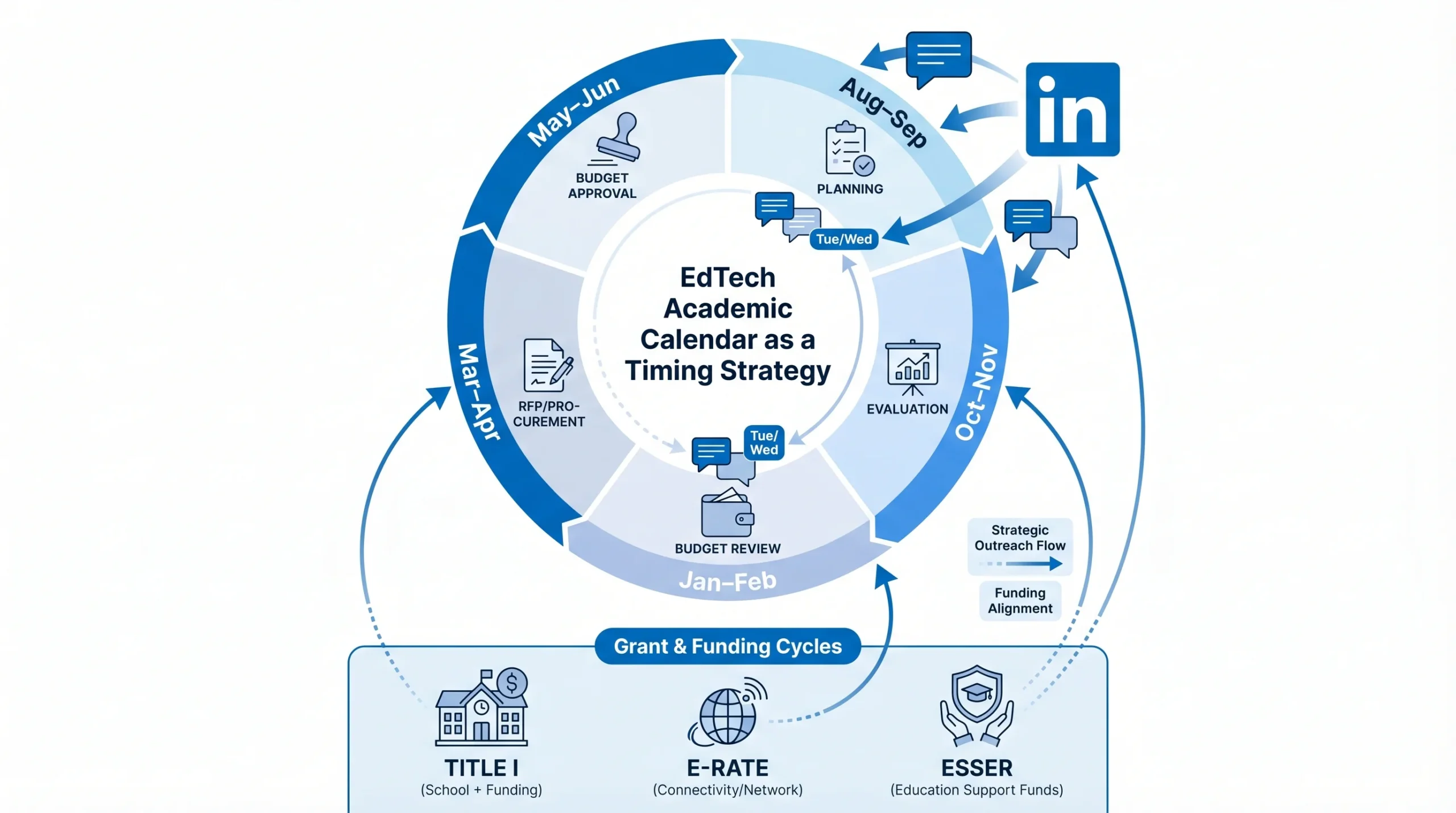
Timing is the most under-discussed variable in EdTech LinkedIn outreach. The same message sent in September and in June will produce completely different results. Not because the message changed, but because the person’s context, stress level, budget availability, and decision-making capacity are completely different at those two points in the year.
Here is how the academic calendar maps to outreach effectiveness:
- August to September: Budget allocations for the new school year are in place. IT teams are onboarding new hardware and software. Administrators are in planning mode and open to evaluating new tools for the year ahead. This is the highest-conversion window for initial outreach and pilot conversations.
- October to November: First-quarter evaluation period. Schools that piloted tools over the summer are deciding whether to expand them. Universities are assessing fall semester tech deployments. A good time to push for discovery calls and demo requests.
- January to February: Mid-year budget reviews open small pockets of discretionary spend. Spring semester rollouts are being planned. Administrators who have been watching a competitor school use your tool all fall are now more receptive to conversations.
- March to April: RFP season for the next academic year. Districts and universities that have already evaluated your tool will be formalizing procurement. If you are not already in their consideration set by March, you are competing against vendors who have been building the relationship since August.
- May to June: Budget approval season. Final decisions for the following year are made, which means the evaluation work is done. This is the worst time to cold-pitch a new product. It is not, however, a bad time to plant seeds: connecting with decision makers in May so you are a familiar name when they start evaluating again in August is a legitimate long-game tactic.
Translating this into LinkedIn sequence timing is straightforward. Start your connection request campaigns for new target institutions in late July or early August. Give yourself two to three weeks for connection acceptance before sending your first message. That puts your first substantive message in front of administrators in late August, when they are back from summer and in planning mode.
For follow-up timing, align with the natural rhythm of the school week. Tuesday and Wednesday mornings between 8 and 10 AM local time consistently outperform other send windows for education sector LinkedIn messages. Monday mornings are consumed by catch-up. Friday afternoons are winding down. Mid-week morning is when administrators are at their desks and processing their professional communications.
Grant Cycles and Federal Funding Windows
This deserves its own section because it changes the entire messaging angle for a significant portion of K-12 prospects.
Federal education funding programs create predictable budget windows that EdTech vendors can plan around:
- Title I funding: Awarded to schools serving high percentages of students from low-income families. Title I schools receive federal funding that can be used for instructional programs and technology. Funds are typically allocated at the start of the fiscal year (October 1) and must be obligated by September 30 of the following year. The urgency window for Title I spending is March through August, when districts are trying to commit remaining funds before the fiscal year closes.
- E-Rate program: Administered by the FCC, E-Rate provides discounts on telecommunications and internet services for eligible schools and libraries. The application window (Form 470) typically opens in late January and closes in mid-February. EdTech tools that involve connectivity or communication infrastructure may qualify. Knowing whether a target district files E-Rate applications tells you something about their technology priorities and their familiarity with federal procurement processes.
- ESSER funding (Elementary and Secondary School Emergency Relief): ESSER III funds were the largest federal investment in K-12 technology in a generation. The obligation deadline for ESSER III was September 30, 2024, meaning most of those funds have been spent. However, districts that made large EdTech investments with ESSER funds are now looking at renewal and expansion decisions. If a district bought your category of tool with ESSER funding, they are a warm prospect for a subscription renewal conversation.
How to identify grant-funded districts in your LinkedIn targeting: filter by district size (smaller districts with large per-pupil federal funding are often Title I-heavy), check the district’s public website for budget documents, and use the National Center for Education Statistics (NCES) school district search to verify Title I status before personalizing your message.
The messaging shift for a grant-funded district is meaningful. Instead of opening with a feature list, open with: “We’ve helped [X] Title I districts use their federal funding to deploy [outcome]. Happy to share what that process looked like.” This repositions you from vendor to advisor, which is the role education buyers trust.
Writing LinkedIn Messages That Education Buyers Actually Reply To
The structural difference between messaging an educator and messaging a corporate buyer is not subtle. Most EdTech reps know there is a difference but underestimate how deep it runs.
Corporate buyers are accustomed to vendor outreach. They have filters for it, they respond to ROI framing, and they understand that the vendor’s goal is to sell them something. The social contract of a cold LinkedIn message in a corporate context is relatively well-established.
For educators, that social contract does not exist in the same way. School administrators receive cold vendor messages, but they are far less normalized in the culture. The implicit message of an unsolicited sales pitch to an educator is: “I know you have limited time, a constrained budget, and responsibilities that directly affect children’s education, and I’d like to use some of that time to tell you about my product.” That implicit message needs to be aggressively overridden from the first word.
The core principle: lead with student outcomes or institutional pain. Not product features, not company name, not funding rounds. The first message must be about something they care about, not something you care about.
What to Write in a LinkedIn Connection Request
The connection request note is 300 characters. That is roughly two to three sentences. Used well, it is the difference between a 15% and a 40% acceptance rate. Used poorly, it signals immediately that you are a vendor and nothing more.
What works:
- Reference a specific challenge, initiative, or goal relevant to their institution or role
- Mention a peer institution, a policy change, or a recent trend they are likely tracking
- Ask a question rather than making a claim
- Do not pitch, do not mention your product, do not include a link
Example for a Curriculum Director at a mid-size school district:
“Hi [Name], working with a few districts on aligning digital tools with [specific curriculum framework they have publicly adopted]. Would love to connect and hear how [their district] is approaching it.”
This works because it demonstrates awareness of something real in their professional context, makes no ask, and creates a reason to connect that has nothing to do with a product sale.
Example for a university VP of Academic Affairs:
“Hi [Name], following your institution’s work on [specific initiative or published report you have actually read]. Connecting with higher ed leaders thinking through instructional technology strategy for the coming year.”
What to never write in a connection request:
- Any mention of your company name or product
- “I came across your profile and was impressed by your background”
- “I’d love to show you how we can help [Institution]”
- A request for a call or meeting
- A link to a website, case study, or demo
The Follow-Up Sequence: Structure, Timing, and Tone
The sequence structure that works for EdTech LinkedIn outreach follows a clear arc:
Message 1 (sent 3 to 5 days after connection acceptance): Value-first, no ask. Share a relevant observation, article, or data point about a challenge relevant to their role. Keep it under 100 words. The goal is to establish that you are paying attention to their world, not just prospecting it.
Example for a K-12 IT Director: “Saw a report from COSN last month showing that 67% of district IT leaders name LMS integration as their top pain point with new EdTech tools. Curious if that matches what you’re seeing in [District].”
Message 2 (sent 7 to 10 days after Message 1, if no reply): Light social proof, still no hard ask. Reference a peer institution or similar-sized district/university that has addressed the same challenge. One sentence on the outcome, one sentence inviting a reaction. Not a pitch. A conversation starter.
Message 3 (sent 7 days after Message 2, if no reply): The explicit ask, but kept small. Not “can we schedule a 30-minute demo.” Instead: “Would it be worth a 10-minute call to see if what we’re doing with [peer institution] is relevant to what you’re working on?” The specificity of the time investment and the peer reference both lower the barrier.
Three messages is the appropriate limit for a cold sequence to an education buyer. A fourth message without any reply crosses from persistence into nuisance, and nuisance damages your reputation in a sector where word travels fast.
Message Templates by Persona (With Real Examples)
K-12 Curriculum Director
The primary concern is teacher adoption and alignment with learning standards. Secondary concern is reporting: can the tool generate data that supports their curriculum decisions?
Message 1:
“Hi [Name], we’ve been working with a few curriculum directors in [state] on the challenge of getting consistent teacher adoption of new digital tools, especially mid-year. Saw [District]’s focus on [specific initiative you found on district website]. Would love to share what’s working for teams at similar districts.”
District IT Director
The primary concern is security, compliance, and integration. They want to know if your tool will break something and who is responsible when it does.
Message 1:
“Hi [Name], a lot of the IT directors I talk with right now are dealing with the same thing: new EdTech tools that pass vendor SOC 2 reviews but still create headaches when they hit the LMS layer. Working with a couple of districts on this specifically. Happy to share what the integration process looks like if it would be useful.”
University Department Head
The primary concern is student engagement and faculty buy-in. They have academic autonomy but need to justify technology decisions to a Dean who may have different priorities.
Message 1:
“Hi [Name], noticed [University]’s [Department]’s focus on [specific program or initiative from their public profile or department page]. We’ve been working with department heads at a few peer institutions on improving student engagement in [relevant subject area]. The results have been worth sharing, if you’re open to a quick conversation.”
Higher Ed Procurement Officer
The primary concern is vendor compliance, contract structure, and FERPA. They are not evaluating your pedagogical claims. They are evaluating your legal and financial standing.
Message 1:
“Hi [Name], reaching out to a few procurement offices at [type of institution] that we’re currently working through vendor qualification with. Happy to send over our compliance documentation, security assessments, and standard contract terms in advance if that makes the evaluation process easier on your end.”
What Kills EdTech LinkedIn Messages Before They’re Read
These are the patterns that result in no reply, an “ignore” on the connection request, or a “not interested” response:
- Pitching in the first message: The reply rate on first-message pitches in the education sector is below 3%. It is not a strategy. It is hope.
- Generic openers: “I came across your profile and was impressed” appears in thousands of LinkedIn messages per day. It takes no information about the recipient. It tells them you are running a template.
- Corporate metric framing: Telling a school administrator that your tool “drives 40% efficiency gains” or “reduces operational overhead” communicates in a language they do not use and do not respond to. Replace with student outcome framing: completion rates, assessment scores, teacher time-on-task.
- Requesting a 30-minute call in message 1: This is asking for the highest-cost commitment at the lowest-trust moment. It signals that you value your time more than theirs.
- Vendor jargon in an educator’s inbox: Words like “synergy,” “scalable solution,” “enterprise-grade,” and “disruptive technology” land differently to someone who manages a classroom or a school budget. Write in plain language.
Running Multi-Stakeholder Outreach at the Same Institution
EdTech deals rarely close with one contact. This is not a flaw in the market. It is the nature of institutional purchasing. At a university, the Dean may champion your tool, the IT Director may approve it technically, and the Procurement Office may negotiate and sign the contract. None of these people are the same person, none of them have identical concerns, and all of them need to be in your funnel at some point.
The mistake most EdTech reps make is contacting everyone at the same institution at the same time with messages that look like they came from the same template. When two contacts compare notes and find that their messages are nearly identical, it collapses trust quickly. The implicit message is: this vendor does not know our institution. They are blasting everyone.
The correct approach is sequenced, differentiated, and coordinated.
Step 1: Identify the champion first. This is typically the person with the most direct interest in solving the problem your tool addresses. For a learning management tool, this is usually the Curriculum Director or a Department Head. For a student data platform, it is often the Registrar or a VP of Academic Affairs. Connect with them first and build an initial conversation before contacting anyone else at the institution.
Step 2: Reference internal stakeholders without creating friction. Once you have an active conversation with the champion, you can mention other stakeholders naturally: “At similar institutions, we typically work with the IT Director early in the evaluation to get the integration questions answered upfront. Would it make sense to loop them in?” This is not cold-contacting the IT Director. It is giving the champion a framework for moving the deal forward internally, which is exactly what a good internal champion needs.
Step 3: Coordinate timing. If your champion has agreed to an evaluation, and you are now reaching out to the Procurement Office or the IT Director independently, make sure your messages to secondary contacts arrive after your champion has had a chance to make an internal introduction. Contacting Procurement cold while your champion is still deciding whether to evaluate creates confusion and occasionally political friction.
Step 4: Differentiate every message within the same institution. The Curriculum Director hears about learning outcomes. The IT Director hears about security and integration. The Procurement Officer hears about compliance documentation and contract terms. These are not variations on the same message. They are different conversations about the same product, addressed to different concerns.
Using LinkedIn to Stay Warm Between Buying Cycles
EdTech deals take time. A study by Forrester found that complex B2B deals in regulated or institutional markets average 6 to 12 months from first contact to contract. In K-12, where budget approvals involve school boards, the timeline can extend to 18 months for district-wide deployments.
LinkedIn is your relationship maintenance channel during that window.
The tactics that work without crossing into nuisance territory:
- Comment on their posts: A thoughtful, specific comment on a post about curriculum challenges, policy changes, or a district initiative puts you in their field of view without any ask attached. One or two per month is enough.
- Share relevant content with no ask: A piece of research from RAND Education, a policy brief from the Education Commission of the States, or a state-level policy update relevant to their role. Send it with one sentence of context: “Thought this might be useful given what you mentioned about [topic from your earlier conversation].” No pitch attached.
- React to institutional announcements: If a school district announces a new initiative or a university publishes a strategic plan, acknowledge it. “Saw [Institution]’s new strategic plan, particularly the section on digital learning infrastructure. Interesting direction.” This requires actually reading the announcement, which most vendors do not do.
The line between nurturing and pestering is whether your touches add value to the other person or just remind them that you exist. Value-first contact at a low frequency (two to three touches per month across formats) keeps you present without becoming the vendor they have started ignoring.
Scaling EdTech LinkedIn Outreach Without Burning Your Account or Your Reputation
The education sector is smaller and more networked than most B2B markets. A school superintendent who had a negative experience with a pushy EdTech vendor will mention it to other superintendents. District IT directors talk to each other at state technology conferences. Word about a vendor who mass-spams school administrators spreads faster in this sector than in most others.
This means that scaling LinkedIn outreach for EdTech is not just a technical question about account limits. It is a reputation management question.
LinkedIn Daily Limits and What They Mean for EdTech Outreach
LinkedIn imposes connection request limits to prevent spam. The exact limits are not published by LinkedIn publicly, but based on consistent data from outreach practitioners:
- New accounts (under 4 weeks old): Safe range is 5 to 10 connection requests per day. Going above this on a new account with no established connection graph risks a temporary restriction.
- Warmed accounts (3 to 6 months of normal activity): Safe range is 20 to 30 connection requests per day. This is the operational window for most outreach.
- High-authority accounts (established profiles with strong connection rates and engagement): Some practitioners report sustaining 40 to 50 requests per day without restriction, but this depends heavily on acceptance rate. A low acceptance rate triggers LinkedIn’s spam detection faster than volume alone.
For EdTech specifically, connection acceptance rates from education administrators run lower than average B2B audiences, typically in the 25 to 35% range for cold outreach to untargeted lists. With well-targeted, persona-specific connection requests that include a relevant note, acceptance rates in the 35 to 45% range are achievable.
The arithmetic matters. At 25 connection requests per day with a 35% acceptance rate, you are adding roughly 8 to 9 connected prospects per day. At 200 working days per year, that is 1,600 to 1,800 new connected prospects annually from one account. For an EdTech company targeting large school districts, that may be sufficient. For a company targeting thousands of individual schools or universities, one account is not enough.
Account Warmup: What It Looks Like Week by Week
Running outreach on a new LinkedIn account without warming it first is one of the most common reasons EdTech sales teams get accounts restricted.
A basic warmup sequence for a new account:
- Week 1 to 2: 3 to 5 connection requests per day, only to people you have some genuine connection to (colleagues, former classmates, industry contacts). Engage with the feed by liking and commenting on posts in the education and EdTech space.
- Week 3 to 4: Increase to 8 to 10 requests per day. Start adding targeted education sector contacts. Keep acceptance rate above 30% by being selective about who you target.
- Week 5 to 6: Move to 15 to 20 requests per day. Begin running light message sequences to accepted connections. Monitor for any restriction warnings from LinkedIn.
- Week 7 and beyond: Operate at full capacity (20 to 30 per day) with normal outreach sequences running.
Rushing this warmup process does not save time. It risks account restriction, which removes a working asset entirely. A restricted account loses its connection history, its established acceptance rate, and its credibility signals. The two to six weeks of warmup time is an insurance premium against losing months of relationship-building.
Where Automation Fits and Where It Does Not
Automation handles the parts of LinkedIn outreach that are repetitive and do not require human judgment: sending connection requests, sending scheduled follow-up messages, logging activity, and moving contacts through a sequence based on whether they have replied.
Human review is non-negotiable at the reply layer. The moment an education administrator replies to a LinkedIn message, the conversation has moved into relationship territory. A templated auto-reply to a genuine question or concern from a Curriculum Director will end the conversation immediately.
For EdTech teams running outreach across dozens or hundreds of institutions simultaneously, the reply volume can exceed what one person can handle manually without significant delay. This is where AI-powered conversation handling becomes operationally relevant. Tools that can read an incoming reply, understand the question or objection, and respond with a contextually appropriate message allow outreach to scale without sacrificing the quality of the individual conversation. The outcome is that more conversations progress to discovery calls, because replies are handled at speed rather than sitting in a queue while a rep catches up.
The metric that matters is not the number of messages sent. It is the number of discovery calls booked from those messages. Scaling the front of the funnel without the capacity to handle replies quickly creates a leaky pipeline that looks busy but produces few meetings.
Conclusion
LinkedIn for EdTech sales works, but it does not work the way most reps think it does. The platform advantage is real. The access to school administrators, curriculum directors, IT leaders, and university academic officers is genuine and improving as LinkedIn adoption in the education sector continues to grow.
But the advantage only materializes when the approach is built for the actual buyer. That means understanding the difference between K-12 and higher ed buying structures before writing a single message. It means aligning your outreach calendar to the academic year, not your sales quota cycle. It means writing messages that lead with student outcomes and institutional pain rather than product features. And it means coordinating multi-stakeholder outreach carefully enough that every person at an institution who encounters you feels like they are being treated as an individual, not as an entry in a CRM.
The one specific action to take from this guide: before opening any outreach tool or writing any message template, pick one institution type (K-12 district or higher education) and build the complete persona map for that org. Name every decision-making role, identify what each role cares about, and write a persona-specific connection request note for each one. That groundwork separates EdTech reps who consistently book meetings from those who are still wondering why their LinkedIn outreach is not working.
Frequently Asked Questions
1. Who are the real decision makers for EdTech purchases at a school district?
EdTech purchasing decisions in K-12 districts typically involve a combination of the Curriculum Director (who evaluates instructional fit), the IT Director (who evaluates technical compatibility and security), the Superintendent (who approves significant budget commitments), and sometimes principals for school-level pilots. The Curriculum Director is usually the internal champion who initiates the evaluation. The Superintendent is usually the final sign-off for district-wide purchases. Contacting only one of these roles without a plan for the others is a common reason EdTech deals stall.
2. How is selling EdTech to universities different from selling to K-12 schools?
University EdTech purchases are more decentralized. Departments often have their own budgets and can make independent tool decisions without involving central procurement. This means an EdTech sale at a large university may happen at the department level (a Dean or Department Head buys for their program) rather than the institutional level. However, tools that touch student data or require LMS integration must still go through IT security and Procurement regardless of where the initiative originates. The implication is that you may need to run parallel conversations at the departmental level and the institutional level simultaneously.
3. What is the best time of year to reach out to school administrators on LinkedIn?
Late August through November and January through March are the highest-conversion windows for EdTech LinkedIn outreach. School administrators are in planning mode at the start of the school year, evaluating tools from October through November, and reviewing mid-year budgets in January and February. May and June are the weakest months for initial outreach: budget decisions for the next academic year have typically already been made, and administrators are managing end-of-year responsibilities.
4. How many LinkedIn connection requests can I send per day without getting flagged?
For an established, warmed LinkedIn account, 20 to 30 connection requests per day is a safe operational range. New accounts should start at 5 to 10 per day and increase gradually over four to six weeks. LinkedIn does not publish its exact limits, but consistent data from outreach practitioners suggests that exceeding these ranges on a cold account risks temporary restriction. Acceptance rate also affects risk: a low acceptance rate (below 20%) on high-volume sending is a stronger trigger for restriction than volume alone.
5. What should I write in a LinkedIn connection request to a school administrator?
Keep the note under 200 characters, reference something specific to their institution or role (not their profile in generic terms), and do not mention your product or company. The goal is to give them a reason to accept that is about their world, not your sales funnel. A note that references a curriculum initiative they are publicly working on, or a challenge relevant to their district size or type, consistently outperforms generic introductions.
6. How do I find EdTech buyers using LinkedIn Sales Navigator?
Use the Industry filter (Primary/Secondary Education or Higher Education), combine it with Seniority Level (Director, CXO) and specific job title keywords relevant to your buyer persona. Cross-reference with Company Headcount to filter out institution sizes outside your ICP. Set up Saved Searches with alerts so you are notified when new contacts match your criteria, which is especially useful for catching new leadership hires in the first 90 days when they are most open to evaluating new tools.
7. Why do my LinkedIn messages to educators get ignored?
The most common reasons are: pitching in the first message, using corporate ROI framing instead of outcome framing relevant to educators, sending generic openers that signal no research was done on the recipient, and reaching out at the wrong time of year. Educators also have lower tolerance for vendor outreach than corporate buyers, and a message that feels like a bulk send is dismissed quickly. Personalization based on a specific institutional initiative or challenge is the minimum threshold for a response.
8. How long does an EdTech sales cycle typically take?
EdTech sales cycles in K-12 range from 3 to 18 months depending on the scope of the purchase. A single-school pilot can move in 60 to 90 days. A district-wide deployment requiring school board approval can take a full academic year or more. In higher education, department-level purchases can close in 4 to 8 weeks. Institutional-level purchases involving IT security review, Procurement qualification, and multi-stakeholder sign-off typically take 9 to 15 months. LinkedIn outreach is most effective as a long-game channel for larger institutional deals.
9. Can I use LinkedIn automation for EdTech outreach, or is it too risky?
Automation for connection requests and initial message sequences is used by EdTech sales teams and carries acceptable risk when account safety practices are followed (warmup periods, daily limits, acceptance rate monitoring). The higher risk is not account restriction. It is reputation damage if automated messages reach the wrong people at the wrong time in the wrong way. The non-negotiable constraint is human or AI-powered review at the reply layer. Automated responses to genuine educator replies produce the kind of experience that gets vendors blocked and talked about negatively at state education conferences.