


Here is the paradox that confuses most LinkedIn users in 2026: LinkedIn removed the ability to follow hashtags, stripped them from dropdown search suggestions, and eliminated public follower counts — yet posts that use hashtags strategically still receive up to 30% more engagement than those that do not. How is that possible?
The answer is that LinkedIn hashtags did not die. They evolved. Their function shifted from a browsable discovery feature — where users clicked on a hashtag to scroll a feed — into something more precise and more powerful: a semantic indexing signal that tells LinkedIn’s algorithm exactly what your content is about, who should see it, and where it belongs in the professional knowledge graph.
Most LinkedIn users either abandoned hashtags entirely after the platform changes or kept stuffing 20 generic tags into every post out of habit. Both approaches are wrong, and both are quietly killing reach. The professionals and brands gaining visibility in 2026 are the ones who understand what hashtags actually do now, and who use them with the precision the algorithm demands.
This guide covers everything. What hashtags are, how the algorithm uses them, what changed in 2024 and 2025, how to add them across every placement, how to build the right mix for your niche, the best hashtags by industry, and the advanced strategy moves that separate high-performing content from content that gets ignored. By the end, you will have a complete, data-backed LinkedIn hashtag strategy built for how the platform actually works today.
Key Takeaways:
- LinkedIn hashtags now function as SEO indexing signals rather than browsable discovery tools — precision matters more than volume
- Use 3–5 carefully chosen hashtags per post; posts with 10 or more risk a 30–50% visibility penalty
- The Pyramid Strategy — one broad hashtag, two to three niche hashtags, and one optional branded hashtag — consistently outperforms other approaches
- Hashtags must align semantically with your post content; a mismatch actively confuses the algorithm and reduces distribution
- The first three hashtags in your post are embedded in the post URL, contributing to Google discoverability beyond LinkedIn
- Company pages now use “Specialisms” instead of traditional hashtags for page-level discoverability
- Keywords in your post body are at least as important as hashtags in 2026 — treat both as part of one integrated LinkedIn SEO strategy
What Are LinkedIn Hashtags? (And Why They’re Different From Other Platforms)
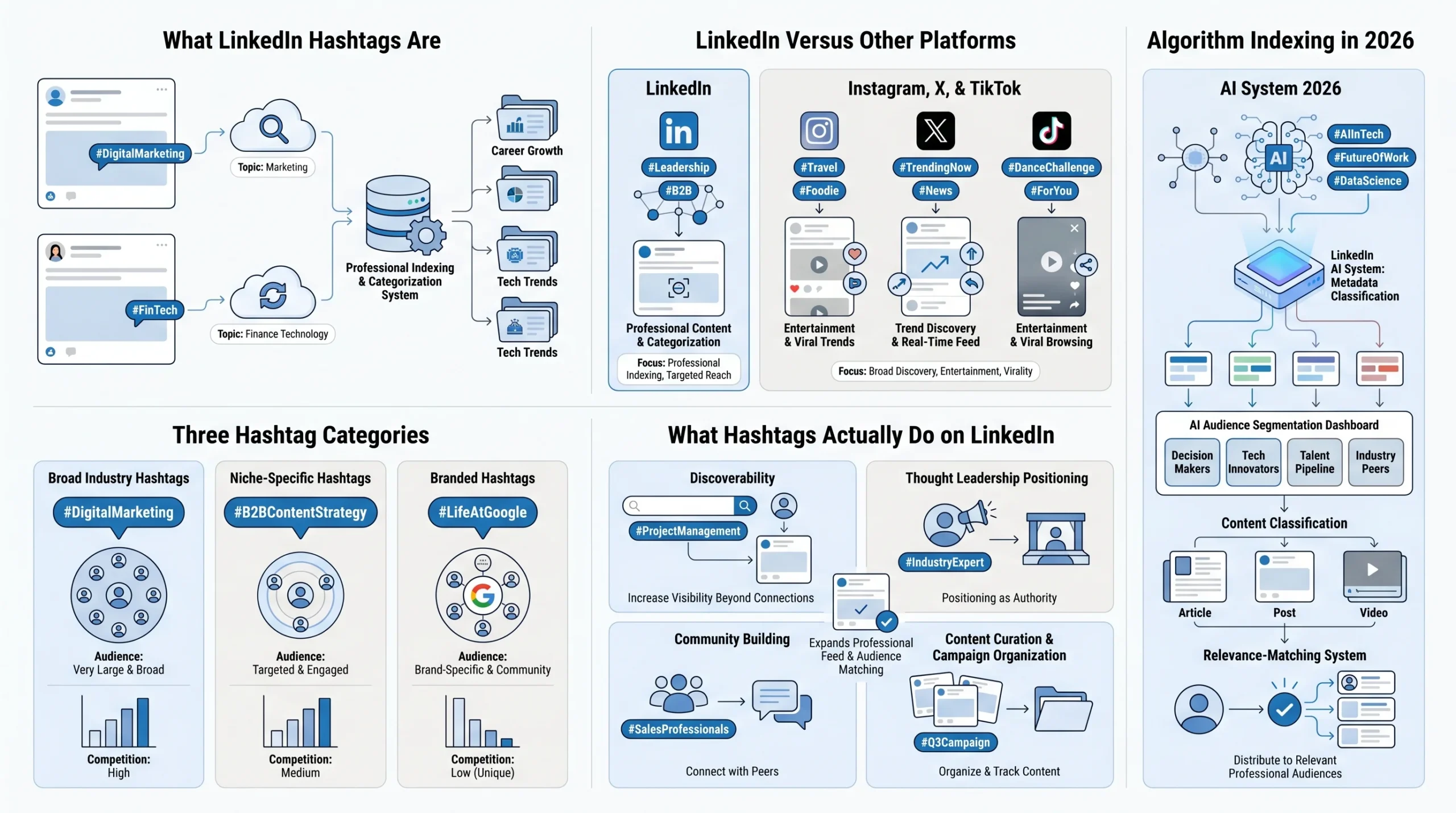
A LinkedIn hashtag is a keyword or phrase preceded by the # symbol that categorizes content and connects it to a broader topic conversation on the platform. When you add #ContentMarketing to a post, LinkedIn groups that post with other content using the same tag, making it easier for the algorithm — and users — to associate your content with that subject area.
That much is familiar. But LinkedIn hashtags operate differently from their counterparts on Instagram, X (formerly Twitter), and TikTok, and understanding those differences is essential before building any strategy around them.
On Instagram, hashtags function primarily as browsing tools. Users follow hashtags, explore hashtag feeds, and discover new accounts through them. Volume and trend-chasing are common tactics because the platform actively surfaces hashtag feeds to followers. On X, hashtags aggregate conversation around real-time events and trending topics, functioning like live chat threads. TikTok hashtags influence both discoverability and the “For You” page algorithm, but they are also heavily trend-driven.
LinkedIn hashtags have never functioned this way, and by 2026, the gap between LinkedIn and other platforms has widened considerably. LinkedIn is a professional knowledge network, not a social entertainment feed. Its users are not casually browsing hashtag pages for discovery in the way Instagram users scroll #TravelPhotography. According to Sprout Social’s 2026 guide, LinkedIn hashtags now serve primarily as categorization metadata — signals that help the system classify and distribute your content to relevant professional audiences, rather than entry points for human browsing.
The three types of LinkedIn hashtags you need to understand:
- Broad industry hashtags: Widely used tags that cover large professional domains, such as #DigitalMarketing, #HumanResources, or #FinTech. These reach large audiences but are highly competitive, meaning your content competes with enormous volumes of other posts using the same tag.
- Niche, specific hashtags: Focused tags that target smaller but highly relevant audiences, such as #B2BContentStrategy, #RemoteTeamBuilding, or #B2BSalesAutomation. These are less competitive and deliver more targeted reach to professionals who are genuinely interested in your specific topic.
- Branded hashtags: Tags created by a company or individual to aggregate content around their brand, campaigns, or culture — for example, #LifeAtGoogle, #IBMCloud, or a custom tag like #YourCompanyStory. Branded hashtags build community, track employer branding content, and compile campaign posts in one searchable place.
What hashtags do on LinkedIn:
- Discoverability: Hashtags increase the pool of users whose feeds or searches can surface your content beyond your existing network.
- Thought leadership: Consistently using relevant industry hashtags positions you as a regular contributor to key professional conversations in your field.
- Community building: Branded hashtags let companies and individuals aggregate and track content tied to their identity, events, or values.
- Content curation: Hashtags group related posts together, which is valuable for campaigns, event coverage, or ongoing content series.
- Algorithm indexing: In 2026, this is the primary function — hashtags give LinkedIn’s AI model a clear, machine-readable signal about what your post covers, helping the system match it to the right audience segments.
What Changed With LinkedIn Hashtags in 2024–2026 (And Why It Matters)
Understanding the current state of LinkedIn hashtags requires understanding the specific platform changes that reshaped how they work. Several significant updates rolled out between 2024 and 2026, and many LinkedIn users are still operating on assumptions that no longer reflect reality.
LinkedIn removed public hashtag follower counts (late 2024). Previously, you could see that #Marketing had 18 million followers or that #Leadership had 20 million, which allowed marketers to gauge the relative size of a hashtag’s audience. That data is no longer publicly available. According to ConnectSafely’s 2026 hashtag guide, these figures were removed, leaving users to estimate relative hashtag size through indirect signals like search volume and engagement patterns on posts using specific tags.
LinkedIn removed hashtag following as a discovery feature (2024–2025). This is the biggest structural change. Users can no longer follow a hashtag and receive a curated feed of posts using that tag. The browsable hashtag feed — the mechanism through which following a hashtag once delivered content to your home feed — no longer exists. This fundamentally altered why hashtags matter. When users could follow #ProjectManagement and receive a stream of related posts, a hashtag’s “follower count” directly translated into a potential audience. That pipeline is gone.
Hashtags no longer appear in the dropdown search bar. Typing a keyword into LinkedIn’s search bar previously surfaced hashtag suggestions with follower counts. This feature has been removed, making it harder to research hashtags directly on the platform and requiring users to adopt alternative research approaches.
The shift to semantic search and AI-driven content indexing. According to Linkboost’s 2026 strategy guide, LinkedIn’s algorithm now analyzes the keywords in your headline, the body of your post, your bio, and your hashtags together to form a complete picture of your content’s context. The platform has effectively become a specialized professional search engine. This semantic approach means that hashtags are now read as one input among several — not as the primary signal, but as a reinforcing label that either confirms or contradicts what the rest of your content communicates.
Hashtags repositioned as SEO signals. As Sprout Social’s 2026 guide explains, LinkedIn’s recent platform updates repositioned hashtags from simple categorization tools to strategic SEO amplifiers within a keyword-driven algorithm. The brands and creators winning on LinkedIn are those who treat hashtags as one layer of a broader content SEO approach rather than a standalone discovery tactic.
The first three hashtags in a post are embedded in its URL. This is one of the least-discussed but most strategically important facts about LinkedIn hashtags in 2026. According to research published by Social Rails, the first three hashtags you use in a LinkedIn post are embedded in that post’s URL. This means those hashtags contribute to how the post is indexed by Google and other search engines, giving your LinkedIn content discoverability well beyond the platform itself.
Company page hashtags became “Specialisms” (late 2026). For LinkedIn company pages, the hashtag system has been replaced by a feature called Specialisms. According to Derrick’s 2026 company hashtag guide, company pages can now add up to 20 specialisms that function as category labels for the page’s expertise areas. These specialisms can be updated at any time, unlike older static page attributes, and they influence how the company page appears in relevant searches. This is a distinct system from post-level hashtags and requires a separate strategic approach.
What this means for your strategy: Hashtags are not optional or irrelevant — but they are no longer the shortcut to a built-in audience they once appeared to be. Their value now comes from telling the algorithm what your content is about with precision, reinforcing the keywords already present in your post text, and contributing to both on-platform and off-platform search discoverability. Volume is penalized. Relevance is rewarded.
Do LinkedIn Hashtags Still Work in 2026?
Yes — but the definition of “work” has changed, and so has the mechanism through which they deliver results.
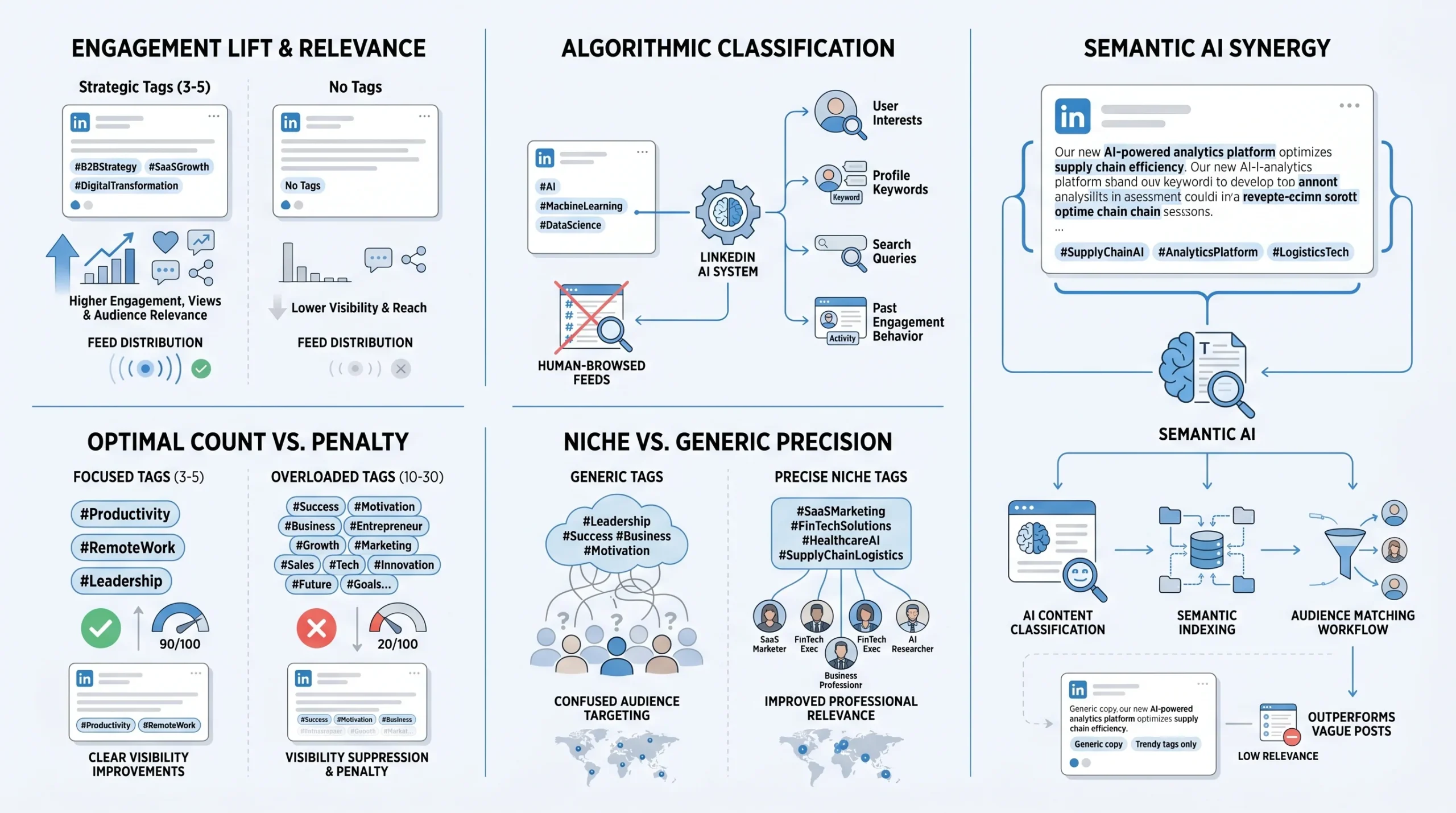
The engagement data is clear. According to Derrick’s 2026 LinkedIn company hashtag research, posts containing hashtags receive up to 30% more engagement than posts without them. A growth marketer cited in the same research found that posts using a strategic combination of broad and niche hashtags consistently generated 40% more views than posts without any hashtags. These are not trivial gains, and they persist despite the removal of hashtag following.
The reason for this lift, however, is not what many users assume. According to Linkboost’s data-backed 2026 strategy guide, the engagement increase does not come from users browsing hashtag feeds and clicking into posts. It comes from the algorithm using hashtags to correctly index your content and serve it to users who have demonstrated interest in those specific topics — through their own posts, searches, profile keywords, and past engagement behavior. Hashtags help the algorithm route your content more accurately. Better routing means more relevant distribution, which produces more engagement from people who actually care about your topic.
The data on hashtag count and engagement:
- Posts with 1–3 hashtags average 14.7 likes, according to ConnectSafely’s 2026 research — higher per-hashtag efficiency than posts with longer tag lists
- Posts with 10 or more hashtags risk a 30–50% visibility penalty, according to research published by LinkedIn consultant Melanie Goodman on Substack
- The optimal range is 3–5 hashtags per post, which is also LinkedIn’s own official recommendation as of 2026
The penalty zone is real. When you use too many hashtags, you are not simply diluting your message — you are actively signaling to the algorithm that your content has no clear focus. As Linkboost explains, using 30 hashtags is essentially telling the algorithm “this post is about everything,” which typically results in the post being distributed to no one in particular, or worse, being deprioritized entirely. The algorithm interprets a scattershot hashtag approach as low-quality, low-relevance content.
Generic hashtags actively harm performance. According to Melanie Goodman’s 2026 LinkedIn algorithm research, generic hashtags like #Leadership, #Success, and #Motivation actively confuse content classification and attract the wrong audience. These tags are so broad and overused that they provide no meaningful indexing signal — and they may pull your content toward audiences whose engagement history has nothing to do with your actual topic.
The verdict on hashtags vs. keywords in 2026: According to Social Rails’ 2026 LinkedIn hashtag guide, keywords in your post text are at least as important as hashtags, possibly more so. LinkedIn’s AI model reads and understands your entire post using semantic analysis. This means the words you use in the body of your post carry significant indexing weight. Hashtags reinforce and confirm those signals — they do not replace them. A post with brilliant hashtags but vague, keyword-poor body copy will still underperform. A post with strong keywords in the body and precise, matching hashtags will consistently outperform.
How LinkedIn Hashtags Work With the Algorithm in 2026
To use LinkedIn hashtags strategically, you need a working understanding of how the algorithm processes them. The 2026 LinkedIn algorithm is meaningfully different from how it operated even two years ago, and several of the changes directly affect how hashtags factor into content distribution.
Hashtags as semantic context signals. According to Linkboost’s 2026 algorithm analysis, LinkedIn’s algorithm analyzes hashtags alongside the keywords in your headline, your post body, and your profile bio to form a complete picture of your content’s context. Hashtags are one input in a multi-signal system, not a standalone lever. The algorithm is looking for coherence — it wants your hashtags to confirm what your content is already clearly communicating.
The semantic disconnect penalty. This is one of the most important concepts in 2026 LinkedIn strategy. According to Linkboost’s guide, if your post discusses “revenue operations” but you use the hashtag #Motivation, there is a semantic disconnect. The algorithm detects a conflict between the text and the tag, and this conflict often results in lower visibility. The system interprets mismatched hashtags as either an attempt at manipulation or evidence of low-quality, unfocused content. Either way, the distribution suffers.
How hashtags interact with your broader profile. The algorithm does not read your post in isolation. According to Linkboost’s analysis of LinkedIn’s semantic search approach, the platform uses signals from your profile keywords, headline, and bio alongside your post content to build a comprehensive understanding of your expertise and content context. If your profile is optimized around #B2BSales and you consistently post content with #B2BSales and related niche hashtags, the algorithm builds a strong association between you and that topic cluster. This reinforcement over time contributes to what some analysts call “topic authority” — a sustained signal that your account is a reliable source of content in a specific domain.
Interest clusters and audience matching. According to the JDR Group’s 2026 LinkedIn algorithm update analysis, instead of scanning posts for exact keywords or hashtags, the platform now looks at semantic meaning to connect your post with the right audience, even if you are not using the exact words your target audience searched for. LinkedIn groups users into interest clusters based on their own content, searches, profile keywords, and engagement history. When your hashtags correctly signal which cluster your content belongs to, the algorithm routes your post to users in that cluster — people who are already demonstrably interested in your topic.
Why relevance beats trendiness in 2026. The JDR Group’s analysis makes clear that your content is no longer competing purely on reach or keyword optimization — it is competing on relevance. If your post aligns with what your ideal audience is interested in right now, it is more likely to be shown. Chasing trending hashtags that are not genuinely relevant to your content may temporarily increase impressions, but it will reduce meaningful engagement and weaken your topic authority signal over time. The algorithm learns from how users respond to your content. If you attract clicks but then produce bounce-like engagement patterns, your future distribution suffers.
Where hashtags sit in the post: caption vs. comments. According to Social Rails’ 2026 guide, LinkedIn’s algorithm gives more weight to hashtags that appear in the original post body than to those added in comments. The recommendation is to place hashtags at the end of your post, after the main content, separated by a line break. This keeps your message clean and readable while still providing the full topic signal to the algorithm. Hiding hashtags in the first comment — a tactic carried over from Instagram — does not provide the same indexing benefit on LinkedIn.
How to Use LinkedIn Hashtags (Step-by-Step, by Placement)
LinkedIn hashtags work differently depending on where you use them. Posts, articles, comments, and company pages each serve a distinct purpose for visibility and reach. Here is how to add hashtags in each placement and what to expect from each.
How to Add Hashtags to Your LinkedIn Posts
LinkedIn posts — the status updates, thought leadership pieces, and content shares that appear in the feed — are the primary and most impactful placement for hashtags. This is where hashtags provide the strongest algorithm signal and the broadest distribution potential.
Step-by-step:
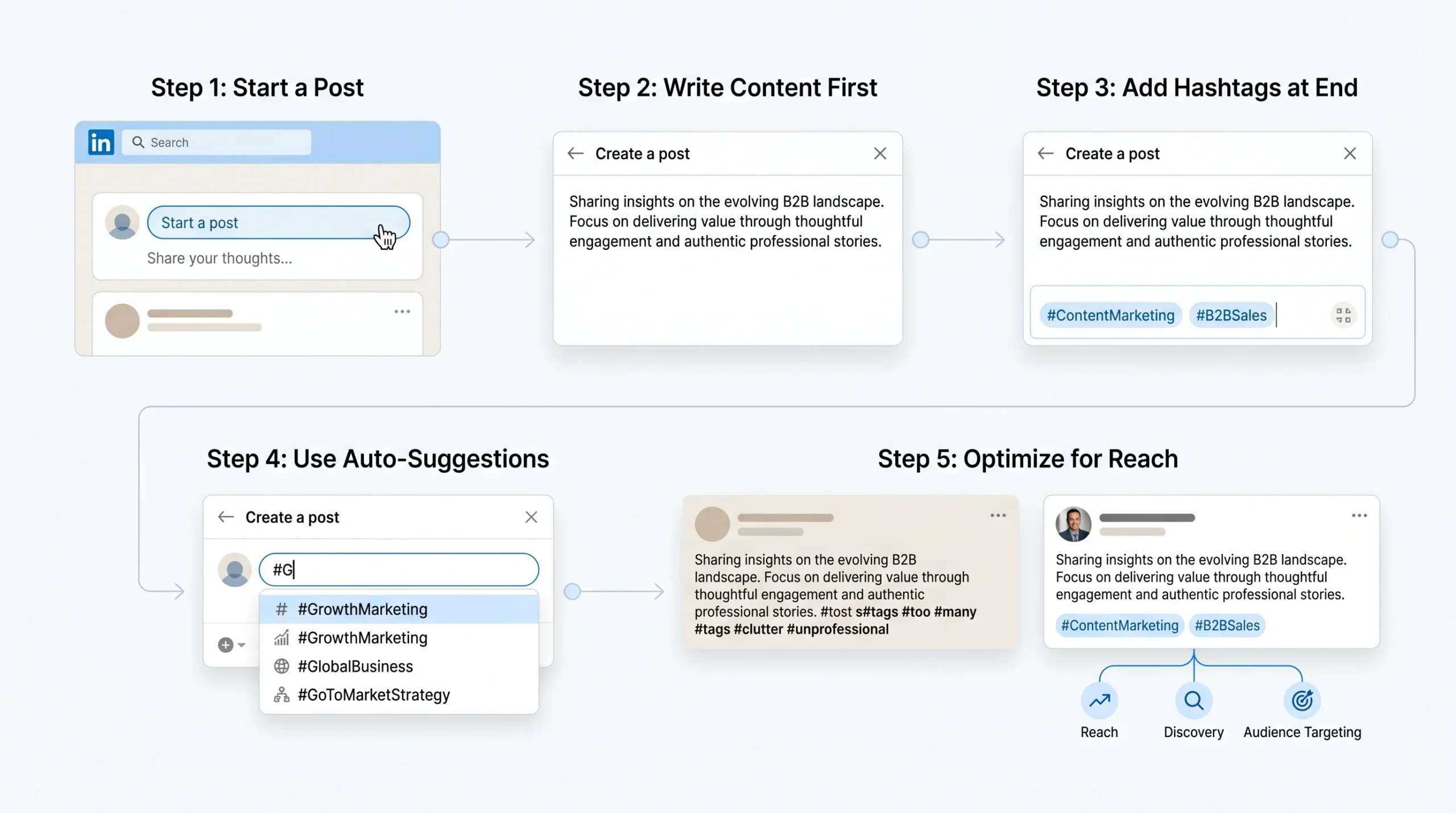
- Open LinkedIn and click the “Start a post” field at the top of your home feed, or navigate to your profile and click “Add a post.”
- Write your post content in full before adding hashtags. The content should stand alone; hashtags are added at the end, not woven through the body text.
- After your post body, press Enter twice to create a clear visual break, then type your hashtags using the # symbol followed immediately by the keyword — for example, #ContentMarketing or #B2BSales.
- LinkedIn will auto-suggest hashtags as you type. These suggestions reflect tags that are active on the platform and can serve as useful reference points, though you should not rely on them exclusively for research.
- Aim for 3–5 hashtags per post. Place all hashtags together at the end of the post, separated by spaces.
- Click “Post” to publish.
Best practices for post hashtags:
- Place hashtags at the end of the post after a line break, not scattered throughout the body copy. Mid-text hashtags disrupt readability and do not provide meaningfully stronger signals than end-of-post placement.
- Use CamelCase formatting for multi-word hashtags (e.g., #DigitalMarketing, not #digitalmarketing). This improves readability and is essential for accessibility — screen readers process CamelCase hashtags as separate words rather than one long string.
- Avoid repeating hashtags across every single post. According to Planable’s strategy research cited in ConnectSafely’s guide, creating 3–4 hashtag sets for different content types and rotating them prevents your account from appearing formulaic and helps you reach different audience clusters.
- You can edit hashtags after publishing. Click the three dots (…) on your post and select “Edit post” to add, remove, or change hashtags without republishing.
In-post vs. in-comments placement: Hashtags in the original post body outperform hashtags added in the comments. According to Social Rails’ 2026 research, LinkedIn’s algorithm gives more weight to hashtags in the caption. Adding hashtags in comments — a workaround sometimes recommended for aesthetic reasons — does not deliver the same indexing benefit.
How to Add Hashtags to LinkedIn Articles and Newsletters
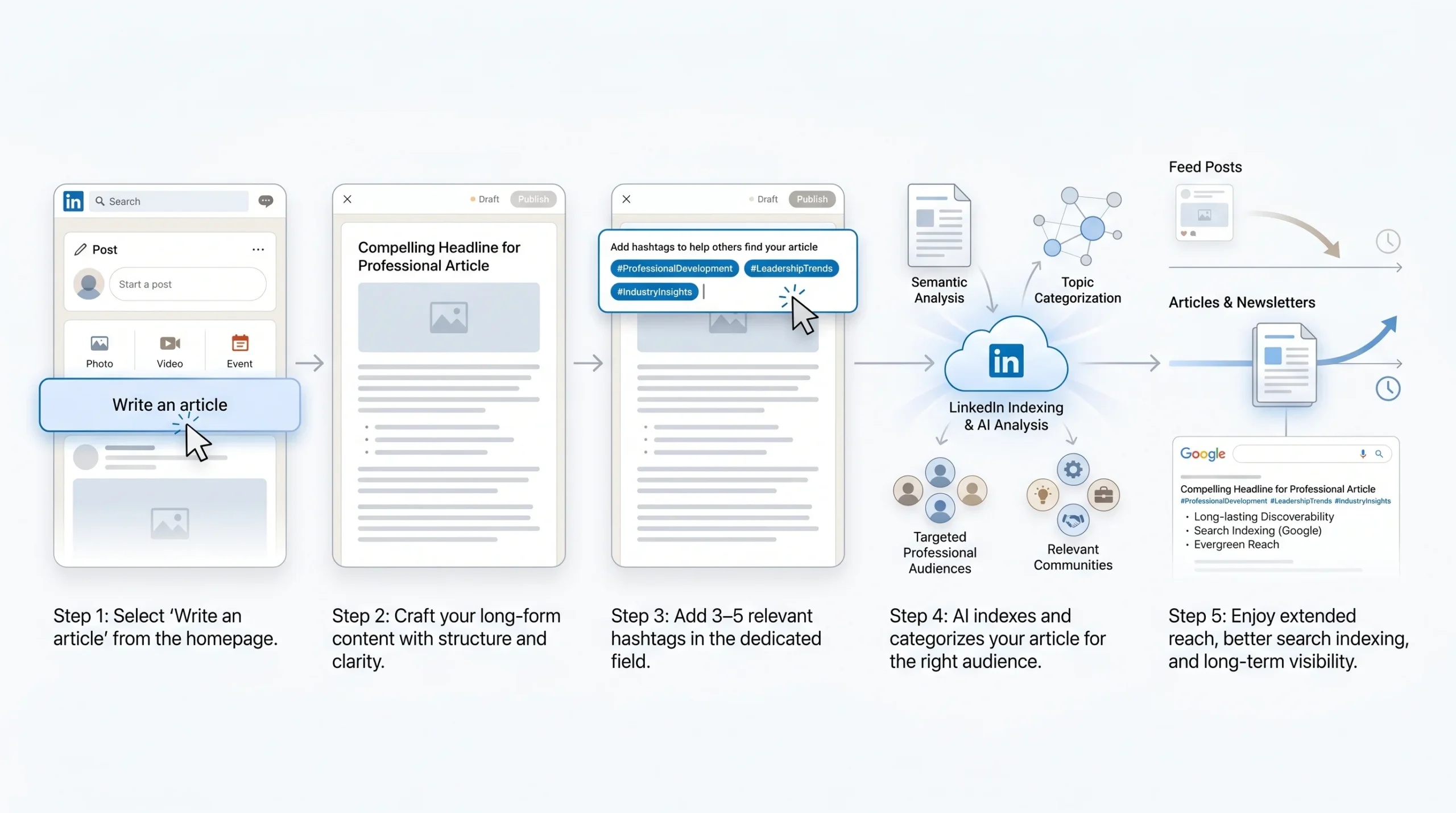
LinkedIn Articles (long-form posts published directly on LinkedIn) and LinkedIn Newsletters index differently from standard posts. They function more like web pages in LinkedIn’s search ecosystem and can also be indexed by Google, giving them longer-lasting discoverability than standard feed posts.
Step-by-step for articles:
- From your LinkedIn home page, click “Write an article” under the post creation options.
- Write your full article content, including a compelling headline and body copy.
- Before publishing, LinkedIn presents a field to add hashtags. This field appears at the top of the article editor and accepts hashtags that categorize the article’s topic.
- Add 3–5 relevant hashtags that reflect the article’s core subject matter.
- Publish the article.
How articles index differently from posts:
- LinkedIn Articles are treated more like published content pieces than ephemeral feed posts. They remain discoverable through LinkedIn search and Google search for a much longer period.
- Because articles can be indexed by Google, the hashtags you choose function as additional keyword signals for external search engines, not just LinkedIn’s internal algorithm.
- The recommended hashtag count for articles mirrors post guidance: 3–5 focused, relevant tags that align semantically with the article’s topic.
- LinkedIn Newsletters, which are subscription-based article series, benefit from consistent hashtag use across issues to build topic authority around the newsletter’s core subject matter.
How to Add Hashtags to LinkedIn Comments
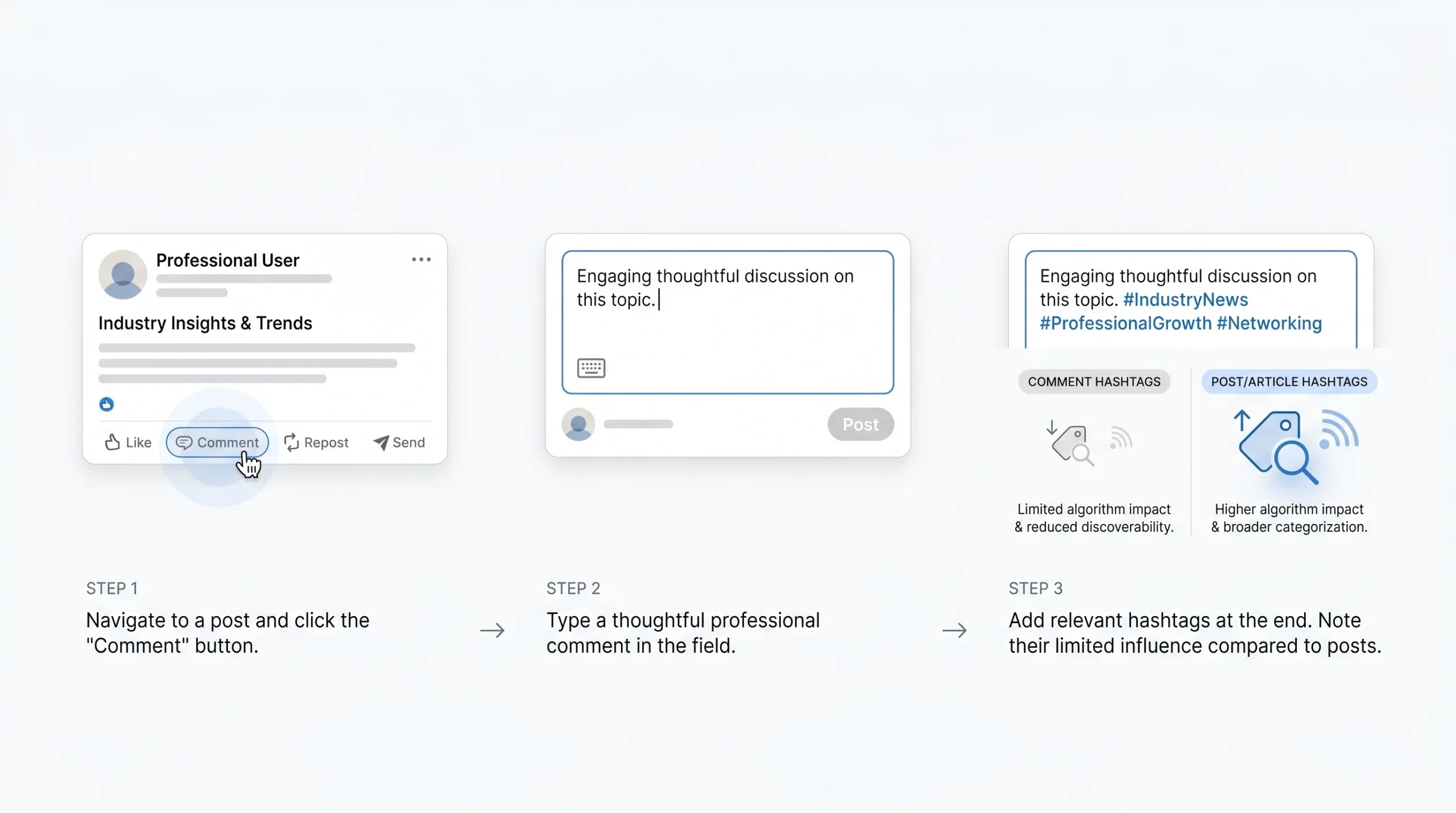
Hashtags can be used in LinkedIn comments, but their function and impact in this placement are limited compared to posts and articles.
How to add hashtags to comments:
- Click the “Comment” button under any LinkedIn post.
- Type your comment as normal.
- Add relevant hashtags within the comment text, typically at the end, using the same # symbol format.
When and why to use hashtags in comments:
- Hashtags in comments contribute a weak indexing signal compared to hashtags in original posts. They should not be used as a substitute for post-level hashtags.
- Use hashtags in comments when you are contributing to a topic conversation and want to connect your comment to a broader subject — for example, participating in a discussion about AI trends and adding #GenerativeAI to a substantive comment.
- Avoid using hashtags purely for visibility in comments. Overuse in comments can appear spammy and damage your professional credibility.
- LinkedIn’s algorithm does not treat comment hashtags as equivalent to post hashtags for content distribution purposes. Their primary value in comments is semantic reinforcement, not distribution.
How to Add Hashtags to Your LinkedIn Company Page (Specialisms)
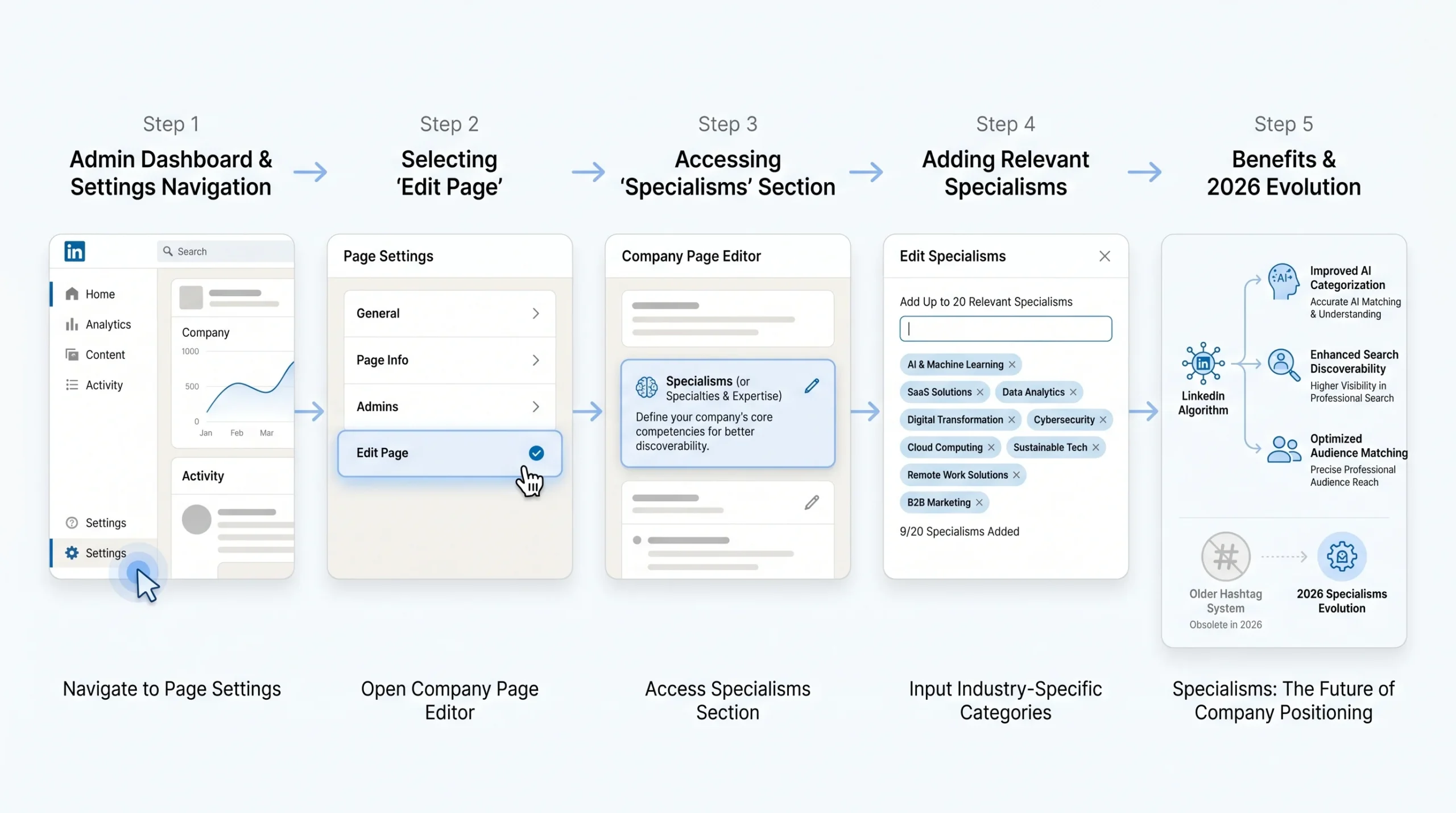
This placement has changed significantly in 2026. According to Derrick’s 2026 company hashtag guide, LinkedIn company page hashtags have been transformed into a feature called “Specialisms,” which fundamentally changes how company pages optimize their discoverability.
What are Specialisms?
Specialisms are topic labels that appear on your LinkedIn company page and signal to LinkedIn’s algorithm — and to page visitors — what your company does and specializes in. They function as category tags for the company page itself, separate from the hashtags you use in individual posts.
How to add Specialisms to your LinkedIn company page:
- Navigate to your LinkedIn company page as an administrator.
- Click “Edit page” to open the page editor.
- In the page settings, locate the “Specialties” or “Specialisms” section (the label may vary slightly depending on when your page was last updated).
- Add up to 20 specialisms that accurately reflect your company’s areas of expertise, products, or services.
- Save your changes. Unlike older static page attributes, Specialisms can be updated at any time to adjust your positioning.
Strategic difference between post hashtags and page Specialisms:
- Post hashtags influence how individual pieces of content are distributed and indexed. Specialisms influence how the company page itself appears in searches for specific topics, industries, and expertise areas.
- Specialisms should reflect your company’s genuine areas of expertise — the topics you consistently create content about and the services or products you provide. They are a long-term positioning signal, not a short-term campaign tactic.
- According to Derrick’s research, posts with hashtags still receive up to 30% more engagement, which means post-level hashtag strategy remains essential even for companies that have updated their Specialisms.
Why Specialisms matter for B2B lead discoverability:
When a LinkedIn user searches for companies in a specific industry or expertise area, Specialisms influence which company pages appear in those results. A company that has carefully selected Specialisms aligned with its target buyers’ search behavior has a structural advantage in being discovered by potential clients, partners, and talent.
Can You Add Hashtags to Your Personal LinkedIn Profile?
The short answer is that traditional hashtag fields have been removed from personal LinkedIn profiles. LinkedIn no longer displays hashtags on individual profile pages as a standalone feature.
However, the underlying strategic goal — signaling your professional expertise to LinkedIn’s algorithm and to profile visitors — is still achievable through the profile itself.
Workarounds for personal profile discoverability:
- Headline optimization: Your LinkedIn headline is one of the most heavily weighted fields in LinkedIn’s search algorithm. Embedding the keywords that correspond to your most important hashtags (e.g., “B2B Content Strategist | SaaS Marketing | Demand Generation”) creates a strong topic authority signal without requiring a hashtag field.
- About section: The About section supports rich keyword embedding. Writing your About section with deliberate inclusion of the same terms you use in your post hashtags reinforces your topic authority signal. According to Linkboost’s 2026 guide, LinkedIn’s algorithm analyzes your headline, bio, and post content together as a holistic profile of your expertise.
- Featured section and post consistency: Consistently posting content with a focused set of hashtags over time builds a strong association between your account and those topic clusters — which is what profile-level hashtag fields were originally designed to signal.
The Optimal LinkedIn Hashtag Formula for 2026
Knowing that hashtags matter is not enough. The difference between a hashtag strategy that quietly boosts reach and one that has no effect — or actively penalizes your content — comes down to how many hashtags you use, which types you combine, and how you match them to different content formats.
How Many Hashtags to Use on LinkedIn
The official LinkedIn recommendation as of 2026 is 3–5 hashtags per post. This is consistent across LinkedIn’s own guidance and the data published by major social media analytics platforms.
According to ConnectSafely’s 2026 hashtag research, posts with 1–3 hashtags average 14.7 likes — a metric that reflects both reach and relevance quality, since it captures engagement from users who found the post through interest-aligned distribution rather than broad blasting. Posts with more hashtags do not see proportional engagement gains; in most cases, they see diminishing returns.
The research published by LinkedIn consultant Melanie Goodman offers a more nuanced breakdown for 2026:
- 0–3 hashtags: Recommended as the default range for most posts. This forces precision and gives the algorithm clear, unambiguous indexing signals.
- 4–5 hashtags: Reserved for events, campaigns, or content with multiple legitimate topic angles — situations where community aggregation around a shared thread genuinely adds value.
- 10+ hashtags: Associated with a 30–50% visibility penalty. LinkedIn’s algorithm interprets this volume as a signal of low content quality or manipulation, and reduces distribution accordingly.
The reason a small number of hashtags outperforms a large list comes down to focus. As Linkboost’s analysis explains, when you use three tags, you give the algorithm three clear paths to distribute your content. When you use thirty, you dilute those signals to the point of meaninglessness — and you risk triggering a penalty.
The Hashtag Pyramid Strategy (Mix for Maximum Reach)
The most consistent high-performing hashtag approach in 2026 is what practitioners and platform analysts call the Pyramid Strategy. It involves mixing three categories of hashtags in a specific ratio designed to balance broad reach with precise targeting.
Tier 1 — Broad hashtag (×1):
One widely used industry hashtag that establishes your content’s general domain. Examples include #Marketing, #Technology, #Finance, or #Leadership. These tags reach large audiences and give your content a baseline of discoverability, but they are highly competitive. Use one broad hashtag as a foundation — not as your entire strategy.
Tier 2 — Niche hashtags (×2–3):
Two to three specific, focused hashtags that target the exact professional audience most relevant to your post. Examples include #B2BContentStrategy, #SaaSGrowth, #DemandGeneration, or #TalentAcquisitionStrategy. These tags are less competitive, which means your content has a better chance of being prominently distributed within that topic cluster. They also attract higher-quality engagement from professionals who are genuinely interested in your specific topic rather than a broad domain.
Tier 3 — Branded hashtag (×1, optional):
One company or personal branded hashtag that aggregates your content, builds community, and tracks campaign performance. Examples include #LifeAtYourCompany, #YourBrandInsights, or a campaign-specific tag. Branded hashtags are not always appropriate for every post — they are most valuable for employer branding content, campaign series, events, or recurring content formats.
Why this mix outperforms using only broad or only niche tags:
Using only broad hashtags gives you access to large audiences but makes it difficult to stand out in a highly competitive tag space. Using only niche hashtags maximizes relevance but limits the initial reach radius. The Pyramid Strategy threads this needle: the broad tag provides reach, the niche tags provide precision, and the branded tag (when used) builds longitudinal community around your content.
Real examples of the Pyramid Strategy by industry:
- B2B SaaS marketer: #SaaS (broad) + #ProductLedGrowth + #CustomerSuccess (niche) + #YourCompanyName (branded)
- HR professional: #HumanResources (broad) + #TalentAcquisition + #EmployeeExperience (niche)
- Finance leader: #Finance (broad) + #CFOInsights + #FPandA (niche)
- Sustainability consultant: #Sustainability (broad) + #ESGStrategy + #CorporateSustainability (niche) + #YourFirmName (branded)
Match Your Hashtags to Your Content Type
One of the most underused dimensions of LinkedIn hashtag strategy is matching your hashtag selection to the specific type of content you are publishing. The same hashtag set should not be applied to every post regardless of format or topic. According to research cited in ConnectSafely’s guide, creating 3–4 hashtag sets for different content types and rotating them prevents your account from appearing formulaic and helps reach different audience segments.
Thought leadership posts: Use niche hashtags and one industry hashtag that reflect the specific expertise or insight you are sharing. If you are writing about emerging trends in B2B sales, use #B2BSales (industry) + #SalesStrategy + #RevenueOperations (niche).
Job search and hiring posts: Use role-specific and industry job hashtags. Examples include #MarketingJobs, #TechJobs, #HiringNow, #OpenToWork, or role-specific tags like #DataScienceJobs. According to Social Rails’ 2026 guide, the recommended approach for job seekers is 2–3 industry hashtags plus 1–2 job-search-specific hashtags to reach both a professional community and active recruiters.
Event and product launch announcements: Combine an event-specific hashtag (e.g., #ContentMarketingWorld2026), a branded hashtag, and one or two relevant industry tags. Event hashtags support community aggregation and allow attendees to find and engage with related content.
Case studies and data posts: Use industry hashtags plus role-specific tags that reflect who benefits from the data. A SaaS case study about churn reduction would benefit from #CustomerSuccess + #SaaSMetrics + #ProductStrategy.
Recurring content series: Create a series-specific branded hashtag and use it consistently across every installment. This builds a searchable archive of your series and helps regular followers recognize and find your content.
How to Find the Right LinkedIn Hashtags for Your Niche
Choosing the right hashtags requires research, not guesswork. The removal of hashtag follower counts and dropdown search suggestions has made on-platform research slightly more indirect, but effective methods are still available. Here is how to identify the hashtags that will genuinely move the needle for your specific content and audience.
Use LinkedIn’s Search Bar
Despite the removal of hashtag-specific dropdown suggestions, LinkedIn’s search bar remains a useful starting point for hashtag research.
How to use it effectively:
- Type the # symbol followed by a keyword related to your content topic directly into the LinkedIn search bar (e.g., #B2BMarketing).
- LinkedIn will return a search results page showing posts, people, and content associated with that hashtag or keyword.
- Review the posts that appear: Are they recent? Do they have meaningful engagement? Are they from accounts in your industry or adjacent fields?
- Note which other hashtags appear in the highest-performing posts. These co-occurring hashtags are strong candidates for your own strategy.
- Try multiple keyword variations to identify which formulations appear most active. For example, compare #ContentStrategy vs. #ContentMarketing vs. #ContentCreation to understand which attracts more relevant, recent, high-engagement content.
This method gives you a qualitative read on which hashtags are genuinely active and what kinds of content perform well within them — which is more useful than raw follower counts ever were.
Analyze Top Creators and Competitors in Your Industry
One of the most reliable hashtag research methods is reverse-engineering the strategy of people and companies already succeeding in your niche.
How to conduct creator and competitor hashtag analysis:
- Identify 5–10 LinkedIn creators or brands in your industry who consistently produce high-engagement content. Look for accounts with strong post-level engagement (comments and shares, not just likes) rather than simply high follower counts — engagement quality is a better signal of hashtag relevance.
- Review their last 20–30 posts and note every hashtag they use. Record which tags appear consistently, which appear occasionally, and which seem tied to specific content types.
- Pay attention to the ratio of broad to niche hashtags in their highest-performing posts. This ratio often reflects what the algorithm is rewarding in your specific topic space.
- Identify hashtags that appear across multiple high-performing creators. Consistent use across successful accounts is a signal that those tags effectively route content to engaged audiences in your niche.
- Note hashtags that appear in posts that received unusually high engagement relative to that creator’s typical performance — these outlier posts often reflect moments when a hashtag delivered particularly strong algorithmic distribution.
Use LinkedIn Groups and Communities
LinkedIn Groups remain an underutilized research resource for hashtag strategy. Active professional groups surface the topics, language, and terminology that real practitioners in your field use — which maps directly to the hashtags most likely to resonate with your target audience.
How to use LinkedIn Groups for hashtag research:
- Search for active LinkedIn Groups in your industry or professional niche. Look for groups with regular posting activity and genuine member engagement, not dormant groups with large memberships but no recent posts.
- Read through recent discussions and note the terminology, phrases, and topics that appear most frequently. These natural language patterns reveal what your audience actually calls their challenges and interests.
- When group members post content with hashtags, note which tags they choose. Active practitioners often have an intuitive sense of which hashtags connect with their peers.
- Group discussions around trending topics can also signal emerging hashtag opportunities — topics that are gaining professional attention but may not yet have saturated mainstream hashtags.
Use AI and Third-Party Hashtag Research Tools
The evolution of LinkedIn’s hashtag ecosystem has driven the development of third-party tools and AI-powered solutions that automate and improve hashtag research.
Relevant tools in 2026:
- Linkboost: Offers AI-driven hashtag analysis and engagement automation, with specific features designed for LinkedIn’s semantic search environment. Particularly useful for B2B founders and sales professionals seeking to reach decision-makers.
- Draftly: Generates relevant hashtag recommendations tailored to your content. Described in Draftly’s own 2026 guide as a tool that can simplify the hashtag selection process by analyzing your content and suggesting appropriate tags.
- Sprout Social: Provides broader social media analytics including LinkedIn hashtag performance tracking, useful for teams managing multiple accounts or high-volume posting schedules.
- Derrick: According to Derrick’s 2026 company hashtag guide, the platform can automatically find any company’s hashtags to analyze their content strategy — valuable for competitive intelligence on company-level hashtag usage.
When to use AI-assisted vs. manual research:
Manual research — analyzing creator content, searching LinkedIn’s search bar, reviewing competitor posts — is most valuable for building your initial hashtag library and developing a genuine understanding of your niche’s vocabulary. It is slower but produces nuanced insights.
AI-assisted research is more efficient for scaling your hashtag strategy, testing new topic areas quickly, or managing a high volume of content across multiple accounts. The best strategies in 2026 use both: human judgment for strategic direction and AI efficiency for execution and iteration.
Test, Rotate, and Refine
Hashtag research is not a one-time activity. The effective hashtag landscape shifts as platforms evolve, as topics gain or lose professional momentum, and as your own content focus develops over time.
Building a personal hashtag library:
- Create a document or spreadsheet that segments your hashtag sets by content pillar. For example, a content marketer might have one set for content strategy posts, one for AI and tools posts, one for career and professional development posts, and one for industry news commentary.
- Each set should follow the Pyramid Strategy: one broad tag, two to three niche tags, and an optional branded tag.
- Label each set clearly and update it quarterly based on performance data.
Rotation logic — why using the same tags every post limits reach:
According to ConnectSafely’s 2026 guide citing Planable’s strategy research, using the same hashtags on every post can cause the algorithm to treat your account as formulaic and limit your content’s distribution to the same narrow audience cluster each time. Rotating your hashtag sets across different content types ensures that your content reaches different user segments over time and signals that your account covers a range of related topics — which contributes to broader topic authority rather than a single narrow niche.
Using LinkedIn analytics to identify what’s working:
LinkedIn provides post-level analytics that show impressions, reach, and engagement for each piece of content. While LinkedIn does not offer direct hashtag-level performance tracking (showing you exactly which hashtag drove which impressions), you can use post-level data to identify patterns. Compare the performance of posts using different hashtag sets. Over time, you will identify which combinations consistently produce higher reach and which produce higher engagement quality — and you can adjust your library accordingly.
The Best LinkedIn Hashtags to Use in 2026 (by Industry and Goal)
The following hashtag categories reflect the most strategically relevant tags for professionals in each domain in 2026. Each category is organized with broad tags for reach and niche tags for targeted precision. Use these as a curated starting point and customize based on your specific audience and content focus — do not copy every tag into every post.
General Professional and Business Hashtags
These broad professional hashtags work across industries and provide baseline discoverability. Use one as a foundation alongside niche tags.
Broad tags:
- #Business
- #Professional
- #Networking
- #CareerDevelopment
- #WorkplaceCulture
Niche tags:
- #FutureOfWork — for posts about remote work, hybrid models, and evolving workplace dynamics
- #ProfessionalGrowth — for personal development and career milestone content
- #B2B — for business-to-business content targeting decision-makers and buying committees
- #SmallBusiness — for posts aimed at founders, operators, and small business owners
- #EntrepreneurMindset — for content about the realities of building and running a business
Marketing, Content, and Social Media Hashtags
For marketers, content strategists, and brand builders, these hashtags connect your posts to active professional conversations around campaigns, content, and digital strategy.
Broad tags:
- #Marketing
- #DigitalMarketing
- #ContentMarketing
- #SocialMedia
- #Branding
Niche tags:
- #B2BContentStrategy — for strategic content marketing posts targeting B2B audiences
- #DemandGeneration — for posts about pipeline building, lead generation, and marketing-to-sales alignment
- #SEO — for search optimization strategy and keyword content
- #EmailMarketing — for email strategy, automation, and deliverability content
- #ContentCreation — for posts about the craft and process of creating professional content
- #LinkedInMarketing — for LinkedIn-specific strategy and platform insights
Technology, AI, and SaaS Hashtags
Tech brands, product teams, software companies, and AI practitioners use these hashtags to reach audiences interested in innovation, product development, and digital transformation.
Broad tags:
- #Technology
- #AI
- #SaaS
- #Innovation
- #TechIndustry
Niche tags:
- #GenerativeAI — for content about large language models, AI tools, and AI-driven workflows
- #ProductLedGrowth — for posts about PLG strategies, user onboarding, and product-driven acquisition
- #CloudComputing — for infrastructure, DevOps, and cloud migration content
- #B2BSaaS — for software companies targeting business buyers
- #DataAnalytics — for posts about data strategy, BI tools, and analytics workflows
- #CyberSecurity — for security strategy, threat intelligence, and compliance content
Finance, Investing, and FinTech Hashtags
For finance professionals, CFOs, investors, and fintech operators, these hashtags connect your content to relevant professional audiences in capital markets, corporate finance, and financial innovation.
Broad tags:
- #Finance
- #Investing
- #FinTech
- #WealthManagement
- #Economics
Niche tags:
- #CFOInsights — for posts written from a CFO or finance leadership perspective
- #FPandA — for financial planning and analysis content targeting finance teams
- #PrivateEquity — for PE strategy, deal flow, and portfolio management content
- #CorporateFinance — for posts about capital structure, M&A, and financial strategy
- #CryptoAssets — for blockchain, digital asset, and decentralized finance content
- #VentureCapital — for posts targeting founders, investors, and the startup funding ecosystem
Human Resources, Talent, and Recruiting Hashtags
For HR professionals, talent acquisition specialists, people operations leaders, and recruiters, these hashtags connect your content to candidates, fellow practitioners, and organizational leaders.
Broad tags:
- #HumanResources
- #Recruiting
- #TalentAcquisition
- #HR
- #PeopleOperations
Niche tags:
- #EmployeeExperience — for posts about workplace culture, retention, and employee engagement
- #HRTech — for content about HR software, ATS platforms, and people analytics tools
- #DEI — for diversity, equity, and inclusion strategy content
- #EmployerBranding — for posts about talent attraction, EVP, and recruitment marketing
- #WorkforcePlanning — for posts about headcount strategy, organizational design, and workforce analytics
- #RemoteTeamBuilding — for content about managing distributed teams and virtual culture
Leadership and Executive Thought Leadership Hashtags
For executives, founders, and senior leaders sharing strategic perspectives, these hashtags connect your content to professional audiences seeking leadership insights and organizational intelligence.
Broad tags:
- #Leadership
- #Management
- #ExecutiveLeadership
- #Strategy
- #CLevel
Niche tags:
- #ThoughtLeadership — for posts positioning you as an expert voice in your domain
- #ChangeManagement — for posts about organizational transformation and leading through change
- #CEOInsights — for executive-level perspectives on business strategy and leadership decisions
- #PeopleFirst — for leadership content centered on human-centered management approaches
- #GrowthMindset — for posts about learning, adaptability, and professional development philosophy
- #Boardroom — for posts about governance, board strategy, and executive decision-making
Sustainability, DEI, and Social Impact Hashtags
For sustainability professionals, ESG leaders, social entrepreneurs, and corporate responsibility practitioners, these hashtags connect your content to the growing audience of professionals committed to responsible business.
Broad tags:
- #Sustainability
- #ESG
- #SocialImpact
- #ClimateAction
- #CorporateResponsibility
Niche tags:
- #ESGStrategy — for posts about integrating ESG into business strategy and investor reporting
- #NetZero — for content about carbon neutrality goals, emissions reduction, and climate commitments
- #CircularEconomy — for posts about waste reduction, regenerative business models, and sustainable supply chains
- #ImpactInvesting — for content about capital allocation toward social and environmental outcomes
- #GreenBusiness — for posts about sustainable business practices, green operations, and environmental leadership
- #DEIStrategy — for diversity, equity, and inclusion strategy content at the organizational level
Entrepreneurship and Startup Hashtags
For founders, early-stage operators, startup investors, and entrepreneurship community members, these hashtags connect your content to the startup ecosystem and the broader entrepreneurship conversation.
Broad tags:
- #Entrepreneurship
- #Startups
- #Founder
- #StartupLife
- #BusinessGrowth
Niche tags:
- #EarlyStage — for content specifically relevant to pre-seed and seed-stage companies
- #FounderStory — for narrative content about the realities of building a company
- #StartupMarketing — for growth and marketing content tailored to resource-constrained early-stage teams
- #ProductMarketFit — for posts about finding, measuring, and maintaining PMF
- #BootstrapBusiness — for content about building without venture capital, emphasizing profitability and sustainability
- #GrowthHacking — for tactical content about rapid experimentation and growth strategy
Sales, B2B, and Revenue Growth Hashtags
For sales professionals, revenue leaders, SDRs, account executives, and B2B growth operators, these hashtags connect your content to buyers, peers, and decision-makers across the revenue function.
Broad tags:
- #Sales
- #B2BSales
- #RevenueGrowth
- #SalesStrategy
- #BusinessDevelopment
Niche tags:
- #RevenueOperations — for posts about RevOps strategy, tech stack alignment, and go-to-market efficiency
- #SDR — for sales development content targeting early-stage pipeline builders and outbound practitioners
- #AccountBasedMarketing — for ABM strategy, targeting, and sales-marketing alignment content
- #SalesEnablement — for content about training, tools, playbooks, and sales productivity
- #CustomerAcquisition — for posts about go-to-market strategy, ICP targeting, and conversion optimization
- #B2BLeadGen — for demand generation and inbound/outbound lead generation content
Job Seekers: Hashtags That Help Recruiters Find You
For professionals actively seeking new roles, LinkedIn content can serve as a powerful recruitment signal — but only if it reaches the right people. According to Social Rails’ 2026 guide, the recommended approach is using 2–3 industry hashtags plus 1–2 job-search-specific hashtags in posts designed to reach both professional communities and active recruiters.
Job-search-specific hashtags:
- #OpenToWork — the most widely recognized signal of active job-seeking status
- #JobSearch — for posts about the job-hunting process and experience
- #HiringNow — useful when resharing or commenting on hiring posts to increase visibility
- #CareerChange — for posts about transitioning industries or functions
Role-specific job hashtags:
- #MarketingJobs
- #TechJobs
- #SalesJobs
- #FinanceJobs
- #EngineeringJobs
- #DesignJobs
- #DataJobs
- #HRJobs
- #HealthcareJobs
Strategic note for job seekers: According to Social Rails’ guide, keywords in your posts and profile matter at least as much as hashtags for LinkedIn’s algorithm to surface you to hiring managers. Write posts that demonstrate your expertise — share insights, commentary, or analysis relevant to your target role. Posting “I’m looking for work” alone, even with job hashtags, delivers far weaker results than content that shows your value.
Advanced LinkedIn Hashtag Strategy Tips
With the foundational strategy in place, the following advanced practices help you extract maximum value from your LinkedIn hashtag investment, avoid common pitfalls, and build a compounding visibility advantage over time.
Align Hashtags With Your LinkedIn SEO Strategy
In 2026, the most effective LinkedIn strategies treat hashtags as one layer of a broader keyword approach — not as a standalone tactic. According to Linkboost’s algorithm analysis, LinkedIn’s algorithm analyzes your headline, bio, post body, and hashtags together to build a complete picture of your expertise and content context. Hashtags that reinforce a coherent keyword theme across all four elements deliver meaningfully stronger results than hashtags that are chosen in isolation from the rest of your profile.
How to integrate hashtags into your LinkedIn SEO approach:
- Audit your LinkedIn profile headline and About section. Identify the 3–5 primary topic areas you want to be known for. These should be the same topic areas your most important hashtags address.
- Ensure that the keywords in your headline and About section align with the niche hashtags you use in your posts. If your headline says “B2B SaaS Growth Strategist” and your posts consistently use #SaaSGrowth and #ProductLedGrowth, you are building a coherent topic authority signal across your entire LinkedIn presence.
- Write post body copy that uses the same keywords as your hashtags naturally within the text. Because LinkedIn’s semantic analysis reads the full post, a post body that uses the phrase “demand generation” multiple times and ends with #DemandGeneration creates a powerful, redundant signal that your content genuinely belongs to that topic cluster.
- Avoid using hashtags for topics you have not addressed in your profile or post body. The semantic disconnect penalty is real, and using hashtags purely as traffic tactics — without genuine content alignment — will reduce your distribution rather than increase it.
Build a Branded Hashtag Strategy
Branded hashtags are one of the most underutilized tools in LinkedIn marketing, particularly for companies and personal brands that produce regular content. When used consistently, a branded hashtag builds a searchable archive of your content, enables community participation, and supports employer branding and campaign tracking.
When and why to create a branded hashtag:
- Employer branding: A hashtag like #LifeAtYourCompany allows employees, candidates, and followers to find and contribute to a stream of culture content in one place.
- Content series: A recurring weekly or monthly content format benefits from a series-specific hashtag that lets followers find every installment.
- Events and campaigns: Campaign-specific hashtags (e.g., #YourBrandSummit2026) aggregate all content related to an event or campaign launch, making it easy to track, measure, and amplify.
- Thought leadership positioning: Personal brand hashtags allow your audience to find your most important content by searching your specific tag.
How to seed and promote a branded hashtag:
- Use the hashtag consistently in every relevant post from day one. Consistency is the single most important factor in establishing a branded hashtag.
- Encourage employees, partners, and engaged followers to use the hashtag when posting related content.
- Feature the hashtag in your LinkedIn company page Specialisms or in your profile About section to signal its existence to new visitors.
- Reference the hashtag in your content — for example, “I share weekly insights on B2B content strategy under #YourBrandInsights” — to drive deliberate adoption among your audience.
Tracking branded hashtag content for employer branding and campaigns:
Use LinkedIn’s search function and third-party social listening tools to monitor posts using your branded hashtag. This allows you to identify and reshare user-generated content, track campaign participation, measure the organic reach of your hashtag, and engage with community members who are amplifying your brand.
Accessibility Best Practices for Hashtags
Hashtag accessibility is not a niche consideration — it is a professional standard that affects how a significant portion of your potential audience experiences your content. Screen readers, used by people with visual impairments, process text differently than sighted users, and hashtag formatting directly impacts that experience.
CamelCase formatting:
CamelCase means capitalizing the first letter of each word within a multi-word hashtag — for example, #DigitalMarketing instead of #digitalmarketing, or #ContentStrategy instead of #contentstrategy. This is important because screen readers process #digitalmarketing as a single word with no natural pause, which is difficult to parse and often rendered as gibberish. #DigitalMarketing, by contrast, is read as two distinct words — “Digital Marketing” — making it comprehensible and professional.
CamelCase also improves readability for all users, not just those using screen readers. A list of CamelCase hashtags at the end of a post is visually clean and easy to scan, while a list of lowercase hashtags blurs into an unreadable string.
Why accessibility is also a performance signal:
Beyond the direct accessibility benefit, CamelCase hashtags are an indicator of professional quality and attention to detail. Posts that demonstrate care in their formatting signal to readers — and to the algorithm, which tracks engagement signals — that the content is produced by a deliberate, credible professional. Lower cognitive load for readers typically produces better engagement, which feeds positively into LinkedIn’s distribution model.
Audit and Rotate Your Hashtag Sets Regularly
A hashtag library is not a static asset. The professional landscape evolves, platform algorithm behavior shifts, new topics gain prominence, and your own content strategy develops over time. Treating your hashtag sets as permanent fixtures is a common error that allows strategy to stagnate.
Setting a quarterly hashtag audit cadence:
Review your hashtag performance data every quarter using LinkedIn’s post analytics. Look for patterns in which hashtag sets consistently produce strong reach or engagement, and which seem to deliver diminishing results. Update your hashtag library to reflect these patterns, retire underperforming tags, and introduce new niche hashtags that reflect emerging topics in your field.
Signs your hashtags are underperforming:
- A sudden or gradual decline in post reach without a corresponding change in post quality or publishing frequency
- High impression volume but very low engagement, which may indicate your content is being distributed to mismatched audiences
- Engagement that comes predominantly from outside your target professional demographic
- Competitor content on similar topics consistently outperforming yours despite comparable content quality
When you notice these signals, reconsider your hashtag mix before assuming the issue is content quality. A change in hashtag strategy — shifting from broad to niche, trying different industry tags, or rotating to a fresh hashtag set — can often restore or improve distribution.
Use Hashtags for Competitor Intelligence
LinkedIn hashtags provide a window into your competitors’ content strategy that many professionals overlook. Monitoring which hashtags competing brands and creators use — and how well their content performs with those tags — can surface strategic insights about your competitive landscape.
How to monitor competitors’ hashtag strategy:
- Follow the LinkedIn profiles and company pages of your primary competitors and track the hashtags they use consistently.
- Search those hashtags on LinkedIn to see all recent content in that space, including from competitors and from the broader professional community.
- Note which competitors’ posts receive the highest engagement in shared hashtag spaces. What type of content — format, length, topic angle — performs best? Which hashtags appear on their strongest posts?
Identifying content gaps and trending topics in your niche:
When you monitor multiple competitors and creators in a shared hashtag space, patterns emerge. You may notice that certain niche hashtags consistently attract high engagement on topics that no one in your network is covering well — these are content gap opportunities. You may also notice emerging hashtags that are gaining traction before becoming mainstream — early adoption of these tags can position your content as part of an emerging conversation rather than a latecomer to a saturated one.
Tools that automate competitor hashtag tracking:
According to Derrick’s 2026 company hashtag guide, tools like Derrick can automatically find any company’s hashtags to analyze their content strategy — making systematic competitor hashtag intelligence accessible without manual research overhead. Sprout Social’s analytics suite offers similar competitive monitoring capabilities for teams managing LinkedIn at scale.
Hashtags for External SEO: Get Found on Google Too
One of the most strategically valuable — and least widely understood — aspects of LinkedIn hashtags in 2026 is their contribution to external search engine discoverability.
According to Social Rails’ 2026 LinkedIn hashtag guide, the first three hashtags you include in a LinkedIn post are embedded in that post’s URL. This means that when Google and other search engines crawl and index LinkedIn post URLs, those hashtag keywords become part of the URL structure — contributing to how the post is categorized and surfaced in external search results.
Optimizing hashtag choice with Google discoverability in mind:
- Treat your first two or three hashtags as keyword-optimized labels that you would be comfortable having indexed by Google. These should be the most precise, professionally relevant tags in your post — not generic motivational tags.
- If your post covers a topic that people actively search on Google (e.g., “B2B content strategy tips” or “how to reduce SaaS churn”), using hashtags that mirror those search queries as closely as possible (e.g., #B2BContentStrategy or #SaaSChurnReduction) increases the probability that your LinkedIn post surfaces in relevant Google results.
- This external SEO benefit applies specifically to the first three hashtags. Later hashtags in your list do not carry the same URL-level signal. This is an additional reason to prioritize precision in your first two or three hashtag selections.
Conclusion
The core shift in LinkedIn hashtags is clear: they are no longer discovery buttons that deliver a built-in audience of followers. They are SEO signals — precise, machine-readable labels that tell LinkedIn’s AI exactly what your content covers and who should see it. That shift changes everything about how hashtags should be chosen, how many to use, and how they fit into the broader work of building a LinkedIn presence that delivers compounding visibility over time.
The professionals and brands getting the most out of LinkedIn in 2026 are not the ones using the most hashtags or chasing the most popular tags. They are the ones using 3–5 precisely chosen hashtags that align semantically with their post content, their profile keywords, and their target audience’s interest clusters. They are rotating hashtag sets across content types, building branded hashtags for their most important content series, and treating the first three hashtags as Google-indexed keywords as much as LinkedIn signals.
The three-step action plan to implement what this guide covers is straightforward. First, audit your current hashtag usage — review your last 20 posts, count how many hashtags you used per post, identify whether they were broad or niche, and check whether they genuinely reflected what each post covered. Second, build a hashtag library segmented by content pillar, using the Pyramid Strategy (one broad, two to three niche, one optional branded tag) for each set. Third, track your post analytics quarterly, compare performance across different hashtag sets, retire underperforming tags, and introduce new niche hashtags that reflect emerging topics in your field.
Hashtags are one part of a larger LinkedIn SEO and content strategy. They work best when your profile is keyword-optimized, your content is genuinely useful to a specific professional audience, and your hashtag choices are precise enough that the algorithm knows exactly where your content belongs. Get that alignment right, and your hashtags stop being a guessing game and start being a reliable, data-backed engine for professional reach and discovery.
Frequently Asked Questions About LinkedIn Hashtags
How many hashtags should I use on LinkedIn in 2026?
The official LinkedIn recommendation and the consensus from platform research is 3–5 hashtags per post. Posts with 1–3 hashtags produce the highest per-hashtag engagement efficiency. Posts with 4–5 are appropriate for events, campaigns, or multi-topic content. Posts with 10 or more risk a 30–50% visibility penalty according to research from LinkedIn consultant Melanie Goodman.
Do LinkedIn hashtags help with Google search?
Yes. According to Social Rails’ 2026 guide, the first three hashtags in a LinkedIn post are embedded in the post’s URL. Because Google indexes LinkedIn post URLs, those hashtag keywords become part of the indexed URL structure and contribute to how the post appears in external Google search results. This makes your first three hashtag choices doubly important: they signal to LinkedIn’s algorithm and to Google simultaneously.
Can I edit hashtags after publishing a post?
Yes. Click the three dots (…) on your published post and select “Edit post.” You can add, remove, or change hashtags without republishing. According to ConnectSafely’s 2026 guide, this feature is available for LinkedIn posts and allows you to optimize hashtags on underperforming content.
Are LinkedIn hashtags case-sensitive?
No. #digitalmarketing and #DigitalMarketing refer to the same hashtag on LinkedIn’s backend. However, CamelCase formatting (#DigitalMarketing) is the recommended standard for two reasons: it significantly improves readability for all users and ensures that screen readers process multi-word hashtags correctly, rendering them as separate words rather than one incomprehensible string.
What happened to LinkedIn hashtag following?
LinkedIn removed the hashtag following feature between 2024 and 2025. Previously, users could follow a hashtag and receive a curated feed of posts using that tag in their home feed. This feature no longer exists. As a result, hashtags no longer deliver reach through a built-in follower audience — instead, they function as algorithm indexing signals that influence how LinkedIn’s AI model distributes your content to users based on their interest clusters and behavioral signals.
What’s the difference between LinkedIn hashtags and Specialisms?
Hashtags are used in individual posts, articles, and comments to help the algorithm categorize specific pieces of content. Specialisms are page-level labels applied to LinkedIn company pages that signal the company’s expertise areas and influence how the page appears in search. According to Derrick’s 2026 guide, Specialisms replaced the older company page hashtag system and allow up to 20 expertise labels per page. Individual post hashtags and company page Specialisms serve different functions and should both be used as part of a comprehensive LinkedIn strategy.
Should I put hashtags in my LinkedIn post or in the comments?
In the post, always. According to Social Rails’ 2026 guide, LinkedIn’s algorithm gives more weight to hashtags in the original post body than to hashtags added in comments. Place your 3–5 hashtags at the end of your post after a line break, not in the first comment.
Do LinkedIn hashtags work differently for personal profiles and company pages?
Yes, in two ways. First, personal profiles and company pages have different algorithmic distribution patterns. Company page content typically requires more deliberate hashtag strategy because organic reach for company pages is generally lower than for personal profiles, making precise targeting through hashtags more important. Second, company pages have the additional Specialisms system at the page level, which personal profiles do not. Personal profiles rely on post-level hashtags and profile keyword optimization rather than a dedicated page-tagging system.