


Here’s what most sales teams get wrong about LinkedIn: they treat InMail like email. It is not.
Regular LinkedIn messages hit a prospect’s inbox alongside hundreds of others. Your message competes with connection requests from strangers, recruiter spam, and their actual work notifications. The open rate is maybe 10-15%. InMail is different. It appears as a priority message with a premium stamp. It goes to their “Conversation Starters” section, not buried in connection requests. Open rates land between 40-50%, and reply rates hover around 15-20% when the message actually matters.
This is exactly why LinkedIn InMail Templates for B2B Sales are no longer optional for serious outbound programs. A poorly written regular message from a cold prospect gets deleted in seconds. A poorly written InMail wastes the premium real estate and your outreach budget. But a well-crafted InMail? That gets read, replied to, and booked.
The difference between a “nice to have” response rate and a consistent 20%+ reply rate is not luck. It is structure. It is knowing exactly which elements trigger a response, how to personalize at scale without sounding automated, and how to adapt your template based on what actually works with your specific buyer.
In this guide, I am going to walk you through the exact anatomy of InMail templates that work in 2026, show you 7 proven templates with real examples from successful B2B teams, and explain the optimization tactics that have moved the needle for everyone from early-stage SDR teams to enterprise GTM leaders.
Why LinkedIn InMail Templates for B2B Sales Outperform Standard Messages
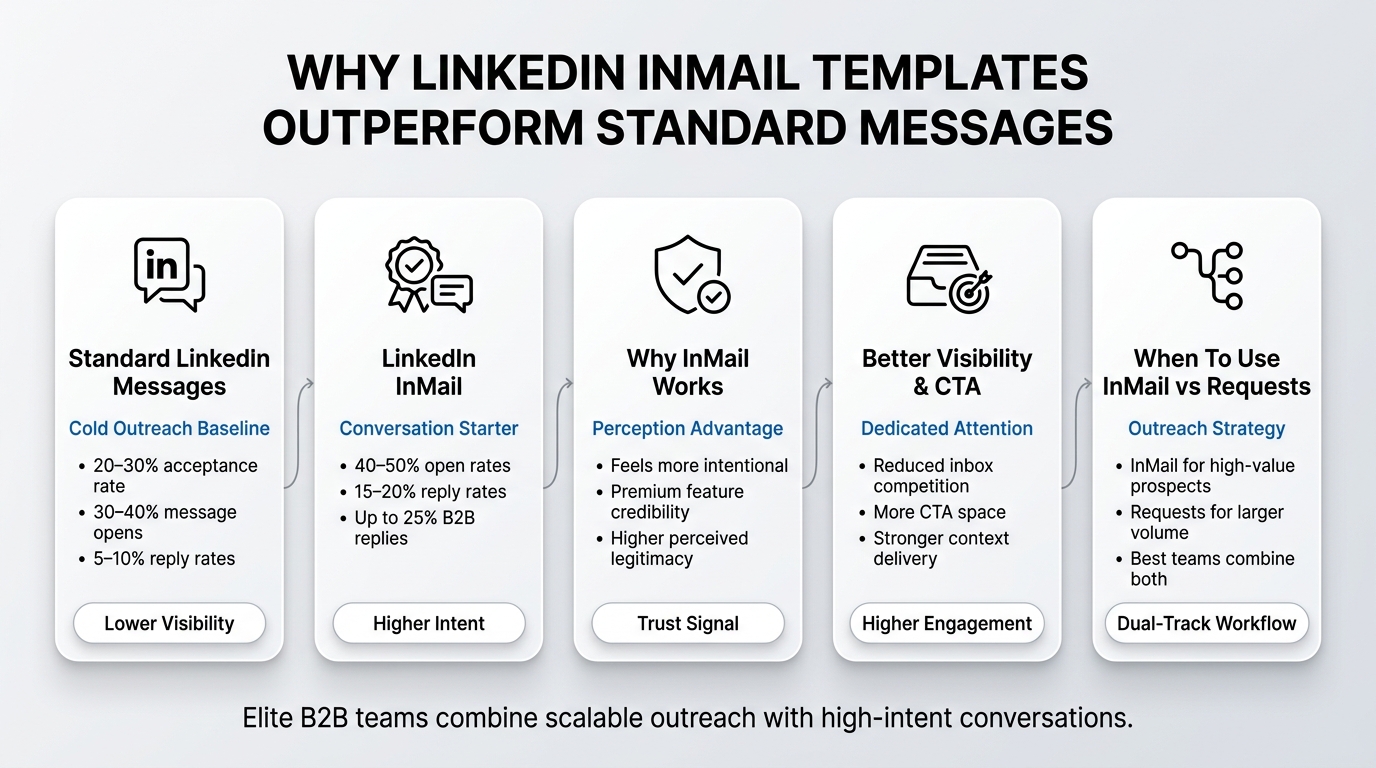
LinkedIn InMail Templates for B2B Sales are not just incremental improvements over regular messages. They are a fundamentally different channel with different mechanics, and that difference shows up directly in your pipeline.
The Numbers: How InMail Stacks Up
Let us start with what the data actually says. A LinkedIn connection request from a cold prospect has a roughly 20-30% acceptance rate. Once accepted, a regular follow-up message gets opened about 30-40% of the time, and replied to maybe 5-10% of the time. That is the baseline for cold outreach at scale.
InMail changes the equation. Because InMail appears as a “Conversation Starter” with a special badge, it gets opened at roughly 40-50% across the board. Reply rates jump to 15-20% depending on several factors we will cover. For B2B sales specifically, where deal values are higher and buyers are more engaged, you see InMail reply rates as high as 25% on well-executed campaigns.
This is not theoretical. SDR teams using InMail as a first touch (rather than buried in a sequence after connection acceptance) report cutting their cost per booked meeting by 30-40% compared to connection-request-first workflows. For a team working with a 15% connection acceptance rate, 10% message open rate, and 5% reply rate, that is a multiplier effect. InMail compresses the funnel.
The psychology is simple: InMail costs the sender money (premium feature on LinkedIn Sales Navigator), so prospects perceive it as more intentional and valuable. A cold connection request feels like spray-and-pray. An InMail feels like someone actually looked at your profile and decided you were worth reaching out to directly.
Why InMail Feels Different (And Works Better)
Beyond the numbers, there is a perception layer that matters. When a prospect sees an InMail, their brain processes it differently than a regular message. Here is what is actually happening:
Perceived legitimacy. InMail requires a LinkedIn Sales Navigator subscription (for most senders) or a limited free quota. This creates a friction cost that filters out casual senders. Your prospect knows that the person reaching out invested time and money. That alone signals you are not sending 500 identical messages a day.
Reduced comparison noise. A regular LinkedIn message sits in a conversation thread. Your prospect might have 20 other first-message requests visible in the same view. InMail goes to a dedicated section. It stands alone. The reader is not subconsciously comparing your message to three others from the same day.
Stronger call-to-action real estate. Because InMail messages are longer and appear in a dedicated interface, your CTA is more visible and actionable. A connection request message might get one sentence for the ask. An InMail gets multiple sentences to set context, build credibility, and make a clear request. That extra space matters.
Higher-intent recipient. If someone opened your InMail, they are already more engaged than someone who just accepted a connection request. You have already passed one filter: they found your message interesting enough to read. That makes them a hotter prospect for the next step.
When InMail Outweighs Connection Requests
This is important: InMail is not always the right first touch. There are specific scenarios where you should start with InMail and others where you should use connection requests as the initial touch.
Use InMail first when:
- Your ICP is C-suite or extremely high-intent executives who do not accept cold connection requests
- You have a highly specific, timely offer (product launch, timely article, specific problem solve)
- You are running a short campaign with a small, high-value target list (20-50 prospects)
- Your deal value justifies the InMail cost (average is 10-30 credits per InMail depending on LinkedIn tier)
- You have strong initial research showing the prospect is actively exploring solutions in your category
Use connection requests first when:
- You are running larger volume (200+ prospects per month)
- Your prospect list is warm or warm-warm (referrals, engaged with your content, existing connections with your ICP)
- You need to build a foundation of connections before running a serious InMail campaign
- Your conversion window is longer and multi-touch is expected
- You are testing a new message angle and want feedback faster before committing InMail credits
The teams winning at scale right now are doing both. They build connection requests at volume to create a pipeline base, and then layer InMail on top of the warmest segments. This creates a dual-track workflow where cold prospects get connection requests (lower cost, still solid reply rates with good copy), and hot prospects who engaged with previous touches get InMail (higher conversion, higher intent).
The Anatomy of High-Converting InMail Templates: What Actually Works
Understanding why a template works is more valuable than memorizing templates. The best performers know the structure, which means they can adapt it when their ICP, offer, or market changes. Let me break down the exact anatomy.
The Five Essential Elements
Every high-performing InMail has five distinct elements, in this order:
1. The Subject Line (One Sentence Maximum)
Your subject line lives in the preview on the prospect’s LinkedIn notifications. It is literally the only thing they see before deciding to open or ignore. This is not an email subject line. It has to work in a notification context where you have maybe 10 words.
The best performing subject lines do one of three things:
- Name a specific problem or situation they are dealing with (e.g., “Scaling ABM with limited dev resources”)
- Ask a genuine, non-rhetorical question they would care about (e.g., “How are you handling the post-iOS landscape?”)
- Reference a credible connection or recent context (e.g., “Quick thought on your recent Series B announcement”)
Weak subject lines that do not work: “Let us connect”, “Quick idea”, “Thought you might find this valuable”, anything generic that could apply to 10,000 people.
2. The Openers: Building Credibility in 2 Sentences
The first two sentences do one job: they make the prospect believe you actually looked at their profile and did not just add them to a list. This is not a pitch yet. It is credibility.
Good openers reference something specific:
- Their recent job change (seen in their headline update)
- Something they posted (share a comment, reaction, or thought)
- Their company milestone (funding round, new feature launch, expansion)
- A mutual connection who suggested you reach out
- Specific detail from their profile (company size, industry vertical, recent post about a relevant topic)
The key is specificity. “I saw you recently became Director of Sales” is weak. “Noticed your title change to Director of Sales at Acme last month, and your company just crossed 200 employees” is strong. It shows real research, not a template spun for anyone.
3. The Value Statement: Why This Message Is Not Spam
After establishing credibility, you need to justify why you are reaching out now and what value you are offering. This is usually 1-2 sentences and answers the prospect’s immediate question: “Why are you telling me this?”
Value statements work when they are specific to the prospect’s situation, not generic to your product. Do not say “We help companies improve their sales efficiency”. Say “We worked with another Series B SaaS company in your space and helped their SDR team cut time-to-first-reply by 30% in the first month”.
Even better, lead with the specific outcome or problem solve: “Three out of four CROs we work with deal with fragmented data across their martech stack. It is one of the biggest blockers when they try to scale their ABM motion.”
4. The Hook: One Compelling Reason to Respond
This is where your template hooks the prospect into saying yes. The hook is usually one of these:
- A new insight or data point they have not seen (e.g., “Our latest benchmark shows companies with your revenue are seeing a 40% increase in velocity when they adopt XYZ”)
- A specific success story with a similar company (e.g., “We just helped Competitor A move 14 deals through their pipeline in half the time”)
- A question about their specific situation that makes them think differently (e.g., “When your team looks at time-to-pipeline, how much of the delay comes from research and qualification vs. actual outreach?”)
- An offer with clear value (e.g., “I put together a specific competitive brief for your vertical that might be useful for your Q3 planning”)
The hook is not your product pitch. It is the reason they would want to spend 5 minutes on a call with you.
5. The CTA: Clear, Specific, and Low Friction
The call-to-action is where 80% of templates fall apart. A weak CTA either asks for too much (30-minute call with no context) or asks for nothing clear (just reply, no specific ask). A strong CTA is specific and low-friction.
Instead of: “Would love to chat about how we might help” Try: “Would a 15-minute call to walk through that brief make sense? I have Tuesday 10-11am or Wednesday 2-3pm EST open”
Instead of: “Let me know if you are interested” Try: “Are you the right person to explore this with, or should I loop in someone else on your team?”
The best CTAs ask for something even smaller than a meeting:
- “Could you tell me who handles this at your company?”
- “Do you see this as a priority for your Q3 roadmap?”
- “Would it make sense to grab 10 minutes, or is this not a priority right now?”
Low-friction CTAs get replied to more often because they do not require the prospect to commit to a meeting. They are answering a simple question or redirecting you. That reply is your victory.
Word Count and Formatting
Prospects do not read InMails like they read emails. They skim them. Your formatting has to support skimming.
Ideal InMail length is 100-150 words for the body. This is long enough to establish credibility and value, short enough that someone reads it in 15 seconds. Longer InMails (200+ words) see higher open rates because they trigger “this looks important” but lower reply rates because they are intimidating to reply to.
Formatting guidance:
- Use short paragraphs (2-3 sentences max)
- Bolden your CTA or the specific offer
- Never use walls of text
- One main idea per paragraph
- Avoid jargon unless your prospect uses it in their profile or posts
A properly formatted 120-word InMail has about 4-5 short paragraphs. You can see the entire message on screen without scrolling. The CTA stands out. It looks intentional, not like a copy-paste.
Proven LinkedIn InMail Templates for B2B Sales (With Real Examples)
Now that you understand the structure, here are seven templates that have produced consistently high reply rates across different industries and prospect types. Each one follows the anatomy, but they are optimized for different scenarios and buyer personas.
Template 1: The Benchmark/Insight Hook
Best for: Decision-makers at mid-market to enterprise companies, any industry Average reply rate: 18-22% When to use: You have a specific data point, benchmark, or insight that is directly relevant to their role
Subject: New benchmark for your industry
Hi [First Name],
I came across your profile while researching how [Industry] leaders are approaching [specific challenge: e.g., “sales efficiency”]. Your background as [Title] at [Company] made me curious if you are dealing with the same challenge we are seeing across your space.
We recently analyzed data from 15+ companies like yours and found that most are spending 60% of their qualification time on basic research instead of actual conversations. For your revenue size, that usually translates to leaving 20-30 deals on the table every quarter.
I pulled together a short brief showing how the best performers in your vertical are handling this differently. Might be useful for your [Q3/planning/hiring] conversation.
Would a quick 15-minute call to walk through it make sense? I have Tuesday 2-4pm EST open.
[First Name]
Why this works: The insight is specific and credible (backed by research, not generic advice). It names the prospect’s world explicitly. The value is tied to a real business outcome (deals on the table). The CTA is specific and low-friction.
Template 2: The Mutual Connection Bridge
Best for: Warm or warm-warm prospects with a mutual connection Average reply rate: 25-32% When to use: Someone in your network knows your prospect or can vouch for your credibility
Subject: [Mutual connection name] suggested I reach out
Hi [First Name],
[Mutual connection name] suggested I message you. He mentioned your team is rethinking how you approach [specific initiative: e.g., “lead qualification”] and that my background in [your relevant expertise] might be worth a conversation.
I have spent the last [timeframe] helping [similar titles/companies] solve [specific problem]. More specifically, we worked on [concrete example relevant to their world].
Rather than pitch, I thought it would be smarter to ask: are you actually exploring changes here, or is it still on the back burner?
If it is a real priority, I can share how other teams in your vertical are approaching this. If not, no worries, just wanted to check in.
[First Name]
Why this works: The mutual connection provides instant credibility. The question format gives the prospect an easy out while still moving the conversation forward. It is conversational and does not assume they want a call.
Template 3: The Specific Competitor Angle
Best for: Prospects at companies that compete with or have similar challenges to your existing customers Average reply rate: 16-20% When to use: You have a specific win or case study you can reference (without naming the competitor, usually)
Subject: How your competitors are thinking about [topic]
Hi [First Name],
Your LinkedIn profile caught my attention because [Company] is dealing with similar scaling challenges that we just helped resolve for another [company size/vertical] player in your space.
Specifically: they had the same problem with [concrete problem] and found that [outcome/solution approach]. The result was [concrete metric: e.g., “reduced sales cycle from 90 to 65 days”].
I am not sure if this applies to your world, but the approach was pretty different from what most teams are trying.
Worth a quick conversation, or not a priority right now?
[First Name]
Why this works: The competitive angle creates curiosity (how are competitors approaching this?). The specificity (concrete metrics, exact problem) makes it credible. The yes/no question makes it easy to respond.
Template 4: The Content Offer Hook
Best for: Prospects who engage with content on LinkedIn, any role or seniority Average reply rate: 14-18% When to use: You have original research, a benchmarking tool, a competitive analysis, or data they would actually find valuable
Subject: [Company] hiring/revenue insights for your vertical
Hi [First Name],
I noticed you lead [department] at [Company], and I just finished pulling together competitive hiring and revenue benchmarks for [vertical/region]. Thought you might find the breakdown useful for your [planning/hiring/strategic] conversation.
The data shows [one key insight that is relevant to their world and likely to be surprising].
I will send you the full brief if it seems useful. Would that be helpful?
[First Name]
Why this works: The offer has immediate, obvious value (they want the data). The single insight makes it specific. The CTA is extremely low friction (just say yes or no).
Template 5: The Problem-First Frame
Best for: Prospects where you are solving a problem that does not have an obvious solution yet Average reply rate: 12-16% When to use: Your prospect likely does not know they have the problem, or they think it is just how their world works
Subject: Quick question on [specific operational thing]
Hi [First Name],
Quick question. When your team qualifies new leads, how much of the back-and-forth is just gathering basic company intel vs. actually discovering if there is a fit?
We work with teams at companies like [similar company examples], and most of them were spending 3-4 hours per lead on just initial research. Once we saw that pattern, it became obvious why their conversion rates were underwater.
Curious if that resonates with how your team is operating.
[First Name]
Why this works: The opening question is genuine (you want to know). It plants a mental seed (maybe we are wasting time too). The problem is stated as something they are likely experiencing, not something your product fixes. The framing makes them want to respond to the question.
Template 6: The Specific Offer (Time-Bound)
Best for: Prospects you actually want to talk to, where you have limited availability or a real time constraint Average reply rate: 19-24% When to use: You genuinely have limited slots or a real deadline (conference coming up, campaign ending, specific initiative)
Subject: 15 min slot available Tuesday
Hi [First Name],
Your background in [area] caught my attention. I am running a focused campaign right now with [type of company] in [vertical], and your experience seems directly relevant.
I have a couple of 15-minute slots this week to talk through how [your solution] might work for [their specific situation]. Heads up: I am only opening this to [number] companies because we are capping our new customer intake through the end of [month].
Does a quick conversation fit your schedule, or is this not on your radar right now?
[First Name]
Why this works: Scarcity is real and credible if you actually have limited slots. The time commitment is tiny (15 minutes). The specificity of the offer (number of slots, deadline) makes it feel real, not salesy. The question gives an easy out.
Template 7: The Referral Ask (Building on Previous Touchpoints)
Best for: Prospects you have already touched once or twice who have not replied, or you have a connection that can vouch for you Average reply rate: 20-26% When to use: You have already sent a first message and are following up with a different angle, or someone can refer you
Subject: Question about your team structure
Hi [First Name],
I reached out a few weeks back about [brief context of previous message], and I realize it probably landed at a bad time.
Trying a different angle: would you be the right person to talk to about [specific initiative], or should I loop in [adjacent title: VP of Ops, VP of GTM, etc.]?
If neither of you is the right contact, any chance you could point me to the person who owns this on your team?
[First Name]
Why this works: It acknowledges the previous silence without being weird about it. It asks for something easy (just tell me who to talk to). The follow-up shows persistence without being annoying. The referral path gives multiple ways to continue the conversation.
Personalization at Scale: Making InMail Templates Feel Individual
Here is the core tension in using templates: they have to feel personal, not templated. Templates scale. Personal messages convert. You need both.
The key is understanding what can be templated and what has to be custom for every single message. Most teams get this backwards.
What to Template vs. What to Customize
Template the structure, not the substance.
The core narrative arc (opener, credibility, value, hook, CTA) is the same across all your messages. The specific details change.
What can stay as variables:
- [First Name]
- [Company]
- [Industry/vertical]
- [Specific challenge/opportunity]
- [Relevant title]
- [Recent company milestone]
What has to be custom (do not half-ass this):
- The opener (specific detail about their profile, recent activity, or company)
- The value statement (their specific situation, not a generic industry problem)
- The proof point or example (relevant to their company size, stage, or industry)
An example of what this looks like in practice:
Generic (bad): Subject: Scaling your sales team
Hi [First Name],
I noticed you are at [Company], which is in [Industry]. A lot of companies in your space are struggling with [generic problem].
Specific (good): Subject: Scaling SDR productivity at SaaS companies
Hi Sarah,
I saw you just hired three new SDRs at Acme (congrats on the growth). Most teams we work with at Series B SaaS companies struggle with getting new reps to quota in under four months.
The difference: custom opener based on actual research. You looked at their company website, saw they posted about hiring, and can reference it. That is not more work, it is just work you actually do instead of skipping.
The Data Variables That Multiply Response
The best personalization does not feel like personalization. It feels like you just happen to know about their situation. Here is how to systematize this:
Company research layer: Before sending any InMail, spend 2 minutes on their company website. Find:
- Recent funding round (if Series B or later, mention it)
- New product launch (reference it in your opener)
- Recent hiring spree (comment on growth)
- Market expansion or new vertical entry (if visible)
- Any public challenges (earnings call, news article, industry commentary)
Profile research layer: Look at their profile, but also their recent activity:
- Job change in the last 60 days (opener gold)
- Recent posts or comments on LinkedIn (reference a specific post, not generic praise)
- Content they have engaged with (if you can see it, understand their interests)
- Current projects or initiatives mentioned in their headline or about section
Connection layer: Check if you have any mutual connections. Even if they are not willing to refer, knowing you have a mutual connection changes your tone (you are not a random stranger).
Competitive intelligence layer: If you sell to their company or similar companies, know their competitive landscape. If they are in a vertical where there is a known transformation happening (e.g., AI adoption, consolidation, new regulation), reference it as context for why you are reaching out now.
This research takes 3-5 minutes per prospect. It makes your message 3-4x more likely to get a reply because you sound like someone who actually cares, not someone sending batch messages.
Avoiding the Robotic Feel
The most common personalization mistake is adding specific details but using the same sentence structure and tone for every message. It still sounds templated.
Here is how to break the pattern:
Vary your opener length:
- “I noticed your title change to Director at Acme last month” (short, punchy)
- “Saw your company just crossed 200 employees and is expanding into EMEA. Your team must be navigating some interesting scaling challenges right now” (longer, conversational)
- “Quick question for you” (question-based)
Vary your sentence structure: Do not write every paragraph as “I did X. You do Y. We solve Y. Want to talk?”
Mix it up:
- “Most teams your size are spending too much time on qualification research.”
- “How much of your qualification time actually goes to research vs. real conversations?”
- “Your process for qualifying is probably similar to what we saw at Competitor A: heavy on research, light on speed.”
Vary the value statement delivery:
- Direct: “We help companies like yours cut their sales cycle in half”
- Question: “When your team looks at sales cycle length, where do you think the biggest bottleneck is?”
- Observation: “The best performers in your vertical have moved away from the traditional qualification playbook”
- Specific proof: “Three of your closest competitors have cut their sales cycle from 90 to 65 days in the last six months”
Avoid AI tells: Do not use: “leverage”, “unlock”, “seamless”, “delve into”, “cutting-edge”, “at its core”, “comprehensive solution”. These phrases are instant tells. Talk like someone who actually runs a sales team.
InMail Mistakes That Kill Your Reply Rates
Now that we know what works, let us talk about what actively breaks InMail performance. Most teams are making at least three of these mistakes right now.
Mistake 1: Making the Pitch Too Early
This is the cardinal sin. You have 100 words to build credibility and get a reply. Using 40 of those words to explain your product kills everything.
Weak InMail structure:
- Hey, I notice you are at [Company]
- Our platform helps companies like yours automate their sales process
- We integrate with Salesforce and HubSpot
- Want to take a call?
Strong InMail structure:
- Hey, I notice you are at [Company] and just hired three new SDRs
- When new reps join, teams usually see a 90-120 day ramp to quota. Most of that time is spent on learning your process.
- I am curious: what does that ramp look like for your team?
- If you are dealing with the same delays most teams see, worth a quick conversation
The weak version explains your product. The strong version explains the problem. If they see themselves in the problem, they will reply asking about your solution. You do not need to pitch it upfront.
Mistake 2: Asking for Too Much Too Soon
“Would love to schedule a 30-minute call this week” is too big an ask from a cold prospect. You are asking for their calendar time, their attention, and 30 minutes of their life based on nothing but your credibility.
Low-friction requests that actually get replies:
- “Is this something your team is dealing with?”
- “Would you be the right person to explore this with, or should I find another contact?”
- “Quick question: when you evaluate tools in this category, what is most important?”
- “Does a 15-minute call make sense, or not a priority right now?”
The best CTAs give people an easy out. They are asking for something smaller than a meeting. The goal of InMail is not to close a 30-minute demo. It is to get a response and move to a warmer channel.
Once they reply to a simple question or low-friction CTA, you can ask for more. But your first ask has to be tiny.
Mistake 3: Losing Specificity in the Opener
Your opener has one job: prove you looked at their profile and did not add them to a bulk list. Specificity is how you prove it.
Weak opener: “I noticed you are in Sales at [Company]”
This applies to literally everyone in sales at that company. It proves nothing.
Strong opener: “Saw your post about hiring a new SDR team last week. Most of the companies we work with see their new reps hit quota in four months, not three.”
This references a specific thing they did (posted), shows you follow them, and connects it to something relevant to their situation.
Building a specific opener is where most teams cut corners. It takes 2 minutes instead of 30 seconds. Do the work. It multiplies your reply rate.
Mistake 4: Generic Value Statements
This is where your template shows. A generic value statement is one that applies to 10,000 companies.
Weak: “We help companies improve their sales efficiency” Strong: “We help Series B SaaS companies reduce their sales cycle from 90 to 65 days by automating initial qualification”
Weak: “Our platform solves sales problems” Strong: “Most VP of Sales we work with are struggling to scale their team without proportionally scaling their operations costs. We help them maintain growth velocity at 50% lower CAC per deal”
Notice the difference: the weak version is broad enough to apply to anyone. The strong version is specific enough that only the right prospects feel it is written for them.
Your template should have a clear ICP (ideal customer profile). Your value statement should be written for that ICP, not for everyone. If your product solves 15 different problems, write five different InMail templates, each one focused on a different problem and a different buyer.
Mistake 5: Inconsistent Follow-Up Logic
This is a workflow mistake, not a message mistake. But it kills your results.
If you send InMail on Monday and do not get a reply by Wednesday, do you follow up? On what channel? How many times?
Here is what works:
- InMail sent: Day 1
- Regular LinkedIn message follow-up: Day 3 (if no reply)
- Second regular message: Day 7 (if no reply)
- Stop
Do not send multiple InMails. You only have so many credits, and a second InMail from the same person without a reply to the first one feels pushy and kills your credibility.
Use your follow-ups strategically. Your second touch should be different from your first (new insight, different angle, different value prop). Do not just repeat the same message.
Mistake 6: Wrong Timing or Volume
Sending 100 InMails on Monday and wondering why your reply rate is low is backwards thinking.
Best practice for InMail volume:
- Ideal: 5-15 InMails per day per Sales Navigator account
- Reason: You get replies over the next 2-7 days, and you want to actually engage with those conversations
- If you send 100 in one day, you will be drowning in replies (if the copy is good) or you will ignore them
- Either way, your conversion drops because you are not following up systematically
Timing:
- Best reply rates: Tuesday through Thursday, 9am-11am in their time zone
- Avoid: Monday morning (inbox chaos), Friday afternoon (checked out), weekends, holidays
- Test and track: Your specific audience might have different patterns
Mistake 7: Not A/B Testing or Tracking Performance
You sent 50 InMails last month. 6 people replied. You have no idea which message elements drove replies and which killed them.
Here is the minimum tracking setup:
- Track: Who got which message variant, open rate, reply rate, meeting booked rate
- Test: One variable at a time. This month, test subject line length. Next month, test opener length.
- Measure: Which variant won. Do not ask if the difference is statistically significant (you do not have that volume yet). Just pick the winner and move.
- Iterate: Next batch of 50, use the winning formula and test a different variable
This does not require sophisticated tools. A spreadsheet works. But teams that track and test see reply rate improvements of 20-40% every three months. Teams that do not track usually send the same mediocre message 500 times and wonder why their results do not improve.
InMail Analytics and Optimization: What to Track and How to Improve
You can not improve what you do not measure. Here is what actually matters to track, what it means, and how to use it to optimize.
The Three Metrics That Actually Matter
Metric 1: Open Rate
Your InMail open rate tells you if the subject line and your profile credibility are working. A good open rate is 40-50% from cold prospects.
If your open rate is below 35%, something is wrong with your subject line or your profile. You look like spam.
Optimization:
- Subject line too generic? Tighten it to something specific
- Your profile picture unprofessional? Fix it
- Your headline vague? Make it specific to what you sell
- Sending to the wrong person? Recalibrate your targeting
Open rate is the easiest metric to move fast. Change your subject line and test again in 20 messages.
Metric 2: Reply Rate
Reply rate is your core metric. This is who engaged with your message. A good reply rate from cold prospects is 15-20%. Exceptional is 25%+.
Reply rate is impacted by:
- Message quality and personalization (biggest factor)
- Your credibility and how targeted you are
- Subject line quality
- CTA clarity and friction level
To improve reply rate:
- Increase personalization depth (spend more time on opener research)
- Change your value statement (make it more specific to this segment)
- Simplify your CTA (ask for something smaller)
- Improve your subject line specificity
If your reply rate is stuck at 5-8%, your message is either too generic, your CTA is too big, or you are targeting the wrong people. Probably all three.
Metric 3: Conversion Rate (Reply to Call Booked)
This is the hidden metric. You can get a 20% reply rate and convert only 10% of those replies into calls. Or you can get a 15% reply rate and convert 50% of those replies into calls.
The second option is better. Fewer messages, higher conversion, same number of booked calls with better profiling.
Track: Of the people who replied to your InMail, how many did you actually have a call with? This measures two things: how qualified your replies are, and how good your follow-up process is.
If you are getting replies but not booking calls, the problem is usually your follow-up, not your InMail. You got them interested. Now you need to close them.
Building Your Testing Framework
Testing should be systematic, not random. Here is a framework that works:
Phase 1: Baseline (20-30 InMails) Send a version of your best message to 20-30 people. Track everything. This is your baseline. You now know: subject line performance, message performance, reply rate, conversion rate.
Phase 2: One Variable Test (30-50 InMails) Change one thing. Could be:
- Subject line (same message, different subject)
- Opener (same structure, different detail level)
- Value statement (same opener, different value angle)
- CTA (same message, different ask)
Send to another 30-50 people. Compare results to baseline. Does the new variable win? If yes, adopt it as new baseline. If no, revert and test something else.
Phase 3: Iterate (ongoing) Every 3-4 weeks, test a new variable. Every 4-6 weeks, completely rewrite your message for a different segment or persona. Track it all.
Advanced Optimization: Segmentation
Once you have baseline performance, segment your list and test different messages for different buyer personas.
Example segmentation:
| Segment | Persona | Pain Point | Message Focus | Expected Reply Rate |
|---|---|---|---|---|
| VP of Sales (Series B) | Revenue leader | Scaling without scaling costs | Efficiency/automation | 18-22% |
| Sales Manager (Mid-market) | Individual contributor leader | Hiring and ramp time | Team productivity | 15-18% |
| Enterprise CRO | Executive buyer | Strategic alignment and complexity | Strategic framework | 12-15% |
| Sales ops leader | Functional specialist | Process and data | Operational efficiency | 20-24% |
Notice: different personas have different pain points, which means different messages, which get different reply rates. If you are averaging these together, you think your reply rate is 16% when really Sales Ops at your ICP gets 24%.
Once you know this, you double down on the high-performing segment and write different messages for the low-performing segments, testing each one separately.
What to Do With Your Data
You now have three months of data. You know which message elements work, which segments reply best, what your conversion rate is from reply to booked call.
Here is what to do with it:
- Standardize winners: Adopt the winning subject line, opener structure, and CTA as your new standard
- Build a template library: You now have 4-5 working templates, each optimized for a different segment
- Scale: Once you have templates that consistently hit 18%+ reply rate, scale your volume up from 10/day to 20-30/day
- Maintain testing: Even at scale, test one variable per month. Markets change, buyer behavior shifts, competitors move. Keep iterating.
- Track cohort performance: Send batch 1 (Jan) and batch 2 (Feb) with the same template. Are results consistent or declining? Declining could mean market saturation or audience fatigue. Time to pivot.
Conclusion
The difference between a “nice-to-have” InMail reply rate and a consistent 18-25% reply rate is not luck or perfect timing. It is structure: knowing exactly how to open, how to establish credibility, how to present value, and how to make a request that prospects actually want to answer.
LinkedIn InMail Templates for B2B Sales work because they compress the sales funnel. You get opened at 40-50%, replied to at 15-25%, and booked at 30-50% of replies. For a typical cold prospect, that is a multiplier effect compared to standard messages.
But templates only work if you actually use them as frameworks, not shortcuts. The best performers spend 5 minutes customizing every opener, make sure their value statement is specific to the person, and test one variable every month to keep pushing their reply rates higher.
Start here: Pick one of the seven templates that fits your ICP best. Customize the opener for 20 prospects (real research, not variables). Send them. Track open rate, reply rate, and which replies convert to calls. Then next month, test a different variable.
Do not send 100 InMails with generic openers. Do not wait for perfect copy before you start. Send 20 well-customized InMails, learn what works, and iterate. Your baseline will likely be 10-12% reply rate. In three months of systematic testing, you should be at 18%+.
Frequently Asked Questions
1. What is the difference between LinkedIn InMail and regular messages?
LinkedIn InMail appears as a “Conversation Starter” in your prospect’s priority inbox with a premium badge, while regular messages go into the standard message queue. InMail has open rates of 40-50% compared to 30-40% for regular messages. Reply rates jump from 5-10% to 15-25%. InMail costs credits (10-30 depending on your tier), while regular messages are free to send once a connection is accepted.
2. What is a good reply rate for LinkedIn InMail?
A good reply rate for cold InMail is 15-20%. Excellent performance is 25%+. If you are seeing 5-10%, your message is either too generic, your CTA is too large, or you are targeting the wrong prospects. Most teams see improvement of 5-10 percentage points within three months of systematic optimization.
3. When should I use InMail vs connection requests?
Use InMail first when you have a highly specific offer, you are targeting C-suite executives, or your deal value justifies the credit cost (typically 200k+ ARR deals or higher). Use connection requests first when running high-volume campaigns (200+ people per month), targeting warm prospects, or testing message angles quickly. Most successful teams use both, with connection requests as the volume play and InMail layered on top of the warmest prospects.
4. How many credits does LinkedIn InMail cost?
InMail costs 10-30 credits per message depending on your LinkedIn tier. Most sales professionals have LinkedIn Sales Navigator, which gives you 50 credits per month for around 99/month. Premium and Business tier accounts can buy additional credits. At 10 credits per message, 50 credits gives you five InMails per month. Most teams buy additional credits when running serious outreach campaigns.
5. What is the ideal InMail length?
The ideal InMail body is 100-150 words. This is long enough to establish credibility, reference something specific about them, explain your value, and make a clear ask. It is short enough that they read it in 15 seconds without scrolling. Longer InMails get higher open rates but lower reply rates because they feel intimidating to respond to.
6. Can I use the same InMail template for everyone in my target list?
No. The template structure (opener, credibility, value, hook, CTA) stays the same, but the specific details have to change for every person. Your opener especially has to be customized. A generic template with only [First Name] and [Company] filled in will get 50% of the reply rate of a properly customized version.
7. How do I personalize at scale without it taking forever?
Spend 2-3 minutes per prospect doing actual research (their profile, recent posts, company updates, mutual connections). Build a research checklist so you know what details to look for. Use your template as a framework, not a script. Fill in the opener with one specific detail, adapt the value statement to their situation, and send. This takes 3-5 minutes per message and multiplies your reply rate.
8. Should I follow up after InMail if I do not get a reply?
Yes. Send one follow-up via regular LinkedIn message on day 3-4 (if no reply), and optionally a second follow-up on day 7-8. Do not send multiple InMails without a reply. Do not follow up more than twice. Different follow-ups should use different angles or hooks to increase the chance they engage.
9. What is the best day and time to send InMail?
Tuesday, Wednesday, and Thursday between 9am-11am in the prospect’s time zone see the highest reply rates. Monday mornings see lower reply rates because of inbox chaos. Friday afternoons and weekends see lower engagement. That said, test this with your specific audience. B2B SaaS teams at tech companies often have different patterns than manufacturing or healthcare professionals.
10. Can I mention my competitor or competitive positioning in InMail?
Yes, but do it carefully. Mentioning that competitors are solving a problem differently is fine. Directly attacking them or using their name when the prospect has not brought them up feels salesy. Instead of “unlike Company X, we do Y”, try “the best performers in your space are approaching this differently” and then explain the approach.
11. Should my InMail CTA ask for a meeting or something smaller?
Ask for something smaller. Instead of “Would you like to schedule a 30-minute call?”, try “Does this seem like a priority for your Q3?” or “Would you be the right person to explore this with?” or “Could you tell me who handles this on your team?”. Lower-friction CTAs get 2-3x more replies. Once they reply to a simple question, you can ask for more.
12. How do I know if my InMail is performing well or if I need to optimize?
If your open rate is below 35%, your subject line or profile needs work. If your reply rate is below 10%, your message is too generic or your CTA is too large. If your reply-to-call conversion is below 25%, your follow-up process needs improvement. Start here: send 20 InMails, track results, and compare to these benchmarks. You now have a baseline to improve from.