


Most SaaS founders treating LinkedIn as a broadcast channel are doing it wrong. They’re posting content, maybe collecting likes, and occasionally sending a connection request that reads like a cold email with the subject line stripped out. Then they wonder why the enterprise pipeline is empty.
Here’s what the data actually shows: LinkedIn outreach for enterprise deals delivers response rates of 5 to 15%, which is 3 to 5 times better than cold email’s 1 to 3% average. But that number only holds when the outreach is built specifically for how enterprise buyers actually make decisions.
Enterprise buyers are not scrolling LinkedIn looking to be sold to. They are managing multi-stakeholder decisions, navigating procurement layers, and protecting themselves from every SDR who memorized a “pain-point-first” messaging framework in a three-day sales training. The templates that work for SMB outreach will actively hurt you here.
What you do have, as a founder, is something no SDR, BDR, or agency can replicate: credibility by association. When the person who built the product reaches out directly, it signals confidence in what you’ve built, genuine investment in the problem, and a peer relationship rather than a vendor transaction. That advantage is real, but it disappears the moment you write like everyone else.
This guide covers the LinkedIn platform mechanics founders need to understand in 2026, the pre-outreach system that separates founders who book enterprise demos from those who get ignored, and 15 complete message templates organized by persona and buying signal, with full follow-up sequences included. Every template is built for one specific scenario. None of them are generic.
The Enterprise Demo Problem (And Why Most Outreach Fails)
Enterprise Is Not SMB Outreach at Scale
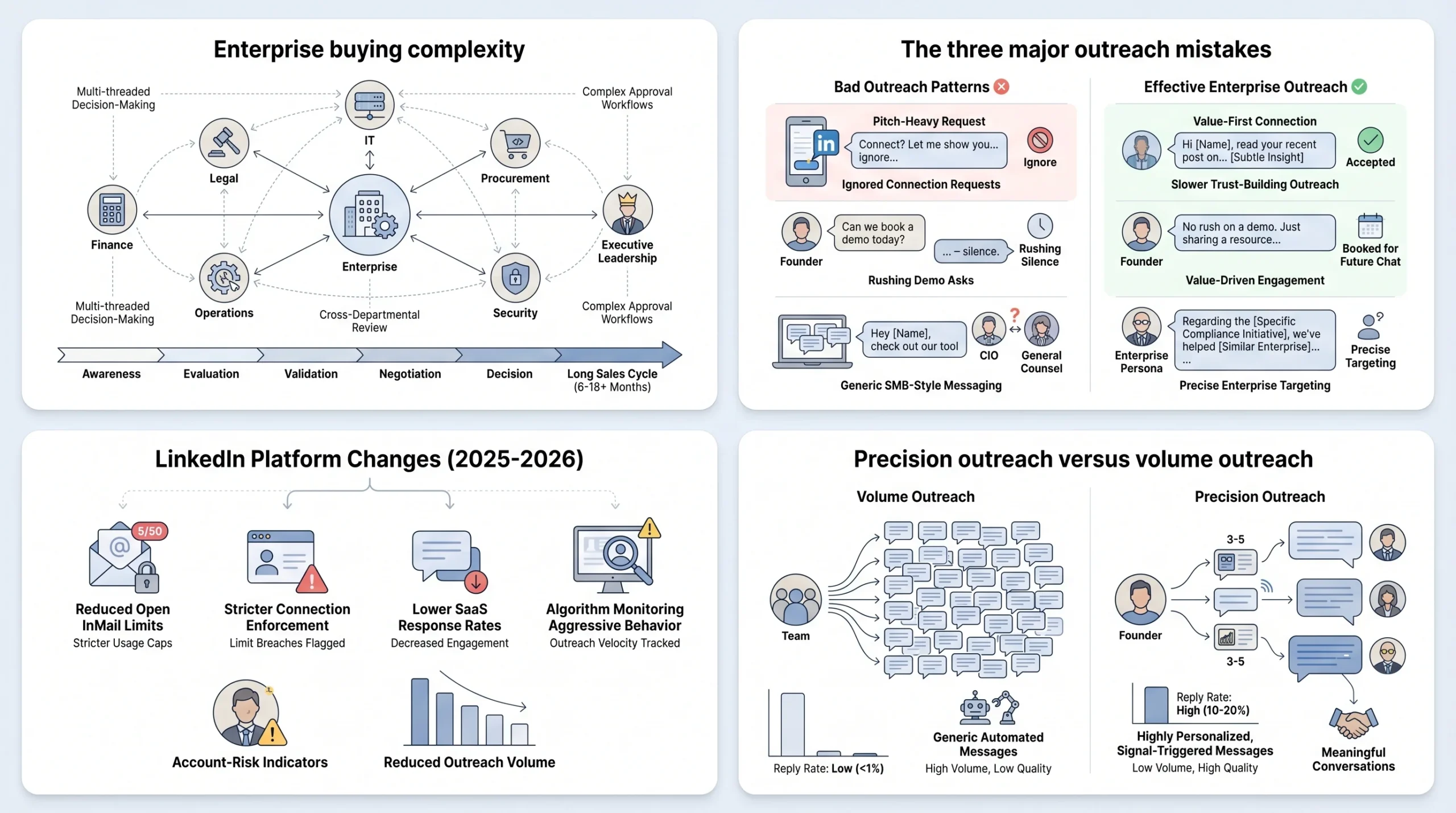
The single most common mistake SaaS founders make when moving upmarket is treating enterprise outreach as a volume problem. They increase the number of messages. They try more tools. They add more steps to the sequence. None of that works, because the problem is not volume. The problem is that enterprise buying is structurally different from SMB buying, and it requires a structurally different approach.
The average B2B buying decision in 2026 involves 8.2 stakeholders. For technology purchases at large enterprises, that number jumps significantly higher. According to research from Gartner, the average B2B buying committee now includes 6 to 10 decision-makers, each evaluating the purchase through a completely different lens: financial impact, technical feasibility, operational workflow, security and compliance, and end-user adoption. Jolly Marketer and Thunderbit data from 2025 put modern enterprise deals at 8 to 13 stakeholders when you account for all influencers in the process.
What this means practically is that even if you write a perfect message to the right person, there is a 90% chance that person cannot say yes by themselves. They need consensus. They need internal selling tools. And they need someone to have already built enough trust with the surrounding committee that the deal doesn’t die in committee before it ever reaches you for a second conversation.
Pitching to one person and hoping they “pass it up” is not a strategy. It’s wishful thinking. And for enterprise deals specifically, where procurement, legal, finance, IT, and executive approval are all layers the purchase has to move through, single-threaded outreach is the primary reason deals stall after a promising first call.
Enterprise sales cycles at the committee level typically extend 6 to 11 months from first touch to signed contract. The founders who win enterprise consistently are the ones who understand that their LinkedIn outreach is not trying to close a deal. It’s trying to open enough relationships within a target account that when evaluation begins, you are already known by the people who matter.
The 3 Mistakes SaaS Founders Make on LinkedIn
Pitching in the connection request. This is the fastest way to guarantee your request gets ignored or, worse, reported as spam. LinkedIn’s algorithm deprioritizes accounts with high report rates, and enterprise buyers at the VP and C-level have seen enough pitch-in-connection-requests to develop an immediate reflex against accepting them. A connection request with a product pitch in it signals one thing: this person is going to use this connection to sell to me. The acceptance rate collapses accordingly. Research from Salesmotion shows that blank connection requests get 55 to 68% acceptance rates versus 30% for requests with templated notes. The note is often hurting you.
Rushing the ask. Most SaaS teams pitch in message two or three. Enterprise buyers need 5 to 8 touchpoints before they are ready to talk solutions. This is not a LinkedIn rule. It is how enterprise buying psychology works. Trust at the enterprise level is built through consistency, relevance, and demonstrated understanding of the buyer’s specific context, not through a well-crafted feature summary delivered in the second message. Moving to a demo request before establishing any of that credibility produces a specific type of rejection: polite non-response. The buyer reads the message, acknowledges that you seem legitimate, but does not see a reason to give you 30 minutes of their calendar yet.
Using SMB templates on enterprise personas. The language, the framing, the call-to-action, and even the length of a message that works for a 50-person SaaS company targeting startup operators will not work for a VP of Engineering at a 5,000-person financial services firm. Enterprise buyers evaluate every inbound communication as a proxy for how you will behave as a vendor. Vague language, generic pain points, and weak calls to action read as low signal. Your message to a Head of Operations at a 50-person SaaS startup should not be the same as your message to a VP of Sales at a 5,000-employee enterprise. The ICP segmentation has to go all the way down to message copy.
The 2025/2026 LinkedIn Platform Reality Founders Must Know
The LinkedIn platform itself changed in ways that matter enormously for enterprise outreach in late 2025. LinkedIn capped Open InMail sends to under 100 per month, down from a practical limit of roughly 800. That is an 87% drop in outbound capacity overnight. The sales community collectively panicked. The response was to search for workarounds. That was the wrong response.
The teams booking the most enterprise demos on LinkedIn were never relying on volume. They were sending fewer, better messages to people who actually had a reason to respond. The cap made volume-based outreach impossible and precision-based outreach the only viable path. That is not a problem for founders running enterprise outreach. It is a competitive advantage, because now the SDRs sending 500 templated InMails per month are restricted to the same volume ceiling as the founder sending 30 carefully crafted messages.
Connection request limits are also tightening. LinkedIn has been restricting accounts that show patterns of mass connection activity, particularly when followed immediately by sales messages. This enforcement is algorithmic and account-level, meaning a restriction on one account can affect how LinkedIn treats your other accounts or company page.
The software and SaaS segment has the lowest InMail response rate of any industry: 4.77%, according to 2026 data from Salesso. The reason is saturation. SaaS professionals, particularly at the VP and C-suite level, receive more LinkedIn outreach than nearly any other professional category. They have developed pattern recognition for templated messages, and they act on it by archiving without responding. This is the specific environment your message needs to cut through.
The practical implication is this: founders sending 20 precisely crafted, signal-triggered messages to the right people at the right accounts will consistently outperform teams sending 200 generic sequences to a broadly defined ICP. The platform has made this the only path that works.
Before You Write a Single Message: The Founder’s Pre-Outreach System
Define Your Enterprise ICP With Precision
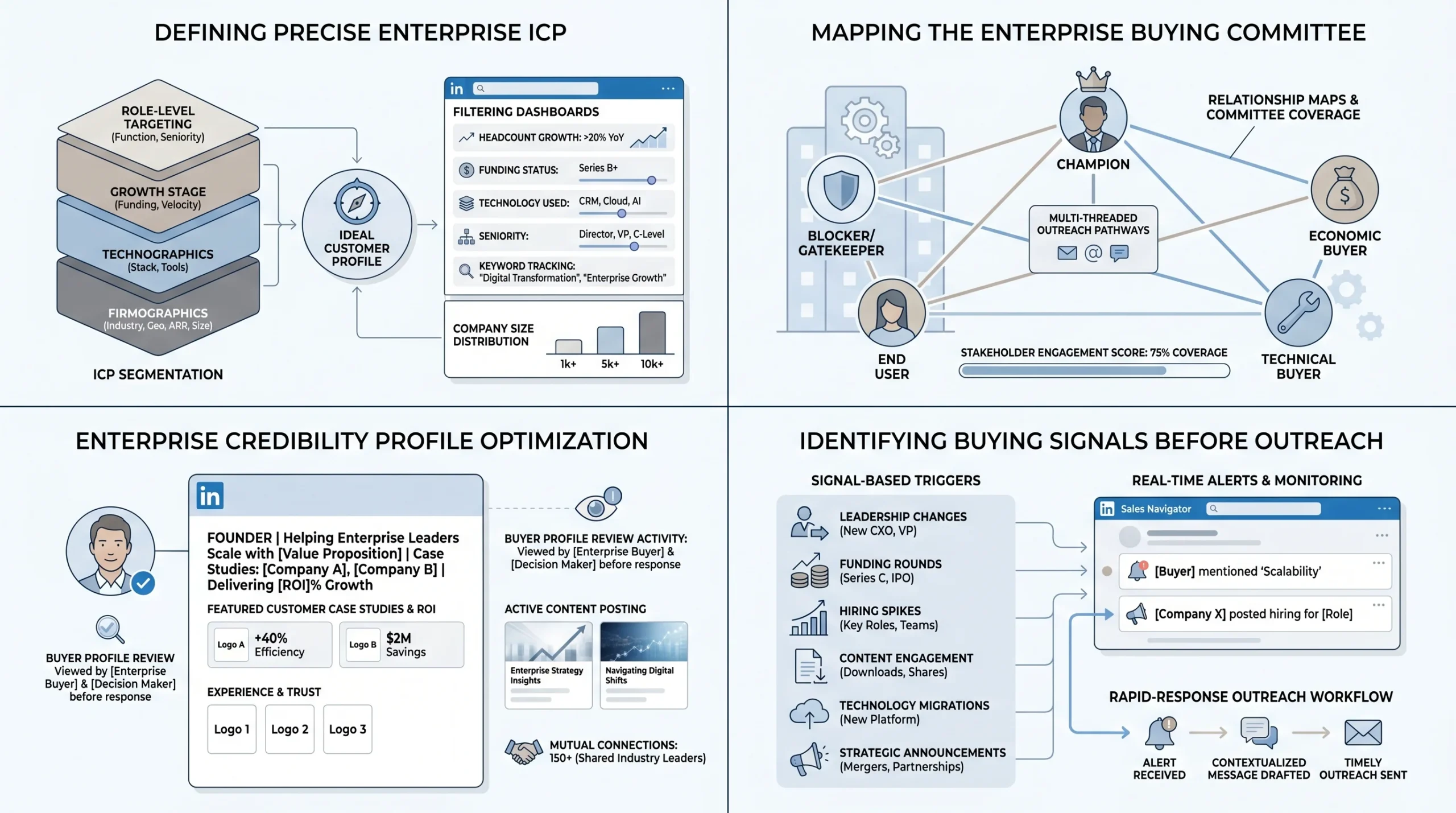
An enterprise ICP is not “companies with more than 500 employees in SaaS.” That is a LinkedIn filter, not a profile. A real enterprise ICP includes firmographic attributes, technographic attributes, behavioral signals, and role-level specificity that gets tight enough to write a message that feels personal without requiring you to spend two hours researching each prospect.
The firmographic layer covers the basics:
- Company size by headcount and ARR (not just headcount; a 200-person company doing $50M ARR is a different buyer than a 200-person company doing $5M ARR)
- Industry vertical, with sub-vertical specificity where your product performs best
- Geography and regulatory environment, especially if compliance is relevant to your product
- Growth stage: Series B, Series C, post-IPO, or PE-backed have different buying behavior, budget cycles, and risk tolerance
The technographic layer is where most founders underinvest. Knowing what tools a target account already uses tells you what your product needs to integrate with, what processes it needs to replace, and what language to use when describing the problem. Tools like HG Insights, BuiltWith, and LinkedIn’s own job posting data (which reveals the tools teams are hiring experience with) give you technographic signals without requiring a sales call.
The role-level layer means getting specific about which title at which function owns the problem you solve. Your message to a Head of Operations at a 50-person SaaS startup will be wrong for a VP of Sales at a 5,000-employee enterprise even if both titles are technically your ICP. The pressures, vocabulary, KPIs, and internal politics are completely different. Build separate ICP profiles for each role you target within a buying committee, and write each message to that profile specifically.
Sales Navigator gives you the filtering infrastructure to operationalize a precise ICP. Use it for:
- Headcount growth rate (companies growing fast are spending and hiring, which means budget exists and problems are multiplying)
- Recently funded (funding rounds trigger vendor evaluation cycles)
- Technology used (LinkedIn surfaces some of this through profile data and job descriptions)
- Seniority level and department (essential for buying committee targeting)
- Posted content keywords (for identifying active, engaged buyers)
Map the Enterprise Buying Committee Before Outreach
The buying committee mapping step is what separates founders who book enterprise demos from those who have interesting first conversations that go nowhere. Before sending a single message to a target account, you need to know who is in the buying committee, what role each person plays, and in what order to approach them.
According to research from Landbase published in 2026, for enterprise accounts with more than 1,000 employees, you should aim to identify five to eight contacts across at least three buying committee roles. The goal is coverage across roles, not maximum volume. One well-identified economic buyer is more valuable than five contacts in the same department.
The five roles every SaaS founder must map per target account are:
- Champion: The person who experiences the problem your product solves and who will advocate for you internally. They need to feel confident selling your solution without you in the room. Your Champion is often a Director or Senior Manager, not a C-suite executive.
- Economic Buyer: The person who controls the budget and makes the final financial decision. This is usually a VP, SVP, or C-suite executive. They evaluate through ROI, payback period, and strategic alignment. They may not attend your first demo but will appear at the approval stage.
- Technical Buyer: The stakeholder who assesses whether your product works within the existing technology environment, evaluates integration requirements, and assesses security posture. Often a Director of Engineering, VP of IT, or Solutions Architect.
- End User: The practitioner who will use your product daily. Their concerns are about workflow change, learning curve, and whether the tool will make their job easier or harder. Winning the end user is critical for adoption and renewal even if they don’t control the purchase decision.
- Blocker or Gatekeeper: The person whose objections, if unaddressed, will kill the deal. This could be procurement, legal, an IT security team, or a senior executive who owns a competing budget priority. Identifying blockers before the deal stage is far better than discovering them after your Champion presents internally.
Research from ABM firm Attainment confirms that deals with three or more engaged stakeholders close at significantly higher rates than single-threaded deals. Building committee coverage before the deal is formally open is the work that makes enterprise pipelines close.
The sequence in which you approach the committee matters. Start with the Champion and Economic Buyer. These two roles establish whether there is real interest and real budget. Once you have engagement from either, bring in the Technical Buyer with outreach that references what you’ve discussed with the Champion. Use your Champion as a referral pathway to other stakeholders where possible, because a warm introduction from an internal advocate converts significantly faster than cold outreach to a committee member who doesn’t know your product is being evaluated.
Optimize Your LinkedIn Profile for Enterprise Credibility
Enterprise buyers do not respond to messages before reviewing your profile. This is not a theory. It is behavioral. When a VP or Director at a 2,000-person company receives a LinkedIn message from an unfamiliar founder, the first thing they do is click the profile. If the profile does not immediately signal credibility, relevance, and legitimate operator experience, the message gets archived.
Your headline is the first thing they see in the message notification before they even open the conversation. “Founder & CEO at [Company Name]” tells them almost nothing. A headline that says “Helping enterprise ops teams cut manual reporting time by 60% | Founder at [Company Name]” tells them exactly what you do and for whom. The specific outcome in the headline does the same job as a subject line in cold email. Write it for your ICP, not for your resume.
Your featured section should function as a proof-of-concept portfolio. Enterprise buyers are evaluating your credibility as a vendor, not just your credibility as a person. Use the featured section for:
- Case study links showing measurable outcomes at named companies (with permission)
- ROI metrics from existing customers, formatted clearly (time saved, revenue generated, cost reduced)
- Customer logos you’re allowed to display
- A short product demo video under 90 seconds that shows rather than explains
Your About section is written for the buyer, not for a recruiter. Open with the problem you solve and who has it. State the outcome you deliver and provide one or two specific examples with numbers. Close with a soft invitation to connect or learn more. The About section should read like a letter written to your ideal customer, not a professional biography.
Social proof signals matter more for enterprise buyers than for any other segment. Before responding to a cold message, enterprise buyers typically check whether you have mutual connections, whether those mutual connections are credible in their industry, whether your company has a LinkedIn page with real employees, and whether you have posted content recently that demonstrates knowledge of their domain. A founder with 500 connections, no posts in six months, and no mutual connections with the prospect will not get the same response rate as a founder with an active, well-connected profile who clearly operates in the prospect’s world.
Identify Buying Signals Before Sending Message One
Signal-based outreach is the core discipline that separates enterprise LinkedIn outreach that works from outreach that burns through your InMail credits with nothing to show. A buying signal is any event or behavior at a target account that indicates the company is in a moment of change, growth, or pain that makes them more likely to need your product right now.
According to Salesmotion data from 2026, signal-driven outreach, timed to specific buying signals like funding rounds, leadership changes, and strategic shifts, achieves 15 to 25% response rates compared to 1 to 2% for generic templates. That is a 10x to 15x difference in outcome from the same message volume, driven entirely by timing.
The specific signals that generate the highest response rates include:
- Leadership changes: A new VP of Sales, CRO, or Head of Revenue Operations almost always reassesses existing tools and vendor relationships within their first 90 days. Reaching out during this window generates 3 to 4 times higher response rates than cold outreach to established leaders. New leaders are actively looking for quick wins and have political cover to make vendor changes that an entrenched leader would not.
- Hiring patterns: When a company posts multiple roles in a specific function, it signals investment and almost always reveals pain points. A company hiring five SDRs probably needs better prospecting tools. A company posting three DevOps roles is likely scaling infrastructure and evaluating their tech stack. The job descriptions themselves often name the specific tools the team is hiring experience with, which tells you exactly what your product competes with or integrates with.
- Funding and financial events: A Series B announcement with a CEO quote about “tripling the sales team by end of year” is not just a piece of news. It is a vendor evaluation trigger. Companies that just raised are spending. They’re building new functions. They’re replacing tools that worked at an earlier scale. Referencing specific financial context in your outreach signals that you follow their business and have done real research, not that you pulled their name from a list.
- Content activity: When a prospect publishes a LinkedIn post about a specific challenge, comments in detail on a post about a problem your product solves, or engages with content in your domain, they are self-identifying as someone who thinks about this problem actively. That is the closest thing to a hand-raise you can get without a form fill.
- Technology changes: When a company stops using a tool your product replaces or integrates with, or when they announce a migration to a platform your product connects with, the window for outreach is immediate.
Building a signal-ready outreach queue means monitoring these triggers before you need them. Use LinkedIn Sales Navigator alert feeds for job changes and company news. Set Google alerts for funding announcements, press releases, and executive appointments at target accounts. Track competitor-named job postings using LinkedIn search filters. When a signal fires, your message should go out within 24 to 48 hours. The relevance window on most signals is short.
LinkedIn Message Architecture for Enterprise Demo Booking
The Anatomy of a Message That Books Enterprise Demos
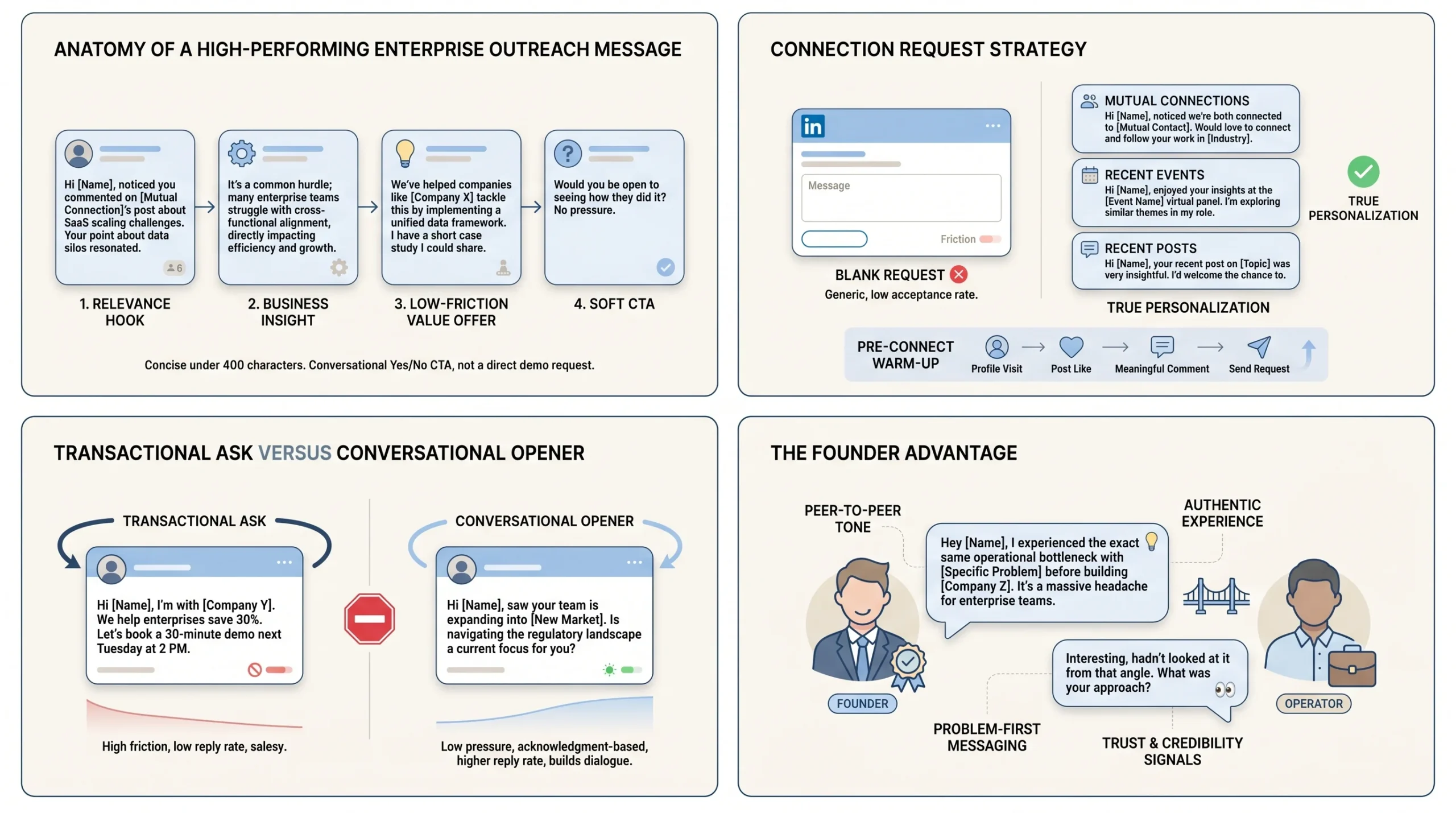
Every LinkedIn message that books an enterprise demo has four components working together: a relevance hook that shows you did specific research on this person or company, a specific insight about their business or situation that demonstrates you understand their world, a low-friction value offer that gives them a reason to respond without committing to anything, and a soft call to action that asks for the next step without demanding a demo.
The relevance hook is the opening line, and it carries the entire weight of whether the message gets read past the first sentence. Generic openers like “I came across your profile and was impressed by your background” or “I noticed we’re both in the SaaS space” are the message equivalents of a cold call that opens with “How are you today?” They signal immediately that the sender sent the same message to 200 other people. Specific openers reference something real: a post the person published, a product announcement their company made, a mutual connection, a hiring pattern you noticed, or a funding event you saw.
Message length is a measurable variable, not a stylistic preference. Messages under 400 characters get a 22% boost in response rates. Messages over 1,200 characters see an 11% decline. At the enterprise buyer level, this is even more pronounced because C-suite and VP-level contacts read messages on mobile between meetings, not at a desk with time to absorb a paragraph. The target for an opening LinkedIn message is 3 to 5 sentences. Every word beyond that is a sentence your prospect is choosing not to read.
The call to action in a first message should never be “book a 30-minute demo.” That ask requires the prospect to evaluate your entire product proposition, decide it’s worth 30 minutes of their calendar, check availability, and take a scheduling action, all before you’ve established any context for why those 30 minutes would be valuable. The friction is too high. The CTA that works in a first message is a yes/no question that takes three seconds to answer: “Does this match something your team is working through right now?” or “Would a quick note on how we’ve handled this for [similar company] be useful?”
The difference between a transactional ask and a conversational opener is not about tone. It is about what you are requesting. A transactional ask requests time. A conversational opener requests acknowledgment. Acknowledgment is a much lower bar, and once a prospect has responded, even with a short answer, the conversation has started. Getting to a second exchange is far more valuable than attempting to get a demo commitment in a single message.
Connection Request Strategy
The connection request is the first communication, and the decision you make here sets the tone for everything that follows. The core question is whether to send a personalized note or a blank request.
Research from Salesmotion shows that blank connection requests get 55 to 68% acceptance rates compared to roughly 30% for requests with templated notes. The reason is counterintuitive: most personalized notes are not actually personal. They are templates with a name inserted. Enterprise buyers recognize this pattern immediately because they receive dozens of them every week. A blank request signals less risk. It says “I’m not immediately going to pitch you” even if it says nothing else.
The cases where a personalized note outperforms a blank request are specific:
- You have a genuine mutual connection and are referencing that relationship
- You attended the same event, conference, or webinar recently and can reference it specifically
- The person published content in the last 48 hours that you are genuinely engaging with
- You have a specific, non-templated observation about their company that cannot wait until after the connection
In these cases, the note works because it is actually personal, not because it follows a “personalization formula.” The test is simple: could you send this note to anyone else in your ICP without changing more than the name? If yes, send a blank request.
Warming up before connecting is a practice that improves acceptance rates across the board. Visiting a prospect’s profile, liking a post they published, or leaving a substantive comment on their content before sending a connection request puts your name in their notification feed before the request arrives. This is not manipulation. It is the LinkedIn equivalent of shaking someone’s hand at a conference before handing them your card. Expandi’s data from their 2025 State of LinkedIn Outreach report shows that Builder Campaigns, which automate warmup actions before connection requests, achieve a 22% connection approval rate and 7.22% reply rate, exceeding cold email outreach performance.
The Founder Advantage: Using Your Story, Not Your Sales Script
The single greatest asset a SaaS founder has in LinkedIn outreach is the authenticity of their position. You built the product. You know why you built it. You understand the problem at a depth that no SDR who read a product brief can replicate. Enterprise buyers, particularly operators who have managed large teams and evaluated dozens of vendors, can tell the difference between someone who understands their problem and someone who is performing understanding.
Referencing your own founder journey creates a peer relationship rather than a vendor relationship. When you write to a VP of Operations and say “We built this because we were running ops at [type of company] and kept hitting [specific problem],” you are not selling. You are telling someone who lives that problem that you have been in their position. That framing is disarming in a way that product pitches are not.
Peer-to-peer framing is the tone enterprise buyers respond to most reliably. Write as a fellow operator, not as a vendor. This means:
- Acknowledging that you know their time is limited and you’ll be brief
- Referencing the problem before the solution, and describing the problem in language their team actually uses
- Being willing to admit when your product is not the right fit for a specific situation, which signals that your recommendation is trustworthy when you do say it fits
The question of when to mention your company versus leading with the problem depends on your brand recognition. If your company name means something to enterprise buyers in your space, use it. If you are pre-brand at the enterprise level, lead with the problem and let the conversation surface the product naturally. Forcing the company name into the first sentence of a message to someone who has never heard of you creates cognitive overhead at exactly the moment you need their attention.
15 LinkedIn Message Templates for SaaS Founders (By Persona and Scenario)
Each template below includes a connection request note, the opening message, a follow-up sequence, and persona notes explaining who the template is for and why each element is structured the way it is.
Templates for the Champion (Your Internal Advocate)
Template 1: The Mutual Pain Point Opener
Target persona: Director-level operator who is actively experiencing the problem your product solves. They post about it, comment about it, or have written about it in a job description. They are not the budget owner, but they are the person who will build the internal case for your product.
Signal: A LinkedIn post, comment, or article they published in the last 30 days that describes a pain point your product addresses directly.
Connection Request Note:
Your post on [specific topic they wrote about] put words to something I’ve been thinking about a lot. Built something that approaches it differently. Sending a connection request in case it’s useful.
Opening Message:
Hi [First Name], [specific line from or about their post] caught my attention because it’s the exact thing that pushed us to build [product name].
We’re working with [type of company similar to theirs] to [specific outcome in their language, not product language]. The approach is different from what most teams try first.
Is this something you’re actively working through, or more of a longer-term problem for your team right now?
Follow-up sequence:
Follow-up 1 (Day 4):
Hi [First Name], just circling back on my last message. Put together a short breakdown of how [similar company] approached this, including what didn’t work before they found a system that did. Happy to send it over if useful.
Follow-up 2 (Day 11):
[First Name], one more note before I stop reaching out. We just published a case study on how [company in their vertical] cut [metric] by [percentage] in [timeframe]. Figured it might be worth a read even if the timing isn’t right for a conversation. Here’s the link if you want it.
Follow-up 3 (Day 22):
Hi [First Name], I’ll keep this brief. If this isn’t a priority right now, completely understand. If circumstances change, I’m happy to reconnect whenever the timing makes sense. Either way, your post on [topic] was worth the read.
Persona note: Champions need to feel confident that this conversation will make them look smart internally, not put them in an awkward position. The opening message validates their thinking, which builds goodwill. The follow-ups add value rather than repeating the ask, which maintains the relationship without burning it.
Template 2: The Relevant Content Share
Target persona: A Champion who is active on LinkedIn, publishes content in your domain, and is clearly someone who thinks publicly about the problem your product solves.
Signal: They published content about a topic where your product provides a direct solution or insight.
Connection Request Note:
Your [post/article] on [topic] is the most direct description of [problem] I’ve seen from an operator. Connecting to follow your thinking.
Opening Message:
Hi [First Name], I’ve been reading your posts on [topic area] for a while. Your take on [specific point they made] is one I share and it’s exactly why we built [product name] the way we did.
We ran into the same problem at [describe founding context briefly] and built around [specific principle or approach that differs from the obvious solution].
I put together a short piece on [related problem or insight] that’s directionally similar to what you’ve been writing about. Would it be useful, or would you rather I just send a quick note on how we’ve approached it?
Follow-up sequence:
Follow-up 1 (Day 5):
Hi [First Name], sent over a quick note last week. Attaching a two-page summary of what [type of company] has done differently to solve [problem]. Worth a read if you’re thinking about this for your team.
Follow-up 2 (Day 14):
[First Name], one last follow-up from me. If your content is any indication, you’re the kind of operator who has probably already tried [common solution that doesn’t work]. We’ve documented why that approach breaks above a certain scale. Happy to share the writeup if you’re curious.
Persona note: Active LinkedIn publishers respond to engagement with their ideas, not pitches. Leading with genuine acknowledgment of their thinking is not flattery. It is qualification. If you cannot reference something specific they wrote, do not use this template.
Template 3: The Peer Reference (Warm Path)
Target persona: A Champion at a target account where you have a mutual connection who is a current satisfied customer or a credible shared contact.
Signal: LinkedIn shows a mutual connection who you know would speak positively about you or your product.
Connection Request Note:
[Mutual connection’s name] mentioned your name recently, thought it would be worth connecting directly.
Opening Message:
Hi [First Name], [Mutual connection’s name] suggested I reach out after we were talking about [relevant topic or company context]. She thought you might find what we’re doing relevant, given what your team is focused on.
We help [company type] [specific outcome in one line]. [Company name] at [mutual’s company] has been using it for [timeframe] and has seen [specific result].
Would a short note on what they’ve done differently be useful, or would it make more sense to have [mutual connection] loop us in on a call?
Follow-up sequence:
Follow-up 1 (Day 5):
Hi [First Name], following up from my last message. I can also ask [mutual connection] to make a proper introduction if that would be more comfortable. Either way, happy to share some context on what they’ve been doing first.
Follow-up 2 (Day 14):
[First Name], last note from me. If the timing isn’t right, no problem at all. I’ll let [mutual connection] know I reached out. If your priorities shift, feel free to reach back out.
Persona note: The warm path template carries the most weight of any opener because a mutual connection reduces the credibility gap to near zero. Never fabricate or exaggerate the nature of the mutual relationship. Enterprise buyers will verify.
Templates for the Economic Buyer (Budget Owner)
Template 4: The ROI-Led Opener
Target persona: A VP, SVP, or C-suite executive who controls the budget relevant to your product. They evaluate every vendor request through an ROI and strategic alignment lens. They are time-poor and inbox-saturated.
Signal: A recent funding announcement, quarterly earnings release, or press interview where the executive references a growth goal or strategic priority your product directly supports.
Connection Request Note:
Sending a blank request here, no pitch attached.
Opening Message:
Hi [First Name], saw the [company name] announcement about [specific growth goal or event]. Congratulations on [specific achievement].
We work with [type of company at similar stage] on [outcome related to their stated goal]. One of them, [company name if sharable], moved from [before state] to [after state] in [timeframe], which freed up budget to [downstream outcome].
If hitting [their goal] is a priority this quarter, I have 15 minutes of context that might change how you’re thinking about [specific function or metric]. Is there room on your calendar for a brief call?
Follow-up sequence:
Follow-up 1 (Day 5):
Hi [First Name], following up quickly. I put together a one-page summary on how [similar company] achieved [relevant outcome]. I can send it over without a call if that’s more useful at this stage.
Follow-up 2 (Day 12):
[First Name], last message from me. If [goal] isn’t the immediate priority, completely understand. I’ll save the context for when the timing is better. If it shifts, I’m easy to find.
Persona note: Economic buyers respond to specificity about outcomes, not feature descriptions. Every sentence in this template should reference something measurable. “Might help” is weak language. “Moved from X to Y in Z” is the language that gets a read-receipt turned into a reply.
Template 5: The Competitive Intelligence Angle
Target persona: Economic buyer at a company you know is actively evaluating competitors in your space or recently engaged with competitor content.
Signal: They followed a competitor’s LinkedIn company page, liked a competitor’s content, or are running job postings that mention a competing tool by name.
Connection Request Note:
Connecting to follow what [company] is building. No pitch in mind, just relevant context.
Opening Message:
Hi [First Name], I noticed [company] has been looking closely at [competitor space or tool]. Makes sense given where you’re focused.
We’ve worked with several companies who evaluated [competitor name] before going a different direction. The difference often comes down to [specific differentiator that is genuinely meaningful at their company size or use case].
Worth a 20-minute conversation before you make a final decision? Happy to walk through how we compare honestly, including where [competitor] is the better fit.
Follow-up sequence:
Follow-up 1 (Day 4):
Hi [First Name], sent a note last week about the evaluation you may be running. One thing worth considering before you decide: [one specific technical or commercial point of differentiation]. Happy to put that in writing if helpful.
Follow-up 2 (Day 10):
[First Name], final note from me. If you’ve already made a decision, I completely respect that. If the evaluation is still open, I’m confident 20 minutes would be worth your time. Here’s my calendar link if that’s useful: [link].
Persona note: This template only works if your intelligence on the competitive signal is accurate. Do not guess. If you are not certain they are evaluating competitors, do not use this framing. A misread signal signals that you are not doing real research, which is worse than a generic opener.
Template 6: The “We Work With Companies Like Yours” Frame
Target persona: An economic buyer at a company that closely matches your best existing customers in terms of size, stage, industry, and growth trajectory.
Signal: Firmographic match. Their company is nearly identical to accounts you already have as customers, including the ICP attributes that correlate with successful outcomes.
Connection Request Note:
Your profile came up when I was researching [industry] companies at [stage/size range]. Connecting to follow what [company] is building.
Opening Message:
Hi [First Name], we’ve been working closely with [two or three company types or named companies if allowed] at a similar stage to [company]. The patterns that come up repeatedly are [specific challenge].
What they’ve found is that [brief, specific insight about what works at their stage and size, not a product feature]. I thought it might be useful context for [company] given where you’re headed.
Would a quick conversation on how they’ve approached this be useful? Not a demo at this point, just context.
Follow-up sequence:
Follow-up 1 (Day 6):
Hi [First Name], quick follow-up. I can also just send the summary of what [company type] typically does at this stage without a call. Happy to work however is easier for you.
Follow-up 2 (Day 15):
[First Name], one last note. If now isn’t the right moment, I’ll check back in a quarter or two. We’re typically most useful when [specific trigger or milestone] is approaching, so feel free to reach out if that timing comes up.
Templates for the Technical Buyer (Integration and Security Gatekeeper)
Template 7: The Technical Credibility Opener
Target persona: A CTO, VP of Engineering, Head of IT, or Director of Security who evaluates whether your product works within their existing technology environment. They are skeptical by profession and respond to technical specificity, not business value claims.
Signal: Their team is hiring for roles that indicate a technical pain point your product addresses, or their job postings reference a specific technology your product integrates with.
Connection Request Note:
Connecting because [company’s] infrastructure choices are interesting. No pitch attached.
Opening Message:
Hi [First Name], noticed [company] is hiring [specific role] and the job description mentions [specific tool or challenge]. We’ve done a fair amount of work in that environment.
For teams running [their tech stack or infrastructure approach], the integration challenge that comes up most often is [specific technical pain point, described in engineering language, not sales language].
We’ve built a native integration with [their tech stack] that handles [specific use case]. Would it be useful to see how [similar company] implemented it? No sales call, just a technical walkthrough from our side.
Follow-up sequence:
Follow-up 1 (Day 5):
Hi [First Name], following up from last week. I can also send over our security documentation and integration spec without a call if that’s easier to review asynchronously first.
Follow-up 2 (Day 13):
[First Name], last follow-up from me. If the integration isn’t a priority right now, no problem. I’ll save the technical context for when it is. Our docs are public at [link] if you want to review on your own time.
Persona note: Technical buyers do not need to be sold. They need to be respected. The framing of “no sales call, just a technical walkthrough” removes the primary objection before they voice it. Leading with their hiring signal shows you did real research, which technical buyers specifically appreciate because it means you are not wasting their time with a product pitch for something that cannot work in their environment.
Template 8: The “No-Disruption” Frame for Risk-Averse Technical Buyers
Target persona: Enterprise IT leaders who are concerned primarily about implementation complexity, system stability, and the risk of adopting a new tool that might create more problems than it solves.
Signal: Their tech stack, visible through job postings or LinkedIn profile data, shows legacy infrastructure, a complex integration environment, or evidence of past implementation failures with vendors.
Connection Request Note:
Connecting because [company’s] infrastructure setup is one we’ve worked with. Sending in case the context is useful.
Opening Message:
Hi [First Name], we work with [company type] running [their type of infrastructure]. The most common concern we hear from IT teams before they evaluate us is whether implementation will require dedicated engineering resources.
The short answer is no, and I can walk through exactly why in about 10 minutes. [Similar company] ran a full implementation with [their size team] in [timeframe] without touching their core stack.
Would a written summary of the implementation process be useful as a starting point?
Follow-up sequence:
Follow-up 1 (Day 6):
Hi [First Name], I put together a one-page implementation overview specifically for teams running [their environment]. Happy to send it over without any follow-up call required.
Follow-up 2 (Day 14):
[First Name], one last note. If implementation risk is a concern, our approach is designed around it. The documentation is available at [link] whenever the timing is right.
Templates for the End User (Practitioner)
Template 9: The Day-in-the-Life Opener
Target persona: An individual contributor or team lead who would use your product daily. They don’t control the budget, but they influence the Champion’s internal case and their adoption rate determines whether your product delivers the outcomes you promised.
Signal: A job posting for their role reveals a specific manual process, tool gap, or workflow bottleneck your product removes.
Connection Request Note:
Your role at [company] came up in some research I was doing on [function]. Connecting to see if there’s something useful to share.
Opening Message:
Hi [First Name], I was looking at how [company] structures [function] and noticed [specific workflow detail visible from job posting or profile]. That’s exactly the kind of setup where [specific pain point] tends to show up.
We built [product name] specifically for [role type] at companies running [their approach]. The part that [role type] usually appreciates most is [specific workflow improvement, not a feature name].
Would it be useful to see a short walkthrough of how it works for someone in your position?
Follow-up sequence:
Follow-up 1 (Day 5):
Hi [First Name], following up from last week. I can share a 3-minute screen recording that shows [specific workflow improvement] in action. No call required. Would that be worth a look?
Follow-up 2 (Day 14):
[First Name], last follow-up from me. If [pain point] isn’t something you’re dealing with right now, completely understand. If it comes up down the road, feel free to reach out.
Template 10: The Community or Peer Proof Opener
Target persona: A practitioner who is active in LinkedIn groups, industry Slack communities, or professional networks relevant to your product. They are socially engaged and respond to peer-level credibility signals.
Signal: They commented substantively on a post related to your product’s domain, asked a question in a LinkedIn group, or published content about a challenge your product addresses.
Connection Request Note:
Saw your comment on [post or group topic]. The question you raised is one we’ve spent a lot of time on. Connecting to share some context.
Opening Message:
Hi [First Name], your comment on [specific post or topic] about [specific point they made] raised exactly the question we hear most from [their role type].
What most people try first is [common approach]. What we’ve found, and what [number] of [similar role types] we work with have found, is that [specific insight that reframes the problem].
Happy to share what’s worked. Would a short note on the approach be useful?
Follow-up sequence:
Follow-up 1 (Day 5):
Hi [First Name], sent a note last week on [topic]. I put together a quick summary of how [peer company type] approached the same question. Happy to share it if the timing is right.
Follow-up 2 (Day 14):
[First Name], last message from me. The post that prompted my first note is still live at [link] if the context was useful. Happy to reconnect whenever it’s relevant.
Templates Triggered by Specific Buying Signals
Template 11: The Funding Announcement Message
Target persona: A CRO, VP of Sales, VP of Operations, or COO at a company that just announced a funding round, particularly a Series B or C where the announced use of funds includes scaling go-to-market, expanding headcount, or entering new markets.
Signal: A funding announcement within the past 30 days, ideally one where the CEO or relevant executive made a public statement about growth plans that your product directly supports.
Connection Request Note:
Congrats on the [Series X] round. Connecting because what you’re building next is relevant to something we’ve been working on.
Opening Message:
Hi [First Name], congratulations on the [Series X] close. [Specific quote or detail from the announcement, such as a headcount goal or market expansion plan] is the kind of milestone we see consistently correlated with [specific operational challenge your product solves].
We’ve helped three companies navigate the same scaling moment at [similar ARR or headcount]. The consistent theme is [specific insight about what breaks at that scale].
If this is something your team is working through, a 15-minute conversation might save a few months of trial and error. Would that be useful?
Follow-up sequence:
Follow-up 1 (Day 4):
Hi [First Name], quick follow-up on my last note. The window right after a round closes is usually when [specific pain your product solves] moves from a minor friction to a blocker. Happy to walk through what that typically looks like and how other teams have handled it.
Follow-up 2 (Day 10):
[First Name], last note from me on this. If the timing isn’t right yet, completely understand. As you build out the [relevant function], feel free to reach out. This is where we’re most useful.
Persona note: The funding trigger has a short relevance window. Send within 24 to 48 hours of the announcement, when the executive’s inbox is full of congratulations and your message is competing with genuine goodwill rather than generic outreach. The fact that you reference the specific announcement details immediately signals that this is not a scheduled mass campaign.
Template 12: The Leadership Change Message
Target persona: A newly appointed VP, SVP, or C-level executive in a function where your product is relevant. Research from Salesmotion confirms that new leaders in these roles almost always reassess existing tools and vendor relationships within their first 90 days. Reaching out during this window generates 3 to 4 times higher response rates than cold outreach to established leaders because new leaders are actively looking for quick wins and have political cover to make vendor changes.
Signal: LinkedIn’s “New position” notification, a company press release, or a change visible in the prospect’s LinkedIn profile within the last 60 days.
Connection Request Note:
Saw the announcement about your new role at [company]. Connecting because the context I have may be useful early in your tenure.
Opening Message:
Hi [First Name], congratulations on joining [company] as [title]. The first 90 days in a [CRO/VP/Head of X] role at a company at [their stage or size] tend to surface the same two or three friction points consistently.
We work specifically with [title type] at [company size/stage] on [outcome]. One thing that comes up early for most people in your role is [specific pain point relevant to your product and their function].
Happy to share what the first few months look like for people in similar positions, without a product pitch attached. Would that be useful?
Follow-up sequence:
Follow-up 1 (Day 5):
Hi [First Name], following up from last week. I can also share a short summary of how other [title types] at [similar companies] have approached the first 90 days operationally. No agenda beyond sharing useful context.
Follow-up 2 (Day 14):
[First Name], last note from me. If the onboarding period is consuming all available bandwidth right now, completely understand. Happy to reconnect in a month or two when things have settled. Good luck in the new role.
Persona note: New executives are simultaneously eager to make an impact and cautious about being sold to before they’ve assessed the landscape. The framing of “without a product pitch attached” removes the primary resistance. Be careful about being too transactional here. The goal of the first message is a relationship, not a demo.
Template 13: The Hiring Signal Message
Target persona: The head of a department that is actively expanding, indicated by multiple job postings in a specific function. The hiring signal tells you where a company is investing and often reveals the operational pain that investment is trying to address.
Signal: A target company is posting multiple roles in a specific function. A company hiring five SDRs probably needs better prospecting tools. A company posting three data engineering roles is likely scaling their data infrastructure. The job descriptions themselves reveal the specific pain because they describe what the new hire will solve.
Connection Request Note:
Noticed [company] is building out [function]. Connecting because we work in that space.
Opening Message:
Hi [First Name], I noticed [company] is hiring [number] [role titles] right now. The job descriptions mention [specific tool, challenge, or workflow detail] which is something we work on directly.
When teams scale [function] from [current state they appear to be at] to [next stage], [specific challenge] tends to become a bottleneck before the headcount fills in. We’ve helped [similar company] navigate that transition specifically.
Would it be worth a 15-minute conversation before you make the next few hires? Might change what you’re optimizing the role for.
Follow-up sequence:
Follow-up 1 (Day 5):
Hi [First Name], quick follow-up from last week. I can share a short breakdown of how [similar company] structured their [function] hiring to avoid the most common bottleneck. No call required, happy to put it in writing.
Follow-up 2 (Day 13):
[First Name], last note. If the hiring is moving quickly and there’s no room for a conversation right now, I understand. If you’re still building the function over the next quarter, I’d be glad to reconnect when there’s more room to think about the infrastructure behind it.
Template 14: The Event or Conference Trigger
Target persona: A prospect who attended, spoke at, or publicly engaged with a relevant industry event. The shared context creates a natural, low-friction opening that is neither cold nor presumptuous.
Signal: They published a LinkedIn post about an event, were listed as a speaker on an event website you can reference, or their content activity shows engagement with conference-specific hashtags in the last 30 days.
Connection Request Note:
Saw you spoke at [event name]. Connecting because the topic is directly related to something we’re working on.
Opening Message:
Hi [First Name], your [talk/post/panel] at [event name] on [specific topic] made it into my reading queue right away. Your point about [specific idea they shared] is one that doesn’t get discussed enough in [their space].
We work on [related problem] for [company type]. Based on what you shared at [event], there’s a direct overlap with how we approach [specific element].
Would a short conversation on how [similar company] is applying the same thinking make sense? Happy to work around your calendar.
Follow-up sequence:
Follow-up 1 (Day 6):
Hi [First Name], following up from last week. I also put together a short breakdown of how [their event topic] applies in a [specific context relevant to their company]. Happy to send it without a call if that’s easier.
Follow-up 2 (Day 15):
[First Name], last note from me. If the timing isn’t right for a conversation, completely understood. Your talk at [event] was worth the time regardless. Happy to reconnect whenever it makes sense.
Persona note: Event-based outreach has a 2 to 3 week relevance window before the connection feels opportunistic rather than timely. If you are referencing something that happened more than 30 days ago, acknowledge the gap directly or use a different template.
Template 15: The Post-Comment Engagement Opener
Target persona: A prospect who commented on a LinkedIn post with a specific question, pain point, or observation that reveals a challenge your product addresses directly. This is the closest to a hand-raise you can get without a form fill on your website.
Signal: Their comment on a LinkedIn post reveals a specific pain point, challenge, or problem your product solves. The comment should be substantive enough that you can reference the specific content, not just the fact that they commented.
Connection Request Note:
Your comment on [post topic] raised a specific question we’ve spent a lot of time on. Connecting to share some context.
Opening Message:
Hi [First Name], I saw your comment on [author’s name]’s post about [topic]. Your question about [specific thing they asked or said] is one we hear from [their role type] at [company type] regularly.
The short answer most people expect is [common answer]. What we’ve actually found is [contrarian or more nuanced insight based on what your product knows about this problem].
Happy to share how [similar company] approached it. Would a short note on their process be useful?
Follow-up sequence:
Follow-up 1 (Day 5):
Hi [First Name], following up from last week. I put together a two-page summary of the approach [similar company] used to address exactly the question you raised. Happy to send it without a call.
Follow-up 2 (Day 13):
[First Name], last message from me. If [topic from their comment] isn’t the current priority, completely fine. If it comes back up, I’m easy to find.
Persona note: This template works because the prospect has publicly self-identified as someone who has this problem. The qualification work is already done. The only job of the message is to be genuinely useful rather than to exploit the signal opportunistically. If your answer to their question adds no value beyond what the original post contained, do not use this template.
The Follow-Up Sequence: Turning Silence Into Booked Demos
Why Follow-Ups Are Where Enterprise Demos Are Actually Won
Silence is not rejection. This is the single most important reframe for any SaaS founder doing enterprise LinkedIn outreach. When a VP of Sales at a 3,000-person company does not respond to your first message, the most likely explanation is not that they evaluated your offer and declined. It is that they saw the message, meant to respond, and then had three internal fires, a board prep call, and a quarterly business review consume the next 10 days.
Research from Outreaches.ai analyzing millions of cold outreach campaigns found that 55% of replies come from follow-up messages, not first messages. That number is not a reason to send aggressive follow-up sequences. It is a reason to send patient, value-adding follow-ups that give the prospect a genuine reason to respond each time.
The enterprise patience principle is worth stating plainly: enterprise buyers operate on quarterly budget cycles, multi-stakeholder approval processes, and calendars that book out three to four weeks. A non-response in the first 10 days tells you almost nothing about genuine interest. What kills enterprise deals is either abandoning the sequence too early after one or two messages, or sending aggressive follow-ups that signal impatience and push the prospect toward an explicit rejection they would otherwise not have given.
The framework for follow-up count at the enterprise level is three to four messages spread over 25 to 30 days before pausing the sequence. Each follow-up must add a new piece of value: a different angle, a piece of content, a case study, or a specific insight that was not in the previous message. A follow-up that simply says “Just checking in on my last message” tells the prospect nothing new and signals that you have run out of things to say. That is worse than no follow-up at all.
The 3-Message Follow-Up Framework (With Value at Every Step)
The three-message follow-up framework works because it creates three separate reasons to respond rather than three repetitions of the same request.
Follow-up 1 (Day 3 to 5): Add a new piece of value.
The first follow-up comes early enough that your opening message is still in recent memory, but adds something new: a case study, a relevant article, a short video, a piece of data, or a specific insight that extends what you said in the opening message. The goal is to give the prospect a reason to engage that is independent of whether they found the opening message compelling. Some people respond to case studies who would not respond to a pain-point opener. Some respond to data who would not respond to a story. The first follow-up is your second shot with a different approach.
Follow-up 2 (Day 10 to 14): Shift the angle entirely.
The second follow-up changes the frame. If your opening message referenced their company’s growth goals, the second follow-up references a specific operational challenge at their stage. If your opening referenced a pain point, the second follow-up references a customer outcome. The aim is to find the angle that triggers relevance for this specific prospect, which you cannot know in advance. Changing the angle also prevents the sequence from reading like a machine running a cadence, which enterprise buyers identify immediately.
Follow-up 3 (Day 21 to 28): The respectful close.
The third follow-up acknowledges that you have reached the end of your initial sequence and makes it easy for the prospect to either respond or formally decline. Language like “I’ll stop reaching out after this” is not a manipulation tactic. It is honest. It removes the implicit pressure that comes from knowing more messages are coming. Giving prospects a clean exit often produces a response, because people are more comfortable engaging when they know it is not an infinite loop. Even a “not right now” response opens a door to a future conversation with clear timing.
Multi-Channel Sequencing After LinkedIn
LinkedIn is the opening channel for enterprise outreach, not the only channel. Once a prospect has accepted your connection request, you have established enough of a relationship to use other channels without the outreach feeling cold.
Moving from LinkedIn to email is the most common and most effective channel extension. The timing varies: some founders move to email after the second LinkedIn message if there has been no response. Others wait until after the full LinkedIn sequence. The key is referencing the LinkedIn connection explicitly in the email to create continuity: “We connected on LinkedIn last month and I shared a note about [topic]” tells the prospect immediately that this is not a new cold email from an unknown sender.
According to research from Martal published in 2026, omnichannel outreach combining email, LinkedIn, and phone can boost results by over 287% versus email alone. This is not an argument to immediately stack three channels on every prospect. It is an argument that enterprise buyers are more likely to respond when they have encountered you in more than one context, because repeated exposure to the same name and company in relevant contexts builds the familiarity that drives a response. The sequencing and spacing matter enormously. Sending email, LinkedIn message, and phone call on the same day is overwhelming and signals desperation. Spacing touchpoints two to three days apart across channels creates the pattern of persistent relevance without the feeling of being hunted.
Multi-Threading Follow-Up: Engaging the Full Buying Committee
Multi-threading is not a tactic to run after your primary contact goes cold. It is a strategy to build in from the start of any enterprise account. Once you have engagement from your Champion, the next step is identifying and reaching out to other members of the buying committee, ideally with your Champion’s knowledge and ideally with their support.
According to ABM research from The Smarterters, when an account has a buying committee engagement score across multiple stakeholders, it signals real readiness far more reliably than any individual contact’s level of activity. An account where four different stakeholders have each engaged once is more ready than an account where one person has engaged fifteen times.
The sequencing for multi-thread follow-up looks like this:
- Weeks 1 to 2: Focus entirely on the Champion. Build the relationship, understand the problem, and establish trust before introducing any other contact.
- Week 3: Once the Champion has responded at least once, reach out to the Economic Buyer independently, without mentioning the Champion conversation unless the Champion specifically gave you permission to reference it.
- Week 4 to 5: If both Champion and Economic Buyer have engaged, reach out to the Technical Buyer with outreach that references the general problem space, not the conversations you have had with other stakeholders.
Use your Champion as a referral pathway where possible. A warm introduction from an internal advocate to the Economic Buyer or Technical Buyer converts significantly faster than cold outreach to a committee member who does not know you exist. The way to get this introduction is to make the Champion’s life easier, not to ask for a favor. When you give a Champion content they can use to make the internal case, documents that answer the questions the Economic Buyer or Technical Buyer will ask, they have a natural reason to loop you in on those conversations.
Measuring What Actually Matters
The Metrics That Predict Pipeline (Not Vanity Numbers)
LinkedIn outreach generates several metrics that feel meaningful but tell you almost nothing about whether your pipeline is actually growing. Profile views, connection count, total message sent, and even total reply rate can all be high while your demo booking rate remains zero. Tracking these metrics in isolation is how founders convince themselves their outreach is working when it is not.
The metrics that actually predict pipeline growth are:
- Connection acceptance rate: According to data from Cleverly, 30 to 50% is the healthy range. Anything below 25% means your targeting is off or your connection requests are reading as too salesy. Above 60% might indicate that you are connecting with too broad a population and your targeting needs narrowing.
- Qualified reply rate: This is not total replies divided by messages sent. It is the percentage of responses that express genuine interest, ask a follow-up question, or request more information. Research on enterprise outreach benchmarks consistently shows that the goal is for roughly half of all responses to be positive or expressing genuine engagement. If your response rate is 15% but your qualified reply rate is 5%, your message is getting attention but not triggering real interest, which is a messaging problem, not a volume problem.
- Demos booked per 100 conversations: This is the north-star metric for founders running enterprise outreach. A conversation is any exchange that goes beyond a single reply. Dividing demos booked by total conversations started tells you how efficiently your full sequence converts engagement into pipeline.
- Account-level engagement score: This is the metric that matters most for enterprise and that most founders never track. Rather than measuring how many times an individual contact has engaged, measure how many different stakeholders at a target account have engaged. An account where three people have responded is further along than an account where one person has responded five times.
A/B Testing Your Templates Without Losing Personalization
A/B testing in enterprise LinkedIn outreach is not the same as A/B testing a mass email campaign. You cannot split 10,000 messages into two groups and measure statistically significant results in a week. Enterprise outreach runs at lower volume by design, which means testing requires longer timeframes and more care about what you are isolating.
The variables worth testing in sequence, not simultaneously, are:
- Opening line: Test a signal-based opener (referencing a funding event, hiring pattern, or content signal) against a pain-point opener (leading with the problem you solve). Give each version 30 to 40 sends before drawing any conclusion.
- CTA phrasing: Test asking a yes/no question against offering to send something (a case study, a breakdown, a summary). The yes/no question has lower commitment. The send-something offer has higher perceived value. Which converts better depends on your ICP.
- Message length: Test a 3-sentence opener against a 5-sentence opener. The data on length favors shorter, but enterprise buyers at different seniority levels have different reading behaviors. A Director might prefer more context. A C-suite executive might need 80 words or fewer.
- Timing: Test sending on Tuesday morning (recipient’s timezone) versus Thursday afternoon. According to outreach benchmark research, Tuesday through Thursday mornings in the recipient’s local timezone produce the best engagement rates for B2B outreach.
Run clean tests: change one variable at a time, send to similar segments, and wait until you have at least 50 data points per variant before treating the result as directional.
Reading response quality as a signal is equally important as reading response rate. A 10% response rate where 80% of responses are “not interested” tells you something very different from a 7% response rate where 70% are genuine conversations. Lower volume with higher quality is almost always the better position in enterprise outreach.
Tools to Scale This System Without Losing the Human Touch
Scaling enterprise LinkedIn outreach without losing the personalization that makes it work requires a specific stack: tools that handle research and logistics while leaving the actual judgment and message writing to a human, or to an AI system sophisticated enough to handle post-reply conversation without degrading quality.
LinkedIn Sales Navigator is the foundation. Without it, your targeting is limited to basic search and your signal feed is close to useless for enterprise buying trigger monitoring. At the enterprise outreach level, the investment in Sales Navigator Advanced pays for itself in targeting precision. The specific features that matter most for this playbook are:
- Smart Links for sending tracked content to prospects and seeing exactly which committee members have reviewed it
- Account alerts for job changes, company news, and buying signals at target accounts
- TeamLink for identifying warm paths through shared connections
- Lead and account lists for organizing buying committee contacts by account rather than by individual
A LinkedIn automation tool with conversation intelligence handles the operational side of multi-account management, connection request sequencing, and follow-up scheduling. The difference between tools that help and tools that hurt enterprise outreach is whether they stop at scheduling messages or continue to manage conversations after replies come in. Most tools stop at the first reply and expect a human to take over. The better approach for founders who cannot spend four hours per day in LinkedIn inboxes is a system that can handle the post-reply conversation intelligently, routing warm leads toward demo booking without requiring manual intervention on every exchange.
For founders running outreach across multiple target accounts simultaneously, using a platform that manages the full conversation flow from connection request through to booked demo, while keeping messages human in tone and specific in content, is what separates founders booking 10 to 15 enterprise demos per month from those booking two or three.
CRM integration is not optional at the enterprise level. Every contact in a buying committee needs to be tagged by role (Champion, Economic Buyer, Technical Buyer, End User, Blocker), connected to the account opportunity, and tracked for multi-thread engagement. Without this, your enterprise outreach is a series of disconnected conversations rather than a coordinated account strategy. HubSpot and Salesforce both handle this well when the data model is set up correctly from the start.
Tracking and analytics at the account level, not the contact level, is the operational habit that separates enterprise outreach from general prospecting. For every target account, you should be able to answer: how many committee members have been contacted, how many have responded, what stage is the account at, and what is the next planned touchpoint for each active contact. Without this visibility, important accounts go quiet because the follow-up timing is lost in a spreadsheet.
Conclusion
Enterprise demo booking on LinkedIn is a system, not a tactic. The founders who build consistent pipeline from it are not the ones with the cleverest opening lines. They are the ones who mapped the buying committee before sending the first message, used signal-based timing to reach the right person at the right moment, built relationships across multiple stakeholders rather than betting everything on one champion, and followed up with patience and new value instead of repetition and pressure.
The 15 templates in this guide are not scripts to copy and paste. They are frameworks that show you the structure of what works at the enterprise level: a relevance hook grounded in real research, a specific insight that earns credibility, a low-friction offer, and a soft ask that starts a conversation rather than demanding a commitment. Your specific language will be better than any template, because you know your product, your customers, and the problem you solve at a depth no template writer can replicate.
The next step is straightforward: pick two or three target accounts where you have a genuine buying signal right now, map the buying committee for each one, and send the first message using the appropriate template for the signal you identified. Do not wait until your profile is perfect, your case study is finished, or your CRM is fully configured. Send the messages. The sequence and the system get built in motion, not in preparation.
If you want to run this at scale across 20 or 30 accounts simultaneously without the conversation management becoming a full-time job, Dealsflow’s Arlo AI handles the post-reply conversation for you: managing objections, answering questions, and moving warm leads toward a booked call while you focus on the accounts that need your direct attention. The demos it books are real meetings with real enterprise buyers, not form fills from a paid campaign.
Frequently Asked Questions
What is the best time to send LinkedIn messages to enterprise buyers?
Research on B2B outreach timing consistently points to Tuesday through Thursday mornings as the highest-engagement window, specifically between 7 and 11 AM in the recipient’s local timezone. Monday mornings are often consumed by weekly standups and planning meetings, and Friday afternoons see sharp drops in response rates across all channels. For enterprise buyers specifically, early morning outreach before their calendar fills with internal meetings has a higher chance of receiving attention. Avoid sending on US public holidays or immediately after major company events like earnings announcements, which tend to consume executive attention for several days.
How do I get past the gatekeeper to reach the economic buyer?
The most reliable path to the economic buyer is through the Champion, not around the gatekeeper. Build a genuine relationship with the Director or VP-level operator who experiences the problem most directly, deliver enough value through the conversation that they have a reason to advocate for a meeting with their budget owner, and then ask specifically whether an introduction makes sense. Attempting to bypass the Champion and cold-pitch the CFO or CRO directly tends to produce explicit rejections that close the account permanently. If you have a specific, time-sensitive reason to reach the economic buyer directly (a funding trigger, a leadership change, a public strategic priority they announced), use the signal-based template for the economic buyer and reference that signal immediately. Without a compelling signal, the cold path to economic buyers converts at very low rates.
Should I mention pricing in early LinkedIn outreach?
No. Mentioning pricing in early LinkedIn outreach creates a friction point that is almost impossible to recover from. Enterprise buyers who see a price before they understand the value will anchor on the number and compare it to alternatives they already know. If the price is higher than expected, the conversation is over before it started. If the price is lower than expected, it may undermine perceived quality. The only context in which pricing is appropriate in early LinkedIn outreach is if a prospect explicitly asks, and even then, providing a range with context (“our enterprise plans typically run between X and Y depending on team size and use case”) is more effective than a direct quote.
How long should a SaaS founder’s LinkedIn outreach sequence last for an enterprise deal?
The initial outreach sequence before pausing should run 25 to 30 days and include three to four touchpoints spaced at 4 to 7 day intervals. After the initial sequence, if there has been no response, a 60 to 90 day pause before attempting re-engagement gives time for the buying situation at the target account to change (new leadership, new funding, new strategic priority) without your previous outreach feeling stale. Enterprise sales cycles routinely extend 6 to 12 months from first touch to signature. A “no response” in month one does not close the account. Many enterprise deals that eventually closed involved a first-touch outreach that received no response for three to six months before circumstances changed at the target company.
How many messages per day should a SaaS founder send on LinkedIn?
LinkedIn’s platform safety guidelines recommend keeping connection requests to 20 to 25 per day maximum for accounts that have not been fully warmed up. For founders with established, active accounts, 30 to 40 connection requests per day is generally safe but approaches the limit of what LinkedIn tolerates before triggering account restrictions. Message volume after connection is lower: 15 to 20 direct messages per day is a sustainable pace that keeps accounts in good standing. For enterprise outreach specifically, volume should be much lower than the platform maximum. If you are sending 40 personalized enterprise connection requests per day, you are not spending enough time on each one. Quality enterprise outreach runs at 10 to 20 new contacts per day maximum.
What response rate should I expect for enterprise LinkedIn outreach?
For signal-based, personalized enterprise outreach, the benchmark response rate from Salesmotion’s 2026 data is 15 to 25%. For generic outreach to enterprise buyers, the rate drops to 1 to 2%. The gap between these numbers is entirely explained by relevance: how well does this message match something the prospect is thinking about right now? Connection acceptance rates for personalized enterprise outreach typically land in the 30 to 50% range when targeting is precise and the connection request does not contain a pitch. Qualified reply rate, meaning responses that express genuine interest rather than a polite decline, should be roughly 40 to 60% of total replies for a well-tuned sequence.
What is multi-threading in LinkedIn outreach and why does it matter for enterprise deals?
Multi-threading is the practice of building simultaneous relationships with multiple stakeholders at the same target account rather than relying on a single contact to carry the deal internally. It matters for enterprise deals because the average enterprise buying committee now includes 8 to 13 stakeholders, and deals where the sales team has relationships with only one or two of those stakeholders close at significantly lower rates than deals where three or more committee members are engaged. When your Champion leaves the company, gets promoted out of the role, or simply faces internal resistance you cannot see, a multi-threaded account has redundant relationships that keep the deal alive. A single-threaded account dies when that one contact goes quiet.
Is it better to use InMail or connection requests for enterprise cold outreach?
Connection requests followed by direct messages consistently outperform cold InMail for enterprise outreach. The reason is platform behavior: InMail carries an implicit “this person paid to reach me” signal that some enterprise buyers read as lower credibility, and InMail credits are now capped at under 100 per month following LinkedIn’s 2025 policy change. Connection request acceptance rates, when the request is not accompanied by a pitch, run at 45% for personalized requests and 55 to 68% for blank requests targeted at well-matched prospects. Once connected, the reply rate on direct messages is 25 to 35%. Reserve InMail credits for Tier 1 accounts where a direct connection request is not accessible, such as prospects with “Open to” settings off and no path through a shared connection.
How do I handle “send me more information” without losing momentum?
“Send me more information” is not a brush-off. It is a qualified expression of interest that is telling you the prospect does not want to commit calendar time yet but is open to learning more. The response should be a specific, concise package rather than a brochure dump. Send a one-page case study of a customer with a similar profile, a 2-minute product overview video, and a single question: “Does any of this match what your team is dealing with?” Follow up in five to seven days specifically referencing the material you sent. The prospect who asked for information and then went quiet is far closer to a demo than a prospect who has not responded at all.
When should I switch from founder-led outreach to an SDR team for enterprise?
Founder-led outreach makes sense when your product is early-stage, the ICP is still being refined, and you need the feedback loop of direct prospect conversations to inform product positioning. It also makes sense for enterprise accounts at the top of your target list where founder credibility provides a genuine advantage. The signal to hire SDRs is when your outreach process is producing predictable outcomes (consistent reply rates, conversion to demo, and demo to opportunity ratios) and the bottleneck is volume rather than quality. If your process is still producing inconsistent results, adding SDRs scales inconsistency. If your process produces consistent enterprise demos at a healthy conversion rate, SDRs can replicate the system. The handoff to SDRs should include documented templates, signal-based targeting criteria, and a clear playbook for buying committee engagement, not just a list of contacts and a generic sequence.
How do I track buying committee progress across multiple accounts simultaneously?
The only sustainable way to track multi-threaded enterprise outreach at scale is a CRM configured specifically for committee-level tracking, not contact-level tracking. In HubSpot or Salesforce, this means creating an account-level opportunity object that connects to all committee contacts individually, tagging each contact with their buying committee role, and logging every engagement at the account level so that the overall opportunity health score reflects committee breadth rather than individual contact activity. A simple alternative for founders running 15 to 25 target accounts is a shared spreadsheet with one row per account, columns for each committee role, and color coding for engagement status. Review it weekly to identify which accounts have gone cold, which need a follow-up, and which have achieved enough committee engagement to trigger a formal demo request.