


Most reps think their LinkedIn outreach is failing because of bad copy or a weak offer. The real problem is usually neither. LinkedIn in 2026 is an algorithm-governed reputation system, and accounts that do not understand that get quietly suppressed before a single human ever reads their message. If your connection acceptance rate is below 30%, if your reply rate is flat despite increasing volume, or if you recently ramped up sends and saw results drop instead of rise, your account is already being penalized. The 12 LinkedIn outreach best practices in this article are not general advice. They are the specific rules that determine whether your outreach reaches inboxes or gets filtered into the void.
Why Most LinkedIn Outreach Rules Advice Is Already Out of Date
The standard best-practice article on LinkedIn cold outreach will tell you to personalize your messages, optimize your profile, and stay under the connection request limit. That advice is not wrong. It is just incomplete to the point of being misleading in 2026, because the rules that actually govern your outreach capacity have changed significantly.
The old playbook assumed a fixed, published limit that every account shared equally. Stay under 100 connection requests per week, follow up twice, and you were running a compliant campaign. That model is gone. What replaced it is more sophisticated and, for most reps, more punishing.
LinkedIn’s Limit System Is Now Reputation-Based, Not Fixed
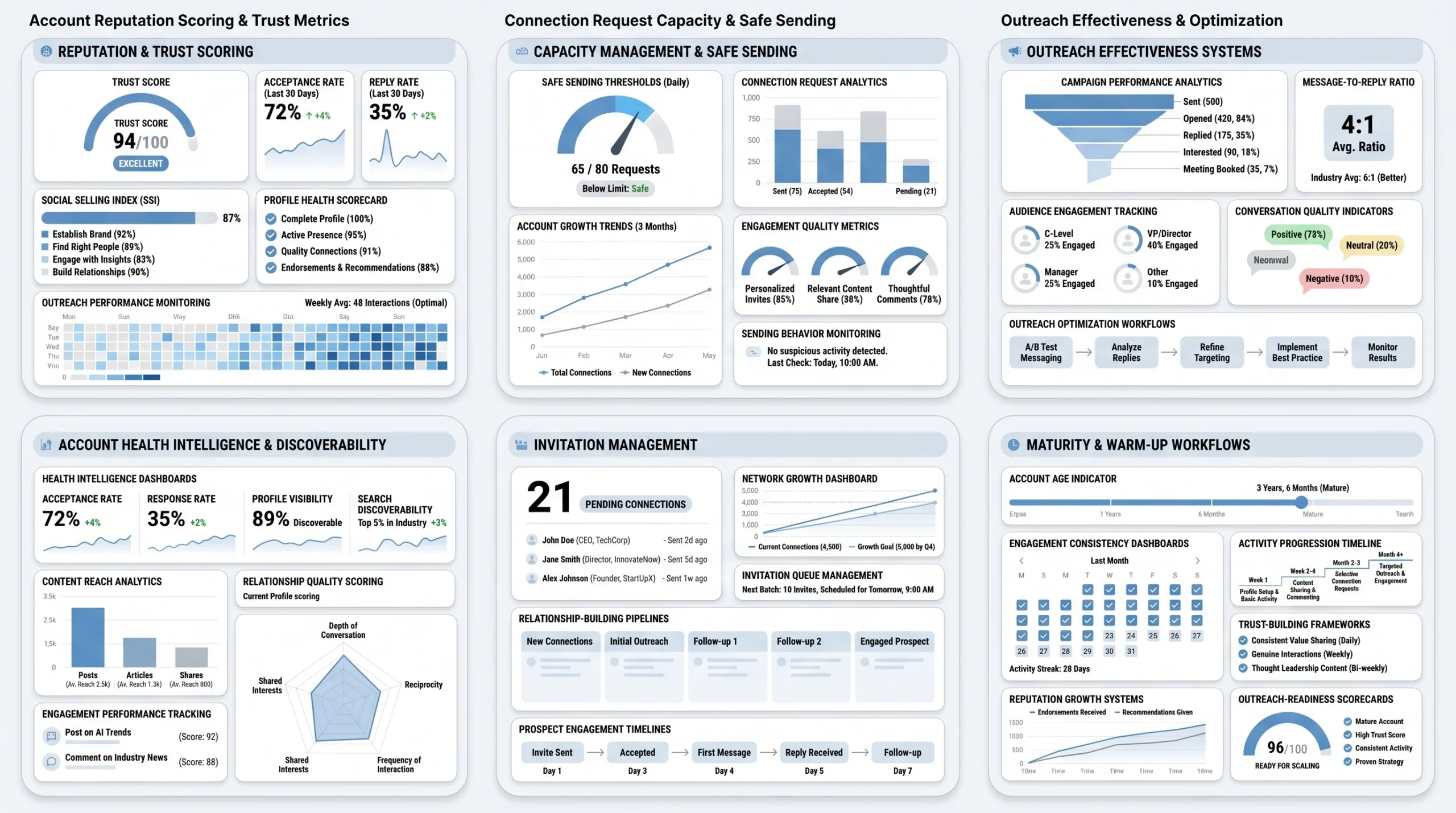
LinkedIn no longer enforces a single connection request ceiling across all accounts. Your actual weekly capacity is determined by your account’s trust score, which is calculated from a combination of your Social Selling Index (SSI) score, your connection acceptance rate, your reply rate, your pending invite queue size, and your overall activity history on the platform.
Here is what that looks like in practice, according to data from LeadLoft and Konnector.ai. Accounts with SSI scores above 70 and acceptance rates consistently above 40% can send up to 200 connection requests per week. Accounts with acceptance rates that drop below 30% get algorithmically throttled, sometimes down to as few as 50 requests per week. A standard free account operating without a track record should target around 80 requests per week to stay in a safe range. Premium and Sales Navigator users with strong account health (SSI above 65, acceptance rate above 40%, account age over six months) can reach up to 200 to 250 requests per week.
The practical implication: two reps at the same company, running the same campaign, can have completely different sending capacities because one account has a stronger reputation score than the other. Volume strategy that ignores account health is not a volume strategy. It is a countdown to a throttled account.
The Volume Tax: LinkedIn’s Silent Campaign Killer
The Volume Tax is the most important concept in LinkedIn outreach compliance that almost no rep or sales manager knows about. Here is how it works. LinkedIn monitors the ratio between messages sent and replies received across your account. If a rep sends high volumes of outreach and receives replies on fewer than 10 to 15% of those messages, LinkedIn’s algorithm classifies the account as a spam risk and begins applying penalties, according to research published by Konnector.ai in 2026.
These penalties do not show up as warnings or account restrictions in most cases. They are silent. LinkedIn routes outreach messages to the “Other” inbox instead of the primary inbox, suppresses the account’s profile in search results, and reduces organic content reach. The rep keeps sending, the numbers keep looking fine on the surface, and the actual outreach keeps getting ignored. The reply rate was never a campaign vanity metric. It is the single most important account health signal on the platform.
What a Well-Run LinkedIn Account Actually Looks Like
Before scaling any outreach campaign, these are the observable signals that indicate an account is in good standing:
- Connection acceptance rate: Consistently above 35%, with a target of 40% or higher.
- Reply rate: Above 15% on active outreach sequences.
- Pending invite queue: Cleared weekly, with no more than 100 to 200 unresolved pending invites at any given time.
- Daily send volume: Gradual and consistent, not spiked. Spreading 80 sends across five business days signals normal human behavior. Sending 80 on Monday and zero the rest of the week signals automation.
- Account age and activity: New accounts (under six months old) should warm up for four to six weeks before running any structured outreach campaign.
These are not campaign goals. They are operating conditions. Campaigns built on accounts that fail these checks will underperform regardless of message quality.
Rules 1 to 4: Your Profile and Targeting Have to Do the Work Before You Send Anything
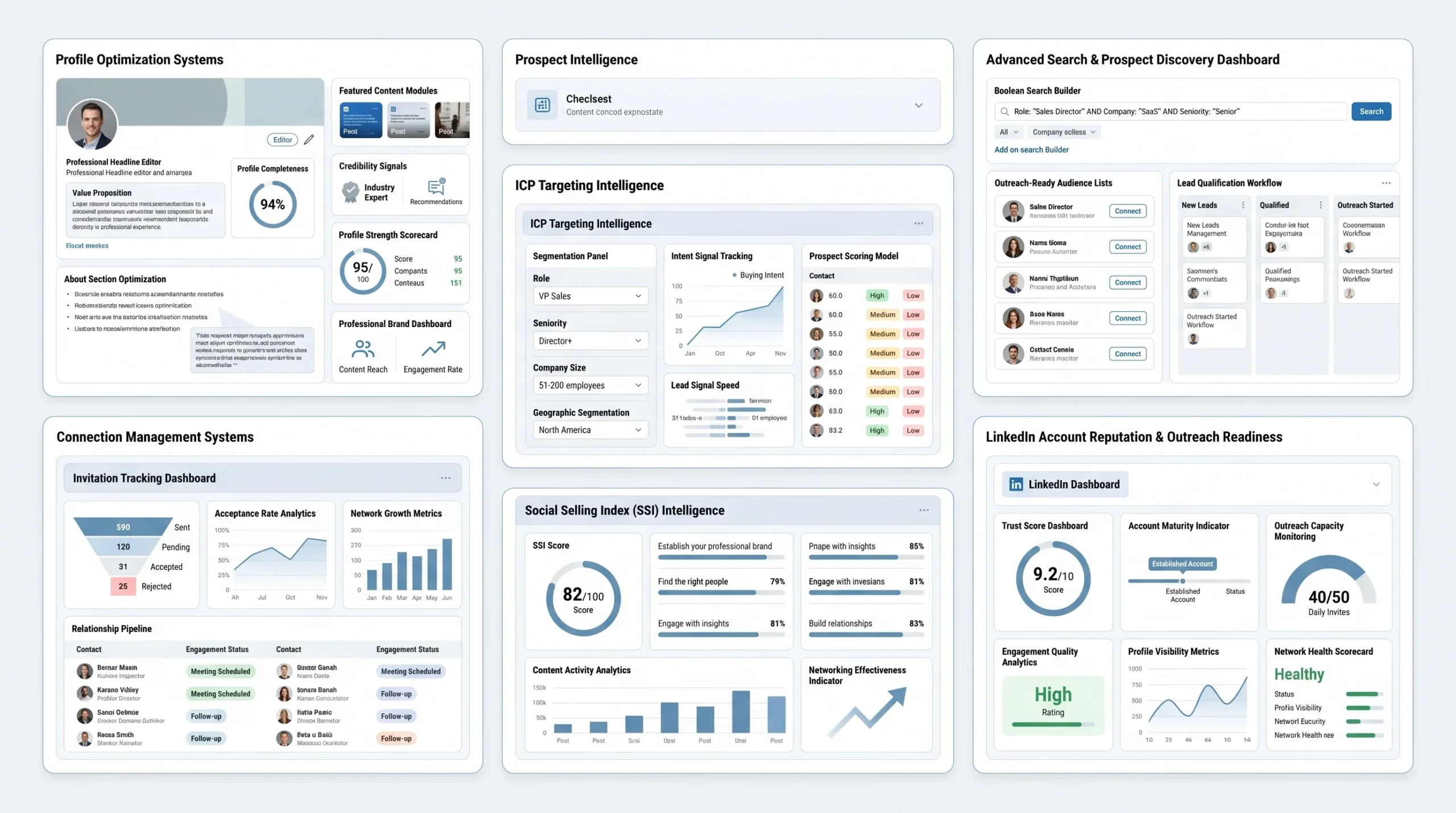
The connection request is not the first impression. The profile view that happens after a prospect receives the request and before they decide whether to accept it is the first impression. If the profile fails that moment, the note in the connection request does not matter. According to data cited by Laxis in their 2026 LinkedIn outreach playbook, a professional, value-focused profile increases connection acceptance rates by up to 40%. That number is the difference between a 25% acceptance rate and a 35% acceptance rate on the same targeting list with the same message.
Rule 1: Your Profile Is a Pre-Sales Page, Not a Resume
The headline is the single most visible element of a LinkedIn profile during the outreach moment. When a prospect gets a connection request, they see the sender’s name, their profile photo, and their headline. That is it. If the headline says “Account Executive at [Company]” or “Senior SDR | SaaS | B2B,” the prospect gets no reason to accept. The headline needs to communicate who you help and what outcome you drive.
A concrete example: instead of “Account Executive at Dealsflow,” a headline like “Helping B2B sales teams book more meetings through LinkedIn outreach” gives the prospect a reason to accept based on self-interest, not professional courtesy.
The About section opening line follows the same logic. The first two lines of the About section appear in search results and preview cards. They need to be written from the prospect’s perspective, not the rep’s. Start with the problem you solve or the outcome you deliver, not with how many years of experience you have.
The Featured section is often left empty or filled with company content. A better use is a short case study, a relevant piece of original content, or a link to something the prospect would find directly useful. This signals credibility before any message is sent.
Rule 2: ICP Targeting Precision Determines Acceptance Rate Before Messaging Does
A low connection acceptance rate is almost always a targeting failure before it is a messaging failure. If 65% of the people receiving connection requests are not a strong fit, even the best-crafted message note will not rescue the acceptance rate. The math does not work.
Precise targeting through LinkedIn Sales Navigator means building lists using a combination of role, seniority level, company size, geography, and at least one intent signal. Intent signals on Sales Navigator include:
- Recent job change: A prospect who changed roles in the past 90 days is evaluating new tools and vendors. They are three times more likely to engage with outreach than someone who has been in the same role for three years.
- Company headcount growth: A company that grew headcount by 20% in the past year is actively building processes and buying tools to support that growth.
- Content activity: A prospect who posted or commented on LinkedIn in the past 30 days is actively using the platform and is more likely to see and respond to outreach.
Boolean search operators, specifically AND, OR, and NOT, give additional precision within Sales Navigator. A search for “VP of Sales” OR “Head of Sales” AND “SaaS” NOT “Recruiting” is far more targeted than a simple title search. Narrowing a list from 10,000 prospects to 1,500 high-fit prospects and maintaining a 40% acceptance rate produces more usable pipeline than blasting 10,000 with a 20% acceptance rate, because the replies from the 1,500 are from people who are actually relevant.
Rule 3: Managing Your Pending Invite Queue Is Not Optional
This rule gets ignored almost universally, and it causes more avoidable account throttling than any other operational mistake. LinkedIn tracks not just how many connection requests you send per week, but also how many unresolved pending requests you are carrying at any given time.
A rep who sends 100 requests per week but never clears their pending queue builds up a backlog. After three months, that backlog can sit at 1,000 to 1,200 unresolved invites. LinkedIn interprets a large pending queue as a signal that the account is sending to people who do not know the sender or are choosing to ignore rather than accept. This damages the account’s trust score and reduces future sending capacity, according to ReachInbox’s 2026 analysis of LinkedIn’s connection limit mechanics.
The fix is simple: every week, withdraw connection requests that have been pending for more than 21 days. These are prospects who are not going to accept, and carrying them indefinitely costs outreach capacity. This should be a weekly checklist item alongside list building and reply handling.
Rule 4: Get Your SSI Score Above 65 Before Scaling Send Volume
The Social Selling Index (SSI) is LinkedIn’s internal score that measures how effectively a user builds their brand, finds the right people, engages with insights, and builds relationships on the platform. It is scored out of 100 and updated daily. According to Magicpost’s 2026 LinkedIn limits guide, SSI score directly correlates with connection request capacity. Reps with SSI scores above 70 and strong account history can reach up to 200 to 250 connection requests per week with Sales Navigator.
The four SSI pillars are: establishing a professional brand, finding the right people, engaging with insights, and building relationships. The two fastest to move are engaging with insights (liking, commenting, and sharing relevant content) and establishing a professional brand (posting original content and completing the profile). A rep who spends 15 minutes per day engaging with posts in their target industry can move their SSI by 5 to 10 points within two to three weeks. That score movement directly increases outreach capacity.
The practical rule: do not run a high-volume campaign on an account with an SSI below 50. The account does not have the trust score to support it, and the campaign will throttle faster than it scales.
Rules 5 to 8: Writing the Messages That Actually Get Responses
Writing effective LinkedIn outreach messages is not about finding the perfect template. It is about understanding what each touchpoint in the sequence is designed to accomplish, and writing specifically toward that goal. Most reps write every message trying to book a call. That approach turns every touchpoint into a pitch, which is exactly the pattern that prospects have been trained to ignore.
Rule 5: The Connection Request Note Has One Job: Get the Request Accepted
The connection request note is not a sales pitch. It is not even an introduction to what you sell. It has exactly one job: give the prospect a low-friction reason to accept the request. The moment the request is accepted, the note has done its job and should be forgotten.
Effective connection request notes share three characteristics. First, they are short: under 200 characters, ideally under 150. Second, they reference something specific to the prospect, whether that is a recent post, a shared group, a mutual connection, a company milestone, or a relevant industry topic. Third, they contain no pitch, no ask, and no mention of a product or service.
A concrete example of a note that follows these rules: “Hi [Name], came across your post on [specific topic] last week and found your take on [specific point] interesting. Would love to connect.” That is it. No call-to-action, no product mention, no attempt to start a conversation before the connection is even accepted.
On the question of blank requests versus personalized notes: testing data cited by SalesBread in their 2026 LinkedIn outreach strategy guide shows that personalized, relevant connection notes outperform blank requests by roughly 10% in acceptance rate. That is a real difference at scale, not a marginal one. Across a campaign of 500 requests, the 10% difference is 50 additional accepted connections. At a 20% meeting booking rate from reply, that is 10 additional meetings per campaign from one change.
Rule 6: The First Message After Connection Should Not Mention the Product
The moment a prospect accepts a connection request, the instinct for most sales reps is to send a pitch immediately. This is the single most common mistake in LinkedIn cold outreach, and it is also the one that most directly damages account reputation because it produces a high volume of messages that receive no reply.
The acceptance of a connection request signals that the prospect is open to being in your network. It does not signal that they are ready for a sales conversation. The first message after connection should do one of three things: share a relevant resource without asking for anything in return, make an observation tied to something in the prospect’s profile or recent activity, or ask a single low-commitment question about a topic relevant to their role.
The goal of the first message is a reply. Not a demo. Not a meeting. A reply. A reply signals to LinkedIn’s algorithm that this is a real conversation between two people, which protects account health. A reply also opens the door for a second message that can begin moving the conversation toward a call. A pitch in the first message skips the relationship-building step that makes every subsequent step easier.
Rule 7: Multi-Touch Follow-Up Is the Standard, Not an Indication of Persistence
The average B2B buying cycle now stretches beyond six months from the first touch to a signed deal, and buying committees average 6.3 stakeholders per deal according to Expandi’s State of LinkedIn Outreach report for the first half of 2026. A two-touch LinkedIn sequence is not a strategy. It is an experiment.
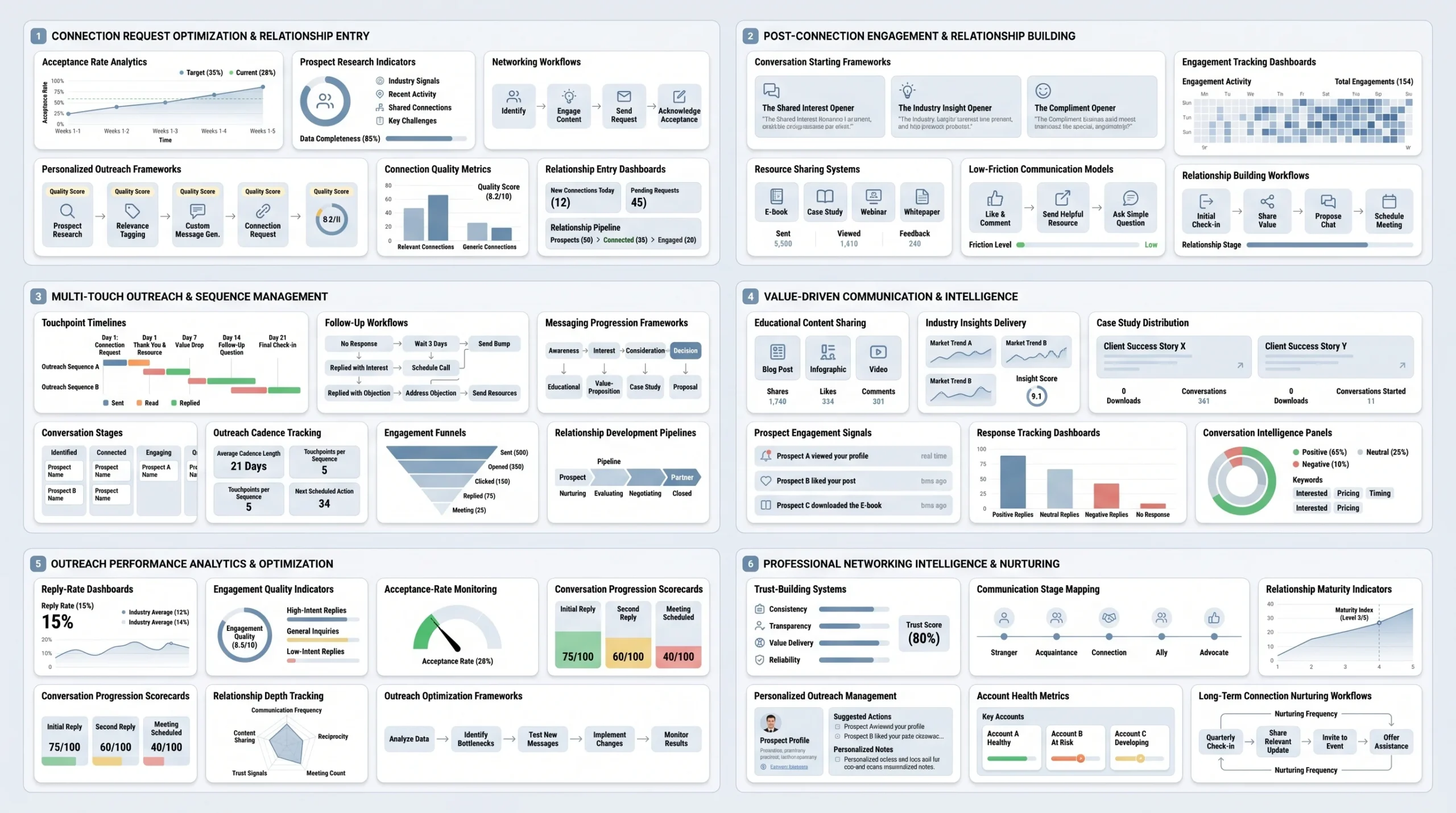
A four-to-five touch sequence with clear angle shifts between each message gives the outreach real coverage across a prospect’s attention window. Here is what a well-structured sequence looks like:
- Touch 1 (Day 1 post-connection): Warm opener. Relevant observation, resource, or low-commitment question. No pitch.
- Touch 2 (Day 4 to 5): Value-add follow-up. Share something directly relevant to a challenge common to the prospect’s role, a short case study, a data point, or a useful framework. One sentence framing why you thought of them.
- Touch 3 (Day 9 to 10): Light pivot toward the conversation. One specific question about how they are currently handling the problem your product solves. Keep it short and specific, not hypothetical.
- Touch 4 (Day 15 to 16): The direct ask. A single, clear calendar link or a simple yes/no question about whether a short call makes sense. No pressure language.
- Touch 5 (Day 22 to 25): The clean exit message. Let the prospect know you will stop reaching out after this, and leave a door open for them to come back later. This message often gets replies that earlier messages did not, because the prospect feels the pressure of the relationship ending.
The exit condition matters as much as the sequence itself. If a prospect replies “not interested” at any touch, that conversation ends. Continuing to message a prospect who has declined is not follow-up, it is the behavior that gets accounts flagged and reported.
Rule 8: Match Message Length to Relationship Depth
The length of a LinkedIn message should correspond directly to how much relationship exists between the sender and the prospect at the moment of sending. At the connection request stage, the relationship is zero, and the note should be 100 to 150 characters. At the first message stage, the relationship is thin (an accepted connection), and the message should be three to five sentences at most. At the third or fourth touch, once the prospect has had the chance to see multiple messages from the rep, a slightly longer message with a specific resource or case study becomes appropriate.
The mistake most reps make is front-loading length. They send a 200-word pitch as the first message post-connection and then wonder why reply rates are low. A prospect who receives a long cold message has to decide whether to invest time in reading it before they have any reason to trust the sender. Most choose not to. A short message that respects the prospect’s time signals self-awareness, which is the first step toward credibility.
A practical rule of thumb: if the message requires scrolling on mobile to read in full, it is too long for the stage of the relationship.
Rules 9 to 10: Handling Replies and What Happens After the Connection
This is the section that most LinkedIn outreach content ignores entirely. Best-practice articles focus almost entirely on how to get a reply. The question of what to do when someone actually responds, especially when the response is anything other than “yes, I want to meet,” is left completely unaddressed. For SDR teams and agency owners running high-volume outreach, reply handling is where the majority of pipeline gets either captured or quietly lost.
Rule 9: Reply Speed and Quality Determine Whether a Conversation Becomes a Meeting
A prospect who replies to a LinkedIn message is in a moment of active engagement with the platform and with the sender. That window is not indefinitely open. Data from outbound sales research consistently shows that reply speed is one of the strongest predictors of conversion from reply to booked call. A response within two hours during business hours dramatically outperforms a response delivered 24 to 48 hours later, because the prospect’s attention has moved on and the context of the original conversation has faded.
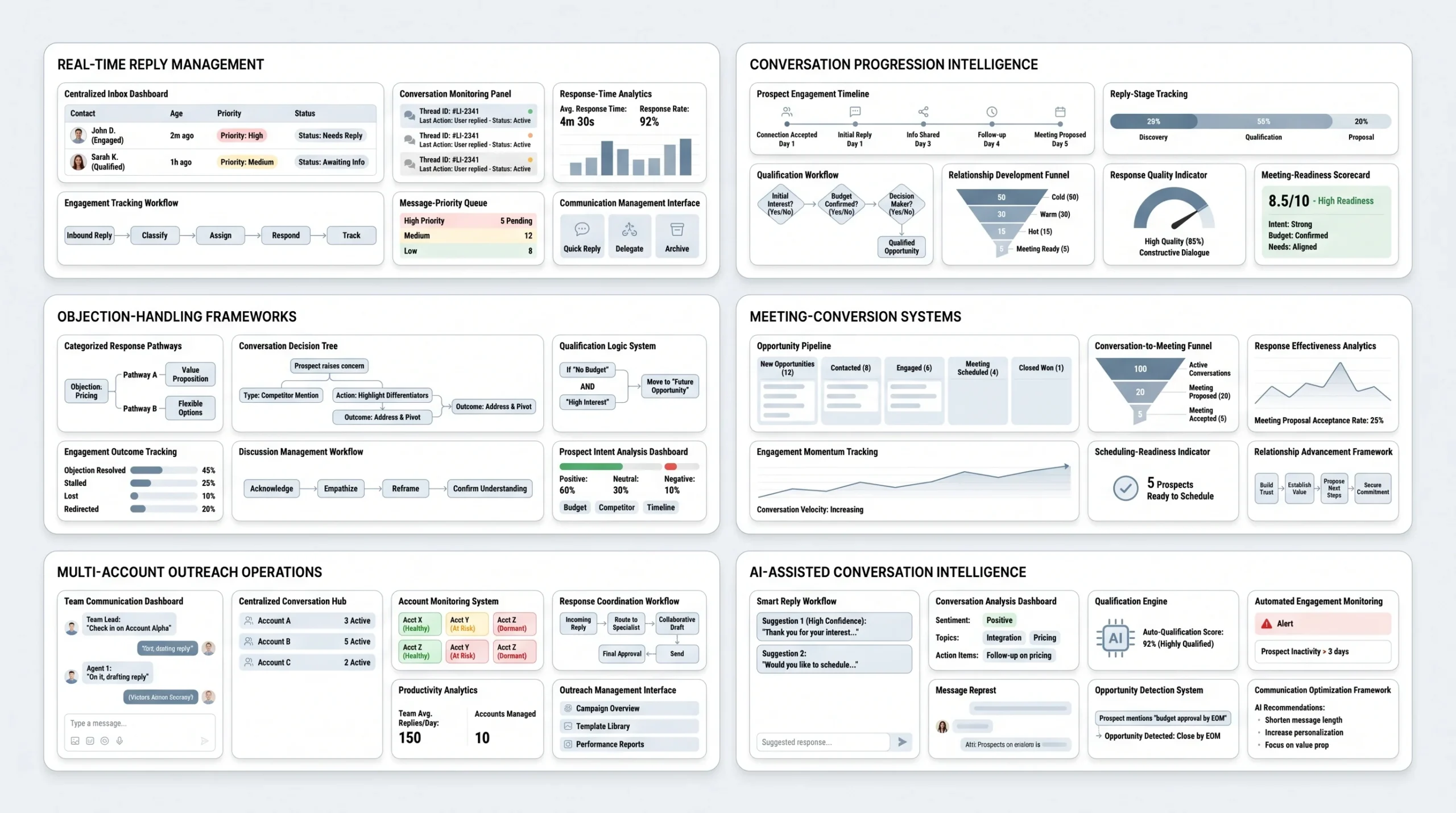
For individual reps managing one LinkedIn account, this is a workflow discipline issue: check LinkedIn messages at the start of the day, at midday, and at the end of the day, and reply to new responses during each of those windows. For SDR teams managing multiple accounts, this requires a centralized reply monitoring setup. Tools like Dealsflow’s multi-account dashboard consolidate replies across up to 50 LinkedIn accounts into a single view, which is the operational difference between a team that responds within two hours and one that responds the next morning, often too late to capture the momentum.
Response quality matters as much as response speed. A reply to a LinkedIn outreach message is not a sales call. The prospect is still in the evaluation phase, deciding whether a conversation is worth their time. A response that immediately pushes for a meeting creates friction. A response that acknowledges what the prospect said, adds one piece of relevant context, and then makes a single low-friction ask (a yes/no question, not a calendar link) converts at a higher rate.
Rule 10: Objection Handling on LinkedIn Requires Different Language Than on a Call
The most common LinkedIn objections fall into four categories, and each one requires a specific approach. Treating all objections the same way is a reliable way to end conversations that could have become meetings.
- “Not interested right now”: This is the most common objection and also the most recoverable. The prospect is telling you the timing is wrong, not that they have no problem. An effective response acknowledges the timing directly, adds one concrete piece of value (a relevant stat, a case study result, or a resource), and ends with a no-pressure invitation to reconnect later. Something like: “Understood, [Name]. No follow-up from me. If [specific challenge] becomes a priority in Q3, happy to share what we have been seeing from teams in [their industry].” This keeps the door open without demanding a response.
- “Send me more info”: This objection sounds like progress but usually is not. “More info” is a polite deferral from a prospect who is not engaged enough to have a conversation but also does not want to say no. Sending a brochure or a long email in response almost never converts. A better approach: ask one clarifying question before sending anything. “Happy to share some relevant material. To make sure it is actually useful rather than generic, what is the specific challenge you are dealing with right now around [topic]?” This forces a real response or reveals that the prospect is not genuinely interested, both of which are better outcomes than sending a deck that gets ignored.
- “We already have a solution”: This is not a closed door. It is an opening to a differentiation conversation, but only if handled correctly. Do not challenge the existing solution directly. Instead, ask about the specific outcomes they are getting from it. “Makes sense. Out of curiosity, what does [the specific outcome your product drives] look like for your team right now?” If the outcome is strong, this is a genuine dead end and the conversation should close cleanly. If the outcome is weak, the prospect often tells you that, and the conversation opens back up.
- No response to a direct calendar link: Sending a calendar link before a prospect is ready to commit is one of the most common conversion killers in LinkedIn outreach. If a prospect engaged with a previous message but did not respond to a calendar link, they were not ready to commit to a specific time. A follow-up that removes the friction of the calendar and replaces it with a single yes/no question, “Would it be worth a 15-minute call this week?” often gets a response where the calendar link did not.
For teams running outreach at scale, having a human review and respond to every reply is the ideal approach for high-complexity conversations. For high-volume outreach where replies come in faster than the team can manually handle, AI-assisted conversation tools like Arlo AI can manage the post-reply conversation layer, handling objections, answering qualifying questions, and booking calls based on trained conversation logic, without requiring a rep to manually respond to every message.
Rules 11 to 12: Scaling Without Getting Flagged or Banned
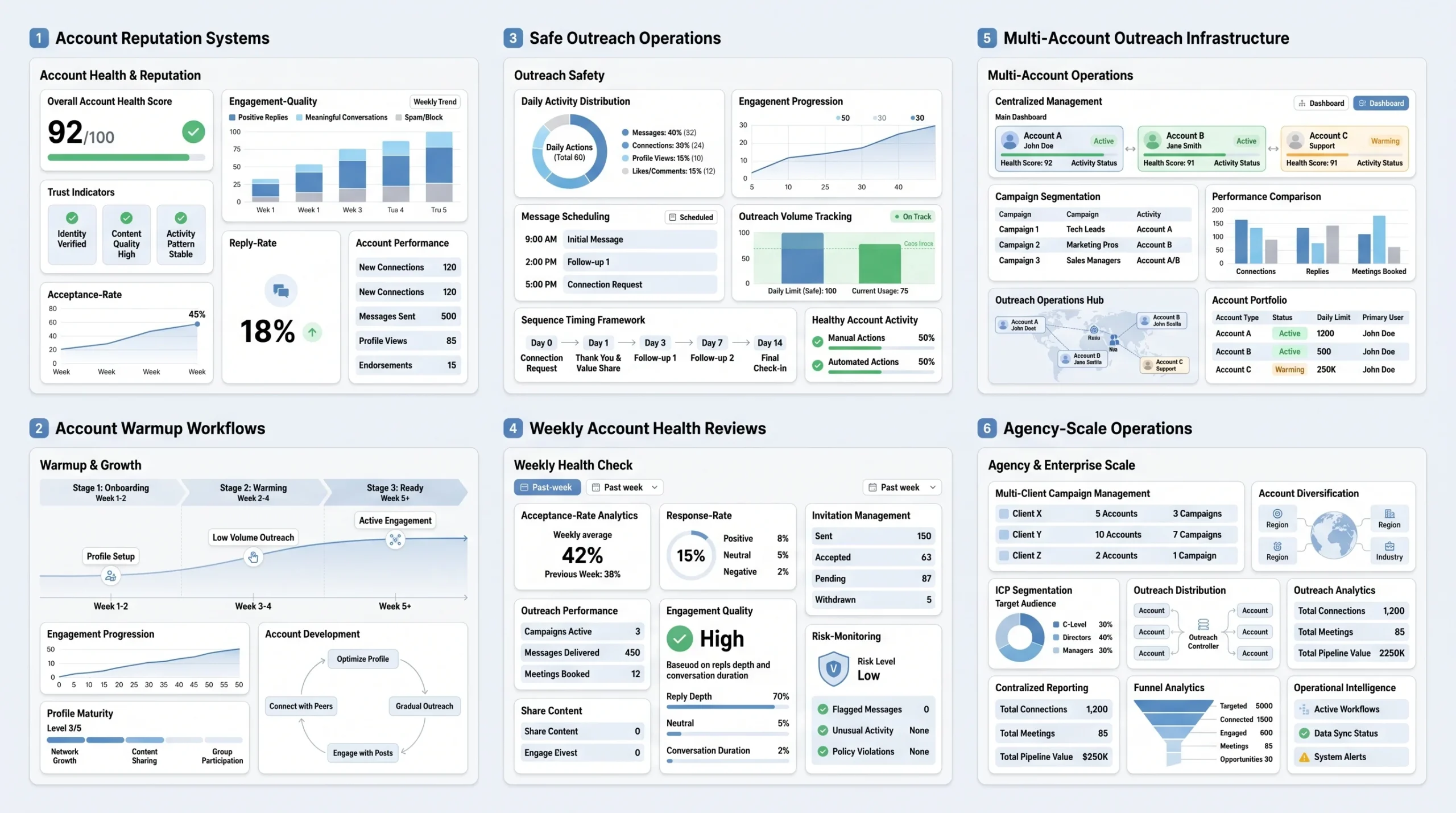
The rules in the previous sections apply to any single LinkedIn account running outreach at a reasonable volume. But the operational reality for lead generation agencies, SDR teams, and founders running outreach across multiple markets is that one account is not enough. Here is how to scale correctly.
Rule 11: Treat Each LinkedIn Account as an Asset With a Reputation Score
Every LinkedIn account used for outreach has a reputation score that is built over time through consistent, high-quality activity and is damaged through spammy patterns, low engagement rates, and sudden volume spikes. That score directly controls how much outreach capacity the account has, and it is easier to protect than it is to rebuild after it has been damaged.
Healthy accounts that can sustain high-volume outreach over the long term share the following operating patterns:
- Gradual warmup for new accounts: A new LinkedIn account should not begin running outreach sequences in the first week. Weeks one and two should focus on completing the profile, connecting with existing contacts, and engaging with content. Week three can introduce a small number of connection requests (20 to 30 per week). Week four and beyond can begin expanding toward the safe threshold. Accounts that jump to 100 requests per week in week one are treated as suspicious by LinkedIn’s detection systems.
- Consistent daily activity patterns: LinkedIn’s algorithm differentiates between human behavior and automated behavior partly through activity patterns. A human account logs in daily, sends a few messages, views some profiles, engages with content, and logs out. An automated account sends 80 messages in a two-hour window at 3 a.m. and does nothing else. Even when using automation tools, sends should be scheduled within normal business hours and spread across the day rather than batched.
- Safe daily message volume: According to LinkedRent’s 2026 outreach limits guide, the practical maximum for safe outbound messaging is 50 to 80 messages per day per account, spread across business hours, with personalized variables in each message. Exceeding this ceiling consistently is one of the fastest ways to trigger throttling.
- Weekly health review: Once per week, check acceptance rate for the past seven days, reply rate for active sequences, and the size of the pending invite queue. If acceptance rate drops below 30%, pause new sends and review targeting before resuming. If reply rate drops below 10%, review message quality and sequence structure before adding more volume.
Rule 12: Multi-Account Management Is the Only Safe Path to Agency-Level Volume
A single LinkedIn account operating at maximum safe capacity produces roughly 80 to 100 connection requests per week and 100 to 150 messages per week. For a solo founder or a single SDR running outreach to one ICP, that is a workable volume. For a lead generation agency running outreach across 10 to 50 clients, or for an SDR team of five to ten reps each covering different territories, one account per rep is a structural bottleneck.
Multi-account outreach, the practice of running outreach campaigns across multiple LinkedIn accounts from a single operational dashboard, is the standard operating model for high-volume outbound teams. It is not a workaround. It is how serious outbound operations are built at scale. Here is what responsible multi-account management looks like in practice:
- Separate warmup schedules for each account: Each account in the stack needs its own warmup period and activity history before being used for campaign outreach. Running five new accounts simultaneously with no warmup is five times the risk of running one new account without warmup.
- Distinct sending schedules per account: Accounts sending at the same times, with the same daily volumes, and to similar audiences create a pattern that LinkedIn’s detection systems can identify as coordinated behavior. Varying send times, volumes, and even sequence timing across accounts reduces this risk.
- Centralized analytics to monitor account health across the stack: When managing five, ten, or fifty accounts, spotting a decline in acceptance rate or reply rate on one account requires a consolidated view of all accounts in one place. Without centralization, account health degradation goes unnoticed until it becomes a restriction. Dealsflow’s multi-account dashboard manages up to 50 LinkedIn accounts in a single view, with full-funnel reporting from connection request to booked call, which is how agency teams keep the entire account stack healthy without manual account-by-account audits every week.
- Account diversification across ICPs and campaigns: Different accounts should be assigned to different ICPs, campaign types, or client portfolios. Mixing all campaigns on one account or all client outreach on one account concentrates the risk. If one account gets restricted, the entire campaign does not stop.
The Metrics That Tell You If Your LinkedIn Outreach Is Actually Working
Most reps track the metrics that are easy to count: connection requests sent, messages sent, maybe connection requests accepted. These numbers feel like progress. They do not predict pipeline. The metrics that actually correlate with booked meetings and closed deals are different, and understanding what good looks like for each one is the difference between optimizing toward real outcomes and optimizing toward activity volume.
The following benchmarks are sourced from Cleverly’s 2026 LinkedIn benchmarks report and LeadLoft’s 2026 LinkedIn limits analysis.
- Connection acceptance rate: The 2026 benchmark is 30 to 45% for targeted outreach. Below 20% is a clear signal of a targeting or profile problem that needs fixing before scaling volume. Above 45% is possible but often indicates the audience is too warm or too narrow to represent real market coverage. For SaaS and technology companies specifically, inbox saturation means acceptance rates tend to sit at the lower end of this range.
- Reply rate: A good LinkedIn outreach reply rate falls between 10 and 25% for standard campaigns. Top performers running personalized, multi-touch sequences reach 30 to 50%. Industry matters significantly here. Recruiting and staffing roles see reply rates of 18 to 25% due to the professional nature of LinkedIn in their context. SaaS and technology roles sit much lower, at around 4 to 8%, because SDRs have been running LinkedIn outreach at scale into these audiences for years and decision-maker inboxes are saturated.
- Meeting booked rate from reply: Of the prospects who reply to a LinkedIn outreach sequence, approximately 15 to 30% convert to a booked meeting with proper reply handling. Below 10% is a conversation quality problem, not a volume problem. If the reply rate is healthy but the meeting booking rate is low, the issue is in the post-reply conversation, not the outreach sequence itself.
- Account health signals (weekly review metrics):
- Pending invite queue size: should stay under 200 at any given time for an actively sending account.
- Ignored-request rate: the percentage of sent connection requests that are explicitly ignored (not just pending). A high ignored-request rate is a direct account health risk.
- Message-to-reply ratio: the single number LinkedIn’s algorithm cares most about. If this drops below 10%, the Volume Tax is likely being applied or is about to be.
Building a weekly review cadence around these five metrics is the operational habit that separates accounts that scale cleanly from accounts that get throttled after three months of good results. The review does not need to be long. Fifteen minutes once per week, checking each metric against the benchmarks above, is enough to catch problems before they become restrictions.
Conclusion
LinkedIn outreach in 2026 is not a volume game. The reps who understand that build their outreach strategy around account reputation first, targeting precision second, message quality third, and volume last. Those four elements are a system, not a list of tips, and they interact with each other in ways that most outreach advice never acknowledges. A high-volume campaign on a damaged account does not recover through better copy. A perfectly written message sent to the wrong audience does not produce replies. And even the best reply rate in the world does not book meetings if nobody handles the post-reply conversation correctly.
The most important thing you can do with the LinkedIn outreach best practices in this article is use them as a diagnostic before you use them as a playbook. Before changing your message templates or adding more touches to your sequence, check your acceptance rate and reply rate for the past 30 days. Those two numbers will tell you exactly which part of the system is broken. Fix that part first. Then scale.
Frequently Asked Questions
1. What is a good LinkedIn connection acceptance rate in 2026?
A connection acceptance rate of 30 to 45% is the benchmark for targeted LinkedIn outreach in 2026, according to Cleverly’s 2026 LinkedIn benchmarks report. Below 20% signals a targeting or profile problem that needs addressing before scaling volume. Rates above 45% are achievable but often indicate the audience is too warm or too narrow for meaningful campaign scale. For SaaS and technology audiences specifically, expect rates at the lower end of this range due to inbox saturation from years of SDR-driven LinkedIn outreach.
2. How many LinkedIn connection requests can I send per week without getting restricted?
There is no single fixed number. LinkedIn’s connection request capacity is reputation-based and varies by account. Standard accounts should target around 80 requests per week. Accounts with SSI scores above 65, acceptance rates above 40%, and at least six months of account history can reach 200 requests per week. Sales Navigator users with strong account health can reach 200 to 250 per week. Accounts with acceptance rates below 30% may find their capacity algorithmically reduced to as few as 50 requests per week.
3. What should I write in a LinkedIn connection request note to get accepted?
Keep the note under 200 characters and make it specific to the recipient. Reference something concrete: a recent post they published, a mutual connection, a shared group, or a relevant industry topic. Do not include a pitch, a product mention, or a call-to-action. The only goal of the connection request note is to give the prospect a low-friction reason to accept. Personalized notes outperform blank requests by roughly 10% in acceptance rate, according to testing data from SalesBread.
4. How long should a LinkedIn outreach message be?
Message length should match the depth of the relationship at the time of sending. Connection request notes should be 100 to 150 characters. The first message after connection should be three to five sentences at most. Follow-up messages at the third or fourth touch can be slightly longer if they include a specific resource or case study. A practical rule: if the message requires scrolling on mobile to read in full, it is too long for the stage of the relationship.
5. How many follow-up messages should I send after connecting on LinkedIn?
A four-to-five touch sequence is the standard for B2B LinkedIn outreach. Touch one is a warm opener with no pitch. Touch two adds a value-focused message around a relevant challenge. Touch three introduces a specific question about how the prospect handles the problem you solve. Touch four is a direct ask with a calendar link or yes/no question. Touch five is a clean exit message that leaves the door open for future contact. If a prospect explicitly says they are not interested at any point, the sequence ends immediately.
6. What is LinkedIn’s “Volume Tax” and how do I know if my account is affected?
The Volume Tax is an algorithmic penalty LinkedIn applies to accounts that send high message volumes with low reply rates (below 10 to 15%). It does not appear as a warning or restriction. Instead, messages get routed to the “Other” inbox, profile visibility in search drops, and organic content reach decreases. The most reliable sign that an account is under the Volume Tax is a sudden, unexplained drop in reply rates and meeting bookings despite no change in message volume or sequence structure. The only fix is reducing send volume, improving targeting, and rebuilding the reply rate over four to six weeks.
7. Is LinkedIn outreach better than cold email for B2B sales?
LinkedIn outreach and cold email serve different functions in a B2B outbound strategy. LinkedIn messages achieve reply rates of around 10% on average, roughly double the 5% typical of cold emails, according to data cited by Martal Group. However, LinkedIn has hard caps on daily and weekly send volume that email does not. The highest-performing outbound teams use both channels in a coordinated sequence: LinkedIn for the warm touch and relationship context, email for volume and follow-up coverage. Choosing one over the other entirely is a strategy constraint, not a strategy.
8. Should I use LinkedIn automation tools or send messages manually?
For individual reps sending fewer than 30 to 40 messages per week, manual sending is workable. Beyond that volume, automation tools are the practical choice, provided they operate within platform-safe limits. The key is using tools that mimic human behavior: randomized send delays, business-hours-only scheduling, and per-account volume caps. Tools like Expandi, HeyReach, Dripify, and Dealsflow all offer automation within safety guardrails. The risk is not automation itself. The risk is automation configured without attention to account health and reply rate thresholds.