


Your LinkedIn inbox is empty. You’ve sent 50 messages this week, but responses are trickling in—if they come at all. You’re checking your sent folder, wondering what went wrong. The truth is, you’re probably making one of the seven critical LinkedIn outreach mistakes that are silently killing your response rates.
LinkedIn has become the primary battleground for B2B sales professionals, recruiters, and business development experts. With over 900 million users, the platform represents an unparalleled opportunity to connect with decision-makers, industry leaders, and potential clients. Yet, despite these numbers, most LinkedIn outreach efforts fail spectacularly.
The problem isn’t that LinkedIn doesn’t work. The problem is that most people approach it wrong.
In this comprehensive guide, we’ll walk you through the seven most dangerous LinkedIn outreach mistakes that are destroying your response rates—and more importantly, we’ll show you exactly how to fix them. Whether you’re a seasoned sales professional or just starting with LinkedIn outreach, this article will reveal the patterns that separate successful outreach campaigns from those that land in the spam folder.
List of LinkedIn Outreach Mistakes
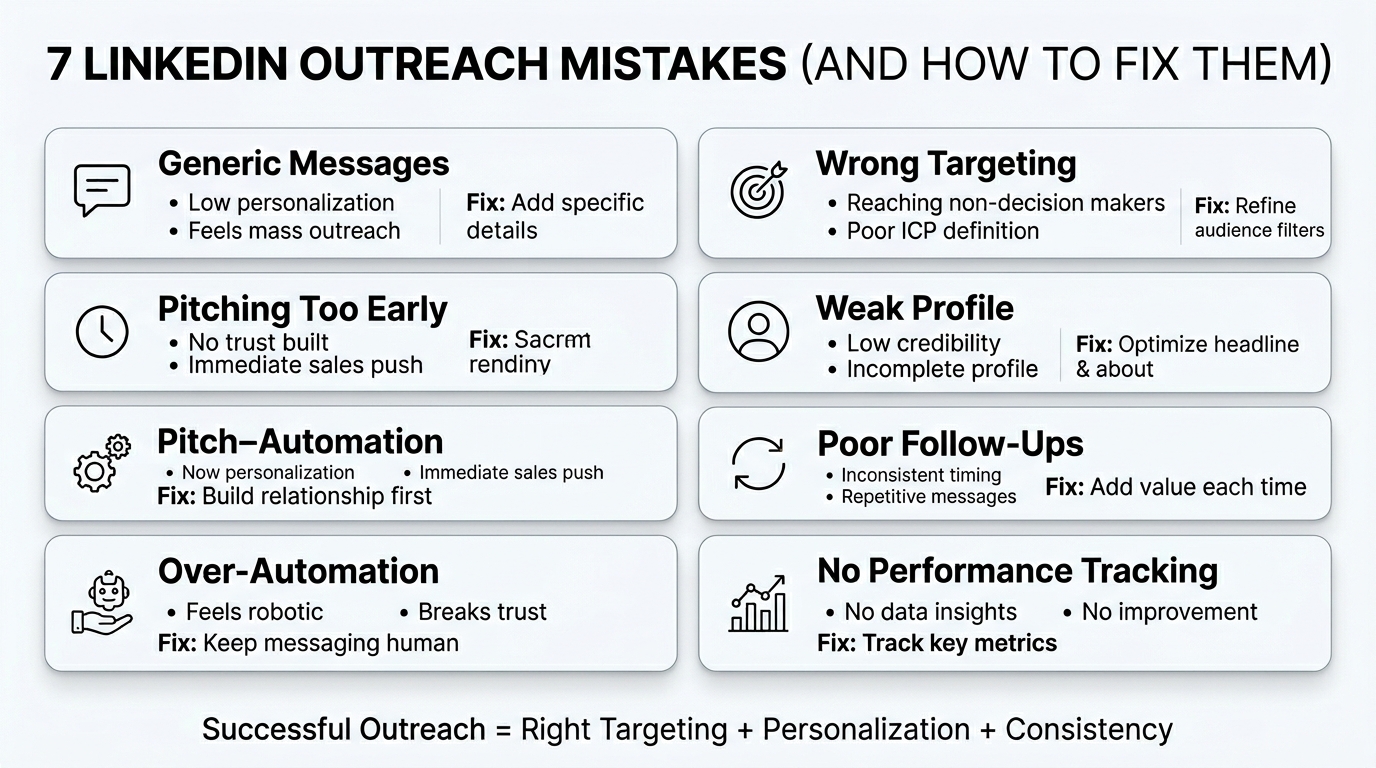
LinkedIn outreach can be a powerful strategy for generating leads, building relationships, and growing your professional network—but only if done correctly. Many professionals and businesses unknowingly make mistakes that not only reduce response rates but also damage their credibility.
Understanding these common LinkedIn outreach mistakes can help you refine your approach, improve engagement, and build meaningful connections instead of being ignored or blocked.
Mistake 1: Sending Generic Messages and How to Fix Them
The Problem: Why Generic Messages Get Ignored
“Hi [First Name], I’d love to connect with you. Let’s chat about how we can work together.”
Does this sound familiar? This is the definition of a generic LinkedIn message, and it’s one of the most common LinkedIn outreach mistakes professionals make.
When you send a generic message, you’re essentially saying: “I don’t know who you are, I don’t care about your specific situation, and I’m sending the same message to 500 other people.” Your prospect knows it. They can feel it. And they delete it immediately.
The human brain is wired to recognize when someone is being authentic versus when they’re running a play from a playbook. Generic messages trigger alarm bells in your prospect’s mind. They scream “mass outreach” and “sales pitch,” which are the exact things LinkedIn users try to avoid.
Here’s the harsh truth: generic messages have response rates that hover around 1-2%. That means you’re wasting 98-99% of your effort. Multiply that across a week, a month, or a quarter, and you’ve just spent dozens of hours getting nowhere.
The reason generic messages fail is rooted in psychology. We live in an age of information overload. Your prospect receives dozens of messages every day. They have limited attention and energy. When they see a message that could apply to literally anyone, they instinctively dismiss it as low-priority noise.
How to Personalize Messages Without Losing Your Mind
The good news? Personalization works. Messages that reference something specific about the prospect’s profile, company, or recent activity see response rates jump to 5-10%, sometimes higher.
The challenge most people face is the misconception that personalization requires hours of research per prospect. It doesn’t.
Step 1: Use the Low-Effort Research Method
Before sending a message, spend 60-90 seconds on the prospect’s profile. Look for:
- Recent activity: What have they posted about? What comments have they made? If they recently shared a post about expanding their team, that’s gold.
- Current role and company: What’s their title? What does their company do? Is there any natural overlap with what you offer?
- Mutual connections: Do you have anyone in common? That’s a personalization goldmine.
- Content they’ve engaged with: Have they commented on posts in your industry? That tells you about their interests.
You’re not writing a biography here. You’re just gathering three to five specific details you can reference.
Step 2: Use Template Personalization
Create a template with bracketed sections for personalization. Here’s an example:
“Hi [Name], I saw your recent post about [specific topic] and really resonated with your point about [specific detail]. I’m currently working with [type of company] on similar challenges, and we’ve had some success with [specific approach]. Given your experience with [their expertise], I thought you might find [specific resource] interesting. Let me know if you’d like to chat.”
Notice how this template has clear placeholder sections. You fill in the brackets, and suddenly it’s personalized. The skeleton is reusable; only the details change.
Step 3: Reference Mutual Value, Not Just Your Product
The biggest mistake in personalized messages? Personalizing the opening, then diving into a pitch.
“Hi Sarah, I love your approach to customer retention. Speaking of which, we have a product that helps with customer retention. Want to buy it?”
That’s not personalization. That’s bait and switch.
Real personalization goes deeper. It says: “I understand your world, your challenges, your priorities, and I have something that genuinely matters to you—not something I’m trying to sell to everyone.”
For example: “Hi Sarah, I noticed you’ve been publishing a lot about customer retention challenges, especially around churn in the first 90 days. I work with B2B SaaS companies on exactly that problem, and I’ve seen patterns that might be relevant to your situation. Rather than pitch you, I thought I’d share a quick observation from our recent work with [similar company]. No pressure to respond, but I thought it was worth your time.”
See the difference? This message respects the prospect’s intelligence and prioritizes their interests over the sale.
Real-World Examples of Personalization Done Right
Bad message: “Hi James, I noticed you’re in marketing. We have a great tool for marketing teams. Let’s connect!”
Good message: “Hi James, I saw your post about attribution challenges with multi-channel campaigns. We work specifically with companies struggling with that exact issue, and I’d be curious if what we’ve learned from [industry/company type] might be relevant to your situation.”
Bad message: “Hi Maria, you look like someone who’d benefit from our sales training. Interested?”
Good message: “Hi Maria, your background in enterprise sales caught my eye, particularly your experience ramping new teams quickly. We recently worked with [similar company] on that challenge, and the results were interesting. Thought it might be worth a conversation.”
The pattern is clear: specificity beats generic every single time.
Mistake 2: Targeting the Wrong People and How to Fix Them
Understanding the Targeting Problem
Here’s a brutal statistic: most people spend 80% of their outreach effort on prospects who were never going to buy in the first place.
This is one of the most expensive LinkedIn outreach mistakes because it’s not just about low response rates—it’s about wasted time on the wrong opportunities.
Imagine a software company selling enterprise resource planning (ERP) systems spending all their outreach effort connecting with startup founders. Or a B2B recruiter targeting mid-level individual contributors when they should be connecting with hiring managers and VPs of Talent.
The problem isn’t effort. The problem is direction.
Poor targeting creates a cascade of problems:
- Low response rates (because you’re reaching the wrong people)
- Long sales cycles (because even interested prospects aren’t decision-makers)
- Low conversion rates (because the prospect’s needs don’t align with your solution)
- Wasted time and money on follow-up sequences
- Damaged professional reputation (you become that person spamming everyone)
The Real Cost of Targeting the Wrong Prospects
Let’s do the math. If you’re sending 20 messages per day, 5 days a week, that’s 400 messages per month. If you’re targeting the wrong people, your response rate might be 1% (four responses). Of those four responses, maybe one is actually interested, and they’re not a decision-maker.
Now, if you refined your targeting to focus on actual decision-makers who fit your ideal customer profile (ICP), your response rate might jump to 8-10%. That’s 32-40 responses per month from actual prospects. Your conversion rate on qualified prospects might be 3-5%, meaning 1-2 customers per month instead of 0.
That’s the difference between a failed outreach strategy and a thriving one.
How to Build Better Prospect Lists
Step 1: Define Your Ideal Customer Profile (ICP)
Before you send a single message, you need to know who you’re looking for. Your ICP should include:
- Company size: Are you targeting startups, mid-market, or enterprise?
- Industry or vertical: Which sectors make the most sense for your solution?
- Revenue or funding: Does company size matter? (Usually yes.)
- Growth stage: Are you looking for high-growth companies or stable, profitable businesses?
- Job titles of decision-makers: Who actually makes the buying decision?
- Specific challenges or pain points: What problems are you solving?
- Geography: Are you targeting specific regions or countries?
For example, an ICP might look like: “VP of Sales or Sales Director at a B2B SaaS company with 50-500 employees, based in the US, in the vertical of healthcare technology, with growth trending 40%+ year-over-year.”
That level of specificity transforms your targeting.
Step 2: Use LinkedIn’s Search Filters Strategically
LinkedIn’s native search is powerful when used correctly. Here’s how to build an effective search:
- Job title filters: Search for specific titles (VP of Sales, Director of Marketing, etc.)
- Company size: Filter by employee count
- Industry: Select relevant industries
- Company name filters: If you have a list of target companies, you can search by company
- Location: Filter by geography if relevant
- Years of experience: You can filter by seniority level
- Recent activity: Filter for people who have been active recently (more likely to respond)
For recruiters, you might search: “Title contains (VP of Sales OR Director of Sales OR Head of Sales) AND Company size (50-500) AND Industry (SaaS OR software) AND Location (United States) AND Last active (within 3 months).”
Step 3: Leverage Boolean Search for Precision
If you’re using LinkedIn’s sales tools or third-party platforms like Apollo.io, Clearbit, or HubSpot, you can use Boolean logic for even more precision.
Example: (title:("VP of Sales" OR "Director of Sales" OR "Head of Sales")) AND (industry:"software development") AND NOT (industry:"recruitment")
This level of filtering ensures you’re reaching people who match your criteria, not just anyone with a vague connection to your industry.
Step 4: Validate Your List Before Outreach
Once you’ve built a list, validate it:
- Check recent activity: Is this person actively using LinkedIn? If their last activity was six months ago, they might not respond.
- Verify the email: Use tools like Hunter.io or RocketReach to confirm email addresses and ensure you have contact information.
- Check job changes: Has this person recently changed roles? If so, wait a week or two—they might still be settling in.
- Review the profile: Does their current role match what you’re targeting? Profiles can be out of date.
This validation step eliminates wasted effort on outdated or irrelevant contacts.
Signs You’re Targeting the Wrong Audience
How do you know if your targeting is off? Look for these red flags:
| Red Flag | What It Means | How to Fix It |
|---|---|---|
| 0-2% response rate | You’re likely reaching the wrong people or your message is irrelevant | Tighten your ICP definition; review message personalization |
| High response rate but low engagement | You’re reaching interested people who aren’t decision-makers | Add a filter for seniority level; focus on decision-makers |
| Meetings scheduled but no closed deals | You’re reaching the right people but offering wrong solution | Review your pitch; ensure solution matches their stated pain point |
| People asking why you contacted them | Your targeting logic was unclear or irrelevant to them | Review your message; clarify the connection you’re drawing |
| Being marked as spam frequently | You’re contacting people far outside your ICP | Refine your search criteria; focus on genuinely relevant prospects |
Mistake 3: Pitching Too Early and How to Fix Them
Why Immediate Pitches Fail
You send a connection request. They accept. You immediately send them a message: “Great to connect! Here’s what we do. Are you interested?”
Most of the time, they’re not. They don’t know you. They don’t trust you. And they definitely don’t want to hear a pitch from someone they just met.
This is one of the most frustrating LinkedIn outreach mistakes because it feels logical. You’ve identified someone who seems like they could benefit from your solution, so why not tell them about it immediately?
The answer lies in how humans make decisions.
Before someone buys anything, they go through a trust-building process. At the moment they accept your connection, you’re at 0% trust. A pitch—even a great one—can’t overcome that deficit. In fact, it confirms their suspicion that you’re just another salesperson with an agenda.
Research on B2B buying behavior shows that prospects take time to evaluate solutions. They need to:
- Recognize they have a problem
- Develop urgency around solving it
- Research potential solutions
- Build trust with vendors they’re considering
- Justify the decision internally
- Finally, make the purchase
A pitch at stage 1 is premature. You’re asking them to buy before they’re ready to buy.
The Relationship-Building Framework
Instead of pitching immediately, build a foundation. Here’s a four-stage framework:
Stage 1: Connection (Week 1)
- Send a personalized connection request or first message
- Focus on: “I respect your work, I think we might have interesting ideas to discuss, let’s build a relationship”
- Goal: Get accepted and show you’re not a bot
Stage 2: Engagement (Weeks 2-3)
- Engage with their content genuinely
- Comment thoughtfully on their posts (not just “Great post!”)
- Share relevant content with them
- Continue lightweight conversation in DMs
- Goal: Build familiarity and show genuine interest in their perspective
Stage 3: Value Delivery (Weeks 3-4)
- Share a relevant insight, article, or resource
- Ask for their perspective on an industry topic
- Offer something of value without asking for anything in return
- Goal: Position yourself as a thinking partner, not a salesperson
Stage 4: Soft Introduction (Week 4+)
- Only now introduce your work or solution
- Frame it as: “We work with companies like [similar example], and I’m curious if we might help with [specific challenge]”
- Suggest a brief conversation to explore fit
- Goal: Transition from relationship to business conversation with foundation already built
This timeline isn’t arbitrary. Research shows that three to four weeks of consistent, low-pressure engagement builds enough familiarity and trust that business conversations feel natural, not intrusive.
Staying Engaged Without Overwhelming
The fear many people have is that staying engaged for three to four weeks before pitching will make them look obsessive or create too much friction.
It won’t, if you do it right.
Here’s what “staying engaged” looks like in practice:
Week 1: Connection message and initial response Week 2: Comment on one of their recent posts (genuine, thoughtful comment) Week 3: Send them a relevant article with a note: “Thought of you when I read this” Week 4: Engage with another post; perhaps ask for their perspective on something industry-related
That’s four lightweight interactions over four weeks. You’re not messaging them daily. You’re not flooding their inbox. You’re simply being present and adding value.
The Engagement Frequency Rule:
- Maximum one meaningful interaction per week
- Never more than two interactions per week
- Space them out across different content (not all DMs, not all comments)
- Always provide value; never ask for anything until week 4+
Real Example of Relationship Building
Week 1: “Hi Sarah, I came across your profile while researching leaders in customer success. Your post about building scalable CS operations really resonated with me. Would love to stay connected and see what you’re working on.”
Week 2: Sarah posts about retention challenges. You comment: “This is spot-on. I’ve seen the same pattern in companies we work with—the gap between onboarding excellence and ongoing support. What’s been your biggest obstacle in closing that gap?”
Week 3: You see an article about customer success strategies. You DM: “Sarah, came across this article on CS metrics—reminded me of our earlier conversation. Thought you might find the section on reporting structures interesting.”
Week 4: You see Sarah posted about a new initiative. You comment, then send a DM: “Sarah, your approach to customer success is impressive. We work with companies building similar operations, and I’ve seen some interesting approaches to scaling support without sacrificing quality. Would be curious to hear your thoughts on a specific challenge we’re seeing. 15 minutes next week?”
Notice the progression: connection → engagement → value → pitch. By week 4, the pitch doesn’t feel like a pitch—it feels like a natural continuation of an ongoing conversation.
Mistake 4: Having a Weak LinkedIn Profile and How to Fix It
Why Your Profile Matters More Than You Think
Here’s what most people don’t realize: prospects don’t just read your messages. They read your profile.
In fact, when someone receives a connection request or message from you, their next action (about 70% of the time) is to visit your profile. Within 10 seconds, they’re making a decision: “Does this person seem credible? Do I want to engage with them?”
A weak profile tanks your outreach efforts before you even get a chance to make your case.
This is one of the most overlooked LinkedIn outreach mistakes because people focus all their energy on the message while neglecting the profile that the message sends them to.
Here’s what happens: You craft a thoughtful, personalized message. They click your profile. They see:
- A default profile picture or blurry photo
- A headline that says “Sales Executive at XYZ Corp”
- An empty “About” section
- No recommendations or endorsements
- A feed that hasn’t been updated in six months
Their trust evaporates. They don’t respond to your message.
Your profile is your credibility foundation. Without it, your outreach efforts are fighting an uphill battle.
Profile Optimization: The Complete Checklist
1. Profile Picture
Your profile picture is the first thing prospects see. It should be:
- Professional but approachable
- High-quality (taken by a photographer, not a selfie)
- Well-lit with a plain or slightly blurred background
- Current (from the last 1-2 years)
- Smiling and making eye contact
A strong profile picture increases profile views by 21x and improves engagement significantly.
2. Headline Optimization
Your headline is not your job title. It’s your value proposition.
Instead of: “Sales Executive at Acme Corp”
Try: “Helping B2B SaaS Companies 3x Their Sales Pipeline | 10+ Years in Enterprise Sales”
Your headline should:
- State who you help (your target customer)
- Describe the outcome you drive
- Be scannable (use pipes or dashes for separation)
- Include a keyword or two (like “sales,” “marketing,” “recruiting”)
- Show expertise or results
3. About Section
Your About section should be 2-3 short paragraphs that tell a story. It should include:
- Who you help: Be specific about your ideal customer
- What problem you solve: State the outcome or benefit
- Your unique approach: What makes you different?
- Social proof: Brief mention of results or client testimonials
- Call-to-action: What’s the next step for someone interested? (“Let’s chat about how we can help” or “Send me a message if you’re curious”)
Example:
“I help VP of Sales at B2B SaaS companies build predictable sales processes that don’t rely on heroic effort or top performers.
After 10 years in enterprise sales, I noticed a pattern: companies either had repeatable sales processes or they were constantly chasing. There was rarely a middle ground. So I started working with companies to build sales systems that scale.
We typically see a 2-3x improvement in productivity per rep within 6 months, not through hacks or tricks, but by designing systems that work for the entire team.
If you’re interested in exploring whether this might help your team, let’s grab coffee (virtual or otherwise).”
Notice: specific audience, clear problem, unique approach, implied result, clear call-to-action.
4. Experience Section
For each position, move beyond job duties. Explain:
- What you accomplished
- Metrics or results (if possible)
- Skills developed
- Relevance to your current work
Instead of: “Responsible for leading sales team and closing deals”
Try: “Led 12-person enterprise sales team through 40% YoY growth, implementing new sales process that increased deal velocity by 35% and improved rep quota attainment from 65% to 88%. Personally closed $2.5M in enterprise deals.”
5. Recommendations
LinkedIn recommendations are one of the most underutilized credibility markers.
- Aim for at least 5-10 recommendations
- Request recommendations from clients, managers, peers, and team members
- Provide specific recommendations to others first (people reciprocate)
- Update recommendations periodically—old ones lose relevance
6. Skills and Endorsements
List relevant skills and endorse others in your network. This helps:
- Improve your profile’s search visibility
- Show concrete expertise
- Encourage reciprocal endorsements
7. Content and Activity
An active profile is a credible profile. Aim to:
- Share insights 1-2 times per week
- Comment meaningfully on others’ posts
- Show up consistently in your network’s feed
This tells prospects: “This person is actively engaged in their industry.”
The Profile Credibility Score
When someone visits your profile after receiving your message, they’re subconsciously scoring your credibility:
| Element | Impact | Your Current Status |
|---|---|---|
| Professional profile picture | High | □ Excellent □ Good □ Needs work |
| Strong headline | High | □ Excellent □ Good □ Needs work |
| Complete About section | High | □ Excellent □ Good □ Needs work |
| 5+ recommendations | Medium | □ Excellent □ Good □ Needs work |
| Current experience with details | Medium | □ Excellent □ Good □ Needs work |
| Regular activity/content | Medium | □ Excellent □ Good □ Needs work |
| Complete work history | Low | □ Excellent □ Good □ Needs work |
| Skills with endorsements | Low | □ Excellent □ Good □ Needs work |
Count your “Excellent” marks. If you have fewer than 5, you’ve found the problem. Your profile isn’t supporting your outreach efforts.
Mistake 5: Over-Automating Messages and How to Fix Them
The Authenticity Problem with Automation
Let’s be honest: automation is tempting. The idea of sending personalized messages to 100 people per day while you sleep is attractive. Tools like LinkedIn automation software promise to multiply your reach while minimizing effort.
The problem? It doesn’t work, and it’s one of the most damaging LinkedIn outreach mistakes you can make.
Here’s why: LinkedIn can detect patterns. If you’re sending 50+ messages per day, the platform’s algorithm notices. More importantly, prospects can tell.
Automated messages have tells. They’re perfect. They’re on-schedule. They lack the slight imperfection and timing variation that characterize human communication.
But there’s a deeper problem than detection: when people realize you’re automated, they stop trusting you. You’ve revealed that your “personalization” was synthetic. Your “relationship” was manufactured.
Worse, aggressive automation violates LinkedIn’s terms of service and can result in:
- Account restrictions
- Reduced outreach deliverability
- Shadowbanning (your messages aren’t delivered)
- Account suspension or permanent banning
Where Automation Breaks Trust
There are specific moments where automation fails:
Immediate Responses: If you send a connection request and they accept, and 30 seconds later your automated follow-up message arrives, they’ll know it’s automated. No human can respond that fast.
Perfect Timing Inconsistency: Humans send messages at varied times—9 AM, 2 PM, 11 PM, sometimes on weekends. Automated sequences follow patterns. Savvy prospects notice.
Generic Variations: Some automation tools use “smart fields” that slot in personalization tokens. But the core message is identical for everyone. It’s: “Hi [FirstName], I saw you work at [Company], I think our [Solution] could help [Industry].” Prospects see through this immediately.
Lack of Responsiveness: Real relationships involve back-and-forth. Automated sequences are one-way. If someone asks a question or says something that requires a contextual response, and your automation fires off a generic follow-up, the jig is up.
Balancing Automation and Personal Touch
The key is knowing what to automate and what to keep human.
What CAN Be Automated:
- Scheduling when messages are sent
- Reminder alerts to follow up with prospects who didn’t respond
- Profile research and data enrichment (finding email addresses, company info)
- LinkedIn engagement tracking (seeing who viewed your profile)
- Data organization (storing prospect information)
- Calendar invitations for scheduled meetings
What Should NEVER Be Automated:
- The actual message content sent to prospects
- Response messages (these must be personalized and human)
- Follow-up sequences (each should be individually crafted based on previous interaction)
- Engagement on their posts (comments should be thoughtful and specific, not templated)
The Hybrid Approach:
- Automate the admin work: Use tools to find prospects, enrich data, track metrics, schedule tasks
- Keep messaging human: Write messages individually, even if they’re based on a template
- Batch your work: Set aside 30-45 minutes each day to write and send personalized messages
- Use templates as scaffolding, not scripts: A template should be a structure you fill in, not words you copy-paste
For example, instead of automating the send of this message:
“Hi [FirstName], I came across your profile while researching [Industry] leaders. I noticed you’re at [Company], which recently [Recent Company News]. I work with companies like yours on [Your Service], and I thought you might find this relevant. Would love to chat.”
Take 60-90 seconds to write a personalized version:
“Hi Sarah, I came across your profile while researching customer success leaders, and I noticed Acme Corp just launched a new CS initiative (saw the news last week). I’ve been working with companies in your space on building scalable onboarding, and given what I’ve seen in the CS industry right now, I suspect you might be thinking about that too. Would be interested in a brief conversation if it’s relevant.”
The second version takes maybe 30 seconds longer but reads like it came from a human because it did.
The Math on Manual vs. Automated
If you send 10 personalized messages per day, that’s 50 per week, 200 per month. If your response rate on personalized, human-written messages is 8%, that’s 16 responses per month from actual prospects.
If you send 100 automated messages per day, that’s 500 per week, 2,000 per month. If your response rate is 1% (which is generous for obvious automation), that’s 20 responses per month—but most are probably complaints or people asking why you contacted them.
The manual approach gets you fewer responses but better-qualified, more likely-to-convert prospects. The automated approach gets you spam-like engagement that damages your reputation.
Mistake 6: Poor Follow-Up Strategy and How to Fix It
Why Follow-Up Is Underrated
You send a great message. No response. You send another message a few days later. Still nothing. You send one more, then give up.
This is one of the most costly LinkedIn outreach mistakes because it’s based on a false assumption: that people should respond the first time.
Here’s the reality: most people don’t respond to the first message. Studies show that it typically takes 5-7 touchpoints before someone responds. On LinkedIn specifically, first-message response rates are around 5-10% for cold outreach. But by the fifth or sixth touchpoint, response rates can reach 30-40%.
The reason is practical: your prospect is busy. They’re in meetings, managing priorities, dealing with urgent issues. Your message arrived at the wrong time or got buried in their inbox. It’s not personal. It’s just the reality of attention in a busy world.
The brands and salespeople who win are the ones who understand this and follow up consistently and respectfully.
Follow-Up Mistakes to Avoid
Mistake 1: Waiting Too Long Between Follow-Ups
If you wait two weeks between follow-ups, the context is lost. They won’t remember your original message. You’ll have to re-explain everything.
Mistake 2: Making Every Follow-Up the Same
“Just following up on my previous message. Interested in connecting?”
If they didn’t respond the first time, saying the same thing again won’t work. You need to provide new value, new context, or a new angle.
Mistake 3: Sounding Desperate or Pushy
“I notice you haven’t responded to my last few messages. Is there a reason you’re not interested?”
This makes you sound resentful and damages the relationship you’re trying to build. It also forces them to give you an explanation or rejection.
Mistake 4: Not Knowing When to Stop
There’s a fine line between persistence and harassment. After five to seven touchpoints with zero engagement, it’s time to move on.
Creating an Effective Follow-Up Schedule
Here’s a template for a respectful, effective follow-up sequence:
Touchpoint 1 (Day 0): Initial Message
- Personalized, focused on them and their company
- Clear but not salesy
- Length: 2-3 sentences
- Goal: Get them to click your profile and accept connection
Touchpoint 2 (Day 3): Value-Add Follow-Up
- Share a relevant resource, article, or insight
- Something that adds value independent of your sale
- Length: 2-3 sentences
- “I came across this article on [topic they care about], thought of you given [specific reason]”
Touchpoint 3 (Day 7): New Angle
- Approach from a different perspective
- New reason why you thought of them
- Possibly new information about their company or their space
- Length: 3-4 sentences
- Example: “Also noticed you just expanded to [new region]. That must come with challenges around [specific challenge]…”
Touchpoint 4 (Day 12): Engagement Approach
- Rather than asking them to respond, engage with their content
- Comment thoughtfully on a recent post
- No follow-up message, just genuine engagement
- Goal: Show up in their feed as a contributor, not just a salesperson
Touchpoint 5 (Day 17): Final Value Play
- Share something extremely relevant to their specific situation
- Could be a case study, a resource, a perspective
- Be clear this is valuable independent of whether they respond
- Length: 2-3 sentences
- “Thought you might find this relevant given [specific situation at their company]”
Touchpoint 6 (Day 22): Graceful Pivot or Exit
- If they still haven’t responded, you have two options
- Option A: “I realize I may have caught you at a bad time. Open to connecting anyway—I generally share thoughts on [your industry/topic]”
- Option B: Move on to another prospect
- Length: 2 sentences maximum
- This is NOT another pitch
The Waiting Periods Explained:
The three-day gap after initial contact allows them time to see the message, visit your profile, and absorb the initial ask without feeling pressured.
The seven-day gap ensures they’ve had a full week to respond. If they haven’t by day 3, they likely didn’t see the message or aren’t immediately available. Day 7 is a good reintroduction point.
The 12-day mark is about two weeks in—long enough that your name might be somewhat familiar, but not so long they’ve completely forgotten.
By day 17-22, you’re in the realm of persistence, so your message should be exceptional or acknowledge that the conversation might not be meant to be.
Follow-Up Message Examples
Initial Message: “Hi Michael, came across your profile while researching leaders in enterprise sales ops. Noticed you just led a restructuring at TechCorp, which is no small feat. Would love to stay connected and exchange ideas on scaling sales processes.”
Day 3 Follow-Up: “Michael, came across this article on sales ops trends for 2025—the section on rep productivity aligns with some of the challenges I’ve been seeing. Thought it might be relevant to your work at TechCorp.”
Day 7 Follow-Up: “Also noticed TechCorp expanded into the EMEA region last month. That’s an exciting move, but I imagine it’s creating new dynamics around sales process standardization across regions—that’s something we work on a lot.”
Day 12 Follow-Up: [Comment on one of his posts with a thoughtful, specific contribution]
Day 17 Follow-Up: “Michael, I’ve been following your insights on building scalable sales teams. I put together a short summary of approaches we’ve seen work well for companies going through similar expansion phases. Would be interesting to hear your perspective on what’s worked for TechCorp.”
Day 22 Follow-Up: “Michael, I’ve reached out a few times, so I’ll keep this brief. If you’re open to it, I’d genuinely value your perspective on [specific industry question]. If not, no worries—worth a shot. Either way, I’ll keep an eye on what you’re doing at TechCorp.”
Notice the progression: pitch → value → insight → engagement → value again → graceful exit. Each message gives them a new reason to respond, a new value proposition.
Mistake 7: Not Tracking Performance and How to Fix Them
Why Data Blindness Is Costly
You’ve been doing LinkedIn outreach for three months. You’ve sent 1,200 messages. Your response rate is… you don’t know. Your conversion rate is… unclear. Your best-performing message? No idea.
This is one of the most frustrating LinkedIn outreach mistakes because it prevents improvement. You’re flying blind.
Without data, you’re operating on hunches and assumptions. Maybe your headline is terrible, but you won’t know because you never compared headline variations. Maybe your messaging is too salesy, but you won’t know because you never A/B tested.
Most salespeople spend enormous effort on outreach but track almost nothing. They send messages, get a few responses, book a few meetings, and chalk it up to effort when the real drivers are often invisible to them.
The Metrics That Actually Matter
Don’t track everything. Track the metrics that drive your outcomes. Here’s what matters:
Primary Metrics:
- Connection Request Acceptance Rate: What % of your connection requests do people accept?
- Target: 50-70% (varies by approach)
- Formula: Accepted connections ÷ Connection requests sent
- Message Response Rate: What % of your messages get a response (any response)?
- Target: 5-15% for cold outreach
- Formula: Messages with responses ÷ Messages sent
- Meeting Request Acceptance Rate: Of the people who respond, what % agree to a meeting?
- Target: 20-40% of responders
- Formula: Meetings scheduled ÷ Conversations with engagement
- SQL (Sales Qualified Lead) Conversion Rate: What % of meetings become qualified sales opportunities?
- Target: 10-30% (varies by quality of qualification)
- Formula: SQLs ÷ Meetings held
- Closed Won Rate: What % of SQLs convert to customers?
- Target: 15-40% (depends on your sales process)
- Formula: Closed won deals ÷ SQLs
Secondary Metrics:
- Profile view rate: What % of people who get your message visit your profile?
- Content engagement rate: What % of people engage with your posts?
- Follow-up effectiveness: Which follow-up #1, #2, #3) gets the most responses?
- Time to response: How long does it take people to respond on average?
Using Data to Improve Results
Here’s how to turn data into improvement:
Step 1: Establish Baselines
For two weeks, track everything without trying to optimize. Just collect data. This becomes your baseline.
- Connection acceptance rate: 52%
- Message response rate: 8%
- Meeting conversion from response: 25%
Step 2: Hypothesize
Based on your baseline, what’s underperforming? Is your connection request acceptance rate low? Is your message response rate abysmal? Is it hard to get meetings once people respond?
If your connection acceptance is low (below 40%), the problem is your approach or profile. If your message response rate is low (below 5%), the problem is your messaging. If your meeting rate is low (below 15%), the problem is your positioning or the conversation quality.
Step 3: Test Variables Systematically
Change ONE variable at a time and measure the impact.
For example, if your message response rate is 4%, test a new headline or opening line. Keep everything else the same. After 50 messages, check the response rate. If it’s 6%, you’ve found an improvement.
Example A/B Test: Subject Line Variation
Version A: “Quick thought on your sales strategy”
- Sent to 50 prospects
- 3 responses = 6% response rate
Version B: “Thought you might find this relevant given TechCorp’s expansion”
- Sent to 50 prospects
- 5 responses = 10% response rate
Version B wins. Use it going forward.
Step 4: Iterate Continuously
Every two weeks, review your metrics. Identify the weakest link in your funnel. Test a hypothesis. Measure results. Adjust.
This compound improvement is how good outreach becomes great. A 1-2% improvement in each stage multiplies into a 10-20% improvement in overall output.
Creating Your Tracking System
You don’t need sophisticated software, but you should have a system.
Minimum Viable Tracking:
Create a Google Sheet with these columns:
- Date contacted
- Prospect name
- Company
- Message sent (first few words)
- Response status (Yes/No/Pending)
- Date of response
- Meeting scheduled (Yes/No)
- Meeting date
- Outcome
This takes 30 seconds per prospect and gives you all the data you need.
Better Option: CRM
If you’re serious about sales outreach, use a CRM (HubSpot, Salesforce, Pipedrive). It automatically tracks:
- When you contacted someone
- How they responded
- Where they are in the pipeline
- Sales cycle length
- Close rates by source
Solutions Comparison Table: LinkedIn Outreach Mistakes Overview
Here’s a quick reference guide showing each LinkedIn outreach mistake, its impact, and the fix:
| Mistake | Common Impact | Primary Fix | Secondary Fix |
|---|---|---|---|
| Generic Messages | 1-2% response rate | Personalize with 3-5 specific details from profile | Use targeted templates with bracketed personalization |
| Wrong Targeting | 0-1% response rate; wrong persona | Define detailed ICP; use LinkedIn filters precisely | Validate list before outreach; remove non-decision-makers |
| Pitching Too Early | Response but no meetings | Wait 3-4 weeks; build relationship first | Provide value in each touchpoint before asking |
| Weak Profile | Low credibility even when reached | Optimize profile picture, headline, About section | Get 5+ recommendations; show activity and content |
| Over-Automation | Account risk; low trust; shadowbanning | Write messages individually; keep human touch | Automate admin (scheduling, reminders, data) not messages |
| Poor Follow-Up | 50% don’t follow up at all | Use 5-7 touchpoint sequence over 3-4 weeks | Vary value/angle with each touchpoint; avoid repetition |
| No Performance Tracking | Can’t improve; flying blind | Track response rate, meeting rate, SQL rate | A/B test one variable at a time; iterate weekly |
Conclusion
LinkedIn outreach mistakes are costing you real opportunities and real revenue. But here’s the good news: they’re fixable. None of the strategies in this guide require special tools, insider connections, or luck. They require:
- Understanding your prospect (personalization)
- Reaching the right people (targeting)
- Building trust before selling (relationship-first approach)
- Looking credible (profile optimization)
- Staying authentic (human touch)
- Being persistent respectfully (follow-up sequences)
- Measuring to improve (data-driven iteration)
The path forward is clear:
- This week: Audit your current approach against these seven mistakes. Which two are biggest issues for you?
- Next week: Fix your top two issues. Update your profile. Refine your targeting.
- Week 3: Start implementing a relationship-first approach. Establish a follow-up sequence.
- Week 4: Begin tracking your metrics. Set up your baseline.
- Week 5+: Iterate. Test. Improve. Compound your gains.
The professionals who win at LinkedIn aren’t the ones with the slickest tools or the most messages sent. They’re the ones who understand that genuine relationships drive business. They’re thoughtful, consistent, and data-informed.
Start implementing these strategies, and you’ll notice the shift almost immediately. Your response rates will climb. Your meetings will be higher-quality. Your sales will improve. And instead of wondering why your LinkedIn outreach isn’t working, you’ll wonder why you didn’t approach it this way sooner.
Frequently Asked Questions
What’s the best way to personalize LinkedIn messages without spending too much time researching?
The 60-90 second rule is your answer. Spend less than two minutes per prospect looking for:
- One recent activity: A post they shared, a comment they made, or a job change
- One company detail: Recent news about their company, a new initiative they’re leading
- One connection point: A mutual connection, a shared industry, or a similar background
That’s it. You don’t need to write a biography. You just need three details that show you looked at them as an individual, not as a generic contact.
Example: “I saw your recent post about scaling remote teams, and noticed you’re at TechCorp which just expanded to Asia. Given your focus on team operations, I thought…”
That took 90 seconds of research and immediately shows you’re not operating from a template.
How can I tell if I’m reaching the wrong audience with my LinkedIn outreach?
Watch for these signals:
- 0-2% response rate consistently: When multiple campaigns get near-zero response, it’s targeting
- Responses that ask “why did you contact me?”: Your relevance isn’t clear; you’re reaching tangentially related people
- Good response rate but no meetings: You’re reaching interested people who aren’t decision-makers
- Meetings booked but no deals: You’re reaching people, but they’re not the right people to solve the problem
- Profile views without engagement: People see you’re reaching out but don’t see relevance
If you’re seeing any of these, revisit your ICP definition and search filters. You’re probably 20% away from perfect targeting, not in a completely wrong direction. Small adjustments often fix it dramatically.
How can I effectively combine automation and personalization in my LinkedIn outreach?
The key is knowing what to automate and what to keep human.
Automate:
- Scheduling when to send messages (send at optimal times without being manual)
- Reminders to follow up
- Data enrichment (finding email addresses, company info)
- CRM data population
- Calendar invites
Don’t automate:
- The message content
- Response messages
- Following up with previously sent sequences
- Content engagement on their posts
In practice: Use a tool to remind you to message someone and track when you did. But write the message yourself. Use a tool to find their email address. But write the outreach message in a way that feels human and specific.
This approach gives you the efficiency gains of automation without the trust loss or platform risk.
What should I do if I’m already shadowbanned or getting low deliverability?
LinkedIn limits account reach when it detects bot-like behavior. If you think you’re shadowbanned:
- Stop outreach immediately: Let your account rest for 1-2 weeks
- Delete any automated sequences: Remove any evidence of automation
- Engage organically: Comment on posts, share content, interact genuinely
- Review your messages: If they’re obviously templated, clean them up
- Restart carefully: When you resume, go very slowly—10-15 messages per day max
- Stay varied: Vary your timing, message format, content
Recovery takes time, but it’s worth it. A shadowbanned account is worthless. A clean account is your most valuable business asset.
How do I know if someone is actually interested or just being polite?
Real interest shows specific engagement. Politeness is generic.
Signs of genuine interest:
- They ask a specific question about your work
- They reference something specific you mentioned
- They suggest a time for a meeting
- They ask for clarification or details
- They engage with your content after connecting
- Their responses are longer than one sentence
Signs of polite dismissal:
- Generic responses (“Thanks for reaching out”)
- Vague non-committal answers (“Interesting, I’ll think about it”)
- Delayed responses after each message
- They view your profile but don’t engage
- One-word answers
If you’re getting polite dismissals, your message either isn’t relevant or they don’t have time right now. Move on to the next prospect. There are plenty of actually interested ones out there.