


You send fifty LinkedIn messages this week. You get four replies. Three of them are polite declines. That ratio is not a fluke — it is the baseline reality for most recruiters operating on LinkedIn today.
According to LinkedIn’s own Talent Solutions data, the average InMail response rate sits at around 25%. That means three out of every four candidates you reach out to will never write back. Yet LinkedIn’s internal research also shows that InMails personalised to a candidate’s specific background — their projects, their career path, a post they wrote — can achieve response rates above 40%, and in some cases considerably higher. The gap between those two numbers is not luck. It is craft.
The core problem is not that candidates are ignoring recruiters. It is that most recruiter messages give candidates no compelling reason to respond. They are generic. They lead with the company’s needs rather than the candidate’s interests. They use the same six opening phrases that every other recruiter uses. And they ask for a big commitment — a call, an interview, a “quick chat” — before establishing any value or trust.
This post exists to close that gap. You will find twelve tested outreach templates covering every major recruiting scenario: cold connection requests, full InMails for specific candidate personas, follow-up sequences, and specialist use cases like executive search and early-career outreach. Alongside each template, you will find a clear explanation of why it works and the one mistake that most often undermines it. Before the templates, you will find the psychological framework that makes all of them effective — because copying a template without understanding its logic limits how well you can adapt it to your own candidates.
The templates cover four message types: connection requests, InMail outreach, follow-up and nurture messages, and speciality scenarios. By the end, you will have everything you need to copy, personalise, and send today.
Why Most LinkedIn Recruiter Messages Get Ignored
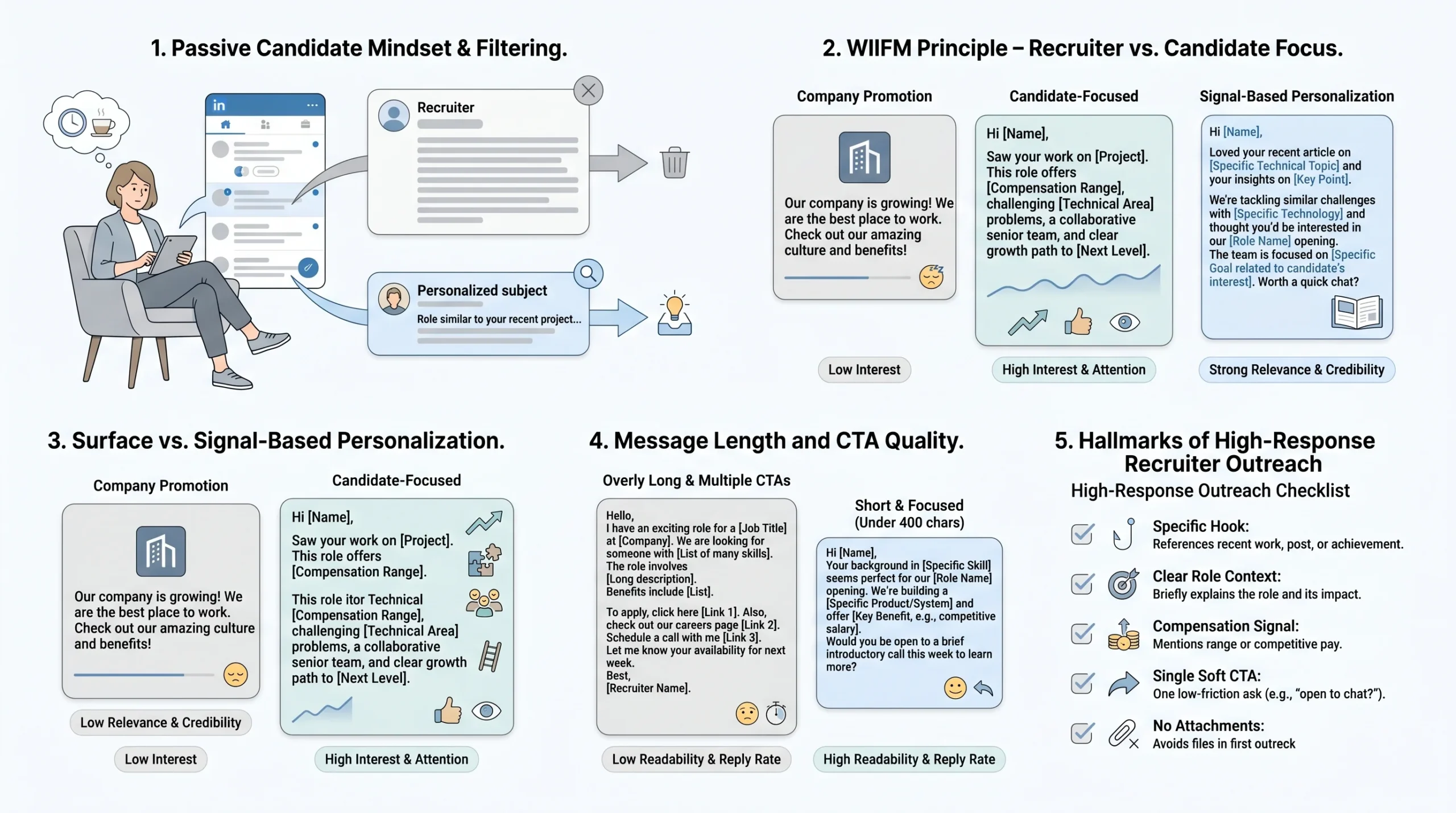
Understanding why candidates delete your messages is the necessary first step to writing ones they read. The problem is not the platform — it is the mismatch between how recruiters write and how passive candidates read.
The passive candidate mindset
The majority of candidates worth reaching out to are not actively looking for a job. They are employed, reasonably comfortable, and not monitoring their LinkedIn inbox with any urgency. When a recruiter message arrives, their default filter is scepticism: Is this worth my time? Does this person actually know anything about me? Most messages fail that test in the first two sentences and get closed without a reply.
This matters because passive candidates have a fundamentally different psychology from active job seekers. An active candidate is motivated to engage even with imperfect outreach. A passive candidate needs a genuine reason to interrupt their day, consider disrupting their career stability, and invest time in a conversation with a stranger. A generic message does not provide that reason.
The WIIFM principle
Every candidate reading a recruiter message is — consciously or not — asking “What’s in it for me?” Most recruiter messages answer this question too late, too vaguely, or not at all. They open with “I came across your profile and was impressed,” pivot to a description of the company, and only eventually arrive at what the role might offer the candidate. By that point, many readers have already moved on.
Effective outreach answers WIIFM within the first two sentences. Not with vague statements like “exciting opportunity” or “great culture,” but with specific signals: a meaningful technical challenge the candidate would work on, a compensation range that represents genuine progression, the kind of team they would join, or the career step the role enables. The specificity is what makes it credible.
The personalisation gap
There is a significant difference between surface personalisation and genuine signal-based personalisation. Surface personalisation sounds like: “I came across your profile and think you’d be a great fit.” Signal-based personalisation sounds like: “I noticed you wrote about the migration challenges in distributed systems last month — that’s exactly the problem our infrastructure team is working through right now.”
The second version demonstrates that the recruiter actually read something the candidate created, holds a view on their expertise, and has drawn a specific connection between that expertise and a real need. That takes thirty seconds of research. It produces a fundamentally different response from the candidate because it signals respect for their time and credibility in the recruiter.
Length, format, and the single CTA
LinkedIn’s own data shows that shorter InMails consistently outperform longer ones. Messages under 400 characters have higher response rates than messages above that threshold. This does not mean good outreach is always brief — it means every word needs to earn its place. Preamble, corporate boilerplate, and over-explanation are the primary length offenders.
Equally damaging is the multiple-CTA message: “Let me know if you’re open to chatting, or I can send a job description, or feel free to apply directly.” Giving candidates three decisions to make often results in them making none. One clear, low-friction ask — typically a yes/no question or a request for a fifteen-minute conversation — performs better than a menu of options.
The five hallmarks of a message that earns a response
- A specific hook in the opening line that demonstrates genuine knowledge of the candidate’s background, not their job title
- A clear role signal — enough context about the position that the candidate can self-qualify without asking follow-up questions
- A salary or compensation hint — not necessarily an exact figure, but a range or a credible signal of progression; candidates report this as one of the most valued pieces of information in outreach
- A single, soft call to action — a question, not a demand; “Would it be worth a fifteen-minute conversation?” performs better than “When are you free for a call?”
- No attachments in the opening message — job description PDFs attached to a first message signal a batch-and-blast approach and reduce trust before the conversation has begun
The Anatomy of a High-Response LinkedIn Outreach Message
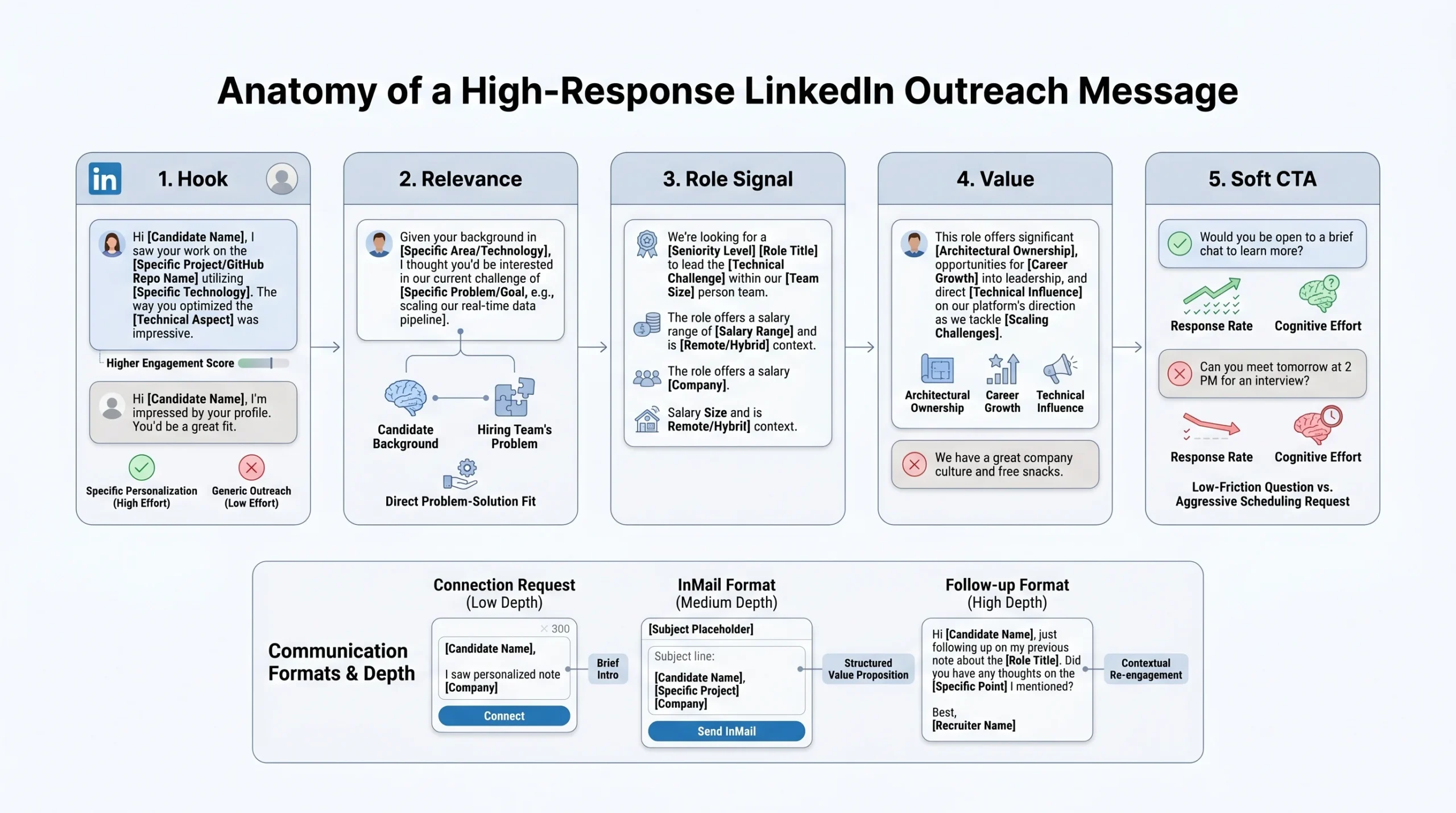
Before looking at the templates, it is worth naming the structure they share. Every high-performing LinkedIn outreach message — regardless of length, candidate persona, or message type — contains five components in sequence. Understanding these components lets you adapt any template to your specific context rather than copying it word for word.
The structure is: Hook → Relevance → Role Signal → Value → Soft CTA.
Hook
The hook is the opening one or two sentences. Its job is to clear the “delete” reflex by demonstrating that this message is not generic. A strong hook references something specific to the candidate: a post they wrote, a company they worked at, a skill they are known for, or a transition they recently made. A weak hook is any sentence the candidate knows could have been sent to a hundred other people without changing a word.
Do this: “Your work on the real-time fraud detection system at [Company] caught my attention — we’re solving a very similar problem at scale.”
Not this: “I came across your profile and was really impressed by your background.”
Relevance
The relevance sentence bridges the hook to the reason you are reaching out. It explains why this candidate is being contacted for this role, and it does so in a way that feels logical rather than promotional. The goal is to make the candidate feel selected rather than targeted.
Do this: “We’re building out the engineering team behind our payments infrastructure, and your background in high-throughput transaction systems is directly relevant.”
Not this: “We have an exciting opportunity and think you’d be a great fit for our team.”
Role signal
The role signal gives the candidate just enough information to self-qualify. This is not a job description. It is the two or three facts a candidate needs to decide whether it’s worth their time to reply: the level of the role, the core technical or functional challenge, and the team context. Compensation range — even a broad one — dramatically increases response rates when included here.
Do this: “It’s a senior IC role leading the design of our event-streaming pipeline — £90–110k base, remote-first team of eight.”
Not this: “The role is a senior-level position with competitive compensation and excellent benefits.”
Value
The value sentence speaks to something the candidate gains from the role beyond salary — career trajectory, technical challenge, team quality, company mission, or autonomy. This is where you address WIIFM explicitly. It should be specific to the role and company, not a generic claim.
Do this: “You’d be the first infrastructure hire with direct influence over architectural decisions as we scale from 10 to 100 million events per day.”
Not this: “It’s a great opportunity to grow your career in a fast-paced environment.”
Soft CTA
The soft CTA closes the message with a single, low-commitment ask. The best-performing CTAs are framed as yes/no questions rather than open-ended requests. They reduce the cognitive effort required to respond and signal that the recruiter respects the candidate’s time.
Do this: “Would a fifteen-minute conversation this week or next be worth your time?”
Not this: “Let me know your availability and we can set something up.”
Adapting the framework by message type
Connection requests are constrained to 300 characters. In this format, you can fit a hook and a soft CTA — but not all five components. Prioritise the hook and keep the CTA to a single brief question.
InMail gives you more room to run all five components fully. The target length is still under 300–400 words; every sentence should map to one of the five components.
Follow-up messages have a different job. They are not repeating the original pitch. They add new value — an article, a development in the role, a piece of news — and re-open the door with a brief, low-pressure CTA. The hook in a follow-up acknowledges that you have already been in touch rather than pretending you haven’t.
Personalisation tokens
Throughout the templates, you will see bracketed tokens: [CANDIDATE NAME], [SPECIFIC SKILL OR PROJECT], [COMPANY], [ROLE], [SALARY RANGE], [MUTUAL CONNECTION]. These are your personalisation variables. For each message, you need to fill at minimum the hook token with something genuinely specific to that candidate. The research required is typically a three-to-five minute scan of their profile, focusing on: their most recent role and what they built there, any content they have published or commented on in the last sixty days, any career transition or promotion in the last twelve months, and any shared connections or groups.
12 LinkedIn Outreach Templates That Actually Get Responses
The templates below are organised into four categories: connection request messages, InMail templates for specific candidate personas, follow-up and nurture sequences, and speciality use cases. Each template includes the full message, a variable guide, an explanation of why it works, and the most common mistake that undermines it.
Connection Request Messages
Template 1: The Skill-Specific Opener
Use case: Passive candidates whose skill set directly matches the role. Use when the candidate’s profile shows a clear, specific technical or functional expertise that is central to what you are hiring for.
The template:
Hi [CANDIDATE NAME], your work in [SPECIFIC SKILL OR DOMAIN] caught my attention. I’m working on a [ROLE LEVEL] role at [COMPANY] that’s directly relevant — happy to share more if you’re open to it.
Variable guide:
[SPECIFIC SKILL OR DOMAIN]— replace with something genuinely specific from their profile: a programming language they are known for, a methodology they have used, a domain they have worked in (e.g., “event-driven architecture” rather than “software engineering”)[ROLE LEVEL]— senior, lead, principal, etc.[COMPANY]— your company name
Why it works: The opening line does one critical job: it proves you read their profile. Candidates can tell the difference between “I saw your experience in software” and “I saw your experience in Kafka-based event streaming.” The former is noise; the latter is a signal that you have done your homework. Because the message also names the level and company, the candidate can self-qualify in ten seconds without needing to ask follow-up questions. The CTA is a soft opt-in (“if you’re open to it”) rather than a demand, which removes the pressure that often stops passive candidates from engaging.
The most common mistake: Making the skill descriptor too broad. “Your experience in marketing” or “your background in engineering” is surface personalisation, not signal-based personalisation. The skill you name should be specific enough that it could not apply to every person in the candidate’s field.
Template 2: The Mutual Connection / Shared Community Hook
Use case: Candidates where you share a mutual LinkedIn connection, are both members of the same professional group, or both attended the same university or bootcamp. The social proof from a shared context dramatically reduces the cold-stranger friction of an unsolicited message.
The template:
Hi [CANDIDATE NAME], we’re both connected to [MUTUAL CONNECTION NAME / both members of [GROUP NAME]] — I’m recruiting for a [ROLE LEVEL] [FUNCTION] role at [COMPANY] and your background looked highly relevant. Worth a quick message?
Variable guide:
[MUTUAL CONNECTION NAME]— use only if you genuinely know the mutual connection and can reference them credibly; do not name-drop someone you have only passively connected with[GROUP NAME]— name of the shared LinkedIn group, alumni network, or professional community[ROLE LEVEL]and[FUNCTION]— e.g., “senior product management” or “lead data engineering”
Why it works: Shared social context is one of the most reliable ways to reduce scepticism in cold outreach. Even a thin connection — a shared group, a shared alma mater — signals that you exist in the same professional ecosystem rather than reaching in from outside it. Research on social proof in sales and recruitment consistently shows that even indirect connections increase engagement rates. The message is also transparent about its purpose (recruiting) rather than pretending to be a networking note, which builds trust with candidates who have been burned by bait-and-switch outreach before.
The most common mistake: Fabricating or exaggerating the shared connection. Candidates check. If the mutual connection is someone they have never spoken to, or the group is one they joined years ago and never engage with, the bridge feels hollow. Only use this template when the connection is genuine.
Template 3: The Content-Engagement Opener
Use case: Candidates who actively post or comment on LinkedIn. This is the strongest personalisation signal available in a connection request because it requires you to engage with something the candidate created or said publicly.
The template:
Hi [CANDIDATE NAME], your post on [SPECIFIC TOPIC FROM THEIR CONTENT] made me think of the problem we’re trying to solve at [COMPANY]. I’m reaching out about a [ROLE LEVEL] role — would love to connect and share more.
Variable guide:
[SPECIFIC TOPIC FROM THEIR CONTENT]— name the actual topic or argument from a post or comment they made, not just the general subject area. “Your post on why zero-downtime deployments break under certain consistency models” is far stronger than “your post on DevOps”[COMPANY]— your company name[ROLE LEVEL]— keep this brief at connection-request length
Why it works: Referencing a candidate’s own published thinking is the single highest-signal personalisation move available on LinkedIn. It tells the candidate three things simultaneously: you follow their work, you found it interesting enough to act on, and you see a genuine connection between what they think and what you need. It also opens a natural conversation thread — the candidate may want to discuss the topic further, which lowers the barrier to engagement considerably. According to LinkedIn’s recruiting data, InMails that reference content the candidate has created consistently outperform generic outreach.
The most common mistake: Vague reference to content without showing you actually understood it. “I loved your recent post” is worse than no personalisation at all because it is clearly a hollow gesture. You must reference the specific argument, finding, or observation the candidate made.
InMail Templates (Role-Specific)
Template 4: Passive Senior Candidate (IC → Leadership Transition)
Use case: Experienced individual contributors who show signs of a readiness or interest in moving into a leadership role. Signs to look for on their profile: increasing scope in recent roles, mentions of mentoring or team leadership in their experience descriptions, or content they have posted about engineering management or people leadership.
The template:
Subject: Engineering leadership at [COMPANY] — relevant to your trajectory
Hi [CANDIDATE NAME],
I’ve been following your work at [CURRENT COMPANY], particularly your progression from [EARLIER ROLE] to [CURRENT ROLE]. The scope you’ve taken on — [SPECIFIC RESPONSIBILITY FROM THEIR PROFILE] — suggests you’ve already been operating at a leadership level, even if the title hasn’t caught up yet.
We’re building out the [TEAM NAME] team at [COMPANY], and I’m looking for a [ROLE TITLE] who can both contribute technically and take ownership of team direction as we scale. The role sits at the intersection of hands-on architecture and people leadership — it’s not a pure EM role, and it’s not a pure IC role.
Compensation is in the [SALARY RANGE] range, with equity on top. The team is [TEAM SIZE] people today and expected to reach [TARGET SIZE] over the next eighteen months.
Would a fifteen-minute conversation be worth your time?
[YOUR NAME]
Variable guide:
[SPECIFIC RESPONSIBILITY FROM THEIR PROFILE]— name something concrete from their experience: “leading the migration to a microservices architecture” or “owning the technical roadmap for the checkout platform”[TEAM NAME]— the specific team within your organisation[SALARY RANGE]— include this; its absence is consistently cited by passive candidates as a reason not to engage[TEAM SIZE]and[TARGET SIZE]— growth context signals opportunity without hyperbole
Why it works: Senior ICs at the threshold of a leadership role are a uniquely receptive audience, but only if the message recognises where they actually are in their career. Telling a senior engineer that a role “offers the opportunity to grow into leadership” is condescending — they are already there. This template reflects their current reality back to them, which demonstrates genuine understanding. The description of the role as sitting between EM and IC is honest about its ambiguity, which builds trust. The salary and team growth context give the candidate everything they need to make a preliminary decision without a call.
The most common mistake: Describing the role as “a great step up” or “perfect for someone looking to move into leadership.” This signals that the recruiter sees the candidate as junior, which is precisely the wrong message for a senior IC who has already been doing leadership work informally.
Template 5: High-Demand / Competitive Talent (Engineering, Data, Design)
Use case: Candidates in fields where demand dramatically exceeds supply — software engineering, machine learning, data science, product design. These candidates receive a high volume of recruiter messages and have very low tolerance for vague outreach. Their time is their scarcest resource.
The template:
Subject: [ROLE TITLE] at [COMPANY] — [SALARY RANGE], [REMOTE POLICY]
Hi [CANDIDATE NAME],
I’ll keep this short because I know you get a lot of these.
We’re hiring a [ROLE TITLE] to work on [ONE SPECIFIC TECHNICAL CHALLENGE IN TWO SENTENCES MAX]. The role is [REMOTE / HYBRID / ON-SITE], pays [SALARY RANGE] base plus [EQUITY OR BONUS STRUCTURE], and sits on a team of [TEAM SIZE] working in [TECH STACK OR DOMAIN].
You’d be working on [SPECIFIC PROBLEM OR SYSTEM] — the kind of problem that doesn’t have a clean solution yet.
If that’s interesting, I’d value fifteen minutes of your time. No pressure either way.
[YOUR NAME]
Variable guide:
[ONE SPECIFIC TECHNICAL CHALLENGE]— this must be genuine and specific. “Scaling our recommendation engine to handle 50 million daily active users” is a real problem; “working on exciting technical challenges in a fast-growing startup” is not[EQUITY OR BONUS STRUCTURE]— even a rough description (“meaningful equity at Series B” or “10–15% annual bonus”) is better than leaving this blank[TECH STACK OR DOMAIN]— name the specific technologies or domain, not a generic descriptor
Why it works: The explicit acknowledgement that the candidate receives many messages (“I know you get a lot of these”) does two things: it demonstrates self-awareness, and it signals that this message will be different — shorter, more respectful of their time, more direct. Putting salary and remote policy in the subject line means the candidate can pre-qualify before opening the message. Research from Greenhouse and LinkedIn’s own talent data consistently shows that candidates in competitive fields rank remote flexibility and compensation transparency as their top criteria when deciding whether to engage with outreach.
The most common mistake: Burying the compensation. In a message targeting high-demand talent, “competitive compensation” in the body is not a value signal — it is a placeholder that tells the candidate nothing. Name the number, or name a range. Candidates in these fields have market data; vagueness signals that the offer will not meet their expectations.
Template 6: Culture / Mission-Fit Angle
Use case: Candidates who show clear signals of values-driven career choices — those who have moved to mission-driven companies, written about purpose at work, or whose content reflects strong alignment with a cause, sustainability, social impact, or a specific type of company culture.
The template:
Subject: [COMPANY] — [ONE LINE MISSION STATEMENT OR IMPACT DESCRIPTION]
Hi [CANDIDATE NAME],
I came across your background and was struck by the thread running through your career — [OBSERVATION ABOUT THEIR VALUES-DRIVEN CHOICES, e.g., “you’ve consistently moved toward companies working on climate infrastructure, even when the commercial upside wasn’t obvious”].
We’re building [DESCRIPTION OF WHAT THE COMPANY DOES AND WHY IT MATTERS] at [COMPANY]. The [ROLE TITLE] role I’m recruiting for is central to that mission — [ONE SENTENCE ON HOW THE ROLE CONNECTS TO THE IMPACT].
On the practical side: the role is [LEVEL], pays [SALARY RANGE], and the team works [REMOTE / HYBRID]. We’re a [COMPANY SIZE / STAGE] business, so the decisions you make will genuinely shape the direction.
If any of this resonates, I’d be glad to have a fifteen-minute conversation.
[YOUR NAME]
Variable guide:
[OBSERVATION ABOUT THEIR VALUES-DRIVEN CHOICES]— this must be based on something specific you observed, not an assumption; draw from their career history, published content, or stated interests in their profile[DESCRIPTION OF WHAT THE COMPANY DOES AND WHY IT MATTERS]— lead with impact, not the product category. “We’re making it cheaper to retrofit existing buildings for low-carbon heating” is better than “we’re a cleantech startup”[COMPANY SIZE / STAGE]— Series A, B, C, or an employee count; gives the candidate a frame for the risk and opportunity
Why it works: Mission-driven candidates are not primarily motivated by compensation — they are motivated by the gap between where they are and where they want to be working. But they are also sophisticated enough to know that a company can claim a mission while delivering a mediocre working experience. This template earns credibility by demonstrating that you actually read their career history and drew a genuine inference about their motivations. The practical details (salary, remote policy, stage) are included because mission-driven candidates are still making pragmatic decisions; the template just puts mission first, as it should be for this audience.
The most common mistake: Hollow mission language. “We’re changing the world” or “we’re making a real difference” are phrases candidates in this category have heard from companies whose actual practices did not match the rhetoric. Be specific about the impact, the mechanism, and the stage — or the mission framing will work against you.
Template 7: Diversity Sourcing — Inclusive, Non-Tokenising Language
Use case: Outreach to candidates from underrepresented groups where the goal is to signal genuine inclusion — not check-box DEI. The distinction matters enormously. Candidates from underrepresented groups can identify performative diversity messaging immediately, and it reduces response rates rather than increasing them.
The template:
Subject: [ROLE TITLE] at [COMPANY] — a few things worth knowing
Hi [CANDIDATE NAME],
I’m reaching out because your background in [SPECIFIC SKILL OR DOMAIN] is genuinely relevant to a [ROLE TITLE] role I’m filling at [COMPANY].
A few things that might be useful context: we have [SPECIFIC ERG OR COMMUNITY, e.g., “an active Women in Engineering group with monthly programming”], [FLEXIBLE WORKING POLICY, e.g., “a fully flexible working schedule with no core hours”], and [SPECIFIC INCLUSIVE PRACTICE, e.g., “structured interview processes designed to reduce evaluation bias”]. These aren’t things I’ve added to hit a checklist — they’re practices I’ve seen in action and can speak to directly.
The role pays [SALARY RANGE] and is [REMOTE / HYBRID / ON-SITE]. The team is [BRIEF TEAM DESCRIPTOR].
Is it worth fifteen minutes to hear more?
[YOUR NAME]
Variable guide:
[SPECIFIC ERG OR COMMUNITY]— name the actual group; do not claim one exists if it does not[FLEXIBLE WORKING POLICY]— be specific; “flexible working” is vague, “no required core hours and full remote” is a fact[SPECIFIC INCLUSIVE PRACTICE]— name something real: structured interviews, blind resume review, pay equity audits, returnship programmes
Why it works: The template leads with professional relevance, not group membership — the candidate is being contacted because of their skills, full stop. The inclusion signals are delivered as practical, specific facts rather than values statements because specific facts are verifiable and statements are not. The explicit acknowledgement (“These aren’t things I’ve added to hit a checklist”) addresses the scepticism that is entirely reasonable given how many companies use diversity language without backing it with practice. The recruiter also positions themselves as a credible source (“I can speak to directly”), which matters — candidates want to know that the person reaching out has actual knowledge of the culture, not just the company’s public DEI page.
The most common mistake: Opening with any language that references the candidate’s membership in an underrepresented group. “I’m specifically reaching out to diverse candidates” or “as part of our diversity initiative” immediately signals tokenisation, regardless of your actual intentions. Lead with their professional qualifications, always.
Template 8: Re-Engaging a Previously Declined Candidate
Use case: Candidates who declined an offer, withdrew from a process, or expressed disinterest in a prior outreach — but whose circumstances may have changed, or where the role or company has genuinely evolved.
The template:
Subject: Things have changed since we last spoke — worth revisiting?
Hi [CANDIDATE NAME],
We spoke [TIMEFRAME, e.g., “about eight months ago”] about a role at [COMPANY], and at the time it wasn’t the right fit — [BRIEF HONEST REASON IF KNOWN, e.g., “the compensation wasn’t where it needed to be” or “the remote policy wasn’t flexible enough”].
I’m reaching out again because a few things have changed: [SPECIFIC CHANGE 1, e.g., “the role now comes with a fully remote arrangement”], [SPECIFIC CHANGE 2 IF RELEVANT, e.g., “and the compensation band has moved to £95–115k”]. The team has also [RELEVANT TEAM CHANGE, e.g., “added two senior engineers with backgrounds in distributed systems, which changes the calibre of the technical environment significantly”].
If your situation or priorities have also shifted, I think it’s worth a fresh fifteen-minute conversation. If the timing still isn’t right, I completely understand — and I’ll make sure any future outreach is genuinely relevant before reaching out.
[YOUR NAME]
Variable guide:
[BRIEF HONEST REASON IF KNOWN]— only include this if you genuinely know why they declined; do not guess[SPECIFIC CHANGE 1 and 2]— these must be real changes; re-engaging a declined candidate with an identical role and compensation is not re-engagement, it is repetition[RELEVANT TEAM CHANGE]— a team composition change, a new engineering leader, a product direction shift, or a funding event are all credible change signals
Why it works: Candidates who have already evaluated your company and declined have a specific mental model of why it was not right. The only way to re-open that conversation is to give them a credible reason to revise that model. This template does that by naming the previous contact, acknowledging why it did not work, and being specific about what has changed. The closing line — committing to relevance in future outreach — is a trust signal that works particularly well for candidates who felt their prior rejection was not fully heard.
The most common mistake: Re-engaging without a genuine change to report. “Reaching back out as I thought of you for this role” with an identical offer signals that the recruiter is not listening and is simply recycling a list. Candidates remember.
Follow-Up and Nurture Sequences
Template 9: The 5-Day Follow-Up (Adds New Value)
Use case: A candidate has not responded to your initial outreach within five to seven days. This follow-up is not a nudge — it is a second message that adds something the first did not have.
The template:
Hi [CANDIDATE NAME],
I sent a note [TIMEFRAME, e.g., “last week”] about the [ROLE TITLE] role at [COMPANY] — just wanted to follow up, and also share something that might add useful context.
[NEW VALUE ELEMENT — one of the following approaches:] Option A (relevant article or resource): “I came across this piece on [TOPIC DIRECTLY RELEVANT TO THEIR BACKGROUND] — [ONE SENTENCE ON WHY IT’S RELEVANT TO THEM OR THE ROLE].” Option B (role update): “Since I reached out, we’ve had some movement — [GENUINE UPDATE ON THE ROLE, e.g., ‘the hiring manager has confirmed the scope includes architectural ownership from day one, not just delivery’]. Option C (team news): “[COMPANY] announced [RELEVANT NEWS — funding, product launch, hire] this week, which changes the context for this role slightly — [ONE SENTENCE ON HOW].”
If the timing isn’t right, no problem — happy to keep in touch for when it might be.
[YOUR NAME]
Variable guide:
- The new value element is not optional — a follow-up without new information is a nudge, and nudges in passive candidate outreach rarely convert and can damage your brand
[RELEVANT NEWS]— only use Option C if the news is genuinely relevant to the candidate’s decision, not just promotional
Why it works: The most common follow-up in recruiter outreach is “just checking in to see if you had a chance to review my last message.” This accomplishes nothing except reminding the candidate that you are still waiting for them, which adds pressure rather than value. This template follows a different principle: every touch in a sequence should give the candidate something they did not have before. A relevant article, a role update, or a piece of company news all give the candidate a new reason to respond and signal that the recruiter is genuinely tracking their interests and the role’s evolution.
The most common mistake: Sending the follow-up at 24 to 48 hours. For passive candidates, this is too fast — it signals impatience and can feel pressuring. Five to seven business days is the right spacing for the first follow-up. The exception is a role with a very short hiring timeline, in which case you should state that explicitly in the message.
Template 10: The “Break-Up” Message (Creates Urgency Without Pressure)
Use case: A candidate has not responded after two or three touches. This is the final message in the sequence before you close the loop on this particular outreach cycle.
The template:
Hi [CANDIDATE NAME],
I’ve reached out a couple of times about the [ROLE TITLE] at [COMPANY] and haven’t heard back — which I completely understand; passive outreach isn’t always welcome.
I won’t keep following up after this, but I did want to say: if your situation changes in the next six to twelve months, I’d still be glad to talk. The role will likely have evolved by then, and so will the team.
If this message catches you at a good moment and there’s any part of the opportunity that’s worth a conversation, I’m here. Otherwise — no pressure, and best of luck with what you’re currently building.
[YOUR NAME]
Variable guide:
- No additional variables needed beyond the standard role and company tokens
- The tone here is important: it should be genuinely closing the loop, not performing closure as a pressure tactic. Candidates can tell the difference
Why it works: The break-up message works because of a well-documented psychological principle: the prospect of losing access to something increases its perceived value. When a candidate receives a message that closes the loop gracefully — without guilt or pressure — it often triggers a response from people who were interested but had not yet found the right moment to reply. Beyond the psychological mechanism, this message also protects your professional reputation. Candidates who are not right for this role may be right for a future one. A respectful final message keeps the relationship intact; a pestering one closes it permanently. Research from recruiting professionals consistently identifies the break-up message as one of the highest-performing templates in a multi-touch sequence.
The most common mistake: Using fake scarcity: “We’re interviewing candidates this week and making a decision by Friday.” If this is not true, do not write it. Candidates who call the bluff and apply two weeks later will know, and candidates who feel manipulated do not refer friends or take your calls in future roles.
Speciality Use Cases
Template 11: Campus / Early-Career Outreach
Use case: Recent graduates, penultimate-year students, or candidates in the first two years of their career. This audience has fundamentally different motivations from mid-career professionals — they are primarily interested in learning, mentorship, structured development, and the quality of the people they will work with. Compensation matters, but it is rarely the primary decision driver.
The template:
Subject: [ROLE TITLE] at [COMPANY] — early-career opportunity worth knowing about
Hi [CANDIDATE NAME],
I came across your profile — your [SPECIFIC PROJECT, DISSERTATION TOPIC, OR RELEVANT COURSEWORK] stood out in the context of what we’re building at [COMPANY].
We’re recruiting [ROLE TITLE / PROGRAMME NAME, e.g., “graduate software engineers”] to join our [TEAM NAME] team. A few things that might be relevant to you:
- The role includes [STRUCTURED LEARNING OR MENTORSHIP ELEMENT, e.g., “a structured six-month onboarding with a dedicated senior engineer mentor”]
- You’d work on [REAL WORK DESCRIPTION — avoid saying “meaningful work” without specifying what it is]
- The team runs [SPECIFIC DEVELOPMENT PRACTICE, e.g., “bi-weekly learning sessions and a yearly conference budget of £1,500”]
- Starting salary is [SALARY], with [BENEFIT SPECIFIC TO EARLY CAREER, e.g., “full study support if you want to pursue chartered status”]
If this sounds interesting, I’d love to spend fifteen minutes talking through what the first year looks like in practice.
[YOUR NAME]
Variable guide:
[SPECIFIC PROJECT, DISSERTATION TOPIC, OR RELEVANT COURSEWORK]— this requires LinkedIn research; look at their featured section, education details, or any listed projects[STRUCTURED LEARNING OR MENTORSHIP ELEMENT]— only include if it is real and specific; “opportunities to grow” is not a benefit[REAL WORK DESCRIPTION]— what will they actually do? Early-career candidates are increasingly sceptical of roles that describe “impactful work” without specifying what that means day to day
Why it works: Early-career candidates have often received advice that they should care primarily about compensation, brand name, or advancement speed. But research from Universum’s annual employer branding surveys consistently shows that learning and development, quality of colleagues, and the chance to do real work are the top-ranked criteria for students and recent graduates when evaluating job opportunities. This template leads with those priorities. It also demonstrates that you read their profile specifically — naming a dissertation topic or project is one of the strongest personalisation signals you can send to someone who has not yet built a long career history.
The most common mistake: Pitching the company brand rather than the experience. “We’re one of the top-rated companies to work for and have won multiple awards for culture” is not useful information for an early-career candidate deciding where to spend the formative years of their career. Tell them what they will learn, who they will learn it from, and what real problems they will work on.
Template 12: Executive / C-Suite Outreach
Use case: Candidates at the VP, SVP, C-suite, or equivalent level. This audience is the most time-scarce and the most sceptical of recruiter outreach. Every element of this message must signal peer-level credibility: maximum brevity, extreme specificity, and a framing that treats the candidate as a professional making a strategic career decision rather than a job applicant.
The template:
Subject: [ROLE TITLE], [COMPANY] — confidential
Hi [CANDIDATE NAME],
[COMPANY] is [ONE SENTENCE CONTEXT — stage, scale, or inflection point, e.g., “scaling from $50M to $200M ARR over the next two years and bringing in a permanent CFO to lead that transition”].
The board is looking for someone who [SPECIFIC QUALIFICATION BASED ON CANDIDATE’S BACKGROUND — e.g., “has navigated a Series C to IPO journey, which your time at [PREVIOUS COMPANY] suggests you have”].
If you’d be open to a confidential thirty-minute conversation, I’d appreciate it. If the timing isn’t right, I understand — and would welcome a referral to anyone in your network you think might be a fit.
[YOUR NAME] | [TITLE] | [CONTACT DETAILS]
Variable guide:
[SPECIFIC QUALIFICATION BASED ON CANDIDATE'S BACKGROUND]— this must reference something specific in their career history; executive candidates expect a higher standard of research- The referral request at the end is deliberate — even if the candidate is not interested, they may connect you with someone who is, and asking signals confidence
- Include your full contact details; executive candidates often prefer to follow up outside of LinkedIn
Why it works: Executive candidates receive outreach from multiple recruiters simultaneously. The messages that earn responses are those that treat the conversation as a peer-level dialogue between professionals, not a pitch from a recruiter to a job seeker. This template achieves that through brevity (under 120 words), specificity (the stage context and the qualification reference are both precise), and the framing (“the board is looking for”) which positions the outreach as an invitation to a strategic conversation rather than a job advertisement. The “confidential” subject line is also meaningful at this level — executive candidates are rightly sensitive about their search becoming known to their current employer.
The most common mistake: Length. Executive outreach that runs to three paragraphs signals that the recruiter does not understand the audience. If the message cannot be read and understood in under thirty seconds, it is too long for this persona.
How to Personalise at Scale Without Sacrificing Quality
The twelve templates above work when personalised. The practical question is how to personalise a hundred messages a week without spending twenty minutes per candidate.
The 80/20 personalisation rule
Effective personalisation does not mean rewriting every message from scratch. It means identifying the one sentence — the hook — that does the work, and making that sentence genuinely specific. The remaining 80% of the message can be a refined, tested template. The 20% that is personalised is what separates a message that gets read from one that gets deleted.
The key is knowing which sentence carries the personalisation load. In most cases, it is the opening line. A specific, accurate, perceptive first sentence about a candidate’s background resets their expectations for the entire message. Even a template body reads differently after a genuine hook.
The three-minute profile scan checklist
For each candidate, run through this sequence before writing the hook:
- Recent activity (last 60 days): Has the candidate posted, commented, or shared anything? If yes, this is your strongest hook material.
- Career transition signals: Has the candidate changed roles, been promoted, or changed companies in the last twelve months? A recent change signals either openness to movement or new context worth referencing.
- Pinned or featured content: Candidates who feature content on their profile are signalling what they want to be known for. This is free persona research.
- Endorsed skills and recommendations: The skills that appear most prominently, and the language used in recommendations, give you the vocabulary the candidate uses to describe their own expertise.
- Shared connections: Even if you do not use them in the message, shared connections can tell you about the professional ecosystem the candidate operates in.
This scan takes three to five minutes per candidate. For a pipeline of twenty to thirty candidates per role, the total investment is under two hours — and the return in response rates is significant.
Using LinkedIn Recruiter’s templating tools effectively
LinkedIn Recruiter allows you to save and send templates, and to use custom fields that auto-populate the candidate’s name, current company, and title. These features are useful for the stable 80% of your message, but they cannot fill the personalisation token — the specific hook based on something you observed about that candidate.
The practical workflow is: save a refined version of the template body in LinkedIn Recruiter, then write the hook line fresh for each candidate based on your profile scan. This prevents the template from feeling automated while keeping your workflow efficient.
Batching by persona
Building five persona-specific templates is more effective than one generic master template. Define your recurring candidate personas — the senior IC approaching leadership, the high-demand engineer in a competitive market, the mission-driven mid-career professional, the early-career graduate, the executive — and maintain a refined template for each. This means your stable 80% is already calibrated to the candidate’s motivations before you write the hook.
Using AI assistance for first-draft hooks
AI tools can help generate a candidate-specific hook based on their profile summary, provided you feed in accurate profile data. The workflow is: paste the candidate’s headline, summary, and most recent experience into an AI tool with the prompt: “Write a one-sentence personalised opening for a recruiter message that references something specific about this person’s background.” Use the output as a starting point, not a finished line — review it for accuracy, tone, and whether it reflects something the candidate would actually recognise as meaningful rather than generic flattery.
The guardrail here is verification. An AI-generated hook that misattributes a skill, references the wrong company, or draws an inaccurate inference about the candidate’s career will do more damage than a generic opener. Always verify any factual claim in an AI-drafted hook before sending.
Subject Lines and Connection Request Notes That Get Opened
Even the best message body fails if the subject line does not earn the open, or if the connection request note does not earn the accept.
InMail subject line formulas
LinkedIn’s research on InMail subject lines shows that shorter subjects consistently outperform longer ones, and that subjects referencing a specific role or benefit outperform generic curiosity triggers. The following formulas are based on what performs in practice:
- The role + benefit format: “[ROLE TITLE] at [COMPANY] — [REMOTE / SALARY RANGE / KEY BENEFIT].” Example: “Senior infrastructure engineer at Monzo — remote-first, £110–130k.” Transparent about purpose, immediately useful for self-qualification.
- The specificity format: “[SPECIFIC CHALLENGE] role — [COMPANY].” Example: “Payments infrastructure scale-up role — Stripe.” Targets candidates who self-identify with a specific technical problem.
- The career trajectory format: “[ROLE LEVEL] → [NEXT LEVEL] opportunity at [COMPANY].” Example: “Senior → Staff engineering opportunity at Revolut.” Works for candidates approaching a level transition.
- The confidential format: “[ROLE TITLE], [COMPANY / SECTOR] — confidential.” Works for executive outreach and sensitive senior hires where discretion matters.
- The social proof format: “[MUTUAL CONNECTION] suggested I reach out.” Only use when true; false social proof is immediately verifiable and destroys trust.
Ten tested subject line examples by use case
- Senior software engineer, fintech — distributed systems focus
- Head of Product at Series B — $90–120k, remote
- Data science lead role — [Company] — your NLP background relevant
- Engineering manager transition — [Company]
- CFO search — Series C to IPO, confidential
- [Mutual connection] mentioned your work on recommendation systems
- Staff engineer opportunity — [Company] — React Native platform
- Climate tech CTO role — B Corp, remote-first
- Graduate programme, [Company] — your ML dissertation caught my eye
- Customer success director, [Company] — enterprise SaaS focus
Connection note constraints
At 300 characters, the connection note has room for a hook and a CTA. The formula is: [SPECIFIC OBSERVATION ABOUT THEM] + [SOFT REASON FOR CONNECTING] + [SINGLE-WORD OR SINGLE-PHRASE CTA].
Example: “Your work on Kafka at [Company] is directly relevant to what we’re building — connecting to share a role that might be worth your time.” (175 characters)
The connection note should never include the job description, compensation details, or a request for a call. These belong in the follow-up InMail after the connection is accepted.
Subject lines to avoid
The following phrases appear in a high proportion of deleted recruiter messages. They signal generic outreach, trigger scepticism, and should be avoided entirely:
- “Exciting opportunity”
- “Quick question”
- “I came across your profile”
- “We’re looking for talented professionals”
- “Are you open to new opportunities?”
- “You could be a great fit”
- “I’d love to connect”
- “Confidential opportunity” (without the role title — vagueness used as a hook backfires at non-executive levels)
Measuring and Improving Your Outreach — What to Track
Templates improve with data. The recruiter who tracks response rates, tests variations, and retires templates when they plateau will consistently outperform one who sends the same messages indefinitely.
Key metrics and benchmarks
- InMail response rate: The baseline benchmark, per LinkedIn’s own data, is around 25% for average InMail. A personalised, well-structured message targeting a relevant candidate should reach 35–50% over a sustained sample size (50+ sends). Below 20% sustained is a signal that something structural is wrong — usually the hook or the relevance of the targeting.
- Accept-to-reply ratio: Of candidates who accept your connection request, what percentage follow up with a message? A high accept rate but low reply rate suggests your connection note is compelling but your follow-up InMail is not converting.
- Time-to-response: Average hours or days from send to response. This metric matters for pipeline velocity, particularly in competitive hiring markets where candidates are fielding multiple approaches simultaneously.
- Pipeline conversion from outreach: Of candidates who respond, what percentage enter the interview pipeline? This is the ultimate measure of message quality — a high response rate combined with low pipeline conversion suggests you are reaching the right people but pitching them inaccurately.
A simple A/B testing framework
Formal A/B testing tools are not required to improve template performance. The protocol is:
- Isolate one variable at a time. Test a subject line change, or a hook change, or a CTA change — not all three simultaneously.
- Use a minimum sample of 50 sends per variant before drawing conclusions. Smaller samples produce unreliable results, particularly for response rates that naturally have high variance.
- Track in a simple spreadsheet: date sent, template version, candidate persona, response (yes/no), pipeline conversion (yes/no). This is sufficient data to identify meaningful differences.
- Test the highest-impact variables first. Subject line and opening hook account for most of the variance in response rates. Start there before testing body copy variations.
When to retire a template
Signs that a template has reached the end of its effective life:
- Sustained response rate decline over 30+ sends — if a template that previously performed at 40% has dropped to below 20% over a recent run of 30 messages, it is losing effectiveness, often because the language has become familiar to candidates in that market
- Consistent “not interested” responses with no engagement — if candidates are replying only to say no without engaging with the content of the message, the message is reaching them but not resonating with their motivations
- Changing market conditions — a template written during a candidate-scarce market will read differently when the market shifts in the employer’s favour; the tone and value proposition need updating
The practice for refreshing a template is to start from the framework — Hook → Relevance → Role Signal → Value → Soft CTA — and rewrite the hook and value sections from scratch while retaining what performed well in the body. Iteration is faster than a blank-page rewrite and preserves the structural elements that work.
Conclusion
The gap between a 20% response rate and a 45% response rate is not a mystery. It is the difference between a message that was written for a thousand candidates and a message that was clearly written for one. Personalisation, specificity, and a single clear value proposition — these are the mechanics behind every template in this post, and they are transferable to any role, any candidate, and any market.
The principle to carry from this is not the templates themselves, but the framework behind them: Hook → Relevance → Role Signal → Value → Soft CTA. Every message you write, whether you use these templates or not, should be able to map its content to those five components. When a message is not performing, the diagnosis is usually that one of them is missing or weak.
The practical next step is simple. Choose two or three templates from this post that match your most common recruiting scenarios. Copy them, fill in the variables, and send them to your next thirty candidates. Track responses. After thirty sends, you will have enough data to know which template and which opening line is working for your specific market and candidate persona. After sixty, you will have a refined, tested version that is genuinely yours.
The candidates who will shape the next chapter of your company’s growth are not waiting in an active job board. They are employed, doing good work, and occasionally — if the right message arrives at the right moment — open to a conversation. Your job is to make that message worth opening.
Frequently Asked Questions
1. What is a good response rate for LinkedIn recruiter outreach?
According to LinkedIn’s own Talent Solutions data, the average InMail response rate across the platform sits at around 25%, meaning three out of every four messages go unanswered. That is the baseline for generic outreach. Personalised InMails — those that reference something specific to the candidate’s background, skills, or published content — can push response rates above 40%. The gap between those two numbers is not determined by the platform or the volume of messages sent; it is determined by the quality of personalisation, the relevance of the role signal, and the clarity of the value offered to the candidate.
2. How long should a LinkedIn recruiter message be?
LinkedIn’s data shows that messages under 400 characters consistently outperform longer ones in response rate. This does not mean all outreach should be under 400 characters — connection request notes are constrained to 300 characters, while InMails allow for longer, more structured messages. The practical rule is that every sentence must earn its place. Preamble, corporate boilerplate, and generic descriptions of company culture are the most common sources of unnecessary length. A well-structured InMail can run to 200–280 words and perform strongly, provided each component — hook, relevance, role signal, value, CTA — is doing its job without repetition.
3. Should recruiters include salary in LinkedIn outreach messages?
Yes. Candidates — particularly those in high-demand fields and those being approached as passive candidates — consistently cite compensation transparency as one of the most valuable pieces of information in recruiter outreach. You do not need to name an exact figure; a salary range, a broad band, or a signal of meaningful progression relative to their current level is sufficient. The absence of any compensation signal forces the candidate to make a decision based on incomplete information, which most passive candidates resolve by not responding. Including even a range demonstrates respect for the candidate’s time and signals that the offer is likely to be relevant to their expectations.
4. What is the difference between a connection request message and an InMail?
A LinkedIn connection request note is limited to 300 characters and is sent before you are connected to the candidate. Its only job is to earn the connection accept — it should contain a specific, personalised hook and a brief soft CTA, but not a full pitch. An InMail is a direct message that can be sent to any LinkedIn member regardless of connection status, and it allows significantly more room to structure a full outreach message covering the hook, relevance, role signal, value, and call to action. InMails are available through LinkedIn Recruiter licences and carry a credit cost, which makes message quality more important — a poorly written InMail wastes both a credit and a candidate relationship.
5. How many follow-up messages should a recruiter send before stopping?
The recommended sequence is a maximum of two to three follow-up messages after the initial outreach, with each follow-up adding something the previous message did not — a relevant article, a role update, a piece of company news. A follow-up message that simply asks whether the candidate saw your last message adds no value and can damage your professional reputation with that candidate. The final message in any sequence should be a respectful “break-up” note that closes the loop gracefully and leaves the door open for future contact. Research from recruiting professionals consistently identifies this final message as one of the highest-converting in a multi-touch sequence, because it activates loss-aversion psychology — candidates who were interested but had not yet responded often reply when they receive a message that signals the opportunity is closing.
6. How do you personalise LinkedIn outreach at scale without spending hours per candidate?
The 80/20 rule applies here: 80% of a high-performing message can be a refined, tested template, and 20% — primarily the opening hook — needs to be genuinely personalised. The hook is the sentence that does the work; writing it well requires a three-to-five minute scan of the candidate’s LinkedIn profile, focusing on: any content they have posted or commented on in the last 60 days, any career change or promotion in the last twelve months, their pinned or featured content, and any shared connections or groups. Building five persona-specific templates rather than one generic master template also reduces the personalisation burden, because the body of the message is already calibrated to that candidate type’s motivations before you write the opening line.
7. What phrases should recruiters avoid in LinkedIn outreach?
The following phrases appear in a disproportionate share of deleted recruiter messages and should be avoided entirely: “exciting opportunity,” “quick question,” “I came across your profile,” “you could be a great fit,” “we’re looking for talented professionals,” “I’d love to connect,” and “are you open to new opportunities?” These phrases are so widely used that they function as a signal to passive candidates that the message is generic and not worth reading. The same applies to vague subject lines like “confidential opportunity” — at non-executive levels, vagueness used as a hook backfires by signalling that the recruiter does not have enough substance to be specific.
8. How should you approach outreach for executive or C-suite candidates differently?
Executive outreach requires maximum brevity, extreme specificity, and a peer-level framing. Candidates at the VP, SVP, or C-suite level are among the most time-scarce professionals on LinkedIn and receive outreach from multiple recruiters simultaneously. Messages that earn responses at this level are under 120 words, reference something specific from the candidate’s career history, describe the company’s current stage or inflection point in one sentence, and ask for a confidential thirty-minute conversation — not a call to “hear more.” The framing should treat the conversation as a strategic dialogue between professionals, not a pitch from a recruiter to a job applicant. Including your full contact details is also worth doing at this level, as executive candidates often prefer to follow up outside of LinkedIn.
9. How do you re-engage a candidate who previously declined?
Re-engaging a declined candidate only works if there is something genuinely new to report. The template should acknowledge the prior contact directly, name the specific reason the previous conversation did not progress (if known), and be explicit about what has changed — a shift in compensation, a change in remote policy, a new hire on the team, a product direction update, or a funding event. Repeating an identical outreach with no new information tells the candidate that their prior rejection was not heard and that nothing has changed. A well-executed re-engagement message also closes by committing to relevance in future outreach, which is a trust signal that works particularly well with candidates who felt their earlier disinterest was not fully respected.