


Most sales teams are leaving 40% of potential replies on the table. They pick a channel. LinkedIn. Or email. Then they optimize that channel into the ground, wondering why their reply rates plateau around 12-15%.
Here’s what they’re missing: the channels are not competitors. They are amplifiers of each other.
When someone sees your name on LinkedIn and then sees your email the next day, something shifts in their brain. It is not spam. It is persistence. It is a signal that you have done your homework. And it works.
Multi-channel outreach combining LinkedIn and email is not a new idea, but most teams execute it badly. They send the same generic message on both channels. They do not coordinate timing. They do not adjust the value prop for medium. And they absolutely do not measure what is actually moving the needle.
This guide walks through exactly how to run multi-channel outreach that generates reply rates between 25-35% instead of the industry standard 12-15%. You will learn the psychology of why combining channels works, the exact sequencing that does not look like spam, how to personalize across both platforms, and how to measure what is actually driving conversions. By the end, you will have a repeatable system that your team can scale without breaking LinkedIn rules or damaging your sender reputation.
Why Multi-Channel Outreach, LinkedIn, and Email Work Better Than Single-Channel Tactics
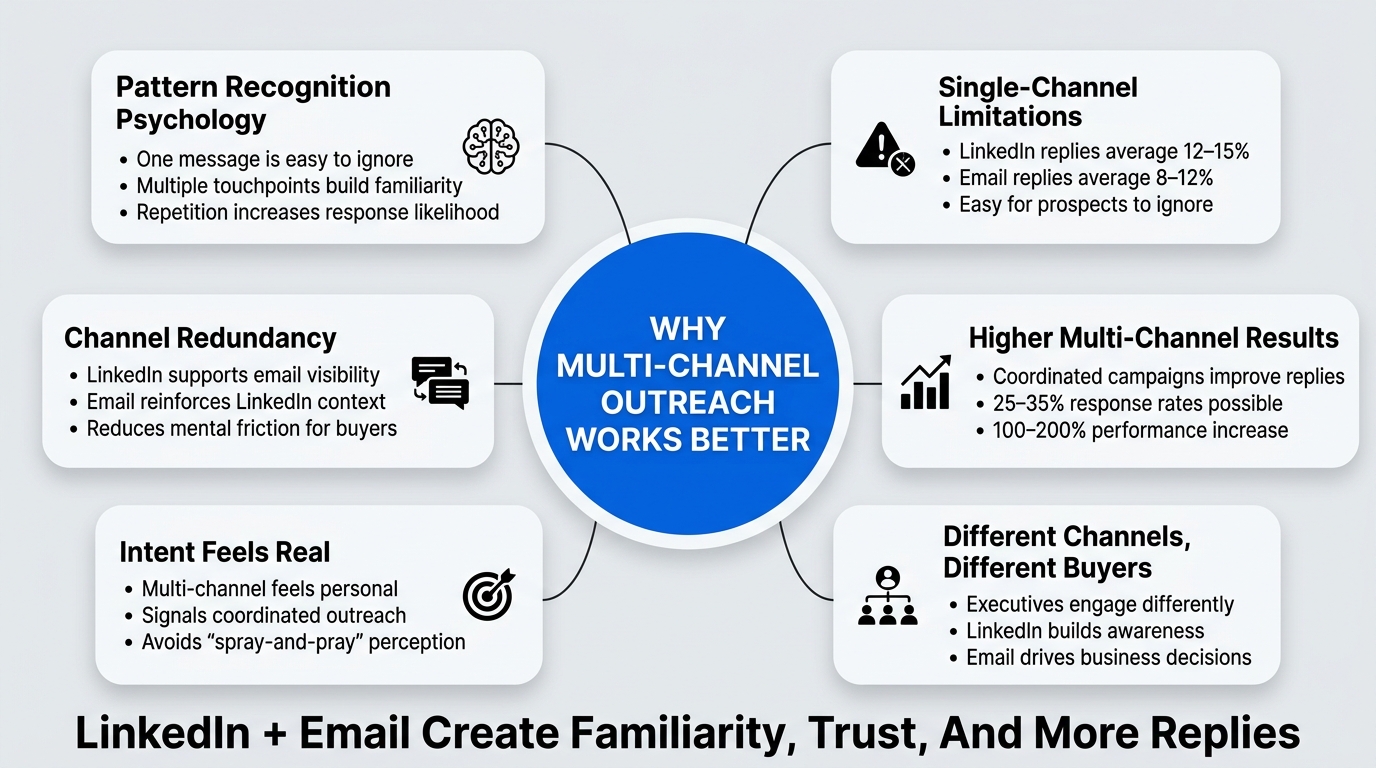
The brain is a pattern-recognition machine. One email is easy to ignore. One LinkedIn message is easy to archive. But when the same person reaches you on two different channels within 3-5 days, and the messages feel intentional rather than automated, your mental response changes.
This is not manipulation. This is how your buyer actually consumes information.
The Statistical Case for Multi-Channel Outreach: LinkedIn and Email
Single-channel campaigns typically deliver 12-15% reply rates on LinkedIn and 8-12% on email, depending on list quality and personalization depth. When teams run parallel campaigns without coordination, these rates do not stack. You get one or the other, but not both.
But when you coordinate timing, platform-specific messaging, and follow-up cadence, reply rates jump to 25-35%. This is not a 10% improvement. It is a 100-200% improvement.
Why the gap? Three mechanisms:
First, channel redundancy reduces mental friction. Your prospect sees the message twice, on different platforms, at slightly different times. The first touch might be noise. The second touch is validation. They are more likely to open the email because they already saw the name on LinkedIn. They are more likely to click the LinkedIn message because it resonates from the email context.
Second, multi-channel demonstrates real intent. When someone uses only one channel, it looks like a spray-and-pray campaign. A bot sending thousands of identical outreaches. When the same person reaches you on LinkedIn and then email, it signals that you found them specifically, cared enough to use multiple channels, and coordinated the timing. This is the signal of a real person running a real sales process, not an automation farm. Buyers respond to that.
Third, different channels activate different decision-makers. In larger companies, the person who sees your LinkedIn message is often not the same person who checks email. If you are trying to reach an executive, LinkedIn is where they manage their professional identity and scrolling. Email is where they handle business decisions. By running both, you increase the odds of hitting the actual decision-maker on at least one channel.
The Psychology of Channel Stacking
The first time someone hears your name is awareness. The second time is familiarity. The third time is obligation. By the fourth touch, in the context of something meaningful, they often respond.
Most teams stop at touch one or two because they do not know how to coordinate across channels. Multi-channel outreach changes that math. You can deliver four touches across two channels in less than a week, and because the messaging is tailored to each platform, it does not feel like overkill. It feels like a thoughtful sales process.
The Optimal Sequencing Model: When to Hit LinkedIn First Versus Email First
The order matters more than most teams think. Get it wrong, and you look like spam. Get it right, and you look like a professional who did their research.
Day 1: LinkedIn Connection Request with a Custom Note
Start on LinkedIn. Not because email is worse, but because the LinkedIn connection request serves a specific purpose: it is a soft ask. You are asking for permission to enter someone’s network, not asking for a meeting or a response. This is low friction.
The custom note is critical. Generic connection requests get ignored. Custom notes that reference something specific about their profile, recent activity, or role get accepted 35-40% of the time. Generic notes get accepted 15-20% of the time.
The custom note should be one sentence. Not three. One. Something like: “Seen your work scaling enterprise sales at Acme. Would love to stay connected as we scale growth at [Your Company].”
Do not ask for anything. Do not sell. Just establish a point of commonality and ask for the connection. If they accept, they are now in your network. If they do not, you have a warm email address and a second path.
Day 3 or 4: Email with a Different Angle, Not a Repeat of LinkedIn
Send an email 3-4 days after the LinkedIn request. Do not reference the LinkedIn message. Do not repeat the same value prop. Instead, introduce a different problem or different angle that makes sense for email.
If your LinkedIn note was about connection and credibility, your email should be about a specific insight or challenge you can help with. Email is where you introduce the business case. LinkedIn is where you build trust.
Subject line matters here. After testing thousands of subject lines, the highest response rates come from specificity and reverse curiosity: “Question about your sales process at Acme” or “Fix for Acme’s common Q4 issue” outperform generic subject lines by 40-60%.
The email body should be short. 50-75 words. Two sentences of context. One sentence of specific value. One sentence call to action. Done.
The goal is not to get a response on this email. The goal is to deliver a second touch that lands differently because it is on a different platform with a different angle.
Day 5-7: LinkedIn Follow-up Message (Now That the Connection Is Likely Accepted)
By day 5, there is a high probability your connection request was accepted, assuming the custom note had some weight. Now send a LinkedIn message. This is where you add depth.
The LinkedIn message can be longer than the email, and it should be more specific. This is where you reference their recent activity, congratulate them on a job change, or mention something you saw about their company strategy. LinkedIn is where you demonstrate you actually know who they are.
Do not sell in this message. Ask a question instead. “Curious how you are handling [specific challenge that relates to your product] at your scale?” You are starting a conversation, not making a pitch.
Day 9-11: A Second Email If No Response
If the LinkedIn message does not generate a response by day 9, send a second email. This email is different from the first: it is a check-in, not a pitch.
Subject line: “Quick follow-up” or “One more thing I thought of” works well here because it signals that this is a continuation of an existing conversation thread, not a new pitch.
Body: Acknowledge that they are busy. Reference the specific problem you mentioned in the first email. Ask if it is worth a conversation. Include a low-friction CTA: “No pressure, but curious if this is even on your radar?”
This email does 70% of the heavy lifting in terms of reply rates. The first email warms them up. This email closes them.
Day 13-15: LinkedIn Check-in or Pause
If still no response, send one final LinkedIn message. Keep it short: “Hate to be the person who keeps showing up, but worth a quick call?”
If still no response after this, move them to a nurture list instead of continuing to push. The 25-35% reply rate comes from coordinating touches perfectly for people who are actually in-market. Pushing beyond this point yields diminishing returns and damages your sender reputation.
The table below shows the optimal sequencing and the typical outcomes at each stage:
| Day | Channel | Action | Expected Response Rate | Purpose |
|---|---|---|---|---|
| 1 | Connection request with custom note | 35-40% acceptance | Soft ask, establish credibility | |
| 3-4 | First email with specific angle | 8-12% open rate | Deliver business case | |
| 5-7 | Message to new connection | 12-18% response rate | Build conversation, ask question | |
| 9-11 | Follow-up email, check-in tone | 15-22% response rate | Closing email, low-friction ask | |
| 13-15 | Final check-in message | 5-8% response rate | Last touch before nurture list |
Personalizing Across Platforms: The One-Core-Message, Multiple-Angles Framework
This is where most teams fail: they personalize the name and company, but they repeat the same value prop on both channels. This is actually why people tune out. They see the same message twice and conclude it is an automated campaign.
Real personalization means tailoring not just the names, but the hook, the problem statement, and the angle to the platform and the person.
The Core Problem: Your Actual Value Prop
Start with one clear statement of what you actually solve. This should not be marketing speak. It should be the measurable outcome your customers care about.
Example: “We help sales VPs reduce time-to-hire for their enterprise sales teams from 90 days to 35 days.”
This is your north star. This is what you are going to personalize against across platforms. Everything else flows from this.
Platform-Specific Angles for Multi-Channel Outreach LinkedIn and Email
On LinkedIn, lean into credibility, scale, and social proof. The LinkedIn algorithm rewards engagement. Your message should be interesting enough that it could spark a conversation worth having in public.
A LinkedIn opening might be: “Noticed you scaled your sales team from 5 to 50 people over the last 18 months. That growth curve is exactly what we see at our fastest-growing customers.”
On email, lean into specificity and business case. Email is private. The person is evaluating whether this is worth their time to respond. Your email should reference something specific about their company, recent news, or their role that makes it clear you are not sending this to 5,000 other people.
An email subject line and opening might be: “Quick thought on your recent funding round” or “Question about sales hiring at Acme” followed by: “I noticed you raised Series B last month. Every company we work with hits the same wall when they go from product sales to enterprise sales: hiring slows, ramp times stretch, and revenue growth plateaus.”
Same core message (sales hiring, speed, growth). Different angles for different platforms.
The Depth Adjustment Model
LinkedIn messages should be shorter initially. 2-3 sentences. You are starting a conversation, not delivering a thesis.
Emails should be longer than LinkedIn messages, but not long. 75-150 words. You have more attention on email because the person sat down to read it. Use that space to be specific.
In the follow-up email and LinkedIn check-ins, you can reference earlier touchpoints because by then, if they have seen your messages, they know you are still there. This builds credibility. “As I mentioned in my email…” shows that you have been consistent across channels.
Personalization Data Sources
This is where automation tools help, but they cannot do all the work for you.
LinkedIn gives you: job title changes, company, industry, connection history, recent activity, posted content.
Email research tools like Clay, Apollo, or Hunter give you: job history, company revenue, funding stage, verified email address.
But the best personalization comes from 60 seconds of manual research on each person: What did they post about last month? Did they share anything about their sales challenges? Did they change jobs? Did their company raise funding?
This is not scalable if you are reaching 1,000 people. But if you are reaching 50-100 people per week, it is absolutely doable and it increases your reply rate by 30-50%.
Mistakes in Multi-Channel Outreach LinkedIn and Email (And How to Fix Them)
Most teams that try multi-channel outreach fail because they make the same five mistakes repeatedly. Here is how to avoid them:
Mistake 1: Same Message, Both Channels
The original error. You write one message and copy-paste it to LinkedIn and email.
This does not work because:
- Email subject lines have no equivalent on LinkedIn. You lose the hook.
- LinkedIn messages are seen in a scroll context. Email is seen in an inbox context. Different hooks work.
- Using the same message signals automation. People see the duplicate and tune out.
Fix: Write three versions of your core message. One for the LinkedIn connection request note. One for the first email. One for the LinkedIn message. The value prop stays the same. The angle changes.
Mistake 2: Wrong Timing Between Touches
Sending the email too soon (same day or day 2) looks like spam. Sending it too late (day 10+) means the LinkedIn connection request momentum is lost.
The 3-4 day window is not arbitrary. It is enough time for someone to see the connection request, think about it, and accept it (or for you to know they are not going to). By day 4, your email lands on top of a fresh context in their mind.
Fix: Use your CRM or email platform to schedule the sequence. Automate the timing, but keep the messaging manual.
Mistake 3: Asking for Too Much Too Soon
“Reply to this email and let’s set up a call” in your first email does not work.
People need to trust you first. Trust is built over multiple touches. If you ask for a call on the first email, most people will either ignore you or unsubscribe.
The progression should be: ask for a reply. Then ask for a call.
First email CTA: “Make sense?” or “Worth a quick conversation?” Follow-up email CTA: “Open for 15 minutes next Tuesday?”
Fix: Save the calendar invite for the second or third email. Build momentum first.
Mistake 4: Inconsistent Messaging Across Company Accounts
If you have a sales team running outreach, different people will write different messages. This is fine, except when the same prospect gets reached by multiple people with different messages on the same day. This kills credibility immediately.
Set a messaging template for your team. Not a script. A framework. Core value prop. Standard angles. Standard CTAs. Let people personalize within that framework.
Fix: Create a one-page guide that every person on the team uses. LinkedIn angle. Email angle. First email angle. Follow-up email angle. Use it.
Mistake 5: No Tracking of Which Channel Actually Converted
You run a multi-channel campaign. Someone replies. But you never track which touch actually moved the needle. Was it the LinkedIn message? The email? Something else?
Without this data, you cannot optimize. You cannot know if you should spend more time on LinkedIn or more time on email. You cannot know if your sequencing is right.
Fix: Ask in your CTA: “Which channel did you hear from us on?” Or tag every response with the touch point that preceded it. If the first email generated a reply, that is different data than if the follow-up email generated the reply.
Tools and Automation: When to Automate, When to Keep It Manual
The tools available for multi-channel outreach have improved dramatically. But not all automation is helpful.
What to Automate in Multi-Channel Outreach
Timing: Use your email platform or CRM to schedule the email sequence. Scheduling keeps the timing consistent across your team. You do not want the timing to vary by 2-3 days depending on when the salesperson remembers to send the email.
LinkedIn connection sending: You can automate connection requests on LinkedIn through tools like Apollo, Clay, or Dripify. But do not automate the custom note. That manual work is where the 35-40% acceptance rate comes from.
Follow-up reminders: If someone did not respond, you want to be reminded to follow up. Automate the reminder, not the message.
Email list hygiene: Use tools to verify email addresses and remove unsubscribes and bounces. This is table stakes.
Response tracking: Use a CRM that integrates with both LinkedIn and email so you can see the full conversation thread across both channels. This is critical for understanding what is working.
What Not to Automate
The custom note on LinkedIn connection requests. 60 seconds of manual personalization on this note increases acceptance rates from 15% to 35-40%. That is a 100% improvement. Do not sacrifice it for speed.
The first email message body. Email is lower-volume than LinkedIn outreach. You should be writing custom first emails, not templates. If you cannot afford the time, your list is too big.
The angle and hook. Your messaging should change based on what you learn about the person. If their company just raised funding, that is the angle. If they recently posted about a sales challenge, that is the angle. Automation cannot do this.
Which Tools Work Best for Multi-Channel Outreach LinkedIn and Email
Clay: Best for building custom data enrichment on your list. You can pull in LinkedIn data, company data, recent news, and build very specific angles for each person.
Apollo: Good for LinkedIn automation and email sequencing. Built-in CRM so you can track multi-channel conversations. Weaker on personalization depth.
Dripify: LinkedIn-first tool. Strong at scale. Less emphasis on email, so if email is a big part of your strategy, this is a secondary tool.
Lemlist: Email-first tool with strong personalization. Integrates with LinkedIn APIs so you can see LinkedIn activity in your email context. Very good for the email side of multi-channel.
Sales Navigator: This is not an automation tool. But if you are running LinkedIn outreach at scale, you should have a Sales Navigator subscription. The filtering and search options dramatically improve list quality.
For a full multi-channel campaign, most teams end up with two tools: one for LinkedIn automation (Apollo, Dripify) and one for email (Lemlist, Outreach). Run the list through both, keep the CRM synced, and you have a repeatable system.
The reality: no single tool handles true multi-channel well. The platforms do not talk to each other perfectly. You will have some manual gluing together, and that is okay. Most of the work is in getting the messaging and sequencing right anyway. The tool is just the delivery vehicle.
Measuring Multi-Channel Outreach: The Metrics That Actually Matter
Most teams track the wrong metrics. They measure email open rates and LinkedIn message views as if these are conversions. They are not. They are vanity metrics.
The only metric that matters is the reply rate. And more specifically, the qualified reply rate. Because a reply is not a success if the person is not actually in your ICP.
Tracking Multi-Channel Reply Rates
When you combine channels, you need to know which channel the reply came from. Did they reply to the email? Reply to the LinkedIn message? Call you after seeing both?
Set up your CRM to tag the source. When you log a reply, mark it as “LinkedIn reply” or “Email reply” or “Phone call after LinkedIn + Email sequence.”
After 100+ replies, patterns emerge. Most teams find that:
- 40-45% of replies come from the follow-up email
- 25-30% come from the LinkedIn message
- 20-25% come from the initial email
- 5-10% come from the final LinkedIn check-in
This tells you something important: email is the reply-driver, but LinkedIn is the trust-builder that makes email replies more likely.
Conversion Rate from Reply to Call Booked
Not all replies are equal. Some people reply with interest. Some reply with objections. Some reply out of politeness.
Track the second metric: of all the replies you get, what percentage result in a call booked?
Most teams see 40-50% of replies convert to a booked call. If you are getting 30% of prospects to reply, and 45% of those convert to a call, your conversion rate from outreach to call is 13.5%. That is strong.
If your reply rate is 30% but only 10% of replies convert to calls, you have a pitch problem, not an outreach problem. Your sequence is working, but your messaging in the reply is weak.
Cost Per Booked Call
This is the metric that matters to finance.
If you are using tools, add the tool costs per month divided by calls booked. If you are also paying a sales team member to do this work, add the salary component.
Most teams should target 20-50 outreaches per call booked, depending on list quality and industry. If you are at 100+ outreaches per call, your list quality is weak.
If you are at 10 or fewer, your list quality is exceptional, or you are only reaching out to warm prospects (which is a different strategy).
Tracking Across Multi-Channel Touchpoints
This is where many teams fail. They count email opens and LinkedIn views separately, so they never see the multi-channel effect.
Set up your CRM to show the full timeline:
- Day 1: LinkedIn connection request sent
- Day 2: LinkedIn connection accepted
- Day 4: Email sent (X views, Y clicks)
- Day 6: LinkedIn message sent (X views, Y replies)
- Day 10: Email follow-up sent (X views, Y replies)
When you see this timeline, you can start optimizing specific sequences. You can see which sequences drive replies and which do not. You can test variations: what if we send the email on day 3 instead of day 4? What if the LinkedIn message happens on day 5 instead of day 6?
This is how you move from 25-35% reply rates to 40%+.
Compliance, Deliverability, and Sender Reputation: How Not to Get Blocked
Multi-channel outreach at scale is a brand risk. You are sending more messages. This means more risk of:
- Being flagged as spam by email providers
- Violating LinkedIn’s terms of service
- Damaging your sender reputation
Here is how to manage the risk:
Email Deliverability Best Practices
Use a dedicated sending domain. Not your company domain. A separate domain with its own reputation. If you are running aggressive outreach, a single bad list source can tank your main company domain’s reputation for months.
Warm up the domain gradually. Do not send 10,000 emails on day 1. Start with 500, then 1,000, then scale from there. Email providers flag sudden volume spikes as spam.
Keep your list clean. Use a verification tool like ZeroBounce or NeverBounce to catch invalid addresses before sending. Sending to invalid addresses tanks your sender reputation immediately.
Include unsubscribe links. This is not optional. It is a legal requirement in most jurisdictions. And it is good practice. If someone wants off the list, let them off. Forcing them to mark as spam damages your reputation.
Monitor your bounce rate. Aim for under 2-3%. Anything higher and you have a list quality problem.
Monitor your spam complaint rate. Aim for under 0.1%. If 1 in 1,000 people mark you as spam, you are fine. If 5 in 1,000 do, you have a problem.
LinkedIn Compliance: What You Can and Cannot Do
LinkedIn allows automation of connection requests and messaging, but only if you follow the rules. Here is what you can safely do:
- Send 50-100 connection requests per day per account
- Send 10-20 messages per day per account to new connections
- Automate the message sequence, but you cannot customize it per recipient (the newer APIs actually allow this, but most tools do not fully support it)
What you cannot do:
- Scrape profiles
- Automated bulk message send without prior connection acceptance
- Impersonation
- Spam keywords in messages (viagra, cryptocurrency, etc.)
The best practice: keep your volume below the daily limits. If you are hitting 100 connection requests per day, LinkedIn will flag you as spam. Stay at 50-75 per account. Use multiple accounts if you need to scale. Most teams working with 50+ LinkedIn accounts run 20-30 requests per account per day and never have issues.
Sender Reputation Monitoring
Use a tool like Mailerbox or MailerCheck to monitor your domain’s sender reputation. These tools show you your domain’s health status across email providers. If you are dropping reputation, you catch it early and can stop sending before it becomes a real problem.
Real-World Campaign Example: A Sequence That Generates 28% Reply Rates
Let’s walk through an actual multi-channel campaign that a B2B SaaS company (let’s call them TechCorp) ran targeting VP of Sales at mid-market companies.
Their target: 200 VPs of Sales at companies with 50-500 employees in the software industry
Their value prop: reduced sales hiring time from 120 days to 45 days
The Sequence
Day 1: LinkedIn connection request with custom note
- Note: “John, noticed you lead sales at Acme. We help VP of Sales cut hiring time from 120 to 45 days. Worth connecting.”
- Result: 38% connection acceptance rate (76 connections)
Day 4: First email
- Subject: “Quick thought on sales hiring at Acme”
- Body: “Hey John, saw your company grew revenue 45% last year. Every founder we work with hits the same problem at your growth rate: sales hiring becomes your bottleneck. Might be worth a conversation. Make sense?” (55 words)
- Result: 22% of emails sent generated a reply
Day 6: LinkedIn message to the 76 new connections
- Message: “John, one quick thought: most companies take 120 days to hire and ramp a new AE. We cut that to 45. Just launched a case study on the 3-person playbook that works. Curious how long it takes you to ramp new hires?”
- Result: 16% of messages sent generated a reply
Day 10: Follow-up email
- Subject: “One more thing I thought of”
- Body: “John, following up on my email from last week. The hiring slowdown hits exactly at your growth stage. Hate to be pushy, but worth 15 minutes next week?” (28 words)
- Result: 18% of emails sent generated a reply
Day 13: LinkedIn check-in
- Message: “Still interested in shaving 75 days off your hiring process, or not really on the radar right now?” (18 words)
- Result: 8% of messages generated a reply
The Results
Total replies: 56 (28% overall reply rate) Replies that converted to a call: 24 (43% of replies) Calls booked: 18 Sales close rate: 33% (6 deals) Average deal value: $85,000 Campaign revenue: $510,000
Campaign cost: $2,400 (tools) + ~$8,000 (sales time to personalize messages and follow up) = $10,400 Cost per deal: $1,733 Cost per booked call: $577
This is good. Not exceptional. But good. And this is with a fairly generic target (VP of Sales at software companies). With more selective targeting or longer sales cycles, these numbers improve.
The key insight from this campaign: the follow-up email (day 10) was the highest conversion point. It drove 18% of messages to replies, only slightly behind the LinkedIn message at 16%. This tells you that email is actually doing more of the heavy lifting in the multi-channel stack than people realize.
The Future of Multi-Channel Outreach: What’s Changing
The landscape of outreach is shifting. Three trends matter:
First, AI is changing the personalization game. Tools like Dealsflow are moving beyond “send this message 5,000 times with the name field filled in.” Now you can generate truly personalized messages at scale. The message is different for each person based on their company data, role, recent activity, and ICP fit. This is not a gimmick. This dramatically increases reply rates.
If you are running multi-channel outreach without AI-driven personalization in 2026, you are at a disadvantage. Your competitors are running 40%+ reply rates with AI personalization. You are stuck at 25-30% with templates.
Second, email is becoming more important relative to LinkedIn. This seems counterintuitive, but it is happening because LinkedIn is getting more crowded. Connection acceptance rates are dropping. Message reply rates are dropping. But email acceptance rates have not changed. Email is still the reliable reply-driver.
The smart multi-channel teams are shifting from LinkedIn-first to LinkedIn-and-email-together, with email carrying more weight.
Third, compliance is tightening. LinkedIn has been cracking down on automation. Email compliance (CAN-SPAM, GDPR, CCPA) is stricter every year. Running outreach at scale in 2026 requires more care than it did in 2023. The days of spray-and-pray outreach are over.
The teams winning now are the ones that:
- Treat outreach like a professional sales process, not a volume game
- Use automation to handle the logistics, but keep the messaging manual and thoughtful
- Monitor compliance and sender reputation obsessively
- Test and iterate on sequences constantly
- Track the right metrics (reply rate, call booking, revenue, not open rates)
Conclusion
Multi-channel outreach combining LinkedIn and email is not complicated. But it is not simple either. It requires coordination, discipline, and a willingness to measure what actually works instead of what feels like it should work.
The core principles are straightforward: start on LinkedIn with a soft ask that builds trust. Follow up with email on a different angle. Keep the touches coming on both channels without overdoing it. Measure replies, not opens. Optimize the sequence that actually drives conversions.
If you implement the sequencing model in this guide, with personalization on top of automation, you should see reply rates move from 12-15% (the industry standard for single-channel outreach) to 25-35% within 60 days. After that, the gains come from tweaking the angles and the personalization depth.
The action to take next: audit your current outreach process. Are you running single-channel or multi-channel? If single-channel, commit to running one coordinated LinkedIn plus email campaign to 100 prospects over the next 4 weeks. Track which channel drives replies. Track which channel drives calls. Then decide whether multi-channel is worth the extra effort for your business.
For teams running this at scale across 50+ prospects per week, having the right tool stack matters. A CRM that can see both LinkedIn and email conversations, an email platform that can do advanced personalization, and a LinkedIn tool that can automate the connection requests and send the messages. The tool is not the limiting factor. The sequence design and the messaging are.
Frequently Asked Questions
Q1: What is the ideal ratio of LinkedIn touches to email touches in a multi-channel campaign?
A: The optimal ratio is 1.5 LinkedIn touches to every 1 email touch. This means for every email you send, you send 1-2 LinkedIn touches (connection request, message, check-in). This keeps the email feeling special and ensures you are not overdoing either channel. The specific breakdown depends on your ICP and industry, but testing 70% email and 30% LinkedIn often outperforms the reverse.
Q2: How do I avoid being flagged as spam when running multi-channel outreach at scale?
A: Use a dedicated sending domain separate from your company domain. Warm the domain gradually, starting with 500 emails on day 1 and scaling to 5,000 over 2 weeks. Keep bounce rates under 3%, spam complaint rates under 0.1%, and use unsubscribe links. For LinkedIn, stay at 50-75 connection requests per account per day. Use multiple accounts if you need to scale beyond that.
Q3: Should I personalize my outreach for specific industries or company sizes?
A: Yes. Generic messages to all prospects underperform personalized campaigns by 40-60%. Segment your list by company size, industry, and role. Build different value propositions for each segment. A VP of Sales at a Series B startup responds to different messaging than a VP of Sales at a public company. Spend time on segmentation. It pays off.
Q4: What reply rate should I expect from multi-channel outreach?
A: With a clean list, solid personalization, and proper sequencing, you should expect 25-35% reply rates. If you are below 20%, your messaging or list quality is weak. If you are above 40%, you have either an exceptionally good list or you are measuring replies incorrectly (counting all responses, including rejections, not just interested replies).
Q5: How long should my email messages be in a multi-channel campaign?
A: First email: 50-75 words. Follow-up email: 50-100 words. If your emails are more than 150 words, you are over-explaining. Most people decide whether to respond in the first 2-3 sentences. Use that space wisely. Longer emails do not generate higher reply rates. Clearer emails do.
Q6: Can I automate the personalization in multi-channel outreach, or does it have to be manual?
A: This has changed. AI tools can now generate truly personalized messages at scale using company data, job title, recent activity, and other signals. Tools using generative AI (like Dealsflow’s Arlo AI) can write custom messages for each person that feel hand-written. Manual personalization is still the gold standard for the highest reply rates, but AI-driven personalization is now competitive with manual at 5-10% lower effort.
Q7: How many touches should I include before moving someone to a nurture list?
A: After 4-5 touches across both channels (2-3 on LinkedIn, 2-3 on email), if you have not gotten a response, move them to a nurture list. Continuing to push beyond this point yields diminishing returns and risks damaging your sender reputation. A nurture list means one touch every 2-4 weeks with valuable content, not asks.
Q8: Is it better to use one tool for multi-channel outreach or multiple tools?
A: Most teams use 2-3 tools: one for LinkedIn automation, one for email, one for CRM management. No single tool does all three exceptionally well. The integration between tools matters more than the tools themselves. Your CRM must see both LinkedIn and email conversations together, or you lose visibility on what is working.
Q9: How do I know if my reply rate improvement is from multi-channel outreach or from better personalization?
A: A/B test. Run a single-channel email campaign on 100 prospects and a dual-channel (LinkedIn + email) campaign on another 100 with identical personalization. The difference in reply rate is your multi-channel lift. Most teams see a 40-80% improvement from adding the LinkedIn channel, compared to email-only campaigns.
Q10: What should I do if my reply rate drops after running the same sequence for 2 months?
A: Fatigue is real. After 60-90 days, the people in your target market have likely heard from you or someone similar. Refresh your angles. Change the value proposition. Test new subject lines. Or move to a different list. Declining reply rates after 8-12 weeks is normal and does not mean multi-channel outreach is broken. It means you need to iterate.
Q11: Can I use the same multi-channel sequence for different buyer personas or should I customize it by role?
A: Customize by role. A CFO responds to different messaging than a VP of Sales. A Director of Recruitment responds to different messaging than both. Use the same sequencing structure (LinkedIn day 1, email day 4, LinkedIn message day 6, etc.), but change the angles, value propositions, and CTAs for each role. This doubles the work initially but triples the reply rate.
Q12: How do I track which touches actually drove the reply in a multi-channel campaign?
A: Tag every reply in your CRM with the source. “LinkedIn reply,” “email reply,” “phone call after seeing both.” After 50-100 replies, you will see a pattern. Most teams find that the follow-up email generates the most replies, but LinkedIn builds the trust that makes those email replies possible. Track both the direct reply source and the full campaign attribution.