


Most nonprofits treat LinkedIn the same way they treat a billboard on a highway — post something, hope someone notices, move on. That is why most nonprofit LinkedIn pages sit quiet for weeks at a time while the same development team sends cold emails into the void and wonders why donor acquisition costs keep climbing.
LinkedIn is not a billboard. It is the only professional network where a single well-placed message to the right person can unlock a $10,000 donation, a multi-year corporate partnership, or an introduction to a board member who changes the trajectory of your organization. The difference between nonprofits that get results on LinkedIn and those that do not comes down to one thing: strategy.
This guide covers the complete nonprofit outreach strategy for LinkedIn in 2026 — from setting up your foundation and finding donor prospects to writing outreach sequences that actually get replies, building corporate partnerships, and measuring what works.
Why LinkedIn Is the #1 Outreach Channel for Nonprofits in 2026
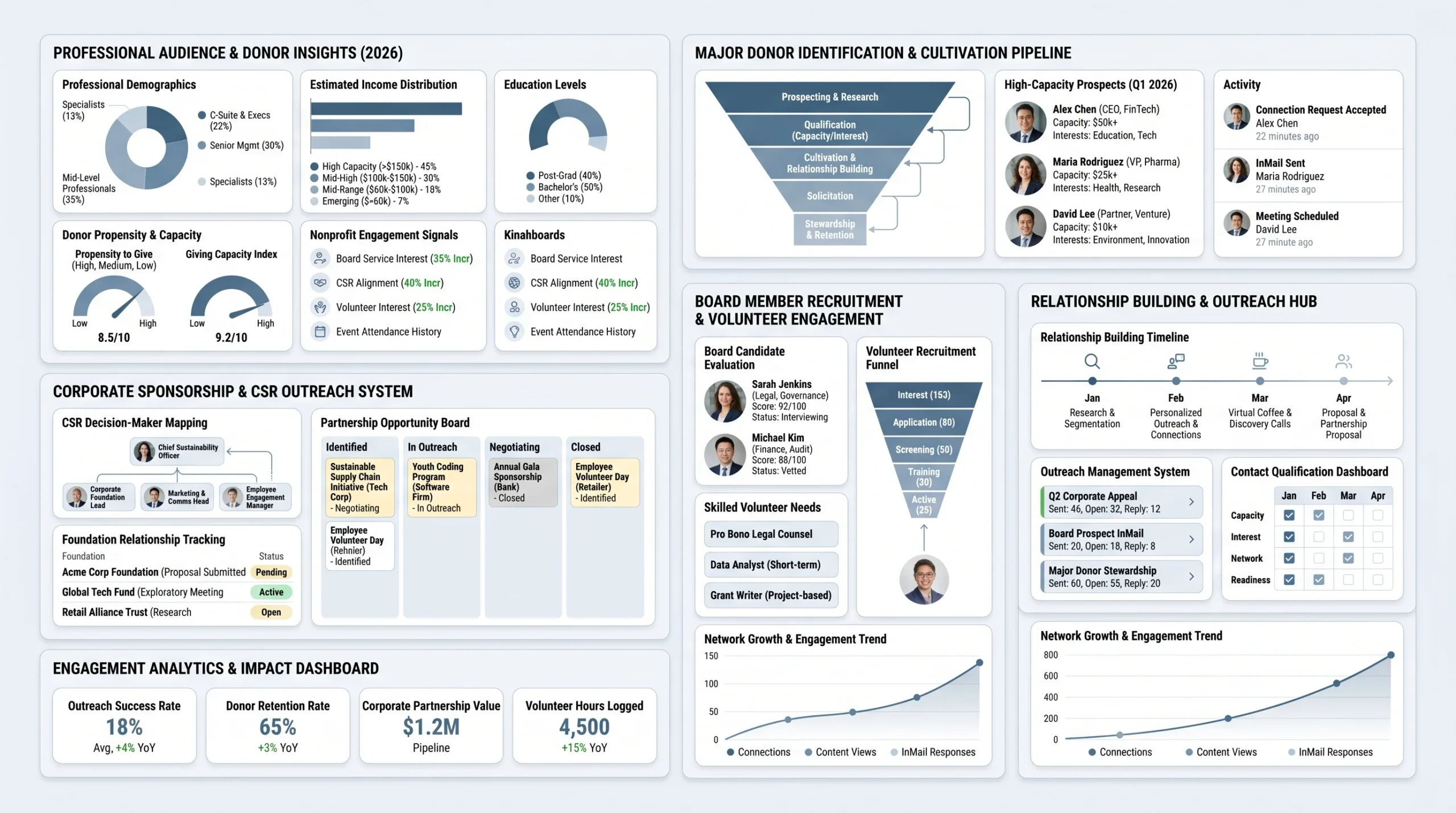
LinkedIn has quietly become one of the most effective donor and partner acquisition channels available to nonprofits, and most organizations are still not using it seriously. Understanding why requires looking at who is actually on the platform and what the data says about their giving behavior.
LinkedIn’s Unique Advantage Over Other Social Platforms
The Audience Difference — Why Professionals Give More
LinkedIn’s user base is structurally different from every other social platform. According to Nonprofit Tech for Good’s 2026 best practices guide, 52% of LinkedIn users hold college degrees and 54% earn more than $100,000 annually. That income profile matters directly for fundraising, because household income is one of the strongest predictors of both giving capacity and corporate giving authority.
On Facebook or Instagram, your mission competes with vacation photos, food content, and political arguments. On LinkedIn, your organization’s story lands in a professional context where people are already thinking about their careers, their industries, and their community impact. That context makes a difference in how messages are received.
Key Stats: LinkedIn Users Are 56% More Likely to Donate to Nonprofits
The Association of Fundraising Professionals cites research showing that LinkedIn users are 56% more likely to donate to nonprofits than the average internet user. That single statistic reframes the entire platform. If you are spending most of your digital fundraising budget on Facebook ads or Instagram campaigns while leaving LinkedIn largely untouched, you are not reaching the highest-propensity donor audience available to you.
Beyond individual giving, LinkedIn is where corporate giving decisions get made. CSR managers, foundation leads, and marketing directors who control corporate philanthropy budgets are professionals who use LinkedIn daily. Reaching them through a platform they trust is categorically different from a cold email they never open.
What You Can Realistically Achieve on LinkedIn
Before outlining what LinkedIn can do, it is worth being honest about what it takes. LinkedIn is a relationship channel, not a direct response channel. You will not send 50 messages on Monday and collect donations by Friday. What you will do, if you build this right, is develop a steady pipeline of warm relationships that convert into donors, partners, and advocates over weeks and months.
Finding Major Donors ($5K to $20K Range)
Virtuous, a nonprofit CRM company, describes the $5,000 to $20,000 partnership range as the sweet spot that most nonprofits struggle to grow through traditional individual giving. LinkedIn is specifically well-suited to this tier because the platform gives you direct access to professionals with disposable income and clear philanthropic signals, without the overhead of major donor events or expensive wealth screening software.
Identifying Corporate Partners and Sponsors
Corporate sponsorships can be one of the most sustainable revenue streams a nonprofit builds. LinkedIn makes it possible to research a company’s CSR priorities, identify the right internal contacts, and initiate a relationship before ever sending a formal proposal. The platform’s advanced search tools let you filter by company size, industry, and geography, turning what used to be a research-heavy manual process into a structured workflow.
Recruiting Board Members and Skilled Volunteers
LinkedIn’s professional network is the most direct path to finding board candidates who bring both mission alignment and professional skills your organization needs. Whether you need a CFO, a legal advisor, or a marketing director, LinkedIn lets you search by title, industry, and geography and then initiate contact through a warm, professional context.
Setting Up Your Foundation Before You Outreach
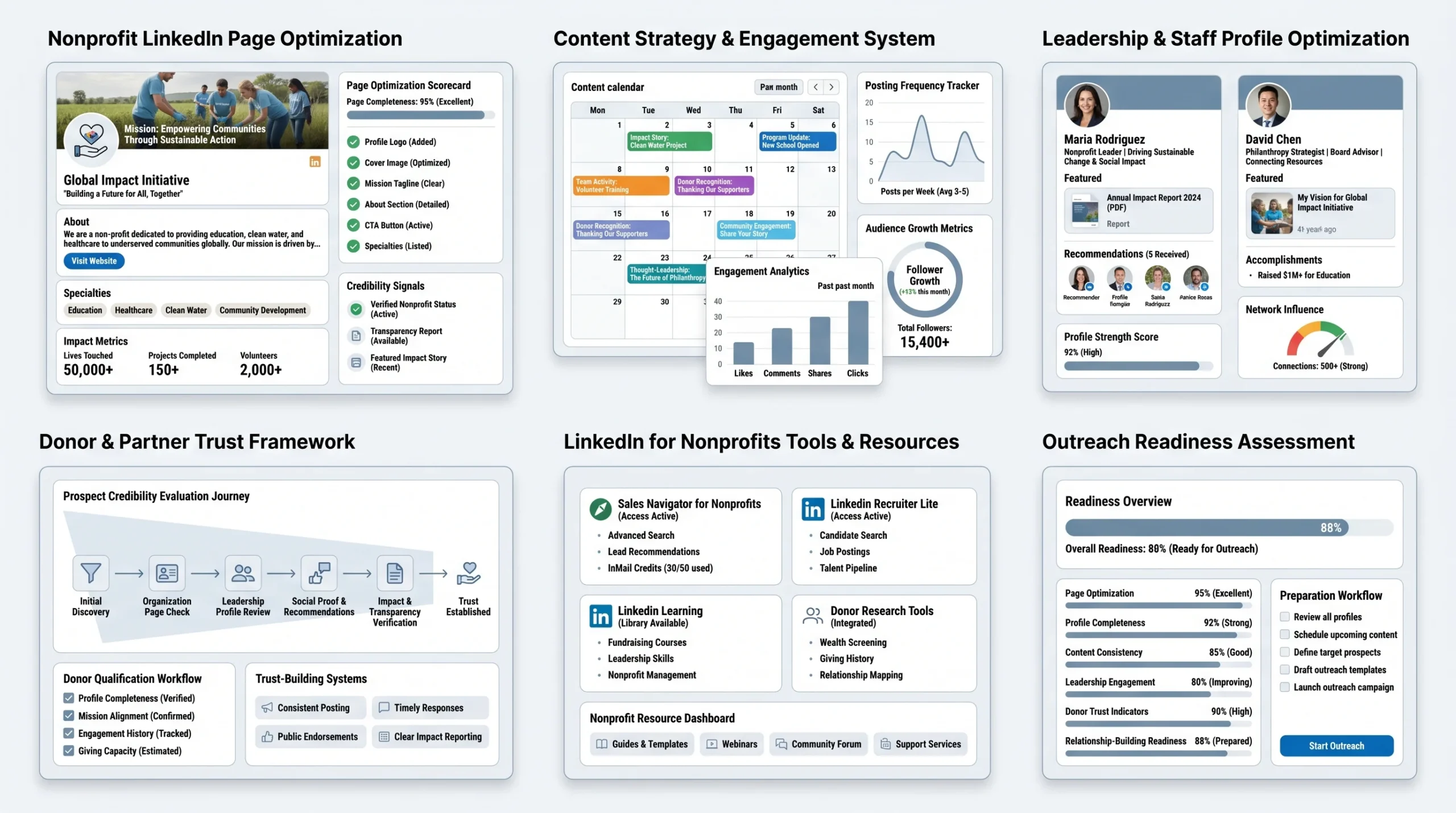
Outreach only works if the people you reach out to can verify your credibility before they respond. On LinkedIn, that verification happens through your nonprofit’s page and your team’s individual profiles. If either of those is incomplete, you are losing responses before you even know it.
Optimizing Your Nonprofit’s LinkedIn Page
Must-Have Page Elements (Tagline, CTA Button, About Section)
Your LinkedIn Page is the first thing a donor or corporate partner checks after receiving a message from your team. LinkedIn’s own resource hub for nonprofits identifies the page as the anchor of your professional credibility on the platform. Every page should include a clear, jargon-free tagline that communicates your mission in one sentence. The custom CTA button (options include “Visit Website,” “Contact Us,” and “Learn More”) should point to whichever action is most valuable at your current stage, whether that is a donation page, an impact report, or a partnership inquiry form. The About section should describe what you do, who you serve, and the outcomes you create, without filler language or vague mission statements.
- Tagline: State your mission outcome, not your method. “We end childhood hunger in rural India” beats “We are dedicated to combating food insecurity.”
- CTA Button: Set it based on your current priority (donation page, contact form, or event registration).
- About Section: Cover who you serve, what you do, and the specific impact you have created. Include your geography, your founding year, and one or two concrete outcome stats.
- Specialties: Fill in the specialties field with terms that describe your cause area, because LinkedIn uses these for search relevance.
- Logo and Cover Image: Use high-resolution images. The cover image is prime real estate; use it to show your work in the field, not an abstract graphic.
Content Cadence — What and How Often to Post
Nonprofit Tech for Good’s 2026 LinkedIn best practices guide recommends that nonprofits prioritize their LinkedIn Page and commit to posting regularly, noting that a sure sign of platform integration is a LinkedIn icon featured on the organization’s website. Consistent posting keeps your page active and searchable. The right cadence for most nonprofits is three to five posts per week, mixing impact updates, team stories, program milestones, and sector commentary.
- Impact updates: Share specific outcomes from your programs (number of people served, funds raised, milestones reached).
- Behind-the-scenes: Show your team in the field, at events, or doing the work. These posts build emotional connection.
- Sector commentary: Share takes on issues in your cause area. This positions your organization as a thought leader, not just a fundraiser.
- Gratitude posts: Thank donors and corporate sponsors publicly. Tag company pages when thanking corporate supporters.
Optimizing Staff and Leadership Profiles
Why Board Members’ and Executives’ Profiles Matter More Than Your Page
According to LinkedIn for Nonprofits’ own guidance, every action and interaction that your staff, board members, and volunteers make within the LinkedIn community increases your nonprofit’s visibility. In practice, this means individual profiles drive more reach than your page does, because LinkedIn’s algorithm favors personal content over page content by a wide margin. When a board member posts about why they serve your organization, or when your executive director shares an impact story, those posts reach networks your page never will.
The implication is practical: invest time in your leadership team’s profiles, not just your organization’s page. A donor who receives an outreach message will almost certainly look at the sender’s personal profile before deciding to respond. If that profile is sparse or generic, the response rate drops.
Profile Checklist for Fundraising Credibility
LinkedIn for Nonprofits’ best practices for connecting with prospects make it explicit that your own LinkedIn profile must be complete, up to date, and convey credibility before you reach out to prospects, because they will almost certainly check it before deciding to reply.
- Headline: Go beyond your job title. “Executive Director at [Org Name] | Building [mission outcome] for [population]” is stronger than “Executive Director.”
- Profile photo: Use a professional, current photo. Profiles with photos receive significantly more engagement than those without.
- About section: Write in first person. Explain why you do this work, what you have achieved, and what kind of connections you are looking for.
- Experience section: List your role at the nonprofit with specific accomplishments, not just duties.
- Featured section: Pin an impact report, a press mention, or a video of your work in action.
- Recommendations: Ask board members and partners to leave recommendations. Social proof on a profile functions the same way it does on a donation page.
Accessing LinkedIn for Nonprofits Discounts
What LinkedIn Offers Nonprofits (Sales Navigator, Recruiter Lite, Learning)
LinkedIn has a dedicated nonprofit program that provides access to its most powerful tools at deeply discounted rates. According to Charity Charge’s complete LinkedIn for Nonprofits guide, LinkedIn provided over $215 million in discounts to more than 3,500 nonprofit organizations in 2022 alone. The products available through this program include:
- LinkedIn Sales Navigator: Used for prospect research, lead list building, saved searches, and InMail outreach to donors and partners. LinkedIn’s nonprofit page for Sales Navigator Core describes its core capabilities as identifying high-potential prospects with advanced search filters, establishing connections through InMail messages, and tracking existing and potential donors’ activity to spot the optimal time to reach out.
- LinkedIn Recruiter Lite: For nonprofits that need to hire mission-aligned staff or find skilled volunteers.
- LinkedIn Learning: Provides access to over 20,000 expert-led courses for staff development at discounted rates.
How to Apply for Nonprofit Pricing
To access nonprofit pricing, your organization must apply through LinkedIn’s nonprofit verification process. Eligibility requirements include being a registered nonprofit or NGO, not being a government entity, and having a LinkedIn company page. The application is handled through LinkedIn’s nonprofit portal, and approval typically requires documentation of your nonprofit status (such as a 501(c)(3) determination letter in the United States). Once approved, your discount is applied to your subscription and renewed annually.
How to Find Donors on LinkedIn in 2026
Finding donors on LinkedIn is a structured process, not a guessing game. The nonprofits that do it well follow a repeatable sequence: define who they are looking for, find those people using the right tools, warm up the relationship through common connections, and then reach out at the right moment. Here is that sequence broken down into steps.
Step 1 — Define Your Ideal Donor Profile (IDP)
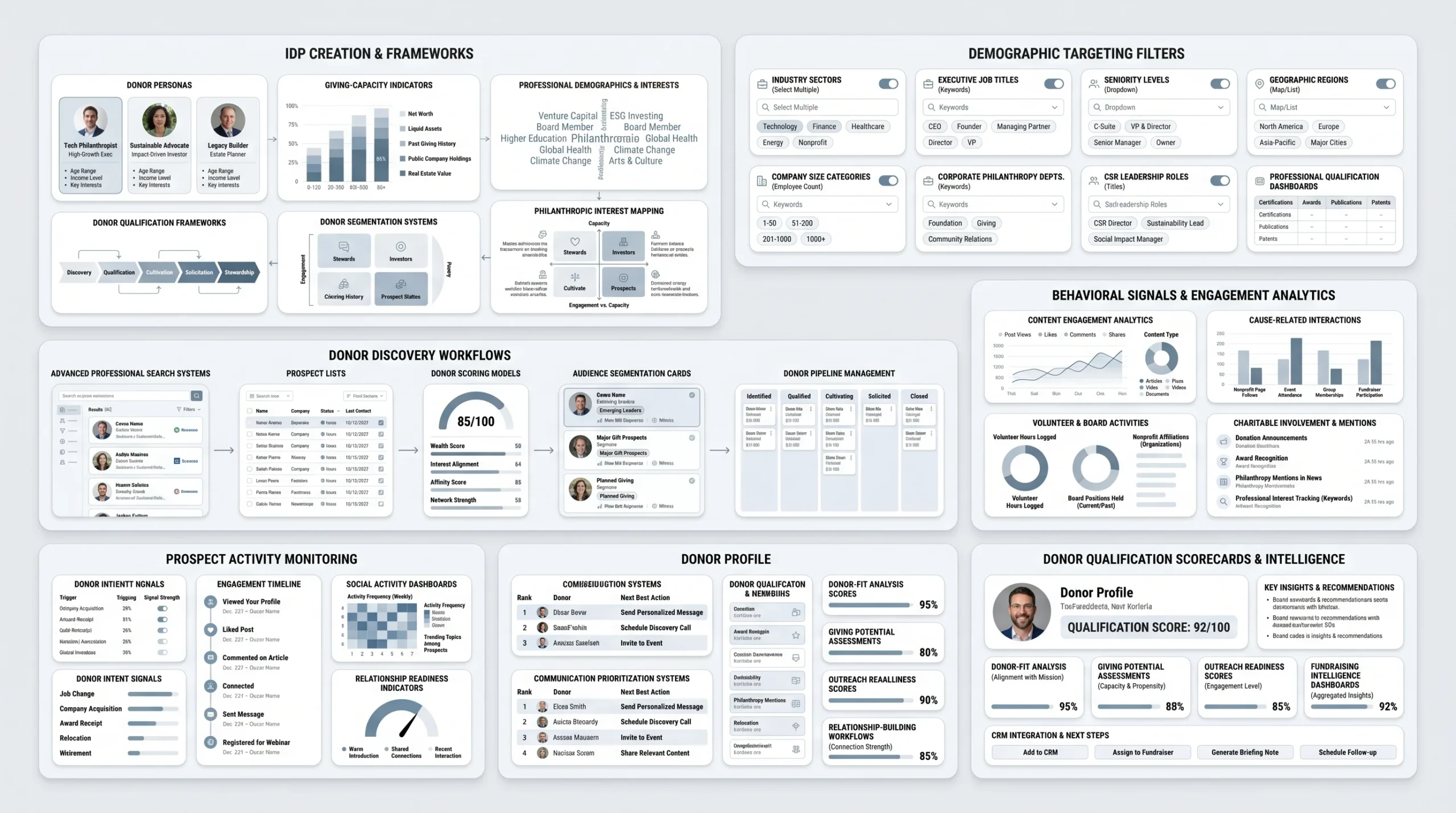
Before you search for anyone, you need to know exactly who you are looking for. An Ideal Donor Profile (IDP) is the LinkedIn-equivalent of a sales Ideal Customer Profile. It captures the professional and behavioral characteristics of your most likely major donors so that your search efforts are not wasted on people who will never give.
Demographic Filters to Use (Industry, Title, Location, Company Size)
fundsforNGOs, which covers nonprofit fundraising strategy for international organizations, recommends defining your ideal donor profile by considering demographics, interests, and previous philanthropic activities before running any LinkedIn search. On LinkedIn, the demographic filters that matter most for donor prospecting include:
- Industry: Identify two to four industries that over-index for philanthropic behavior in your cause area. For environmental nonprofits, this might be technology and finance. For education nonprofits, it might be consulting and professional services.
- Job title or seniority level: Mid-to-senior professionals (VP level and above) typically have both the income and the decision-making authority to make significant donations. For corporate giving specifically, target CSR Managers, Directors of Corporate Affairs, and Foundation Leads.
- Location: Filter by geography if your cause is regional. For national or global organizations, focus on cities and regions known for high philanthropic activity.
- Company size: Professionals at mid-size to large companies often have more giving capacity than those at early-stage startups, and companies above a certain headcount are more likely to have structured CSR programs.
Behavioral Signals to Look For (Content Engagement, Philanthropy Mentions)
Beyond demographics, LinkedIn gives you access to behavioral signals that are strong predictors of giving interest. LinkedIn Sales Navigator’s real-time insights into prospects, as described by fundsforNGOs, let you observe these signals at scale:
- Content engagement: Prospects who like, comment on, or share content related to your cause area are already interested in the issue. This interest is a strong predictor of receptiveness to your outreach.
- Philanthropy mentions: Many professionals mention charitable boards, volunteer work, or causes they support directly in their LinkedIn profiles. Searching for these mentions using Boolean search narrows your list to pre-qualified prospects.
- Activity level: LinkedIn for Nonprofits’ best practices for connecting with prospects specifically advise checking the “Activity” section on a prospect’s LinkedIn profile before messaging, because if they have been silent for a while, they may be taking a break from LinkedIn and will miss your message.
Step 2 — Using LinkedIn Search to Find Prospects (Free Method)
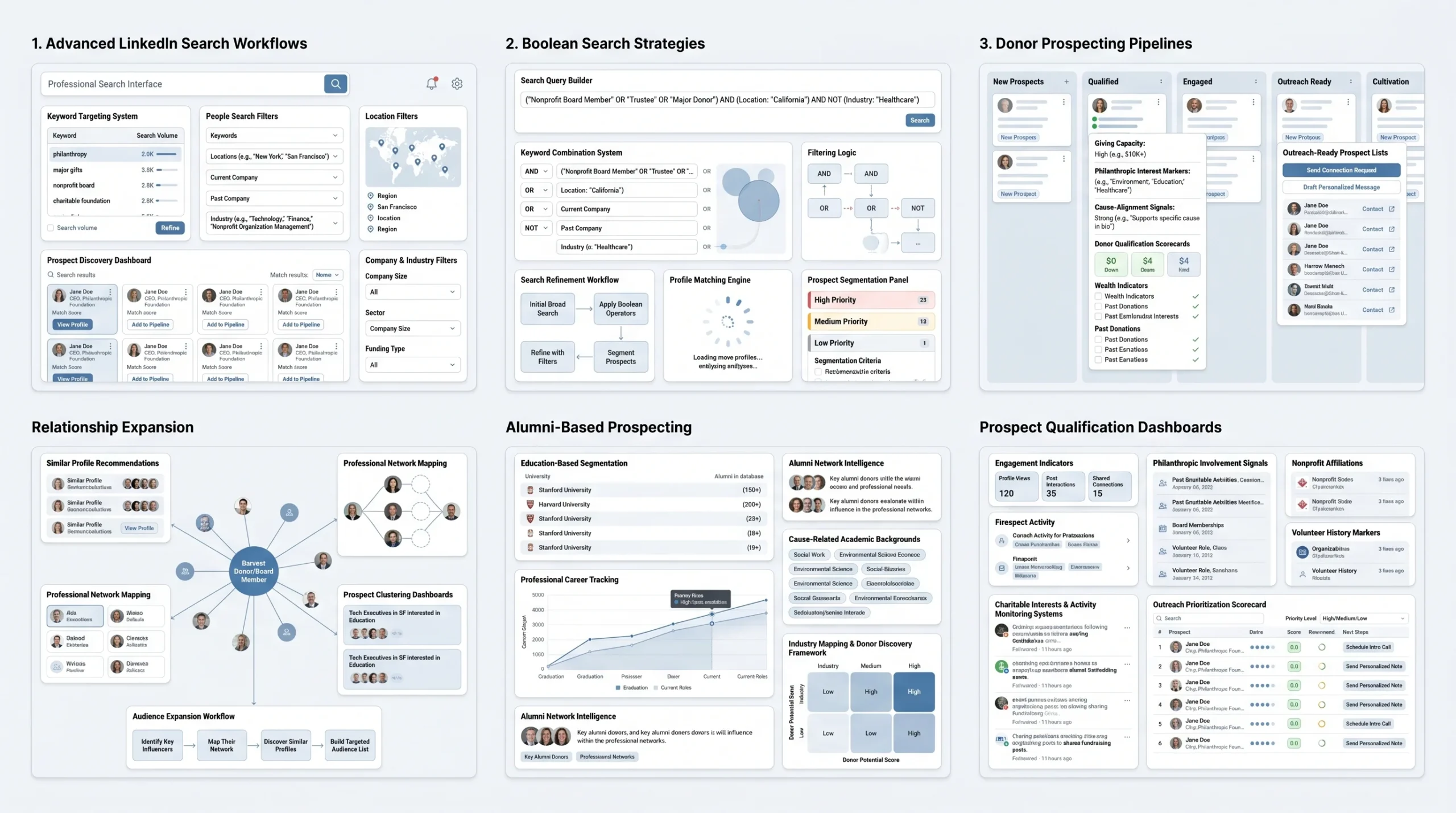
LinkedIn’s standard search is more powerful than most people use it, and it is free. Before investing in Sales Navigator, you can build a solid initial prospect list using a few underused features.
Boolean Search Tips for Donor Prospecting
LinkedIn’s search bar accepts Boolean operators that dramatically sharpen your results. Boolean search uses the words AND, OR, and NOT in capital letters to combine or exclude terms.
- AND: “philanthropy AND education AND director” returns profiles that mention all three terms.
- OR: “CSR OR ‘corporate social responsibility’ OR ‘community investment'” catches profiles that use different terminology for the same concept.
- NOT: “director NOT ‘board director'” excludes results where “director” refers to board membership rather than a professional title.
- Quotation marks: Putting a phrase in quotes searches for that exact phrase. Searching “charitable giving” in quotes returns only profiles that use that exact string.
Combine these in the People search filter alongside the People filters for location, company, and industry to build targeted lists of prospects without any paid tools.
How to Use “People Also Viewed” and “Alumni” Features
Two underused free features on LinkedIn are worth building into your prospecting workflow:
- People Also Viewed: When you visit a promising prospect’s profile, the “People Also Viewed” sidebar shows professionals with similar backgrounds and networks. This is a fast way to expand from one good prospect into ten.
- Alumni tool: LinkedIn’s Alumni tool (found on any university’s LinkedIn page) lets you filter graduates by field of study, where they work now, and what they do. If your cause is aligned with a particular academic background (public health, social work, law), alumni searches surface high-relevance prospects you would not find through standard keyword searches.
Step 3 — Using LinkedIn Sales Navigator for Advanced Prospecting
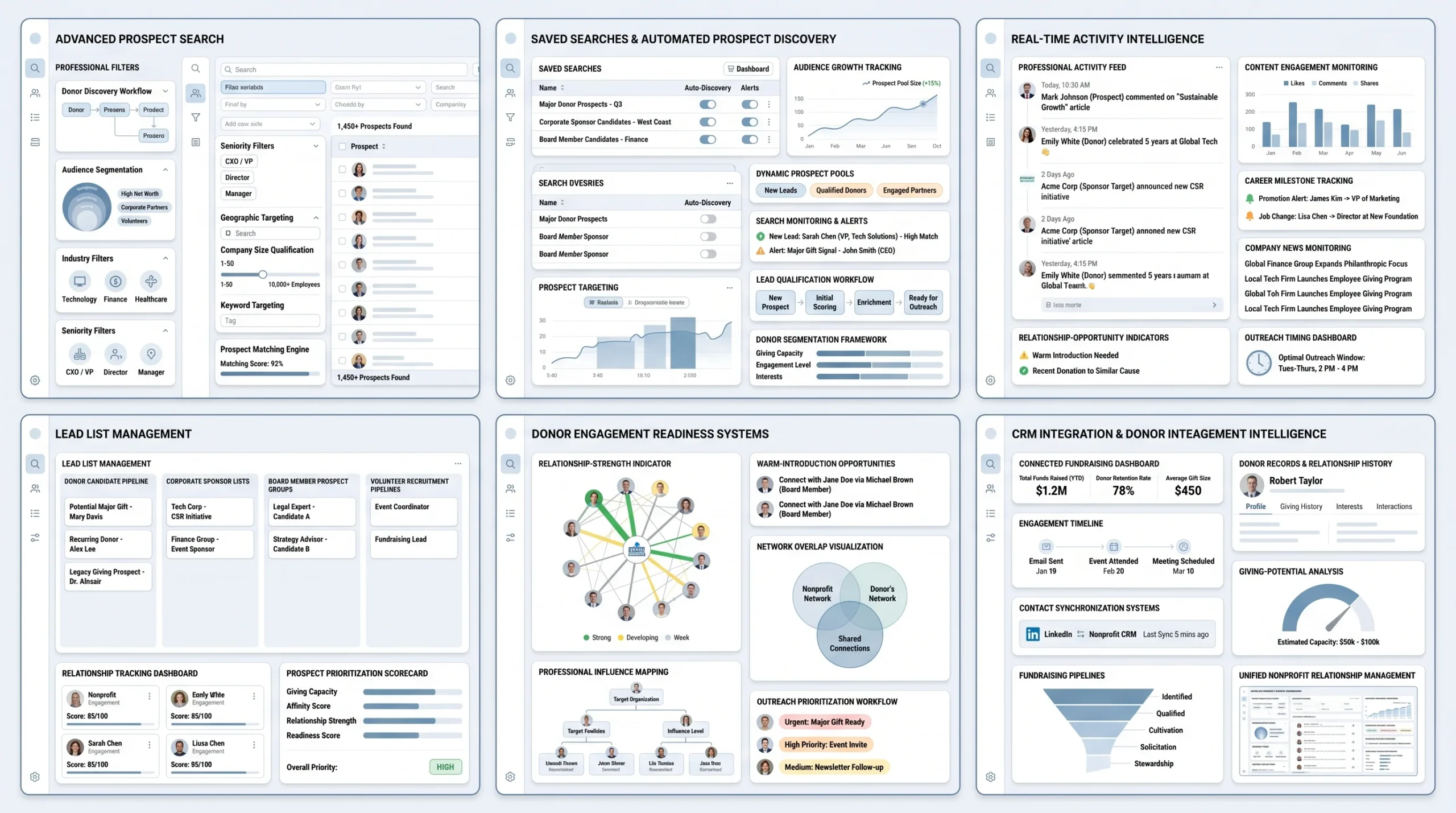
Sales Navigator is where LinkedIn’s nonprofit outreach strategy moves from good to systematic. It is the tool that lets you build, track, and act on a donor prospect list at a scale that is not possible with the free version.
Setting Up Lead Lists and Saved Searches
LinkedIn Sales Navigator for nonprofits, as described on LinkedIn’s own nonprofit fundraising page, lets you use targeted searches to find the right connections, decision-makers, and champions for your nonprofit at scale, tap into your organization’s network, spot warm introductions, and get real-time updates on top prospects and donors.
The workflow for setting up prospecting in Sales Navigator follows a clear sequence:
- Define your search criteria: Use the advanced filters to set industry, seniority level, geography, company headcount, and keyword mentions. Sales Navigator offers more than 30 filters that are not available in the standard LinkedIn search.
- Save your search: Once you have a search that returns quality results, save it. Sales Navigator will alert you when new people match your criteria, which keeps your prospect list fresh without requiring you to re-run searches manually.
- Build Lead Lists: As you review results and identify strong prospects, save them to a Lead List. You can create multiple lists segmented by prospect type (major donor candidates, corporate partner contacts, board member prospects) so that your outreach stays organized.
Real-Time Alerts — Spotting the Right Moment to Reach Out
One of Sales Navigator’s most practically useful features for nonprofits is its real-time activity alerts. LinkedIn’s official description of Sales Navigator Core for nonprofits includes the ability to “keep track of existing and potential donors’ activity to spot the optimal time to reach out.” In practice, this means Sales Navigator notifies you when a saved prospect:
- Posts new content on LinkedIn (creating a natural reason to engage with a comment before sending a message)
- Changes jobs or gets promoted (a life event that often prompts reflection on charitable giving)
- Appears in the news or earns a professional milestone
These alerts turn cold outreach into warm outreach by giving you a genuine, specific reason to initiate contact.
Pairing Sales Navigator with Your CRM
Sales Navigator is not a standalone tool. Its value multiplies when it is connected to your donor management or CRM system. Charity Charge’s LinkedIn for Nonprofits guide advises nonprofits to pair Sales Navigator with CRM data to segment leads and tailor communication based on giving history or area of interest.
Most major nonprofit CRMs (including Salesforce, HubSpot, and Virtuous) offer Sales Navigator integrations that sync contact records, log InMail conversations, and surface LinkedIn activity alongside your existing donor data. This integration means your development team works from a single source of truth rather than managing LinkedIn outreach separately from their donor pipeline.
Step 4 — Warm Introductions vs. Cold Outreach
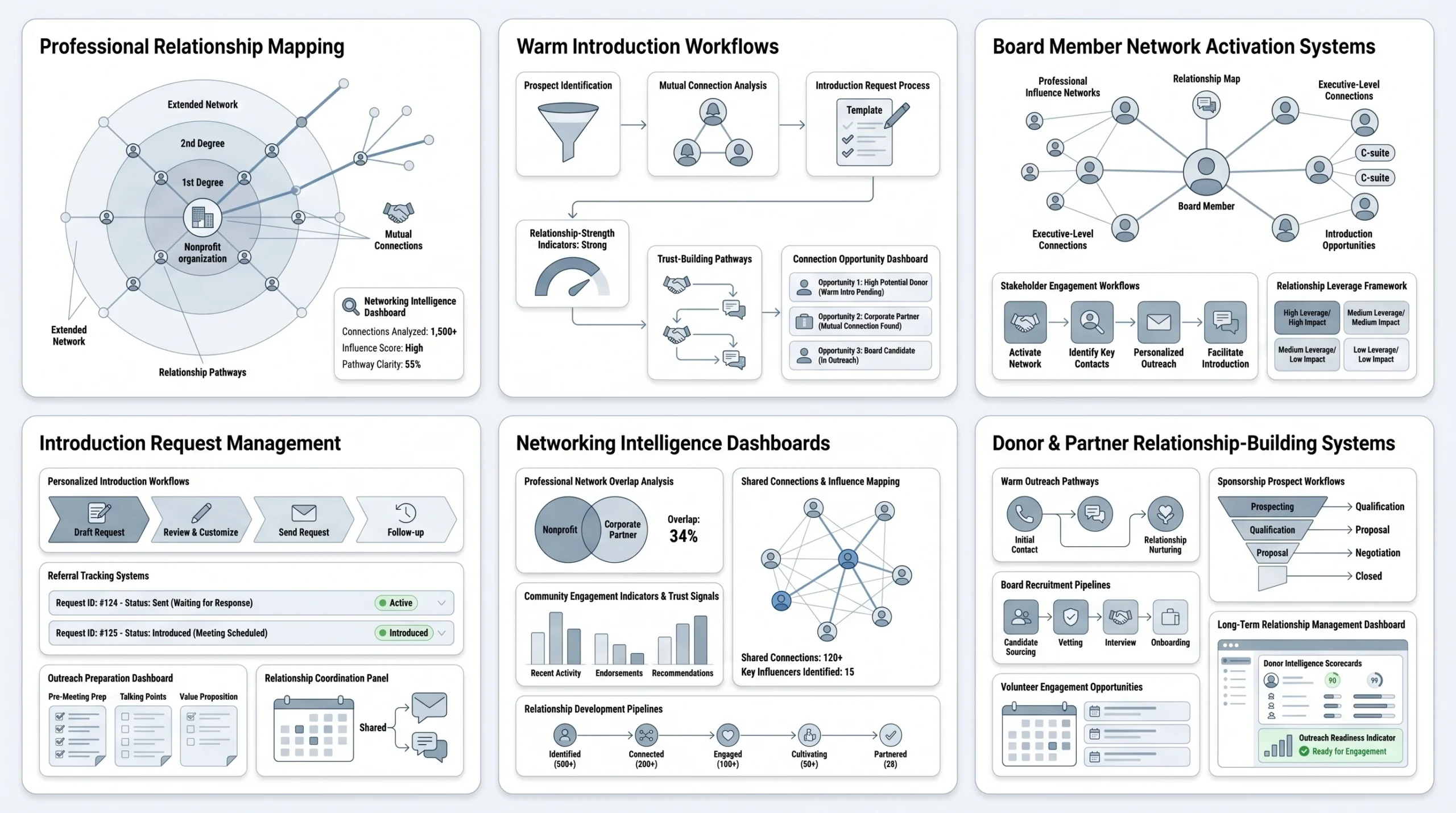
Not all LinkedIn outreach is equal. A warm introduction, where a mutual connection introduces you to a prospect, consistently outperforms cold outreach in both response rate and relationship quality. Building a warm introduction workflow into your LinkedIn strategy is not complicated, but it requires deliberate effort.
How to Leverage 2nd-Degree Connections for Introductions
LinkedIn’s degrees of connection feature shows you exactly how you are connected to any prospect. A “2nd” label next to a name means you share a mutual connection with that person. LinkedIn for Nonprofits’ official guidance on connecting with prospects explains that first-degree connections are people you are already connected with, while second-degree connections are people with whom you share a mutual connection, creating opportunities for warm introductions.
When you identify a high-value prospect who is a 2nd-degree connection, the right move is to look at your mutual connections and identify which one is most likely to know the prospect well enough to make a credible introduction. Then reach out to that mutual connection first, explain why you want to meet the prospect, and ask for a specific introduction.
Asking Board Members to Make Specific LinkedIn Introductions (Not Generic Asks)
Wild Apricot’s LinkedIn for Nonprofits guide quotes Beth Granger of Beth Granger Consulting on a critical distinction: “If your development person asks the board for introductions to law firm partners, that’s too vague and makes the person think or look in their database. If, instead, they search using LinkedIn to see who the board knows and make a very specific ask — I see you know [whoever], please make an introduction — it’s likely to be more successful.”
This is the difference between a generic ask (“Can you introduce us to anyone at law firms?”) and a specific ask (“I can see on LinkedIn that you are connected to [Name], the Managing Partner at [Firm]. Would you be willing to introduce us? Here is a two-sentence note you could use.”). The specific ask removes friction for the board member and makes it easy for them to say yes.
How to Find Corporate Partners on LinkedIn in 2026
Corporate partnerships follow a different prospecting logic than individual donor outreach. The goal is not to find one person who cares about your mission; it is to find a company whose business interests align with your cause area, identify the right internal stakeholder, and build a relationship that frames the partnership as mutually beneficial.
Identifying Companies with Mission Alignment
The first mistake nonprofits make in corporate prospecting is going after the biggest names they can think of without checking for genuine alignment. ChairityHowTo’s corporate sponsorship guide from January 2026 states directly that the key is not “finding sponsors,” but identifying the right matches and creating partnerships that genuinely benefit both sides.
Searching by CSR Focus, Industry, and Employee Size
On LinkedIn, you can research a company’s CSR priorities before ever reaching out through several methods:
- Company page “About” section: Many companies with active CSR programs describe their philanthropic focus areas in their About section or in their featured content.
- Employee posts: Searching for posts from employees at a target company that mention volunteer days, charity partnerships, or community investment gives you a real picture of what causes the company actually supports (versus what their website says they support).
- LinkedIn’s “Commitments” feature: Some company pages now include a Commitments section that lists their stated social and environmental commitments, giving you a fast alignment check.
- Industry filtering: Certain industries correlate with specific cause areas. Technology companies frequently support STEM education and digital inclusion. Financial services firms often support economic mobility and financial literacy. Healthcare companies align with health access and wellness causes.
- Employee size: Companies with 500 or more employees are significantly more likely to have structured CSR programs with dedicated budgets than smaller organizations.
Scoring Prospects — A Simple 5-Factor Framework
DonorDock’s guide to building a corporate sponsor pipeline recommends scoring prospects on five dimensions that predict partnership success. Adapt this framework to LinkedIn prospecting:
- Mission fit (1 to 5): How closely does the company’s stated CSR focus match your cause area? A perfect match is a 5; a tangential connection is a 1 or 2.
- Giving capacity (1 to 5): Based on company size, revenue, and any available public giving data, what is a realistic partnership size?
- Engagement opportunity (1 to 5): Can you offer meaningful employee volunteer opportunities, cause marketing campaigns, or co-branded events that would appeal to the company’s HR or marketing team?
- Geographic alignment (1 to 5): Is the company operating in the same communities your nonprofit serves? Local alignment makes partnership narratives much stronger.
- Timing (1 to 5): Has the company recently announced a new CSR initiative, hired a new CSR lead, or received news coverage for social impact work? These signals suggest active interest in new partnerships.
Companies that score 18 or above out of 25 go into your active cultivation tier. Those scoring 12 to 17 go into a warm monitoring tier where you track their activity without heavy outreach. Below 12, park them for future consideration.
Reaching Decision-Makers Inside Target Companies
Identifying the right company is step one. Step two is finding the right person inside that company. This is where most nonprofit corporate outreach breaks down: nonprofits send partnership proposals to general inboxes or the wrong contact entirely.
Who to Target — CSR Managers, Foundations Leads, Marketing Directors
The right contact varies by company size and structure. At large companies (2,000+ employees), look for dedicated CSR Managers, Heads of Corporate Social Responsibility, or Community Investment Directors. At mid-size companies (200 to 2,000 employees), the responsibility often sits with Marketing Directors, HR Directors, or Communications Managers. At smaller companies, you may be reaching the CEO or founder directly.
On LinkedIn, use the People filter on a company’s page to search by title. Filter for “CSR,” “corporate responsibility,” “community,” “sustainability,” “philanthropy,” or “foundation” to surface the relevant contacts. Cross-reference the results against your 5-factor scoring to confirm you have the right person before initiating contact.
How to Use “Company Pages” to Map Internal Stakeholders
Before reaching out to anyone at a target company, spend ten minutes mapping the relevant stakeholders through the company’s LinkedIn page:
- “People” tab: View all employees on LinkedIn. Filter by department or title to identify your primary contact, their manager, and anyone who might serve as an internal champion.
- Recent activity: Check the company’s recent posts for mentions of community involvement, charitable partnerships, or volunteer events. If a specific employee is consistently posting about CSR topics, that person is a warmer prospect than someone whose profile shows no such interest.
- Mutual connections: Identify which of your existing connections work at the target company or are connected to the people you want to reach. These become potential warm introduction pathways.
Turning Event Attendees Into Long-Term Partners
One of the most underused LinkedIn tactics for corporate partnership development is the post-event follow-up. Physical and virtual events create a legitimate reason to connect, and LinkedIn connection requests sent within 48 hours of an event are accepted at far higher rates than cold connection requests sent out of context.
Post-Event LinkedIn Follow-Up That Converts
Virtuous documented a case study in April 2026 that illustrates this exactly. After a fundraising breakfast with 250 attendees, a nonprofit team connected with every single guest on LinkedIn with a personalized thank-you message. Those follow-ups converted into over $100,000 in new partnership revenue. The event gave them the reason. LinkedIn gave them the ongoing connection.
The formula is straightforward:
- Within 24 to 48 hours of an event, send connection requests to every relevant attendee with a personalized note referencing the event specifically.
- In your first message after connecting, lead with a genuine thank-you and one specific thing you appreciated about meeting them (or about their attendance).
- Wait at least three to five days before any mention of your organization’s programs or partnership opportunities.
- Your third or fourth touchpoint is where you begin exploring alignment.
Personalizing Connection Requests After In-Person Events
The connection request itself needs to be specific. Generic requests — “I’d like to add you to my professional network” — have lower acceptance rates than requests that reference the shared context. A connection request that reads “It was great to meet you at [Event Name] last Thursday. I’d love to stay connected” is short, contextual, and gives the recipient an immediate frame of reference. LinkedIn limits connection request notes to 300 characters, so specificity requires economy.
Crafting Outreach Messages That Get Responses
This is where most nonprofit LinkedIn outreach breaks down. Organizations spend time on profile optimization and prospect research, and then they send a message that reads like a grant application and wonder why no one responds. LinkedIn outreach for nonprofits requires a different approach than email, and a fundamentally different approach than any kind of paid advertising.
The Golden Rules of LinkedIn Outreach for Nonprofits
Never Include an Ask in a Connection Request
LinkedIn for Nonprofits’ official guidance on connecting with prospects is unambiguous: do not include your asks in your connection requests. Instead, highlight the prospect’s interest in your cause to get their attention, and wait until you are connected before sending any fundraising messages. Connection requests that lead with an ask are flagged as spam at a much higher rate than those that lead with a genuine, relevant observation. The connection request is an invitation to a conversation, not the conversation itself.
Check Activity Before Messaging — Timing Matters
LinkedIn’s nonprofit resource hub on connecting with prospects specifically advises looking at the “Activity” section on a prospect’s LinkedIn profile before sending a message. If the prospect has not posted or engaged on LinkedIn in several weeks, they may be taking a break from the platform and will miss your message entirely. Send InMails and connection requests to active users first. Save dormant prospects for later, when you can catch them at a more active period.
Quality Over Quantity — Why 25 Targeted Messages Beat 250 Blasts
Virtuous shared a case study of a woodworking nonprofit leader with roughly 3,000 LinkedIn connections who did not want to do cold outreach. He messaged only people already in his network, said he wanted to catch up, and sent 25 messages in an afternoon. Within six hours, he had 15 calls booked — just reconnecting with warm relationships that had been sitting dormant.
That result is only possible because the messages were targeted and genuine. A volume-first approach, where you send hundreds of template messages with minimal personalization, triggers LinkedIn’s spam detection and damages the credibility of your outreach. LinkedIn’s algorithm monitors activity patterns and can restrict accounts that show behavior consistent with spam.
The 4-Step LinkedIn Outreach Sequence
A LinkedIn outreach sequence for nonprofits is a series of intentional touchpoints that move a prospect from first contact to meaningful conversation over one to three weeks. The following sequence is based on the approach outlined by LinkedIn for Nonprofits and ProfitOutreach’s nonprofit LinkedIn sequence guide.
Message 1 — The Connection Request (Mission Hook, No Ask)
Your connection request note should do three things in under 300 characters: establish relevance, reference something specific to the prospect (a post they shared, a mutual connection, an event you both attended), and signal genuine interest without making any ask.
Example structure: “I came across your post on [topic relevant to your cause] and thought it was worth connecting. I work with [Org Name] on [brief mission description]. Would love to be in each other’s network.”
What this message does not do: mention donation, partnership, sponsorship, or funding in any form.
Message 2 — The Relationship Builder (Value-First, Personal Reference)
After the connection is accepted, wait three to five days before sending your first message. This message should provide value without asking for anything. Share a resource, an impact update, or an observation that is relevant to the prospect’s stated interests. Reference something from their profile or recent posts to show that you have actually looked at who they are.
Example structure: “Thanks for connecting. I noticed you have been working on [topic they care about] — we recently published [brief description of relevant content] that you might find interesting. Happy to share it if useful.”
The goal of this message is to demonstrate that you are a thoughtful, mission-driven person who pays attention, not a fundraiser running a script.
Message 3 — The Soft Introduction to Your Work (Story, Not Pitch)
One week after your first message, send a short message that tells a specific story about your organization’s work. Not a pitch. A story. One person you helped. One outcome you created. One moment that illustrates why the mission matters.
Example structure: “Wanted to share something we saw this week at [Org Name]. [Two to three sentence story about a specific impact moment]. This is why our team does this work.”
ProfitOutreach’s nonprofit LinkedIn sequence guide emphasizes that focused messaging should center on the nonprofit’s social impact and mission rather than a sales pitch, and that the goal is long-term relationship building and awareness rather than hard-selling.
Message 4 — The Thoughtful Ask (Specific, Outcome-Oriented)
After three genuine, value-first touchpoints, you have earned the right to make an ask. That ask should be specific, low-friction, and outcome-oriented. Do not ask for money in a first-sequence message. Ask for a 20-minute call. Ask for a specific introduction. Ask for their perspective on your cause area.
Example structure: “I have been thinking about [specific challenge or opportunity in your cause area] and would love to hear your perspective. Would you be open to a 20-minute call sometime in the next few weeks? I would be glad to work around your schedule.”
If they say yes to the call, the fundraising or partnership conversation happens in a human context where your mission can breathe. LinkedIn messages are where you earn the call; the call is where you build the relationship.
InMail Strategy for Reaching People Outside Your Network
InMail is LinkedIn’s paid messaging feature that allows you to reach people you are not connected to. It is available through Sales Navigator or a LinkedIn Premium subscription, and it is particularly useful for reaching high-value prospects who do not accept connection requests from people they do not already know.
When to Use InMail vs. Connection Requests
Connection requests are the right first move for most prospects, especially those who are 2nd-degree connections or who show active engagement on the platform. InMail makes sense when a prospect has a closed network (they do not accept connection requests from strangers), when they hold a very senior position where unsolicited connection requests may be filtered, or when the personalization opportunity in a longer InMail message is worth the credit cost.
InMail Credit Management and Response-Rate Tips
LinkedIn’s InMail credit system refunds credits when a prospect accepts, declines, or responds to your InMail within 90 days, as stated on LinkedIn’s nonprofit resource hub. This means that well-targeted InMails that generate responses are effectively free, while ignored InMails consume credits. Managing your InMail budget well requires targeting prospects with high activity and strong alignment scores, and writing messages specific enough to warrant a response.
For response rate, LinkedIn for Nonprofits advises a warm, professional tone that acknowledges the prospect’s interests before mentioning your organization. InMails longer than 400 words have lower response rates than those under 200 words. Lead with the most relevant insight in your first sentence, because many recipients read only the preview before deciding whether to open.
Message Templates for Different Prospect Types
The following templates are starting points. Every message should be personalized with specific references to the recipient before sending.
Template for a Major Donor
Connection request note: “I came across your work in [industry] and the philanthropic interests you mentioned in your profile. I lead [Org Name], which works on [mission area]. I’d love to connect.”
Follow-up message (after connecting): “Thank you for connecting. I noticed your interest in [cause area] — we recently saw [specific impact outcome] at [Org Name] that I thought you might find meaningful. Happy to share more if you are curious about our work.”
Template for a Corporate Partner
Connection request note: “I saw [Company Name]’s recent work on [CSR initiative or community program] — it aligns closely with what we do at [Org Name]. Would love to connect and explore any common ground.”
Follow-up message: “Thanks for connecting. [Company]’s commitment to [cause area] caught my attention because it mirrors the outcomes we create for [population served] at [Org Name]. I would love to share how other companies in [industry] have built partnerships with us that support both their community goals and ours. Would a quick call make sense?”
Template for a Potential Board Member
Connection request note: “Your background in [field] and your work at [company or organization] are exactly the kind of expertise we need at [Org Name]. I would love to connect and share what we are building.”
Follow-up message: “Thank you for connecting. I’m reaching out because [Org Name] is in a period of [growth stage or strategic initiative], and we are building out a board with deep expertise in [field]. Based on your work at [company], I think you would find our mission compelling. Would you be open to a 20-minute conversation to learn more?”
LinkedIn Content Strategy That Attracts Donors and Partners Passively
Outreach is active. Content is passive. Both work together. A strong content strategy on LinkedIn means that by the time someone receives an outreach message from your team, they may already have seen your organization’s posts, engaged with your stories, or noticed your name through a mutual connection’s feed. That context makes your outreach easier and more effective.
Publishing Content That Signals Credibility and Impact
Types of Posts That Drive Inbound Interest (Impact Updates, Milestones, Behind-the-Scenes)
Vista.today’s guide to how nonprofit leaders can use LinkedIn for greater impact identifies the core principle: if you want to attract donors, board members, collaborators, or corporate sponsors, they need to see your mission in action. Content that demonstrates impact, not content that requests support, is what attracts inbound interest.
The types of posts that perform best for nonprofits on LinkedIn include:
- Impact milestones: “We just served our 10,000th meal” or “This quarter, 94% of our program graduates secured employment.” These posts are shareable, credible, and make prospects feel the organization is effective.
- Program updates: Real stories from your work in the field. A specific person whose life changed because of your program, told in two to three sentences with their permission.
- Team and culture posts: Introducing staff members, showing your team at work, and sharing the human side of your organization builds trust with prospects who may be evaluating whether to invest in your work.
- Thought leadership: Commentary on your sector that shows your leadership team understands the landscape. This positions your organization as a credible voice, not just a charity asking for money.
Using Storytelling to Humanize Your Mission on LinkedIn
The most effective nonprofit content on LinkedIn tells stories at the individual level, not the aggregate level. “We helped 3,000 people” is less compelling than “Here is what happened to one person because of your support.” Vista.today’s guide suggests framing posts around why you serve the mission, letting the story draw others in. The emotional specificity of one person’s experience is more shareable and more memorable than any statistics.
When writing impact stories on LinkedIn, structure them with a clear before-and-after: who was this person before your program, what did your organization do, and what is their life like now? Keep the post under 300 words, end with a line that connects their story to your broader mission, and include a photo when permission allows.
Using LinkedIn Live Events and Newsletters
How to Host a LinkedIn Live Event That Attracts New Prospects
LinkedIn Live Events are available to any organization with a LinkedIn Page and a streaming tool connected to LinkedIn’s API (tools like StreamYard and Restream integrate directly). Live events work for nonprofits because they create a reason for people to show up, engage in real time, and follow your page after the event ends.
Effective nonprofit LinkedIn Live formats include:
- Impact panels: Bring together your program director, a beneficiary (with permission), and a donor to discuss your work.
- Sector conversations: Host a discussion on an issue in your cause area and invite an expert from outside your organization. This positions you as a convener, not just a fundraiser.
- Q&A with leadership: An informal session where your executive director answers questions about your mission, strategy, and how people can get involved.
Promote the event two weeks in advance through your page and your team’s personal profiles. After the event, post a replay on your page and send connection requests to everyone who registered or attended.
Building a LinkedIn Newsletter as a Donor Nurture Tool
LinkedIn’s newsletter feature lets your page send articles directly to subscribers, who opt in to receive notifications when you publish. Unlike email newsletters, LinkedIn newsletters are distributed within the platform to people who are already engaged with your content, reducing the friction of getting new subscribers.
A nonprofit LinkedIn newsletter should publish monthly and cover a mix of impact stories, program updates, sector news, and calls to action. Each edition should end with one specific ask (attend an event, read a report, schedule a call) rather than a generic donation appeal. Over time, a well-maintained newsletter builds a warm audience of professionals who receive your content regularly without you needing to do active outreach to each of them.
Engaging as Your Organization Page (Not Just Personally)
Commenting, Reposting, and Tagging Corporate Partners
LinkedIn’s nonprofit best practices guide explains that as an admin for your page, you can engage as your page with posts shared to the feed by individuals and pages that you follow. This is an underused feature. When a corporate partner posts about community investment, engaging from your page (not just your personal profile) increases your organization’s visibility within the professional networks of that company’s employees and connections.
Use page-level engagement to:
- Comment substantively on posts from corporate partners, local government accounts, and other nonprofits in your space.
- Repost content from aligned organizations with a one or two sentence addition from your perspective.
- Congratulate partners on milestones publicly.
Thanking Donors and Sponsors Publicly to Build Social Proof
Public recognition serves two functions at once. It thanks your existing supporter and signals to prospective supporters that real organizations and individuals trust your work. Liquid Web’s guide on using LinkedIn for nonprofits recommends sharing thank-you posts to highlight specific donors and tagging company pages of corporate supporters. When you tag a company page, the post can appear in the feeds of that company’s followers, extending your reach beyond your own network.
Keep public recognition specific and genuine. “Thank you to [Company] for sponsoring our annual gala” is less effective than “Thanks to [Company] and their team for making it possible for us to serve 200 additional families this quarter. Their commitment to [cause area] is making a real difference on the ground.”
Monitoring, Measuring, and Scaling Your LinkedIn Outreach
You cannot improve what you do not measure. Building a measurement system for your LinkedIn outreach does not need to be complicated, but it does need to be consistent. The goal is to know which activities are generating relationships that convert into donors and partners, and to allocate your team’s time accordingly.
Key KPIs to Track for Nonprofit LinkedIn Outreach
Connection Acceptance Rate, InMail Response Rate, Conversion to Call
The metrics that matter for nonprofit LinkedIn outreach fall into three categories: reach, engagement, and conversion.
- Connection acceptance rate: The percentage of connection requests that are accepted. A rate below 30% suggests your connection request notes are too generic or your prospect targeting needs refinement. A rate above 50% indicates strong targeting and compelling request notes.
- Message response rate: The percentage of follow-up messages that receive a reply. For cold outreach, a response rate of 10 to 15% is reasonable. For warm network outreach (like the woodworking nonprofit example), rates can exceed 50%.
- InMail response rate: LinkedIn considers an InMail response rate above 25% strong for nonprofit outreach. If your rate is significantly below that, revisit the length, personalization, and timing of your InMails.
- Conversion to call: The percentage of LinkedIn conversations that result in a scheduled meeting or call. This is your ultimate lead generation metric, because virtually all significant donor relationships and corporate partnerships require at least one real conversation before moving forward.
LinkedIn Analytics — 5 Metrics LinkedIn for Nonprofits Recommends
Liquid Web’s guide to LinkedIn for nonprofits, drawing on LinkedIn’s own recommendations, identifies five key performance indicators for your LinkedIn Page performance:
- Unique visitors: How many distinct people are viewing your page in a given period. This measures awareness.
- Followers: The total number of people following your page and the growth rate over time.
- Post impressions: How many times your posts are seen. A high impression count with low engagement suggests your content is reaching people but not resonating.
- Engagement rate: The percentage of people who see a post and take an action (like, comment, share). For nonprofit content, an engagement rate of 2 to 5% on organic posts is solid.
- Follower demographics: The breakdown of your followers by industry, job function, and seniority. This tells you whether you are reaching the right audience or attracting a different one than you intended.
Building a Repeatable Weekly Outreach Routine
The Minimum Viable Routine — 1 Hour/Month to Start
Nonprofit Tech for Good’s 2026 LinkedIn best practices guide recommends that nonprofits schedule at least one hour monthly to conduct fundraising outreach and stewardship on LinkedIn as a minimum starting point. This is the floor, not the ceiling, but it is a realistic entry point for organizations where LinkedIn is not yet a dedicated function.
In one focused hour per month, a development staff member can:
- Send 10 to 15 targeted connection requests to high-priority prospects.
- Follow up with 5 to 10 existing connections who have shown recent activity.
- Engage with posts from 10 to 15 corporate targets or potential partners.
- Review Sales Navigator alerts and note any prospects who have had relevant life events.
Scaling Up — When to Invest More Time or Upgrade Tools
Once your team is comfortable with the basic outreach workflow and your response rates are above 15%, it is worth expanding your investment. Nonprofit Tech for Good’s guide advises that once you have become experienced and skilled within the LinkedIn community and learned how to effectively engage and cultivate current donors, then you may want to sign up for Sales Navigator.
Indicators that you are ready to scale:
- You are consistently running out of meaningful prospects in your saved searches.
- Your response-to-call conversion rate is strong enough that the limiting factor is the number of conversations you are starting, not the quality of them.
- Your development team is spending more than 30 minutes per week on LinkedIn and seeing clear pipeline outcomes.
At that point, consider dedicating a part-time LinkedIn outreach function to a junior development staff member or coordinator, using Sales Navigator to scale the prospecting workflow, and building a formal 30-day outreach sequence that includes LinkedIn, email, and phone follow-up.
Integrating LinkedIn into Your Broader Donor Pipeline
Syncing LinkedIn Prospects with Your CRM
LinkedIn relationships should not exist in isolation from the rest of your donor pipeline. Every prospect that progresses past a first response on LinkedIn should be entered into your CRM with notes on how they were found, what their stated interests are, and where they are in the relationship.
Most major nonprofit CRMs support manual import of contacts and many support direct integration with Sales Navigator, as Charity Charge’s guide recommends, pairing Sales Navigator with CRM data to segment leads and tailor communication based on giving history or area of interest. Even if you do not have an automatic integration, maintaining a LinkedIn column in your donor prospect spreadsheet that tracks connection date, last message, and next step is enough to keep outreach organized.
Multi-Channel Follow-Up — When to Move from LinkedIn to Email or Phone
LinkedIn is where you start the relationship; it is often not where you close it. Most significant donations and corporate partnerships require conversations that move off the platform at some point. The trigger for moving from LinkedIn to email or phone is the prospect’s own signal: if they share their email address, respond with extended messages, or ask specific questions about your programs, they are ready for a deeper conversation through a different channel.
ProfitOutreach’s nonprofit LinkedIn sequence guide describes the multi-channel approach as essential: the sequence looks to integrate other channels like email to surround the prospect with consistent messaging that builds recognition and trust. The transition should feel natural rather than abrupt. A message like “I’d love to continue this conversation — would it be easier over email or a quick call?” gives the prospect control over the channel while moving the relationship forward.
Conclusion
LinkedIn works for nonprofit donor and partner acquisition when it is treated as a relationship channel and worked systematically. The platform gives you direct access to the highest-propensity donor audience available in digital marketing, a suite of prospecting tools built for exactly this kind of outreach, and a professional context that makes mission-driven conversations land differently than they do anywhere else.
The organizations that see results are not the ones with the largest followings or the most sophisticated tools. They are the ones that show up consistently, personalize every touchpoint, and invest in real conversations before any ask. A woodworking nonprofit booked 15 calls from 25 warm messages in one afternoon. A team that followed up with 250 event attendees on LinkedIn converted them into over $100,000 in new partnerships. Neither of those results required a massive budget or a sophisticated technology stack. They required intention, specificity, and patience.
Quick-Start Checklist (Page, Profiles, First 25 Outreach Messages)
Use this checklist to get your LinkedIn outreach operational within one week:
- Page: Complete your nonprofit’s LinkedIn page with a clear tagline, CTA button, compelling About section, and high-resolution images.
- Profiles: Update the LinkedIn profiles of your executive director and at least two board members with complete headlines, About sections, and featured content.
- Nonprofit discount: Apply for LinkedIn’s nonprofit pricing for Sales Navigator if your development team will be conducting regular prospecting.
- Ideal Donor Profile: Define two to three prospect segments with specific industry, seniority, and geography criteria.
- Lead list: Build an initial prospect list of 50 to 100 contacts using LinkedIn search or Sales Navigator.
- First 25 messages: Send personalized connection requests to your top 25 prospects using specific, relevant notes. Do not mention your organization’s needs in the request itself.
- CRM integration: Create a tracking system (a CRM integration or a simple spreadsheet) to record every prospect’s status and next step.
The Long Game — Building a LinkedIn-Powered Development Engine
LinkedIn donor and partner development is not a campaign; it is an ongoing system. The organizations that build the most sustainable results treat LinkedIn outreach the same way they treat major donor cultivation: as a relationship process with consistent touchpoints over months and years, not a one-time push tied to a fundraising deadline. Build the system, work it consistently, and the pipeline will grow.
Frequently Asked Questions
What is a nonprofit outreach strategy on LinkedIn?
A nonprofit outreach strategy on LinkedIn is a defined, repeatable process for identifying, connecting with, and cultivating donors, corporate partners, board members, and other supporters through LinkedIn’s professional network. It combines profile optimization, targeted prospect research using LinkedIn Search or Sales Navigator, personalized outreach sequences, and content publishing to build a pipeline of warm relationships that convert into meaningful support for the organization’s mission.
How do nonprofits find donors on LinkedIn?
Nonprofits find donors on LinkedIn by first defining their Ideal Donor Profile using filters like industry, seniority, location, and philanthropic signals in their profile. They then use LinkedIn’s free search with Boolean operators, or LinkedIn Sales Navigator for advanced prospecting, to build a targeted lead list. The most effective approach starts with warm 2nd-degree connections and mutual introductions before moving to cold outreach, because warm outreach generates significantly higher response rates.
Is LinkedIn Sales Navigator worth it for nonprofits?
LinkedIn Sales Navigator is worth it for nonprofits that are conducting regular, systematic donor and partner prospecting. It provides advanced search filters not available in the free version, real-time alerts on prospect activity, lead list management, and InMail credits for reaching people outside your network. LinkedIn offers Sales Navigator to eligible nonprofits at a significant discount through its nonprofit program, which makes the cost-benefit calculation more favorable than it would be for a commercial user.
How do I get a LinkedIn nonprofit discount?
To access LinkedIn’s nonprofit discount, your organization must apply through LinkedIn’s nonprofit verification portal. You will need to provide documentation of your nonprofit status (such as a 501(c)(3) determination letter in the United States) and have a LinkedIn company page. Once approved, you can access discounts on Sales Navigator, Recruiter Lite, and LinkedIn Learning. LinkedIn has provided over $215 million in discounts to more than 3,500 nonprofits.
What should a nonprofit say in a LinkedIn connection request?
A nonprofit’s LinkedIn connection request should be short (under 300 characters), specific, and make no ask. It should reference something relevant to the prospect — a post they shared, a mutual connection, a shared interest in your cause area, or an event you both attended. The goal is to give the prospect a genuine reason to accept the request, not to introduce your organization or make any fundraising or partnership appeal.
How many LinkedIn messages should a nonprofit send before making an ask?
Best practice for nonprofit LinkedIn outreach is at least three value-first touchpoints before any ask. The first message should be a relationship-building note with no pitch. The second should share something relevant or useful. The third should tell a specific impact story. The fourth message is where a low-friction ask (a 20-minute call, an introduction) becomes appropriate. Making an ask in the first or second message dramatically reduces response rates and can damage the relationship before it starts.
Can nonprofits use LinkedIn to find corporate sponsors?
Yes. LinkedIn is one of the most effective tools for identifying and approaching corporate sponsors. Nonprofits can search for companies by industry, size, and CSR focus, identify the right internal contacts (CSR Managers, Marketing Directors, Foundation Leads), research a company’s philanthropic priorities through their page activity and employee posts, and initiate a warm relationship before sending any formal sponsorship proposal.
What is the biggest mistake nonprofits make on LinkedIn?
The most common and most damaging mistake is treating LinkedIn as a broadcast channel rather than a relationship channel, publishing content without initiating any direct conversations, and sending mass generic connection requests that feel like spam. The second most common mistake is making a donation or partnership ask too early in the relationship, before any trust has been established. Both errors stem from the same root cause: treating LinkedIn like email marketing rather than like face-to-face networking.
Should board members use LinkedIn for nonprofit outreach?
Yes. Board members’ individual LinkedIn profiles and networks are often more valuable to a nonprofit’s outreach strategy than the organization’s page, because LinkedIn’s algorithm gives more reach to personal content and because board members typically have professional networks that do not overlap with the organization’s existing connections. The most effective use of board members on LinkedIn is to ask them to make specific, named introductions to 2nd-degree connections rather than generic appeals to their networks.