


Most sales teams are not losing meetings because their product is weak or their pricing is off. They are losing meetings because their outreach gives up too early, leans on one channel, and reads like every other message in the prospect’s inbox. A structured sales outreach cadence fixes all three problems at once. It creates a repeatable, multi-channel sequence of touches that keeps a rep visible without being aggressive, builds familiarity across weeks, and makes each message feel like it belongs to a conversation rather than a broadcast. This guide breaks down exactly how to build one from scratch, with step-by-step instructions, cadence examples, email and call templates, measurement benchmarks, and the common mistakes that quietly kill reply rates.
What Is a Sales Outreach Cadence? (And Why Most Reps Get It Wrong)
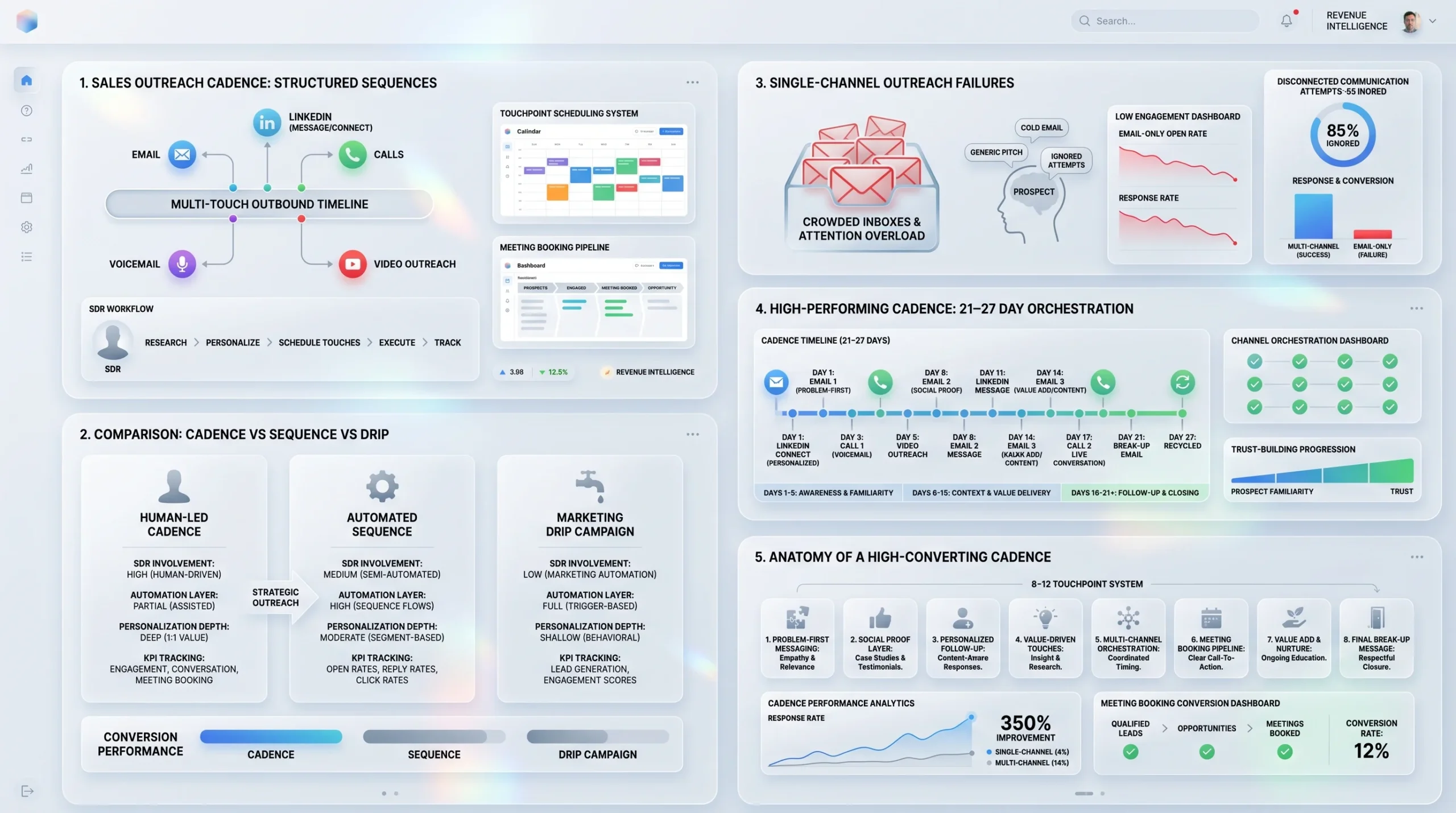
A sales outreach cadence is a structured, repeatable sequence of touchpoints that a sales rep executes across multiple channels over a defined period of time, with the goal of converting a cold or warm prospect into a booked meeting. The cadence maps out every contact attempt: which channel to use, what to say, how many days to wait, and when to stop. It replaces ad-hoc follow-up with a system that produces consistent results at scale.
Sequence vs. Cadence vs. Drip Campaign: What Is the Difference?
These three terms are often used interchangeably, but they describe meaningfully different things.
A sales cadence is a human-led, multi-channel outreach sequence executed by an SDR or Account Executive. It typically involves manual steps such as phone calls, personalized LinkedIn messages, and custom video messages, alongside automated email touches. Cadences are measured by meetings booked.
A sales sequence is a broader term often used inside sales engagement platforms like Outreach or Salesloft. It refers to the scheduled series of steps inside a tool, which can include both automated and manual tasks. In most contexts, sequences and cadences mean the same thing.
A drip campaign is a marketing-owned, fully automated email series triggered by a prospect’s behavior, such as downloading a whitepaper or visiting a pricing page. It requires no rep involvement and is measured by click-through rates and form fills, not meetings.
The practical difference: a cadence requires a rep. A drip campaign does not. When the goal is a booked meeting with a cold or warm outbound prospect, a sales cadence is the right tool.
Why Generic, Single-Channel Outreach No Longer Books Meetings
Buyers have become significantly harder to reach. Decision-makers receive an average of 15 cold emails per week, and according to research cited by The Digital Bloom, 71% of ignored emails lack relevance, 43% fail on personalization, and 36% lack trust signals. Relying on email alone means competing in the most crowded inbox of any channel available.
The persistence problem compounds this. According to data from Spotio, 80% of sales require five or more follow-ups to close, yet 44% of sales reps give up after just one attempt. A single cold email followed by silence is not a cadence. It is a lost opportunity.
A single-channel, low-persistence approach fails for two structural reasons. First, different buyers prefer different channels. A VP of Engineering may ignore email but respond to a well-crafted LinkedIn message. A CFO may not be active on LinkedIn but picks up the phone on Tuesday mornings. Second, familiarity compounds across touches. A prospect who sees a name in their email inbox on Day 1, on LinkedIn on Day 3, and hears a voicemail on Day 5 is far more likely to respond than someone reached on only one of those channels. Research from FundedIQ confirms that sequences using three or more channels can see response rates increase by over 250% compared to single-channel outreach.
What a High-Performing Cadence Actually Looks Like
A high-performing sales outreach cadence in the current environment has three defining characteristics. It uses multiple channels, not just email. It runs for enough days to build familiarity without burning the relationship. And every message delivers something the prospect can actually use, rather than repeating “just checking in” in different words. According to research from Growleads, effective cadences typically include 8 to 12 touchpoints spaced across 21 to 27 days. The messaging follows a logical arc: the first touch introduces a relevant problem, middle touches add proof and perspective, and the final touch is a direct break-up message that triggers a loss-aversion response and often gets the highest reply rate of any step in the sequence.
The Anatomy of a Meeting-Booking Sales Cadence
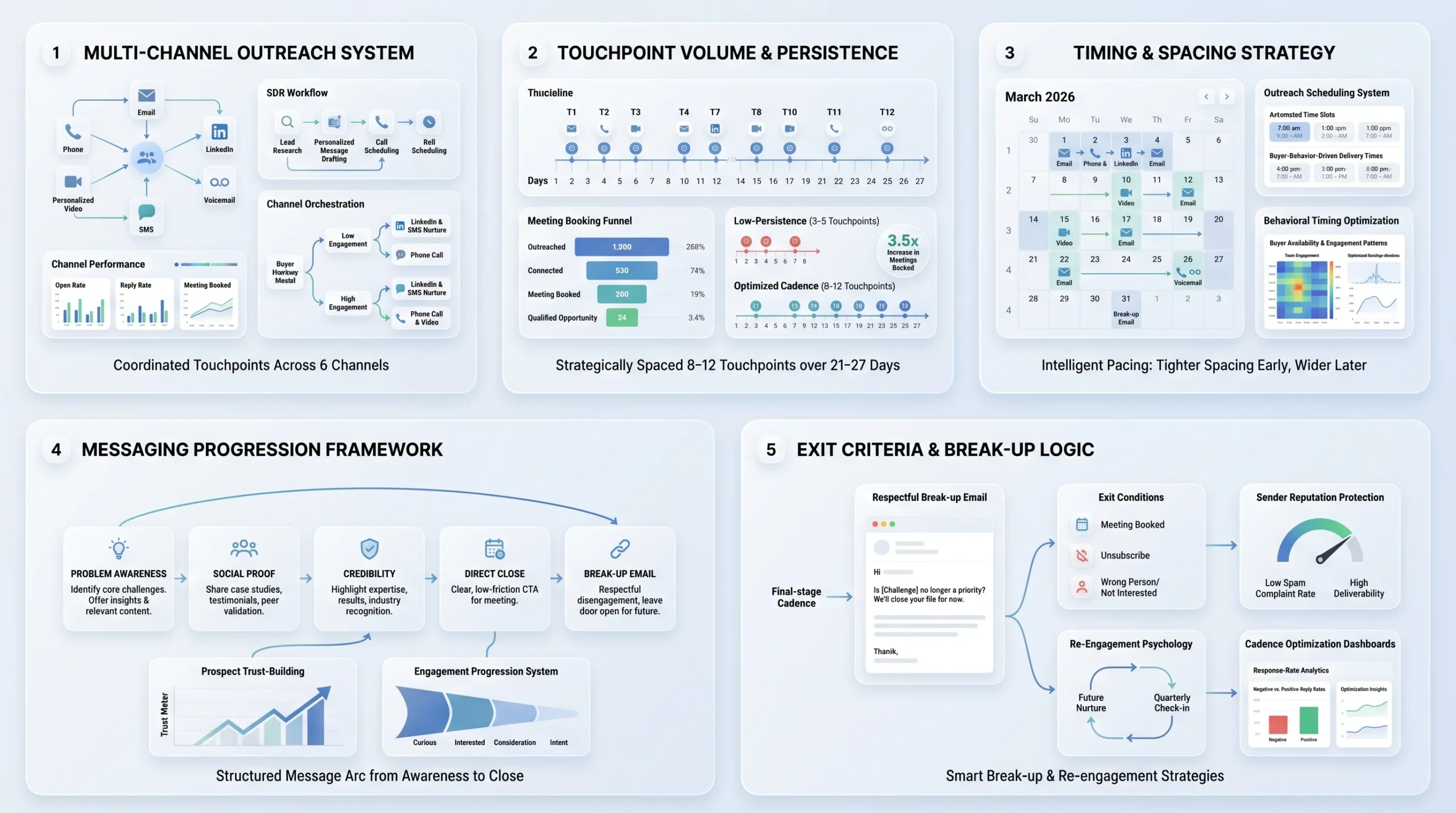
Before mapping out a day-by-day sequence, it helps to understand the five structural components that every effective cadence shares. Getting any one of them wrong can undermine the rest.
The 5 Core Components Every Cadence Must Have
1. Channels: The channels in a cadence determine who you can reach and how often you can show up. The primary channels in a B2B outreach cadence are email, phone, LinkedIn, personalized video, and SMS. Each channel has a different benchmark, a different appropriate frequency, and a different tone. Using all of them does not mean using them equally.
2. Number of touchpoints: The volume of touches determines whether you give up before a prospect was ever going to respond. Research from Spotio shows that 80% of sales require five or more follow-ups. According to Growleads, most well-performing cadences land between 8 and 12 total touches.
3. Timing and spacing: The gap between touches controls whether you feel persistent or aggressive. Touches in the first week can be spaced 2 to 3 days apart. After the first week, spacing extends to 4 to 7 days. Cramming three touches into 48 hours reads as desperation, not enthusiasm.
4. Messaging progression: Each touch should advance the conversation, not repeat it. The message arc typically moves from problem-awareness in early touches, to social proof and credibility in middle touches, to a direct close or break-up in the final step. If every message says the same thing with different words, the cadence fails to build any momentum.
5. Exit and break-up criteria: Every cadence needs a defined stopping point and a final break-up email. Without these, reps either continue reaching out indefinitely (which damages sender reputation) or stop without closure (which leaves booked meetings on the table). The break-up email is a strategic asset, not a farewell. It consistently generates some of the highest reply rates in any cadence because it triggers a psychological response to perceived loss.
How Long Should a Sales Cadence Be?
The right length depends on the segment you are targeting. According to research from Uplift GTM, longer cadences of 14 to 21 days suit enterprise and mid-market outreach, where prospects need more time and multiple angles before engaging. Shorter cadences of 2 weeks with 6 to 8 touches are better suited to SMB, where the buying decision is faster and manual investment rarely pays off at high volume.
As a general benchmark, most effective cadences for B2B outbound run between 21 and 27 days. According to data from Growleads, this duration provides enough time to cycle through multiple channels, surface multiple angles, and reach a prospect who may have been traveling, heads-down in a project, or simply on a buying cycle that was not active in week one.
How Many Touchpoints Should Your Cadence Have?
Eight to 12 touchpoints is the range cited most consistently by sales engagement research. According to data from Intelemark, most teams find 8 to 12 outreach touches to be the sweet spot, with the key being persistence without aggression. According to research from FundedIQ, the 5-to-7 touch rule establishes the minimum threshold: prospects typically require at least five meaningful touchpoints before they are ready to engage or respond.
What counts as a touchpoint matters here. A voicemail left after a no-answer counts. A LinkedIn message counts. A personalized video counts. What does not count is a second email sent 30 minutes after the first because no one opened it yet. Quality of contact, not raw volume, is what the benchmark reflects.
Step-by-Step: How to Build a Sales Outreach Cadence That Books Meetings
Building a cadence that actually books meetings is not about finding the right template and copying it. It is about constructing a system that matches your ICP, your channels, and your offer to a sequence that earns attention without burning goodwill. Here are the nine steps to do it right.
Step 1: Define Your Cadence Goal (Beyond “More Pipeline”)
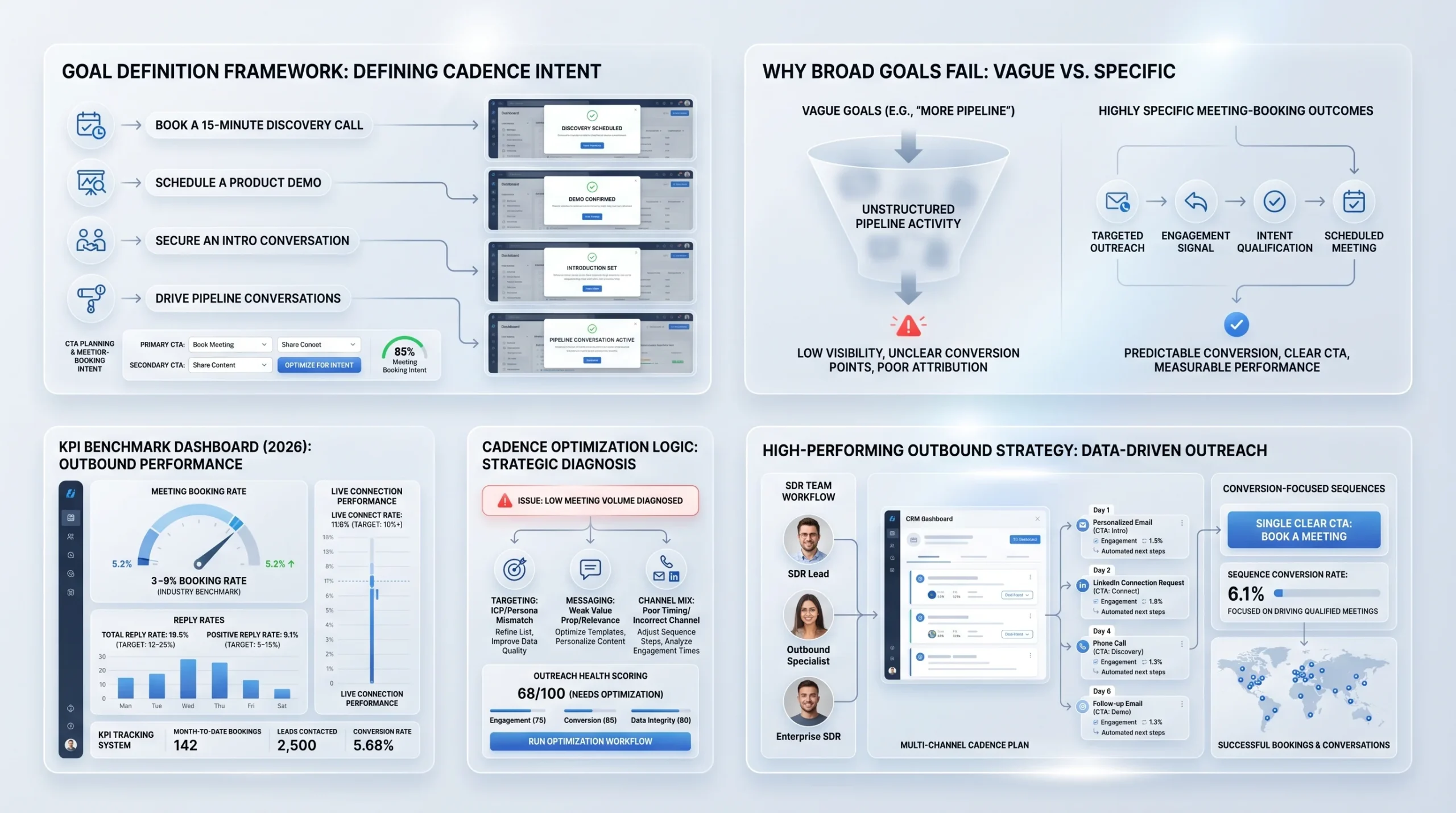
Broad goals produce vague cadences. Before mapping a single touch, define the specific action you want the prospect to take. Is it booking a 15-minute discovery call? Registering for a product demo? Agreeing to a quick intro conversation? The CTA at the end of every message in your cadence should point to exactly that action, and nothing else.
Setting benchmark targets helps you know whether the cadence is working. According to data from Growleads, a meeting booking rate of 10% or above from live connections represents strong performance. According to Uplift GTM, for well-targeted cold outbound cadences, meeting book rates typically fall between 3% and 8% of prospects contacted. Total reply rates for the same cohort sit between 12% and 25%, with positive reply rates between 5% and 15%.
Use these numbers as guardrails. If your cadence runs 500 contacts and books fewer than 15 meetings, something is wrong with the targeting, the messaging, or the channel mix.
Step 2: Build and Segment Your ICP List
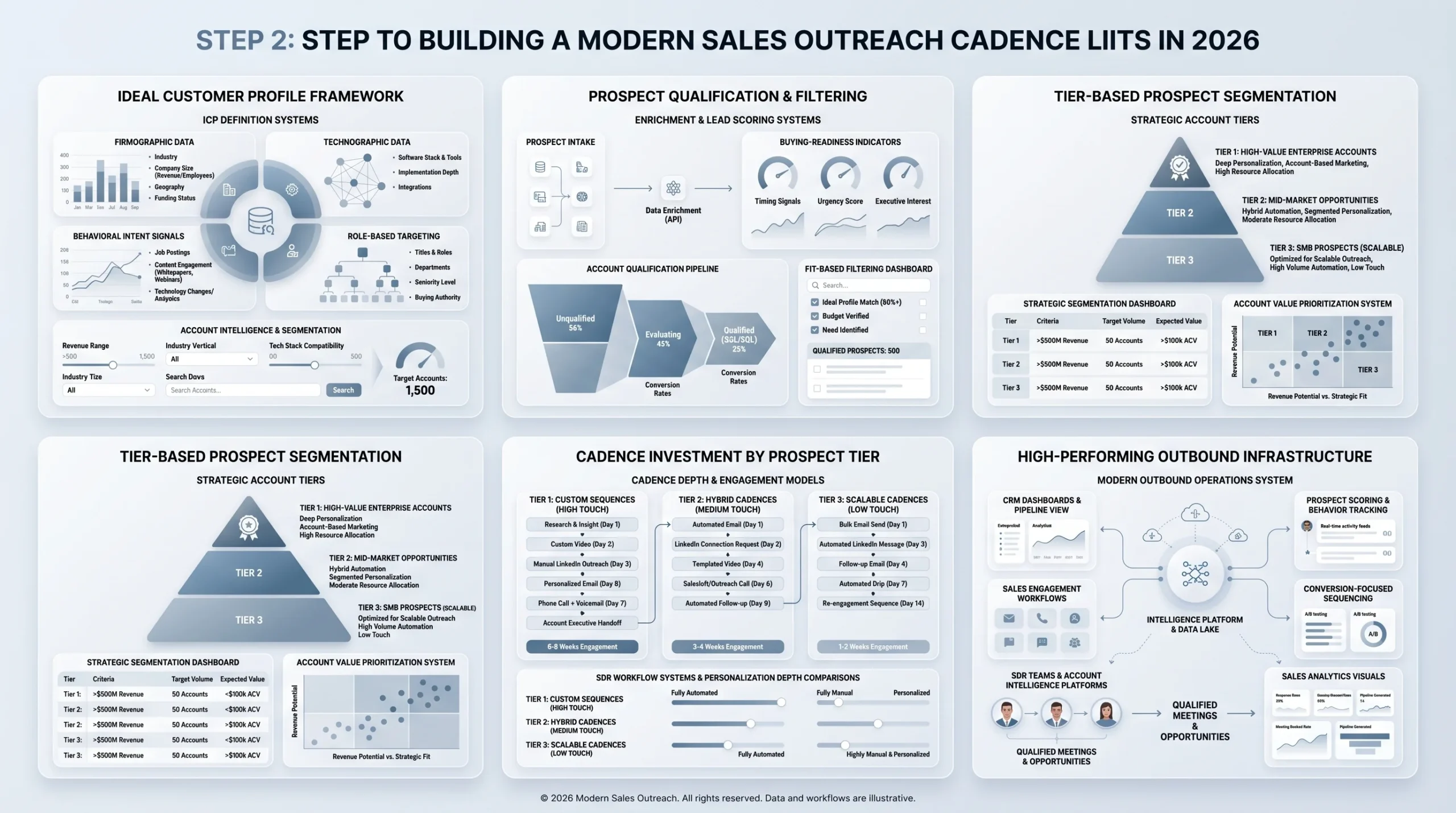
A cadence is only as good as the list it runs against. Sending a well-crafted 10-touch sequence to the wrong people is a waste of every rep’s time and a damage risk to your domain reputation.
Start by defining your Ideal Customer Profile across four dimensions:
- Firmographic: Industry, company size, revenue range, geography
- Technographic: Tools and platforms they use that indicate buying readiness or product fit
- Behavioral: Intent signals such as content consumption, recent job postings, or technology changes
- Role-based: Job title, seniority, department, and buying authority
Once the ICP is defined, segment the list into tiers. According to research from MySalesCoach, top-performing teams categorize prospects into three buckets: Tier 1 for high-value accounts that demand extensive research and longer engagement; Tier 2 and Tier 3 for good-fit, average-size deals that can be approached with more automation and less manual personalization.
Tier matters because it determines cadence depth. A Tier 1 prospect with a $100K potential deal value warrants a 12-touch sequence with custom video and manual LinkedIn steps. A Tier 3 SMB prospect at a $5K deal value does not justify the same investment.
Step 3: Choose Your Outreach Channels
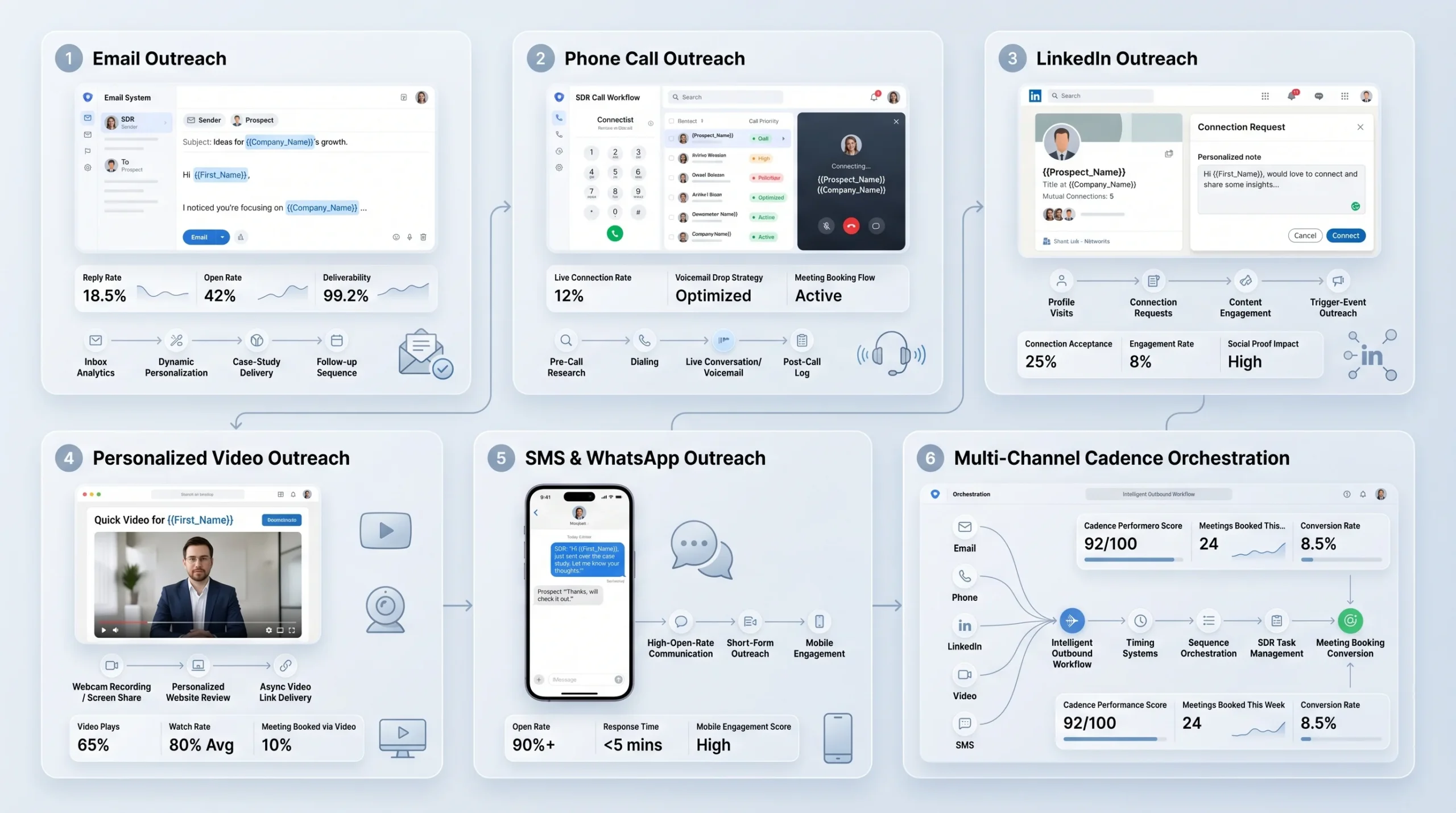
The channels in your cadence determine your reach and your differentiation. Here is how each channel performs and where it fits in a meeting-booking sequence.
Email is the foundation of most outbound cadences. It is asynchronous, scalable, and easy to personalize with dynamic fields and research. The challenge is deliverability and inbox competition. According to SalesHive, average B2B cold email open rates sit around 42.35% as of 2025, while reply rates for cold outbound average between 3% and 5.1%. Top-quartile performers achieve 15% to 25% reply rates through tight ICP targeting, strong subject lines, and relevant hooks.
Email works best at the beginning of a cadence as an introduction, in the middle as a value-add or case study delivery, and at the end as a break-up.
Phone Calls
Cold calling is not dead. It is selective. Phone calls break through email fatigue and create real-time conversation, which is the fastest path to a booked meeting. According to research from Growleads, a call connection rate above 12% to 15% is considered strong for cold outbound. The voicemail left when no one answers is a separate asset: it creates familiarity and increases the likelihood that the next email gets opened.
Phone calls belong in the first week of a cadence after at least one email has been sent, and again in later stages when lighter touches have produced no response.
LinkedIn operates differently from email because the platform creates social context. A prospect who receives a connection request can see your profile, mutual connections, shared groups, and recent posts before deciding whether to engage. That social proof changes the dynamic entirely compared to a cold email.
According to research from Belkins (sourced from Expandi’s dataset of over 20 million outreach attempts), adding a personalized message to a connection request lifts post-acceptance reply rates from 5.44% to 9.36%. Campaigns that combine a direct message with a profile visit achieve reply rates of up to 11.87%. According to Cleverly’s analysis, outreach tied to a recent trigger event such as a promotion, webinar attendance, or post engagement boosts response rates by 32%.
LinkedIn connection acceptance rates average around 26% to 37% for cold outreach, according to data from multiple sources including Alsona and Cleverly. If you warm up a prospect by engaging with their content first, acceptance rates can climb above 60%.
Video Messages
Personalized video messages are a high-effort, high-return channel that most reps do not use, which is precisely why they work. Tools like Loom, Vidyard, and Sendspark allow reps to record a 60 to 90-second video referencing the prospect’s website, LinkedIn post, or specific pain point. According to a Vidyard study cited by BizAI, personalized videos produce 40% higher engagement rates compared to standard email. Video belongs in the middle of a cadence, typically at touch 3 or 4, as a pattern interrupt when email and phone have not yet generated a response.
SMS and Text Messages
SMS is appropriate in limited, high-intent situations where the prospect has already engaged with your outreach in some way, or where your ICP has indicated openness to mobile communication. According to benchmark data from Outreaches.ai, WhatsApp open rates reach 95%, making it the most-read channel available. However, the reply rate sits at around 4%, which indicates that while people read the message, they do not always respond in text format. SMS is best used as a final touchpoint, not a first one.
Step 4: Map Your Touchpoint Sequence Day by Day
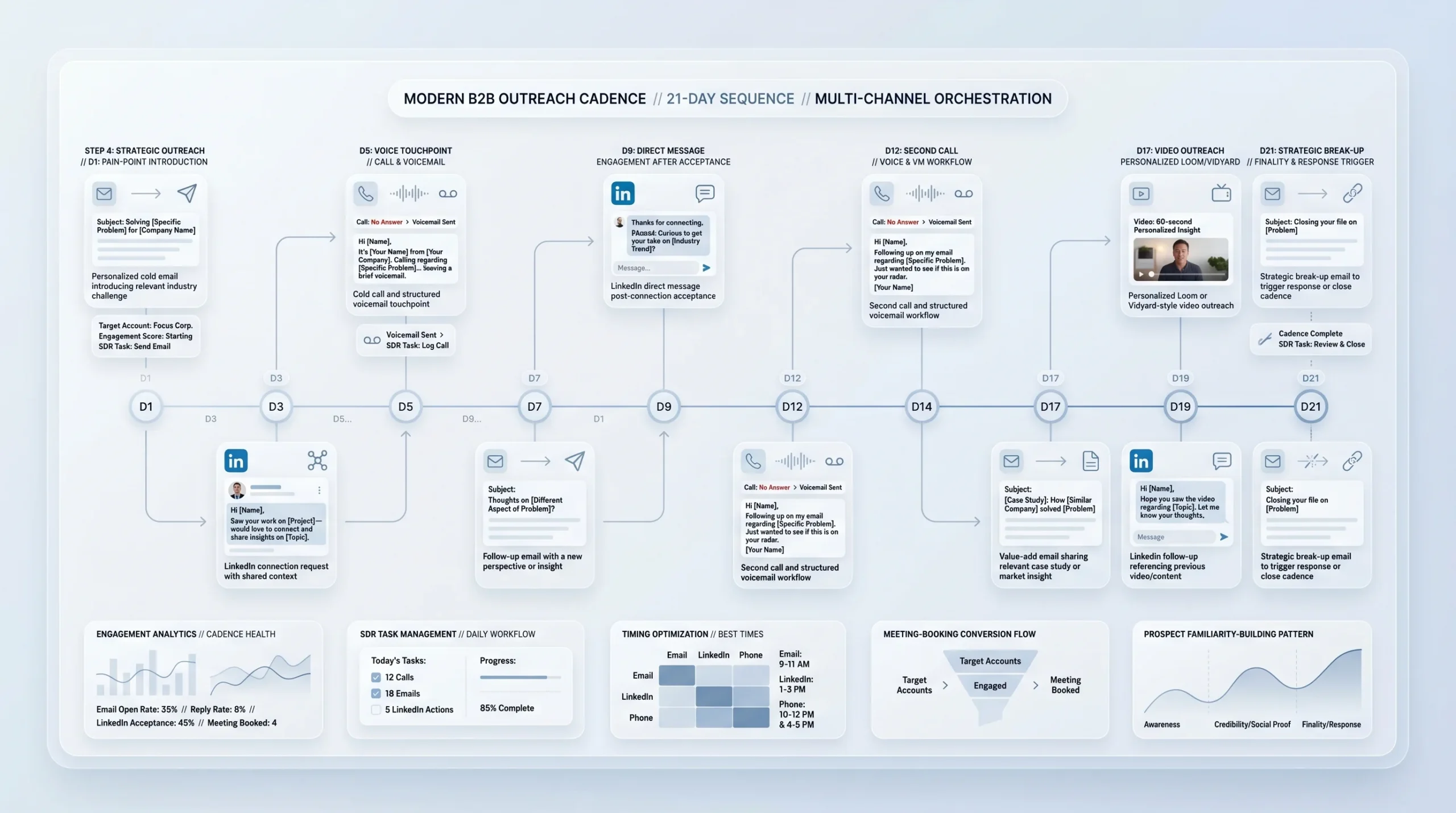
With channels selected and segments defined, the next step is mapping the actual sequence. A typical 10-touch, 21-day cadence for cold outbound B2B looks like this:
- Day 1: Personalized cold email (introduction and relevant problem statement)
- Day 3: LinkedIn connection request with a brief, non-salesy note
- Day 5: Cold call plus voicemail if no answer
- Day 7: Follow-up email with a new angle, not a repeat of Day 1
- Day 9: LinkedIn direct message after connection is accepted
- Day 12: Cold call plus voicemail
- Day 14: Value-add email with a relevant case study, article, or insight
- Day 17: Personalized video message via Loom or Vidyard
- Day 19: LinkedIn follow-up message referencing the video or prior email
- Day 21: Break-up email
According to data from Growleads, a typical pattern includes email on Day 1, a LinkedIn connection on Day 3, and a phone call on Day 5, with alternating channels throughout the cadence. The principle is to rotate channels so that every few days the prospect encounters your outreach in a different format and context.
The value arc across the sequence should be deliberate. Early touches focus on a specific pain point and a credible reason why you are reaching out. Middle touches add proof in the form of data, case studies, or social proof. The final touch creates a sense of finality that prompts a response.
Step 5: Write Messaging That Earns a Reply (Not Just an Open)
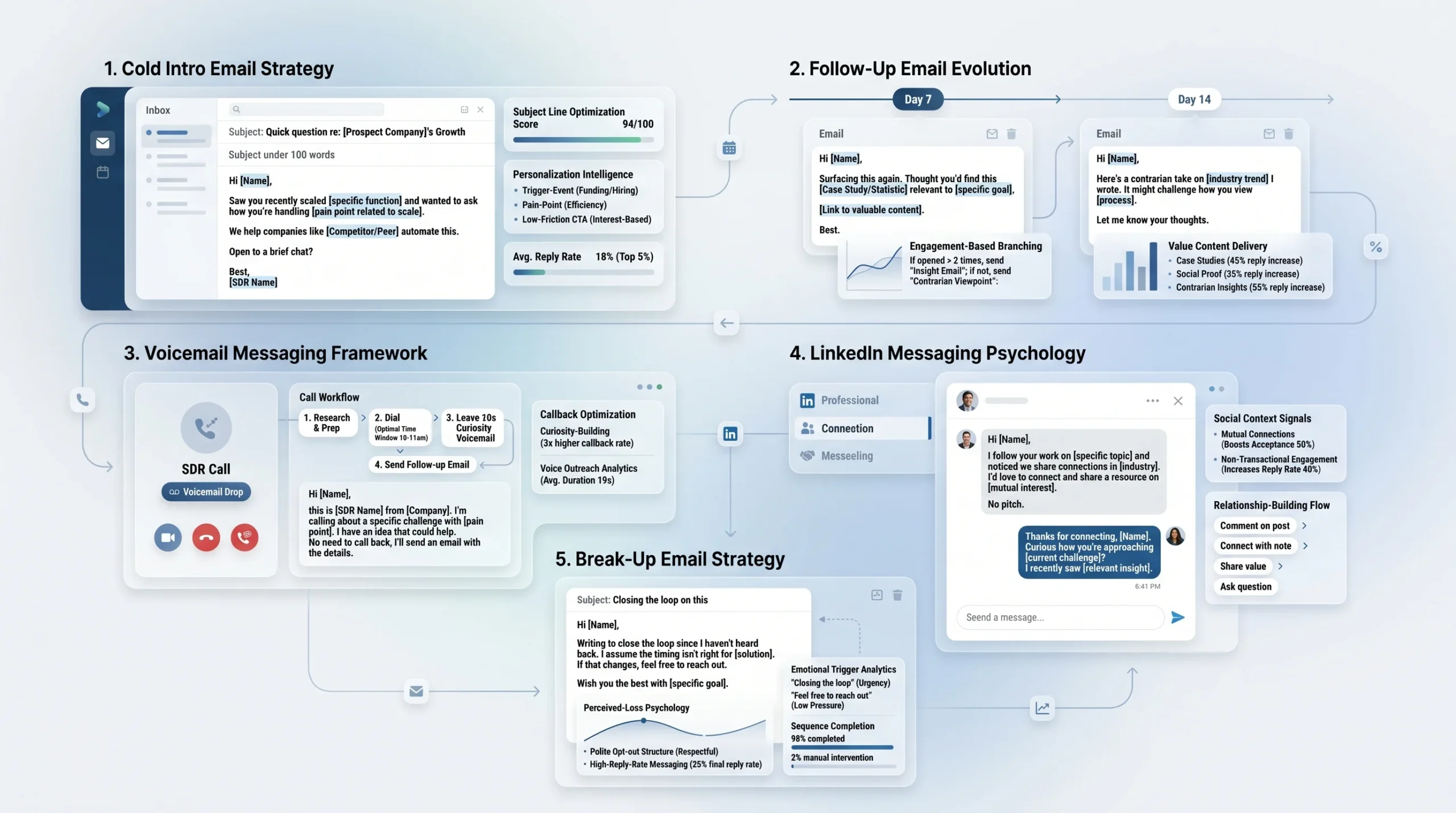
Messaging is where most cadences fail. A rep spends three days building the perfect sequence structure, then fills every step with the same generic “I wanted to reach out because” copy. Here is how to write each message type so it actually gets a response.
Cold intro email (Day 1): Keep it under 100 words. Open with a specific, researched observation about the prospect’s company, a trigger event, or a direct pain point. State what you do in one sentence. End with a single, low-friction ask (a 15-minute call, not a full demo). Subject lines that reference a specific company name, a recent event, or a problem outperform generic lines consistently.
Follow-up emails (Days 7 and 14): Never repeat the first email. Change the angle completely. If Day 1 focused on a pain point, Day 7 should deliver proof via a case study or a relevant statistic. Day 14 should try a completely different frame, such as a question, a contrarian observation, or a piece of content the prospect would genuinely find useful.
Voicemail scripts: Keep voicemails to 20 to 30 seconds. State your name, your company, one sentence of context, and a specific reason to call back. End with your number said slowly, twice. Do not summarize your entire pitch in a voicemail. The goal is enough curiosity to prompt a callback or make the next email more likely to be opened.
LinkedIn connection notes and direct messages: Connection notes should be under 300 characters (LinkedIn’s limit for connection request messages). They should reference something specific: a mutual connection, a post the prospect wrote, an industry trend you both operate in. Direct messages after connection acceptance should feel conversational, not transactional. Starting with a genuine observation works far better than pivoting immediately to a pitch.
The break-up email: The break-up email is the final touch in a cadence. It signals that this is the last time you will reach out and gives the prospect explicit permission to say no. This structure triggers a psychological response to perceived loss, which is why break-up emails consistently generate the highest reply rates of any step in the sequence. A simple format: acknowledge you have reached out a few times, say you do not want to keep bothering them, express that you believe the problem is relevant to them, and offer one final easy way to engage. If they are not interested, you respect that.
Step 6: Personalize at Scale Without Losing Your Mind
Personalization is the most discussed and least executed part of any cadence. According to research from Hunter.io’s analysis of 11 million emails cited by The Digital Bloom, personalization depth (not just name merge tags) drives 52% higher reply rates. According to data from Belkins, highly personalized emails achieve 2 to 3 times higher reply rates than generic templates. Yet according to research from Martal, only 5% of reps consistently personalize every message.
The gap exists because genuine personalization takes time. The solution is tier-based personalization, where depth matches deal value:
- Tier 1 prospects: Manual research for each contact before the first touch. Reference a specific company initiative, a quote from a recent LinkedIn post, a competitor they just named in an earnings call, or a hiring trend visible from their job board. This level of personalization takes 10 to 15 minutes per prospect and is worth it at $50K+ deal values.
- Tier 2 and Tier 3 prospects: Dynamic field personalization using firmographic data: company name, industry, role, and company size woven into a template that feels specific without requiring manual research. Tools like Clay, Apollo, and Instantly automate this at scale.
- Trigger-based personalization: The highest-efficiency personalization tactic is monitoring for real-time signals and building those signals into the first line of your outreach. According to research cited by Autobound, newly hired executives spend 70% of their budget in the first 100 days, and leadership change signals generate 14% response rates compared to 1.2% for standard cold outreach. Vendors contacting recently funded companies within 48 hours of the funding announcement see 400% higher conversion rates.
Triggers to monitor include: new leadership hires, funding rounds, company expansions, competitor mentions, product launches, and content published by the prospect on LinkedIn.
Step 7: Set Timing Rules and Sending Windows
Timing affects deliverability, open rates, and the probability of catching a prospect when they are in a position to respond. According to research from Belkins (sourced from Expandi data), Tuesday has the highest LinkedIn reply rates at 6.90%, followed by Monday at 6.85%. Weekend replies drop significantly to 6.40% on Saturdays.
For email, the most commonly cited sending windows for B2B are Tuesday through Thursday, with morning sends between 8 AM and 10 AM in the prospect’s local time zone and afternoon sends between 2 PM and 4 PM performing well. Avoid Monday mornings (inbox recovery from the weekend) and Friday afternoons (checked-out mode).
For calls, align to industry behavior. According to research from Tendril, healthcare professionals are more reachable during early morning or evening hours, while retail decision-makers are more accessible mid-morning. For North American audiences, late morning (10 AM to 11 AM) and early afternoon (1 PM to 2 PM) in the prospect’s time zone tend to produce the best connect rates.
For multi-region outreach, never assume that what works in North America works elsewhere. According to data from Outreaches.ai, the US market shows 15% to 20% lower email response rates than EU markets. APAC and EMEA audiences generally respond better with slightly fewer touchpoints and longer spacing between them, according to research from Tendril.
Step 8: Decide What Automation Handles vs. What Reps Own
The automation question is one of the most practically important decisions in cadence design. Getting it wrong in either direction creates problems. Over-automating turns a cadence into a drip campaign, which loses the conversational quality that books meetings. Under-automating creates manual bottlenecks that prevent the cadence from running consistently.
The rule is simple: automate anything that does not require human judgment. Assign manual tasks to reps for anything that does.
Automate:
- Follow-up email sends on schedule
- Task creation and reminders in the CRM
- Meeting scheduling links and confirmation emails
- Data enrichment and contact field updates
- Email sequence enrollment and unenrollment triggers
Keep manual:
- Cold calls and voicemails
- Personalized LinkedIn messages and video recordings
- First-touch emails to Tier 1 high-value accounts
- Any response handling and objection management
- Any touch following a positive signal (email open, link click, LinkedIn profile view)
Sales engagement platforms like Outreach, Salesloft, and Apollo manage this split well. They automate scheduled email steps and surface manual task reminders in a daily queue so reps execute calls and LinkedIn touches without needing to track timing manually.
Step 9: Define Exit Criteria and Cadence Endings
A cadence without a clear exit creates two failure modes: reps who keep reaching out indefinitely to prospects who will never convert, and reps who drop prospects the moment a sequence ends without building a re-engagement path.
Exit criteria to define:
- Positive response: Remove from cadence immediately. Move to a human conversation and a booked meeting.
- Negative response (not interested): Remove, mark in CRM, and do not re-enroll for at least 6 months.
- No response after the full cadence: Move to a “re-engagement” tag. These prospects can be re-enrolled in a new cadence in 60 to 90 days with a completely fresh angle.
- Out-of-office reply: Pause the cadence, set a task to resume after the return date.
- Bounced email: Remove the email address, attempt to find an alternative, or contact via LinkedIn only.
The re-engagement path is underused by most teams. A prospect who did not respond to your first cadence in February may be actively looking for a solution in May after a budget cycle opens or a new initiative gets approved. A 4-touch re-engagement cadence with a completely different message frame costs little to run and frequently surfaces meetings from prospects who had no interest three months prior.
5 Ready-to-Use Sales Cadence Sequences That Book Meetings
Each cadence below includes the goal, the ideal audience, the day-by-day structure, and the specific logic behind the channel choices.
Cadence 1: The 10-Touch Cold Outbound Cadence (21 Days)
Goal: Break into net-new accounts efficiently while maintaining a personalized, relevant approach.
Ideal for: SDRs prospecting Tier 2 and Tier 3 cold accounts in a defined ICP segment.
Day-by-day structure:
- Day 1: Cold intro email. Specific subject line referencing the prospect’s company or role. Problem-first opening, one-sentence solution, clear and frictionless CTA.
- Day 3: LinkedIn connection request with a brief note referencing the email or a shared professional context.
- Day 5: Cold call plus voicemail. Reference the email sent on Day 1 in the voicemail.
- Day 7: Second email. New angle entirely. Introduce a relevant case study or data point.
- Day 9: LinkedIn direct message after connection acceptance. Casual and conversational, not a pitch.
- Day 12: Cold call plus voicemail. Voicemail references the video coming on Day 14 to create anticipation.
- Day 14: Value-add email. Share a relevant blog post, framework, or industry insight with a brief context note.
- Day 17: Personalized Loom or Vidyard video. Screen-record a 60-second observation about the prospect’s business.
- Day 19: LinkedIn follow-up message referencing the video. “Did you get a chance to watch the video I sent?”
- Day 21: Break-up email. Direct, brief, and respectful. Offers one final easy-to-say-yes-to path.
Why it works: The cadence rotates channels every 2 to 3 days, which prevents repetitive inbox fatigue. The video in Day 17 acts as a pattern interrupt and consistently drives replies from prospects who ignored the previous 6 touches. The break-up email on Day 21 triggers a loss-aversion response.
Cadence 2: The Inbound Speed-to-Lead Cadence (7 Days, 6 Touches)
Goal: Convert an inbound lead into a booked meeting before momentum cools.
Ideal for: Marketing-qualified leads (MQLs) who filled out a form, downloaded a resource, attended a webinar, or requested information.
Day-by-day structure:
- Day 1, within 5 minutes of lead creation: Immediate email response. Acknowledge what they downloaded or requested, provide the resource if not already delivered, and ask for a meeting.
- Day 1, within 1 hour: Phone call. Reference the resource they engaged with. If no answer, leave a voicemail.
- Day 2: LinkedIn connection request. Reference the webinar or piece of content that drove the lead.
- Day 3: Second email. Share one highly relevant case study related to their company size or industry.
- Day 5: Phone call plus voicemail.
- Day 7: Break-up email. Keep it light. Acknowledge they may be evaluating options and leave the door open.
Why it works: According to research cited by Martal, responding to new leads within 5 minutes makes them 9 times more likely to convert. Speed is the differentiator on inbound. This cadence is shorter because the prospect already expressed interest. Staying persistent over 7 days is appropriate because the buyer is actively engaged; extending to 21 days is unnecessary and risks the conversation going cold.
Cadence 3: The Enterprise Multi-Stakeholder Cadence (30 Days)
Goal: Open conversations with multiple decision-makers at a single target account.
Ideal for: AEs and senior SDRs targeting enterprise accounts with deal values above $50,000.
How it differs: Enterprise deals typically involve multiple stakeholders. According to research from Outreach.io, your economic buyer prefers brief emails and executive briefings, while technical evaluators respond better to detailed documentation and demo-focused content. The enterprise cadence is not a single sequence running to one person. It runs simultaneously to 3 to 5 contacts at the same company, each with messaging calibrated to their role and priorities.
Day-by-day structure (per contact, personalized by role):
- Day 1: Research-led cold email to the primary economic buyer. Highly personalized, short, and specific to a company initiative.
- Day 3: LinkedIn connection request to all identified stakeholders simultaneously.
- Day 7: Cold call to the primary contact. Voicemail if no answer.
- Day 10: Role-specific email to each stakeholder. The economic buyer gets a business outcome focus. The technical evaluator gets a process or integration focus.
- Day 14: Personalized video for the primary economic buyer.
- Day 17: LinkedIn direct message to any stakeholder who accepted the connection request.
- Day 21: Cold call to any contact who has not responded via any channel.
- Day 24: Case study email. Industry-specific and relevant to the company’s stated priorities.
- Day 27: LinkedIn message or email referencing activity at the account level (a recent press release, job posting, or product announcement).
- Day 30: Break-up email to primary contact with a clear offer to reconnect when timing is better.
Why it works: Enterprise prospects respond to specificity and persistence over a longer arc. A 30-day cadence gives enough time for a stakeholder to pass your name internally, for a trigger event to create urgency, or for a budget cycle to open. Multi-threading at the same account increases the probability that at least one conversation starts.
Cadence 4: The Re-Engagement Cadence for Cold or Dead Leads
Goal: Revive prospects who went cold or did not respond to a prior cadence.
Ideal for: Contacts who completed a full outbound cadence 60 to 90 days ago without responding, or inbound leads who engaged initially and then went quiet.
Day-by-day structure:
- Day 1: Re-engagement email with a completely new angle. Reference time passed naturally: “A few months back I reached out about X. I wanted to try again because [new reason, new insight, or new development].”
- Day 4: LinkedIn message. If the connection was never accepted, resend the connection request with a new note.
- Day 7: Cold call plus voicemail referencing the email.
- Day 10: Value-add email with a genuinely new piece of content or insight relevant to a recent industry development.
Why it works: The most common mistake in re-engagement is using the same message with a “following up” subject line. Prospects recognize it and ignore it. A re-engagement cadence works when the angle is genuinely fresh, the timing is different, and the rep signals awareness that time has passed.
Cadence 5: The Event or Trigger-Based Cadence
Goal: Capitalize on a real-world trigger event to make outreach feel timely and relevant rather than cold.
Ideal for: Any ICP prospect who exhibits a qualifying trigger signal.
Common triggers that warrant a dedicated cadence:
- The prospect’s company received a new round of funding
- A new executive (likely economic buyer or champion) joined the company
- The company announced an expansion into a new market or launched a new product
- A competitor of the prospect is a current customer of yours
- The prospect published a LinkedIn post directly related to a problem your product solves
Day-by-day structure:
- Day 1: Trigger-referenced cold email. Open directly with the trigger. “Saw that [Company] just raised a Series B. Congratulations. Teams at this stage typically run into [specific challenge]. Here is how [similar company] handled it.”
- Day 2: LinkedIn connection request with a note referencing the same trigger.
- Day 4: Cold call plus voicemail. Reference the funding or trigger in the voicemail opening.
- Day 7: Follow-up email. Shift from the trigger to the outcome. “Given where [Company] is headed, [outcome] becomes a lot more achievable. Worth a quick call?”
- Day 10: LinkedIn direct message.
- Day 14: Break-up email if no response.
Why it works: According to research from Autobound, outreach tied to a leadership change signal generates 14% response rates compared to 1.2% for standard cold outreach, a more than 11-times improvement. Trigger-based outreach works because it removes the “why now?” question before the prospect even has to ask it. You are reaching out because something changed, not because you pulled their name off a list.
Email and Call Templates for Each Stage of Your Cadence
Templates are a starting point, not a finished product. Every template below should be modified with specific research before sending. Sending these word-for-word to a large list will produce average results at best.
Cold Intro Email Templates (Day 1)
Template A (Problem-First):
Subject: [Company Name] + [specific problem]
“Hi [First Name],
[Company Name] has been growing quickly in [market]. Teams at that stage usually start running into [specific problem].
We help [ICP description] solve [specific problem] by [one-sentence mechanism]. [Reference company] went from [before state] to [after state] in [timeframe].
Worth a 15-minute call this week?
[Your name]”
Template B (Trigger-Based):
Subject: Congrats on the [trigger] – quick question
“Hi [First Name],
Saw [Company] just [trigger event]. Congrats.
Teams making that kind of move typically face [relevant challenge]. We just helped [similar company] work through it.
Would a quick call this week make sense?
[Your name]”
Follow-Up Email Templates (Days 7 and 14)
Day 7 follow-up (new angle, case study):
Subject: How [similar company] handled [problem]
“Hi [First Name],
Wanted to share something relevant before I let this sit.
[Similar company in their space] was dealing with [same problem]. After [action they took], they [specific result].
Happy to walk you through how they did it in 15 minutes. Interested?
[Your name]”
Day 14 follow-up (insight or question):
Subject: Quick question
“Hi [First Name],
Are you currently [experiencing the core problem your product solves]?
Most [ICP role] at [ICP company type] I talk to say [insight or common assumption]. In practice, [contrarian or clarifying observation].
Worth a short conversation to compare notes?
[Your name]”
Value-Add and Content Touch Templates
The purpose of a value-add touch is to deliver something the prospect can use without needing to book a call with you first. Keep it short. No more than three sentences of context before the resource.
“Hi [First Name],
Thought this might be relevant given what [Company] is working on: [link to article, framework, or report].
The section on [specific section] maps closely to what [similar company] was working through.
No agenda. Just thought it was worth passing along.
[Your name]”
Break-Up Email Templates
The break-up email must feel final without being rude. The best-performing versions are short, direct, and leave one last door open.
Subject: Closing the loop
“Hi [First Name],
I have reached out a few times and do not want to keep cluttering your inbox.
I genuinely believe [specific problem] is relevant to where [Company] is going. If I am wrong about the timing or fit, I completely understand.
If things change down the road, my contact information is below.
[Your name]”
Voicemail Scripts That Get Callbacks
“Hi [First Name], this is [Your Name] from [Company]. I sent you an email last week about [one sentence of context]. I wanted to follow up because [brief specific reason]. You can reach me at [number, said slowly]. Again, that is [number repeated]. Talk soon.”
LinkedIn Message Templates (Connection Request, Direct Message, InMail)
Connection request note (under 300 characters):
“Hi [First Name], noticed your post on [topic]. Our work overlaps a bit. Would love to connect.”
Direct message after connection acceptance:
“Thanks for connecting, [First Name]. I work with [ICP type] on [core problem]. Not sure if it is relevant, but happy to share what we have seen work. Let me know if a quick conversation makes sense.”
InMail (for non-connections):
“Hi [First Name], I work with [similar companies] on [specific challenge]. [Company] looks like a strong fit based on [observation]. Would a 15-minute call be worth it?”
How to Measure Whether Your Cadence Is Actually Working
Measuring cadence performance requires tracking the right metrics at the right level of granularity. Looking only at total replies tells you the cadence is working or not. Looking at reply rate by step tells you which specific touches are driving results and which are invisible.
The 6 Metrics Every Sales Team Should Track
1. Email bounce rate: Aim for under 2%. A higher rate means your list quality is poor or your domain health is at risk. High bounce rates hurt deliverability for every future send.
2. Email open rate: According to data from Growleads, a target of 18% to 24% is the B2B benchmark for cold outbound. Note that Apple Mail Privacy Protection inflates open rate figures for some audiences by auto-loading tracking pixels. Use open rate as a directional signal, not a primary KPI.
3. Reply rate: Cold outbound reply rates of 3% to 5.1% represent the industry average, according to data from SalesHive and The Digital Bloom. Top-quartile performers achieve 15% to 25% through strong targeting and personalized hooks. If your cadence is below 3%, the problem is either the list, the messaging, or the ICP fit.
4. Call connection rate: According to Growleads, a call connection rate of 12% to 15% represents strong performance for cold outbound. Below 5% typically indicates bad phone data, wrong timing, or going directly to gatekeeper.
5. Meeting booking rate: According to Growleads, a meeting booking rate above 10% from live connections represents strong performance. According to Uplift GTM, for well-targeted cold outbound cadences overall, meeting book rates fall between 3% and 8% of all prospects enrolled.
6. Pipeline progression and time to conversion: Track how long it takes from first touch to booked meeting and from booked meeting to opportunity created. According to data from Outreach.io, opportunities that include live meetings have deal cycles that are 32 days shorter on average compared to those without meetings.
How to Read Reply Rate by Step (And What It Tells You)
Reply rate by step is the most actionable metric in cadence optimization. According to research from Sendspark, tracking which touches generate the most responses allows you to identify your strongest messages and eliminate or replace the weakest ones. A cadence where Step 1 and Step 9 generate 80% of replies and Steps 2 through 8 generate almost nothing is telling you that the middle of the cadence is empty. Either the messages need to be rewritten or those steps need to be replaced with different channel touches.
If the break-up email (typically the final step) generates a disproportionately high reply rate, that is expected. The question is whether those replies are positive or simply people responding to ask to be removed. A high positive reply rate on the break-up email often means the cadence ran too long and the prospect was waiting for a signal that you were done.
When to Pause, Optimize, or Kill a Cadence
Pause: If reply rates drop sharply after a sending domain change, a major news event in the prospect’s industry, or a significant shift in the ICP list, pause the cadence rather than killing it. The infrastructure may be fine and the content the problem.
Optimize: If open rates are healthy but reply rates are low, the subject line is working but the message body is not. Rewrite the body copy of your lowest-performing steps and re-run. If open rates are low, test new subject lines first.
Kill: If a cadence has run through at least 200 contacts with consistent delivery and produces a reply rate below 1% and zero meetings, the fundamental premise of the cadence is wrong. The ICP, the channel mix, or the core value proposition needs to be rebuilt from scratch, not iterated.
How to Run A/B Tests on Your Cadence Without Blowing Up Your Pipeline
A/B testing in a cadence is simple in practice. According to Outreach.io, you clone a sequence step, change the messaging or subject line in the new version, and let the platform automatically assign prospects to one version or the other. The key is changing one variable at a time. Testing a new subject line and new body copy simultaneously means you cannot attribute results to either change.
Test subject lines separately from body copy. Test a problem-first opening against a trigger-based opening. Test a video step against a value-add email at the same position in the sequence. Run each test through at least 100 contacts before drawing conclusions, because smaller sample sizes produce unreliable variance.
Tools to Build, Run, and Automate Your Sales Cadence
The right tools reduce manual overhead, improve timing consistency, and give you the data needed to optimize over time. Here is what each category of tool does and which platforms are worth knowing.
Sales Engagement Platforms
Sales engagement platforms are the operating system for a multi-touch cadence. They manage step scheduling, surface manual task reminders, automate email delivery, track open and reply rates, and provide sequence-level analytics.
- DealsFlow: An AI-native LinkedIn outreach platform built for agencies and SDR teams running multi-account campaigns at scale. Its core differentiator is the Arlo AI engine, which doesn’t just send initial messages — it reads replies, handles objections, and books meetings autonomously without human intervention. Best for teams or agencies that want to automate the full LinkedIn conversation cycle across dozens of accounts from a single dashboard.
- Outreach: The most established enterprise-grade platform. Strong sequence management, A/B testing, and call integration. Best for larger SDR teams with dedicated RevOps support.
- Salesloft: Direct competitor to Outreach, with comparable sequence features and strong conversation intelligence via Drift integration. Well-suited to teams that also use it for deal management.
- Apollo.io: A cost-effective option that combines a prospect database with sequence management, making it useful for teams that want ICP list building and cadence execution in one tool.
- Instantly.ai: Built specifically for email-heavy outbound at high volume. Strong deliverability infrastructure and inbox rotation capabilities.
CRM Integration
A cadence tool without CRM integration creates a data silo. Activity logged in your sales engagement platform, such as emails sent, calls made, and meetings booked, needs to flow directly into your CRM so reps and managers can see the full picture of each account’s history.
Salesforce and HubSpot are the two most common CRMs in B2B sales environments. Both integrate natively with Outreach and Salesloft. Apollo and Instantly also offer CRM sync, though with varying depth depending on your CRM version and configuration.
AI-Powered Personalization Tools
- Clay: Pulls data from dozens of sources including LinkedIn, Crunchbase, news, job boards, and company websites to build research-rich contact records. Used to generate personalized first lines at scale without manual research for every prospect.
- Lavender: An email writing assistant that scores cold emails in real time, flags weak subject lines, and suggests improvements based on reply rate data from millions of emails.
- Amplemarket and Smartlead: Both combine prospect data, AI personalization, and sequence management into single platforms, reducing tool stack complexity for smaller teams.
LinkedIn Automation: What Is Safe, What Gets You Banned
LinkedIn enforces daily activity limits and actively detects automation patterns. Safe LinkedIn automation means operating within connection request limits (typically 20 to 25 per day on a standard account), spacing activity across the day rather than executing it in bursts, and using tools that operate via the LinkedIn interface rather than the API.
Tools like Expandi, HeyReach, and Dripify operate within LinkedIn’s safety parameters and are widely used for cadence automation at scale. Tools that send hundreds of connection requests per day or mimic clicking patterns that no human would produce put accounts at risk of restriction or permanent ban.
For teams managing LinkedIn outreach across multiple accounts, such as agency SDR teams running outreach for clients, Dealsflow supports multi-account management from a single dashboard with built-in safety controls and automated warmup to protect each account. Its Arlo AI engine goes further by handling the full post-reply conversation autonomously, not just scheduling the initial outreach steps. For teams where reps spend too much time managing replies across dozens of LinkedIn threads, that distinction matters.
Video Prospecting Tools
- Loom: Free for basic use. Easy to record and share a screen or webcam video. Works well for quick personalized prospecting videos.
- Vidyard: Purpose-built for sales video prospecting. Tracks opens, plays, and re-watches. Integrates with Salesforce, HubSpot, and most major sales engagement platforms.
- Sendspark: Allows reps to create personalized video thumbnails with the prospect’s name or company logo dynamically overlaid, increasing click-through rates before the video even plays.
Conclusion
A sales outreach cadence that books meetings is not a complicated piece of machinery. It is a structured, repeatable system that shows up in the right channels, at the right frequency, with messages that actually say something worth reading. The reps who book the most meetings are not the ones with the most creative subject lines. They are the ones who are still following up on Day 17 when everyone else stopped on Day 5, who are switching to LinkedIn when email is not landing, and who are using real signals to make their outreach feel inevitable rather than generic.
Build the cadence, define the exit criteria, set up the CRM tasks, and measure by step. Then optimize based on what the data shows. That is the entire system. The teams that execute it consistently outperform the ones still running single-channel email blasts by a margin that is not even close.
The next step is picking one segment, building one cadence for it, and running it through 100 contacts. Everything in this guide becomes more useful once you have real reply data of your own to compare against.
Frequently Asked Questions
What is the difference between a sales cadence and a drip campaign?
A sales cadence is a human-led, multi-channel outreach sequence managed by an SDR or Account Executive, including manual steps such as phone calls, personalized LinkedIn messages, and custom video. It is measured by meetings booked. A drip campaign is a fully automated, marketing-owned email series triggered by prospect behavior such as a form fill or content download. It is measured by click-through rates and form fills. Cadences require rep involvement; drip campaigns do not. When the goal is a booked discovery call with a cold prospect, a cadence is the right tool.
How many touchpoints should a cold outreach cadence have?
For most B2B cold outbound segments, 8 to 12 touchpoints across 21 to 27 days represents the most consistently cited effective range, based on data from Growleads and Intelemark. The exact number should be calibrated to deal value and segment: enterprise accounts warrant 10 to 12 touches over 30 days, while SMB cadences are more effective at 6 to 8 touches over 14 days. Below 5 touches, most prospects who would have responded given more time never get the opportunity.
What is a realistic meeting booking rate from a cold cadence?
According to data from Uplift GTM, for well-targeted cold outbound cadences, meeting book rates typically fall between 3% and 8% of all prospects enrolled. According to Growleads, a meeting booking rate of 10% or more from live call connections represents strong performance. These numbers vary significantly based on ICP accuracy, message quality, domain reputation, and market conditions. A 5% meeting book rate on a list of 500 contacts means 25 meetings. At 8%, that becomes 40.
Should I have different cadences for inbound versus outbound leads?
Yes, and the difference is significant. Inbound leads have already expressed interest, which changes the appropriate timing, tone, and length. An inbound speed-to-lead cadence should start within minutes of lead creation, run for 7 days rather than 21, and assume a warmer disposition. Outbound cadences start from zero awareness and need more touches, a longer arc, and more patience. Treating an inbound lead with a 21-day cold outbound cadence risks losing them to a competitor who responds faster.
How do I personalize outreach at scale without slowing my team down?
The answer is tier-based personalization matched to deal value. Tier 1 high-value accounts receive manual research, custom first lines, and personalized video. Tier 2 and Tier 3 accounts receive dynamic field personalization using firmographic data pulled automatically by tools like Clay or Apollo. Trigger-based personalization, outreach built around funding rounds, leadership changes, or prospect-published content, delivers high relevance with relatively low research time because the trigger itself provides the context.
When should I stop following up with a prospect?
Stop after your defined break-up email has been sent and received no response. For most outbound cadences, that means stopping after 10 to 12 touches across 21 to 27 days. Do not stop before the break-up email, because the final message is one of the highest-reply-rate steps in any sequence. After the break-up, move the prospect to a re-engagement queue and revisit in 60 to 90 days with a completely fresh angle and new context if available.
How do I know if my cadence needs to be fixed or replaced?
Fix the cadence if one or two specific steps are underperforming while the rest of the sequence shows healthy engagement. Replace the cadence entirely if overall reply rates sit below 1% after 200 or more contacts with clean delivery, because the fundamental premise, whether that is the ICP, the channel mix, or the core value proposition, is not working. The diagnostic test is step-by-step reply rate analysis. If no step in the sequence is generating replies at a meaningful rate, the cadence needs a structural rebuild, not an edit.
What is the best day and time to send cold outreach?
For email, Tuesday through Thursday between 8 AM and 10 AM in the prospect’s local time zone consistently performs well across B2B segments. For LinkedIn messages, according to Expandi data analyzed by Belkins, Tuesday has the highest reply rate at 6.90%, followed by Monday at 6.85%. For phone calls, late morning (10 AM to 11 AM) and early afternoon (1 PM to 2 PM) in the prospect’s time zone produce the best connection rates for most industries. Healthcare and retail professionals follow different patterns and respond better during early morning or mid-morning windows respectively, according to research from Tendril.
Is LinkedIn a better outreach channel than email?
For many B2B segments, yes. According to data from Engagekit, LinkedIn DMs average a 10.3% reply rate, which is more than double the average cold email reply rate of 3% to 5.1%. Messenger campaigns targeting first-degree connections achieve up to 16.86% reply rates, according to Expandi data. The difference is context: LinkedIn creates a social and professional environment where the prospect can see mutual connections and recent activity before deciding to engage. Email lacks that trust layer. The best cadences use both, with LinkedIn reinforcing and adding credibility to email outreach rather than replacing it.
How do I measure whether my cadence is working?
Track six metrics consistently: email bounce rate (target under 2%), email open rate (18% to 24% for B2B cold outbound), reply rate (3% to 5.1% industry average, 15% to 25% for top performers), call connection rate (12% to 15% for strong performance), meeting booking rate (3% to 8% of enrolled prospects for cold outbound), and time to conversion (how many days from first touch to booked meeting). Analyze each metric by cadence step, not just overall, to identify which specific touches are driving results and which need to be rebuilt.