

Most people post something on LinkedIn, check the number under it, feel vaguely good or vaguely bad, and then move on without really knowing what that number means.
That number is impressions. And honestly, it’s one of the most misunderstood metrics on the entire platform.
Here’s what usually happens. Someone spends 45 minutes writing a post they’re proud of. They hit publish. A few hours later, it says 214 impressions. They think: that’s low, I must be doing something wrong. Or it says 3,800 impressions and they think: great, crushing it. Then they look at the next post, which took 10 minutes to write, and it has 6,200 impressions. Now they have no idea what’s happening or why.
That confusion isn’t your fault. LinkedIn doesn’t exactly make it easy to understand what impressions actually are, how they’re counted, why they go up and down, and what you’re supposed to do with that information. Most of what’s written about LinkedIn analytics is either too surface-level (“impressions = how many people saw your post!”) or too focused on vanity metrics that don’t connect to anything real.
So let’s actually break this down properly. What impressions mean on LinkedIn in 2026, how the algorithm decides who sees your content, what’s a good number and what isn’t, and the practical things you can do to grow your impressions over time without turning your LinkedIn into a full-time job or posting the same motivational quote format everyone else is copying.
There’s also a difference between impressions on your posts, impressions on your profile, and impressions in the context of LinkedIn ads. All three use the word “impressions” but they’re measuring different things. That’s worth clearing up early so you’re not mixing them up halfway through a strategy conversation with yourself at midnight.
Let’s get into it.
What Is an Impression on LinkedIn? (The Actual Definition)
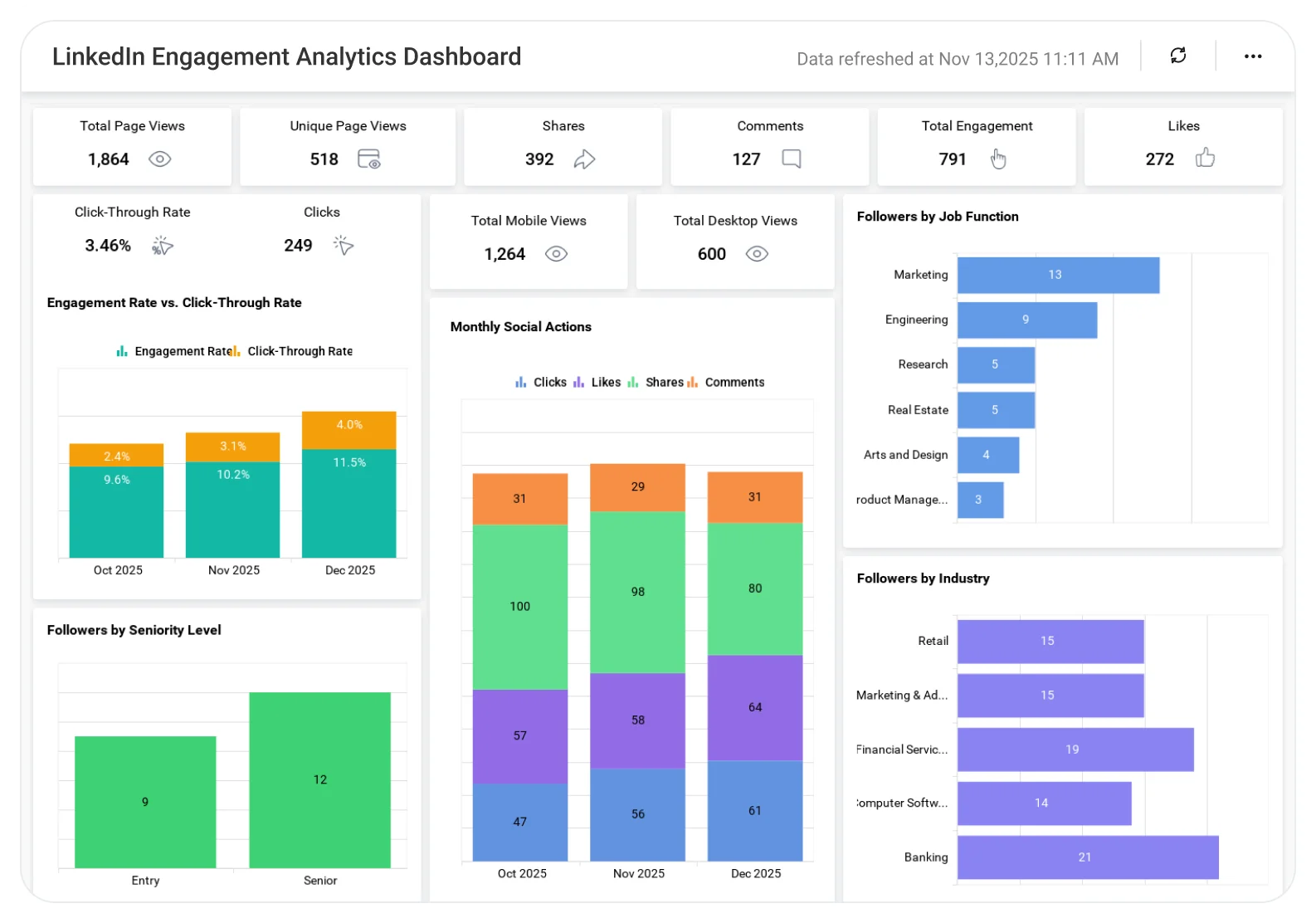
An impression on LinkedIn is counted every time your content appears on someone’s screen. Not every time they read it. Not every time they engage with it. Just every time it loads in their feed, whether they scroll past it in two seconds or stop and read every word.
So if your post shows up in 500 people’s feeds, that’s 500 impressions. If the same person sees your post three times because the algorithm keeps surfacing it, that counts as 3 impressions. LinkedIn counts each appearance separately, not each unique person.
This is where a lot of people get tripped up. Impressions and reach are not the same thing. Reach measures unique people. Impressions measure total appearances. A post with 1,000 impressions and 600 reach means about 400 of those impressions were repeat views. A post with 1,000 impressions and 1,000 reach means every person only saw it once.
LinkedIn shows you both numbers in your post analytics. Most people only look at impressions. Looking at both together tells you a lot more.
What Are Impressions on LinkedIn Posts
When you post something, whether it’s a text post, an image, a video, a document carousel, or an article, LinkedIn starts distributing it. First to a small slice of your network, usually people who engage with your content regularly or who LinkedIn thinks are most likely to interact. If those early viewers engage (like, comment, share, dwell time), the algorithm pushes it further. More impressions get generated as it reaches more people.
LinkedIn’s post impressions include:
- Views in the main feed
- Views through the “Recent Activity” section on someone’s profile
- Views when someone shares your post and their connections see it
- Views from outside LinkedIn if the post is public (yes, this counts)
One thing LinkedIn does count that some platforms don’t: if your post is visible in the feed and a user scrolls past it without stopping, that still counts as an impression. The content just needs to be rendered on the screen.
What Are Impressions on LinkedIn Profile
Profile impressions are different. This is how many times your profile appeared in search results or “People You May Know” suggestions. You’ll see this in your profile analytics dashboard.
A profile impression doesn’t mean someone visited your profile. It means your name and headline showed up somewhere and someone had the chance to click. It’s upstream of a profile view. High profile impressions with low profile views usually means your headline isn’t compelling enough to make people want to click through.
What Are Impressions in LinkedIn Ads
In LinkedIn advertising, impressions work the same technical way (every time the ad renders on screen = one impression), but they feed into different calculations. Ad campaigns use impressions to calculate CPM (cost per thousand impressions), click-through rate, and frequency. If you’re running LinkedIn ads, impression data is how you diagnose whether your targeting is too narrow, your creative is getting ignored, or your campaign is being shown to the same people over and over.
This blog is mostly focused on organic content impressions, not paid. But knowing the difference matters so you’re not looking at paid metrics and applying them to your organic strategy or vice versa.
Why LinkedIn Impressions Go Up and Down So Much
This is genuinely frustrating. You post something, it gets 4,000 impressions. You post something similar a week later, it gets 800. Nothing changed about your account. What’s going on?
A few things.
The Algorithm’s First-Hour Test
LinkedIn runs a pretty well-documented initial test when you post. The algorithm shows your content to a small group, typically people who regularly engage with you plus a random sample of your broader network, and watches what happens in the first 60 to 90 minutes. High early engagement signals that the content is worth distributing more widely. Low early engagement and the post basically stays where it is.
This is why posting time matters. If you post at 6 PM on a Friday when your audience isn’t online, that first wave of views is smaller and less engaged. The algorithm reads that as a weak signal and caps the distribution early.
Dwell Time Is a Big Factor
LinkedIn’s algorithm puts significant weight on dwell time, which is how long someone’s feed pauses on your post even if they don’t actively engage. A post that makes people stop and read gets a higher distribution score than a post that generates quick likes with no actual reading.
This is why long-form posts with genuine substance often outperform short posts with lots of reactions. The reactions are visible, but the dwell time is what’s actually pushing distribution behind the scenes.
Connection Engagement Affects Your Reach
If your connections aren’t engaging with your content over time, LinkedIn gradually reduces how much of your audience sees your posts. This is basically the platform’s way of filtering out accounts that aren’t generating real interaction. It’s a bit brutal honestly, but that’s how it works.
If you’ve been posting and getting low engagement for a few months, your impressions will be suppressed even if your connection count is high. The fix is getting real engagement, which we’ll get into.
Content Format Matters More Than Most People Realize
Text-only posts, image posts, video posts, carousels (document posts), polls, and articles all get different distribution treatment from LinkedIn’s algorithm, and that treatment shifts over time as LinkedIn decides which formats to promote.
In 2025 and into 2026, document carousels and native video have been getting strong distribution. External links in posts (where you’re linking out to another site) get noticeably less reach because LinkedIn doesn’t want people leaving the platform. This isn’t a secret, LinkedIn has basically said as much. If you’re including external links, put them in the first comment rather than the post itself.
What’s a Good Number of Impressions on LinkedIn
People ask this all the time and the honest answer is: it depends entirely on your audience size, your industry, and what you’re trying to accomplish. But let’s give some real benchmarks instead of just saying “it varies.”
For someone with 1,000 to 3,000 connections posting consistently, 500 to 2,000 impressions per post is pretty normal. For someone with 5,000 to 10,000 connections, you’d expect 2,000 to 8,000 on a typical post. Accounts with 20,000+ followers can see 20,000 to 100,000+ impressions on posts that hit well.
But raw impressions without context are misleading. A post with 800 impressions and 40 comments is performing way better than a post with 5,000 impressions and 10 likes. The engagement rate (total engagements divided by impressions, times 100) matters more than impressions alone.
A healthy engagement rate on LinkedIn sits somewhere between 2% and 5% for most accounts. Above 5% is strong. Below 1% means either the content isn’t connecting or the audience isn’t right.
Why Chasing High Impressions Alone Is a Trap
Here’s an opinion: optimizing purely for impressions is the wrong goal for most LinkedIn users.
High impressions with zero business or professional outcome is just vanity. A post that goes semi-viral among people who have nothing to do with your industry or goals might feel great for 24 hours, but it doesn’t move anything forward.
What you actually want is relevant impressions. People in your target industry, potential clients, hiring managers, collaborators, or whoever matters for your specific goals seeing your content repeatedly. 500 impressions from exactly the right 500 people beats 10,000 impressions from people who will never interact with you meaningfully.
That said, more impressions from the right audience is obviously better than fewer. So let’s talk about how to grow them properly.
How to Increase LinkedIn Impressions in 2026
No hacks here. No “post every day at 8:47 AM” type advice. Just what actually works based on how the platform behaves right now.
Optimize Your Profile So People Actually Want to Follow You
Your profile is the foundation. When someone sees your post and their impression converts to a profile visit, your profile needs to make them want to connect or follow. If it doesn’t, you keep reaching the same capped audience.
The headline is the most important element. Not your job title. Your headline should tell someone what you do and why it matters to them in plain language. “Marketing Director at XYZ Corp” is a job title. “Helping B2B SaaS companies get more qualified pipeline from content” is a headline that makes someone in that world want to connect.
Profile photo matters. Not because you need to look perfect, but because a clear, recognizable photo increases the likelihood that someone who sees your post repeatedly will recognize you and engage. Faceless accounts have consistently lower engagement rates on LinkedIn.
Post Content That Creates a Reason to Stop
The single biggest driver of impressions is whether your content makes people pause. LinkedIn’s algorithm rewards dwell time. So the question to ask about every post before publishing is: would someone in my audience stop scrolling for this?
Formats that consistently stop scrolls in 2026:
Document carousels (PDF posts). These are swipeable slide-style posts. They get strong dwell time because people swipe through slide by slide, which registers as extended engagement. A 10-slide carousel where each slide has one clear insight tends to outperform a text post making the same 10 points.
Native video. LinkedIn has been pushing video hard. Short, direct videos (60 to 90 seconds) where you make one clear point perform well. Not polished corporate videos. More like someone talking to a camera about something real in their field. The production quality bar is low. The authenticity bar is high.
Strong text posts with a real hook. The first line of your post is everything. It’s what shows before the “see more” cut-off. If it doesn’t pull someone in, they scroll. “5 things about marketing” is weak. “We ran 200 LinkedIn posts last year. Here’s the one thing that changed everything” is a hook.
Post Consistently (But Not Robotically)
The algorithm favors accounts that post regularly. Three to five times a week is a sweet spot for most people who want to grow impressions. Once a week is too infrequent to build momentum. Daily posting can work but only if the quality holds up.
The bigger issue isn’t frequency, it’s consistency over time. LinkedIn’s algorithm has a memory. Accounts that post regularly for 3+ months see compounding impressions because the algorithm builds up a sense of how well your content performs and extends your baseline distribution. An account that posts in bursts and then disappears resets that baseline every time.
Engage First, Then Post
This is counterintuitive but real. Spending 20 to 30 minutes genuinely engaging with other people’s posts before you publish yours warms up the algorithm. When you comment on posts, LinkedIn registers you as an active user and gives your own posts slightly better initial distribution.
The comments have to be real. Not “Great post!” or “So true!” Those are ignored. Substantive comments that add something to the conversation, a different angle, a specific example, a question that goes deeper, those get engagement themselves and drive people back to your profile.
Use the First Comment for Links
When you want to include a link to an article, your website, a newsletter signup, whatever, don’t put it in the post itself. Put it in the first comment. Posts with outbound links in the body get reduced distribution because LinkedIn’s algorithm penalizes content that takes people off the platform. Dropping the link in the first comment sidesteps this cleanly. Most people in the LinkedIn content world know this. A lot of regular users still don’t.
Tag People Strategically (Not Spammily)
Tagging relevant people in your posts can extend your reach to their audiences. When you tag someone and they engage with it, your post gets exposed to their followers. The key word is relevant. Tagging 10 people who have nothing to do with the post’s topic just to generate notifications is annoying and most of them won’t engage anyway.
Tag people when you’re genuinely referencing them, quoting them, or creating something they’d actually want to share. That’s when tagging actually generates impressions.
Build a Core Group of Genuine Engagers
Look at who consistently comments on your posts. Those people are valuable. Engage back with them seriously. Comment on their posts too. Build real reciprocal interactions.
When a tight group of engaged connections regularly interacts with your content in the first hour of posting, the algorithm reads this as strong early engagement and widens distribution. This isn’t manufactured. It’s just what happens when you build real relationships on the platform.
Profile Impressions: How to Get Them Up
For profile impressions specifically (showing up in search results more often), the main levers are:
Keywords in your headline and About section. LinkedIn is a search engine too. If someone searches “UX designer London” or “supply chain consultant FMCG,” your profile only shows up if those words are actually in your profile text. Most people’s profiles are too vague to rank for anything specific.
Activity level. LinkedIn shows more active users in search results and suggestions. Posting and engaging regularly keeps you visible.
LinkedIn’s “Open to Work” or “Providing Services” features, if applicable to your situation, also increase how often you surface in recruiter and client searches.
LinkedIn Impressions vs Reach vs Views: Stop Confusing These
Since LinkedIn shows multiple numbers and doesn’t always make it obvious what’s what, here’s a clear breakdown.
Impressions: Total times your content appeared on a screen. Counts repeat views of the same person.
Reach (unique impressions): Number of distinct individuals who saw your content at least once. Always lower than or equal to impressions.
Views: On video posts, views count how long someone watched, with LinkedIn counting a “view” after a certain watch threshold. On articles, a view means someone opened the article. Views are a subset of impressions.
Profile views: Separate from post analytics. This is how many people actually visited your profile page, not just saw your name in a search result.
Reactions, comments, shares: Engagement metrics, not impression metrics. Used to calculate engagement rate.
When you’re looking at your post analytics, the number LinkedIn shows you prominently under the post is impressions. To find reach, click into the detailed analytics. Both numbers together tell a more honest story.
Tracking Your LinkedIn Impressions Over Time
Looking at a single post’s impressions is nearly useless. What matters is the trend.
LinkedIn’s analytics section (click on your profile picture, go to Analytics, then Content) shows you impression data over 7, 28, or 90-day windows. Use the 28 or 90-day view to spot patterns.
Questions worth asking when you look at this data:
Which posts got the most impressions and why? Was it the topic, the format, the hook, the timing?
What’s your impression trend over the last 90 days? Flat, growing, or declining? If it’s declining, you’ve got a consistency or quality problem.
What’s the ratio of impressions to engagement across your posts? Identify your highest engagement rate posts even if they didn’t have the highest impressions. Those are content types worth repeating.
LinkedIn’s native analytics are basic. If you want more detailed data, tools like Shield App, Taplio, or Sprout Social give you deeper breakdowns including follower growth correlated to content performance, best posting times based on your audience’s activity, and content format comparisons.
What Impressions Tell You (And What They Don’t)
Impressions are a distribution metric. They tell you how far your content traveled. They don’t tell you whether it was understood, whether it changed anyone’s thinking, or whether it moved someone toward working with you.
So yeah, track impressions. Try to grow them. But they’re the start of the story, not the end.
The real outcome for most LinkedIn users isn’t impressions. It’s the conversation that starts in the comments, the DM from someone who saw a post and wants to talk, the recruiter who checked your profile because your post showed up in their feed three times this month, the client who followed you for a month before reaching out. Impressions create the conditions for those things to happen. They’re not the thing itself.
Keep that distinction clear and you’ll use the metric a lot more sensibly than most people do.
Conclusion
Impressions aren’t the whole game. But they’re the first number that tells you whether the game is even happening for you on LinkedIn.
Understand what they actually measure. Track them over time instead of post by post. Look at them alongside engagement rate so you know if the reach is doing anything real. And focus your energy on the things that grow them consistently: strong hooks, useful content, regular posting, genuine engagement with others, and a profile that gives people a reason to follow you once they land there.
That’s it. Not complicated. Just consistent.
Frequently Asked Questions
What is impression in LinkedIn exactly, and does it mean someone read my post?
Nope. An impression means your content appeared on someone’s screen. It doesn’t confirm they read it, stopped on it, or even registered it consciously. It’s a visibility count, not a readership count.
What are impressions on LinkedIn vs views?
Impressions count every time your content loads on any screen. Views, specifically for video content, count only after a viewer watches past a minimum threshold. For articles, a view means someone actually opened the article page. Impressions is the broader number; views is a narrower, higher-intent signal.
Why do my LinkedIn impressions drop suddenly?
A few reasons. Posting less frequently (the algorithm deprioritizes inconsistent accounts), a run of low-engagement posts (the algorithm lowers your baseline distribution), or changes in how LinkedIn is weighting certain content formats. Sometimes it’s also just the normal variance of social media. Not every post hits.
How many LinkedIn impressions is good for a post?
For a person with under 3,000 connections, 500 to 2,000 per post is typical. For 5,000 to 10,000 connections, expect 2,000 to 8,000 on a solid post. These are rough benchmarks. Engagement rate matters more than raw impressions.
Do impressions from outside LinkedIn count?
Yes. If your profile is public and your posts are publicly visible, views from people who aren’t logged into LinkedIn or who come through a Google search can count toward impressions. It’s a smaller portion of most people’s impression count, but it does count.
Does LinkedIn count it as an impression if I view my own post?
Generally, no. LinkedIn filters out your own views from your impression count. Same with repeated views from your own account.
Can I see who saw my LinkedIn post impressions?
Not specifically. LinkedIn doesn’t show you a list of individuals who saw your post (unlike profile views, where you can see who visited your profile, depending on privacy settings). You can see demographic breakdowns of your audience in post analytics, like job titles, industries, and locations of people reached, but not individual names.
Do LinkedIn impressions affect LinkedIn’s algorithm for future posts?
Indirectly. High impressions alone don’t boost future distribution. But high impressions combined with high engagement tells the algorithm your content is valuable, which does positively affect how future posts get distributed. Impressions are part of the signal but engagement rate is what carries more weight.
What’s the difference between LinkedIn post impressions and LinkedIn ad impressions?
Same basic definition (each time content renders on screen = one impression), but different context. Ad impressions feed into paid metrics like CPM and CTR. Organic post impressions feed into your content analytics. They’re measured the same way but used differently.
How do I increase my profile impressions on LinkedIn?
Use specific keywords in your headline and About section that match what people in your field search for. Stay active on the platform. Use the “Open to Work” or “Services” features if relevant. A complete profile with a good photo also ranks better in LinkedIn search.