


In today’s B2B marketing landscape, capturing quality leads has become more challenging than ever. Marketers face increasing competition, declining email open rates, and audiences fatigued by traditional advertising tactics. Yet, one platform continues to deliver consistent results for lead generation professionals: LinkedIn.
If you’ve been scrolling through LinkedIn and noticed ads where a form pops up without ever leaving the platform, you’ve witnessed the power of a game-changing tool. These are LinkedIn Lead Gen Forms, and they’re revolutionizing how B2B companies capture, qualify, and nurture their most valuable prospects.
The challenge isn’t just getting people to see your message—it’s getting them to take action. The friction between clicking an ad and filling out a landing page often kills conversions. LinkedIn Lead Gen Forms eliminate that friction entirely. By keeping prospects within the LinkedIn ecosystem and autofilling their profile information, these forms achieve conversion rates that traditional landing pages simply cannot match.
In this comprehensive guide, we’ll explore what LinkedIn Lead Gen Forms are, why they matter, and how to leverage them strategically to capture more leads, qualify better prospects, and ultimately drive more revenue for your business.
What are LinkedIn Lead Gen Forms
Before diving into strategy, let’s establish a clear understanding of what LinkedIn Lead Gen Forms actually are and how they operate within the broader LinkedIn advertising ecosystem.
LinkedIn Lead Gen Forms are specialized form tools designed to capture prospect information directly within LinkedIn’s native environment. When a user clicks on a sponsored ad, instead of being redirected to an external landing page, they encounter a pre-populated form that appears seamlessly within the LinkedIn platform. This form automatically fills in information from their LinkedIn profile—such as first name, last name, email address, company name, and job title—requiring minimal additional effort from the prospect.
The beauty of this approach lies in its simplicity. A form that typically takes 2-3 minutes to complete on a landing page can be finished in seconds within LinkedIn. The prospect never leaves the platform they’re already engaged with, maintaining context and continuity in their user experience.
From a technical standpoint, when you create a LinkedIn Lead Gen Form campaign, LinkedIn’s servers process the form submission instantly. The data flows directly into your designated destination—whether that’s your CRM, marketing automation platform, or a spreadsheet. This real-time data capture eliminates manual entry and reduces the likelihood of data errors.
How LinkedIn Lead Gen Forms Work Within Ads
Understanding the mechanics of how these forms integrate with LinkedIn’s advertising platform is crucial for optimizing your campaigns.
When you set up a Lead Gen Form campaign through LinkedIn Campaign Manager, you’re essentially creating a connection between an ad creative and a data capture tool. The process works as follows:
First, you design your ad creative—whether it’s a Sponsored Content ad, InMail message, or Text ad. This creative includes compelling copy, an eye-catching image or video, and a clear call-to-action that entices your target audience to learn more.
When a LinkedIn user matches your targeting criteria sees this ad and clicks it, the form instantly loads within their browser. Crucially, this happens without navigating away from LinkedIn. The user remains in the familiar interface they know, reducing friction and anxiety about clicking external links.
The form then populates with data from the user’s LinkedIn profile. Their name appears in the name field, their email address in the email field, and their company and job title in the respective fields. This autofill feature is transformative because it removes the primary barrier to form completion: the friction of manual data entry.
When the user clicks “Submit,” their information is captured in real-time. Depending on your configuration, this data can be:
- Sent immediately to your CRM
- Integrated with marketing automation platforms via webhooks
- Exported to a simple lead database
- Used to trigger automated workflows
This entire process—from ad view to lead capture—happens within seconds, and entirely within LinkedIn’s ecosystem.
The Autofill Feature: Convenience Meets Data Quality
One of the most powerful aspects of LinkedIn Lead Gen Forms is the autofill feature, which deserves deeper exploration because it addresses two critical challenges in lead generation: user experience and data quality.
When prospects encounter traditional web forms, they face decision fatigue. Should they fill out the form? Will their information be safe? How much time will this take? These hesitations, even if subconscious, reduce conversion rates. LinkedIn’s autofill feature virtually eliminates these concerns.
Here’s what the autofill mechanism captures from LinkedIn profiles:
| Field | Source | Accuracy Level |
|---|---|---|
| First Name | LinkedIn Profile | 99%+ (LinkedIn verified) |
| Last Name | LinkedIn Profile | 99%+ (LinkedIn verified) |
| Email Address | LinkedIn Profile | 98%+ (Primary email on file) |
| Company Name | LinkedIn Profile | 95%+ (Current position company) |
| Job Title | LinkedIn Profile | 95%+ (Current position title) |
| Phone Number | LinkedIn Profile (if provided) | Varies |
| Industry | LinkedIn Profile | 95%+ (Inferred from company) |
This matters tremendously for lead quality. Data that comes from LinkedIn has already been verified by the user themselves. It’s not a random form completion by someone with a fake email—it’s actual profile information that LinkedIn members have stakes in maintaining accurately, since it affects their professional reputation.
From a conversion perspective, the autofill feature is equally transformative. Studies consistently show that forms requiring less than three fields convert at significantly higher rates. LinkedIn’s autofill means even if your form requires five or six fields total, the user only needs to manually enter two or three new pieces of information.
The psychological impact is substantial. Users who see their information already populated experience a sense of momentum and reduced effort. They’re more likely to complete the form and, critically, more likely to do so accurately.
Types of Ads Supporting LinkedIn Lead Gen Forms
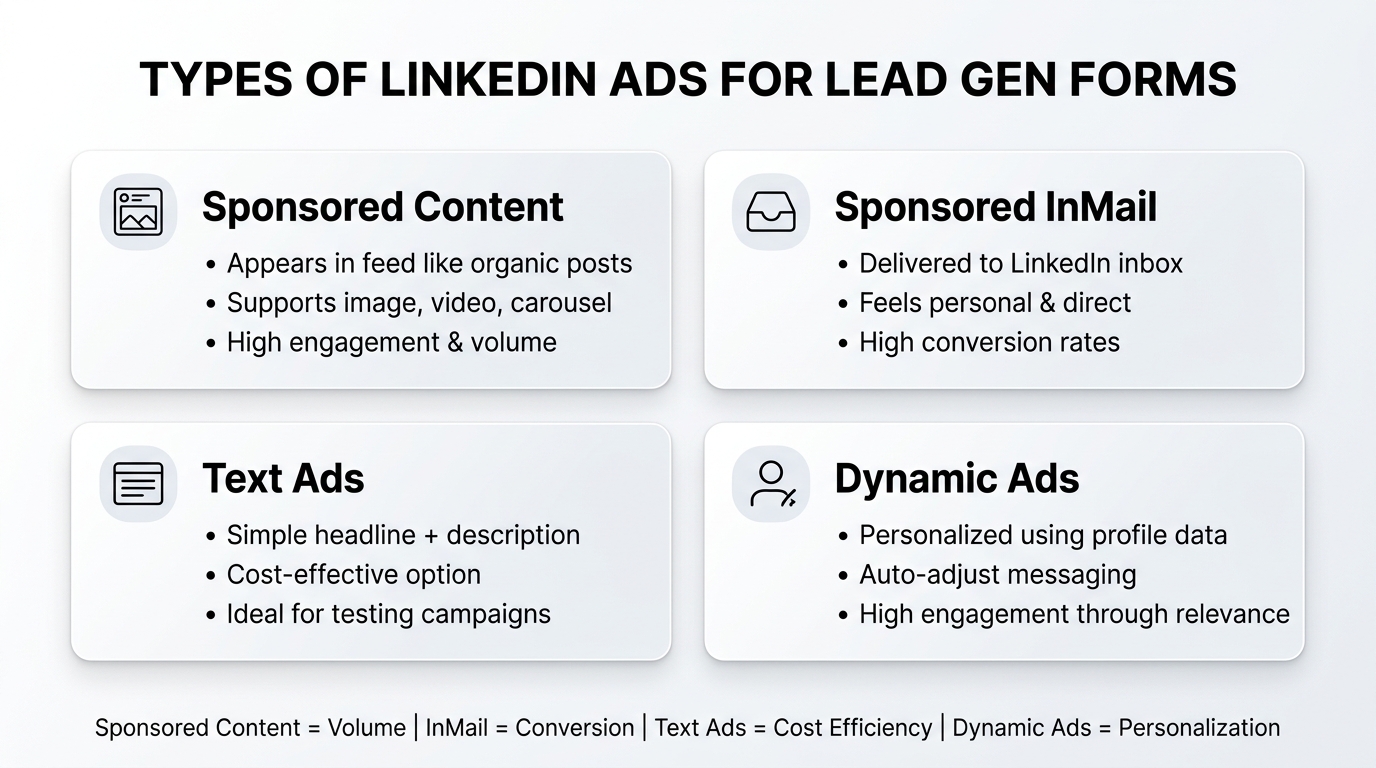
Not all LinkedIn ad formats support Lead Gen Forms equally. Understanding which ad types work best for your objectives helps you allocate your budget effectively.
Sponsored Content with Lead Gen Forms represents the most versatile option. These ads appear in the LinkedIn feed, appearing similar to organic LinkedIn posts but clearly marked as sponsored. They can include images, videos, carousels, or document content. Sponsored Content performs well because users are actively scrolling through content and are mentally engaged with the platform.
Sponsored InMail campaigns deliver Lead Gen Forms directly to user inboxes. These high-impact messages appear in the “Inbox” section of LinkedIn and often achieve higher engagement rates because they feel more personal and less like traditional advertising. InMail campaigns work exceptionally well for high-value offers like executive briefings or premium webinars.
Text Ads, the simplest format, include a headline, description, and thumbnail. While less visually impressive than Sponsored Content, Text Ads can be highly effective and often cost less to run, making them excellent for testing and budget-conscious campaigns.
Dynamic Ads personalize content based on viewer profile data. They automatically adjust headlines and messaging to reference the viewer’s name, company, or job title. This personalization can significantly boost engagement and form completion rates.
Each format has distinct advantages. Sponsored Content typically drives higher volume, while InMail achieves higher conversion rates. Text Ads offer cost efficiency, and Dynamic Ads provide personalization at scale.
Benefits of LinkedIn Lead Gen Forms Over Traditional Landing Pages
The shift from traditional landing pages to LinkedIn Lead Gen Forms represents a fundamental change in how B2B companies should approach lead capture. Let’s examine the specific advantages in detail.
Elimination of Page Load Friction: When a prospect clicks an ad on a landing page, they experience several points of friction. The page must load, they must parse the content, they must scroll to find the form, and then they must fill it out. Each step represents an opportunity for abandonment. With Lead Gen Forms, the form appears instantly after the click. No loading delays, no navigation, just immediate access to the conversion opportunity.
Superior Conversion Rates: Industry benchmarks consistently demonstrate that Lead Gen Forms achieve conversion rates 20-40% higher than traditional landing page forms. Some campaigns report conversion rates exceeding 50%, compared to typical landing page conversion rates of 20-30%. This uplift directly impacts your cost per lead and ROI.
Data Quality and Verification: LinkedIn has already verified the identity and professional information of every user who completes a Lead Gen Form. You’re not receiving form submissions from bots, fake email addresses, or people using disposable email services. The data you capture is real and actionable.
Mobile-First Experience: Over 60% of LinkedIn users access the platform primarily via mobile devices. LinkedIn’s mobile app is optimized for quick interactions. Lead Gen Forms within the app create seamless mobile experiences, whereas traditional landing pages often suffer from mobile usability issues, navigation confusion, and slow load times.
Reduced Time to Action: The entire lead capture process can be completed in 15-30 seconds. Compare this to a landing page experience, which might take 2-3 minutes from click to submission. This speed differential matters because user attention and intent diminish over time.
Better Attribution and Tracking: Because Lead Gen Forms exist within LinkedIn’s ecosystem, tracking is cleaner. You get precise data about which ads, audiences, and messages drove conversions. Traditional landing pages involve more complex attribution chains involving redirects, UTM parameters, and third-party tracking.
The cumulative effect of these advantages makes a compelling case for prioritizing Lead Gen Forms in your LinkedIn advertising strategy.
Best Practices for Using LinkedIn Lead Gen Forms
Having established what LinkedIn Lead Gen Forms are and how they function, let’s explore the strategic and tactical best practices that maximize their effectiveness.
Crafting Clear and Compelling Offers
The foundation of any successful Lead Gen Form campaign is the offer itself. Your offer is the value exchange—what you’re giving your prospect in return for their information.
An effective offer resonates with your target audience’s specific challenges, interests, and timeline within the buying journey. A generic offer—like “Download our guide”—rarely compels action. But a specific, timely offer that addresses a particular pain point or provides immediate value drives engagement and form completion.
Consider the different types of offers and their strategic applications:
Product Demos and Trials: Ideal for prospects in the consideration stage of the buying journey, product demos or free trial offers reduce purchase hesitation by allowing hands-on experience. These work best when targeted to companies actively evaluating solutions. Example: “See How Our Platform Works: 15-Minute Interactive Demo.”
Whitepapers and Case Studies: These research-backed resources serve prospects earlier in the buying journey who are still researching approaches and evaluating different solutions. They establish thought leadership and provide comparative insights. Example: “2024 State of B2B Sales: Benchmarks, Trends, and Best Practices.”
Webinars and Educational Content: Expert-led webinars offer value through education rather than sales pitches. They work well for building awareness and early-stage engagement. They also build email lists for ongoing nurturing. Example: “Live Webinar: How to Reduce Sales Cycle Length by 30% (Proven Strategies).”
Free Consultations or Assessments: Direct conversation with an expert can be highly compelling for prospects with significant challenges. These offers often produce higher-quality leads that convert to sales quickly. Example: “Free 30-Minute Consultation With Our Industry Experts: Custom Roadmap.”
Industry Reports and Benchmarks: Proprietary data and industry research are inherently valuable because they’re not available elsewhere. They attract prospects interested in competitive positioning and market trends. Example: “Exclusive Report: Marketing Budget Allocation by Company Size and Industry.”
Templates, Toolkits, and Checklists: Practical, immediately useful resources appeal to prospects seeking quick wins. These lower-commitment offers generate higher volume of leads that may require more nurturing. Example: “Sales Conversation Checklist: 47-Point Framework for Discovery Calls.”
The key to selecting the right offer is alignment. Match your offer type to your target audience’s position in the buying journey, their immediate needs, and their propensity to engage with your company.
Furthermore, inject specificity into your offer language. Instead of “Download Our Guide,” say “Get the 2024 Customer Retention Benchmarks Report: Industry Averages, Regional Differences, and Top Performer Metrics.” Specificity signals value and makes the offer more compelling.
Finally, create authentic urgency without resorting to false scarcity. Limited-time offers, early-bird bonuses, or time-sensitive insights provide genuine motivation. “Register before May 15 for access to exclusive Q&A with the founder” is more effective and ethical than arbitrary scarcity.
Designing Simple and User-Friendly Forms
Form design psychology directly impacts conversion rates. A form that appears complex, confusing, or demanding will dramatically reduce submission rates, even if your offer is compelling.
The Principle of Minimal Fields: Every field you add to a form reduces conversion rates. Research consistently shows a non-linear relationship: a three-field form typically converts 50-60% higher than a five-field form. Yet, many marketers add fields “just in case” they might be useful for future follow-up.
The solution is discipline. Identify the absolute essential information you need to qualify a lead and pursue the next conversation. For most B2B situations, this means:
- First Name
- Last Name
- Email Address
- Company Name
- Job Title
These five fields capture the minimum needed for outreach and qualification. Any additional fields should provide specific qualification value. For instance, if you’re targeting a specific industry, asking about their industry makes sense. If your solution only serves companies above a certain size, asking for company size qualifies leads immediately.
Progressive Profiling: If you have existing relationships with prospects or you operate within platforms that track user history, implement progressive profiling. This technique shows different form fields to different users based on what you already know about them. A returning visitor might only see two new fields, while a new visitor might see five. This approach gathers richer data without increasing friction for individual users.
Logical Field Ordering: Fields should flow in a psychologically logical sequence. Begin with common, low-risk fields (name, email) before asking for potentially sensitive information. End with any optional fields. The mental model is: easy questions first to build momentum, harder questions in the middle, optional questions at the end.
Clear Distinction Between Required and Optional Fields: Users should immediately understand which fields are required and which are optional. Use clear labeling (“Required” or an asterisk) and differentiate optional fields visually or through notation (“Optional – helps us personalize your experience”).
Mobile Optimization: Ensure your forms render beautifully on mobile devices. Test form fields on various screen sizes. Confirm that dropdown menus function smoothly, that input fields are large enough to tap accurately, and that the submit button is prominent and easy to activate. Mobile form completion is often 20-40% lower than desktop if not properly optimized.
Visual Hierarchy and Branding: Ensure your form matches your brand aesthetics. Consistent button colors, typography, and spacing create a professional impression. A form that looks slapped together or inconsistent with your brand can create doubt about legitimacy.
Error Prevention and Clear Messaging: Minimize user errors through validation. If you require an email address, validate the format before allowing submission. If certain fields are required, highlight them if left blank. Provide clear error messages that explain specifically what went wrong and how to fix it: “Please enter a valid email address (example@company.com)” rather than “Invalid entry.”
Confirmation and Transparency: After submission, users should receive immediate confirmation. “Thank you! Your [offer] is being sent to your email” provides clarity and reduces anxiety about whether their submission registered.
Optimizing Call-to-Actions for Maximum Engagement
Your call-to-action (CTA) is the critical moment where interest converts to action. A weak CTA can undermine an otherwise compelling offer, while a strong CTA can amplify response rates.
Crafting Effective CTA Language: The language of your CTA matters more than many realize. Action verbs are non-negotiable. Instead of “Submit” or “OK,” use action-oriented language that mirrors user intent:
- Get: “Get Your Free Assessment”
- Download: “Download the 2024 Benchmarks Report”
- Register: “Register for the Webinar”
- Access: “Access the Complete Toolkit”
- Claim: “Claim Your Free Consultation”
- Discover: “Discover Your Savings Potential”
These action-oriented verbs create clear expectations about what will happen when the user clicks.
Second-person language often performs better than first-person. “See Your Competitive Position” outperforms “Show Us Your Competitive Position.” The user’s perspective matters.
Specificity in CTA text can also boost engagement. “Get the 2024 Report” outperforms “Download Our Guide” because it provides detail about what they’re claiming.
Considering Tone and Brand Voice: Your CTA language should reflect your brand voice. A playful fintech company might use “Let’s Optimize Your Finances,” while a serious B2B consultancy might use “Schedule Your Strategic Review.” Consistency with brand voice builds trust and recognition.
Button Color and Visual Prominence: Your CTA button should stand out visually from the rest of the form. High-contrast colors typically perform better. A/B testing your button colors (while keeping everything else identical) often reveals that contrasting colors generate 10-15% better click-through rates.
Placement Strategy: Position your CTA button at the bottom right of the form in right-to-left interfaces, or bottom center for maximum visibility and ergonomic ease of clicking.
Pre-Form Messaging: The copy immediately preceding your form (in the ad or landing page) should set expectations about the CTA. If your CTA says “Get Free Access,” your preceding message should reinforce that it’s free and what access entails.
Post-Submission Expectations: Users should understand what happens after they click. Include messaging like “You’ll receive the report via email within 2 minutes” or “Our team will call within 24 business hours” to set appropriate expectations.
Targeting the Right Audience on LinkedIn
Even the best offer and form design fail if they reach the wrong audience. LinkedIn’s targeting capabilities are extraordinarily sophisticated, allowing you to reach precisely the right professionals.
Job Title and Function Targeting: Filter by specific job titles, functions, and seniority levels. Rather than broadly targeting “managers,” target “VP of Sales” or “Sales Operations Manager” depending on your solution. LinkedIn allows you to include or exclude multiple titles, enabling precision targeting.
Industry Filtering: LinkedIn provides industry classifications for virtually every organization. Whether you’re targeting financial services, manufacturing, healthcare, or technology, you can restrict your campaign to relevant industries. You can also exclude irrelevant industries that might waste budget.
Company Size Parameters: Many solutions only make sense for companies above a certain size. LinkedIn allows you to target companies by size—from startups (1-10 employees) to large enterprises (10,000+ employees). This filters out tire-kickers and ensures you reach viable prospects.
Skill-Based Targeting: LinkedIn members identify and endorse specific skills on their profiles. You can target professionals with particular skill combinations. For instance, if you’re marketing sales automation software, you might target people with “Salesforce,” “Sales Operations,” and “CRM” skills.
Company Targeting (Include/Exclude Lists): Create specific lists of your target accounts or competitors’ customers. Include these companies to focus on high-value opportunities, or exclude them if they’re current customers you don’t want to re-market to.
Geographic Targeting: Restrict campaigns to specific countries, regions, or metropolitan areas. This is essential for solutions with geographic limitations, localized solutions, or when you have specific sales teams allocated to regions.
Interests and Behavior: Target professionals who follow relevant LinkedIn Pages, engage with specific content topics, or have demonstrated interest in particular subjects. This behavioral targeting helps reach engaged professionals likely to care about your message.
Account-Based Marketing (ABM) Targeting: LinkedIn’s matched audiences feature allows you to upload lists of specific accounts you want to reach. Create targeted campaigns focused on high-value accounts, with customized messaging and offers designed specifically for those companies.
Lookalike Audiences: Once you have customers or engaged prospects, create lookalike audiences to find similar professionals. LinkedIn analyzes characteristics of your best customers and finds others with similar profiles, interests, and behaviors.
The art of audience targeting is balancing specificity with scale. Too narrow, and you run out of reach. Too broad, and you waste budget on poor fits. Start specific, monitor performance, and gradually expand your targeting criteria if performance allows.
Integrating with CRM and Marketing Automation Tools
Lead Gen Forms only create value if the captured leads flow seamlessly into your sales and marketing systems. Integration with CRM and marketing automation platforms transforms raw leads into managed pipeline.
Why Integration Matters: Manual processes between lead capture and CRM entry introduce delays, errors, and lost data. A prospect who submits a form at 2 PM on Friday might not enter your CRM until Monday morning—a loss of valuable selling time. Integration eliminates this latency.
When a lead submission triggers automatic workflows, the prospect immediately receives relevant follow-up content. If they download a whitepaper, they automatically receive related content. If they register for a webinar, they get confirmation and reminders. This automation nurtures engagement without requiring manual intervention.
Integration also enables lead scoring. Your marketing automation platform can assign points based on form responses, creating immediate qualification signals. A prospect who indicates their company has 500+ employees and they’re evaluating solutions in the next 60 days receives higher scores than someone still in research mode.
Native LinkedIn Integrations: HubSpot, Salesforce, Marketo, and other major platforms offer native integrations with LinkedIn Lead Gen Forms. When you set up these integrations, lead data flows automatically the moment a form submits. No APIs, no Zapier, no manual export-and-import.
Webhook and Zapier Automation: For platforms without native integration, webhooks and Zapier create automated workflows. A webhook sends the form submission data to a specified URL in real-time. Zapier creates “Zaps”—if-then workflows that move data between platforms.
A typical Zapier workflow might look like:
- Lead completes LinkedIn Lead Gen Form
- Zapier receives the webhook notification
- Lead data is formatted and sent to your CRM
- CRM automatically assigns the lead to the appropriate sales representative based on territory or account
- CRM triggers an automated welcome email to the prospect
- Slack notification alerts the sales team of a new qualified lead
These automations compress hours of manual work into seconds.
CRM Data Enrichment: Advanced platforms can enrich form submission data with additional information. If a prospect submits their name and email, enrichment services can look up their company size, revenue, technology stack, and other relevant data, creating richer prospect profiles automatically.
Testing and Campaign Optimization Strategies
Successful Lead Gen Form campaigns aren’t set-and-forget operations. They require continuous testing, measurement, and refinement to maximize performance and ROI.
A/B Testing Fundamentals: A/B testing involves changing one variable while keeping everything else identical, then measuring which version performs better. Common variables to test include:
- Ad Copy: “Discover Your Competitive Advantage” vs. “Get the Market Benchmark Report”
- Ad Creative: Different images or videos that highlight different value propositions
- Offers: “Free Demo” vs. “Case Study” vs. “Consultation”
- CTA Button Text: “Get the Report” vs. “Download Now” vs. “Access Insights”
- Form Fields: 3-field form vs. 5-field form vs. progressive profiling
- Targeting: Different job titles, industries, or company sizes
Each test should run long enough to gather statistical significance. With LinkedIn’s typical scale, this usually means 5-7 days minimum per variation. Never make conclusions from a day or two of data, as you’ll misinterpret natural variation as meaningful differences.
Key Performance Metrics: Tracking the right metrics ensures you’re optimizing toward the right outcomes:
| Metric | Definition | Importance |
|---|---|---|
| Click-Through Rate (CTR) | Percentage of ad impressions resulting in form clicks | Indicates ad relevance and appeal |
| Conversion Rate | Percentage of form clicks resulting in submissions | Indicates form and offer quality |
| Cost Per Lead (CPL) | Total campaign spend ÷ number of leads | Direct measure of campaign efficiency |
| Cost Per Thousand (CPM) | Cost to reach 1,000 people with your ad | Benchmark for ad pricing and targeting |
| Lead Quality Score | Internal score based on fit, engagement, and conversion likelihood | Indicates lead qualification accuracy |
| Cost Per Acquisition (CPA) | Cost of leads that convert to customers | Ultimate measure of marketing ROI |
The most important metrics are those that directly connect to business outcomes. CPL matters less than CPA—cost per customer acquired. However, if you’re early in your optimization journey, CPL serves as a useful proxy metric.
Strategic Optimization Approach: Rather than randomly testing variables, develop a testing roadmap based on performance bottlenecks.
If your conversion rate is strong but your CTR is weak, your problem is ad relevance and appeal. Test different copy, creative, and value propositions.
If your CTR is strong but your conversion rate is weak, your problem is the form or offer. Test simpler forms, different field combinations, and different offers.
If both are weak, your problem is audience targeting. You’re reaching people who don’t care about your offer. Refine your targeting to focus on more relevant segments.
This diagnostic approach prevents wasted testing effort and focuses your optimization on the actual performance bottleneck.
Leveraging Performance Data Insights: Successful campaigns generate insights about which audiences, messages, and offers resonate most strongly. Document these insights and apply them to future campaigns.
If “IT Directors in Financial Services” convert at 3x the rate of other segments, create dedicated campaigns focused on that segment. If demo offers convert better than guide offers, shift your offer mix toward demos.
These iterative refinements compound over time, significantly improving campaign performance and ROI.
Examples of Successful LinkedIn Lead Gen Form Campaigns
Theory becomes concrete through examples. Let’s explore four distinct campaign types and the specific strategies that made them successful.
B2B Software Company Promoting Product Demos
A B2B SaaS company selling sales enablement software wanted to accelerate their sales cycle by getting prospects hands-on experience with their platform.
Campaign Structure:
- Offer: Interactive 15-minute product demo with an engineer
- Target Audience: Sales directors and VPs at companies with 100-1000 employees in the United States
- Ad Copy: “See How Sales Teams Shorten Deals by 30%: Live Product Demo (No Pressure, No Pitch)”
- Form Fields: First Name, Last Name, Email, Company, Job Title, Company Size (custom dropdown)
- CTA Button: “Schedule My Demo”
Results and Performance:
- Click-Through Rate: 3.8% (vs. industry average of 1.2%)
- Conversion Rate: 18% (vs. their landing page baseline of 7%)
- Cost Per Lead: $47 (vs. $120 for landing page campaigns)
- Cost Per Qualified Lead (entered pipeline): $156 (vs. $420 for landing page campaigns)
What Made This Successful:
The specific nature of the offer (15-minute demo with an engineer) created clarity and reduced hesitation. “Product demo” might feel sales-y, but “15-minute interactive demo with an engineer” signals genuine product exploration rather than a sales pitch.
The target audience was precisely defined. Rather than targeting all sales professionals, they focused on decision-makers (directors and VPs) at mid-market companies where the solution made sense. This increased qualification significantly.
The company size custom field enabled immediate lead scoring. Prospects at 50-person companies and 5000-person companies have very different needs and buying processes. By collecting this field, they could immediately deprioritize non-viable company sizes.
The LinkedIn Lead Gen Form itself drove a 2.5x improvement in conversion rates compared to landing pages. The same prospect might have abandoned a landing page form but completed the LinkedIn form due to reduced friction.
SaaS Company Driving Webinar Registrations
A marketing automation platform wanted to drive attendance at executive roundtables discussing AI’s impact on marketing strategies.
Campaign Strategy:
- Offer: Exclusive executive roundtable webinar: “AI-Powered Marketing: Strategies From 50 Leading CMOs”
- Audience: Marketing leaders (CMOs, VP Marketing, Marketing Directors) at companies with 500+ employees
- Ad Visual: Carousel showing headshots of three participating executives with company logos
- Form Fields: First Name, Last Name, Email, Company, Job Title
- Pre-Form Copy: “Join 500+ marketing leaders discussing the future of AI-powered campaigns (LinkedIn exclusive event)”
Performance Metrics:
- Impressions: 187,000
- Clicks: 5,642
- Form Submissions: 2,104
- Conversion Rate: 37%
- Cost Per Registration: $38
- Webinar Attendance Rate: 62% (excellent for webinars)
- Post-Webinar CRM Entry Rate: 94%
Success Factors:
The exclusivity positioning (“LinkedIn exclusive event”) created urgency and interest. Executive roundtables naturally attract senior practitioners interested in peer insights.
The carousel creative showing attending executives added social proof and credibility. Seeing peers and colleagues who already agreed to participate increased registration likelihood.
The minimal form (just 5 fields, all essential) ensured minimal friction. Executives are time-constrained; a form requiring 10+ fields would suffer dramatically higher abandonment.
The company leveraged the high webinar attendance rate (62%) into a subsequent nurture program. Attendees received recordings, follow-up content, and invitations to additional events. A single successful webinar campaign often seeds months of engagement opportunities.
Event Marketing Using Lead Gen Forms
A conference organizer wanted to drive registrations for a three-day industry conference and segment attendees by interest areas (financial services, healthcare, retail, manufacturing).
Campaign Design:
- Primary Offer: “3-Day Industry Conference (Virtual + In-Person): 200+ Sessions, 50 Exhibitors, Exclusive Networking”
- Segmentation: Different Lead Gen Forms for each industry track (Financial Services, Healthcare, Retail, Manufacturing)
- Form Strategy:
- Required: Name, Email, Company, Job Title
- Custom: Industry (automated based on campaign), Session Interests (checkbox), Attendance Format (Virtual/In-Person/Hybrid)
Results:
- Total Form Submissions: 8,347
- Cost Per Registration: $32
- In-Person Attendance Rate: 68%
- Conversion from Attendee to Post-Event Lead: 41%
- Revenue Generated (sponsorships + registrations): $1.2M
Why This Worked:
The industry-specific campaigns ensured highly relevant messaging. A financial services professional saw messaging about “Key Regulatory Updates and Digital Transformation Strategies,” while a healthcare professional saw “Interoperability, Privacy Compliance, and Patient Engagement Solutions.”
The segmentation enabled immediate qualification and post-event nurturing. The organizers knew exactly which attendees cared about each topic, enabling targeted post-event follow-up.
The optional fields (interests and format preference) provided valuable data without increasing abandonment risk. Not all prospects filled them out, but those who did provided signals for personalized event experience.
Event organizers coordinated with sponsors and exhibitors, explaining that attendees captured through Lead Gen Forms had pre-identified interests. This increased sponsor value and created a better matchmaking experience between attendees and vendors.
Recruitment Marketing Through Lead Capture Forms
A staffing firm wanted to build a talent pipeline of passive candidates interested in data science roles.
Campaign Strategy:
- Offer: “Apply Now: Data Science Roles (Remote, $150K-$200K, Top Tech Companies)”
- Audience: Data scientists, ML engineers, analytics professionals with “Data Science,” “Machine Learning,” or “Python” skills
- Form Strategy:
- Basic info: Name, Email, Phone, LinkedIn URL
- Screening: Desired salary range, Preferred locations, Notice period
- Interest: Current employment status, Open to opportunities
Performance:
- Form Submissions: 1,233
- Application Completion Rate: 78% (excellent for recruitment)
- Average Time to Complete: 2.5 minutes
- Qualified Candidates (passed initial screen): 412
- Placement Rate: 23% (strong for recruitment)
- Client Satisfaction: 4.5/5 stars
Key Success Elements:
The specific salary range and company types (“Top Tech Companies”) immediately qualified candidates. Data scientists know their market value; providing a clear range filters out both over-qualified and under-qualified candidates.
The simple form (4-5 minutes to complete) was critical. Many candidates applying to multiple roles will abandon lengthy applications. The streamlined form increased completion rates significantly.
The inclusion of current employment status (“Are you currently employed?”) and notice period (“When could you start?”) enabled immediate qualification. A candidate on a 2-week notice period ready to start immediately is far more valuable than someone with 3 months’ notice still evaluating options.
The staffing firm followed up immediately—within 1 hour of submission—creating significant advantage in candidate engagement. Speed matters in recruitment; candidates receive multiple opportunities and commit quickly to those who move fast.
How to Leverage Advanced Features to Enhance Lead Generation
Beyond the basics, LinkedIn Lead Gen Forms offer sophisticated features that enable greater customization, compliance, and user experience optimization.
Customizing Forms With Advanced Fields
Standard form fields capture essential information, but custom fields enable qualification, segmentation, and personalization.
Custom Text Fields: Ask open-ended questions that generate rich qualification data. “What is your primary challenge with your current solution?” reveals pains and objections. “What success would look like for your organization?” indicates goals and vision.
Dropdown and Multiple-Choice Questions: These structured responses enable easier analysis and automation. Rather than free-text company size entry (which generates “100 employees,” “100-employee,” and “approx 100 people”), dropdown options standardize responses.
Rating and Ranking Questions: Ask prospects to prioritize challenges, evaluate product features, or rate their interest level. “How interested are you in implementing a solution in the next 90 days?” on a 1-5 scale immediately indicates buying timeline.
Conditional Logic: Show or hide fields based on previous responses. If someone selects “Financial Services” as their industry, show follow-up questions specific to financial services compliance challenges. This personalizes the form experience without overwhelming every respondent.
File Upload Fields: Allow prospects to upload their company’s challenge document, project requirements, or current vendor contracts. This generates richer context for sales conversations and demonstrates deeper prospect engagement.
Ensuring Compliance With Data Privacy Policies
Data privacy regulations—GDPR (Europe), CCPA (California), and others—impose legal requirements on how you collect, store, and use prospect data.
Explicit Consent Mechanisms: Include clear language that prospects are opting into communication. Standard language: “By submitting this form, you agree to receive marketing communications from [Company Name]. We respect your privacy and will only contact you as you’ve indicated.”
Privacy Policy Links: Include prominent links to your privacy policy. Prospects want assurance that their data will be protected. Transparent, accessible privacy policies build trust.
Data Retention Policies: Clearly communicate how long you’ll retain submitted data. “We keep your information for 24 months to provide relevant content and follow-up” is transparent.
GDPR-Specific Considerations: For campaigns targeting EU residents, include GDPR-compliant language. “You have the right to access, correct, or delete your personal data at any time” acknowledges GDPR rights.
Many companies maintain different form versions for different regions, ensuring each version complies with local regulations.
Enhancing User Experience Design
The entire form experience—from initial impression to post-submission—impacts conversion rates and user satisfaction.
Custom Questions Strategy: Each question should serve a purpose. Avoid vanity questions that you don’t actually use. If you don’t act on “What is your favorite industry trend?”, don’t ask it. Respect prospect time.
Hidden Fields Strategy: Capture UTM parameters and source data in hidden fields. Your ad runs across multiple channels and creative variations. By capturing source data automatically, you can analyze which ads and messages perform best without cluttering the visible form.
Lead Segmentation Implementation: Use form responses to create immediate lead segments. Prospects who indicate they’re evaluating solutions in the next 30 days go to a different nurture sequence than those 6-12 months away. Prospects who indicate a budget of $500K+ receive different follow-up than those with a $50K budget.
Mobile Optimization Deep Dive: Test your forms on iPhone, Android, various screen sizes, and connection speeds. Confirm that dropdown menus function smoothly, that date pickers work intuitively, and that the form width adapts to screen size.
Trust Signal Integration: Add trust signals that increase confidence in form submission. Company logos of customers (especially large brands), security badges (SSL, GDPR certified, SOC2 certified), and testimonials build credibility. A prospect who sees that 500+ companies have submitted their information feels safer doing so.
How to Maximize ROI Through Campaign Management and Analytics
Creating LinkedIn Lead Gen Form campaigns is just the beginning. Maximizing ROI requires continuous monitoring, measurement, and optimization.
Monitoring Key Metrics for Success
Establish baseline metrics before launching campaigns, enabling you to measure improvement over time.
Create a monitoring dashboard covering:
- Campaign-Level Metrics: CPL, conversion rate, CTR for each active campaign
- Audience Metrics: Performance breakdown by job title, industry, company size, location
- Time-Based Metrics: Performance by day of week, hour of day (LinkedIn audiences vary significantly by when they’re active)
- Comparative Metrics: Historical performance comparison (this month vs. last month, this quarter vs. last quarter)
Regular monitoring (weekly reviews minimum) enables rapid detection of performance changes. A sudden CPL increase might indicate increased competition for your audience, requiring immediate budget or targeting adjustment.
Using Campaign Performance Data for Optimization
Performance data informs optimization decisions.
If a particular audience segment converts at 2x the rate of others, allocate more budget to that segment. Scale success rather than spreading resources evenly.
If CTR is strong but conversion is weak, the problem lies with the form or offer, not audience or ad relevance. Test form simplification, offer changes, or CTA adjustments.
If CTR is weak but you’re convinced the audience is right, test new creative and messaging angles. A/B testing different value propositions, benefits, or pain points may uncover messaging that resonates better.
Linking Lead Gen Forms with Pipeline Management
To assess true ROI, connect lead generation metrics to sales outcomes.
Implement closed-loop reporting: track which leads convert to opportunities, which opportunities close, and what revenue results. A $50 CPL might seem reasonable until you discover that only 2% of leads close—making the real cost per customer acquired $2,500. Conversely, a $100 CPL might be excellent if 30% of leads close.
Establish lead scoring or qualification standards based on actual historical conversion. Leads with certain characteristics (company size, industry, budget, timeline) convert at significantly higher rates. Use this data to improve targeting, messaging, and qualification.
Testing Variables for Continuous Improvement
Structured testing prevents you from chasing random variations and focuses effort on high-impact improvements.
Document a testing hypothesis for each test: “We believe that emphasizing specific ROI metrics (Cost Savings) in ad copy will improve CTR among CFO-level decision-makers from 2% to 2.5%.”
Run the test for sufficient duration (minimum 5-7 days) to gather statistical significance. A 5% improvement over 2 days might be random variation; the same improvement over 2 weeks suggests genuine impact.
Document results and learning regardless of outcome. Both successful and unsuccessful tests generate insights that inform future decisions.
Continuous Campaign Optimization Techniques
Optimization is ongoing, not a one-time effort.
Pause underperformers: Campaigns with CPL 30% above average don’t justify continued investment. Reallocate that budget to better performers.
Expand winners: If a particular audience, message, or offer works exceptionally well, create additional campaigns exploring variations of that winner.
Refresh creative: The same ad creative shown repeatedly leads to ad fatigue. Engagement drops over time even if the audience and targeting remain constant. Refresh creative monthly or bi-monthly.
Seasonal adjustments: Many B2B buying patterns follow seasonal cycles. Q4 budgets might boost spending while Q1 budgets constrain it. Adjust campaigns and offers to align with buying cycles.
Competitive monitoring: Track competitor campaigns and offerings. Are they emphasizing different benefits? Running new promotional offers? Successful competitor positioning might indicate opportunities you’ve overlooked.
Aligning Sales Funnel With Lead Nurturing Strategies
The most successful organizations align lead generation with sales readiness and nurturing.
Create different campaigns for different funnel stages:
- Awareness Stage: Educational content, industry insights, trend reports. These campaigns build audience and establish thought leadership.
- Consideration Stage: Comparative content, case studies, demo offers. These campaigns help prospects evaluate options and build confidence in your solution.
- Decision Stage: Consultation offers, proposal requests, trial signups. These campaigns drive immediate action and conversion.
Nurture leads through multiple touchpoints, not just the initial conversion. A prospect who downloads a guide shouldn’t immediately receive a demo offer. They should receive complementary content that builds confidence progressively.
Scaling LinkedIn Lead Generation With Smart Automation
As campaigns prove successful, scaling becomes the next frontier.
Automation platforms like HubSpot, Marketo, or Salesloft enable scaling by:
- Automatic audience expansion: Lookalike audiences built from existing customers or engaged prospects
- Intelligent bid adjustments: Automated bid increases for high-performing segments, decreases for underperformers
- Dynamic creative optimization: Automatically testing message variations and scaling to top performers
- Workflow automation: Automatically routing leads to sales reps based on territory, industry, or qualification score
These automation techniques enable significant scale without proportional increases in manual work or management overhead.
Conclusion
LinkedIn Lead Gen Forms represent a paradigm shift in B2B lead generation. They solve fundamental problems that have plagued marketers for years: friction in the conversion funnel, slow form completion, poor data quality, and friction between ad click and form completion.
But the tool itself isn’t the entire story. Success requires strategic thinking about your offers, deep understanding of your target audience, continuous testing and optimization, and integration with your broader sales and marketing systems.
The most successful LinkedIn Lead Gen Form campaigns share common characteristics:
Clarity of Offer: Successful offers are specific, timely, and clearly communicated. They address concrete prospect needs rather than vague benefits.
Audience Precision: Rather than broad targeting, successful campaigns focus on well-defined audience segments where the offer has maximum relevance and appeal.
Continuous Optimization: Successful campaigns aren’t static. They evolve based on performance data, testing insights, and market changes.
Integration and Automation: Successful organizations ensure lead data flows seamlessly into their sales and marketing systems, triggering immediate engagement and nurturing.
Focus on Outcomes: Rather than vanity metrics (impressions, clicks), successful organizations track metrics that matter: cost per customer acquired, conversion rates to pipeline, and ultimate revenue impact.
If you’re using LinkedIn for B2B marketing but haven’t yet implemented Lead Gen Forms, you’re likely leaving significant performance and efficiency gains on the table. If you’ve implemented them but haven’t systematically optimized them, today is the day to start.
The businesses that master LinkedIn Lead Gen Forms will capture larger markets, shorter sales cycles, better lead quality, and ultimately more revenue. That advantage compounds as your optimization efforts accelerate performance improvements.
Start with a clear offer, keep your form simple, target precisely, monitor performance, and continuously iterate. Over time, your campaigns will move from “decent” to “exceptional” through disciplined optimization.
Your competitors are already figuring this out. The time to double down on LinkedIn Lead Gen Forms is now.
Frequently Asked Questions
What are LinkedIn Lead Gen Forms and how do they work within LinkedIn ads?
LinkedIn Lead Gen Forms are specialized forms that appear directly within LinkedIn when users click on ads, eliminating the need to leave the platform. They auto-populate user information from LinkedIn profiles—name, email, company, job title—requiring minimal additional input. This reduces friction and completion time, typically resulting in 20-40% higher conversion rates than traditional landing page forms. The forms integrate directly with your CRM and marketing automation tools for immediate lead capture and automated follow-up.
What best practices should I follow to optimize my LinkedIn Lead Gen Forms for higher conversion rates?
Start with a clear, compelling offer that addresses your target audience’s specific needs or challenges. Keep forms simple with 3-5 essential fields, as every additional field reduces conversion rates. Craft action-oriented CTA text like “Get the Report” or “Schedule Your Demo” rather than generic text like “Submit.” Test different form variations, offers, and audience segments while ensuring mobile optimization since over 60% of LinkedIn users access via mobile.
How can I effectively target the right audience using LinkedIn Lead Gen Forms?
Use job title and function filters to reach decision-makers in relevant roles, and filter by industry to focus on specific sectors. Target company sizes that match your solution’s applicability and leverage skill-based targeting to find professionals with relevant expertise. Implement geographic filtering if your solution has regional limitations and use Account-Based Marketing (ABM) targeting for high-value opportunities. Start specific and expand gradually while monitoring performance to ensure quality doesn’t decline.
What types of incentives or lead magnets work best with LinkedIn Lead Gen Forms in B2B marketing?
Product demos and free trials work exceptionally well for consideration-stage prospects ready to evaluate solutions. Educational content like whitepapers, case studies, and industry reports attract early-stage prospects researching solutions. Expert-led webinars appeal to professionals seeking peer insights and education, while free consultations or assessments directly from your experts attract prospects with significant challenges. Match your offer type to your audience’s position in the buying journey for optimal results.
Why is integrating LinkedIn Lead Gen Forms with CRM and marketing automation tools important?
Integration eliminates manual workflows and delays by enabling real-time data flow, getting leads into your system within seconds of form submission. This immediate capture allows your CRM and automation tools to trigger welcome sequences, assign leads to sales reps, and begin nurturing before prospect interest cools. Integration also enables lead scoring and automatic workflows based on prospect responses, creating closed-loop reporting that connects lead generation to actual sales and revenue. These automations compound significantly as your volume grows.
What advantages do LinkedIn Lead Gen Forms offer over traditional landing pages for lead capture?
LinkedIn Lead Gen Forms achieve 20-40% higher conversion rates than traditional landing pages because forms appear instantly with no page load delay. The autofill feature from LinkedIn profiles eliminates manual typing and reduces friction, while keeping users within LinkedIn’s familiar environment rather than redirecting them away. Data comes from LinkedIn-verified profiles ensuring quality, and the mobile experience is optimized within LinkedIn’s app, making completion faster (15-30 seconds vs. 2-3 minutes).
How much does it cost to run LinkedIn Lead Gen Form campaigns?
LinkedIn Lead Gen Form costs vary based on your targeting, audience size, and industry competition, typically ranging from $20-$100+ per lead depending on campaign specifics. You can set daily or total campaign budgets, and LinkedIn charges per form submission rather than per click. The cost-per-lead often appears higher than other platforms initially, but the conversion quality and subsequent ROI often justify the investment. Starting with smaller budgets to test offers and audience segments before scaling is recommended.
How long does it take to see results from LinkedIn Lead Gen Form campaigns?
Most campaigns generate initial results within 24-48 hours of launch, though significant data requires 5-7 days minimum to make optimization decisions. Campaigns typically reach statistical significance (enough data to make confident conclusions) after running for 1-2 weeks depending on your budget and audience size. Full campaign optimization and understanding of what resonates with your audience usually takes 4-6 weeks of continuous testing and refinement. Patience and consistent monitoring during this period yield the best long-term results.
Can I use LinkedIn Lead Gen Forms for different industries or is it B2B specific?
While LinkedIn Lead Gen Forms are optimized for B2B marketing, they can work for B2C companies targeting professionals in specific industries or roles. The platform’s user base is predominantly professionals, so B2B use cases naturally align better with LinkedIn’s ecosystem. B2C companies selling to consumers (not professionals) typically find better ROI on other platforms like Facebook or Instagram. However, B2C companies selling products or services to business professionals can successfully use Lead Gen Forms.
What data should I collect in my LinkedIn Lead Gen Forms to maximize lead quality?
Collect essential fields like first name, last name, email, company, and job title—these are auto-populated by LinkedIn and require no manual entry. Add one to two custom qualification fields like company size, budget timeline, or specific challenges relevant to your solution. Avoid requesting excessive information that creates friction and reduces completion rates; you can gather additional details during follow-up conversations. Use progressive profiling or conditional logic to show different fields to different users based on their responses, balancing data collection with conversion rate optimization.