


Most salespeople treat LinkedIn Sales Navigator as the gold standard for B2B outreach. And to be fair, it earns that reputation — the depth of its prospecting filters and lead intelligence is genuinely hard to beat. But here’s the problem nobody talks about openly: finding leads is only half the battle. The real challenge is converting them into booked calls, and that’s where the cracks start to show.
LinkedIn Sales Navigator tells you who to talk to. It does almost nothing to help you actually talk to them — at scale, consistently, and without burning hours of manual effort every single day. You still have to write every connection request, craft every follow-up message, and handle every reply yourself. For a solo founder or a small SDR team, that’s an enormous time sink that doesn’t scale.
DealsFlow approaches the problem from the other direction entirely. It was built not as a prospecting intelligence tool, but as an outreach execution engine. Its AI — called Arlo — connects to your LinkedIn accounts, finds qualified prospects, initiates conversations, handles objections, and books meetings directly on your calendar. You show up for the calls.
These two tools are not exactly direct competitors, and that’s the most important thing to understand before comparing them. Sales Navigator lives at the top of the funnel. DealsFlow owns the middle and the bottom. The question isn’t really “which is better” in an absolute sense — it’s “which one solves the problem you actually have right now?” This article breaks down both tools across features, AI capability, pricing, team management, and real-world use cases so you can make an informed decision — and understand exactly when using both together makes the most sense.
What Is LinkedIn Sales Navigator?
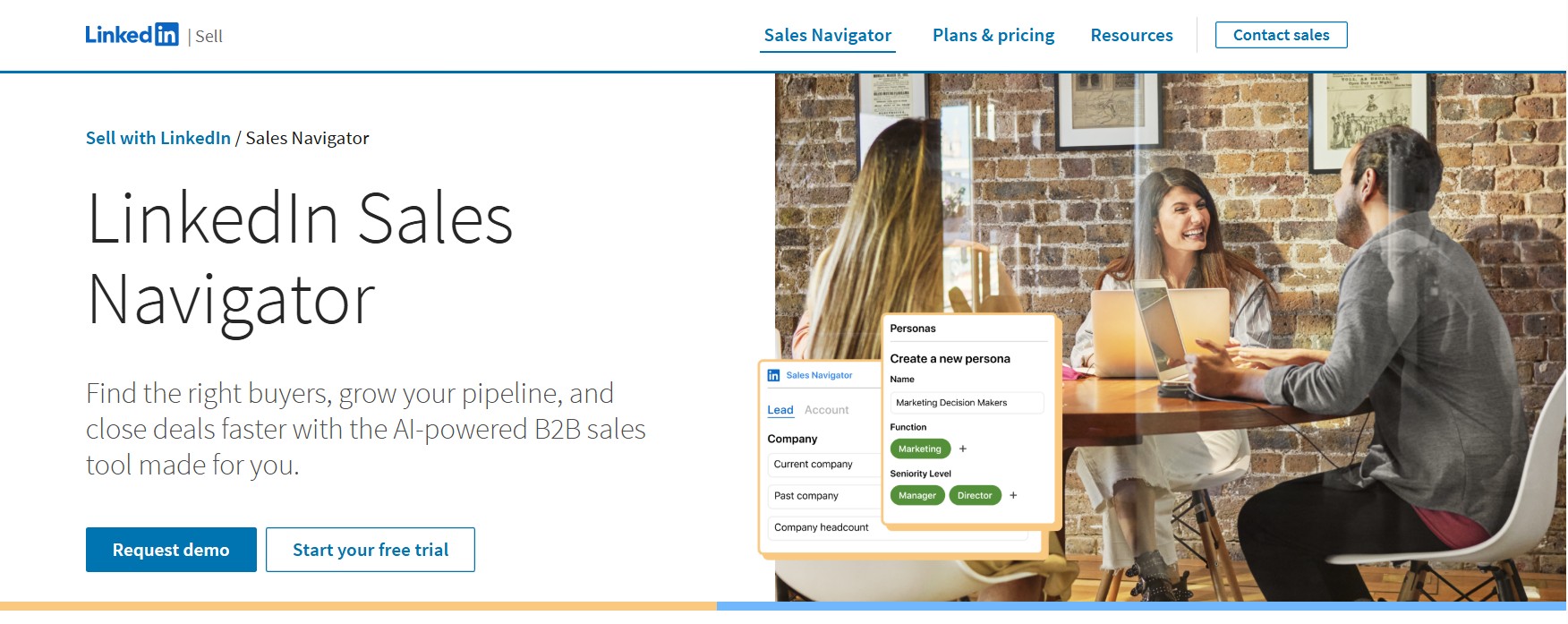
LinkedIn Sales Navigator is LinkedIn’s premium subscription tool built specifically for sales professionals. At its core, it is a sales intelligence and prospecting platform — designed to help you find the right people, understand their professional context, and identify the warmest path to reaching them. It does not automate outreach. It does not send messages on your behalf. It equips you with the research and targeting infrastructure to make your manual outreach smarter.
Sales Navigator pulls directly from LinkedIn’s own database of over 1 billion members, which means the data is updated in real time. When a prospect changes jobs, gets promoted, or updates their profile, you see it instantly — something no third-party data provider can match.
Here is what Sales Navigator actually offers across its plans:
- Advanced search filters (30+): You can filter leads by job title, seniority level, company size, industry, geography, years in current role, technologies used, and more. This level of targeting precision allows you to build hyper-focused lead lists that match your Ideal Customer Profile without manual guesswork.
- Lead recommendations: Sales Navigator’s algorithm suggests leads based on your saved searches, browsing behavior, and saved accounts — surfacing relevant prospects you might not have found manually.
- Saved searches and alerts: You can save a search and receive automatic notifications when new leads match your criteria, which keeps your pipeline fresh without repeated manual effort.
- Relationship Explorer: This feature surfaces the best path to reach a decision-maker based on existing relationships — essentially showing you who in your extended network knows who you’re trying to reach.
- Relationship Map: Builds dynamic org charts so you can visualize the structure of a target account, identify multiple stakeholders, and plan multi-threaded outreach strategies.
- TeamLink (Advanced plan): Lets you tap into your entire team’s collective network. If a colleague already has a first-degree connection with a prospect you’re targeting, TeamLink surfaces that warm introduction path — reducing the friction of cold outreach significantly.
- InMail credits: The Core plan includes 50 InMail credits per month, which allows you to message people outside your network directly. In practice, 50 credits amounts to roughly two messages per business day — useful for high-value targets, but not nearly enough to build an outbound strategy on.
- CRM integration (Advanced Plus): The top-tier plan connects natively with Salesforce and Microsoft Dynamics, keeping your CRM data enriched and current with LinkedIn profile updates automatically.
What Sales Navigator does not do is equally important to understand. It does not send connection requests automatically. It does not follow up on your behalf. It does not handle replies. Every piece of actual outreach — writing, sending, responding — remains entirely manual. Sales Navigator gives you excellent intelligence about who to contact; it leaves the contacting entirely to you.
What Is DealsFlow?

DealsFlow is an AI-native LinkedIn outreach automation platform built to handle the entire outreach workflow — from finding prospects to booking the meeting — without requiring manual intervention at each step. It describes itself as a tool where “your AI books LinkedIn meetings while you run the business,” and that framing is accurate.
The platform was built AI-first from day one, not retrofitted with AI features after the fact. Its core AI engine, Arlo, is what separates DealsFlow from every other LinkedIn automation tool on the market. Most automation tools send templated sequences and stop the moment a prospect replies. Arlo continues the conversation — reading the reply, understanding the context, crafting a personalized response, handling objections, and ultimately booking the meeting. The human only enters the picture when it’s time to show up for the call.
Here is what DealsFlow actually offers:
- Arlo AI Engine: Arlo reads every prospect reply and determines the best response based on the context of the conversation. If a prospect expresses interest, Arlo moves toward booking a call. If a prospect objects — “We already have a tool,” “Not the right time,” “Send me more info” — Arlo handles the rebuttal professionally and in the user’s own voice. According to DealsFlow’s platform data, Arlo achieves a 23% AI reply rate across active campaigns.
- Multi-account management: DealsFlow allows you to connect and manage up to 20 LinkedIn accounts (Agency Pilot plan) from a single dashboard. Every inbox, every campaign, every account is visible in one place. This is purpose-built for agencies running outreach for multiple clients and SDR teams managing accounts across reps.
- Campaign Builder: You can build full outreach sequences — connection requests, follow-up messages, and conversation continuations — all managed automatically once the campaign is live.
- Prospect CRM with AI warmth scoring: Leads can be imported from LinkedIn search URLs, post commenters, or CSV files. DealsFlow’s CRM assigns each lead an AI warmth score — Hot, Warm, Neutral, or Cold — based on engagement signals, so you always know where to focus human attention.
- Full-funnel analytics: DealsFlow tracks every stage of the outreach funnel: connections sent, accepted, replied, and booked calls. According to platform benchmarks, users see a 74% connection acceptance rate, 17.1% reply rate, and 3.1% meeting booking rate from outreach campaigns. All data is exportable — nothing is locked inside the platform.
- Account safety and warmup: DealsFlow uses distributed cloud execution and randomized human-like timing for all outreach activity. Hard daily limits are enforced automatically to stay within LinkedIn’s current safety thresholds. New accounts go through an automatic warmup period before full campaign volumes are activated.
What DealsFlow does not offer is the depth of native lead intelligence that Sales Navigator provides. You cannot run 30-filter searches natively inside DealsFlow. Prospect sourcing relies on importing LinkedIn search URLs, CSV files, or post-commenter lists — which means you benefit from using Sales Navigator (or standard LinkedIn search) for targeting, then feeding those leads into DealsFlow for execution. As DealsFlow’s own FAQ acknowledges, Sales Navigator is recommended for high-volume outreach to maximize results, though it is not strictly required.
Head-to-Head Feature Comparison
Before diving into the detail of each category, here is a direct feature comparison across both platforms:
| Feature | DealsFlow | LinkedIn Sales Navigator |
|---|---|---|
| AI conversation handling | ✅ Full (Arlo AI) | ❌ None |
| Automated follow-up sequences | ✅ Yes | ❌ No |
| Multi-account management | ✅ Up to 20 accounts (Agency plan) | ❌ Per-seat only |
| Advanced prospect search (30+ filters) | ⚠️ Via LinkedIn URLs / CSV import | ✅ Industry-leading |
| Lead intelligence and alerts | ⚠️ AI warmth scoring on imported leads | ✅ Strong (job changes, account signals) |
| Built-in CRM | ✅ Lightweight CRM with AI warmth scores | ⚠️ Basic lists only (Advanced+ for full CRM sync) |
| Reply management | ✅ AI-handled by Arlo | ❌ Entirely manual |
| InMail credits | ❌ Not applicable | ✅ 50/month (Core plan) |
| Agency / multi-client dashboard | ✅ Purpose-built | ❌ No agency workflow |
| Full-funnel outreach analytics | ✅ Connection → reply → booked call | ⚠️ Usage reporting on Advanced plan only |
| Account safety and warmup | ✅ Built-in, automated | ✅ Native platform (no ban risk) |
| Objection handling | ✅ Handled by Arlo AI | ❌ Manual |
| Meeting booking | ✅ Automated by Arlo | ❌ Manual |
| Pricing model | Flat-rate (per plan, multiple accounts) | Per seat |
The Core Difference: Intelligence vs. Execution
This is the single most important distinction in the entire comparison, and it is the one that most buyers miss when evaluating these tools side by side.
LinkedIn Sales Navigator is a sales intelligence tool. It is extraordinarily good at helping you understand who your ideal prospects are, how they’re connected to you, and what’s happening in their professional lives right now. When you need to identify the CRO of a 200-person SaaS company in the DACH region who has been in their role for less than a year, Sales Navigator finds them in seconds. That capability is genuinely valuable and genuinely difficult to replicate.
But Sales Navigator stops the moment you’ve identified the lead. The execution — writing the message, sending the connection request, following up three times, handling the reply, overcoming the objection, proposing a time, sending the calendar invite — all of that remains entirely manual, entirely on you, and entirely time-consuming.
This creates a real operational problem for most outbound teams. Sales Navigator’s advanced filters and export limitations mean that data tends to stay siloed inside LinkedIn. Teams end up copying lead information manually into spreadsheets or CRMs, managing outreach from separate tools, and still handling every reply themselves. The workflow doesn’t scale without adding people.
DealsFlow is an outreach execution tool. It picks up exactly where Sales Navigator leaves off. Once you have a list of qualified prospects — whether sourced from Sales Navigator, standard LinkedIn search, post commenters, or a CSV — DealsFlow takes over. Arlo handles the connection request, the follow-up sequence, the reply, the objection, and the booking. The human effort required per booked meeting is minimal.
The combined implication is this: Sales Navigator makes your prospecting smarter. DealsFlow makes your outreach autonomous. They operate on different parts of the same funnel, and conflating them as direct substitutes leads to a comparison that misses the point.
AI Capabilities: Where the Real Gap Shows
Both platforms have invested in AI, but the nature and scope of those investments are fundamentally different — and the difference matters enormously for outreach outcomes.
LinkedIn Sales Navigator’s AI is primarily passive and analytical. It powers lead recommendations based on your search history and saved accounts. It fuels the Relationship Explorer, which surfaces connection paths to decision-makers. It helps with account mapping and identifies signals like job changes or company growth. All of this is genuinely useful intelligence — but it is intelligence about who to contact, not intelligence that contacts them. The AI assists your research; it does not replace your execution.
DealsFlow’s Arlo AI is active and conversational. This is a meaningful distinction. Arlo does not just help you find leads — it talks to them. Specifically, Arlo:
- Reads every prospect reply in full context — not just keyword detection, but actual comprehension of what the prospect is saying and what it signals about their intent.
- Crafts personalized responses in the user’s voice — drawing on the prospect’s bio, recent LinkedIn activity, and company context to make each message feel genuinely individual rather than templated.
- Handles objections professionally — when a prospect says “We already have an outreach tool” or “Not the right time,” Arlo provides a contextually appropriate rebuttal rather than stopping the conversation cold.
- Books the meeting — when a prospect signals interest, Arlo moves directly to proposing a call time and closing the loop. The user only enters the picture when the calendar invite has been accepted.
To make this concrete: imagine a prospect replies to your connection follow-up with, “Interesting, but we already have an outreach tool. What makes this different?” In Sales Navigator, that reply sits in your LinkedIn inbox waiting for you to find time to respond. In DealsFlow, Arlo reads it within minutes, recognizes it as a soft objection with embedded curiosity, and responds with something like: “Fair question — most tools stop when someone replies. Arlo actually continues the conversation, handles objections, and books the call. Would 15 minutes this Thursday work to see it live?” The conversation continues. The meeting gets booked.
This capability — handling the middle-of-funnel conversation autonomously — is what DealsFlow’s own FAQ refers to when it says: “Unlike tools that stop, Arlo reads the reply. If it’s a positive response, Arlo moves to book a call. If it’s an objection, Arlo provides a professional rebuttal.” The user can intervene at any point, but in most cases, the intervention happens only when Arlo has already secured the meeting.
Pricing: What You Actually Pay
Pricing is where the comparison becomes particularly stark, especially for agencies and growing sales teams.
LinkedIn Sales Navigator Pricing
LinkedIn Sales Navigator offers three plans, with significant differences in capability between tiers:
- Core (Professional): $99.99/month, or $79.99/month billed annually ($959.88/year). This plan covers advanced search filters, 50 InMail credits per month, lead recommendations, saved lists, and the Relationship Explorer. It does not include CRM integration, team collaboration features, or TeamLink. For teams, this means lists remain siloed and colleagues have no visibility into each other’s outreach activity — a workflow that creates duplicated effort and missed coordination.
- Advanced (Team): $149.99/month, or $139.99/month billed annually ($1,679.88/year). This plan adds TeamLink (access to your team’s collective network), Smart Links for tracking prospect engagement on shared content, CSV upload for account list creation, and usage reporting for managers.
- Advanced Plus (Enterprise): Custom pricing starting at approximately $1,600 per user per year, with the final cost dependent on team size and CRM setup. This plan adds native Salesforce and Microsoft Dynamics integration with automatic data validation and CRM enrichment.
The per-seat pricing model is the critical cost driver for teams. A five-person SDR team on the Advanced plan costs nearly $9,000 per year — before accounting for any separate outreach automation tool they need to actually send messages. For agencies managing outreach across multiple clients, Sales Navigator offers no multi-client workflow at any price point; each seat is tied to an individual LinkedIn account.
It is also worth noting what Sales Navigator does not include at any tier: automated outreach, conversation handling, follow-up sequences, or meeting booking. You are paying for access to the database and the intelligence layer. The execution is entirely your responsibility, and likely requires additional tooling to scale.
DealsFlow Pricing
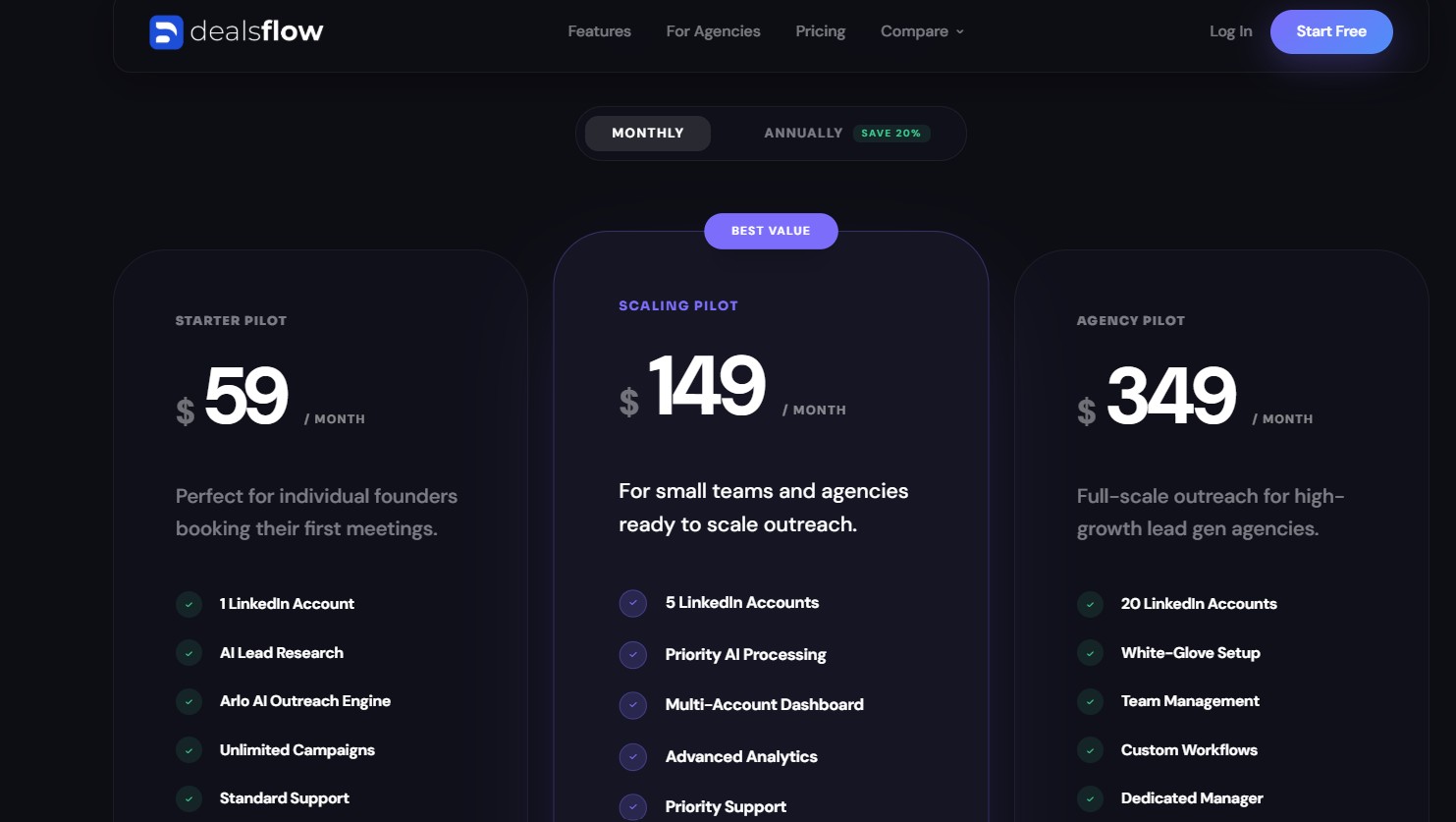
DealsFlow offers three flat-rate plans based on the number of LinkedIn accounts you need to manage:
- Starter Pilot: $59/month — 1 LinkedIn account, full access to Arlo AI, unlimited campaigns, AI lead research, and standard support. Built for individual founders or solo SDRs booking their first meetings.
- Scaling Pilot: $149/month — 5 LinkedIn accounts, priority AI processing, multi-account dashboard, advanced analytics, and priority support. Designed for small teams and agencies beginning to scale outreach.
- Agency Pilot: $349/month — 20 LinkedIn accounts, white-glove setup, team management, custom workflows, and a dedicated account manager. Built for high-growth lead generation agencies running outreach at volume across multiple clients.
All plans include a 14-day free trial with no credit card required, and DealsFlow’s own documentation states that setup takes approximately 10 minutes.
The Pricing Verdict
A direct comparison reveals a significant cost disparity once you account for the complete workflow. A five-person SDR team using Sales Navigator Advanced ($149.99/seat/month) spends $749.95/month on Sales Navigator alone — and still needs a separate outreach automation tool to send messages at scale. DealsFlow’s Scaling Pilot at $129/month covers five LinkedIn accounts, includes Arlo AI handling all conversations and bookings, and requires no additional tooling to complete the workflow. For agencies, the contrast is even more pronounced: DealsFlow’s Agency Pilot at $299/month covers 20 accounts, while replicating that coverage in Sales Navigator would cost thousands per month in per-seat fees with no agency-specific workflow included.
Who Each Tool Is Built For
Understanding the intended audience for each platform clarifies much of the confusion around this comparison.
LinkedIn Sales Navigator is best for:
- Enterprise account executives doing deep account research before high-stakes, strategic outreach where relationship mapping and org chart visibility matter.
- Account-based marketing teams that need to track buying signals, job changes, and intent data at the account level across large target lists.
- Sales teams using Salesforce or Dynamics who need their CRM automatically enriched with current LinkedIn profile data (Advanced Plus only).
- Teams where one-to-one, high-touch relationship selling is the motion — where a single deal justifies significant research time and the goal is quality over volume.
- Individual sales professionals or small businesses who need straightforward tools to find and manage leads and conduct their own outreach manually.
DealsFlow is best for:
- Lead generation agencies managing outreach across 10 to 50+ clients who need multi-account management, per-client reporting, and flat-rate pricing that doesn’t scale linearly with client count.
- SDR teams with connection and meeting quotas that need to scale outreach volume without proportionally scaling headcount. Arlo handles the volume; the team handles the calls.
- Founders doing their own outreach who want a consistent pipeline of booked calls without spending hours every day in LinkedIn DMs. The 14-day trial and 10-minute setup make the barrier to entry extremely low.
- Teams running volume-based LinkedIn outreach where speed, consistency, and follow-up discipline are the competitive advantage — and where manual execution creates bottlenecks.
- Anyone who needs AI to handle conversations, not just suggest leads — where the bottleneck is not finding the right people but converting them into meetings.
Can You Use Both Together?
Yes — and for certain teams, this combination represents the most powerful outreach stack available at any price point.
The logic is straightforward. LinkedIn Sales Navigator is the best prospecting and intelligence tool on the market. Its 30+ filters, real-time data, Relationship Explorer, and Buyer Intent Signals help you build the most precisely targeted lead lists possible. No third-party tool replicates that depth of native LinkedIn data access.
DealsFlow is the best outreach execution tool for those lists. Once you have identified your ideal prospects inside Sales Navigator, you export or import those leads into DealsFlow via LinkedIn search URLs or CSV. From that point, Arlo handles every message, every follow-up, every objection, and every meeting booking — autonomously.
The two tools together cover the entire outreach funnel without any gaps:
- Sales Navigator handles: ICP definition, lead discovery, account intelligence, relationship mapping, and signal tracking.
- DealsFlow handles: connection requests, follow-up sequences, reply management, objection handling, and meeting booking.
- You handle: the actual sales conversations on the calls that Arlo booked.
DealsFlow’s own FAQ acknowledges this complementary relationship directly: “While Sales Navigator helps with search granularity, it’s not strictly required. DealsFlow works with standard LinkedIn accounts. However, we recommend Sales Navigator for high-volume outreach to maximize your results.”
For context on cost: a solo founder using DealsFlow’s Starter Pilot ($49/month) plus Sales Navigator Core ($99.99/month) spends approximately $149/month total for a complete end-to-end outreach system. That is still significantly less than the cost of a part-time SDR’s monthly salary — and this stack runs 24 hours a day.
Real-World Scenarios: Which Tool Wins?
Scenario 1 — Solo founder, no dedicated sales team
A founder at an early-stage B2B SaaS company needs to generate pipeline but cannot afford to spend four hours a day on LinkedIn. They need booked calls, not just a database of people to message.
Winner: DealsFlow. Sales Navigator helps identify prospects but does nothing to contact them. DealsFlow’s Starter Pilot at $49/month connects one LinkedIn account, lets Arlo run the outreach from connection request to booked call, and frees the founder to focus on the business. The 14-day free trial and 10-minute setup mean there is no meaningful friction to getting started.
Scenario 2 — Agency managing outreach for 15 clients
A lead generation agency has 15 active clients, each needing LinkedIn outreach managed across one to three accounts. They need per-client visibility, multi-account management, and pricing that doesn’t eat the margin on every client contract.
Winner: DealsFlow. Sales Navigator has no agency workflow at any price tier. Managing 15 clients on Sales Navigator would require individual per-seat licenses with no shared dashboard, no per-client reporting, and no multi-account management. DealsFlow’s Agency Pilot covers 20 LinkedIn accounts with team management, custom workflows, and a dedicated account manager — all for $299/month flat.
Scenario 3 — Enterprise AE at a Fortune 500 doing strategic account selling
An AE covering 20 named accounts needs to map buying committees, track job changes among key stakeholders, identify warm introduction paths through colleagues, and build multi-threaded relationships inside large organizations over months.
Winner: LinkedIn Sales Navigator. This use case is exactly what Sales Navigator was designed for. The Relationship Map, TeamLink, Buyer Intent Signals, and CRM enrichment features provide irreplaceable value in a high-touch, account-based selling motion. DealsFlow’s automated outreach model is not designed for this type of long-cycle, relationship-first sales process.
Scenario 4 — SDR team of 5 with a monthly meeting quota
Five SDRs each have a quota of 20 booked calls per month. They are currently spending 60% of their day on prospecting and manual outreach, leaving limited time for actual selling activity.
Winner: DealsFlow + Sales Navigator together. Sales Navigator handles the targeting — each SDR builds precise lead lists using advanced filters. DealsFlow handles the execution — Arlo runs the outreach, handles replies, and books calls while the SDRs focus their time on running the meetings Arlo booked. This combination multiplies output per rep without adding headcount.
Scenario 5 — Early-stage startup needing pipeline fast
A startup with a small team and limited budget needs booked discovery calls within the first two weeks to validate their go-to-market motion. They need fast setup, low cost, and immediate results.
Winner: DealsFlow. The Starter Pilot at $49/month, 14-day free trial, and 10-minute setup time mean the first campaign can be live the same day. DealsFlow’s platform data shows users booking calls within the first week of launching campaigns. Sales Navigator’s onboarding is more complex and its value is in research depth, not speed to first booked call.
The Verdict
The framing of this comparison as either/or misses the most important insight: these tools operate on different parts of the same outreach funnel, and the right answer depends entirely on where your bottleneck actually lives.
If your bottleneck is knowing who to target — if your team struggles to find the right decision-makers, map accounts, track intent signals, and build relationship intelligence — then LinkedIn Sales Navigator is the tool you are missing. Its data depth and filtering precision are genuinely unmatched, and for high-touch enterprise selling, the investment is justified.
If your bottleneck is converting leads into meetings — if you have lists of qualified prospects but lack the bandwidth to message them consistently, follow up persistently, handle replies intelligently, and book calls at scale — then DealsFlow is the tool you are missing. Arlo closes the gap between “we know who to contact” and “we have calls on the calendar,” without requiring additional headcount or additional hours.
For the majority of agencies, SDR teams, and founders doing volume-based LinkedIn outreach, DealsFlow is the more complete solution. It replaces multiple tools — outreach automation, basic CRM, follow-up sequences, reply management — in one platform, at a fraction of the cost of assembling those pieces separately. The AI-first design means the platform gets more effective as it learns your voice and your prospects’ patterns over time.
For teams with the budget and the use case for both, the combination of Sales Navigator’s prospecting intelligence and DealsFlow’s outreach automation is the most powerful LinkedIn sales stack available. Sales Navigator finds them. Arlo books them. You close them.
Frequently Asked Questions
Q1. Is DealsFlow a replacement for LinkedIn Sales Navigator?
Not exactly — and understanding that distinction is the key to using both tools well. LinkedIn Sales Navigator is a sales intelligence platform. It helps you find the right people, filter them by over 30 criteria, map org charts, and track account-level signals like job changes. DealsFlow is an outreach execution platform. It takes a list of prospects and runs the entire conversation — connection request, follow-up, reply handling, objection rebuttal, and meeting booking — through its Arlo AI engine. Sales Navigator tells you who to contact. DealsFlow does the contacting. If your bottleneck is finding leads, Sales Navigator solves it. If your bottleneck is converting leads into booked calls, DealsFlow solves it. For teams with volume-based outreach goals, using both together gives you the most complete LinkedIn sales stack available.
Q2. Do I need a LinkedIn Sales Navigator subscription to use DealsFlow?
No. DealsFlow works with standard LinkedIn accounts and does not require a Sales Navigator subscription to run campaigns. You can import prospects using standard LinkedIn search URLs, post-commenter lists, or CSV files, and Arlo will handle the outreach from there. That said, DealsFlow’s own FAQ recommends Sales Navigator for high-volume outreach because of the additional targeting precision its 30+ filters provide. If you are running outreach at serious scale and want the tightest possible ICP targeting, pairing Sales Navigator with DealsFlow is the stronger setup. But it is a recommendation, not a requirement.
Q3. How does Arlo AI handle replies differently from standard LinkedIn automation tools?
Most LinkedIn automation tools — including many well-known ones — operate on a simple logic: send a sequence of pre-written messages, and stop the moment someone replies. The reply lands in your inbox, and the follow-up becomes your problem. Arlo works differently. When a prospect replies, Arlo reads the full context of the message, determines the intent behind it (interest, objection, curiosity, dismissal), and crafts a contextually appropriate response in the user’s own voice. If the prospect says they are interested, Arlo moves to book a call. If the prospect objects — “We already use a tool” or “Not the right time” — Arlo provides a professional rebuttal and keeps the conversation moving. According to DealsFlow’s platform data, Arlo achieves a 23% AI reply rate across active campaigns. You can intervene at any point, but the platform is designed so that Arlo handles the middle-of-funnel conversation autonomously, right through to a booked meeting.
Q4. What are the main limitations of LinkedIn Sales Navigator for outreach?
LinkedIn Sales Navigator has three meaningful limitations when it comes to outreach specifically. First, it does not automate any part of the outreach process — every connection request, message, and follow-up must be written and sent manually. Second, it does not handle replies; all prospect responses sit in your LinkedIn inbox waiting for your personal attention. Third, there are significant data portability constraints — you cannot natively export lead lists from Sales Navigator into a CSV without using a third-party Chrome extension. This means your data tends to stay siloed inside LinkedIn, and building outreach workflows around that data requires additional tooling. For individual sellers doing careful, high-touch outreach, these limitations are manageable. For SDR teams or agencies trying to run volume-based outreach at scale, they create real operational bottlenecks.
Q5. How much does it cost to use DealsFlow and LinkedIn Sales Navigator together?
The combined cost is more affordable than most people expect. DealsFlow’s Starter Pilot is $49/month and covers one LinkedIn account with full Arlo AI access and unlimited campaigns. LinkedIn Sales Navigator Core is $99.99/month (or $79.99/month billed annually). Together, that is approximately $149/month for a complete end-to-end LinkedIn outreach system — Sales Navigator handling the targeting and intelligence, DealsFlow handling every step of the outreach execution. For teams, DealsFlow’s Scaling Pilot at $129/month covers five LinkedIn accounts. Five seats on Sales Navigator Advanced would cost $749.95/month by comparison — without any outreach automation included. The combination of both tools still comes in at a fraction of what a single full-time SDR costs per month.
Q6. Is DealsFlow safe to use with LinkedIn? Will it get my account banned?
DealsFlow addresses this directly in its FAQ: the platform guarantees zero bans. It achieves this through distributed cloud execution, randomized human-like timing on all outreach activity, and hard daily limits that align with LinkedIn’s current safety thresholds. New accounts are also run through an automatic warmup period before full campaign volumes are activated — meaning DealsFlow does not blast a new account with hundreds of messages on day one. The goal is to make every action look like organic human behavior to LinkedIn’s systems. That said, no automation tool can offer a 100% absolute guarantee against LinkedIn policy changes, which is why DealsFlow’s built-in safety protocols are designed to stay well within the platform’s acceptable usage patterns at all times.
Q7. Which LinkedIn Sales Navigator plan is right for most sales teams?
For most B2B sales teams of two or more people, the Advanced plan ($149.99/month per seat, or $139.99/month billed annually) is the practical minimum. The Core plan lacks any team collaboration features — lists are siloed, and there is no visibility into whether a colleague is already speaking to the same lead. The Advanced plan adds TeamLink, which lets you surface warm introduction paths through your team’s collective network, along with Smart Links and usage reporting for managers. The Advanced Plus plan — which starts at approximately $1,600 per user per year and includes native Salesforce and Dynamics CRM integration — is designed for large enterprise organizations with the budget and CRM infrastructure to justify it. For smaller teams or agencies, Advanced Plus is excessive.
Q8. Can DealsFlow manage outreach for multiple clients at once?
Yes — DealsFlow was purpose-built for agencies managing outreach across multiple clients. The Agency Pilot plan ($299/month) supports up to 20 LinkedIn accounts, all visible and manageable from a single dashboard. You can switch between client accounts with one click, view aggregated stats across your entire agency, set up per-client campaigns with custom workflows, and access per-client reporting. LinkedIn Sales Navigator offers none of this. There is no multi-client view, no aggregated agency dashboard, and no per-client reporting at any Sales Navigator tier. For agencies, DealsFlow is the structurally appropriate tool — Sales Navigator is designed for individual sellers or internal sales teams, not client-facing agency workflows.
Q9. What results can I realistically expect from DealsFlow?
Based on DealsFlow’s published platform benchmarks, users running active campaigns see a 74% LinkedIn connection acceptance rate, a 17.1% reply rate from accepted connections, and a 3.1% meeting booking rate from total outreach volume. In practice, that means for every 1,000 connection requests sent, approximately 740 are accepted, 127 lead to replies, and 31 result in booked calls — all without manual effort on the outreach side. Individual results will vary based on the quality of the target list, the strength of the ICP definition, and the industry being targeted. DealsFlow’s user testimonials cite outcomes including 47 meetings booked in 30 days, a 3x improvement in reply rate, and 6 calls booked within the first week of the first campaign going live.
Q10. What is the difference between LinkedIn Premium and LinkedIn Sales Navigator?
LinkedIn Premium (also called LinkedIn Business) and LinkedIn Sales Navigator are separate products that serve different purposes, even though both are paid LinkedIn subscriptions. LinkedIn Premium is built for professionals who want to grow their network, stand out on the platform, and access features like profile visibility, AI message drafting, and professional development content through LinkedIn Learning. It is not a sales tool. LinkedIn Sales Navigator is built specifically for salespeople and includes everything in Premium plus a dedicated prospecting environment with advanced lead and account search, saved lead lists, Relationship Maps, Buyer Intent Signals, TeamLink, InMail credits, and CRM integration. If your goal is lead generation and outreach, Sales Navigator is the relevant product — not LinkedIn Premium.
Q11. How quickly can I get started with DealsFlow?
According to DealsFlow, setup takes approximately 10 minutes. The process involves connecting your LinkedIn account(s) to the platform, defining your Ideal Customer Profile, importing your prospect list (via LinkedIn search URL, post-commenter import, or CSV), and activating your first campaign. Arlo then handles the outreach from that point. DealsFlow offers a 14-day free trial with no credit card required, which means you can have your first campaign live and generating outreach activity on the same day you sign up. The Agency Pilot plan also includes a white-glove setup service and a dedicated account manager for teams that want a guided onboarding experience.