


What are LinkedIn’s Connection Request Limits and Daily Thresholds
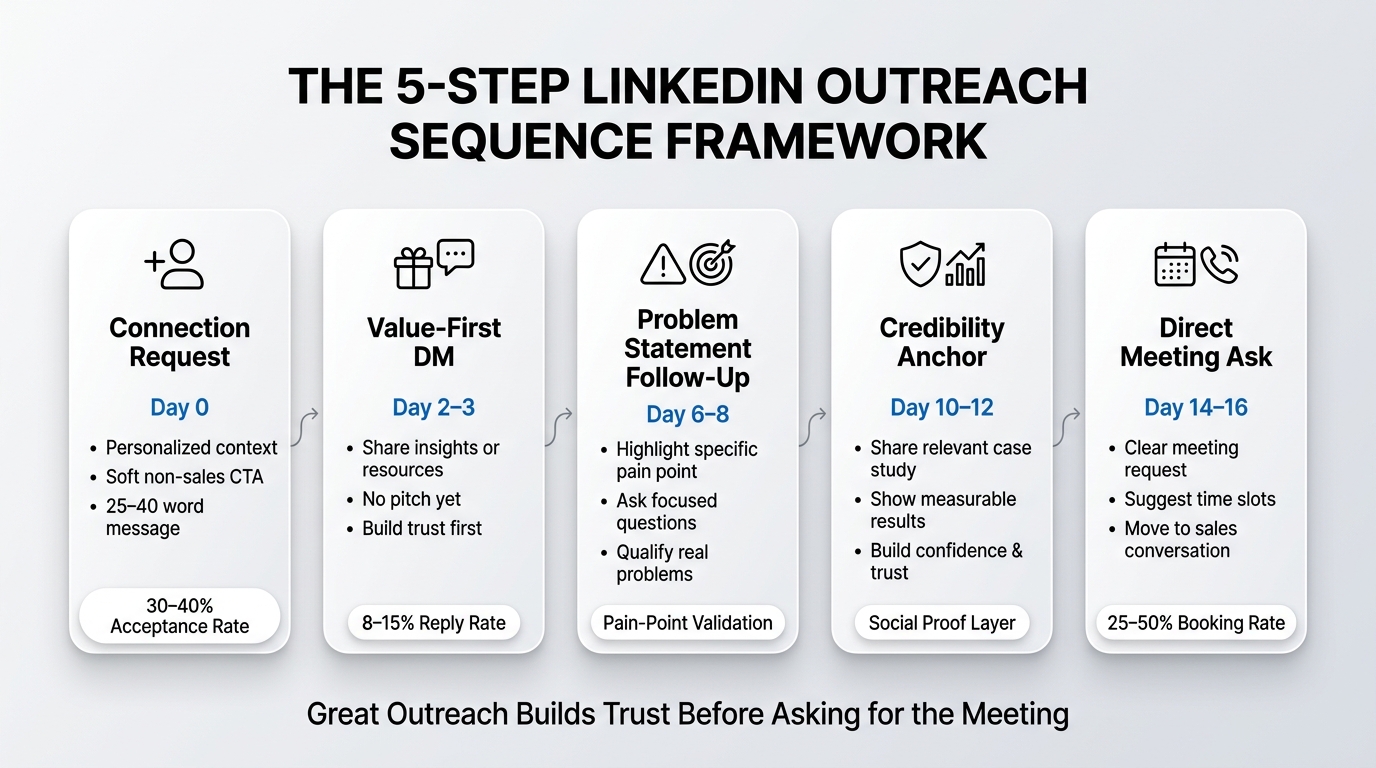
The first thing to understand is that LinkedIn does not announce a hard daily limit for connection requests. If you call LinkedIn support and ask, “What’s my daily limit?” they’ll tell you it depends on account behavior and engagement. That’s the honest answer, even though it’s infuriating.
However, LinkedIn does have published guidelines. According to LinkedIn’s own platform policies, accounts are flagged for suspicious activity when patterns look like automated scraping or mass outreach. The platform uses machine learning to detect when someone is sending rapid-fire, personalization-free connection requests to unrelated profiles. When LinkedIn’s systems detect this, they temporarily restrict your ability to send new requests, typically for 24 to 48 hours.
In practice, here’s what we know from running outreach at scale across hundreds of accounts:
New accounts (less than 3 months old): These are your riskiest accounts. LinkedIn is most aggressive with new profiles because scammers and bots love them. Most new accounts can safely send 20 to 40 connection requests per day without triggering a restriction. Some can go to 50, but it depends heavily on how frequently you engage with the platform outside of sending requests.
Established accounts (6 months to 2 years): Once your account has a history of genuine activity, you have more room. These accounts typically tolerate 50 to 100 connection requests per day. The sweet spot for most established accounts without causing LinkedIn to notice is around 60 to 80 requests per day.
Mature accounts (2+ years, 3,000+ connections): Older accounts with significant network depth and regular engagement can handle 100 to 150 requests per day. Some accounts with extremely high engagement and strong connection patterns push to 200 daily without restrictions, but that’s the upper boundary for most professionals.
Enterprise or Sales Navigator accounts: If you’re using LinkedIn Sales Navigator, the limits are slightly higher because you’re a paying customer and LinkedIn monitors your behavior differently. Sales Navigator users often report success with 100 to 200 requests per day without issues.
The actual limit your account can handle depends on several factors beyond just account age. LinkedIn’s algorithm considers how many requests you’re accepting (your reciprocal connection ratio), how often you’re logged in, how much you’re commenting and engaging with content, whether you’re using the same generic message repeatedly, and your overall network growth pattern.
Think of it like this: if you create an account today and immediately send 200 connection requests with the same copy-paste message to random people, LinkedIn will flag you within 24 hours. But if you create an account, spend a week engaging with content, building genuine connections, and then gradually increase your outreach while personalizing your messages and maintaining a 2:1 ratio of your connections accepting your requests back, you can push significantly higher numbers safely.
How LinkedIn’s Algorithm Detects and Restricts Suspicious Activity
Understanding the mechanism behind LinkedIn’s restrictions is crucial because it explains why the limits aren’t fixed. LinkedIn doesn’t actually have a hard cap on connection requests. Instead, the platform runs continuous behavioral analysis on every account, and certain patterns trigger automated flags.
LinkedIn’s detection system looks for several specific signals that indicate bot-like or spammy behavior. The first and most obvious signal is velocity. If your account sends 10 requests per hour during nighttime hours (when humans typically sleep), that looks suspicious. LinkedIn expects human-like patterns, which means gradual request distribution throughout business hours, not constant machine-like activity.
The second signal is personalization. LinkedIn’s system can detect when you’re sending the same message to hundreds of people. If your connection request message is identical across 50 consecutive requests, LinkedIn flags you. Even slight variations in the standard “I’d like to add you to my professional network” message matter. When you’re not personalizing at all, LinkedIn treats you like a bot.
The third signal is acceptance ratio. If you send 100 connection requests and only 5 people accept, LinkedIn notices the pattern. A healthy account typically sees 30 to 40% acceptance rates. When your acceptance rate drops below 20%, LinkedIn’s system assumes you’re either targeting the wrong people or behaving suspiciously. Accounts that repeatedly send requests to people who decline them get flagged faster.
The fourth signal is network growth velocity. If your account had 500 connections a month ago and suddenly has 2,500 connections today, that’s a red flag. Human networking doesn’t work that way. LinkedIn expects gradual, organic growth. Spike patterns trigger algorithmic scrutiny.
The fifth signal is cross-session behavior. LinkedIn tracks whether you’re logging in from multiple locations, multiple IP addresses, or at unusual times. If you’re accessing your account from Tokyo one day and New York the next, using the same account to send requests, LinkedIn might flag it as account sharing or bot network activity.
Here’s the important part: these signals interact with each other. A new account that sends 100 personalized, high-quality connection requests with a 40% acceptance rate over three days might not get flagged. A mature account that sends 50 generic connection requests with a 15% acceptance rate every single day will eventually get restricted.
LinkedIn’s restriction itself is also not binary. The platform uses graduated responses. The first time an account shows suspicious patterns, LinkedIn might simply slow down your ability to send requests. You can send requests, but you hit a manual CAPTCHA every 20 requests. The second time, you get a 24-hour restriction where the “Add Connection” button disappears entirely. The third time, you might get a 48-hour restriction. Repeated violations can lead to permanent account restrictions or shadowbanning, where your profile still exists but your messages don’t deliver and your requests go into a spam folder.
The key insight here is that LinkedIn’s limits are not about hitting a magic number. They’re about maintaining patterns that look human. The more you optimize for LinkedIn’s algorithm rather than against it, the higher you can safely push your connection requests.
Safe Daily Connection Request Limits by Account Type and Strategy
Let me break down the realistic daily connection request limits based on actual data from running outreach at scale. These are not LinkedIn’s published numbers; these are tested thresholds that work in 2026 without triggering restrictions.
Table: Safe Daily Connection Request Limits by Account Profile
| Account Type | Age | Network Size | Daily Limit (Conservative) | Daily Limit (Aggressive) | Acceptance Rate Target | Risk Level |
|---|---|---|---|---|---|---|
| Brand New Account | 0-3 months | 0-500 | 20-30 | 40-50 | 35%+ | Very High |
| New Account | 3-6 months | 200-1,000 | 30-50 | 60-80 | 30%+ | High |
| Established Account | 6-24 months | 1,000-3,000 | 60-80 | 100-120 | 25%+ | Moderate |
| Mature Account | 2+ years | 3,000-5,000 | 100-120 | 150-180 | 20%+ | Low |
| Veteran Account | 3+ years | 5,000+ | 120-150 | 200-250 | 15%+ | Very Low |
| Sales Navigator User | Any age | 1,000+ | 100-150 | 200-300 | 20%+ | Low |
| Multi-Account Setup | Any age | Varies | 40-60 per account | 80-100 per account | 25%+ | Moderate to High |
Let me explain what this table means for your actual outreach strategy.
For brand new accounts, you’re testing the platform’s trust threshold. A brand new account has zero track record, so LinkedIn’s algorithm is maximally suspicious of everything you do. If you send 30 personalized connection requests to highly relevant prospects on day one, with good acceptance rates, you’re building credibility. But if you send 50 generic requests to random profiles, you’ll trigger a restriction by day two. The conservative limit is where most new accounts should operate. Only move to the aggressive limit after you’ve confirmed that 2 to 3 days of requests at the conservative level don’t result in any CAPTCHA challenges or restrictions.
For accounts that are 3 to 6 months old, you’ve got some history now. LinkedIn’s algorithm has data on your behavior. If you’ve been consistently active, engaged with content, accepted a reasonable number of connection requests back, and maintained organic growth, you can safely push to 50 to 80 requests per day. The key here is consistency. If you’ve been sending 30 requests per day for three months and suddenly jump to 100, LinkedIn will flag you. But if you gradually increase from 30 to 50 to 70 to 100 over a month, the algorithm adapts.
For established accounts between 6 months and 2 years, the balance shifts. You have genuine activity history. LinkedIn trusts you more. These accounts can operate in the 60 to 120 request per day range safely, depending on your engagement and personalization. The aggressive limit is where you’re pushing the boundary but still managing acceptance rates above 25%. Again, consistency matters more than absolute volume.
For mature accounts with 2+ years of history and 3,000+ connections, you’re in the safest territory. These accounts have demonstrated that they’re real people doing real networking. You can send 100 to 200 requests per day without triggering restrictions, assuming your acceptance rates stay healthy (above 20%). The risk level is low because your account behavior is so established that short-term anomalies don’t register as suspicious.
For veteran accounts with 3+ years and 5,000+ connections, you’ve essentially passed all of LinkedIn’s trust tests. These accounts can often push 200 to 300 daily requests, but the key constraint shifts from “will LinkedIn flag me?” to “can I actually maintain quality and acceptance rates at this volume?” Most people don’t have time to personalize 250 connection requests per day anyway.
For Sales Navigator users, the rules are slightly different because you’re a paying customer. LinkedIn benefits when you’re active and finding leads within Sales Navigator. Most Sales Navigator users report that they can send 150 to 300 connection requests per day without restrictions, assuming they maintain personalization and healthy acceptance rates. Sales Navigator also gives you better targeting filters, so you’re naturally sending requests to more relevant prospects, which improves acceptance and reduces algorithmic suspicion.
For multi-account setups, each account gets evaluated independently by LinkedIn’s algorithm. If you’re running five accounts and sending 100 requests from each account per day, LinkedIn sees that as five separate behaviors, not one coordinated behavior (unless you’re using automation tools that LinkedIn can detect). The conservative limit per account in a multi-account setup is lower than a single-account limit because there’s inherent risk in running multiple accounts. Most operators running multiple accounts safely send 40 to 60 requests per account per day. If you go to 100 per account across five accounts, you’re risking restrictions on multiple accounts simultaneously.
The aggressive limits in this table are the absolute boundary. Operating at the aggressive limit requires perfect execution: excellent personalization, high acceptance rates, consistent engagement with the platform, natural login patterns, and good targeting. Most people should not operate at the aggressive limit regularly.
The Role of Personalization, Timing, and Engagement in Connection Request Success
Here’s something most people get wrong: the daily limit you can safely achieve is not fixed at a number. It’s determined by how well you execute the factors that surround the requests themselves.
Personalization is the single biggest factor. A generic connection request counts as 1 unit of risk in LinkedIn’s algorithm. A personalized connection request with a specific mention of something on the person’s profile counts as 0.3 units of risk. The difference is enormous over time.
When you send a generic request that says, “I’d like to add you to my professional network,” LinkedIn’s system sees thousands of identical messages being sent by bots every day. It gets lumped in with spam. When you send a request that says, “Hi Sarah, I saw your recent post on demand-gen strategy at TechCorp. We’re working on similar challenges in the B2B SaaS space. Would love to connect and explore if we can help each other,” LinkedIn’s system recognizes that as a human-crafted message. The algorithm doesn’t think you’re a bot. Even if you send 100 personalized messages per day, the risk level is much lower than sending 30 generic ones.
Personalization doesn’t mean you need to write a novel for each request. It means referencing something specific: a recent job change, a common connection, a company they work at, a post they liked, a skill they listed. It takes 10 seconds to personalize a request but reduces algorithmic risk dramatically.
Timing affects your limits too. LinkedIn’s algorithm considers when you’re sending requests. If you send 10 requests every hour from 9 AM to 5 PM Monday through Friday, that looks human. If you send 150 requests from 2 AM to 4 AM every night, that looks like a bot running on a schedule. Most LinkedIn activity happens during business hours, with a spike around 8 to 10 AM and another around 4 to 6 PM when people check LinkedIn on their phones during their commute.
If you’re using automation tools, distribute your requests throughout the day with randomized intervals. If you’re sending requests manually, you can safely send more per day because the timing automatically feels human.
Engagement rate is a hidden multiplier on your limits. Accounts that actively engage with LinkedIn content (commenting on posts, liking updates, sharing thoughts) can push higher connection request volumes safely. LinkedIn’s algorithm interprets engagement as proof of genuine activity. Accounts that send connection requests but never engage with content look like outreach machines. The algorithm trusts engaged accounts more.
A practical formula: for every 100 connection requests you send in a week, engage with 20 to 30 pieces of content from your target market. Comment on posts in your industry. Like and retweet. Share relevant content. This activity pattern makes LinkedIn confident you’re a real person, not a bot. With strong engagement, you can push toward the higher limits. Without it, you should stay conservative.
Acceptance rate directly impacts your future limits too. If you send 100 connection requests and 35 people accept, you’re at a 35% acceptance rate. LinkedIn’s algorithm tracks this. Accounts with 40%+ acceptance rates are clearly sending high-quality requests to relevant people. Those accounts get “rewarded” with less algorithmic friction. They can send more requests without hitting CAPTCHA challenges.
Accounts with 15% or lower acceptance rates are either targeting the wrong people or behaving suspiciously (in LinkedIn’s view). These accounts hit more restrictions. If your acceptance rate is below 20%, you should reduce your daily request volume, not increase it. The problem isn’t your daily number. It’s your targeting or personalization.
Mistakes That Trigger LinkedIn Restrictions Faster
Most people don’t actually hit LinkedIn’s hard algorithmic limits. They hit restrictions because they’re making preventable mistakes that accelerate the algorithm’s suspicion.
Mistake #1: Sending requests to random people. If you’re a B2B SaaS sales rep and you’re sending connection requests to fashion influencers, personal trainers, and random students because you saw them in a search result, your acceptance rate craters. LinkedIn notices. You’ll get flagged faster than someone sending 100 requests to perfectly targeted prospects. Narrow your targeting. Better to send 40 highly relevant requests than 100 irrelevant ones.
Mistake #2: Using the exact same message template repeatedly. I’ve seen people create a connection request message, use it for a month, and then wonder why they got restricted. LinkedIn’s algorithm has become very good at detecting repetitive messages. Even changing a single word is better than pure repetition. Better yet, use a template structure but vary key details. If your template is “Hi [First Name], I noticed you work at [Company]. We’re helping [Niche] companies with [Problem]. Would love to connect and explore if we can help,” you can use this structure hundreds of times and it still feels personalized because the variable parts are different.
Mistake #3: Accepting every connection request without discernment. This is counterintuitive, but accounts that accept 95% of the connection requests sent to them look suspicious. Real professionals are selective. They decline requests from people outside their industry or with misaligned goals. If you accept everything, LinkedIn assumes either you’re not reading requests (bot behavior) or you’re running a connection-selling scheme. Accept requests from relevant people and politely decline others. A 70 to 80% acceptance rate of inbound requests is healthy and looks human.
Mistake #4: Changing your account activity patterns drastically. You’ve been logging in once a week for six months. Then you suddenly start logging in 15 times a day and sending connection requests every hour. LinkedIn notices the change. It triggers a review of your account. Even if your behavior isn’t actually suspicious, the sudden shift from your historical pattern raises red flags. Gradual changes are always safer than sudden ones.
Mistake #5: Using your account for activities it’s not designed for. LinkedIn is strict about what constitutes acceptable behavior. Accounts that are spamming people with “Make Money Fast” offers, cryptocurrency promotions, or sexual content get flagged immediately. This sounds obvious, but I’ve seen people set up legitimate LinkedIn outreach accounts and then use them to post MLM recruitment content. LinkedIn’s algorithm catches this quickly.
Mistake #6: Bulk uploading a contact list on day one. If you create an account and immediately import 5,000 email addresses to find on LinkedIn and send requests to all of them, that’s a massive red flag. LinkedIn sees bulk uploads as the hallmark of bot networks. If you’re doing a bulk upload, space it out. Import 100 contacts, send requests to 30 of them over a week, then import another batch. The gradual approach is less suspicious.
Mistake #7: Not maintaining any content or profile activity. Your LinkedIn account should not be purely a request-sending machine. Update your profile picture occasionally. Share an article once a month. Write a thoughtful post every few weeks. Accounts that are completely dormant outside of sending requests look like outreach bots. Real accounts have a lifecycle of activity that extends beyond requests.
Strategies to Maximize Your Connection Request Limits Safely in 2026
Now that you understand the limits and what causes restrictions, here’s how to actually maximize your daily outreach without triggering LinkedIn’s algorithm.
Strategy 1: Implement a progressive volume increase. If you’re taking over an existing account or trying to increase your outreach volume, don’t jump straight to your target number. Week 1, send 30 requests per day. Week 2, send 40 per day. Week 3, send 50 per day. By the time you reach your target of 80 or 100 per day, the algorithm has adapted to the pattern. This gradual increase looks like natural growth. A sudden jump looks like automation.
Strategy 2: Separate your targeting by ICP fit. Instead of sending all your daily requests to your top-tier ICP, split them. Send 60% to your best-fit prospects (highest acceptance rates), 30% to secondary targets, and 10% to exploratory contacts. This diversifies your risk. If the exploratory segment has lower acceptance rates, the overall impact on your account health is minimal. Your primary segment stays clean.
Strategy 3: Use Sales Navigator intentionally. If you’re serious about outreach at scale, Sales Navigator is not optional. It costs $99 to $199 per month depending on the tier, but the higher daily limits and better filtering tools are worth it. Sales Navigator accounts can send 150 to 300 requests per day safely, which is double or triple what personal accounts can handle. For agency owners or SDR teams, Sales Navigator accounts essentially unlock a higher velocity tier.
Strategy 4: Automate your engagement, not your requests. Use automation tools to engage with content (likes, comments, shares) in your target market. Do not use automation to send connection requests or direct messages. LinkedIn can detect request and message automation more easily than engagement automation. Automated engagement makes your account look more active and human. Automated requests make you look like a bot. The combination of high engagement and manual personalized requests is the safest approach.
Strategy 5: Create multiple accounts with different specializations. Instead of one account sending 100 requests across multiple industries, create three specialized accounts. Account A focuses on demand-gen leaders. Account B focuses on sales ops directors. Account C focuses on marketing managers. Each account builds a specific expertise and network. Each can send 60 to 80 requests per day safely. Combined, you’re sending 180 to 240 requests per day across the platform, but the algorithmic risk on each account is much lower.
Strategy 6: Monitor your acceptance rate religiously. Check your acceptance rate weekly. If it drops below 25%, investigate. Are you targeting the wrong people? Is your message not resonating? Are you hitting saturation in your ICP? Make changes before the algorithm notices and restricts you. Acceptance rate is your early warning system.
Strategy 7: Maintain a 1:3 request-to-acceptance ratio. For every 100 connection requests you send, aim to accept 25 to 30 inbound connection requests. This keeps your network growth balanced and looks natural. If you’re sending 100 requests per day but rejecting all inbound requests, your account looks suspicious. Reciprocal relationships are a sign of genuine networking.
Tools and Automation: What Works and What Gets You Restricted
The question of whether you should use automation tools is nuanced. Automation is not inherently dangerous. Poorly-configured automation that violates LinkedIn’s terms of service is dangerous.
LinkedIn officially prohibits using third-party tools to send connection requests, send messages, or perform actions on your behalf. Technically, using any automation tool that connects to LinkedIn violates the terms of service. In practice, LinkedIn enforces this selectively. New accounts using automation get caught quickly. Mature accounts using sophisticated automation sometimes operate undetected.
Here’s my honest take: if you’re serious about outreach at scale in 2026, you will eventually need some form of automation. Manual outreach doesn’t scale past 50 requests per day if you’re personalizing properly. But the type of automation you use matters enormously.
Engagement automation is generally safe. Tools that automatically like posts, comment on content, or engage with your target market are low-risk because they mimic human activity. LinkedIn struggles to detect engagement automation because human engagement patterns are so diverse. A tool that likes 20 random posts per day blends in easily.
Request and message automation is high-risk. Tools that send connection requests or direct messages on your behalf are what LinkedIn actively detects and blocks. These tools need to integrate with LinkedIn’s API or use browser automation. LinkedIn’s security systems are specifically trained to identify request and message automation. When you use these tools, expect restrictions.
Multi-account management tools are medium-risk. Tools that help you manage multiple LinkedIn accounts from one dashboard are useful but flagged occasionally. LinkedIn notices when one person controls many accounts. If you’re running five accounts and each is sending requests, LinkedIn might flag them as a coordinated network. If each account has genuinely separate activity and personalization, the risk is lower.
The safest approach for scaling: use engagement and content automation to boost your account credibility, but send requests and messages manually or with minimal personalization automation. This takes more time, but it’s much safer. If you’re sending 100 personalized connection requests per day, that’s several hours of actual work. That’s the honest cost of scaling without risking your account.
For teams running multi-account outreach at scale, platforms like Dealsflow that use AI to handle post-reply conversations without violating LinkedIn’s terms are a different category. These tools work because they focus on the conversation after the connection is established, not on the connection request itself. They also have built-in safeguards to respect LinkedIn’s daily limits and account safety protocols. The distinction matters.
Account Safety Measures and Warmup Strategies
If you’re planning to scale your connection requests significantly, you need account safety measures in place. These aren’t optional if you’re sending more than 100 requests per day.
Account warmup is a real practice. Before you launch a big outreach campaign, “warm up” your account by establishing a pattern of normal activity. Spend one to two weeks logging in regularly, engaging with content, updating your profile, and sending a small number of requests. This establishes that your account is active and real. Then gradually increase your request volume. An account that’s been warmed up properly can push higher volumes with less risk than a cold account.
Use a consistent IP address and location. If you’re logging in from different countries every day, LinkedIn flags you. Use a VPN consistently or avoid VPNs entirely if you’re in the same location. IP hopping looks suspicious. Consistent login patterns from the same location look human.
Maintain device consistency. Logging in from your desktop, phone, tablet, and browser extensions all on the same day looks bot-like. Stick to one or two primary devices. Use one device for the bulk of your activity.
Space out your requests throughout the day. If you have a tool sending requests, configure it to spread them out. 10 requests every hour looks more human than 100 requests in a 30-minute batch.
Never buy connections or use growth hacking services. Services that promise to “add 500 connections in a week” are always violating LinkedIn’s terms. If you use them, your account will get flagged, often within days. I’ve seen accounts permanently shadowbanned from using these services.
Keep your profile complete and active. A complete profile with a professional photo, headline, summary, and recent experience is treated as lower-risk than a sparse profile. Update your profile every few months. Add new experience, skills, or endorsements. Active profiles look like real accounts.
Conclusion
The answer to “How many LinkedIn connection requests can you send per day?” is not a simple number. It depends on account age, engagement, personalization, targeting, acceptance rates, and dozens of other factors that LinkedIn’s algorithm evaluates continuously.
In 2026, the practical guidance is straightforward: new accounts should operate in the 20 to 50 daily request range. Established accounts can push to 60 to 100. Mature accounts can reach 100 to 200. Sales Navigator users have more flexibility. Multi-account operators should expect lower per-account limits.
But the real ceiling is not determined by LinkedIn’s published policies, which don’t exist. The ceiling is determined by how well you optimize for factors that LinkedIn’s algorithm considers trustworthy: personalization, engagement, acceptance rates, targeting quality, and consistent activity patterns.
Start conservative. Monitor your acceptance rate and account health. Gradually increase your volume as you build credibility. Use personalization religiously. Maintain engagement outside of requests. This is how you scale your outreach without triggering restrictions.
The operators running the most successful outreach campaigns in 2026 are not the ones pushing 300 requests per day on a sketchy account. They’re the ones sending 80 highly personalized, perfectly targeted requests per day and maintaining acceptance rates above 35%. They’re focused on quality over volume. That approach scales sustainably.
Your next step: audit your current outreach performance. Check your acceptance rate, your average response rate to follow-up messages, and your booked meeting rate. If any of these metrics are below expectations, the issue is probably not your daily request limit. It’s your targeting, personalization, or follow-up strategy. Fix those first. Then increase your volume gradually while monitoring your account health.
Frequently Asked Questions
Q: What happens if I exceed LinkedIn’s connection request limit?
A: You’ll receive a temporary restriction, typically lasting 24 to 48 hours, where the “Add Connection” button becomes unavailable. You’ll still be able to use other LinkedIn features, but you cannot send new connection requests. Repeated violations can result in longer restrictions or permanent shadowbanning.
Q: Is there a published daily limit from LinkedIn?
A: No, LinkedIn does not publish a specific daily limit for connection requests. The platform uses algorithmic detection rather than hard caps. This means different accounts have different practical limits based on their behavior patterns.
Q: Can I send more requests if I use Sales Navigator?
A: Yes. Sales Navigator is a paid tool specifically designed for outreach at scale. Sales Navigator users typically experience higher daily limits (150 to 300 requests) because LinkedIn acknowledges that professional outreach is the intended use case.
Q: How do I know if I’m sending too many requests?
A: Monitor three indicators: your daily acceptance rate, CAPTCHA challenges, and any official messages from LinkedIn. If your acceptance rate drops below 20%, you’re either targeting wrong or behaving suspiciously. If you’re seeing CAPTCHA challenges on every 20th request, you’re pushing your limit. Reduce volume.
Q: Does personalization really matter for daily limits?
A: Absolutely. Personalized requests are treated differently by LinkedIn’s algorithm than generic ones. The same account can safely send 50 personalized requests but only 25 generic ones. Personalization is the biggest factor in your actual limit.
Q: Can I use automation tools to send connection requests?
A: LinkedIn officially prohibits third-party automation for connection requests. In practice, LinkedIn’s detection varies. New accounts get caught quickly. Mature accounts sometimes operate undetected. The safer approach is to use engagement automation and send requests manually or with minimal personalization assistance.
Q: What’s a healthy acceptance rate for connection requests?
A: A 30 to 40% acceptance rate is excellent. A 20 to 30% acceptance rate is healthy. Below 20% is a warning sign. Above 40% suggests you’re targeting well-aligned prospects. Your acceptance rate directly impacts how many requests you can send safely.
Q: If my account gets restricted, can I appeal it?
A: LinkedIn rarely provides direct appeals for connection request restrictions. The restrictions are typically temporary (24 to 48 hours) and lift automatically. If your account is permanently restricted, you can contact LinkedIn support, but they may not reverse the decision if your behavior violated their terms of service.
Q: Should I worry about shadowbanning?
A: Yes. Shadowbanning is when LinkedIn’s system suppresses your visibility, messages, and request delivery without notifying you. You think your outreach is working, but it’s actually being filtered into spam. Avoid this by maintaining healthy engagement, good acceptance rates, and diverse targeting.
Q: How many accounts can I safely run simultaneously?
A: Running two to three accounts is generally safe if each account has distinct activity and personalization. Running five or more accounts dramatically increases the risk that LinkedIn will flag them as a coordinated network. If you do run multiple accounts, ensure each has genuinely separate content, connections, and messaging.
Q: Is there a best time of day to send connection requests?
A: Yes. Requests sent during business hours (8 AM to 6 PM) look more human than those sent at 3 AM. Spreading requests across the day looks more natural than batching them. If you’re sending 100 requests, distribute them across 8 to 10 hours. This pattern looks human and reduces algorithmic suspicion.
Q: What should I do if I see a sudden drop in my acceptance rate?
A: Investigate immediately. Changes in acceptance rate indicate either that LinkedIn is filtering your requests or that your targeting has become misaligned. First, check your targeting and personalization quality. Second, reduce your daily request volume temporarily while you diagnose the issue. Third, check your connection request message to ensure it’s resonating with your audience.