


The average sales professional spends only 34% of their time actually selling. The rest? Administrative tasks, data entry, follow-ups, and manual workflow management. This inefficiency costs businesses billions annually in lost productivity and missed opportunities. In 2026, the solution lies in one strategic decision: choosing the right sales automation tool.
But here’s the challenge: the market is flooded with options. From comprehensive CRM platforms to specialized email automation software, the variety can be overwhelming. What works for a 5-person startup might cripple a 500-person enterprise. Conversely, enterprise-grade solutions often leave small teams drowning in unnecessary complexity and expense.
This guide walks you through the complete process of evaluating and selecting a sales automation solution that aligns perfectly with your business size, budget, and growth trajectory. Whether you’re a solopreneur, a growing mid-market company, or an established enterprise, you’ll learn exactly how to navigate this critical decision.
What is a Sales Automation Tool?
Sales automation tools are software platforms designed to streamline and accelerate the sales process by automating repetitive tasks, managing customer relationships, and providing data-driven insights. These tools eliminate manual work, reduce human error, and create consistent processes that scale with your business.
At their core, sales automation tools handle the operational backbone of selling. They’re not replacements for salesmanship—they’re force multipliers that free your team to focus on relationship-building and closing deals rather than administrative busywork.
The distinction is important: sales automation isn’t about replacing human connection. Rather, it’s about removing the friction that prevents genuine human interaction. When your team isn’t buried in spreadsheets and manual tasks, they have bandwidth for meaningful conversations with prospects.
What Sales Automation Tools Actually Handle
Modern sales automation platforms manage far more than scheduling emails. They integrate with your existing tech stack, centralize customer data, and create intelligent workflows that respond to prospect behavior in real-time.
Typical capabilities include:
- Lead capture and qualification: Automatically collecting leads from multiple sources and scoring them based on engagement and fit
- Pipeline management: Visual representations of deals at each stage with automatic stage progression based on defined triggers
- Activity logging: Recording all customer interactions—calls, emails, meetings—without manual entry
- Automated workflows: Creating sequences that respond to prospect actions without human intervention
- Reporting and analytics: Real-time dashboards showing pipeline health, conversion rates, and sales velocity
- Multi-channel communication: Managing outreach across email, phone, SMS, and social platforms from a unified interface
- Data synchronization: Keeping information consistent across all connected tools and platforms
The Rise of Sales Automation
The adoption of sales automation has accelerated dramatically since 2020. What was once a luxury for large enterprises is now essential for competitive survival at any business size.
The trajectory is clear: in 2020, 51% of high-performing sales organizations used some form of automation. By 2026, that figure had climbed to 78%. In 2026, the expectation is that companies without basic automation are operating at a disadvantage that’s nearly impossible to overcome.
This shift reflects a fundamental change in how sales works. Modern buyers interact with companies across multiple touchpoints before ever speaking with a salesperson. They expect personalized communication, fast response times, and seamless experiences. Manual processes simply cannot deliver at this level of sophistication and scale.
Why This Matters For Your Business
The ROI of sales automation is substantial and measurable. Companies implementing proper automation see:
- 30-50% reduction in sales cycle length
- 25-40% increase in sales productivity
- 15-25% improvement in conversion rates
- 40% reduction in operational costs
- Significant improvement in data accuracy and compliance
But these numbers only materialize if you choose a tool aligned with your actual needs. A misaligned choice creates drag rather than acceleration.
Spot Pipeline Before Your Competitors Even Know It Exists
One of the most overlooked advantages of modern sales automation is the ability to identify and capitalize on emerging opportunities before competitors recognize them.
Advanced automation platforms monitor prospect behavior patterns across multiple channels. When a prospect visits your website multiple times, engages with specific content, or shows increased activity, the system alerts your team immediately. This “first-mover advantage” at the prospect engagement level compounds over time.
Companies using automation effectively don’t just react to inbound interest—they develop sophisticated early warning systems that identify when prospects are entering buying cycles. They see patterns that wouldn’t be visible in spreadsheets or disconnected systems.
For example, if your tool integrates with your website analytics, email platform, and social monitoring, it can recognize when a prospect from a high-value account is showing increased engagement across all channels. Traditional systems would require someone to notice each signal independently. Automated systems connect the dots instantly and alert your top salesperson to engage before a competitor even knows the opportunity exists.
This capability becomes increasingly valuable as you scale. A 10-person sales team might catch these opportunities organically. A 100-person sales team cannot without automation.
Why Sales Automation Matters in 2026 and Beyond
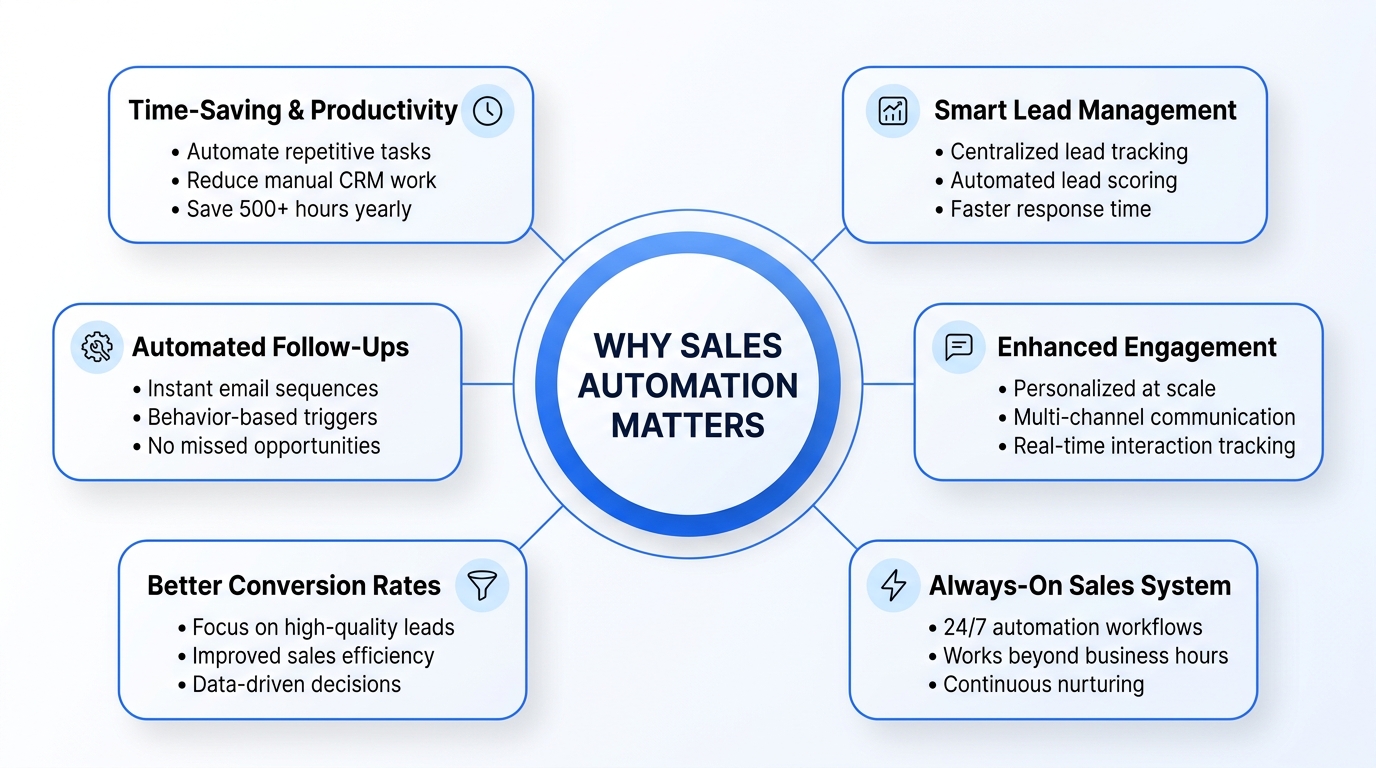
The importance of sales automation in 2026 extends beyond simple efficiency gains. It addresses fundamental challenges reshaping the sales landscape.
1. Time-Saving and Productivity Gains
The time savings from automation are substantial and multifaceted. Consider the typical salesperson’s day without automation:
- 15 minutes: Email management and responding to routine inquiries
- 20 minutes: Updating CRM records manually
- 15 minutes: Creating follow-up sequences in email
- 10 minutes: Searching for past interactions or context on a prospect
- 25 minutes: Creating templates and customizing communications
- 15 minutes: Administrative tasks and data hygiene
That’s roughly 2 hours of administrative work daily—or 10 hours weekly. Over a year, that’s 500+ hours per salesperson redirected from selling activities.
With automation:
- CRM updates happen automatically as emails are sent and meetings occur
- Follow-up sequences deploy instantly based on prospect behavior
- Context on prospects appears automatically when you open their record
- Templates are dynamic, personalizing automatically based on prospect data
- Administrative tasks execute in the background
The time reclaimed translates directly to more prospect conversations, deeper relationship building, and more closed deals.
2. Better Lead Management and Follow-Ups
Lead management without automation is inherently fragmented. Leads sit in email inboxes, Slack messages, form submissions, and various other sources. Some get followed up immediately. Others fall through cracks. Response time becomes inconsistent—sometimes within an hour, sometimes days later.
Modern automation centralizes all leads into a single system, prioritizes them based on fit and engagement, and ensures consistent follow-up regardless of which team member is responsible.
Consider a lead that comes in at 3 PM on Friday. In a manual system, it might wait until Monday for response. With automation, it’s captured, assessed, and an initial response sequence deploys within minutes—even outside business hours.
Lead scoring automation is equally transformative. Rather than assuming all leads have equal value, automation evaluates leads against your ideal customer profile. It considers:
- Company size and industry alignment
- Engagement level (website visits, email opens, content downloads)
- Firmographic fit
- Behavioral signals indicating buying cycle proximity
Your sales team receives only qualified leads, prioritized by likelihood to close. This focus dramatically improves efficiency and conversion rates.
3. Enhanced Customer Engagement
Personalization at scale—a contradiction just years ago—is now standard practice through automation. Dynamic content, intelligent timing, and behavioral responsiveness create engagement experiences that feel individually crafted despite being systematically delivered.
When a prospect downloads a specific whitepaper, automation can immediately trigger a tailored follow-up sequence focused on the topic they’ve indicated interest in. When they open emails from your company, automation adjusts the cadence. If they go silent, automation can deploy a re-engagement sequence with different messaging.
This isn’t cold or mechanical. Rather, it’s creating the infrastructure for more human, more timely engagement than would be possible without systems support.
Multi-channel engagement becomes possible at scale through automation. A prospect might interact with you through email, your website, LinkedIn, and SMS. Automation tracks all these interactions on a single customer record, ensuring your communication is coherent and progressive across channels rather than disjointed and repetitive.
Types of Sales Automation Tools: Understanding Your Options
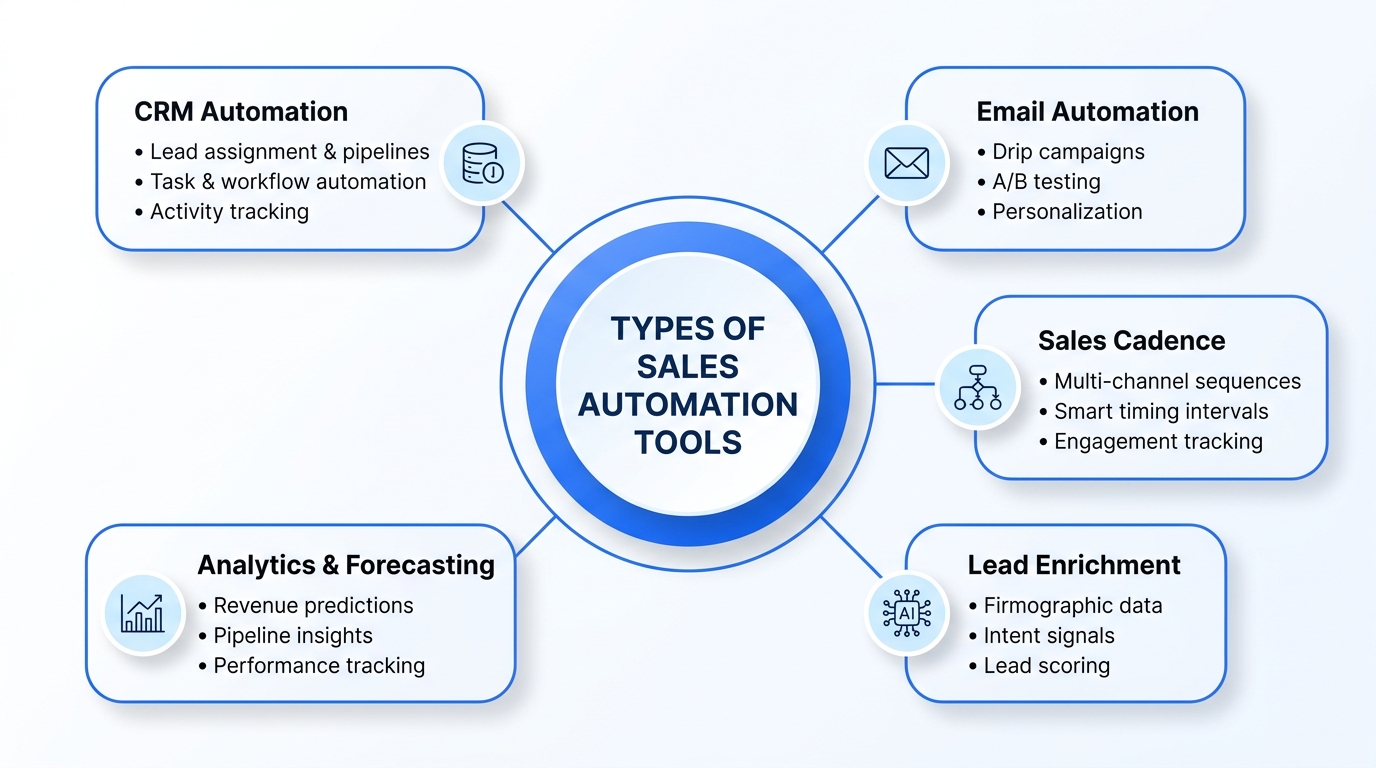
When you’re trying to choose sales automation tools, understanding the different categories helps tremendously. Most companies don’t use a single tool in isolation. Rather, they combine complementary solutions into an integrated tech stack.
1. CRM-Based Automation Tools
Customer Relationship Management platforms form the foundation of most sales automation implementations. These tools centralize all customer and prospect data, create pipelines, and automate workflows within the CRM ecosystem.
CRM-based automation includes:
- Automatic lead assignment based on territory, capacity, or custom rules
- Pipeline automation that moves deals between stages based on actions or time
- Task and reminder automation ensuring nothing falls through cracks
- Report generation that happens on schedules you define
- Email integration that logs all outbound communication automatically
- Activity tracking that captures calls, meetings, and interactions without manual entry
Modern CRMs like Salesforce, HubSpot, and Pipedrive have native automation engines that eliminate the need for separate tools in many cases.
The advantage: everything lives in one system, reducing complexity and ensuring data consistency.
The consideration: CRM-based automation is as powerful as your data quality. Garbage data produces garbage automation.
2. Email and Outreach Automation
Specialized email automation platforms handle outreach sequences, follow-ups, and email-based engagement at sophistication levels most CRMs can’t match.
These tools manage:
- Drip campaigns that deliver progressive messaging to prospects based on behavior and time
- A/B testing of subject lines, content, and send times to optimize performance
- Personalization including dynamic content blocks that change based on prospect data
- Deliverability optimization including list cleaning, warmup sequences, and engagement scoring
- Response handling automatically moving prospects to new sequences when they reply
- Integration with dialing platforms for voice and SMS follow-up
Email automation tools often include built-in compliance features (GDPR, CAN-SPAM) that reduce legal risk.
3. Sales Cadence Software
Sales cadence tools orchestrate multi-channel, multi-touch outreach sequences. A cadence might include five email touches, two phone calls, three LinkedIn messages, and a direct mail piece—all orchestrated across the right timeframe with intelligent spacing.
These platforms:
- Create sequences combining email, phone, SMS, social, and direct mail
- Manage timing with intelligent intervals preventing prospect fatigue
- Track sequences showing exactly where prospects are and what they’ve engaged with
- Enable customization allowing personalization within templated sequences
- Provide analytics on which cadences and touches convert best
- Handle exceptions automatically responding to replies and moving prospects to new sequences
Sales cadence tools are particularly valuable for outbound prospecting at scale.
4. Lead Enrichment and Scoring Tools
These tools add depth and intelligence to your prospect data. Lead enrichment platforms append information to your prospect records—job titles, company details, technology stacks, employee counts, funding status—drawing from extensive databases.
Lead scoring tools evaluate prospects against your ideal customer profile, automatically assigning scores that indicate fit and buying cycle proximity.
Key capabilities include:
- Firmographic enrichment adding company data like industry, size, and revenue
- Technographic data revealing what tools and technologies companies use
- Intent data showing which companies are actively researching solutions like yours
- Behavioral scoring adjusting scores based on engagement with your content
- Custom scoring models reflecting your specific sales criteria
These tools dramatically improve efficiency by ensuring your sales team pursues the highest-probability opportunities.
5. Forecasting and Analytics Platforms
Advanced analytics platforms transform raw sales data into predictive insights. These tools answer critical questions:
- Which deals are most likely to close?
- What’s our realistic revenue forecast?
- Where are pipeline bottlenecks?
- Which salespeople are excelling and why?
- What’s our sales cycle actually looking like?
These insights enable better management decisions, resource allocation, and strategic planning.
Key Features to Look for When You Choose a Sales Automation Tool
Selecting the right automation platform requires evaluating numerous features. However, certain capabilities separate excellent tools from mediocre ones.
1. Workflow Automation Capabilities
The ability to create sophisticated workflows without coding is essential. Look for platforms where you can:
- Define triggers (contact opens email, meeting scheduled, stage changed) that initiate workflows
- Create branching logic where different paths execute based on conditions
- Set time-based actions that execute at specific intervals or times
- Execute complex sequences combining multiple actions and channels
- Manage exceptions handling replies and manual interventions gracefully
Workflow capability directly determines whether your automation matches your actual sales process or forces you to change processes to fit the tool.
2. CRM Integration and Synchronization
Even if you’re not using a dedicated CRM, integration capabilities matter enormously. Your automation platform must:
- Sync seamlessly with your existing CRM or database in real-time
- Maintain data consistency preventing conflicts or duplication
- Log activities automatically without manual entry burden
- Access custom fields enabling personalization based on your specific data
- Handle two-way sync updating both systems when information changes
- Provide API access for custom integrations with specialized tools
Poor integration creates data silos and makes reporting impossible.
3. Multi-Channel Outreach Support
Modern sales requires orchestrating engagement across multiple channels. Evaluate whether the platform handles:
- Email with deliverability optimization and compliance
- Phone and dialing with call recording and disposition tracking
- SMS for timely, high-engagement communication
- LinkedIn and social integration for outreach and engagement
- Direct mail automation for high-value prospects
- In-app notifications and messaging capabilities
Single-channel tools create limitation as your strategy evolves.
4. Live Analytics and Reporting
Dashboards and reports should provide:
- Real-time visibility into pipeline status, not historical snapshots
- Customizable reporting creating views relevant to your specific metrics
- Drilling capability from summary dashboards into transaction-level detail
- Forecasting tools predicting revenue based on pipeline and historical patterns
- Individual performance tracking enabling targeted coaching and recognition
- Automated reports sent on schedules to relevant stakeholders
Poor analytics limit your ability to optimize and manage effectively.
5. AI-Powered Personalization
In 2026, AI integration in sales automation is becoming standard. Evaluate:
- Automated copy generation suggesting subject lines, email content, and message frameworks
- Optimal send time prediction determining when individual prospects are most likely to engage
- Conversation intelligence analyzing call recordings to identify successful patterns
- Predictive lead scoring going beyond rule-based to machine-learning scoring
- Engagement prediction identifying which prospects are most likely to respond
- Content recommendations suggesting which assets to share based on prospect data
AI capabilities should enhance human judgment, not replace it.
Sales Automation Platform Pricing Models Explained
Understanding pricing models prevents sticker shock and hidden costs that appear after deployment.
1. Per User/Month Pricing
This is the most straightforward model. You pay a fixed amount per user account monthly or annually. This model works well if:
- Your team size is stable
- All users have similar feature needs
- You want predictable costs
Example calculation: 15 users × $99/user/month = $1,485/month = $17,820 annually
Advantages: Simplicity, predictability, scalability in one direction
Disadvantages: Can become expensive as teams grow; users with minimal needs pay same price as heavy users
2. Tiered Feature-Based Pricing
Platforms offer different feature sets at different price points. Teams choose based on needed capability level.
Structure Example:
- Starter: $199/month – basic automation, 5 users, essential features
- Professional: $499/month – advanced automation, 25 users, API access
- Enterprise: Custom pricing – unlimited users, custom integrations, dedicated support
Advantages: Aligns cost with feature needs; lower entry price for small teams
Disadvantages: May require upgrade as you scale; feature limitations at lower tiers frustrate growing teams
3. Freemium vs. Enterprise Plans
Some platforms offer free tiers enabling teams to experiment before committing financially.
Freemium advantages:
- Zero financial risk to trial
- Build internal support before expanding
- Understand tool before committing to paid tier
Enterprise plans provide:
- Custom pricing based on scale and requirements
- Dedicated support and implementation
- Custom integrations and development
- SLAs and security compliance assurances
4. Hidden Costs to Watch Out For
Beyond stated pricing, watch for:
| Cost Category | What to Watch |
|---|---|
| Setup and Implementation | Many platforms charge $5,000-$50,000+ for configuration and training |
| Data Migration | Moving from old systems to new platform carries costs—sometimes $10,000+ |
| Integration Fees | Some platforms charge per integration with other tools |
| API Usage | Overage fees if you exceed API call allowances |
| Training and Support | Ongoing training beyond included support can be expensive |
| Add-ons | Advanced features (AI, advanced reporting, compliance) cost extra |
| Contract Terms | Early cancellation fees or minimum contract lengths add costs |
Request all-in costs before committing, not just per-user pricing.
How to Compare Sales Automation Tools Effectively
Systematic comparison prevents emotional decisions and ensures objective evaluation.
1. Sales Cadence Software Comparison Checklist
When evaluating cadence tools specifically, ensure you assess:
- Multi-channel capability (email, phone, SMS, social, mail)
- Sequence customization options and templates
- Lead status tracking and intelligent routing
- A/B testing for optimization
- Integration with your CRM
- Reporting on cadence performance
- Support for manual follow-up and exceptions
- Mobile app for remote engagement
- Compliance and data privacy certifications
- Ease of use and training requirements
- Onboarding and implementation timeline
- Pricing transparency and all-in costs
Use this checklist to score each option on weighted criteria.
2. CRM Tools Comparison Matrix
For CRM evaluation, create a matrix comparing:
| Feature | Your Weight | Tool A | Tool B | Tool C |
|---|---|---|---|---|
| Pipeline Visualization | 10% | ★★★★★ | ★★★★☆ | ★★★☆☆ |
| Automation Capability | 15% | ★★★★★ | ★★★★★ | ★★★☆☆ |
| Integration Ecosystem | 10% | ★★★★☆ | ★★★★★ | ★★★★☆ |
| Reporting and Analytics | 12% | ★★★★☆ | ★★★★★ | ★★★★☆ |
| Ease of Use | 10% | ★★★☆☆ | ★★★★☆ | ★★★★★ |
| Pricing | 15% | ★★★★☆ | ★★★☆☆ | ★★★★★ |
| Customer Support | 10% | ★★★☆☆ | ★★★★☆ | ★★★★★ |
| Security & Compliance | 8% | ★★★★☆ | ★★★★★ | ★★★★☆ |
| Scalability | 10% | ★★★★☆ | ★★★★★ | ★★★★☆ |
Weighted scoring provides objective comparison rather than subjective impression.
3. Demo Request and Trial Evaluation Tips
When demoing platforms, focus on:
- Your actual workflow: Ask how the tool handles your specific process, not generic workflows
- Realistic data: Request demos using data volumes similar to yours, not minimal samples
- Integration specifics: Have technical team members evaluate how the tool actually integrates with your stack
- Customization possibilities: Understand what requires customization vs. built-in functionality
- Onboarding process: Understanding implementation timeline and effort required
- Support access: Evaluate actual support responsiveness, not scripted demo support
- Honest limitations: Ask what the tool doesn’t do well; good vendors admit limitations
Request free trials for at least 2-4 weeks. Live testing with your team reveals issues impossible to spot in demos.
How to Choose the Right Sales Automation Tool: A Strategic Framework
With countless options and considerations, having a structured decision-making framework prevents decision paralysis and ensures alignment with business goals.
Step 1: Define Your Current State and Challenges
Before evaluating tools, diagnose where you are:
- What’s working? What manual processes are actually effective but consuming resources?
- What’s broken? Where do prospects fall through cracks? Where do you lose visibility?
- What’s limiting growth? What processes prevent you from scaling?
- What’s the cost of status quo? How much revenue is lost due to inefficiency, delayed responses, or inconsistent processes?
Document specific problems the tool must solve. Avoid selecting “best in class” tools that solve problems you don’t have.
Step 2: Define Your Ideal Outcomes
What would success look like 12 months after implementation?
- Sales cycle reduction: From current 90 days to 60 days?
- Productivity improvement: 25% more meetings per salesperson?
- Win rate improvement: From 20% to 25% conversion rate?
- Forecast accuracy: From current 65% accuracy to 85%?
- Team experience: Reduce administrative time from 2 hours to 45 minutes daily?
Specific, measurable outcomes guide tool selection and implementation.
Step 3: Assess Your Team’s Technical Capability
Honest assessment of your team prevents overshooting or underutilizing features:
- Technical sophistication: Can your team handle API-level integrations or need low-code solutions?
- Change management capacity: Is your team eager for new tools or resistant to change?
- Training readiness: Can they dedicate time to learning new systems?
- Admin support: Is there someone available to own configuration and optimization?
Sophisticated tools with limited internal capability create abandoned implementations. Simple tools with capable teams leave value on the table.
Step 4: Evaluate Integration Requirements
Map all systems touching your sales process:
- CRM or database systems
- Email and communication platforms
- Dialing and phone systems
- Website analytics and tracking
- Marketing automation platforms
- Financial and billing systems
- Collaboration tools (Slack, Teams)
- Reporting and BI tools
Evaluate how each potential automation tool integrates with your complete stack. Poor integration creates manual workarounds negating automation benefits.
Step 5: Calculate True Cost of Ownership
Build a comprehensive cost model including:
- Annual software costs: All user licenses and add-ons
- Implementation: Setup, configuration, and training
- Integration: Fees for connecting other systems
- Administration: Ongoing management and optimization
- Training and support: Ongoing team development
- Opportunity costs: Time diverted from selling to system management
Compare tools on total cost over three years, not just per-user monthly rates.
Step 6: Run Structured Trials
For final candidates, deploy actual trials with real team members, real data, and real workflows:
- Duration: Minimum 30 days; 60 days is better
- Users: Not just power users—include entire spectrum of team
- Data: Import actual prospect and customer data
- Workflows: Configure your actual sales process, not generic workflows
- Integration: Test actual integrations with your systems
- Documentation: Require trial version of documentation and training materials
Actual trials reveal implementation challenges impossible to predict from demos.
Step 7: Validate Vendor Viability
Even the best tool doesn’t help if the vendor struggles:
- Financial stability: Research company funding and growth trajectory
- Roadmap alignment: Are they building features you’ll need in 2-3 years?
- Support quality: Beyond sales, evaluate actual customer support
- Customer success: Do they help customers succeed, or just sell?
- Integration partnerships: Do they work with your other vendors?
Call current customers in your industry segment. Ask specifically about vendor support and product roadmap alignment.
Step 8: Plan Implementation and Change Management
The best tool fails with poor implementation. Plan:
- Timeline: Realistic deployment schedule from kickoff to full adoption
- Resources: Internal team time and vendor support required
- Training: Structured onboarding for all users
- Champions: Identify power users who’ll support peers
- Quick wins: Early successes building internal support
- Metrics: How you’ll measure adoption and impact
- Support: Ongoing access to vendor and internal expertise
Implementation strategy often determines success more than tool selection.
Common Mistakes to Avoid When Buying Sales Automation Software
Understanding failures others have experienced prevents repeating them.
1. Overlooking Integration Needs
The mistake: Selecting a tool based on features without evaluating how it connects to your ecosystem.
The consequence: End up maintaining manual data entry or complex workarounds negating automation benefits. Salespeople spend time updating multiple systems instead of selling.
The prevention: Create a definitive list of systems requiring integration. Evaluate each potential tool’s integration capability before narrowing choices.
2. Ignoring User Adoption and Training
The mistake: Purchasing advanced tool, deploying with minimal training, then wondering why adoption fails.
The consequence: Expensive tool largely unused; team continues old workarounds; investment never pays off.
The prevention: Plan comprehensive training covering not just features but why they matter. Designate champions. Build training into vendor contracts. Plan for ongoing education.
3. Choosing Based on Price Alone
The mistake: Selecting cheapest option to reduce costs.
The consequence: Tool lacks required features, creating workarounds. Team abandons platform. Actual cost per user becomes astronomical considering low adoption.
The prevention: Evaluate pricing relative to features and fit. Most expensive tool and cheapest tool aren’t optimal—the right tool is most cost-effective relative to outcomes.
4. Not Aligning with Sales Goals
The mistake: Purchasing tool because competitors use it or it won a review without tying selection to business objectives.
The consequence: Implement features solving wrong problems. Minimal impact on revenue. Difficulty justifying continued investment.
The prevention: Start with clear goals. Evaluate tools against solving specific problems. Require demonstrable connection between tool and outcome improvement.
5. Underestimating Implementation Effort
The mistake: Assuming implementation will be quick and easy.
The consequence: Deployment takes 3x longer than expected. Team frustration builds. Implementation stalls with incomplete configuration.
The prevention: Request honest implementation timeline from vendors. Connect with existing customers about actual implementation duration. Plan for 2-3 months for meaningful deployment even for simpler tools.
6. Ignoring Mobile and Remote Needs
The mistake: Selecting tool with poor mobile experience.
The consequence: Sales team avoids using it in field. Data entry lags. Mobile-first sales processes not supported.
The prevention: Evaluate mobile experience seriously. Test on actual phones with real connectivity. If team is mobile-first, mobile capability is non-negotiable.
Best Practices for Choosing the Right Tool
Beyond avoiding mistakes, following best practices increases success likelihood.
1. Define Your Sales Workflow Needs
Document your actual sales process in detail:
- Lead generation: How do leads enter your system?
- Initial engagement: How do you identify fit and interest?
- Opportunity qualification: What defines qualified opportunity?
- Negotiation process: What stages exist? What triggers progression?
- Close and handoff: How are deals closed and transferred to service?
- Exception handling: Where do processes break or need manual intervention?
Match tool capabilities to your actual workflow, not generic workflows.
2. Involve Your Sales Team in the Decision
Sales teams know:
- Which tools support their workflow best
- What actually wastes time daily
- Where systems frustrate them
- What improvements matter most
Excluding them from selection creates resistance and poor choices. Include frontline salespeople in demos and trial evaluation.
3. Prioritize Scalability and Support
Select tools that grow with you:
- Scalability: Can you add users, volume, and features without platform collapse?
- Support: Beyond hours 9-5, what support exists? How quickly do they respond?
- Customization: Can the tool adapt to your evolving needs or force rigid adherence?
- Vendor viability: Will the vendor exist in 5 years?
Growing companies can’t afford tool changes. Plan for significant growth when selecting.
4. Test with a Sales Automation Demo Request
Before committing, request structured demos:
- Your workflow demo: Using your actual sales process
- Integration demo: Showing real connection to your systems
- Customization demo: Demonstrating how tool adapts to your needs
- Support demo: Connecting with actual support team, not presales
- Data migration demo: Showing how they’d handle your existing data
Quality vendors provide these demos. Those unwilling should raise questions.
Conclusion
Choosing the right sales automation tool for your business size is among the most important technology decisions you’ll make. The right choice compounds productivity, improves forecasting, accelerates growth, and dramatically improves team experience. The wrong choice becomes expensive liability consuming resources without return.
The decision requires honesty about your current state, clarity about desired outcomes, realistic assessment of capabilities, and systematic evaluation of options. It’s not about finding the best tool on the market. It’s about finding the best tool for your specific situation.
In 2026, sales automation is no longer optional. The only question is which platform you’ll choose. By following this framework, you’ll make a decision grounded in your actual needs rather than marketing noise. You’ll avoid expensive mistakes. And you’ll implement a platform that accelerates your business toward its growth goals.
The companies winning in today’s market aren’t those with the fanciest tools. They’re those whose teams spend minimal time on busywork and maximum time building relationships, qualifying opportunities, and closing deals. That’s what sales automation, when chosen and deployed correctly, enables.
Frequently Asked Questions
Q1. How do I choose the right sales automation tool for my business?
Start by documenting your current challenges, desired outcomes, and specific workflows that need automation. Define must-have features, nice-to-have capabilities, and your budget. Evaluate options against your criteria systematically rather than emotionally. Request demos and trials with your actual data and workflows. Involve your sales team in evaluation. Calculate total cost of ownership, not just per-user pricing. Most importantly, align tool selection to solving your specific problems, not copying what competitors use.
Q2. What are the key features to look for in a sales automation platform?
Essential features include workflow automation enabling complex sequences, tight CRM integration maintaining data consistency, multi-channel outreach capability (email, phone, SMS, social), live analytics providing real-time insights, and AI-powered personalization improving relevance. However, prioritize features solving your actual problems over comprehensive feature lists. A tool excelling at your critical need is better than tool decent at everything.
Q3. How much should I expect to pay for a sales automation tool?
Pricing varies dramatically by platform and team size. Per-user pricing typically ranges from $50-$300 monthly. Smaller teams might pay $300-$1,000 monthly; mid-market teams might pay $3,000-$10,000 monthly; enterprises often negotiate custom pricing. However, focus on total cost of ownership, not just software cost. Implementation, integration, training, and support often exceed software costs by 100-200%. A platform costing $200/user/month might cost $400-600/user when including implementation and support.
Q4. What are common mistakes to avoid when selecting a sales automation tool?
Avoid these mistakes: choosing based on price alone without evaluating features; overlooking integration requirements creating manual workarounds; ignoring user adoption and training leading to abandonment; selecting tools solving competitors’ problems rather than yours; underestimating implementation effort causing deployment delays; neglecting mobile capability if team is remote-first; and failing to involve sales team causing resistance and poor choices.
Q5. How can I effectively evaluate sales automation tools during a trial period?
Use trial periods to test with actual data, actual workflows, and actual team members—not just power users or minimal data. Configure your specific sales process rather than generic workflows. Test integrations with your complete system ecosystem. Include frontline salespeople in evaluation; they’ll identify issues executives miss. Measure trial impact against your defined success metrics. Talk to current customers about their trial experience. Most importantly, evaluate how vendors support you during trial, as that indicates post-sale support quality.
Q6. What’s the difference between CRM automation and specialized automation tools?
CRM-based automation manages processes within the CRM—lead assignment, pipeline movement, task creation, report generation. Specialized tools like email automation or sales cadence software excel at specific functions (email sequences, multi-channel outreach) but lack broader CRM capabilities. Most implementations combine CRM automation with specialized tools, with the CRM as central data hub and specialized tools handling specific functions.
Q7. How do I ensure my team will actually adopt the new sales automation tool?
Adoption depends more on implementation than product. Involve sales team in selection process. Ensure training is comprehensive, practical, and ongoing. Identify power users who’ll champion adoption among peers. Focus on quick wins demonstrating value within weeks. Don’t hide tool features—show specific ways it makes salespeople’s lives easier. Track adoption metrics and course-correct rapidly. Ensure leadership visibly uses and values the tool. Make tool usage part of performance expectations.
Q8. Should I choose one comprehensive platform or multiple specialized tools?
This depends on integration capability and team sophistication. Comprehensive platforms simplify integration and reduce system management complexity but may be stronger in some areas than others. Multiple specialized tools can excel at specific functions but require excellent integration and create more complexity. Most successful implementations use 3-5 integrated tools: a CRM as foundation, email automation, sales cadence, analytics, and lead enrichment. Prioritize integration seamlessness over platform count.