


Most job seekers and sales professionals use LinkedIn passively. They scroll through job posts, send applications into crowded pipelines, and wait for replies that rarely come. The problem is not always a lack of skills or experience. In many cases, it is because they are approaching LinkedIn like a job board instead of a networking and search platform. Recruiters are not spending their entire day reviewing random applications. They are using LinkedIn’s search tools to actively identify candidates who match specific industries, skills, job titles, locations, and experience levels. If your profile and outreach strategy are not aligned with how recruiters search, you become invisible no matter how qualified you are.
Learning how to find recruiters on LinkedIn is really about understanding how recruiters work behind the scenes. Most recruiters rely on keyword searches, mutual connections, activity signals, and profile optimization to discover potential candidates. They search for people who appear active, credible, and relevant to the role they are trying to fill. That means your headline, profile summary, skills, featured content, and even your recent activity can influence whether you appear in their searches. Simply having a LinkedIn account is not enough anymore. You need to position yourself so recruiters can instantly understand who you are, what you do, and why you fit the opportunities they are hiring for.
Finding recruiters also requires a more strategic approach than sending random connection requests. The best results come from identifying recruiters who specialize in your industry, company type, or role category. A recruiter hiring for SaaS sales roles will respond differently than someone recruiting for engineering or operations. Once you identify the right people, your outreach message matters just as much as your profile. Generic messages like “I’m looking for opportunities” are often ignored because recruiters receive hundreds of them every week. Personalized outreach that references your experience, shared interests, or specific roles creates stronger engagement and makes you memorable instead of forgettable.
The real value of LinkedIn comes from relationship-building, not one-time outreach. Recruiters often revisit profiles multiple times before reaching out, and many opportunities come from staying visible over time rather than applying once. Engaging with recruiter posts, sharing industry insights, commenting thoughtfully, and consistently improving your profile can gradually place you into their professional ecosystem. When recruiters already recognize your name or see you as someone active in your field, conversations become easier and opportunities appear more naturally. In today’s competitive market, success on LinkedIn is less about luck and more about becoming discoverable, credible, and relevant to the people already searching for talent.
How to Find Recruiters on LinkedIn: The Search Framework
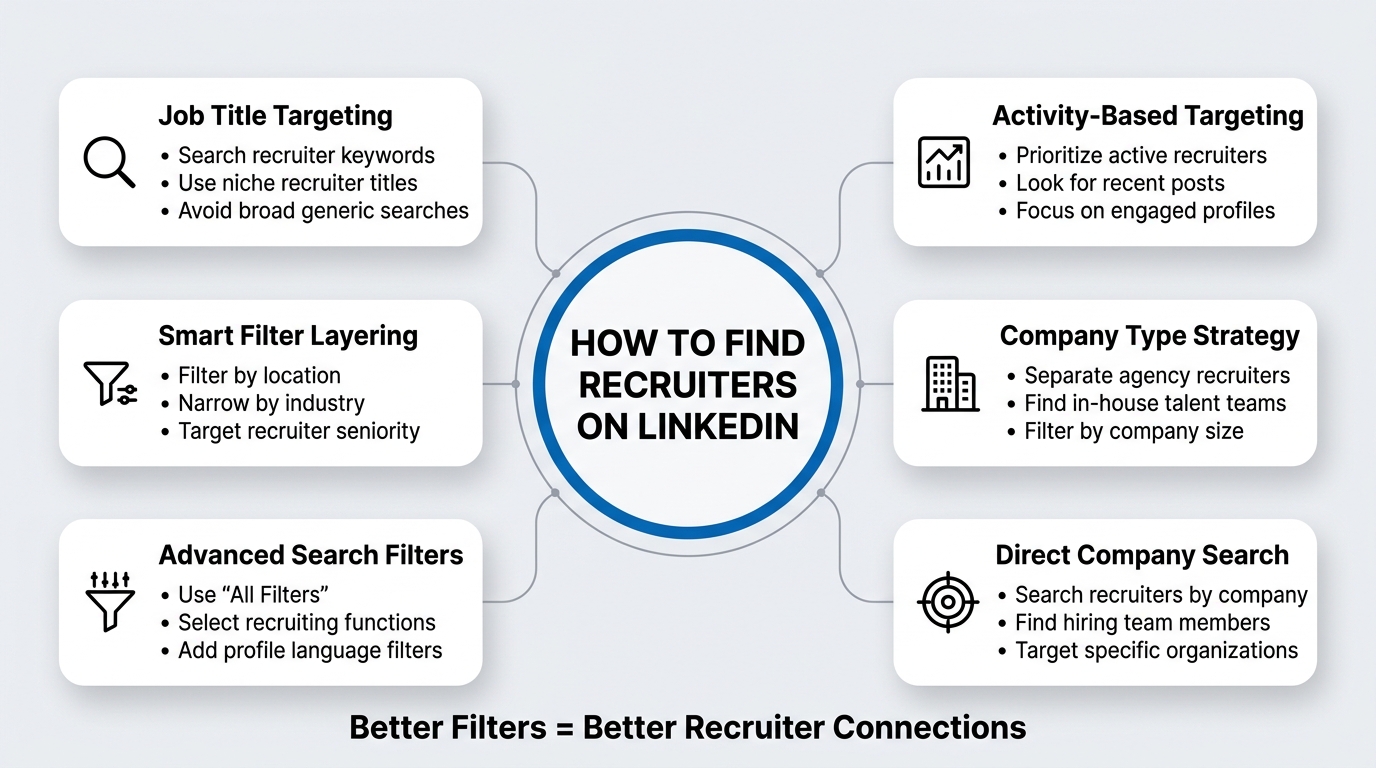
Finding recruiters on LinkedIn starts with understanding LinkedIn’s search architecture and how to weaponize it. LinkedIn’s search function is powerful but most people use it at 20% capacity. They search by job title, get overwhelmed with 50,000 results, and give up.
The key is layering filters in the right order. Instead of searching “recruiter,” you’ll search “recruiter” plus location plus company size plus activity level. This shrinks your list from worthless to workable.
Step One: Use LinkedIn’s Native Search with Job Title Targeting
Open LinkedIn’s search bar at the top of your feed. Type “recruiter” or a more specific variant like “technical recruiter,” “executive recruiter,” or “talent acquisition specialist.” LinkedIn will show you profiles that match that keyword. But here is the critical move: do not scroll yet.
You now have filters on the right side of the screen. This is where most people miss the real power. The filters include: Location, Current Company, Industry, Seniority Level, and Profile Language. Do not filter to “All Recruiters.” Filter by the location where you want to work or where the recruiter’s clients are based. If you are targeting enterprise tech roles in the San Francisco Bay Area, filter by that location. A recruiter in Oakland is more likely to have Bay Area opportunities than a recruiter in rural Montana.
Add an industry filter if you know it. If you are a software engineer, filter to “Computer Software,” “Information Technology and Services,” or “IT Services and IT Consulting.” If you are in healthcare, filter accordingly. This prevents you from contacting recruitment agencies that specialize in retail or hospitality when you need someone who places tech talent.
Filter by seniority level. Recruiters themselves span the spectrum from junior sourcer to Managing Director. A junior recruiter might have fewer connections but will have enthusiasm and bandwidth to engage with you. A senior recruiter might have relationships with hiring managers and influence but will be harder to reach. Most people benefit from targeting “Senior” to “Director” level recruiters because they control inbound pipelines and decision-making. But if you are an early-career candidate, a “Mid-level” recruiter might spend more time nurturing talent.
Step Two: Leverage LinkedIn’s “All Filters” for Granular Targeting
Once you have applied basic filters, look for an “All Filters” option to expose advanced criteria. Here you can add:
- Function: Select “Human Resources” or “Recruiting and Talent Acquisition” to eliminate profiles that mention recruiting but work in a different function (like marketing or operations).
- Profile Language: If you are searching for English-speaking recruiters, set this to English. This eliminates noise.
- Search Intent Signals: Some profiles list specific skills like “recruitment strategy,” “executive search,” “technical recruiting,” or “talent sourcing.” Add these to your search if the platform allows skill filtering. This targets recruiters with domain expertise in your field.
Step Three: Sort by Relevance or Recent Activity
LinkedIn’s search results default to relevance, which is fine, but consider sorting by “Recent activity” or “Most recent profile changes.” This shows you recruiters who have been actively updating their profiles, posting content, or engaging on the platform. These are your best targets because they are actively working. A recruiter who has not logged in for three months is not filling positions. A recruiter who posted a job article yesterday is actively sourcing.
Step Four: Narrow by Company Type
If you are targeting in-house recruitment teams (not agencies), filter by company size and type. In-house recruiters work for specific companies. Agency recruiters work for staffing firms. Both matter, but the approach differs. In-house recruiters own a specific job pipeline. Agency recruiters own relationships with multiple hiring managers across many clients. Knowing which you are contacting changes your message. If you filter by company size (e.g., “10,001+ employees”) and exclude typical staffing agency names, you find in-house recruiters at Fortune 500s, mid-market tech companies, or growth-stage startups.
This is labor-intensive but powerful: if you know you want to work at a specific company (Google, Amazon, Microsoft), search for “recruiter” + that company name in the current company filter. You will find the exact person or team recruiting for that organization.
Types of Recruiters and Where to Find Each One
Not all recruiters are created equal. Each type operates differently, sources differently, and responds to different outreach strategies. If you lump them together, you waste time on the wrong people.
Agency Recruiters (Third-Party Staffing Firms)
Agency recruiters work for firms like Robert Half, Kforce, Heidrick and Struggles, or hundreds of smaller niche firms. Their business model is simple: they place candidates with client companies and earn placement fees (usually 15-30% of the candidate’s first-year salary). They are incentivized to move fast because time is money. A candidate sitting in their pipeline untouched is lost revenue.
To find agency recruiters on LinkedIn, search “recruiter” and filter by company type. Look for company names like “Staffing Solutions,” “Talent Acquisition Firm,” “Search Firm,” or the names of known recruiting agencies. These profiles usually state “working with clients across [industry]” rather than listing a single employer’s jobs.
Agency recruiters are your fastest responders because they have immediate job openings waiting. They get 200+ inbound messages per week, so your message must be precise and show you understand their specialty. If they focus on tech hiring, lead with your technical qualifications. If they place C-suite executives, lead with your leadership experience.
In-House Recruiters (Corporate Talent Teams)
In-house recruiters work directly for the company they recruit for. They are part of HR, Talent Acquisition, or People Operations. They have deeper knowledge of the company’s culture, specific team needs, and long-term hiring plans. They move slower than agency recruiters because they are building a talent pool for future needs, not racing to fill a specific open role today.
Find in-house recruiters by filtering for specific companies you admire or want to work for. Use the search “recruiter [Company Name].” LinkedIn will show you the recruiting team at that company. This approach gives you pre-filtered, highly targeted recruiter profiles.
In-house recruiters respond well to candidates who demonstrate genuine interest in the company (not just the job). They want people excited about the mission, culture, and team, not just the paycheck.
Talent Sourcers and Recruiters (Different Roles)
On some teams, the distinction between “sourcer” and “recruiter” matters. Sourcers find candidates; recruiters close candidates. If you are talking to a sourcer, your goal is to be found and added to their talent database, so they can match you with future opportunities. If you are talking to a recruiter, you are focused on a specific open position.
To find sourcers, search for “talent sourcer,” “sourcers,” or “recruiting coordinator” instead of “recruiter.” These people are earlier in the funnel and often more accessible than senior recruiters. A sourcer who discovers you will add you to a system and match you to jobs automatically.
Executive Search Consultants (Retained Recruiters)
At the high end are executive search consultants (headhunters). They work on retained agreements, meaning they are paid upfront to fill a specific senior role for a specific company. They research, network, and build a shortlist of pre-vetted candidates before any public job posting exists. They are harder to reach but move fast once engaged because they own the relationship with a hiring executive.
Find them by searching “executive recruiter,” “senior recruiter,” or the names of well-known search firms (Korn Ferry, Spencer Stuart, Russell Tobin). Their profiles often emphasize seniority, industry focus, or particular geographies.
Specialized Recruiters (Niche Expertise)
Some recruiters specialize by domain: healthcare, legal, IT, manufacturing, finance. Their profiles usually say “healthcare recruiting,” “IT recruiter,” or “financial services talent acquisition.” These specialists are valuable because they understand your field, speak your language, and maintain deep networks in your industry.
Search for “[Industry] recruiter” to find them. A search for “healthcare recruiter” will return only people focused on placing healthcare talent. This filter alone saves you weeks of misaligned outreach.
How to Optimize Your LinkedIn Profile So Recruiters Find YOU
This feels like the opposite of “how to find recruiters,” but it is critical. While you are searching for recruiters, recruiters are searching for you. If your profile is not optimized for their searches, you become invisible.
Make Your Target Role Crystal Clear in Your Headline
Your headline is the first line recruiters see, and they scan it in two seconds. Do not waste it on something cute or clever. Use it to signal exactly what role you want.
Bad headline: “Passionate developer | Lifelong learner | Coffee enthusiast” Good headline: “Senior Software Engineer | Python, AWS, Kubernetes | Open to Tech Opportunities”
The second headline tells a recruiter immediately that you are a software engineer, what technologies you know, and that you are open to opportunities. A recruiter searching “Python engineer San Francisco” will find you because your headline contains their search terms.
Complete Your “About” Section with Keywords and Credibility
Your About section is where recruiters see whether you are worth inbound outreach. Keep it professional but add your target keywords naturally. If you want a product marketing manager role at a SaaS company, mention it: “Product marketing leader with 8 years in B2B SaaS. Specialized in go-to-market strategy, demand generation, and market positioning. Currently seeking a Principal PMM role at a Series B-D venture-backed startup.”
Recruiters also scan for credentials: degrees, certifications, languages, and notable achievements. If you have an MBA from a target school, a PMP certification, or sold $10M in enterprise contracts, put it here. These are signals that pass a recruiter’s “initial fit” check.
Add Specific Skills and Get Endorsements
LinkedIn’s Skills section is searchable. When a recruiter searches “Java developer Chicago,” LinkedIn matches candidates based on skill endorsements. Adding skills is not enough; you need endorsements (other users clicking the checkmark next to your skill). Endorsements act as a social proof signal to both LinkedIn’s algorithm and human recruiters.
Request endorsements from colleagues and managers for skills that matter most in your target role. A Java developer with 100+ endorsements in Java looks more credible than one with zero.
Use Keywords Throughout Your Experience Descriptions
Every job description is an opportunity to optimize for recruiter searches. Include the job titles you are targeting, technologies or tools you use, and outcomes you drove. Instead of “Responsible for managing projects,” write “Managed 15+ cloud migration projects using AWS, reducing infrastructure costs by 40% while improving uptime to 99.99%.”
Recruiters search for combinations of skills, companies they know, and specific achievements. Every detail adds to your discoverability.
Set Your Job Preferences to “Open to Work”
LinkedIn’s “Open to Work” feature tells recruiters you are actively looking. You can specify what role, seniority level, location, company size, industry, and work style you prefer. Recruiters filter by this status. If you are not “Open to Work,” you become less visible in recruiter searches.
The feature has a toggle to show your job interests only to recruiters (not to your entire network), which is valuable if you are employed and do not want your current employer knowing you are looking.
The Recruiter Connection Request: Timing, Messaging, and What Actually Works
Finding recruiters and connecting with them are two different things. Most people send generic connection requests. Recruiters ignore them. A personalized request with a clear, mutual value proposition gets accepted and responded to.
Timing Your Outreach Around Hiring Activity
Recruiters are busiest at specific times: after job postings go live, at the start of hiring initiatives (usually in January and September), and when budget cycles reset (usually Q1). Your outreach lands better when they are actively sourcing.
Here is the play: search for recent job postings from companies or recruiters you are targeting. If a recruiter just posted a job that matches your profile, send a connection request within 72 hours mentioning the role. “Hi [Name], I saw you posted a [role] position at [company]. I have 8 years of [relevant experience], and the team sounds like a great fit. Loved your approach to [specific detail]. Let’s connect?”
This approach shows you have done homework, you understand what they are hiring for, and you are not spray-and-pray.
Craft a Connection Request with Specificity
Connection requests on LinkedIn allow 300 characters. Use them. Do not write “Let’s connect.” Write something like this:
“Hi [Name], I found your profile while researching technical recruiters in [city/industry]. I am a [job title] with [X] years in [relevant domain], and I see you specialize in [their niche]. I would love to understand your current hiring priorities. Open to a quick conversation?”
This request signals that you:
- Know who they are (you did not just send random requests)
- Understand their specialty
- Have a clear reason for reaching out
- Are not asking for a favor; you are offering a conversation
Recruiters accept these requests because they smell like a real lead, not spam.
Use the Direct Messaging Window After Connection Acceptance
Once a recruiter accepts your connection, you have a 30-day window to send them a direct message. This is where the real conversation starts. Most people blow it here by sending a resume and saying “interested?” Recruiters receive 50+ resumes weekly. Yours will disappear.
Instead, send a message that creates curiosity:
“Hey [Name], thanks for connecting! I was impressed by your background in [specific achievement or specialization]. I am currently exploring roles in [specific area], and I think the team you work with could be a great fit. What is your typical hiring timeline for [role type]?”
This is not a pitch; it is a question that invites a response. You are asking them for information, which is a flattering, low-pressure way to start a conversation.
Respect the First Message as Discovery, Not Closure
The first message is not where you sell yourself. It is where you discover whether there is mutual interest and timing alignment. The recruiter responds with questions like: “What are your salary expectations?” “When are you available?” “What locations are you open to?” Answer these directly and add one question of your own: “What are the key characteristics you are looking for in this role?”
This back-and-forth builds a real conversation. Real conversations turn into phone calls. Phone calls turn into introductions to hiring managers. Introductions turn into offers.
Mistakes That Kill Your Recruiter Outreach Before It Starts
You can follow every strategy above and still fail if you make one of these mistakes. These are the profile, messaging, and timing errors that cause recruiters to ignore or actively avoid responding to you.
Mistake One: Being Vague About What You Want
Recruiters are paid to fill specific roles, not play matchmaker for “anything interesting.” If your profile says you are open to “any opportunity” or your message says “I’m looking for a role where I can make an impact,” the recruiter cannot help you.
Specificity is filterable. “I want a Senior Product Manager role at a Series B-D SaaS company focused on marketplace or supply chain software, preferably remote or San Francisco-based” is a recruiter’s dream. It is precise enough that they can immediately think of fits or say “I don’t have anything like that right now, but I will keep you in mind.”
Mistake Two: Not Having a Clear Professional Story
Your LinkedIn profile and resume tell a story. Recruiters read this story in 10 seconds and decide if you are a real candidate or a time-waster. A story sounds like: “I spent five years as an IC software engineer at Series A startups, then moved into founding and exited one. Now I am looking to bring technical depth and startup experience to a technical leadership role at a growth-stage company.”
A non-story sounds like: “I have many skills and have worked in lots of companies. I am always learning.”
Story = credibility. Non-story = skip.
Mistake Three: Contacting Recruiters with Jobs You Don’t Actually Qualify For
A recruiter’s job is to say “no” fast. If you message them about a role that requires 10 years of Java experience and you have two years, they will reject you immediately and be annoyed. You will have wasted both of your time.
Be honest about whether you fit the job before reaching out. You do not have to be a perfect fit, but you should be “close enough” that the recruiter can see a path. If the job asks for “3+ years,” you need at least two.
Mistake Four: Ignoring Specialization
Reaching out to a healthcare recruiter when you want a tech role, or contacting a C-suite executive recruiter when you are mid-level, shows you did not do basic research. It tells the recruiter you are spray-and-praying, not strategic. They will ignore you.
Spend the extra five minutes to confirm that the recruiter specializes in your function, industry, and seniority level before you reach out.
Mistake Five: Multiple Touches Before a Response
Once you send a connection request and message a recruiter, wait 5-7 days for a response. If they do not respond, wait another week and send a single follow-up: “Hey [Name], just checking in. Still interested in connecting about opportunities in [area]?” Then stop. Do not send five messages. Do not spam their inbox. Recruiters have a high threshold for persistence because they get inbound constantly, but they also block people who feel desperate or pushy.
Mistake Six: Not Engaging with Their Content
Recruiters are active on LinkedIn. They post about hiring, company culture, industry trends, and career advice. Engaging with this content (thoughtful comments, shares, reactions) keeps you on their radar and builds familiarity. When they see your name again in their inbox, they recognize you as someone who engages thoughtfully with their work.
This is not spammy; this is relationship building. Spend 10 minutes a week engaging with posts from recruiters you want to talk to.
Advanced Tactics: How Top Candidates Get Recruiter Attention at Scale
If you want to be proactive rather than reactive, if you want to turn the tables and have recruiters reach out to you, use these advanced tactics.
Tactic One: Position Yourself as an Expert
The most powerful recruiter magnet is thought leadership. If you write about your industry, share insights, comment meaningfully on trends, and become known as someone with depth in your field, recruiters will come to you. They pay attention to people who have influence and credibility because those are the candidates hiring managers actually want to talk to.
Start by commenting thoughtfully on posts in your industry. Share articles with your own take. Write a post once a month on something you know well. This takes 20 minutes but compounds over months.
Tactic Two: Join LinkedIn Groups and Communities Where Recruiters Hang Out
LinkedIn Groups are ghost towns now, but LinkedIn’s newer feature (communities) is where professionals gather. For recruiters, they congregate in communities focused on “Recruiting,” “Talent Acquisition,” “Sales Recruiting,” or “Tech Hiring.”
Participating in these communities puts you in front of recruiters regularly. When a recruiter reads a thoughtful comment from you, they check your profile. If your profile is solid, they might reach out directly.
Tactic Three: Attend (Virtual and In-Person) Recruiting Events
Recruiters sponsor webinars, networking events, and industry conferences. Attending these events and connecting with recruiters afterward is far more effective than cold LinkedIn outreach. You already have a conversation starter (“I attended your webinar on [topic]”), and you are a familiar face, not a random name in their inbox.
Tactic Four: Leverage Your Network to Get Warm Introductions
The best recruiter connection is a warm introduction from someone they trust. Ask your network if they know any recruiters in your target space. One text to a former colleague or mutual connection asking “Do you know any good talent acquisition people at [company] or in [industry]?” often yields a response and an introduction.
Warm introductions have a 60-70% acceptance and response rate. Cold outreach has a 5-15% rate. The difference is huge.
Tactic Five: Use LinkedIn’s Outreach Tools (Premium and Recruiter Lite)
LinkedIn Premium allows you to send InMail messages that bypass the connection requirement. Recruiters respond to InMail at higher rates than cold connection requests because InMail is seen as more intentional and professional.
If you send an InMail, treat it like you would a connection request: personalized, specific, and showing you have done research.
Managing the Relationship Once You Have Their Attention
Getting a recruiter’s attention is only step one. Managing the relationship and keeping yourself top-of-mind requires intentional follow-up, good communication, and understanding what they need from you.
Provide What They Ask For, Quickly
When a recruiter asks for your resume, references, salary expectations, or availability, send it within 24 hours. This speed signals that you are serious and easy to work with. Recruiters move fast on good candidates. If you take a week to respond to a simple question, they move on to the next candidate.
Be Transparent About Your Process
If you are exploring multiple opportunities or interviewing with other companies, tell the recruiter. They understand that good candidates have options. Transparency builds trust. Hiding it breeds resentment if they find out later.
Update Them on Changes in Your Situation
If your situation changes (you got another offer, you accepted a role elsewhere, you took on a new responsibility at your current job), tell the recruiter who is actively trying to place you. This keeps them from pitching you for jobs that no longer fit.
Ask Them Specific Questions About Opportunities
Generic questions like “what are you working on?” get generic responses. Specific questions like “are you working with any Series B fintech companies on backend engineering roles?” get real answers that help you both.
Show Appreciation
When a recruiter sends you an opportunity that is not quite right but is thoughtful and close, acknowledge it. “Thanks for thinking of me on this one. Not quite my fit, but I appreciate the thought.” When they successfully place you, write them a recommendation or send a note of thanks. These small gestures build loyalty.
Measuring What Works: Tracking Your Recruiter Outreach
You cannot optimize what you do not measure. Track your outreach so you know which types of recruiters respond best, which approaches land conversations, and what is wasting your time.
| Metric | What to Track | Why It Matters |
|---|---|---|
| Connection Requests Sent | Total requests to recruiters | Baseline volume; helps you gauge effort level |
| Connection Acceptance Rate | Accepted connections / total requests | Shows if your messaging or profile is compelling |
| Time to First Response | Days between connection and first message response | Indicates recruiter interest and activity level |
| Recruiter Response Rate | Responses to first message / total connections | Shows messaging effectiveness |
| Phone Call Rate | Phone calls booked / total conversations | Indicates whether they see you as a real candidate |
| Interview Rate | Interviews with hiring manager / recruiter conversations | Measure of true fit and recruiter advocacy |
| Recruiter Type Performance | Response rates by recruiter type (agency vs. in-house vs. executive search) | Helps you prioritize your effort |
| Message Type Performance | Response rates by outreach message template | Shows which messaging resonates most |
If your acceptance rate is 10%, your messaging in the connection request needs work. If your response rate to messages is 5%, your follow-up timing or message content is weak. If your phone call rate is low, the recruiter is not convinced you fit.
Track these numbers in a simple spreadsheet. After 50-100 recruiter contacts, patterns emerge. You will see which approaches work and which are dead weight.
Personal Perspective: Why This Actually Matters
I want to be direct: most job seekers treat finding recruiters like a side hustle. They send a few requests, get ignored a few times, and give up. Then they complain that “nobody helps you” or “it is all who you know.”
Here is what actually happens: the people who succeed at this are not more talented or more qualified. They are more systematic. They understand that recruiting is a business, recruiters have specific pain points (filling open roles fast), and if you position yourself as a solution to that pain, you get responses.
The candidates who get recruiter attention are the ones who spend 30 minutes a week on this instead of 30 minutes a month. They update their profiles, engage with content, send thoughtful outreach, and follow up strategically. They do not expect a recruiter to respond to a copy-paste message because they understand that recruiters see 500 of those a week.
The difference between being ignored and being top-of-mind is not luck. It is doing the small things consistently: having a clear profile, being specific about what you want, reaching out when hiring is active, and following up without being pushy.
If you apply the strategies in this guide, you will get responses from recruiters. Not every recruiter. Not on every attempt. But real responses that lead to conversations and opportunities. And that is how careers actually change.
Conclusion
How to find recruiters on LinkedIn is not a passive process. It requires research, strategy, and consistent effort. But it is entirely within your control. You do not need a perfect resume, a prestigious company background, or connections at the top. You need specificity about what you want, a profile that signals professional credibility, and the willingness to reach out thoughtfully to the people who make hiring decisions.
The recruiters on LinkedIn are actively looking for people like you. The gap is not awareness. The gap is visibility and clarity. Optimize your profile so they can find you. Search for them strategically so you find the right ones. Reach out with a message that shows you have done your homework. Then follow up and build the relationship.
Start with one specific company or recruiter type you are targeting. Spend 30 minutes this week optimizing your profile. Then spend 20 minutes sending five thoughtful connection requests to recruiters who specialize in your field. Track what happens over the next two weeks. The patterns that emerge will tell you what is working.
A recruiter conversation that turns into a phone call with a hiring manager is worth 1,000 applications. Get started this week.
Frequently Asked Questions
Q: What is the difference between a LinkedIn recruiter and a LinkedIn Recruiter (the tool)?
A: “LinkedIn Recruiter” is a paid tool that LinkedIn sells to recruiters and companies for advanced candidate search and outreach. When people say “recruiter,” they usually mean a human recruiter using the tool or their own methods. LinkedIn Recruiter is a professional recruiting platform within LinkedIn; a recruiter is the person using it.
Q: How many recruiters should I target at once?
A: Start with 10-15 recruiters per week if you are actively job searching. This is enough volume to see patterns without overwhelming yourself with follow-ups. If you are casually exploring opportunities, 3-5 per week is reasonable. Quality of contact matters more than quantity.
Q: Should I connect with recruiters if I am currently employed?
A: Yes. Use LinkedIn’s “Open to Work” feature with the “Show to recruiters only” toggle. This tells recruiters you are interested without broadcasting it to your current employer or the entire internet.
Q: What is a good response rate from recruiters?
A: If you are sending 20-30 recruiter connection requests per month, expect 20-40% acceptance (4-12 accepted). Of those, expect 30-50% to respond to your first message (1-6 responses). Of those, expect 25-50% to have a substantive conversation or phone call (0-3 phone calls). These are loose benchmarks. Poor execution can drop these numbers by 50%. Good execution can double them.
Q: Can I automate recruiter outreach on LinkedIn?
A: LinkedIn’s terms of service prohibit automation that mimics human behavior. Third-party tools like Expandi, HeyReach, or Dripify can automate certain actions (like connection requests), but LinkedIn actively blocks large-scale automation. The safest approach is manual outreach. If you use automation tools, keep volume low and stay within LinkedIn’s published limits (30-50 connection requests per day per account).
Q: How long should I wait for a recruiter to respond before following up?
A: Wait 5-7 days for a response to your first message. Send one polite follow-up. If they do not respond within another week, assume they are not interested or too busy. Do not spam. Most recruiters who are interested respond within 48 hours.
Q: Should I ever pay for LinkedIn Premium to improve my recruiter outreach?
A: LinkedIn Premium ($49/month) gives you InMail credits and the ability to message recruiters outside of connection requirements. It is worthwhile if you are actively job searching or pursuing specific opportunities. The ROI is high if it turns one connection into an interview.
Q: What should my LinkedIn headline be if I am job searching?
A: Use your target job title, key skills, and a signal that you are open to work. Example: “Senior Product Manager | B2B SaaS | Experienced in Go-to-Market Strategy | Open to Opportunities.” Avoid vague headlines like “Seeking challenging opportunities” or job titles you are not yet qualified for.
Q: Can recruiters contact me if I don’t have an “Open to Work” badge?
A: Yes, but recruiters will prioritize “Open to Work” profiles in their searches. You are less visible without it. If you want to explore opportunities while employed, use “Open to Work” with recruiter visibility only.
Q: How specific should I be about salary expectations when a recruiter asks?
A: Provide a range, not a single number. Example: “I am looking for a range of $150-180K for this level of role, depending on equity and benefits.” Give yourself room but do not be unrealistic. If you ask for 50% above market, recruiters will not take you seriously.
Q: What do recruiters actually look for when they review your profile?
A: In order: job titles and companies (credibility), current “Open to Work” status (availability), specific skills relevant to open roles (fit), activity and engagement (signal that you are real and active), recommendations and endorsements (social proof), and detailed work history (proof of experience). Most recruiters scan your profile in 30 seconds. Make it obvious why you matter.