


Your LinkedIn profile is essentially your digital professional resume, and in 2026, it’s more important than ever. Whether you’re an active job seeker, a freelancer looking for clients, or someone building thought leadership in your industry, knowing how to update your LinkedIn profile effectively can transform how recruiters, hiring managers, and potential clients perceive you. I’ve worked with professionals across sales, marketing, tech, and finance, and the difference between a neglected profile and a strategically optimized one is staggering. Profiles with complete information receive 40 times more connection requests than incomplete profiles. The stakes are real, and ignoring this reality puts you at a competitive disadvantage.
Here’s what most professionals miss: updating your LinkedIn profile isn’t just about keeping information current. It’s about strategically positioning yourself so that the right opportunities find you, even when you’re not actively looking. The algorithm changes constantly, recruiter search behaviors evolve, and what worked two years ago might be invisible today. I’ve seen professionals with decades of experience lose visibility simply because they haven’t refreshed their profiles in 18 months. Conversely, I’ve watched mid-career professionals explode their visibility and opportunities by making targeted updates to just three sections of their profile. The investment is small, but the returns can be enormous.
The problem many professionals face is uncertainty about what actually matters. Should you focus on your headline or your summary first? How specific should your accomplishments be? What keywords actually help recruiters find you? How many skills should you list? These questions paralyze people into inaction, so they leave their profiles partially complete or outdated. This guide eliminates that confusion. We’re going through every element of your profile, explaining exactly why it matters, and showing you precisely how to implement changes that move the needle on visibility and engagement. No guesswork. No fluff. Just actionable steps based on how LinkedIn’s algorithm actually works and how recruiters actually search for candidates.
By the end of this checklist, you’ll have a profile that works for you 24/7. While you sleep, while you’re in meetings, while you’re busy with your current job, your profile will be attracting recruiter attention, generating meaningful connection requests, and positioning you as someone worth knowing in your industry. That’s the power of a strategically optimized LinkedIn profile. Let’s build yours.
Why Updating Your LinkedIn Profile in 2026 Matters More Than Ever
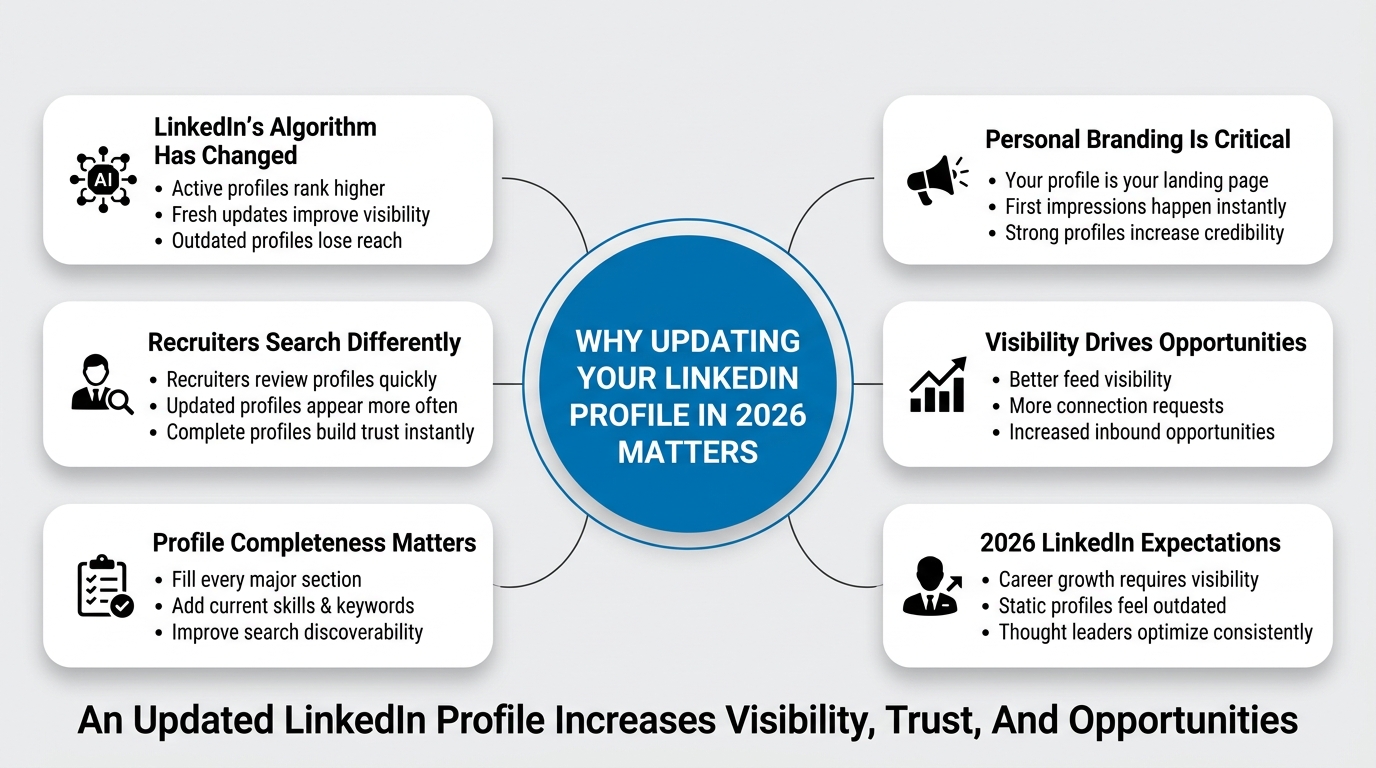
Your LinkedIn profile isn’t static. The platform itself evolves, the algorithm changes, recruiter behavior shifts, and what worked in 2024 might not move the needle today. Understanding why this update is critical will keep you motivated as you work through the checklist.
Algorithm Changes and Discovery
LinkedIn’s algorithm has become increasingly intelligent about matching users with relevant content, opportunities, and connections. When you update your profile with fresh information, complete sections, and current keywords, you signal to the algorithm that your profile is active and relevant. An outdated profile sits in search results far below actively maintained ones. Recruiters searching for candidates using LinkedIn’s recruiter tools look for profiles updated within the last three months. If your last activity was two years ago, you’re invisible to that search.
Beyond recruiter searches, profile completeness affects how often your posts and articles appear in your network’s feed. A profile with a clear headline, professional photo, and compelling summary gets algorithmic preference. The platform trusts complete profiles more than skeletal ones, and that trust translates to visibility.
Recruiter Expectations and Hiring Patterns
Recruiters are busier than ever. The average recruiter spends 45 seconds on an initial profile review. In those 45 seconds, they assess whether you’re worth a deeper look based on your headline, photo, current role, and profile completeness. An incomplete or outdated profile signals lack of engagement or, worse, that you’re not seriously engaged with your career growth. That’s a disqualifier before anyone reads your accomplishments.
Additionally, many hiring teams use LinkedIn’s advanced search filters to find candidates. These filters often weight profile completion heavily. When you fill in every section, use relevant keywords, and keep information current, you automatically appear more frequently in recruiter search results.
Personal Branding and Thought Leadership
If you’re building a personal brand or positioning yourself as a thought leader, your profile is your landing page. When someone discovers your article or follows your updates, the first thing they do is click on your profile. What they find there determines whether they engage further or move on. A thoughtfully optimized profile builds credibility immediately.
How to Update Your LinkedIn Profile Picture and Branding Elements
Your LinkedIn photo is the first impression millions might have of you. This isn’t the place for casual vacation shots or blurry headshots. Let’s talk about how to optimize this critical element.
Choosing the Right Profile Picture
Your profile picture should be a professional headshot taken in good lighting with a neutral or complementary background. The best photos show you smiling naturally, looking directly at the camera, with your head taking up about 60% of the frame. You want to look approachable and professional simultaneously.
Here’s what actually works: professional headshots outperform casual photos by a measurable margin. When your photo shows you in professional clothing, the engagement rate jumps. Avoid photos with multiple people, sunglasses, or heavy filters. LinkedIn’s algorithm actually flags heavily filtered photos and deprioritizes profiles with them because the platform wants authentic representation.
Consider these specifics for your photo based on your industry. If you’re in tech or creative fields, you can be slightly more casual, but still maintain professionalism. If you’re in finance, law, or consulting, a traditional formal headshot performs best. Regardless of industry, make sure your photo is recent. If your profile photo is from five years ago, update it immediately. People change, and a significant mismatch between your photo and reality damages trust.
The technical details matter too. Use a JPG or PNG file around 400×400 pixels. LinkedIn compresses images, so don’t use anything smaller. The photo should load quickly and look sharp on mobile devices, where many recruiters review profiles.
Setting Up Your Background Photo
Most professionals overlook the background photo, but it’s valuable real estate that affects how your profile appears on mobile devices and desktop. The background photo appears behind your profile information and can reinforce your personal brand or industry positioning.
Choose a background that complements your professional image without being distracting. If you work in technology, a subtle tech-themed background works. If you’re in creative fields, something visually interesting that reflects your aesthetic is appropriate. However, avoid anything that looks cluttered or unprofessional. A soft gradient, a subtle pattern, or a professional photo of your industry in action are all safe choices.
The recommended dimensions are 1500×500 pixels. Use a JPG file for faster loading. Ensure the background doesn’t obscure text when overlaid with your profile information. Test how it looks on mobile by viewing your profile on a phone browser.
Creating a Cohesive Visual Identity
Your photo and background should work together to create a cohesive visual identity. Think of your profile as a mini brand. The colors, tones, and professionalism level should align. If your background is vibrant and modern, your headshot should be equally contemporary. If your background is traditional, your photo should match that energy.
This visual consistency builds subconscious trust. When everything on your profile appears intentional and coordinated, people perceive you as serious about your professional image.
How to Update Your LinkedIn Headline to Attract Your Target Audience
Your headline is the single most impactful text element on your entire profile. It appears next to your name in search results, in notifications, and anywhere your profile is referenced. Most people waste this space with a simple job title. That’s a massive missed opportunity.
Moving Beyond Your Job Title
Your headline doesn’t have to be your job title. In fact, it shouldn’t be, unless you’re job searching specifically for that role. Instead, your headline should position you as someone solving a problem for a specific audience. This is where SEO thinking matters. Your headline should include keywords that recruiters, clients, or potential connections search for.
Here’s the difference between wasted and optimized headlines:
Weak: “Marketing Manager at TechCorp” Strong: “Marketing Manager | B2B SaaS Growth Strategist | 15+ Years Building Product-Qualified Leads”
The strong version tells a recruiter within three seconds what you specialize in, who you help, and what you’ve accomplished. It includes searchable keywords like “B2B SaaS,” “growth,” and “leads.” Someone searching for a growth marketer finds you. Someone searching for B2B expertise finds you. Your job title alone doesn’t do that.
Keyword Research for Your Headline
Think about how your ideal hiring manager, recruiter, or client would search for someone like you. What words would they type into LinkedIn’s search bar? Those words belong in your headline.
If you’re a software engineer specializing in backend development, include “backend engineer” or “full-stack developer.” If you’re a sales leader focused on enterprise deals, include “enterprise sales” or “B2B sales leader.” If you’re a UX designer specializing in SaaS, include “SaaS UX designer” or “product design.”
Use LinkedIn’s search bar to check what comes up when you search relevant terms. If the terms show positions similar to yours, they’re the right keywords. Include your current or target role, a specialization, and one accomplishment or area of expertise. That’s your formula: Role + Specialization + Value = Headline.
Including Personality and Differentiation
Your headline should be professional, but it can also include personality. If you’re known for mentoring, add “mentor.” If you’re actively consulting, add “advisor.” If you’re speaking at conferences, mention that. These additions humanize your headline and help you stand out when multiple people have similar roles.
You have 220 characters in your headline. Use all of them strategically. Every character matters. Avoid filler words like “passionate,” “dedicated,” or “seeking.” Those words take up valuable space without communicating substance.
How to Update Your LinkedIn Summary to Tell Your Professional Story
Your summary (also called the “About” section) is where you have space to tell your professional story, explain your approach, and connect emotionally with people viewing your profile. This section is skipped by most professionals, which means it’s an opportunity for you to stand out.
Structuring Your Summary for Maximum Impact
Your summary should be 2,600 characters of strategic storytelling, not your resume rewritten in paragraph form. Think of this as your elevator pitch with room to expand.
Start with a hook that addresses your reader’s biggest pain point or question. Instead of “I’m a project manager with 10 years of experience,” try “Do your projects consistently miss deadlines? I specialize in helping enterprise teams deliver complex initiatives on time and under budget.”
The hook should make someone scroll down and keep reading. You have about 150 characters before they need to see the payoff, so make them count.
Follow your hook with 2 to 3 paragraphs explaining your approach, methodology, or philosophy. This is where you differentiate from others doing similar work. What’s your unique angle? How do you think about your field differently?
Then include a clear statement of what you help achieve. Use specific outcomes. Instead of “help companies grow,” say “help B2B SaaS companies increase their monthly recurring revenue by 25% within 12 months through improved customer retention.” The specificity is persuasive.
Finally, end with a clear call-to-action. Tell people what you want them to do next. “If you’re scaling a product team and need someone who’s done it before, let’s talk,” is far stronger than simply ending your summary.
Adding Keywords Naturally Throughout
Your summary is one of the longest text fields on your profile, which means it’s valuable for SEO. Search engines and LinkedIn’s search algorithm index your summary text. When you include relevant keywords naturally, you improve your discoverability.
If you’re a UX designer specializing in e-commerce, include “e-commerce,” “UX design,” “user research,” and “conversion optimization” somewhere in your summary. Don’t force them, but place them naturally throughout your narrative. When someone searches “e-commerce UX designer,” your profile appears.
Formatting Your Summary for Readability
A dense block of text doesn’t get read. Use line breaks and short paragraphs to improve readability. LinkedIn’s formatting allows you to use line breaks effectively. Separate your story into digestible chunks.
Consider using emojis sparingly to break up text. One or two emojis can draw the eye to important sections without looking gimmicky. Use them to highlight what you specialize in or what problems you solve.
How to Update Your LinkedIn Experience Section with Quantified Results
Your experience section is where you prove your competence. Most people list responsibilities. That’s a wasted opportunity. Your experience section should showcase impact through numbers, outcomes, and results.
Rewriting Job Descriptions as Achievement Stories
For each position you’ve held, move beyond describing responsibilities to describing results. This is a simple but powerful shift.
Before: “Led marketing team at SaaS startup. Managed campaigns, oversaw content production, and coordinated with sales.”
After: “Led 5-person marketing team at Series B SaaS company. Built content strategy from scratch that generated 40% of monthly leads. Reduced customer acquisition cost by 32% while increasing deal velocity by 18% through improved nurture sequences and product-market fit messaging.”
The after version includes numbers, specific outcomes, and measurable impact. Someone reading this immediately understands what you’ve achieved and can visualize whether you could do similar work for their company.
For each role, identify your 3 to 5 most significant accomplishments. Quantify them whenever possible. Use metrics like revenue generated, costs reduced, team members managed, projects completed, revenue growth percentages, customer acquisition improvements, retention improvements, or engagement increases.
Balancing Multiple Accomplishments with Clarity
You might have ten significant accomplishments in a single role. You don’t need to list all of them. Instead, choose the 3 to 5 that best demonstrate impact and align with your current positioning. If you’re currently a sales leader, highlight sales results. If you’re emphasizing leadership, highlight team building and retention. Match your accomplishments to your target role.
Each accomplishment can be 1 to 2 sentences. Long paragraphs discourage reading. Scannable lists are better. Use bullet points (LinkedIn allows them in the experience section). Make each point substantive but brief.
Including Keywords in Experience Descriptions
Just like your summary, your experience descriptions are indexed for search. If you specialized in “agile project management” and “stakeholder management,” mention those terms specifically. Recruiters searching for candidates with specific methodologies or specializations find you through these keywords.
However, never force keywords. They should emerge naturally from describing what you actually did. If agile wasn’t your methodology, don’t mention it. Authenticity matters.
How to Update Your LinkedIn Profile Skills Section Strategically
The Skills section is underutilized by most professionals, yet it’s one of the most searchable sections on LinkedIn. This is where you make yourself discoverable to recruiters using specific skill filters.
Choosing Skills That Matter for Your Target Role
LinkedIn allows you to add 50 skills. You don’t need all 50, and having irrelevant skills actually dilutes your profile. Instead, choose 15 to 25 skills that directly support your positioning and target roles.
Prioritize skills that appear frequently in job descriptions for positions you want. If you’re a software engineer targeting backend roles, “Python,” “Java,” “system design,” and “microservices architecture” should be on your list. If you’re a marketing leader, “strategic planning,” “team leadership,” “B2B marketing,” and “go-to-market strategy” matter more than “Twitter.”
Order your skills strategically. The first 3 to 5 skills appear on your profile preview before someone clicks “show more.” Put your strongest, most marketable skills at the top.
Getting Endorsements That Boost Credibility
Skills become more valuable when they’re endorsed by others. LinkedIn’s algorithm recognizes that multiple people endorsing the same skill is a credibility signal. Skills with more endorsements appear higher in search results.
Don’t ask for endorsements outright, but when you endorse others’ skills, many will reciprocate. This mutual endorsement process happens naturally in professional networks. Additionally, when you update your profile with new skills, your network gets notified and often endorses them automatically.
Adding Skills That Reflect Your Growth
As you develop new skills, add them to your profile. This shows growth and keeps your profile current. If you’ve completed a certification, learned a new tool, or developed expertise in a new area, add it. Your profile should evolve as your career evolves.
How to Update Your LinkedIn Profile Credentials and Certifications Section
Certifications and credentials carry weight with recruiters and hiring managers. When relevant certifications appear on your profile, they become searchable signals that you have specific qualifications.
Adding Professional Certifications
If you hold certifications relevant to your field, add them all. This includes industry certifications, software training, and academic credentials beyond your degree.
When adding a certification, include the issuing organization, the date you earned it, and the credential ID if available. You can link to the credential’s verification page, which adds legitimacy. Recruiters can then verify your credentials directly, reducing trust barriers.
For example, if you’re a project manager with a PMP (Project Management Professional) certification, add it. If you’re a data scientist with machine learning certifications from Coursera or edX, list them. If you have Salesforce Admin certifications, include them.
Including Coursework and Continuous Learning
You can also add courses you’ve completed that don’t result in formal certifications but demonstrate commitment to your field. “Machine Learning Specialization (Andrew Ng, Coursera)” shows you’re actively learning, even without a formal credential.
However, be selective. A few high-impact courses matter more than dozens of low-value ones. Choose courses that align with your positioning and target roles.
Comprehensive LinkedIn Profile Update Checklist Table
Use this table as your actual checklist when updating your profile. Go through each item, assess your current profile, and make updates accordingly.
| Profile Section | Key Element | Update Action | Priority | Status |
|---|---|---|---|---|
| Photo & Branding | Profile Picture | Update with recent professional headshot | High | ☐ |
| Photo & Branding | Background Photo | Add cohesive background image (1500x500px) | Medium | ☐ |
| Headline | Primary Keyword | Include target role and specialization | High | ☐ |
| Headline | Value Proposition | Add specific accomplishment or expertise | High | ☐ |
| Summary | Hook Statement | Start with reader’s pain point | High | ☐ |
| Summary | Methodology/Approach | Explain your unique perspective | Medium | ☐ |
| Summary | Call-to-Action | Add clear next step for connections | Medium | ☐ |
| Experience | Job Descriptions | Replace responsibilities with achievements | High | ☐ |
| Experience | Quantified Results | Add metrics and numbers | High | ☐ |
| Experience | Media Attachments | Add articles, projects, or portfolio links | Medium | ☐ |
| Skills | Relevant Skills | Add 15-25 skills aligned to target role | High | ☐ |
| Skills | Skill Ordering | Move strongest skills to top | Medium | ☐ |
| Credentials | Professional Certifications | Add all relevant certifications | High | ☐ |
| Credentials | Verification Links | Link to official credential pages | Medium | ☐ |
| Education | Degree Information | Ensure accuracy and completion date | Medium | ☐ |
| Recommendations | Colleague Recommendations | Request from recent colleagues | High | ☐ |
| Activity | Recent Activity | Share or comment on industry content | Medium | ☐ |
| Open to Work | Status Update | Set to open to roles or opportunities | High | ☐ |
| Profile Visibility | Public Profile URL | Customize your LinkedIn URL | Medium | ☐ |
| Profile Visibility | Search Visibility | Ensure profile is searchable by recruiters | High | ☐ |
Beyond the Basics: Advanced LinkedIn Profile Optimization Strategies
Now that you’ve covered the fundamentals, let’s talk about optimization strategies that take your profile from good to exceptional.
Building a Strong Recommendation Section
Recommendations are social proof. When someone visits your profile and sees that multiple people have written substantive recommendations about working with you, it dramatically increases credibility. A profile with strong recommendations converts visitors to connections and opportunities at a significantly higher rate.
You should aim for 8 to 15 recommendations minimum. These should come from colleagues, direct reports, managers, and clients. Diverse recommenders carry more weight than recommendations all from the same person.
Here’s the key: don’t just collect recommendations randomly. Request recommendations from people who can speak specifically to your strengths aligned with your current positioning. If you’re positioning yourself as a sales leader, get recommendations from sales team members, managers who hired you for sales roles, and clients who saw your sales impact. If you’re a designer, get recommendations from product managers you worked with, engineers you collaborated with, and clients who benefited from your designs.
When requesting a recommendation, make it easy for the person by suggesting the specific angle you’d like them to focus on. Instead of a generic request, write: “I’m updating my profile to emphasize my experience building and mentoring high-performing sales teams. Would you be willing to write a recommendation about our work together on the east coast team?”
Leveraging Your Featured Section
The Featured section appears prominently on your profile and lets you showcase your best work. This could include articles you’ve written, presentations you’ve given, projects you’ve completed, media appearances, or content you’ve created.
Use this section to reinforce your positioning. If you’re a thought leader, feature your most important articles. If you’re showing portfolio work, feature your best projects. If you’ve spoken at conferences, feature video clips or slides.
Curate this section ruthlessly. Five high-impact featured items outperform twenty mediocre ones. Each item should reinforce your professional positioning.
Creating Content That Keeps Your Profile Active
One of the best ways to ensure your profile stays visible in LinkedIn’s algorithm is to stay active by sharing content. When you post, comment thoughtfully on others’ posts, and share industry insights, LinkedIn registers your account as active.
You don’t need to post daily. Quality over frequency. One substantive post per week outperforms seven surface-level shares. Your posts should provide value, showcase your expertise, or spark meaningful conversation in your industry.
When you post, include relevant hashtags and keywords that help your content reach your target audience. Use clear formatting with line breaks and short paragraphs so your post is easy to read on mobile.
Mobile Optimization and Profile Visibility Settings
With most people accessing LinkedIn on mobile devices, your profile needs to look excellent on a phone screen. It’s not enough to optimize for desktop.
Understanding How Your Profile Appears on Mobile
On mobile, the visual elements matter even more. Your profile picture, background photo, and headline are the first things people see. If your background photo obscures important text or if your photo is low quality, mobile viewers get a poor first impression.
Test your profile on multiple devices. View it on an iPhone and Android to ensure everything displays correctly. Check that your summary is readable, that your experience section scans well, and that all links function properly.
Customizing Your Public Profile URL
LinkedIn assigns you a generic public profile URL, but you can customize it to something more professional and memorable. Instead of “linkedin.com/in/andrew-smith-3847bx2,” you can claim “linkedin.com/in/andrewsmith.”
A clean, customized URL is more professional to share and easier for people to remember. It’s also slightly better for SEO since URLs with keywords rank slightly better. If your name has SEO value for your industry, use your name. If not, consider “linkedin.com/in/[firstname]-[role]” like “linkedin.com/in/andrew-salesdirector.”
Adjusting Privacy and Search Visibility Settings
Make sure your profile is fully searchable. LinkedIn allows you to control whether your profile appears in search results for different audience segments. For most professionals, you want to be visible to everyone.
Go to your privacy settings and ensure “Public Profile” is enabled. This makes your profile visible to people who search LinkedIn and even to search engines like Google. The more places your profile is discoverable, the better.
You can also control whether you’re “Open to Work,” which sends a signal to recruiters that you’re interested in opportunities. Even if you’re not actively job searching, setting this option increases recruiter outreach.
Using LinkedIn Profile Data to Inform Your Positioning
LinkedIn provides analytics about who views your profile, what your top performing content is, and who engages with your posts. Use this data to refine your positioning and update your profile strategically.
Analyzing Profile Visitor Patterns
LinkedIn shows you who views your profile (if they’re identified). Look at these patterns. Are your target audience members viewing your profile? If you’re trying to attract sales leaders and you’re getting views primarily from marketing directors, your positioning may need adjustment.
Additionally, LinkedIn shows which search keywords led people to your profile. If you notice that people are finding you through keywords you didn’t intend to rank for, that’s useful information. You can either refine your profile to focus on the keywords that matter most, or adjust your positioning based on how people are actually searching for someone like you.
Watching Engagement Patterns on Your Posts
When you share content, LinkedIn shows you detailed engagement metrics. Posts that generate comments, shares, and clicks tell you what your audience cares about. If you regularly post about sales strategy and get high engagement, that’s data validating your positioning in that area.
Use this data to refine your profile narrative and featured content. If posts about product management generate little engagement but posts about entrepreneurship generate a lot, emphasize the entrepreneurship angle in your profile.
Conclusion
Here’s the thing: updating your LinkedIn profile is not a one-time project. It’s an ongoing process of refinement and optimization. The profiles that generate the most opportunities are the ones that receive regular attention and improvement.
Start with the checklist provided above. Work through each section systematically. Don’t try to update everything in one sitting. Spend an hour on your headline and summary, another hour on your experience section, and continue from there. Quality updates done thoughtfully outperform rushed updates.
After you’ve completed the initial update, commit to reviewing your profile quarterly. Check whether your experience descriptions still reflect your best accomplishments, whether new skills should be added, and whether your headline still accurately positions you. This quarterly cadence keeps your profile fresh and ensures you’re staying visible.
The most important principle: your profile is not about you; it’s about the person reading it. Every update you make should answer the question: “Why should someone connect with me, hire me, or work with me?” When every section of your profile answers that question clearly and compellingly, opportunities follow.
Frequently Asked Questions
1. How often should I update my LinkedIn profile?
Review your profile quarterly to ensure information is current and accurate. Major updates to your job, skills, or positioning should be reflected immediately. Even small changes like a new profile photo or updated headline signal activity to LinkedIn’s algorithm, which can increase your visibility.
2. Does updating my profile trigger notifications to my network?
Yes, LinkedIn notifies your network of profile changes, particularly significant updates like a new headline, job change, or photo. Use this to your advantage. When you make substantial improvements to your profile, your network gets a subtle reminder that you’re actively building your professional presence.
3. What’s the optimal length for my LinkedIn summary?
Use up to 2,600 characters (the maximum allowed). However, don’t force yourself to use every character. Quality matters more than length. A compelling 1,500-character summary beats a padded 2,600-character one. Focus on clarity and engagement rather than word count.
4. Should I include a phone number or email in my LinkedIn profile?
Include your professional email in your profile or in the contact information section. This makes it easy for recruiters to reach you without sending a LinkedIn message. You don’t need to include your phone number on the profile itself, as recruiters will typically ask for it during initial contact.
5. How many skills should I actually have on my LinkedIn profile?
Quality over quantity applies to skills. Aim for 15 to 25 skills that genuinely represent your expertise. Having 50 random skills suggests you’re not strategic about your positioning. Focus on skills that appear in job descriptions for roles you want or that align with your current positioning.
6. Are recommendations or endorsements more important for my profile?
Recommendations carry more weight because they’re narrative and specific. An endorsement is a single click; a recommendation is someone taking time to write about your capabilities. Prioritize getting strong recommendations from credible sources, but endorsements add supporting credibility.
7. How do I make my LinkedIn profile stand out from competitors with similar experience?
Differentiate through your summary’s unique perspective, your achievement stories with specific numbers, and your positioning around a specific problem you solve. Most people list what they’ve done; differentiated profiles explain how and why they do it better than others.
8. Can I have multiple LinkedIn profiles if I have multiple careers?
LinkedIn’s terms of service don’t allow multiple profiles for the same person. However, you can update a single profile to reflect multiple areas of expertise. Use your headline and featured section to show different dimensions of your professional identity.
9. How important is LinkedIn for job searching compared to other platforms?
For most professional roles (especially in corporate, tech, sales, and marketing), LinkedIn is the primary platform recruiters use. A strong LinkedIn profile is essential for job searching. Other platforms matter, but LinkedIn should be your foundation.
10. What happens if I haven’t updated my profile in two years?
Your profile becomes less visible to recruiters and appears less frequently in search results. LinkedIn prioritizes active profiles. Even updating your profile with no substantive changes signals activity. Outdated profiles are often overlooked in favor of more recently updated ones.
11. Should my LinkedIn profile match my resume exactly?
Your LinkedIn profile should tell the same story as your resume but in a different format. Your resume is chronological and concise; your LinkedIn profile is narrative and detailed. The achievement-focused descriptions on LinkedIn can be longer and more comprehensive than resume bullets.
12. How do I know if my profile changes have improved my visibility?
LinkedIn provides profile analytics showing profile views, search appearances, and engagement metrics. Track these over time after making updates. You should see increased profile views within 1 to 2 weeks of significant updates. Use these metrics to guide future optimizations.