


LinkedIn has undergone a dramatic transformation over the past few years, yet many professionals still approach it as if it were merely a digital resume repository. They update their headline once annually, rarely share content, and express puzzlement when their network fails to generate meaningful opportunities. Meanwhile, a smaller but growing segment of users is strategically building genuine communities, attracting opportunities without traditional cold outreach, and establishing themselves as voices their industries actually listen to. The difference between these two groups isn’t luck or timing—it’s strategy.
The reality is both harder and simpler than most people realize: success on LinkedIn requires understanding how the platform actually functions in 2026, not how it operated three years ago. The algorithm has evolved, user behavior has shifted, and the most effective tactics have fundamentally changed. Most professionals are investing time on LinkedIn without a clear roadmap, which means their efforts generate minimal return. However, when time is invested strategically on this platform, it becomes one of the most valuable professional investments you can make—opening doors to opportunities, building authority, and creating genuine professional relationships at scale.
The stakes have never been higher. Your industry is moving faster than ever, and staying relevant requires more than a passive presence. Whether your goal is to accelerate your career trajectory, establish yourself as an authority in your field, generate qualified leads for your business, or simply remain visible and connected in a rapidly evolving landscape, LinkedIn offers a concrete pathway—but only if you know how to use it. Most professionals understand that the platform matters, yet they struggle to translate that understanding into concrete results.
The distinction between wasted time and valuable investment on LinkedIn comes down to clarity and approach. This guide provides exactly that: a comprehensive strategy for using LinkedIn effectively in 2026. It walks through every critical element—from optimizing your profile to building genuine networks, creating content that resonates, leveraging underutilized features, and measuring what actually matters. What you’ll discover is that effective LinkedIn strategy isn’t complicated, but it does require understanding the platform’s mechanics and committing to consistent, purposeful action.
Your LinkedIn Profile Is Your Resume: How to Optimize It for 2026
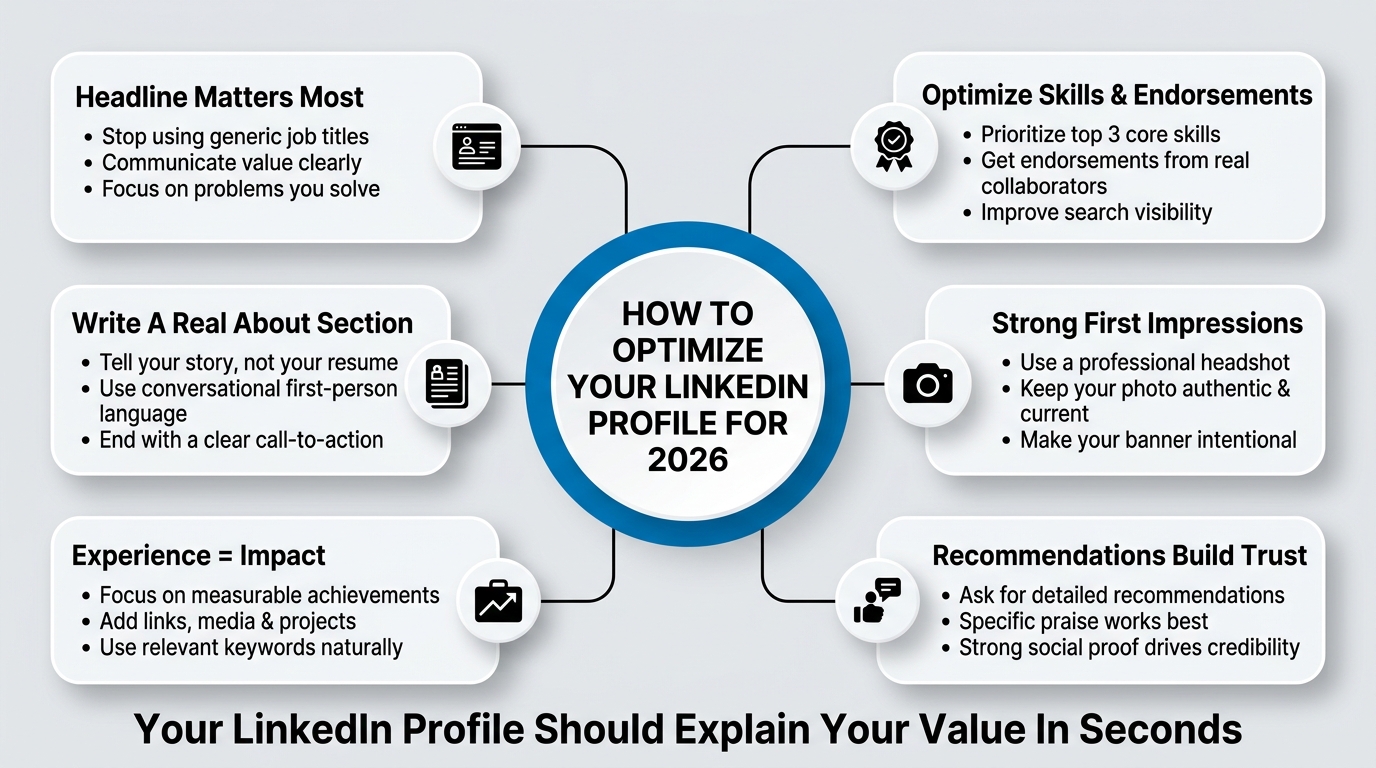
Your LinkedIn profile is the first impression. It’s also the last chance to convince someone that connecting with you is worth their time. Most professionals have profile optimization wrong. They think it’s about listing achievements. It’s actually about clarity, relevance, and specificity.
The Headline: Stop Using Your Job Title
Your headline appears in search results, next to your name in comments, and in every notification your connections see. A generic job title like “Marketing Manager at XYZ Corp” tells someone nothing about why they should care.
Instead, write headlines that communicate value. Here’s what works: your headline should answer one of three questions: What do you do that’s unusual or valuable? Who do you serve? What problem do you solve? A better headline might be “Marketing Manager helping B2B SaaS companies reach product-market fit” or “Tech Startup Advisor | Former Founder | Helping Teams Scale Revenue.”
LinkedIn gives you 220 characters. Use every one. Include a keyword or two naturally (like “LinkedIn strategy” if that’s your area), but prioritize clarity over keyword stuffing. The people searching for your expertise will find you. The people who don’t understand what you do will scroll past, and that’s fine.
Your headline is also one of the only places on LinkedIn that doesn’t get limited by the algorithm. So invest in it. Test different versions. Check your profile views and inbound messages to see which resonates.
About Section: Tell Your Story, Not Your Resume
The “About” section is where professionals fail almost universally. They paste their resume. Wrong approach.
Your About section has roughly 2,600 characters. Use it to tell a story that a recruiter, partner, or potential client actually wants to read. Start with what you care about. Not your job title. What do you genuinely care about in your field? What change do you want to see? What kind of people do you enjoy working with?
Here’s a structure that works: Start with your current focus or mission. Then briefly explain why you got here (what’s the origin story?). Then mention what you do, but tie it to the value it creates. Finally, end with a clear call to action. What should people do if they want to work with you, learn from you, or just stay connected?
For example:
“I help B2B SaaS companies grow through authentic community building on LinkedIn. After spending five years in traditional sales roles and watching cold outreach tank ROI, I realized there had to be a better way. Now I work with founders and marketing leaders to build LinkedIn strategies that actually generate qualified opportunities without feeling salesy. If you’re trying to grow your network without becoming a spammer, or build your personal brand while staying true to yourself, let’s connect.”
This section should be written in first person, conversational, and genuine. LinkedIn’s algorithm actually rewards profiles where people spend time reading the About section. So give them a reason to read it.
The Experience Section: Make Your Work Sound Like Work That Matters
When you list your experience, don’t just copy your job description. Translate it into impact. For each role, include 3 to 4 bullet points. Focus these on:
- What you accomplished that was measurable (increased sales by 35%, built a team from scratch, launched a new product line)
- What you learned that applies broadly
- How the work was relevant to the problems your future network cares about
Add links, media, and examples where relevant. If you wrote something published, link to it. If you led a project, link to it. If you have press mentions, include them. LinkedIn’s profile richness actually factors into how often your profile appears in searches.
Also, use keywords in your experience descriptions. Not keyword stuffing, but naturally. If you’re looking to be found by people searching “LinkedIn content strategy,” and you’ve done that work, name it. LinkedIn’s search function is surprisingly decent at matching profiles to keywords found in experience sections.
Skills and Endorsements: The Section Almost No One Does Right
LinkedIn’s Skills section is underutilized. Most people add 5 to 10 generic skills and call it done. The opportunity: your top 3 skills are the ones people will actually search for when they’re looking for you. So choose carefully.
The order matters. LinkedIn displays your top skills more prominently. If you want to be found for “LinkedIn strategy,” that should be in your top 3. If you also want to be visible for “content marketing,” same thing.
Also: skip endorsements from people who don’t actually know you or your work. A Linked endorsement from someone you barely know is worse than no endorsement. The value in skills is when they’re endorsed by people who’ve actually worked with you and can vouch for them.
Get your team, colleagues, clients, or collaborators to endorse your top skills. If you’re a LinkedIn strategist, having 50 endorsements for “LinkedIn” from actual clients carries weight. An endorsement from someone you connected with last week does not.
Photo and Banner: Don’t Underestimate First Impressions
Your profile photo is the first thing someone sees. Professional headshot, good lighting, genuine expression. You don’t need it to be styled like a corporate photoshoot. You do need it to be clear, current (taken in the last 2 years), and authentic.
The banner (that background image behind your profile name) is a chance to communicate something about who you are or what you stand for. Use it. Some people put their mission statement. Some put an image that represents their work. Some use their company branding if they’re a founder or leader. Whatever you do, make it intentional.
Recommendations: Social Proof That Actually Influences People
LinkedIn recommendations are the modern version of professional references. They’re also read way more often than most people realize. When someone is considering connecting with you, joining your network, or working with you, they look at these.
Get them. Actively ask 3 to 5 people you’ve worked closely with to write recommendations. Write detailed ones for them first (they’ll usually reciprocate). A generic “Great to work with” recommendation helps. A specific one like “Sarah brought our content strategy from 2% engagement rate to 14% in six months by completely rethinking our audience and messaging approach” actually tells someone something.
Aim for 10 to 15 recommendations spread across your most relevant skills and experiences. Recommendations from other professionals in your field carry more weight than recommendations from people outside it.
How to Use LinkedIn for Genuine Networking Without Spamming
This is where most professionals either do nothing or do everything wrong. They either ghost LinkedIn entirely or they spam connection requests and generic messages to everyone in their network.
The truth is harder and simpler at the same time: networking on LinkedIn works when you approach it like actual networking. You know, the kind where you remember people and actually want to help them.
Connection Strategy: Quality Over Velocity
LinkedIn allows roughly 10,000 connections. Most professionals who care about the platform have 500 to 2,000. The best networkers have high-quality networks within that range. What’s a high-quality connection? Someone you’d actually be interested in talking to, helping, or learning from.
Don’t send connection requests to everyone who has your job title. Connect with people you might actually want to know. That means: people in your industry who are doing interesting work, potential collaborators, peers at companies you respect, thought leaders you follow, or people in adjacent fields who have complementary skills.
When you send a connection request, always include a personal message. LinkedIn allows up to 300 characters. Use most of it. Reference something specific. “I noticed you wrote about LinkedIn communities, and I’m building our team’s strategy around that right now” is infinitely better than nothing. “Let’s connect” is an empty request that many people will ignore.
Look at your connection acceptance rate. If it’s below 50%, your connection requests are either too generic or you’re connecting with people who aren’t actually interested in your network. Adjust. Make your requests more personal. Be more selective about who you’re reaching out to.
The Art of Messaging: Start With Value, Not Asks
Most LinkedIn messages fail because they ask something of the recipient. “Would you be open to a call?” “Can I pick your brain?” “I’d love to connect.” All asks. No value.
Flip it. Start by offering something. That might be: information related to what they’re working on, an introduction to someone in your network, a piece of content they might find relevant, genuine feedback on something they’ve published, or just an insightful comment on their work.
Give first. The reciprocity principle works on LinkedIn just like everywhere else. When you show genuine interest in someone’s work and offer something first, they’re much more likely to respond and to actually help you when the time comes.
Also, keep your first message concise. Two to three sentences max. You’re not asking them to commit to a relationship in that first message. You’re asking them to respond. A short, genuine message that shows you’ve actually paid attention to their work gets a response at a much higher rate than a novel asking for their time.
Building Genuine Relationships at Scale: The Follow-Up
One message doesn’t build a relationship. Consistency does. If you come across something someone you respect has written, comment on it. Not a generic “Great post!” comment. An actual response that shows you thought about what they said. Ask a question. Add to the conversation.
This is one of the only ways to build genuine relationships with people at scale on LinkedIn. You can’t meet 100 people for coffee. You can engage meaningfully with their content over time. And here’s what happens: eventually, you have a relationship. When you reach out, they actually know who you are.
The number of professionals who benefit from this is shockingly small. Most people just consume content. A tiny fraction actually engage. That tiny fraction stands out dramatically in people’s feeds and in people’s minds.
LinkedIn Groups and Communities: The Undervalued Network Multiplier
LinkedIn has Communities (formerly Groups), and most professionals either haven’t heard of them or think they’re irrelevant. They’re not. A good community in your field is a place where your actual target network hangs out and has discussions.
Join 3 to 5 communities where your ideal network congregates. If you’re in B2B SaaS, there are communities for that. If you’re in sales leadership, there are communities for that. If you’re a freelancer, there are communities for that. Spend time there. Contribute. Answer questions. Introduce people who should know each other.
A community is low-pressure networking. You’re not reaching out cold. You’re just being helpful in a place where your people gather. Do that consistently, and your reputation grows. Opportunities come.
The Networking Strategy Snapshot: Create Your System
Here’s what your weekly LinkedIn networking should look like if you’re serious about it:
- Sunday night: Spend 15 minutes reviewing connection requests and accepting the relevant ones. Send 5 to 10 new, personalized connection requests to people you actually want to know.
- Throughout the week: When you see something someone in your network posted that you have a genuine thought on, comment. Don’t just like it. Actually engage.
- Once a week: Send 2 to 3 thoughtful messages to people you’ve been meaning to stay in touch with. No asks. Just checking in, sharing something relevant, or making an introduction.
- Twice a month: Spend 20 minutes in one of your communities. Answer questions. Share expertise. Make connections between people.
This is not time-consuming. It’s consistent. And it builds a network that’s actually valuable because people actually know you.
LinkedIn Content Strategy: Building Authority and Engagement
Creating content on LinkedIn is not about vanity metrics. It’s about positioning yourself as someone who thinks clearly about your field, understands the problems people face, and has useful perspectives to share.
Most professionals publish nothing. Some publish constantly but nothing lands. The gap is strategy.
What Actually Gets Engagement on LinkedIn in 2026
LinkedIn’s algorithm has changed significantly since 2023. Engagement is no longer just about reach. The algorithm now weighs time spent viewing content heavily. It rewards posts that keep people reading, not posts that get quick reactions.
Here’s what that means: thoughtful, slightly longer-form posts outperform short ones. Posts that are specific and detailed outperform generic ones. Posts that create genuine conversation outperform posts that are just information dumps.
The highest-performing posts on LinkedIn in 2026 follow roughly this structure:
- A hook that makes someone stop scrolling (a contrarian take, a question, a specific vulnerability, or a surprising stat)
- A story or specific example (not generic advice, but something that actually happened)
- A clear insight or lesson
- An open-ended question that invites people to add their perspective in the comments
Let’s say you’re in sales. Instead of posting “Here are 5 tips to improve your sales process,” post: “I spent $40,000 on sales training that didn’t move the needle. Here’s what actually changed our numbers.” Then tell the story of what happened. Then ask “What’s the most surprising thing you’ve learned about your own sales process?”
The second version will get 10 times the engagement because it’s specific and it invites conversation. The algorithm rewards that conversation.
Types of Content That Work
Different types of content have different purposes on LinkedIn. To build authority and engagement, you need variety:
Thought Leadership Posts (15% of your content): These are your perspective on something happening in your industry. You’ve noticed a trend, you disagree with conventional wisdom, or you’re calling out something everyone’s thinking but nobody’s saying. These establish you as someone who thinks.
Case Studies and Lessons Learned (25% of your content): Specific wins, failures, or unexpected learnings from your work. These are trusted because they’re real. “We cut content production time by 40% by switching to this process. Here’s how” performs way better than generic tips.
Educational Content (30% of your content): Teaching something you know well. How to do something, how to think about something, common mistakes in your field. This attracts people who are trying to get better at what they do.
Questions and Conversation Starters (15% of your content): Direct questions that invite your network to share their experience. “What’s the biggest mistake you see people making when they try to build personal brand on LinkedIn?” You’ll get dozens of comments, and each one teaches you something.
Shared Content with Your Take (15% of your content): When something relevant happens in your field, share it with your own perspective. Don’t just repost. Add your thinking. LinkedIn’s algorithm prioritizes original thoughts even when they’re attached to other people’s content.
How to Build Ideas for Content
Most professionals say they don’t have enough ideas to post regularly. That’s not true. You just haven’t set up your idea capture system.
Here’s what works: keep a running list. Whenever you notice something relevant to your field, write it down. When you solve a problem at work, note how you solved it. When someone asks you something in a meeting, that’s a signal that other people have the same question. When you read something that changes how you think, capture your take on it.
You need roughly 15 to 20 content ideas before you start publishing. Then when you have that bank, you post 2 to 3 times per week (not every day, not once a month). That frequency is enough to stay visible without seeming like you’re living on the platform.
The Visual Dimension: Make Your Content Readable
Most LinkedIn posts with long paragraphs get scrolled past. The same post broken into clear sections with white space gets read.
When you write a post, format it:
- Short hook first
- Two to three blank lines
- Short sections or bullet-point ideas (3 to 5)
- Two to three blank lines
- A closing thought or question
You can also add images, videos, or carousels. A carousel (a multi-slide post) performs exceptionally well on LinkedIn currently. If you have a framework, a process, or a list of lessons, a carousel is often better than a text post.
If you’re not naturally a visual designer, you don’t need to be. Simple carousels with text on a background color work fine. Tools like Canva are built for this and take 10 minutes to figure out.
Leveraging LinkedIn Features Most Professionals Ignore
LinkedIn has launched a dozen features in the past three years. Most professionals don’t know they exist. The ones who do have an unfair advantage.
LinkedIn Documents: Share Long-Form Thinking Without Leaving LinkedIn
LinkedIn Documents let you post longer articles directly on LinkedIn without needing an external blog or newsletter. You can write 3,000-word essays and publish them as a LinkedIn Document. They get indexed, they show up in feeds, and they drive visibility.
Here’s the advantage: most content on LinkedIn is skimmable. Documents are for people who actually want to think deeply about something. If you write something substantial every month as a Document, you attract the people in your network who actually want to engage with your thinking at depth.
LinkedIn Live: Building Real Relationships Through Video
LinkedIn Live lets you go live and broadcast to your network. Most professionals think of this as something company leaders do, or something too complicated for regular people.
It’s not. A LinkedIn Live can be just you, talking to your audience for 30 minutes about something you know. No producer, no complex setup, no script required.
The beauty of going live: real-time interaction. People comment as you’re speaking. You can answer questions on the fly. It’s genuine connection in a way that recorded video isn’t. Once a quarter, or even once a month if you’re serious about this, going live for 30 minutes builds loyalty and visibility.
LinkedIn Newsletter: Keep Your Audience Updated
LinkedIn lets you start your own newsletter directly on the platform. This is underutilized. If you have insights you want to share regularly with people who follow your work, a newsletter is the right home for it.
A weekly or bi-weekly newsletter on LinkedIn can be 500 to 1,000 words. It builds a dedicated audience of people who opted in specifically to hear from you. That’s a different level of attention than someone who happens to see your post in their feed.
LinkedIn Creator Mode: Unlock More Visibility and Tools
If you’re serious about building authority on LinkedIn, switch to Creator Mode. It changes your profile slightly: you get access to LinkedIn Stories (now called Share Updates), you can see more analytics, and you’re optimized for being followed rather than just connected to.
Creator Mode also changes what’s visible on your profile. Instead of just connections, you see followers. This is important because followers don’t require mutual connection. Someone can follow your content without connecting with you directly.
LinkedIn Articles: The Original Long-Form Home
LinkedIn Articles (sometimes called Pulse Articles) were LinkedIn’s original long-form feature. They still exist, but few people use them now that Documents exist. Articles can be good if you’re posting formal thought leadership, but Documents are often the better choice for most professionals.
Measuring What Matters: LinkedIn Metrics That Actually Predict Growth
LinkedIn is full of vanity metrics. Profile views, post impressions, how many people liked your post. None of these directly predict actual growth in your professional life.
The metrics that matter are different.
Primary Metrics: What Actually Matters
Engagement Rate on Your Posts: Not total impressions, but engagement rate. What percentage of people who see your post interact with it? If 1,000 people see your post and 50 engage, that’s 5%. Over time, if your engagement rate on posts is above 3%, you’re building an audience that pays attention. Anything below 1% means your content isn’t resonating.
Profile Views and Source: How many people are viewing your profile each week? More importantly, where are they coming from? Are they finding you through search (which means your profile is optimized for keywords)? Are they coming through post engagement (which means your content is driving interest)? Are they connections coming back (less valuable)? Knowing the source tells you what’s working.
Inbound Messages: How many messages are you getting? Not all messages are valuable. A DM from someone spamming you isn’t a win. But genuine inbound messages from people in your target network is the truest sign that your profile and content are working. If you’re not getting any inbound messages, your profile isn’t making people want to talk to you.
Profile Search Appearances: LinkedIn tells you how many times your profile appeared in search results. If this number is going up, you’re optimizing correctly. If it’s flat, people aren’t searching for whatever keywords are on your profile. This tells you either to update those keywords or to build more credibility in those areas.
Relationship Depth: Not measured on LinkedIn, but track this yourself. Of your connections, how many would actually take a call with you? How many have replied when you’ve reached out? This is your real network strength. Track it.
Vanity Metrics to Ignore
Profile views in absolute terms don’t matter. 100 profile views could come from random people or from your actual target network. Context matters. Engagement metrics that are disconnected from anything: high post impressions that don’t translate to follows or messages aren’t valuable.
Likes are nice, but comments are what matter. A post with 10 likes and 50 comments is outperforming a post with 100 likes and 5 comments. Comments mean people are thinking, not just reacting.
Setting Up Your Dashboard
Once a week, check:
- Engagement rate on your last week of posts
- Profile views and where they’re coming from
- Your top-performing post from the week (by engagement rate, not just impressions)
- Any new inbound messages (and where they came from, what triggered them)
Once a month, check:
- Profile search appearances trend
- Profile view trend
- Whether you’ve grown followers
- The quality of comments you’re getting (are they thoughtful or generic?)
Once a quarter:
- Step back and assess: is my strategy working? Am I getting closer to my goals on LinkedIn?
LinkedIn Mistakes Professionals Make in 2026
Some of the biggest obstacles to LinkedIn success aren’t about what to do. They’re about what not to do.
Mistake 1: Treating LinkedIn Like Facebook
LinkedIn is a professional network, but it’s also increasingly a platform where people share real parts of their lives. The mistake is swinging too far in either direction. Either you’re purely professional (stiff, unrelatable, forgettable) or you’re treating it like Facebook (oversharing personal details, controversy-seeking posts, off-brand content).
The right approach: be professional but human. Share real perspectives, real lessons learned, real struggles. But keep them work-relevant. “I spent the morning debugging our ad strategy” is relatable. “Here’s my personal political take” is off-brand.
Mistake 2: Posting Inconsistently Then Giving Up
Many professionals post once every few months, get discouraged at the lack of visible results, and quit. LinkedIn growth isn’t linear. It’s compounding. Your first 10 posts might get almost no engagement. Your 30th post might get 100 comments because by then you’ve built an audience.
Commit to 8 to 12 weeks of consistent posting (2 to 3 times per week) before you evaluate whether it’s working. Many people quit at week 3 before they’ve even had time to see results.
Mistake 3: Connecting With Everyone, Engaging With No One
A massive network of people you don’t interact with is a network you’re not using. It’s better to have 500 real connections you actually engage with than 5,000 connections you’ve never talked to.
Also: never send out bulk messages to your whole network. Personalized, individual outreach gets responses. Blasted messages don’t.
Mistake 4: Being Overly Promotional
Your profile is not a sales page. Your posts are not sales pitches. The moment someone feels sold to on LinkedIn, they disconnect.
Instead: share what you know, help people, build genuine relationships. Sales follow naturally. The reverse rarely works.
Mistake 5: Neglecting Your Existing Network
The people you’re currently connected with are your most valuable asset on LinkedIn. Yet most professionals put all their energy into meeting new people. The best play is to strengthen existing relationships.
Go through your connections once a month. Is there anyone you haven’t talked to in a while? Reach out. Congratulate people on work anniversaries or promotions. Comment on their posts. A network you actively maintain grows in value exponentially.
Mistake 6: Ignoring Analytics Until It’s Too Late
If you’re posting regularly but not checking which posts work and which don’t, you’re flying blind. Spend 10 minutes once a week looking at which posts engaged your audience and which didn’t. Then do more of what works.
You’ll quickly notice patterns. Maybe your audience engages more with advice than with news. Maybe they respond to personal stories more than to frameworks. Maybe they like longer posts more than short ones. Let the data guide your strategy.
Mistake 7: Using LinkedIn Like a Job Board
LinkedIn can help with job searching, but if you’re actively looking, don’t just update your headline and wait. That’s not a job search strategy. That’s hoping.
Instead: tell your network you’re open. Make 10 to 20 direct connections with people you’d want to work with or who might know opportunities. Engage with content from companies you’d like to join. Show up as interested and thoughtful.
Opportunities on LinkedIn follow visibility and relationship. Neither happen by accident.
Conclusion
How to use LinkedIn isn’t complicated. It’s just different from what most professionals are doing. You need a profile that’s clear and specific. You need a strategy for building a real network, not just a big one. You need to show up consistently with content that matters.
Most importantly: LinkedIn compounds. The value of everything you do grows over time. The person who invests seriously in LinkedIn for two years has an unfair advantage over someone who’s been on the platform for ten years but treating it passively.
Start with your profile. Make it specific. Make it real. Then commit to 8 to 12 weeks of consistent engagement. Comment on content. Send thoughtful messages. Share something of value once or twice a week.
By the end of 12 weeks, you’ll have a network that actually knows you. People will start reaching out. Opportunities will surface. You’ll realize how to use LinkedIn is less about the platform and more about actually showing up.
Your next step: block 2 hours on your calendar this week. Spend the first hour redesigning your profile based on what you’ve read here. Spend the second hour writing out 15 to 20 content ideas you could share over the next few months.
Then commit to posting twice a week for 12 weeks. Not perfectly. Just consistently. That’s it. The compounding begins from there.
Frequently Asked Questions
Q: How many connections should I have on LinkedIn?
A: There’s no magic number. The quality of your network matters infinitely more than the size. A network of 500 people who know you and respect your work beats 10,000 random connections. That said, if you’re under 500, grow your network intentionally. If you’re over 2,000, audit it and consider if all those connections are valuable to maintain.
Q: Is LinkedIn better for job searching or business development?
A: Both, but differently. For job searching, LinkedIn shows your career progression and connects you with recruiters and hiring managers. The advantage is lower friction. For business development and sales, LinkedIn helps you build authority and relationships. The advantage is that decision-makers actually check their LinkedIn profiles regularly. Your use case determines your strategy, but the fundamentals (good profile, consistent visibility, genuine engagement) apply to both.
Q: How often should I post on LinkedIn?
A: Two to three times per week is the optimal frequency. It keeps you visible without looking like you live on the platform. If you post once every few weeks, your content gets buried. If you post five times a day, you look spammy. Two to three is the sweet spot.
Q: What’s the best time to post on LinkedIn?
A: Conventional wisdom says Tuesday through Thursday, 7 to 9 AM, during business hours. But here’s the truth: the platform is global. Your audience might be in a different timezone. Post when your specific audience is likely to be online. Check your analytics after a few weeks. LinkedIn shows you when your audience is most active.
Q: Should I use hashtags on LinkedIn?
A: Sparingly. One to three hashtags per post can help with discoverability. More than that looks spammy. LinkedIn’s algorithm is already strong at understanding your content without hashtags, so don’t lean on them as your main strategy.
Q: How do I grow my followers on LinkedIn?
A: Post consistently with value. Followers come from visibility and engagement. If your content is worth reading, people follow you. There’s no shortcut. The mistake people make is trying to optimize for followers instead of engagement. Optimize for genuine engagement, and followers naturally follow.
Q: What should I do if I get negative comments on my posts?
A: Don’t delete them (unless they’re spam or violate platform rules). Respond professionally and directly. A thoughtful response to criticism often looks better than the post itself. It shows confidence and willingness to engage. People respect that. Deleting negative comments makes you look insecure.
Q: Can I use LinkedIn for direct sales?
A: Yes, but indirectly. LinkedIn is best for warming cold relationships and demonstrating expertise. Cold pitching people in their DMs usually doesn’t work. Building visibility through content and genuine engagement, then offering your product or service when it’s relevant, does work.
Q: Should I use LinkedIn automation tools?
A: Be careful. LinkedIn’s terms of service prohibit most automation. That said, tools that help you organize leads, schedule posts, or track engagement are generally fine. Tools that automate messages or fake engagement get accounts banned. The risk isn’t worth it. Do the work manually or use only tools that LinkedIn explicitly allows.
Q: How do I handle LinkedIn recruiter outreach?
A: If you’re open to opportunities, respond to legitimate recruiter messages. If you’re not interested, ignore them or reply professionally declining. If you’re passively interested, set up a call but ask more questions before committing. Many recruiter outreaches are low quality, so filter aggressively. Your time is your most valuable asset.
Q: What’s the difference between connecting and following on LinkedIn?
A: Connections require mutual approval (usually). Follows are one-way. When you switch to Creator Mode, following becomes more prominent. Followers see your content in their feed without needing to be your connection. Both have value. Connections are for your network. Followers are for your audience.
Q: How long does it take to see results from a LinkedIn strategy?
A: Real results take 8 to 12 weeks of consistent effort. Some things happen faster (you might get comments on posts within days). But meaningful change in your network, visibility, and inbound opportunities takes 3 months of consistency. Most people quit before the 12-week mark, which is why they never see results.
Q: Is LinkedIn worth the time investment compared to other platforms?
A: For professional growth, yes. LinkedIn is where decision-makers are. Twitter (X) is good for thought leadership in tech but doesn’t convert to opportunities as reliably. Other platforms are even less relevant professionally. If you’re serious about your career or business, LinkedIn is worth the investment. If you’re looking to maximize reach, you might diversify. But for actual professional impact, LinkedIn is the primary platform.
Q: How do I handle LinkedIn criticism or conflict?
A: Stay professional. Reply thoughtfully, not defensively. You don’t need to convince the person criticizing you. You need to show observers that you handle disagreement maturely. Most people respect that. Heated arguments, insults, or defensive responses hurt your reputation. Cool disagreement is a sign of confidence and maturity.
Q: Can I use LinkedIn if I’m just starting out in my field?
A: Absolutely. In fact, starting early is an advantage. Document your learning journey. Share what you’re figuring out. Build relationships with people further ahead. The combination of humility and visibility is powerful. You don’t need to be an expert to use LinkedIn effectively. You just need to be authentic.
Q: What’s the best way to get LinkedIn recommendations?
A: Ask directly. Don’t be shy. Reach out to people you’ve worked closely with and ask if they’d be willing to write a recommendation. Offer to write one for them first (most will reciprocate). Be specific about what you’d like them to mention. Make it easy for them. Specific, detailed recommendations carry way more weight than generic ones.
Q: Should my LinkedIn profile be exactly the same as my resume?
A: No. Your resume is a formal document. Your LinkedIn profile is a marketing document about you as a professional. Your resume lists jobs. Your LinkedIn profile tells your story and communicates your value. They’re related but not the same. Your LinkedIn profile should be warmer, more specific to your actual value, and more strategically written than your resume.