


LinkedIn is not just a job board or a networking tool for corporate professionals. For nonprofits, it has quietly become one of the most powerful platforms available — a space where mission-driven organizations can connect with donors, corporate sponsors, board candidates, and community advocates who are actively looking to make a difference. Unlike Instagram or Facebook, where content competes with personal posts and entertainment, LinkedIn’s professional context means that when someone engages with your nonprofit’s content, they are often in a decision-making mindset.
The question is not whether your nonprofit should be on LinkedIn. The question is whether you are using it strategically enough to unlock its full potential. This guide walks you through everything — from building your page and crafting outreach messages to publishing content that drives real fundraising results and partnership opportunities.
Why LinkedIn Is a Game-Changer for Nonprofits
Before diving into tactics, it helps to understand why LinkedIn works so well for nonprofits specifically. The platform’s user base consists largely of professionals, executives, and decision-makers — people who have disposable income, corporate budgets, or institutional influence. According to LinkedIn’s own data, over 65 million decision-makers use the platform, along with 10 million C-suite executives.
For nonprofits, this translates directly into access to:
- Major individual donors who are professionals looking to give back
- Corporate social responsibility (CSR) managers who control partnership budgets
- Foundation officers and grant professionals
- Board candidates with the skills and networks your organization needs
- Volunteers with specialized expertise in law, finance, marketing, and technology
The professional tone of LinkedIn also lends credibility. When you share a campaign or an impact story on LinkedIn, it is received as a serious, trustworthy communication — not just another social media post.
How to Build a Strong LinkedIn Foundation Before You Outreach
You would not invite someone to a house that is not ready to receive guests. The same logic applies to LinkedIn. Before you begin any linkedin outreach for nonprofits and fundraising efforts, your organizational presence must be polished, complete, and compelling. Think of your LinkedIn presence as your nonprofit’s digital headquarters — the place where donors, partners, volunteers, and board candidates land when they want to learn more about you. If that space looks incomplete, outdated, or generic, you lose credibility before the conversation even begins.
This section breaks down every single element you need to get right before you send a single outreach message or publish a single post.
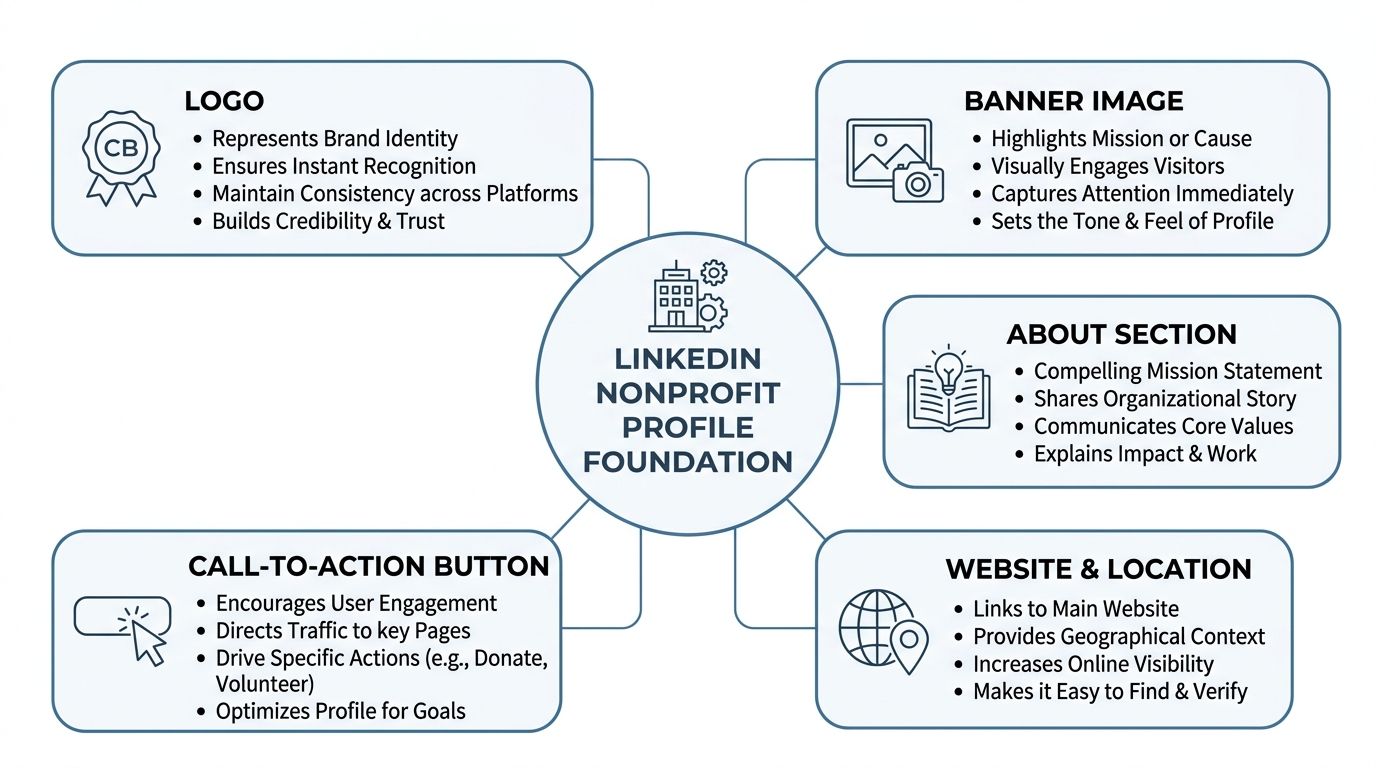
Your Organization Page: The Digital Front Door of Your Nonprofit
Your LinkedIn organization page is not just a profile — it is the first impression you make on every potential donor, corporate partner, and volunteer who searches for you or stumbles across your content. Just like a nonprofit’s physical office communicates professionalism and trustworthiness, your LinkedIn page communicates whether your organization is credible, active, and worth engaging with.
Here is a deep dive into every element that matters:
A High-Resolution Logo as Your Profile Image
Your logo is the visual anchor of your entire LinkedIn presence. It appears next to every post you publish, every comment you leave, and every search result your organization appears in. A blurry, pixelated, or incorrectly sized logo sends an immediate signal of carelessness — even if your work in the community is extraordinary.
LinkedIn recommends a profile image size of 300 x 300 pixels for organization pages. Always upload a PNG file with a transparent or clean background so it looks sharp on both light and dark display settings.
If your nonprofit does not yet have a professionally designed logo, this is worth investing in before anything else. Free tools like Canva offer nonprofit-friendly logo templates, and organizations like the Taproot Foundation sometimes connect nonprofits with pro bono graphic designers. Your logo is not just a visual — it is a trust signal. People associate visual polish with organizational competence, whether consciously or not.
Also consider how your logo looks at a very small size, since LinkedIn shrinks profile images significantly in the feed and search results. A logo with dense text or intricate details becomes unreadable at small sizes. A clean, simple, bold mark always performs better in this context.
A Professional Banner Image That Reflects Your Mission Visually
The banner image — also called the cover photo — is the large horizontal image that stretches across the top of your organization page. It is the single largest piece of visual real estate on your profile, yet it is one of the most commonly neglected elements for nonprofits.
LinkedIn recommends a banner image size of 1128 x 191 pixels. This space should never be left blank or filled with a generic stock photo. Instead, use it intentionally to communicate your mission at a glance.
Effective nonprofit banner images typically include one or more of the following:
- A real photograph of your team, your beneficiaries (with appropriate permissions), or your programs in action
- Your mission statement or tagline overlaid in clean, legible text
- A campaign message or call to action if you are actively running a fundraising drive
- Statistics that demonstrate impact — for example, “12,000 meals served in 2024” or “500 families housed this year”
The banner image should be updated periodically — at least two to three times per year — to reflect current campaigns, seasonal initiatives, or major milestones. A banner that has not changed in two years signals that your page is not actively managed, which quietly undermines confidence in your organization.
Think of the banner and logo together as a visual handshake. Within two seconds of landing on your page, a visitor should understand what your organization does and feel something — whether that is hope, urgency, admiration, or solidarity with your cause.
A Fully Written About Section That Explains Who You Are, Who You Serve, and What Impact You Create
The About section is where most nonprofits make their biggest mistake. They treat it like a Wikipedia entry — a dry recitation of their founding year, their legal status, and a generic description of their programs. This approach wastes the most valuable text space on your entire LinkedIn page.
Your About section has a 2,000-character limit, which is enough space to tell a compelling, structured story. Here is how to use it strategically:
Opening line — the problem statement. Start with the challenge or injustice your organization exists to address. Do not start with your organization’s name or founding date. Start with the community and the need. For example: “Every year, thousands of children in our city enter kindergarten without access to books, safe housing, or nutritious food — not because their families don’t care, but because the systems designed to support them have failed.”
Second paragraph — your solution. Explain clearly and concisely what your organization does in response to that problem. Avoid jargon. Write as if you are explaining your work to an intelligent professional who has never heard of you.
Third paragraph — your impact. Use real numbers. How many people have you served? What outcomes have you achieved? Impact data transforms vague goodwill into credible evidence of effectiveness. Donors and corporate partners are increasingly sophisticated — they want to see results, not just intentions.
Closing line — your invitation. End with a direct invitation for the reader to take an action: visit your website, follow your page, reach out to your team, or learn about partnership opportunities.
Revisit and update your About section at least once every six months to ensure the data, programs, and messaging reflect your current work.
Your Website URL, Location, and Organization Size
These fields feel minor but they are not. Every piece of incomplete information on your profile creates a small moment of friction or doubt for a visitor. Here is why each one matters:
Website URL — This is your most direct pathway from LinkedIn to your donation page, your program information, and your contact details. Without it, interested visitors have to search for you separately, and many will not bother. Make sure the link goes to a well-maintained, mobile-friendly website. If your site is outdated or broken, fix that before driving LinkedIn traffic to it.
Location — Donors and corporate partners who are looking to invest locally need to know where you operate. Your location also affects how you appear in LinkedIn search results when people look for organizations in their region. List your headquarters location and, if relevant, note in your About section if you serve multiple regions or operate nationally.
Organization size — LinkedIn asks for an employee count range. Be honest and accurate here. This field matters because it helps potential partners and donors understand the scale of your organization, which affects their expectations for reporting, accountability, and communication. It also affects how LinkedIn categorizes your page in its internal systems.
Sector and organization type — Make sure you have selected “Nonprofit” as your organization type and chosen the most accurate industry category. This affects your discoverability in LinkedIn’s search and recommendation systems. Choosing the wrong category can mean missing out on followers who are specifically looking for organizations in your cause area.
A Custom Call-to-Action Button
LinkedIn allows organization pages to add a button near the top of their profile that directs visitors to take a specific action. The available options include: Visit website, Contact us, Learn more, Register, and Sign up.
For most nonprofits, the best choice depends on your current strategic priority:
- If you are focused on building awareness, use “Learn more” linking to your impact page or annual report
- If you are running a fundraising campaign, use “Visit website” linking directly to your donation page
- If you are focused on partnership development, use “Contact us” so interested businesses can reach your team immediately
- If you are recruiting volunteers or board members, use “Sign up” linking to an application or interest form
Update this button seasonally or when your priorities shift. A button that says “Register” pointing to an event that ended six months ago actively damages your credibility. Treat this button the same way you would treat a front desk sign in a physical office — it should always point people toward something current and relevant.
Staff and Leadership Profiles: Your Most Powerful Amplification Network
Here is a truth that many nonprofits miss entirely: your organization page’s reach is inherently limited compared to the combined reach of all your staff and leadership personal profiles. LinkedIn’s algorithm distributes content from personal profiles significantly more broadly than content from organization pages. This means your people are your most powerful organic marketing channel — and it costs absolutely nothing to activate them.
Linking Personal Profiles to the Organization Page
When a staff member or board member lists your nonprofit as their current employer in their experience section and links it to your organization page, several things happen automatically:
- Their profile appears in your organization’s “People” tab, which is one of the first places a visitor looks when evaluating your team
- Every post or article they publish from their personal profile can be shared to your organization’s audience and vice versa
- Their network sees their affiliation with your organization, which means every connection they have is passively exposed to your nonprofit’s name regularly
Walk your team through the simple process of editing their experience section to link their current role to the official organization page. This takes less than two minutes per person but has lasting effects on your collective visibility.
Updating Headlines to Reflect Role and Mission
A LinkedIn headline is the short line of text that appears directly below a person’s name on their profile and in every search result, post, and comment they appear in. By default, LinkedIn populates this field with a person’s job title. But the headline field allows up to 220 characters, and the smartest professionals — and nonprofit communicators — use every character intentionally.
Instead of a headline that simply reads “Executive Director,” encourage your team to write something like:
“Executive Director at [Nonprofit Name] | Fighting Food Insecurity in Rural Communities | Connecting Donors with Measurable Impact”
This expanded headline does three things simultaneously. It identifies the person’s role, communicates your mission to anyone who sees their profile or their comments, and includes searchable keywords that help the right people find them. When your development director comments on a post by a corporate CSR manager, that manager sees the headline immediately — and if it speaks to their priorities, they are far more likely to visit the profile and follow the link to your organization.
Invest one team meeting in reviewing everyone’s LinkedIn headlines and updating them together. Provide a template and examples. The collective impact of having five to ten staff members with mission-aligned headlines operating across LinkedIn is far greater than any single piece of content your organization page can publish.
Sharing Organizational Content From Personal Accounts
This is the simplest, highest-impact habit you can build across your team. When your organization page publishes a post, ask every staff member and board member to share it from their personal account within the first hour of publication.
Why the first hour? Because LinkedIn’s algorithm makes critical decisions about how widely to distribute content in the first 60 to 90 minutes after posting. A surge of engagement — even just shares and likes — in that window signals to the algorithm that the content is valuable, which triggers broader distribution to people outside your existing followers.
Beyond the algorithmic benefit, personal shares add a layer of authenticity that organization page posts cannot replicate. When a donor sees your executive director share a post and add a personal comment like, “This story represents exactly why I do this work every day,” it creates an emotional connection that a brand post alone never could.
Create a simple internal system for this — a WhatsApp group, a Slack channel, or even a weekly email that alerts staff when a new post has been published and asks them to engage with it. Make it easy, make it quick, and make it a habit. The nonprofits that are most visible and most trusted on LinkedIn are not necessarily the ones with the biggest budgets — they are the ones whose entire team shows up consistently and amplifies each other’s voices.
The Foundation Is Everything
Every outreach message you send, every content piece you publish, and every partnership conversation you begin on LinkedIn will be evaluated — consciously or unconsciously — against the backdrop of your organizational presence. A polished, complete, and active LinkedIn foundation does not just make you look professional. It makes every subsequent action you take more effective, because the credibility is already there before the conversation starts.
Take the time to build it right. It is the single most important investment you will make in your LinkedIn strategy.
What is LinkedIn’s Algorithm for Maximum Reach
Before you start publishing content, it is worth understanding how LinkedIn decides what to show people. The algorithm rewards:
- Early engagement — posts that receive likes and comments within the first hour perform significantly better
- Native content — documents, videos, and images uploaded directly to LinkedIn outperform external links
- Conversation — posts that generate comments are distributed more widely than those that only receive likes
- Consistency — accounts that post regularly are shown preferential treatment over sporadic posters
This means that for your nonprofit, the goal is not to go viral overnight. It is to build a consistent rhythm of quality content that generates genuine engagement from your existing network, which then expands your reach organically over time.
Content Strategy That Drives Fundraising and Awareness
Content is the backbone of everything you do on LinkedIn. It is how donors discover you, how partners evaluate your credibility, and how your community stays engaged between campaigns. Here is a breakdown of content types that work best for nonprofits:
| Content Type | Purpose | Posting Frequency |
|---|---|---|
| Impact Stories | Emotional connection, donor retention | 2–3x per week |
| Data & Statistics | Credibility, thought leadership | 1–2x per week |
| Behind-the-Scenes | Humanizes your team, builds trust | 1x per week |
| Campaign Announcements | Direct fundraising, event promotion | As needed |
| Volunteer/Donor Spotlights | Community appreciation, social proof | 1x per week |
| LinkedIn Articles | SEO, deep thought leadership | 2–4x per month |
| Video Content | Highest engagement, storytelling | 1x per week |
| Native Documents/Carousels | Education, step-by-step guides | 2–3x per month |
Impact Stories
These are the most powerful posts in your content arsenal. An impact story follows a simple structure: here was the challenge, here is what we did, and here is the result. When written from the perspective of a real person your organization has helped (with their permission), these stories create emotional resonance that inspires giving.
Keep them concise on the post itself — three to five paragraphs — and use a strong opening line that stops people from scrolling. Something like: “Maria came to us with nothing but a bag and two children. Eighteen months later, she owns a small business.”
Thought Leadership Content
LinkedIn is uniquely suited for establishing your executive director or program leaders as experts in your cause area. When your leaders share insights about sector trends, policy changes, or community needs, they attract followers who care about those issues — which is exactly the audience you want for fundraising and partnership conversations.
Encourage leadership to publish long-form LinkedIn Articles at least twice a month. These articles are indexed by search engines and can bring in entirely new audiences beyond your existing followers.
How to Use LinkedIn for Non-Profit Fundraising & Partnership Outreach Through Direct Messaging
Direct outreach is where LinkedIn truly differentiates itself from other platforms. The ability to send a personalized message directly to a potential donor or corporate partner — without needing their email address — is a feature no other major platform offers at this scale.
The Right Mindset for Outreach
Before writing a single message, shift your mindset away from transactional thinking. LinkedIn outreach for nonprofits and fundraising is not about blasting a pitch to hundreds of strangers. It is about starting genuine conversations with people who are already aligned with your cause — even if they do not know it yet.
Think of every message you send as the beginning of a relationship, not the end of a sales funnel.
Identifying the Right People to Contact
LinkedIn’s search functionality is remarkably powerful for prospecting. You can search by:
- Job title (e.g., “CSR Manager,” “Philanthropy Director,” “Vice President of Community Relations”)
- Industry (healthcare, finance, technology)
- Geography (your city, state, or region)
- Company size (useful when targeting corporate partners with larger giving budgets)
- Shared connections (warm introductions are always more effective)
Start by identifying 20 to 30 high-potential contacts per month rather than trying to message hundreds of people at once. Quality and personalization will always outperform volume in nonprofit outreach.
Anatomy of an Effective Outreach Message
Here is a framework that works consistently well for nonprofit outreach on LinkedIn:
Step 1 — Connection Request Note (300 characters max) Keep it brief, personal, and non-transactional. Mention something specific about their work or interests that relates to your cause.
Example: “Hi Sarah — I noticed your work on corporate sustainability initiatives at [Company]. Our nonprofit works in exactly that space and I’d love to connect.”
Step 2 — First Message After Connection (no ask) Thank them for connecting. Share something of value — a recent impact report, a relevant article, or a brief insight about your work. Ask a genuine question about their interests.
Step 3 — Second Message (the soft introduction) Share a specific story or data point that connects your work to their professional interests. This is where you begin to draw a line between what they care about and what you do.
Step 4 — Third Message (the ask) Only after establishing rapport should you make a specific, reasonable ask — whether that is a 20-minute call, a partnership exploratory conversation, or information about their company’s giving programs.
Building Corporate Partnerships Through LinkedIn
Corporate partnerships are one of the most valuable and sustainable funding sources for nonprofits. LinkedIn is the ideal platform for initiating these relationships because it is where CSR teams, marketing directors, and executive leadership are already spending professional time.
Finding Corporate Partners
Use LinkedIn’s company search to identify businesses in your region or industry that:
- Have a stated CSR or sustainability mission
- Employ people in your target demographic or community
- Have recently posted about giving, volunteering, or social impact
- Share values that align with your cause area
Once you identify a company, look at who works there in relevant roles. CSR managers, community relations directors, and foundation program officers are your primary targets. Look at their recent activity — what do they post about? What do they comment on? This intelligence makes your outreach far more personalized and effective.
What to Offer in a Partnership Conversation
Before reaching out to a corporate prospect, prepare a clear value proposition. Companies partner with nonprofits for several reasons:
| What Companies Want | What Nonprofits Offer |
|---|---|
| Employee engagement opportunities | Volunteer programs and skill-based giving |
| Brand visibility and community goodwill | Logo placement, co-branding, media mentions |
| Tax-deductible giving options | Official donation receipts and documentation |
| Alignment with ESG goals | Measurable social impact data and reports |
| Staff development | Board service and leadership opportunities |
Go into every conversation ready to discuss what you bring to the table, not just what you need from them.
Using LinkedIn Events and Live Features for Fundraising
LinkedIn Events is an underused tool for nonprofits. You can create virtual events directly on the platform and invite your entire network — and beyond — at no cost.
Consider using LinkedIn Events for:
- Annual fundraising galas streamed live on LinkedIn
- Donor appreciation webinars where you share program outcomes
- Panel discussions featuring community leaders and cause experts
- Grant writing or development workshops that attract professional audiences
- Volunteer information sessions targeting skilled professionals
LinkedIn Live, the platform’s live streaming feature, is particularly valuable because LinkedIn notifies your followers when you go live, dramatically increasing visibility. Nonprofits that use LinkedIn Live consistently report higher engagement rates than standard posts.
Board Member and Volunteer Recruitment on LinkedIn
Recruiting the right board members can transform a nonprofit’s capacity, credibility, and fundraising power. LinkedIn is the most efficient tool available for this kind of targeted recruitment.
When posting a board opening or volunteer opportunity, be specific about what skills and experiences you are looking for. Vague posts asking for “passionate individuals” attract lower-quality responses than posts that say: “Seeking a finance professional with CPA credentials and experience in nonprofit audit oversight.”
Use LinkedIn’s job posting feature (which has a nonprofit pricing option) to list open board positions. Additionally, reach out directly to individuals whose profiles indicate relevant expertise — attorneys, accountants, marketers, and technology executives who are already active in civic or philanthropic causes.
LinkedIn Groups and Community Engagement
LinkedIn Groups are spaces where professionals gather around shared interests, industries, or causes. For nonprofits, they serve two purposes: finding people already engaged in your cause area, and positioning your organization as a thought leader within relevant communities.
Search for groups related to:
- Your specific cause (e.g., “Environmental Nonprofits Network,” “Youth Development Professionals”)
- Fundraising and development (e.g., “Nonprofit Fundraising Professionals”)
- Your geographic region (“Chicago Nonprofit Leaders,” “Bay Area Social Impact”)
Within these groups, focus on contributing value before promoting your organization. Answer questions, share resources, comment on discussions. Over time, consistent engagement builds name recognition and trust — which makes your outreach messages far more likely to receive a response.
Analytics: Measuring What Actually Matters
Posting content and sending messages without tracking results is like fundraising without keeping records. LinkedIn provides a robust analytics dashboard for organization pages that shows you:
- Follower growth over time
- Post impressions and reach for each piece of content
- Engagement rate (likes, comments, shares as a percentage of impressions)
- Visitor demographics — job function, industry, seniority of people viewing your page
- Follower demographics — who is already in your audience
Use these metrics monthly to identify what types of content generate the most engagement and what topics attract the follower demographics most aligned with your donor and partner profiles.
| Metric | What It Tells You | Target Benchmark |
|---|---|---|
| Follower Growth Rate | Community building momentum | 5–10% monthly growth |
| Engagement Rate | Content resonance | 2–5% per post |
| Post Impressions | Reach and visibility | Grow 15% quarterly |
| Profile Views (Personal) | Outreach effectiveness | Track after each campaign |
| InMail Response Rate | Outreach message quality | 25–35% is strong |
Mistakes Nonprofits Make on LinkedIn
Even well-intentioned nonprofits make avoidable mistakes on LinkedIn. Here are the most common ones to watch out for:
Treating LinkedIn like Facebook. LinkedIn audiences expect professional, substantive content. Highly casual posts or purely emotional appeals without data or context tend to underperform.
Asking too soon in outreach. Sending a donation request or partnership pitch in the first message is the fastest way to get ignored. Always lead with value and relationship.
Neglecting the organization page. Many nonprofits focus entirely on personal profiles and forget that their organization page is the first impression for anyone who searches for them directly.
Posting inconsistently. Posting five times one week and then disappearing for a month confuses the algorithm and your audience. A steady cadence of three to four posts per week consistently outperforms bursts of activity.
Ignoring comments. Every comment on your post is an opportunity to deepen a relationship. Replying to comments signals to both the algorithm and your audience that you are actively engaged.
Conclusion
LinkedIn is one of the most underutilized tools in the nonprofit sector, yet it offers something rare: direct access to the professionals, executives, and decision-makers who have both the capacity and the interest to support your mission. Whether you are building relationships for major gifts, approaching corporate partners for cause-related sponsorships, or recruiting board members who can open doors, LinkedIn provides the infrastructure to do it all — authentically and at scale.
The key is patience and consistency. This is not a platform where you post once and expect donations to roll in. It is a platform where organizations that show up regularly, contribute genuine value, and treat outreach as relationship-building — rather than pitching — build something truly durable over time.
Start with one priority: clean up your organization page this week. Then build your content calendar, identify your first 20 outreach targets, and begin. The nonprofits doing the most effective LinkedIn outreach for nonprofits and fundraising are not the ones with the biggest budgets — they are the ones with the most intentional strategy and the most human approach to connection.
Frequently Asked Questions
Q: Does LinkedIn work for small nonprofits with limited staff?
Absolutely. You do not need a large team to be effective on LinkedIn. Even a single staff member dedicating three to four hours per week to content and outreach can generate meaningful results over time. Start small and be consistent.
Q: How many connection requests should we send per week?
LinkedIn recommends staying under 100 connection requests per week to avoid account restrictions. For nonprofits, a more focused approach of 20 to 30 highly targeted, personalized requests per week is far more effective anyway.
Q: Should we use LinkedIn Premium or Sales Navigator?
For most nonprofits, the free version of LinkedIn provides sufficient tools. LinkedIn Sales Navigator can be valuable for organizations doing high-volume major donor prospecting, but it is best introduced once your organic strategy is already working.
Q: How long does it take to see results from LinkedIn fundraising outreach?
LinkedIn is a long-term relationship platform. Most nonprofits begin to see meaningful traction — new partner conversations, donor inquiries, or increased page engagement — within three to six months of consistent effort. The organizations that stick with it beyond that window tend to see compounding returns.
Q: Can we run fundraising campaigns directly on LinkedIn?
LinkedIn does not have a native donation feature like Facebook. However, you can use LinkedIn to drive traffic to your donation pages, promote crowdfunding campaigns, and steward relationships that lead to offline gifts. Sponsored content can also amplify campaign reach to targeted professional audiences.
Q: What is the best time to post on LinkedIn for nonprofits?
Research consistently shows that Tuesday through Thursday mornings, between 8 AM and 10 AM in your local time zone, generate the highest engagement on LinkedIn. Mid-week lunch hours (12 PM to 1 PM) also perform well.