


You spent weeks planning the perfect webinar. The topic is sharp, the speakers are credible, the slides are polished. But when registration day arrives, the numbers trickle in slower than you hoped. Sound familiar?
The problem is rarely the webinar itself. It is almost always the promotion strategy — or more specifically, the absence of a LinkedIn-first promotion strategy.
LinkedIn is not just another social media platform you check off your promotional checklist. For B2B marketers, it is the single most powerful channel for webinar promotion available today. With over one billion members globally, and a user base that skews heavily toward professionals, decision-makers, and industry leaders, LinkedIn gives you direct access to exactly the kind of people who register for and attend B2B webinars.
But here is the thing: most marketers treat LinkedIn like a billboard. They post the registration link once, maybe twice, and wonder why seats are not filling up. Effective LinkedIn webinar promotion is a system — built on the right content, the right channels within the platform, the right timing, and the right outreach approach.
This guide walks you through that entire system, from the foundation you need to lay weeks before your event to the post-webinar strategy that keeps the momentum going long after the live session ends.
How LinkedIn Can Supercharge Your Webinar Promotion
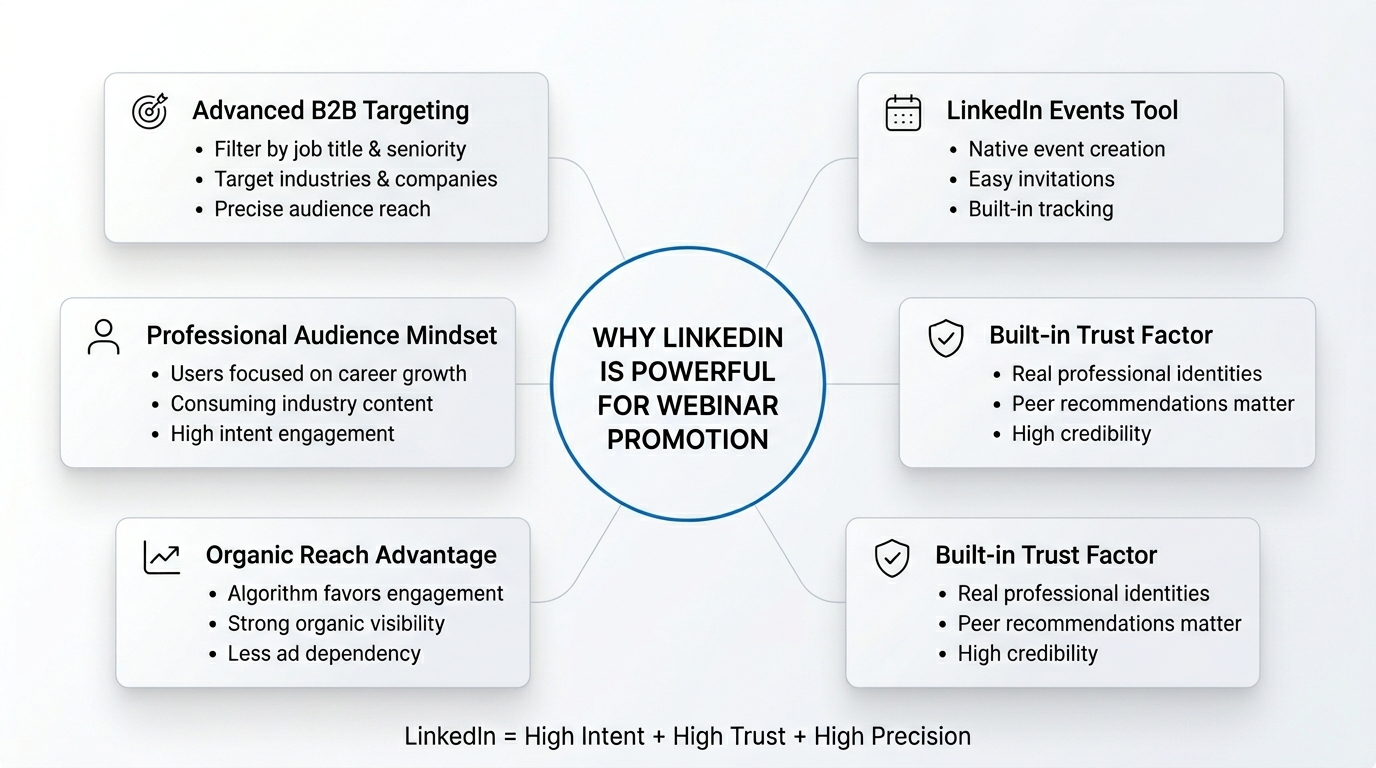
Before diving into tactics, it is worth understanding why LinkedIn is structurally better suited for B2B webinar promotion than any other platform.
The audience is already in a professional mindset
When someone opens LinkedIn, they are not looking at holiday photos or viral dance videos. They are reading industry news, engaging with thought leadership content, and actively looking for ways to grow professionally. That mindset makes them far more receptive to a webinar invitation than someone scrolling through Instagram or Twitter.
Targeting is unmatched for B2B
No other platform lets you filter an audience by job title, seniority level, company size, industry, and even specific companies — all at once. Whether you are trying to reach CFOs at mid-market SaaS companies or HR managers at enterprise manufacturing firms, LinkedIn can get you there organically and through paid promotion.
Trust is built into the platform
People on LinkedIn share their real professional identity. When a credible peer or industry leader shares your webinar, the endorsement carries genuine weight. Unlike anonymous social sharing, LinkedIn recommendations feel personal and professional at the same time.
The LinkedIn algorithm favors content that sparks conversation
Unlike platforms where reach is almost entirely driven by paid ads, LinkedIn still rewards thoughtful, engaging organic content with meaningful reach. A well-written post from your company page or a speaker’s personal profile can reach thousands of highly relevant professionals without spending a single rupee.
LinkedIn Events is a purpose-built tool that most marketers underuse
LinkedIn has a native Events feature that allows you to create a dedicated event page, invite your connections, and have interested attendees follow along for updates — all within the platform. Most marketers are not using it nearly enough.
When you combine all of these structural advantages — professional mindset, precise targeting, built-in trust, organic reach potential, and native event tools — you get a platform that is purpose-built for promoting B2B webinars.
Easy Ways to Use LinkedIn to Promote Your Webinar (Before You Get Into the Full Strategy)
Before breaking down the full step-by-step system, here are the core levers you will be pulling throughout your LinkedIn promotion effort. Think of these as the fundamental building blocks everything else is built on.
Keep your followers consistently updated
Your company page followers and your personal network follow you because they find your content relevant. Use that relationship by giving them early access, behind-the-scenes previews, speaker spotlights, and topic teasers — not just the registration link.
Activate your partners and co-hosts
If you are hosting the webinar with a sponsor, a co-presenting brand, or even a well-known speaker, their LinkedIn network is an extension of your promotional reach. A single post from a speaker with 20,000 followers can drive more registrations than a week of company page posts.
Tap into LinkedIn Groups
There are thousands of active LinkedIn Groups where your target audience gathers to discuss industry challenges. These groups are often overlooked but can drive highly qualified registrations when you engage genuinely — not just by dropping links.
Use direct outreach thoughtfully
LinkedIn gives you access to direct messaging, connection requests, and InMail. When used carefully and personally, these tools let you invite the most relevant professionals in your network one-on-one — which converts at a much higher rate than broadcast posts.
These four levers — consistent updates, partner amplification, group engagement, and direct outreach — form the tactical core of LinkedIn webinar promotion. Every section below expands on these and adds additional layers.
Part 1: Lay the Groundwork Before You Start Promoting
Before you write your first LinkedIn post about your webinar, you need to build a solid foundation. This groundwork determines whether your promotion efforts will reach the right people with the right message, or whether you’ll waste effort broadcasting to an audience that doesn’t care about your webinar. The better your preparation, the more efficient your promotion will be.
Define Your Target Audience on LinkedIn Specifically
Most webinar marketers have a vague sense of their audience: “marketing professionals” or “HR decision-makers.” But LinkedIn demands more precision than that, because the platform gives you the tools to be precise — and if you do not use them, you are wasting your reach.
Before you write a single post, answer these questions:
- What job titles does your ideal attendee hold? (VP of Marketing, Head of Talent Acquisition, Chief Revenue Officer)
- What industries are they in?
- What company sizes are they working at?
- What are they actively talking about on LinkedIn right now?
- What kind of content do they engage with in their feed?
This research shapes everything: the language you use in your posts, the angles you take in your content, the groups you join, and the people you reach out to directly.
Spend time on LinkedIn itself doing this research. Look at the profiles of your best past attendees. Read the posts of influencers in your niche. See what vocabulary your audience uses and mirror it back in your webinar title, posts, and outreach messages.
Craft a Title That Stops the Scroll
Your webinar title is doing heavy lifting the moment it appears in someone’s LinkedIn feed. A generic title like “Marketing Strategy Webinar 2026” will get ignored. A specific, outcome-driven title will get clicks.
A strong B2B webinar title on LinkedIn typically does one of three things:
- Promises a specific, measurable outcome — “How to Cut Your CAC by 30% Without Increasing Ad Spend”
- Raises a sharp, relevant question — “Why Your Lead Nurturing Emails Are Getting Ignored (And What to Do Instead)”
- Signals exclusive, timely insight — “The 2026 B2B Buyer Report: What 5,000 Decision-Makers Really Want”
Test your title by asking: if this appeared in my LinkedIn feed from a brand I respect, would I click? If the answer is not an enthusiastic yes, rewrite it.
Part 2: Build a Registration Page That Converts LinkedIn Traffic
Your registration page is where your LinkedIn promotion efforts convert into actual attendees. A perfectly promoted webinar will fail to deliver results if the registration page doesn’t effectively convert the traffic you drive to it. Understanding how LinkedIn users behave when they land on a registration page is critical to building one that actually works.
Why LinkedIn Traffic Behaves Differently
When someone clicks your webinar link from LinkedIn, they arrive at your registration page with a specific context. They have just read a professional post, they are in work mode, and they are making a quick judgment about whether this webinar is worth 45 to 90 minutes of their time.
That means your registration page needs to do a few things exceptionally well:
Reinforce the value immediately. The headline on your landing page should echo the promise made in your LinkedIn post. If your post said “Learn the 3 frameworks top SaaS companies use to reduce churn,” your landing page headline should say something very close to that — not something vague like “Join Our Upcoming Webinar.”
Show speaker credibility upfront. LinkedIn users are especially sensitive to credibility signals. Display speaker photos, titles, and company names prominently. If a speaker has a strong LinkedIn presence, consider linking to their profile.
Minimize friction. Every additional field in your registration form is a reason for someone not to complete it. Name, email, and job title are usually sufficient. Company name is acceptable if you need it for lead scoring. Asking for phone number, annual revenue, or other sensitive fields at this stage will tank your conversion rate.
Make the page mobile-responsive. A significant portion of LinkedIn traffic comes from mobile devices. If your registration page is clunky on a phone screen, you are losing registrations.
Track LinkedIn Traffic Separately
Always use UTM parameters for links you share on LinkedIn. Create separate UTMs for your company page posts, personal profile posts, LinkedIn ads, InMail campaigns, and LinkedIn Events. This lets you measure exactly which LinkedIn activity is driving registrations so you can double down on what works and cut what does not.
A basic UTM structure might look like:
?utm_source=linkedin&utm_medium=organic&utm_campaign=webinar-june2026&utm_content=company-page
Part 3: Activate Your LinkedIn Owned Channels Fully
Your Company Page
Your LinkedIn Company Page is the official voice of your brand on the platform. It should be the first channel you activate when promoting a webinar, but it should not be the last.
Start promoting at least three to four weeks before the event. Do not lead with “Register Now” — lead with curiosity, context, and value. Here is a simple content arc for your company page over a four-week promotion window:
| Week | Content Type | Goal |
|---|---|---|
| Week 4 (Before Event) | Teaser post — hint at the topic, raise a pain point | Build awareness |
| Week 3 | Speaker spotlight post with bio and insight preview | Build credibility |
| Week 2 | “What you’ll learn” post with bullet-point takeaways | Drive intent |
| Week 1 | Registration reminder with social proof (e.g., “500 already registered”) | Create urgency |
| Day Before | Final reminder post with logistics (time, link, what to expect) | Maximize last-minute sign-ups |
| Day of Event | “We’re live today” post with direct link | Capture last-minute audience |
Each post should have a clear, single call to action: click the link to register. But the body of the post should lead with value, not the ask.
Use LinkedIn Events — The Most Underused Feature for Webinar Promotion
LinkedIn Events is a native feature that lets you create a dedicated event page within LinkedIn itself. Think of it as a mini landing page that lives on the platform and appears in your followers’ feeds, notifications, and even search results.
Here is why you should always create a LinkedIn Event for your webinar:
- Attendees can click “Attend” directly on LinkedIn, which sends them a notification reminder before the event
- You can post updates to the event page that notify all interested attendees
- The event appears in LinkedIn search for people looking for industry content
- Other users can share the event, expanding your organic reach
To get the most out of LinkedIn Events, invite your first-degree connections personally — especially those who match your target audience profile. LinkedIn lets you send invitations directly from the event page. You can invite up to 1,000 connections per week, so prioritize strategically.
Personal Profiles of Speakers and Key Team Members
Here is a truth most B2B marketers know but consistently underact on: personal profiles on LinkedIn almost always outperform company pages in terms of organic reach and engagement. The LinkedIn algorithm is designed to prioritize content from individual people over branded pages because content from people feels more authentic and trustworthy.
This means your speakers, your executives, your sales leaders, and your subject matter experts are sitting on a goldmine of promotional potential — if you activate them properly.
The key word is “properly.” Asking someone to copy-paste a marketing message from your content team is not activation — it is inauthentic, and LinkedIn audiences can tell the difference. Instead:
- Give speakers talking points and let them write in their own voice
- Share the registration link along with a suggested angle that feels natural to that person
- Encourage them to share a genuine personal reason they are excited about the topic
- Ask them to engage with comments on their post, not just post and disappear
A speaker with 10,000 LinkedIn followers who posts authentically about your webinar can drive more registrations from that single post than a month of company page activity.
LinkedIn Newsletter and Long-Form Articles
If your company page has a LinkedIn Newsletter, your webinar is a natural fit for a dedicated edition. LinkedIn Newsletters have a significant advantage over email newsletters in one specific way: LinkedIn notifies all of your subscribers when a new edition is published, which means your reach is built into the platform itself.
Write a newsletter edition that goes deep on the webinar topic — not just a promotional notice, but genuine thought leadership content that stands on its own. Include a registration CTA naturally within the piece. Readers who find the content valuable will be highly motivated to attend the live session.
Similarly, publishing a long-form LinkedIn Article that explores your webinar’s core topic gives you additional organic search visibility within LinkedIn. People searching for content on that topic may discover your article and, through it, your webinar.
Part 4: Leverage LinkedIn Groups and Community Spaces
LinkedIn Groups are one of the most underrated channels for webinar promotion. These are dedicated spaces where professionals gather around shared interests, industries, or challenges — which means the audience inside a relevant group is pre-qualified by definition.
The key to using LinkedIn Groups effectively is to not lead with promotion. Groups are community spaces, and dropping a registration link as your first contribution will get you ignored at best, removed at worst.
Instead, follow this approach:
Step 1: Join three to five highly relevant groups where your target audience is active. Look for groups with regular posting activity, not just high member counts — a 5,000-member group with daily discussions is more valuable than a 50,000-member group that has not seen a post in months.
Step 2: Spend one to two weeks contributing genuinely. Answer questions, share perspectives, engage with others’ posts. Build a reputation as a helpful participant before you ask for anything.
Step 3: Share your webinar as a resource, not an advertisement. Frame your post around the problem your webinar solves. Something like: “A lot of people in this group have been discussing [specific challenge]. We’re running a free session next week where [Expert Name] is going to break down exactly how [specific approach] works. Happy to share the link if anyone’s interested.” This feels like a recommendation, not a sales pitch.
Step 4: Engage with every comment on your group post. Respond to questions, thank people for their interest, and keep the conversation alive. Active threads get more visibility within the group.
Part 5: How to Use LinkedIn to Promote Your B2B Webinar Through Direct Outreach
Direct, one-on-one outreach on LinkedIn is your highest-converting promotional tool — and also the one most people either skip entirely or execute so poorly that it backfires. Done right, personal outreach can fill a significant portion of your seats with highly qualified attendees.
Who to Reach Out to Directly
Your outreach list should be built thoughtfully. Prioritize:
- Past webinar attendees who are connected to you on LinkedIn
- People who have engaged with your content (liked, commented, shared) in the past 30 to 60 days
- People who are first-degree connections and match your ideal attendee profile
- LinkedIn Event attendees who clicked “Interested” but have not registered
These groups are warm — they already have some familiarity with you or your brand, which makes your outreach feel welcome rather than intrusive.
Writing Outreach Messages That Actually Get Responses
The biggest mistake in LinkedIn webinar outreach is sending a message that reads like a mass email. People can tell immediately when a message was written for them versus when it was written for everyone. Here is a framework for outreach that converts:
Bad message:
“Hi [Name], I wanted to let you know we’re hosting a webinar on B2B lead generation next Thursday. Click here to register: [link]”
Good message:
“Hi [Name], I noticed your post last week about the challenges of pipeline generation in a tighter budget environment — really resonated. We’re running a free session next Thursday specifically on that, with [Speaker Name] from [Company] walking through a framework that’s worked for a few teams in your space. Thought it might be useful. Happy to send the link if you’re interested.”
Notice the difference. The good message is specific, references something real, and invites a conversation rather than demanding a click.
Connection Requests vs. InMail
If you are connected with someone on LinkedIn, use a regular direct message. It is free, and response rates are better because there is an existing relationship.
If you want to reach second or third-degree connections who are not yet in your network, you have two options:
- Send a personalized connection request with a note that briefly mentions the webinar context. This works well when the person is a close match and you have a genuine reason to connect.
- Use InMail (available with LinkedIn Premium or Sales Navigator) for higher-value targets where the registration is worth the credit. InMail should be reserved for decision-makers and key prospects — not used as a mass outreach tool.
Part 6: Boost Reach with LinkedIn Paid Media
Organic LinkedIn promotion can take you far, but paid amplification can accelerate your results significantly — especially when you are working within a tight promotion window or targeting a very specific audience segment.
LinkedIn Sponsored Content
Sponsored Content lets you take your best-performing organic webinar post and push it to a precisely targeted audience beyond your existing followers. Because you are promoting a post that has already demonstrated organic engagement, the social proof (likes, comments, shares) carries over and makes the ad feel more credible than a freshly created ad unit.
For webinar promotion, the best-performing ad formats are typically:
| Ad Format | Best Used For |
|---|---|
| Single Image Ad | Direct registration CTA with a clean visual |
| Video Ad | Speaker teaser or 60-second topic preview |
| Carousel Ad | Showcasing multiple session topics or speakers |
| Document Ad | Sharing a related resource that drives to registration |
LinkedIn Lead Gen Forms: Remove All Registration Friction
LinkedIn Lead Gen Forms are a game-changer for webinar promotion. Instead of clicking through to an external landing page, users can register directly within LinkedIn — with their profile data (name, email, job title, company) pre-populated automatically.
This dramatically reduces friction, which directly improves conversion rates. Research consistently shows that Lead Gen Forms outperform external landing page destination ads by a significant margin for B2B event registrations.
The trade-off is that you need to sync the Lead Gen Form data with your webinar platform to actually register people — this typically requires a CRM integration or a tool like Zapier to automate the connection.
Retargeting Your Warm Audience
One of the most cost-effective LinkedIn paid strategies is retargeting people who have already shown interest:
- Website visitors who landed on your registration page but did not convert
- People who engaged with your previous LinkedIn content
- Your email list uploaded as a matched audience
- Past webinar attendees
These audiences are already warm, which means your cost per registration will be much lower than cold audience targeting. Retargeting is especially powerful in the final week before your event, when urgency is highest.
Part 7: Drive Last-Minute Sign-Ups and Day-of Excitement
The final 48 hours before a webinar are often the highest-converting window in your entire promotion timeline. Urgency is real, FOMO kicks in, and people who have been sitting on the fence make their decision.
Do not go quiet in this window — lean in hard.
The Final 48-Hour Content Push
48 hours out: Post a “final reminder” on your company page and encourage personal profile posts from speakers. Include a specific, compelling reason to attend right now — a stat, a question, a challenge that the webinar will answer.
24 hours out: Share a short video from one of your speakers talking about what they are most excited to share. Video posts get significantly higher organic reach on LinkedIn than text-only posts, and a genuine 60-second speaker preview builds anticipation.
Morning of the event: Post a “we’re live today” announcement with all the logistics — time zone, duration, link. Make it easy for people to share with colleagues who might also be interested.
1 hour before: A final “starting soon” post from the company page and/or speakers’ profiles.
Encourage Registrants to Share
Every confirmation email and reminder email you send to registered attendees should include a pre-written LinkedIn share message. Make it one click to share the event with their network. Even if only five percent of registrants share it, that is free organic reach from trusted sources — which is the most powerful promotion you can get.
Part 8: Post-Webinar LinkedIn Strategy
Most webinar marketers go quiet on LinkedIn the moment the live session ends. This is a missed opportunity. The post-webinar window is when your content is freshest, your speakers are most engaged, and your audience’s interest is at its peak.
Share the On-Demand Replay
Post the replay link on LinkedIn within 24 to 48 hours of the live session. Frame it as an exclusive for people who could not make it live — “If you missed the live session, here is what you missed.” Include two or three specific takeaways from the session to give people a reason to watch.
Repurpose the Webinar Into a LinkedIn Content Series
A single 60-minute webinar contains enough content to fuel weeks of LinkedIn posts. Here is a repurposing framework:
| Content Format | LinkedIn Application |
|---|---|
| Key quotes from speakers | Quote graphic posts from the company page |
| Top 5 takeaways | Carousel post or article |
| A specific framework or model | Diagram post or educational article |
| Audience Q&A highlights | Follow-up post addressing top questions |
| Short clip of a key moment | Native video post (60–90 seconds) |
| Full recording | LinkedIn Article with embedded replay link |
Each piece of repurposed content drives new traffic to the on-demand recording, which extends the webinar’s lead generation life well beyond the live event date.
Keep the Conversation Going with Attendees
After the webinar, reach out on LinkedIn to attendees who engaged meaningfully — asked questions during the session, commented on your posts, or shared the event. A brief personal message thanking them for attending, referencing something specific from their engagement, and asking if they found it useful is a natural, non-salesy way to continue the relationship.
This is where webinar attendees become warm pipeline. Not because you pushed a sales message, but because you maintained a genuine professional conversation.
Part 9: Measure, Analyze, and Optimize Every Promotion Cycle
The difference between marketers who consistently fill their webinars and those who struggle is not creative talent — it is measurement discipline. Every LinkedIn promotion campaign should generate data that makes the next one better.
LinkedIn Metrics to Track for Webinar Promotion
| Metric | What It Tells You |
|---|---|
| Post impressions | How many people your content reached |
| Engagement rate | How relevant your content was to the people who saw it |
| Click-through rate (CTR) | How compelling your registration CTA was |
| LinkedIn-attributed registrations (via UTM) | How much of your total registration volume came from LinkedIn |
| Cost per registration (paid) | Efficiency of your LinkedIn ad spend |
| InMail/DM response rate | Effectiveness of your direct outreach messaging |
| LinkedIn Event attendance rate | Of people who clicked “Attend,” how many actually showed up |
Track these metrics for every webinar and build a running comparison document. Over time, patterns emerge: certain post formats consistently outperform others, certain times of day drive more clicks, certain audiences respond better to specific angles.
What to Test and Improve
Here are the variables worth testing systematically across your webinar promotion campaigns:
- Post format: Text-only vs. image vs. native video vs. document/carousel
- Posting time: Early morning vs. lunch hour vs. late afternoon
- CTA language: “Register free” vs. “Save your spot” vs. “Join us live”
- Content angle: Problem-focused vs. solution-focused vs. data-driven
- Outreach message structure: Question-first vs. context-first vs. benefit-first
Run one or two tests per campaign, document the results, and carry the winning approach into your next webinar promotion cycle.
Conclusion
LinkedIn is not just a channel for posting job openings and industry news. For B2B webinar marketers, it is the most powerful promotional platform available — when you know how to use it systematically.
The approach laid out in this guide — from audience research and title crafting, to company page activation, personal profile amplification, LinkedIn Events, group engagement, direct outreach, paid amplification, day-of urgency, post-webinar repurposing, and performance measurement — is not a list of optional tactics. It is a connected system where each piece supports the others.
The marketers who consistently fill their B2B webinars are not doing anything magical. They are starting earlier, thinking more carefully about their audience, using more LinkedIn channels simultaneously, and measuring everything so they improve with every event.
Use this guide as your operational playbook. Start four weeks out. Activate every channel available to you. Be genuinely helpful in every post, every group comment, and every outreach message. And then measure what worked so your next webinar promotion is even stronger than this one.
Frequently Asked Questions
How far in advance should I start promoting my webinar on LinkedIn?
For most B2B webinars, a four-week promotion window is ideal. Start with awareness content three to four weeks out, move to value-driven content in weeks two and three, and shift to urgency and reminders in the final week. Starting too early (more than six weeks) means people forget; starting too late (under two weeks) does not give the LinkedIn algorithm enough time to build momentum on your posts.
How many times should I post about my webinar on LinkedIn without annoying my audience?
A good rule of thumb is three to five company page posts over the four-week window, plus regular posting from speakers’ personal profiles. The key is variety — each post should take a different angle (speaker spotlight, key takeaway, audience pain point, registration reminder) so it does not feel repetitive even if people see multiple posts.
Should I use LinkedIn Events even if I am hosting the webinar on a different platform?
Absolutely. LinkedIn Events is a promotional tool, not a hosting platform. You create the event on LinkedIn to build awareness, collect “Interested” signals, and send native notifications — while the actual webinar runs on your platform of choice (Zoom, ON24, GoToWebinar, etc.). The two things serve completely different functions.
Are LinkedIn Lead Gen Forms worth using for webinar registration?
Yes, especially if your webinar platform allows for manual or API-based registration data imports. The reduction in friction from pre-filled forms typically results in a 20 to 40 percent improvement in conversion rates compared to driving traffic to an external landing page. The setup effort is worth it for most B2B webinars.
What is the best type of LinkedIn content for webinar promotion?
Based on consistent platform data, native video posts and carousel/document posts tend to generate the highest organic reach on LinkedIn. For webinar promotion specifically, a 60-second speaker preview video is one of the highest-converting formats you can use in the final week before your event.
How do I measure if my LinkedIn promotion actually drove registrations?
UTM parameters on every link you share on LinkedIn are non-negotiable. Create unique UTMs for your company page posts, personal profile posts, LinkedIn Events link, InMail campaigns, and paid ads. In your webinar platform’s registration data, you will be able to see exactly which LinkedIn touchpoints drove each registration.