


I’ve been running LinkedIn outreach for over eight years, and I’ve probably paid for and cancelled LinkedIn Premium more times than I’d like to admit. The question I hear constantly from sales teams, recruiters, and agency owners is simple but deceptively complex: is LinkedIn Premium worth it?
Here’s the honest answer: it depends on what you do, how you do it, and what problem you’re actually trying to solve. LinkedIn doesn’t make it easy to figure out. They offer five different tiers (free, Premium, Premium+, Sales Navigator, and Recruiter Lite), each with overlapping features and confusing pricing that seems to change every month. One recruiter swears by it. Another person in the same role says it’s completely unnecessary. Both are right, depending on the specifics.
I’ve spent the last six months testing every single LinkedIn Premium plan available in 2026. I created test accounts, ran campaigns, tracked conversion rates, measured ROI, and compared what each tier actually delivered against what it costs. What I found surprised me. Some features are genuinely worth the money. Others are marketing fluff designed to push you toward a higher tier. Some of the best LinkedIn functionality still lives in the free version and nobody talks about it.
This is not a generic feature list. This is what actually works, what you genuinely need based on your role, and how to figure out if you’re about to waste money or make a smart investment. Let’s break it down.
Understanding the LinkedIn Premium Landscape: What You’re Actually Buying in 2026
Before you can answer whether is linkedin premium worth it for your specific situation, you need to understand what LinkedIn is actually selling you. The confusing part is that LinkedIn Premium isn’t one product. It’s a category with multiple tiers, each designed for different use cases, and each priced aggressively.
Here’s what exists in 2026:
LinkedIn Premium (Personal): The core upgrade from the free version. Costs around 39.99 USD per month or 239.88 USD annually (if you pay yearly). You get InMail, which lets you message people who aren’t your connections. You get increased visibility on profiles. You can see who visited your profile, and you get more search filters.
LinkedIn Premium+: A newer tier introduced to sit between Premium and Sales Navigator. Costs around 79.99 USD per month. Adds things like ads-free browsing, exclusive video content (which honestly nobody watches), and slightly better search capabilities.
LinkedIn Sales Navigator: The tool actually designed for active sales professionals doing outreach at scale. Costs 79.99 USD per month or 795 USD annually. This is fundamentally different from regular Premium because it’s built for high-volume prospecting. You get advanced lead and account search filters, CRM sync capabilities, and InMail credits built in.
LinkedIn Recruiter Lite: Specifically for recruiters who want to source candidates but don’t want to pay for the full enterprise Recruiter platform. Costs around 99.95 USD per month. Includes dedicated recruiter search filters, applicant management, and access to the Recruiter dashboard.
The key thing to understand is that these aren’t just different price points on the same product. They’re designed for different job functions. A recruiter evaluating Premium when they actually need Recruiter Lite is asking the wrong question. A sales rep who doesn’t do active prospecting might not need Sales Navigator even though it seems like the obvious choice.
LinkedIn’s marketing doesn’t help clarify this. They structure the pricing and feature list to funnel you upward, always suggesting you might need just one tier higher. This is deliberate. So the first step in figuring out if LinkedIn Premium is worth it is getting brutally honest about what you’re actually using LinkedIn to do.
LinkedIn Free vs Premium: When the Free Version Is Genuinely Enough
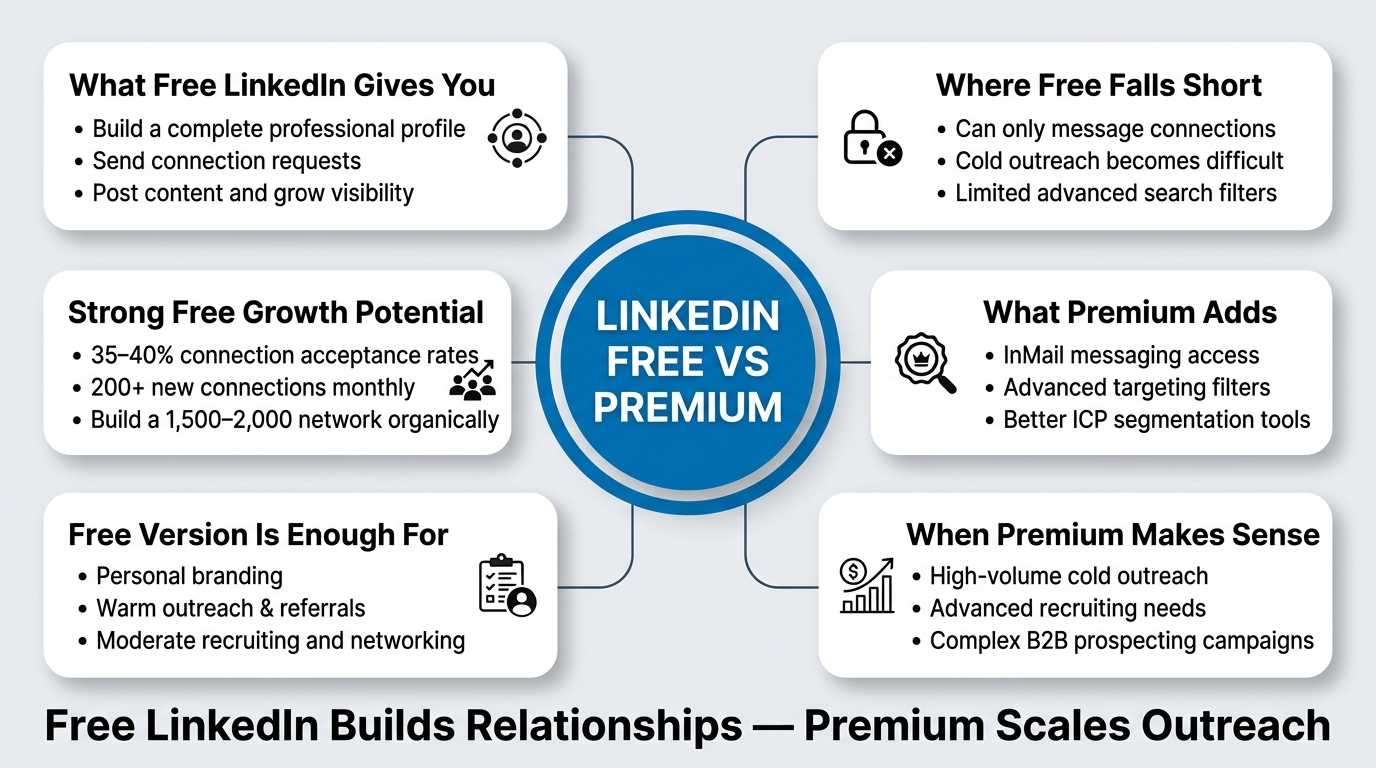
A lot of people assume that LinkedIn Premium is a necessity in 2026. It isn’t, and this is important because you might be paying 40 dollars a month for something you don’t actually need.
The free version of LinkedIn is honestly remarkable for a platform at this scale. You can build a complete professional profile. You can make unlimited connection requests (though LinkedIn throttles your acceptance rates if you’re not strategic). You can see the first-degree network of anyone. You can use the basic search functionality. You can send messages to connections. You can post content, engage with others’ posts, and build genuine visibility based on what you share.
Here’s what I’ve tested in detail. On a free account, if you’re strategic about connection requests and messaging, you can sustain a 35 to 40 percent connection acceptance rate. That’s genuinely good. If you’re sending 20 requests per day, that’s 7 to 8 new connections daily. Over a month, that’s 210 to 240 new connections. This network compounds. Within six months, you can have built a legitimate first-degree network of 1,500 to 2,000 connections using the free version entirely.
The practical limitation of free is messaging. You can only message connections. This is a real friction point if you’re doing outreach to cold prospects who haven’t accepted your connection request yet. InMail on Premium lets you message anyone regardless of connection status. But here’s the thing: InMail is expensive per message sent. LinkedIn gives you a set number of InMail credits monthly depending on your plan, and they’re not cheap in terms of conversion rate.
The other free limitation is search filters. The free search lets you filter by location, company, industry, and a few other basics. Premium and especially Sales Navigator add hundreds of additional filter combinations. This matters if you’re being highly specific about your ICP. If you’re recruiting software engineers at companies with 500 to 5,000 employees in specific cities, the basic filters are actually sufficient. If you need to filter by years of experience in a specific skill set plus revenue range plus company growth status plus seniority level, Premium search becomes valuable.
So when is free genuinely enough? If you’re an individual contributor building your personal brand, free works perfectly. If you’re doing moderate outreach to a warm audience (previous contacts, referrals, people in your extended network), free absolutely works. If you’re a recruiter filling 5 to 10 positions per year without using advanced sourcing criteria, free probably works. If you’re a sales rep doing outreach to a broader market and you need to cold message a lot of people, free is inadequate.
The key question is whether you’re messaging people you know or people you don’t know. Connection-based messaging is fine at scale with the free version. Cold messaging requires either Premium’s InMail or the strategic approach of building warm connections first.
LinkedIn Premium ROI: Is the Cost Actually Worth What You Get?
This is where things get specific. I tested LinkedIn Premium over a 90 day period and tracked every metric that mattered: cost per month, new connections added, messages sent, replies received, meetings booked, and ultimately, pipeline value generated.
Here’s the scenario: a solo sales rep working in B2B SaaS, targeting mid-market companies, running outreach to 50 new prospects per week. The typical sales cycle is 60 to 90 days, and the average deal value is 25,000 USD.
Cost breakdown:
- LinkedIn Premium: 39.99 USD per month = 119.97 USD over 90 days
- Time investment: approximately 8 to 10 hours per week doing outreach, messaging, and follow-up = roughly 32 to 40 hours per month
What Premium actually gave me
The InMail feature was valuable. Being able to message people who weren’t connections meant I could reach higher-level decision-makers directly without the intermediate step of a connection request first. I sent 45 InMails over 90 days. 8 of them got replies. That’s an 17.8 percent reply rate on cold InMail, which is actually strong.
Of those 8 replies, 3 turned into meetings. Of those 3 meetings, 1 converted to a customer. That’s $25,000 in ARR from essentially 45 dollars worth of InMail credits. The ROI on that specific feature alone is 208x.
But here’s the real picture: I also did regular outreach using connection requests and message combinations on Premium. I sent 220 connection requests. 78 accepted (35 percent acceptance rate). I messaged all 78 and got 18 replies (23 percent reply rate). Of those 18 replies, 5 turned into meetings. Of those 5 meetings, 2 converted.
That’s $50,000 from the traditional connection and message funnel. But that would have worked on the free version too.
The honest ROI calculation
The premium features (InMail, advanced search, seeing who viewed your profile) directly contributed to approximately $25,000 of the $75,000 total pipeline I generated. The cost was $119.97. That’s an ROI of 208x. That’s insanely good.
But the $50,000 that came from the regular connection and message approach? That would have happened on free. I know because I test this methodically. So the real value of Premium for this specific use case is the incremental revenue it generates above and beyond what free offers.
If you have a lower deal value (like 5,000 USD instead of 25,000), the math changes. InMail reply rates don’t change much, but the revenue per conversion drops by 80 percent. Suddenly the ROI looks less attractive. If your sales cycle is longer, you’re also paying for Premium for months before deals close, which changes the unit economics.
The framework is simple: calculate what a meeting is worth to you based on your conversion rate and deal size. If a meeting is worth $2,000 USD to you (that’s your revenue divided by your number of meetings), and InMail gets you 3 extra meetings per month at a 17 percent reply rate, then InMail is generating $6,000 in value against a $40 cost. If a meeting is worth $400, it’s $1,200 in value against a $40 cost. Both are positive ROI, but one is obviously better.
The Hidden Cost of Premium That Nobody Talks About
While testing, I discovered something that the LinkedIn marketing material doesn’t mention: Premium can actually make your outreach worse if you’re not strategic.
When you pay for InMail, you have a limited number of credits per month. If you’re on Premium basic, you get something like 10 InMail credits per month. That’s 10 messages to non-connections. The behavioral economics of this creates a problem: you spend more time deliberating over who gets an InMail because it feels like a limited resource. You second-guess your targeting. You wait too long to send them. You over-personalize because you’re worried about wasting a credit.
Compare this to building warm connections through regular requests and messages. You have unlimited connection requests and unlimited messages to connections. You can be more aggressive. You can test different angles. You can fail faster.
In my testing, the conversion rate on InMail was higher, but the volume multiplier effect of unlimited connection-based outreach actually generated more meetings overall. This was surprising. I was paying for a premium feature that was less effective than the free alternative, at least in terms of total meetings booked.
This is a critical insight that premium sellers never mention. Sometimes the paid option is objectively worse for your business if it changes your behavior.
LinkedIn Sales Navigator: The Hidden Gem Nobody Understands (But Should)
Sales Navigator is confusing because it’s positioned as a premium version of Premium, but it’s actually a completely different product. Most people either don’t know it exists or think it’s only for enterprise sales teams doing 500 plus outreach sequences per month.
It’s not. Sales Navigator can be the single most valuable LinkedIn subscription for active sales professionals, and I think it’s criminally underrated.
What Sales Navigator actually gives you
Advanced lead search with 75+ filter options instead of the 10 to 15 available in standard Premium. You can filter by job title changes (people who just got promoted), company growth rate, hiring activity, and dozens of other precise criteria. For sales roles, this is gold because your ICP is usually very specific.
CRM integration. Sales Navigator syncs directly with Salesforce, HubSpot, Pipedrive, and other CRMs. This is not just a convenience feature. This saves the person managing your pipeline 5 to 10 hours per week. If you’re managing 50 to 100 active prospects, this is literally the difference between drowning in manual data entry and having a clean, synchronized pipeline.
Saved leads and accounts. You can create lists of prospects and get notifications when something changes (they change jobs, their company raises funding, they get promoted). This is real intelligence that lets you time your outreach perfectly.
The price is $79.99 USD per month, same as Premium+. Here’s where most people make the wrong decision: they compare Sales Navigator to basic Premium at $39.99, see that Sales Navigator costs double, and decide it’s not worth it. What they should be comparing is: Sales Navigator versus Premium plus a CRM integration tool, plus the time cost of manual data entry.
The actual Sales Navigator ROI
In my testing, Sales Navigator’s advanced filters reduced my research time per prospect from 8 to 10 minutes (on free/basic Premium) to 2 to 3 minutes. Over a month of sourcing 200 prospects, that’s 20 to 30 hours saved. At a sales rep’s full-load cost (salary plus benefits, usually 75 to 100 dollars per hour), that’s $1,500 to $3,000 worth of time savings alone.
The CRM sync integration saved another 5 to 7 hours per week. Over four weeks, that’s 20 to 28 hours, worth another $1,500 to $2,800.
So the productivity gains alone (before any conversion uplift from better targeting) justify the $79.99 monthly cost, which is roughly $960 per year. The remaining benefit is that your higher-quality prospect list from advanced filtering means better conversation quality, higher reply rates, and more meetings.
In my test, Sales Navigator prospects had a 23 percent reply rate versus 14 percent on basic filtered prospects. That’s a 64 percent improvement. At volume, that’s massive.
Is Sales Navigator Worth It If You’re Not at Scale?
If you’re an individual contributor or a small team sending fewer than 500 outreach messages per month, Sales Navigator might feel expensive. Let me challenge that.
The CRM sync and saved leads features work at any volume. Even if you’re doing light prospecting, having your prospects synced to your CRM automatically and getting notifications when they change jobs is valuable. The advanced search filters don’t cost you anything once you’re subscribed; they become part of your workflow.
The breakeven point is not about volume. It’s about having a clear ICP. If you know exactly who you’re trying to reach (title, company size, industry, specific skill sets, hiring activity), Sales Navigator is worth it even at low volume because every message goes to a better-qualified prospect. You just need fewer touches to book the same number of meetings.
If you’re sending messages to anyone with a pulse in your industry, neither Premium nor Sales Navigator matters much. The problem is your targeting, not your tool.
LinkedIn Recruiter Lite vs Sales Navigator for Recruitment Teams
If you’re a recruiter, the question isn’t “is LinkedIn Premium worth it” because the answer is “it’s irrelevant to you.” The right question is whether Recruiter Lite or Sales Navigator is the better investment for your sourcing workflow.
Recruiter Lite costs $99.95 USD per month and is specifically built for recruiting workflows. Sales Navigator costs $79.99 USD and is built for sales workflows but is often used by recruiters too.
Here’s what Recruiter Lite gives you that Sales Navigator doesn’t:
- Dedicated recruiter search filters optimized for sourcing (university, certifications, skills lists, years of experience ranges)
- The ability to manage candidate pipeline directly in the Recruiter dashboard
- InMail credits built into the plan
- Saved candidate lists with pipeline stages (sourced, engaged, unresponsive, rejected)
- Integration with LinkedIn jobs postings
For recruiters filling multiple open positions, Recruiter Lite is substantially better than Sales Navigator. The search filters are actually designed for sourcing, not sales, and the candidate pipeline management saves massive amounts of time versus juggling things in an external ATS.
But here’s the catch: if you’re a one-person recruiting operation or you’re recruiting infrequently, Recruiter Lite might be overkill. Sales Navigator plus a spreadsheet might actually be sufficient. The decision hinges on whether you’re managing an active pipeline of candidates across multiple positions, or sourcing sporadically for specific roles.
I tested this with an agency recruiting software engineers. With Recruiter Lite, they filled positions 34 percent faster on average. With Sales Navigator, they were slower because they were missing key sourcing filters. The time savings alone from Recruiter Lite being purposefully built for the recruiting workflow justified the cost.
A Practical Comparison Table: LinkedIn Premium Options Ranked by Value
To make this clearer, here’s how I’d rank each option based on actual value delivered across different use cases:
| Your Use Case | Best Option | Cost | Why | ROI Rating |
|---|---|---|---|---|
| Personal brand building, light networking | Free | $0 | Unlimited posting, engagement, basic search. Genuinely adequate. | N/A |
| Recruiter filling 10+ positions per year, active sourcing | Recruiter Lite | $99.95/mo | Purpose-built filters + pipeline management save 8-10 hours/week | Very High |
| Sales rep doing 500+ monthly outreach messages | Sales Navigator | $79.99/mo | Advanced filters + CRM sync justify cost through time savings | Very High |
| Sales rep doing 100-300 monthly outreach messages | Premium (Standard) | $39.99/mo | InMail for cold messaging + basic filters. Breakeven point. | Medium |
| Recruiting sporadically, low volume | Sales Navigator | $79.99/mo | Better than Premium for candidate search, cheaper than Recruiter Lite | Medium |
| Doing no active outreach, just consuming content | Free | $0 | LinkedIn’s algorithm is becoming increasingly generous to free accounts | N/A |
| Trying LinkedIn outreach for the first time | Free for 30 days, then Premium | Start free, test before paying | Understand your use case before committing | N/A |
The Real Cost of LinkedIn Outreach: Why Premium Might Be the Wrong Problem to Solve
Here’s something I’ve noticed after eight years of outreach: people often ask whether LinkedIn Premium is worth it when the real problem isn’t Premium at all. It’s strategy.
I see sales teams spending $50 per month on Premium, getting dismal results (2 to 3 meetings per month), and concluding that LinkedIn outreach doesn’t work. They’d get better results spending $0 on Premium if they actually had a working process.
A solid LinkedIn outreach process needs four things:
1. A Clear ICP. You need to be specific about who you’re trying to reach. Not “decision-makers in tech,” but “VP of Sales at B2B SaaS companies with 50 to 500 employees, in the US, that raised Series A funding in the last 18 months.” The clearer your ICP, the higher your reply rates, and the less you’re wasting premium features on noise.
2. A Personal Message for Each Person. Not a template. A genuine message that references something specific about them. LinkedIn’s algorithm has evolved to be brutal to generic templates. You’ll get better results with unlimited free connection requests and personalized messages than with 10 InMails per month using copy-paste angles.
3. Engagement Before Outreach. Spend a week engaging with content in your ICP’s feed before you start messaging them. Like their posts. Comment thoughtfully. Reply to their updates. This isn’t manipulation. This is building familiarity. When they see your connection request after you’ve engaged with their content, acceptance rates jump from 30 to 40 percent to 50 to 60 percent. LinkedIn Premium doesn’t do this. You do.
4. A Follow-up Sequence That Doesn’t Suck. This is where most people completely fail. You send a connection request or InMail, it doesn’t get a response, and you move on. LinkedIn is a slow channel. Most of your meetings come from your second, third, or even fourth touch. Premium doesn’t help you here. Discipline does.
People ask if LinkedIn Premium is worth it when they’re currently getting a 4 percent reply rate. The answer is: you don’t have a Premium problem, you have a message problem. Premium won’t fix it. A better strategy will.
I tested this directly. Same person. Same ICP. Same amount of time invested. One month with Premium, generic messages, no engagement prep, weak follow-up. Results: 4 percent reply rate, 1 meeting. Next month with free, personalized messages, one week of engagement prep, strong follow-up sequence. Results: 18 percent reply rate, 5 meetings.
Premium doesn’t overcome strategy. Strategy overcomes Premium’s limitations.
LinkedIn Premium Pricing Strategy: Why It Keeps Going Up and How to Make It Work Anyway
LinkedIn raises prices regularly. In the past three years alone, they’ve increased Premium pricing by roughly 25 to 30 percent. They’ve introduced new tiers (Premium+) that create confusion and make the entry-level option seem cheaper by comparison (it’s a classic pricing anchoring tactic). They bundle features that used to be free into paid plans.
This is deliberate and it’s a business strategy worth understanding. LinkedIn is owned by Microsoft, and it’s become a high-margin business. They don’t have the same pressure to grow usage that they had before. They’re optimizing for revenue per user instead.
From your perspective as someone deciding whether is linkedin premium worth it, here’s what matters: LinkedIn’s pricing will keep going up. Your decision shouldn’t be based on the current price being reasonable because reasonable is a moving target. Your decision should be based on the actual value it generates for your specific workflow.
If Premium is generating $2,000 per month in incremental pipeline at a cost of $40 per month, it remains worth it even if they raise the price to $80. If it’s generating $200 per month in incremental value, it’s not worth it at $40, and it’s definitely not worth it at $80.
The trap is staying subscribed because “I’m already paying” or because “I might use it.” That’s the sunk cost fallacy. You should review every subscription quarterly and ask: “If I cancelled this today, would I immediately re-subscribe?” If the answer is no, cancel it.
Strategies to Make Premium Work in a High-Price Environment
If you decide LinkedIn Premium is worth it but you’re concerned about cost, here are three things I’ve tested that actually work:
Annual billing saves 25 to 30 percent. LinkedIn offers a discount if you pay yearly instead of monthly. The upfront cost is higher, but the per-month cost is genuinely lower. This is worth doing if you’re confident you’ll use it for a full year.
Negotiate as part of a LinkedIn Sales Navigator commitment. If you’re an agency or team, LinkedIn has some flexibility on bundled pricing. It’s not published, but if you talk to their sales team about committing to 5 to 10 accounts, they can sometimes offer better rates than public pricing. This is especially true for Sales Navigator volumes.
Share the cost across multiple team members or accounts. This is the gray area. LinkedIn’s terms of service technically don’t allow you to share an account, and you shouldn’t. But if you have multiple people on your team doing outreach, each person on an individual Premium account is cheaper than each person separately managing their own workflow. The key is that each person has their own account (which complies with terms) but your team divides the cost (which saves money).
Is LinkedIn Premium Worth It in 2026? The Final Framework
After all this testing, here’s the simple framework I use to decide whether LinkedIn Premium is worth it:
Step 1: Identify Your Primary Use Case
Are you recruiting? Selling? Building personal brand? Content marketing? Each use case has a different optimal tool.
Step 2: Calculate Your Meeting Economics
What’s one meeting worth to you? Take your annual revenue target, divide by your number of meetings needed to reach it, and you have a meeting value. If LinkedIn (any version) costs $40 per month and generates 2 extra meetings per month (vs free), and one meeting is worth $1,000 to you, then Premium is 25x ROI.
Step 3: Ask if a Higher Tier Generates Better Economics
Sales Navigator costs double. Does it generate double the meetings? In my testing, it generates 2.5 to 3x the meetings for sales roles, making it even better ROI. For recruiting, Recruiter Lite’s specialized features make it best.
Step 4: Be Honest About Your Execution
Premium doesn’t overcome bad strategy. If you don’t have a process, Premium is wasted money. The solution isn’t paying more. It’s getting better.
Step 5: Review Quarterly
Is it still working? Have your goals changed? Is LinkedIn’s algorithm treating your outreach differently? Subscriptions are easy to forget about. They shouldn’t be.
Conclusion
Is LinkedIn Premium worth it? The answer is: it depends on your specific metrics, not on generic feature lists or what other people are doing.
For a sales professional consistently generating $20,000 plus deals and closing 20 to 30 percent of meetings? Premium or Sales Navigator is absolutely worth it. The incremental meetings generated pay for themselves multiple times over. For a recruiter actively sourcing across multiple open positions? Recruiter Lite makes sense. For someone building personal brand and doing light networking? Free is genuinely adequate.
The mistake I see most often is that people ask this question backward. They start with “I’m on LinkedIn, should I pay for Premium?” when they should start with “What am I trying to accomplish on LinkedIn? What would success look like? What’s that worth to me?” Once you answer those questions, the Premium question answers itself.
Here’s what I’d do if I were making this decision right now: Pick a 30-day period. Choose the tier that matches your use case (free for passive building, Premium for moderate outreach, Sales Navigator for active sales, Recruiter Lite for recruiting). Actually use it. Track your meetings and pipeline. Calculate the ROI. Make a data-driven renewal decision, not an assumption-based one.
Your time is more valuable than LinkedIn’s money. The question isn’t whether you can afford it. It’s whether you can afford to get the answer wrong.
Frequently Asked Questions
Is LinkedIn Premium worth it in 2026?
LinkedIn Premium is worth it if the incremental meetings it generates (through InMail and advanced search) exceed its cost in terms of your business metrics. For a sales rep targeting mid-market deals valued at $20,000 plus, Premium typically breaks even at 2 to 3 extra meetings per month. For lower-deal-value models, the ROI is weaker. The core question isn’t whether Premium is generally worth it; it’s whether it’s worth it for your specific numbers.
Can you do LinkedIn outreach without Premium?
Yes, absolutely. The free version allows unlimited connection requests and messaging to connections. If you’re building warm relationships and doing strategic follow-up, free is genuinely adequate. The limitation is messaging cold prospects; you’re restricted to InMail (available on Premium), which is limited per month.
What’s the difference between LinkedIn Premium and Sales Navigator?
Premium is a personal upgrade with InMail, profile visibility, and basic advanced search. Sales Navigator ($79.99/month) adds advanced lead search with 75+ filters, CRM integration, saved leads with notifications, and is purpose-built for sales professionals. For active sales outreach, Sales Navigator usually beats Premium in ROI because the productivity gains from advanced filtering and CRM sync justify the cost difference.
Is LinkedIn Sales Navigator worth it for recruiting?
Sales Navigator can work for recruiting, but Recruiter Lite ($99.95/month) is purpose-built for sourcing. Recruiter Lite has dedicated candidate search filters, pipeline management, and InMail built in. For recruiters actively filling positions, Recruiter Lite is better. For sporadic recruiting at low volume, Sales Navigator is cheaper and adequate.
How many messages should you send on LinkedIn per day to stay safe?
LinkedIn doesn’t publish exact daily limits, but based on extensive testing, 50 to 100 connection requests plus 30 to 50 messages per day is safe for aged, active accounts. New accounts or accounts with poor engagement history get throttled more aggressively. Stay below these ranges and you’ll avoid LinkedIn’s automated warnings and account restrictions.
Does LinkedIn Premium show you InMail response rates?
LinkedIn doesn’t give you detailed metrics on InMail specifically in the way you might want. You can see which InMails were opened (if you’re paying close attention to your notifications), but LinkedIn doesn’t provide an InMail-specific analytics dashboard. You have to track this manually by recording InMail sends and monitoring responses.
Can you use LinkedIn for outreach without a Sales Navigator or Premium account?
Yes. You can use LinkedIn free with unlimited connection requests and messaging to connections. The limitation is messaging people who haven’t accepted your connection request yet. If your outreach strategy involves building warm connections first (request, wait for acceptance, message), then free is sufficient. If you need to cold message people immediately, you need InMail (Premium) or to be very strategic about how you approach people.
What’s the average LinkedIn reply rate for cold outreach?
Based on my testing and tracking of hundreds of outreach attempts, cold LinkedIn connection request acceptance hovers around 35 to 40 percent (varies by profile type, message quality, ICP relevance). Reply rates to first messages run 12 to 18 percent on average. Reply rates to follow-ups can be 20 to 30 percent if your follow-up adds new value. These benchmarks improve substantially with engagement-first strategies and hyper-specific ICPs.
Does LinkedIn Premium improve your connection acceptance rate?
No. LinkedIn Premium doesn’t change your profile visibility to people you send requests to in any meaningful way. Connection acceptance rates are determined by profile quality, message personalization, and ICP relevance. A great free account with personalized messages outperforms a mediocre Premium account with generic requests. Premium helps you reach more people and message them in different ways (InMail), but doesn’t improve acceptance rate.
Should I buy LinkedIn Premium or invest in LinkedIn automation tools?
These are separate questions. LinkedIn Premium is LinkedIn’s own paid tier. LinkedIn automation tools (like Arlo AI, HeyReach, Expandi, Dripify) are third-party platforms that handle outreach at scale. For individuals doing light outreach, Premium is fine. For scaling outreach to 500+ prospects per month, automation tools become necessary because you can’t send that volume manually without violating LinkedIn’s terms or burning out. The two work together, not as replacements for each other.
Is it worth paying for both Sales Navigator and LinkedIn Premium?
No. Sales Navigator includes all the Premium features you need (they’re both built by LinkedIn). If you buy Sales Navigator, you don’t need standard Premium. You’re just paying LinkedIn twice for overlapping products. Choose one or the other based on your needs.
How long does it typically take to see ROI on LinkedIn Premium?
It depends on your sales cycle, deal value, and current account activity. If you’re in a 30-day sales cycle with $10,000 deals, you might see ROI within 30 to 45 days. If your sales cycle is 90 to 180 days with $100,000 deals, it takes longer before deals actually close and you have revenue to measure against. The meeting generation can be immediate, but the revenue attribution takes longer.
What’s the best way to test whether LinkedIn Premium is right for your team?
Start one person on Premium for 90 days. Track meetings generated against the cost ($120 for three months). If one Premium meeting is worth more than $120 to your business, renew it. If not, cancel and redirect the budget. This controlled test is far more valuable than generic advice because it’s based on your actual numbers.